steering MERCEDES-BENZ SPRINTER 2014 MY14 Operator’s Manual
[x] Cancel search | Manufacturer: MERCEDES-BENZ, Model Year: 2014, Model line: SPRINTER, Model: MERCEDES-BENZ SPRINTER 2014Pages: 338, PDF Size: 6.78 MB
Page 249 of 338
the locking mechanism and out of the load-
ing rail through a recess.
Carrier systems
G
WARNING
When you load the roof, the center of gravity
of the vehicle rises and the driving character-
istics change. If you exceed the maximum roof
load, the driving characteristics, as well as
steering and braking, will be greatly impaired.
There is a risk of an accident.
Never exceed the maximum roof load and
adjust your driving style.
You can find information about the maximum
roof load in the "Technical data" section
(Y page 331).
! Make sure that:
R the screws for the roof carrier are tight-
ened in the sliding blocks to a torque of
6.0 – 7.4 lb-ft (8 – 10 Nm)
R the bolts, when tightened, do not touch
the rails.
R the slot nuts are not located in the area
of the plastic caps.
R the slot nuts have the right cross-section.
R the mounting rails in the interior are free
of dirt.
R the screws are retightened evenly after
approximately 300 miles (500 km).
We recommend that you only use roof
racks tested and approved by Sprinter.
These help avoid vehicle damage.
! If you want to retrofit securing rails, have
it done at a qualified specialist workshop.
You could otherwise damage the vehicle. 0043
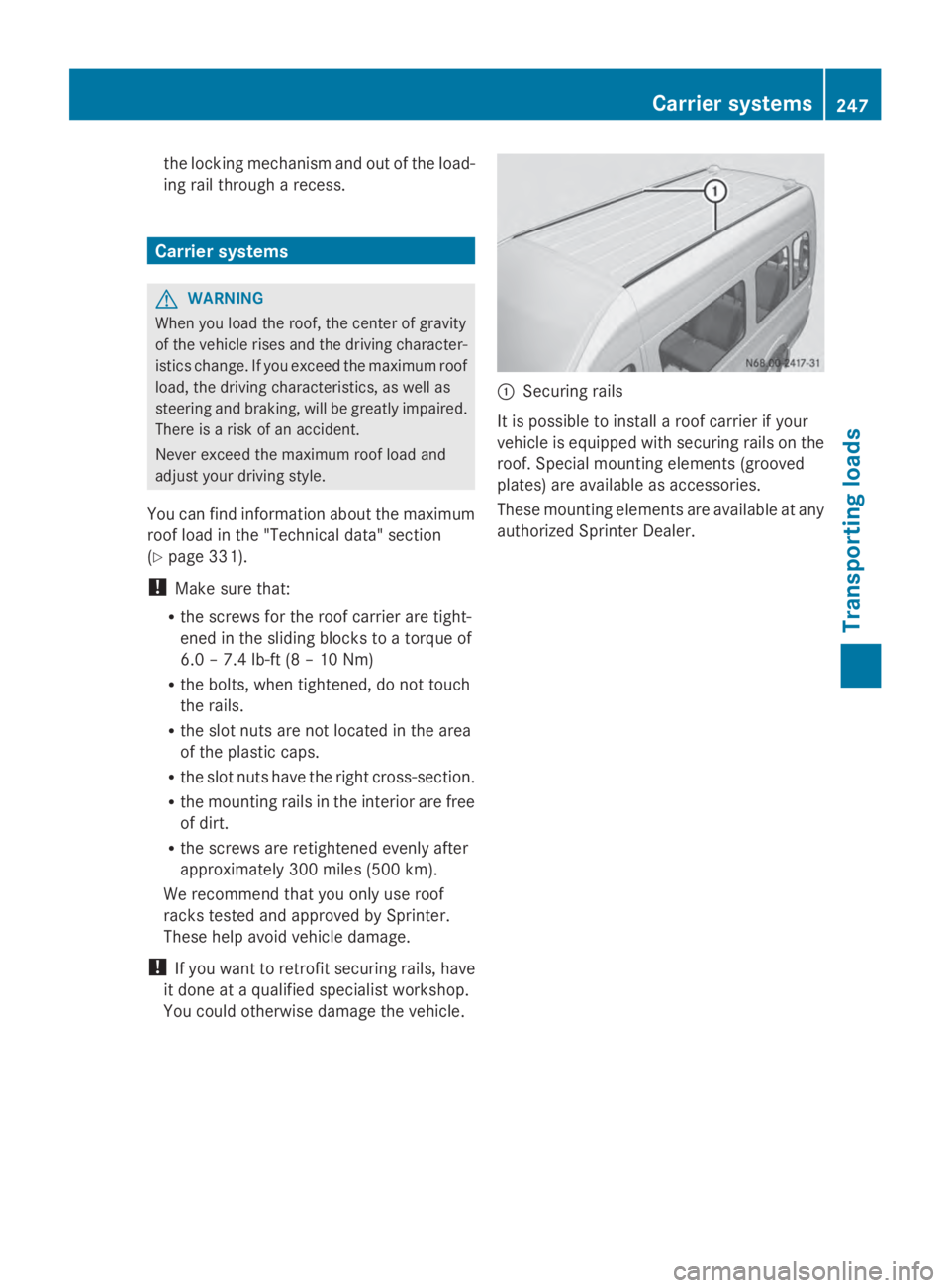
Securing rails
It is possible to install a roof carrier if your
vehicle is equipped with securing rails on the
roof. Special mounting elements (grooved
plates) are available as accessories.
These mounting elements are available at any
authorized Sprinter Dealer. Carrier systems
247Transporting loads Z
Page 253 of 338
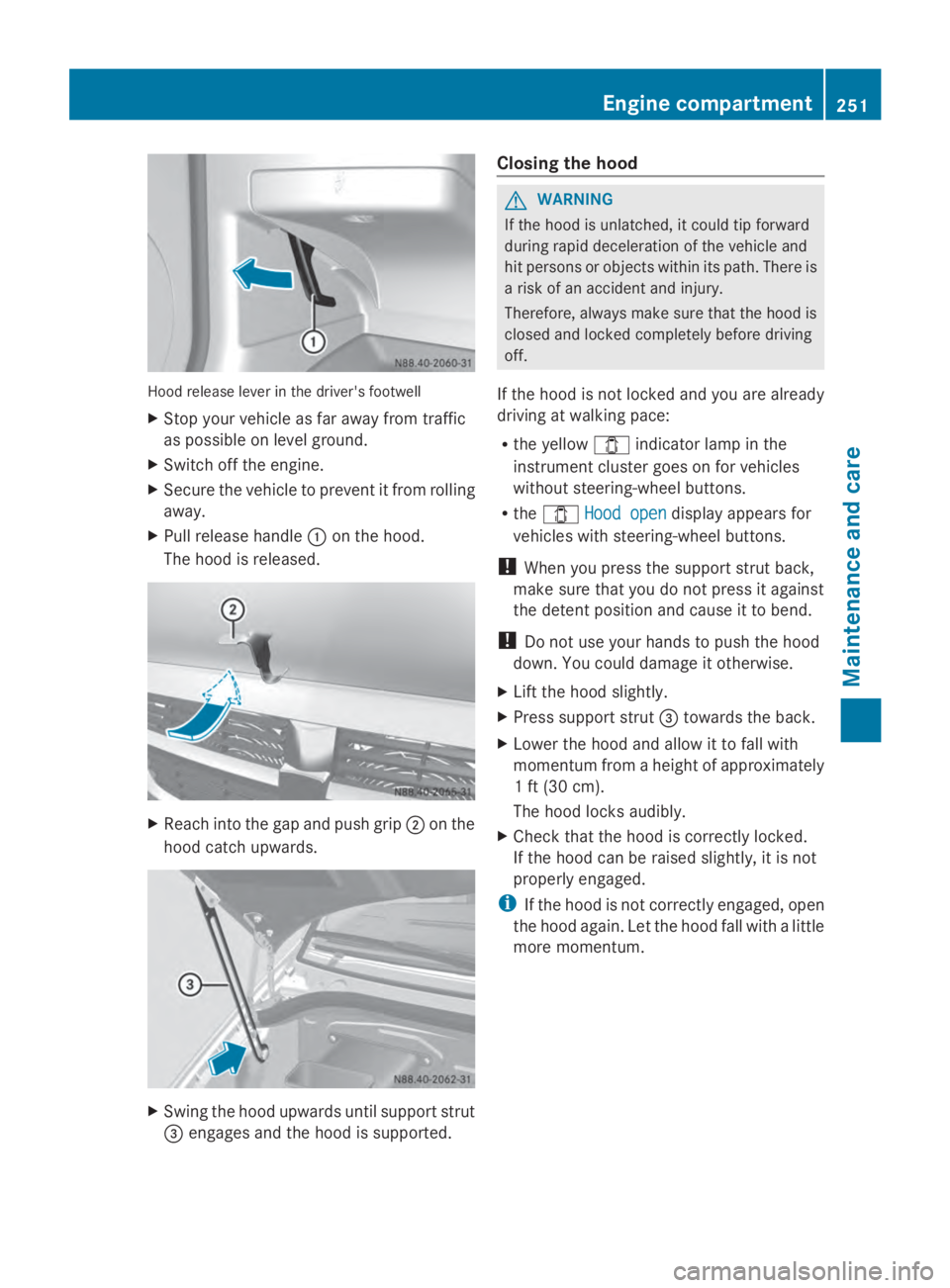
Hood release lever in the driver's footwell
X Stop your vehicle as far away from traffic
as possible on level ground.
X Switch off the engine.
X Secure the vehicle to prevent it from rolling
away.
X Pull release handle 0043on the hood.
The hood is released. X
Reach into the gap and push grip 0044on the
hood catch upwards. X
Swing the hood upwards until support strut
0087 engages and the hood is supported. Closing the hood G
WARNING
If the hood is unlatched, it could tip forward
during rapid deceleration of the vehicle and
hit persons or objects within its path. There is
a risk of an accident and injury.
Therefore, always make sure that the hood is
closed and locked completely before driving
off.
If the hood is not locked and you are already
driving at walking pace:
R the yellow 003Eindicator lamp in the
instrument cluster goes on for vehicles
without steering-wheel buttons.
R the 003E Hood open Hood open display appears for
vehicles with steering-wheel buttons.
! When you press the support strut back,
make sure that you do not press it against
the detent position and cause it to bend.
! Do not use your hands to push the hood
down. You could damage it otherwise.
X Lift the hood slightly.
X Press support strut 0087towards the back.
X Lower the hood and allow it to fall with
momentum from a height of approximately
1 ft (30 cm).
The hood locks audibly.
X Check that the hood is correctly locked.
If the hood can be raised slightly, it is not
properly engaged.
i If the hood is not correctly engaged, open
the hood again. Let the hood fall with a little
more momentum. Engine compartment
251Maintenance and care Z
Page 254 of 338
Overview of the engine compartment
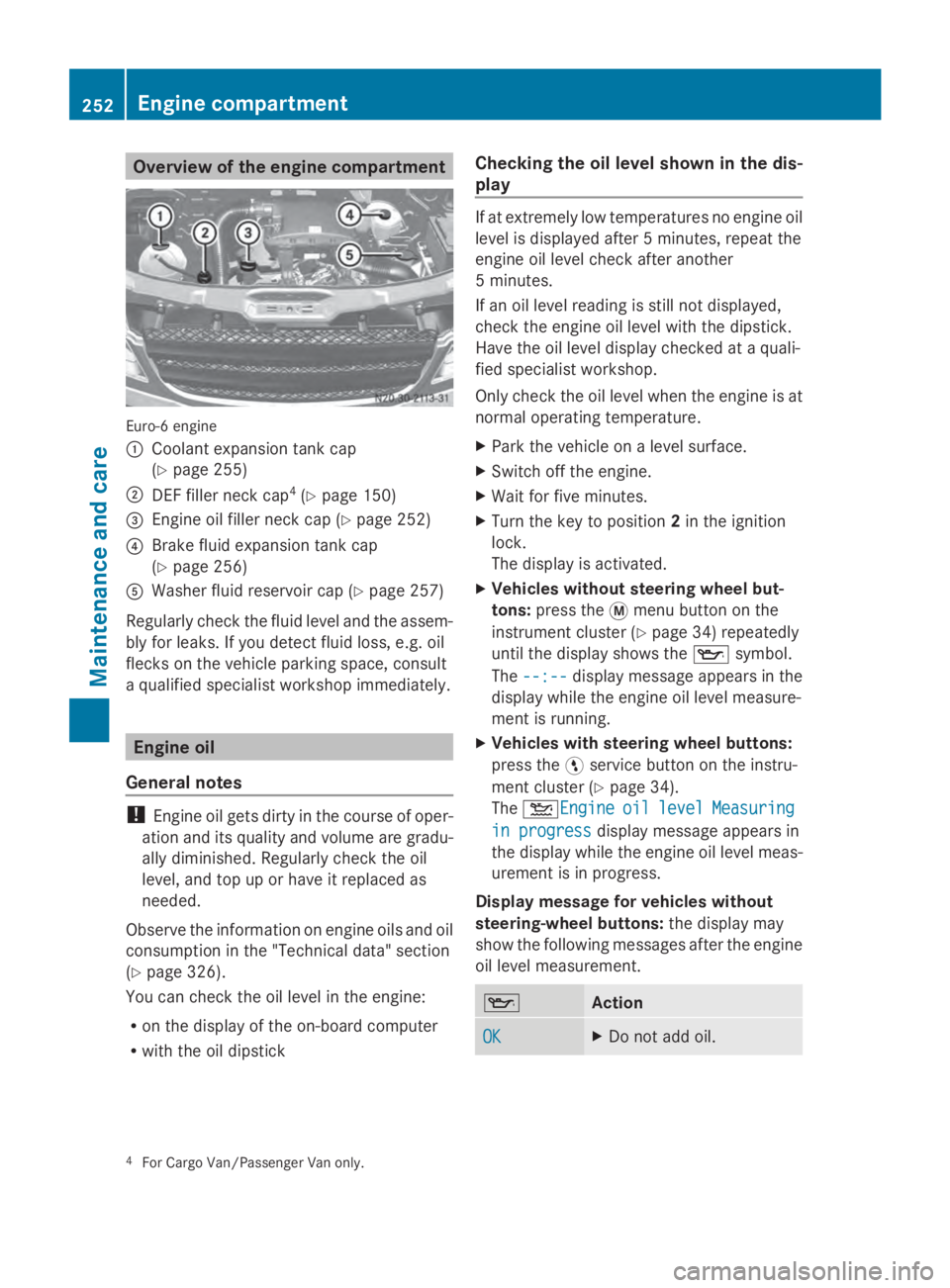
Euro-6 engine
0043
Coolant expansion tank cap
(Ypage 255)
0044 DEF filler neck cap 4
(Y page 150)
0087 Engine oil filler neck cap (Y page 252)
0085 Brake fluid expansion tank cap
(Ypage 256)
0083 Washer fluid reservoir cap (Y page 257)
Regularly check the fluid level and the assem-
bly for leaks. If you detect fluid loss, e.g. oil
flecks on the vehicle parking space, consult
a qualified specialist workshop immediately. Engine oil
General notes !
Engine oil gets dirty in the course of oper-
ation and its quality and volume are gradu-
ally diminished. Regularly check the oil
level, and top up or have it replaced as
needed.
Observe the information on engine oils and oil
consumption in the "Technical data" section
(Y page 326).
You can check the oil level in the engine:
R on the display of the on-board computer
R with the oil dipstick Checking the oil level shown in the dis-
play If at extremely low temperatures no engine oil
level is displayed after 5 minutes, repeat the
engine oil level check after another
5 minutes.
If an oil level reading is still not displayed,
check the engine oil level with the dipstick.
Have the oil level display checked at a quali-
fied specialist workshop.
Only check the oil level when the engine is at
normal operating temperature.
X Park the vehicle on a level surface.
X Switch off the engine.
X Wait for five minutes.
X Turn the key to position 2in the ignition
lock.
The display is activated.
X Vehicles without steering wheel but-
tons: press the 0079menu button on the
instrument cluster (Y page 34) repeatedly
until the display shows the 00AFsymbol.
The --:-- --:-- display message appears in the
display while the engine oil level measure-
ment is running.
X Vehicles with steering wheel buttons:
press the 0098service button on the instru-
ment cluster (Y page 34).
The 00B2Engine Engine oil oillevel
level Measuring
Measuring
in progress
in progress display message appears in
the display while the engine oil level meas-
urement is in progress.
Display message for vehicles without
steering-wheel buttons: the display may
show the following messages after the engine
oil level measurement. 00AF
Action
OK OK X
Do not add oil. 4
For Cargo Van/Passenger Van only. 252
Engine compartmentMaintenance and care
Page 261 of 338
responsible manner. Comply with the instruc-
tions for use of the care products.
Do not run the engine for longer than neces-
sary when the vehicle is stationary.
Before having maintenance and repairs per-
formed, it is essential to read the materials
related to the maintenance and repairs:
R the applicable sections of the technical
documentation, e.g. the Operator's Manual
and workshop information.
R regulations such as industrial safety regu-
lations and accident prevention regula-
tions.
While working under the vehicle, you must
secure the vehicle on jack stands with suffi-
cient load capacity.
Never use the jack as a substitute. the vehi-
cle's jack is intended only to raise the vehicle
for a short time when changing a wheel. It is
not suited for performing maintenance work
under the vehicle.
Please also refer to the notes about qualified
specialist workshops (Y page 26).
The scope and regularity of the inspection
and maintenance work primarily depend on
the often diverse operating conditions. Spe-
cialist knowledge beyond the scope of this
Operator's Manual is required when carrying
out testing and maintenance work. This work
should only be carried out by trained staff.
The vehicle's Maintenance Booklet describes
the extent and frequency of the maintenance
work and contains additional information on
the New Vehicle Limited Warranty and on the
service products.
i Maintenance services must be carried out
in accordance with the provisions and rec-
ommendations in the Maintenance Book-
let.
Not doing so could void the warranty claim
and lead to refusal of goodwill gestures
after the manufacturer has submitted a
damage report. i
Observe the information on Sprinter orig-
inal parts in the "Technical data" section
(Y page 318). Service interval display
General notes A service that is due is displayed in the service
interval display about 1 month in advance. A
message is then displayed while the vehicle
is in motion or when the ignition is switched
on.
i
The service interval display does not pro-
vide information about the oil level. The
service interval display should therefore
not be confused with the 00B3engine oil
level display.
The service due date is displayed in days or
miles (kilometers), depending on the total
distance driven.
The symbols or letters on the service display
show the type of service that is due.
0099 orA
A for a minor service
009A orB B for a major service
Service due date display Vehicles with steering wheel buttons:
the
following messages may be displayed.
R 0099 Service A due in ... days
Service A due in ... days
R 0099 Service A due in ... mi Service A due in ... mi (kmkm)
R 0099 Service A Carry out now
Service A Carry out now
Vehicles without steering wheel buttons:
the following messages may be displayed.
R 0099 for service A
R 009A for Service B
Additionally, you will see the remaining dis-
tance in miles (mi mi) or kilometers (km km) or the
remaining time in days (d d). Maintenance
259Maintenance and care Z
Page 262 of 338
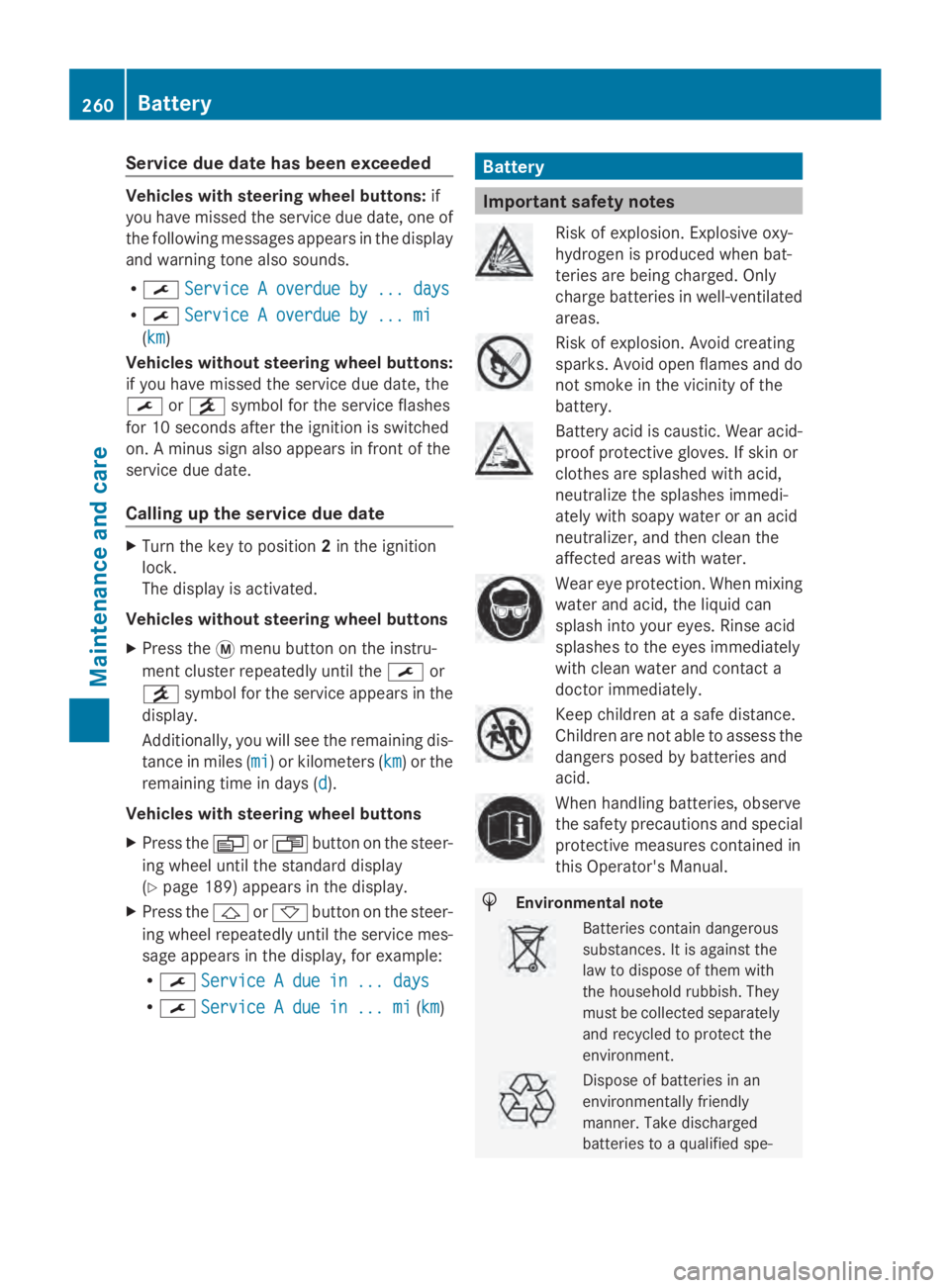
Service due date has been exceeded
Vehicles with steering wheel buttons:
if
you have missed the service due date, one of
the following messages appears in the display
and warning tone also sounds.
R 0099 Service A overdue by ... days
Service A overdue by ... days
R 0099 Service A overdue by ... mi
Service A overdue by ... mi
(km km)
Vehicles without steering wheel buttons:
if you have missed the service due date, the
0099 or009A symbol for the service flashes
for 10 seconds after the ignition is switched
on. A minus sign also appears in front of the
service due date.
Calling up the service due date X
Turn the key to position 2in the ignition
lock.
The display is activated.
Vehicles without steering wheel buttons
X Press the 0079menu button on the instru-
ment cluster repeatedly until the 0099or
009A symbol for the service appears in the
display.
Additionally, you will see the remaining dis-
tance in miles (mi mi) or kilometers ( km km) or the
remaining time in days (d d).
Vehicles with steering wheel buttons
X Press the 0080or007F button on the steer-
ing wheel until the standard display
(Y page 189) appears in the display.
X Press the 0041or0068 button on the steer-
ing wheel repeatedly until the service mes-
sage appears in the display, for example:
R 0099 Service A due in ... days
Service A due in ... days
R 0099 Service A due in ... mi Service A due in ... mi (kmkm) Battery
Important safety notes
Risk of explosion. Explosive oxy-
hydrogen is produced when bat-
teries are being charged. Only
charge batteries in well-ventilated
areas.
Risk of explosion. Avoid creating
sparks. Avoid open flames and do
not smoke in the vicinity of the
battery.
Battery acid is caustic. Wear acid-
proof protective gloves. If skin or
clothes are splashed with acid,
neutralize the splashes immedi-
ately with soapy water or an acid
neutralizer, and then clean the
affected areas with water.
Wear eye protection. When mixing
water and acid, the liquid can
splash into your eyes. Rinse acid
splashes to the eyes immediately
with clean water and contact a
doctor immediately.
Keep children at a safe distance.
Children are not able to assess the
dangers posed by batteries and
acid.
When handling batteries, observe
the safety precautions and special
protective measures contained in
this Operator's Manual.
H
Environmental note Batteries contain dangerous
substances. It is against the
law to dispose of them with
the household rubbish. They
must be collected separately
and recycled to protect the
environment. Dispose of batteries in an
environmentally friendly
manner. Take discharged
batteries to a qualified spe-260
BatteryMaintenance and care
Page 274 of 338
R
Ensure sufficient ventilation when clean-
ing.
R Make sure that the vehicle interior is
completely dry after cleaning.
Cleaning the display !
For cleaning, do not use any of the fol-
lowing:
R alcohol-based thinner or gasoline
R abrasive cleaning agents
R commercially-available household clean-
ing agents
These may damage the display surface. Do
not put pressure on the display surface
when cleaning. This could lead to irrepara-
ble damage to the display.
X Switch off the audio equipment and let the
display cool down.
X Clean the display surface with a commer-
cially available microfiber cloth and cleaner
for TFT/LCD displays.
X Dry the display surface using a dry micro-
fiber cloth.
Cleaning the plastic trim G
WARNING
Care products and cleaning agents containing
solvents cause surfaces in the cockpit to
become porous. As a result, plastic parts may
come loose in the event of air bag deploy-
ment. There is a risk of injury.
Do not use any care products and cleaning
agents to clean the cockpit.
! Do not affix the following to plastic surfa-
ces:
R stickers
R films
R scented oil bottles or similar items
You can otherwise damage the plastic.
! Do not allow cosmetics, insect repellent
or sunscreen to come into contact with the plastic trim. This maintains the high-quality
look of the surfaces.
X Wipe the plastic trim and the cockpit with
a damp, lint-free cloth, e.g. a microfiber
cloth.
X Heavy soiling: use a mild detergent.
Cleaning the steering wheel and selec-
tor lever X
Thoroughly wipe with a damp cloth.
Cleaning the trim elements !
Do not use solvent-based cleaning agents
such as tar remover, wheel cleaners, pol-
ishes or waxes. There is otherwise a risk of
damaging the surface.
X Wipe the trim elements with a damp, lint-
free cloth, e.g. a microfiber cloth.
X Heavy soiling: use care products and
cleaning agents recommended and
approved for Sprinter vehicles.
Cleaning the seat covers !
Do not use microfiber cloths to clean arti-
ficial leather covers. If used often, a micro-
fiber cloth can damage the cover.
! Clean:
R artificial leather covers with a cloth mois-
tened with a solution containing 1%
detergent, e.g. dish washing liquid.
R cloth covers with a microfiber cloth mois-
tened with a solution containing 1%
detergent, e.g. dish washing liquid. Wipe
entire seat sections carefully to avoid
leaving visible lines. Leave the seat to dry
afterwards. Cleaning results depend on
the type of dirt and how long it has been
there. 272
CareMaintenance and care
Page 281 of 338
R
Only use jumper cables that have a suffi-
cient cross-section and insulated terminal
clamps.
R If the battery is fully discharged, attach the
battery of another vehicle for a few minutes
before attempting to start. This charges the
empty battery a little.
R Make sure that the two vehicles do not
touch.
Make sure that:
R the jumper cables are not damaged.
R bare parts of the terminal clamps do not
come into contact with other metal parts
while the jumper cables are connected to
the battery.
R the jumper cables cannot come into con-
tact with parts such as the V-belt pulley or
the fan. These parts move when the engine
is started and while it is running.
i Jumper cables and further information
regarding jump starting can be obtained at
any qualified specialist workshop. Before connecting the jumper cables
On vehicles with a battery main switch, check
whether the battery main switch is switched
on (Y page 136).
X Apply the parking brake.
X Move the selector lever of the automatic
transmission to position P.
X Switch off all electrical consumers, e.g.
audio equipment, blower.
X Turn the key to position 0in the ignition
lock and remove it (Y page 137).
X Open the hood (Y page 250). Tow-starting and towing away
Important safety notes
G
WARNING
Functions relevant to safety are restricted or
no longer available if:
R the engine is not running.
R the brake system or the power steering is
malfunctioning.
R there is a malfunction in the voltage supply
or the vehicle's electrical system.
If your vehicle is being towed, much more
force may be necessary to steer or brake.
There is a risk of an accident.
In such cases, use a tow bar. Before towing,
make sure that the steering moves freely. G
WARNING
You can no longer steer the vehicle if the
steering wheel lock has been engaged. There
is a risk of an accident.
Always switch off the ignition when towing the
vehicle with a tow cable or a tow bar. G
WARNING
If the weight of the vehicle to be towed or tow-
started is greater than the permissible gross
weight of your vehicle:
R the towing eye could detach itself
R the vehicle/trailer combination could roll-
over.
There is a risk of an accident.
When towing or tow-starting another vehicle,
its weight should not be greater than the per-
missible gross weight of your vehicle.
Information on your vehicle's gross vehicle
weight rating can be found on the vehicle
identification plate (Y page 319).
! Only secure the tow rope or tow bar at the
towing eyes. Otherwise, the vehicle could
be damaged. Tow-starting and towing away
279Breakdown assistance Z
Page 284 of 338
Towing the vehicle with both axles on
the ground
Important safety notes G
WARNING
You can no longer steer the vehicle if the
steering wheel lock has been engaged. There
is a risk of an accident.
Always switch off the ignition when towing the
vehicle with a tow cable or a tow bar.
! Do not exceed a towing speed of
31 mph (50 km/h). You could otherwise
damage the transmission.
! Always use new bolts when installing the
propeller shafts.
i Only have the propeller shafts fitted/
removed at a qualified specialist workshop.
Before towing the vehicle, observe the fol-
lowing:
R the information on towing in the event of
malfunctions (Y page 281) and
R the important safety notes (Y page 279).
Towing You may only tow the vehicle a maximum dis-
tance of 30 miles (50 km). For a towing dis-
tance of over 30 miles (50 km), you must
remove the propeller shafts to the driven
axles.
X Turn the key to position 2in the ignition
lock.
X Depress the brake pedal and keep it
depressed.
X Shift the automatic transmission to posi-
tion N.
X Release the brake pedal.
X Release the parking brake.
X Leave the key in position 2in the ignition
lock. X
Switch on the hazard warning lamps
(Y page 96).
X Do not exceed the towing speed of
30 mph (50 km/h) and the towing distance
of 30 miles (50 km). Recovering a vehicle that is stuck
! When recovering a vehicle that has
become stuck, pull it as smoothly and
evenly as possible. Excessive tractive
power could damage the vehicles.
If the drive wheels get trapped on loose or
muddy ground, recover the vehicle with the
utmost care. This is especially the case if the
vehicle is laden.
Never attempt to recover a vehicle with a
trailer attached.
Pull out the vehicle backwards, if possible,
using the tracks it made when it became
stuck. Transporting the vehicle
! You may only secure the vehicle by the
wheels, not by parts of the vehicle such as
axle or steering components. Otherwise,
the vehicle could be damaged. Tow-starting (emergency engine
starting)
Vehicles with automatic transmission !
Vehicles with automatic transmission
must not be tow-started. You could other-
wise damage the automatic transmission.
Information on "Jump-starting" can be found
at the beginning of the "Breakdown assis-
tance" section ( Ypage 278). 282
Tow-starting and towing awayBreakdown assistance
Page 296 of 338
notes on the recommended tire pressure
(Y
page 290).
The tire pressure monitor is not able to warn
you of a sudden loss of pressure, e.g. follow-
ing penetration by a foreign object. In this
event, brake the vehicle until it comes to a
standstill. Do not carry out any sudden steer-
ing maneuvers.
The tire pressure monitor has a yellow 0077
warning lamp in the instrument cluster for
indicating pressure loss/malfunctions (USA)
or pressure loss (Canada). Depending on how
the warning lamp flashes or lights up, an
underinflated tire or a malfunction in the tire
pressure monitor is displayed:
R if the 0077 warning lamp is lit continuously,
the tire pressure on one or more tires is
significantly too low. The tire pressure mon-
itor is not malfunctioning.
R USA only: if the 0077warning lamp flashes
for 60 seconds and then remains lit con-
stantly, the tire pressure monitor is mal-
functioning.
Only vehicles with steering wheel buttons: the
on-board computer displays information on
tire pressure. After a few minutes of driving,
the current tire pressure of each tire is shown
in the on-board computer.
USA only: if the tire pressure monitor is mal-
functioning, it may be more than 10 minutes
before the malfunction is shown. The 0077
tire pressure warning lamp flashes for
60 seconds and then remains lit. When the
malfunction has been rectified, the 0077tire
pressure warning lamp goes out after a few
minutes of driving.
The tire pressure values indicated by the on-
board computer may differ from those meas-
ured at a gas station with a pressure gauge.
The tire pressures shown by the on-board
computer refer to those measured at sea
level. At high altitudes, the tire pressure value
indicated by a pressure gauge are higher than
those shown by the on-board computer. In
this case, do not reduce the tire pressures. If radio transmitting equipment (e.g. wireless
headphones, two-way radios) is operated
inside the vehicle or in the vicinity of the vehi-
cle, this can interfere with the operation of
the tire pressure monitor.
Checking the tire pressure electroni-
cally (vehicles with steering wheel but-
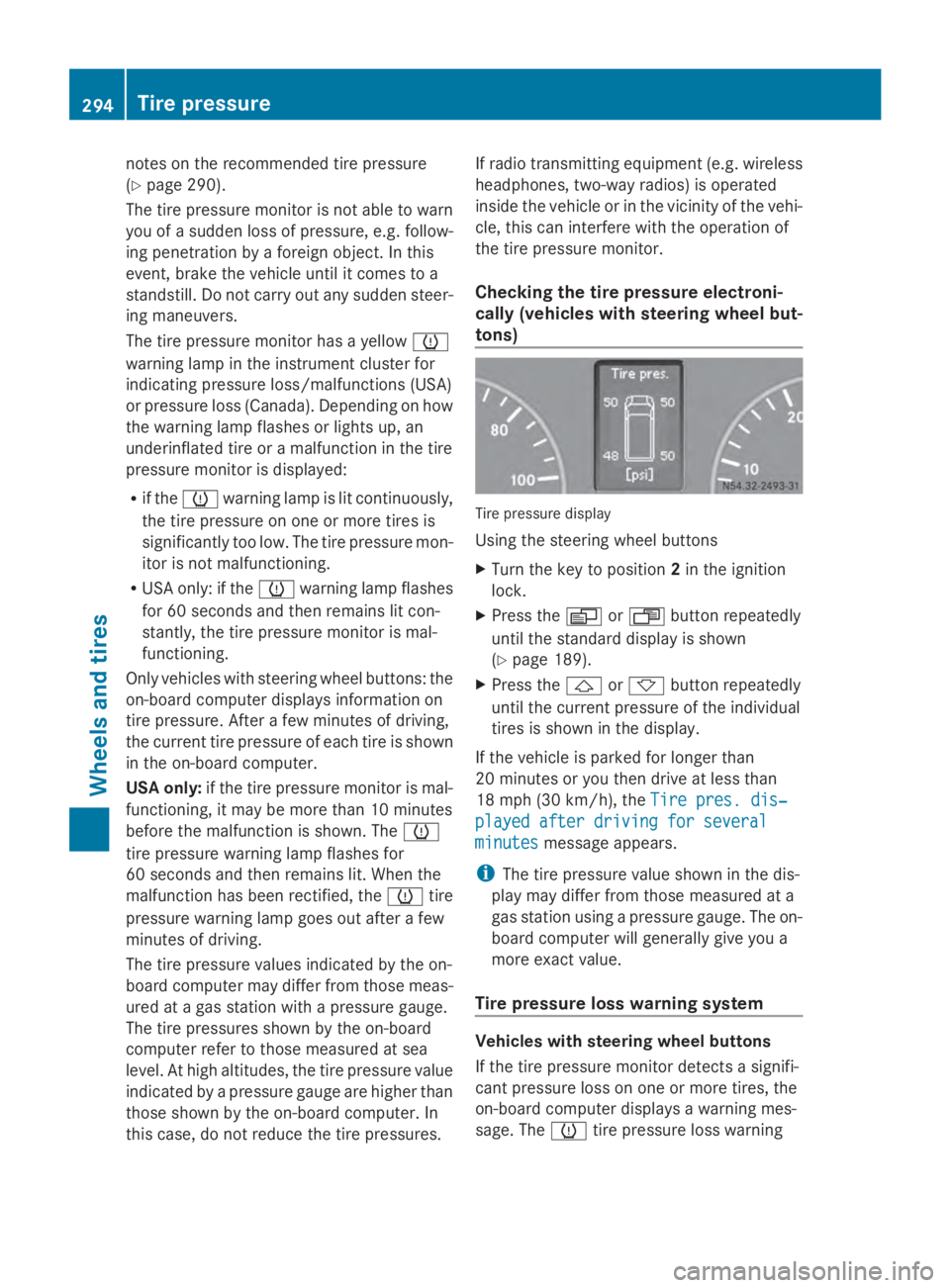
tons) Tire pressure display
Using the steering wheel buttons
X
Turn the key to position 2in the ignition
lock.
X Press the 0080or007F button repeatedly
until the standard display is shown
(Y page 189).
X Press the 0041or0068 button repeatedly
until the current pressure of the individual
tires is shown in the display.
If the vehicle is parked for longer than
20 minutes or you then drive at less than
18 mph (30 km/h), the Tire pres. dis‐
Tire pres. dis‐
played after driving for several played after driving for several
minutes minutes message appears.
i The tire pressure value shown in the dis-
play may differ from those measured at a
gas station using a pressure gauge. The on-
board computer will generally give you a
more exact value.
Tire pressure loss warning system Vehicles with steering wheel buttons
If the tire pressure monitor detects a signifi-
cant pressure loss on one or more tires, the
on-board computer displays a warning mes-
sage. The 0077tire pressure loss warning 294
Tire pressureWheels and tires
Page 297 of 338
lamp in the instrument cluster (Y
page 229)
lights up.
The tire pressure is shown in 2 red rectangles.
The pressure of the tire concerned is shown
in one of the two rectangles (Y page 199).
Additionally, a warning tone sounds.
Each tire that is affected by a significant loss
of pressure is highlighted in the pressure dis-
play.
Restarting the tire pressure monitor When you restart the tire pressure monitor,
the currently set tire pressure are taken as
reference values for monitoring.
In most cases, the tire pressure monitor
detects the new reference values automati-
cally, e.g. after you have:
R changed the tire pressure
R mounted
R mounted new wheels or tires
However, you can also define reference val-
ues manually as described here.
Before restarting the tire pressure moni-
tor:
X Set the tire pressure to the value recom-
mended on the Tire and Loading Informa-
tion placard or the tire pressure table on
the B-pillar on the driver's side
(Y page 290).
Observe the notes on tire pressure when
doing so (Y page 290).
X Make sure that the tire pressure is correct
on all four wheels. Restarting the tire pressure monitor
(vehicles without steering wheel but-
tons):
X
Turn the key to position 2in the ignition
lock.
X Press the 0079menu button on the instru-
ment cluster repeatedly until the display
shows the following message:
+CAL- TPMS
+CAL- TPMS
X Press the 0074button on the instrument clus-
ter.
The display shows:
OK TPMS OK TPMS
The tire pressure monitor activation proc-
ess has begun. The tire pressures meas-
ured for the individual wheels are stored as
the new reference values, provided that the
tire pressure monitor considers them to be
plausible.
If you wish to cancel the restart:
X Press the 0075button or the 0079menu button
on the instrument cluster.
The activation process is canceled auto-
matically if 30 seconds elapse without
input.
Restarting the tire pressure monitor
(vehicles with steering wheel buttons):
X Turn the key to position 2in the ignition
lock.
X Press the 0080or007F button on the steer-
ing wheel repeatedly until the standard dis-
play is shown ( Ypage 189).
X Press the 0041or0068 button on the steer-
ing wheel repeatedly until the current pres-
sure of the individual tires is displayed or
the display shows the following message:
Tire Tire pres.
pres. displayed
displayed after
afterdriving
driving
for several minutes
for several minutes
X Press the 0045reset button on the instru-
ment cluster.
The display shows the following message: Tire pressure
295Wheels and tires Z