check oil MERCEDES-BENZ SPRINTER 2014 MY14 Operator’s Manual
[x] Cancel search | Manufacturer: MERCEDES-BENZ, Model Year: 2014, Model line: SPRINTER, Model: MERCEDES-BENZ SPRINTER 2014Pages: 338, PDF Size: 6.78 MB
Page 187 of 338
Using the
0074,0075,0079or0045 adjustment but-
tons, you can select the following functions:
R Calling up the service due date
(Y page 260)
R Checking the oil level (Y page 252)
R Checking the DEF supply (Y page 184)
R Preselecting/setting the auxiliary heating
switch-on time (Y page 124)
R Tire pressure monitor (Y page 293)
R Setting the time (Y page 185)
R Activating/deactivating Highbeam Assist
(Y page 194)
R Setting the daytime running lamps
(Y page 185)
Setting the time X
Turn the key to position 2in the ignition
lock.
X Press the 0079menu button repeatedly until
the hours figure flashes.
X Press the 0074or0075 button to set the hour.
X Press the 0045reset button.
The minute display flashes.
X Press the 0074or0075 button to set the minute.
i If you keep the 0074or0075 button pressed,
the value will change continuously.
Activating/deactivating Highbeam
Assist X
Turn the key to position 2in the ignition
lock.
X Press the 0079menu button repeatedly until
the 00CE indicator lamp flashes and the
on
on orOFF
OFF message appears in the display.
X Use the 0074or0075 button to switch High-
beam Assist on/off.
Switching the daytime running lamps
on/off If you switch the daytime running lights
ON ON,
the daytime running lights will automatically
light up when the engine is running. For safety reasons, it is only possible to
change this setting when the vehicle is sta-
tionary. The factory setting is
ON ONin countries
in which constant headlamp mode or daytime
running lights are mandatory.
X Turn the key to position 2in the ignition
lock.
X Press the 0079menu button repeatedly until
the 0058 indicator lamp flashes and the
on on orOFF
OFF message appears in the display.
X Press the 0074or0075 button to activate or
deactivate the daytime running lamps.
i USA only:
If you turn the light switch to 0060or
0058, the corresponding light switches on.
If you turn the light switch to 0058, the
daytime running lamps remain switched
on.
Canada only:
If you turn the light switch to 0058, the low-
beam headlamps switch on. If you turn the
light switch to 0060or0058, the daytime
running lamps remain switched on. On-board computer (vehicles without steering wheel buttons)
185On-board computer and displays Z
Page 190 of 338
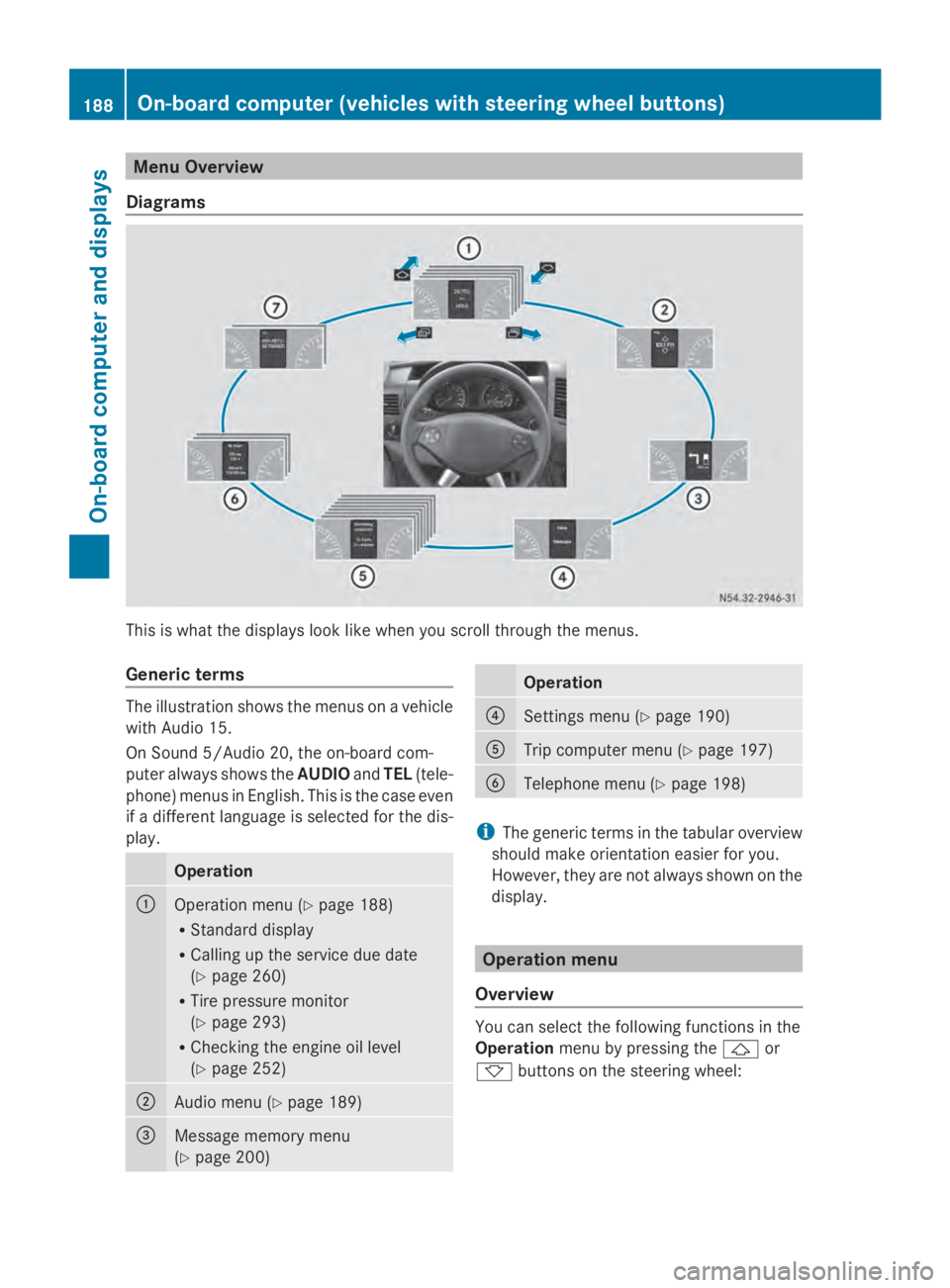
Menu Overview
Diagrams This is what the displays look like when you scroll through the menus.
Generic terms The illustration shows the menus on a vehicle
with Audio 15.
On Sound 5/Audio 20, the on-board com-
puter always shows the AUDIOandTEL (tele-
phone) menus in English. This is the case even
if a different language is selected for the dis-
play. Operation
0043
Operation menu (Y
page 188)
R Standard display
R Calling up the service due date
(Y page 260)
R Tire pressure monitor
(Y page 293)
R Checking the engine oil level
(Y page 252) 0044
Audio menu (Y
page 189) 0087
Message memory menu
(Y
page 200) Operation
0085
Settings menu (Y
page 190) 0083
Trip computer menu (Y
page 197) 0084
Telephone menu (Y
page 198) i
The generic terms in the tabular overview
should make orientation easier for you.
However, they are not always shown on the
display. Operation menu
Overview You can select the following functions in the
Operation
menu by pressing the 0041or
0068 buttons on the steering wheel: 188
On-board computer (vehicles with steering wheel buttons)On-board computer and displays
Page 191 of 338
R
Displaying the trip odometer and odometer
(standard display) (Y page 189)
R Displaying the coolant temperature
(Y page 189)
R Calling up the service due date
(Y page 260)
R Tire pressure monitor (Y page 293)
R Checking the oil level (Y page 252)
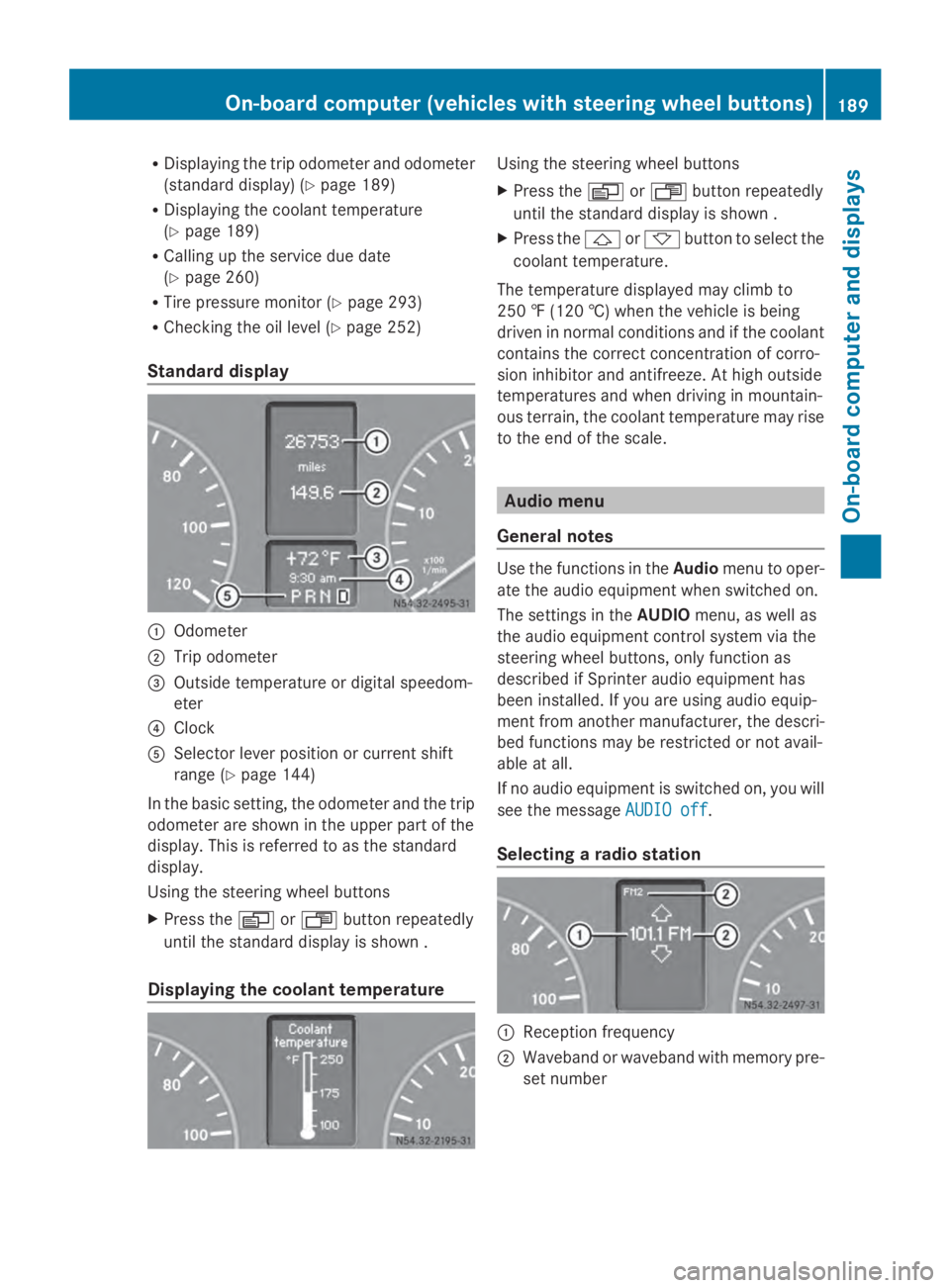
Standard display 0043
Odometer
0044 Trip odometer
0087 Outside temperature or digital speedom-
eter
0085 Clock
0083 Selector lever position or current shift
range (Y page 144)
In the basic setting, the odometer and the trip
odometer are shown in the upper part of the
display. This is referred to as the standard
display.
Using the steering wheel buttons
X Press the 0080or007F button repeatedly
until the standard display is shown .
Displaying the coolant temperature Using the steering wheel buttons
X
Press the 0080or007F button repeatedly
until the standard display is shown .
X Press the 0041or0068 button to select the
coolant temperature.
The temperature displayed may climb to
250 ‡ (120 †) when the vehicle is being
driven in normal conditions and if the coolant
contains the correct concentration of corro-
sion inhibitor and antifreeze. At high outside
temperatures and when driving in mountain-
ous terrain, the coolant temperature may rise
to the end of the scale. Audio menu
General notes Use the functions in the
Audiomenu to oper-
ate the audio equipment when switched on.
The settings in the AUDIOmenu, as well as
the audio equipment control system via the
steering wheel buttons, only function as
described if Sprinter audio equipment has
been installed. If you are using audio equip-
ment from another manufacturer, the descri-
bed functions may be restricted or not avail-
able at all.
If no audio equipment is switched on, you will
see the message AUDIO off AUDIO off.
Selecting a radio station 0043
Reception frequency
0044 Waveband or waveband with memory pre-
set number On-board computer (vehicles
with steering wheel buttons)
189On-board computer and displays Z
Page 217 of 338
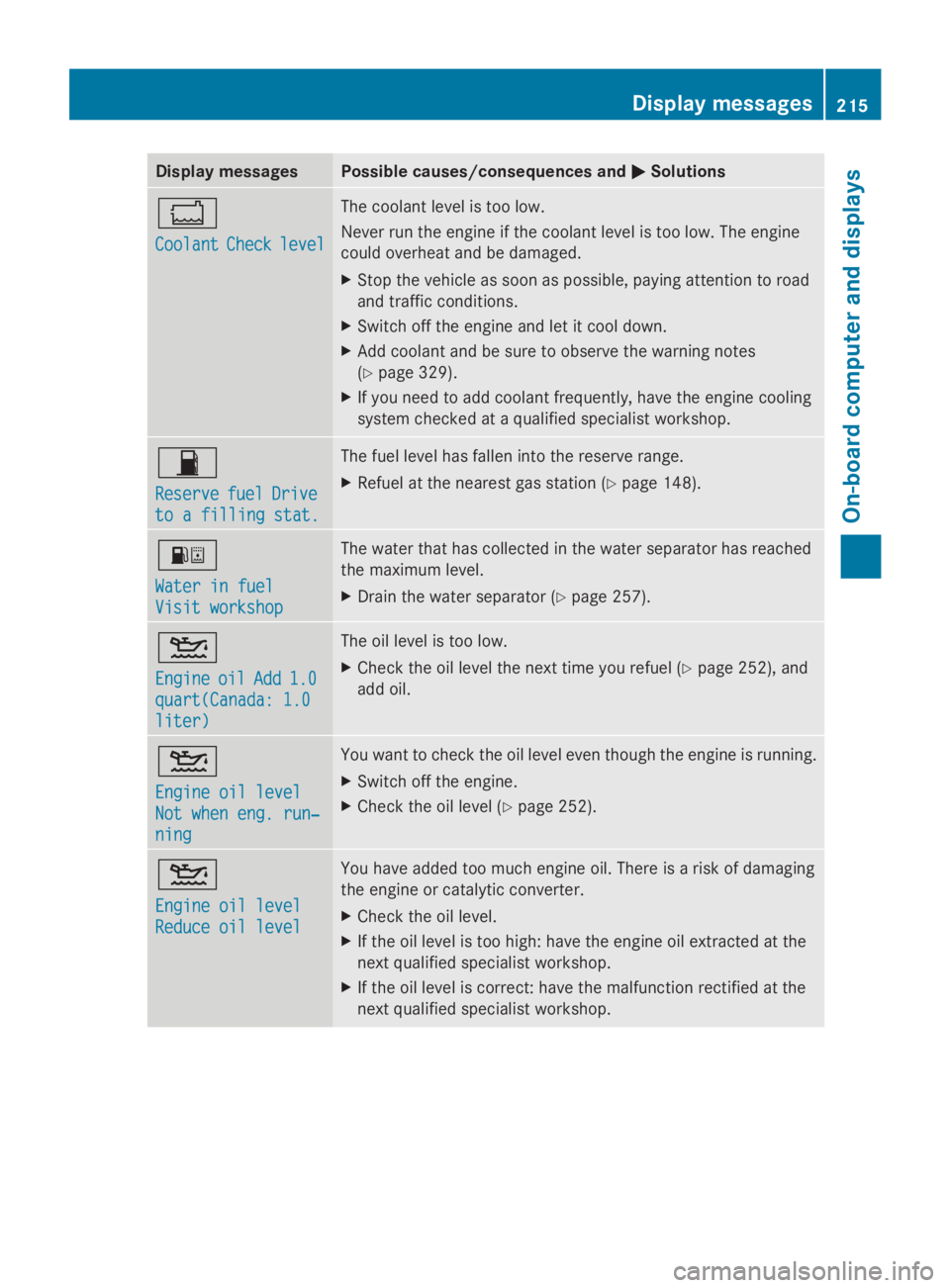
Display messages Possible causes/consequences and
0050
0050Solutions 00BC
Coolant Coolant
Check
Checklevel
level The coolant level is too low.
Never run the engine if the coolant level is too low. The engine
could overheat and be damaged.
X
Stop the vehicle as soon as possible, paying attention to road
and traffic conditions.
X Switch off the engine and let it cool down.
X Add coolant and be sure to observe the warning notes
(Y page 329).
X If you need to add coolant frequently, have the engine cooling
system checked at a qualified specialist workshop. 00B5
Reserve Reserve
fuel
fuelDrive
Drive
to a filling stat.
to a filling stat. The fuel level has fallen into the reserve range.
X
Refuel at the nearest gas station ( Ypage 148). 00B8
Water in fuel Water in fuel
Visit workshop Visit workshop The water that has collected in the water separator has reached
the maximum level.
X
Drain the water separator (Y page 257).00B2
Engine Engine
oil
oilAdd
Add 1.0
1.0
quart(Canada: 1.0
quart(Canada: 1.0
liter) liter) The oil level is too low.
X
Check the oil level the next time you refuel (Y page 252), and
add oil. 00B2
Engine oil level Engine oil level
Not when eng. run‐ Not when eng. run‐
ning ning You want to check the oil level even though the engine is running.
X
Switch off the engine.
X Check the oil level (Y page 252).00B2
Engine oil level Engine oil level
Reduce oil level Reduce oil level You have added too much engine oil. There is a risk of damaging
the engine or catalytic converter.
X
Check the oil level.
X If the oil level is too high: have the engine oil extracted at the
next qualified specialist workshop.
X If the oil level is correct: have the malfunction rectified at the
next qualified specialist workshop. Display
messages
215On-board computer and displays Z
Page 218 of 338
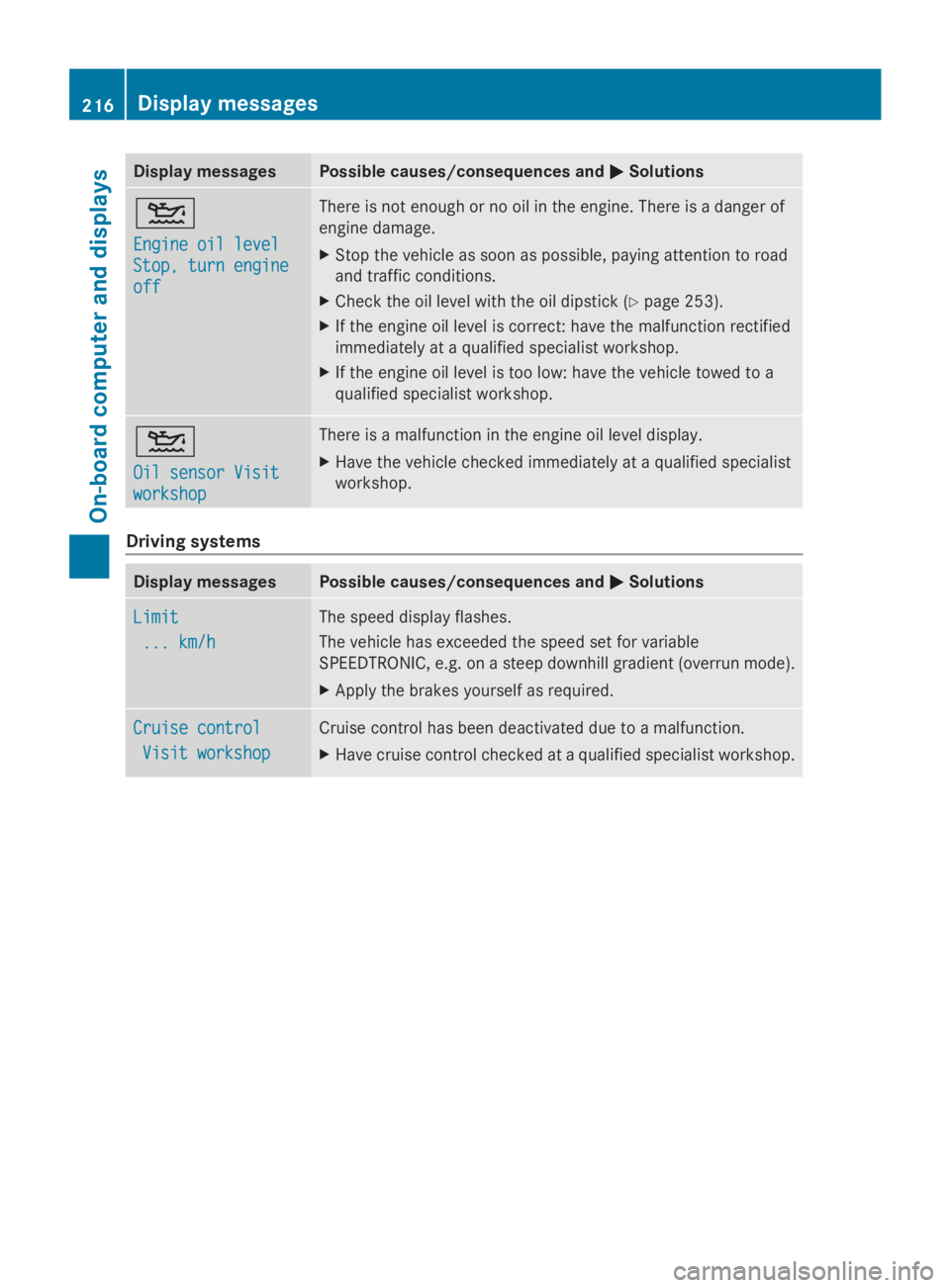
Display messages Possible causes/consequences and
0050
0050Solutions 00B2
Engine oil level Engine oil level
Stop, turn engine Stop, turn engine
off off There is not enough or no oil in the engine. There is a danger of
engine damage.
X
Stop the vehicle as soon as possible, paying attention to road
and traffic conditions.
X Check the oil level with the oil dipstick (Y page 253).
X If the engine oil level is correct: have the malfunction rectified
immediately at a qualified specialist workshop.
X If the engine oil level is too low: have the vehicle towed to a
qualified specialist workshop. 00B2
Oil sensor Visit Oil sensor Visit
workshop workshop There is a malfunction in the engine oil level display.
X
Have the vehicle checked immediately at a qualified specialist
workshop. Driving systems
Display messages Possible causes/consequences and
0050 0050Solutions Limit
Limit
... km/h
... km/h The speed display flashes.
The vehicle has exceeded the speed set for variable
SPEEDTRONIC, e.g. on a steep downhill gradient (overrun mode).
X Apply the brakes yourself as required. Cruise control Cruise control
Visit workshop
Visit workshop Cruise control has been deactivated due to a malfunction.
X
Have cruise control checked at a qualified specialist workshop. 216
Display
messagesOn-board computer and displays
Page 227 of 338
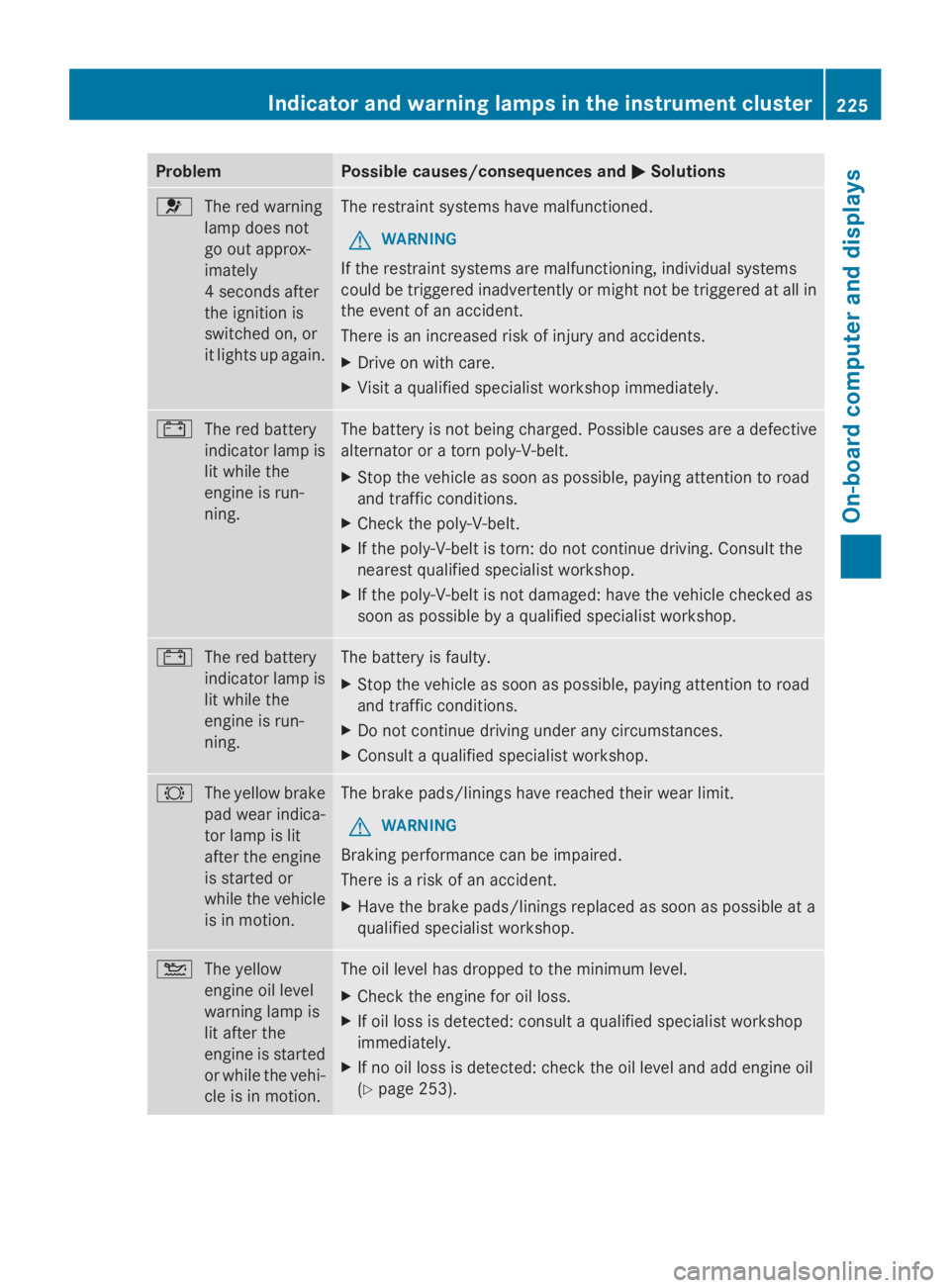
Problem Possible causes/consequences and
0050
0050Solutions 0075
The red warning
lamp does not
go out approx-
imately
4 seconds after
the ignition is
switched on, or
it lights up again. The restraint systems have malfunctioned.
G WARNING
If the restraint systems are malfunctioning, individual systems
could be triggered inadvertently or might not be triggered at all in
the event of an accident.
There is an increased risk of injury and accidents.
X Drive on with care.
X Visit a qualified specialist workshop immediately. 003D
The red battery
indicator lamp is
lit while the
engine is run-
ning. The battery is not being charged. Possible causes are a defective
alternator or a torn poly-V-belt.
X
Stop the vehicle as soon as possible, paying attention to road
and traffic conditions.
X Check the poly-V-belt.
X If the poly-V-belt is torn: do not continue driving. Consult the
nearest qualified specialist workshop.
X If the poly-V-belt is not damaged: have the vehicle checked as
soon as possible by a qualified specialist workshop. 003D
The red battery
indicator lamp is
lit while the
engine is run-
ning. The battery is faulty.
X
Stop the vehicle as soon as possible, paying attention to road
and traffic conditions.
X Do not continue driving under any circumstances.
X Consult a qualified specialist workshop. 0026
The yellow brake
pad wear indica-
tor lamp is lit
after the engine
is started or
while the vehicle
is in motion. The brake pads/linings have reached their wear limit.
G WARNING
Braking performance can be impaired.
There is a risk of an accident.
X Have the brake pads/linings replaced as soon as possible at a
qualified specialist workshop. 00B2
The yellow
engine oil level
warning lamp is
lit after the
engine is started
or while the vehi-
cle is in motion. The oil level has dropped to the minimum level.
X
Check the engine for oil loss.
X If oil loss is detected: consult a qualified specialist workshop
immediately.
X If no oil loss is detected: check the oil level and add engine oil
(Y page 253). Indicator and warning lamps in the instrument cluster
225On-board computer and displays Z
Page 228 of 338
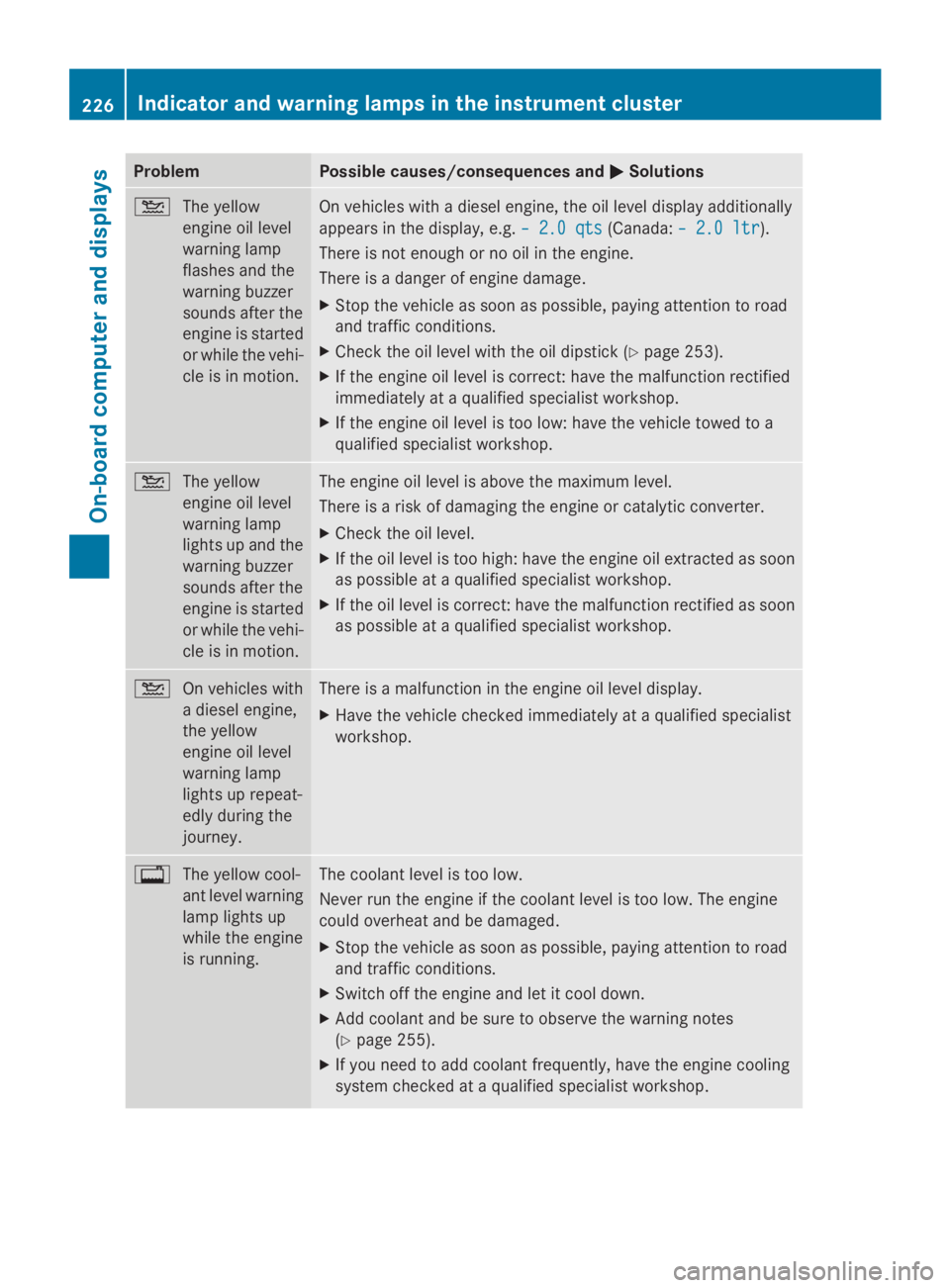
Problem Possible causes/consequences and
0050
0050Solutions 00B2
The yellow
engine oil level
warning lamp
flashes and the
warning buzzer
sounds after the
engine is started
or while the vehi-
cle is in motion. On vehicles with a diesel engine, the oil level display additionally
appears in the display, e.g.
– 2.0 qts
– 2.0 qts (Canada:– 2.0 ltr – 2.0 ltr).
There is not enough or no oil in the engine.
There is a danger of engine damage.
X Stop the vehicle as soon as possible, paying attention to road
and traffic conditions.
X Check the oil level with the oil dipstick (Y page 253).
X If the engine oil level is correct: have the malfunction rectified
immediately at a qualified specialist workshop.
X If the engine oil level is too low: have the vehicle towed to a
qualified specialist workshop. 00B2
The yellow
engine oil level
warning lamp
lights up and the
warning buzzer
sounds after the
engine is started
or while the vehi-
cle is in motion. The engine oil level is above the maximum level.
There is a risk of damaging the engine or catalytic converter.
X
Check the oil level.
X If the oil level is too high: have the engine oil extracted as soon
as possible at a qualified specialist workshop.
X If the oil level is correct: have the malfunction rectified as soon
as possible at a qualified specialist workshop. 00B2
On vehicles with
a diesel engine,
the yellow
engine oil level
warning lamp
lights up repeat-
edly during the
journey. There is a malfunction in the engine oil level display.
X
Have the vehicle checked immediately at a qualified specialist
workshop. 003F
The yellow cool-
ant level warning
lamp lights up
while the engine
is running. The coolant level is too low.
Never run the engine if the coolant level is too low. The engine
could overheat and be damaged.
X
Stop the vehicle as soon as possible, paying attention to road
and traffic conditions.
X Switch off the engine and let it cool down.
X Add coolant and be sure to observe the warning notes
(Y page 255).
X If you need to add coolant frequently, have the engine cooling
system checked at a qualified specialist workshop. 226
Indicator and warning lamps in the instrument clusterOn-board computer and displays
Page 245 of 338
Always observe the operating instructions of
the respective manufacturer when using suit-
able load securing aids or tie downs. In par-
ticular, the information on service life.
Load securing aids and tie downs may not be
used, for example, if:
R identification marks are missing or illegible
R there are yarn breakages, damage to bear-
ing seams or other signs of tearing
R there are signs of shearing, deformation,
pinching or other damage
R there is damage to clamping or connecting
elements
Such load securing aids and tie downs are
worn; they should not be used and must be
replaced. If you use load securing aids or tie
downs which are worn, the load may not be
sufficiently secured and could cause damage
to property.
After an accident, the following must be
checked at a specialist workshop:
R Cargo compartment floor
R Load surface
R Cargo tie-down rings
R Tie downs
Otherwise, the load may not be correctly
secured the next time anything is stowed.
Even if you follow all loading guidelines, the
load increases the risk of injury in the event
of an accident. Observe the tips in the "Secur-
ing luggage/loads" (Y page 244) and "Load
distribution" (Y page 244) sections. Before loading
! The anti-slip mats cannot be used for
securing goods and must be replaced when
they show signs of:
R Permanent deformation and crushing
R Crack formation
R Cuts X
Tire pressure: check the tire pressure and
correct if necessary ( Ypage 290).
X Cargo compartment floor: clean the
cargo compartment floor.
The cargo compartment floor must be free
from oil and dust, dry and swept clean to
prevent the load from slipping.
X Place non-slip mats (anti-slip mats) on the
cargo compartment floor if necessary. During loading
! On passenger van versions with maxi-
mum seating layout, the permissible rear
axle load would be exceeded if the full pay-
load were to be loaded in the cargo com-
partment.
X Observe the gross axle weight rating and
permissible gross vehicle weight for your
vehicle.
Take into account that your vehicle's curb
weight is increased if accessories or
optional equipment are installed. The max-
imum payload is thus reduced.
X Observe the notes on load distribution
(Y page 244).
The overall center of gravity of the load
should always be as low as possible, cen-
tered and between the axles near the rear
axle.
X Secure the load (Y page 244).
Always observe the relevant country-spe-
cific legal requirements, laws and regula-
tions. Checks after loading
G
WARNING
Combustion engines emit poisonous exhaust
gases, such as carbon monoxide. If the sliding
door or rear door is open when the engine is
running, exhaust gases can enter the vehicle
interior, especially during the journey. There
is a risk of poisoning. Loading guidelines
243Transporting loads
Z
Page 254 of 338
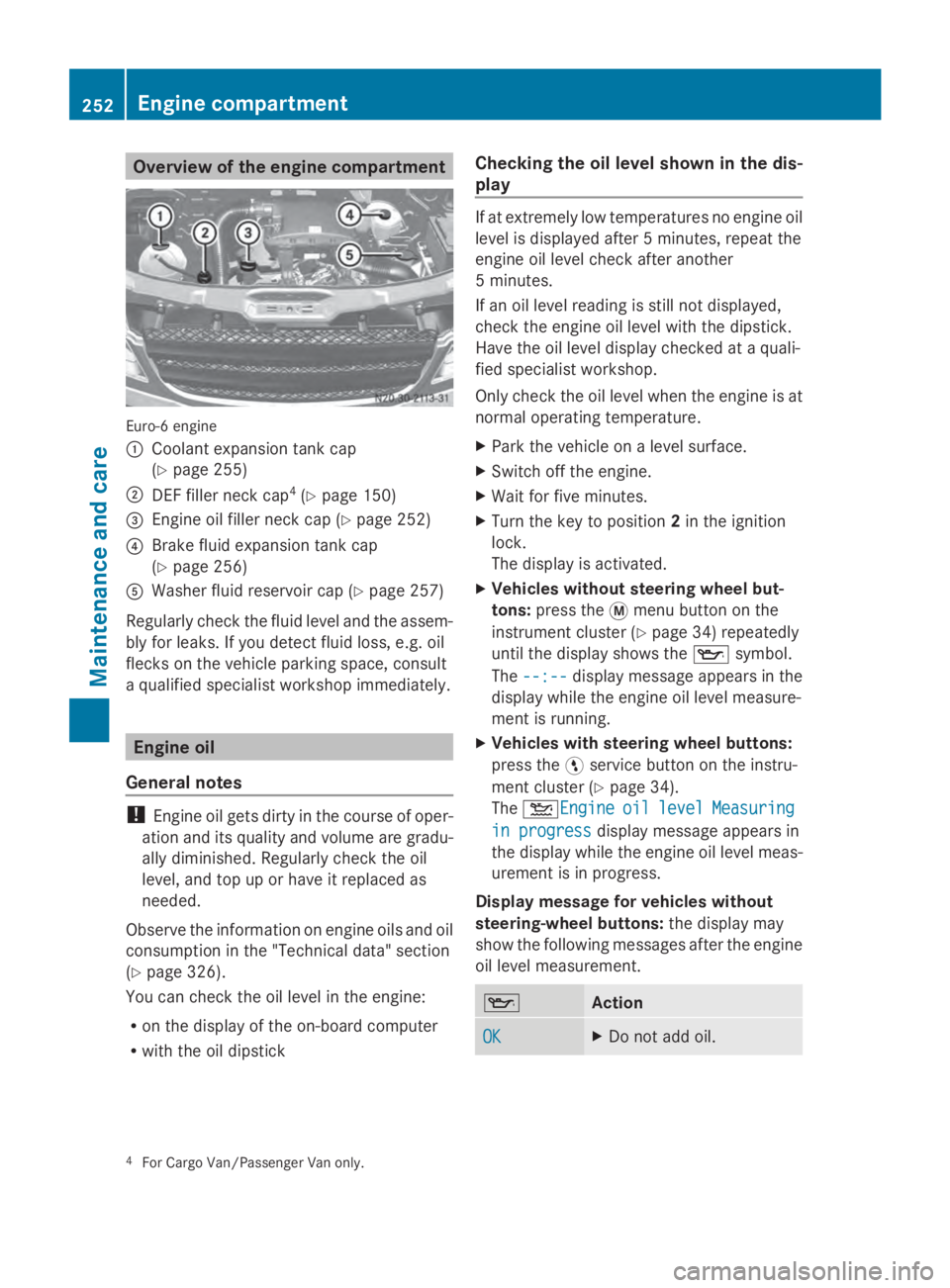
Overview of the engine compartment
Euro-6 engine
0043
Coolant expansion tank cap
(Ypage 255)
0044 DEF filler neck cap 4
(Y page 150)
0087 Engine oil filler neck cap (Y page 252)
0085 Brake fluid expansion tank cap
(Ypage 256)
0083 Washer fluid reservoir cap (Y page 257)
Regularly check the fluid level and the assem-
bly for leaks. If you detect fluid loss, e.g. oil
flecks on the vehicle parking space, consult
a qualified specialist workshop immediately. Engine oil
General notes !
Engine oil gets dirty in the course of oper-
ation and its quality and volume are gradu-
ally diminished. Regularly check the oil
level, and top up or have it replaced as
needed.
Observe the information on engine oils and oil
consumption in the "Technical data" section
(Y page 326).
You can check the oil level in the engine:
R on the display of the on-board computer
R with the oil dipstick Checking the oil level shown in the dis-
play If at extremely low temperatures no engine oil
level is displayed after 5 minutes, repeat the
engine oil level check after another
5 minutes.
If an oil level reading is still not displayed,
check the engine oil level with the dipstick.
Have the oil level display checked at a quali-
fied specialist workshop.
Only check the oil level when the engine is at
normal operating temperature.
X Park the vehicle on a level surface.
X Switch off the engine.
X Wait for five minutes.
X Turn the key to position 2in the ignition
lock.
The display is activated.
X Vehicles without steering wheel but-
tons: press the 0079menu button on the
instrument cluster (Y page 34) repeatedly
until the display shows the 00AFsymbol.
The --:-- --:-- display message appears in the
display while the engine oil level measure-
ment is running.
X Vehicles with steering wheel buttons:
press the 0098service button on the instru-
ment cluster (Y page 34).
The 00B2Engine Engine oil oillevel
level Measuring
Measuring
in progress
in progress display message appears in
the display while the engine oil level meas-
urement is in progress.
Display message for vehicles without
steering-wheel buttons: the display may
show the following messages after the engine
oil level measurement. 00AF
Action
OK OK X
Do not add oil. 4
For Cargo Van/Passenger Van only. 252
Engine compartmentMaintenance and care
Page 255 of 338
– 1.0 qts
– 1.0 qts X
Add the amount of oil
shown (Y page 254).
X Check the engine oil level
again after a few minutes. – 1.5 qts – 1.5 qts
– 2.0 qts
– 2.0 qts
HI
HI The oil level is too high.
X
Have excess oil removed. Measurement units in the display:
R
qts qts USA only
R ltr
ltr Canada only
Display message for vehicles with steer-
ing-wheel buttons: the display may show
the following messages after the engine oil
level measurement. 00AF
Action
Engine
Engine
oil level oil level
OK OK X
Do not add oil. Engine
Engine
oil Add oil Add
1.0quart 1.0quart X
Add the amount of oil
shown (Y page 254).
X Check the engine oil level
again after a few minutes. Engine Engine
oil Add oil Add
1.5quart 1.5quart
Engine
Engine
oil Add oil Add
2.0quart 2.0quart
Engine
Engine
oil level oil level
Reduce Reduce
oil level oil level The oil level is too high.
X
Have excess oil removed. Eng. oil Eng. oil
lev. Turn lev. Turn
ignition ignition
on for on for
level level X
Turn the key to posi-
tion 2in the ignition lock. Observe Observe
wait. wait.
period period X
Repeat the engine oil
measurement after about
5 minutes if the engine is
at normal operating tem-
perature.
X Repeat the engine oil
measurement after about
30 minutes if the engine
is not at normal operating
temperature. Engine Engine
oil level oil level
Not when Not when
eng. run‐ eng. run‐
ning ning X
Switch off the engine and
wait for approximately
5 minutes if the engine is
at normal operating tem-
perature. Then, perform
the engine oil measure-
ment. Measurement units in the display:
R
qts qts USA only
R ltr
ltr Canada only
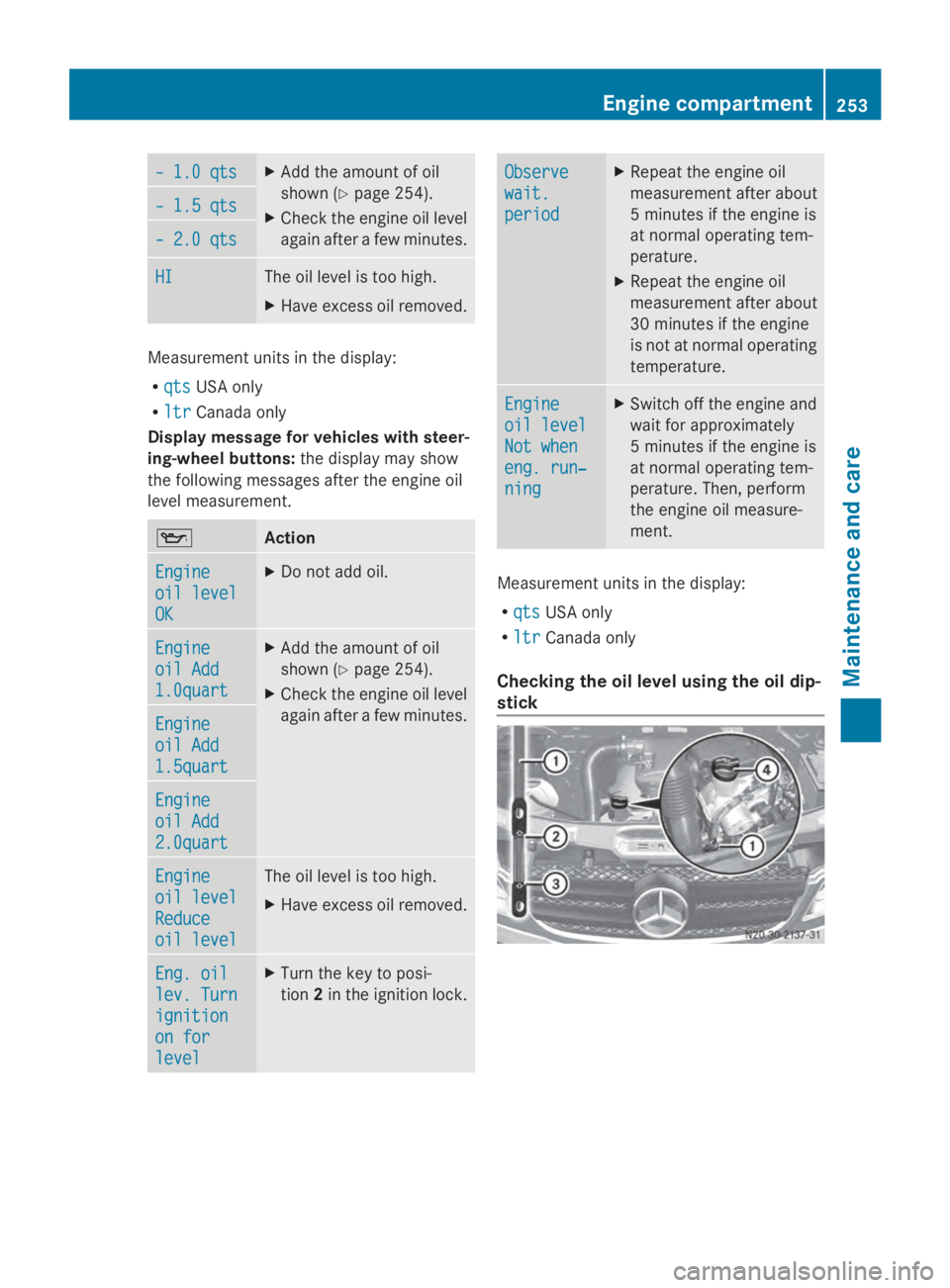
Checking the oil level using the oil dip-
stick Engine compartment
253Maintenance and care Z