stop start MERCEDES-BENZ SPRINTER 2014 MY14 Operator’s Manual
[x] Cancel search | Manufacturer: MERCEDES-BENZ, Model Year: 2014, Model line: SPRINTER, Model: MERCEDES-BENZ SPRINTER 2014Pages: 338, PDF Size: 6.78 MB
Page 149 of 338
Problems with the transmission
Problem Possible causes/consequences and
0050
0050Solutions The transmission mal-
functions when shifting
gear. The transmission is losing oil.
X
Have the transmission checked immediately at a qualified spe-
cialist workshop. The acceleration char-
acteristics have deter-
iorated noticeably.
The transmission does
not shift. The transmission is in emergency mode.
It is only possible to shift into second gear or reverse gear
R.
X Stop the vehicle.
X Depress the brake pedal.
X Move the selector lever to position P.
X Switch off the engine.
X Wait at least 10 seconds before restarting the engine.
X Depress the brake pedal.
X Move the selector lever to position Dor R.
In position D, the transmission shifts into second gear; in posi-
tion R, the transmission shifts into reverse gear.
X Have the transmission checked immediately at a qualified spe-
cialist workshop. Releasing the parking lock manually
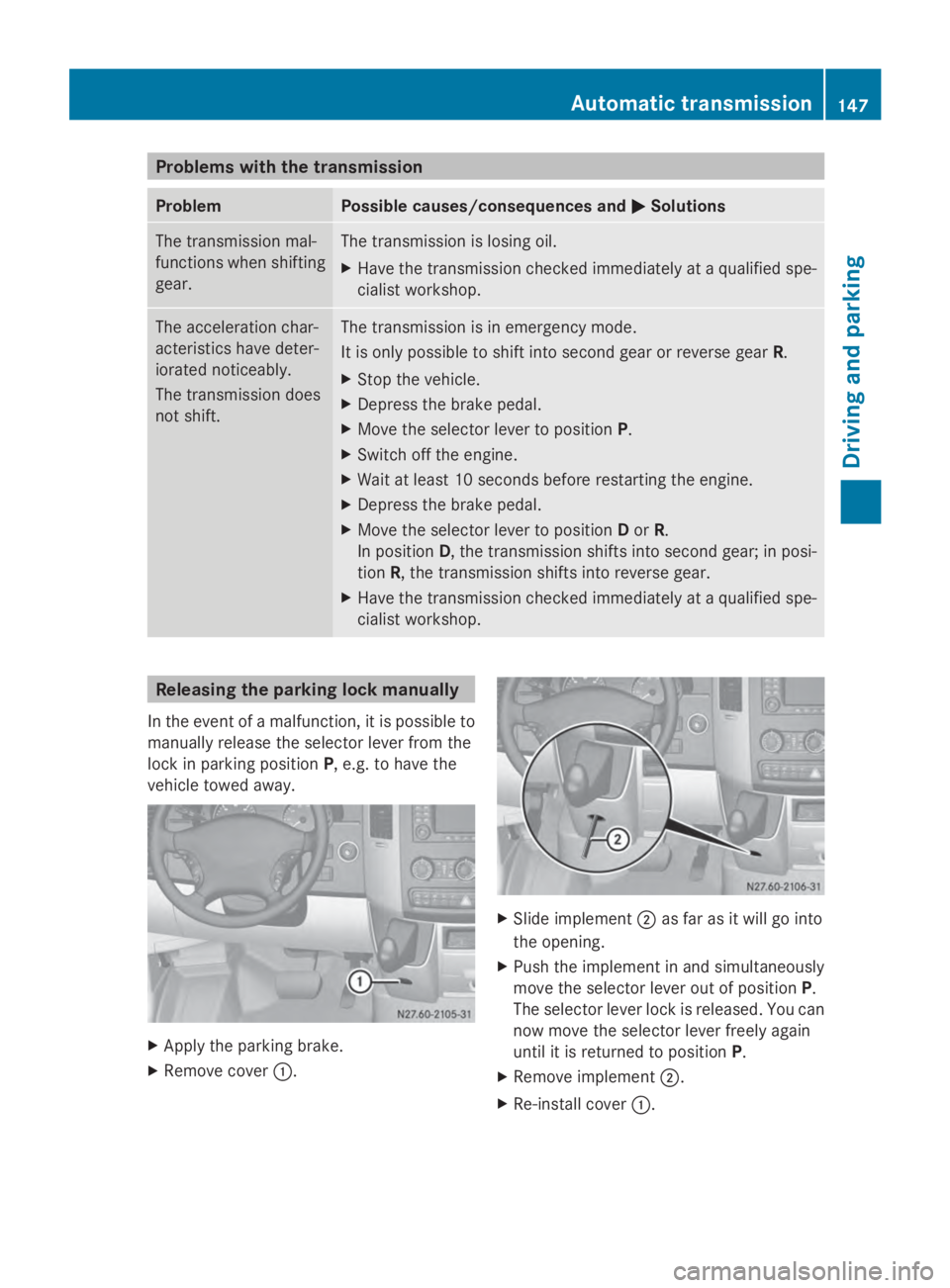
In the event of a malfunction, it is possible to
manually release the selector lever from the
lock in parking position P, e.g. to have the
vehicle towed away. X
Apply the parking brake.
X Remove cover 0043. X
Slide implement 0044as far as it will go into
the opening.
X Push the implement in and simultaneously
move the selector lever out of position P.
The selector lever lock is released. You can
now move the selector lever freely again
until it is returned to position P.
X Remove implement 0044.
X Re-install cover 0043. Automatic transmission
147Driving and parking Z
Page 154 of 338
Parking brake
G
WARNING
If you leave children unsupervised in the vehi-
cle, they could set it in motion by, for example:
R release the parking brake.
R shift the automatic transmission out of the
parking position P.
R start the engine.
In addition, they may operate vehicle equip-
ment and become trapped. There is a risk of
an accident and injury.
When leaving the vehicle, always take the
SmartKey with you and lock the vehicle. Never
leave children unsupervised in the vehicle. G
WARNING
If you must brake the vehicle with the parking
brake, the braking distance is considerably
longer and the wheels could lock. There is an
increased danger of skidding and accidents.
Only use the parking brake to brake the vehi-
cle when the service brake is faulty. Do not
apply the parking brake too firmly. If the
wheels lock, release the parking brake until
the wheels begin turning again. The brake lamps are not illuminated when you
brake the vehicle using the parking brake.
As a rule, you may only apply the parking
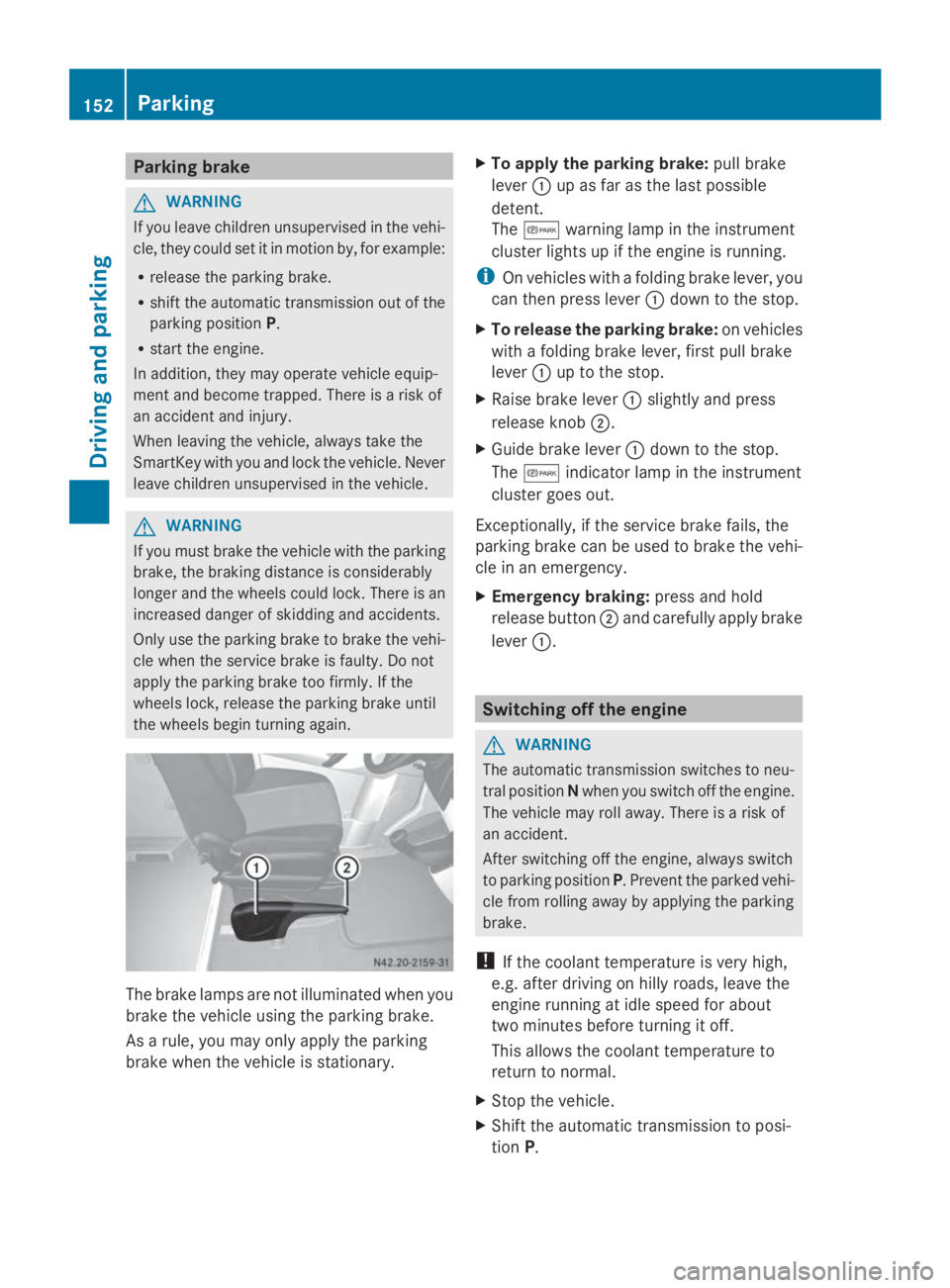
brake when the vehicle is stationary. X
To apply the parking brake: pull brake
lever 0043up as far as the last possible
detent.
The 0066 warning lamp in the instrument
cluster lights up if the engine is running.
i On vehicles with a folding brake lever, you
can then press lever 0043down to the stop.
X To release the parking brake: on vehicles
with a folding brake lever, first pull brake
lever 0043up to the stop.
X Raise brake lever 0043slightly and press
release knob 0044.
X Guide brake lever 0043down to the stop.
The 0066 indicator lamp in the instrument
cluster goes out.
Exceptionally, if the service brake fails, the
parking brake can be used to brake the vehi-
cle in an emergency.
X Emergency braking: press and hold
release button 0044and carefully apply brake
lever 0043. Switching off the engine
G
WARNING
The automatic transmission switches to neu-
tral position Nwhen you switch off the engine.
The vehicle may roll away. There is a risk of
an accident.
After switching off the engine, always switch
to parking position P. Prevent the parked vehi-
cle from rolling away by applying the parking
brake.
! If the coolant temperature is very high,
e.g. after driving on hilly roads, leave the
engine running at idle speed for about
two minutes before turning it off.
This allows the coolant temperature to
return to normal.
X Stop the vehicle.
X Shift the automatic transmission to posi-
tion P. 152
ParkingDriving and parking
Page 156 of 338
Bear in mind that at a speed of just 30 mph
(approximately 50 km/h), your vehicle covers
a distance of 44 feet (approximately 14 m)
every second. G
WARNING
If you switch off the ignition while driving,
safety-relevant functions are only available
with limitations, or not at all. This could affect,
for example, the power steering and the brake
boosting effect. You will require considerably
more effort to steer and brake. There is a risk
of an accident.
Do not switch off the ignition while driving.
! Always observe the ground clearance of
the vehicle and avoid obstacles. On vehi-
cles with a step, ground clearance is further
restricted. Obstacles can damage the vehi-
cle.
If you must drive over obstacles, drive espe-
cially slowly and carefully. If necessary,
have another person direct you.
Drive sensibly – save fuel In order to save fuel, observe the following
tips:
X
The tires should always be inflated to the
recommended tire pressure.
X Remove unnecessary loads.
X Remove roof carriers when they are not
needed.
X Warm up the engine at low engine speeds.
X Avoid frequent acceleration or braking.
X Have all maintenance work carried out as
indicated by the service intervals in the
Maintenance Booklet or by the service
interval display.
Fuel consumption also increases when driv-
ing in cold weather, in stop-start traffic and in
mountainous terrain. Overrun cutoff If you are in overrun mode and take your foot
off the accelerator pedal, the fuel supply is
cut off when the engine speed is out of the
idle speed control range.
Drinking and driving
G
WARNING
Drinking and driving and/or taking drugs and
driving are very dangerous combinations.
Even a small amount of alcohol or drugs can
affect your reflexes, perceptions and judg-
ment.
The possibility of a serious or even fatal acci-
dent are greatly increased when you drink or
take drugs and drive.
Do not drink or take drugs and drive or allow
anyone to drive who has been drinking or tak-
ing drugs.
Emission control G
WARNING
Combustion engines emit poisonous exhaust
gases such as carbon monoxide. Inhaling
these exhaust gases leads to poisoning. There
is a risk of fatal injury. Therefore never leave
the engine running in enclosed spaces with-
out sufficient ventilation.
Certain engine systems are designed to keep
the level of poisonous substances in exhaust
fumes within legal limits.
These systems only work optimally if they are
maintained exactly in accordance with the
manufacturer's specifications. Any work on
the engine should therefore be carried out by
qualified and authorized technicians at a
Sprinter dealer.
The engine settings must not be changed
under any circumstances. In addition, all spe-
cific maintenance work must be carried out
at regular intervals and in accordance with
the service requirements of the dealer listed 154
Driving tipsDriving and parking
Page 201 of 338
X
Press the 0041or0068 button to select the
desired name.
Or
X To start rapid scrolling: press and hold
the 0041 or0068 button longer than 1 sec-
ond.
Rapid scrolling stops when you release the
button or reach the end of the list.
Using the steering wheel buttons
X To start dialing: press the0061button.
The on-board computer dials the corre-
sponding phone number.
When a connection is established, the
name of the other person and/or the call
duration appear in the display.
X To exit the telephone book: press the
0076 button.
Redialing The on-board computer saves the last names
or numbers dialed in the redial memory.
Using the steering wheel buttons
X Use the 0080or007F buttons to select the
TEL
TEL menu.
The display shows the mobile phone opera-
tional readiness symbol.
X Press the 0061button.
The display shows the most recently dialed
numbers or names in the redial memory.
X Press the 0041or0068 button to select the
desired name or number.
X To start dialing: press the0061button.
The on-board computer dials the corre-
sponding phone number.
When a connection is established, the
name of the other person and/or the call
duration appear in the display.
Or
X To exit the redial memory: press the
0076 button. Display messages
Notes on display messages
Important safety notes G
WARNING
No information will be displayed if either the
instrument cluster or the display is inopera-
tive.
As a result, you will not be able to see warning
and indicator lamps or information about the
driving conditions, such as speed or outside
temperature. Driving characteristics may be
impaired. Adjust your driving style and vehicle
speed accordingly.
Contact a qualified specialist workshop
immediately. G
WARNING
If service work is not carried out correctly, the
operating safety of your vehicle may be
affected. This could cause you to lose control
of your vehicle and cause an accident. More-
over, the safety systems may no longer be
able to protect you or others as they are
designed to do.
Always have service work carried out at a
qualified specialist workshop.
i If you turn the key to position 2in the
ignition, a display check is performed. All
warning/indicator lamps (except the turn
signal indicator lamps) and the display are
activated. Before starting the journey,
check that the warning and indicator lamps
are operating correctly.
Vehicles without steering wheel but-
tons Warnings, malfunctions or additional infor-
mation may also be shown in the display. The
following tables show all the display mes-
sages. A warning tone sounds with certain
display messages. Display messages
199On-board computer and displays Z
Page 204 of 338
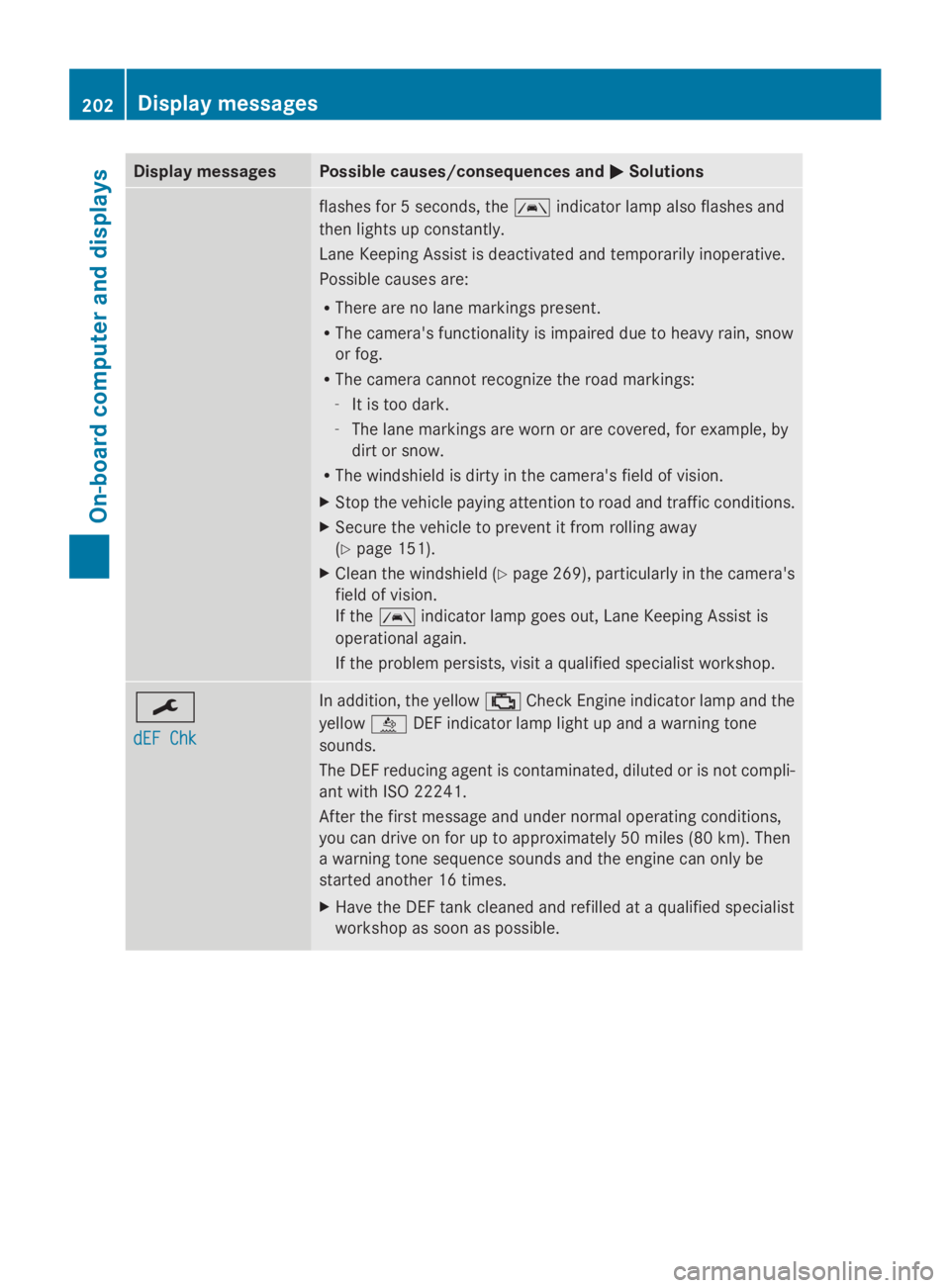
Display messages Possible causes/consequences and
0050
0050Solutions flashes for 5 seconds, the
00B0indicator lamp also flashes and
then lights up constantly.
Lane Keeping Assist is deactivated and temporarily inoperative.
Possible causes are:
R There are no lane markings present.
R The camera's functionality is impaired due to heavy rain, snow
or fog.
R The camera cannot recognize the road markings:
- It is too dark.
- The lane markings are worn or are covered, for example, by
dirt or snow.
R The windshield is dirty in the camera's field of vision.
X Stop the vehicle paying attention to road and traffic conditions.
X Secure the vehicle to prevent it from rolling away
(Y page 151).
X Clean the windshield (Y page 269), particularly in the camera's
field of vision.
If the 00B0 indicator lamp goes out, Lane Keeping Assist is
operational again.
If the problem persists, visit a qualified specialist workshop. 0099
dEF Chk dEF Chk In addition, the yellow
00B9Check Engine indicator lamp and the
yellow 00E2DEF indicator lamp light up and a warning tone
sounds.
The DEF reducing agent is contaminated, diluted or is not compli-
ant with ISO 22241.
After the first message and under normal operating conditions,
you can drive on for up to approximately 50 miles (80 km). Then
a warning tone sequence sounds and the engine can only be
started another 16 times.
X Have the DEF tank cleaned and refilled at a qualified specialist
workshop as soon as possible. 202
Display
messagesOn-board computer and displays
Page 205 of 338
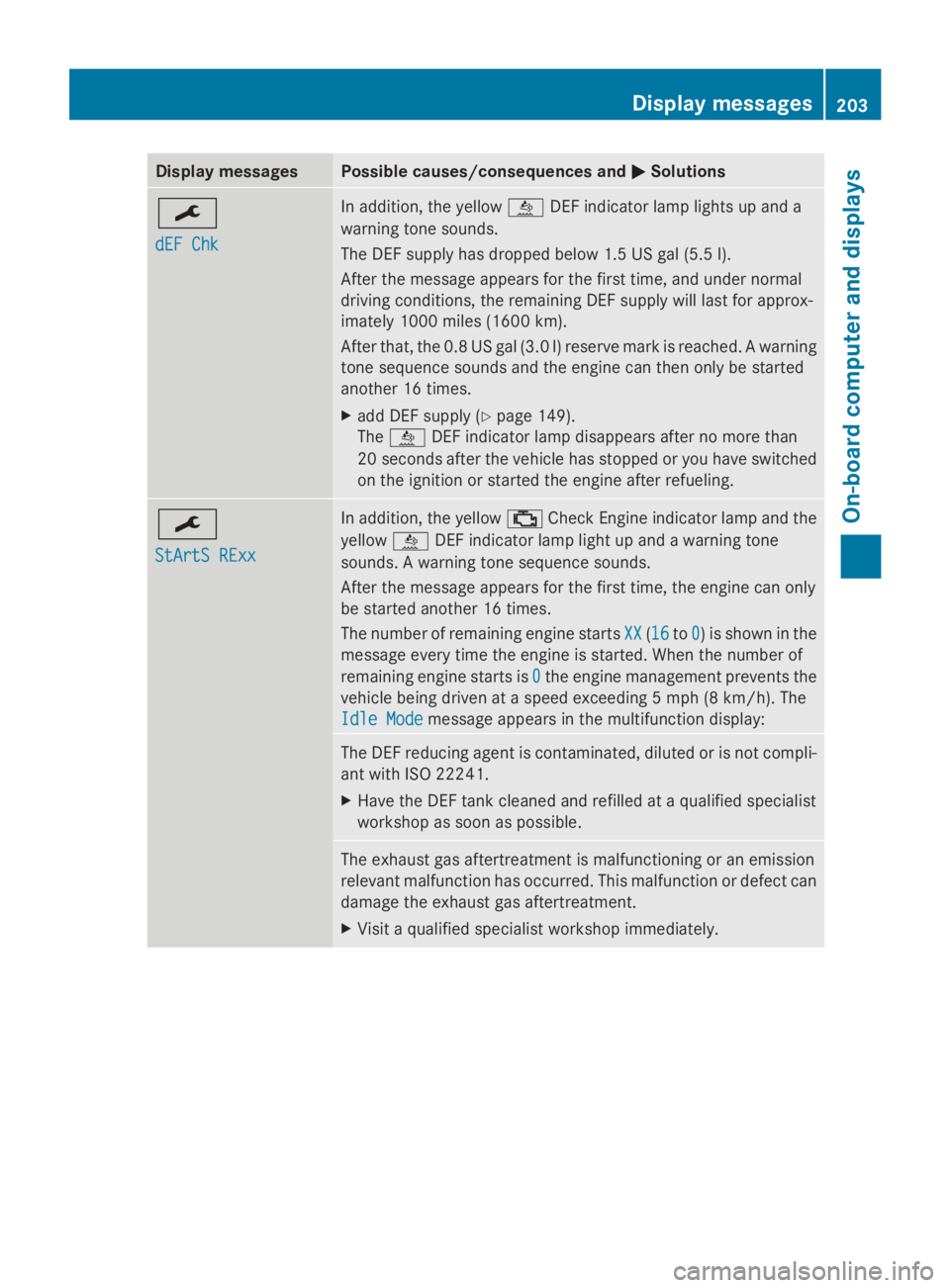
Display messages Possible causes/consequences and
0050
0050Solutions 0099
dEF Chk dEF Chk In addition, the yellow
00E2DEF indicator lamp lights up and a
warning tone sounds.
The DEF supply has dropped below 1.5 US gal (5.5 l).
After the message appears for the first time, and under normal
driving conditions, the remaining DEF supply will last for approx-
imately 1000 miles (1600 km).
After that, the 0.8 US gal (3.0 l) reserve mark is reached. A warning
tone sequence sounds and the engine can then only be started
another 16 times.
X add DEF supply (Y page 149).
The 00E2 DEF indicator lamp disappears after no more than
20 seconds after the vehicle has stopped or you have switched
on the ignition or started the engine after refueling. 0099
StArtS RExx StArtS RExx In addition, the yellow
00B9Check Engine indicator lamp and the
yellow 00E2DEF indicator lamp light up and a warning tone
sounds. A warning tone sequence sounds.
After the message appears for the first time, the engine can only
be started another 16 times.
The number of remaining engine starts XX XX(1616 to0
0) is shown in the
message every time the engine is started. When the number of
remaining engine starts is 0 0the engine management prevents the
vehicle being driven at a speed exceeding 5 mph (8 km/h). The
Idle Mode Idle Mode message appears in the multifunction display: The DEF reducing agent is contaminated, diluted or is not compli-
ant with ISO 22241.
X
Have the DEF tank cleaned and refilled at a qualified specialist
workshop as soon as possible. The exhaust gas aftertreatment is malfunctioning or an emission
relevant malfunction has occurred. This malfunction or defect can
damage the exhaust gas aftertreatment.
X
Visit a qualified specialist workshop immediately. Display
messages
203On-board computer and displays Z
Page 206 of 338
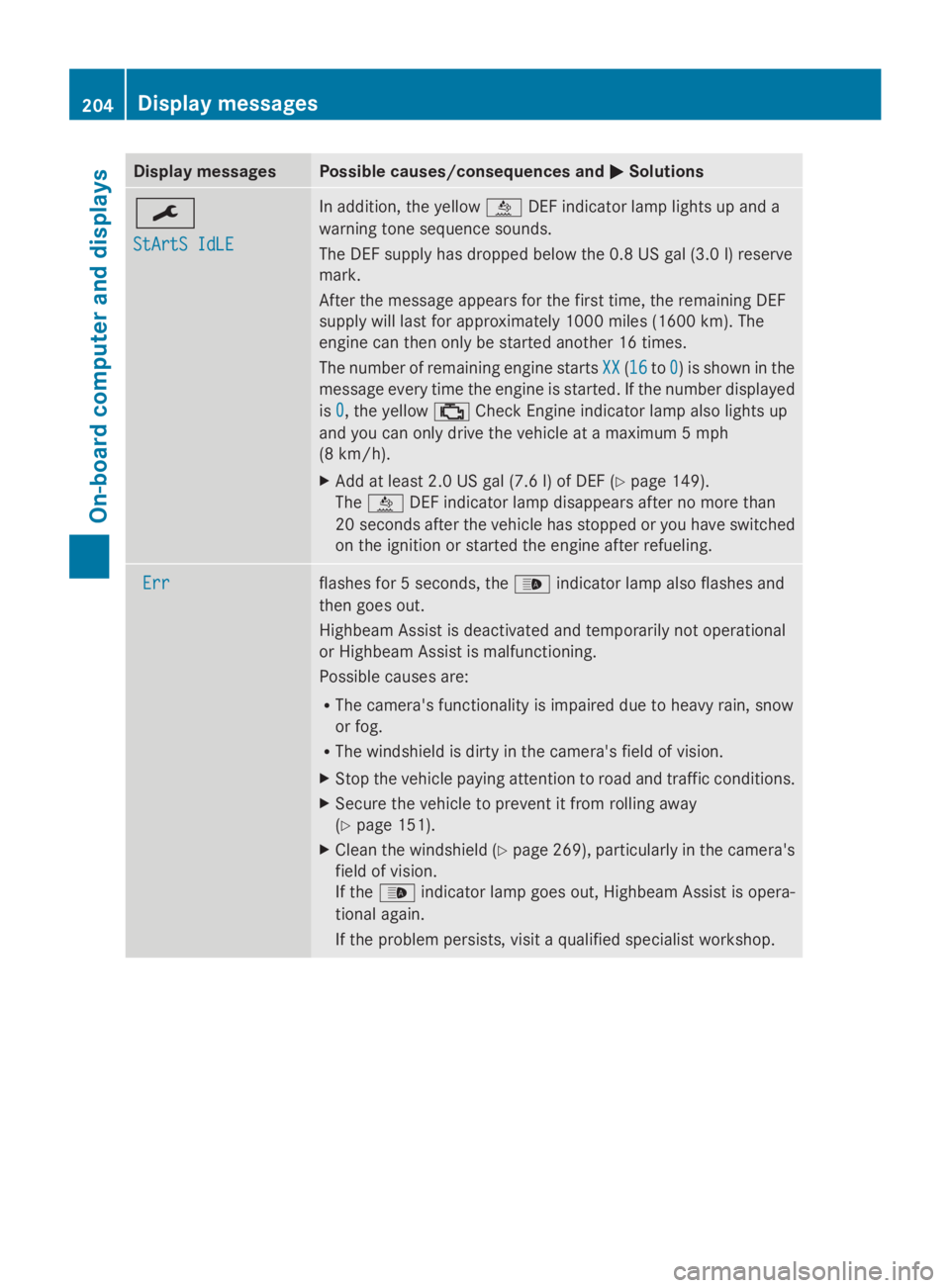
Display messages Possible causes/consequences and
0050
0050Solutions 0099
StArtS IdLE StArtS IdLE In addition, the yellow
00E2DEF indicator lamp lights up and a
warning tone sequence sounds.
The DEF supply has dropped below the 0.8 US gal (3.0 l) reserve
mark.
After the message appears for the first time, the remaining DEF
supply will last for approximately 1000 miles (1600 km). The
engine can then only be started another 16 times.
The number of remaining engine starts XX
XX (1616 to0 0) is shown in the
message every time the engine is started. If the number displayed
is 0 0, the yellow 00B9Check Engine indicator lamp also lights up
and you can only drive the vehicle at a maximum 5 mph
(8 km/h).
X Add at least 2.0 US gal (7.6 l) of DEF (Y page 149).
The 00E2 DEF indicator lamp disappears after no more than
20 seconds after the vehicle has stopped or you have switched
on the ignition or started the engine after refueling. Err Err flashes for 5 seconds, the
00CEindicator lamp also flashes and
then goes out.
Highbeam Assist is deactivated and temporarily not operational
or Highbeam Assist is malfunctioning.
Possible causes are:
R The camera's functionality is impaired due to heavy rain, snow
or fog.
R The windshield is dirty in the camera's field of vision.
X Stop the vehicle paying attention to road and traffic conditions.
X Secure the vehicle to prevent it from rolling away
(Y page 151).
X Clean the windshield (Y page 269), particularly in the camera's
field of vision.
If the 00CE indicator lamp goes out, Highbeam Assist is opera-
tional again.
If the problem persists, visit a qualified specialist workshop. 204
Display
messagesOn-board computer and displays
Page 216 of 338
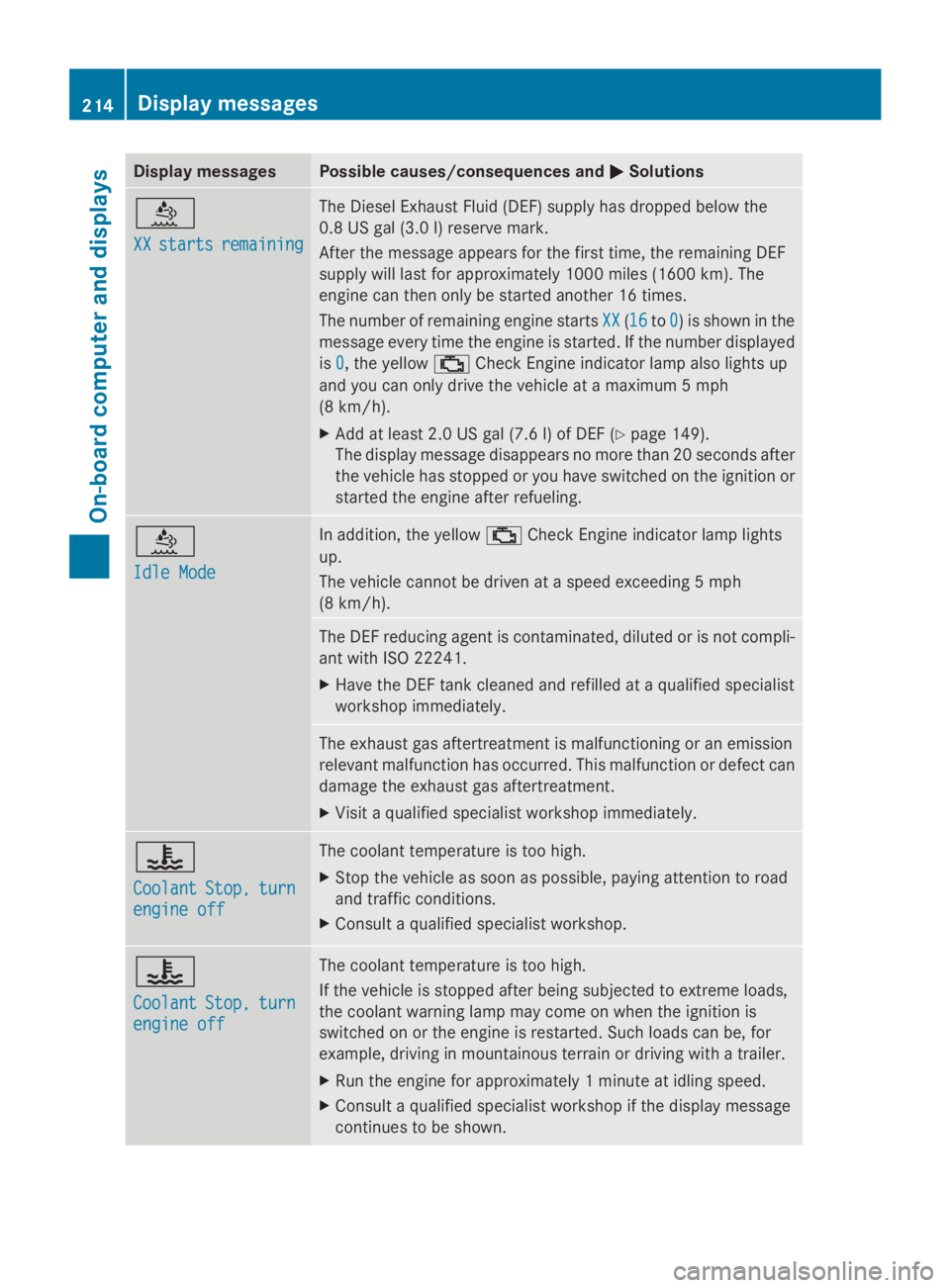
Display messages Possible causes/consequences and
0050
0050Solutions 00E2
XX XX
starts
starts remaining
remaining The Diesel Exhaust Fluid (DEF) supply has dropped below the
0.8 US gal (3.0 l) reserve mark.
After the message appears for the first time, the remaining DEF
supply will last for approximately 1000 miles (1600 km). The
engine can then only be started another 16 times.
The number of remaining engine starts
XX XX(1616 to0
0) is shown in the
message every time the engine is started. If the number displayed
is 0 0, the yellow 00B9Check Engine indicator lamp also lights up
and you can only drive the vehicle at a maximum 5 mph
(8 km/h).
X Add at least 2.0 US gal (7.6 l) of DEF (Y page 149).
The display message disappears no more than 20 seconds after
the vehicle has stopped or you have switched on the ignition or
started the engine after refueling. 00E2
Idle Mode Idle Mode In addition, the yellow
00B9Check Engine indicator lamp lights
up.
The vehicle cannot be driven at a speed exceeding 5 mph
(8 km/h). The DEF reducing agent is contaminated, diluted or is not compli-
ant with ISO 22241.
X
Have the DEF tank cleaned and refilled at a qualified specialist
workshop immediately. The exhaust gas aftertreatment is malfunctioning or an emission
relevant malfunction has occurred. This malfunction or defect can
damage the exhaust gas aftertreatment.
X
Visit a qualified specialist workshop immediately. 00AC
Coolant Coolant
Stop,
Stop,turn
turn
engine off
engine off The coolant temperature is too high.
X
Stop the vehicle as soon as possible, paying attention to road
and traffic conditions.
X Consult a qualified specialist workshop. 00AC
Coolant Coolant
Stop,
Stop,turn
turn
engine off
engine off The coolant temperature is too high.
If the vehicle is stopped after being subjected to extreme loads,
the coolant warning lamp may come on when the ignition is
switched on or the engine is restarted. Such loads can be, for
example, driving in mountainous terrain or driving with a trailer.
X
Run the engine for approximately 1 minute at idling speed.
X Consult a qualified specialist workshop if the display message
continues to be shown. 214
Display
messagesOn-board computer and displays
Page 227 of 338
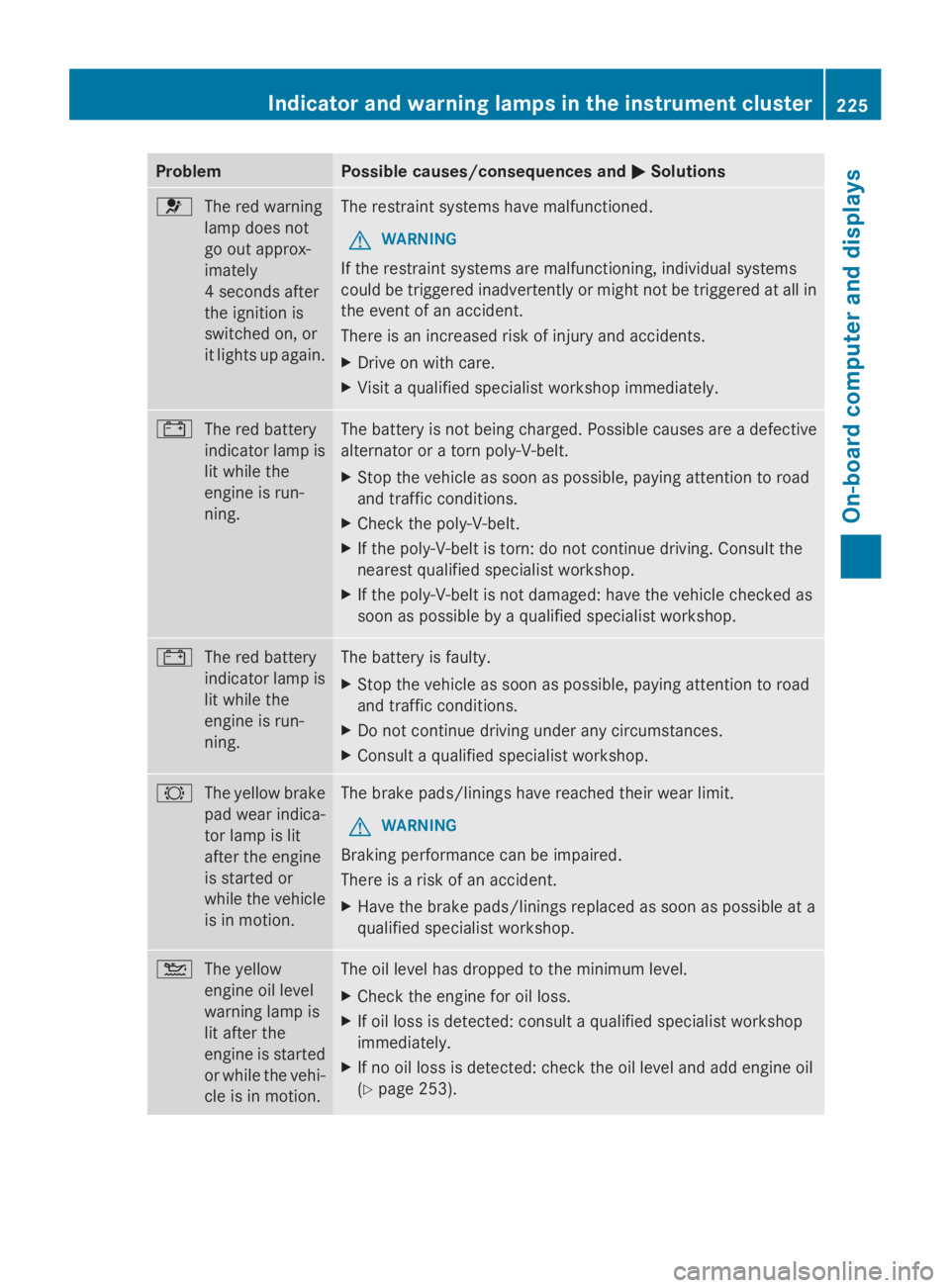
Problem Possible causes/consequences and
0050
0050Solutions 0075
The red warning
lamp does not
go out approx-
imately
4 seconds after
the ignition is
switched on, or
it lights up again. The restraint systems have malfunctioned.
G WARNING
If the restraint systems are malfunctioning, individual systems
could be triggered inadvertently or might not be triggered at all in
the event of an accident.
There is an increased risk of injury and accidents.
X Drive on with care.
X Visit a qualified specialist workshop immediately. 003D
The red battery
indicator lamp is
lit while the
engine is run-
ning. The battery is not being charged. Possible causes are a defective
alternator or a torn poly-V-belt.
X
Stop the vehicle as soon as possible, paying attention to road
and traffic conditions.
X Check the poly-V-belt.
X If the poly-V-belt is torn: do not continue driving. Consult the
nearest qualified specialist workshop.
X If the poly-V-belt is not damaged: have the vehicle checked as
soon as possible by a qualified specialist workshop. 003D
The red battery
indicator lamp is
lit while the
engine is run-
ning. The battery is faulty.
X
Stop the vehicle as soon as possible, paying attention to road
and traffic conditions.
X Do not continue driving under any circumstances.
X Consult a qualified specialist workshop. 0026
The yellow brake
pad wear indica-
tor lamp is lit
after the engine
is started or
while the vehicle
is in motion. The brake pads/linings have reached their wear limit.
G WARNING
Braking performance can be impaired.
There is a risk of an accident.
X Have the brake pads/linings replaced as soon as possible at a
qualified specialist workshop. 00B2
The yellow
engine oil level
warning lamp is
lit after the
engine is started
or while the vehi-
cle is in motion. The oil level has dropped to the minimum level.
X
Check the engine for oil loss.
X If oil loss is detected: consult a qualified specialist workshop
immediately.
X If no oil loss is detected: check the oil level and add engine oil
(Y page 253). Indicator and warning lamps in the instrument cluster
225On-board computer and displays Z
Page 228 of 338
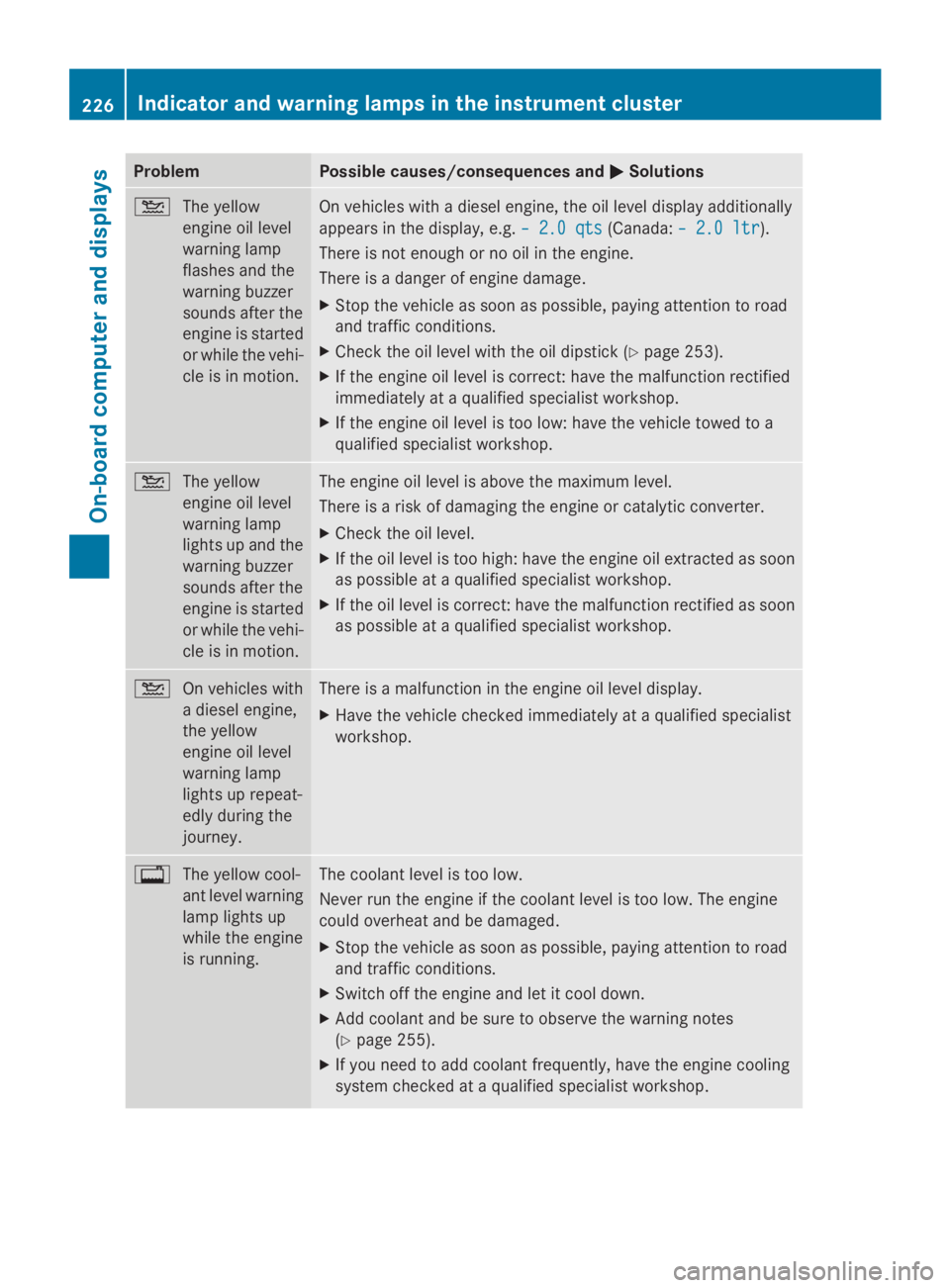
Problem Possible causes/consequences and
0050
0050Solutions 00B2
The yellow
engine oil level
warning lamp
flashes and the
warning buzzer
sounds after the
engine is started
or while the vehi-
cle is in motion. On vehicles with a diesel engine, the oil level display additionally
appears in the display, e.g.
– 2.0 qts
– 2.0 qts (Canada:– 2.0 ltr – 2.0 ltr).
There is not enough or no oil in the engine.
There is a danger of engine damage.
X Stop the vehicle as soon as possible, paying attention to road
and traffic conditions.
X Check the oil level with the oil dipstick (Y page 253).
X If the engine oil level is correct: have the malfunction rectified
immediately at a qualified specialist workshop.
X If the engine oil level is too low: have the vehicle towed to a
qualified specialist workshop. 00B2
The yellow
engine oil level
warning lamp
lights up and the
warning buzzer
sounds after the
engine is started
or while the vehi-
cle is in motion. The engine oil level is above the maximum level.
There is a risk of damaging the engine or catalytic converter.
X
Check the oil level.
X If the oil level is too high: have the engine oil extracted as soon
as possible at a qualified specialist workshop.
X If the oil level is correct: have the malfunction rectified as soon
as possible at a qualified specialist workshop. 00B2
On vehicles with
a diesel engine,
the yellow
engine oil level
warning lamp
lights up repeat-
edly during the
journey. There is a malfunction in the engine oil level display.
X
Have the vehicle checked immediately at a qualified specialist
workshop. 003F
The yellow cool-
ant level warning
lamp lights up
while the engine
is running. The coolant level is too low.
Never run the engine if the coolant level is too low. The engine
could overheat and be damaged.
X
Stop the vehicle as soon as possible, paying attention to road
and traffic conditions.
X Switch off the engine and let it cool down.
X Add coolant and be sure to observe the warning notes
(Y page 255).
X If you need to add coolant frequently, have the engine cooling
system checked at a qualified specialist workshop. 226
Indicator and warning lamps in the instrument clusterOn-board computer and displays