display MERCEDES-BENZ SPRINTER 2014 MY14 Operator’s Manual
[x] Cancel search | Manufacturer: MERCEDES-BENZ, Model Year: 2014, Model line: SPRINTER, Model: MERCEDES-BENZ SPRINTER 2014Pages: 338, PDF Size: 6.78 MB
Page 38 of 338
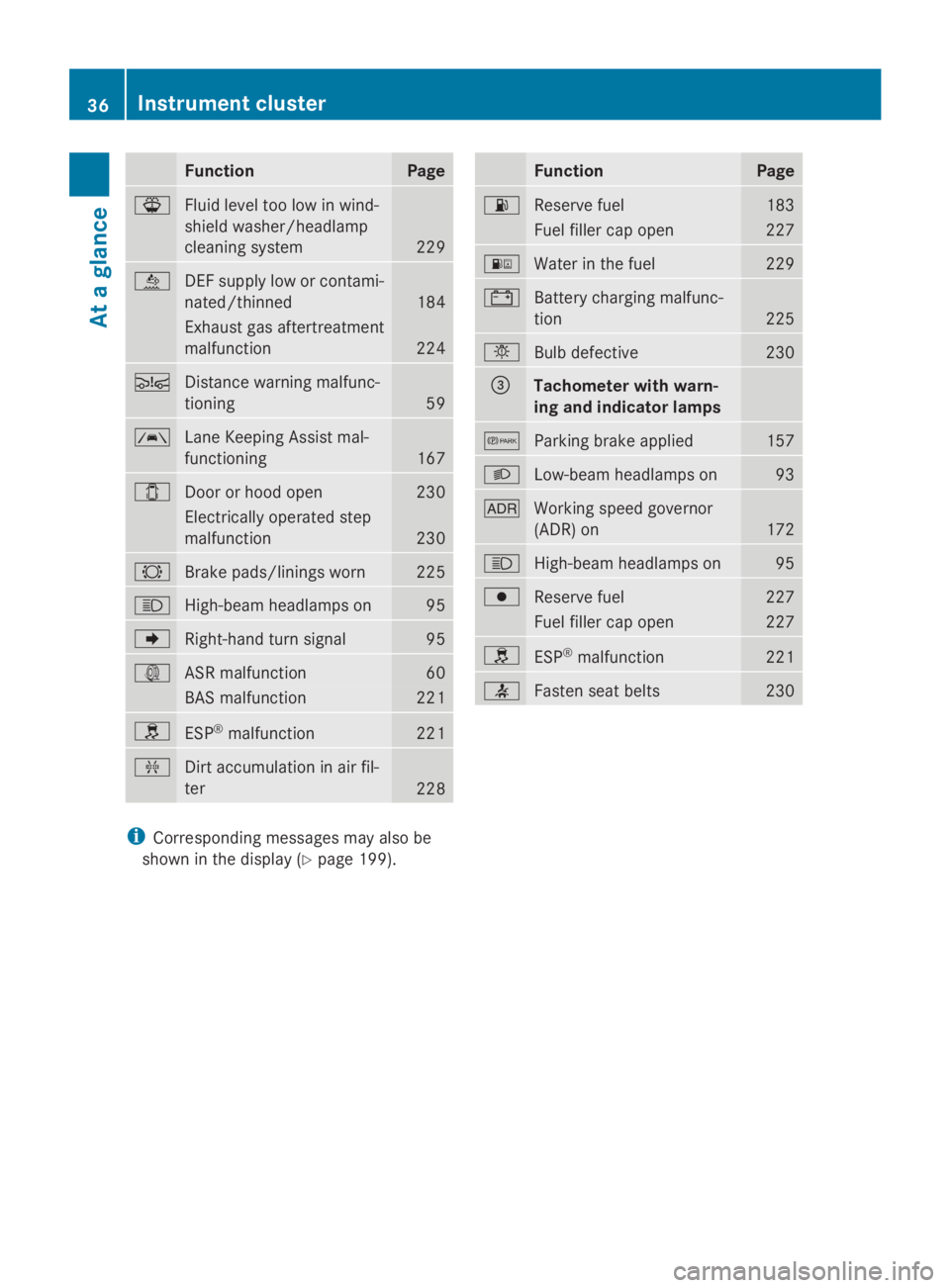
Function Page
00B1
Fluid level too low in wind-
shield washer/headlamp
cleaning system
229
00E2
DEF supply low or contami-
nated/thinned
184
Exhaust gas aftertreatment
malfunction 224
00C7
Distance warning malfunc-
tioning
59
00B0
Lane Keeping Assist mal-
functioning
167
003E
Door or hood open 230
Electrically operated step
malfunction 230
0026
Brake pads/linings worn 225
0057
High-beam headlamps on 95
004D
Right-hand turn signal 95
003D
ASR malfunction 60
BAS malfunction 221
0089
ESP
®
malfunction 221
009F
Dirt accumulation in air fil-
ter
228 Function Page
00B4
Reserve fuel 183
Fuel filler cap open 227
00B8
Water in the fuel 229
003D
Battery charging malfunc-
tion
225
0049
Bulb defective 230
0087
Tachometer with warn-
ing and indicator lamps 0066
Parking brake applied 157
0058
Low-beam headlamps on 93
004E
Working speed governor
(ADR) on
172
0057
High-beam headlamps on 95
0077
Reserve fuel 227
Fuel filler cap open 227
0089
ESP
®
malfunction 221
0076
Fasten seat belts 230
i
Corresponding messages may also be
shown in the display (Y page 199).36
Instrument clusterAt a glance
Page 39 of 338
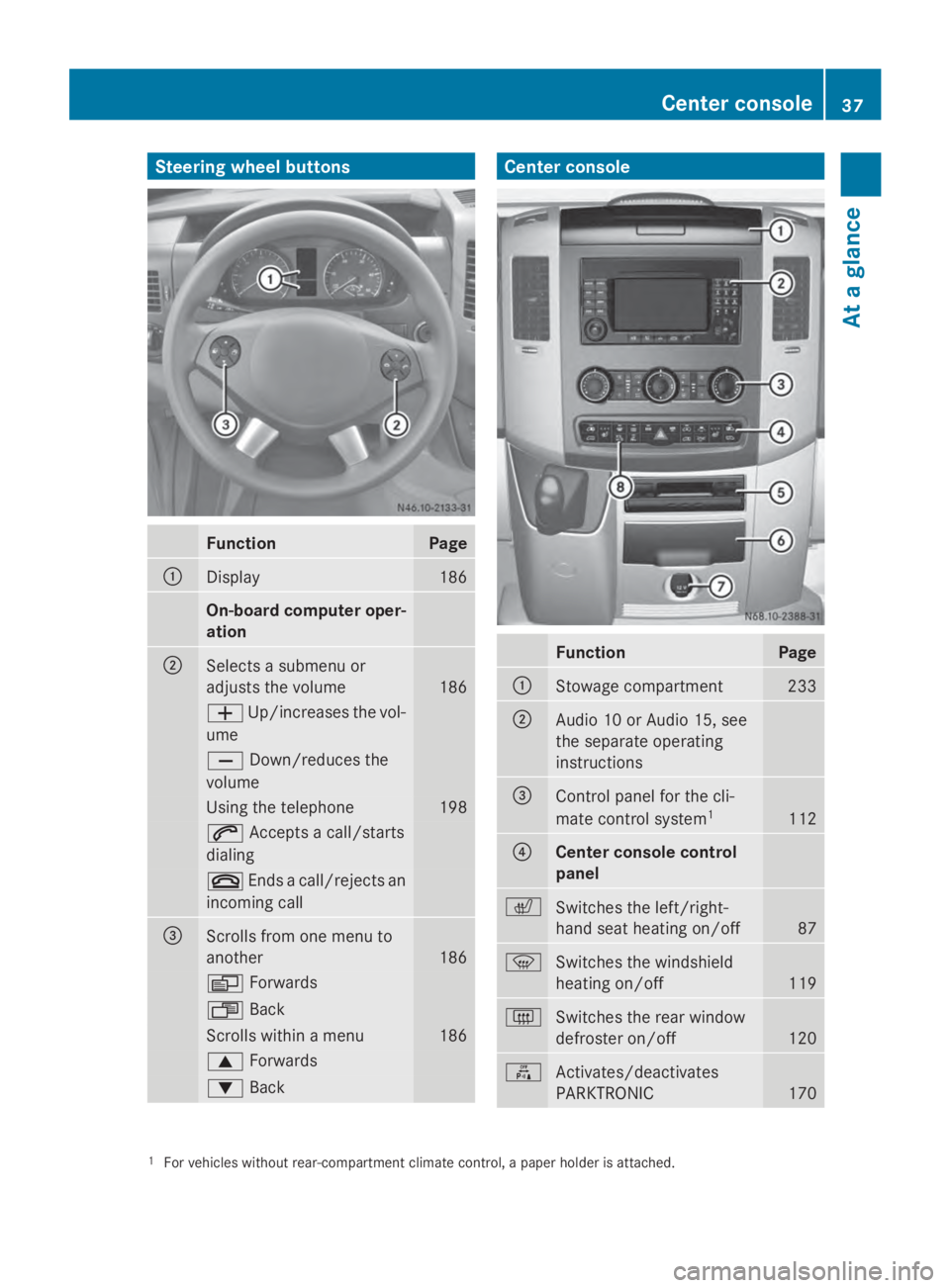
Steering wheel buttons
Function Page
0043
Display 186
On-board computer oper-
ation
0044
Selects a submenu or
adjusts the volume
186
0081
Up/increases the vol-
ume 0082
Down/reduces the
volume Using the telephone 198
0061
Accepts a call/starts
dialing 0076
Ends a call/rejects an
incoming call 0087
Scrolls from one menu to
another
186
0080
Forwards 007F
Back Scrolls within a menu 186
0063
Forwards 0064
Back Center console
Function Page
0043
Stowage compartment 233
0044
Audio 10 or Audio 15, see
the separate operating
instructions
0087
Control panel for the cli-
mate control system
1 112
0085
Center console control
panel
0072
Switches the left/right-
hand seat heating on/off
87
0085
Switches the windshield
heating on/off
119
0071
Switches the rear window
defroster on/off
120
0069
Activates/deactivates
PARKTRONIC
170
1
For vehicles without rear-compartment climate control, a paper holder is attached. Center console
37At a glance
Page 60 of 338
ESP
®
therefore permits the vehicle's over-
steering and understeering characteristics,
which facilitates an extremely sporty driving
style. This driving style requires an extremely
qualified and experienced driver. COLLISION PREVENTION ASSIST
COLLISION PREVENTION ASSIST General notes
COLLISION PREVENTION ASSIST comprises
the distance warning function and adaptive
Brake Assist.
Distance warning function
Important safety notes
i Note the section on 'Important safety
notes' ( Ypage 56). G
WARNING
The distance warning function does not react:
R to people or animals
R to oncoming vehicles
R to crossing traffic
R when cornering
Thus, the distance warning function cannot
provide a warning in all critical situations.
There is a risk of an accident.
Always pay careful attention to the traffic sit-
uation and be ready to brake. G
WARNING
The distance warning function cannot always
clearly identify objects and complex traffic
situations.
In such cases, the distance warning function
may:
R give an unnecessary warning
R not give a warning
There is a risk of an accident.
Always pay careful attention to the traffic sit-
uation and do not rely solely on the distance
warning function. Operation
The distance warning function can help you
to minimize the risk of a front-end collision
with a vehicle ahead or reduce the effects of
such a collision. If the distance warning func-
tion detects that there is a risk of a collision,
you will be warned visually and acoustically.
Without your intervention, the distance warn-
ing function cannot prevent a collision.
The distance warning function will issue a
warning at speeds of around 20 mph
(30 km/h) or more if:
R
you approach a vehicle ahead of you very
quickly. You will then hear an intermittent
warning tone and the 00C7warning lamp in
the instrument cluster flashes.
X Brake immediately in order to increase the
distance from the vehicle in front.
Or
X Take evasive action provided it is safe to do
so.
If you want the distance warning function to
assist you, the function must be activated and
operational.
Due to the nature of the system, particularly
complicated driving conditions may cause the
system to display an unnecessary warning.
With the help of the radar sensor system, the
distance warning function can detect obsta-
cles that are in the path of your vehicle for an
extended period of time.
From a speed of around 45 mph (70 km/h),
the distance warning function can also react
to stationary obstacles, such as stopped or
parked vehicles.
If you approach an obstacle and the distance
warning function detects a risk of a collision,
the system will alert you both visually and
acoustically.
In particular, the detection of obstacles can
be impaired in the case of:
R dirt on the sensors or anything else cover-
ing the sensors
R it is snowing or raining heavily 58
Driving safety systemsSafety
Page 61 of 338
R
there is interference from other radar sour-
ces
R there are strong radar reflections, for
example in parking garages
R a narrow vehicle is traveling in front, e.g. a
motorbike
R a vehicle is traveling in front on a different
line
Following damage to the front end of the vehi-
cle, have the configuration and operation of
the radar sensor checked at a qualified spe-
cialist workshop. This also applies to colli-
sions at slow speeds where there is no visible
damage to the front of the vehicle.
Activating/deactivating the distance
warning function
When you switch on the engine, the distance
warning function switches on after a few sec-
onds.
X To deactivate: press the00D4button
(Y page 37).
Vehicles without steering wheel but-
tons: the00C7 warning lamp in the instru-
ment cluster lights up and the OFF
OFF message
flashes.
Vehicles with steering wheel buttons:
the 00C7 warning lamp in the instrument
cluster lights up and the message Dis‐ Dis‐
tance warning deactivated
tance warning deactivated appears.
X To activate: press the00D4button again
(Y page 37).
Vehicles without steering wheel but-
tons: the00C7 warning lamp in the instru-
ment cluster goes out and the ON
ON message
flashes.
Vehicles with steering wheel buttons:
the 00C7 warning lamp in the instrument
cluster goes out and the message Dis‐ Dis‐
tance
tance warning
warning activated
activated appears in the
multifunction display.
Adaptive Brake Assist
i Observe the "Important safety notes" sec-
tion for driving safety systems
(Y page 56). G
WARNING
Adaptive Brake Assist cannot always clearly
identify objects and complex traffic situa-
tions.
In such cases, Adaptive Brake Assist may:
R intervene unnecessarily
R not intervene
There is a risk of an accident.
Always pay careful attention to the traffic sit-
uation and be ready to brake. Terminate the
intervention in a non-critical driving situation. G
WARNING
Adaptive Brake Assist does not react:
R to people or animals
R to oncoming vehicles
R to crossing traffic
R to stationary obstacles
R when cornering
As a result, Adaptive Brake Assist may not
intervene in all critical conditions. There is a
risk of an accident.
Always pay careful attention to the traffic sit-
uation and be ready to brake.
Adaptive Brake Assist aids you when braking
during hazardous situations at speeds above
20 mph (30 km/h). With the help of the radar
sensor system, adaptive Brake Assist can rec-
ognize obstacles that are in the path of your
vehicle for an extended period of time.
When you approach an obstacle and adaptive
Brake Assist detects that there is a risk of a
collision, adaptive Brake Assist calculates the
braking force necessary to avoid a collision.
Should you apply the brakes forcefully, adap-
tive Brake Assist will automatically increase
the braking force to the calculated level.
X Keep the brake pedal depressed until the
emergency braking situation is over.
ABS prevents the wheels from locking. Driving safety systems
59Safety Z
Page 76 of 338
In order to reduce risks:
R
draw the passengers' attention to the elec-
trical step. Wait until the electrical step is
fully extended.
R do not jump out of the vehicle.
R only use the grab handle and step. Only
they are designed for such a load.
R keep grab handles, access steps and entry
sills free from dirt, e.g. mud, clay, snow and
ice. Operation and obstacle detection
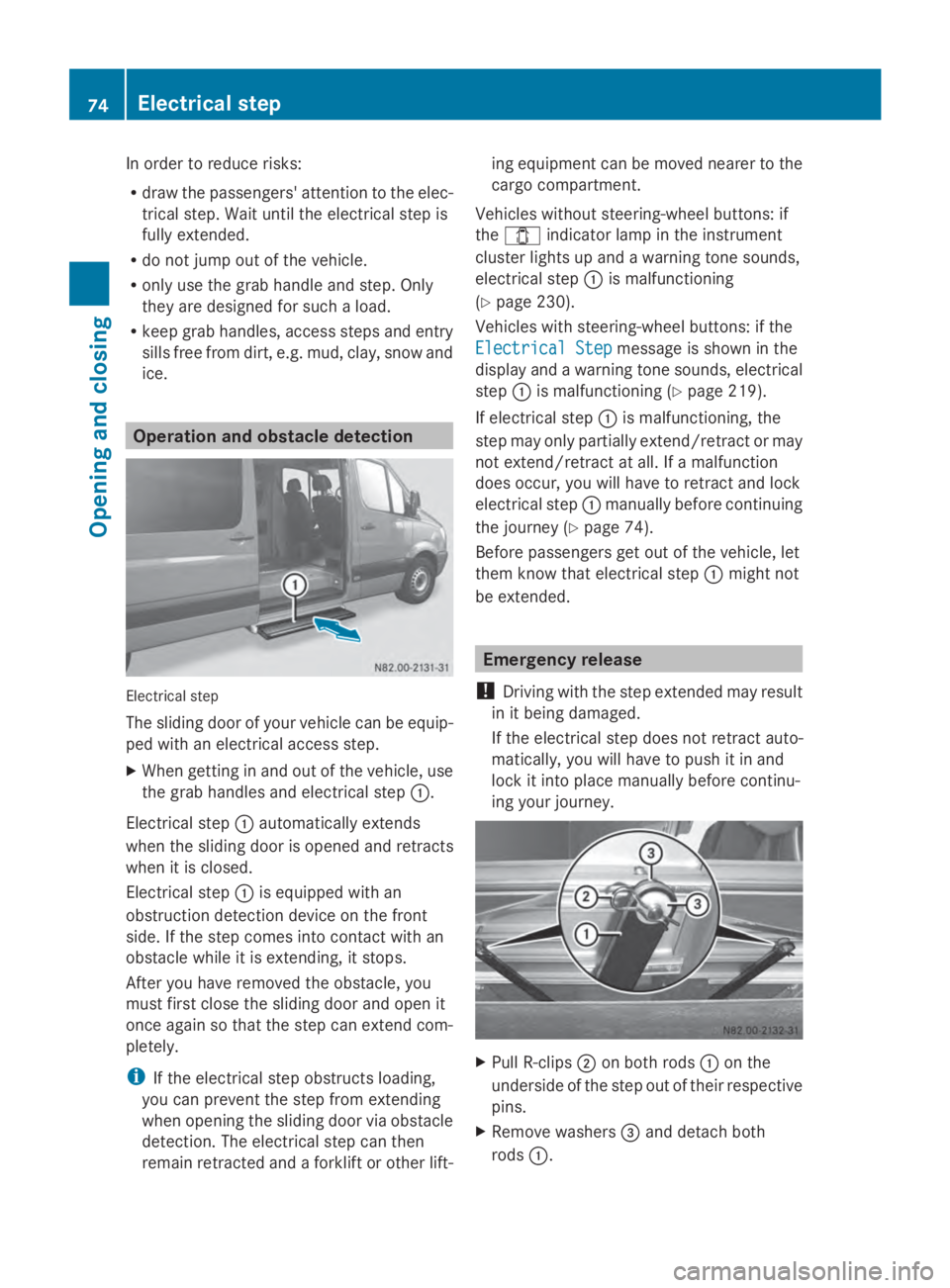
Electrical step
The sliding door of your vehicle can be equip-
ped with an electrical access step.
X When getting in and out of the vehicle, use
the grab handles and electrical step 0043.
Electrical step 0043automatically extends
when the sliding door is opened and retracts
when it is closed.
Electrical step 0043is equipped with an
obstruction detection device on the front
side. If the step comes into contact with an
obstacle while it is extending, it stops.
After you have removed the obstacle, you
must first close the sliding door and open it
once again so that the step can extend com-
pletely.
i If the electrical step obstructs loading,
you can prevent the step from extending
when opening the sliding door via obstacle
detection. The electrical step can then
remain retracted and a forklift or other lift- ing equipment can be moved nearer to the
cargo compartment.
Vehicles without steering-wheel buttons: if
the 003E indicator lamp in the instrument
cluster lights up and a warning tone sounds,
electrical step 0043is malfunctioning
(Y page 230).
Vehicles with steering-wheel buttons: if the
Electrical Step
Electrical Step message is shown in the
display and a warning tone sounds, electrical
step 0043is malfunctioning (Y page 219).
If electrical step 0043is malfunctioning, the
step may only partially extend/retract or may
not extend/retract at all. If a malfunction
does occur, you will have to retract and lock
electrical step 0043manually before continuing
the journey (Y page 74).
Before passengers get out of the vehicle, let
them know that electrical step 0043might not
be extended. Emergency release
! Driving with the step extended may result
in it being damaged.
If the electrical step does not retract auto-
matically, you will have to push it in and
lock it into place manually before continu-
ing your journey. X
Pull R-clips 0044on both rods 0043on the
underside of the step out of their respective
pins.
X Remove washers 0087and detach both
rods 0043. 74
Electrical stepOpening and closing
Page 95 of 338
For this reason, check the condition and func-
tion of your vehicle's lighting system and, if
necessary, that of the trailer before each jour-
ney.
The bulb failure indicator monitors all of the
exterior lighting lamps, except the perimeter
lamp and the trailer lighting. If a bulb fails,
either the 0049(Ypage 35) indicator lamp
lights up, or you will see a corresponding
message in the display (Y page 210).
i Depending on the equipment, the bulb
failure indicator can fail for all lamps with
the exception of the turn signal lamps. Light switch
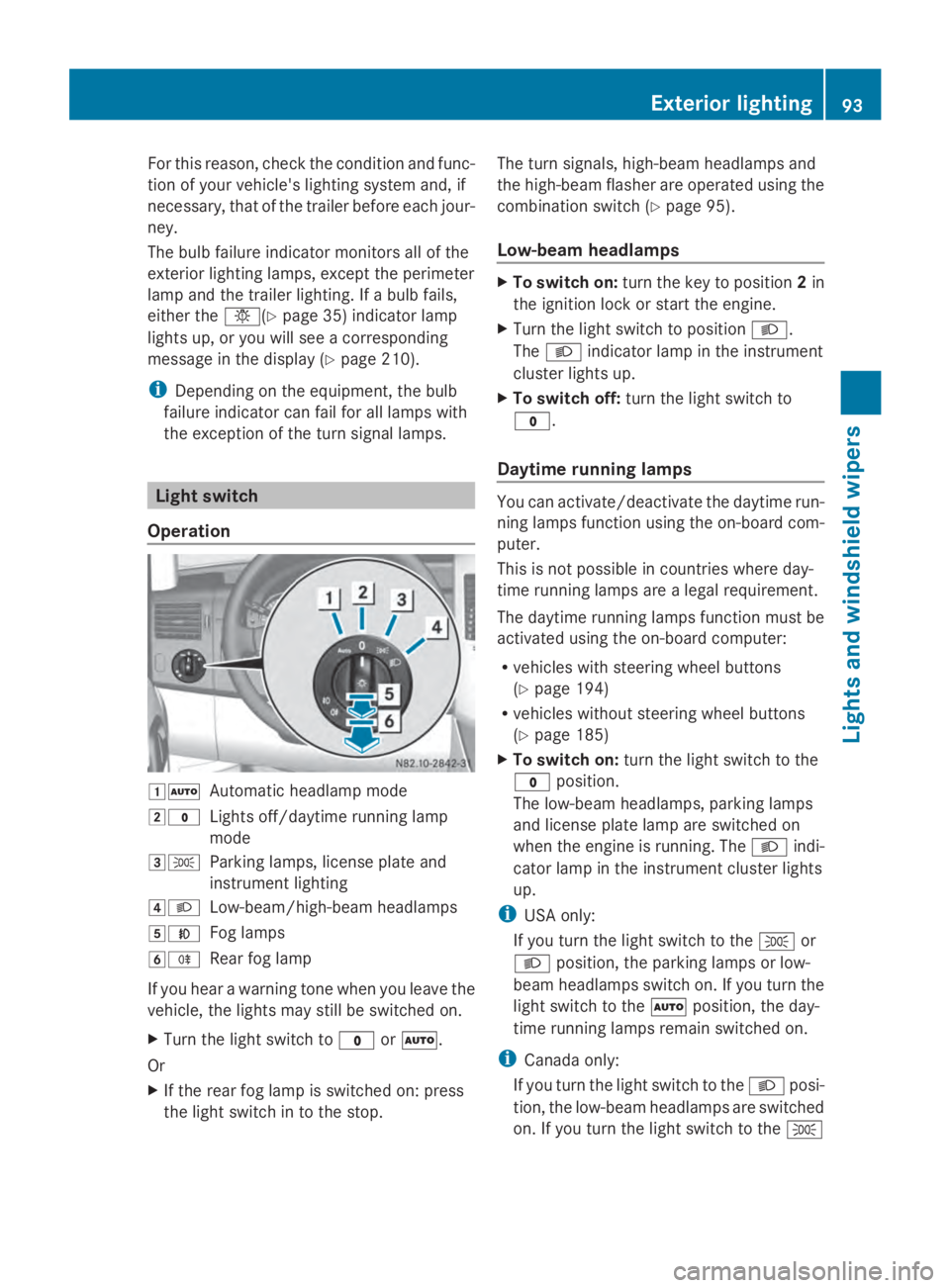
Operation 00470058
Automatic headlamp mode
0048003F Lights off/daytime running lamp
mode
00490060 Parking lamps, license plate and
instrument lighting
004A0058 Low-beam/high-beam headlamps
004B005A Fog lamps
004C005E Rear fog lamp
If you hear a warning tone when you leave the
vehicle, the lights may still be switched on.
X Turn the light switch to 003For0058.
Or
X If the rear fog lamp is switched on: press
the light switch in to the stop. The turn signals, high-beam headlamps and
the high-beam flasher are operated using the
combination switch (Y
page 95).
Low-beam headlamps X
To switch on: turn the key to position 2in
the ignition lock or start the engine.
X Turn the light switch to position 0058.
The 0058 indicator lamp in the instrument
cluster lights up.
X To switch off: turn the light switch to
003F.
Daytime running lamps You can activate/deactivate the daytime run-
ning lamps function using the on-board com-
puter.
This is not possible in countries where day-
time running lamps are a legal requirement.
The daytime running lamps function must be
activated using the on-board computer:
R
vehicles with steering wheel buttons
(Y page 194)
R vehicles without steering wheel buttons
(Y page 185)
X To switch on: turn the light switch to the
003F position.
The low-beam headlamps, parking lamps
and license plate lamp are switched on
when the engine is running. The 0058indi-
cator lamp in the instrument cluster lights
up.
i USA only:
If you turn the light switch to the 0060or
0058 position, the parking lamps or low-
beam headlamps switch on. If you turn the
light switch to the 0058position, the day-
time running lamps remain switched on.
i Canada only:
If you turn the light switch to the 0058posi-
tion, the low-beam headlamps are switched
on. If you turn the light switch to the 0060 Exterior lighting
93Lights and windshield wipers Z
Page 99 of 338
Active light function
The active light function is a system that
moves the headlamps according to the steer-
ing movements of the front wheels. In this
way, relevant areas will be illuminated to a
greater extent while driving. This allows you
to recognize pedestrians, cyclists and ani-
mals.
Active: when the lights are switched on. Highbeam Assist
General notes You can use this function to set the head-
lamps to change between high beam and low
beam automatically. The system recognizes
vehicles with their lights on, either approach-
ing from the opposite direction or traveling in
front of your vehicle, and consequently
switches the headlamps from high beam to
low beam.
Once the system no longer detects any other
vehicles, it reactivates the high-beam head-
lamps.
The system's optical sensor is located behind
the windshield near the overhead control
panel.
Important safety notes G
WARNING
Highbeam Assist does not recognize road
users:
R who have no lights, e.g. pedestrians
R who have poor lighting, e.g. cyclists
R whose lighting is blocked, e.g. by a barrier
In very rare cases, Highbeam Assist may fail
to recognize other road users who have lights,
or may recognize them too late. In this or sim-
ilar situations, the automatic high-beam head-
lamps will not be deactivated or will be acti-
vated regardless. There is a risk of an acci-
dent. Always carefully observe the traffic conditions
and switch off the high-beam headlamps in
good time.
Highbeam Assist cannot take into account
road, weather or traffic conditions. Highbeam
Assist is only an aid. You are responsible for
adjusting the vehicle's lighting to the prevail-
ing light, visibility and traffic conditions.
In particular, the detection of obstacles can
be restricted if there is:
R poor visibility, e.g. due to fog, heavy rain or
snow
R dirt on the sensors or anything else cover-
ing the sensors
Activating/deactivating Highbeam
Assist X
To activate: switch on the Highbeam
Assist function using the on-board com-
puter (Y page 194).
X Turn the light switch to the 0058position.
X Press the combination switch beyond the
pressure point in the direction of arrow 0043
(Y page 95).
Highbeam Assist is active.
The or
00CE indicator lamp in the
multifunction display lights up when it is
dark and the light sensor activates the low-
beam headlamps.
If you are driving at speeds above approx-
imately 22 mph (35 km/h) and no other
road users have been detected:
The high-beam headlamps are switched on
automatically. The 0057indicator lamp in
the instrument cluster also lights up.
If you are driving at speeds below approx-
imately 19 mph (30 km/h) other road users
are recognized or the roads are adequately
lit:
The high-beam headlamps are switched off
automatically. The 0057indicator lamp in
the instrument cluster goes out. The 00CE Exterior lighting
97Lights and windshield wipers Z
Page 100 of 338
or indicator lamp in the multifunc-
tion display remains lit.
X To deactivate: move the combination
switch back to its normal position or move
the light switch to another position.
The 00CE or indicator lamp in the
multifunction display goes out. Headlamps fogged up on the inside
The headlamps may fog up on the inside if
there is high atmospheric humidity.
X Switch on the low-beam headlamps and
drive off.
The level of moisture diminishes, depend-
ing on the length of the journey and the
weather conditions (humidity and temper-
ature).
If the level of moisture does not diminish:
X Have the headlamps checked at a qualified
specialist workshop. Interior lighting
Switching the dashboard lighting on/
off
Overview Standard interior light
0047
Interior light switched on
0048 Interior light switched off
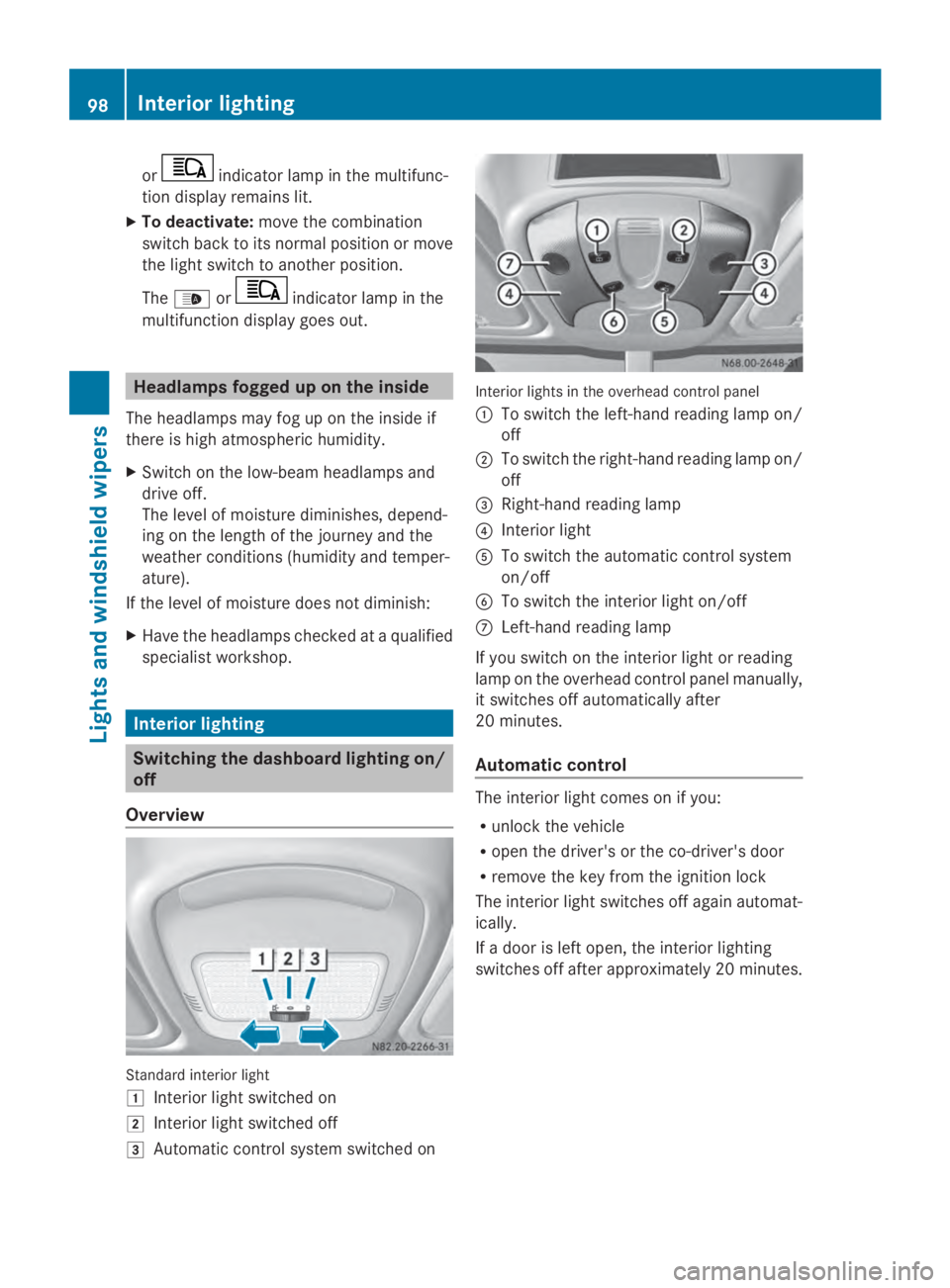
0049 Automatic control system switched on Interior lights in the overhead control panel
0043 To switch the left-hand reading lamp on/
off
0044 To switch the right-hand reading lamp on/
off
0087 Right-hand reading lamp
0085 Interior light
0083 To switch the automatic control system
on/off
0084 To switch the interior light on/off
006B Left-hand reading lamp
If you switch on the interior light or reading
lamp on the overhead control panel manually,
it switches off automatically after
20 minutes.
Automatic control The interior light comes on if you:
R
unlock the vehicle
R open the driver's or the co-driver's door
R remove the key from the ignition lock
The interior light switches off again automat-
ically.
If a door is left open, the interior lighting
switches off after approximately 20 minutes. 98
Interior lightingLights and windshield wipers
Page 116 of 338
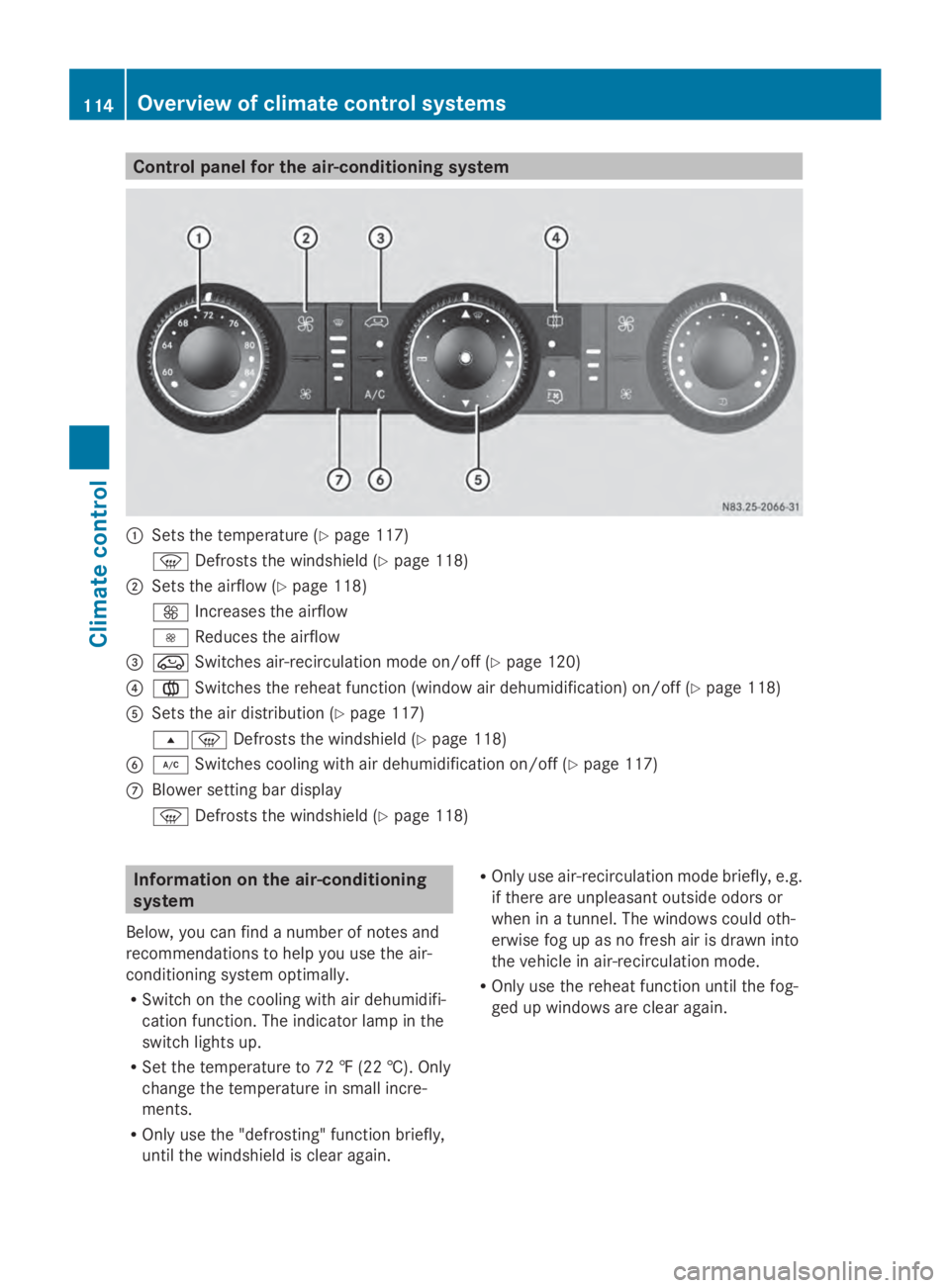
Control panel for the air-conditioning system
0043
Sets the temperature (Y page 117)
0085 Defrosts the windshield (Y page 118)
0044 Sets the airflow (Y page 118)
0097 Increases the airflow
0095 Reduces the airflow
0087 008A Switches air-recirculation mode on/off (Y page 120)
0085 0083 Switches the reheat function (window air dehumidification) on/off ( Ypage 118)
0083 Sets the air distribution (Y page 117)
007E0085 Defrosts the windshield (Y page 118)
0084 005A Switches cooling with air dehumidification on/off ( Ypage 117)
006B Blower setting bar display
0085 Defrosts the windshield (Y page 118)Information on the air-conditioning
system
Below, you can find a number of notes and
recommendations to help you use the air-
conditioning system optimally.
R Switch on the cooling with air dehumidifi-
cation function. The indicator lamp in the
switch lights up.
R Set the temperature to 72 ‡ (22 †). Only
change the temperature in small incre-
ments.
R Only use the "defrosting" function briefly,
until the windshield is clear again. R
Only use air-recirculation mode briefly, e.g.
if there are unpleasant outside odors or
when in a tunnel. The windows could oth-
erwise fog up as no fresh air is drawn into
the vehicle in air-recirculation mode.
R Only use the reheat function until the fog-
ged up windows are clear again. 114
Overview of climate control systemsClimate control
Page 118 of 338
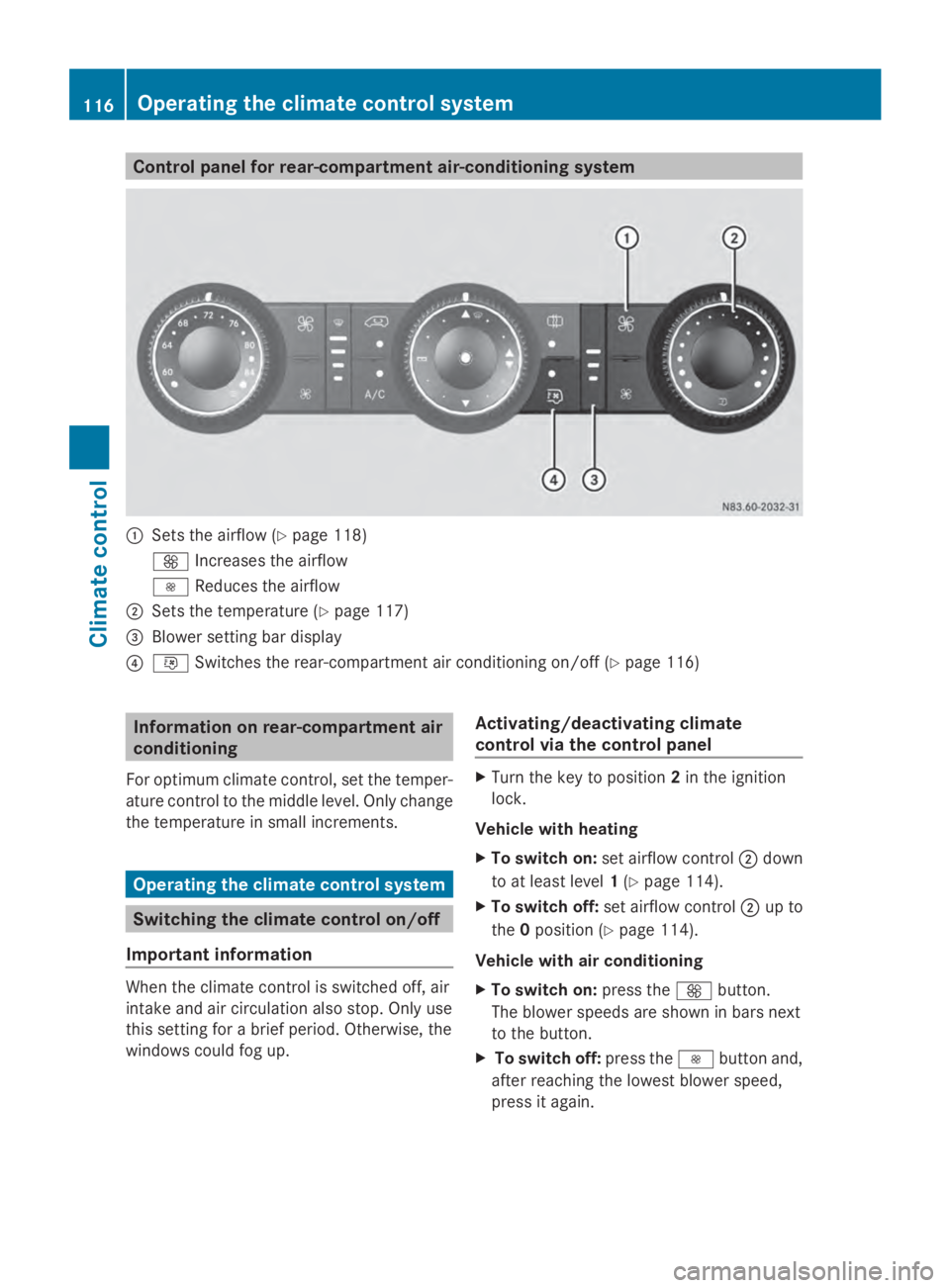
Control panel for rear-compartment air-conditioning system
0043
Sets the airflow (Y page 118)
0097 Increases the airflow
0095 Reduces the airflow
0044 Sets the temperature (Y page 117)
0087 Blower setting bar display
0085 0074 Switches the rear-compartment air conditioning on/off (Y page 116)Information on rear-compartment air
conditioning
For optimum climate control, set the temper-
ature control to the middle level. Only change
the temperature in small increments. Operating the climate control system
Switching the climate control on/off
Important information When the climate control is switched off, air
intake and air circulation also stop. Only use
this setting for a brief period. Otherwise, the
windows could fog up. Activating/deactivating climate
control via the control panel X
Turn the key to position 2in the ignition
lock.
Vehicle with heating
X To switch on: set airflow control 0044down
to at least level 1(Y page 114).
X To switch off: set airflow control 0044up to
the 0position (Y page 114).
Vehicle with air conditioning
X To switch on: press the0097button.
The blower speeds are shown in bars next
to the button.
X To switch off: press the0095button and,
after reaching the lowest blower speed,
press it again. 116
Operating the climate control systemClimate control