reset MERCEDES-BENZ SPRINTER 2014 MY14 Operator’s Manual
[x] Cancel search | Manufacturer: MERCEDES-BENZ, Model Year: 2014, Model line: SPRINTER, Model: MERCEDES-BENZ SPRINTER 2014Pages: 338, PDF Size: 6.78 MB
Page 199 of 338
X
Press the 0063button to select the Key
Key
function.
The selection marker is on the current set-
ting.
X Press the 0081or0082 button to activate
or deactivate key dependency. Trip computer menu
General notes You can call up or reset statistical data for the
vehicle in the Trip computer menu.
i When you call up the trip computer again,
it displays the last function called up.
The units of the statistical information dis-
played are set permanently for each spe-
cific country, and are therefore independ-
ent of the units selected in the Settings
Settings
menu.
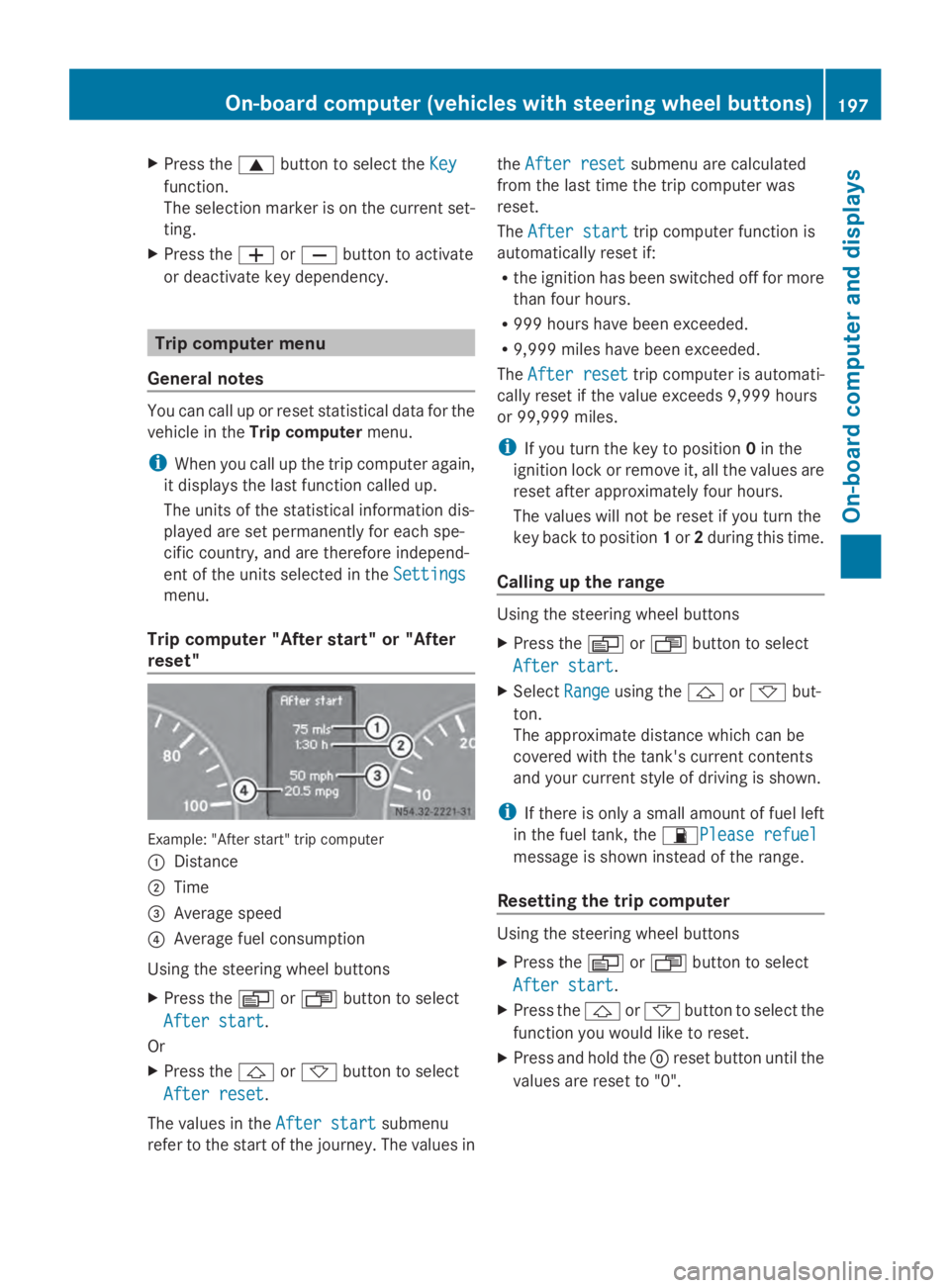
Trip computer "After start" or "After
reset" Example: "After start" trip computer
0043
Distance
0044 Time
0087 Average speed
0085 Average fuel consumption
Using the steering wheel buttons
X Press the 0080or007F button to select
After start
After start.
Or
X Press the 0041or0068 button to select
After reset After reset.
The values in the After start
After startsubmenu
refer to the start of the journey. The values in the
After reset
After reset submenu are calculated
from the last time the trip computer was
reset.
The After start After start trip computer function is
automatically reset if:
R the ignition has been switched off for more
than four hours.
R 999 hours have been exceeded.
R 9,999 miles have been exceeded.
The After reset
After reset trip computer is automati-
cally reset if the value exceeds 9,999 hours
or 99,999 miles.
i If you turn the key to position 0in the
ignition lock or remove it, all the values are
reset after approximately four hours.
The values will not be reset if you turn the
key back to position 1or 2during this time.
Calling up the range Using the steering wheel buttons
X
Press the 0080or007F button to select
After start After start.
X Select Range
Rangeusing the 0041or0068 but-
ton.
The approximate distance which can be
covered with the tank's current contents
and your current style of driving is shown.
i If there is only a small amount of fuel left
in the fuel tank, the 00B5Please refuelPlease refuel
message is shown instead of the range.
Resetting the trip computer Using the steering wheel buttons
X
Press the 0080or007F button to select
After start After start.
X Press the 0041or0068 button to select the
function you would like to reset.
X Press and hold the 0045reset button until the
values are reset to "0". On-board computer (vehicles with steering wheel buttons)
197On-board computer and displays Z
Page 202 of 338
Vehicles with steering wheel buttons
The on-board computer shows warnings, mal-
functions or additional information in the dis-
play. A warning tone sounds with certain dis-
play messages. Display messages of a high
priority are shown in red.
Please respond in accordance with the dis-
play messages and follow the additional
notes in this Operator's Manual.
You can hide low-priority display messages by
pressing the 0080,007F,0041or0068 but-
ton on the steering wheel or the 0045reset but-
ton.
You cannot hide display messages of the
highest priority. These messages will con-
tinue to be shown in the display until their
cause has been eliminated.
The on-board computer stores certain display
messages in the message memory
(Y page 200).
The following shows all the messages that
could appear in the display, arranged alpha-
betically. Message memory
The on-board computer only records and
shows malfunctions and warnings from cer-
tain systems. Therefore, make sure that your
vehicle is safe to use. You could cause an
accident by driving an unsafe vehicle.
The on-board computer stores certain display
messages. In the Message memory menu,
you can call up stored display messages.
Using the steering wheel buttons
X Press the 0080or007F button repeatedly
until the number of stored display mes- sages, e.g.
2
2 messages messages, appears in the dis-
play.
If no malfunctions have occurred, the No No
messages
messages message appears.
X Scroll through the stored display messages
with the 0041or0068 button.
X To exit the message memory menu:
press the 0080or007F button.
When you switch off the ignition, all display
messages are deleted from the message
memory. 200
Display messagesOn-board computer and displays
Page 265 of 338
Reconnecting the starter battery
!
Always connect the battery in the order
described below. Never swap the terminal
clamps. You may otherwise damage the
vehicle electronics.
X Fold the positive terminal clamp with the
pre-fuse box down to the terminal.
X Connect the positive terminal clamp.
X Attach the cover to the positive terminal.
X Connect the negative terminal clamp.
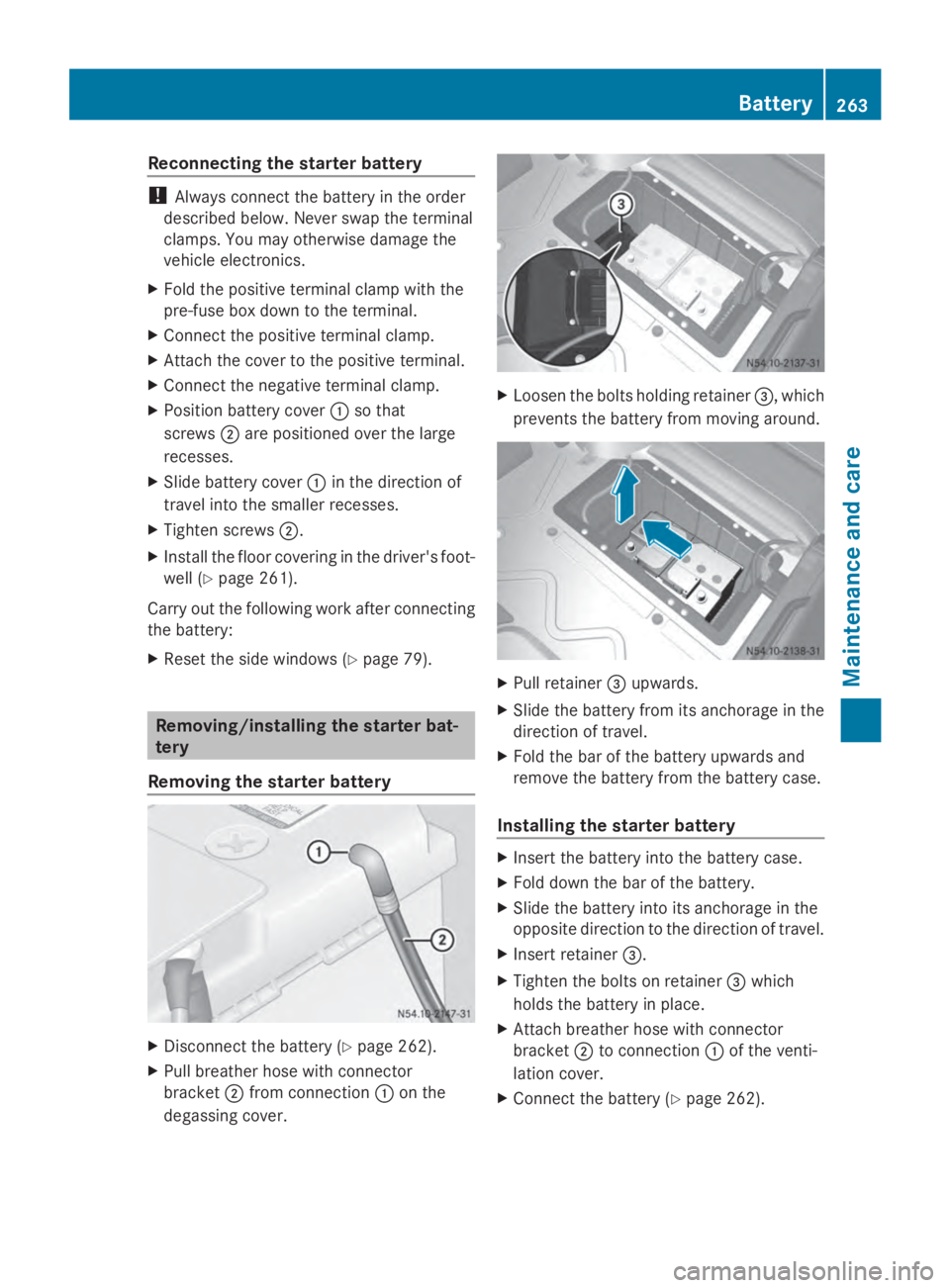
X Position battery cover 0043so that
screws 0044are positioned over the large
recesses.
X Slide battery cover 0043in the direction of
travel into the smaller recesses.
X Tighten screws 0044.
X Install the floor covering in the driver's foot-
well (Y page 261).
Carry out the following work after connecting
the battery:
X Reset the side windows (Y page 79).Removing/installing the starter bat-
tery
Removing the starter battery X
Disconnect the battery ( Ypage 262).
X Pull breather hose with connector
bracket 0044from connection 0043on the
degassing cover. X
Loosen the bolts holding retainer 0087, which
prevents the battery from moving around. X
Pull retainer 0087upwards.
X Slide the battery from its anchorage in the
direction of travel.
X Fold the bar of the battery upwards and
remove the battery from the battery case.
Installing the starter battery X
Insert the battery into the battery case.
X Fold down the bar of the battery.
X Slide the battery into its anchorage in the
opposite direction to the direction of travel.
X Insert retainer 0087.
X Tighten the bolts on retainer 0087which
holds the battery in place.
X Attach breather hose with connector
bracket 0044to connection 0043of the venti-
lation cover.
X Connect the battery (Y page 262). Battery
263Maintenance and care Z
Page 266 of 338
Disconnecting and connecting the
additional battery (engine compart-
ment)
Important safety notes G
WARNING
During the charging process, a battery produ-
ces hydrogen gas. If a short circuit occurs or
sparks are created, the hydrogen gas can
ignite. There is a risk of an explosion.
R Make sure that the positive terminal of a
connected battery does not come into con-
tact with vehicle parts.
R Never place metal objects or tools on a bat-
tery.
R It is important that you observe the descri-
bed order of the battery terminals when
connecting and disconnecting a battery.
R When jump-starting, make sure that the
battery poles with identical polarity are
connected.
R It is particularly important to observe the
described order when connecting and dis-
connecting the jumper cables.
R Never connect or disconnect the battery
terminals while the engine is running.
Disconnecting the additional battery !
Switch off the engine and remove the key
from the ignition lock before you loosen or
disconnect the terminal clamps. You may
otherwise destroy electronic components
such as the alternator.
Always disconnect the starter battery in the
battery case in the driver's footwell first.
! Always disconnect the battery in
the order described below. Never swap the
terminal clamps. You may otherwise dam-
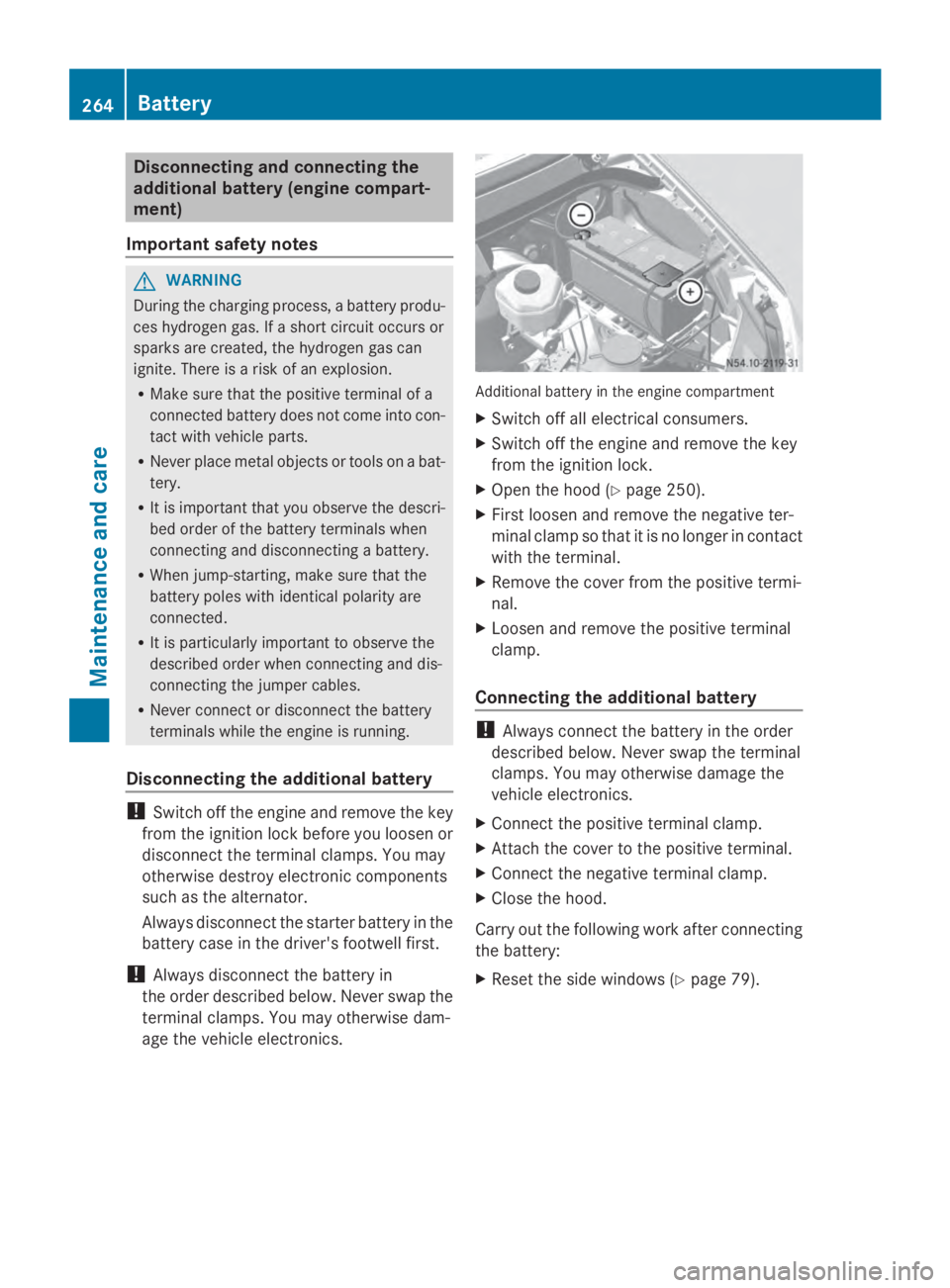
age the vehicle electronics. Additional battery in the engine compartment
X Switch off all electrical consumers.
X Switch off the engine and remove the key
from the ignition lock.
X Open the hood (Y page 250).
X First loosen and remove the negative ter-
minal clamp so that it is no longer in contact
with the terminal.
X Remove the cover from the positive termi-
nal.
X Loosen and remove the positive terminal
clamp.
Connecting the additional battery !
Always connect the battery in the order
described below. Never swap the terminal
clamps. You may otherwise damage the
vehicle electronics.
X Connect the positive terminal clamp.
X Attach the cover to the positive terminal.
X Connect the negative terminal clamp.
X Close the hood.
Carry out the following work after connecting
the battery:
X Reset the side windows ( Ypage 79). 264
BatteryMaintenance and care
Page 297 of 338
lamp in the instrument cluster (Y
page 229)
lights up.
The tire pressure is shown in 2 red rectangles.
The pressure of the tire concerned is shown
in one of the two rectangles (Y page 199).
Additionally, a warning tone sounds.
Each tire that is affected by a significant loss
of pressure is highlighted in the pressure dis-
play.
Restarting the tire pressure monitor When you restart the tire pressure monitor,
the currently set tire pressure are taken as
reference values for monitoring.
In most cases, the tire pressure monitor
detects the new reference values automati-
cally, e.g. after you have:
R changed the tire pressure
R mounted
R mounted new wheels or tires
However, you can also define reference val-
ues manually as described here.
Before restarting the tire pressure moni-
tor:
X Set the tire pressure to the value recom-
mended on the Tire and Loading Informa-
tion placard or the tire pressure table on
the B-pillar on the driver's side
(Y page 290).
Observe the notes on tire pressure when
doing so (Y page 290).
X Make sure that the tire pressure is correct
on all four wheels. Restarting the tire pressure monitor
(vehicles without steering wheel but-
tons):
X
Turn the key to position 2in the ignition
lock.
X Press the 0079menu button on the instru-
ment cluster repeatedly until the display
shows the following message:
+CAL- TPMS
+CAL- TPMS
X Press the 0074button on the instrument clus-
ter.
The display shows:
OK TPMS OK TPMS
The tire pressure monitor activation proc-
ess has begun. The tire pressures meas-
ured for the individual wheels are stored as
the new reference values, provided that the
tire pressure monitor considers them to be
plausible.
If you wish to cancel the restart:
X Press the 0075button or the 0079menu button
on the instrument cluster.
The activation process is canceled auto-
matically if 30 seconds elapse without
input.
Restarting the tire pressure monitor
(vehicles with steering wheel buttons):
X Turn the key to position 2in the ignition
lock.
X Press the 0080or007F button on the steer-
ing wheel repeatedly until the standard dis-
play is shown ( Ypage 189).
X Press the 0041or0068 button on the steer-
ing wheel repeatedly until the current pres-
sure of the individual tires is displayed or
the display shows the following message:
Tire Tire pres.
pres. displayed
displayed after
afterdriving
driving
for several minutes
for several minutes
X Press the 0045reset button on the instru-
ment cluster.
The display shows the following message: Tire pressure
295Wheels and tires Z