interior lights MERCEDES-BENZ SPRINTER 2014 MY14 Operator’s Manual
[x] Cancel search | Manufacturer: MERCEDES-BENZ, Model Year: 2014, Model line: SPRINTER, Model: MERCEDES-BENZ SPRINTER 2014Pages: 338, PDF Size: 6.78 MB
Page 8 of 338
Brakes
ABS .................................................. 56
Adaptive Brake Assist ......................59
Applying the parking brake ............152
BAS .................................................. 57
Brake fluid (notes) .........................328
Checking brake fluid leve l.............. 256
Display messages ..........................207
EBD .................................................. 57
Important safety notes ..................156
Maintenance .................................. 221
Parking brake (notes) ..................... 157
Riding tips ...................................... 156
Brake system
Malfunction ................................... .207
Warning lamp ................................. 221
Breakdown
Fire extinguisher ............................ 278
First-aid kit .................................... 277
Jump-starting ................................. 278
Reflective safety jacket .................. 277
Vehicle tool kit ............................... 276
Warning lamp ................................. 277
Warning triangle ............................ 277
see Flat tire
see Towing away
see Tow-starting
Bulb
see Changing a bulb
Bulb failure indicator ..........................92C
Care Car wash ........................................ 267
Display ........................................... 272
Exterior lights ................................ 270
Notes ............................................. 267
Paint .............................................. 269
Plastic trim .................................... 272
Power washer ................................ 268
Rear view camera .......................... 271
Roof lining ...................................... 273
Seat belt ........................................ 273
Seat cover ..................................... 272
Selector lever ................................ 272
Sensors ......................................... 270
Sliding door ................................... 271Steering wheel
............................... 272
Step (electrical) ............................. 271
Trim pieces .................................... 272
Washing by hand ........................... 268
Washing the engine .......................269
Wheels ........................................... 269
Windows ........................................ 269
Wiper blades .................................. 270
Cargo compartment
Activating/deactivating ventila-
tion ................................................ 133
Cargo compartment floor ...................28
Cargo tie-down points and tie
downs
Important safety notes ..................244
Cargo tie-down rings
Installing ........................................ 246
Permissible tensile loa d................. 331
Car wash (care) ................................. 267
CD player/CD changer ......................190
Cell phone see Mobile phone
Center console overview ....................37
Central locking Automatic locking ............................ 71
Important safety notes ....................71
Locking/unlocking (buttons) ...........71
Locking/unlocking (SmartKey) ........66
Locking/unlocking manually ............ 71
Central locking system
see Central locking
Changing bulbs
Additional indicators (roof) ............105
Backup lamp (Chassis Cab) ...........104
Backup lamps ................................ 103
Bi-Xenon bulbs ............................... 100
Brake lamps ................................... 103
Brake lamps (Chassis Cab) ............104
Cornering lamps ............................ 102
Courtesy lights ............................... 105
Daytime running lamps (halogen
headlamps) .................................... 102
Display message ............................ 210
Front interior light ..........................106
High-beam headlamps ...................101
Interior light ................................... 106
Interior lighting .............................. 106
License plate lamp .........................1046
Index
Page 14 of 338
Installing/removing the ball cou-
pling
.................................................... 175
Instrument cluster Fuel gage ....................................... 183
Important safety notes ..................182
Instrument cluster lighting .............183
Outside temperature displa y.......... 183
Overview .......................................... 34
Speedometer ................................. 183
Tachometer ................................... 183
Warning and indicator lamps ...........35
Instrument cluster lighting ..............183
Instrument lighting see Instrument cluster lighting
Interior lighting ................................... 98
Front ................................................ 98
Motion detectors ........................... 100
Notes on replacing bulbs ...............106
Replacing bulbs ............................. 106
Switching the rear compartment
lighting on centrally .........................99
Interior motion sensor
Arming ............................................. 63
Deactivating .................................... .64
Function ........................................... 63
Switching off .................................... 64J
Jack Jacking points ................................ 309
Preparation .................................... 309
Storage location ............................ 276
Using ............................................. 309
Jump-starting ..................................... 278K
Key Position in the ignition lock ............ 137
see SmartKey
Kickdown ........................................... 146 L
Lamps see Warning and indicator lamps
Lane Keeping Assist
Activating/deactivating .................167
Function/notes ............................. 166
Language
Display (vehicles with steering
wheel buttons) ............................... 192
Lashing points and tie downs
Permissible tensile loa d................. 331
LATCH-type (ISOFIX) child seat
anchors ................................................ 52
License plate lamp Replacing bulbs ............................. 104
License plate lamp (Chassis Cab)
Replacing bulbs ............................. 104
Lighting
Light switch ..................................... 93
see Lights
Lights
Activating/deactivating daytime
running lamps (on-board com-
puter with steering wheel but-
tons) .............................................. 194
Activating/deactivating daytime
running lamps (vehicles with
steering wheel buttons) ...................93
Activating/deactivating surround
lighting (vehicles with steering
wheel buttons) ............................... 195
Active light function .........................97
Automatic headlamp mode ..............94
Bulb failure indicator ........................92
Cornering light function ...................96
Driving abroad ............................... 155
Fog lamps ........................................ 94
Hazard warning lamps .....................96
Headlamp range .............................. 95
Highbeam Assist .............................. 97
High beam flasher ............................ 95
High-beam headlamps .....................95
Low-beam headlamps ......................93
Parking lamps .................................. 93
Rear fog lamp .................................. 9412
Index
Page 15 of 338
Setting the exterior lighting
delayed switch-off (vehicles with
steering wheel buttons)
.................195
Switching the daytime running
lamps on/off (switch) ......................93
Turn signals ..................................... 95
see Changing a bulb
see Interior lighting
Light sensor ......................................... 94
Limited Warranty ................................ 29
Load distribution ............................... 244
Loading guidelines Important safety notes ..................242
Loading rails
Installing cargo tie-down rings .......246
Maximum tensile strength .............331
Loads
Securing ........................................ 244
Transporting .................................. 242
Load securing aids
Carrier systems ............................. 247
Locator lighting
Setting (vehicles with steering
wheel buttons) ............................... 195
Locking
see Central locking
Locking and unlocking manually .......71
Locking centrally see Central locking
Low-beam headlamps
Display message ............................ 210
Driving abroad ............................... 155
Replacing bulbs ............................. 101
Switching on/off .............................. 93
Lumbar support ................................... 83M
M+S tires ............................................ 288
Maintenance ...................................... 258
Malfunctions Message memory (on-board com-
puter) ............................................. 200
Maximum speed
Speed limitation ............................ .155 Menu (vehicles with steering
wheel buttons)
Audio ............................................. 189
Operation ....................................... 188
Settings ......................................... 190
Telephone ...................................... 198
Message
see Display message
Message memory (on-board com-
puter) ................................................. .200
Mirrors Exterior mirrors ................................ 89
Rear-view mirror .............................. 89
Mobile navigation devices ................240
Mobile phone ..................................... 239
Important safety notes ..................239
Pre-installation ............................... 239
Type approval/frequency ..............318
Mounting wheels
Lowering the vehicle ......................312
Mounting a new wheel ...................311
Preparing the vehicle .....................308
Raising the vehicle .........................309
Removing and mounting the spare
wheel ............................................. 314
Removing a wheel ..........................311
Securing the vehicle against roll-
ing away ........................................ 308 N
Navigation Fittings for PND mobile navigation
devices .......................................... 240
Navigation lights
Replacing bulbs ............................. 101
Notes on breaking-in a new vehi-
cle ....................................................... 136 O
Occupant safety Air bags ........................................... 44
Children in the vehicle .....................50
Important safety notes ....................42 Index
13
Page 17 of 338
Plastic trim (cleaning instructions)
..272
Power supply Battery isolating switch .................136
Switching off .................................. 137
Switching on .................................. 137
Power take-off
Engine speed setting .....................172
Power washers .................................. 268
Power windows see Side windows
Preparing for a journey
Checks in the vehicle .....................138
Visual check of the vehicle exte-
rior ................................................. 138
Product information ............................22
Protection of the environment General notes .................................. 22
Pulling away ...................................... 139Q
Qualified specialist workshop ...........26 R
Radiator cover ..................................... 28
Radio Changing stations (vehicles with
steering wheel buttons) .................189
Setting station selection (vehicles
with steering wheel buttons) .........196
see separate operating instructions
Rain and light sensor
Setting the sensitivity (vehicles
with steering wheel buttons) .........196
Windshield wiper ........................... 107
Range (vehicles with steering
wheel buttons) .................................. 197
Rear bench seat Installing/removing (Passenger
Van) ................................................. 85
Stowage compartment (crewcab) ..235
Rear compartment
Activating/deactivating climate
control ........................................... 116
Setting the air vents ......................122Rear-compartment air-condition-
ing system
see Climate control
Rear-compartment heating
see Climate control
Rear door
Child-proof locks .............................. 55
Important safety notes ....................75
Opening/closing .............................. 75
Rear fog lamp
Replacing bulbs ............................. 103
Switching on/off .............................. 94
Rear fog lamp (Chassis Cab)
Replacing bulbs ............................. 104
Rear interior light
Replacing bulbs ............................. 106
Rear lamps
see Lights
Rear rack
Notes ............................................. 247
Rear view camera
Cleaning instructions .....................271
Important safety notes ..................171
Switching on .................................. 171
Rear-view mirror
Anti-glare mode ............................... 89
Rear window defroster
Problem (malfunction) ...................120
Switching on/off ........................... 120
Rear window wiper ...........................108
Switching on/off ........................... 108
Refilling
DEF filler neck ............................... 150
Important safety notes (Diesel
Exhaust Fluid – DEF) ......................149
Refilling procedure (Diesel
Exhaust Fluid – DEF) ......................150
Refrigerant ......................................... 330
Refueling Fuel filler fla p................................. 148
Fuel gauge ..................................... 183
Important safety notes (fuel) .........148
Refueling procedure (fuel) .............148
see Fuel
Releasing the parking lock man-
ually (automatic transmission) ........147 Index
15
Page 65 of 338
If the alarm system is armed, a visual and
audible alarm is triggered by the following:
R Unlocking the vehicle from inside
R Opening a door
R Opening the hood
i The alarm is not switched off, even if you
immediately close the open door that has
triggered it, for example.
X To stop the alarm: press the0036button
on the remote control.
Or
X Insert the key into the ignition lock.
The alarm stops. Tow-away alarm
Operation A visual and audible alarm is triggered if the
inclination of the vehicle changes when the
tow-away alarm is armed. This can be the
case if the vehicle is raised on one side, for
example.
Arming/deactivating The tow-away alarm is automatically armed
approximately 20 seconds after you lock the
vehicle.
The tow-away alarm is automatically deacti-
vated when you unlock the vehicle.
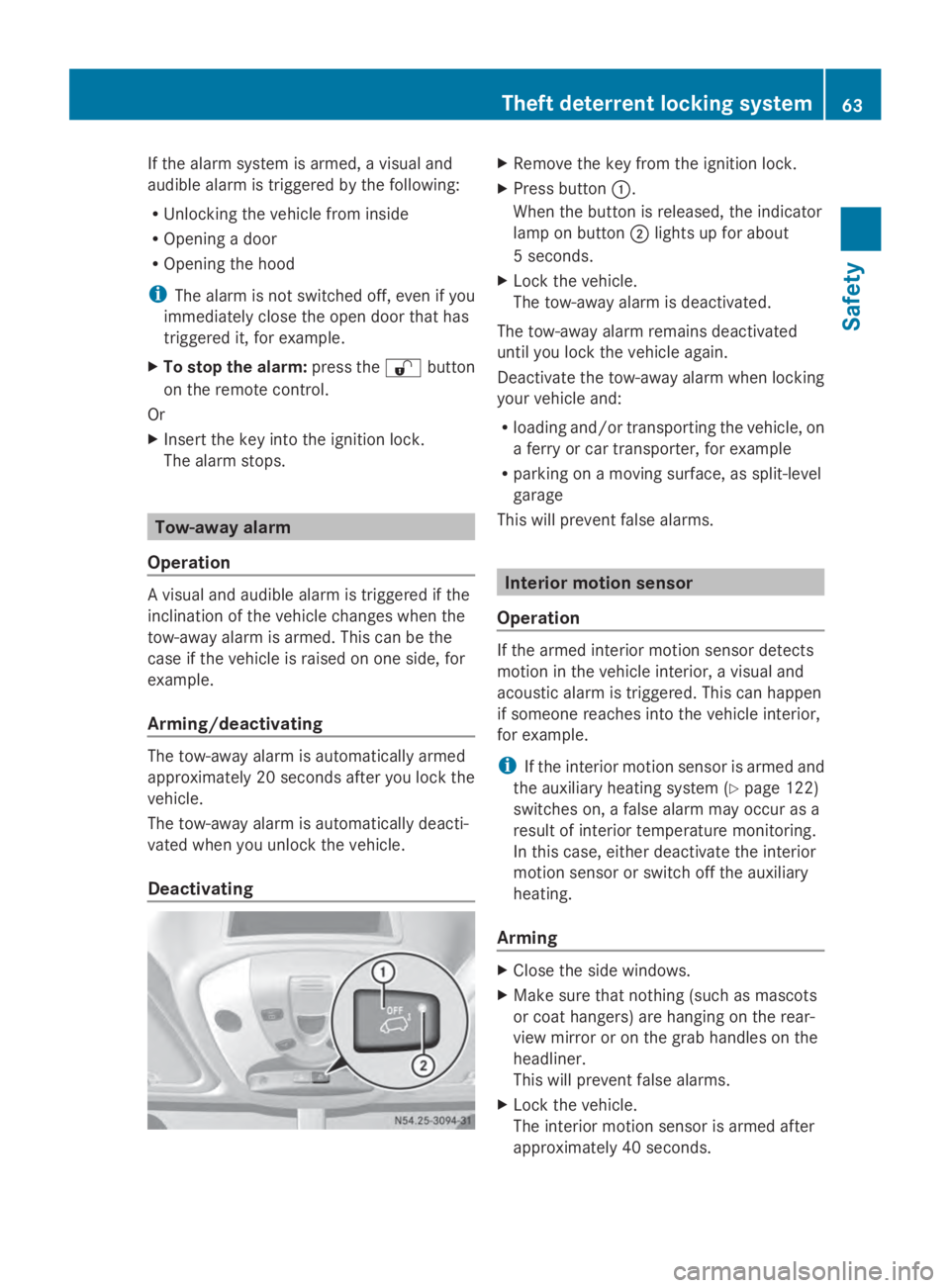
Deactivating X
Remove the key from the ignition lock.
X Press button 0043.
When the button is released, the indicator
lamp on button 0044lights up for about
5 seconds.
X Lock the vehicle.
The tow-away alarm is deactivated.
The tow-away alarm remains deactivated
until you lock the vehicle again.
Deactivate the tow-away alarm when locking
your vehicle and:
R loading and/or transporting the vehicle, on
a ferry or car transporter, for example
R parking on a moving surface, as split-level
garage
This will prevent false alarms. Interior motion sensor
Operation If the armed interior motion sensor detects
motion in the vehicle interior, a visual and
acoustic alarm is triggered. This can happen
if someone reaches into the vehicle interior,
for example.
i
If the interior motion sensor is armed and
the auxiliary heating system (Y page 122)
switches on, a false alarm may occur as a
result of interior temperature monitoring.
In this case, either deactivate the interior
motion sensor or switch off the auxiliary
heating.
Arming X
Close the side windows.
X Make sure that nothing (such as mascots
or coat hangers) are hanging on the rear-
view mirror or on the grab handles on the
headliner.
This will prevent false alarms.
X Lock the vehicle.
The interior motion sensor is armed after
approximately 40 seconds. Theft deterrent locking system
63Safety Z
Page 66 of 338
Switching off
X
Unlock vehicle.
The interior motion sensor automatically
switches off.
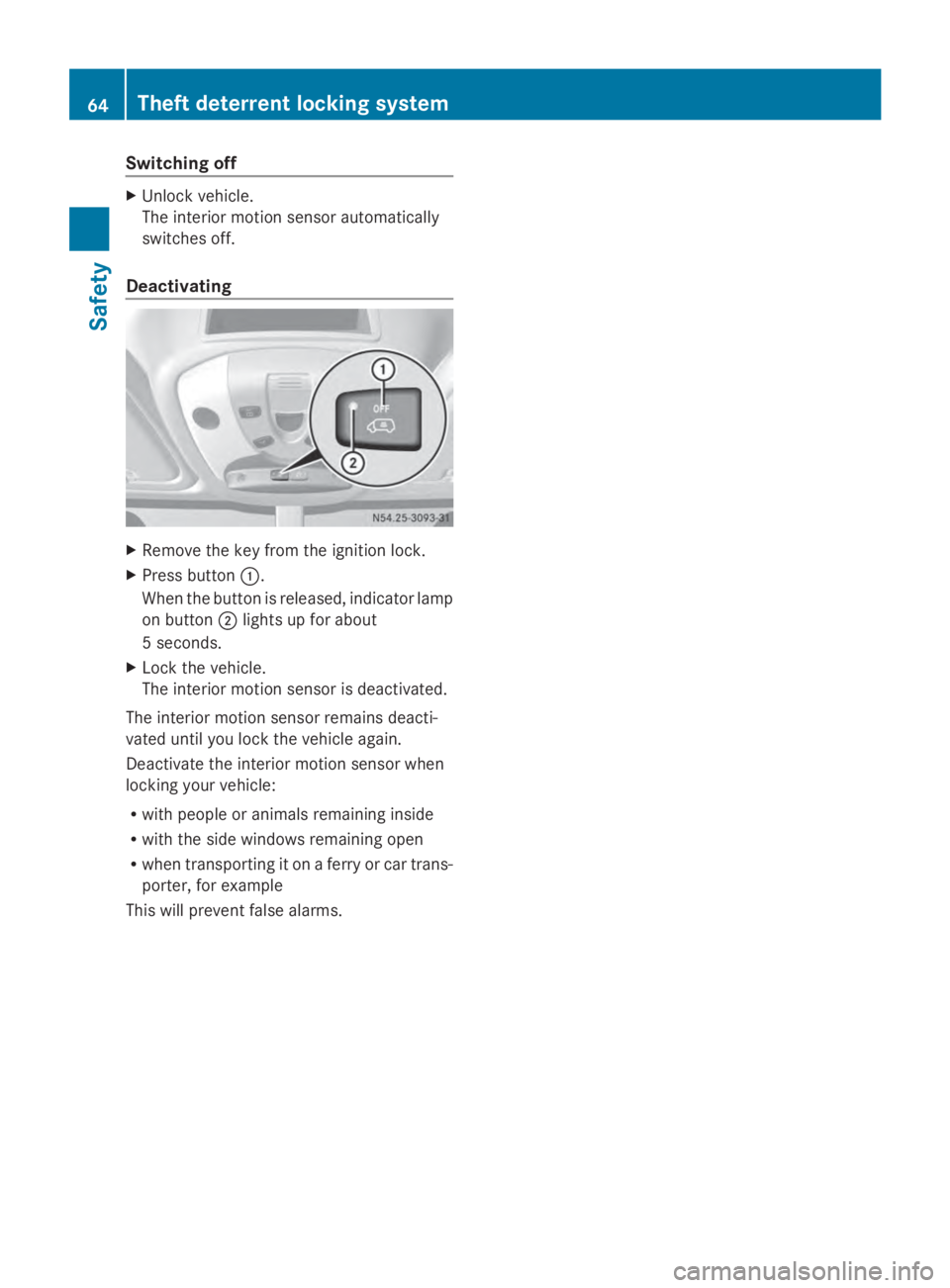
Deactivating X
Remove the key from the ignition lock.
X Press button 0043.
When the button is released, indicator lamp
on button 0044lights up for about
5 seconds.
X Lock the vehicle.
The interior motion sensor is deactivated.
The interior motion sensor remains deacti-
vated until you lock the vehicle again.
Deactivate the interior motion sensor when
locking your vehicle:
R with people or animals remaining inside
R with the side windows remaining open
R when transporting it on a ferry or car trans-
porter, for example
This will prevent false alarms. 64
Theft deterrent locking systemSafety
Page 93 of 338
Useful information
..............................92
Exterior lighting .................................. 92
Interior lighting ................................... 98
Changing bulbs ................................. 100
Windshield wipers ............................107 91Lights and windshield wipers
Page 100 of 338
or indicator lamp in the multifunc-
tion display remains lit.
X To deactivate: move the combination
switch back to its normal position or move
the light switch to another position.
The 00CE or indicator lamp in the
multifunction display goes out. Headlamps fogged up on the inside
The headlamps may fog up on the inside if
there is high atmospheric humidity.
X Switch on the low-beam headlamps and
drive off.
The level of moisture diminishes, depend-
ing on the length of the journey and the
weather conditions (humidity and temper-
ature).
If the level of moisture does not diminish:
X Have the headlamps checked at a qualified
specialist workshop. Interior lighting
Switching the dashboard lighting on/
off
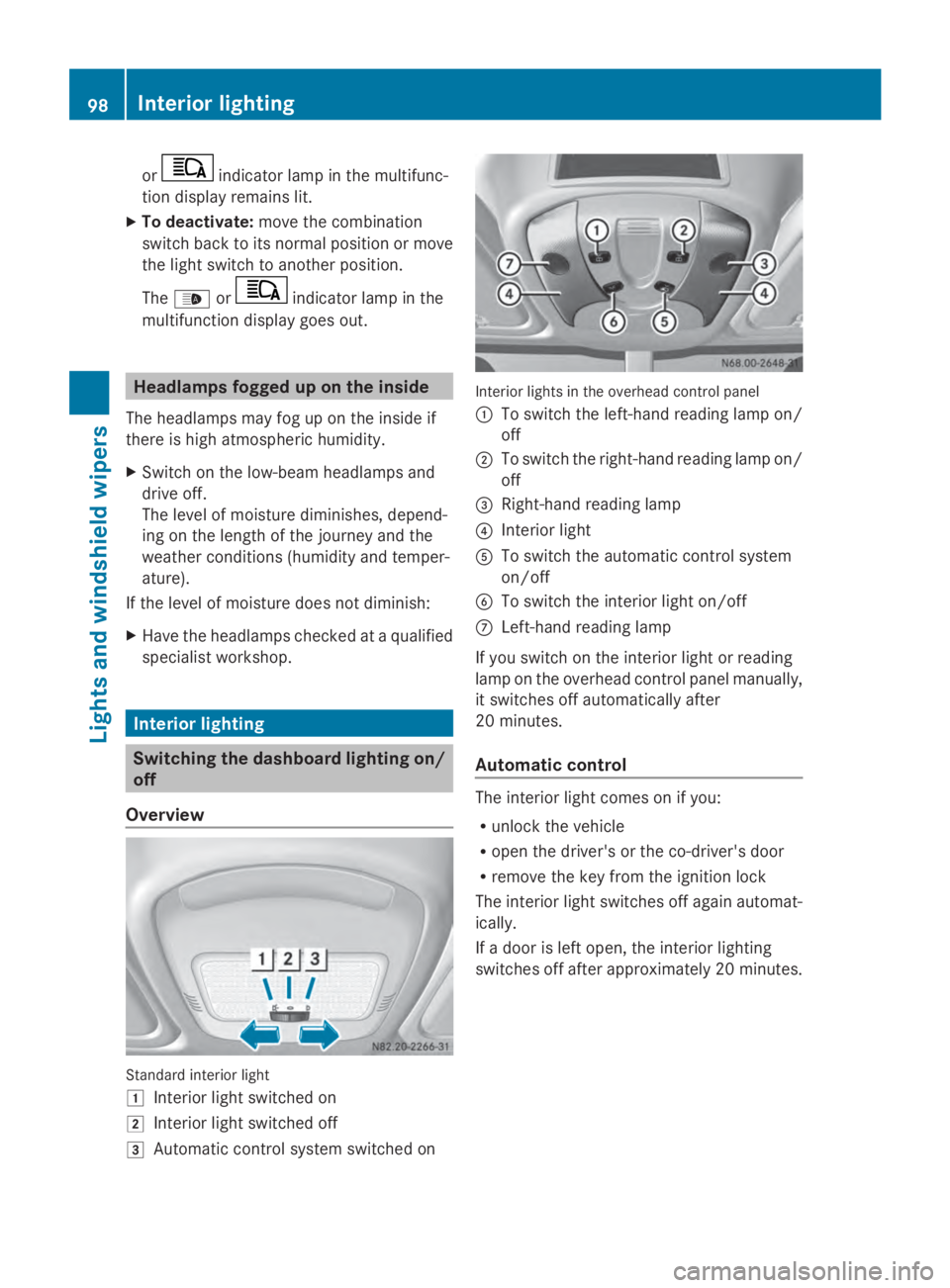
Overview Standard interior light
0047
Interior light switched on
0048 Interior light switched off
0049 Automatic control system switched on Interior lights in the overhead control panel
0043 To switch the left-hand reading lamp on/
off
0044 To switch the right-hand reading lamp on/
off
0087 Right-hand reading lamp
0085 Interior light
0083 To switch the automatic control system
on/off
0084 To switch the interior light on/off
006B Left-hand reading lamp
If you switch on the interior light or reading
lamp on the overhead control panel manually,
it switches off automatically after
20 minutes.
Automatic control The interior light comes on if you:
R
unlock the vehicle
R open the driver's or the co-driver's door
R remove the key from the ignition lock
The interior light switches off again automat-
ically.
If a door is left open, the interior lighting
switches off after approximately 20 minutes. 98
Interior lightingLights and windshield wipers
Page 101 of 338
Switching the rear compartment
lighting on/off centrally (Passenger
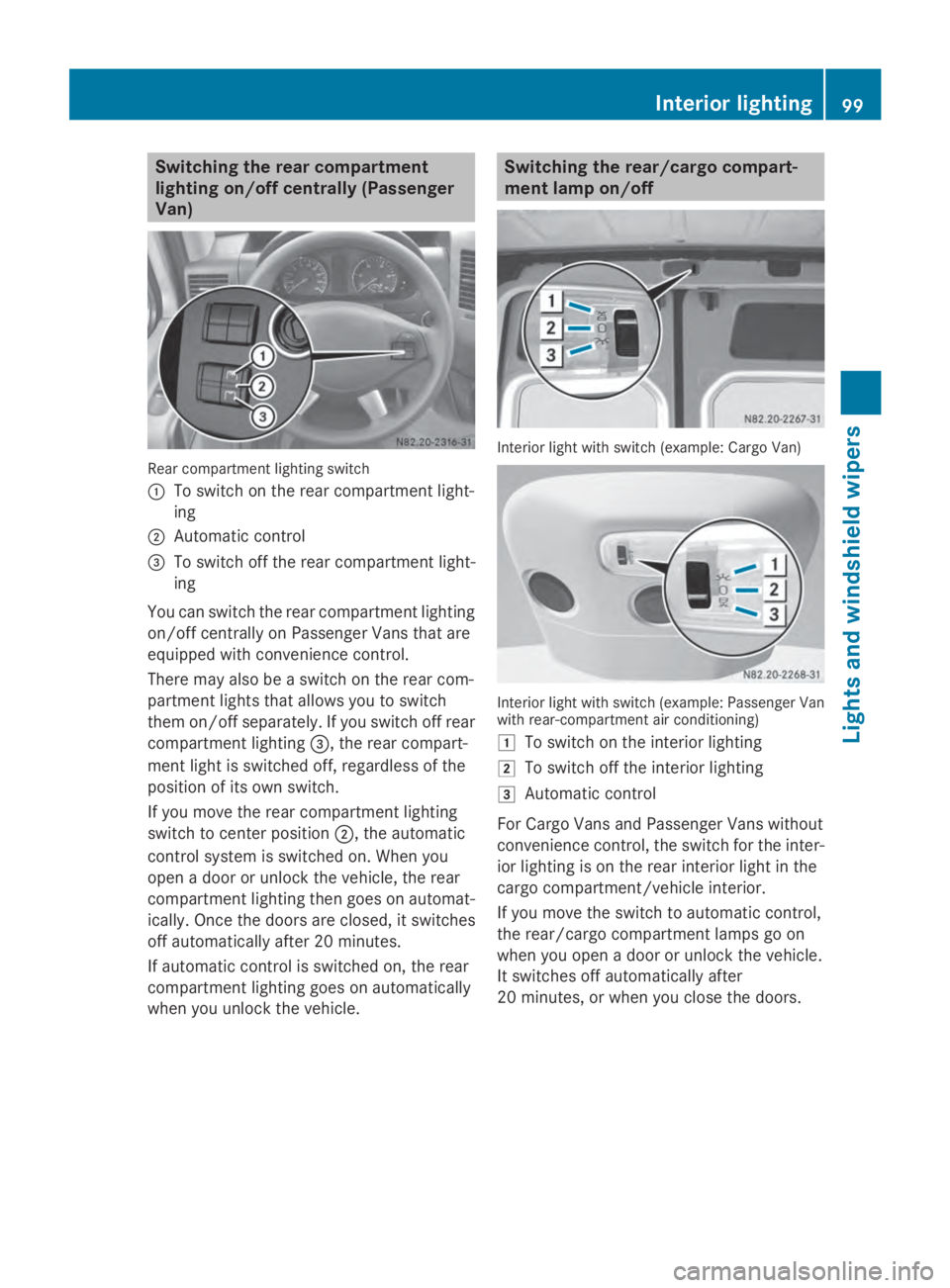
Van) Rear compartment lighting switch
0043
To switch on the rear compartment light-
ing
0044 Automatic control
0087 To switch off the rear compartment light-
ing
You can switch the rear compartment lighting
on/off centrally on Passenger Vans that are
equipped with convenience control.
There may also be a switch on the rear com-
partment lights that allows you to switch
them on/off separately. If you switch off rear
compartment lighting 0087, the rear compart-
ment light is switched off, regardless of the
position of its own switch.
If you move the rear compartment lighting
switch to center position 0044, the automatic
control system is switched on. When you
open a door or unlock the vehicle, the rear
compartment lighting then goes on automat-
ically. Once the doors are closed, it switches
off automatically after 20 minutes.
If automatic control is switched on, the rear
compartment lighting goes on automatically
when you unlock the vehicle. Switching the rear/cargo compart-
ment lamp on/off
Interior light with switch (example: Cargo Van)
Interior light with switch (example: Passenger Van
with rear-compartment air conditioning)
0047
To switch on the interior lighting
0048 To switch off the interior lighting
0049 Automatic control
For Cargo Vans and Passenger Vans without
convenience control, the switch for the inter-
ior lighting is on the rear interior light in the
cargo compartment/vehicle interior.
If you move the switch to automatic control,
the rear/cargo compartment lamps go on
when you open a door or unlock the vehicle.
It switches off automatically after
20 minutes, or when you close the doors. Interior lighting
99Lights and windshield wipers Z
Page 102 of 338
Motion detector
G
WARNING
The motion detector sends the invisible infra-
red radiation emitted by LEDs (light emitting
diodes).
These LEDs are classified as class 1M lasers
and can damage the retina if you:
R look directly into the unfiltered laser beam
of the motion detector for an extended
period
R look directly into the laser beam of the
motion detector using optical instruments,
e.g. eyeglasses or a magnifying glass.
There is a risk of injury.
Never look directly into the motion detector.
The cargo compartment lighting is also
switched on by the motion detector in the
cargo compartment of Cargo Vans equipped
with this feature.
If the motion detector detects a movement in
the cargo compartment when the vehicle is
stationary, the cargo compartment lighting
switches on for approximately two minutes.
The cargo compartment lighting can be
switched on by the motion detector within
four seconds if:
R the rear interior light switch (Y page 99) is
set to automatic control.
R the vehicle is stationary, the parking brake
is applied and the brake pedal is not being
depressed
Or
R the selector lever is in position Pon vehi-
cles with automatic transmission and the
brake pedal is not being depressed and
R the vehicle has not been locked from the
outside using the key
The motion detector switches off automati-
cally if no change is detected in the vehicle
for several hours, e.g. if a door is opened, if
the ignition key is turned, etc. This prevents
the battery from becoming discharged. Changing bulbs
Important safety notes
G
DANGER
Xenon bulbs carry a high voltage. You can get
an electric shock if you remove the cover of
the Xenon bulb and touch the electrical con-
tacts. There is a risk of fatal injury.
Never touch the parts or the electrical con-
tacts of the Xenon bulb. Always have work on
the Xenon bulbs carried out at a qualified spe-
cialist workshop. G
WARNING
Bulbs, lamps and connectors can get very hot
when operating. If you change a bulb, you
could burn yourself on these components.
There is a risk of injury.
Allow these components to cool down before
changing a bulb.
! Make sure the bulbs are always securely
installed.
If your vehicle is equipped with Bi-Xenon
bulbs, you can recognize this by the following:
the cone of light from the Xenon bulbs moves
from the top to the bottom and back again
when you start the engine. For this to be
observed, the low-beam headlamps must be
switched on before starting the engine.
The bulbs and lamps are an essential compo-
nent of vehicle safety. You must therefore
make sure that these function correctly at all
times. Have the headlamp setting checked
regularly.
R Always switch off the vehicle's lighting sys-
tem before changing a bulb.
This will prevent a short circuit.
R Do not touch the glass tube of new bulbs
with your bare hands. Always use a clean,
lint-free cloth or only touch the base of the
bulb when installing.
Even minor contamination can burn into
the glass surface and reduce the service life
of the bulbs. 100
Changing bulbsLights and windshield wipers