roof MERCEDES-BENZ SPRINTER 2014 MY14 Operator’s Manual
[x] Cancel search | Manufacturer: MERCEDES-BENZ, Model Year: 2014, Model line: SPRINTER, Model: MERCEDES-BENZ SPRINTER 2014Pages: 338, PDF Size: 6.78 MB
Page 135 of 338
Problem Possible causes/consequences and
0050
0050Solutions The auxiliary heating
switches off automati-
cally and/or cannot be
switched on. The low-voltage protection system integrated in the control unit
switches off the auxiliary heating because the on-board voltage is
less than 10 V.
X
Have the alternator and battery checked. The auxiliary heating
switches off automati-
cally and/or cannot be
switched on. The fuse is blown.
X
Replace the fuse; see the "Fuse allocation" supplement.
X Have the cause of the blown fuse determined at a qualified spe-
cialist workshop. The auxiliary heating
switches off automati-
cally and/or cannot be
switched on. A malfunction has occurred.
X
Switch the ignition on and off twice.
If the auxiliary heating still cannot be switched on, the heating
device is faulty.
X Have the auxiliary heating checked at a qualified specialist
workshop. The auxiliary heating is
overheated. The coolant level is too low.
X
Check the coolant level and add more coolant if necessary
(Y page 255). Operating the cargo compartment air
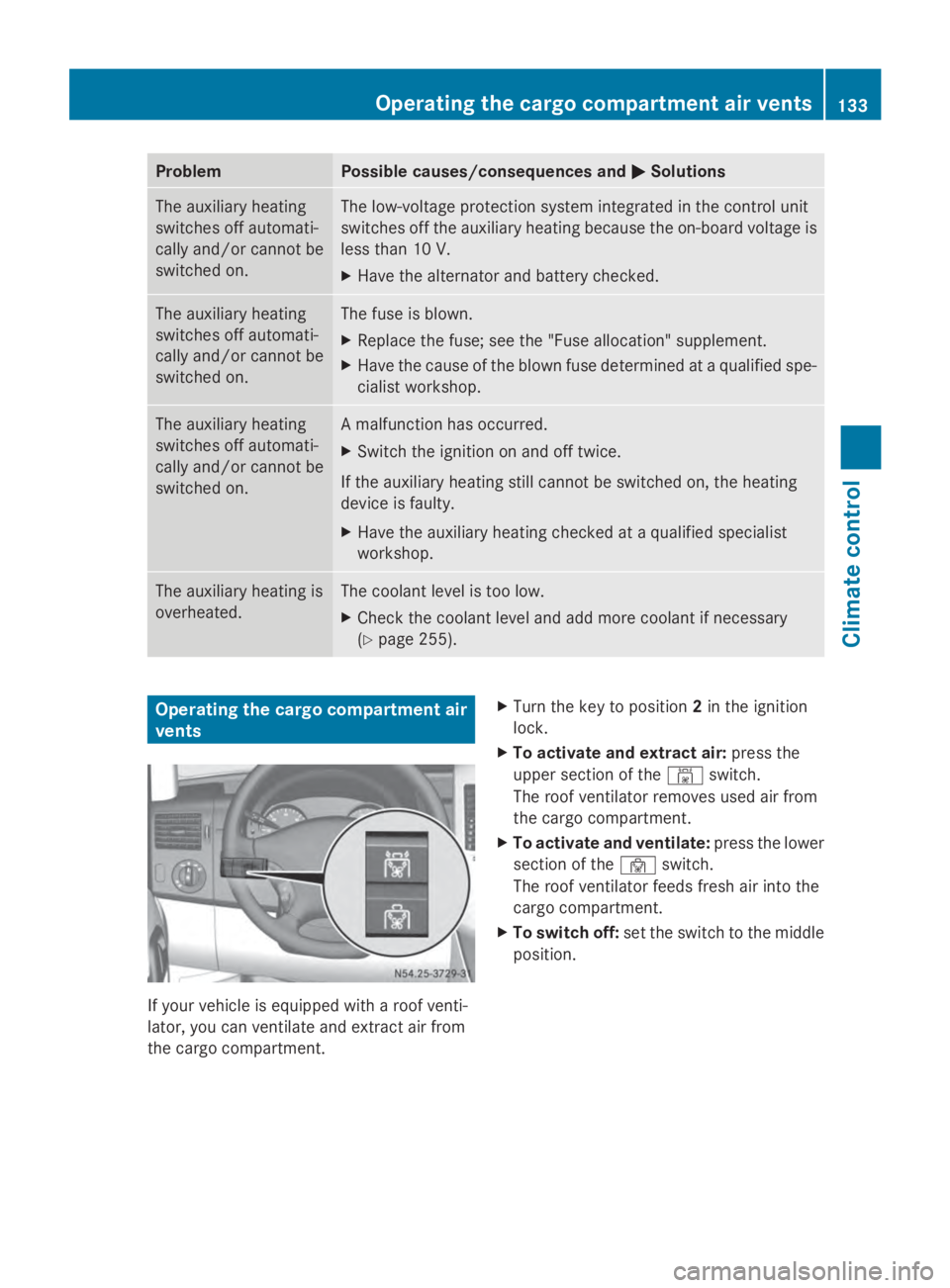
vents If your vehicle is equipped with a roof venti-
lator, you can ventilate and extract air from
the cargo compartment. X
Turn the key to position 2in the ignition
lock.
X To activate and extract air: press the
upper section of the 00A8switch.
The roof ventilator removes used air from
the cargo compartment.
X To activate and ventilate: press the lower
section of the 00A7switch.
The roof ventilator feeds fresh air into the
cargo compartment.
X To switch off: set the switch to the middle
position. Operating the cargo compartment air vents
133Climate control Z
Page 156 of 338
Bear in mind that at a speed of just 30 mph
(approximately 50 km/h), your vehicle covers
a distance of 44 feet (approximately 14 m)
every second. G
WARNING
If you switch off the ignition while driving,
safety-relevant functions are only available
with limitations, or not at all. This could affect,
for example, the power steering and the brake
boosting effect. You will require considerably
more effort to steer and brake. There is a risk
of an accident.
Do not switch off the ignition while driving.
! Always observe the ground clearance of
the vehicle and avoid obstacles. On vehi-
cles with a step, ground clearance is further
restricted. Obstacles can damage the vehi-
cle.
If you must drive over obstacles, drive espe-
cially slowly and carefully. If necessary,
have another person direct you.
Drive sensibly – save fuel In order to save fuel, observe the following
tips:
X
The tires should always be inflated to the
recommended tire pressure.
X Remove unnecessary loads.
X Remove roof carriers when they are not
needed.
X Warm up the engine at low engine speeds.
X Avoid frequent acceleration or braking.
X Have all maintenance work carried out as
indicated by the service intervals in the
Maintenance Booklet or by the service
interval display.
Fuel consumption also increases when driv-
ing in cold weather, in stop-start traffic and in
mountainous terrain. Overrun cutoff If you are in overrun mode and take your foot
off the accelerator pedal, the fuel supply is
cut off when the engine speed is out of the
idle speed control range.
Drinking and driving
G
WARNING
Drinking and driving and/or taking drugs and
driving are very dangerous combinations.
Even a small amount of alcohol or drugs can
affect your reflexes, perceptions and judg-
ment.
The possibility of a serious or even fatal acci-
dent are greatly increased when you drink or
take drugs and drive.
Do not drink or take drugs and drive or allow
anyone to drive who has been drinking or tak-
ing drugs.
Emission control G
WARNING
Combustion engines emit poisonous exhaust
gases such as carbon monoxide. Inhaling
these exhaust gases leads to poisoning. There
is a risk of fatal injury. Therefore never leave
the engine running in enclosed spaces with-
out sufficient ventilation.
Certain engine systems are designed to keep
the level of poisonous substances in exhaust
fumes within legal limits.
These systems only work optimally if they are
maintained exactly in accordance with the
manufacturer's specifications. Any work on
the engine should therefore be carried out by
qualified and authorized technicians at a
Sprinter dealer.
The engine settings must not be changed
under any circumstances. In addition, all spe-
cific maintenance work must be carried out
at regular intervals and in accordance with
the service requirements of the dealer listed 154
Driving tipsDriving and parking
Page 160 of 338
engine's air suction nozzles and this can
cause engine damage.
If you have to drive on stretches of road on
which water has collected, please bear in
mind that:
R the water level of standing water should not
be above the lower edge of the front
bumper
R do not drive faster than walking speed Driving in winter
General notes G
WARNING
If you shift down on a slippery road surface in
an attempt to increase the engine's braking
effect, the drive wheels could lose their grip.
There is an increased danger of skidding and
accidents.
Do not shift down for additional engine brak-
ing on a slippery road surface. G
DANGER
If the exhaust pipe is blocked or adequate
ventilation is not possible, poisonous gases
such as carbon monoxide (CO) may enter the
vehicle. This is the case, e.g. if the vehicle
becomes trapped in snow. There is a risk of
fatal injury.
If you leave the engine or the auxiliary heating
running, make sure the exhaust pipe and area
around the vehicle are clear of snow. To
ensure an adequate supply of fresh air, open
a window on the side of the vehicle that is not
facing into the wind.
Have your vehicle winterproofed at a qualified
specialist workshop in good time at the onset
of winter.
i Do not cover the radiator, e.g. with a win-
ter cover. The measurements of the on-
board diagnostic system may otherwise
return inaccurate values. Some of these values are legally prescribed and must
therefore always be exact.
Observe the notes in the "Winter operation"
section (Y page 288).
Driving with summer tires Observe the notes in the "Winter operation"
section (Y
page 288).
Slippery road surfaces G
WARNING
If you shift down on a slippery road surface in
an attempt to increase the engine's braking
effect, the drive wheels could lose their grip.
There is an increased danger of skidding and
accidents.
Do not shift down for additional engine brak-
ing on a slippery road surface. G
WARNING
The outside temperature indicator is not
designed to serve as an ice-warning device
and is therefore unsuitable for that purpose.
Indicated temperatures just above the freez-
ing point do not guarantee that the road sur-
face is free of ice. The road may still be icy,
especially in wooded areas or on bridges.
! Vehicles with automatic transmission
may roll only briefly in the neutral position
N. Prolonged rolling of the wheels, e.g.
when being towed, will result in transmis-
sion damage.
If the vehicle threatens to skid or cannot be
stopped when moving at low speed:
X Shift the transmission to neutral position
N.
X Try to maintain control of the vehicle using
corrective steering.
Drive particularly carefully on slippery roads.
Avoid sudden acceleration, steering and
braking maneuvers. Do not use cruise
control. 158
Driving tipsDriving and parking
Page 174 of 338
The rear view camera is a visual parking aid.
Information on operation can be found in the
separate Audio 15 supplement.
The camera is in the middle of the roof above
the high-mounted brake lamp (Y page 271).
The rear view camera may show obstacles in
perspectival distortion, incorrectly or not at
all. The rear view camera cannot display all
objects located very near and/or under the
rear bumper. It does not warn you of a colli-
sion, persons or objects.
The area behind the vehicle is displayed in a
mirrored fashion, as in the rear-view mirror or
the exterior mirrors. The guide lines displayed
assist you in backing up.
The function of the rear view camera may be
partially or completely impaired in the follow-
ing circumstances:
R it is raining very heavily or snowing, or it is
foggy.
R the parking space is located in a very dark
place.
R the camera is exposed to very strong white
light. White stripes may appear on the dis-
play.
R the surrounding area is illuminated with flu-
orescent light. The display may flicker.
R if the temperature changes very quickly, for
example if you drive into a heated garage
in the winter.
R ambient temperatures are very high.
R the camera lens is dirty or obstructed.
R the rear of the vehicle is damaged. In this
case, have the position and setting
checked at a specialist workshop.
The rear view camera is switched on when
you engage reverse gear R.
You can find information on cleaning the cam-
era in the "Maintenance and care" section
(Y page 271). Working mode
ADR (working speed governor)
General notes When activated, ADR automatically increases
the engine speed to a preset speed or a speed
you have set.
i
After a cold start, the idling speed of the
engine is increased automatically. If the
preset working speed is lower than the
increased idling speed, the working speed
is only reached once the engine has com-
pleted the warm-up phase.
It is only possible to activate ADR with the
vehicle stationary and the parking brake
applied.
The selector lever of the automatic trans-
mission must be in position P.
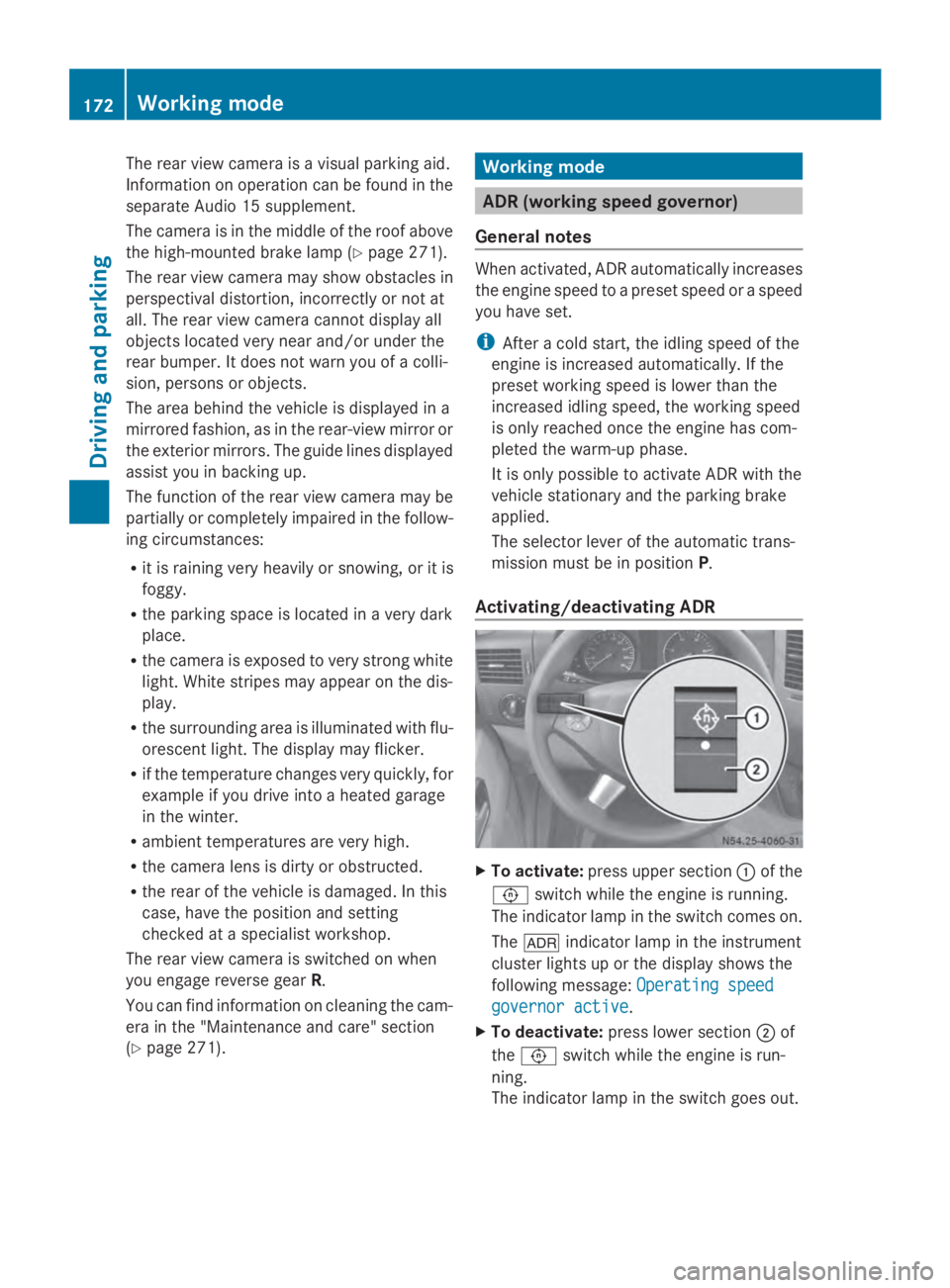
Activating/deactivating ADR X
To activate: press upper section 0043of the
0091 switch while the engine is running.
The indicator lamp in the switch comes on.
The 004E indicator lamp in the instrument
cluster lights up or the display shows the
following message: Operating speed Operating speed
governor active governor active.
X To deactivate: press lower section 0044of
the 0091 switch while the engine is run-
ning.
The indicator lamp in the switch goes out. 172
Working modeDriving and parking
Page 244 of 338
Useful information
This Operator's Manual describes all models
as well as standard and optional equipment
of your vehicle that were available at the time
of going to print. Country-specific variations
are possible. Note that your vehicle may not
be equipped with all of the described func-
tions. This also applies to systems and func-
tions relevant to safety.
Read the information on qualified specialist
workshops (Y page 26). Loading guidelines
Important safety notes
G
WARNING
As a result of improperly placed or unevenly
distributed loads, the center of gravity of the
load being transported may be too high or too
far back. This can significantly impair handling
as well as steering and braking characteris-
tics. There is a risk of an accident.
Always make sure that the center of gravity of
the load is:
R between the axles
and
R as low as possible, near the rear axle. G
WARNING
When objects are unsecured or inadequately
secured, they can slip, turn over or be thrown
about, striking vehicle occupants. This also
applies to:
R luggage or loads
R a rear bench seat which has been removed
and is being transported in the vehicle in an
exceptional case.
There is a risk of injury, particularly in the
event of braking maneuvers or abrupt
changes in direction.
Always stow objects in such a way that they
cannot be tossed about. Before traveling,
secure objects, luggage or loads to prevent them slipping or tipping over. If you remove a
rear bench seat, it is advisable to store it out-
side the vehicle.
G
WARNING
When the permissible wheel loads, axle loads
and/or the maximum permissible gross vehi-
cle weight are exceeded, driving safety is
compromised. The handling as well as steer-
ing and braking characteristics may be signif-
icantly impaired. Overloaded tires may over-
heat, causing them to burst. There is a risk of
an accident.
When transporting a load, always observe the
permissible wheel loads, axle loads and the
maximum permissible gross vehicle weight
for the vehicle (including occupants). G
WARNING
When you load the roof, the center of gravity
of the vehicle rises and the driving character-
istics change. If you exceed the maximum roof
load, the driving characteristics, as well as
steering and braking, will be greatly impaired.
There is a risk of an accident.
Never exceed the maximum roof load and
adjust your driving style.
! If you are using a roof carrier, observe the
maximum roof load and maximum roof car-
rier load.
You will find information about the maximum
roof load in the "Technical data" section
(Y page 331 )and information about roof car-
riers in the "Carrier systems" section
(Y page 247).
R Do not stack luggage or loads higher than
the backrests.
R Stow objects preferably in the cargo com-
partment.
R When transporting luggage, always use the
cargo tie-down rings and a parcel net, if
present.
R Use cargo tie-down rings and fasteners
which are suitable for the weight and size
of the load. 242
Loading guidelinesTransporting loads
Page 249 of 338
the locking mechanism and out of the load-
ing rail through a recess.
Carrier systems
G
WARNING
When you load the roof, the center of gravity
of the vehicle rises and the driving character-
istics change. If you exceed the maximum roof
load, the driving characteristics, as well as
steering and braking, will be greatly impaired.
There is a risk of an accident.
Never exceed the maximum roof load and
adjust your driving style.
You can find information about the maximum
roof load in the "Technical data" section
(Y page 331).
! Make sure that:
R the screws for the roof carrier are tight-
ened in the sliding blocks to a torque of
6.0 – 7.4 lb-ft (8 – 10 Nm)
R the bolts, when tightened, do not touch
the rails.
R the slot nuts are not located in the area
of the plastic caps.
R the slot nuts have the right cross-section.
R the mounting rails in the interior are free
of dirt.
R the screws are retightened evenly after
approximately 300 miles (500 km).
We recommend that you only use roof
racks tested and approved by Sprinter.
These help avoid vehicle damage.
! If you want to retrofit securing rails, have
it done at a qualified specialist workshop.
You could otherwise damage the vehicle. 0043
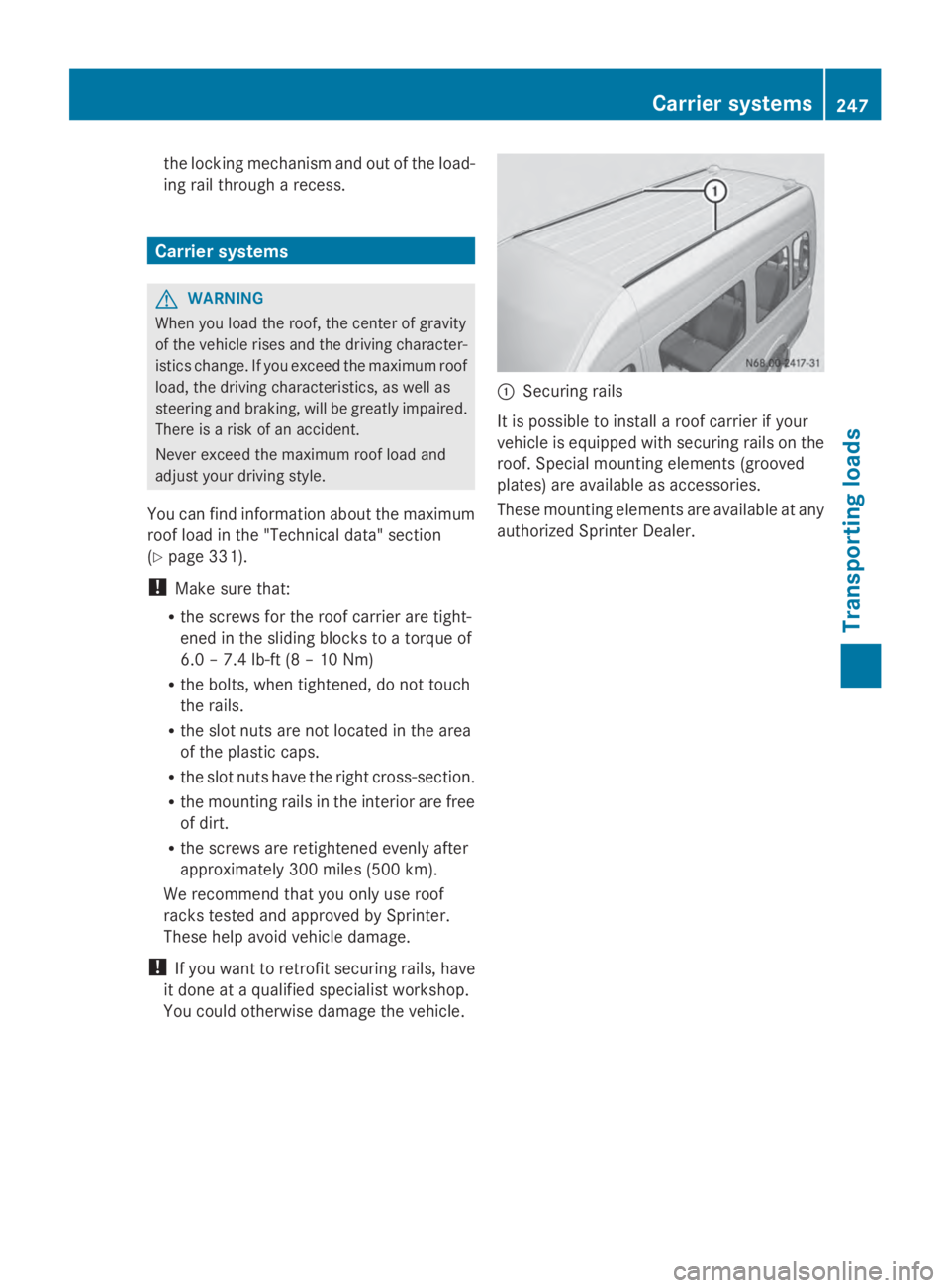
Securing rails
It is possible to install a roof carrier if your
vehicle is equipped with securing rails on the
roof. Special mounting elements (grooved
plates) are available as accessories.
These mounting elements are available at any
authorized Sprinter Dealer. Carrier systems
247Transporting loads Z
Page 260 of 338
X
Turn the key to position 2in the ignition
lock.
X Open drain plug 0044immediately until the
water/fuel mixture flows out of drain
hose 0043.
X Screw in drain plug 0044as soon as approx-
imately 0.2 US qt (0.2 l) of the water/fuel
mixture have been collected.
i The electrical fuel pump halts the flow of
the water/fuel mixture after 30 seconds.
X After draining, turn the key back to posi-
tion 0in the ignition lock.
X Dispose of the collected water/fuel mix-
ture in an environmentally responsible
manner, e.g. at a qualified specialist work-
shop.
X Check drain plug 0044. The drain plug must
be closed.
When the engine is running and drain
hose 0044is open, fuel is lost through drain
hose 0043.
X Close the hood.
If the 00B8 indicator lamp does not go out
after draining:
X Drain the fuel filter again.
X If the 00B8 indicator lamp does not go out
after draining for the second time, have the
cause checked immediately at a qualified
specialist workshop. Vehicle interior
Air filter for the rear-compartment air
conditioning
! Regularly check the air filters for visible
dirt. Clean or replace a dirty filter mat. The
dirt may otherwise lead to damage to the
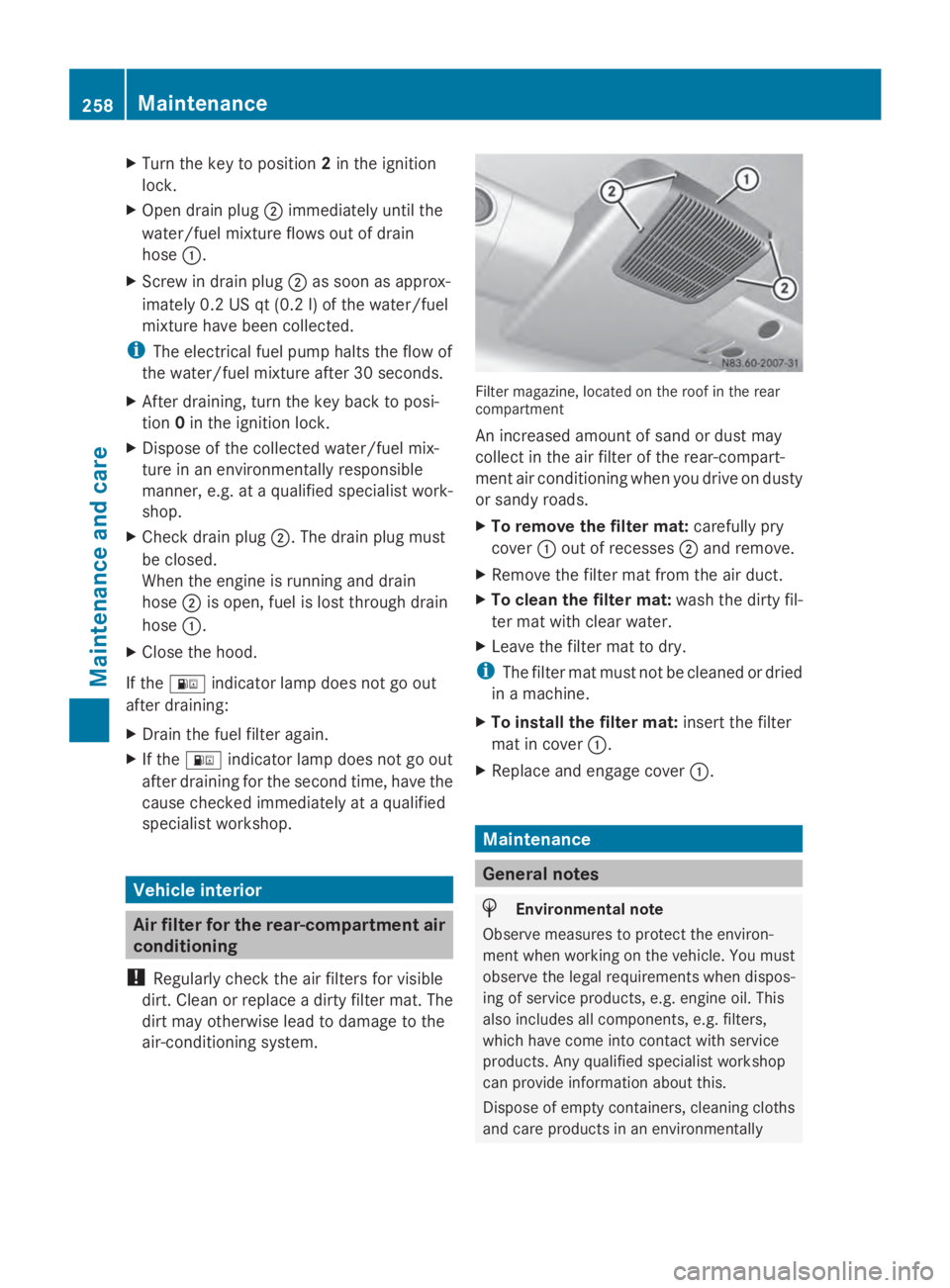
air-conditioning system. Filter magazine, located on the roof in the rear
compartment
An increased amount of sand or dust may
collect in the air filter of the rear-compart-
ment air conditioning when you drive on dusty
or sandy roads.
X
To remove the filter mat: carefully pry
cover 0043out of recesses 0044and remove.
X Remove the filter mat from the air duct.
X To clean the filter mat: wash the dirty fil-
ter mat with clear water.
X Leave the filter mat to dry.
i The filter mat must not be cleaned or dried
in a machine.
X To install the filter mat: insert the filter
mat in cover 0043.
X Replace and engage cover 0043. Maintenance
General notes
H
Environmental note
Observe measures to protect the environ-
ment when working on the vehicle. You must
observe the legal requirements when dispos-
ing of service products, e.g. engine oil. This
also includes all components, e.g. filters,
which have come into contact with service
products. Any qualified specialist workshop
can provide information about this.
Dispose of empty containers, cleaning cloths
and care products in an environmentally 258
MaintenanceMaintenance and care
Page 262 of 338
Service due date has been exceeded
Vehicles with steering wheel buttons:
if
you have missed the service due date, one of
the following messages appears in the display
and warning tone also sounds.
R 0099 Service A overdue by ... days
Service A overdue by ... days
R 0099 Service A overdue by ... mi
Service A overdue by ... mi
(km km)
Vehicles without steering wheel buttons:
if you have missed the service due date, the
0099 or009A symbol for the service flashes
for 10 seconds after the ignition is switched
on. A minus sign also appears in front of the
service due date.
Calling up the service due date X
Turn the key to position 2in the ignition
lock.
The display is activated.
Vehicles without steering wheel buttons
X Press the 0079menu button on the instru-
ment cluster repeatedly until the 0099or
009A symbol for the service appears in the
display.
Additionally, you will see the remaining dis-
tance in miles (mi mi) or kilometers ( km km) or the
remaining time in days (d d).
Vehicles with steering wheel buttons
X Press the 0080or007F button on the steer-
ing wheel until the standard display
(Y page 189) appears in the display.
X Press the 0041or0068 button on the steer-
ing wheel repeatedly until the service mes-
sage appears in the display, for example:
R 0099 Service A due in ... days
Service A due in ... days
R 0099 Service A due in ... mi Service A due in ... mi (kmkm) Battery
Important safety notes
Risk of explosion. Explosive oxy-
hydrogen is produced when bat-
teries are being charged. Only
charge batteries in well-ventilated
areas.
Risk of explosion. Avoid creating
sparks. Avoid open flames and do
not smoke in the vicinity of the
battery.
Battery acid is caustic. Wear acid-
proof protective gloves. If skin or
clothes are splashed with acid,
neutralize the splashes immedi-
ately with soapy water or an acid
neutralizer, and then clean the
affected areas with water.
Wear eye protection. When mixing
water and acid, the liquid can
splash into your eyes. Rinse acid
splashes to the eyes immediately
with clean water and contact a
doctor immediately.
Keep children at a safe distance.
Children are not able to assess the
dangers posed by batteries and
acid.
When handling batteries, observe
the safety precautions and special
protective measures contained in
this Operator's Manual.
H
Environmental note Batteries contain dangerous
substances. It is against the
law to dispose of them with
the household rubbish. They
must be collected separately
and recycled to protect the
environment. Dispose of batteries in an
environmentally friendly
manner. Take discharged
batteries to a qualified spe-260
BatteryMaintenance and care
Page 270 of 338
!
Make sure that:
R the side windows and the roof are com-
pletely closed
R the climate control blower is switched off
R the windshield wiper switch is at position
0
The vehicle could otherwise be damaged.
You can wash the vehicle in an automatic car
wash from the very start.
Wash off excess dirt before cleaning the vehi-
cle in an automatic car wash.
After putting the vehicle through an auto-
matic car wash, wipe off wax from:
R the rear view camera lens (Y page 271)
R the windshield
R the windshield wiper blades
This will prevent smears and reduce wiping
noises caused by residue on the wind-
shield.
Washing by hand In some countries, washing by hand is only
allowed at specially equipped washing bays.
Observe the legal requirements for each indi-
vidual country.
X Do not use hot water and do not wash the
vehicle in direct sunlight.
X Use a soft car sponge.
X Use a mild cleaning agent, e.g. a car sham-
poo approved for use with Sprinter vehi-
cles.
X Thoroughly hose down the vehicle with a
gentle jet of water.
X Do not point the water jet directly towards
the air inlets.
X Use plenty of water and rinse out the
sponge frequently.
X Rinse the vehicle with clean water and dry
thoroughly with a chamois.
X Do not let the cleaning agents dry on the
paintwork. When using the vehicle in winter, remove all
traces of road salt deposits carefully and as
soon as possible.
High-pressure cleaning equipment G
WARNING
The water jet from a circular jet nozzle (dirt
blasters) can cause invisible exterior damage
to the tires or chassis components. Compo-
nents damaged in this way may fail unexpect-
edly. There is a risk of an accident.
Do not use power washers with circular jet
nozzles to clean the vehicle. Have damaged
tires or chassis components replaced imme-
diately.
! Under no circumstances use power wash-
ers in the vehicle interior. The pressurized
water and associated spray produced by
the power washer could cause extensive
damage to the vehicle.
! Observe the minimum distance to be
maintained between the nozzle of the
power washer and object to be cleaned, as
outlined below:
R approximately 2.2 ft(70 cm) when using
round-jet nozzles
R approximately 1 ft (30 cm) when using
25°flat-spray jets and dirt blasters
Keep the water jet moving while cleaning.
To avoid causing damage, do not point the
water jet directly at:
R door joints
R brake hoses
R electrical components
R electrical connections
R seals
R drive train, especially not at the inter-
mediate bearing of the propeller shaft
R rear view camera (camera lens and
microphone opening on the bottom)
Keep a minimum distance of
1.6 ft(50 cm). 268
CareMaintenance and care
Page 273 of 338
X
Clean all sensors 0043in the front and rear
bumpers with water, shampoo and a soft
cloth.
Cleaning the rear view camera !
Do not use dry, coarse or hard cloths and
do not scrub. Otherwise, you will scratch or
damage the lens of the rear-view camera.
If you clean the vehicle with a high-pressure
or steam cleaner, maintain a distance of at
least 1.650 cm from the rear-view camera.
Do not aim directly at the rear-view camera
or at the microphone opening on the under-
side of the rear-view camera. You could
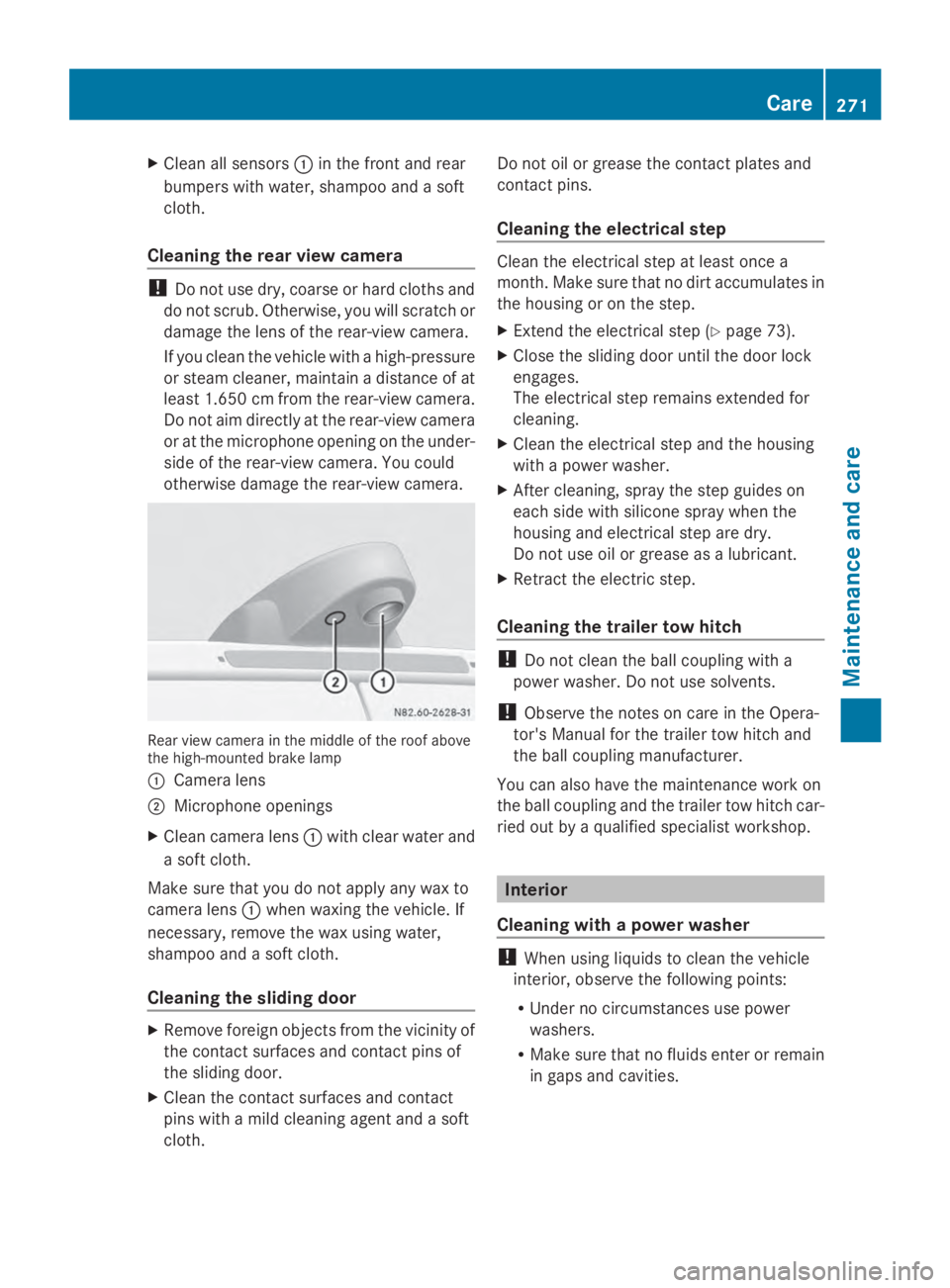
otherwise damage the rear-view camera. Rear view camera in the middle of the roof above
the high-mounted brake lamp
0043 Camera lens
0044 Microphone openings
X Clean camera lens 0043with clear water and
a soft cloth.
Make sure that you do not apply any wax to
camera lens 0043when waxing the vehicle. If
necessary, remove the wax using water,
shampoo and a soft cloth.
Cleaning the sliding door X
Remove foreign objects from the vicinity of
the contact surfaces and contact pins of
the sliding door.
X Clean the contact surfaces and contact
pins with a mild cleaning agent and a soft
cloth. Do not oil or grease the contact plates and
contact pins.
Cleaning the electrical step Clean the electrical step at least once a
month. Make sure that no dirt accumulates in
the housing or on the step.
X
Extend the electrical step (Y page 73).
X Close the sliding door until the door lock
engages.
The electrical step remains extended for
cleaning.
X Clean the electrical step and the housing
with a power washer.
X After cleaning, spray the step guides on
each side with silicone spray when the
housing and electrical step are dry.
Do not use oil or grease as a lubricant.
X Retract the electric step.
Cleaning the trailer tow hitch !
Do not clean the ball coupling with a
power washer. Do not use solvents.
! Observe the notes on care in the Opera-
tor's Manual for the trailer tow hitch and
the ball coupling manufacturer.
You can also have the maintenance work on
the ball coupling and the trailer tow hitch car-
ried out by a qualified specialist workshop. Interior
Cleaning with a power washer !
When using liquids to clean the vehicle
interior, observe the following points:
R Under no circumstances use power
washers.
R Make sure that no fluids enter or remain
in gaps and cavities. Care
271Maintenance and care Z