turn signal MERCEDES-BENZ SPRINTER 2014 MY14 Operator’s Manual
[x] Cancel search | Manufacturer: MERCEDES-BENZ, Model Year: 2014, Model line: SPRINTER, Model: MERCEDES-BENZ SPRINTER 2014Pages: 338, PDF Size: 6.78 MB
Page 168 of 338
The brightness of the indicator/warning
lamps is adjusted automatically according to
the ambient light.
Collision warning
If a vehicle is detected in the monitoring range
of Blind Spot Assist and you switch on the
corresponding turn signal, a double warning
tone sounds once. Red warning lamp 0043
flashes. If the turn signal remains on,
detected vehicles are indicated by the flash-
ing of red warning lamp 0043. There are no fur-
ther warning tones.
Activating/deactivating Blind Spot Assist
i Blind Spot Assist is activated when you
switch on the ignition.
X Turn the key to position 2in the ignition
lock.
Warning lamps 0043in the exterior mirrors
light up red for approximately
1.5 seconds and then turn yellow.
X To deactivate: press the button in
the center console (Y page 37).
The yellow indicator lamp in exterior mir-
ror 0043first flashes and then lights up con-
tinuously. Blind Spot Assist is deactivated.
X To activate: press the button in the
center console again (Y page 37).
The yellow indicator lamp in exterior mir-
ror 0043flashes initially. If you exceed
19 mph (30 km/h) while driving, the yellow
indicator lamp in exterior mirror 0043goes
out. Blind Spot Assist is activated.
Towing a trailer
If you attach a trailer, make sure that you have
correctly established the electrical connec-
tion. This can be accomplished by checking
the trailer lighting. Blind Spot Assist is then
deactivated. The indicator lamp in the exte-
rior mirrors lights up yellow.
On vehicles with steering wheel buttons, the
message: Blind Spot Assist deacti‐
Blind Spot Assist deacti‐ vated vated
also appears in the multifunction dis-
play.
Lane Keeping Assist General notes
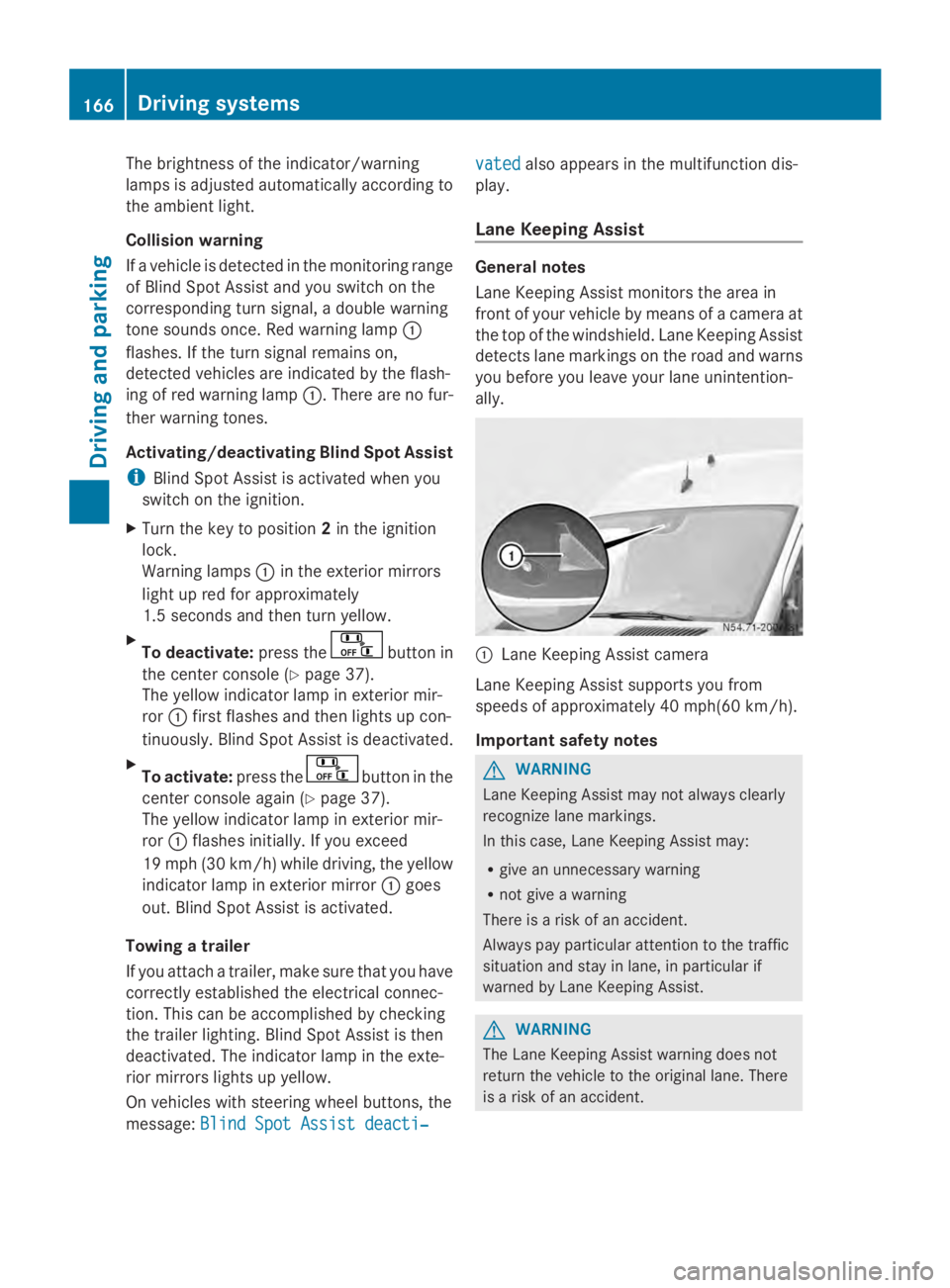
Lane Keeping Assist monitors the area in
front of your vehicle by means of a camera at
the top of the windshield. Lane Keeping Assist
detects lane markings on the road and warns
you before you leave your lane unintention-
ally.
0043
Lane Keeping Assist camera
Lane Keeping Assist supports you from
speeds of approximately 40 mph(60 km/h).
Important safety notes G
WARNING
Lane Keeping Assist may not always clearly
recognize lane markings.
In this case, Lane Keeping Assist may:
R give an unnecessary warning
R not give a warning
There is a risk of an accident.
Always pay particular attention to the traffic
situation and stay in lane, in particular if
warned by Lane Keeping Assist. G
WARNING
The Lane Keeping Assist warning does not
return the vehicle to the original lane. There
is a risk of an accident. 166
Driving systemsDriving and parking
Page 169 of 338
You should always steer, brake or accelerate
yourself, in particular if warned by Lane Keep-
ing Assist.
Lane Keeping Assist may not work properly
or may not work at all if the vehicle is incor-
rectly loaded (Y page 242).
If you fail to adapt your driving style, Lane
Keeping Assist can neither reduce the risk of
accident nor override the laws of physics.
Lane Keeping Assist cannot take into account
road, weather or traffic conditions. Lane
Keeping Assist is only an aid. You are respon-
sible for the distance to the vehicle in front,
for vehicle speed, braking in good time and
for staying in your lane.
Lane Keeping Assist does not keep your vehi-
cle in its lane.
The system may be impaired or may not func-
tion if:
R there is poor visibility, e.g. due to insuffi-
cient illumination of the road, or due to
snow, rain, fog or spray
R there is glare, e.g. from oncoming traffic,
the sun or reflection from other vehicles
(e.g. if the road surface is wet)
R the windshield is dirty, fogged up, damaged
or covered, for instance by a sticker, in the
vicinity of the camera
R no, or several, unclear lane markings are
present for one lane, e.g. in a construction
area
R the lane markings are worn away, dark or
covered up, e.g. by dirt or snow
R the distance to the vehicle in front is too
small and the lane markings thus cannot be
detected
R the lane markings change quickly, e.g.
lanes branch off, cross one another or
merge
R the road is narrow and winding
R there are highly variable shade conditions
on the road
A warning may be given if a front wheel
passes over a lane marking. In addition, a warning tone sounds and the
00B0indicator
lamp in the instrument cluster lights up.
Activating/deactivating Lane Keeping
Assist
Lane Keeping Assist is automatically acti-
vated when you start the engine.
X To deactivate: press the button in
the center console (Y page 37).
On vehicles without steering wheel but-
tons:
OFF OFF flashes briefly in the display and the
00B0 indicator lamp in the instrument clus-
ter flashes and then lights up continuously.
On vehicles with steering wheel but-
tons:
The message: Lane Keeping Assist Lane Keeping Assist
deactivated
deactivated appears in the display and
the 00B0 indicator lamp in the instrument
cluster flashes and then lights up contin-
uously.
Lane Keeping Assist is deactivated.
X To activate: press the button in the
center console again (Y page 37).
On vehicles without steering wheel but-
tons:
ON ON flashes briefly in the display and the
00B0 indicator lamp in the instrument clus-
ter flashes and then goes out.
On vehicles with steering wheel but-
tons:
The message: Lane Keeping Assist Lane Keeping Assist
activated
activated appears in the display and the
00B0 indicator lamp in the instrument clus-
ter flashes and then goes out.
Lane Keeping Assist is activated.
A Lane Keeping Assist warning is suppressed
if:
R a driving safety system intervenes, such as
ABS, BAS or ESP ®
.
R you have set the turn signal and a lane
change is detected. In this case, the warn- Driving systems
167Driving and parking Z
Page 176 of 338
G
WARNING
If you rest your foot on the brake pedal while
driving, the braking system can overheat. This
increases the stopping distance and can even
cause the braking system to fail. There is a
risk of an accident.
Never use the brake pedal as a footrest. Never
depress the brake pedal and the accelerator
pedal at the same time.
! Depressing the brake pedal constantly
results in excessive and premature wear to
the brake pads.
Always observe the operating instructions
provided by the manufacturers of the trailer
coupling and the ball coupling.
Couple and decouple the trailer carefully.
When backing up the towing vehicle, make
sure nobody is standing between the vehicle
and the trailer.
A trailer which is incorrectly coupled to the
towing vehicle could break away. A correctly
coupled trailer must be positioned horizon-
tally behind the towing vehicle.
Ensure that the following weights are not
exceeded:
R the permissible noseweight
R the permissible trailer load
R the permissible rear axle load of the towing
vehicle
R the permissible gross weight of both the
towing vehicle and the trailer
R the permissible gross combination weight
The applicable permissible values that may
not be exceeded can be found:
R in your vehicle documents
R on the type plates for the trailer tow hitch
R on the type plates for the trailer
R on the vehicle identification plate
(Y page 319).
Where the values differ, the lowest is valid.
You will find values approved by the manu-
facturer on the identification plates and those
for the towing vehicle in the "Permissible trailer loads and trailer drawbar noseweights"
section (Y
page 178).
Your vehicle behaves differently with a trailer
than without one.
The vehicle/trailer combination:
R is heavier
R is restricted in its acceleration and gradi-
ent-climbing capability
R has an increased braking distance
R is more susceptible to strong crosswinds
R requires more sensitive steering
R has a larger turning circle
This may impair the handling characteristics.
When towing a trailer, always adjust your
speed to suit the road and weather condi-
tions. Drive carefully. Maintain a safe dis-
tance.
If you require any further explanation of the
information contained in the Operating
Instructions, please contact an authorized
Sprinter dealer.
General notes R
Observe the legally prescribed maximum
speed for vehicle/trailer combinations in
the relevant country, state or Canadian
province. Before setting off, check the vehi-
cle documents of the your trailer to find out
the permissible maximum speed.
This reduces the risk of accidents.
R Install only an approved trailer coupling on
your vehicle. Only use a ball coupling that
is approved for your vehicle and Sprinter
trailer tow hitch. More information on the
availability, mounting and installation of the
trailer electrics is available at any qualified
specialist workshop.
R The turn signals on the trailer are only guar-
anteed to function when incandescent
bulbs are used. You can obtain more infor-
mation about installing the trailer electrics
at any qualified specialist workshop.
R The trailer coupling is one of the most
important vehicle parts with regard to road 174
Towing a trailerDriving and parking
Page 181 of 338
tion consists of the towing vehicle including
the driver, passengers and load, as well as
the loaded trailer.
R Check the maximum permissible gross axle
weight rating of the front and rear axles
(GAWR), the gross trailer weight (GTW), the
gross combination weight rating (GCWR)
and the noseweight of the trailer drawbar
(TWR). Trailer power supply
! Incorrect wiring of the connector plug
could, under certain circumstances, cause
malfunctions in the vehicle's other elec-
tronic systems. We therefore recommend
having the connector plug wired at a quali-
fied specialist workshop.
! You can connect accessories with a max-
imum power consumption of 240 W to the
permanent power supply.
You must not charge a trailer battery using
the power supply.
Your vehicle may be equipped with various
electrical installations for trailer towing.
Depending on your trailer, you may need an
adapter to connect the electrical system of
the trailer with that of the vehicle.
The trailer socket of your vehicle is equipped
at the factory with a permanent power supply.
The permanent power supply is on the trailer
socket pin assignment 4.
Note that the permanent power supply of the
trailer is not switched off when the on-board
voltage is low. This can completely discharge
the starter battery of your vehicle.
The turn signals on the trailer are only guar-
anteed to function when incandescent bulbs
are used.
Further information on the electrical equip-
ment currently installed on your vehicle and
on installing trailer electrics can be obtained
at any qualified specialist workshop. Towing a trailer
179Driving and parking Z
Page 201 of 338
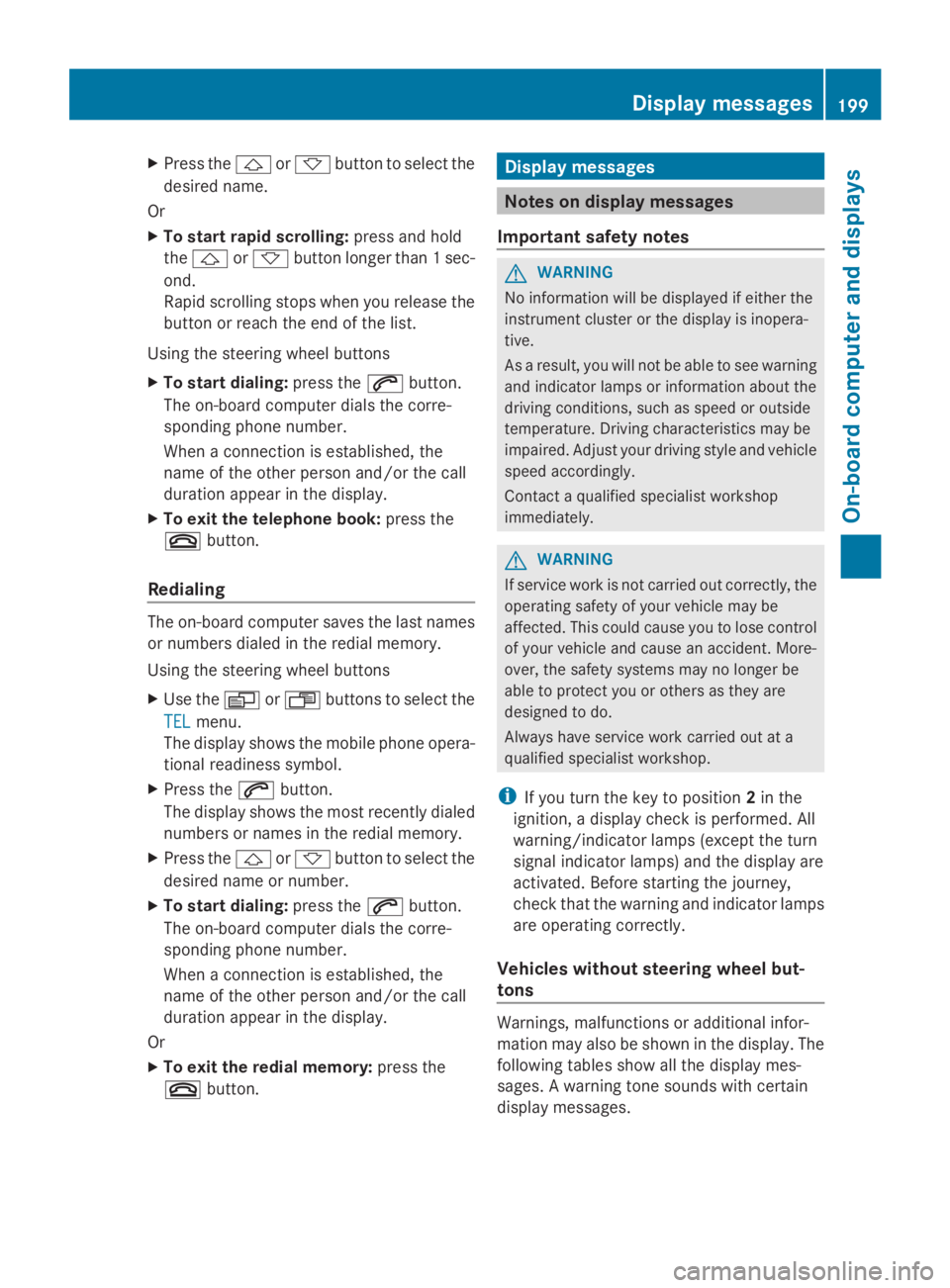
X
Press the 0041or0068 button to select the
desired name.
Or
X To start rapid scrolling: press and hold
the 0041 or0068 button longer than 1 sec-
ond.
Rapid scrolling stops when you release the
button or reach the end of the list.
Using the steering wheel buttons
X To start dialing: press the0061button.
The on-board computer dials the corre-
sponding phone number.
When a connection is established, the
name of the other person and/or the call
duration appear in the display.
X To exit the telephone book: press the
0076 button.
Redialing The on-board computer saves the last names
or numbers dialed in the redial memory.
Using the steering wheel buttons
X Use the 0080or007F buttons to select the
TEL
TEL menu.
The display shows the mobile phone opera-
tional readiness symbol.
X Press the 0061button.
The display shows the most recently dialed
numbers or names in the redial memory.
X Press the 0041or0068 button to select the
desired name or number.
X To start dialing: press the0061button.
The on-board computer dials the corre-
sponding phone number.
When a connection is established, the
name of the other person and/or the call
duration appear in the display.
Or
X To exit the redial memory: press the
0076 button. Display messages
Notes on display messages
Important safety notes G
WARNING
No information will be displayed if either the
instrument cluster or the display is inopera-
tive.
As a result, you will not be able to see warning
and indicator lamps or information about the
driving conditions, such as speed or outside
temperature. Driving characteristics may be
impaired. Adjust your driving style and vehicle
speed accordingly.
Contact a qualified specialist workshop
immediately. G
WARNING
If service work is not carried out correctly, the
operating safety of your vehicle may be
affected. This could cause you to lose control
of your vehicle and cause an accident. More-
over, the safety systems may no longer be
able to protect you or others as they are
designed to do.
Always have service work carried out at a
qualified specialist workshop.
i If you turn the key to position 2in the
ignition, a display check is performed. All
warning/indicator lamps (except the turn
signal indicator lamps) and the display are
activated. Before starting the journey,
check that the warning and indicator lamps
are operating correctly.
Vehicles without steering wheel but-
tons Warnings, malfunctions or additional infor-
mation may also be shown in the display. The
following tables show all the display mes-
sages. A warning tone sounds with certain
display messages. Display messages
199On-board computer and displays Z
Page 212 of 338
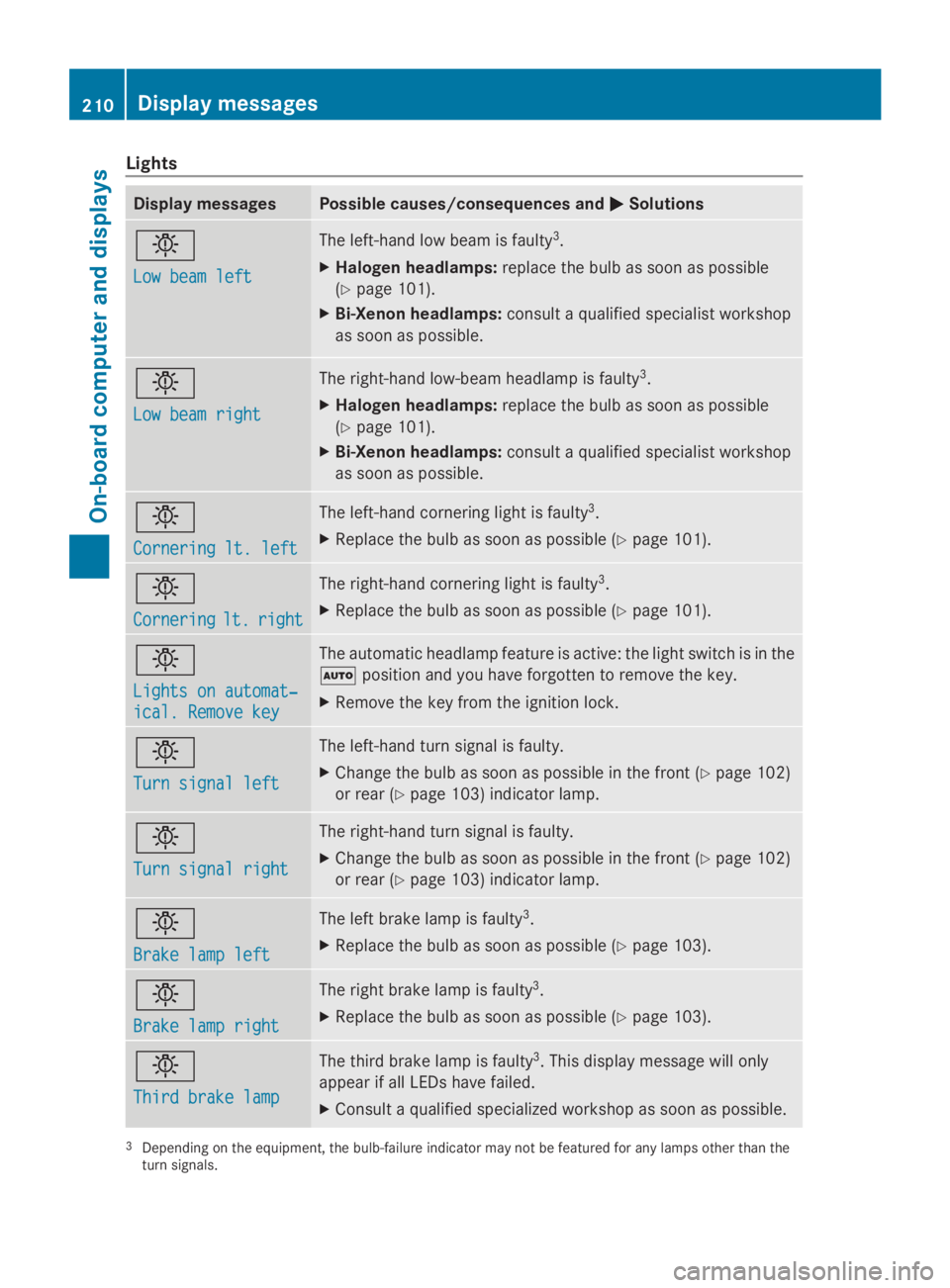
Lights
Display messages Possible causes/consequences and
0050
0050Solutions 0049
Low beam left Low beam left The left-hand low beam is faulty
3
.
X Halogen headlamps: replace the bulb as soon as possible
(Y page 101).
X Bi-Xenon headlamps: consult a qualified specialist workshop
as soon as possible. 0049
Low beam right Low beam right The right-hand low-beam headlamp is faulty
3
.
X Halogen headlamps: replace the bulb as soon as possible
(Y page 101).
X Bi-Xenon headlamps: consult a qualified specialist workshop
as soon as possible. 0049
Cornering lt. left Cornering lt. left The left-hand cornering light is faulty
3
.
X Replace the bulb as soon as possible (Y page 101).0049
Cornering Cornering
lt.
lt.right
right The right-hand cornering light is faulty
3
.
X Replace the bulb as soon as possible (Y page 101).0049
Lights on automat‐ Lights on automat‐
ical. Remove key ical. Remove key The automatic headlamp feature is active: the light switch is in the
0058
position and you have forgotten to remove the key.
X Remove the key from the ignition lock. 0049
Turn signal left Turn signal left The left-hand turn signal is faulty.
X
Change the bulb as soon as possible in the front ( Ypage 102)
or rear (Y page 103) indicator lamp. 0049
Turn signal right Turn signal right The right-hand turn signal is faulty.
X
Change the bulb as soon as possible in the front ( Ypage 102)
or rear (Y page 103) indicator lamp. 0049
Brake lamp left Brake lamp left The left brake lamp is faulty
3
.
X Replace the bulb as soon as possible (Y page 103).0049
Brake lamp right Brake lamp right The right brake lamp is faulty
3
.
X Replace the bulb as soon as possible (Y page 103).0049
Third brake lamp Third brake lamp The third brake lamp is faulty
3
. This display message will only
appear if all LEDs have failed.
X Consult a qualified specialized workshop as soon as possible. 3
Depending on the equipment, the bulb-failure indicator may not be featured for any lamps other than the
turn signals. 210
Display messagesOn-board computer and displays
Page 213 of 338
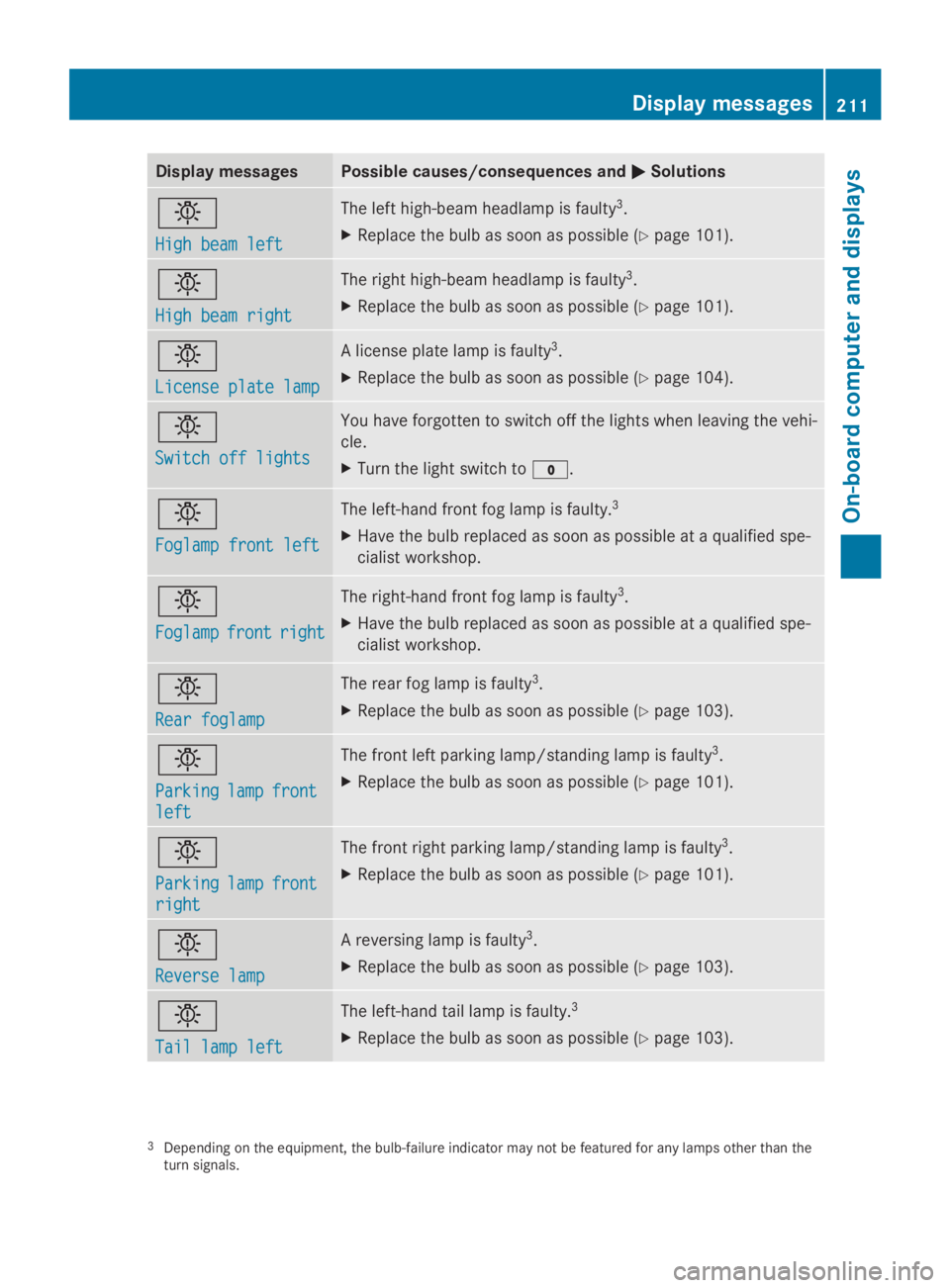
Display messages Possible causes/consequences and
0050
0050Solutions 0049
High beam left High beam left The left high-beam headlamp is faulty
3
.
X Replace the bulb as soon as possible (Y page 101).0049
High beam right High beam right The right high-beam headlamp is faulty
3
.
X Replace the bulb as soon as possible (Y page 101).0049
License plate lamp License plate lamp A license plate lamp is faulty
3
.
X Replace the bulb as soon as possible (Y page 104).0049
Switch off lights Switch off lights You have forgotten to switch off the lights when leaving the vehi-
cle.
X
Turn the light switch to 003F.0049
Foglamp front left Foglamp front left The left-hand front fog lamp is faulty.
3
X Have the bulb replaced as soon as possible at a qualified spe-
cialist workshop. 0049
Foglamp Foglamp
front
frontright
right The right-hand front fog lamp is faulty
3
.
X Have the bulb replaced as soon as possible at a qualified spe-
cialist workshop. 0049
Rear foglamp Rear foglamp The rear fog lamp is faulty
3
.
X Replace the bulb as soon as possible (Y page 103).0049
Parking Parking
lamp
lampfront
front
left
left The front left parking lamp/standing lamp is faulty
3
.
X Replace the bulb as soon as possible (Y page 101).0049
Parking Parking
lamp
lampfront
front
right
right The front right parking lamp/standing lamp is faulty
3
.
X Replace the bulb as soon as possible (Y page 101).0049
Reverse lamp Reverse lamp A reversing lamp is faulty
3
.
X Replace the bulb as soon as possible (Y page 103).0049
Tail lamp left Tail lamp left The left-hand tail lamp is faulty.
3
X Replace the bulb as soon as possible (Y page 103).3
Depending on the equipment, the bulb-failure indicator may not be featured for any lamps other than the
turn signals. Display
messages
211On-board computer and displays Z
Page 214 of 338
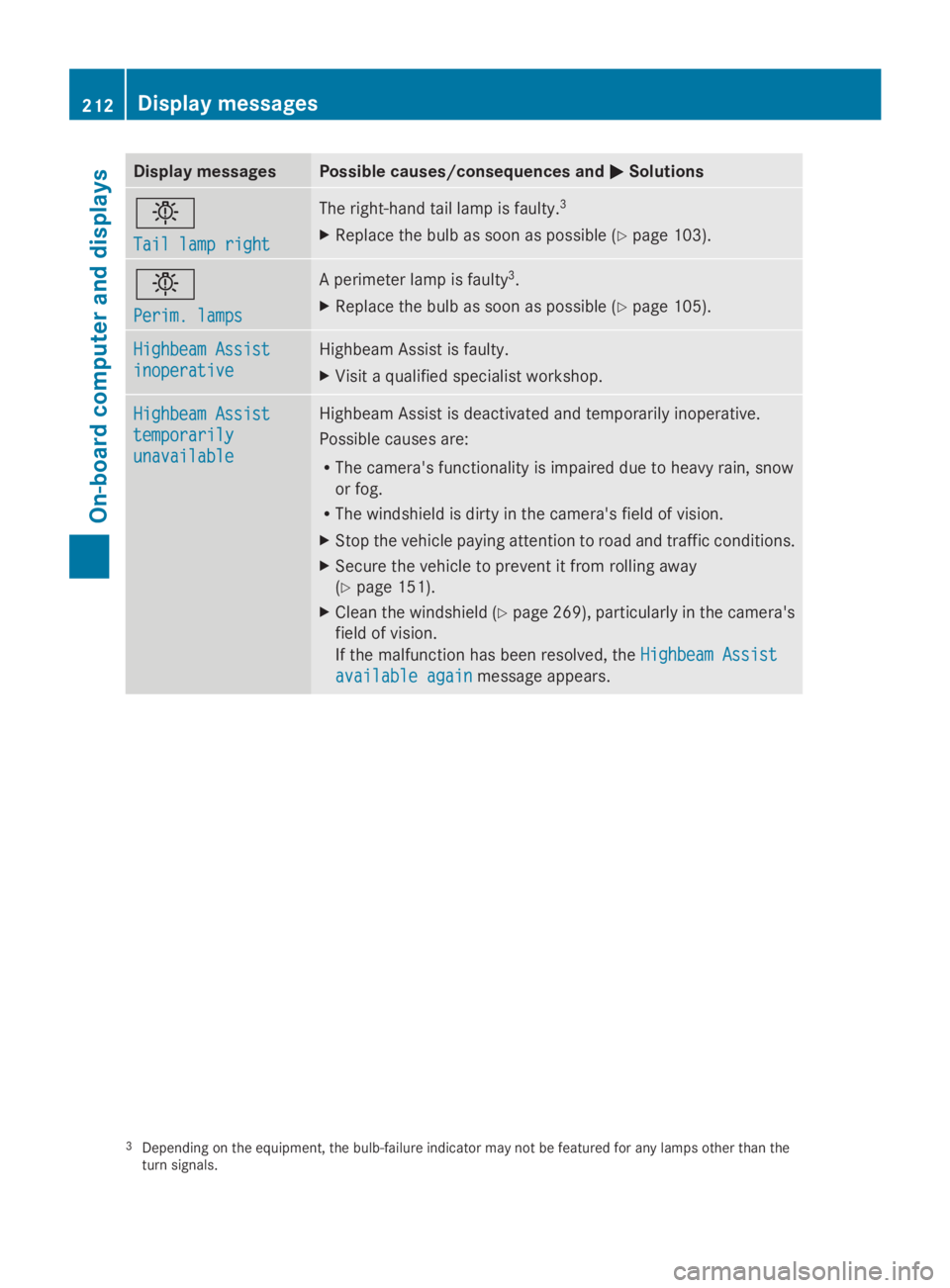
Display messages Possible causes/consequences and
0050
0050Solutions 0049
Tail lamp right Tail lamp right The right-hand tail lamp is faulty.
3
X Replace the bulb as soon as possible (Y page 103).0049
Perim. lamps Perim. lamps A perimeter lamp is faulty
3
.
X Replace the bulb as soon as possible (Y page 105).Highbeam Assist
Highbeam Assist
inoperative inoperative Highbeam Assist is faulty.
X
Visit a qualified specialist workshop. Highbeam Assist Highbeam Assist
temporarily temporarily
unavailable unavailable Highbeam Assist is deactivated and temporarily inoperative.
Possible causes are:
R
The camera's functionality is impaired due to heavy rain, snow
or fog.
R The windshield is dirty in the camera's field of vision.
X Stop the vehicle paying attention to road and traffic conditions.
X Secure the vehicle to prevent it from rolling away
(Y page 151).
X Clean the windshield (Y page 269), particularly in the camera's
field of vision.
If the malfunction has been resolved, the Highbeam Assist
Highbeam Assist
available again available again message appears.3
Depending on the equipment, the bulb-failure indicator may not be featured for any lamps other than the
turn signals. 212
Display
messagesOn-board computer and displays
Page 232 of 338
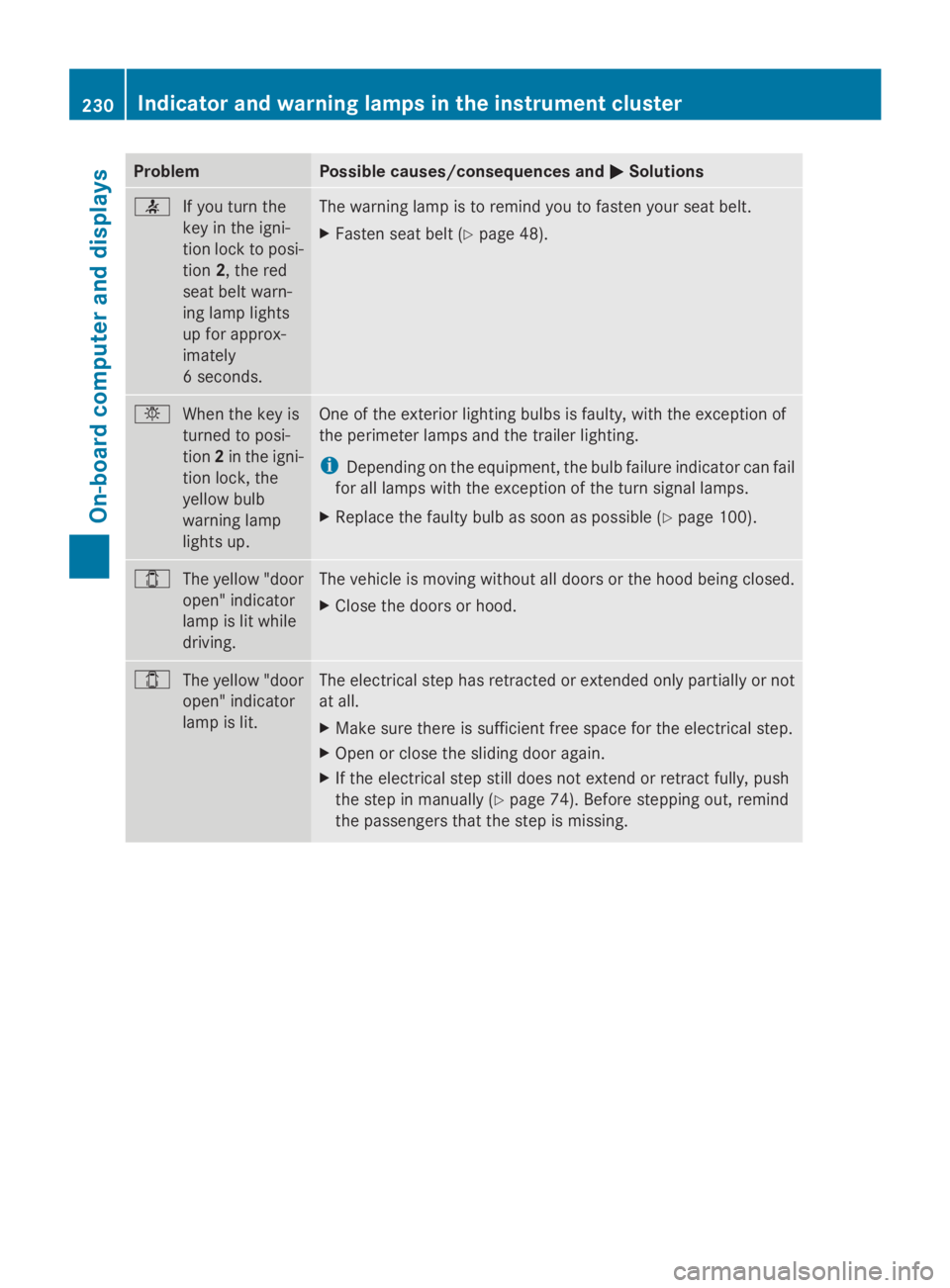
Problem Possible causes/consequences and
0050
0050Solutions 0076
If you turn the
key in the igni-
tion lock to posi-
tion2, the red
seat belt warn-
ing lamp lights
up for approx-
imately
6 seconds. The warning lamp is to remind you to fasten your seat belt.
X
Fasten seat belt (Y page 48).0049
When the key is
turned to posi-
tion2in the igni-
tion lock, the
yellow bulb
warning lamp
lights up. One of the exterior lighting bulbs is faulty, with the exception of
the perimeter lamps and the trailer lighting.
i
Depending on the equipment, the bulb failure indicator can fail
for all lamps with the exception of the turn signal lamps.
X Replace the faulty bulb as soon as possible (Y page 100).003E
The yellow "door
open" indicator
lamp is lit while
driving. The vehicle is moving without all doors or the hood being closed.
X
Close the doors or hood. 003E
The yellow "door
open" indicator
lamp is lit. The electrical step has retracted or extended only partially or not
at all.
X
Make sure there is sufficient free space for the electrical step.
X Open or close the sliding door again.
X If the electrical step still does not extend or retract fully, push
the step in manually (Y page 74). Before stepping out, remind
the passengers that the step is missing. 230
Indicator and warning lamps in the instrument clusterOn-board computer and displays
Page 272 of 338
cleaner. Wheel cleaners could cause
increased corrosion of the brake discs and
brake pads/linings. For this reason, you
should drive for a few minutes after clean-
ing. Braking heats the brake discs and the
brake pads/linings, thus drying them. The
vehicle can then be parked.
If you clean the wheels with a power washer,
observe the safety notes for the power
washer (Y page 268). You could otherwise
damage the tires.
Cleaning the wiper blades G
WARNING
You could become trapped by the windshield
wipers if they start moving while cleaning the
windshield or wiper blades. There is a risk of
injury.
Always switch off the windshield wipers and
the ignition before cleaning the windshield or
wiper blades.
! Do not fold the windshield wipers away
from the windshield unless the hood is
closed. Otherwise, you could damage the
hood.
! Do not pull the wiper blade. Otherwise,
the wiper blade could be damaged.
! Do not clean wiper blades too often and
do not rub them too hard. Otherwise, the
graphite coating could be damaged. This
could cause wiper noise.
! Hold the wiper arm securely when folding
back. The windshield could be damaged if
the wiper arm smacks against it suddenly.
X Turn the key to position 0in the ignition
lock or remove it.
X Fold the windshield wiper arms away from
the windshield until you feel them engage.
X Carefully clean the wiper blades with a
damp cloth.
X Fold back the wiper arms before switching
on the ignition. Cleaning the exterior lighting !
Only use cleaning agents or cleaning
cloths which are suitable for plastic light
lenses. Unsuitable cleaning agents or
cleaning cloths could scratch or damage
the plastic light lenses.
X Clean the plastic covers of the exterior
lighting with a damp sponge and a mild
cleaning agent, e.g. car shampoo for
Sprinter vehicles, or with cleaning cloths.
Cleaning the mirror turn signal !
Only use cleaning agents or cleaning
cloths that are suitable for plastic lenses.
Unsuitable cleaning agents or cleaning
cloths could scratch or damage the plastic
lenses of the mirror turn signals.
X Clean the plastic lenses of the mirror turn
signals in the exterior mirror housing using
a wet sponge and mild cleaning agent, e.g.
car shampoo or cleaning cloths.
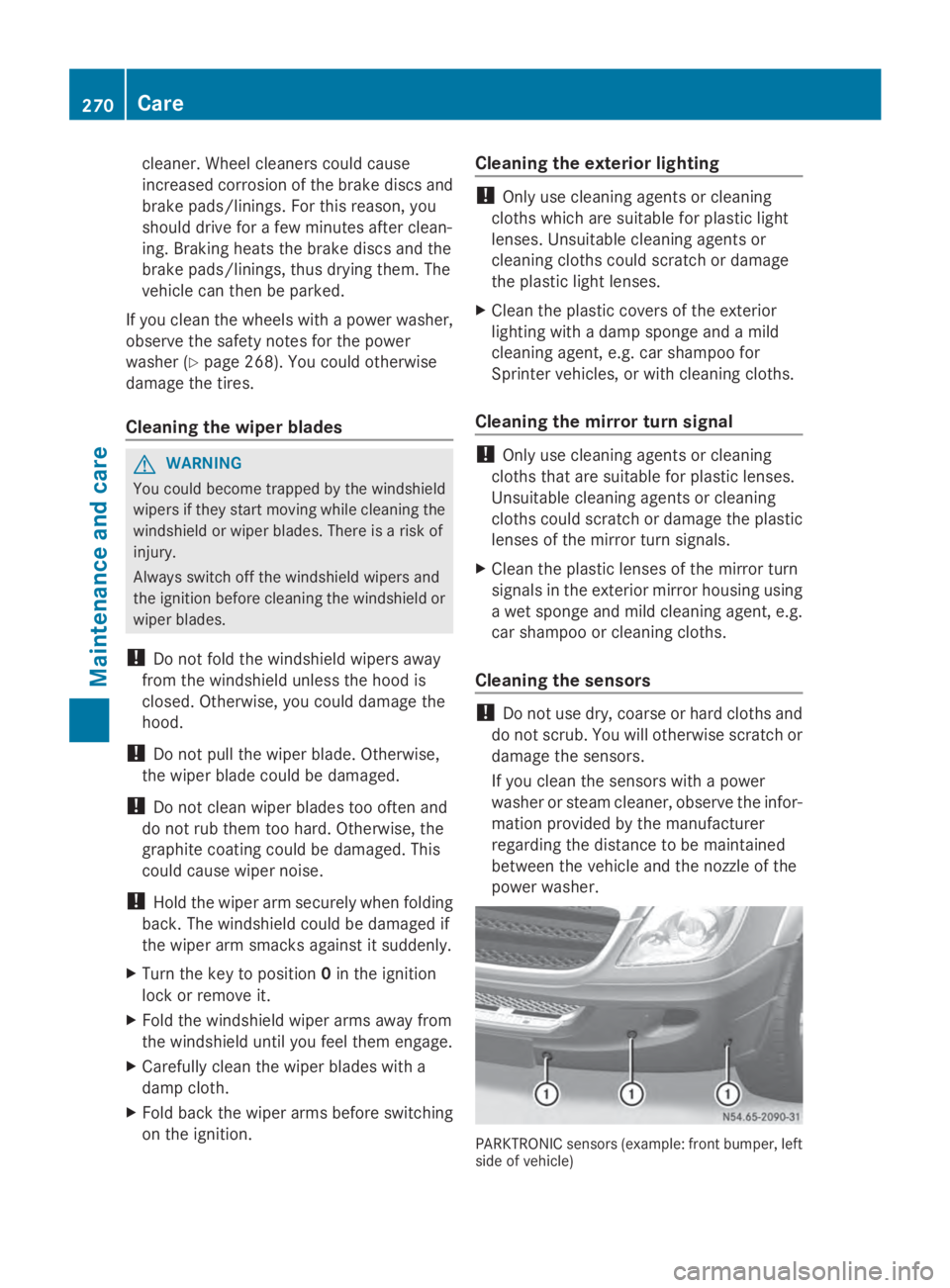
Cleaning the sensors !
Do not use dry, coarse or hard cloths and
do not scrub. You will otherwise scratch or
damage the sensors.
If you clean the sensors with a power
washer or steam cleaner, observe the infor-
mation provided by the manufacturer
regarding the distance to be maintained
between the vehicle and the nozzle of the
power washer. PARKTRONIC sensors (example: front bumper, left
side of vehicle)270
CareMaintenance and care