ignition MERCEDES-BENZ SPRINTER 2014 MY14 Operator’s Manual
[x] Cancel search | Manufacturer: MERCEDES-BENZ, Model Year: 2014, Model line: SPRINTER, Model: MERCEDES-BENZ SPRINTER 2014Pages: 338, PDF Size: 6.78 MB
Page 184 of 338
Useful information
This Operator's Manual describes all models
as well as standard and optional equipment
of your vehicle that were available at the time
of going to print. Country-specific variations
are possible. Note that your vehicle may not
be equipped with all of the described func-
tions. This also applies to systems and func-
tions relevant to safety.
Read the information on qualified specialist
workshops (Y page 26). Important safety notes
G
WARNING
If you are driving and reach through the steer-
ing wheel to operate the adjustment knob,
you could lose control of the vehicle. There is
a risk of an accident and injury.
Only operate the adjustment knobs when the
vehicle is stationary. Do not reach through the
steering wheel when driving. G
WARNING
If you operate information systems and com-
munication equipment integrated in the vehi-
cle while driving, you will be distracted from
traffic conditions. You could also lose control
of the vehicle. There is a risk of an accident.
Only operate the equipment when the traffic
situation permits. If you are not sure that this
is possible, park the vehicle paying attention
to traffic conditions and operate the equip-
ment when the vehicle is stationary. G
WARNING
If the instrument cluster has failed or mal-
functioned, you may not recognize function
restrictions in systems relevant to safety. The
operating safety of your vehicle may be
impaired. There is a risk of an accident.
Drive on carefully. Have the vehicle checked
at a qualified specialist workshop immedi-
ately. If uncertainties regarding the operating safety
of the vehicle arise when continuing the jour-
ney, stop the vehicle, paying attention to road
and traffic conditions. Instrument cluster
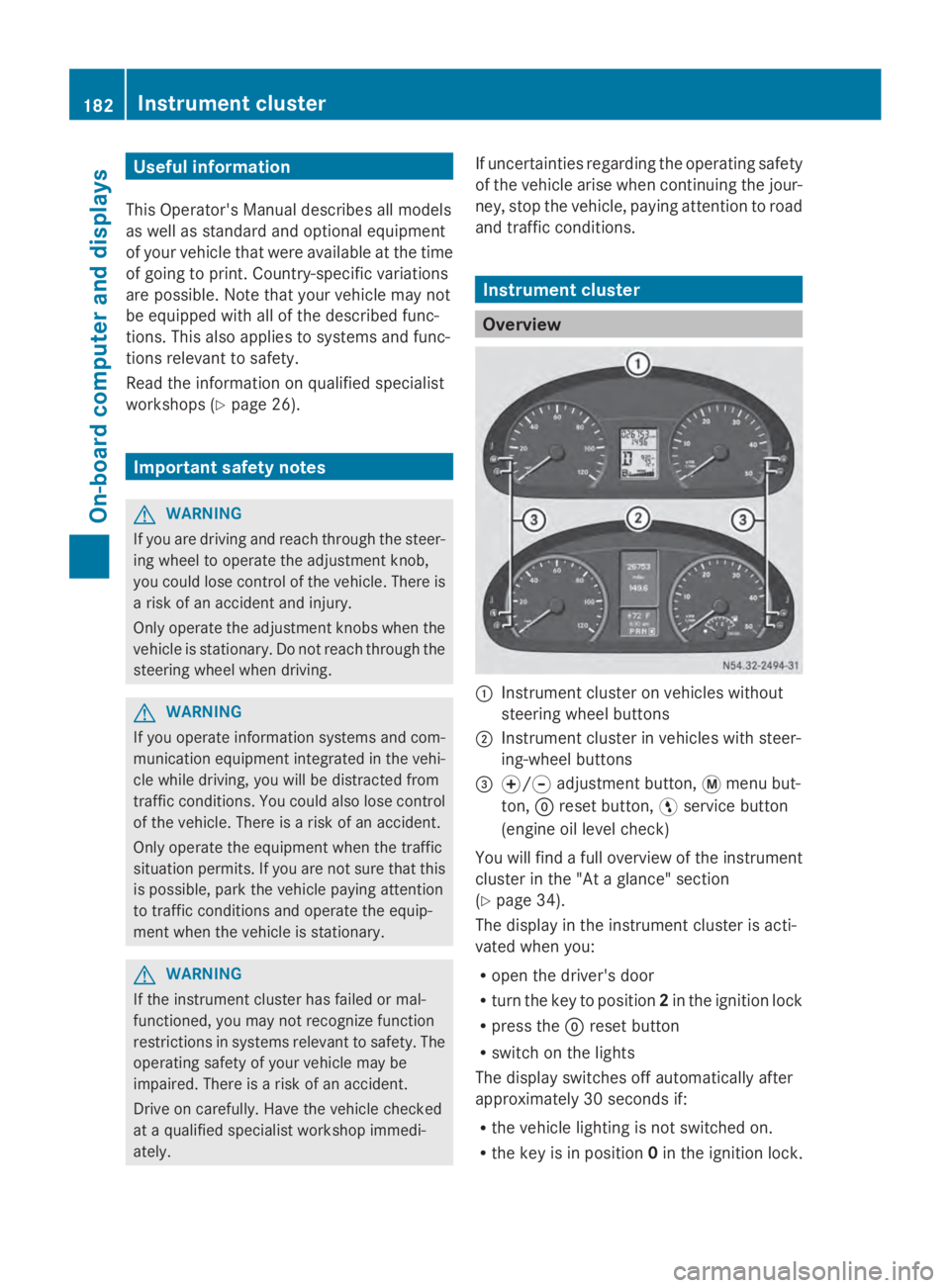
Overview
0043
Instrument cluster on vehicles without
steering wheel buttons
0044 Instrument cluster in vehicles with steer-
ing-wheel buttons
0087 0074/0075 adjustment button, 0079menu but-
ton, 0045reset button, 0098service button
(engine oil level check)
You will find a full overview of the instrument
cluster in the "At a glance" section
(Y page 34).
The display in the instrument cluster is acti-
vated when you:
R open the driver's door
R turn the key to position 2in the ignition lock
R press the 0045reset button
R switch on the lights
The display switches off automatically after
approximately 30 seconds if:
R the vehicle lighting is not switched on.
R the key is in position 0in the ignition lock. 182
Instrument clusterOn-board computer and displays
Page 186 of 338
DEF gauge
Vehicles without steering wheel but-
tons If the supply of DEF is less than 1.5 US gal
(5.5 l), the 00E2indicator lamp lights up and
the 0099 dEF Chk
dEF Chk display message appears.
If the supply of DEF falls below the reserve
range of 0.8 US gal (3.0 l), the 00E2indicator
lamp lights up and the 0099StArtS RExx
StArtS RExx
display message appears. In the display, xx
xx
corresponds to the number of possible
remaining engine starts (16 16to0
0).
Further information on DEF consumption can
be found in the "Service products and filling
capacity" section (Y page 324).
Vehicles with steering wheel buttons If the supply of DEF is less than 1.5 US gal
(5.5 l), the Check Diesel Exhaust Fluid
Check Diesel Exhaust Fluid
See
See Operator's
Operator's Manual
Manualmessage is shown
in the display.
If the supply of DEF falls below the reserve
range of 0.8 US gal (3.0 l), the 00E2xx
xx
starts remaining starts remaining message is displayed. In
the display, xx
xxcorresponds to the number of
possible remaining engine starts ( 16
16to0
0).
Further information on DEF consumption can
be found in the "Service products and filling
capacity" section (Y page 324).On-board computer (vehicles without
steering wheel buttons) Operating the on-board computer
General notes The on-board computer is activated as soon
as you turn the key to position 1in the ignition
lock.
The on-board computer shows vehicle infor-
mation and settings in the display. You can control the display and the settings
in the on-board computer using the adjust-
ment buttons on the instrument cluster.
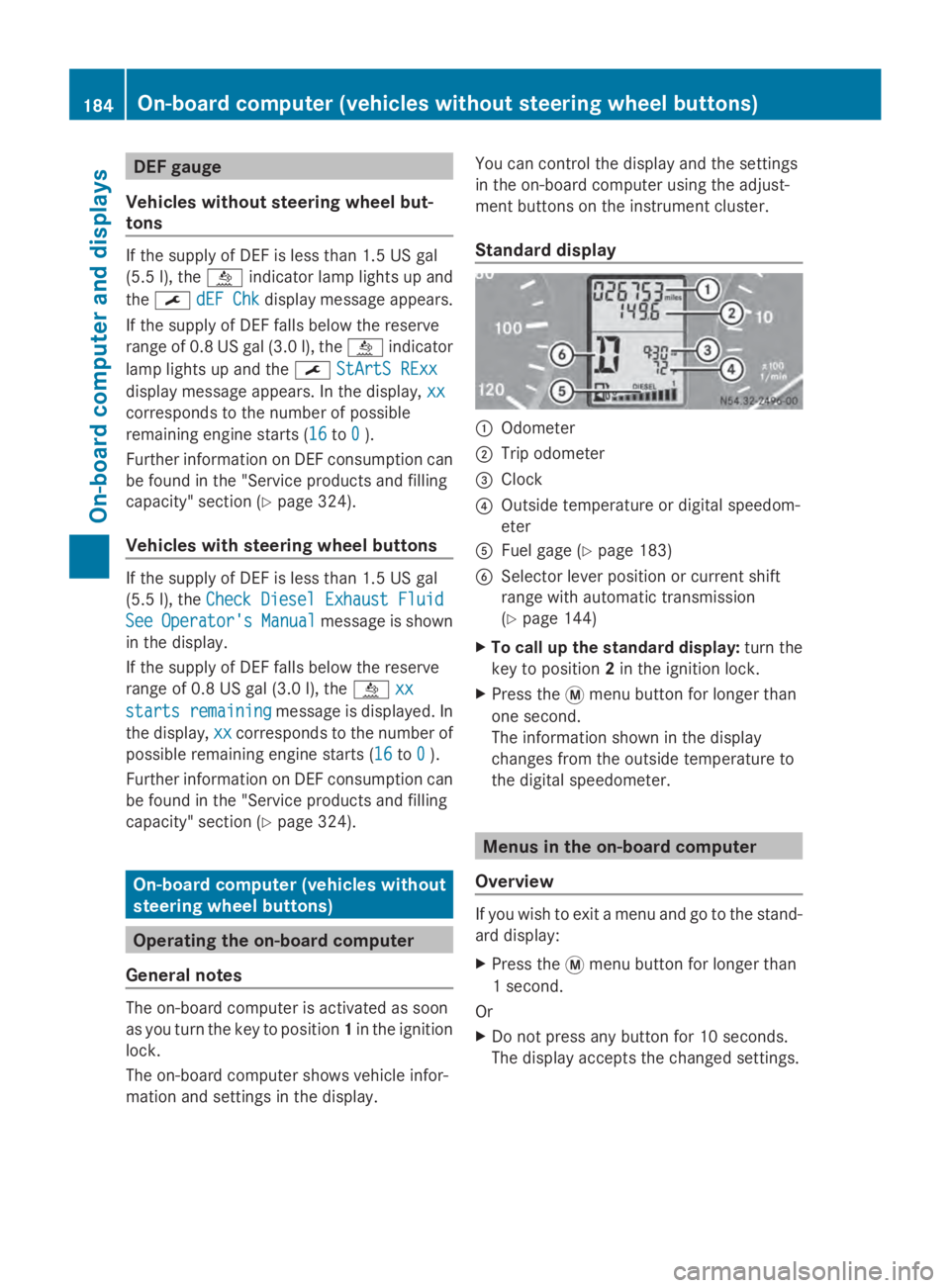
Standard display
0043
Odometer
0044 Trip odometer
0087 Clock
0085 Outside temperature or digital speedom-
eter
0083 Fuel gage (Y page 183)
0084 Selector lever position or current shift
range with automatic transmission
(Ypage 144)
X To call up the standard display: turn the
key to position 2in the ignition lock.
X Press the 0079menu button for longer than
one second.
The information shown in the display
changes from the outside temperature to
the digital speedometer. Menus in the on-board computer
Overview If you wish to exit a menu and go to the stand-
ard display:
X
Press the 0079menu button for longer than
1 second.
Or
X Do not press any button for 10 seconds.
The display accepts the changed settings. 184
On-boa
rdcompu ter (vehicles without steering wheel buttons)On-board computer and displays
Page 187 of 338
Using the
0074,0075,0079or0045 adjustment but-
tons, you can select the following functions:
R Calling up the service due date
(Y page 260)
R Checking the oil level (Y page 252)
R Checking the DEF supply (Y page 184)
R Preselecting/setting the auxiliary heating
switch-on time (Y page 124)
R Tire pressure monitor (Y page 293)
R Setting the time (Y page 185)
R Activating/deactivating Highbeam Assist
(Y page 194)
R Setting the daytime running lamps
(Y page 185)
Setting the time X
Turn the key to position 2in the ignition
lock.
X Press the 0079menu button repeatedly until
the hours figure flashes.
X Press the 0074or0075 button to set the hour.
X Press the 0045reset button.
The minute display flashes.
X Press the 0074or0075 button to set the minute.
i If you keep the 0074or0075 button pressed,
the value will change continuously.
Activating/deactivating Highbeam
Assist X
Turn the key to position 2in the ignition
lock.
X Press the 0079menu button repeatedly until
the 00CE indicator lamp flashes and the
on
on orOFF
OFF message appears in the display.
X Use the 0074or0075 button to switch High-
beam Assist on/off.
Switching the daytime running lamps
on/off If you switch the daytime running lights
ON ON,
the daytime running lights will automatically
light up when the engine is running. For safety reasons, it is only possible to
change this setting when the vehicle is sta-
tionary. The factory setting is
ON ONin countries
in which constant headlamp mode or daytime
running lights are mandatory.
X Turn the key to position 2in the ignition
lock.
X Press the 0079menu button repeatedly until
the 0058 indicator lamp flashes and the
on on orOFF
OFF message appears in the display.
X Press the 0074or0075 button to activate or
deactivate the daytime running lamps.
i USA only:
If you turn the light switch to 0060or
0058, the corresponding light switches on.
If you turn the light switch to 0058, the
daytime running lamps remain switched
on.
Canada only:
If you turn the light switch to 0058, the low-
beam headlamps switch on. If you turn the
light switch to 0060or0058, the daytime
running lamps remain switched on. On-board computer (vehicles without steering wheel buttons)
185On-board computer and displays Z
Page 188 of 338
On-board computer (vehicles with
steering wheel buttons) Operating the on-board computer
Overview X
To activate the on-board computer: turn
the key to position 1in the ignition lock.
The on-board computer is activated as soon
as you turn the key to position 1in the ignition
lock.
The on-board computer shows vehicle infor-
mation and settings in the display.
You can control the display and the settings
in the on-board computer with the buttons on
the steering wheel.
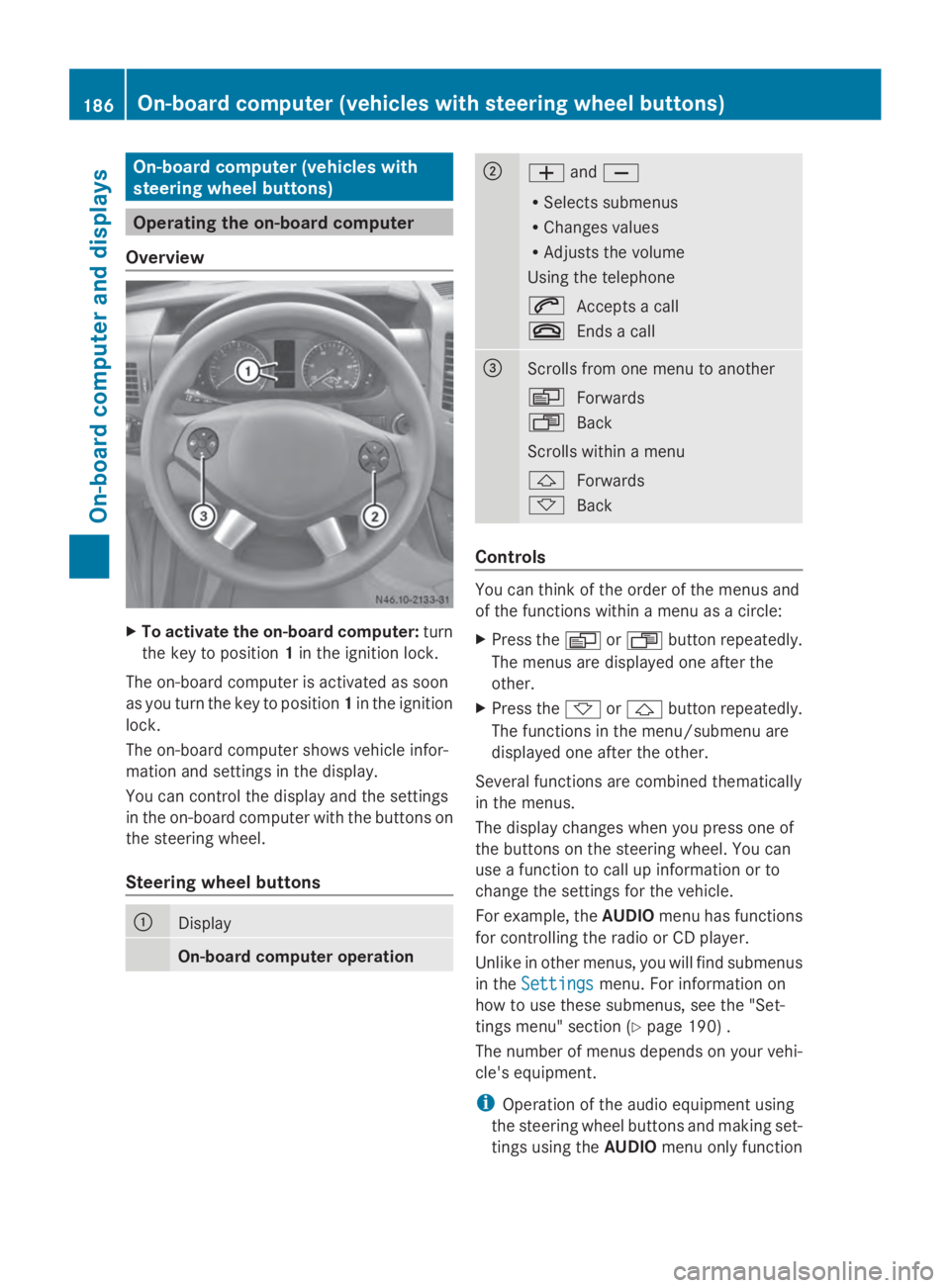
Steering wheel buttons 0043
Display
On-board computer operation 0044
0081
and0082
R Selects submenus
R Changes values
R Adjusts the volume
Using the telephone
0061 Accepts a call
0076 Ends a call 0087
Scrolls from one menu to another
0080
Forwards
007F Back
Scrolls within a menu
0041 Forwards
0068 Back Controls
You can think of the order of the menus and
of the functions within a menu as a circle:
X
Press the 0080or007F button repeatedly.
The menus are displayed one after the
other.
X Press the 0068or0041 button repeatedly.
The functions in the menu/submenu are
displayed one after the other.
Several functions are combined thematically
in the menus.
The display changes when you press one of
the buttons on the steering wheel. You can
use a function to call up information or to
change the settings for the vehicle.
For example, the AUDIOmenu has functions
for controlling the radio or CD player.
Unlike in other menus, you will find submenus
in the Settings Settings menu. For information on
how to use these submenus, see the "Set-
tings menu" section (Y page 190) .
The number of menus depends on your vehi-
cle's equipment.
i Operation of the audio equipment using
the steering wheel buttons and making set-
tings using the AUDIOmenu only function 186
On-board computer (vehicles with steering wheel buttons)On-board computer and displays
Page 197 of 338
motion. You will see the following message
in the display: Setting only possible
Setting only possible
at standstill
at standstill.
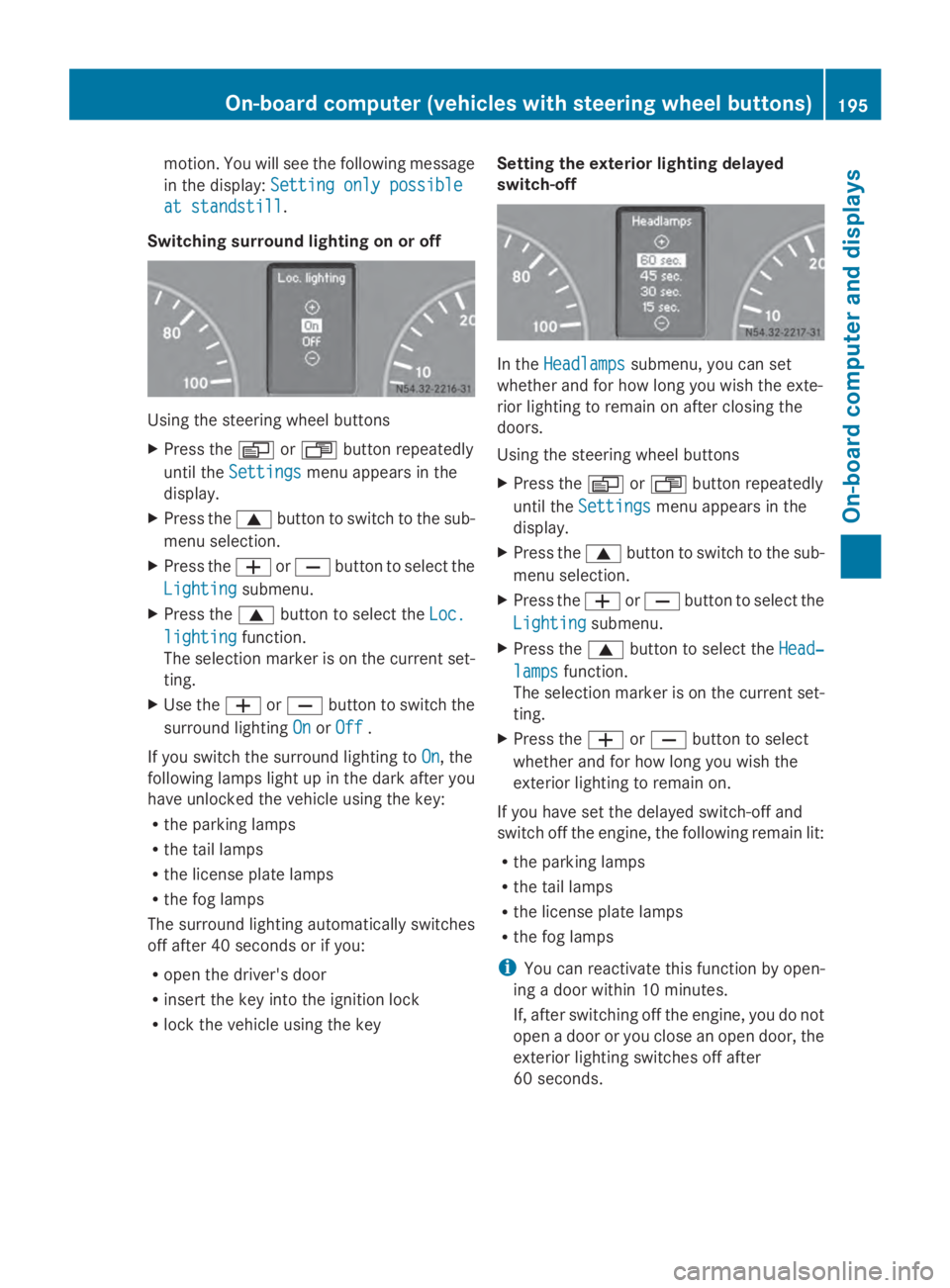
Switching surround lighting on or off Using the steering wheel buttons
X
Press the 0080or007F button repeatedly
until the Settings
Settings menu appears in the
display.
X Press the 0063button to switch to the sub-
menu selection.
X Press the 0081or0082 button to select the
Lighting
Lighting submenu.
X Press the 0063button to select the Loc. Loc.
lighting
lighting function.
The selection marker is on the current set-
ting.
X Use the 0081or0082 button to switch the
surround lighting On OnorOff
Off .
If you switch the surround lighting to On
On, the
following lamps light up in the dark after you
have unlocked the vehicle using the key:
R the parking lamps
R the tail lamps
R the license plate lamps
R the fog lamps
The surround lighting automatically switches
off after 40 seconds or if you:
R open the driver's door
R insert the key into the ignition lock
R lock the vehicle using the key Setting the exterior lighting delayed
switch-off In the
Headlamps Headlamps submenu, you can set
whether and for how long you wish the exte-
rior lighting to remain on after closing the
doors.
Using the steering wheel buttons
X Press the 0080or007F button repeatedly
until the Settings Settings menu appears in the
display.
X Press the 0063button to switch to the sub-
menu selection.
X Press the 0081or0082 button to select the
Lighting
Lighting submenu.
X Press the 0063button to select the Head‐
Head‐
lamps
lamps function.
The selection marker is on the current set-
ting.
X Press the 0081or0082 button to select
whether and for how long you wish the
exterior lighting to remain on.
If you have set the delayed switch-off and
switch off the engine, the following remain lit:
R the parking lamps
R the tail lamps
R the license plate lamps
R the fog lamps
i You can reactivate this function by open-
ing a door within 10 minutes.
If, after switching off the engine, you do not
open a door or you close an open door, the
exterior lighting switches off after
60 seconds. On-board computer (vehicles with steering wheel buttons)
195On-board computer and displays Z
Page 199 of 338
X
Press the 0063button to select the Key
Key
function.
The selection marker is on the current set-
ting.
X Press the 0081or0082 button to activate
or deactivate key dependency. Trip computer menu
General notes You can call up or reset statistical data for the
vehicle in the Trip computer menu.
i When you call up the trip computer again,
it displays the last function called up.
The units of the statistical information dis-
played are set permanently for each spe-
cific country, and are therefore independ-
ent of the units selected in the Settings
Settings
menu.
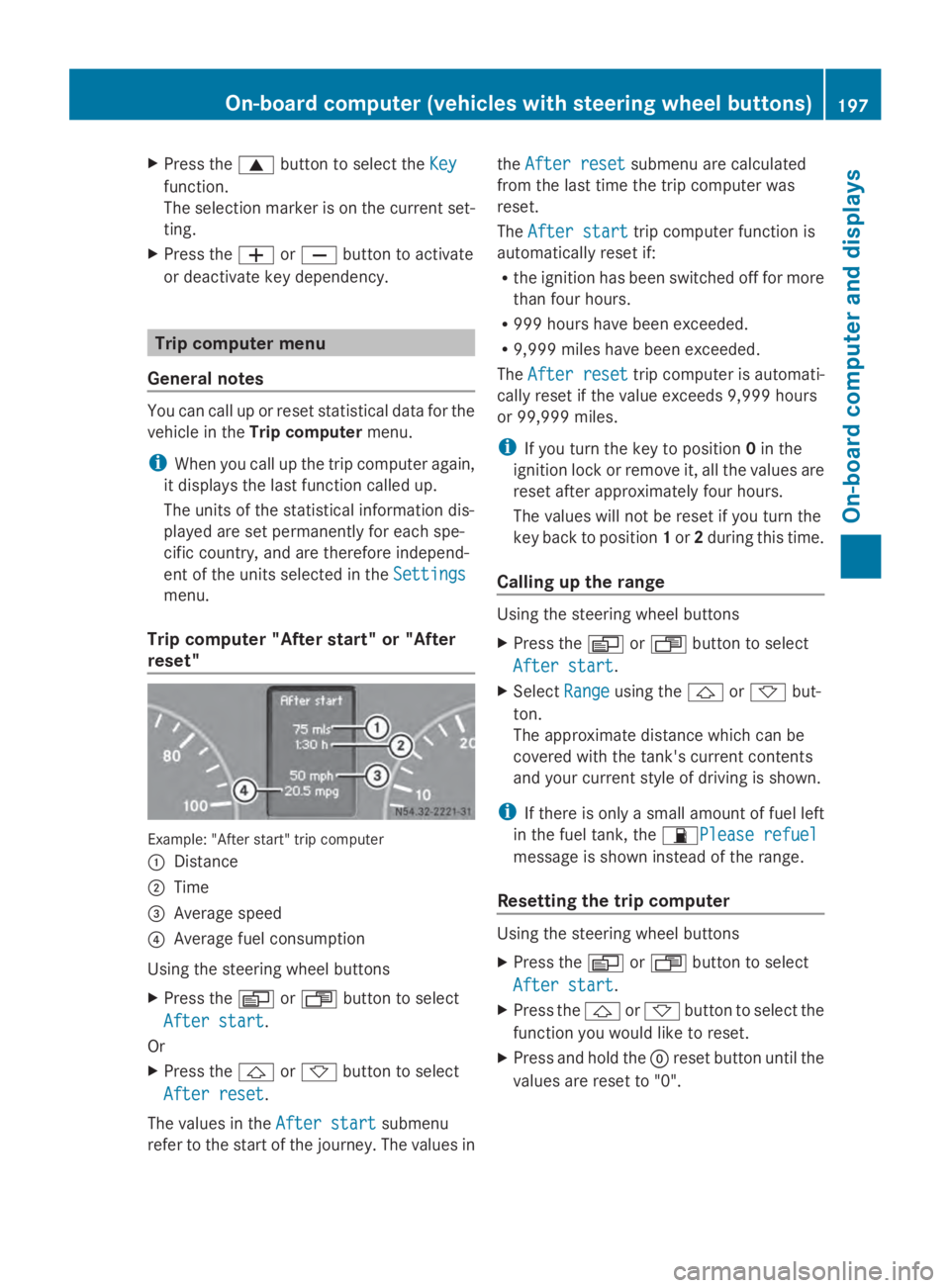
Trip computer "After start" or "After
reset" Example: "After start" trip computer
0043
Distance
0044 Time
0087 Average speed
0085 Average fuel consumption
Using the steering wheel buttons
X Press the 0080or007F button to select
After start
After start.
Or
X Press the 0041or0068 button to select
After reset After reset.
The values in the After start
After startsubmenu
refer to the start of the journey. The values in the
After reset
After reset submenu are calculated
from the last time the trip computer was
reset.
The After start After start trip computer function is
automatically reset if:
R the ignition has been switched off for more
than four hours.
R 999 hours have been exceeded.
R 9,999 miles have been exceeded.
The After reset
After reset trip computer is automati-
cally reset if the value exceeds 9,999 hours
or 99,999 miles.
i If you turn the key to position 0in the
ignition lock or remove it, all the values are
reset after approximately four hours.
The values will not be reset if you turn the
key back to position 1or 2during this time.
Calling up the range Using the steering wheel buttons
X
Press the 0080or007F button to select
After start After start.
X Select Range
Rangeusing the 0041or0068 but-
ton.
The approximate distance which can be
covered with the tank's current contents
and your current style of driving is shown.
i If there is only a small amount of fuel left
in the fuel tank, the 00B5Please refuelPlease refuel
message is shown instead of the range.
Resetting the trip computer Using the steering wheel buttons
X
Press the 0080or007F button to select
After start After start.
X Press the 0041or0068 button to select the
function you would like to reset.
X Press and hold the 0045reset button until the
values are reset to "0". On-board computer (vehicles with steering wheel buttons)
197On-board computer and displays Z
Page 201 of 338
X
Press the 0041or0068 button to select the
desired name.
Or
X To start rapid scrolling: press and hold
the 0041 or0068 button longer than 1 sec-
ond.
Rapid scrolling stops when you release the
button or reach the end of the list.
Using the steering wheel buttons
X To start dialing: press the0061button.
The on-board computer dials the corre-
sponding phone number.
When a connection is established, the
name of the other person and/or the call
duration appear in the display.
X To exit the telephone book: press the
0076 button.
Redialing The on-board computer saves the last names
or numbers dialed in the redial memory.
Using the steering wheel buttons
X Use the 0080or007F buttons to select the
TEL
TEL menu.
The display shows the mobile phone opera-
tional readiness symbol.
X Press the 0061button.
The display shows the most recently dialed
numbers or names in the redial memory.
X Press the 0041or0068 button to select the
desired name or number.
X To start dialing: press the0061button.
The on-board computer dials the corre-
sponding phone number.
When a connection is established, the
name of the other person and/or the call
duration appear in the display.
Or
X To exit the redial memory: press the
0076 button. Display messages
Notes on display messages
Important safety notes G
WARNING
No information will be displayed if either the
instrument cluster or the display is inopera-
tive.
As a result, you will not be able to see warning
and indicator lamps or information about the
driving conditions, such as speed or outside
temperature. Driving characteristics may be
impaired. Adjust your driving style and vehicle
speed accordingly.
Contact a qualified specialist workshop
immediately. G
WARNING
If service work is not carried out correctly, the
operating safety of your vehicle may be
affected. This could cause you to lose control
of your vehicle and cause an accident. More-
over, the safety systems may no longer be
able to protect you or others as they are
designed to do.
Always have service work carried out at a
qualified specialist workshop.
i If you turn the key to position 2in the
ignition, a display check is performed. All
warning/indicator lamps (except the turn
signal indicator lamps) and the display are
activated. Before starting the journey,
check that the warning and indicator lamps
are operating correctly.
Vehicles without steering wheel but-
tons Warnings, malfunctions or additional infor-
mation may also be shown in the display. The
following tables show all the display mes-
sages. A warning tone sounds with certain
display messages. Display messages
199On-board computer and displays Z
Page 202 of 338
Vehicles with steering wheel buttons
The on-board computer shows warnings, mal-
functions or additional information in the dis-
play. A warning tone sounds with certain dis-
play messages. Display messages of a high
priority are shown in red.
Please respond in accordance with the dis-
play messages and follow the additional
notes in this Operator's Manual.
You can hide low-priority display messages by
pressing the 0080,007F,0041or0068 but-
ton on the steering wheel or the 0045reset but-
ton.
You cannot hide display messages of the
highest priority. These messages will con-
tinue to be shown in the display until their
cause has been eliminated.
The on-board computer stores certain display
messages in the message memory
(Y page 200).
The following shows all the messages that
could appear in the display, arranged alpha-
betically. Message memory
The on-board computer only records and
shows malfunctions and warnings from cer-
tain systems. Therefore, make sure that your
vehicle is safe to use. You could cause an
accident by driving an unsafe vehicle.
The on-board computer stores certain display
messages. In the Message memory menu,
you can call up stored display messages.
Using the steering wheel buttons
X Press the 0080or007F button repeatedly
until the number of stored display mes- sages, e.g.
2
2 messages messages, appears in the dis-
play.
If no malfunctions have occurred, the No No
messages
messages message appears.
X Scroll through the stored display messages
with the 0041or0068 button.
X To exit the message memory menu:
press the 0080or007F button.
When you switch off the ignition, all display
messages are deleted from the message
memory. 200
Display messagesOn-board computer and displays
Page 205 of 338
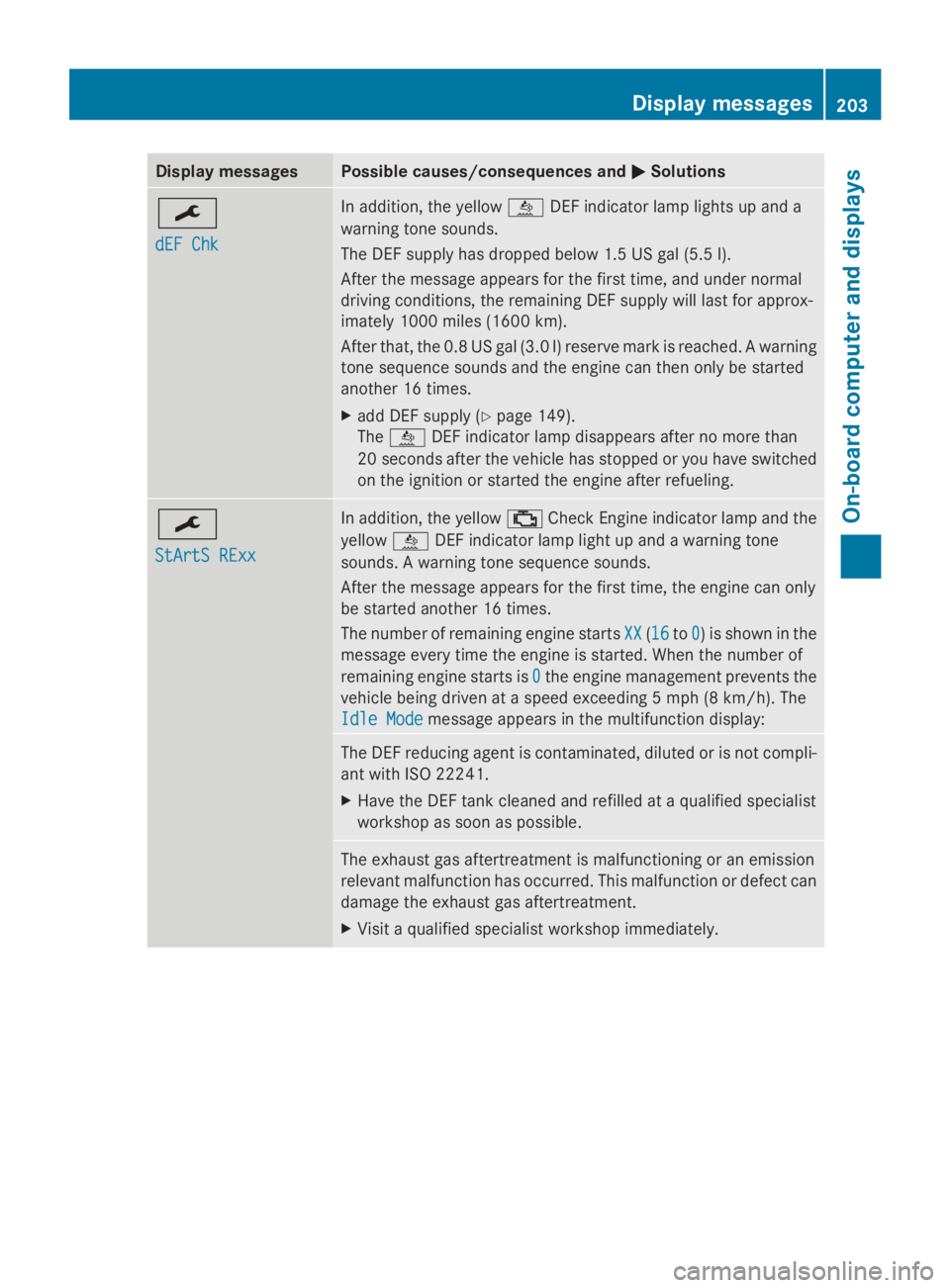
Display messages Possible causes/consequences and
0050
0050Solutions 0099
dEF Chk dEF Chk In addition, the yellow
00E2DEF indicator lamp lights up and a
warning tone sounds.
The DEF supply has dropped below 1.5 US gal (5.5 l).
After the message appears for the first time, and under normal
driving conditions, the remaining DEF supply will last for approx-
imately 1000 miles (1600 km).
After that, the 0.8 US gal (3.0 l) reserve mark is reached. A warning
tone sequence sounds and the engine can then only be started
another 16 times.
X add DEF supply (Y page 149).
The 00E2 DEF indicator lamp disappears after no more than
20 seconds after the vehicle has stopped or you have switched
on the ignition or started the engine after refueling. 0099
StArtS RExx StArtS RExx In addition, the yellow
00B9Check Engine indicator lamp and the
yellow 00E2DEF indicator lamp light up and a warning tone
sounds. A warning tone sequence sounds.
After the message appears for the first time, the engine can only
be started another 16 times.
The number of remaining engine starts XX XX(1616 to0
0) is shown in the
message every time the engine is started. When the number of
remaining engine starts is 0 0the engine management prevents the
vehicle being driven at a speed exceeding 5 mph (8 km/h). The
Idle Mode Idle Mode message appears in the multifunction display: The DEF reducing agent is contaminated, diluted or is not compli-
ant with ISO 22241.
X
Have the DEF tank cleaned and refilled at a qualified specialist
workshop as soon as possible. The exhaust gas aftertreatment is malfunctioning or an emission
relevant malfunction has occurred. This malfunction or defect can
damage the exhaust gas aftertreatment.
X
Visit a qualified specialist workshop immediately. Display
messages
203On-board computer and displays Z
Page 206 of 338
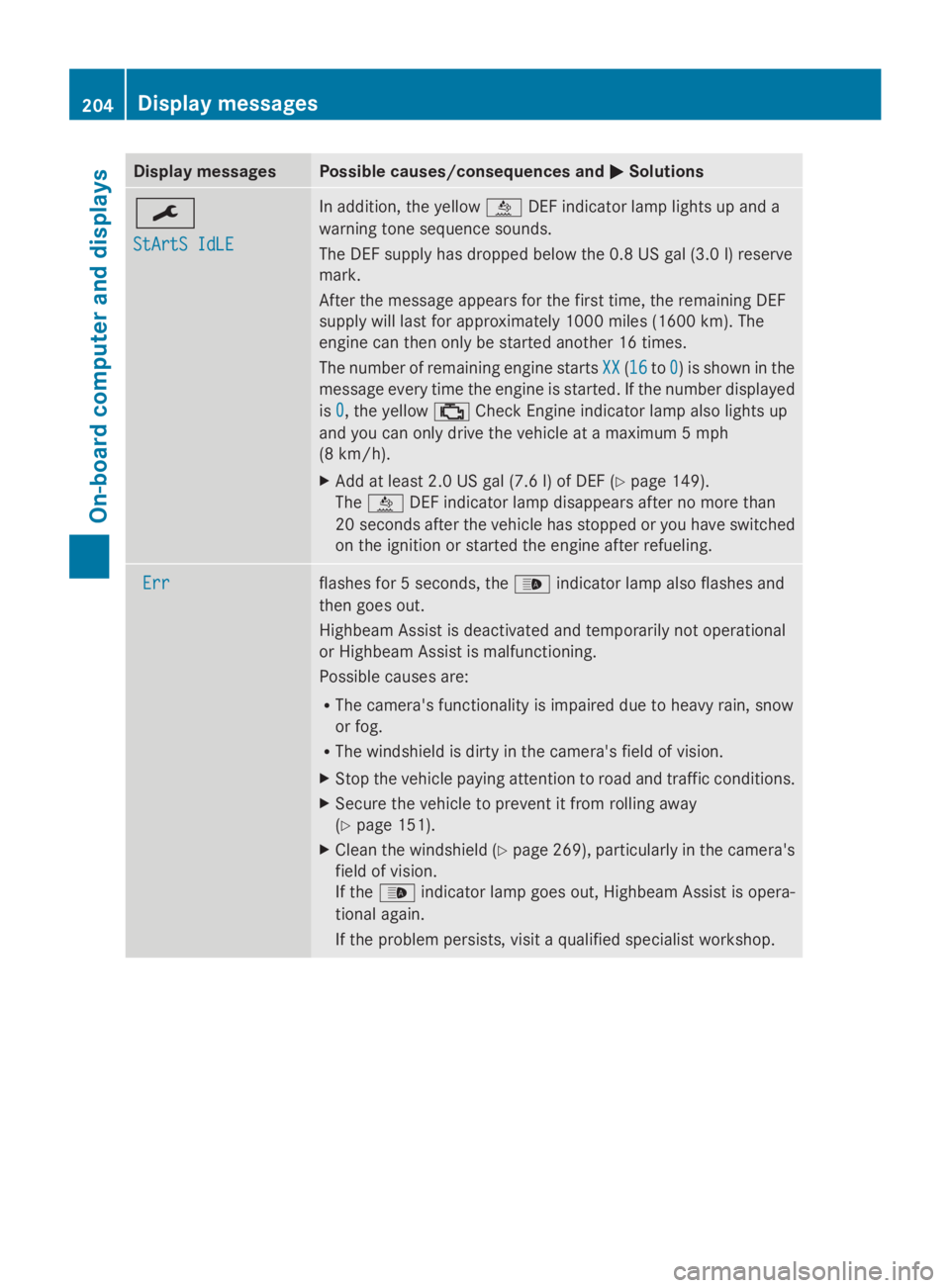
Display messages Possible causes/consequences and
0050
0050Solutions 0099
StArtS IdLE StArtS IdLE In addition, the yellow
00E2DEF indicator lamp lights up and a
warning tone sequence sounds.
The DEF supply has dropped below the 0.8 US gal (3.0 l) reserve
mark.
After the message appears for the first time, the remaining DEF
supply will last for approximately 1000 miles (1600 km). The
engine can then only be started another 16 times.
The number of remaining engine starts XX
XX (1616 to0 0) is shown in the
message every time the engine is started. If the number displayed
is 0 0, the yellow 00B9Check Engine indicator lamp also lights up
and you can only drive the vehicle at a maximum 5 mph
(8 km/h).
X Add at least 2.0 US gal (7.6 l) of DEF (Y page 149).
The 00E2 DEF indicator lamp disappears after no more than
20 seconds after the vehicle has stopped or you have switched
on the ignition or started the engine after refueling. Err Err flashes for 5 seconds, the
00CEindicator lamp also flashes and
then goes out.
Highbeam Assist is deactivated and temporarily not operational
or Highbeam Assist is malfunctioning.
Possible causes are:
R The camera's functionality is impaired due to heavy rain, snow
or fog.
R The windshield is dirty in the camera's field of vision.
X Stop the vehicle paying attention to road and traffic conditions.
X Secure the vehicle to prevent it from rolling away
(Y page 151).
X Clean the windshield (Y page 269), particularly in the camera's
field of vision.
If the 00CE indicator lamp goes out, Highbeam Assist is opera-
tional again.
If the problem persists, visit a qualified specialist workshop. 204
Display
messagesOn-board computer and displays