ignition MERCEDES-BENZ SPRINTER 2014 MY14 Operator’s Manual
[x] Cancel search | Manufacturer: MERCEDES-BENZ, Model Year: 2014, Model line: SPRINTER, Model: MERCEDES-BENZ SPRINTER 2014Pages: 338, PDF Size: 6.78 MB
Page 260 of 338
X
Turn the key to position 2in the ignition
lock.
X Open drain plug 0044immediately until the
water/fuel mixture flows out of drain
hose 0043.
X Screw in drain plug 0044as soon as approx-
imately 0.2 US qt (0.2 l) of the water/fuel
mixture have been collected.
i The electrical fuel pump halts the flow of
the water/fuel mixture after 30 seconds.
X After draining, turn the key back to posi-
tion 0in the ignition lock.
X Dispose of the collected water/fuel mix-
ture in an environmentally responsible
manner, e.g. at a qualified specialist work-
shop.
X Check drain plug 0044. The drain plug must
be closed.
When the engine is running and drain
hose 0044is open, fuel is lost through drain
hose 0043.
X Close the hood.
If the 00B8 indicator lamp does not go out
after draining:
X Drain the fuel filter again.
X If the 00B8 indicator lamp does not go out
after draining for the second time, have the
cause checked immediately at a qualified
specialist workshop. Vehicle interior
Air filter for the rear-compartment air
conditioning
! Regularly check the air filters for visible
dirt. Clean or replace a dirty filter mat. The
dirt may otherwise lead to damage to the
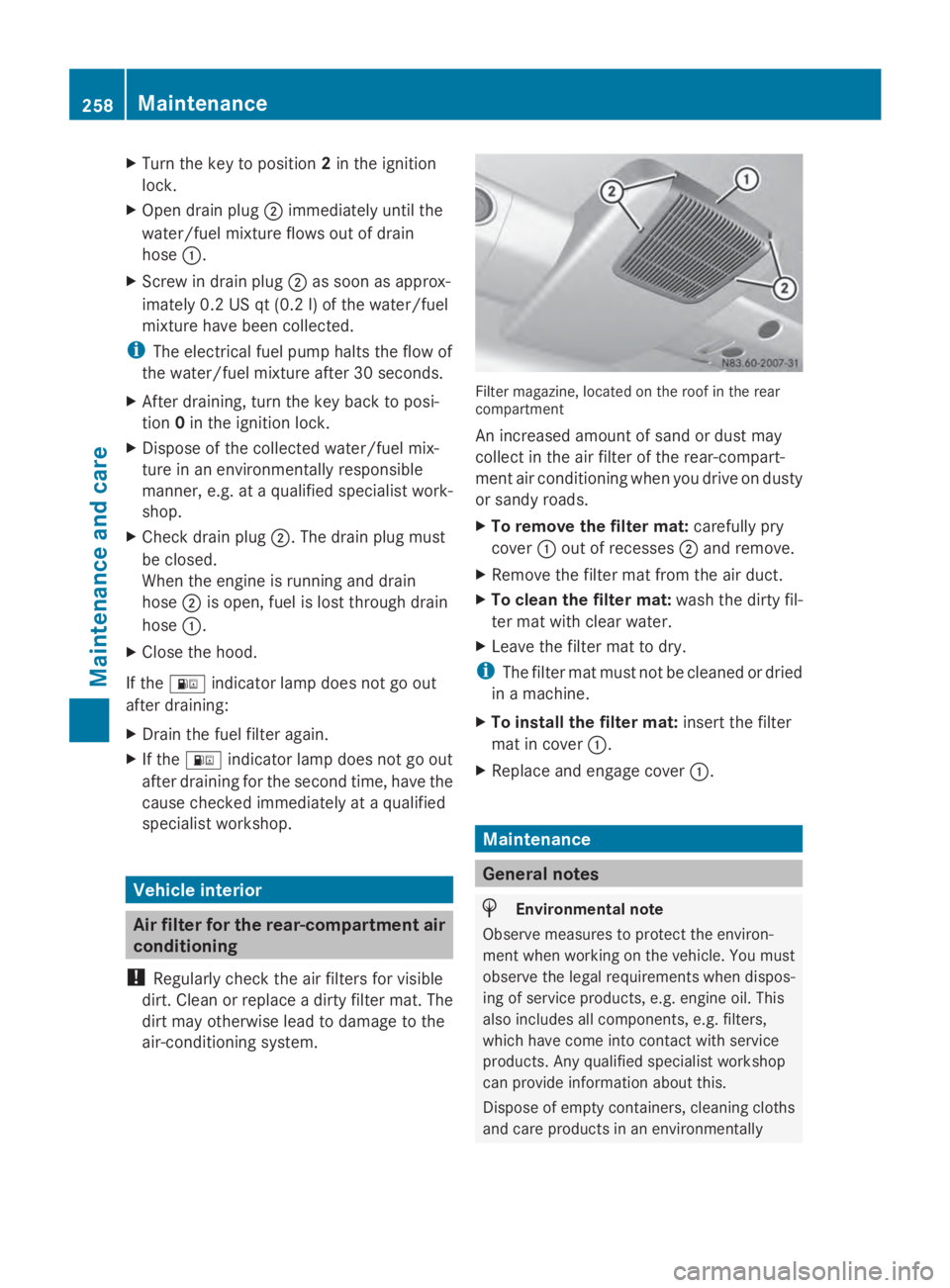
air-conditioning system. Filter magazine, located on the roof in the rear
compartment
An increased amount of sand or dust may
collect in the air filter of the rear-compart-
ment air conditioning when you drive on dusty
or sandy roads.
X
To remove the filter mat: carefully pry
cover 0043out of recesses 0044and remove.
X Remove the filter mat from the air duct.
X To clean the filter mat: wash the dirty fil-
ter mat with clear water.
X Leave the filter mat to dry.
i The filter mat must not be cleaned or dried
in a machine.
X To install the filter mat: insert the filter
mat in cover 0043.
X Replace and engage cover 0043. Maintenance
General notes
H
Environmental note
Observe measures to protect the environ-
ment when working on the vehicle. You must
observe the legal requirements when dispos-
ing of service products, e.g. engine oil. This
also includes all components, e.g. filters,
which have come into contact with service
products. Any qualified specialist workshop
can provide information about this.
Dispose of empty containers, cleaning cloths
and care products in an environmentally 258
MaintenanceMaintenance and care
Page 261 of 338
responsible manner. Comply with the instruc-
tions for use of the care products.
Do not run the engine for longer than neces-
sary when the vehicle is stationary.
Before having maintenance and repairs per-
formed, it is essential to read the materials
related to the maintenance and repairs:
R the applicable sections of the technical
documentation, e.g. the Operator's Manual
and workshop information.
R regulations such as industrial safety regu-
lations and accident prevention regula-
tions.
While working under the vehicle, you must
secure the vehicle on jack stands with suffi-
cient load capacity.
Never use the jack as a substitute. the vehi-
cle's jack is intended only to raise the vehicle
for a short time when changing a wheel. It is
not suited for performing maintenance work
under the vehicle.
Please also refer to the notes about qualified
specialist workshops (Y page 26).
The scope and regularity of the inspection
and maintenance work primarily depend on
the often diverse operating conditions. Spe-
cialist knowledge beyond the scope of this
Operator's Manual is required when carrying
out testing and maintenance work. This work
should only be carried out by trained staff.
The vehicle's Maintenance Booklet describes
the extent and frequency of the maintenance
work and contains additional information on
the New Vehicle Limited Warranty and on the
service products.
i Maintenance services must be carried out
in accordance with the provisions and rec-
ommendations in the Maintenance Book-
let.
Not doing so could void the warranty claim
and lead to refusal of goodwill gestures
after the manufacturer has submitted a
damage report. i
Observe the information on Sprinter orig-
inal parts in the "Technical data" section
(Y page 318). Service interval display
General notes A service that is due is displayed in the service
interval display about 1 month in advance. A
message is then displayed while the vehicle
is in motion or when the ignition is switched
on.
i
The service interval display does not pro-
vide information about the oil level. The
service interval display should therefore
not be confused with the 00B3engine oil
level display.
The service due date is displayed in days or
miles (kilometers), depending on the total
distance driven.
The symbols or letters on the service display
show the type of service that is due.
0099 orA
A for a minor service
009A orB B for a major service
Service due date display Vehicles with steering wheel buttons:
the
following messages may be displayed.
R 0099 Service A due in ... days
Service A due in ... days
R 0099 Service A due in ... mi Service A due in ... mi (kmkm)
R 0099 Service A Carry out now
Service A Carry out now
Vehicles without steering wheel buttons:
the following messages may be displayed.
R 0099 for service A
R 009A for Service B
Additionally, you will see the remaining dis-
tance in miles (mi mi) or kilometers (km km) or the
remaining time in days (d d). Maintenance
259Maintenance and care Z
Page 262 of 338
Service due date has been exceeded
Vehicles with steering wheel buttons:
if
you have missed the service due date, one of
the following messages appears in the display
and warning tone also sounds.
R 0099 Service A overdue by ... days
Service A overdue by ... days
R 0099 Service A overdue by ... mi
Service A overdue by ... mi
(km km)
Vehicles without steering wheel buttons:
if you have missed the service due date, the
0099 or009A symbol for the service flashes
for 10 seconds after the ignition is switched
on. A minus sign also appears in front of the
service due date.
Calling up the service due date X
Turn the key to position 2in the ignition
lock.
The display is activated.
Vehicles without steering wheel buttons
X Press the 0079menu button on the instru-
ment cluster repeatedly until the 0099or
009A symbol for the service appears in the
display.
Additionally, you will see the remaining dis-
tance in miles (mi mi) or kilometers ( km km) or the
remaining time in days (d d).
Vehicles with steering wheel buttons
X Press the 0080or007F button on the steer-
ing wheel until the standard display
(Y page 189) appears in the display.
X Press the 0041or0068 button on the steer-
ing wheel repeatedly until the service mes-
sage appears in the display, for example:
R 0099 Service A due in ... days
Service A due in ... days
R 0099 Service A due in ... mi Service A due in ... mi (kmkm) Battery
Important safety notes
Risk of explosion. Explosive oxy-
hydrogen is produced when bat-
teries are being charged. Only
charge batteries in well-ventilated
areas.
Risk of explosion. Avoid creating
sparks. Avoid open flames and do
not smoke in the vicinity of the
battery.
Battery acid is caustic. Wear acid-
proof protective gloves. If skin or
clothes are splashed with acid,
neutralize the splashes immedi-
ately with soapy water or an acid
neutralizer, and then clean the
affected areas with water.
Wear eye protection. When mixing
water and acid, the liquid can
splash into your eyes. Rinse acid
splashes to the eyes immediately
with clean water and contact a
doctor immediately.
Keep children at a safe distance.
Children are not able to assess the
dangers posed by batteries and
acid.
When handling batteries, observe
the safety precautions and special
protective measures contained in
this Operator's Manual.
H
Environmental note Batteries contain dangerous
substances. It is against the
law to dispose of them with
the household rubbish. They
must be collected separately
and recycled to protect the
environment. Dispose of batteries in an
environmentally friendly
manner. Take discharged
batteries to a qualified spe-260
BatteryMaintenance and care
Page 264 of 338
Disconnecting/connecting the
starter battery
Important safety notes G
WARNING
During the charging process, a battery produ-
ces hydrogen gas. If a short circuit occurs or
sparks are created, the hydrogen gas can
ignite. There is a risk of an explosion.
R Make sure that the positive terminal of a
connected battery does not come into con-
tact with vehicle parts.
R Never place metal objects or tools on a bat-
tery.
R It is important that you observe the descri-
bed order of the battery terminals when
connecting and disconnecting a battery.
R When jump-starting, make sure that the
battery poles with identical polarity are
connected.
R It is particularly important to observe the
described order when connecting and dis-
connecting the jumper cables.
R Never connect or disconnect the battery
terminals while the engine is running.
Disconnecting the starter battery !
Switch off the engine and remove the key
from the ignition lock before you loosen or
disconnect the terminal clamps. You may
otherwise destroy electronic components
such as the alternator.
Always disconnect the starter battery in the
battery case in the driver's footwell first.
! Always disconnect the battery in
the order described below. Never swap the
terminal clamps. You may otherwise dam-
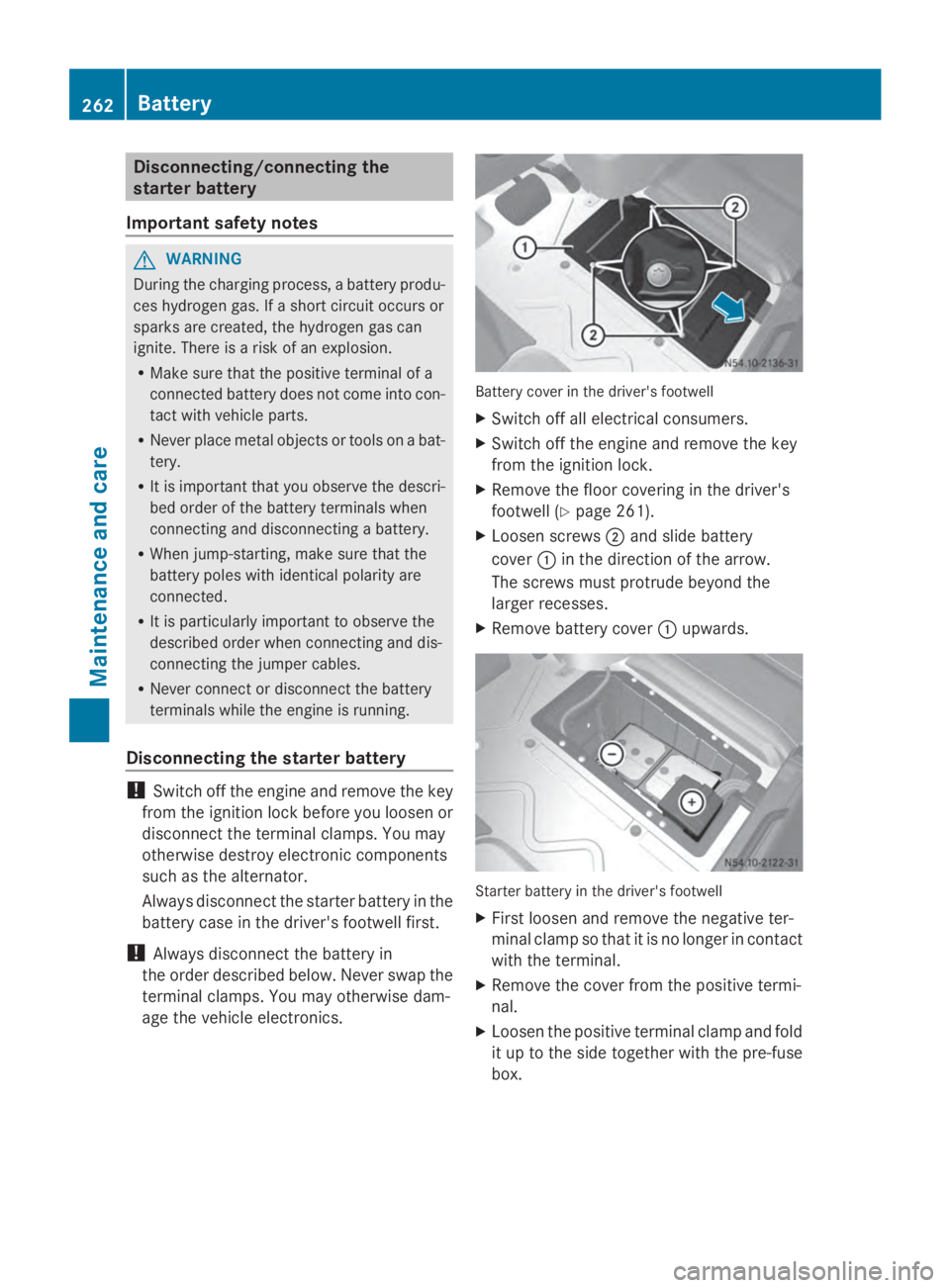
age the vehicle electronics. Battery cover in the driver's footwell
X Switch off all electrical consumers.
X Switch off the engine and remove the key
from the ignition lock.
X Remove the floor covering in the driver's
footwell ( Ypage 261).
X Loosen screws 0044and slide battery
cover 0043in the direction of the arrow.
The screws must protrude beyond the
larger recesses.
X Remove battery cover 0043upwards. Starter battery in the driver's footwell
X First loosen and remove the negative ter-
minal clamp so that it is no longer in contact
with the terminal.
X Remove the cover from the positive termi-
nal.
X Loosen the positive terminal clamp and fold
it up to the side together with the pre-fuse
box. 262
BatteryMaintenance and care
Page 266 of 338
Disconnecting and connecting the
additional battery (engine compart-
ment)
Important safety notes G
WARNING
During the charging process, a battery produ-
ces hydrogen gas. If a short circuit occurs or
sparks are created, the hydrogen gas can
ignite. There is a risk of an explosion.
R Make sure that the positive terminal of a
connected battery does not come into con-
tact with vehicle parts.
R Never place metal objects or tools on a bat-
tery.
R It is important that you observe the descri-
bed order of the battery terminals when
connecting and disconnecting a battery.
R When jump-starting, make sure that the
battery poles with identical polarity are
connected.
R It is particularly important to observe the
described order when connecting and dis-
connecting the jumper cables.
R Never connect or disconnect the battery
terminals while the engine is running.
Disconnecting the additional battery !
Switch off the engine and remove the key
from the ignition lock before you loosen or
disconnect the terminal clamps. You may
otherwise destroy electronic components
such as the alternator.
Always disconnect the starter battery in the
battery case in the driver's footwell first.
! Always disconnect the battery in
the order described below. Never swap the
terminal clamps. You may otherwise dam-
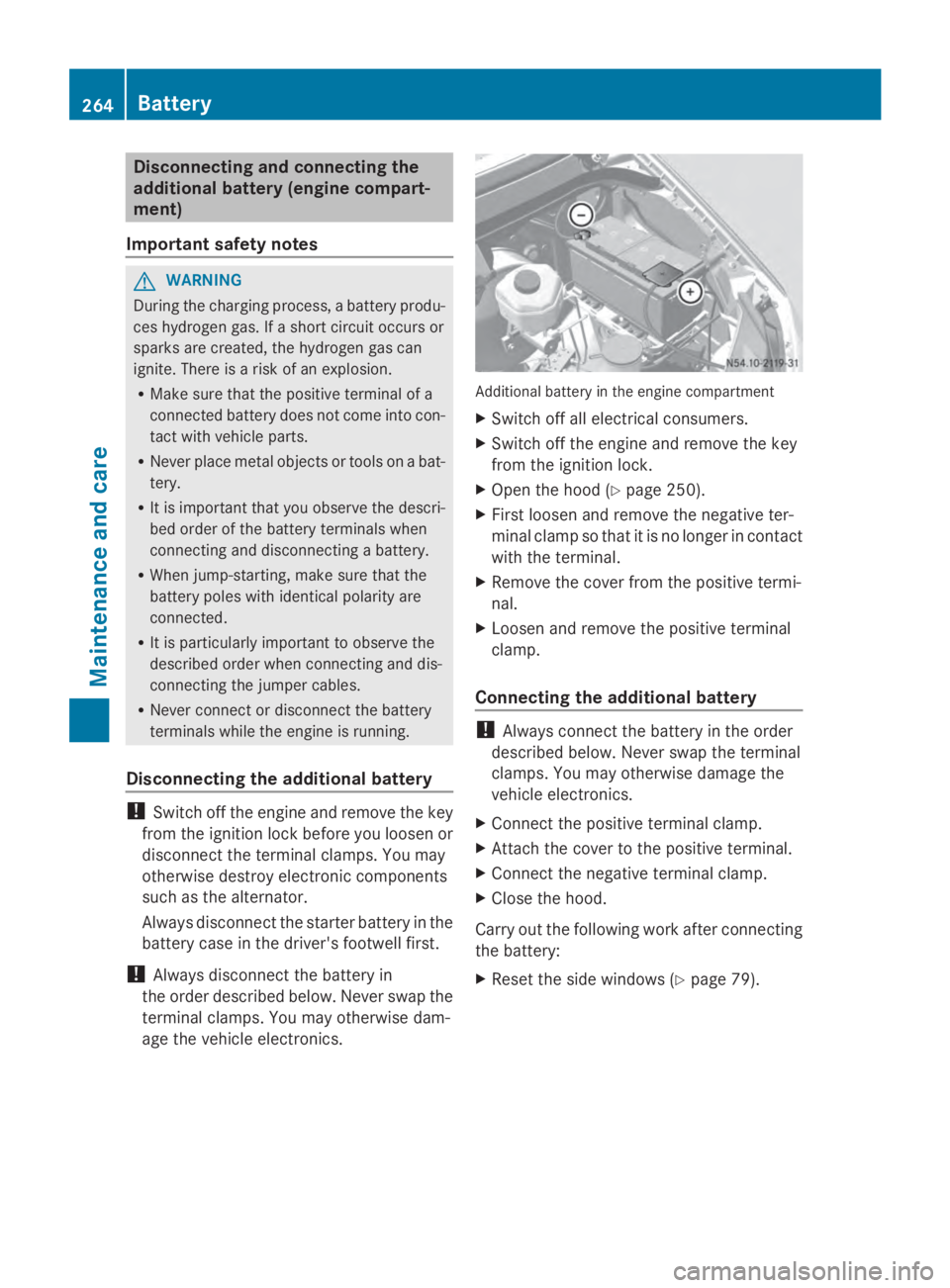
age the vehicle electronics. Additional battery in the engine compartment
X Switch off all electrical consumers.
X Switch off the engine and remove the key
from the ignition lock.
X Open the hood (Y page 250).
X First loosen and remove the negative ter-
minal clamp so that it is no longer in contact
with the terminal.
X Remove the cover from the positive termi-
nal.
X Loosen and remove the positive terminal
clamp.
Connecting the additional battery !
Always connect the battery in the order
described below. Never swap the terminal
clamps. You may otherwise damage the
vehicle electronics.
X Connect the positive terminal clamp.
X Attach the cover to the positive terminal.
X Connect the negative terminal clamp.
X Close the hood.
Carry out the following work after connecting
the battery:
X Reset the side windows ( Ypage 79). 264
BatteryMaintenance and care
Page 267 of 338
Installing and removing the additional
battery (engine compartment)
Removing the additional battery X
Disconnect the battery (Y page 264).
X Loosen the bolts holding the retainer that
prevents the battery from moving around.
X Remove the battery holder and take out the
battery.
Installing the additional battery X
Insert the battery into the battery case.
X Insert the battery holder.
X Tighten the bolts holding the retainer that
prevents the battery in the engine com-
partment from moving around.
X Connect the battery (Y page 264).Disconnecting and connecting the
auxiliary battery (base of the driver's
seat)
Important safety notes G
WARNING
During the charging process, a battery produ-
ces hydrogen gas. If a short circuit occurs or
sparks are created, the hydrogen gas can
ignite. There is a risk of an explosion.
R Make sure that the positive terminal of a
connected battery does not come into con-
tact with vehicle parts.
R Never place metal objects or tools on a bat-
tery.
R It is important that you observe the descri-
bed order of the battery terminals when
connecting and disconnecting a battery.
R When jump-starting, make sure that the
battery poles with identical polarity are
connected. R
It is particularly important to observe the
described order when connecting and dis-
connecting the jumper cables.
R Never connect or disconnect the battery
terminals while the engine is running.
Disconnecting the auxiliary battery !
Switch off the engine and remove the key
from the ignition lock before you loosen or
disconnect the terminal clamps. Other-
wise, you could destroy electronic compo-
nents such as the alternator.
First disconnect the starter battery in the
engine compartment.
! Always disconnect the battery in
the order described below. Never swap the
terminal clamps. You may otherwise dam-
age the vehicle electronics.
The auxiliary battery is located in the driver's
seat base.
X Switch off all electrical consumers.
X Switch off the engine and remove the key
from the ignition lock.
X Fold the driver's seat cushion forward.
X First loosen and remove the negative ter-
minal clamp so that it is no longer in contact
with the terminal.
X Remove the cover from the positive termi-
nal.
X Loosen and remove the positive terminal
clamp.
Reconnecting the auxiliary battery !
Always connect the battery in the order
described below. Never swap the terminal
clamps. You may otherwise damage the
vehicle electronics.
X Connect the positive terminal clamp.
X Attach the cover to the positive terminal.
X Connect the negative terminal clamp.
X Fold the driver's seat cushion back. Battery
265Maintenance and care Z
Page 271 of 338

Cleaning the engine
!
Water must not enter intake or ventilation
openings. When cleaning with high pres-
sure water or steam cleaners, the spray
must not be aimed directly at electrical
components or the terminals of electrical
lines.
Preserve the engine after the engine has
been cleaned. Protect the belt drive system
from exposure to the preservative agent.
Also observe the information in the section
"Power washer" (Y page 268).
Cleaning the paintwork !
Do not affix:
R stickers
R films
R magnetic plates or similar items
to painted surfaces. You could otherwise
damage the paintwork.
Scratches, corrosive deposits, areas affected
by corrosion and damage caused by inade-
quate care cannot always be completely
repaired. In such cases, visit a qualified spe-
cialist workshop.
X Remove impurities immediately, where
possible, whilst avoiding rubbing too hard.
X Soak insect remains with insect remover
and rinse off the treated areas afterwards.
X Soak bird droppings with water and rinse
off the treated areas afterwards.
X Remove coolant, brake fluid, tree resin,
oils, fuels and greases by rubbing gently
with a cloth soaked in petroleum ether or
lighter fluid.
X Use tar remover to remove tar stains.
X Use silicone remover to remove wax.
Cleaning the windows G
WARNING
You could become trapped by the windshield
wipers if they start moving while cleaning the windshield or wiper blades. There is a risk of
injury.
Always switch off the windshield wipers and
the ignition before cleaning the windshield or
wiper blades.
! Do not fold the windshield wipers away
from the windshield unless the hood is
closed. Otherwise, you could damage the
hood.
! Hold the wiper arm securely when folding
back. The windshield could be damaged if
the wiper arm smacks against it suddenly.
! Do not use dry cloths, abrasive products,
solvents or cleaning agents containing sol-
vents to clean the inside of the windows.
Do not touch the insides of the windows
with hard objects, e.g. an ice scraper or
ring. There is otherwise a risk of damaging
the windows.
Before cleaning the windshield
X Turn the key to position 0in the ignition
lock or remove it.
X Fold the windshield wiper arms away from
the windshield until you feel them engage.
Before switching the ignition on again, fold
the windshield wipers back into position.
Cleaning the windows
X Clean the inside and outside of the win-
dows with a damp cloth and a cleaning
agent that is recommended and approved
for Sprinter vehicles. Exterior
Cleaning the wheels !
Do not use any acidic or alkaline cleaning
agents. They can cause corrosion on the
wheel bolts (wheel nuts) or the retainer
springs for the wheel-balancing weights.
! Do not park the vehicle for an extended
period straight after cleaning it, particularly
after having cleaned the wheels with wheel Care
269Maintenance and care Z
Page 272 of 338
cleaner. Wheel cleaners could cause
increased corrosion of the brake discs and
brake pads/linings. For this reason, you
should drive for a few minutes after clean-
ing. Braking heats the brake discs and the
brake pads/linings, thus drying them. The
vehicle can then be parked.
If you clean the wheels with a power washer,
observe the safety notes for the power
washer (Y page 268). You could otherwise
damage the tires.
Cleaning the wiper blades G
WARNING
You could become trapped by the windshield
wipers if they start moving while cleaning the
windshield or wiper blades. There is a risk of
injury.
Always switch off the windshield wipers and
the ignition before cleaning the windshield or
wiper blades.
! Do not fold the windshield wipers away
from the windshield unless the hood is
closed. Otherwise, you could damage the
hood.
! Do not pull the wiper blade. Otherwise,
the wiper blade could be damaged.
! Do not clean wiper blades too often and
do not rub them too hard. Otherwise, the
graphite coating could be damaged. This
could cause wiper noise.
! Hold the wiper arm securely when folding
back. The windshield could be damaged if
the wiper arm smacks against it suddenly.
X Turn the key to position 0in the ignition
lock or remove it.
X Fold the windshield wiper arms away from
the windshield until you feel them engage.
X Carefully clean the wiper blades with a
damp cloth.
X Fold back the wiper arms before switching
on the ignition. Cleaning the exterior lighting !
Only use cleaning agents or cleaning
cloths which are suitable for plastic light
lenses. Unsuitable cleaning agents or
cleaning cloths could scratch or damage
the plastic light lenses.
X Clean the plastic covers of the exterior
lighting with a damp sponge and a mild
cleaning agent, e.g. car shampoo for
Sprinter vehicles, or with cleaning cloths.
Cleaning the mirror turn signal !
Only use cleaning agents or cleaning
cloths that are suitable for plastic lenses.
Unsuitable cleaning agents or cleaning
cloths could scratch or damage the plastic
lenses of the mirror turn signals.
X Clean the plastic lenses of the mirror turn
signals in the exterior mirror housing using
a wet sponge and mild cleaning agent, e.g.
car shampoo or cleaning cloths.
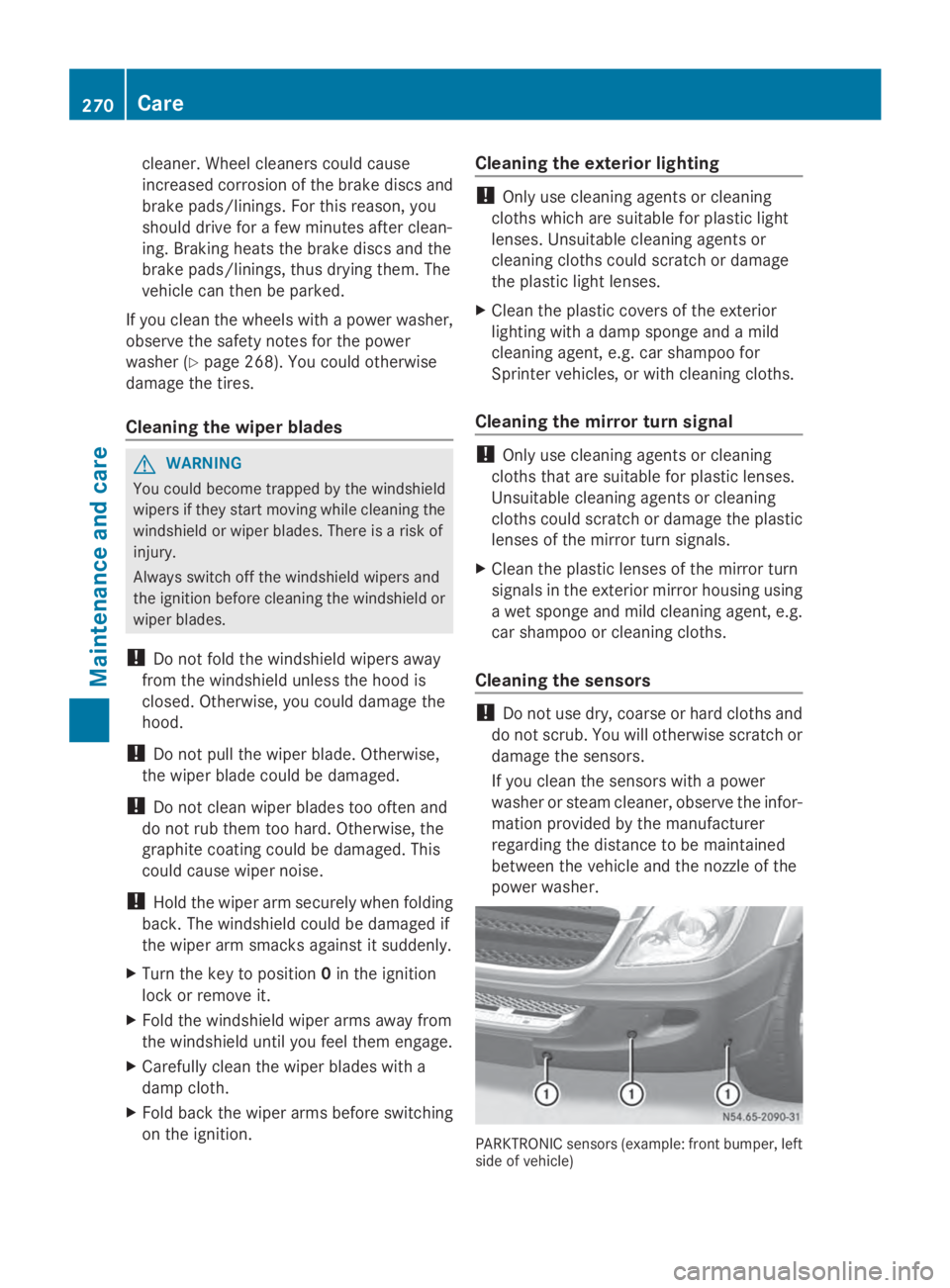
Cleaning the sensors !
Do not use dry, coarse or hard cloths and
do not scrub. You will otherwise scratch or
damage the sensors.
If you clean the sensors with a power
washer or steam cleaner, observe the infor-
mation provided by the manufacturer
regarding the distance to be maintained
between the vehicle and the nozzle of the
power washer. PARKTRONIC sensors (example: front bumper, left
side of vehicle)270
CareMaintenance and care
Page 281 of 338
R
Only use jumper cables that have a suffi-
cient cross-section and insulated terminal
clamps.
R If the battery is fully discharged, attach the
battery of another vehicle for a few minutes
before attempting to start. This charges the
empty battery a little.
R Make sure that the two vehicles do not
touch.
Make sure that:
R the jumper cables are not damaged.
R bare parts of the terminal clamps do not
come into contact with other metal parts
while the jumper cables are connected to
the battery.
R the jumper cables cannot come into con-
tact with parts such as the V-belt pulley or
the fan. These parts move when the engine
is started and while it is running.
i Jumper cables and further information
regarding jump starting can be obtained at
any qualified specialist workshop. Before connecting the jumper cables
On vehicles with a battery main switch, check
whether the battery main switch is switched
on (Y page 136).
X Apply the parking brake.
X Move the selector lever of the automatic
transmission to position P.
X Switch off all electrical consumers, e.g.
audio equipment, blower.
X Turn the key to position 0in the ignition
lock and remove it (Y page 137).
X Open the hood (Y page 250). Tow-starting and towing away
Important safety notes
G
WARNING
Functions relevant to safety are restricted or
no longer available if:
R the engine is not running.
R the brake system or the power steering is
malfunctioning.
R there is a malfunction in the voltage supply
or the vehicle's electrical system.
If your vehicle is being towed, much more
force may be necessary to steer or brake.
There is a risk of an accident.
In such cases, use a tow bar. Before towing,
make sure that the steering moves freely. G
WARNING
You can no longer steer the vehicle if the
steering wheel lock has been engaged. There
is a risk of an accident.
Always switch off the ignition when towing the
vehicle with a tow cable or a tow bar. G
WARNING
If the weight of the vehicle to be towed or tow-
started is greater than the permissible gross
weight of your vehicle:
R the towing eye could detach itself
R the vehicle/trailer combination could roll-
over.
There is a risk of an accident.
When towing or tow-starting another vehicle,
its weight should not be greater than the per-
missible gross weight of your vehicle.
Information on your vehicle's gross vehicle
weight rating can be found on the vehicle
identification plate (Y page 319).
! Only secure the tow rope or tow bar at the
towing eyes. Otherwise, the vehicle could
be damaged. Tow-starting and towing away
279Breakdown assistance Z
Page 282 of 338
!
Observe the following points when towing
with a tow rope:
R Secure the tow rope on the same side on
both vehicles.
R Ensure that the tow cable is not longer
than legally permitted. Mark the tow
cable in the middle, e.g. with a white
cloth (30 x 30 cm). This will make other
road users aware that the vehicle is being
towed.
R Only secure the tow cable to the towing
eye.
R Observe the brake lamps of the towing
vehicle while driving. Always maintain a
distance so that the tow rope does not
sag.
R Do not use steel cables or chains to tow
your vehicle. You could otherwise dam-
age the vehicle.
! Do not use the towing eye for recovery,
this could damage the vehicle. If in doubt,
recover the vehicle with a crane.
! When towing, pull away slowly and
smoothly. If the tractive power is too high,
the vehicles could be damaged.
Observe the legal requirements for the rele-
vant country when towing.
It is preferable to have the vehicle trans-
ported on a transporter or trailer instead of
towing it.
The automatic transmission selector lever
must be in the Nposition when towing the
vehicle.
The battery must be connected and charged.
Otherwise, you:
R cannot turn the key in the ignition lock to
position 2
R cannot move the selector lever to position
N on vehicles with automatic transmission.
i Switch off the automatic locking feature
before the vehicle is towed (Y page 71). You
could otherwise lock yourself out of the
vehicle when pushing or towing away the
vehicle. Installing/removing the towing eye
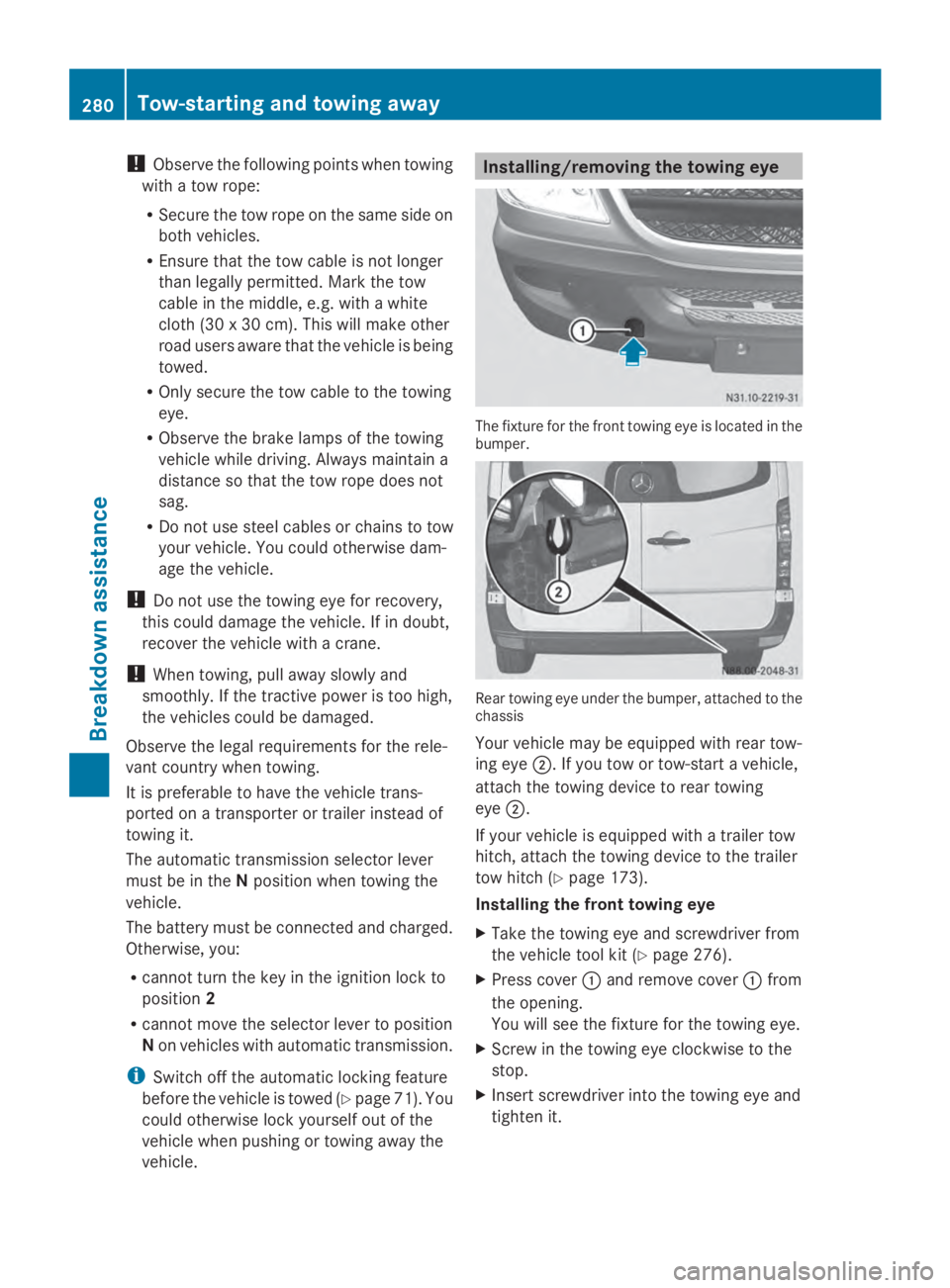
The fixture for the front towing eye is located in the
bumper.
Rear towing eye under the bumper, attached to the
chassis
Your vehicle may be equipped with rear tow-
ing eye 0044. If you tow or tow-start a vehicle,
attach the towing device to rear towing
eye 0044.
If your vehicle is equipped with a trailer tow
hitch, attach the towing device to the trailer
tow hitch (Y page 173).
Installing the front towing eye
X Take the towing eye and screwdriver from
the vehicle tool kit (Y page 276).
X Press cover 0043and remove cover 0043from
the opening.
You will see the fixture for the towing eye.
X Screw in the towing eye clockwise to the
stop.
X Insert screwdriver into the towing eye and
tighten it. 280
Tow-starting and towing awayBreakdown assistance