lock MERCEDES-BENZ SPRINTER 2014 MY14 Operator’s Manual
[x] Cancel search | Manufacturer: MERCEDES-BENZ, Model Year: 2014, Model line: SPRINTER, Model: MERCEDES-BENZ SPRINTER 2014Pages: 338, PDF Size: 6.78 MB
Page 104 of 338
0044
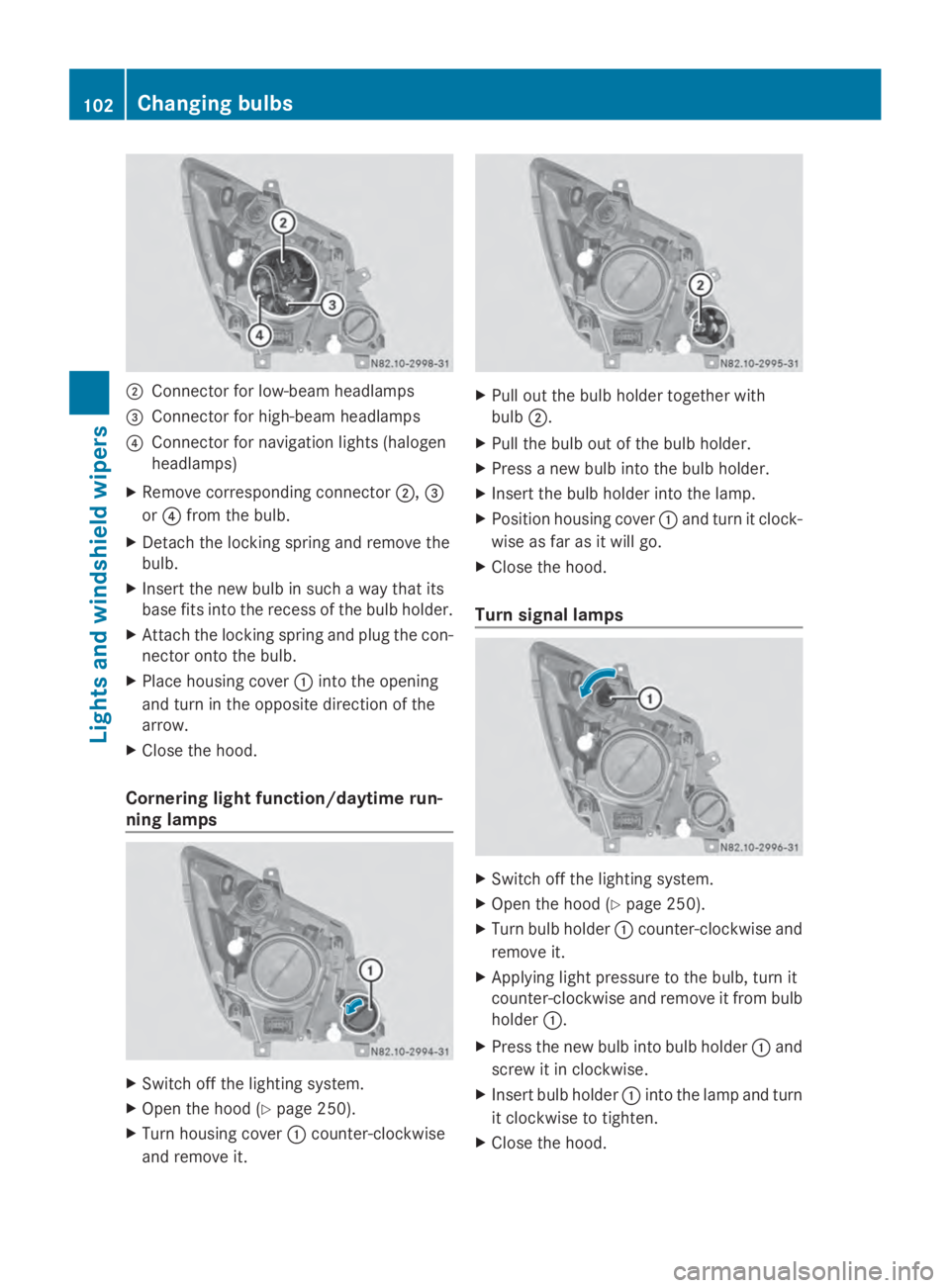
Connector for low-beam headlamps
0087 Connector for high-beam headlamps
0085 Connector for navigation lights (halogen
headlamps)
X Remove corresponding connector 0044,0087
or 0085 from the bulb.
X Detach the locking spring and remove the
bulb.
X Insert the new bulb in such a way that its
base fits into the recess of the bulb holder.
X Attach the locking spring and plug the con-
nector onto the bulb.
X Place housing cover 0043into the opening
and turn in the opposite direction of the
arrow.
X Close the hood.
Cornering light function/daytime run-
ning lamps X
Switch off the lighting system.
X Open the hood (Y page 250).
X Turn housing cover 0043counter-clockwise
and remove it. X
Pull out the bulb holder together with
bulb 0044.
X Pull the bulb out of the bulb holder.
X Press a new bulb into the bulb holder.
X Insert the bulb holder into the lamp.
X Position housing cover 0043and turn it clock-
wise as far as it will go.
X Close the hood.
Turn signal lamps X
Switch off the lighting system.
X Open the hood (Y page 250).
X Turn bulb holder 0043counter-clockwise and
remove it.
X Applying light pressure to the bulb, turn it
counter-clockwise and remove it from bulb
holder 0043.
X Press the new bulb into bulb holder 0043and
screw it in clockwise.
X Insert bulb holder 0043into the lamp and turn
it clockwise to tighten.
X Close the hood. 102
Changing bulbsLights and windshield wipers
Page 106 of 338
X
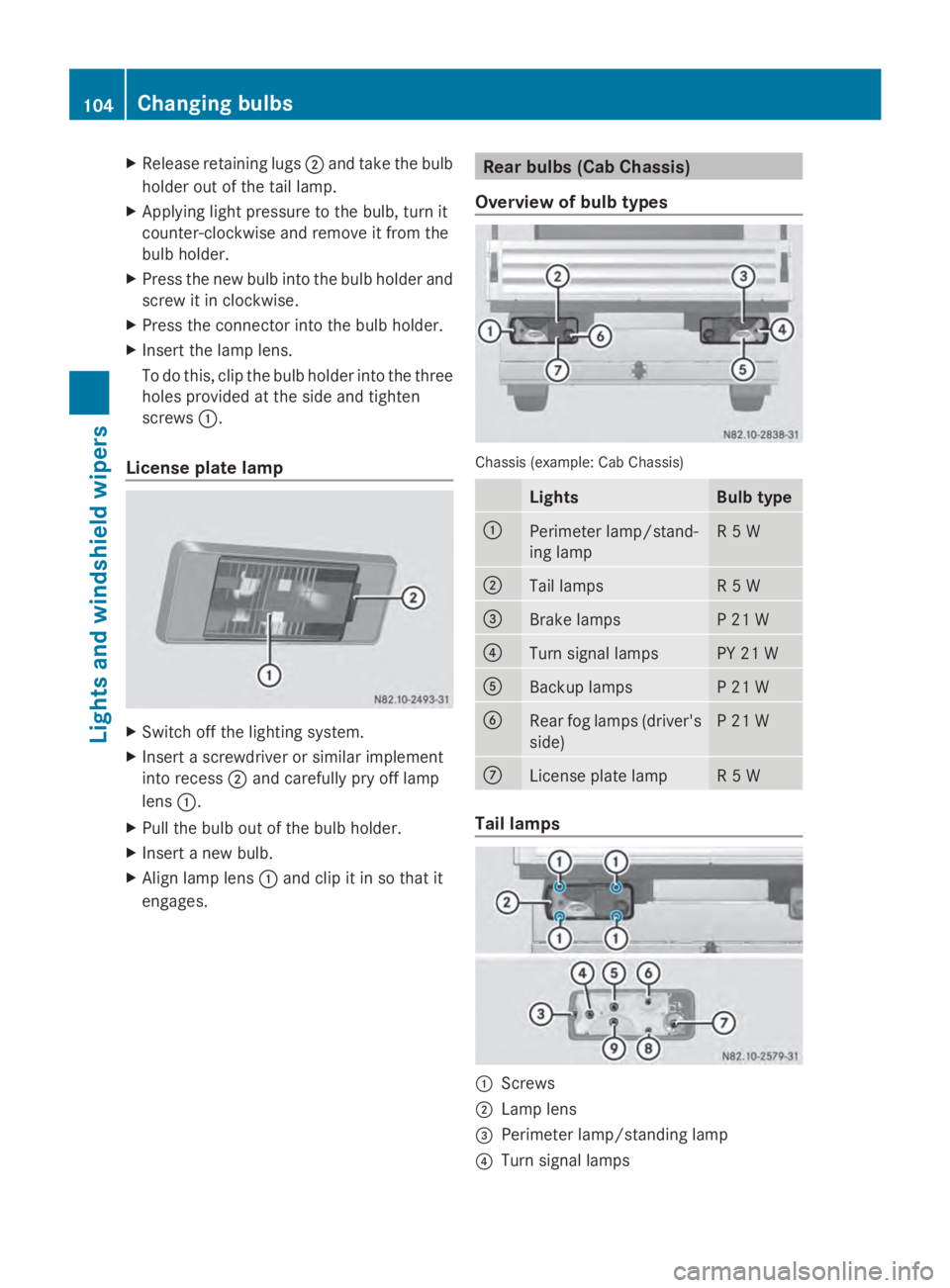
Release retaining lugs 0044and take the bulb
holder out of the tail lamp.
X Applying light pressure to the bulb, turn it
counter-clockwise and remove it from the
bulb holder.
X Press the new bulb into the bulb holder and
screw it in clockwise.
X Press the connector into the bulb holder.
X Insert the lamp lens.
To do this, clip the bulb holder into the three
holes provided at the side and tighten
screws 0043.
License plate lamp X
Switch off the lighting system.
X Insert a screwdriver or similar implement
into recess 0044and carefully pry off lamp
lens 0043.
X Pull the bulb out of the bulb holder.
X Insert a new bulb.
X Align lamp lens 0043and clip it in so that it
engages. Rear bulbs (Cab Chassis)
Overview of bulb types Chassis (example: Cab Chassis)
Lights Bulb type
0043
Perimeter lamp/stand-
ing lamp R 5 W
0044
Tail lamps R 5 W
0087
Brake lamps P 21 W
0085
Turn signal lamps PY 21 W
0083
Backup lamps P 21 W
0084
Rear fog lamps (driver's
side) P 21 W
006B
License plate lamp R 5 W
Tail lamps
0043
Screws
0044 Lamp lens
0087 Perimeter lamp/standing lamp
0085 Turn signal lamps 104
Changing bulbsLights and windshield wipers
Page 107 of 338
0083
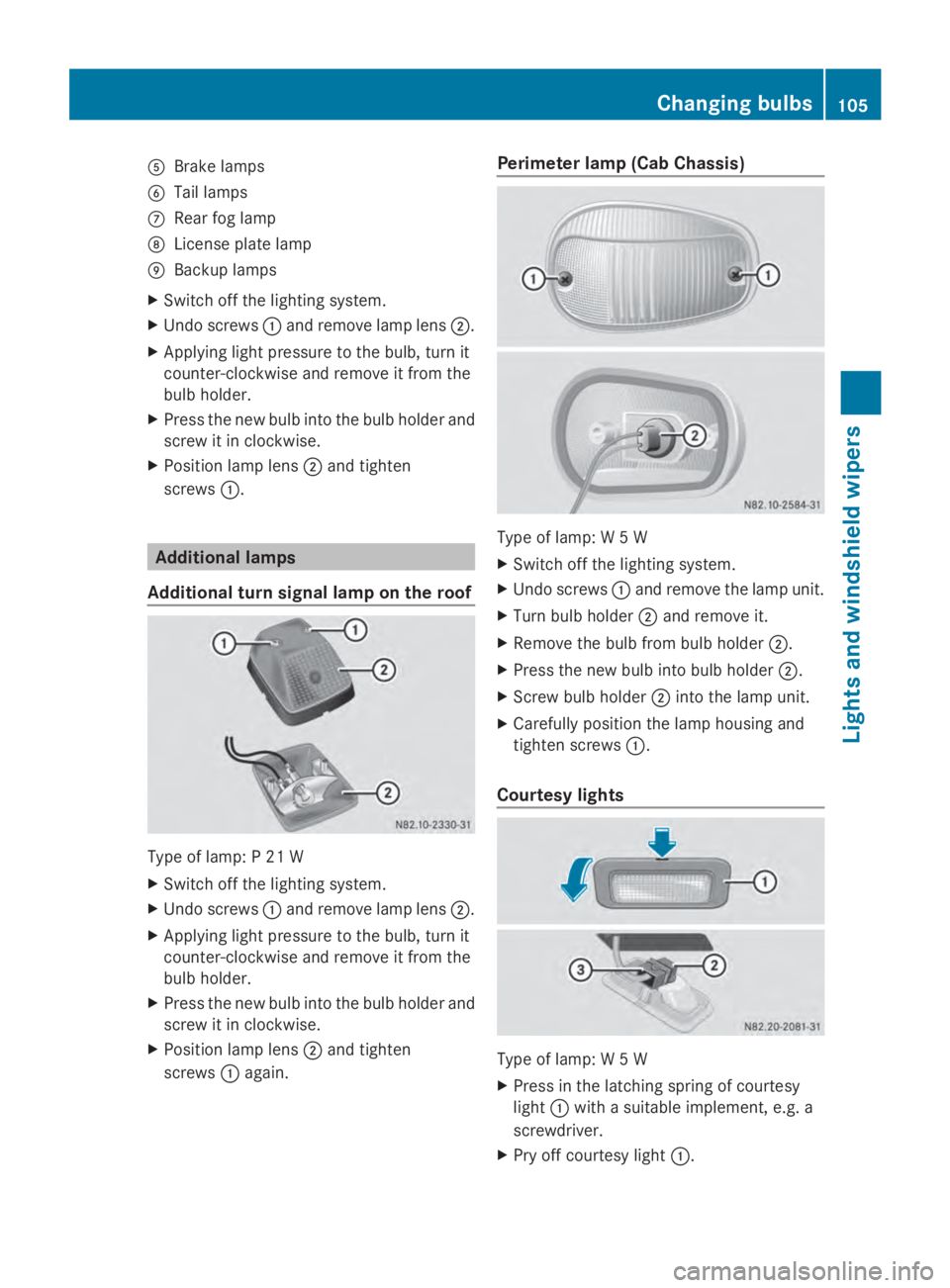
Brake lamps
0084 Tail lamps
006B Rear fog lamp
006C License plate lamp
006D Backup lamps
X Switch off the lighting system.
X Undo screws 0043and remove lamp lens 0044.
X Applying light pressure to the bulb, turn it
counter-clockwise and remove it from the
bulb holder.
X Press the new bulb into the bulb holder and
screw it in clockwise.
X Position lamp lens 0044and tighten
screws 0043. Additional lamps
Additional turn signal lamp on the roof Type of lamp: P 21 W
X
Switch off the lighting system.
X Undo screws 0043and remove lamp lens 0044.
X Applying light pressure to the bulb, turn it
counter-clockwise and remove it from the
bulb holder.
X Press the new bulb into the bulb holder and
screw it in clockwise.
X Position lamp lens 0044and tighten
screws 0043again. Perimeter lamp (Cab Chassis)
Type of lamp: W 5 W
X
Switch off the lighting system.
X Undo screws 0043and remove the lamp unit.
X Turn bulb holder 0044and remove it.
X Remove the bulb from bulb holder 0044.
X Press the new bulb into bulb holder 0044.
X Screw bulb holder 0044into the lamp unit.
X Carefully position the lamp housing and
tighten screws 0043.
Courtesy lights Type of lamp: W 5 W
X
Press in the latching spring of courtesy
light 0043with a suitable implement, e.g. a
screwdriver.
X Pry off courtesy light 0043. Changing bulbs
105Lights and windshield wipers Z
Page 108 of 338
X
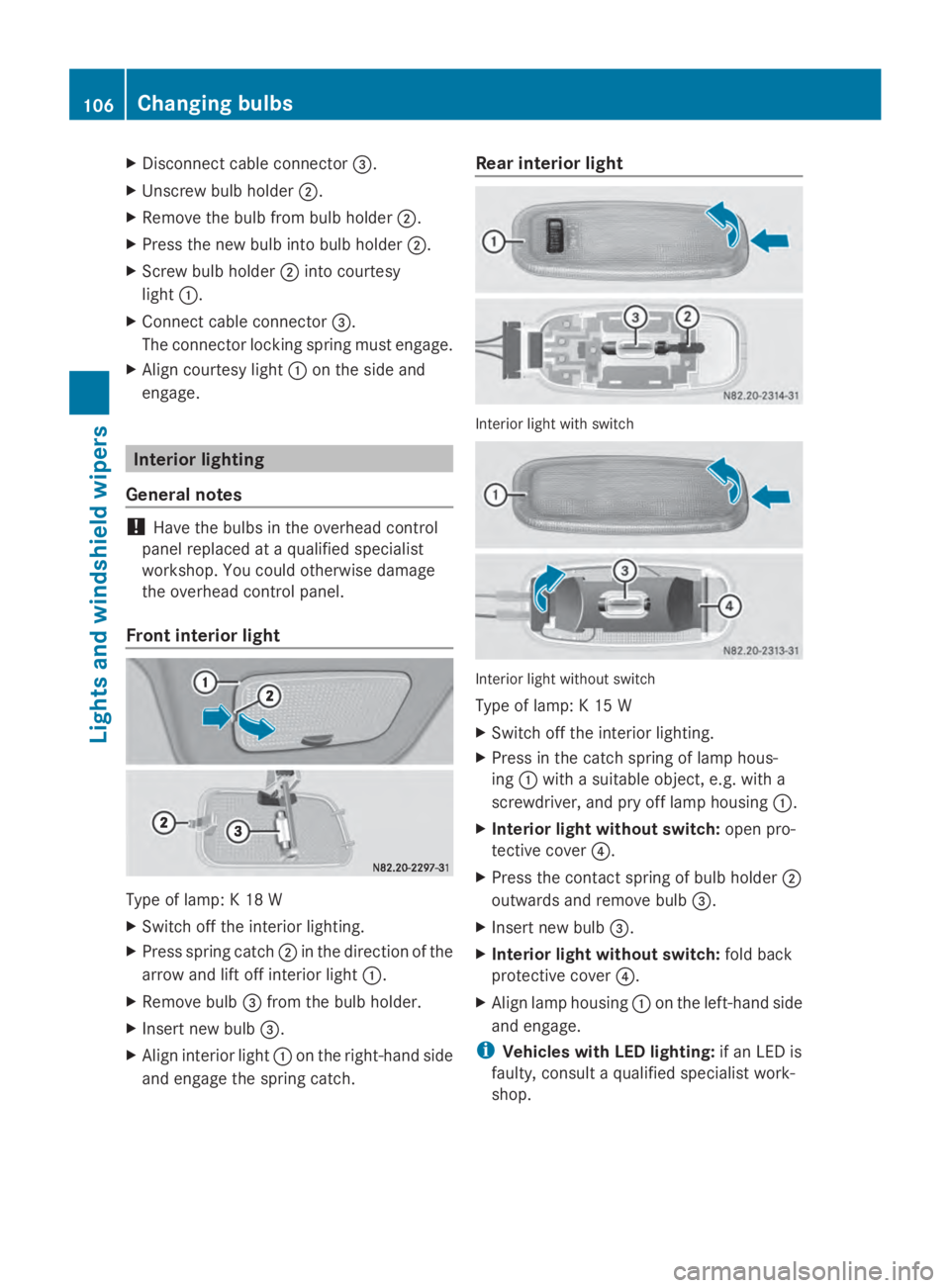
Disconnect cable connector 0087.
X Unscrew bulb holder 0044.
X Remove the bulb from bulb holder 0044.
X Press the new bulb into bulb holder 0044.
X Screw bulb holder 0044into courtesy
light 0043.
X Connect cable connector 0087.
The connector locking spring must engage.
X Align courtesy light 0043on the side and
engage. Interior lighting
General notes !
Have the bulbs in the overhead control
panel replaced at a qualified specialist
workshop. You could otherwise damage
the overhead control panel.
Front interior light Type of lamp: K 18 W
X
Switch off the interior lighting.
X Press spring catch 0044in the direction of the
arrow and lift off interior light 0043.
X Remove bulb 0087from the bulb holder.
X Insert new bulb 0087.
X Align interior light 0043on the right-hand side
and engage the spring catch. Rear interior light
Interior light with switch
Interior light without switch
Type of lamp: K 15 W
X
Switch off the interior lighting.
X Press in the catch spring of lamp hous-
ing 0043with a suitable object, e.g. with a
screwdriver, and pry off lamp housing 0043.
X Interior light without switch: open pro-
tective cover 0085.
X Press the contact spring of bulb holder 0044
outwards and remove bulb 0087.
X Insert new bulb 0087.
X Interior light without switch: fold back
protective cover 0085.
X Align lamp housing 0043on the left-hand side
and engage.
i Vehicles with LED lighting: if an LED is
faulty, consult a qualified specialist work-
shop. 106
Changing bulbsLights and
windshield wipers
Page 109 of 338
Cargo compartment lamp
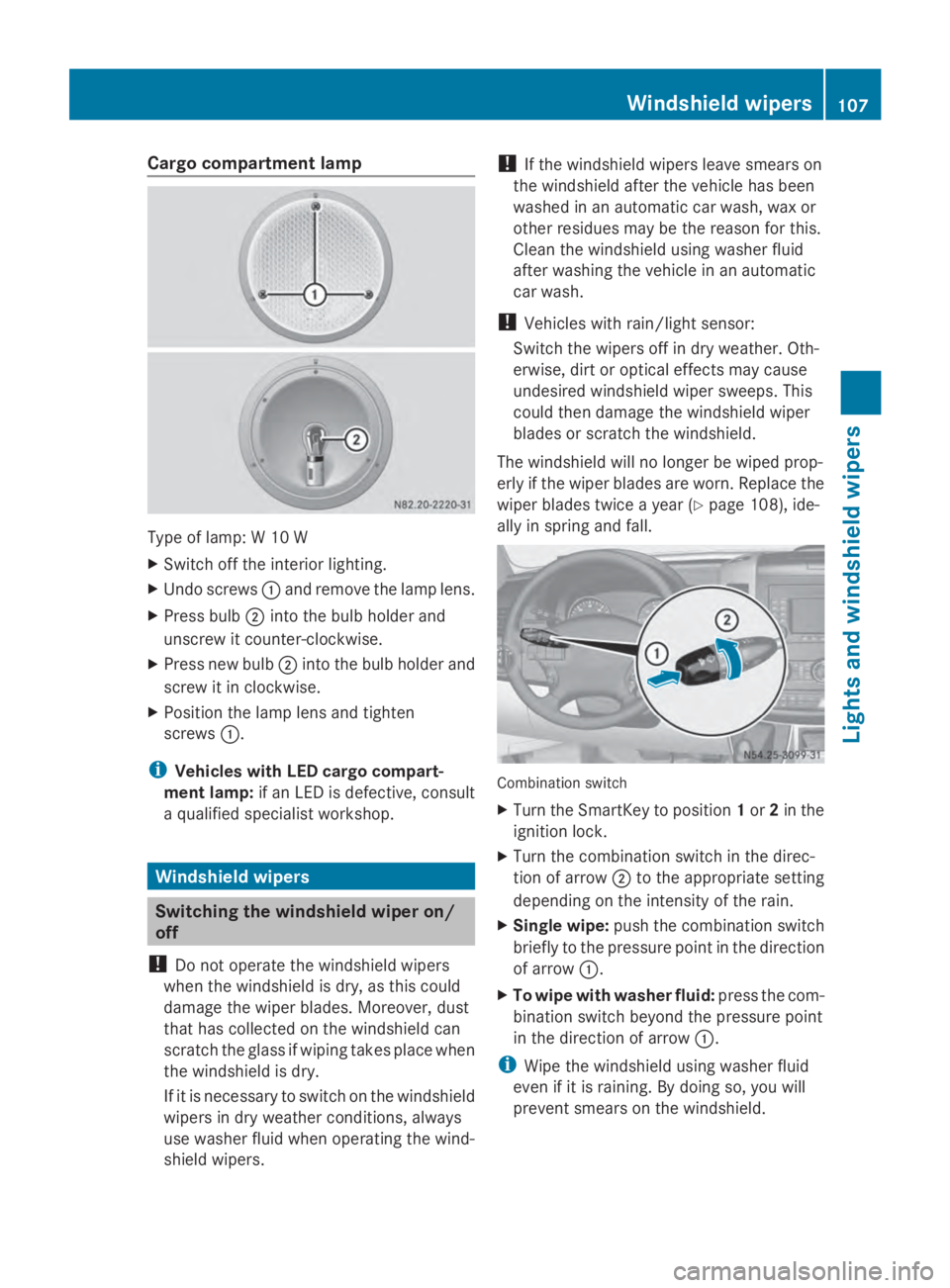
Type of lamp: W 10 W
X
Switch off the interior lighting.
X Undo screws 0043and remove the lamp lens.
X Press bulb 0044into the bulb holder and
unscrew it counter-clockwise.
X Press new bulb 0044into the bulb holder and
screw it in clockwise.
X Position the lamp lens and tighten
screws 0043.
i Vehicles with LED cargo compart-
ment lamp: if an LED is defective, consult
a qualified specialist workshop. Windshield wipers
Switching the windshield wiper on/
off
! Do not operate the windshield wipers
when the windshield is dry, as this could
damage the wiper blades. Moreover, dust
that has collected on the windshield can
scratch the glass if wiping takes place when
the windshield is dry.
If it is necessary to switch on the windshield
wipers in dry weather conditions, always
use washer fluid when operating the wind-
shield wipers. !
If the windshield wipers leave smears on
the windshield after the vehicle has been
washed in an automatic car wash, wax or
other residues may be the reason for this.
Clean the windshield using washer fluid
after washing the vehicle in an automatic
car wash.
! Vehicles with rain/light sensor:
Switch the wipers off in dry weather. Oth-
erwise, dirt or optical effects may cause
undesired windshield wiper sweeps. This
could then damage the windshield wiper
blades or scratch the windshield.
The windshield will no longer be wiped prop-
erly if the wiper blades are worn. Replace the
wiper blades twice a year (Y page 108), ide-
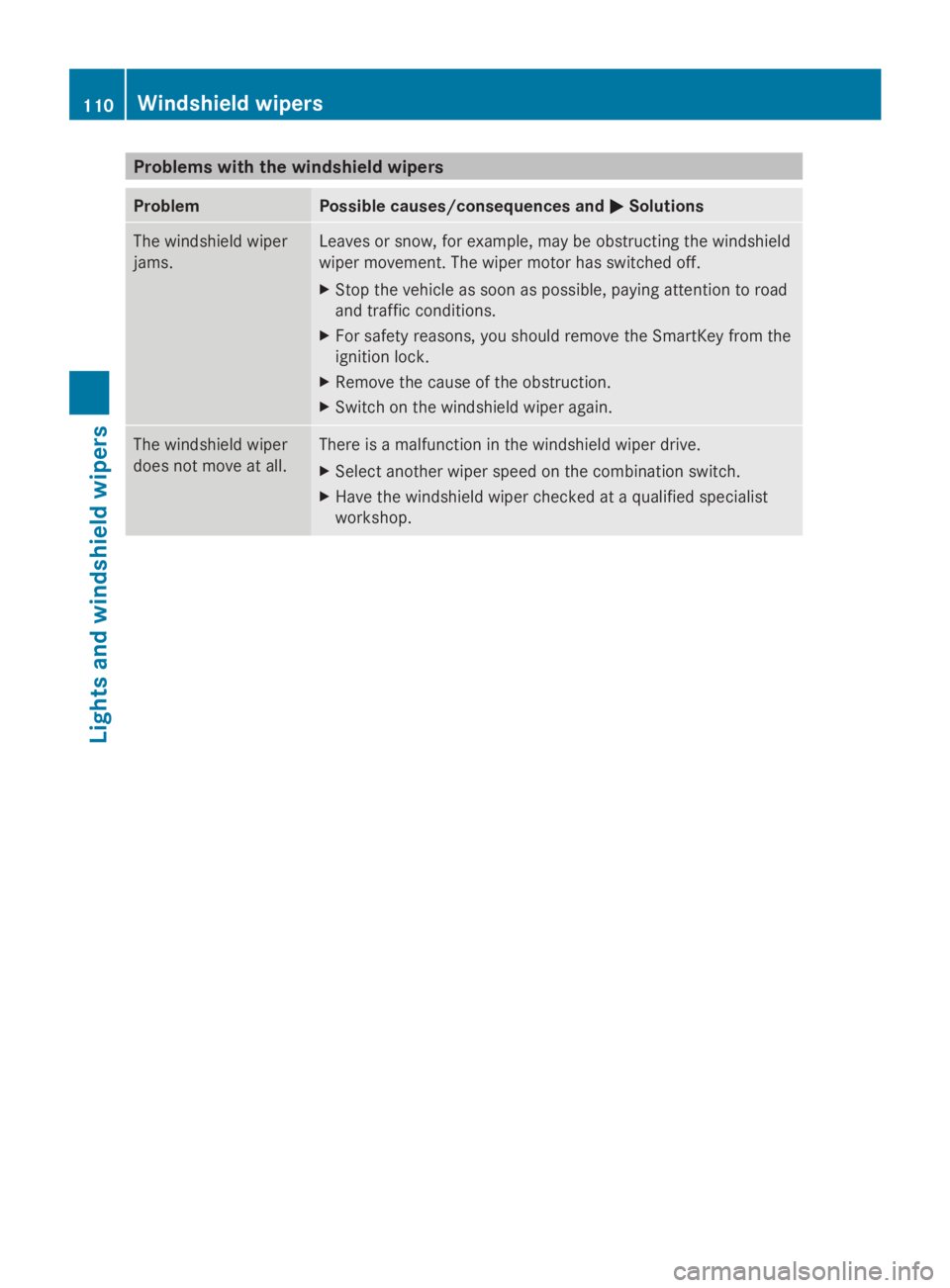
ally in spring and fall. Combination switch
X
Turn the SmartKey to position 1or 2in the
ignition lock.
X Turn the combination switch in the direc-
tion of arrow 0044to the appropriate setting
depending on the intensity of the rain.
X Single wipe: push the combination switch
briefly to the pressure point in the direction
of arrow 0043.
X To wipe with washer fluid: press the com-
bination switch beyond the pressure point
in the direction of arrow 0043.
i Wipe the windshield using washer fluid
even if it is raining. By doing so, you will
prevent smears on the windshield. Windshield wipers
107Lights and windshield wipers Z
Page 110 of 338

The detent positions of the combination
switch correspond to the following wiper
speeds:
0W indshield wipers off
II ntermittent wipe
II Normal wipe
III Rapid wipe
i Canada only:
If the windshield wipers are switched on
and you stop the vehicle, the windshield
wiper speed is reduced. For example, if you
have selected level IIand stop the vehicle,
wiping continues with intermittent wipe
while the vehicle is stationary. If intermit-
tent wipe is selected, the intervals become
longer.
Vehicles with a rain and light sensor:
you can use level Ias the universal setting.
The rain and light sensor sets the appropri-
ate wiping frequency automatically,
according to the intensity of the rain. When
you stop the vehicle, levels IIIand IIare
switched down to level Iautomatically.
The windshield wiper will return to the orig-
inal level when you drive faster than
5 mph (8 km/h).
You can adjust the sensitivity of the rain and
light sensor using the on-board computer
(Y page 196).
Information on checking the washer fluid
level can be found in the "Maintenance and
care" (Y page 257) section. Switching the rear window wiper on/
off Combination switch
0043
00C5 Rear window wiper switch
0048 00E2 To wipe with washer fluid
0049 ITo switch on intermittent wiping
004A 0To switch off intermittent wiping
004B 00E2 To wipe with washer fluid
X Turn the key to position 1or 2in the ignition
lock.
X Turn switch 0043to the corresponding posi-
tion
The rear window wiper switches on automat-
ically if you engage reverse gear and the wind-
shield wipers are on. Replacing the wiper blades
G
WARNING
If the windshield wipers begin to move while
you are changing the wiper blades, you could
be trapped by the wiper arm. There is a risk
of injury.
Always switch off the windshield wipers and
ignition before changing the wiper blades.
! Never open the hood if a windshield wiper
arm has been folded away from the wind-
shield.
Never fold a windshield wiper arm without
a wiper blade back onto the windshield/
rear window. 108
Windshield wipersLights and
windshield wipers
Page 112 of 338
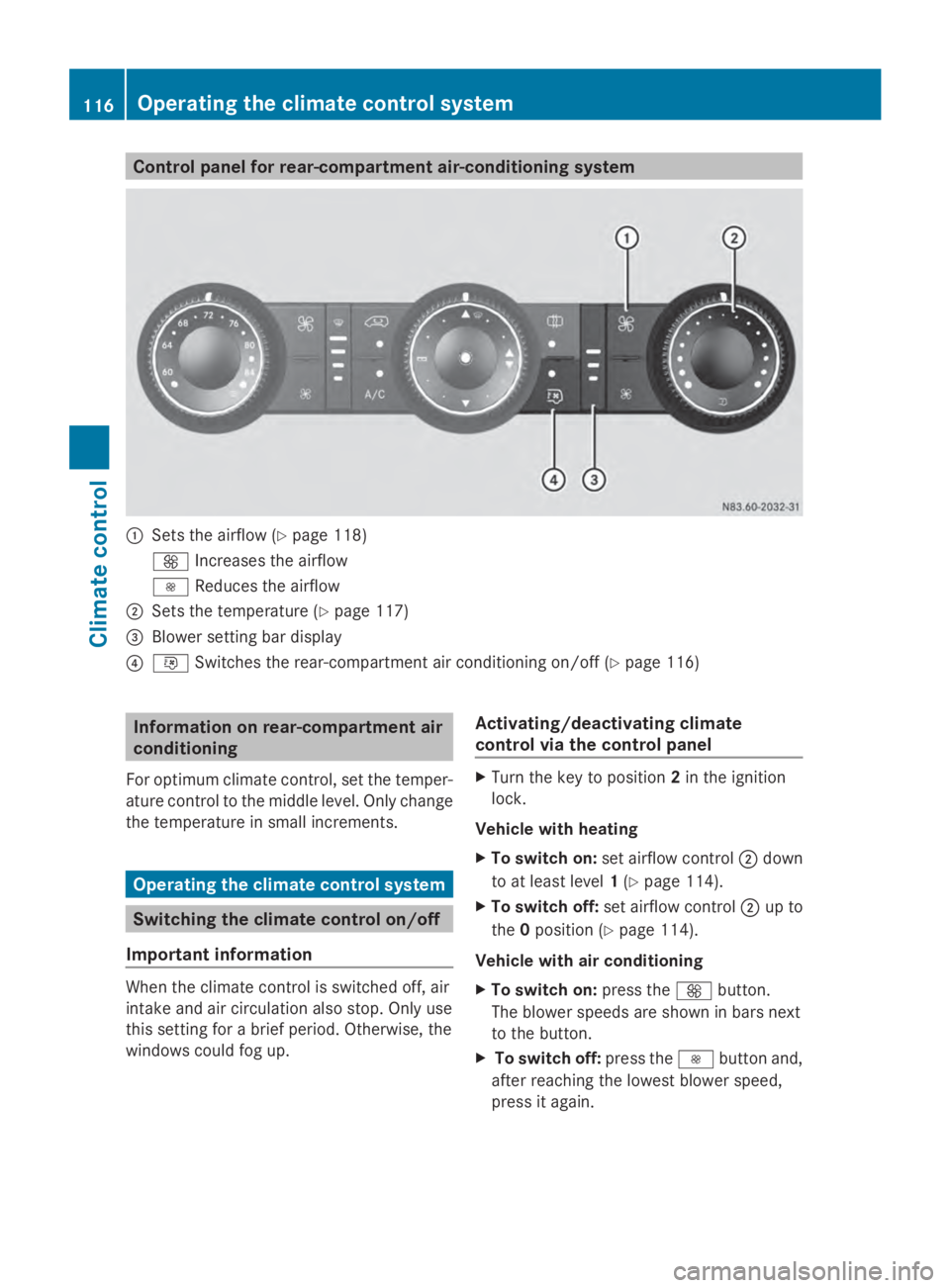
Problems with the windshield wipers
Problem Possible causes/consequences and
0050
0050Solutions The windshield wiper
jams. Leaves or snow, for example, may be obstructing the windshield
wiper movement. The wiper motor has switched off.
X
Stop the vehicle as soon as possible, paying attention to road
and traffic conditions.
X For safety reasons, you should remove the SmartKey from the
ignition lock.
X Remove the cause of the obstruction.
X Switch on the windshield wiper again. The windshield wiper
does not move at all. There is a malfunction in the windshield wiper drive.
X
Select another wiper speed on the combination switch.
X Have the windshield wiper checked at a qualified specialist
workshop. 110
Windshield wipersLights and windshield wipers
Page 118 of 338
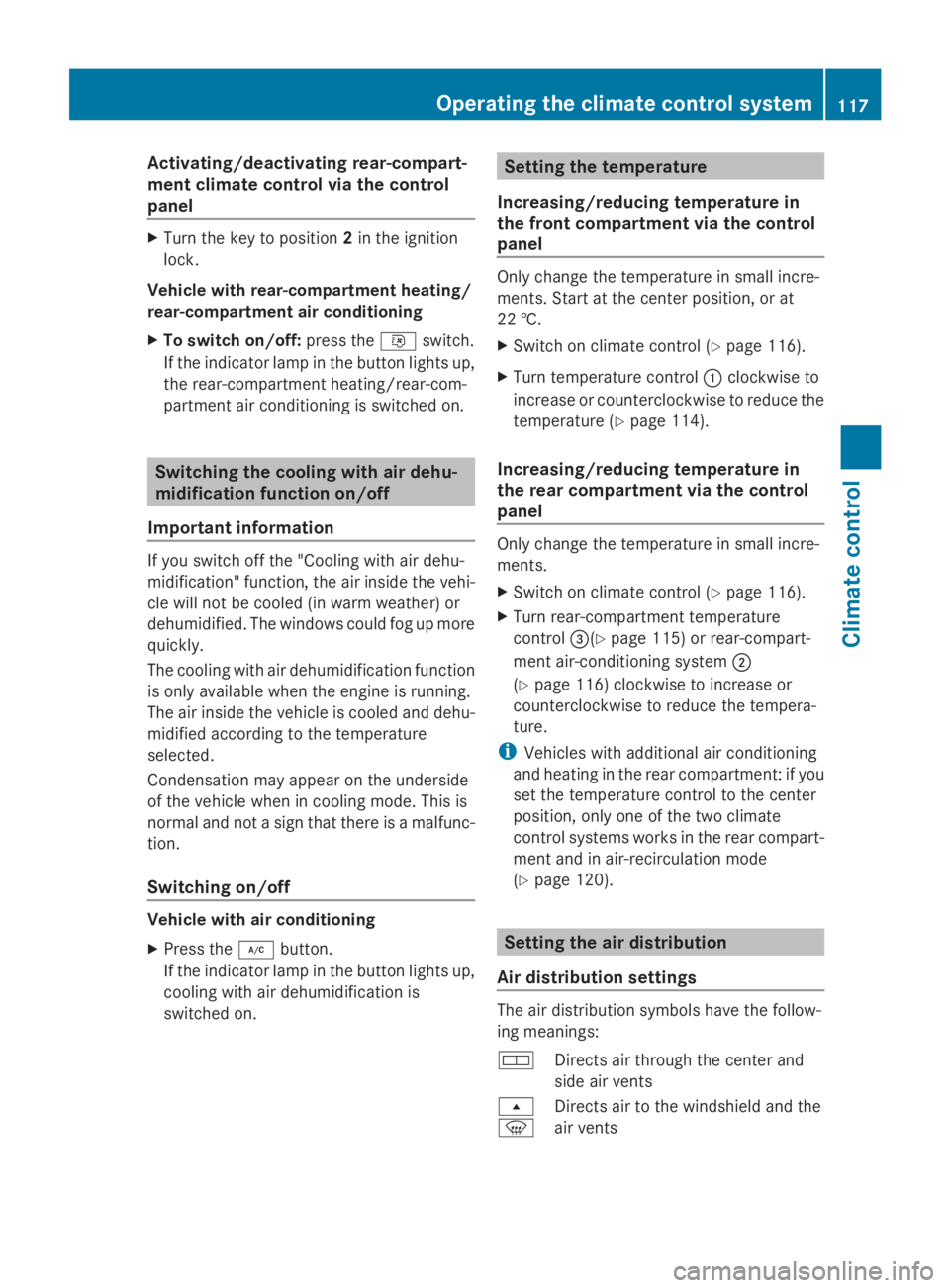
Control panel for rear-compartment air-conditioning system
0043
Sets the airflow (Y page 118)
0097 Increases the airflow
0095 Reduces the airflow
0044 Sets the temperature (Y page 117)
0087 Blower setting bar display
0085 0074 Switches the rear-compartment air conditioning on/off (Y page 116)Information on rear-compartment air
conditioning
For optimum climate control, set the temper-
ature control to the middle level. Only change
the temperature in small increments. Operating the climate control system
Switching the climate control on/off
Important information When the climate control is switched off, air
intake and air circulation also stop. Only use
this setting for a brief period. Otherwise, the
windows could fog up. Activating/deactivating climate
control via the control panel X
Turn the key to position 2in the ignition
lock.
Vehicle with heating
X To switch on: set airflow control 0044down
to at least level 1(Y page 114).
X To switch off: set airflow control 0044up to
the 0position (Y page 114).
Vehicle with air conditioning
X To switch on: press the0097button.
The blower speeds are shown in bars next
to the button.
X To switch off: press the0095button and,
after reaching the lowest blower speed,
press it again. 116
Operating the climate control systemClimate control
Page 119 of 338
Activating/deactivating rear-compart-
ment climate control via the control
panel X
Turn the key to position 2in the ignition
lock.
Vehicle with rear-compartment heating/
rear-compartment air conditioning
X To switch on/off: press the0074switch.
If the indicator lamp in the button lights up,
the rear-compartment heating/rear-com-
partment air conditioning is switched on. Switching the cooling with air dehu-
midification function on/off
Important information If you switch off the "Cooling with air dehu-
midification" function, the air inside the vehi-
cle will not be cooled (in warm weather) or
dehumidified. The windows could fog up more
quickly.
The cooling with air dehumidification function
is only available when the engine is running.
The air inside the vehicle is cooled and dehu-
midified according to the temperature
selected.
Condensation may appear on the underside
of the vehicle when in cooling mode. This is
normal and not a sign that there is a malfunc-
tion.
Switching on/off Vehicle with air conditioning
X
Press the 005Abutton.
If the indicator lamp in the button lights up,
cooling with air dehumidification is
switched on. Setting the temperature
Increasing/reducing temperature in
the front compartment via the control
panel Only change the temperature in small incre-
ments. Start at the center position, or at
22 †.
X
Switch on climate control (Y page 116).
X Turn temperature control 0043clockwise to
increase or counterclockwise to reduce the
temperature (Y page 114).
Increasing/reducing temperature in
the rear compartment via the control
panel Only change the temperature in small incre-
ments.
X
Switch on climate control (Y page 116).
X Turn rear-compartment temperature
control 0087(Ypage 115) or rear-compart-
ment air-conditioning system 0044
(Y page 116) clockwise to increase or
counterclockwise to reduce the tempera-
ture.
i Vehicles with additional air conditioning
and heating in the rear compartment: if you
set the temperature control to the center
position, only one of the two climate
control systems works in the rear compart-
ment and in air-recirculation mode
(Y page 120). Setting the air distribution
Air distribution settings The air distribution symbols have the follow-
ing meanings:
0078
Directs air through the center and
side air vents
007E
0085 Directs air to the windshield and the
air vents Operating the climate control system
117Climate control
Page 122 of 338
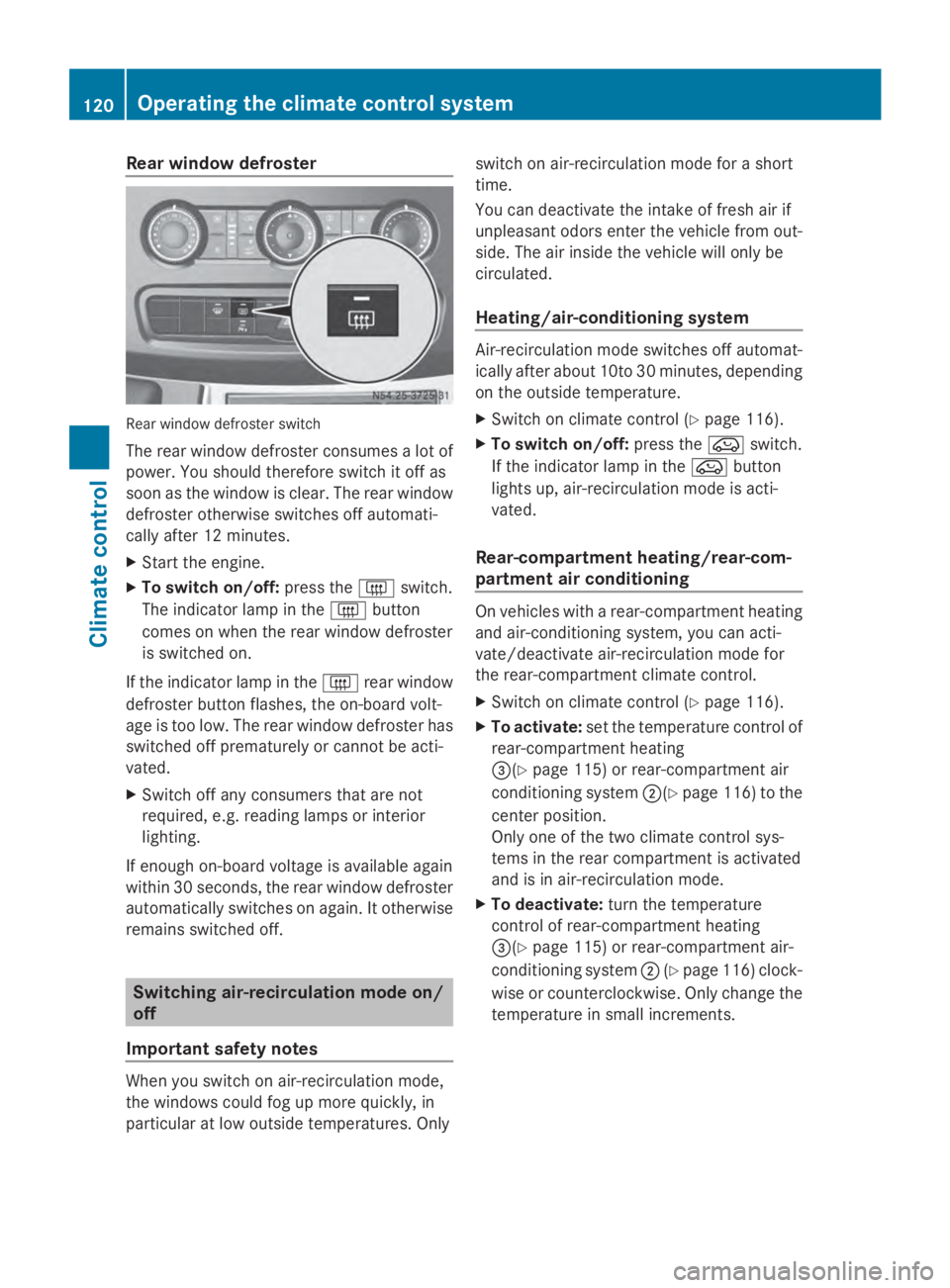
Rear window defroster
Rear window defroster switch
The rear window defroster consumes a lot of
power. You should therefore switch it off as
soon as the window is clear. The rear window
defroster otherwise switches off automati-
cally after 12 minutes.
X Start the engine.
X To switch on/off: press the0071switch.
The indicator lamp in the 0071button
comes on when the rear window defroster
is switched on.
If the indicator lamp in the 0071rear window
defroster button flashes, the on-board volt-
age is too low. The rear window defroster has
switched off prematurely or cannot be acti-
vated.
X Switch off any consumers that are not
required, e.g. reading lamps or interior
lighting.
If enough on-board voltage is available again
within 30 seconds, the rear window defroster
automatically switches on again. It otherwise
remains switched off. Switching air-recirculation mode on/
off
Important safety notes When you switch on air-recirculation mode,
the windows could fog up more quickly, in
particular at low outside temperatures. Only switch on air-recirculation mode for a short
time.
You can deactivate the intake of fresh air if
unpleasant odors enter the vehicle from out-
side. The air inside the vehicle will only be
circulated.
Heating/air-conditioning system
Air-recirculation mode switches off automat-
ically after about 10to 30 minutes, depending
on the outside temperature.
X Switch on climate control (Y page 116).
X To switch on/off: press the008Aswitch.
If the indicator lamp in the 008Abutton
lights up, air-recirculation mode is acti-
vated.
Rear-compartment heating/rear-com-
partment air conditioning On vehicles with a rear-compartment heating
and air-conditioning system, you can acti-
vate/deactivate air-recirculation mode for
the rear-compartment climate control.
X
Switch on climate control (Y page 116).
X To activate: set the temperature control of
rear-compartment heating
0087(Y page 115) or rear-compartment air
conditioning system 0044(Ypage 116) to the
center position.
Only one of the two climate control sys-
tems in the rear compartment is activated
and is in air-recirculation mode.
X To deactivate: turn the temperature
control of rear-compartment heating
0087(Y page 115) or rear-compartment air-
conditioning system 0044(Ypage 116) clock-
wise or counterclockwise. Only change the
temperature in small increments. 120
Operating the climate control systemClimate control