warning light MERCEDES-BENZ SPRINTER 2014 MY14 Operator’s Manual
[x] Cancel search | Manufacturer: MERCEDES-BENZ, Model Year: 2014, Model line: SPRINTER, Model: MERCEDES-BENZ SPRINTER 2014Pages: 338, PDF Size: 6.78 MB
Page 270 of 338
!
Make sure that:
R the side windows and the roof are com-
pletely closed
R the climate control blower is switched off
R the windshield wiper switch is at position
0
The vehicle could otherwise be damaged.
You can wash the vehicle in an automatic car
wash from the very start.
Wash off excess dirt before cleaning the vehi-
cle in an automatic car wash.
After putting the vehicle through an auto-
matic car wash, wipe off wax from:
R the rear view camera lens (Y page 271)
R the windshield
R the windshield wiper blades
This will prevent smears and reduce wiping
noises caused by residue on the wind-
shield.
Washing by hand In some countries, washing by hand is only
allowed at specially equipped washing bays.
Observe the legal requirements for each indi-
vidual country.
X Do not use hot water and do not wash the
vehicle in direct sunlight.
X Use a soft car sponge.
X Use a mild cleaning agent, e.g. a car sham-
poo approved for use with Sprinter vehi-
cles.
X Thoroughly hose down the vehicle with a
gentle jet of water.
X Do not point the water jet directly towards
the air inlets.
X Use plenty of water and rinse out the
sponge frequently.
X Rinse the vehicle with clean water and dry
thoroughly with a chamois.
X Do not let the cleaning agents dry on the
paintwork. When using the vehicle in winter, remove all
traces of road salt deposits carefully and as
soon as possible.
High-pressure cleaning equipment G
WARNING
The water jet from a circular jet nozzle (dirt
blasters) can cause invisible exterior damage
to the tires or chassis components. Compo-
nents damaged in this way may fail unexpect-
edly. There is a risk of an accident.
Do not use power washers with circular jet
nozzles to clean the vehicle. Have damaged
tires or chassis components replaced imme-
diately.
! Under no circumstances use power wash-
ers in the vehicle interior. The pressurized
water and associated spray produced by
the power washer could cause extensive
damage to the vehicle.
! Observe the minimum distance to be
maintained between the nozzle of the
power washer and object to be cleaned, as
outlined below:
R approximately 2.2 ft(70 cm) when using
round-jet nozzles
R approximately 1 ft (30 cm) when using
25°flat-spray jets and dirt blasters
Keep the water jet moving while cleaning.
To avoid causing damage, do not point the
water jet directly at:
R door joints
R brake hoses
R electrical components
R electrical connections
R seals
R drive train, especially not at the inter-
mediate bearing of the propeller shaft
R rear view camera (camera lens and
microphone opening on the bottom)
Keep a minimum distance of
1.6 ft(50 cm). 268
CareMaintenance and care
Page 271 of 338

Cleaning the engine
!
Water must not enter intake or ventilation
openings. When cleaning with high pres-
sure water or steam cleaners, the spray
must not be aimed directly at electrical
components or the terminals of electrical
lines.
Preserve the engine after the engine has
been cleaned. Protect the belt drive system
from exposure to the preservative agent.
Also observe the information in the section
"Power washer" (Y page 268).
Cleaning the paintwork !
Do not affix:
R stickers
R films
R magnetic plates or similar items
to painted surfaces. You could otherwise
damage the paintwork.
Scratches, corrosive deposits, areas affected
by corrosion and damage caused by inade-
quate care cannot always be completely
repaired. In such cases, visit a qualified spe-
cialist workshop.
X Remove impurities immediately, where
possible, whilst avoiding rubbing too hard.
X Soak insect remains with insect remover
and rinse off the treated areas afterwards.
X Soak bird droppings with water and rinse
off the treated areas afterwards.
X Remove coolant, brake fluid, tree resin,
oils, fuels and greases by rubbing gently
with a cloth soaked in petroleum ether or
lighter fluid.
X Use tar remover to remove tar stains.
X Use silicone remover to remove wax.
Cleaning the windows G
WARNING
You could become trapped by the windshield
wipers if they start moving while cleaning the windshield or wiper blades. There is a risk of
injury.
Always switch off the windshield wipers and
the ignition before cleaning the windshield or
wiper blades.
! Do not fold the windshield wipers away
from the windshield unless the hood is
closed. Otherwise, you could damage the
hood.
! Hold the wiper arm securely when folding
back. The windshield could be damaged if
the wiper arm smacks against it suddenly.
! Do not use dry cloths, abrasive products,
solvents or cleaning agents containing sol-
vents to clean the inside of the windows.
Do not touch the insides of the windows
with hard objects, e.g. an ice scraper or
ring. There is otherwise a risk of damaging
the windows.
Before cleaning the windshield
X Turn the key to position 0in the ignition
lock or remove it.
X Fold the windshield wiper arms away from
the windshield until you feel them engage.
Before switching the ignition on again, fold
the windshield wipers back into position.
Cleaning the windows
X Clean the inside and outside of the win-
dows with a damp cloth and a cleaning
agent that is recommended and approved
for Sprinter vehicles. Exterior
Cleaning the wheels !
Do not use any acidic or alkaline cleaning
agents. They can cause corrosion on the
wheel bolts (wheel nuts) or the retainer
springs for the wheel-balancing weights.
! Do not park the vehicle for an extended
period straight after cleaning it, particularly
after having cleaned the wheels with wheel Care
269Maintenance and care Z
Page 272 of 338
cleaner. Wheel cleaners could cause
increased corrosion of the brake discs and
brake pads/linings. For this reason, you
should drive for a few minutes after clean-
ing. Braking heats the brake discs and the
brake pads/linings, thus drying them. The
vehicle can then be parked.
If you clean the wheels with a power washer,
observe the safety notes for the power
washer (Y page 268). You could otherwise
damage the tires.
Cleaning the wiper blades G
WARNING
You could become trapped by the windshield
wipers if they start moving while cleaning the
windshield or wiper blades. There is a risk of
injury.
Always switch off the windshield wipers and
the ignition before cleaning the windshield or
wiper blades.
! Do not fold the windshield wipers away
from the windshield unless the hood is
closed. Otherwise, you could damage the
hood.
! Do not pull the wiper blade. Otherwise,
the wiper blade could be damaged.
! Do not clean wiper blades too often and
do not rub them too hard. Otherwise, the
graphite coating could be damaged. This
could cause wiper noise.
! Hold the wiper arm securely when folding
back. The windshield could be damaged if
the wiper arm smacks against it suddenly.
X Turn the key to position 0in the ignition
lock or remove it.
X Fold the windshield wiper arms away from
the windshield until you feel them engage.
X Carefully clean the wiper blades with a
damp cloth.
X Fold back the wiper arms before switching
on the ignition. Cleaning the exterior lighting !
Only use cleaning agents or cleaning
cloths which are suitable for plastic light
lenses. Unsuitable cleaning agents or
cleaning cloths could scratch or damage
the plastic light lenses.
X Clean the plastic covers of the exterior
lighting with a damp sponge and a mild
cleaning agent, e.g. car shampoo for
Sprinter vehicles, or with cleaning cloths.
Cleaning the mirror turn signal !
Only use cleaning agents or cleaning
cloths that are suitable for plastic lenses.
Unsuitable cleaning agents or cleaning
cloths could scratch or damage the plastic
lenses of the mirror turn signals.
X Clean the plastic lenses of the mirror turn
signals in the exterior mirror housing using
a wet sponge and mild cleaning agent, e.g.
car shampoo or cleaning cloths.
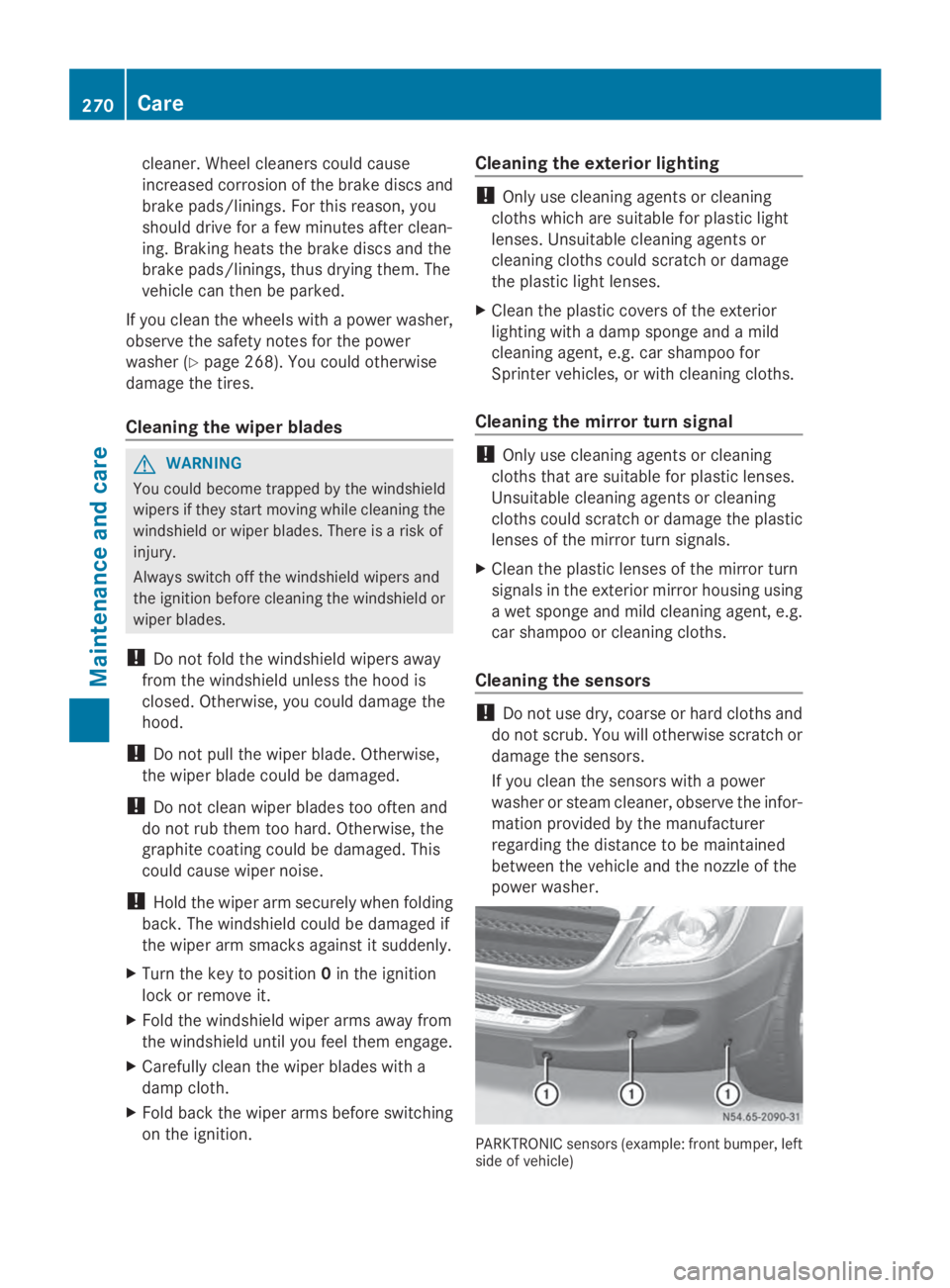
Cleaning the sensors !
Do not use dry, coarse or hard cloths and
do not scrub. You will otherwise scratch or
damage the sensors.
If you clean the sensors with a power
washer or steam cleaner, observe the infor-
mation provided by the manufacturer
regarding the distance to be maintained
between the vehicle and the nozzle of the
power washer. PARKTRONIC sensors (example: front bumper, left
side of vehicle)270
CareMaintenance and care
Page 275 of 338
Cleaning the seat belts
G
WARNING
Seat belts can become severely weakened if
bleached or dyed. This could cause the seat
belts to tear or fail, for instance, in the event
of an accident. This poses an increased risk
of injury or fatal injury.
Never bleach or dye the seat belts.
! Do not clean the seat belts using chemical
cleaning agents. Do not dry the seat belts
by heating at temperatures above 176 ‡
(80 †) or in direct sunlight.
Remove any stains or dirt immediately. This
will avoid residue or damage.
X Use clean, lukewarm water and soap solu-
tion.
Cleaning the roof trim X
Use a soft brush or dry shampoo to remove
heavy soiling.
Cleaning the curtains !
The curtains must not be washed. Wash-
ing could cause the curtains to shrink and
lose their fire-retardant properties. Always
have the curtains dry-cleaned. Care
273Maintenance and care Z
Page 293 of 338
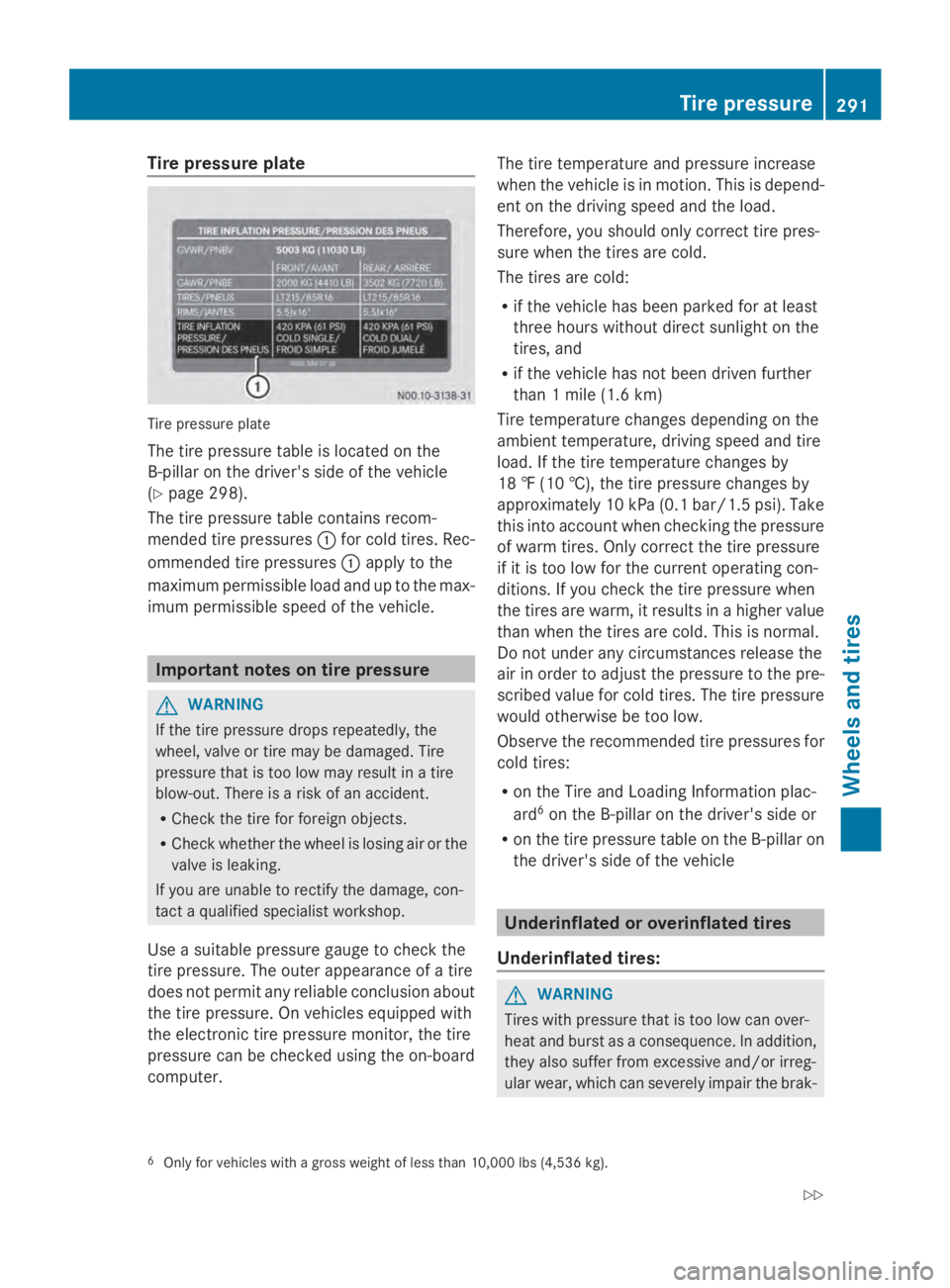
Tire pressure plate
Tire pressure plate
The tire pressure table is located on the
B-pillar on the driver's side of the vehicle
(Y page 298).
The tire pressure table contains recom-
mended tire pressures 0043for cold tires. Rec-
ommended tire pressures 0043apply to the
maximum permissible load and up to the max-
imum permissible speed of the vehicle. Important notes on tire pressure
G
WARNING
If the tire pressure drops repeatedly, the
wheel, valve or tire may be damaged. Tire
pressure that is too low may result in a tire
blow-out. There is a risk of an accident.
R Check the tire for foreign objects.
R Check whether the wheel is losing air or the
valve is leaking.
If you are unable to rectify the damage, con-
tact a qualified specialist workshop.
Use a suitable pressure gauge to check the
tire pressure. The outer appearance of a tire
does not permit any reliable conclusion about
the tire pressure. On vehicles equipped with
the electronic tire pressure monitor, the tire
pressure can be checked using the on-board
computer. The tire temperature and pressure increase
when the vehicle is in motion. This is depend-
ent on the driving speed and the load.
Therefore, you should only correct tire pres-
sure when the tires are cold.
The tires are cold:
R
if the vehicle has been parked for at least
three hours without direct sunlight on the
tires, and
R if the vehicle has not been driven further
than 1 mile (1.6 km)
Tire temperature changes depending on the
ambient temperature, driving speed and tire
load. If the tire temperature changes by
18 ‡ (10 †),the tire pressure changes by
approximately 10 kPa (0.1 ba r/1.5 psi). Take
this into account when checking the pressure
of warm tires. Only correct the tire pressure
if it is too low for the current operating con-
ditions. If you check the tire pressure when
the tires are warm, it results in a higher value
than when the tires are cold. This is normal.
Do not under any circumstances release the
air in order to adjust the pressure to the pre-
scribed value for cold tires. The tire pressure
would otherwise be too low.
Observe the recommended tire pressures for
cold tires:
R on the Tire and Loading Information plac-
ard 6
on the B-pillar on the driver's side or
R on the tire pressure table on the B-pillaron
the driver's side of the vehicle Underinflated or overinflated tires
Underinflated tires: G
WARNING
Tires with pressure that is too low can over-
heat and burst as a consequence. In addition,
they also suffer from excessive and/or irreg-
ular wear, which can severely impair the brak-
6 Only for vehicles with a gross weight of less than 10,000 lbs (4,536 kg). Tire pressure
291Wheels and tires
Z
Page 296 of 338
notes on the recommended tire pressure
(Y
page 290).
The tire pressure monitor is not able to warn
you of a sudden loss of pressure, e.g. follow-
ing penetration by a foreign object. In this
event, brake the vehicle until it comes to a
standstill. Do not carry out any sudden steer-
ing maneuvers.
The tire pressure monitor has a yellow 0077
warning lamp in the instrument cluster for
indicating pressure loss/malfunctions (USA)
or pressure loss (Canada). Depending on how
the warning lamp flashes or lights up, an
underinflated tire or a malfunction in the tire
pressure monitor is displayed:
R if the 0077 warning lamp is lit continuously,
the tire pressure on one or more tires is
significantly too low. The tire pressure mon-
itor is not malfunctioning.
R USA only: if the 0077warning lamp flashes
for 60 seconds and then remains lit con-
stantly, the tire pressure monitor is mal-
functioning.
Only vehicles with steering wheel buttons: the
on-board computer displays information on
tire pressure. After a few minutes of driving,
the current tire pressure of each tire is shown
in the on-board computer.
USA only: if the tire pressure monitor is mal-
functioning, it may be more than 10 minutes
before the malfunction is shown. The 0077
tire pressure warning lamp flashes for
60 seconds and then remains lit. When the
malfunction has been rectified, the 0077tire
pressure warning lamp goes out after a few
minutes of driving.
The tire pressure values indicated by the on-
board computer may differ from those meas-
ured at a gas station with a pressure gauge.
The tire pressures shown by the on-board
computer refer to those measured at sea
level. At high altitudes, the tire pressure value
indicated by a pressure gauge are higher than
those shown by the on-board computer. In
this case, do not reduce the tire pressures. If radio transmitting equipment (e.g. wireless
headphones, two-way radios) is operated
inside the vehicle or in the vicinity of the vehi-
cle, this can interfere with the operation of
the tire pressure monitor.
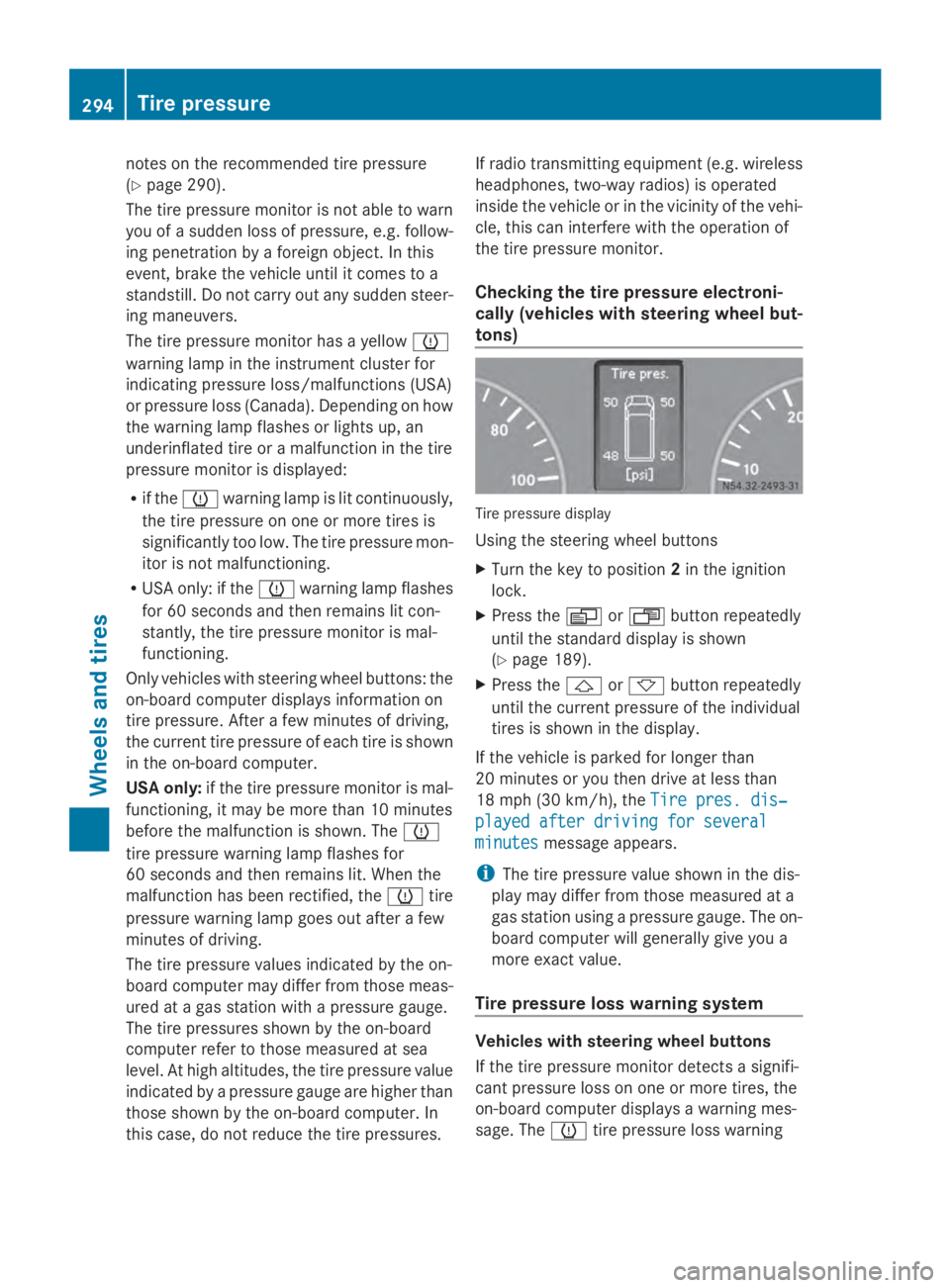
Checking the tire pressure electroni-
cally (vehicles with steering wheel but-
tons) Tire pressure display
Using the steering wheel buttons
X
Turn the key to position 2in the ignition
lock.
X Press the 0080or007F button repeatedly
until the standard display is shown
(Y page 189).
X Press the 0041or0068 button repeatedly
until the current pressure of the individual
tires is shown in the display.
If the vehicle is parked for longer than
20 minutes or you then drive at less than
18 mph (30 km/h), the Tire pres. dis‐
Tire pres. dis‐
played after driving for several played after driving for several
minutes minutes message appears.
i The tire pressure value shown in the dis-
play may differ from those measured at a
gas station using a pressure gauge. The on-
board computer will generally give you a
more exact value.
Tire pressure loss warning system Vehicles with steering wheel buttons
If the tire pressure monitor detects a signifi-
cant pressure loss on one or more tires, the
on-board computer displays a warning mes-
sage. The 0077tire pressure loss warning 294
Tire pressureWheels and tires
Page 297 of 338
lamp in the instrument cluster (Y
page 229)
lights up.
The tire pressure is shown in 2 red rectangles.
The pressure of the tire concerned is shown
in one of the two rectangles (Y page 199).
Additionally, a warning tone sounds.
Each tire that is affected by a significant loss
of pressure is highlighted in the pressure dis-
play.
Restarting the tire pressure monitor When you restart the tire pressure monitor,
the currently set tire pressure are taken as
reference values for monitoring.
In most cases, the tire pressure monitor
detects the new reference values automati-
cally, e.g. after you have:
R changed the tire pressure
R mounted
R mounted new wheels or tires
However, you can also define reference val-
ues manually as described here.
Before restarting the tire pressure moni-
tor:
X Set the tire pressure to the value recom-
mended on the Tire and Loading Informa-
tion placard or the tire pressure table on
the B-pillar on the driver's side
(Y page 290).
Observe the notes on tire pressure when
doing so (Y page 290).
X Make sure that the tire pressure is correct
on all four wheels. Restarting the tire pressure monitor
(vehicles without steering wheel but-
tons):
X
Turn the key to position 2in the ignition
lock.
X Press the 0079menu button on the instru-
ment cluster repeatedly until the display
shows the following message:
+CAL- TPMS
+CAL- TPMS
X Press the 0074button on the instrument clus-
ter.
The display shows:
OK TPMS OK TPMS
The tire pressure monitor activation proc-
ess has begun. The tire pressures meas-
ured for the individual wheels are stored as
the new reference values, provided that the
tire pressure monitor considers them to be
plausible.
If you wish to cancel the restart:
X Press the 0075button or the 0079menu button
on the instrument cluster.
The activation process is canceled auto-
matically if 30 seconds elapse without
input.
Restarting the tire pressure monitor
(vehicles with steering wheel buttons):
X Turn the key to position 2in the ignition
lock.
X Press the 0080or007F button on the steer-
ing wheel repeatedly until the standard dis-
play is shown ( Ypage 189).
X Press the 0041or0068 button on the steer-
ing wheel repeatedly until the current pres-
sure of the individual tires is displayed or
the display shows the following message:
Tire Tire pres.
pres. displayed
displayed after
afterdriving
driving
for several minutes
for several minutes
X Press the 0045reset button on the instru-
ment cluster.
The display shows the following message: Tire pressure
295Wheels and tires Z
Page 304 of 338
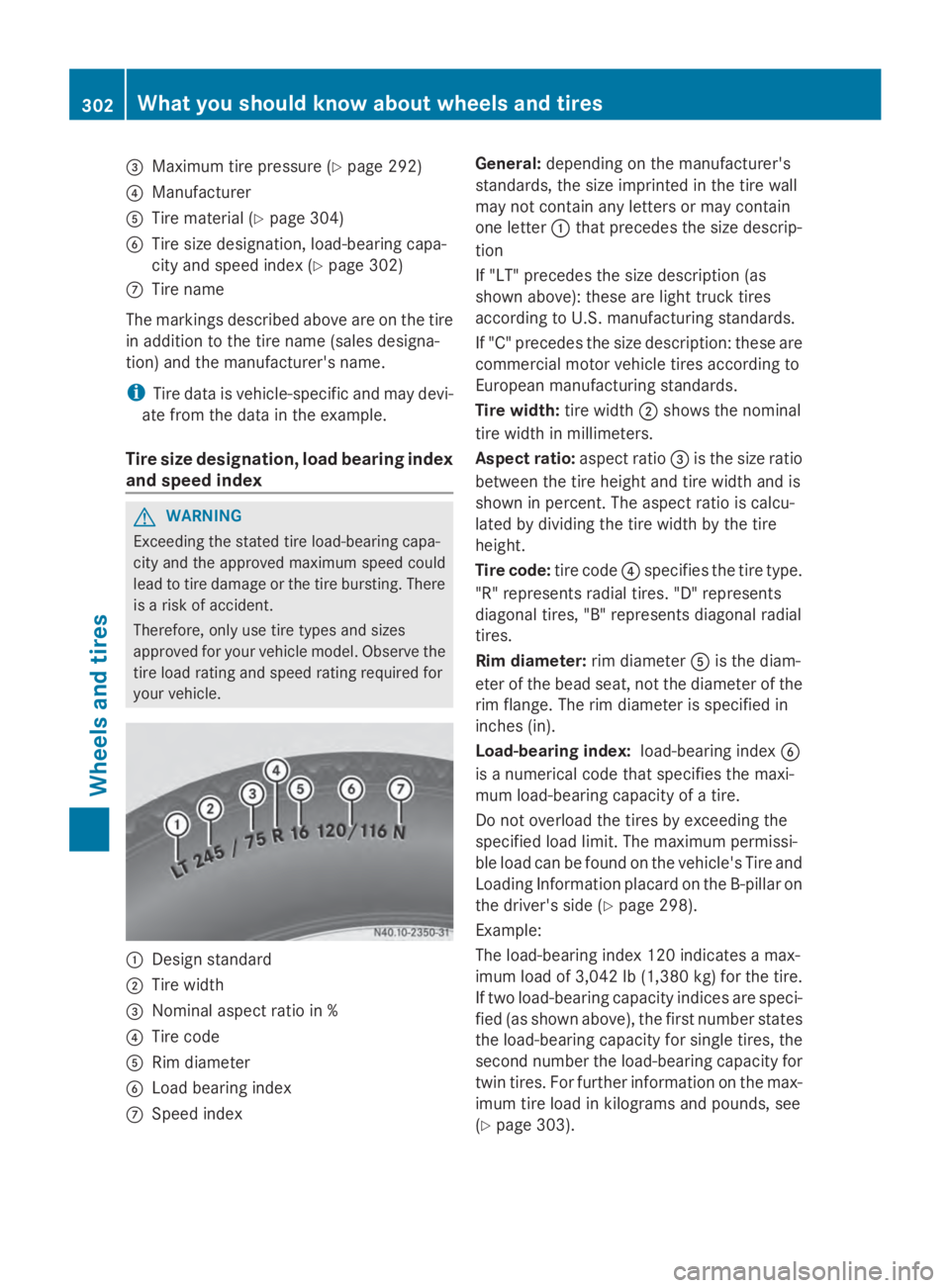
0087
Maximum tire pressure (Y page 292)
0085 Manufacturer
0083 Tire material (Y page 304)
0084 Tire size designation, load-bearing capa-
city and speed index (Y page 302)
006B Tire name
The markings described above are on the tire
in addition to the tire name (sales designa-
tion) and the manufacturer's name.
i Tire data is vehicle-specific and may devi-
ate from the data in the example.
Tire size designation, load bearing index
and speed index G
WARNING
Exceeding the stated tire load-bearing capa-
city and the approved maximum speed could
lead to tire damage or the tire bursting. There
is a risk of accident.
Therefore, only use tire types and sizes
approved for your vehicle model. Observe the
tire load rating and speed rating required for
your vehicle. 0043
Design standard
0044 Tire width
0087 Nominal aspect ratio in %
0085 Tire code
0083 Rim diameter
0084 Load bearing index
006B Speed index General:
depending on the manufacturer's
standards, the size imprinted in the tire wall
may not contain any letters or may contain
one letter 0043that precedes the size descrip-
tion
If "LT" precedes the size description (as
shown above): these are light truck tires
according to U.S. manufacturing standards.
If "C" precedes the size description: these are
commercial motor vehicle tires according to
European manufacturing standards.
Tire width: tire width0044shows the nominal
tire width in millimeters.
Aspect ratio: aspect ratio0087is the size ratio
between the tire height and tire width and is
shown in percent. The aspect ratio is calcu-
lated by dividing the tire width by the tire
height.
Tire code: tire code0085specifies the tire type.
"R" represents radial tires. "D" represents
diagonal tires, "B" represents diagonal radial
tires.
Rim diameter: rim diameter0083is the diam-
eter of the bead seat, not the diameter of the
rim flange. The rim diameter is specified in
inches (in).
Load-bearing index: load-bearing index0084
is a numerical code that specifies the maxi-
mum load-bearing capacity of a tire.
Do not overload the tires by exceeding the
specified load limit. The maximum permissi-
ble load can be found on the vehicle's Tire and
Loading Information placard on the B-pillar on
the driver's side (Y page 298).
Example:
The load-bearing index 120 indicates a max-
imum load of 3,042 lb (1,380 kg) for the tire.
If two load-bearing capacity indices are speci-
fied (as shown above), the first number states
the load-bearing capacity for single tires, the
second number the load-bearing capacity for
twin tires. For further information on the max-
imum tire load in kilograms and pounds, see
(Y page 303). 302
What you should know about wheels and tiresWheels and tires
Page 310 of 338
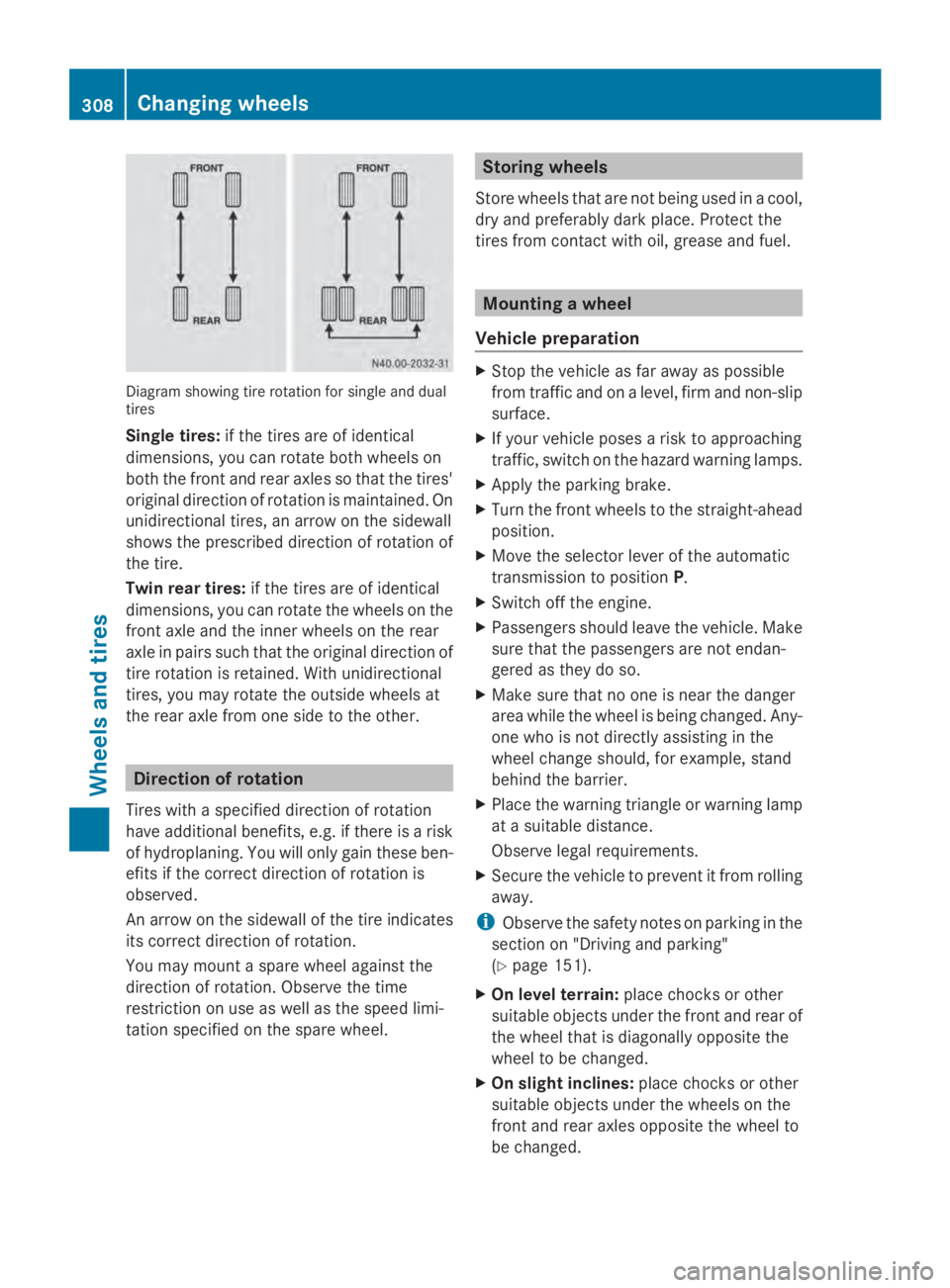
Diagram showing tire rotation for single and dual
tires
Single tires: if the tires are of identical
dimensions, you can rotate both wheels on
both the front and rear axles so that the tires'
original direction of rotation is maintained. On
unidirectional tires, an arrow on the sidewall
shows the prescribed direction of rotation of
the tire.
Twin rear tires: if the tires are of identical
dimensions, you can rotate the wheels on the
front axle and the inner wheels on the rear
axle in pairs such that the original direction of
tire rotation is retained. With unidirectional
tires, you may rotate the outside wheels at
the rear axle from one side to the other. Direction of rotation
Tires with a specified direction of rotation
have additional benefits, e.g. if there is a risk
of hydroplaning. You will only gain these ben-
efits if the correct direction of rotation is
observed.
An arrow on the sidewall of the tire indicates
its correct direction of rotation.
You may mount a spare wheel against the
direction of rotation. Observe the time
restriction on use as well as the speed limi-
tation specified on the spare wheel. Storing wheels
Store wheels that are not being used in a cool,
dry and preferably dark place. Protect the
tires from contact with oil, grease and fuel. Mounting a wheel
Vehicle preparation X
Stop the vehicle as far away as possible
from traffic and on a level, firm and non-slip
surface.
X If your vehicle poses a risk to approaching
traffic, switch on the hazard warning lamps.
X Apply the parking brake.
X Turn the front wheels to the straight-ahead
position.
X Move the selector lever of the automatic
transmission to position P.
X Switch off the engine.
X Passengers should leave the vehicle. Make
sure that the passengers are not endan-
gered as they do so.
X Make sure that no one is near the danger
area while the wheel is being changed. Any-
one who is not directly assisting in the
wheel change should, for example, stand
behind the barrier.
X Place the warning triangle or warning lamp
at a suitable distance.
Observe legal requirements.
X Secure the vehicle to prevent it from rolling
away.
i Observe the safety notes on parking in the
section on "Driving and parking"
(Y page 151).
X On level terrain: place chocks or other
suitable objects under the front and rear of
the wheel that is diagonally opposite the
wheel to be changed.
X On slight inclines: place chocks or other
suitable objects under the wheels on the
front and rear axles opposite the wheel to
be changed. 308
Changing wheelsWheels and tires
Page 314 of 338
Wheels with centering by wheel bolts:
X
Vehicles with alloy wheels: take the short
wheel bolts that fit the steel spare wheel
out of the vehicle tool kit.
X Screw in the wheel bolts and tighten them
lightly.
For wheels with wheel nuts:
X Front wheels with wheel nut covers: press
the wheel nut covers onto the wheel nuts.
X Screw in the three wheel nuts over the fix-
ing discs of the wheel nut cover.
X Turn the wheel so that the wheel bolts are
in the middle of the holes.
X Screw on the rest of the wheel nuts.
X Slightly tighten all the wheel nuts.
Lowering the vehicle G
WARNING
The wheels could work loose if the wheel nuts
and bolts are not tightened to the specified
tightening torque. There is a risk of accident.
Have the tightening torque immediately
checked at a qualified specialist workshop
after a wheel is changed.
! Only use the jack pump lever middle rod
and the rod with the largest diameter as a
lug wrench extension. Only slide the middle
rod as far as it will go onto the lug wrench.
The rods may otherwise bend and be dis-
torted to such an extent that they can no
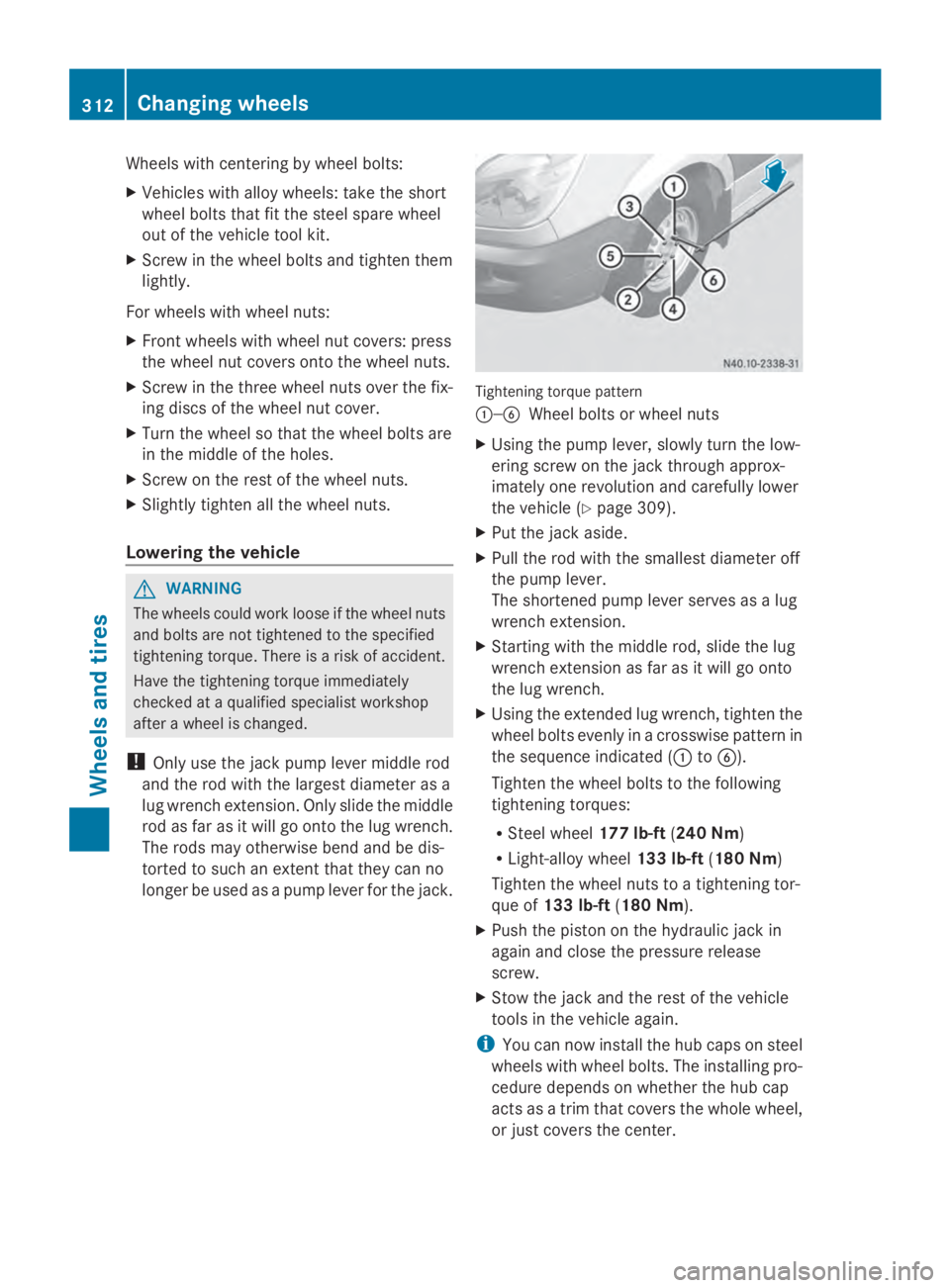
longer be used as a pump lever for the jack. Tightening torque pattern
0043—0084
Wheel bolts or wheel nuts
X Using the pump lever, slowly turn the low-
ering screw on the jack through approx-
imately one revolution and carefully lower
the vehicle (Y page 309).
X Put the jack aside.
X Pull the rod with the smallest diameter off
the pump lever.
The shortened pump lever serves as a lug
wrench extension.
X Starting with the middle rod, slide the lug
wrench extension as far as it will go onto
the lug wrench.
X Using the extended lug wrench, tighten the
wheel bolts evenly in a crosswise pattern in
the sequence indicated (0043 to0084).
Tighten the wheel bolts to the following
tightening torques:
R Steel wheel 177 lb-ft(240 Nm)
R Light-alloy wheel 133 lb-ft(180 Nm)
Tighten the wheel nuts to a tightening tor-
que of 133 lb-ft (180 Nm).
X Push the piston on the hydraulic jack in
again and close the pressure release
screw.
X Stow the jack and the rest of the vehicle
tools in the vehicle again.
i You can now install the hub caps on steel
wheels with wheel bolts. The installing pro-
cedure depends on whether the hub cap
acts as a trim that covers the whole wheel,
or just covers the center. 312
Changing wheelsWheels and tires