audio MERCEDES-BENZ SPRINTER 2014 MY14 Operator’s Manual
[x] Cancel search | Manufacturer: MERCEDES-BENZ, Model Year: 2014, Model line: SPRINTER, Model: MERCEDES-BENZ SPRINTER 2014Pages: 338, PDF Size: 6.78 MB
Page 15 of 338
Setting the exterior lighting
delayed switch-off (vehicles with
steering wheel buttons)
.................195
Switching the daytime running
lamps on/off (switch) ......................93
Turn signals ..................................... 95
see Changing a bulb
see Interior lighting
Light sensor ......................................... 94
Limited Warranty ................................ 29
Load distribution ............................... 244
Loading guidelines Important safety notes ..................242
Loading rails
Installing cargo tie-down rings .......246
Maximum tensile strength .............331
Loads
Securing ........................................ 244
Transporting .................................. 242
Load securing aids
Carrier systems ............................. 247
Locator lighting
Setting (vehicles with steering
wheel buttons) ............................... 195
Locking
see Central locking
Locking and unlocking manually .......71
Locking centrally see Central locking
Low-beam headlamps
Display message ............................ 210
Driving abroad ............................... 155
Replacing bulbs ............................. 101
Switching on/off .............................. 93
Lumbar support ................................... 83M
M+S tires ............................................ 288
Maintenance ...................................... 258
Malfunctions Message memory (on-board com-
puter) ............................................. 200
Maximum speed
Speed limitation ............................ .155 Menu (vehicles with steering
wheel buttons)
Audio ............................................. 189
Operation ....................................... 188
Settings ......................................... 190
Telephone ...................................... 198
Message
see Display message
Message memory (on-board com-
puter) ................................................. .200
Mirrors Exterior mirrors ................................ 89
Rear-view mirror .............................. 89
Mobile navigation devices ................240
Mobile phone ..................................... 239
Important safety notes ..................239
Pre-installation ............................... 239
Type approval/frequency ..............318
Mounting wheels
Lowering the vehicle ......................312
Mounting a new wheel ...................311
Preparing the vehicle .....................308
Raising the vehicle .........................309
Removing and mounting the spare
wheel ............................................. 314
Removing a wheel ..........................311
Securing the vehicle against roll-
ing away ........................................ 308 N
Navigation Fittings for PND mobile navigation
devices .......................................... 240
Navigation lights
Replacing bulbs ............................. 101
Notes on breaking-in a new vehi-
cle ....................................................... 136 O
Occupant safety Air bags ........................................... 44
Children in the vehicle .....................50
Important safety notes ....................42 Index
13
Page 16 of 338
Pets in the vehicle
........................... 56
Seat belts ........................................ 47
Odometer
Display (vehicles without steering
wheel buttons) ............................... 184
Display (vehicles with steering
wheel buttons) ............................... 189
Off-road driving
Checklist after driving off-road ......160
Important safety notes ..................159
Rules for driving off-roa d............... 160
Oil
see Engine oil
On-board computer
Display message ............................ 199
Lighting submenu .......................... 194
On-board computer (vehicles with-
out steering wheel buttons)
Display message ............................ 199
General notes ................................ 184
Setting the clock ............................ 185
Standard displa y............................ 184
On-board computer (vehicles with
steering wheel buttons) Audio menu ................................... 189
Display message ............................ 186
Menu overview .............................. 188
Operating ...................................... .186
Operation menu ............................. 188
Settings menu ............................... 190
Standard displa y............................ 189
Telephone menu ............................ 198
Trip computer menu ......................197
Operating safety
Attachments, bodies, equipment
and conversions ............................... 27
Correct use ...................................... 26
Declaration of conformity ................25
Diagnostics connection ...................25
Digital speedometer and odome-
ter .................................................... 25
Important safety note ......................24
Limited Warranty ............................. 29
Modifying engine output ..................25
Qualified specialist workshop ..........26
Radiator cover ................................. 28
Vehicle registration ..........................23
Warning note sticker ........................26Operating system
see On-board computer
Operator's Manual
General notes .................................. 23
Vehicle equipment ...........................23
Outline lamp
Replacing bulbs ............................. 105
Outside temperature display ...........183
Overhead control panel ......................38
Overrevving range .............................183
Overrun cutoff ................................... 154 P
Paint code number ............................319
Paintwork (cleaning instructions) ...269
Paper holder ...................................... 236
Parking ............................................... 151
Important safety notes ..................151
Parking brake ................................ 152
Wheel chock .................................. 153
see PARKTRONIC
Parking aid
see PARKTRONIC
Parking brake
Display message ............................ 209
Notes/function .............................. 152
PARKTRONIC
Deactivating/activating .................170
Driving system ............................... 168
Function/notes ............................. 168
Important safety notes ..................168
Problem (malfunction) ...................171
Range of the sensors .....................168
Roll-back warning .......................... 170
Trailer towing ................................. 170
Warning displa y............................. 169
Partition sliding door
Important safety notes ....................77
Opening/closing .............................. 77
Passenger compartment air-condi-
tioning system
see Climate control
Passenger compartment heating
see Climate control
Perimeter lamp
Replacing bulbs ............................. 104
Pets in the vehicle ............................... 5614
Index
Page 34 of 338
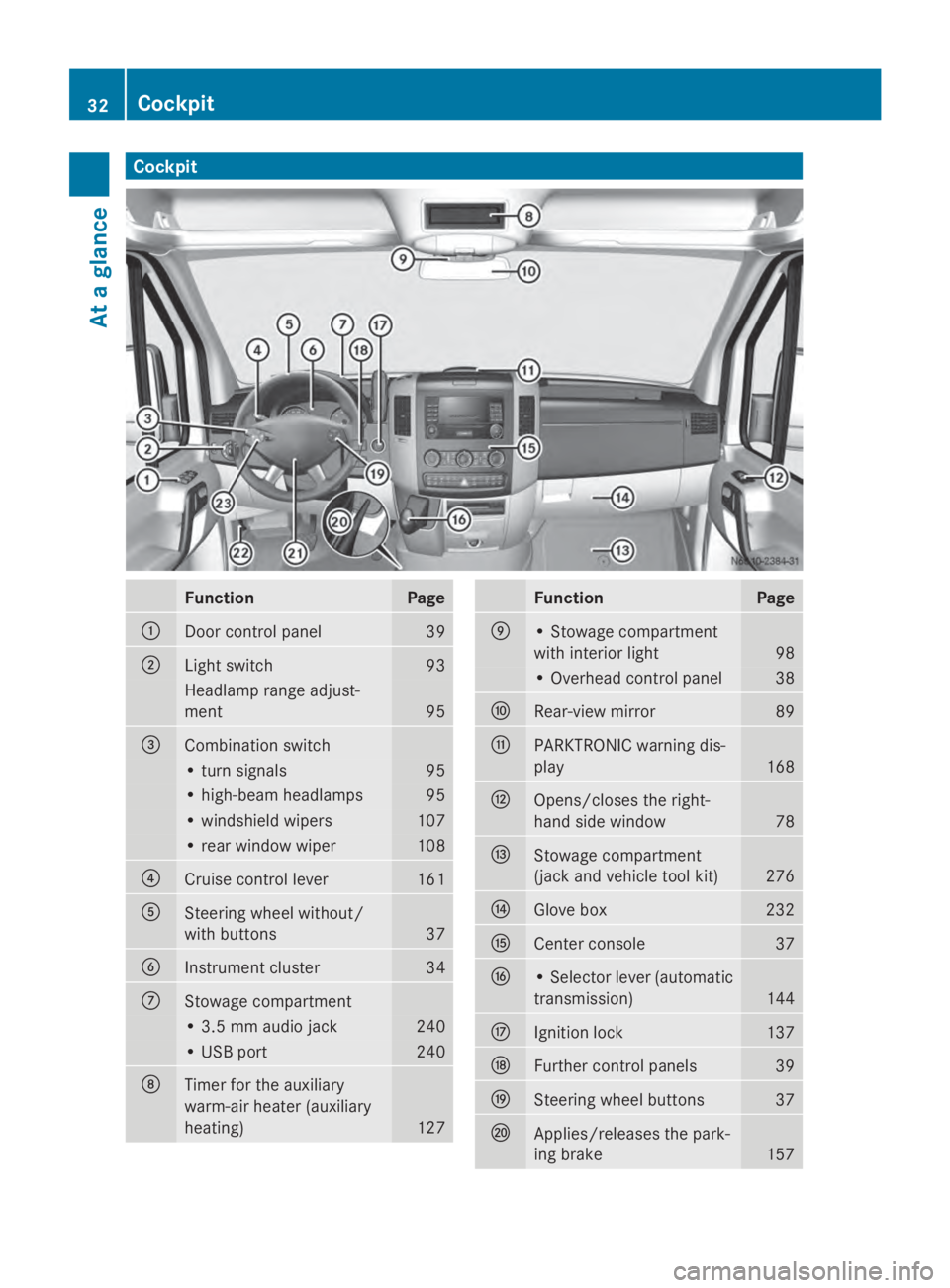
Cockpit
Function Page
0043
Door control panel 39
0044
Light switch 93
Headlamp range adjust-
ment 95
0087
Combination switch
• turn signals 95
• high-beam headlamps 95
• windshield wipers 107
• rear window wiper 108
0085
Cruise control lever 161
0083
Steering wheel without/
with buttons
37
0084
Instrument cluster 34
006B
Stowage compartment
• 3.5 mm audio jack 240
• USB port 240
006C
Timer for the auxiliary
warm-air heater (auxiliary
heating)
127 Function Page
006D
• Stowage compartment
with interior light
98
• Overhead control panel 38
006E
Rear-view mirror 89
006F
PARKTRONIC warning dis-
play
168
0070
Opens/closes the right-
hand side window
78
0071
Stowage compartment
(jack and vehicle tool kit)
276
0072
Glove box 232
0073
Center console 37
0074
• Selector lever (automatic
transmission)
144
0075
Ignition lock 137
0076
Further control panels 39
0077
Steering wheel buttons 37
0078
Applies/releases the park-
ing brake
15732
CockpitAt a glance
Page 39 of 338
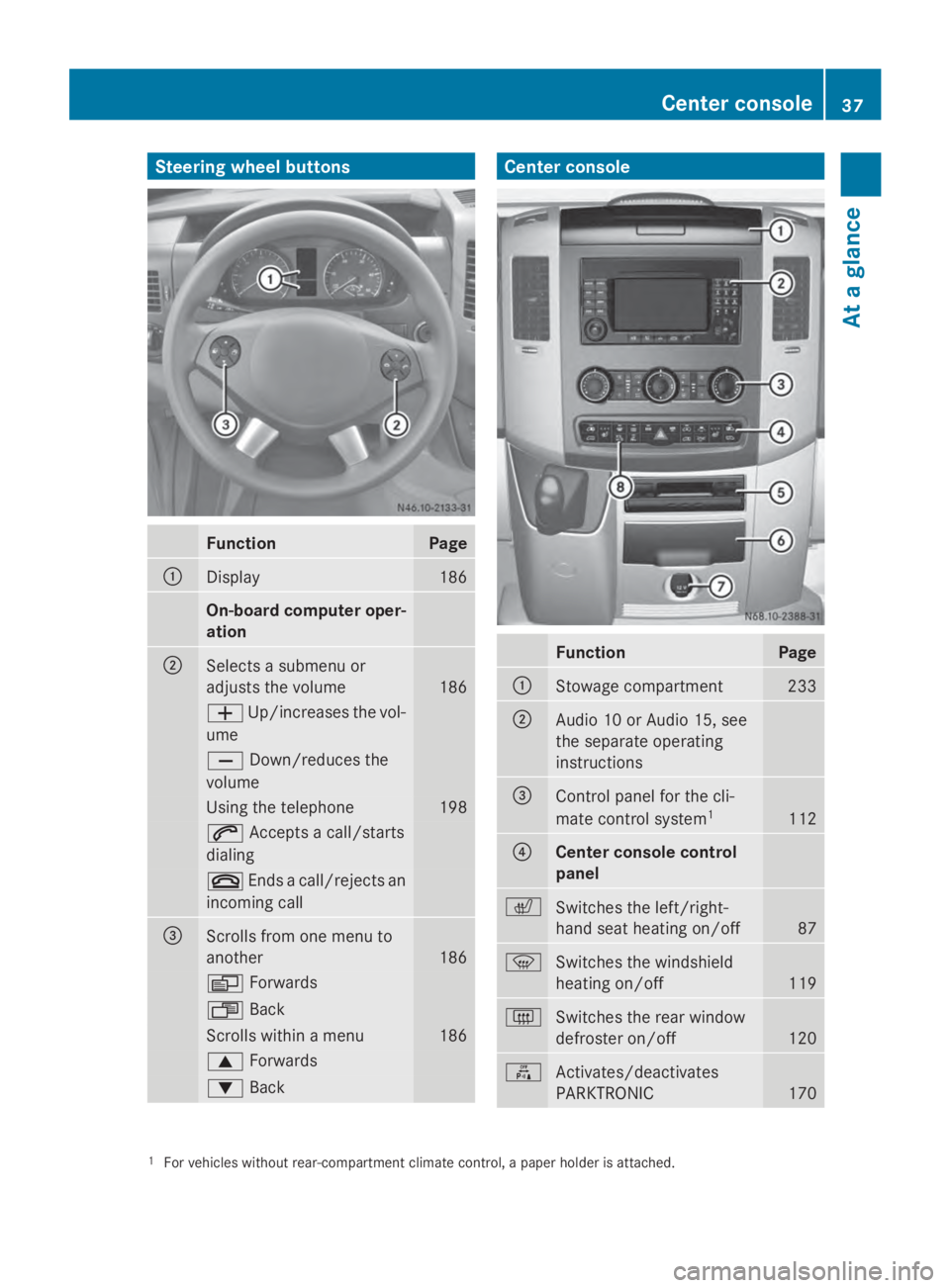
Steering wheel buttons
Function Page
0043
Display 186
On-board computer oper-
ation
0044
Selects a submenu or
adjusts the volume
186
0081
Up/increases the vol-
ume 0082
Down/reduces the
volume Using the telephone 198
0061
Accepts a call/starts
dialing 0076
Ends a call/rejects an
incoming call 0087
Scrolls from one menu to
another
186
0080
Forwards 007F
Back Scrolls within a menu 186
0063
Forwards 0064
Back Center console
Function Page
0043
Stowage compartment 233
0044
Audio 10 or Audio 15, see
the separate operating
instructions
0087
Control panel for the cli-
mate control system
1 112
0085
Center console control
panel
0072
Switches the left/right-
hand seat heating on/off
87
0085
Switches the windshield
heating on/off
119
0071
Switches the rear window
defroster on/off
120
0069
Activates/deactivates
PARKTRONIC
170
1
For vehicles without rear-compartment climate control, a paper holder is attached. Center console
37At a glance
Page 174 of 338
The rear view camera is a visual parking aid.
Information on operation can be found in the
separate Audio 15 supplement.
The camera is in the middle of the roof above
the high-mounted brake lamp (Y page 271).
The rear view camera may show obstacles in
perspectival distortion, incorrectly or not at
all. The rear view camera cannot display all
objects located very near and/or under the
rear bumper. It does not warn you of a colli-
sion, persons or objects.
The area behind the vehicle is displayed in a
mirrored fashion, as in the rear-view mirror or
the exterior mirrors. The guide lines displayed
assist you in backing up.
The function of the rear view camera may be
partially or completely impaired in the follow-
ing circumstances:
R it is raining very heavily or snowing, or it is
foggy.
R the parking space is located in a very dark
place.
R the camera is exposed to very strong white
light. White stripes may appear on the dis-
play.
R the surrounding area is illuminated with flu-
orescent light. The display may flicker.
R if the temperature changes very quickly, for
example if you drive into a heated garage
in the winter.
R ambient temperatures are very high.
R the camera lens is dirty or obstructed.
R the rear of the vehicle is damaged. In this
case, have the position and setting
checked at a specialist workshop.
The rear view camera is switched on when
you engage reverse gear R.
You can find information on cleaning the cam-
era in the "Maintenance and care" section
(Y page 271). Working mode
ADR (working speed governor)
General notes When activated, ADR automatically increases
the engine speed to a preset speed or a speed
you have set.
i
After a cold start, the idling speed of the
engine is increased automatically. If the
preset working speed is lower than the
increased idling speed, the working speed
is only reached once the engine has com-
pleted the warm-up phase.
It is only possible to activate ADR with the
vehicle stationary and the parking brake
applied.
The selector lever of the automatic trans-
mission must be in position P.
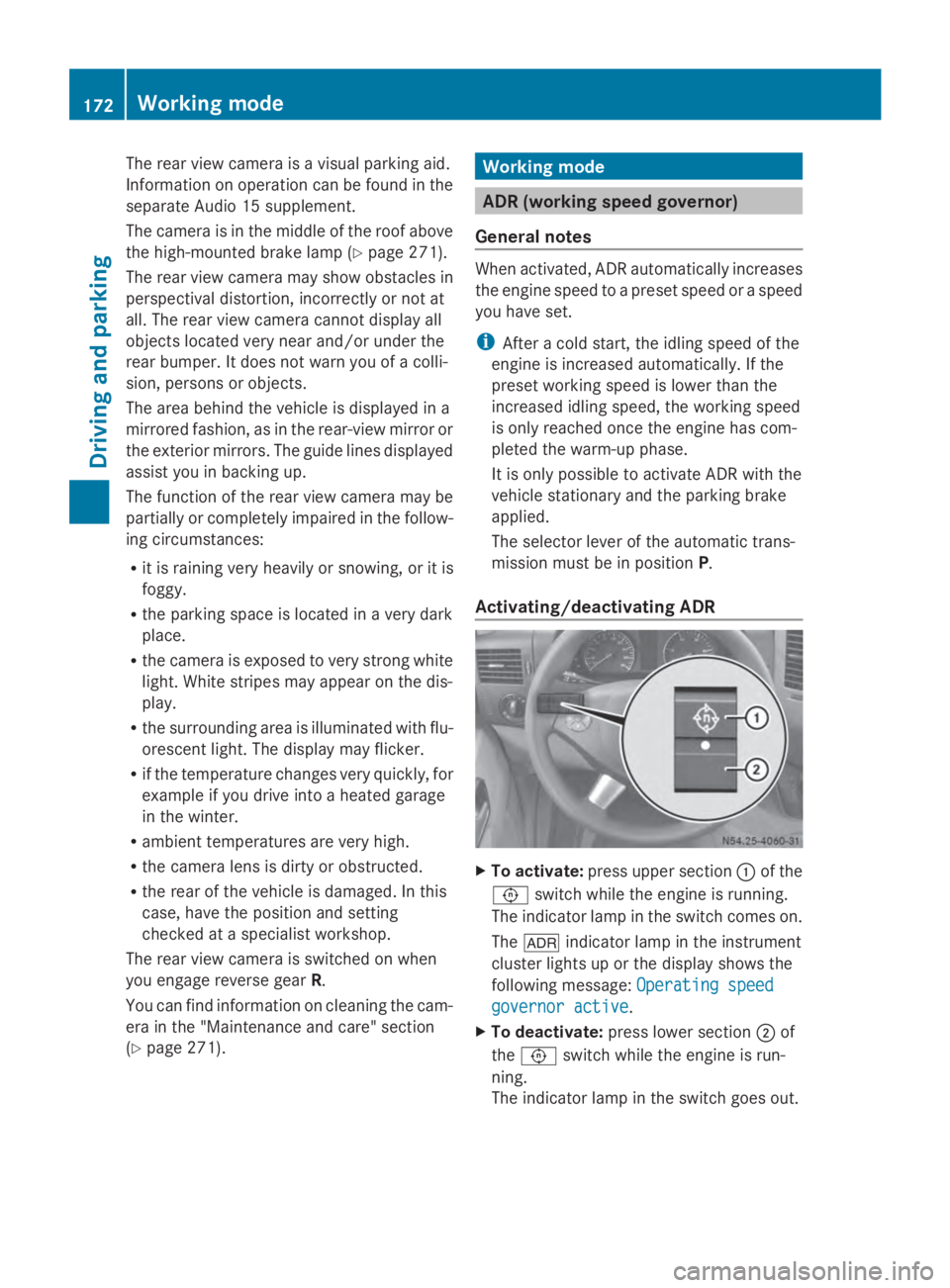
Activating/deactivating ADR X
To activate: press upper section 0043of the
0091 switch while the engine is running.
The indicator lamp in the switch comes on.
The 004E indicator lamp in the instrument
cluster lights up or the display shows the
following message: Operating speed Operating speed
governor active governor active.
X To deactivate: press lower section 0044of
the 0091 switch while the engine is run-
ning.
The indicator lamp in the switch goes out. 172
Working modeDriving and parking
Page 188 of 338
On-board computer (vehicles with
steering wheel buttons) Operating the on-board computer
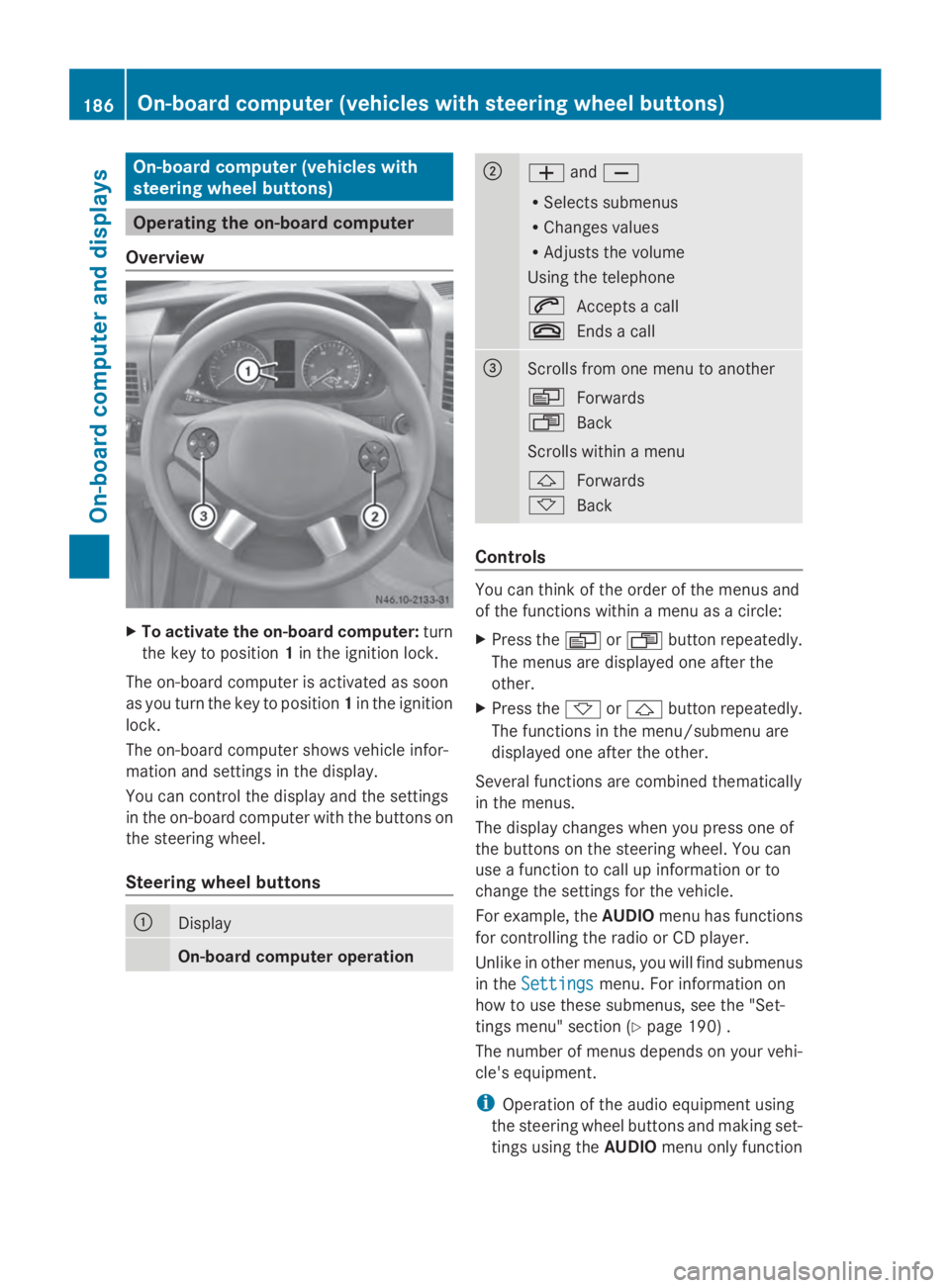
Overview X
To activate the on-board computer: turn
the key to position 1in the ignition lock.
The on-board computer is activated as soon
as you turn the key to position 1in the ignition
lock.
The on-board computer shows vehicle infor-
mation and settings in the display.
You can control the display and the settings
in the on-board computer with the buttons on
the steering wheel.
Steering wheel buttons 0043
Display
On-board computer operation 0044
0081
and0082
R Selects submenus
R Changes values
R Adjusts the volume
Using the telephone
0061 Accepts a call
0076 Ends a call 0087
Scrolls from one menu to another
0080
Forwards
007F Back
Scrolls within a menu
0041 Forwards
0068 Back Controls
You can think of the order of the menus and
of the functions within a menu as a circle:
X
Press the 0080or007F button repeatedly.
The menus are displayed one after the
other.
X Press the 0068or0041 button repeatedly.
The functions in the menu/submenu are
displayed one after the other.
Several functions are combined thematically
in the menus.
The display changes when you press one of
the buttons on the steering wheel. You can
use a function to call up information or to
change the settings for the vehicle.
For example, the AUDIOmenu has functions
for controlling the radio or CD player.
Unlike in other menus, you will find submenus
in the Settings Settings menu. For information on
how to use these submenus, see the "Set-
tings menu" section (Y page 190) .
The number of menus depends on your vehi-
cle's equipment.
i Operation of the audio equipment using
the steering wheel buttons and making set-
tings using the AUDIOmenu only function 186
On-board computer (vehicles with steering wheel buttons)On-board computer and displays
Page 189 of 338
with Sprinter audio equipment. If you are
using audio equipment from another man-
ufacturer, the described functions may be
restricted or not available at all. On-board computer (vehicles with steering wheel buttons)
187On-board computer and displays Z
Page 190 of 338
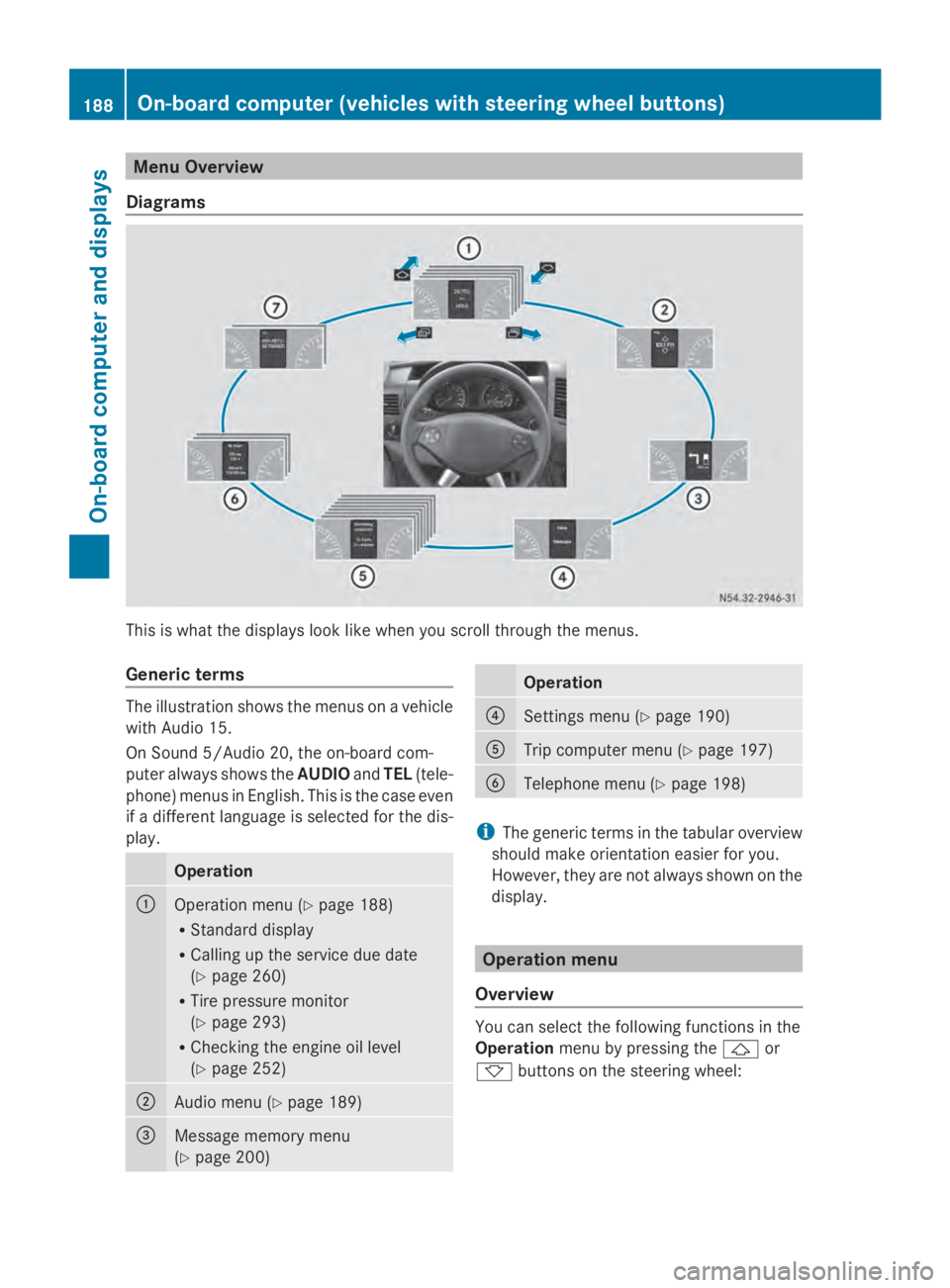
Menu Overview
Diagrams This is what the displays look like when you scroll through the menus.
Generic terms The illustration shows the menus on a vehicle
with Audio 15.
On Sound 5/Audio 20, the on-board com-
puter always shows the AUDIOandTEL (tele-
phone) menus in English. This is the case even
if a different language is selected for the dis-
play. Operation
0043
Operation menu (Y
page 188)
R Standard display
R Calling up the service due date
(Y page 260)
R Tire pressure monitor
(Y page 293)
R Checking the engine oil level
(Y page 252) 0044
Audio menu (Y
page 189) 0087
Message memory menu
(Y
page 200) Operation
0085
Settings menu (Y
page 190) 0083
Trip computer menu (Y
page 197) 0084
Telephone menu (Y
page 198) i
The generic terms in the tabular overview
should make orientation easier for you.
However, they are not always shown on the
display. Operation menu
Overview You can select the following functions in the
Operation
menu by pressing the 0041or
0068 buttons on the steering wheel: 188
On-board computer (vehicles with steering wheel buttons)On-board computer and displays
Page 191 of 338
R
Displaying the trip odometer and odometer
(standard display) (Y page 189)
R Displaying the coolant temperature
(Y page 189)
R Calling up the service due date
(Y page 260)
R Tire pressure monitor (Y page 293)
R Checking the oil level (Y page 252)
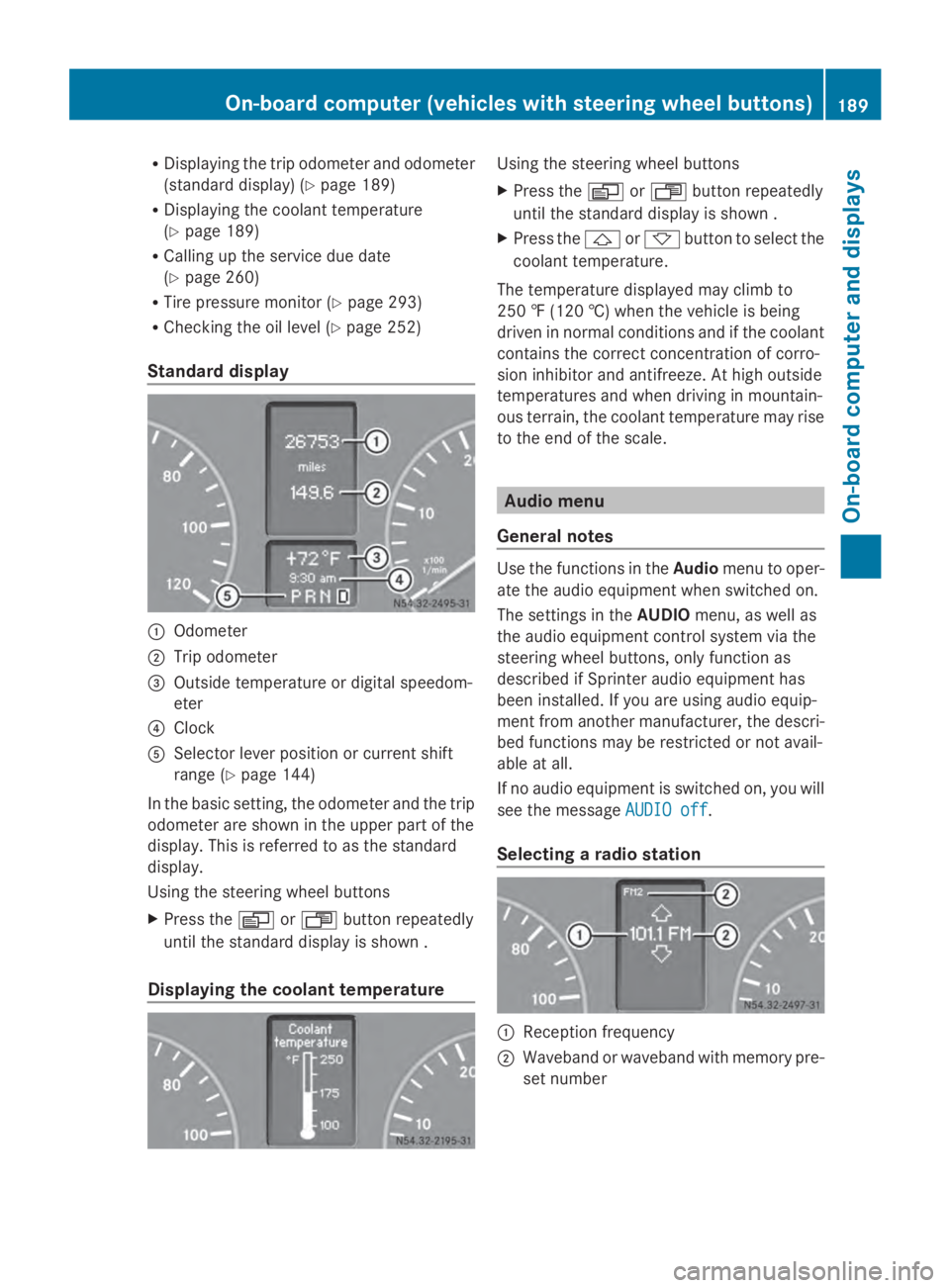
Standard display 0043
Odometer
0044 Trip odometer
0087 Outside temperature or digital speedom-
eter
0085 Clock
0083 Selector lever position or current shift
range (Y page 144)
In the basic setting, the odometer and the trip
odometer are shown in the upper part of the
display. This is referred to as the standard
display.
Using the steering wheel buttons
X Press the 0080or007F button repeatedly
until the standard display is shown .
Displaying the coolant temperature Using the steering wheel buttons
X
Press the 0080or007F button repeatedly
until the standard display is shown .
X Press the 0041or0068 button to select the
coolant temperature.
The temperature displayed may climb to
250 ‡ (120 †) when the vehicle is being
driven in normal conditions and if the coolant
contains the correct concentration of corro-
sion inhibitor and antifreeze. At high outside
temperatures and when driving in mountain-
ous terrain, the coolant temperature may rise
to the end of the scale. Audio menu
General notes Use the functions in the
Audiomenu to oper-
ate the audio equipment when switched on.
The settings in the AUDIOmenu, as well as
the audio equipment control system via the
steering wheel buttons, only function as
described if Sprinter audio equipment has
been installed. If you are using audio equip-
ment from another manufacturer, the descri-
bed functions may be restricted or not avail-
able at all.
If no audio equipment is switched on, you will
see the message AUDIO off AUDIO off.
Selecting a radio station 0043
Reception frequency
0044 Waveband or waveband with memory pre-
set number On-board computer (vehicles
with steering wheel buttons)
189On-board computer and displays Z
Page 192 of 338
Using the steering wheel buttons
X
Switch on the audio equipment (see the
separate operating instructions).
X Press the 0080or007F button repeatedly
until the station selected appears in the
display.
The type of search depends on the setting
of the radio station selection
(Y page 196): the nearest stored station
will be selected or the station search starts.
X Press the 0041or0068 button to select the
desired station.
i You can only store new stations on the
audio system itself. See the separate oper-
ating instructions.
You can also operate the audio equipment
in the same way as usual.
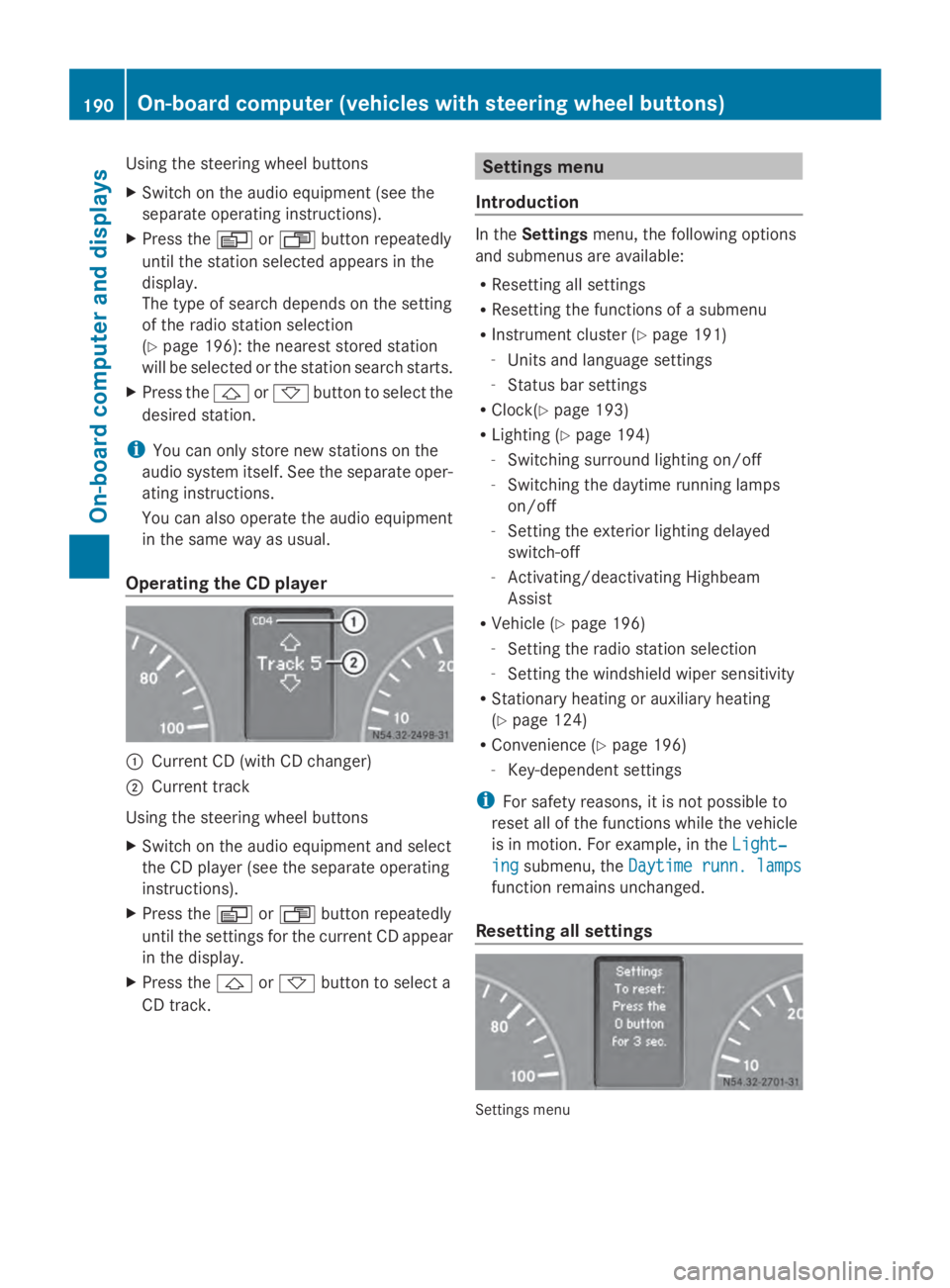
Operating the CD player 0043
Current CD (with CD changer)
0044 Current track
Using the steering wheel buttons
X Switch on the audio equipment and select
the CD player (see the separate operating
instructions).
X Press the 0080or007F button repeatedly
until the settings for the current CD appear
in the display.
X Press the 0041or0068 button to select a
CD track. Settings menu
Introduction In the
Settings menu, the following options
and submenus are available:
R Resetting all settings
R Resetting the functions of a submenu
R Instrument cluster (Y page 191)
- Units and language settings
- Status bar settings
R Clock(Y page 193)
R Lighting (Y page 194)
- Switching surround lighting on/off
- Switching the daytime running lamps
on/off
- Setting the exterior lighting delayed
switch-off
- Activating/deactivating Highbeam
Assist
R Vehicle (Y page 196)
- Setting the radio station selection
- Setting the windshield wiper sensitivity
R Stationary heating or auxiliary heating
(Y page 124)
R Convenience (Y page 196)
- Key-dependent settings
i For safety reasons, it is not possible to
reset all of the functions while the vehicle
is in motion. For example, in the Light‐ Light‐
ing
ing submenu, the Daytime runn. lamps
Daytime runn. lamps
function remains unchanged.
Resetting all settings Settings menu190
On-board computer (vehicles with steering wheel buttons)On-board computer and displays