timer MERCEDES-BENZ SPRINTER 2014 MY14 Operator’s Manual
[x] Cancel search | Manufacturer: MERCEDES-BENZ, Model Year: 2014, Model line: SPRINTER, Model: MERCEDES-BENZ SPRINTER 2014Pages: 338, PDF Size: 6.78 MB
Page 7 of 338
Trailer towing
................................. 146
Transmission oil change ................328
Automatic transmission emer-
gency mode ....................................... 147
Auxiliary heating Activating/deactivating heater
booster mode ................................ 130
Conditions for switching on ...........123
Heating time .................................. 123
Important safety notes ..................122
Operating with the button (control
panel) ............................................ 124
Operation with the remote
control ........................................... 125
Operation with the timer ................127
Problem (malfunction) ...................132
Selecting a switch-on time ............. 124
Setting the switch-on time .............125
see Auxiliary heating
AUX port ............................................ .240
Axle load, permissible (trailer tow-
ing) ...................................................... 333 B
Backup lamps Replacing bulbs ............................. 103
Backup lamps (Chassis Cab)
Replacing bulbs ............................. 104
BAS (Brake Assist System)
Display message ............................ 207
Function/notes ................................ 57
Indicator lamp ................................ 221
Basic settings
see Settings
Battery
Isolating switch .............................. 136
Replacing (SmartKey) ......................69
Battery (SmartKey)
Checking .......................................... 68
Important safety notes ....................68
Replacing ......................................... 69
Battery (vehicle)
Care ............................................... 266
Charge indicator lamp ...................225
Charging ........................................ 266
Disconnecting and connecting
(driver's footwell) ........................... 262Disconnecting and connecting
(engine compartment)
...................264
Disconnecting and reconnecting
(base of driver's seat) ....................265
Display message ............................ 219
Important safety notes ..................260
Installing/removing (base of driv-
er's seat) ........................................ 266
Installing/removing (driver's foot-
well) ............................................... 263
Installing/removing (engine com-
partment) ....................................... 265
Jump starting ................................. 278
Location ......................................... 261
Removing/installing the floor cov-
ering (driver's footwell) ..................261
Before driving off
Important safety notes ..................138
Belt
see Seat belts
Bleeding the fuel system ..................143
Blind Spot Assist Activating/deactivating .................166
Notes/function .............................. 164
Trailer towing ................................. 166
Bodies
Body/equipment mounting direc-
tives for trucks ................................. 28
Bottle holder ...................................... 237
see Cup holder
Brake Assist System
see BAS (Brake Assist System)
Brake fluid
Checking the level .........................256
Display message ............................ 208
Notes ............................................. 328
Warning lamp ................................. 222
Brake force distribution, elec-
tronic
see EBD (electronic brake force
distribution)
Brake lamps
Replacing bulbs ............................. 103
Brake lamps (Chassis Cab)
Replacing bulbs ............................. 104
Brake linings
Display message ............................ 207
Indicator lamp ................................ 225 Index
5
Page 20 of 338
Switching the surround lighting
on/off (on-board computer)
.............195
Switch unit see Control panel
Swivel seat .......................................... .84T
Tachometer ........................................ 183
Tail lamps Changing ....................................... 104
Replacing bulbs ............................. 103
see Lights
Tail lamps (Chassis Cab)
Replacing bulbs ............................. 104
Tank
see Fuel tank
Tank content
Fuel gauge ..................................... 183
Range (vehicles with steering
wheel buttons) ............................... 197
Reserve fuel warning lamp .............227
Technical data
Capacities ...................................... 320
Cargo tie-down points .................... 331
Cargo tie-down rings ..................... .331
Loading rails .................................. 331
Roof carrier .................................... 331
Tires/wheels ................................. 297
Trailer tow hitch ............................. 332
Vehicle data ................................... 331
Telephone .......................................... 239
Telephone (on-board computer) Accepting an incoming call ............198
Display messages ..........................220
Numbers from the phone book ......198
Operating ...................................... .198
Redialing ........................................ 199
Rejecting or ending a call ..............198
Temperature
Outside temperature ..................... .183
Setting (climate control) ................117
Setting the unit (vehicles with
steering wheel buttons) .................191
Theft deterrent systems
ATA (Anti-Theft Alarm system) .........62
Immobilizer ...................................... 62
Tow-away alarm ............................... 63Thoraxbag
............................................ 45
Tightening torques for wheel nuts/
wheel bolts ........................................ 312
Time Setting the time (vehicles without
steering wheel buttons) .................185
Setting the time (vehicles with
steering wheel buttons) .................193
Timer
Activating ....................................... 128
Important safety notes ..................127
Overview ........................................ 127
Setting the heating level (auxiliary
heating) ......................................... 130
Setting the preselection time
(auxiliary heating) .......................... 129
Setting weekday, time and oper-
ating duration (auxiliary heating) ...128
Switching immediate heating
mode on/off (auxiliary heating) .....128
Tire pressure
Calling up (on-board computer) .....293
Checking manually ........................292
Display messages (vehicles with-
out steering wheel buttons) ...........201
Display messages (vehicles with
steering wheel buttons) .................218
Maximum ....................................... 292
Notes ............................................. 291
Recommended ............................... 290
Setting the unit (vehicles with
steering wheel buttons) .................193
Tire label ................................ 290, 291
Tire pressure loss warning system ..294
Tire pressure monitor Display message ............................ 218
Indicator lamp ................................ 229
Tire pressure monitoring system
Checking the tire pressure elec-
tronically ........................................ 294
Function/notes ............................. 293
Restarting ...................................... 295
Warning lamp ................................. 294
Tire pressure table ............................297
Tires Aspect ratio (definition) .................306
Average weight of the vehicle
occupants (definition) ....................30518
Index
Page 34 of 338
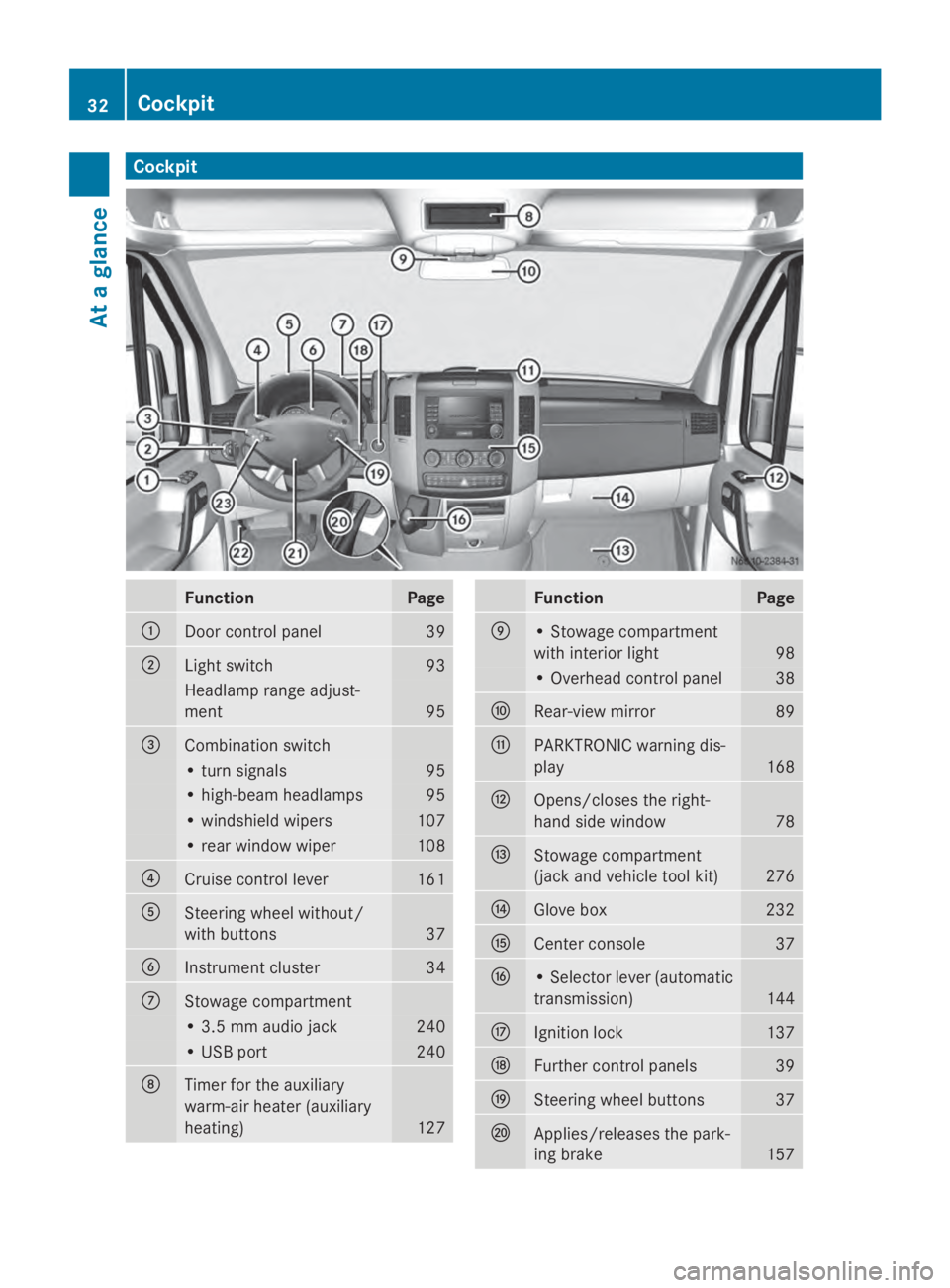
Cockpit
Function Page
0043
Door control panel 39
0044
Light switch 93
Headlamp range adjust-
ment 95
0087
Combination switch
• turn signals 95
• high-beam headlamps 95
• windshield wipers 107
• rear window wiper 108
0085
Cruise control lever 161
0083
Steering wheel without/
with buttons
37
0084
Instrument cluster 34
006B
Stowage compartment
• 3.5 mm audio jack 240
• USB port 240
006C
Timer for the auxiliary
warm-air heater (auxiliary
heating)
127 Function Page
006D
• Stowage compartment
with interior light
98
• Overhead control panel 38
006E
Rear-view mirror 89
006F
PARKTRONIC warning dis-
play
168
0070
Opens/closes the right-
hand side window
78
0071
Stowage compartment
(jack and vehicle tool kit)
276
0072
Glove box 232
0073
Center console 37
0074
• Selector lever (automatic
transmission)
144
0075
Ignition lock 137
0076
Further control panels 39
0077
Steering wheel buttons 37
0078
Applies/releases the park-
ing brake
15732
CockpitAt a glance
Page 124 of 338
X
To open: for the right-hand side of the vehi-
cle, turn thumbwheel 0044or for the left-hand
side of the vehicle, thumbwheel 0043of the
air vents clockwise.
X To close: for the right-hand side of the
vehicle, turn thumbwheel 0044or for the left-
hand side of the vehicle, thumbwheel 0043of
the air vents counter-clockwise. Adjusting the air vents in the roof duct
! Always leave at least one air vent open.
If the rear-compartment air conditioning is
switched on and all the air vents are closed,
the air-conditioning system may be dam-
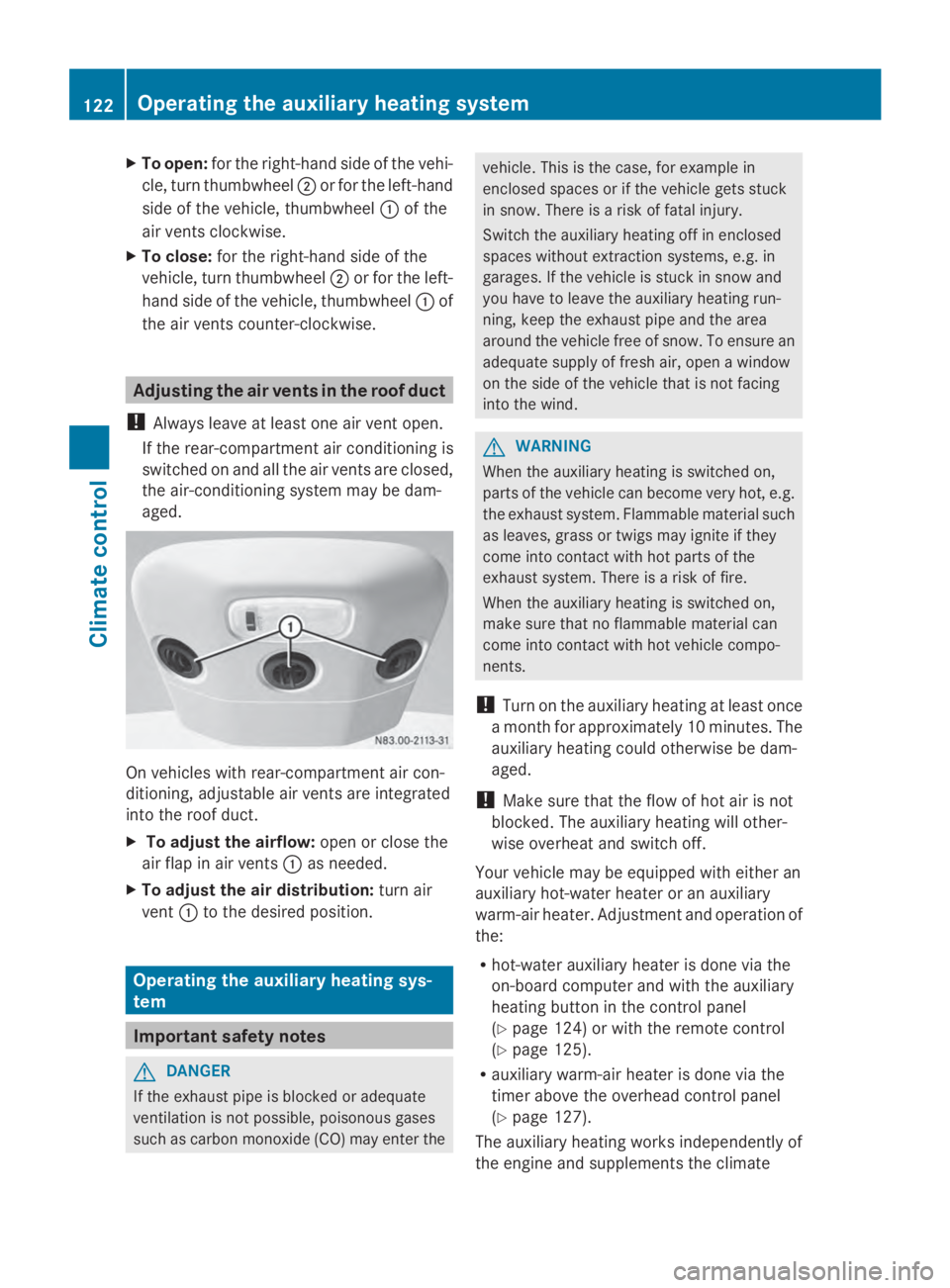
aged. On vehicles with rear-compartment air con-
ditioning, adjustable air vents are integrated
into the roof duct.
X To adjust the airflow: open or close the
air flap in air vents 0043as needed.
X To adjust the air distribution: turn air
vent 0043to the desired position. Operating the auxiliary heating sys-
tem Important safety notes
G
DANGER
If the exhaust pipe is blocked or adequate
ventilation is not possible, poisonous gases
such as carbon monoxide (CO) may enter the vehicle. This is the case, for example in
enclosed spaces or if the vehicle gets stuck
in snow. There is a risk of fatal injury.
Switch the auxiliary heating off in enclosed
spaces without extraction systems, e.g. in
garages. If the vehicle is stuck in snow and
you have to leave the auxiliary heating run-
ning, keep the exhaust pipe and the area
around the vehicle free of snow. To ensure an
adequate supply of fresh air, open a window
on the side of the vehicle that is not facing
into the wind. G
WARNING
When the auxiliary heating is switched on,
parts of the vehicle can become very hot, e.g.
the exhaust system. Flammable material such
as leaves, grass or twigs may ignite if they
come into contact with hot parts of the
exhaust system. There is a risk of fire.
When the auxiliary heating is switched on,
make sure that no flammable material can
come into contact with hot vehicle compo-
nents.
! Turn on the auxiliary heating at least once
a month for approximately 10 minutes. The
auxiliary heating could otherwise be dam-
aged.
! Make sure that the flow of hot air is not
blocked. The auxiliary heating will other-
wise overheat and switch off.
Your vehicle may be equipped with either an
auxiliary hot-water heater or an auxiliary
warm-air heater. Adjustment and operation of
the:
R hot-water auxiliary heater is done via the
on-board computer and with the auxiliary
heating button in the control panel
(Y page 124) or with the remote control
(Y page 125).
R auxiliary warm-air heater is done via the
timer above the overhead control panel
(Y page 127).
The auxiliary heating works independently of
the engine and supplements the climate 122
Operating the auxiliary heating systemClimate control
Page 126 of 338
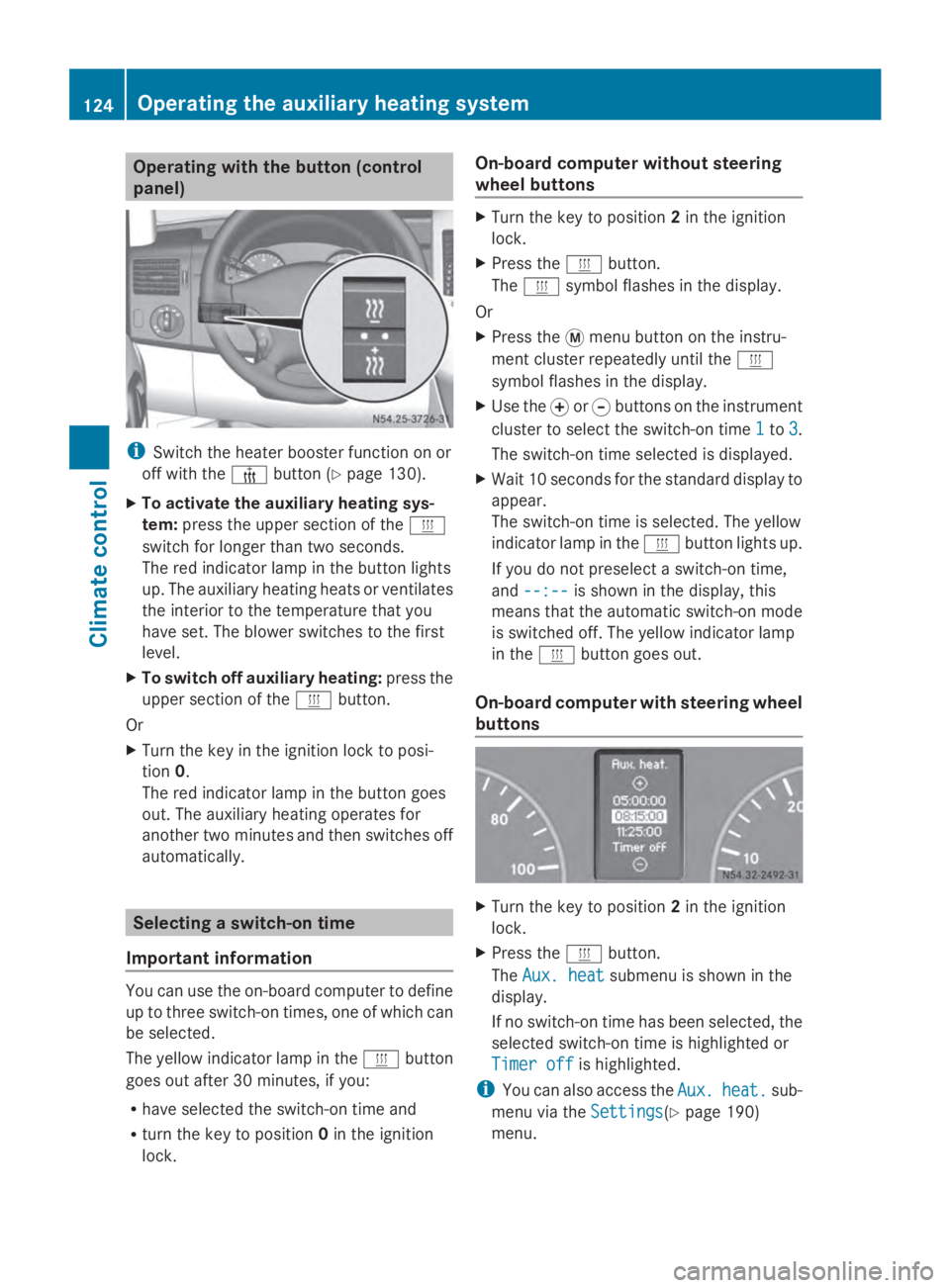
Operating with the button (control
panel)
i
Switch the heater booster function on or
off with the 006Abutton (Y page 130).
X To activate the auxiliary heating sys-
tem: press the upper section of the 0084
switch for longer than two seconds.
The red indicator lamp in the button lights
up. The auxiliary heating heats or ventilates
the interior to the temperature that you
have set. The blower switches to the first
level.
X To switch off auxiliary heating: press the
upper section of the 0084button.
Or
X Turn the key in the ignition lock to posi-
tion 0.
The red indicator lamp in the button goes
out. The auxiliary heating operates for
another two minutes and then switches off
automatically. Selecting a switch-on time
Important information You can use the on-board computer to define
up to three switch-on times, one of which can
be selected.
The yellow indicator lamp in the 0084button
goes out after 30 minutes, if you:
R have selected the switch-on time and
R turn the key to position 0in the ignition
lock. On-board computer without steering
wheel buttons X
Turn the key to position 2in the ignition
lock.
X Press the 0084button.
The 0084 symbol flashes in the display.
Or
X Press the 0079menu button on the instru-
ment cluster repeatedly until the 0084
symbol flashes in the display.
X Use the 0074or0075 buttons on the instrument
cluster to select the switch-on time 1
1 to 3 3.
The switch-on time selected is displayed.
X Wait 10 seconds for the standard display to
appear.
The switch-on time is selected. The yellow
indicator lamp in the 0084button lights up.
If you do not preselect a switch-on time,
and --:-- --:-- is shown in the display, this
means that the automatic switch-on mode
is switched off. The yellow indicator lamp
in the 0084button goes out.
On-board computer with steering wheel
buttons X
Turn the key to position 2in the ignition
lock.
X Press the 0084button.
The Aux. heat Aux. heat submenu is shown in the
display.
If no switch-on time has been selected, the
selected switch-on time is highlighted or
Timer off
Timer off is highlighted.
i You can also access the Aux. Aux.heat.
heat. sub-
menu via the Settings
Settings(Ypage 190)
menu. 124
Operating the auxiliary heating systemClimate control
Page 127 of 338
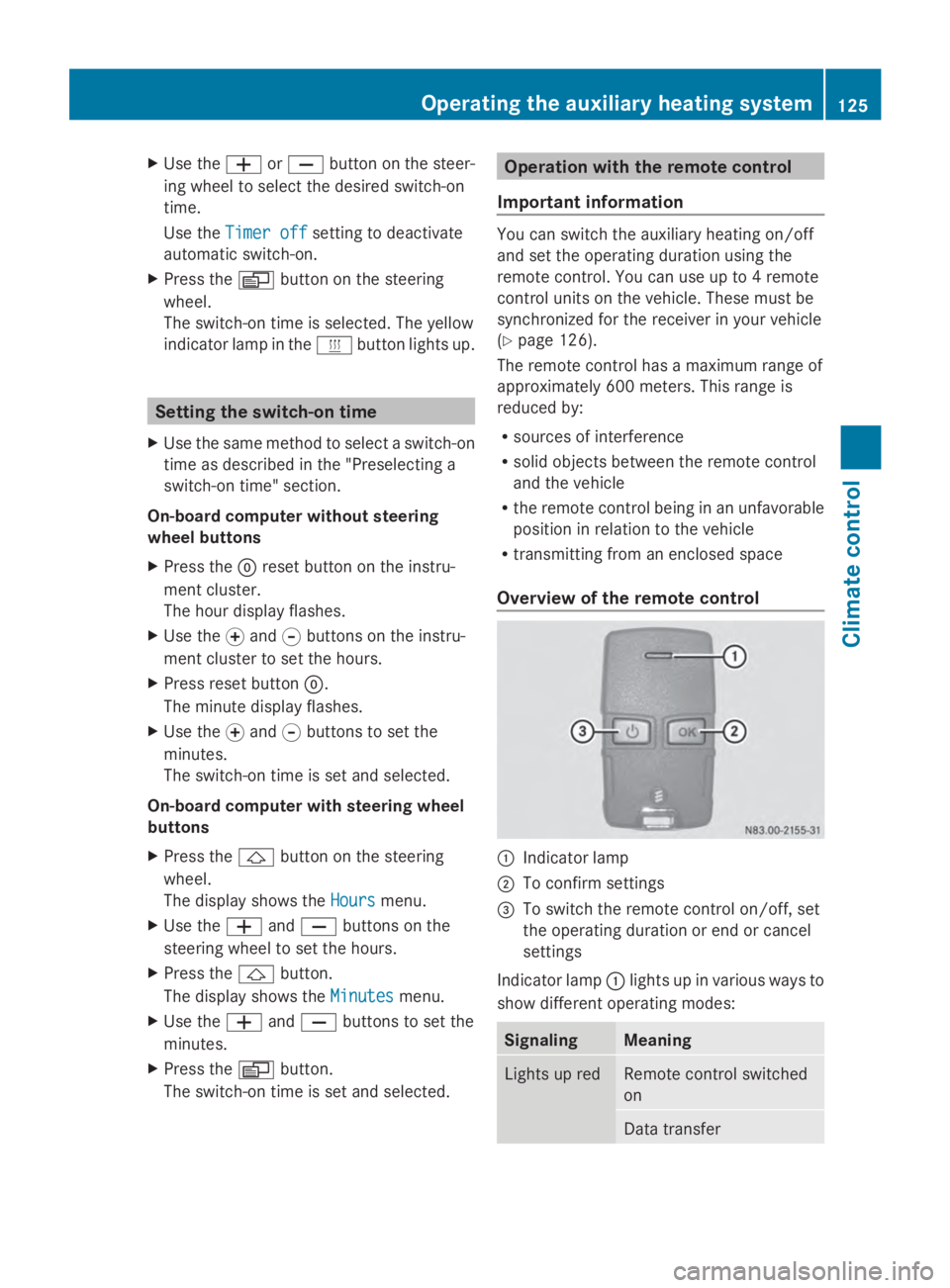
X
Use the 0081or0082 button on the steer-
ing wheel to select the desired switch-on
time.
Use the Timer off
Timer off setting to deactivate
automatic switch-on.
X Press the 0080button on the steering
wheel.
The switch-on time is selected. The yellow
indicator lamp in the 0084button lights up. Setting the switch-on time
X Use the same method to select a switch-on
time as described in the "Preselecting a
switch-on time" section.
On-board computer without steering
wheel buttons
X Press the 0045reset button on the instru-
ment cluster.
The hour display flashes.
X Use the 0074and 0075buttons on the instru-
ment cluster to set the hours.
X Press reset button 0045.
The minute display flashes.
X Use the 0074and 0075buttons to set the
minutes.
The switch-on time is set and selected.
On-board computer with steering wheel
buttons
X Press the 0041button on the steering
wheel.
The display shows the Hours
Hours menu.
X Use the 0081and0082 buttons on the
steering wheel to set the hours.
X Press the 0041button.
The display shows the Minutes
Minutes menu.
X Use the 0081and0082 buttons to set the
minutes.
X Press the 0080button.
The switch-on time is set and selected. Operation with the remote control
Important information You can switch the auxiliary heating on/off
and set the operating duration using the
remote control. You can use up to 4 remote
control units on the vehicle. These must be
synchronized for the receiver in your vehicle
(Y
page 126).
The remote control has a maximum range of
approximately 600 meters. This range is
reduced by:
R sources of interference
R solid objects between the remote control
and the vehicle
R the remote control being in an unfavorable
position in relation to the vehicle
R transmitting from an enclosed space
Overview of the remote control 0043
Indicator lamp
0044 To confirm settings
0087 To switch the remote control on/off, set
the operating duration or end or cancel
settings
Indicator lamp 0043lights up in various ways to
show different operating modes: Signaling Meaning
Lights up red Remote control switched
on
Data transferOperating the auxiliary heating system
125Climate control Z
Page 129 of 338
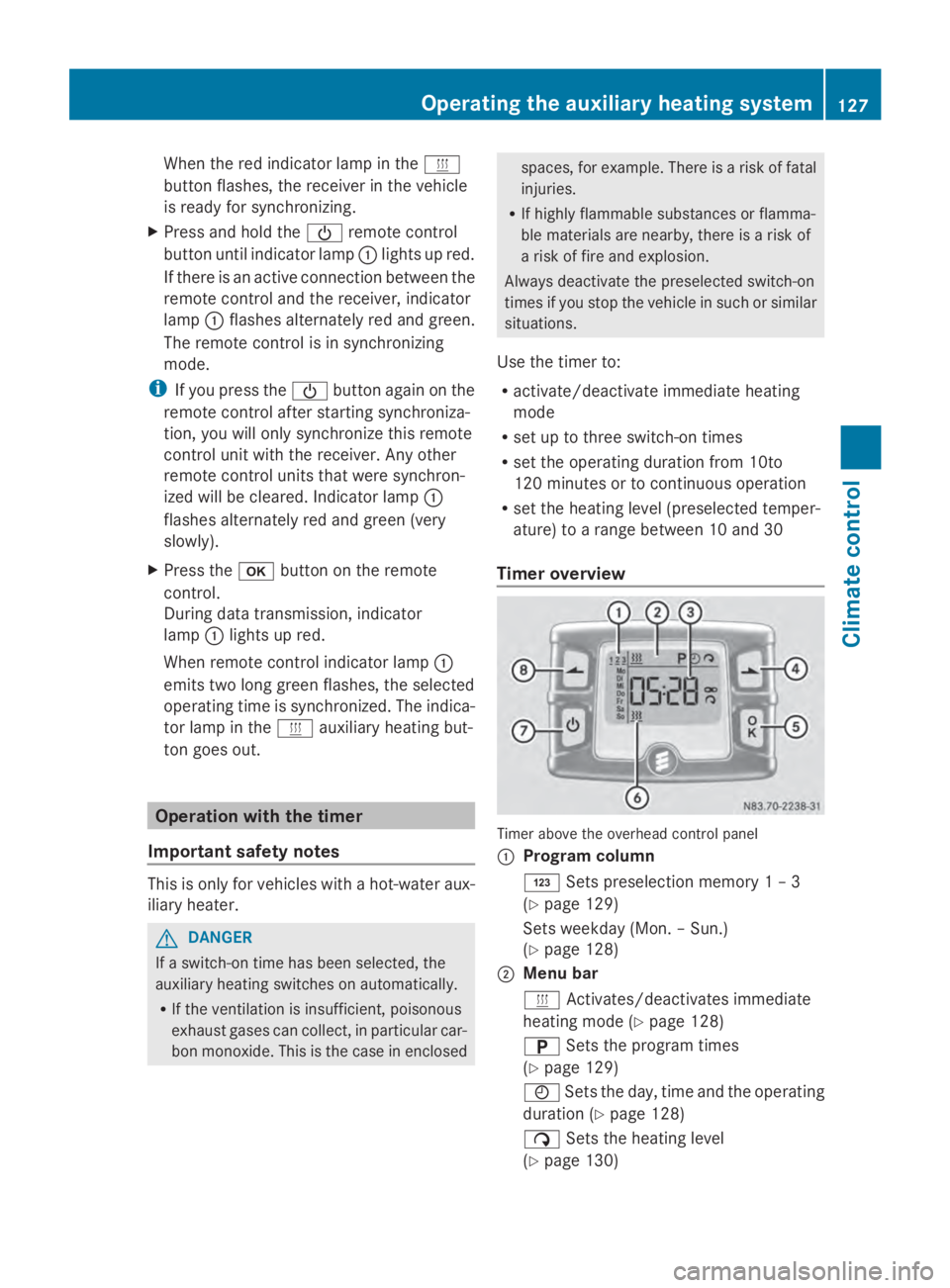
When the red indicator lamp in the
0084
button flashes, the receiver in the vehicle
is ready for synchronizing.
X Press and hold the 00D0remote control
button until indicator lamp 0043lights up red.
If there is an active connection between the
remote control and the receiver, indicator
lamp 0043flashes alternately red and green.
The remote control is in synchronizing
mode.
i If you press the 00D0button again on the
remote control after starting synchroniza-
tion, you will only synchronize this remote
control unit with the receiver. Any other
remote control units that were synchron-
ized will be cleared. Indicator lamp 0043
flashes alternately red and green (very
slowly).
X Press the 0070button on the remote
control.
During data transmission, indicator
lamp 0043lights up red.
When remote control indicator lamp 0043
emits two long green flashes, the selected
operating time is synchronized. The indica-
tor lamp in the 0084auxiliary heating but-
ton goes out. Operation with the timer
Important safety notes This is only for vehicles with a hot-water aux-
iliary heater.
G
DANGER
If a switch-on time has been selected, the
auxiliary heating switches on automatically.
R If the ventilation is insufficient, poisonous
exhaust gases can collect, in particular car-
bon monoxide. This is the case in enclosed spaces, for example. There is a risk of fatal
injuries.
R If highly flammable substances or flamma-
ble materials are nearby, there is a risk of
a risk of fire and explosion.
Always deactivate the preselected switch-on
times if you stop the vehicle in such or similar
situations.
Use the timer to:
R activate/deactivate immediate heating
mode
R set up to three switch-on times
R set the operating duration from 10to
120 minutes or to continuous operation
R set the heating level (preselected temper-
ature) to a range between 10 and 30
Timer overview Timer above the overhead control panel
0043
Program column
0059 Sets preselection memory 1 – 3
(Y page 129)
Sets weekday (Mon. – Sun.)
(Y page 128)
0044 Menu bar
0084 Activates/deactivates immediate
heating mode (Y page 128)
0045 Sets the program times
(Y page 129)
0045 Sets the day, time and the operating
duration (Y page 128)
00D1 Sets the heating level
(Y page 130) Operating the auxiliary heating system
127Climate control Z
Page 130 of 338
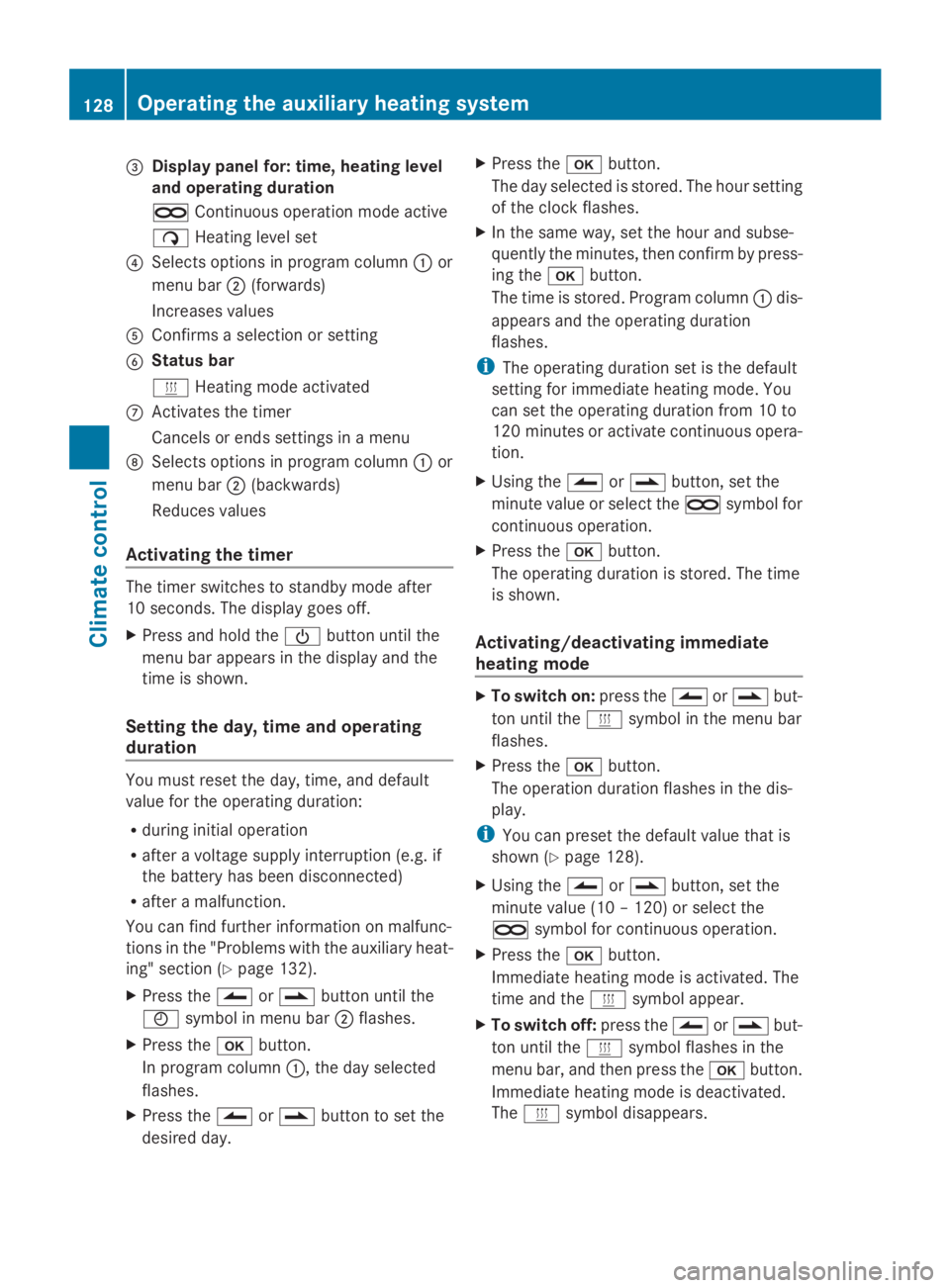
0087
Display panel for: time, heating level
and operating duration
00D5 Continuous operation mode active
00D1 Heating level set
0085 Selects options in program column 0043or
menu bar 0044(forwards)
Increases values
0083 Confirms a selection or setting
0084 Status bar
0084 Heating mode activated
006B Activates the timer
Cancels or ends settings in a menu
006C Selects options in program column 0043or
menu bar 0044(backwards)
Reduces values
Activating the timer The timer switches to standby mode after
10 seconds. The display goes off.
X Press and hold the 00D0button until the
menu bar appears in the display and the
time is shown.
Setting the day, time and operating
duration You must reset the day, time, and default
value for the operating duration:
R during initial operation
R after a voltage supply interruption (e.g. if
the battery has been disconnected)
R after a malfunction.
You can find further information on malfunc-
tions in the "Problems with the auxiliary heat-
ing" section (Y page 132).
X Press the 00CFor00DB button until the
0045 symbol in menu bar 0044flashes.
X Press the 0070button.
In program column 0043, the day selected
flashes.
X Press the 00CFor00DB button to set the
desired day. X
Press the 0070button.
The day selected is stored. The hour setting
of the clock flashes.
X In the same way, set the hour and subse-
quently the minutes, then confirm by press-
ing the 0070button.
The time is stored. Program column 0043dis-
appears and the operating duration
flashes.
i The operating duration set is the default
setting for immediate heating mode. You
can set the operating duration from 10 to
120 minute sor activate continuous opera-
tion.
X Using the 00CFor00DB button, set the
minute value or select the 00D5symbol for
continuous operation.
X Press the 0070button.
The operating duration is stored. The time
is shown.
Activating/deactivating immediate
heating mode X
To switch on: press the00CFor00DB but-
ton until the 0084symbol in the menu bar
flashes.
X Press the 0070button.
The operation duration flashes in the dis-
play.
i You can preset the default value that is
shown (Y page 128).
X Using the 00CFor00DB button, set the
minute value (10 – 120) or select the
00D5 symbol for continuous operation.
X Press the 0070button.
Immediate heating mode is activated. The
time and the 0084symbol appear.
X To switch off: press the00CFor00DB but-
ton until the 0084symbol flashes in the
menu bar, and then press the 0070button.
Immediate heating mode is deactivated.
The 0084 symbol disappears. 128
Operating the auxiliary heating systemClimate control
Page 131 of 338
The auxiliary heating operates for another
two minutes and then switches off auto-
matically.
i If you switch off the ignition while imme-
diate heating mode (operating duration
10– 120 minutes) is active, immediate
heating mode is also switched off. The aux-
iliary heating operates for another
two minutes and then switches off auto-
matically.
If you have set continuous operation as the
operating duration and you switch off the
ignition, the auxiliary heating switches off
automatically after about 15 minutes. If, in
the remaining time, the ignition is switched
on again, continuous operation of the aux-
iliary heating continues.
Setting the preselection time G
WARNING
The auxiliary heating must not be operated if
there are highly flammable substances
nearby or in enclosed spaces without an
extraction system. Make sure that the auxili-
ary heating is not switched on automatically
by the timer in such places. If this possibility
exists, deactivate the respective programmed
time.
You can set three preselection times using
the timer.
Observe that when setting the preselection
time, this does not correspond to the switch-
on time but to the switch-off or departure
time. The auxiliary heating system starts up
automatically and runs for the operating dura-
tion set prior to departure.
Example: For a planned departure time of
7:00 a.m., you should also set the preselec-
tion time to 7:00 a.m. If the operating dura-
tion is preset to 40 minutes, for example, the
auxiliary heating starts up at 6:20 a.m.
If an identical time (time and day) is set in the
preselection memory, only the last time set is
saved. After a malfunction or if the battery has been
disconnected, you must set the preselection
times again. You can find further information
on malfunctions in the "Problems with the
auxiliary heating" section ( Ypage 132).
X Press the 00CFor00DB button until the
0045 symbol in the menu bar flashes.
X Press the 0070button.
In the program column, the 0059preselec-
tion memory numbers appear. The selected
preselection memory flashes.
X Press the 00CFor00DB button to select the
desired preselection memory.
X Press the 0070button.
The preselection memory is selected. The
days are shown.
X Set the day and time as described in the
"Setting the day, time and operating dura-
tion" section (Y page 128).
The preselection time is stored. The pro-
gram column disappears. In the display
panel, the on
on message and the 0084sym-
bol appear.
X Press the 0070button.
The operating duration flashes.
X Press the 00CFor00DB button to set the
minute value (10 – 120).
X Press the 0070button.
The operating duration for the preselection
time is saved. The time and number of the
selected preselection memory are shown.
i The preselection memory that will be acti-
vated next is underlined. Additionally, the
day that is set appears.
Deactivating the preselection time X
Carry out the steps as described in the
"Setting the preselection time" section. Operating the auxiliary heating system
129Climate control Z