ABS MERCEDES-BENZ SPRINTER 2015 MY15 Operator’s Manual
[x] Cancel search | Manufacturer: MERCEDES-BENZ, Model Year: 2015, Model line: SPRINTER, Model: MERCEDES-BENZ SPRINTER 2015Pages: 334, PDF Size: 5.94 MB
Page 61 of 334
If you deactivate ASR:
R engine torque is not limited and the drive
wheels are able to spin. The spinning
wheels will then achieve a cutting effect for
better traction.
R traction control remains active through
brake intervention. If a drive wheel attains
its tire traction limit because one side of the
road is slippery, for example, that wheel is
braked. The traction is then increased in
this situation.
R active brake intervention by ESP ®
to
increase driving stability remains active.
The 0072 warning lamp in the instrument
cluster flashes when ESP ®
is intervening. BAS (Brake Assist System)
G
WARNING
If BAS is malfunctioning, the braking distance
in an emergency braking situation is
increased. There is a risk of an accident.
In an emergency braking situation, depress
the brake pedal with full force. ABS prevents
the wheels from locking.
Vehicles without steering wheel buttons: if
the BAS driving safety system is malfunction-
ing, the 003Dwarning lamp lights up while the
engine is running (Y page 218).
BAS operates in emergency braking situa-
tions. If you depress the brake quickly, BAS
automatically increases the brake pressure,
thereby reducing the stopping distance.
The brakes will function as usual once you
release the brake pedal. BAS is deactivated. EBD (electronic brake force distribu-
tion) G
WARNING
If EBD is malfunctioning, the rear wheels can
lock, e.g. under full braking. This increases the risk of skidding and an accident. You should therefore adapt your driving style
to the different handling characteristics. Have
the brake system checked at a qualified spe-
cialist workshop.
EBD monitors and controls the brake pres-
sure to the rear wheels. This enables EBD to
improve handling during braking.
Observe the information on warning and indi- cator lamps (Y page 218). ESP
®
(Electronic Stability Program)
Important safety notes Observe the important safety guidelines for
the driving safety system (Y
page 57). G
WARNING
If ESP ®
is malfunctioning it will not provide
any vehicle stabilization. There is an increased
risk of skidding or of an accident.
Exercise caution when continuing to drive.
Have ESP ®
checked at a qualified specialist
workshop.
! Do not run the vehicle on a roller dyna-
mometer (e.g. for performance tests). If
you must operate the vehicle on a roller
dynamometer, please consult a qualified
specialist workshop in advance. You could
otherwise damage the drive train or the
brake system.
If ESP ®
is malfunctioning, the 0089warning
lamp lights up while the engine is running and
the engine power may be reduced
(Y page 218).
Only use wheels with the recommended tire
sizes. Only then will ESP ®
function properly.
Crosswind Assist Crosswind Assist does not work if ESP
®
is
deactivated or disabled because of a mal-
function. Driving safety systems
59Safety Z
Page 139 of 334
Battery isolating switch
Important safety notes !
Make sure that the key is in position
0in
the ignition lock and wait at least 20 sec-
onds before disconnecting or connecting
the battery isolating switch. You could oth-
erwise damage electrical system compo-
nents.
You can use the battery isolating switch to
disconnect the power supply to all your vehi- cle's consumers. This will prevent uncontrol-
led battery discharge caused by off-load cur-
rent consumption.
If your vehicle is equipped with an auxiliary
battery in the engine compartment, you will
need to disconnect both batteries. Only then
is the electrical system fully disconnected
from the power supply.
i Only switch the vehicle to de-energized
using the battery main switch if:
R the vehicle is stationary for a lengthy
period
R it is absolutely necessary
After the power supply has been activated,
you will need to reset the side windows
(Y page 79).
Switching off the power supply !
When you clamp the connector under the
accelerator pedal, make sure that the con- nector does not become damaged or dirty.
It may otherwise not be possible to restore
the electrical connection when the parts
are reassembled. Battery isolating switch in the driver's footwell, on
the right-hand side next to the accelerator pedal
X Remove the key from the ignition lock and
wait for about 20 seconds.
X Press button 0044in the direction of the
arrow and hold.
X Pull connector 0043from the earth pin.
X Clamp connector 0043under the accelerator
pedal so that it cannot make contact with
the earth pin.
All starter battery consumers are discon-
nected from the power supply.
Switching on the power supply X
Insert the key into the ignition lock.
X Press connector 0043onto earth pin 0044until
you feel it engage and the lock inhibitor is
released.
Connector 0043must be in full contact with
earth pin 0044.
All consumers are reconnected to the DC
power supply. Driving
137Driving an d parking Z
Page 162 of 334
Activation conditions
To activate cruise control, all of the following
activation conditions must be fulfilled:
R the parking brake must be released. The
0066 indicator lamp in the instrument clus-
ter is off
R you are driving faster than 20 mph
(30 km/h)
R neither the brake or clutch pedal is
depressed
i Other drive and brake systems not descri-
bed in this Operator's Manual, such as a
retarder, may affect cruise control. You can
find information on this in the separate
operating instructions provided by the
body manufacturer.
Storing and maintaining the current
speed X
Accelerate the vehicle to the desired speed
above 20 mph (30 km/h).
X Briefly push the cruise control lever up 0043
or down 0087.
X Release the accelerator pedal.
Cruise control is activated. The current
speed is stored.
Setting the speed It may be a moment before the vehicle starts
to accelerate or brake to the set speed. Take
this delay into account when setting the
speed.
X Briefly push the cruise control lever up 0043
to increase the speed or down 0087to reduce
the speed.
The last stored speed increases or decrea- ses in 1 mph increments (1 km/h incre-
ments).
or
X Press and hold the cruise control lever
up 0043 or down 0087until the desired speed
has been reached. X
Release the cruise control lever.
The current speed is stored.
i Cruise control is not deactivated if you
depress the accelerator pedal. If you accel- erate briefly to overtake, for example,
cruise control resumes the vehicle’s speed
to the last speed stored after you have fin- ished overtaking.
Deactivating cruise control There are various ways to deactivate cruise
control:
X Briefly press the cruise control lever for-
wards 0085.
or
X Apply the brakes.
The last speed set remains stored. The last
speed stored is deleted when you switch off
the engine.
Cruise control is deactivated automatically
when: R you apply the brakes
R you apply the parking brake and the 0066
indicator lamp in the instrument cluster
lights up
R you are driving slower than 20 mph
(30 km/h)
R you shift the automatic transmission to
neutral position Nwhile the vehicle is in
motion
R ESP ®
or ASR intervenes
R there is a malfunction in the ESP ®
, ASR or
ABS system 160
Driving systemsDriving and parking
Page 165 of 334
Adaptive Brake Assist aids you when braking
during hazardous situations at speeds above
20 mph (30 km/h). With the help of Adaptive Brake Assist, the distance warning signal can
detect obstacles that are in the path of your
vehicle for an extended period of time.
When you approach an obstacle and adaptive Brake Assist detects that there is a risk of a
collision, adaptive Brake Assist calculates the
braking force necessary to avoid a collision.
Should you apply the brakes forcefully, adap- tive Brake Assist will automatically increase
the braking force to the calculated level.
X Keep the brake pedal depressed until the
emergency braking situation is over.
ABS prevents the wheels from locking.
The brakes function as usual again if:
R you release the brake pedal
R there is no longer any danger of a collision
R no obstacle is detected in front of your
vehicle
Adaptive Brake Assist is then deactivated.
Up to the maximum vehicle speed, adaptive
Brake Assist can react to moving obstacles
that have already been recognized as such at least once over the period of observation.
Adaptive Brake Assist does not react to sta-
tionary obstacles.
In particular, the detection of obstacles can
be impaired if:
R there is dirt on the sensors or anything else
covering the sensors
R it is snowing or raining heavily
R there is interference from other radar sour-
ces
R there are strong radar reflections, for
example in parking garages
R a narrow vehicle traveling in front, e.g. a
motorbike
R a vehicle traveling in front on a different line
If adaptive Brake Assist is not available due to a malfunction in the radar sensor system, thefull brake boosting effect with the help of BAS
remains available. Following damage to the front end of the vehi-
cle, have the configuration and operation of
the radar sensor checked at a qualified spe-
cialist workshop. This also applies to colli-
sions at slow speeds where there is no visible damage to the front of the vehicle. Lane Tracking package
Blind Spot Assist General notes
Blind Spot Assist uses a radar sensor system
to monitor the areas on both sides of your
vehicle. It supports you from speeds of
approximately 20 mph (30 km/h). A warning
display in the exterior mirrors draws your
attention to vehicles detected in the moni-
tored area. If you then switch on the corre-
sponding turn signal to change lane, you will
also receive an optical and audible collision
warning. For this purpose, Blind Spot Assist
uses sensors in the rear bumper and behind
the protective strips of the B-pillars.
Important safety notes G
WARNING
Blind Spot Assist does not react to:
R vehicles overtaken too closely on the side,
placing them in the blind spot area
R vehicles which approach with a large speed
differential and overtake your vehicle
As a result, Blind Spot Assist may not give
warnings in such situations. There is a risk of an accident.
Always observe the traffic conditions care-
fully, and maintain a safe lateral distance.
Blind Spot Assist is only an aid. It may fail to
detect some vehicles and is no substitute for
attentive driving.
i USA only:
This device has been approved by the FCC as a "Vehicular Radar System". The radar
sensor is intended for use in an automotive Driving systems
163Driving and parking Z
Page 169 of 334
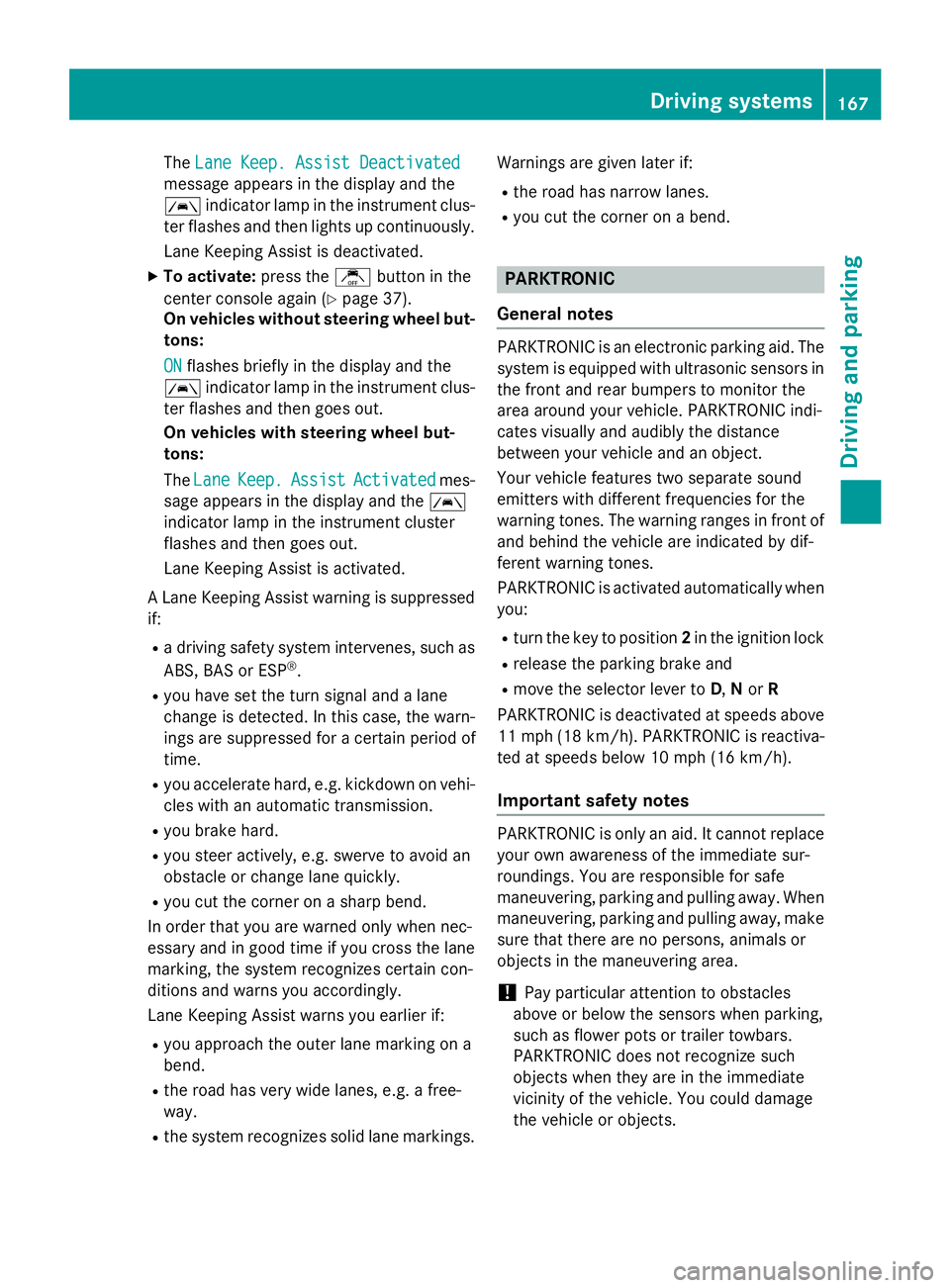
The
Lane Keep. Assist Deactivated
Lane Keep. Assist Deactivated
message appears in the display and the
00B0 indicator lamp in the instrument clus-
ter flashes and then lights up continuously.
Lane Keeping Assist is deactivated.
X To activate: press thejbutton in the
center console again (Y page 37).
On vehicles without steering wheel but-
tons:
ON ON flashes briefly in the display and the
00B0 indicator lamp in the instrument clus-
ter flashes and then goes out.
On vehicles with steering wheel but-
tons:
The Lane Lane Keep.
Keep. Assist
Assist Activated
Activated mes-
sage appears in the display and the 00B0
indicator lamp in the instrument cluster
flashes and then goes out.
Lane Keeping Assist is activated.
A Lane Keeping Assist warning is suppressed if:
R a driving safety system intervenes, such as
ABS, BAS or ESP ®
.
R you have set the turn signal and a lane
change is detected. In this case, the warn-
ings are suppressed for a certain period of
time.
R you accelerate hard, e.g. kickdown on vehi-
cles with an automatic transmission.
R you brake hard.
R you steer actively, e.g. swerve to avoid an
obstacle or change lane quickly.
R you cut the corner on a sharp bend.
In order that you are warned only when nec-
essary and in good time if you cross the lane marking, the system recognizes certain con-
ditions and warns you accordingly.
Lane Keeping Assist warns you earlier if:
R you approach the outer lane marking on a
bend.
R the road has very wide lanes, e.g. a free-
way.
R the system recognizes solid lane markings. Warnings are given later if:
R the road has narrow lanes.
R you cut the corner on a bend. PARKTRONIC
General notes PARKTRONIC is an electronic parking aid. The
system is equipped with ultrasonic sensors inthe front and rear bumpers to monitor the
area around your vehicle. PARKTRONIC indi-
cates visually and audibly the distance
between your vehicle and an object.
Your vehicle features two separate sound
emitters with different frequencies for the
warning tones. The warning ranges in front of
and behind the vehicle are indicated by dif-
ferent warning tones.
PARKTRONIC is activated automatically when you:
R turn the key to position 2in the ignition lock
R release the parking brake and
R move the selector lever to D,Nor R
PARKTRONIC is deactivated at speeds above
11 mph (18 km/h) . PARKTRONIC is reactiva-
ted at speeds below 10 mph (16 km/h).
Important safety notes PARKTRONIC is only an aid. It cannot replace
your own awareness of the immediate sur-
roundings. You are responsible for safe
maneuvering, parking and pulling away. Whenmaneuvering, parking and pulling away, make
sure that there are no persons, animals or
objects in the maneuvering area.
! Pay particular attention to obstacles
above or below the sensors when parking,
such as flower pots or trailer towbars.
PARKTRONIC does not recognize such
objects when they are in the immediate
vicinity of the vehicle. You could damage
the vehicle or objects. Driving systems
167Driving and parking Z
Page 206 of 334
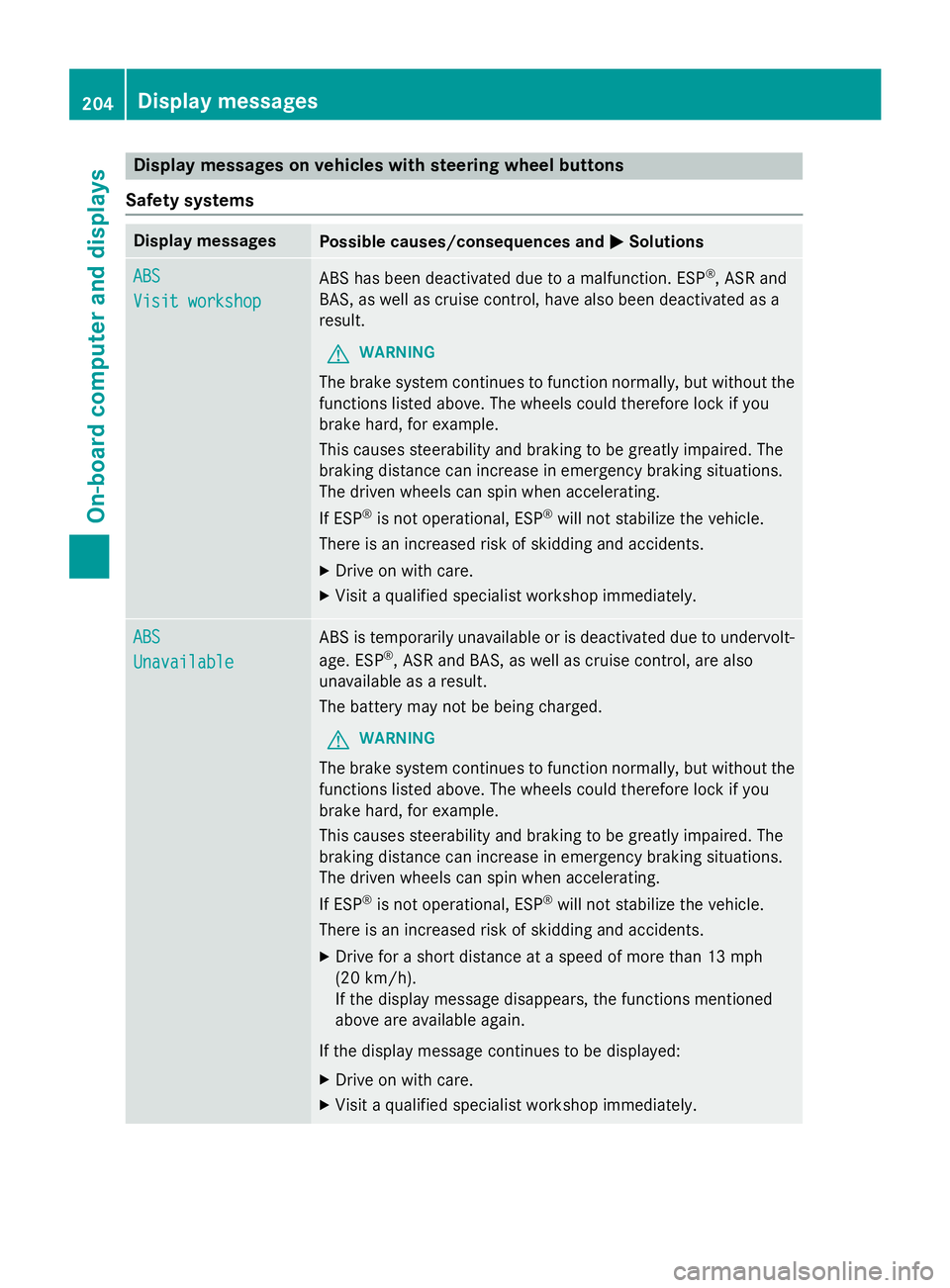
Display messages on vehicles with steering wheel buttons
Safety systems Display messages
Possible causes/consequences and
0050
0050Solutions ABS
ABS
Visit workshop Visit workshop
ABS has been deactivated due to a malfunction. ESP
®
, ASR and
BAS, as well as cruise control, have also been deactivated as a
result.
G WARNING
The brake system continues to function normally, but without the functions listed above. The wheels could therefore lock if you
brake hard, for example.
This causes steerability and braking to be greatly impaired. The
braking distance can increase in emergency braking situations.
The driven wheels can spin when accelerating.
If ESP ®
is not operational, ESP ®
will not stabilize the vehicle.
There is an increased risk of skidding and accidents.
X Drive on with care.
X Visit a qualified specialist workshop immediately. ABS ABS
Unavailable Unavailable ABS is temporarily unavailable or is deactivated due to undervolt-
age. ESP ®
, ASR and BAS, as well as cruise control, are also
unavailable as a result.
The battery may not be being charged.
G WARNING
The brake system continues to function normally, but without the functions listed above. The wheels could therefore lock if you
brake hard, for example.
This causes steerability and braking to be greatly impaired. The
braking distance can increase in emergency braking situations.
The driven wheels can spin when accelerating.
If ESP ®
is not operational, ESP ®
will not stabilize the vehicle.
There is an increased risk of skidding and accidents.
X Drive for a short distance at a speed of more than 13 mph
(20 km/ h).
If the display message disappears, the functions mentioned
above are available again.
If the display message continues to be displayed:
X Drive on with care.
X Visit a qualified specialist workshop immediately. 204
Display messagesOn-board computer and displays
Page 220 of 334
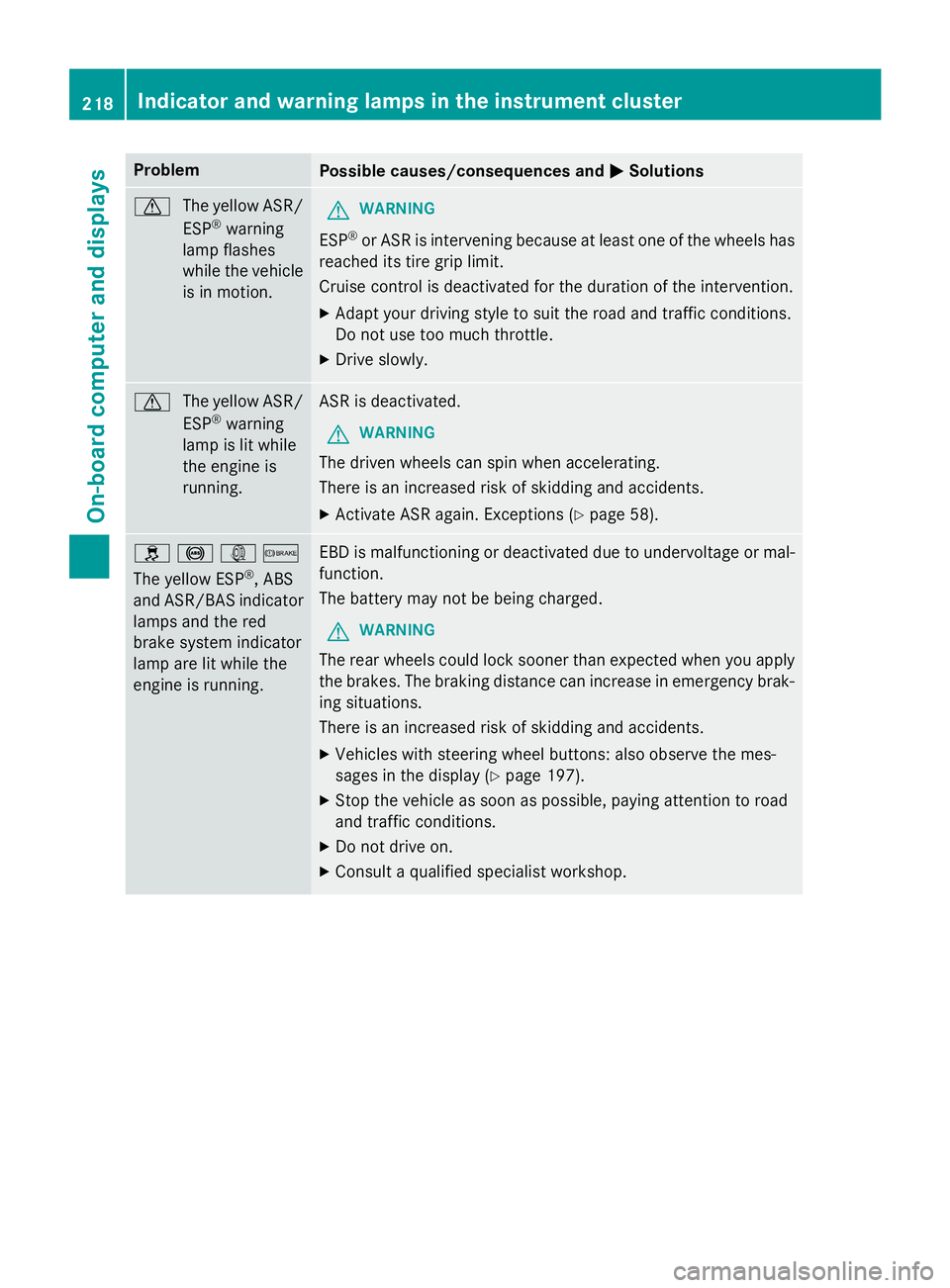
Problem
Possible causes/consequences and
0050
0050Solutions 0072
The yellow ASR/
ESP ®
warning
lamp flashes
while the vehicle
is in motion. G
WARNING
ESP ®
or ASR is intervening because at least one of the wheels has
reached its tire grip limit.
Cruise control is deactivated for the duration of the intervention.
X Adapt your driving style to suit the road and traffic conditions.
Do not use too much throttle.
X Drive slowly. 0072
The yellow ASR/
ESP ®
warning
lamp is lit while
the engine is
running. ASR is deactivated.
G WARNING
The driven wheels can spin when accelerating.
There is an increased risk of skidding and accidents.
X Activate ASR again. Exceptions (Y page 58).0089
0025003D0065
The yellow ESP ®
, ABS
and ASR/BAS indicator lamps and the red
brake system indicator
lamp are lit while the
engine is running. EBD is malfunctioning or deactivated due to undervoltage or mal-
function.
The battery may not be being charged.
G WARNING
The rear wheels could lock sooner than expected when you apply the brakes. The braking distance can increase in emergency brak-
ing situations.
There is an increased risk of skidding and accidents.
X Vehicles with steering wheel buttons: also observe the mes-
sages in the display (Y page 197).
X Stop the vehicle as soon as possible, paying attention to road
and traffic conditions.
X Do not drive on.
X Consult a qualified specialist workshop. 218
Indicator and warning lamps in the instrument clusterOn-board computer and displays
Page 223 of 334
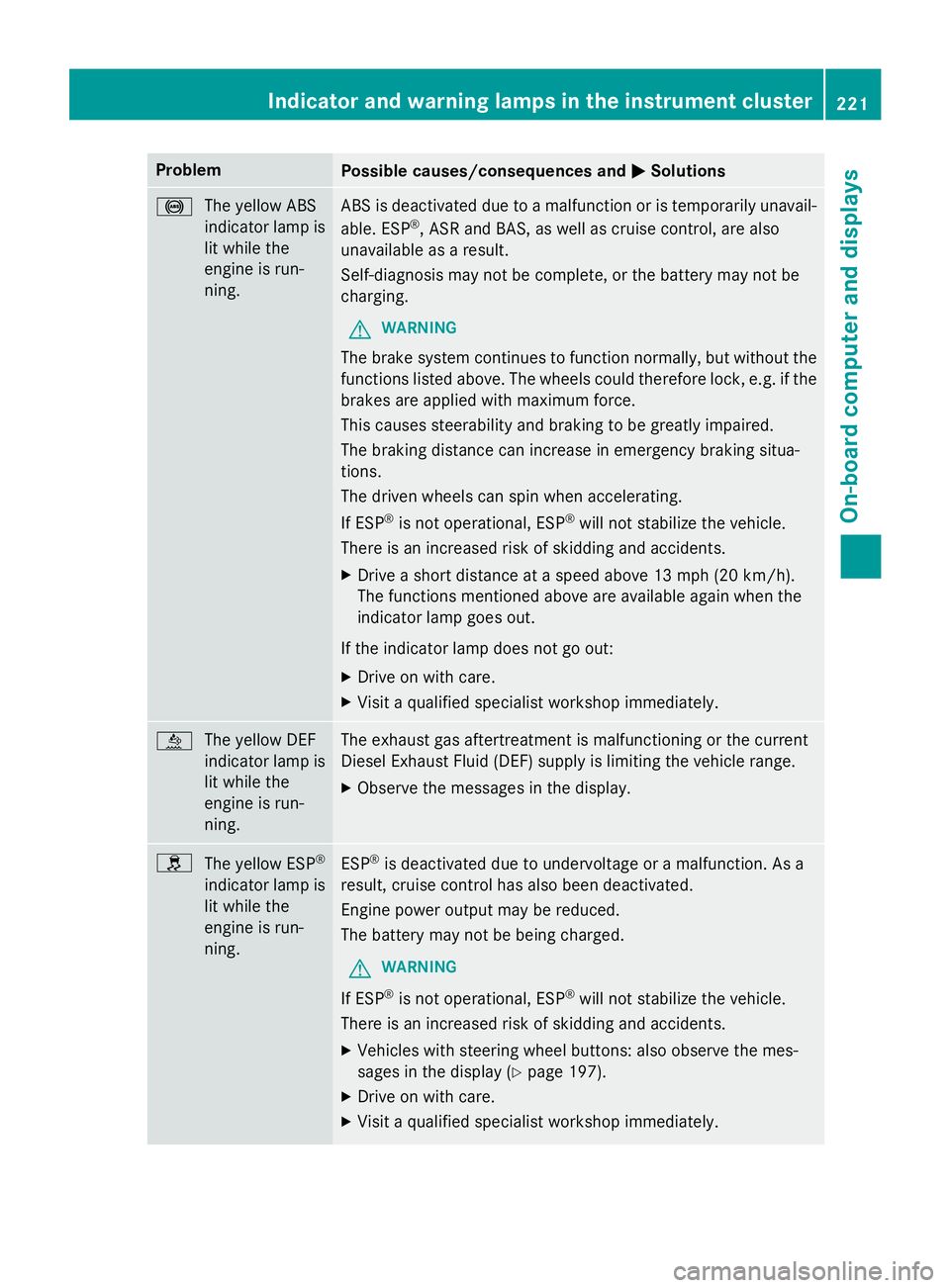
Problem
Possible causes/consequences and
0050
0050Solutions 0025
The yellow ABS
indicator lamp is
lit while the
engine is run-
ning. ABS is deactivated due to a malfunction or is temporarily unavail-
able. ESP ®
, ASR and BAS, as well as cruise control, are also
unavailable as a result.
Self-diagnosis may not be complete, or the battery may not be
charging.
G WARNING
The brake system continues to function normally, but without the functions listed above. The wheels could therefore lock, e.g. if thebrakes are applied with maximum force.
This causes steerability and braking to be greatly impaired.
The braking distance can increase in emergency braking situa-
tions.
The driven wheels can spin when accelerating.
If ESP ®
is not operational, ESP ®
will not stabilize the vehicle.
There is an increased risk of skidding and accidents.
X Drive a short distance at a speed above 13 mph (20 km/h).
The functions mentioned above are available again when the
indicator lamp goes out.
If the indicator lamp does not go out: X Drive on with care.
X Visit a qualified specialist workshop immediately. 00E2
The yellow DEF
indicator lamp is
lit while the
engine is run-
ning. The exhaust gas aftertreatment is malfunctioning or the current
Diesel Exhaust Fluid (DEF) supply is limiting the vehicle range.
X Observe the messages in the display. 0089
The yellow ESP ®
indicator lamp is lit while the
engine is run-
ning. ESP
®
is deactivated due to undervoltage or a malfunction. As a
result, cruise control has also been deactivated.
Engine power output may be reduced.
The battery may not be being charged.
G WARNING
If ESP ®
is not operational, ESP ®
will not stabilize the vehicle.
There is an increased risk of skidding and accidents.
X Vehicles with steering wheel buttons: also observe the mes-
sages in the display (Y page 197).
X Drive on with care.
X Visit a qualified specialist workshop immediately. Indicator and warning lamps in the instrument cluster
221On-board computer and displays Z
Page 245 of 334
maximum loading capacity of the weakest
cargo tie-down point into account.
If you brake hard, for example, the forces
acting could be up to several times the
weight force of the load. Always use multi-
ple cargo tie-down points in order to dis-
tribute the force absorption. Load the
anchorages evenly.
Spread the load evenly between the cargo tie- down points or tie-down rings.
Please also refer to the notes about qualified
specialist workshops (Y page 25).
Always observe the operating instructions or
the notes of the lashing strap manufacturer
for the operation of the lashing strap.
Information about the maximum loading
capacity of the cargo tie-down points can be
found in the "Technical data" section
(Y page 327).
As the driver, you are responsible for ensuring that:
R The applicable requirements and guide-
lines relating to load-securing practices
must be met.
If this is not the case, this may constitute a punishable offense, depending on local leg-
islation and any ensuing consequences.
You should therefore observe the respec-
tive legal requirements for the relevant
country.
Make sure that the load is secure before every journey and at regular intervals during a long
journey. Correct an incorrectly or inade-
quately secured load if necessary.
You can obtain information about securing
the load correctly from the manufacturer of
the load securing aids or tie down for securing the load.
X Fill spaces between the load and the cargo
compartment walls or wheel housings
(form-locking). Use rigid load securing aids,
such as wedges, wooden fixings or pad-
ding.
X Attach secured and stabilized loads in all
directions. Use the cargo tie-down points or cargo tie-down rings and the loading rails
in the cargo compartment or on the cargo
area.
Only use tie downs, such as lashing rods or lashing nets and lashing straps, that have
been tested in accordance with current
standards (e.g. DIN EN).
Always use the cargo tie-down rings closest
to the load to secure it and pad sharp edges
for protection.
Loads, and heavy loads in particular, should
preferably be secured using the cargo tie-
down rings.
i Tie downs tested in accordance with cur-
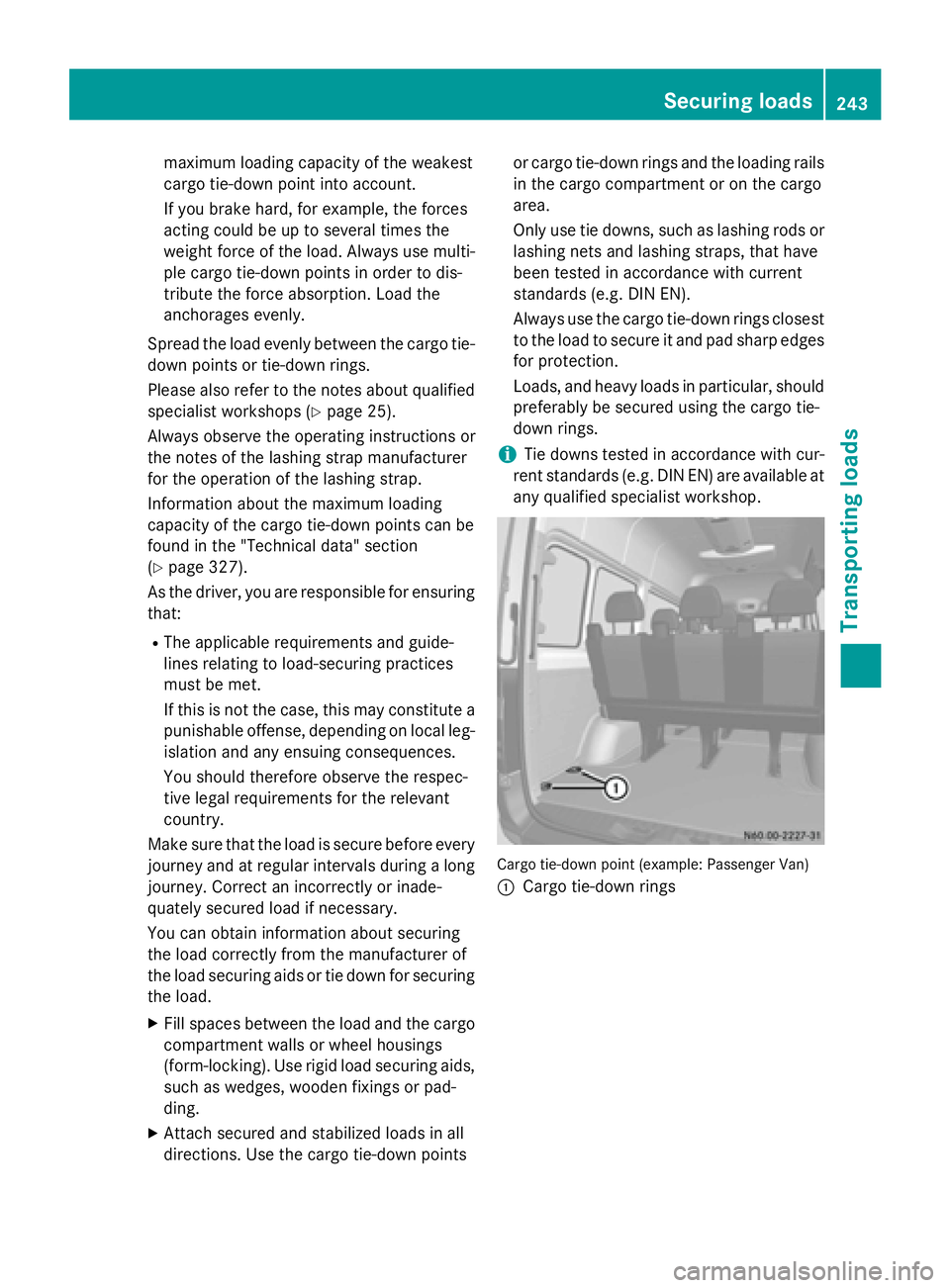
rent standards (e.g. DIN EN) are available at any qualified specialist workshop. Cargo tie-down point (example: Passenger Van)
0043 Cargo tie-down rings Securing loads
243Transporting loads Z
Page 246 of 334
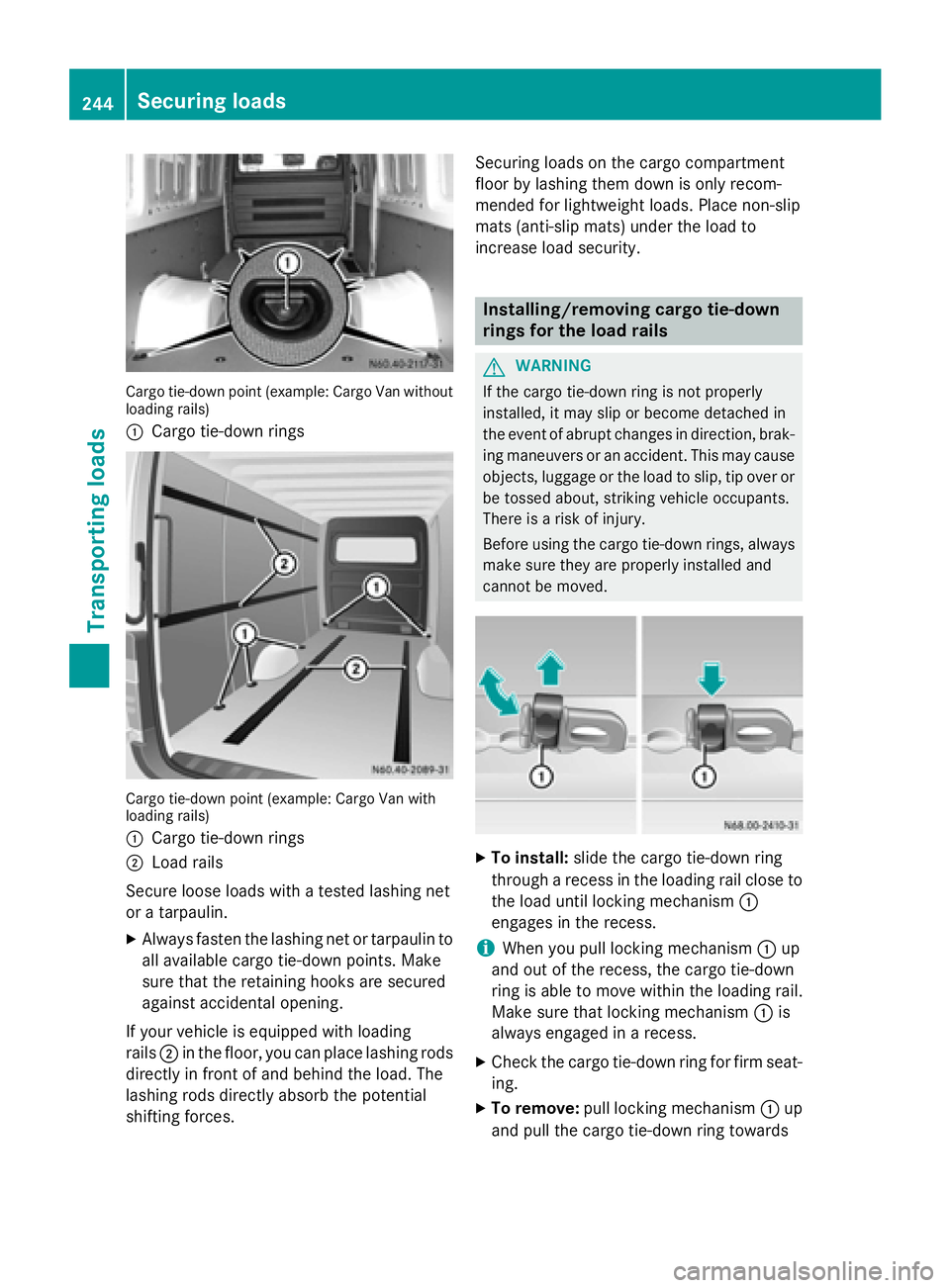
Cargo tie-down point (example: Cargo Van without
loading rails)
0043 Cargo tie-down rings Cargo tie-down point (example: Cargo Van with
loading rails)
0043 Cargo tie-down rings
0044 Load rails
Secure loose loads with a tested lashing net
or a tarpaulin.
X Always fasten the lashing net or tarpaulin to
all available cargo tie-down points. Make
sure that the retaining hooks are secured
against accidental opening.
If your vehicle is equipped with loading
rails 0044in the floor, you can place lashing rods
directly in front of and behind the load. The
lashing rods directly absorb the potential
shifting forces. Securing loads on the cargo compartment
floor by lashing them down is only recom-
mended for lightweight loads. Place non-slip
mats (anti-slip mats) under the load to
increase load security. Installing/removing cargo tie-down
rings for the load rails
G
WARNING
If the cargo tie-down ring is not properly
installed, it may slip or become detached in
the event of abrupt changes in direction, brak- ing maneuvers or an accident. This may causeobjects, luggage or the load to slip, tip over or
be tossed about, striking vehicle occupants.
There is a risk of injury.
Before using the cargo tie-down rings, always
make sure they are properly installed and
cannot be moved. X
To install: slide the cargo tie-down ring
through a recess in the loading rail close to the load until locking mechanism 0043
engages in the recess.
i When you pull locking mechanism
0043up
and out of the recess, the cargo tie-down
ring is able to move within the loading rail.
Make sure that locking mechanism 0043is
always engaged in a recess.
X Check the cargo tie-down ring for firm seat-
ing.
X To remove: pull locking mechanism 0043up
and pull the cargo tie-down ring towards 244
Securing loadsTransporting loads