brakes MERCEDES-BENZ SPRINTER 2015 MY15 Operator’s Manual
[x] Cancel search | Manufacturer: MERCEDES-BENZ, Model Year: 2015, Model line: SPRINTER, Model: MERCEDES-BENZ SPRINTER 2015Pages: 334, PDF Size: 5.94 MB
Page 159 of 334
G
WARNING
When driving off-road, your body is subject to forces from all directions, due to the uneven
surface. You could be thrown from your seat,
for instance. There is a risk of injury.
Always wear a seat belt, even when driving off-
road. G
WARNING
If you drive over obstacles or in ruts, the steer- ing wheel may jerk out of your grip, causing
injury to your hands.
Always hold the steering wheel firmly with
both hands. When driving over obstacles, you must expect steering forces to increase
briefly and suddenly. G
WARNING
Flammable material such as leaves, grass or
twigs may ignite if they come into contact with hot parts of the exhaust system. There is a risk of fire.
When driving off road or on unpaved roads,
check the vehicle's underside regularly. In
particular, remove parts of plants or other
flammable materials which have become
trapped. In the case of damage, contact a
qualified specialist workshop.
! When driving off-road or on unpaved sur-
faces, check the underside of the vehicle
and the wheels and tires at regular inter-
vals. In particular, remove any trapped for- eign objects, e.g. stones and branches.
Such foreign objects may:
R damage the chassis, the fuel tank or the
brake system
R cause imbalances and thus vibrations
R be flung out when you continue driving
If there is any damage, inform a qualified
specialist workshop.
When driving off-road and on construction
sites, sand, mud and water mixed with oil, for
example, may get into the brakes. This may
lead to a reduction in braking performance or total brake failure, also as a result of
increased wear. The braking characteristics
will vary depending on the material that has
got into the system. Clean the brakes after
driving off-road. If you then notice reduced
braking performance or hear scraping noises,
have the brake system checked at a qualified specialist workshop. Adjust your driving style
to the changed braking characteristics.
Driving off-road or on construction sites
increases the possibility of vehicle damage
which may in turn lead to the failure of certain assemblies and systems. Adapt your driving
style to the off-road driving conditions. Drive
carefully. Have any vehicle damage rectified
at a qualified specialist workshop as soon as
possible.
When driving on rough terrain, do not shift the transmission into the neutral position. You
could lose control when attempting to brake
the vehicle with the service brake. If your
vehicle cannot manage an uphill slope, drive
back down the slope in reverse gear.
When loading your vehicle for driving off-road or on a construction site, keep the vehicle's
center of gravity as low as possible.
Checklist before driving off-road X
Check the fuel and DEF levels (Y page 181)
and top up (Y page 148).
X Engine: check the oil level (Y page 250)
and add oil (Y page 252).
Before driving up or down steep gradients,
fill the oil to the maximum level.
i If you drive up or down steep gradients,
the 00B2 symbol may appear in the display.
The engine operating safety is not put at
risk if you have filled the engine oil to the
maximum level before the journey.
X Vehicle tool kit: check that the jack is
working (Y page 274).
X Make sure that a lug wrench (Y page 274),
wooden underlay for the jack, a robust tow Driving tips
157Driving and parking Z
Page 161 of 334
age to fuel lines, brake hoses and the rub-
ber bellows of axle joints and drive shafts.
X Clean the brake disks, brake pads and axle
joints, particularly after operation in sand,
mud, grit/gravel, water or similarly dirty
conditions.
X Check the entire floor assembly, the tires,
wheels, bodywork structure, brakes, steer-
ing, chassis and exhaust system for any
damage.
X Check the service brake for operating
safety, e.g. carry out a brake test.
X If you notice strong vibrations after driving
off-road, check the wheels and drive train
for foreign objects again. Remove any for-
eign objects which can lead to imbalances
and thus cause vibrations. Driving systems
Cruise control
General notes Cruise control maintains the speed of the
vehicle for you.
Use cruise control if road and traffic condi-
tions make it appropriate to maintain a steady speed for a prolonged period. You can set any
speed from 20 mph upwards in increments of
1 mph.
i If you have set km/h as the unit for the
digital speedometer (Y page 190), you can
set any speed from 30 km/h upwards in
increments of 1 km/h.
Cruise control should not be activated when
driving off-road or on construction sites.
Cruise control may not be able to maintain the
stored speed on uphill or downhill gradients.
If the gradient evens out and the vehicle's
speed does not fall below 20 mph (30 km/h), the stored speed is resumed. Important safety notes Observe the notes on braking (Y
page 154).
If you fail to adapt your driving style or if you
are inattentive, cruise control can neither
reduce the risk of an accident nor override the laws of physics. Cruise control cannot take
road, weather and traffic conditions into
account. Cruise control is only an aid. You are responsible for the distance to the vehicle in
front, for vehicle speed, for braking in good
time and for staying in lane.
Do not use cruise control:
R in traffic conditions that are unsuitable for
driving at a constant speed, e.g. in heavy
traffic, on winding roads or off-road.
R on slippery roads. Braking or accelerating
may cause the drive wheels to lose traction
and the vehicle could then skid.
R when there is poor visibility, e.g. due to fog,
heavy rain or snow.
If there is a change of drivers, make sure that you inform the new driver about the set cruisespeed.
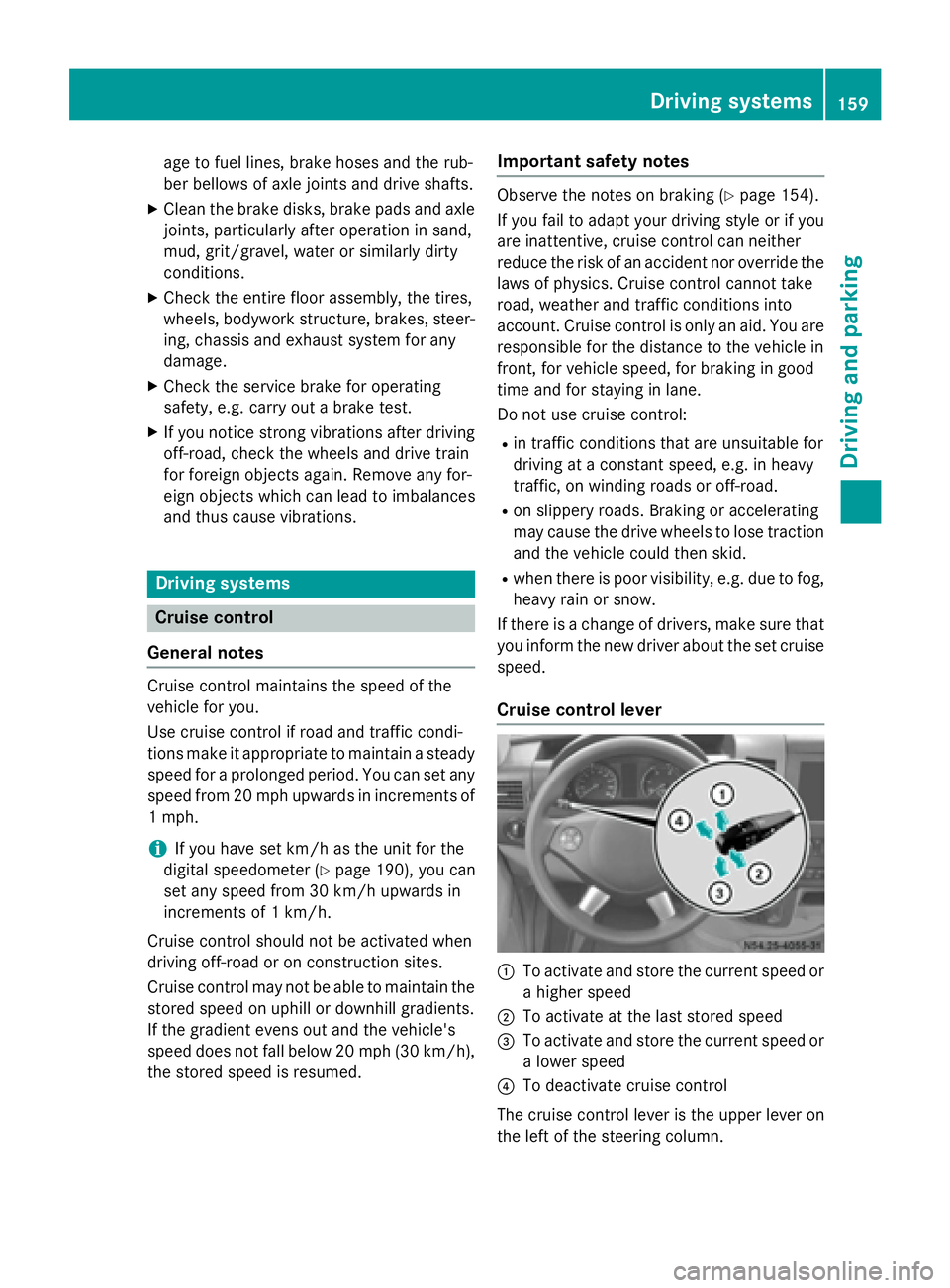
Cruise control lever 0043
To activate and store the current speed or
a higher speed
0044 To activate at the last stored speed
0087 To activate and store the current speed or
a lower speed
0085 To deactivate cruise control
The cruise control lever is the upper lever on
the left of the steering column. Driving systems
159Driving and parking Z
Page 162 of 334
Activation conditions
To activate cruise control, all of the following
activation conditions must be fulfilled:
R the parking brake must be released. The
0066 indicator lamp in the instrument clus-
ter is off
R you are driving faster than 20 mph
(30 km/h)
R neither the brake or clutch pedal is
depressed
i Other drive and brake systems not descri-
bed in this Operator's Manual, such as a
retarder, may affect cruise control. You can
find information on this in the separate
operating instructions provided by the
body manufacturer.
Storing and maintaining the current
speed X
Accelerate the vehicle to the desired speed
above 20 mph (30 km/h).
X Briefly push the cruise control lever up 0043
or down 0087.
X Release the accelerator pedal.
Cruise control is activated. The current
speed is stored.
Setting the speed It may be a moment before the vehicle starts
to accelerate or brake to the set speed. Take
this delay into account when setting the
speed.
X Briefly push the cruise control lever up 0043
to increase the speed or down 0087to reduce
the speed.
The last stored speed increases or decrea- ses in 1 mph increments (1 km/h incre-
ments).
or
X Press and hold the cruise control lever
up 0043 or down 0087until the desired speed
has been reached. X
Release the cruise control lever.
The current speed is stored.
i Cruise control is not deactivated if you
depress the accelerator pedal. If you accel- erate briefly to overtake, for example,
cruise control resumes the vehicle’s speed
to the last speed stored after you have fin- ished overtaking.
Deactivating cruise control There are various ways to deactivate cruise
control:
X Briefly press the cruise control lever for-
wards 0085.
or
X Apply the brakes.
The last speed set remains stored. The last
speed stored is deleted when you switch off
the engine.
Cruise control is deactivated automatically
when: R you apply the brakes
R you apply the parking brake and the 0066
indicator lamp in the instrument cluster
lights up
R you are driving slower than 20 mph
(30 km/h)
R you shift the automatic transmission to
neutral position Nwhile the vehicle is in
motion
R ESP ®
or ASR intervenes
R there is a malfunction in the ESP ®
, ASR or
ABS system 160
Driving systemsDriving and parking
Page 165 of 334
Adaptive Brake Assist aids you when braking
during hazardous situations at speeds above
20 mph (30 km/h). With the help of Adaptive Brake Assist, the distance warning signal can
detect obstacles that are in the path of your
vehicle for an extended period of time.
When you approach an obstacle and adaptive Brake Assist detects that there is a risk of a
collision, adaptive Brake Assist calculates the
braking force necessary to avoid a collision.
Should you apply the brakes forcefully, adap- tive Brake Assist will automatically increase
the braking force to the calculated level.
X Keep the brake pedal depressed until the
emergency braking situation is over.
ABS prevents the wheels from locking.
The brakes function as usual again if:
R you release the brake pedal
R there is no longer any danger of a collision
R no obstacle is detected in front of your
vehicle
Adaptive Brake Assist is then deactivated.
Up to the maximum vehicle speed, adaptive
Brake Assist can react to moving obstacles
that have already been recognized as such at least once over the period of observation.
Adaptive Brake Assist does not react to sta-
tionary obstacles.
In particular, the detection of obstacles can
be impaired if:
R there is dirt on the sensors or anything else
covering the sensors
R it is snowing or raining heavily
R there is interference from other radar sour-
ces
R there are strong radar reflections, for
example in parking garages
R a narrow vehicle traveling in front, e.g. a
motorbike
R a vehicle traveling in front on a different line
If adaptive Brake Assist is not available due to a malfunction in the radar sensor system, thefull brake boosting effect with the help of BAS
remains available. Following damage to the front end of the vehi-
cle, have the configuration and operation of
the radar sensor checked at a qualified spe-
cialist workshop. This also applies to colli-
sions at slow speeds where there is no visible damage to the front of the vehicle. Lane Tracking package
Blind Spot Assist General notes
Blind Spot Assist uses a radar sensor system
to monitor the areas on both sides of your
vehicle. It supports you from speeds of
approximately 20 mph (30 km/h). A warning
display in the exterior mirrors draws your
attention to vehicles detected in the moni-
tored area. If you then switch on the corre-
sponding turn signal to change lane, you will
also receive an optical and audible collision
warning. For this purpose, Blind Spot Assist
uses sensors in the rear bumper and behind
the protective strips of the B-pillars.
Important safety notes G
WARNING
Blind Spot Assist does not react to:
R vehicles overtaken too closely on the side,
placing them in the blind spot area
R vehicles which approach with a large speed
differential and overtake your vehicle
As a result, Blind Spot Assist may not give
warnings in such situations. There is a risk of an accident.
Always observe the traffic conditions care-
fully, and maintain a safe lateral distance.
Blind Spot Assist is only an aid. It may fail to
detect some vehicles and is no substitute for
attentive driving.
i USA only:
This device has been approved by the FCC as a "Vehicular Radar System". The radar
sensor is intended for use in an automotive Driving systems
163Driving and parking Z
Page 170 of 334
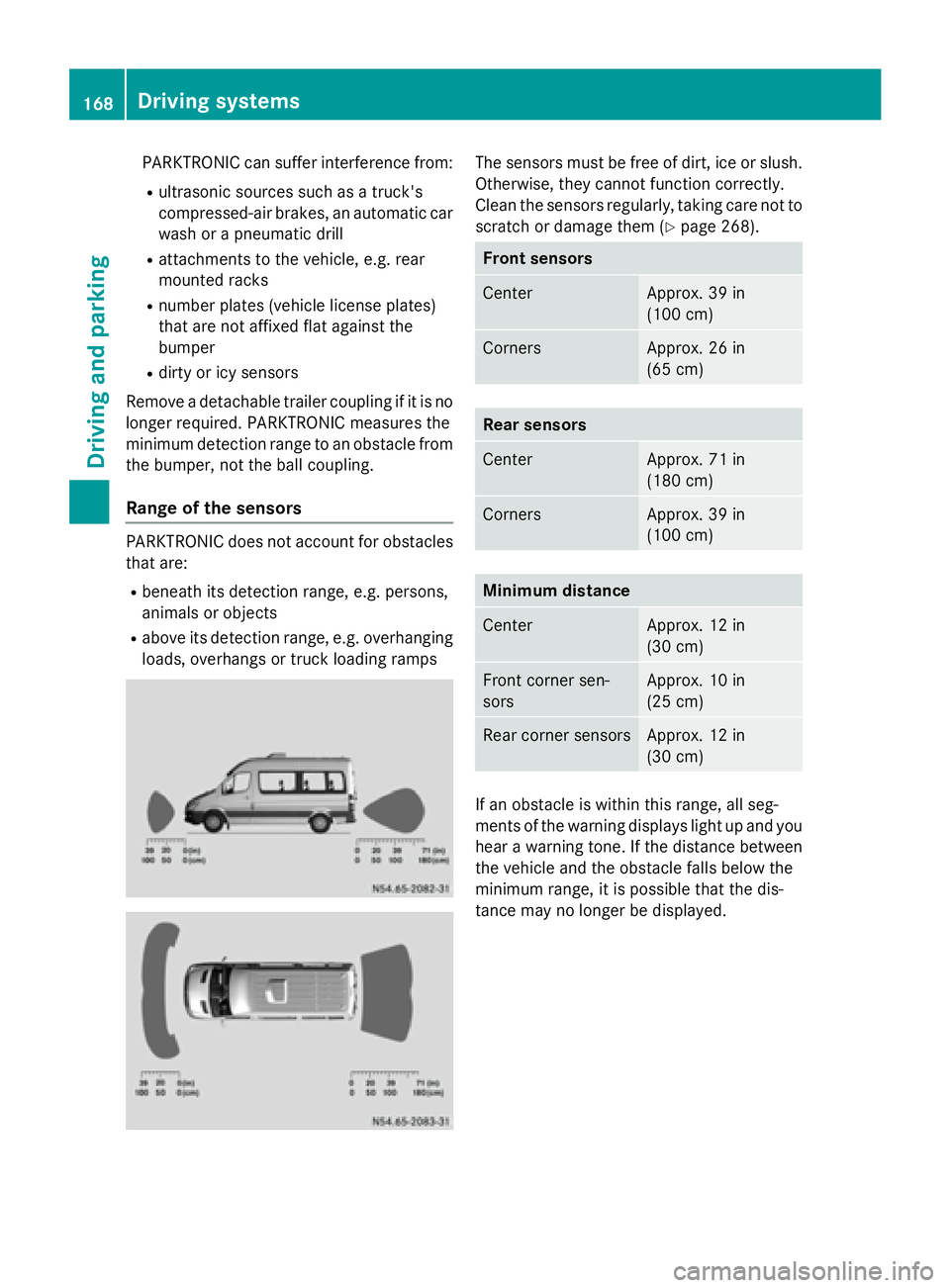
PARKTRONIC can suffer interference from:
R ultrasonic sources such as a truck's
compressed-air brakes, an automatic car
wash or a pneumatic drill
R attachments to the vehicle, e.g. rear
mounted racks
R number plates (vehicle license plates)
that are not affixed flat against the
bumper
R dirty or icy sensors
Remove a detachable trailer coupling if it is no longer required. PARKTRONIC measures the
minimum detection range to an obstacle from the bumper, not the ball coupling.
Range of the sensors PARKTRONIC does not account for obstacles
that are:
R beneath its detection range, e.g. persons,
animals or objects
R above its detection range, e.g. overhanging
loads, overhangs or truck loading ramps The sensors must be free of dirt, ice or slush.
Otherwise, they cannot function correctly.
Clean the sensors regularly, taking care not to
scratch or damage them (Y page 268). Front sensors
Center Approx. 39 in
(100 cm)
Corners Approx. 26 in
(65 cm)
Rear sensors
Center Approx. 71 in
(180 cm)
Corners Approx. 39 in
(100 cm)
Minimum distance
Center Approx. 12 in
(30 cm)
Front corner sen-
sors Approx. 10 in
(25 cm)
Rear corner sensors Approx. 12 in
(30 cm)
If an obstacle is within this range, all seg-
ments of the warning displays light up and you
hear a warning tone. If the distance between the vehicle and the obstacle falls below the
minimum range, it is possible that the dis-
tance may no longer be displayed. 168
Driving systemsDriving and parking
Page 177 of 334
is case, use a trailer with a height-adjusta-
ble trailer drawbar.
Driving tips The maximum permissible speed for vehicle/
trailer combination depends on the type of
trailer. Before setting off, check the vehicle
documents of the your trailer to find out the
permissible maximum speed. Observe the
legally prescribed maximum speed for vehi-
cle/trailer combinations in the relevant coun-
try, state or Canadian province.
When towing a trailer, your vehicle's handling
characteristics will be different in comparison to when driving without a trailer and it will
consume more fuel.
On long, steep downhill slopes you must
select shift range 3,2or 1in good time.
i This also applies if cruise control is acti-
vated.
This enables you to utilize the engine's brak-
ing effect and you do not need to brake so
heavily to keep the correct speed, which pro-
tects the brake system and prevents the
brakes from overheating and wearing too
quickly. If you need to brake additionally, to
not depress the brake pedal constantly, but
periodically.
Driving tips If the trailer begins to swing from side to side:
X Do not accelerate.
X Do not counter-steer.
X Brake if necessary.
i You can reduce the risk of the trailer
swinging and rocking by retrofitting anti-
roll bars or trailer stability programs. More information is available from your author-
ized Sprinter Dealer.
R Maintain a greater distance than you would
when driving without towing a trailer.
R Avoid sudden braking. Apply the brakes
gently at first to allow the trailer brake to overrun. Then, increase the brake force
quickly.
R The figures for the gradient climbing capa-
bilities from a standstill refer to sea level.
When driving in mountainous areas, note
that the power output of the engine, and
with it its gradient climbing capability,
decrease with increasing altitude. Coupling up a trailer
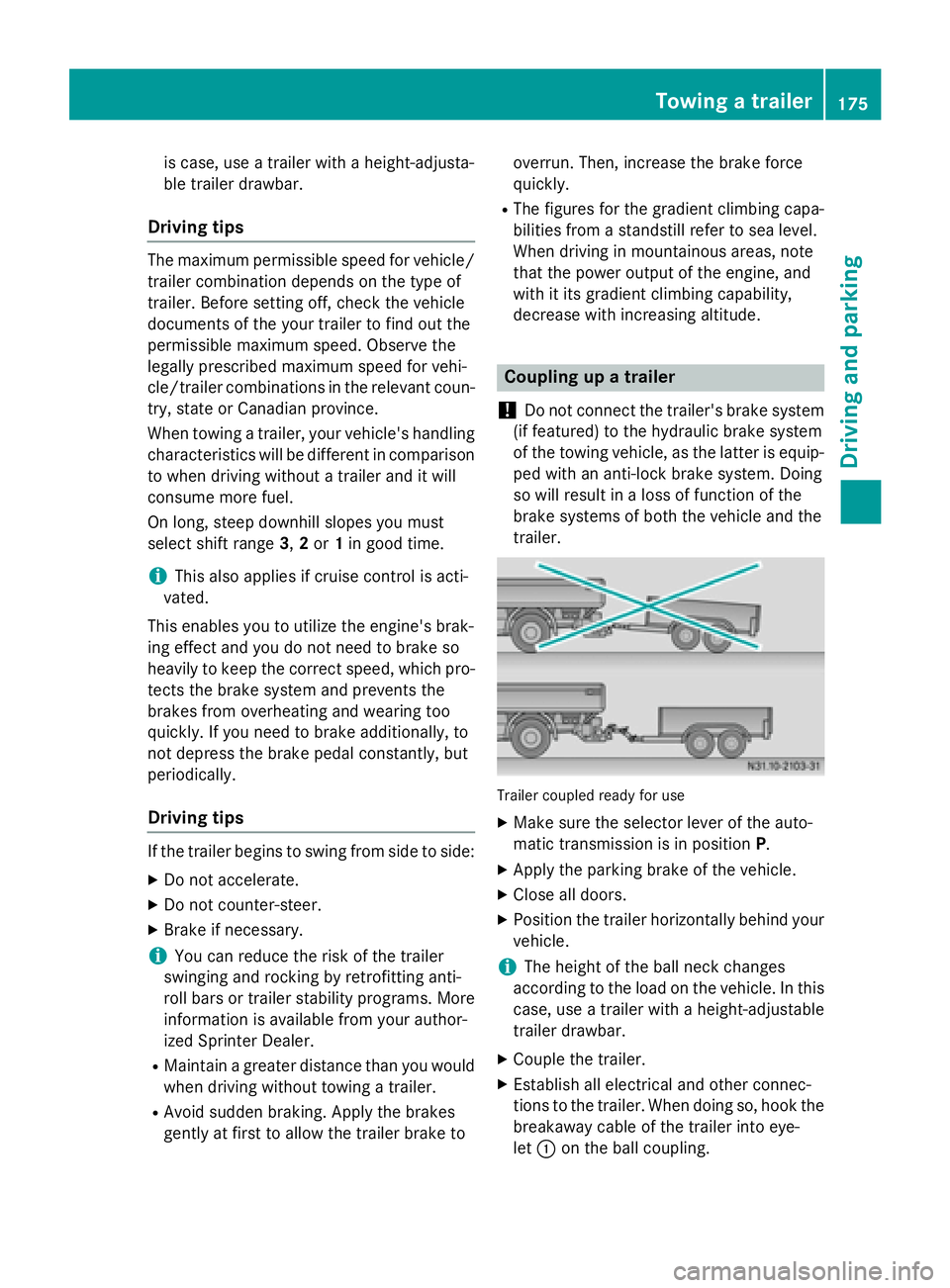
! Do not connect the trailer's brake system
(if featured) to the hydraulic brake system
of the towing vehicle, as the latter is equip- ped with an anti-lock brake system. Doing
so will result in a loss of function of the
brake systems of both the vehicle and the
trailer. Trailer coupled ready for use
X Make sure the selector lever of the auto-
matic transmission is in position P.
X Apply the parking brake of the vehicle.
X Close all doors.
X Position the trailer horizontally behind your
vehicle.
i The height of the ball neck changes
according to the load on the vehicle. In this
case, use a trailer with a height-adjustable
trailer drawbar.
X Couple the trailer.
X Establish all electrical and other connec-
tions to the trailer. When doing so, hook the
breakaway cable of the trailer into eye-
let 0043 on the ball coupling. Towing a trailer
175Driving and parking Z
Page 178 of 334
X
Remove the objects that are preventing the
trailer from rolling, e.g. wheel chocks.
X Release the trailer parking brake.
i The subharness of the vehicle has a cable
connection to the brake lamp indicator
lamp.
Observe the maximum permissible trailer
dimensions (width and length).
Most federal states and all Canadian provin-
ces require by law:
R safety chains between the towing vehicle
and the trailer. The chains should be cross-
wound under the trailer drawbar. They must be fastened to the vehicle's trailer cou-
pling, not to the bumper or the axle.
Leave enough slack in the chains. This
allows you to drive round tight corners.
R a separate brake system for certain types
of trailer.
R a safety switch for braked trailers. Find out
the specific requirements according to the
applicable laws.
If the trailer detaches from the towing vehi- cle, the safety switch applies the trailer's
brakes. Towing a trailer
There are numerous legal requirements con-
cerning the towing of a trailer, e.g. speed
restrictions. Make sure your vehicle/trailer
combination complies with local laws. This
not only means where you live, but also any-
where you are driving to. Information is avail-
able from the police and local authorities.
Observe the following when towing a trailer:
R Practice driving around bends, stopping
and backing up at a place where there is no
traffic. This enables you to gain experience and get used to the new handling charac-
teristics.
R Before driving, check:
- that the trailer tow hitch and ball cou-
pling are secure
- that the safety switch for a braked trailer
is functioning properly
- that the safety chains are secure and not
damaged
- that the electrical connections are
secure
- that the lights are working
- that the wheels are in good order and the
tire pressure is correct
R Adjust the exterior mirrors to provide an
unobstructed view of the rear section of the
trailer.
R If the trailer has electronically controlled
brakes, pull the vehicle/trailer combina-
tion away carefully. Brake manually using
the brake controller and check that the
brakes are working.
R Secure the load on the trailer according to
the applicable specifications and current
standards on securing loads (Y page 242).
R When driving with a trailer, check at regular
intervals that the load is secured and that
the brakes and lights are working.
R Bear in mind that the handling will be less
stable when towing a trailer than when driv-
ing without one. Avoid sudden steering
movements.
R The vehicle/trailer combination is heavier,
accelerates more slowly and has a
decreased gradient climbing capability and
a longer braking distance.
It is more susceptible to crosswinds and
requires cautious steering.
R If possible, do not brake suddenly, but
rather moderately at first so that the trailer
can activate its brakes. Then increase the
force on the brake pedal.
R If the automatic transmission repeatedly
shifts between gears when driving on 176
Towing a trailerDriving and pa
rking
Page 179 of 334
inclines, restrict the shift range. Select shift
range 4,3, 2or 1.
Driving in a low gear and at a low speed
reduces the risk of damaging the engine.
R When driving on a downhill gradient, shift to
a low gear and take advantage of the
engine's braking effect.
Avoid continuous brake application as this
may overheat the vehicle brakes and, if
installed, the trailer brakes.
R If the coolant temperature increases dra-
matically while the air-conditioning system
is switched on, switch off the air-condition-
ing system.
Coolant heat can also be dissipated by
switching the airflow and the temperature
of the heater/air conditioning to the maxi-
mum level. Open the windows if necessary.
R When overtaking, pay particular attention
to the extended length of your vehicle/
trailer combination.
Due to the length of your vehicle/trailer
combination you need an additional dis-
tance before you can return to your original
lane. Uncoupling a trailer
G
WARNING
If you uncouple a trailer with the overrun
brake engaged, you could trap your hand
between the vehicle and the trailer drawbar.
There is a risk of injury.
Do not uncouple a trailer if the overrun brake is engaged.
! Do not disconnect a trailer with an
engaged overrun brake. Otherwise, your
vehicle could be damaged by the rebound- ing of the overrun brake.
X Make sure the selector lever of the auto-
matic transmission is in position P.
X Apply the parking brake of the vehicle.
X Close all doors. X
Apply the parking brake of the trailer.
X In addition, secure the trailer against rolling
away with a wheel chock or similar object.
X Remove the trailer cable and safety chains
and decouple the trailer. Permissible trailer loads and trailer
drawbar noseweights
Weight information !
On vehicles with a permissible gross vehi-
cle weight of 11030 lbs (5003 kg), the per- missible gross combination weight is less
than the total of the permissible gross vehi-
cle weight and the permissible trailer load.
Exceeding the permissible gross combina-
tion weight can lead to damage to the driv-
etrain, to the transmission or to the trailer
tow hitch.
If the vehicle or the trailer is fully laden, the relevant value for the permissible gross
vehicle weight or the permissible trailer
load is therefore lower. In this case, the
trailer or the vehicle may only be partially
loaded.
The gross trailer weight (GTW) is calculated by adding the weight of the trailer to the weight
of the load and equipment.
The maximum gross vehicle weight is vehicle-specific and equipment-dependent: 5,000 lbs
(2,268 kg) or 7,500 lbs (3,402 kg).
The maximum perm issible trailer drawbar
noseweight on the ball coupling is 500 lbs
(227 kg) or 750 lbs (340 kg). Theactual nose-
weight may not exceed the value given on the
identification plates of the trailer tow hitch or
the trailer. If the values vary, the lowest value always applies.
The gross combination weight rating (GCWR)is calculated by adding the gross weight of the
trailer to the gross vehicle weight including a
driver's weight of approximately 150 lbs
(68 kg). The permissible Gross Combination
Weight Rating is vehicle-specific and depends
on the equipment level. Towing a trailer
177Driving and parking Z
Page 208 of 334
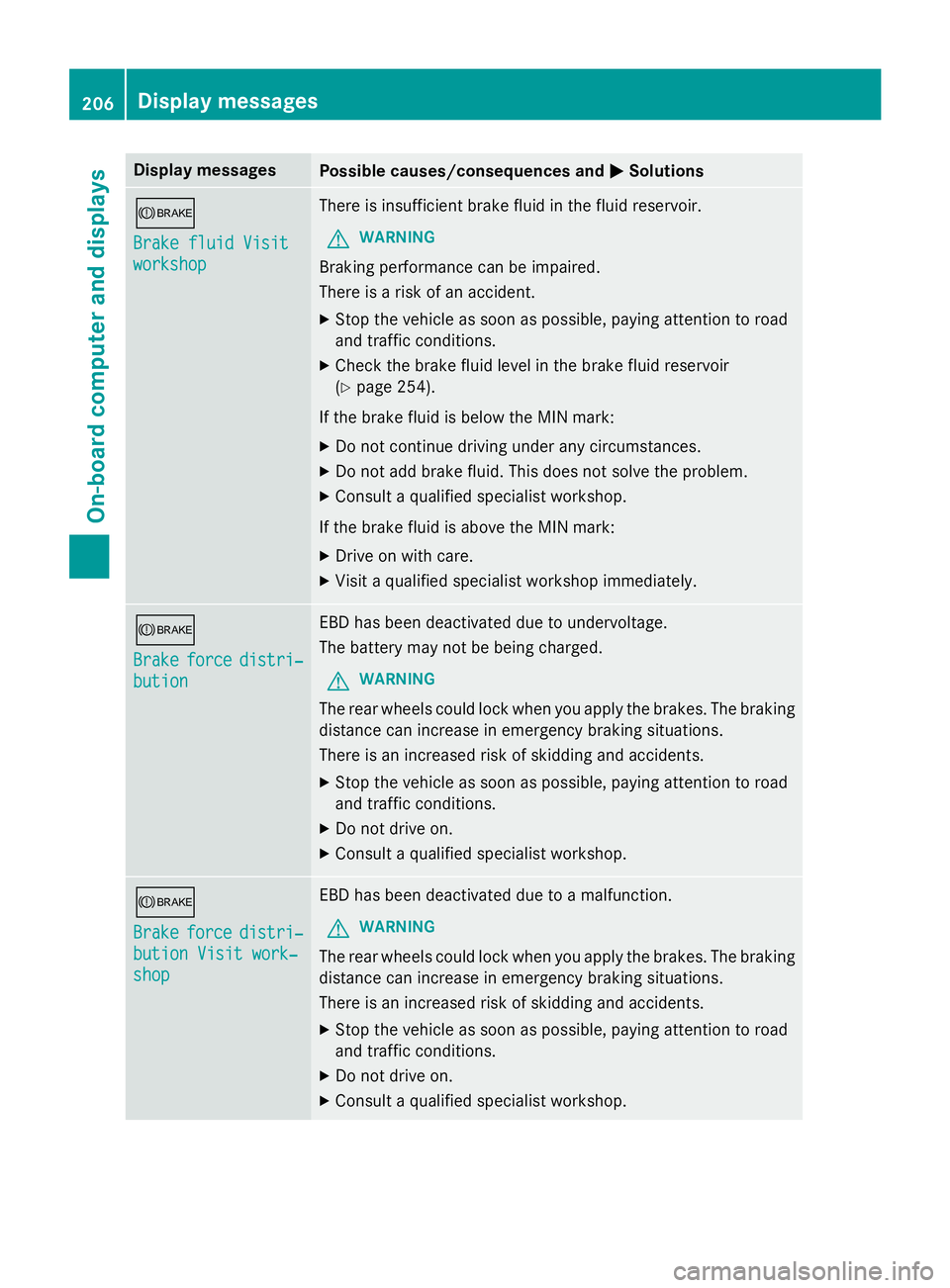
Display messages
Possible causes/consequences and
0050
0050Solutions 0065
Brake fluid Visit Brake fluid Visit
workshop workshop There is insufficient brake fluid in the fluid reservoir.
G WARNING
Braking performance can be impaired.
There is a risk of an accident. X Stop the vehicle as soon as possible, paying attention to road
and traffic conditions.
X Check the brake fluid level in the brake fluid reservoir
(Y page 254).
If the brake fluid is below the MIN mark:
X Do not continue driving under any circumstances.
X Do not add brake fluid. This does not solve the problem.
X Consult a qualified specialist workshop.
If the brake fluid is above the MIN mark: X Drive on with care.
X Visit a qualified specialist workshop immediately. 0065
Brake Brake
force
forcedistri‐
distri‐
bution
bution EBD has been deactivated due to undervoltage.
The battery may not be being charged.
G WARNING
The rear wheels could lock when you apply the brakes. The braking
distance can increase in emergency braking situations.
There is an increased risk of skidding and accidents.
X Stop the vehicle as soon as possible, paying attention to road
and traffic conditions.
X Do not drive on.
X Consult a qualified specialist workshop. 0065
Brake Brake
force
forcedistri‐
distri‐
bution Visit work‐
bution Visit work‐
shop shop EBD has been deactivated due to a malfunction.
G WARNING
The rear wheels could lock when you apply the brakes. The braking
distance can increase in emergency braking situations.
There is an increased risk of skidding and accidents.
X Stop the vehicle as soon as possible, paying attention to road
and traffic conditions.
X Do not drive on.
X Consult a qualified specialist workshop. 206
Display
messagesOn-board computer and displays
Page 220 of 334
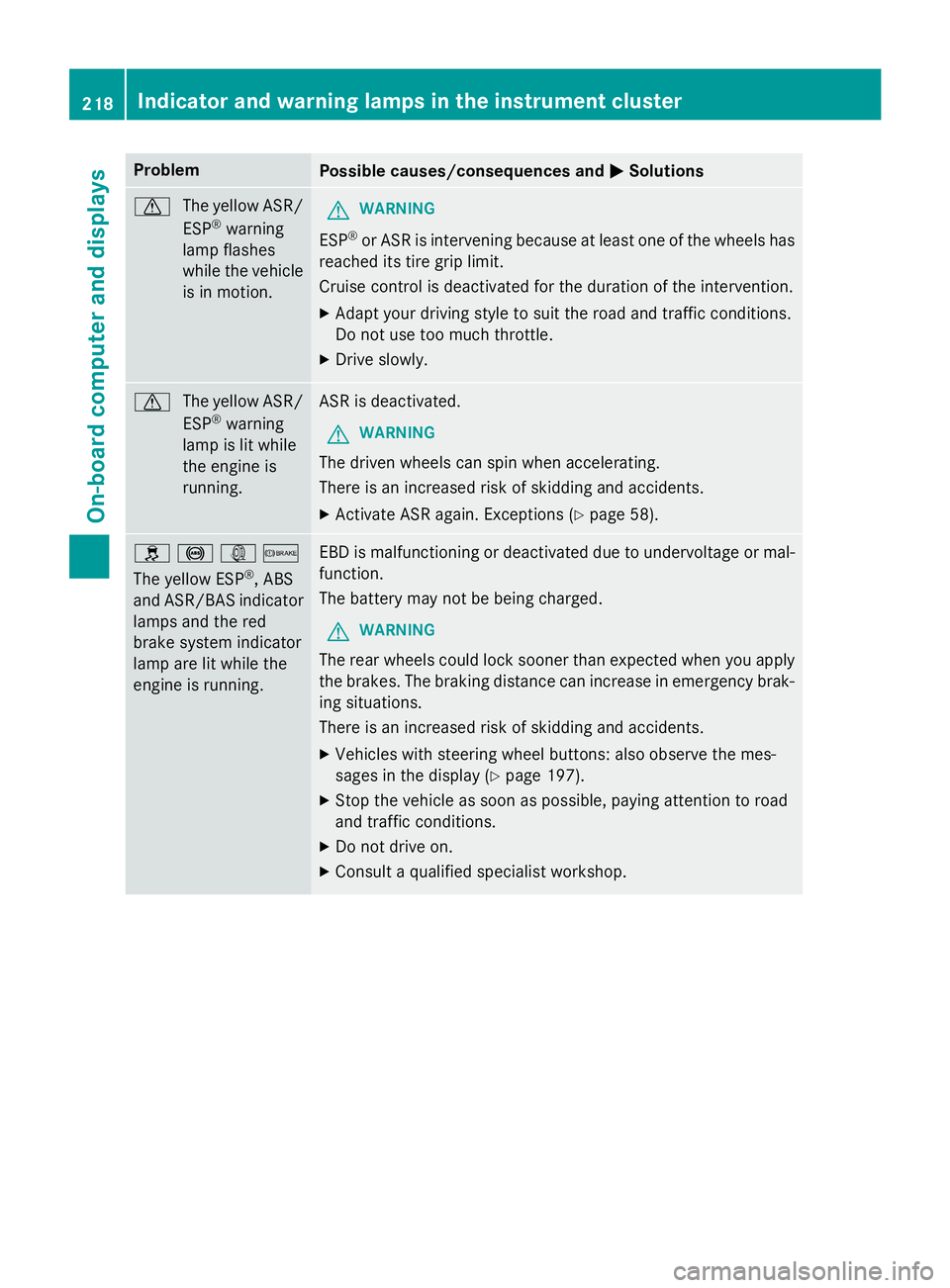
Problem
Possible causes/consequences and
0050
0050Solutions 0072
The yellow ASR/
ESP ®
warning
lamp flashes
while the vehicle
is in motion. G
WARNING
ESP ®
or ASR is intervening because at least one of the wheels has
reached its tire grip limit.
Cruise control is deactivated for the duration of the intervention.
X Adapt your driving style to suit the road and traffic conditions.
Do not use too much throttle.
X Drive slowly. 0072
The yellow ASR/
ESP ®
warning
lamp is lit while
the engine is
running. ASR is deactivated.
G WARNING
The driven wheels can spin when accelerating.
There is an increased risk of skidding and accidents.
X Activate ASR again. Exceptions (Y page 58).0089
0025003D0065
The yellow ESP ®
, ABS
and ASR/BAS indicator lamps and the red
brake system indicator
lamp are lit while the
engine is running. EBD is malfunctioning or deactivated due to undervoltage or mal-
function.
The battery may not be being charged.
G WARNING
The rear wheels could lock sooner than expected when you apply the brakes. The braking distance can increase in emergency brak-
ing situations.
There is an increased risk of skidding and accidents.
X Vehicles with steering wheel buttons: also observe the mes-
sages in the display (Y page 197).
X Stop the vehicle as soon as possible, paying attention to road
and traffic conditions.
X Do not drive on.
X Consult a qualified specialist workshop. 218
Indicator and warning lamps in the instrument clusterOn-board computer and displays