key MERCEDES-BENZ SPRINTER 2015 MY15 Operator’s Manual
[x] Cancel search | Manufacturer: MERCEDES-BENZ, Model Year: 2015, Model line: SPRINTER, Model: MERCEDES-BENZ SPRINTER 2015Pages: 334, PDF Size: 5.94 MB
Page 63 of 334
X
Position both handles 0043horizontally.
Make sure that the locks 0087are inside in
front of the window frame.
The window is locked.
X Replace locking pins 0044at the latest before
starting on a new journey.
You can obtain information on this at any
qualified specialist workshop.
In an emergency, or after an accident, the
vehicle occupants can exit the vehicle
through the emergency exit window.
Observe the following notes to make sure that
the emergency exit window can be used
safely in the event of an emergency:
R Before beginning a journey, inform the vehi-
cle occupants of the emergency exit win-
dow and explain how to use it. Make sure to
explicitly point out the risks described here.
R Only vehicle occupants who know how to
use the emergency exit window are permit-
ted to sit next to it.
R Access to the emergency exit window must
remain unobstructed. Do not place any
large or heavy objects on or in front of the
seats next to the emergency exit window.
R The window handles must not be used as
hooks, e.g. to hang up light objects, bags or
items of clothing.
R When exiting the vehicle through the emer-
gency exit window, pay attention to the
vehicle height and the local conditions. Par- ticularly children and smaller adults may
require assistance when exiting the vehi-
cle. Theft deterrent locking system
Immobilizer
X To activate: remove the key from the igni-
tion lock.
X To deactivate: turn the key to position 2in
the ignition lock.
The immobilizer prevents your vehicle from
being started without the correct key. Always take the key with you and lock the
vehicle when leaving the vehicle. If you leave
the key in the vehicle, anyone can start the
engine.
i The immobilizer is always deactivated
when you start the engine.
In the event that the engine cannot be star- ted when the starter battery is fully
charged, the immobilizer may be faulty.
Contact an authorized Sprinter dealer or
call 1-877-762-8267 (in USA) or
1-800-387-0100 (in Canada). ATA (Anti-Theft Alarm system)
X To arm: close all doors.
X Lock the vehicle with the key.
The indicator lamp in the central locking
button (Y page 71) flashes.
X To deactivate: unlock the vehicle with the
key.
The indicator lamp in the central locking
button (Y page 71) goes out.
i Cargo Van and Passenger Van only:
Unless you open a door within 40 seconds
after unlocking the vehicle:
R the vehicle will be locked again
R the anti-theft alarm system will be armed
again
If the alarm system is armed, a visual and
audible alarm is triggered by the following:
R Unlocking the vehicle from inside
R Opening a door
R Opening the hood
i The alarm is not switched off, even if you
immediately close the open door that has
triggered it, for example.
X To stop the alarm: press the0036button
on the remote control.
or
X Insert the key into the ignition lock.
The alarm stops. Theft deterrent locking system
61Safety Z
Page 64 of 334
Tow-away alarm
Operation A visual and audible alarm is triggered if the
inclination of the vehicle changes when the
tow-away alarm is armed. This can be the
case if the vehicle is raised on one side, for
example.
Arming/disarming The tow-away alarm is automatically armed
approximately 20 second
s after you lock the
vehicle.
The tow-away alarm is automatically deacti-
vated when you unlock the vehicle.
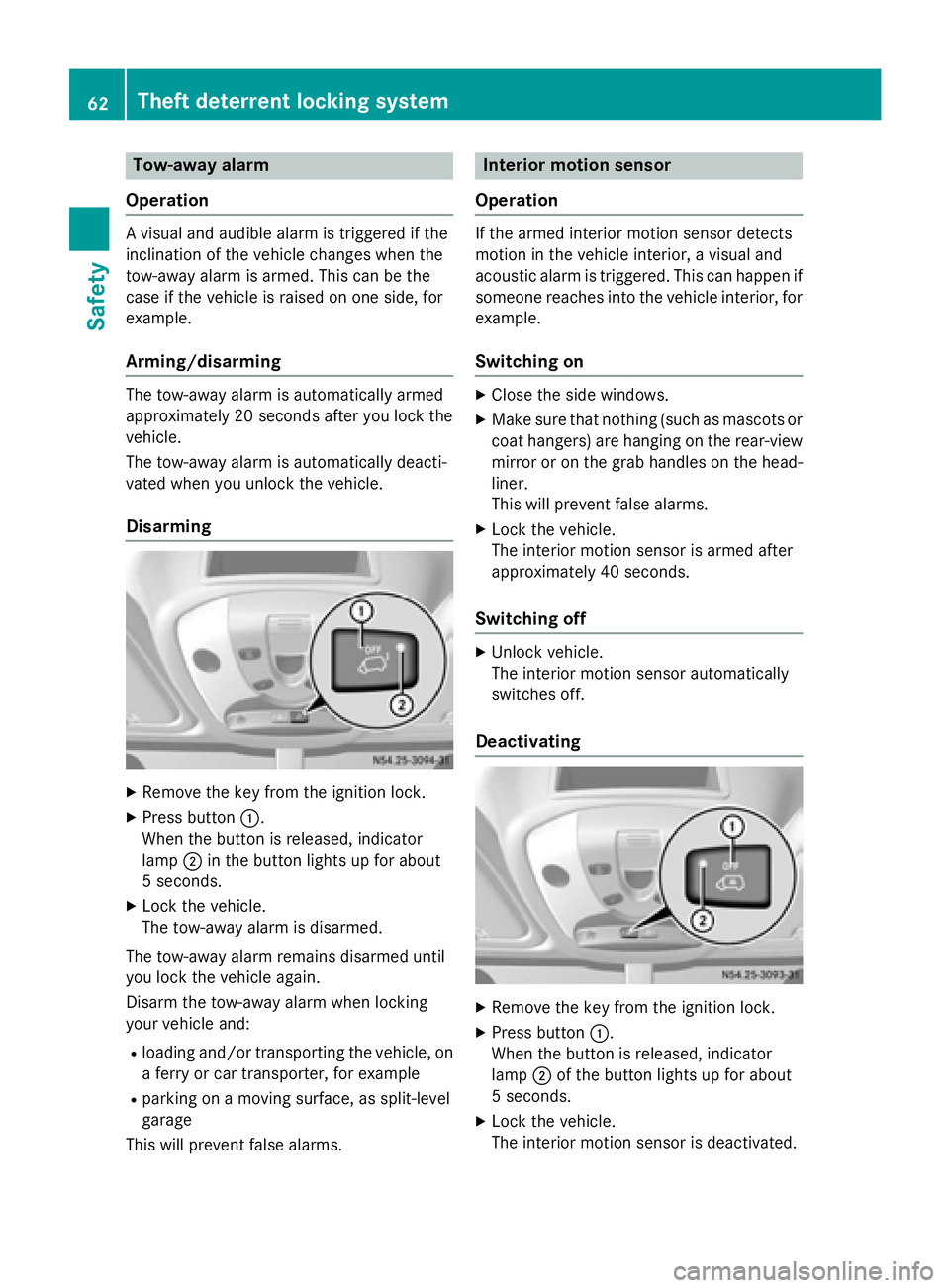
Disarming X
Remove the key from the ignition lock.
X Press button 0043.
When the button is released, indicator
lamp 0044in the button lights up for about
5 second s.
X Lock the vehicle.
The tow-away alarm is disarmed.
The tow-away alarm remains disarmed until
you lock the vehicle again.
Disarm the tow-away alarm when locking
your vehicle and: R loading and/or transporting the vehicle, on
a ferry or car transporter, for example
R parking on a moving surface, as split-level
garage
This will prevent false alarms. Interior motion sensor
Operation If the armed interior motion sensor detects
motion in the vehicle interior, a visual and
acoustic alarm is triggered. This can happen if
someone reaches into the vehicle interior, for example.
Switching on X
Close the side windows.
X Make sure that nothing (such as mascots or
coat hangers) are hanging on the rear-view
mirror or on the grab handles on the head- liner.
This will prevent false alarms.
X Lock the vehicle.
The interior motion sensor is armed after
approximately 40 seconds.
Switching off X
Unlock vehicle.
The interior motion sensor automatically
switches off.
Deactivating X
Remove the key from the ignition lock.
X Press button 0043.
When the button is released, indicator
lamp 0044of the button lights up for about
5 seconds.
X Lock the vehicle.
The interior motion sensor is deactivated. 62
Theft deterrent locking systemSafety
Page 67 of 334
Useful information
..............................66
Key ........................................................ 66
Central locking .................................... 71
Driver's door and co-driver's door .....72
Sliding door ......................................... 72
Electrical step ...................................... 73
Rear doors ........................................... 75
Partition sliding door ..........................77
Side windows ...................................... 78 65Opening and closing
Page 68 of 334
Useful information
This Operator's Manual describes all models
as well as standard and optional equipment of your vehicle that were available at the time of going to print. Country-specific variations are
possible. Note that your vehicle may not be
equipped with all of the described functions.
This also applies to systems and functions
relevant to safety.
Read the information on qualified specialist
workshops (Y page 25). Key
Important safety notes
G
WARNING
Activate the child-proof door locks if children are traveling in the vehicle. The children could
otherwise open the doors while the vehicle is
in motion, injuring themselves and others. G
WARNING
Do not leave children unsupervised in the
vehicle, even if they are secured in a child
restraint system. Children could otherwise
injure themselves on parts of the vehicle.
They could be severely or even fatally injured by prolonged exposure to intense heat or
cold.
If children open a door, they could:
R injure other people
R get out of the vehicle and thereby injure
themselves or be injured by a passing vehi-
cle
R severely injure themselves by falling down,
in particular due to the vehicle height
Always take the key with you when leaving the
vehicle, even if you are only leaving for a short time. G
WARNING
If you attach heavy or large objects to the
SmartKey, the SmartKey could be uninten- tionally turned in the ignition lock. This could
cause the engine to be switched off. There is a risk of an accident.
Do not attach any heavy or large objects to the
SmartKey. Remove any bulky key rings before
inserting the SmartKey into the ignition lock.
Do not keep the key with remote control:
R with electronic devices, e.g. a mobile
phone or another key with remote control
R with metallic objects, e.g. coins or metal
foil
R in metallic objects, e.g. metal cases
This can affect the key's functionality. Key functions of the remote control
General notes The vehicle is equipped with either 2 or
4 remote controls with a folding key, or 4
mechanical keys. In this Operator's Manual,
both the mechanical keys and the keys with
remote control are referred to as keys. The
remote control key has a range of up to 32 ft (10 m). Use the remote control of the key only
when in immediate proximity of the vehicle.
This prevents theft.
Remote controls that are not included in the
scope of delivery for the vehicle must be pro- grammed before use. Further information can
be obtained at any authorized Sprinter
Dealer.
The key's remote control locks/unlocks the
driver's door and/or the following centrally if the factory settings have not been changed:
R the driver's and the co-driver's door
R the sliding doors
R the rear doors
i If the driver's or co-driver's door is not
closed, the corresponding door is not
locked. If a sliding door or a rear door is not
closed properly, none of the rear doors are
locked. 66
KeyOpening and closing
Page 69 of 334
If there is a key is in the ignition lock, the
remote control is inoperative. When locking
or unlocking the vehicle with the remote con- trol, always pay attention to the indicator
lamp signaling. Also check the locking knobs
of the doors.
Unlocking/locking the vehicle with the
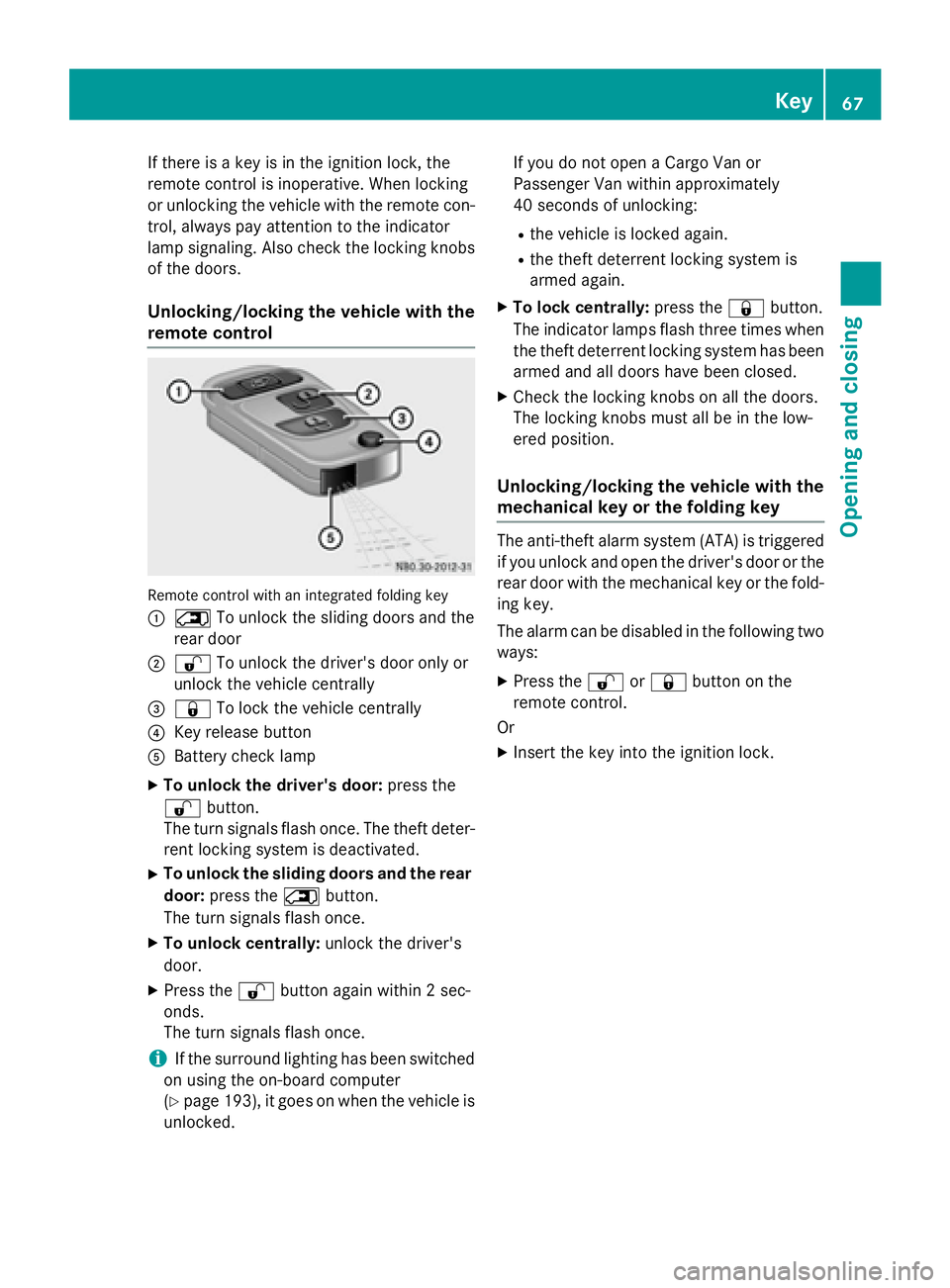
remote control Remote control with an integrated folding key
0043 0042 To unlock the sliding doors and the
rear door
0044 0036 To unlock the driver's door only or
unlock the vehicle centrally
0087 0037 To lock the vehicle centrally
0085 Key release button
0083 Battery check lamp
X To unlock the driver's door: press the
0036 button.
The turn signals flash once. The theft deter-
rent locking system is deactivated.
X To unlock the sliding doors and the rear
door: press the 0042button.
The turn signals flash once.
X To unlock centrally: unlock the driver's
door.
X Press the 0036button again within 2 sec-
onds.
The turn signals flash once.
i If the surround lighting has been switched
on using the on-board computer
(Y page 193), it goes on when the vehicle is
unlocked. If you do not open a Cargo Van or
Passenger Van within approximately
40 seconds of unlocking:
R the vehicle is locked again.
R the theft deterrent locking system is
armed again.
X To lock centrally: press the0037button.
The indicator lamps flash three times when
the theft deterrent locking system has been armed and all doors have been closed.
X Check the locking knobs on all the doors.
The locking knobs must all be in the low-
ered position.
Unlocking/locking the vehicle with the
mechanical key or the folding key The anti-theft alarm system (ATA) is triggered
if you unlock and open the driver's door or the
rear door with the mechanical key or the fold-
ing key.
The alarm can be disabled in the following two ways:
X Press the 0036or0037 button on the
remote control.
Or
X Insert the key into the ignition lock. Key
67Opening and closing Z
Page 70 of 334
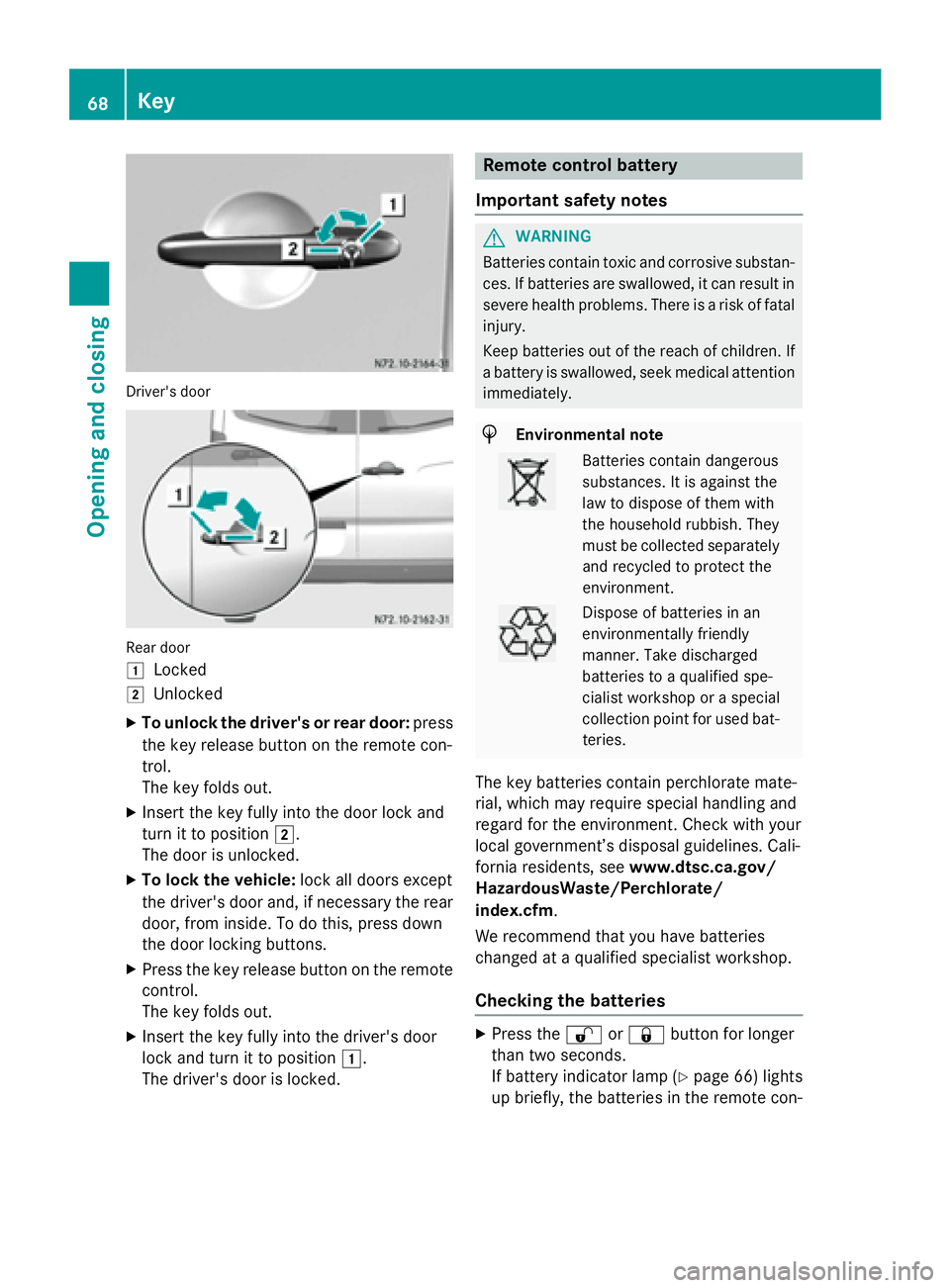
Driver's door
Rear door
0047
Locked
0048 Unlocked
X To unlock the driver's or rear door: press
the key release button on the remote con-
trol.
The key folds out.
X Insert the key fully into the door lock and
turn it to position 0048.
The door is unlocked.
X To lock the vehicle: lock all doors except
the driver's door and, if necessary the rear
door, from inside. To do this, press down
the door locking buttons.
X Press the key release button on the remote
control.
The key folds out.
X Insert the key fully into the driver's door
lock and turn it to position 0047.
The driver's door is locked. Remote control battery
Important safety notes G
WARNING
Batteries contain toxic and corrosive substan- ces. If batteries are swallowed, it can result in
severe health problems. There is a risk of fatal injury.
Keep batteries out of the reach of children. If
a battery is swallowed, seek medical attention immediately. H
Environmental note Batteries contain dangerous
substances. It is against the
law to dispose of them with
the household rubbish. They
must be collected separately
and recycled to protect the
environment. Dispose of batteries in an
environmentally friendly
manner. Take discharged
batteries to a qualified spe-
cialist workshop or a special
collection point for used bat-
teries.
The key batteries contain perchlorate mate-
rial, which may require special handling and
regard for the environment. Check with your
local government’s disposal guidelines. Cali-
fornia residents, see www.dtsc.ca.gov/
HazardousWaste/Perchlorate/
index.cfm.
We recommend that you have batteries
changed at a qualified specialist workshop.
Checking the batteries X
Press the 0036or0037 button for longer
than two seconds.
If battery indicator lamp (Y page 66) lights
up briefly, the batteries in the remote con- 68
KeyOpening and closing
Page 71 of 334
trol still have sufficient charge. Otherwise,
change the batteries immediately.
i If the remote control is checked within the
signal reception range of the vehicle, press- ing the 0037or0036 button:
R lock or
R unlock the vehicle
Changing batteries You need a CR 2025 2 3 V cell battery, which
can be obtained from any qualified specialist
workshop.
When changing the batteries, do not press
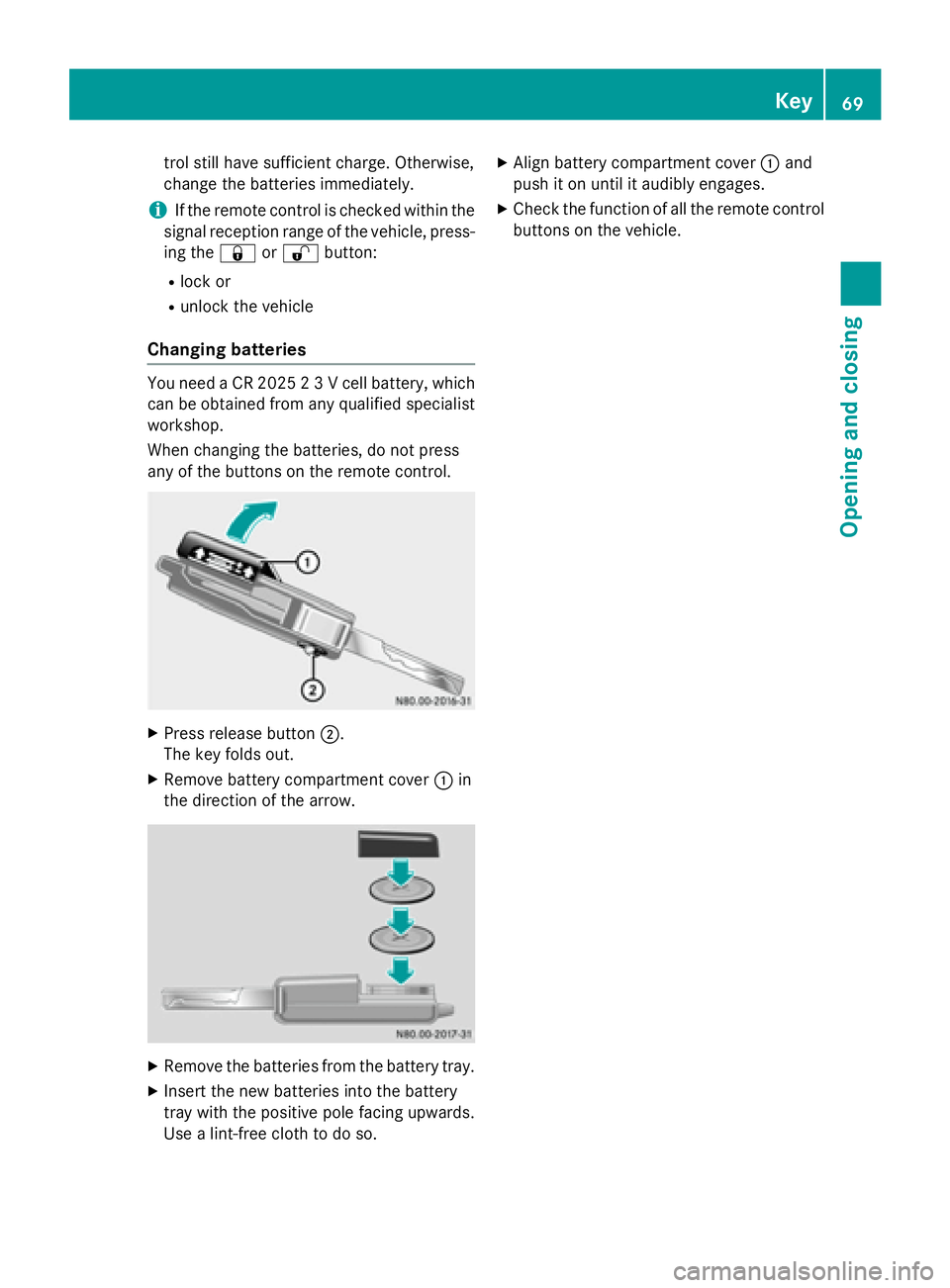
any of the buttons on the remote control. X
Press release button 0044.
The key folds out.
X Remove battery compartment cover 0043in
the direction of the arrow. X
Remove the batteries from the battery tray.
X Insert the new batteries into the battery
tray with the positive pole facing upwards.
Use a lint-free cloth to do so. X
Align battery compartment cover 0043and
push it on until it audibly engages.
X Check the function of all the remote control
buttons on the vehicle. Key
69Opening and closing Z
Page 72 of 334
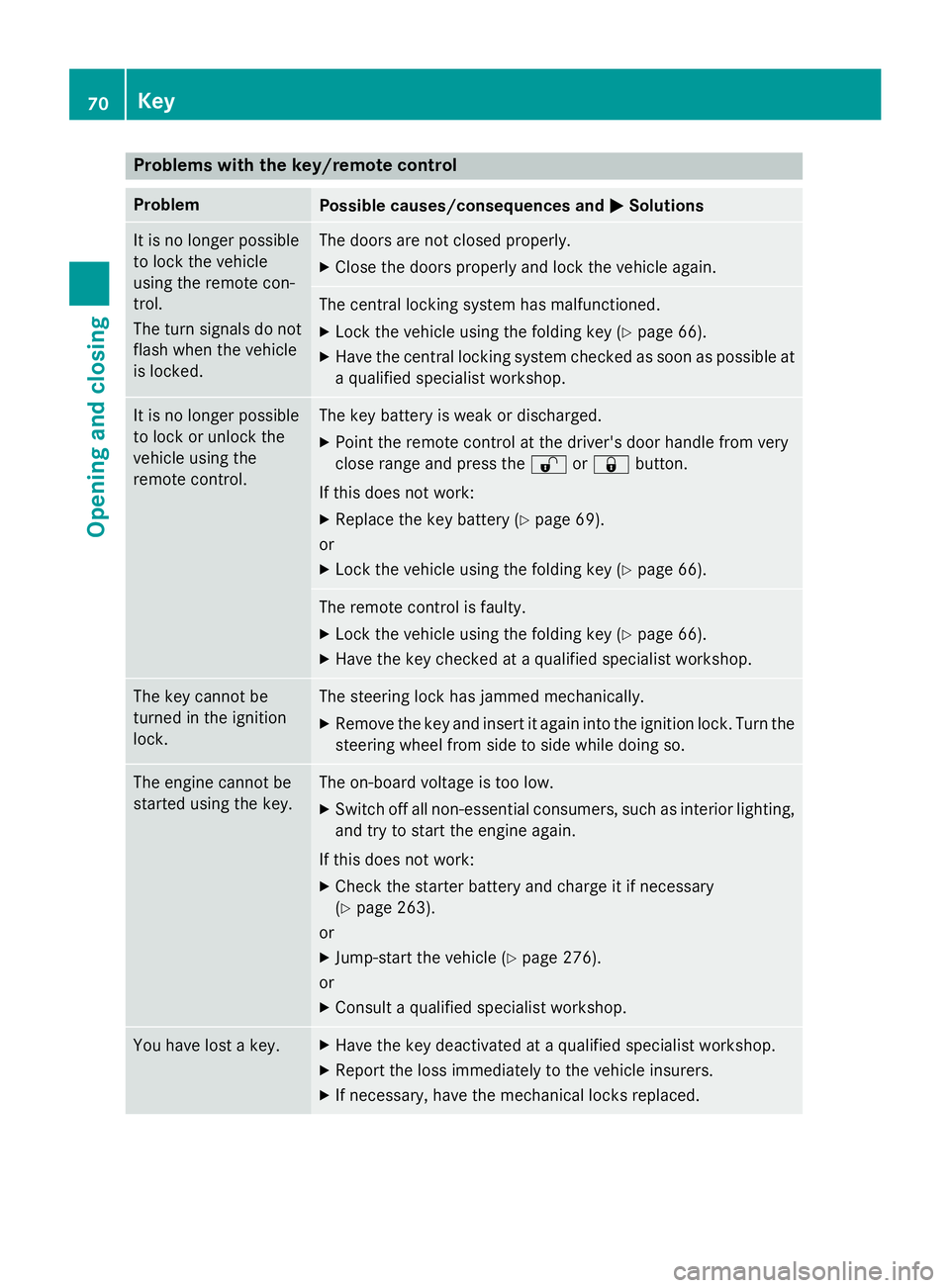
Problems with the key/remote control
Problem
Possible causes/consequences and
0050
0050Solutions It is no longer possible
to lock the vehicle
using the remote con-
trol.
The turn signals do not
flash when the vehicle
is locked. The doors are not closed properly.
X Close the doors properly and lock the vehicle again. The central locking system has malfunctioned.
X Lock the vehicle using the folding key (Y page 66).
X Have the central locking system checked as soon as possible at
a qualified specialist workshop. It is no longer possible
to lock or unlock the
vehicle using the
remote control. The key battery is weak or discharged.
X Point the remote control at the driver's door handle from very
close range and press the 0036or0037 button.
If this does not work:
X Replace the key battery (Y page 69).
or
X Lock the vehicle using the folding key (Y page 66). The remote control is faulty.
X Lock the vehicle using the folding key (Y page 66).
X Have the key checked at a qualified specialist workshop. The key cannot be
turned in the ignition
lock. The steering lock has jammed mechanically.
X Remove the key and insert it again into the ignition lock. Turn the
steering wheel from side to side while doing so. The engine cannot be
started using the key. The on-board voltage is too low.
X Switch off all non-essential consumers, such as interior lighting,
and try to start the engine again.
If this does not work: X Check the starter battery and charge it if necessary
(Y page 263).
or
X Jump-start the vehicle (Y page 276).
or
X Consult a qualified specialist workshop. You have lost a key. X
Have the key deactivated at a qualified specialist workshop.
X Report the loss immediately to the vehicle insurers.
X If necessary, have the mechanical locks replaced. 70
KeyOpening and closing
Page 73 of 334
Central locking
Important safety notes
G
WARNING
Activate the child-proof door locks if children are traveling in the vehicle. The children could
otherwise open the doors while the vehicle is
in motion, injuring themselves and others. G
WARNING
Do not leave children unsupervised in the
vehicle, even if they are secured in a child
restraint system. Children could otherwise
injure themselves on parts of the vehicle.
They could be severely or even fatally injured by prolonged exposure to intense heat or
cold.
If children open a door, they could:
R injure other people
R get out of the vehicle and thereby injure
themselves or be injured by a passing vehi-
cle
R severely injure themselves by falling down,
in particular due to the vehicle height
Always take the key with you when leaving the
vehicle, even if you are only leaving for a short time.
You can open a locked front door from the
inside at any time. You can open a locked
sliding door or rear door from the inside if it
has been previously unlocked from inside. Locking and unlocking manually
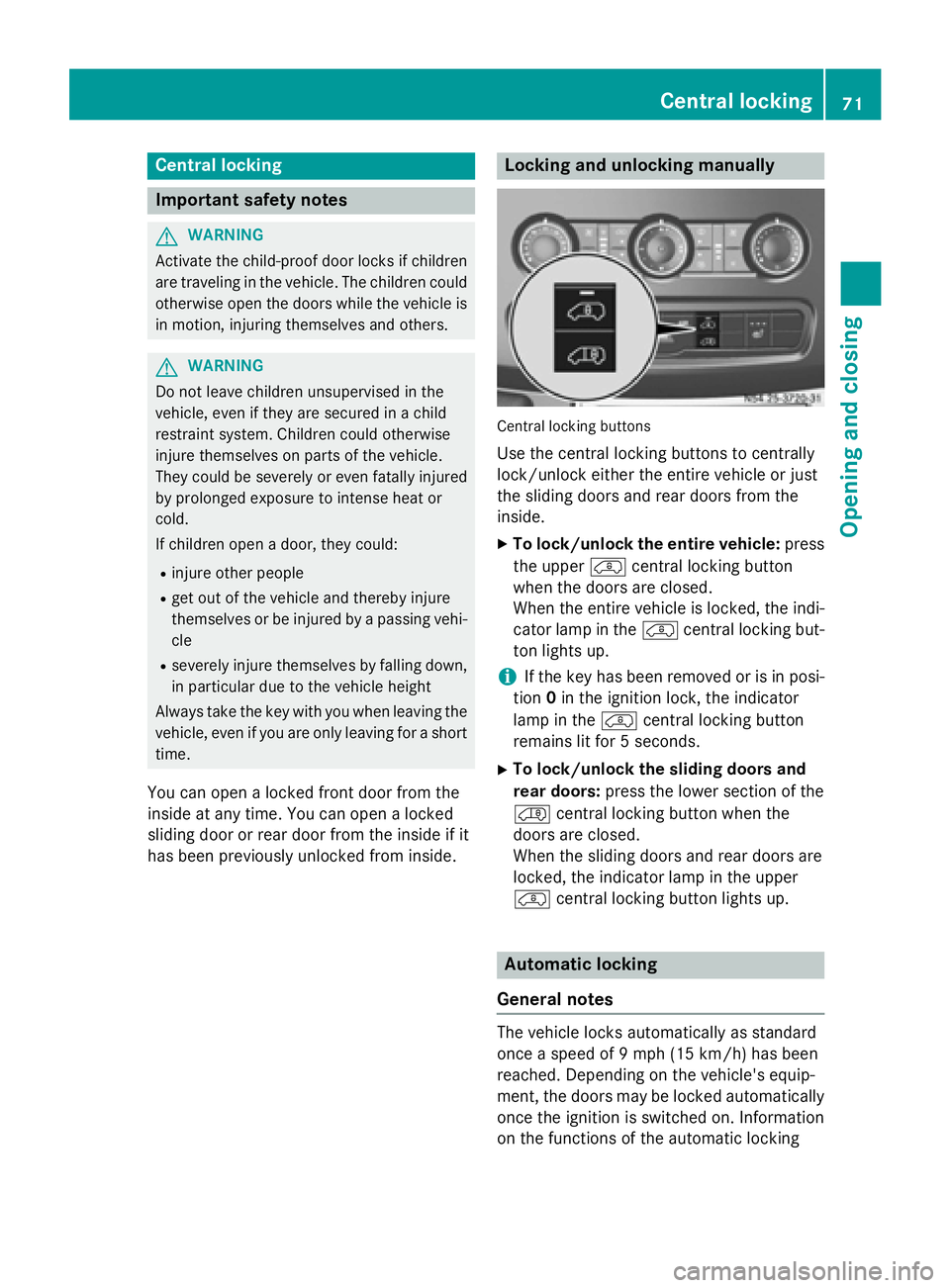
Central locking buttons
Use the central locking buttons to centrally
lock/unlock either the entire vehicle or just
the sliding doors and rear doors from the
inside.
X To lock/unlock the entire vehicle: press
the upper 00BFcentral locking button
when the doors are closed.
When the entire vehicle is locked, the indi-
cator lamp in the 00BFcentral locking but-
ton lights up.
i If the key has been removed or is in posi-
tion 0in the ignition lock, the indicator
lamp in the 00BFcentral locking button
remains lit for 5 seconds.
X To lock/unlock the sliding doors and
rear doors: press the lower section of the
00C0 central locking button when the
doors are closed.
When the sliding doors and rear doors are
locked, the indicator lamp in the upper
00BF central locking button lights up. Automatic locking
General notes The vehicle locks automatically as standard
once a speed of 9 mph
(15 km/h)has been
reached. Depending on the vehicle's equip-
ment, the doors may be locked automatically once the ignition is switched on. Information
on the functions of the automatic locking Central locking
71Opening and closing Z
Page 74 of 334
mechanism of your vehicle can be obtained
from any authorized Sprinter Dealer.
If the automatic locking when driving function
is activated, there is a risk of being locked out
when the vehicle is pushed or towed.
For this reason, deactivate the automatic
locking when driving function:
R before pushing the vehicle
R before towing the vehicle
If activated, automatic locking is deactivated
when the vehicle is unlocked or locked using
the central locking button.
Automatic locking is reactivated after the
ignition is switched off or a door is opened
with the vehicle stationary.
Activating automatic locking when driv- ing X
Turn the key to position 1or 2in the ignition
lock when the doors are closed.
X For the entire vehicle: press the upper
00BF central locking button until the indi-
cator lamp in the button flashes four times.
X For the sliding doors and rear doors
only: press the 00C0lower central locking
button until the indicator lamp in the 00BF
upper button flashes four times.
Deactivating automatic locking when
driving X
Turn the key to position 1or 2in the ignition
lock when the doors are closed.
X For the entire vehicle: press the00BF
upper central locking button until the indi-
cator lamp in the button flashes twice.
X For the sliding doors and rear doors
only: press the 00C0lower central locking
button until the indicator lamp in the 00BF
upper button flashes twice. Driver's door and co-driver's door
! Only open the doors when road and traffic
conditions permit. Make sure that there is
sufficient clearance when opening the
doors. Otherwise, you could damage your
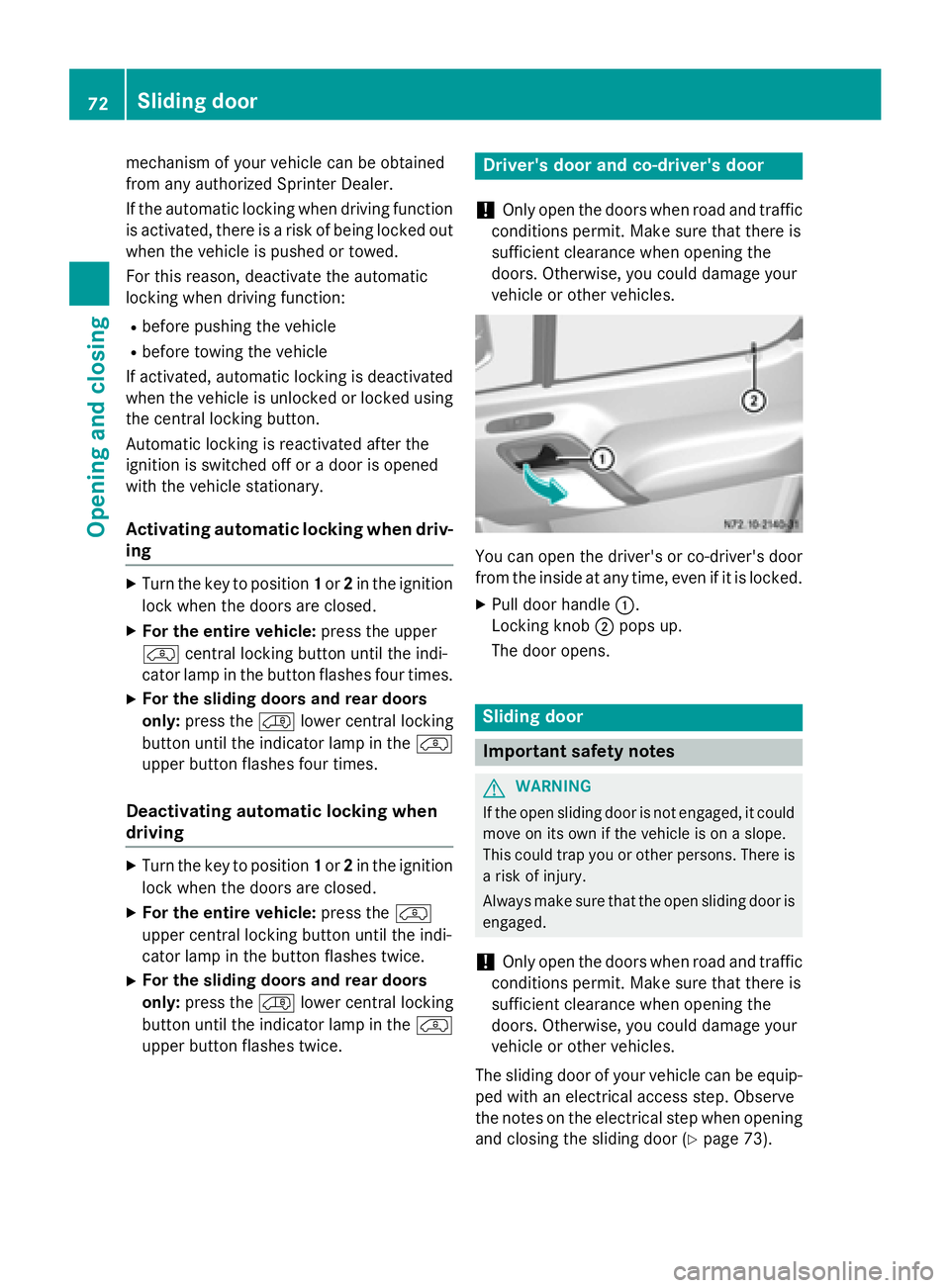
vehicle or other vehicles. You can open the driver's or co-driver's door
from the inside at any time, even if it is locked.
X Pull door handle 0043.
Locking knob 0044pops up.
The door opens. Sliding door
Important safety notes
G
WARNING
If the open sliding door is not engaged, it could move on its own if the vehicle is on a slope.
This could trap you or other persons. There is a risk of injury.
Always make sure that the open sliding door is
engaged.
! Only open the doors when road and traffic
conditions permit. Make sure that there is
sufficient clearance when opening the
doors. Otherwise, you could damage your
vehicle or other vehicles.
The sliding door of your vehicle can be equip-
ped with an electrical access step. Observe
the notes on the electrical step when opening and closing the sliding door (Y page 73).72
Sliding doorOpening and closing