display MERCEDES-BENZ SPRINTER 2015 MY15 Operator’s Manual
[x] Cancel search | Manufacturer: MERCEDES-BENZ, Model Year: 2015, Model line: SPRINTER, Model: MERCEDES-BENZ SPRINTER 2015Pages: 334, PDF Size: 5.94 MB
Page 129 of 334
The remote control is in synchronizing
mode.
i If you press the
00D0button again on the
remote control after starting synchroniza-
tion, you will only synchronize this remote
control unit with the receiver. Any other
remote control units that were synchron-
ized will be cleared. Indicator lamp 0043
flashes alternately red and green (very
slowly).
X Press the 0070button on the remote con-
trol.
During data transmission, indicator
lamp 0043lights up red.
When remote control indicator lamp 0043
emits two long green flashes, the selected
operating time is synchronized. The indica-
tor lamp in the 0084auxiliary heating but-
ton goes out. Operation with the timer
Important safety notes This is only for vehicles with a hot-water aux-
iliary heater. G
DANGER
If a switch-on time has been selected, the
auxiliary heating switches on automatically.
R If the ventilation is insufficient, poisonous
exhaust gases can collect, in particular car-
bon monoxide. This is the case in enclosed
spaces, for example. There is a risk of fatal
injuries.
R If highly flammable substances or flamma-
ble materials are nearby, there is a risk of a
risk of fire and explosion.
Always deactivate the preselected switch-on
times if you stop the vehicle in such or similar situations.
Use the timer to: R activate/deactivate immediate heating
mode
R set up to three switch-on times R
set the operating duration from 10to
120 minutes or to continuous operation
R set the heating level (preselected temper-
ature) to a range between 10 and 30
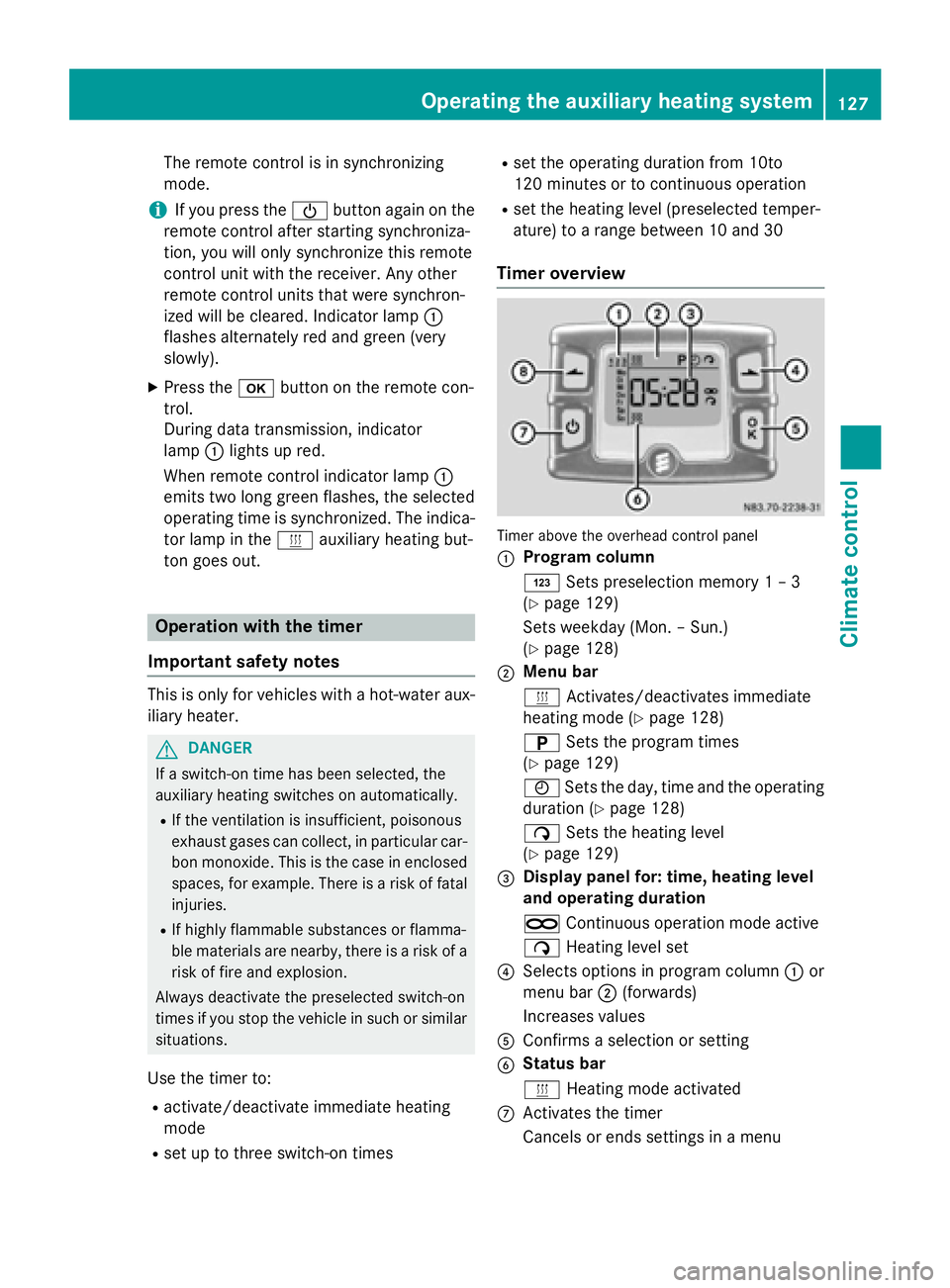
Timer overview Timer above the overhead control panel
0043
Program column
0059
Sets preselection memory 1 – 3
(Y page 129)
Sets weekday (Mon. – Sun.)
(Y page 128)
0044 Menu bar
0084
Activates/deactivates immediate
heating mode (Y page 128)
0045 Sets the program times
(Y page 129)
0045 Sets the day, time and the operating
duration (Y page 128)
00D1 Sets the heating level
(Y page 129)
0087 Display panel for: time, heating level
and operating duration
00D5 Continuous operation mode active
00D1 Heating level set
0085 Selects options in program column 0043or
menu bar 0044(forwards)
Increases values
0083 Confirms a selection or setting
0084 Status bar
0084
Heating mode activated
006B Activates the timer
Cancels or ends settings in a menu Operating the auxiliary heating system
127Climate control Z
Page 130 of 334
006C
Selects options in program column 0043or
menu bar 0044(backwards)
Reduces values
Activating the timer The timer switches to standby mode after
10 seconds. The display goes off.
X Press and hold the 00D0button until the
menu bar appears in the display and the
time is shown.
Setting the day, time and operating
duration You must reset the day, time, and default
value for the operating duration:
R during initial operation
R after a voltage supply interruption (e.g. if
the battery has been disconnected)
R after a malfunction.
You can find further information on malfunc-
tions in the "Problems with the auxiliary heat-
ing" section (Y page 132).
X Press the 00CFor00DB button until the
0045 symbol in menu bar 0044flashes.
X Press the 0070button.
In program column 0043, the day selected
flashes.
X Press the 00CFor00DB button to set the
desired day.
X Press the 0070button.
The day selected is stored. The hour setting
of the clock flashes.
X In the same way, set the hour and subse-
quently the minutes, then confirm by press- ing the 0070button.
The time is stored. Program column 0043dis-
appears and the operating duration
flashes.
i The operating duration set is the default
setting for immediate heating mode. You
can set the operating duration from 10 to
120 minutes or activate continuous opera-
tion. X
Using the 00CFor00DB button, set the
minute value or select the 00D5symbol for
continuous operation.
X Press the 0070button.
The operating duration is stored. The time
is shown.
Activating/deactivating immediate
heating mode X
To switch on: press the00CFor00DB but-
ton until the 0084symbol in the menu bar
flashes.
X Press the 0070button.
The operation duration flashes in the dis-
play.
i You can preset the default value that is
shown (Y page 128).
X Using the 00CFor00DB button, set the
minute value (10 – 120) or select the 00D5
symbol for continuous operation.
X Press the 0070button.
Immediate heating mode is activated. The
time and the 0084symbol appear.
X To switch off: press the00CFor00DB
button until the 0084symbol flashes in the
menu bar, and then press the 0070button.
Immediate heating mode is deactivated.
The 0084 symbol disappears.
The auxiliary heating operates for another
two minutes and then switches off auto-
matically.
i If you switch off the ignition while imme-
diate heating mode (operating duration
10– 120 minutes) is active, immediate
heating mode is also switched off. The aux- iliary heating operates for another
two minutes and then switches off auto-
matically.
If you have set continuous operation as the
operating duration and you switch off the
ignition, the auxiliary heating switches off
automatically after about 15 minute s.If, in
the remaining time, the ignition is switched
on again, continuous operation of the aux-
iliary heating continues. 128
Operating the auxiliary heating systemClimate control
Page 131 of 334
Setting the preselection time
G
WARNING
The auxiliary heating must not be operated if
there are highly flammable substances
nearby or in enclosed spaces without an
extraction system. Make sure that the auxili-
ary heating is not switched on automatically
by the timer in such places. If this possibility
exists, deactivate the respective programmed time.
You can set three preselection times using
the timer.
Observe that when setting the preselection
time, this does not correspond to the switch- on time but to the switch-off or departure
time. The auxiliary heating system starts up
automatically and runs for the operating dura-
tion set prior to departure.
Example: For a planned departure time of
7:00 a.m., you should also set the preselec-
tion time to 7:00 a.m. If the operating dura-
tion is preset to 40 minutes, for example, the
auxiliary heating starts up at 6:20 a.m.
If an identical time (time and day) is set in the preselection memory, only the last time set is
saved.
After a malfunction or if the battery has been disconnected, you must set the preselection
times again. You can find further information
on malfunctions in the "Problems with the
auxiliary heating" section (Y page 132).
X Press the 00CFor00DB button until the
0045 symbol in the menu bar flashes.
X Press the 0070button.
In the program column, the 0059preselec-
tion memory numbers appear. The selected preselection memory flashes.
X Press the 00CFor00DB button to select the
desired preselection memory.
X Press the 0070button.
The preselection memory is selected. The
days are shown. X
Set the day and time as described in the
"Setting the day, time and operating dura-
tion" section (Y page 128).
The preselection time is stored. The pro-
gram column disappears. In the display
panel, the on
on message and the 0084sym-
bol appear.
X Press the 0070button.
The operating duration flashes.
X Press the 00CFor00DB button to set the
minute value (10 – 120).
X Press the 0070button.
The operating duration for the preselection time is saved. The time and number of the
selected preselection memory are shown.
i The preselection memory that will be acti-
vated next is underlined. Additionally, the
day that is set appears.
Deactivating the preselection time X
Carry out the steps as described in the
"Setting the preselection time" section.
If the 0084 symbol in the status bar is shown:
X Press the 00CFor00DB button until the off off
message in the display panel is shown.
X Press the 0070button.
The preselection time is deactivated. The
time is shown.
Setting the heating level You can set the heating level to a range
between 10 and 30.
The heating level corresponds to a preselec-
tion temperature for the vehicle interior. This
is a guide value and may, depending on the
outside temperature, differ from the actual
vehicle interior temperature.
X Press the 00CFor00DB button until the
00D1 symbol in the menu bar flashes.
X Press the 0070button.
The heating level display flashes. Operating the auxiliary heating system
129Climate control Z
Page 141 of 334
Wear suitable footwear to ensure correct
usage of the pedals.
X Secure the load as per the loading guide-
lines (Y page 240).
X Make sure that the floormats and carpets
are properly secured so that they cannot
slip and obstruct the pedals.
X Close all doors. Starting the engine
G
WARNING
Combustion engines emit poisonous exhaust
gases such as carbon monoxide. Inhaling
these exhaust gases leads to poisoning. There is a risk of fatal injury. Therefore never leave
the engine running in enclosed spaces with-
out sufficient ventilation.
! Do not depress the accelerator pedal
when starting the engine.
X Before starting the engine, make sure that:
R all the doors are closed.
R all the vehicle occupants are wearing
their seat belts correctly.
R the parking brake is applied.
i If you depress the brake pedal before
starting the engine, the pedal travel is short
and pedal resistance is high.
If you depress the brake pedal again after
starting the engine, pedal travel and resist-
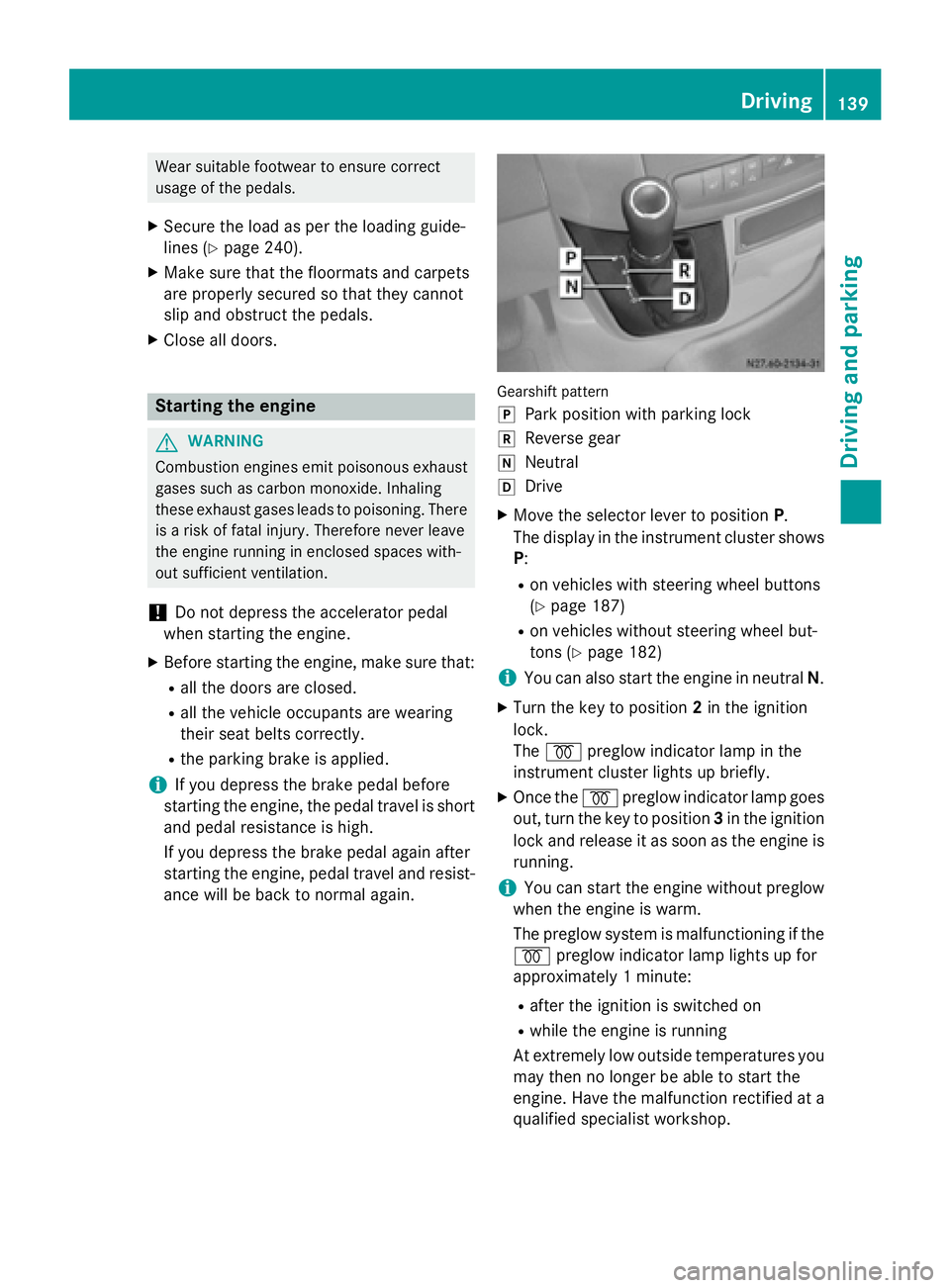
ance will be back to normal again. Gearshift pattern
005D
Park position with parking lock
005E Reverse gear
005C Neutral
005B Drive
X Move the selector lever to position P.
The display in the instrument cluster shows
P:
R on vehicles with steering wheel buttons
(Y page 187)
R on vehicles without steering wheel but-
tons (Y page 182)
i You can also start the engine in neutral
N.
X Turn the key to position 2in the ignition
lock.
The 0028 preglow indicator lamp in the
instrument cluster lights up briefly.
X Once the 0028preglow indicator lamp goes
out, turn the key to position 3in the ignition
lock and release it as soon as the engine is running.
i You can start the engine without preglow
when the engine is warm.
The preglow system is malfunctioning if the
0028 preglow indicator lamp lights up for
approximately 1 minute:
R after the ignition is switched on
R while the engine is running
At extremely low outside temperatures you
may then no longer be able to start the
engine. Have the malfunction rectified at a qualified specialist workshop. Driving
139Driving and parking Z
Page 143 of 334
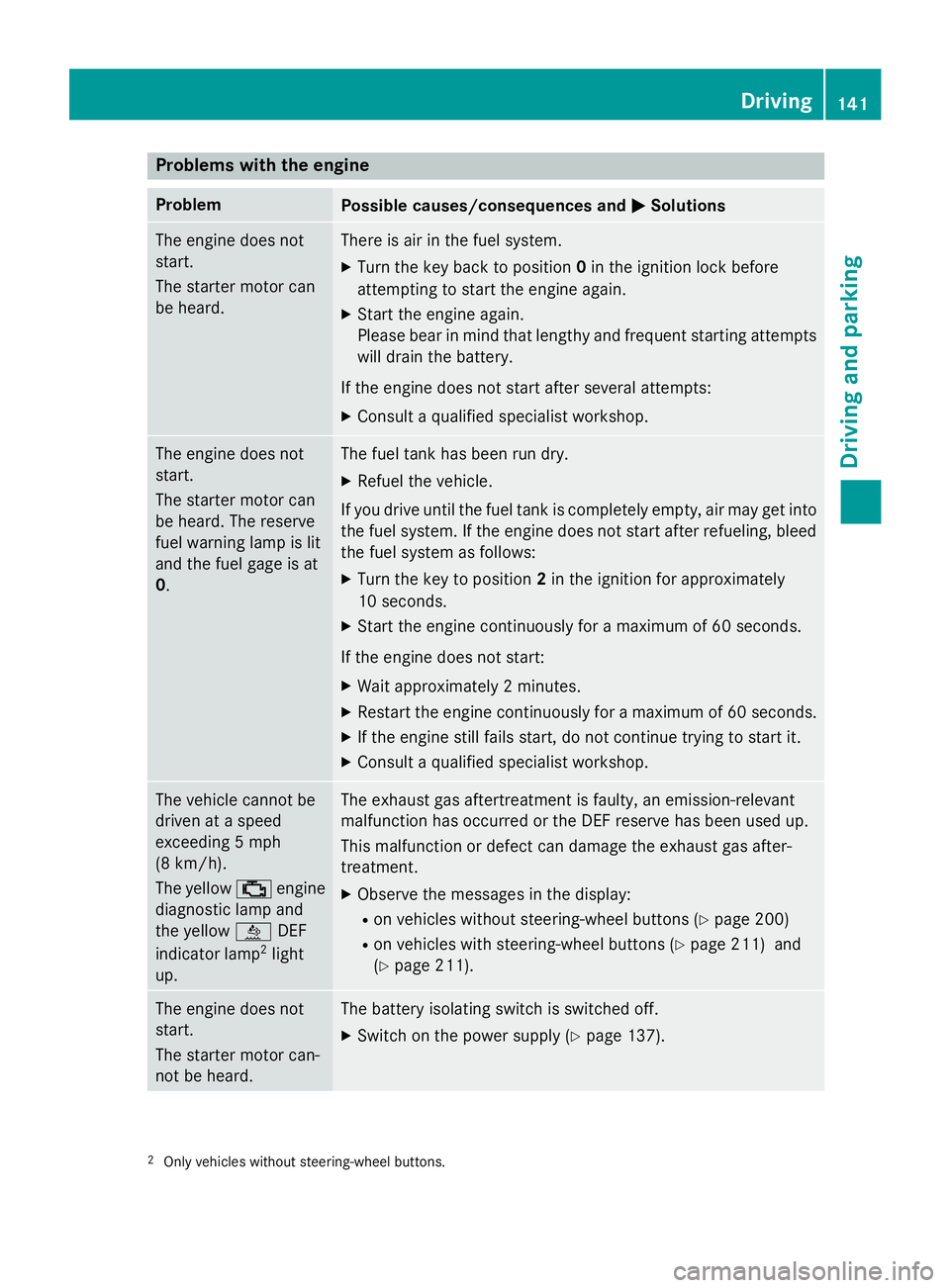
Problems with the engine
Problem
Possible causes/consequences and
0050
0050Solutions The engine does not
start.
The starter motor can
be heard. There is air in the fuel system.
X Turn the key back to position 0in the ignition lock before
attempting to start the engine again.
X Start the engine again.
Please bear in mind that lengthy and frequent starting attempts
will drain the battery.
If the engine does not start after several attempts:
X Consult a qualified specialist workshop. The engine does not
start.
The starter motor can
be heard. The reserve
fuel warning lamp is lit
and the fuel gage is at
0. The fuel tank has been run dry.
X Refuel the vehicle.
If you drive until the fuel tank is completely empty, air may get into
the fuel system. If the engine does not start after refueling, bleed the fuel system as follows:
X Turn the key to position 2in the ignition for approximately
10 seconds.
X Start the engine continuously for a maximum of 60 seconds.
If the engine does not start:
X Wait approximately 2 minutes.
X Restart the engine continuously for a maximum of 60 seconds.
X If the engine still fails start, do not continue trying to start it.
X Consult a qualified specialist workshop. The vehicle cannot be
driven at a speed
exceeding 5 mph
(8 km/h).
The yellow
00B9engine
diagnostic lamp and
the yellow 00E2DEF
indicator lamp 2
light
up. The exhaust gas aftertreatment is faulty, an emission-relevant
malfunction has occurred or the DEF reserve has been used up.
This malfunction or defect can damage the exhaust gas after-
treatment.
X Observe the messages in the display:
R on vehicles without steering-wheel buttons (Y page 200)
R on vehicles with steering-wheel buttons (Y page 211) and
(Y page 211). The engine does not
start.
The starter motor can-
not be heard. The battery isolating switch is switched off.
X Switch on the power supply (Y page 137).2
Only vehicles without steering-wheel buttons. Driving
141Driving and parking Z
Page 144 of 334
Problem
Possible causes/consequences and
0050
0050Solutions The engine does not
start.
The starter motor can-
not be heard. The on-board voltage is too low. The battery is too weak or dis-
charged.
X Jump-start the vehicle (Y page 276).
If the engine cannot be jump-started, the starter motor is faulty.
X Consult a qualified specialist workshop. The engine does not
start.
The starter motor can-
not be heard. The battery is discharged or faulty.
X Check the battery for damage.
X Charge the battery (Y page 263).Automatic transmission
Important safety notes
G
WARNING
If the engine speed is above the idling speed
and you engage transmission position Dor R,
the vehicle could pull away suddenly. There is a risk of an accident.
When engaging transmission position Dor R,
always firmly depress the brake pedal and do not simultaneously accelerate.
! Vehicles with automatic transmission
may roll only briefly in the neutral position
N. Prolonged rolling of the wheels, e.g.
when being towed, will result in transmis-
sion damage.
i Be sure to observe the instructions in the
"Tow-starting and towing away" section
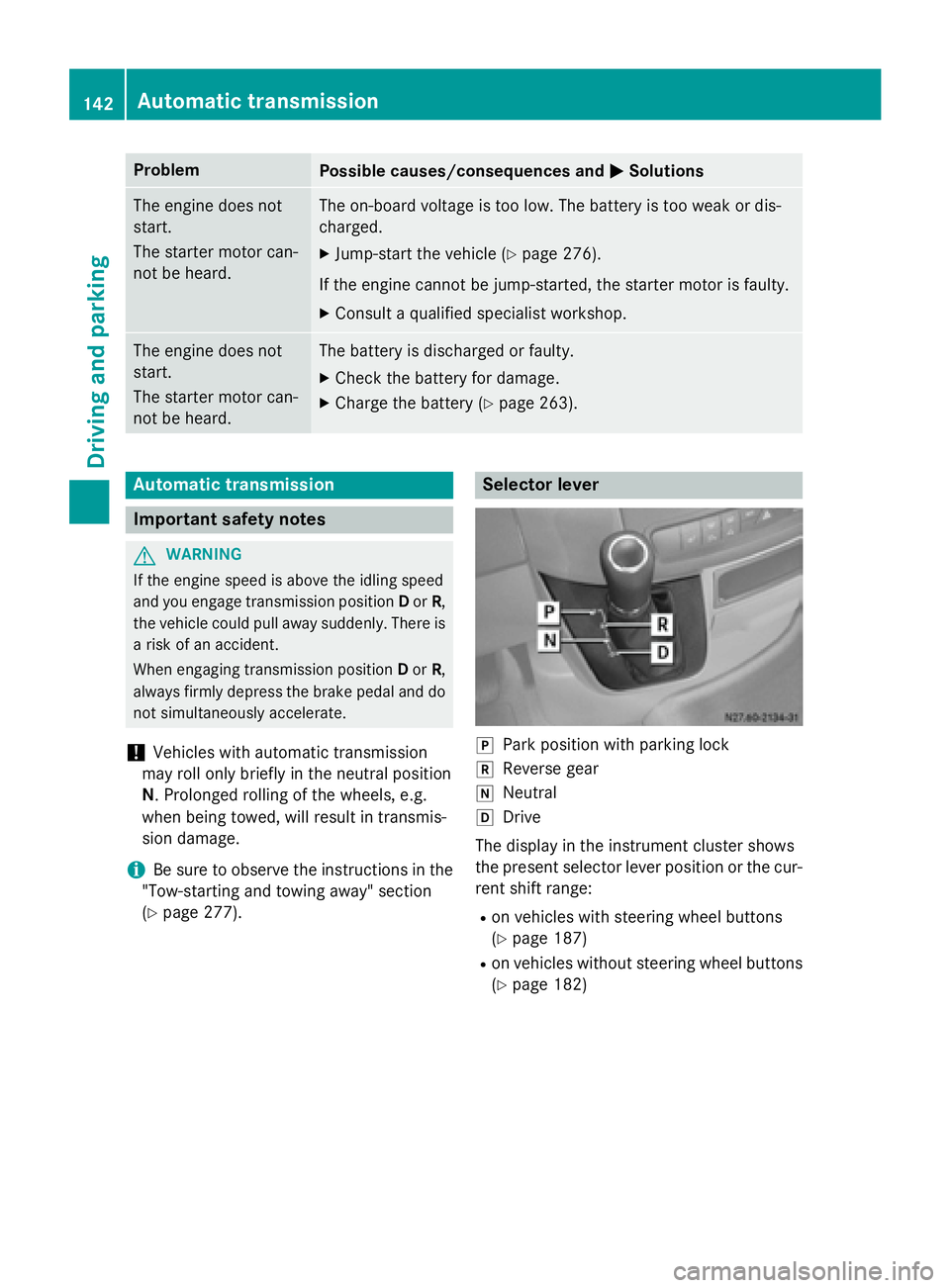
(Y page 277). Selector lever
005D
Park position with parking lock
005E Reverse gear
005C Neutral
005B Drive
The display in the instrument cluster shows
the present selector lever position or the cur-
rent shift range:
R on vehicles with steering wheel buttons
(Y page 187)
R on vehicles without steering wheel buttons
(Y page 182) 142
Automatic transmissionDriving and parking
Page 146 of 334
X
To derestrict the shift range: press and
hold the selector lever towards D+until D
D
appears in the display again.
The automatic transmission shifts from the
current shift range directly to D.
X To select the optimum shift range: press
and hold the selector lever to the left
towards D–.
The automatic transmission will shift to a
range which allows easy acceleration and
deceleration. To do this, the automatic
transmission will shift down one or more
gears. Shift ranges
When the selector lever is in position Dyou
can restrict or derestrict the shift range for
the automatic transmission.
X To derestrict/restrict the shift range:
press the selector lever briefly to the right
towards D+or left towards D–.
The display shows the selected shift range.
The automatic transmission shifts only as
far as the relevant gear.
i If the maximum engine speed for the
restricted shift range is reached and you
depress the accelerator pedal, the auto-
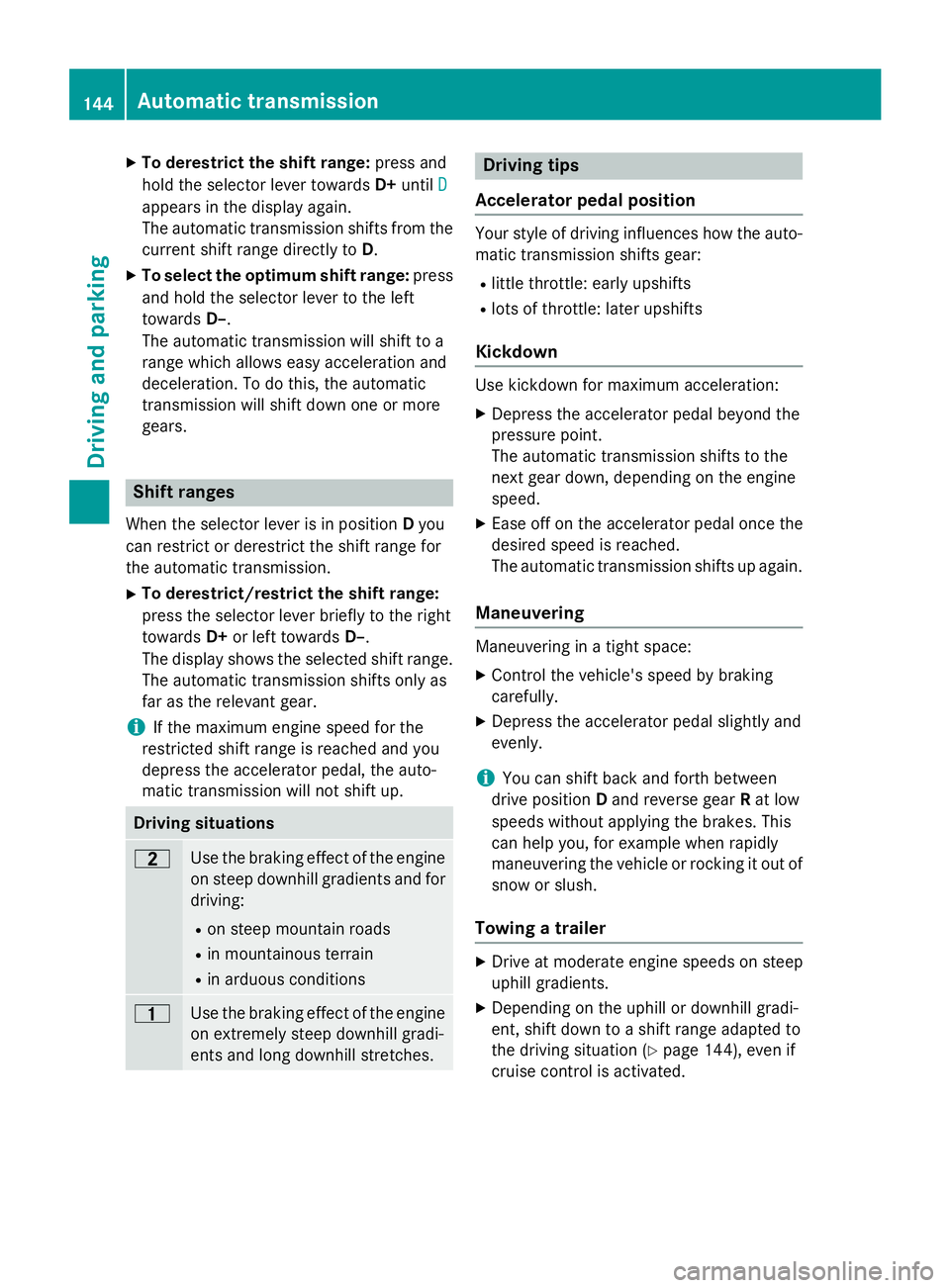
matic transmission will not shift up. Driving situations
0038
Use the braking effect of the engine
on steep downhill gradients and for
driving:
R on steep mountain roads
R in mountainous terrain
R in arduous conditions 0037
Use the braking effect of the engine
on extremely steep downhill gradi-
ents and long downhill stretches. Driving tips
Accelerator pedal position Your style of driving influences how the auto-
matic transmission shifts gear:
R little throttle: early upshifts
R lots of throttle: later upshifts
Kickdown Use kickdown for maximum acceleration:
X Depress the accelerator pedal beyond the
pressure point.
The automatic transmission shifts to the
next gear down, depending on the engine
speed.
X Ease off on the accelerator pedal once the
desired speed is reached.
The automatic transmission shifts up again.
Maneuvering Maneuvering in a tight space:
X Control the vehicle's speed by braking
carefully.
X Depress the accelerator pedal slightly and
evenly.
i You can shift back and forth between
drive position Dand reverse gear Rat low
speeds without applying the brakes. This
can help you, for example when rapidly
maneuvering the vehicle or rocking it out of snow or slush.
Towing a trailer X
Drive at moderate engine speeds on steep
uphill gradients.
X Depending on the uphill or downhill gradi-
ent, shift down to a shift range adapted to
the driving situation (Y page 144), even if
cruise control is activated. 144
Automatic transmissionDriving an
d parking
Page 154 of 334
call. If you choose to use the telephone while
driving, please use the hands-free device and
only use the telephone when road, weather
and traffic conditions permit.
Some jurisdictions prohibit the driver from
using a mobile phone while driving a vehicle.
Bear in mind that at a speed of just 30 mph
(approximately 50 km/h), your vehicle covers a distance of 44 feet (approximately 14 m)
every second. G
WARNING
If you switch off the ignition while driving,
safety-relevant functions are only available
with limitations, or not at all. This could affect, for example, the power steering and the brake
boosting effect. You will require considerably
more effort to steer and brake. There is a risk of an accident.
Do not switch off the ignition while driving.
! Always observe the ground clearance of
the vehicle and avoid obstacles. On vehi-
cles with a step, ground clearance is further
restricted. Obstacles can damage the vehi- cle.
If you must drive over obstacles, drive espe-
cially slowly and carefully. If necessary,
have another person direct you.
Drive sensibly – save fuel In order to save fuel, observe the following
tips:
X The tires should always be inflated to the
recommended tire pressure.
X Remove unnecessary loads.
X Remove roof carriers when they are not
needed.
X Warm up the engine at low engine speeds.
X Avoid frequent acceleration or braking.
X Have all maintenance work carried out as
indicated by the service intervals in the
Maintenance Booklet or by the service
interval display. Fuel consumption also increases when driv-
ing in cold weather, in stop-start traffic and in
mountainous terrain.
Overrun cutoff If you are in overrun mode and take your foot
off the accelerator pedal, the fuel supply is cut off when the engine speed is out of the idle
speed control range.
Drinking and driving G
WARNING
Drinking and driving and/or taking drugs and driving are very dangerous combinations.
Even a small amount of alcohol or drugs can
affect your reflexes, perceptions and judg-
ment.
The possibility of a serious or even fatal acci-
dent are greatly increased when you drink or
take drugs and drive.
Do not drink or take drugs and drive or allow
anyone to drive who has been drinking or tak-
ing drugs.
Emission control G
WARNING
Combustion engines emit poisonous exhaust
gases such as carbon monoxide. Inhaling
these exhaust gases leads to poisoning. There is a risk of fatal injury. Therefore never leave
the engine running in enclosed spaces with-
out sufficient ventilation.
Certain engine systems are designed to keep
the level of poisonous substances in exhaust fumes within legal limits.
These systems only work optimally if they are
maintained exactly in accordance with the
manufacturer's specifications. Any work on
the engine should therefore be carried out by qualified and authorized technicians at a
Sprinter dealer.
The engine settings must not be changed
under any circumstances. In addition, all spe- 152
Driving tipsDriving and parking
Page 159 of 334
G
WARNING
When driving off-road, your body is subject to forces from all directions, due to the uneven
surface. You could be thrown from your seat,
for instance. There is a risk of injury.
Always wear a seat belt, even when driving off-
road. G
WARNING
If you drive over obstacles or in ruts, the steer- ing wheel may jerk out of your grip, causing
injury to your hands.
Always hold the steering wheel firmly with
both hands. When driving over obstacles, you must expect steering forces to increase
briefly and suddenly. G
WARNING
Flammable material such as leaves, grass or
twigs may ignite if they come into contact with hot parts of the exhaust system. There is a risk of fire.
When driving off road or on unpaved roads,
check the vehicle's underside regularly. In
particular, remove parts of plants or other
flammable materials which have become
trapped. In the case of damage, contact a
qualified specialist workshop.
! When driving off-road or on unpaved sur-
faces, check the underside of the vehicle
and the wheels and tires at regular inter-
vals. In particular, remove any trapped for- eign objects, e.g. stones and branches.
Such foreign objects may:
R damage the chassis, the fuel tank or the
brake system
R cause imbalances and thus vibrations
R be flung out when you continue driving
If there is any damage, inform a qualified
specialist workshop.
When driving off-road and on construction
sites, sand, mud and water mixed with oil, for
example, may get into the brakes. This may
lead to a reduction in braking performance or total brake failure, also as a result of
increased wear. The braking characteristics
will vary depending on the material that has
got into the system. Clean the brakes after
driving off-road. If you then notice reduced
braking performance or hear scraping noises,
have the brake system checked at a qualified specialist workshop. Adjust your driving style
to the changed braking characteristics.
Driving off-road or on construction sites
increases the possibility of vehicle damage
which may in turn lead to the failure of certain assemblies and systems. Adapt your driving
style to the off-road driving conditions. Drive
carefully. Have any vehicle damage rectified
at a qualified specialist workshop as soon as
possible.
When driving on rough terrain, do not shift the transmission into the neutral position. You
could lose control when attempting to brake
the vehicle with the service brake. If your
vehicle cannot manage an uphill slope, drive
back down the slope in reverse gear.
When loading your vehicle for driving off-road or on a construction site, keep the vehicle's
center of gravity as low as possible.
Checklist before driving off-road X
Check the fuel and DEF levels (Y page 181)
and top up (Y page 148).
X Engine: check the oil level (Y page 250)
and add oil (Y page 252).
Before driving up or down steep gradients,
fill the oil to the maximum level.
i If you drive up or down steep gradients,
the 00B2 symbol may appear in the display.
The engine operating safety is not put at
risk if you have filled the engine oil to the
maximum level before the journey.
X Vehicle tool kit: check that the jack is
working (Y page 274).
X Make sure that a lug wrench (Y page 274),
wooden underlay for the jack, a robust tow Driving tips
157Driving and parking Z
Page 163 of 334
Problems with cruise control
Problem
Possible causes/consequences and
0050
0050Solutions On vehicles with steer-
ing wheel buttons, the
speed cannot be set
when cruise control is
activated. The display shows a high-priority message. Thus a change in speed
is not possible.
X Proceed as instructed by the message in the display.
X Deactivate cruise control COLLISION PREVENTION ASSIST
General notes COLLISION PREVENTION ASSIST comprises
the distance warning function and adaptive
Brake Assist.
Distance warning function Important safety notes
i Note the section on 'Important safety
notes' (Y page 57). G
WARNING
The distance warning function does not react:
R to people or animals
R to oncoming vehicles
R to crossing traffic
R when cornering
Thus, the distance warning function cannot
provide a warning in all critical situations.
There is a risk of an accident.
Always pay careful attention to the traffic sit-
uation and be ready to brake. G
WARNING
The distance warning function cannot always
clearly identify objects and complex traffic
situations.
In such cases, the distance warning function
may:
R give an unnecessary warning
R not give a warning
There is a risk of an accident. Always pay careful attention to the traffic sit-
uation and do not rely solely on the distance
warning function.
Operation
The distance warning function can help you to
minimize the risk of a front-end collision with
a vehicle ahead or reduce the effects of such a collision. If the distance warning function
detects that there is a risk of a collision, you
will be warned visually and acoustically. With-out your intervention, the distance warning
function cannot prevent a collision.
The distance warning function will issue a
warning at speeds of around 20 mph
(30 km/h) or more if:
R you approach a vehicle ahead of you very
quickly. You will then hear an intermittent
warning tone and the 00C7warning lamp in
the instrument cluster flashes.
X Brake immediately in order to increase the
distance from the vehicle in front.
or
X Take evasive action provided it is safe to do
so.
If you want the distance warning function to
assist you, the function must be activated and operational.
Due to the nature of the system, particularly
complicated driving conditions may cause thesystem to display an unnecessary warning.
With the help of the radar sensor system, the
distance warning function can detect obsta-
cles that are in the path of your vehicle for an
extended period of time. Driving systems
161Driving and parking Z