power steering MERCEDES-BENZ SPRINTER 2015 MY15 Operator’s Manual
[x] Cancel search | Manufacturer: MERCEDES-BENZ, Model Year: 2015, Model line: SPRINTER, Model: MERCEDES-BENZ SPRINTER 2015Pages: 334, PDF Size: 5.94 MB
Page 8 of 334
Warning lamp ................................. 218
Brakes
ABS .................................................. 57
Adaptive Brake Assist .................... 162
Applying the parking brake ............ 150
BAS .................................................. 59
Brake fluid (notes) .........................3 24
Checking brake fluid leve l.............. 254
Display messages .......................... 205
EBD .................................................. 59
Important safety notes .................. 154
Maintenance .................................. 218
Parking brake (notes) ..................... 155
Riding tips ...................................... 154
Breakdown
Fire extinguisher ............................ 276
First-aid kit .................................... 275
Jump-starting ................................. 276
Reflective safety jacket .................. 275
Vehicle tool kit ............................... 274
Warning lamp ................................. 275
Warning triangle ............................ 275
see Flat tire
see Towing away
Bulb
see Changing bulbs
Bulb failure indicator .......................... 92C
Car see Vehicle
Care
Access step in the bumpe r............ 269
Car wash ........................................ 265
Display ........................................... 270
Exterior lights ................................ 268
Interior ........................................... 270
Note s............................................. 265
Paint .............................................. 267
Plastic trim .................................... 270
Power washer ................................ 266
Rear view camera .......................... 269
Roof lining ...................................... 271
Seat belt ........................................ 271
Seat cove r..................................... 271
Selector lever ................................ 270
Sensors ......................................... 268 Sliding door ................................... 269
Steering wheel ............................... 270
Step (electrical) ............................. 269
Trim pieces .................................... 270
Washing by hand ........................... 266
Washing the engine ....................... 266
Wheels ........................................... 267
Windows ........................................ 267
Wiper blades .................................. 268
Cargo compartment
Activating/deactivating ventila-
tion ................................................ 133
Cargo compartment floor ................... 27
Cargo tie-down points and tie
downs
Important safety notes .................. 242
Cargo tie-down rings
Installing ........................................ 244
Permissible tensile load ................. 327
Carrier system
Ladder rack ................................... 245
CD player/CD changer ...................... 188
Cell phone
see Mobile phone
Center console overview .................... 37
Central locking
Automatic locking ............................ 71
Important safety notes .................... 71
Locking/unlocking (buttons) ........... 71
Locking/unlocking (SmartKey )........ 66
Locking/unlocking manually ............ 71
Central locking system
see Central locking
Changing bulbs
Additional indicators (roof) ............ 104
Backup lamp (Chassis Cab) ........... 104
Backup lamps ................................ 103
Bi-Xenon bulbs ................................. 99
Brake lamps ................................... 103
Brake lamps (Chassis Cab) ............ 104
Cornering lamps ............................ 101
Courtesy lights ............................... 105
Daytime running lamps (halogen
headlamps) .................................... 101
Display message ............................ 208
Front interior light .......................... 105
High-beam headlamp s................... 100
Interior light ................................... 105 6
Index
Page 12 of 334
E
EBD (electronic brake force distri-
bution)
Display message ............................ 206
Function/notes ................................ 59
Indicator lamps .............................. 218
Electrical closing assist ...................... 73
Electrical fuses
see Fuses
Electrical step
Cleaning ........................................ .269
Display message ............................ 216
Emergency release .......................... 74
Function .......................................... .74
Important safety notes .................... 73
Indicator lamp ................................ 227
Manual retraction ............................ 74
Obstacle detection ........................... 74
Electrical system
Battery main switch ....................... 137
Electronic brake force distribution
see EBD (electronic brake force
distribution)
Electronic Stability Program
see ESP ®
(Electronic Stability Program)
Emergency exit .................................... 60
Emergency exit window .....................60
Emergency Tensioning Devices
Activation ........................................ .49
Emissions control
Service and warranty information .... 28
Engine
ADR (working speed governor) ...... 172
Changing the power output ............ .25
Check Engine warning lamp .......... .224
Cleaning instructions ..................... 266
Engine number ............................... 317
Engine speed setting (working
mode) ............................................ 173
Irregular running ............................ 141
Jump-starting ................................. 276
Starting .......................................... 139
Starting problems .......................... 141
Switching off .................................. 150
Tow-starting (vehicle) ..................... 280
Engine electronics
Notes ............................................. 316 Problem (malfunction) ................... 141
Engine oil
Adding .......................................... .252
Additives ........................................ 323
Checking the oil level (on-board
computer) ...................................... 250
Checking the oil level using the
dipstick .......................................... 251
Display message ............................ 213
Filling capacity ............................... 323
Information about oil consump-
tion ................................................ 324
Mixing ............................................ 323
Notes about oil grades ................... 322
Oil change ...................................... 323
Oil level (note) ............................... 250
Viscosity ........................................ 322
Warning lamp ................................. 222
Engine speed setting (working
mode) ................................................. 172
Engine, jump-starting ....................... 276
Equipment/conversions ..................... 26
ESP ®
(Electronic Stability Pro-
gram)
Display message ............................ 207
Important safety information ........... 59
Indicator lamp ................................ 221
Warning lamp ................................. 218
Exhaust check ................................... 152
Exhaust gas aftertreatment
DEF level indicator ......................... 182
DEF reducing agent ....................... 320
Diesel Exhaust Fluid (DEF) ............. 320
Display messages (vehicles with
steering wheel buttons) ................. 211
Display messages (vehicles with-
out steering wheel buttons) ........... 200
Indicator lamp ....................... 221, 225
Malfunction ................................... .211
Refilling DEF .................................. 147
Exterior lighting
see Lights
Exterior mirrors
Adjusting ......................................... 89
Important safety notes .................... 89
Eyeglasses compartment ................. 23110
Index
Page 16 of 334
Off-road driving
Checklist after driving off-road ...... 158
Important safety notes .................. 156
Rules for driving off-road ............... 158
Oil
see Engine oil
On-board computer
Display message ............................1 97
Lighting submenu .......................... 192
On-board computer (vehicles with
steering wheel buttons)
Audio menu ................................... 187
Display message ............................ 184
Menu overview .............................. 186
Operating ....................................... 184
Operation menu ............................ .186
Settings menu ............................... 188
Standard displa y............................ 187
Telephone menu ............................ 196
Trip computer menu ...................... 195
On-board computer (vehicles with-
out steering wheel buttons)
Display message ............................ 198
General notes ................................ 182
Setting the clock ............................ 183
Standard display ............................ 182
Operating Instructions
Before the first journey .................... 22
Limited Warranty ............................. 22
Operating safety
Vehicle registration .......................... 28
Operating safety and vehicle
approval
Attachments and bodie s.................. 26
BlueTEC exhaust gas aftertreat-
ment ................................................ 25
Changing the engine power out-
put ................................................... 25
Correct use ...................................... 22
Declaration of conformity ................ 24
Equipment and conversions ............. 26
Important safety notes .................... 24
Information about body/equip-
ment mounting directives ................ 26
Notes on operating the vehicle ........ 24
Qualified specialist worksho p.......... 25
Registering your vehicl e................... 25 Operating system
see On-board computer
Operator's Manual
General notes .................................. 22
Vehicle equipment ........................... 22
Outline lamp
Replacing bulb s............................. 105
Outside temperature display ........... 181
Overhead control panel ...................... 38
Overrevving range ............................. 181
Overrun cutoff ................................... 152 P
Paintwork (cleaning instructions) ... 267
Paper holder ...................................... 233
Parking ............................................... 149
Important safety notes .................. 149
Parking brake ................................ 150
Wheel chock .................................. 151
see PARKTRONIC
Parking aid
see PARKTRONIC
Parking assistance
see PARKTRONIC
Parking brake
Display message ............................ 207
Notes/function .............................. 150
Parking lamps
Replacing bulb s............................. 100
PARKTRONIC
Deactivating/activating ................. 169
Driving system ............................... 167
Function/note s............................. 167
Important safety notes .................. 167
Problem (malfunction) ................... 171
Range of the sensors ..................... 168
Roll-back warning .......................... 169
Trailer towing ................................. 170
Warning display ............................. 169
Partition sliding door
Important safety notes .................... 77
Opening/closing .............................. 77
Passenger compartment air-condi-
tioning system
see Climate control
Passenger compartment heating
see Climate control 14
Index
Page 17 of 334
Perimeter lamp
Replacing bulbs ............................. 104
Pets in the vehicle ...............................56
Plastic trim (cleaning instruc-
tions) .................................................. 270
Power supply
Battery isolating switch ................. 137
Switching off ..................................1 37
Switching on .................................. 137
Power take-off
Engine speed setting ..................... 172
Power washers .................................. 266
Power windows
see Side windows
Preparing for a journey
Checks in the vehicle ..................... 138
Visual check of the vehicle exte-
rior ................................................. 138
Protection of the environment
General notes .................................. 23
Pulling away ...................................... 140 Q
Qualified specialist workshop ........... 25R
Radiator cover ..................................... 27
Radio
Changing stations (vehicles with
steering wheel buttons) ................. 187
see separate operating instructions
Radio-wave reception/transmis-
sion in the vehicle
Declaration of conformity ................ 24
Rain and light sensor
Setting the sensitivity (vehicles
with steering wheel buttons) ......... 193
Windshield wiper ........................... 107
Range (vehicles with steering
wheel buttons) .................................. 195
Rear bench seat
Installing/removing (Passenger
Van) ................................................. 85
Stowage compartment (crewcab) .. 233 Rear compartment
Activating/deactivating climate
control .......................................... .116
Setting the air vents ..................... .121
Rear door
Child-proof locks .............................. 56
Important safety notes .................... 75
Opening/closing .............................. 75
Rear fog lamp
Replacing bulbs ............................ .103
Switching on/off .............................. 93
Rear fog lamp (Chassis Cab)
Replacing bulbs ............................ .104
Rear interior light
Replacing bulbs ............................ .106
Rear lamps
see Lights
Rear rack
Notes ............................................. 245
Rear view camera
Cleaning instructions ..................... 269
Important safety notes .................. 171
Switching on .................................. 171
Rear window defroster
Problem (malfunction) ................... 119
Switching on/off ........................... 119
Rear window wiper ........................... 108
Switching on/off ........................... 108
Rear-compartment air-condition-
ing system
see Climate control
Rear-compartment heating
see Climate control
Rear-view mirror
Anti-glare mode ............................... 89
Refilling
DEF filler neck ............................... 148
Important safety notes (Diesel
Exhaust Fluid – DEF) ..................... .147
Refilling procedure (Diesel
Exhaust Fluid – DEF) ..................... .148
Refrigerant ......................................... 326
Refueling
Fuel filler fla p................................. 146
Fuel gauge ..................................... 181
Important safety notes (fuel )......... 145
Refueling procedure (fuel )............. 146
see Fuel Index
15
Page 18 of 334
Releasing the parking lock man-
ually (automatic transmission)
........ 145
Remote control
Changing the operating duration
(auxiliary heating) .......................... 126
Replacing the battery (auxiliary
heating ) ........................................ 130
Switching on/off (auxiliary heat-
ing) ................................................ 126
Synchronizing (auxiliary heating) ... 126
Replacing bulbs
Important safety notes .................... 99
Replacing the battery (auxiliary
heating remote control) .................... 130
Restraint system
Introduction ..................................... 42
Warning lamp (function) .......... 42, 222
Reverse warning feature .................. 140
Roof carrier
Maximum payloa d.......................... 328
Notes ............................................. 245
Roof load (roof carrier) ..................... 328S
Safety Child restraint systems .................... 52
Children in the vehicle ..................... 51
Safety system
see Driving safety systems
Seat belts
Adjusting the height ......................... 45
Cleaning ......................................... 271
Correct usage .................................. 45
Display message ............................ 207
Fastening ......................................... 45
Important safety guidelines ............. 44
Introduction ..................................... 43
Releasing ......................................... 46
Warning lamp ................................. 227
Warning lamp (function) ................... 46
Seat heating ......................................... 87
Seats
Adjusting lumbar support ................ 83
Adjusting the co-driver's sea t.......... 83
Adjusting the head restraint ............ 86
Armrest ............................................ 87
Cleaning the cover ......................... 271 Correct driver's seat position ........... 82
Folding seat ..................................... 85
Important safety notes .................... 82
Rear bench seat ............................... 85
Seat heating .................................... 87
Setting the driver's seat ................... 83
Swivel seat ....................................... 84
Twin co-driver's seat ........................ 85
Securing loads
Important safety notes .................. 242
Selector lever
Cleaning ......................................... 270
Sensors (cleaning instructions) ....... 268
Service center
see Qualified specialist workshop
Service interval display
Calling up the service due date ...... 258
Exceeding a service due date ........ 258
Notes ............................................. 257
Service due date (automatic dis-
play) ............................................... 257
Service products
Brake fluid ..................................... 324
Coolant (engine) ............................ 325
Diesel ............................................ 318
Diesel Exhaust Fluid (DEF) ............. 320
Engine oil ....................................... 322
Fuel ................................................ 318
Important safety notes .................. 318
Power steering fluid ....................... 324
Refrigerant ..................................... 326
Transmission oil ............................. 324
Washer fluid ................................... 326
Setting the air distribution ............... 117
Setting the airflow ............................ 118
Setting the clock
Vehicles with steering wheel but-
tons ............................................... 191
Vehicles without steering wheel
buttons .......................................... 183
Settings
Resetting all (vehicles with steer-
ing wheel buttons) ......................... 188
Resetting submenus (vehicles
with steering wheel buttons) ......... 189
Short journeys (diesel particle fil-
ter) ...................................................... 153 16
Index
Page 60 of 334
Braking
If ABS intervenes when braking, you will feel a
pulsating in the brake pedal.
The pulsating brake pedal can be an indica-
tion of hazardous road conditions and func-
tions as a reminder to take extra care while
driving.
X If ABS intervenes: continue to depress the
brake pedal with force until the braking sit-
uation is over.
X To make a full brake application:
depress the brake pedal with full force. ASR (acceleration skid control)
General notes Important safety notes
Observe the important safety guidelines for
the driving safety system (Y
page 57).
ASR can neither reduce the risk of an accident nor suspend the laws of physics if the driver
does not pay attention when pulling away or
accelerating. ASR is only an aid. Always adapt
your driving style to suit the prevailing road
and weather conditions.
Vehicles without steering wheel buttons: if
ASR is malfunctioning, the 003Dindicator
lamp lights up while the engine is running and the engine power may be reduced
(Y page 218).
ASR significantly improves traction, i.e. the
transmission of power from the tires to the
road surface, and thus increases the vehicle's driving stability. If the driving wheels start to
spin, ASR brakes individual drive wheels and
limits the engine torque. ASR thus signifi-
cantly assists you when pulling away and
accelerating, especially on wet or slippery
roads.
If traction on the road surface is not sufficient,
even ASR will not allow you to pull away with- out difficulty. The type of tires and total
weight of the vehicle as well as the gradient of
the road also play a crucial role. If ASR intervenes, the
0072warning lamp in
the instrument cluster flashes.
Activating/deactivating ASR G
WARNING
If deactivated, ASR will not attempt to stabi-
lize the vehicle during pulling away and accel- eration. There is an increased risk of skiddingand of an accident.
Only deactivate ASR in the situations descri-
bed in the following.
! If you deactivate ASR, ESP ®
will still inter-
vene to stabilize the vehicle. Frequent brak-
ing automatically triggered by ESP ®
can
damage the brake system.
For this reason, deactivate ASR only briefly and when absolutely necessary. When ESP
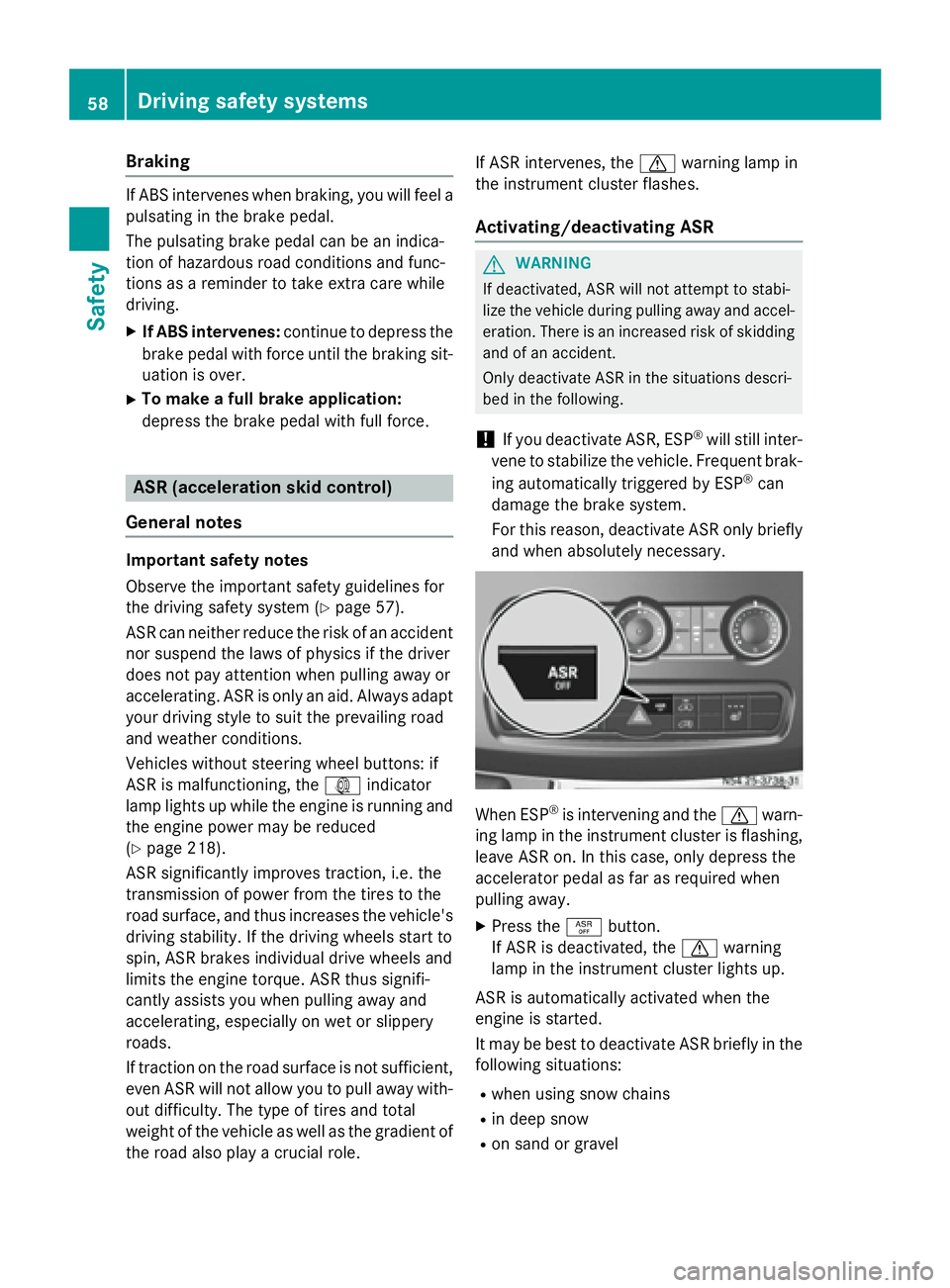
®
is intervening and the 0072warn-
ing lamp in the instrument cluster is flashing,
leave ASR on. In this case, only depress the
accelerator pedal as far as required when
pulling away.
X Press the 00E3button.
If ASR is deactivated, the 0072warning
lamp in the instrument cluster lights up.
ASR is automatically activated when the
engine is started.
It may be best to deactivate ASR briefly in the
following situations:
R when using snow chains
R in deep snow
R on sand or gravel 58
Driving safety systemsSafety
Page 61 of 334
If you deactivate ASR:
R engine torque is not limited and the drive
wheels are able to spin. The spinning
wheels will then achieve a cutting effect for
better traction.
R traction control remains active through
brake intervention. If a drive wheel attains
its tire traction limit because one side of the
road is slippery, for example, that wheel is
braked. The traction is then increased in
this situation.
R active brake intervention by ESP ®
to
increase driving stability remains active.
The 0072 warning lamp in the instrument
cluster flashes when ESP ®
is intervening. BAS (Brake Assist System)
G
WARNING
If BAS is malfunctioning, the braking distance
in an emergency braking situation is
increased. There is a risk of an accident.
In an emergency braking situation, depress
the brake pedal with full force. ABS prevents
the wheels from locking.
Vehicles without steering wheel buttons: if
the BAS driving safety system is malfunction-
ing, the 003Dwarning lamp lights up while the
engine is running (Y page 218).
BAS operates in emergency braking situa-
tions. If you depress the brake quickly, BAS
automatically increases the brake pressure,
thereby reducing the stopping distance.
The brakes will function as usual once you
release the brake pedal. BAS is deactivated. EBD (electronic brake force distribu-
tion) G
WARNING
If EBD is malfunctioning, the rear wheels can
lock, e.g. under full braking. This increases the risk of skidding and an accident. You should therefore adapt your driving style
to the different handling characteristics. Have
the brake system checked at a qualified spe-
cialist workshop.
EBD monitors and controls the brake pres-
sure to the rear wheels. This enables EBD to
improve handling during braking.
Observe the information on warning and indi- cator lamps (Y page 218). ESP
®
(Electronic Stability Program)
Important safety notes Observe the important safety guidelines for
the driving safety system (Y
page 57). G
WARNING
If ESP ®
is malfunctioning it will not provide
any vehicle stabilization. There is an increased
risk of skidding or of an accident.
Exercise caution when continuing to drive.
Have ESP ®
checked at a qualified specialist
workshop.
! Do not run the vehicle on a roller dyna-
mometer (e.g. for performance tests). If
you must operate the vehicle on a roller
dynamometer, please consult a qualified
specialist workshop in advance. You could
otherwise damage the drive train or the
brake system.
If ESP ®
is malfunctioning, the 0089warning
lamp lights up while the engine is running and
the engine power may be reduced
(Y page 218).
Only use wheels with the recommended tire
sizes. Only then will ESP ®
function properly.
Crosswind Assist Crosswind Assist does not work if ESP
®
is
deactivated or disabled because of a mal-
function. Driving safety systems
59Safety Z
Page 138 of 334
Useful information
This Operator's Manual describes all models
as well as standard and optional equipment of your vehicle that were available at the time of going to print. Country-specific variations are
possible. Note that your vehicle may not be
equipped with all of the described functions.
This also applies to systems and functions
relevant to safety.
Read the information on qualified specialist
workshops (Y page 25). Breaking-in notes
The first 1000 miles (1500 km)
New or replaced brake pads and brake disks
only reach their optimum braking effect after
a few 100 miles (a few 100 kilometers). Until then, compensate for this by applying greaterforce to the brake pedal.
For the service life and economy of your vehi-
cle it is crucial that you break in the engine
with due care.
R Therefore, protect the engine for the first
1000 miles (1500 km) by driving at varying vehicle and engine speeds.
R Avoid overstraining the vehicle and high
engine speeds during this period, e.g. driv-
ing at full throttle. Do not exceed 00C6of the
maximum speed for each gear.
R Do not change down a gear manually in
order to brake.
R Try to avoid depressing the accelerator
pedal beyond the point of resistance (kick-
down).
R The shift ranges 3,2or 1should only be
engaged when driving slowly, e.g. when
driving in mountainous terrain.
After 1000 miles (1500 km), you can increase
the engine speed gradually and accelerate
the vehicle to full speed.
i You should also observe these notes on
breaking-in if the engine or parts of the drive train on your vehicle have been
replaced. Driving
Important safety notes
G
WARNING
If you switch off the ignition while driving,
safety-relevant functions are only available
with limitations, or not at all. This could affect, for example, the power steering and the brake
boosting effect. You will require considerably
more effort to steer and brake. There is a risk of an accident.
Do not switch off the ignition while driving. G
WARNING
If the parking brake has not been fully
released when driving, the parking brake can:
R overheat and cause a fire
R lose its hold function.
There is a risk of fire and an accident. Release
the parking brake fully before driving off.
If you park the vehicle for more than
three weeks:
R connect the batteries to a trickle charger or
R disconnect the vehicle's starter battery or
R switch off the electrical system using the
battery main switch (Y page 137) and
R disconnect the vehicle's auxiliary battery
Otherwise, you need to check the battery's
condition of charge every three weeks, since standby power consumption can drain the
battery. If the battery voltage is lower than
12.2 V, the battery must be charged. Other-
wise, the battery may be damaged by exhaus-
tive discharging.
Be sure to observe the notes on disconnect-
ing and charging the batteries under "Battery"
(Y page 258). You can obtain information
about trickle chargers from a qualified spe-
cialist workshop. 136
DrivingDriving and parking
Page 140 of 334
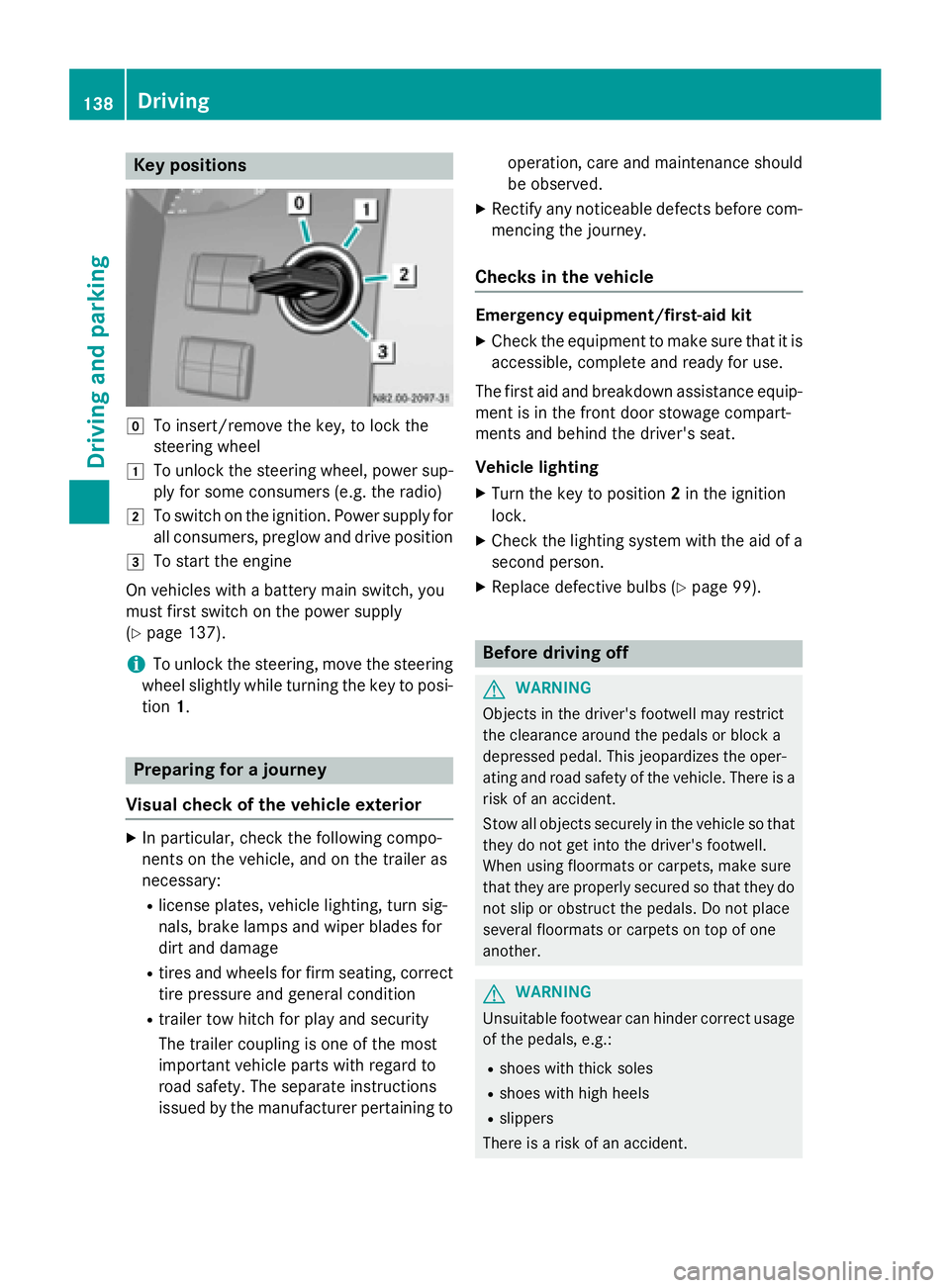
Key positions
005A
To insert/remove the key, to lock the
steering wheel
0047 To unlock the steering wheel, power sup-
ply for some consumers (e.g. the radio)
0048 To switch on the ignition. Power supply for
all consumers, preglow and drive position
0049 To start the engine
On vehicles with a battery main switch, you
must first switch on the power supply
(Y page 137).
i To unlock the steering, move the steering
wheel slightly while turning the key to posi- tion 1. Preparing for a journey
Visual check of the vehicle exterior X
In particular, check the following compo-
nents on the vehicle, and on the trailer as
necessary:
R license plates, vehicle lighting, turn sig-
nals, brake lamps and wiper blades for
dirt and damage
R tires and wheels for firm seating, correct
tire pressure and general condition
R trailer tow hitch for play and security
The trailer coupling is one of the most
important vehicle parts with regard to
road safety. The separate instructions
issued by the manufacturer pertaining to operation, care and maintenance should
be observed.
X Rectify any noticeable defects before com-
mencing the journey.
Checks in the vehicle Emergency equipment/first-aid kit
X Check the equipment to make sure that it is
accessible, complete and ready for use.
The first aid and breakdown assistance equip-
ment is in the front door stowage compart-
ments and behind the driver's seat.
Vehicle lighting
X Turn the key to position 2in the ignition
lock.
X Check the lighting system with the aid of a
second person.
X Replace defective bulbs (Y page 99). Before driving off
G
WARNING
Objects in the driver's footwell may restrict
the clearance around the pedals or block a
depressed pedal. This jeopardizes the oper-
ating and road safety of the vehicle. There is a risk of an accident.
Stow all objects securely in the vehicle so that
they do not get into the driver's footwell.
When using floormats or carpets, make sure
that they are properly secured so that they do not slip or obstruct the pedals. Do not place
several floormats or carpets on top of one
another. G
WARNING
Unsuitable footwear can hinder correct usage of the pedals, e.g.:
R shoes with thick soles
R shoes with high heels
R slippers
There is a risk of an accident. 138
DrivingDriving and pa
rking
Page 143 of 334
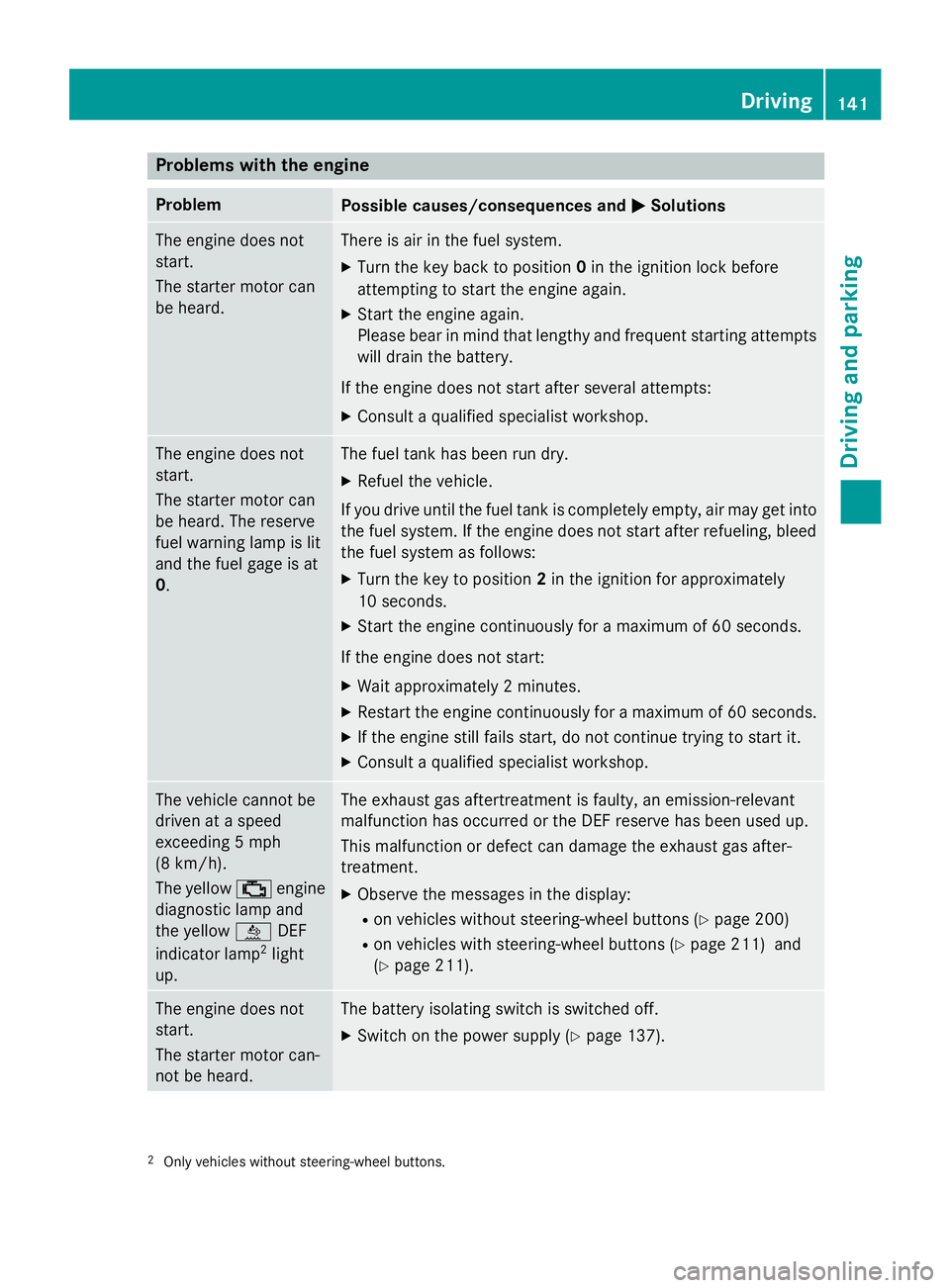
Problems with the engine
Problem
Possible causes/consequences and
0050
0050Solutions The engine does not
start.
The starter motor can
be heard. There is air in the fuel system.
X Turn the key back to position 0in the ignition lock before
attempting to start the engine again.
X Start the engine again.
Please bear in mind that lengthy and frequent starting attempts
will drain the battery.
If the engine does not start after several attempts:
X Consult a qualified specialist workshop. The engine does not
start.
The starter motor can
be heard. The reserve
fuel warning lamp is lit
and the fuel gage is at
0. The fuel tank has been run dry.
X Refuel the vehicle.
If you drive until the fuel tank is completely empty, air may get into
the fuel system. If the engine does not start after refueling, bleed the fuel system as follows:
X Turn the key to position 2in the ignition for approximately
10 seconds.
X Start the engine continuously for a maximum of 60 seconds.
If the engine does not start:
X Wait approximately 2 minutes.
X Restart the engine continuously for a maximum of 60 seconds.
X If the engine still fails start, do not continue trying to start it.
X Consult a qualified specialist workshop. The vehicle cannot be
driven at a speed
exceeding 5 mph
(8 km/h).
The yellow
00B9engine
diagnostic lamp and
the yellow 00E2DEF
indicator lamp 2
light
up. The exhaust gas aftertreatment is faulty, an emission-relevant
malfunction has occurred or the DEF reserve has been used up.
This malfunction or defect can damage the exhaust gas after-
treatment.
X Observe the messages in the display:
R on vehicles without steering-wheel buttons (Y page 200)
R on vehicles with steering-wheel buttons (Y page 211) and
(Y page 211). The engine does not
start.
The starter motor can-
not be heard. The battery isolating switch is switched off.
X Switch on the power supply (Y page 137).2
Only vehicles without steering-wheel buttons. Driving
141Driving and parking Z