light MERCEDES-BENZ SPRINTER 2016 MY16 Operator’s Manual
[x] Cancel search | Manufacturer: MERCEDES-BENZ, Model Year: 2016, Model line: SPRINTER, Model: MERCEDES-BENZ SPRINTER 2016Pages: 290, PDF Size: 6.44 MB
Page 166 of 290
Using thef,g,4or9 adjustment buttons,
you can select the following functions:
RCalling up the service due date
(Ypage 226)
RChecking the oil level (Ypage 220)
RChecking the DEF supply (Ypage 162)
RPreselecting/setting the auxiliary heating
switch-on time (Ypage 108)
RTire pressure monitor (Ypage 253)
RSetting the time (Ypage 164)
RActivating/deactivating Highbeam Assist
(Ypage 171)
RSetting the daytime running lamps
(Ypage 79)
Setting the time
XTurn the key to position 2in the ignition lock.
XPress the 4menu button repeatedly until the
hours figure flashes.
XPress the forg button to set the hour.
XPress the 9reset button.
The minute display flashes.
XPress the forg button to set the minute.
iIf you keep the forg button pressed, the
value will change continuously.
Activating/deactivating Highbeam
Assist
XTurn the key to position 2in the ignition lock.
XPress the 4menu button repeatedly until the
_ indicator lamp flashes and the onorOFFmessage appears in the display.
XUse the forg button to switch Highbeam
Assist on/off.
Switching the daytime running lamps
on/off
If you switch the daytime running lamps on, the
daytime running lamps will automatically light
up when the engine is running.
For safety reasons, it is only possible to change
this setting when the vehicle is stationary. The
factory setting is on
in countries in which day-
time running lamp mode or daytime running
lamps are mandatory.
XTurn the key to position 2in the ignition lock.
XPress the 4menu button repeatedly until the
L indicator lamp flashes and the onorOFFmessage appears in the display.
XPress the forg button to activate or deac-
tivate the daytime running lamps.
iUSA only:
If you turn the light switch to TorL,
the corresponding light switches on. If you
turn the light switch to Ã, the daytime
running lamps remain switched on.
Canada only:
If you turn the light switch to L, the low-
beam headlamps switch on. If you turn the
light switch to TorÃ, the daytime run-
ning lamps remain switched on.
On-board computer (vehicles with
steering wheel buttons)
Operating the on-board computer
Overview
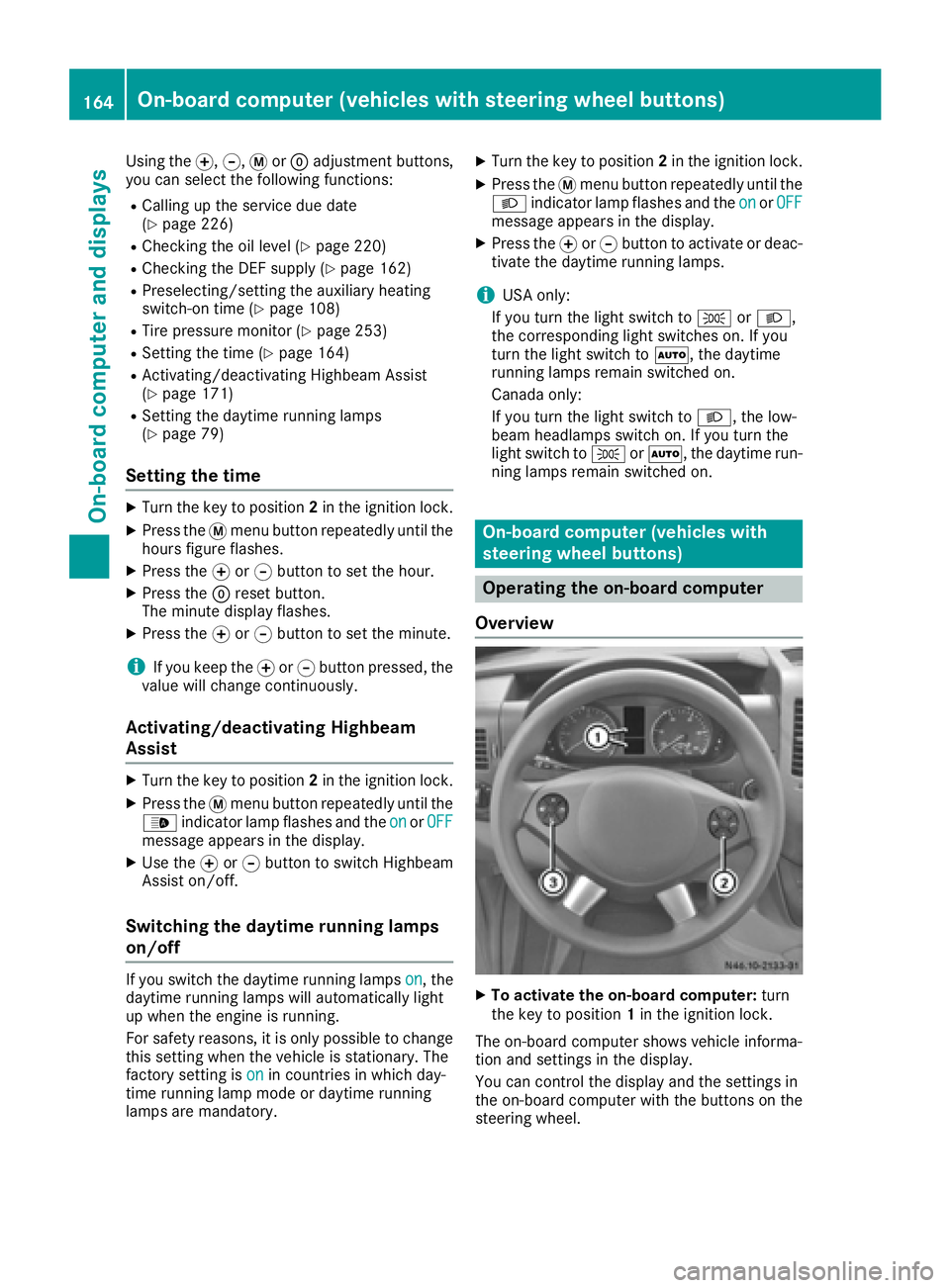
XTo activate the on-board computer: turn
the key to position 1in the ignition lock.
The on-board computer shows vehicle informa-
tion and settings in the display.
You can control the display and the settings in
the on-board computer with the buttons on the
steering wheel.
164On-board computer (vehicles with steering wheel buttons)
On-board computer and displays
Page 170 of 290
Operating the CD player
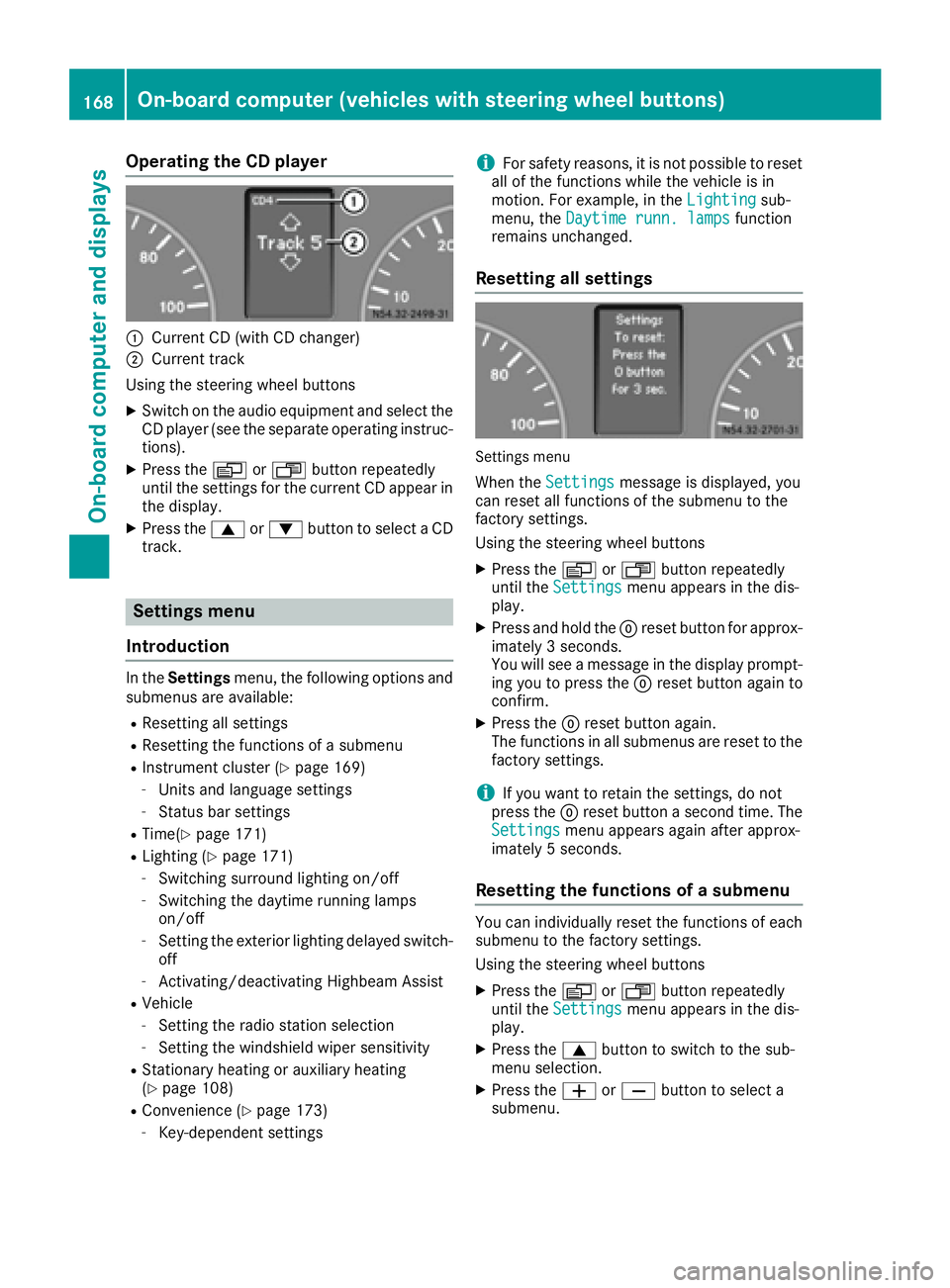
:Current CD (with CD changer)
;Current track
Using the steering wheel buttons
XSwitch on the audio equipment and select the
CD player (see the separate operating instruc-
tions).
XPress the VorU button repeatedly
until the settings for the current CD appear in
the display.
XPress the 9or: button to select a CD
track.
Settings menu
Introduction
In the Settings menu, the following options and
submenus are available:
RResetting all settings
RResetting the functions of a submenu
RInstrument cluster (Ypage 169)
-Units and language settings
-Status bar settings
RTime(Ypage 171)
RLighting (Ypage 171)
-Switching surround lighting on/off
-Switching the daytime running lamps
on/off
-Setting the exterior lighting delayed switch-
off
-Activating/deactivating Highbeam Assist
RVehicle
-Setting the radio station selection
-Setting the windshield wiper sensitivity
RStationary heating or auxiliary heating
(Ypage 108)
RConvenience (Ypage 173)
-Key-dependent settings
iFor safety reasons, it is not possible to reset
all of the functions while the vehicle is in
motion. For example, in the Lighting
sub-
menu, the Daytime runn. lampsfunction
remains unchanged.
Resetting all settings
Settings menu
When the Settingsmessage is displayed, you
can reset all functions of the submenu to the
factory settings.
Using the steering wheel buttons
XPress the VorU button repeatedly
until the Settingsmenu appears in the dis-
play.
XPress and hold the 9reset button for approx-
imately 3 seconds.
You will see a message in the display prompt-
ing you to press the 9reset button again to
confirm.
XPress the 9reset button again.
The functions in all submenus are reset to the
factory settings.
iIf you want to retain the settings, do not
press the 9reset button a second time. The
Settings
menu appears again after approx-
imately 5 seconds.
Resetting the functions of a submenu
You can individually reset the functions of each
submenu to the factory settings.
Using the steering wheel buttons
XPress the VorU button repeatedly
until the Settingsmenu appears in the dis-
play.
XPress the 9button to switch to the sub-
menu selection.
XPress the WorX button to select a
submenu.
168On-board computer (vehicles with steering wheel buttons)
On-board computer and displays
Page 173 of 290
Clock/Date submenu
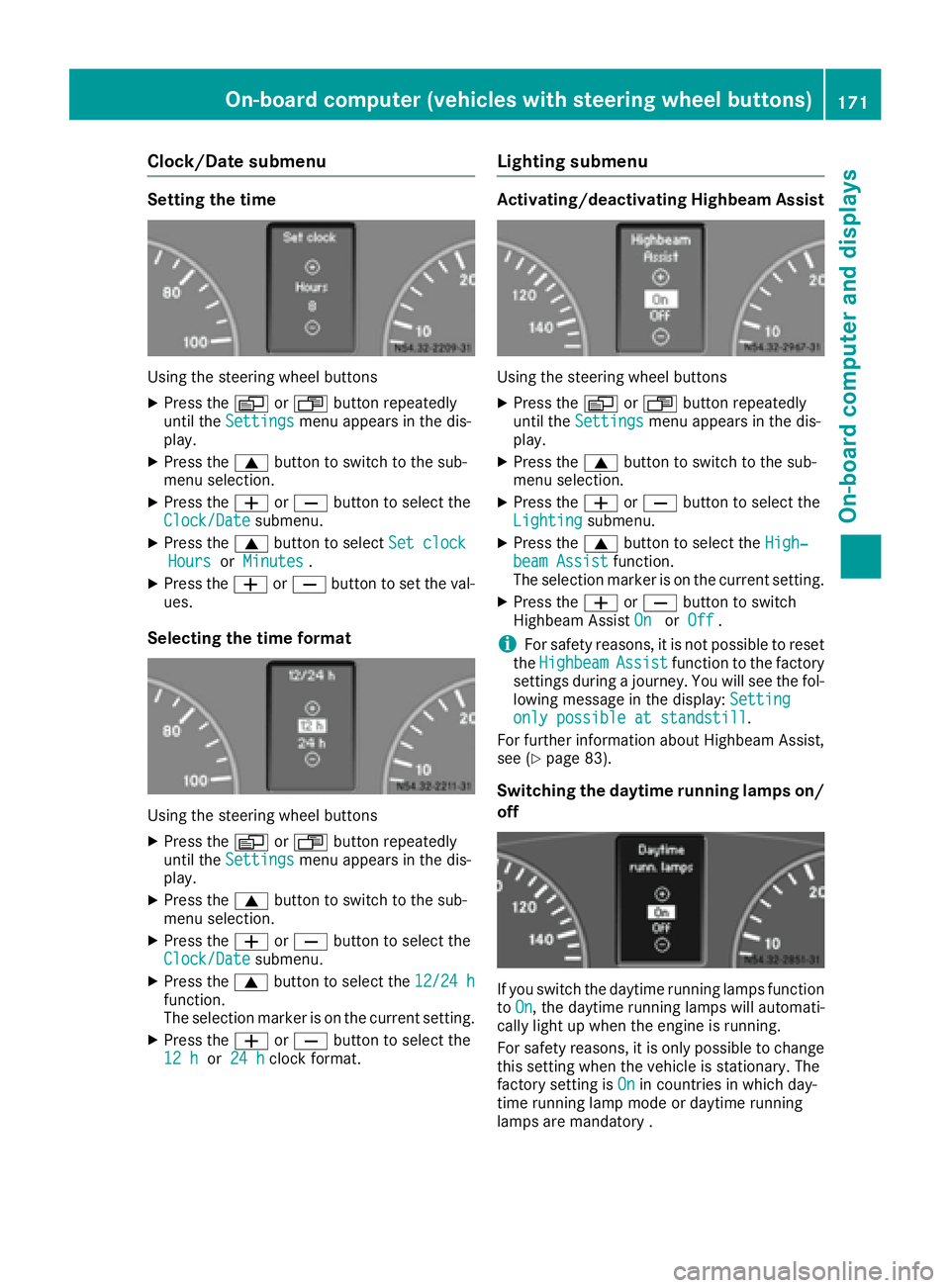
Setting the time
Using the steering wheel buttons
XPress theVorU button repeatedly
until the Settingsmenu appears in the dis-
play.
XPress the 9button to switch to the sub-
menu selection.
XPress the WorX button to select the
Clock/Datesubmenu.
XPress the 9button to select Set clockHoursorMinutes.
XPress the WorX button to set the val-
ues.
Selecting the time format
Using the steering wheel buttons
XPress the VorU button repeatedly
until the Settingsmenu appears in the dis-
play.
XPress the 9button to switch to the sub-
menu selection.
XPress the WorX button to select the
Clock/Datesubmenu.
XPress the 9button to select the 12/24 hfunction.
The selection marker is on the current setting.
XPress theWorX button to select the
12 hor 24 hclock format.
Lighting submenu
Activating/deactivating Highbeam Assist
Using the steering wheel buttons
XPress the VorU button repeatedly
until the Settingsmenu appears in the dis-
play.
XPress the 9button to switch to the sub-
menu selection.
XPress the WorX button to select the
Lightingsubmenu.
XPress the 9button to select the High‐beam Assistfunction.
The selection marker is on the current setting.
XPress the WorX button to switch
Highbeam Assist OnorOff.
iFor safety reasons, it is not possible to reset
the HighbeamAssistfunction to the factory
settings during a journey. You will see the fol-
lowing message in the display: Setting
only possible at standstill.
For further information about Highbeam Assist,
see (
Ypage 83).
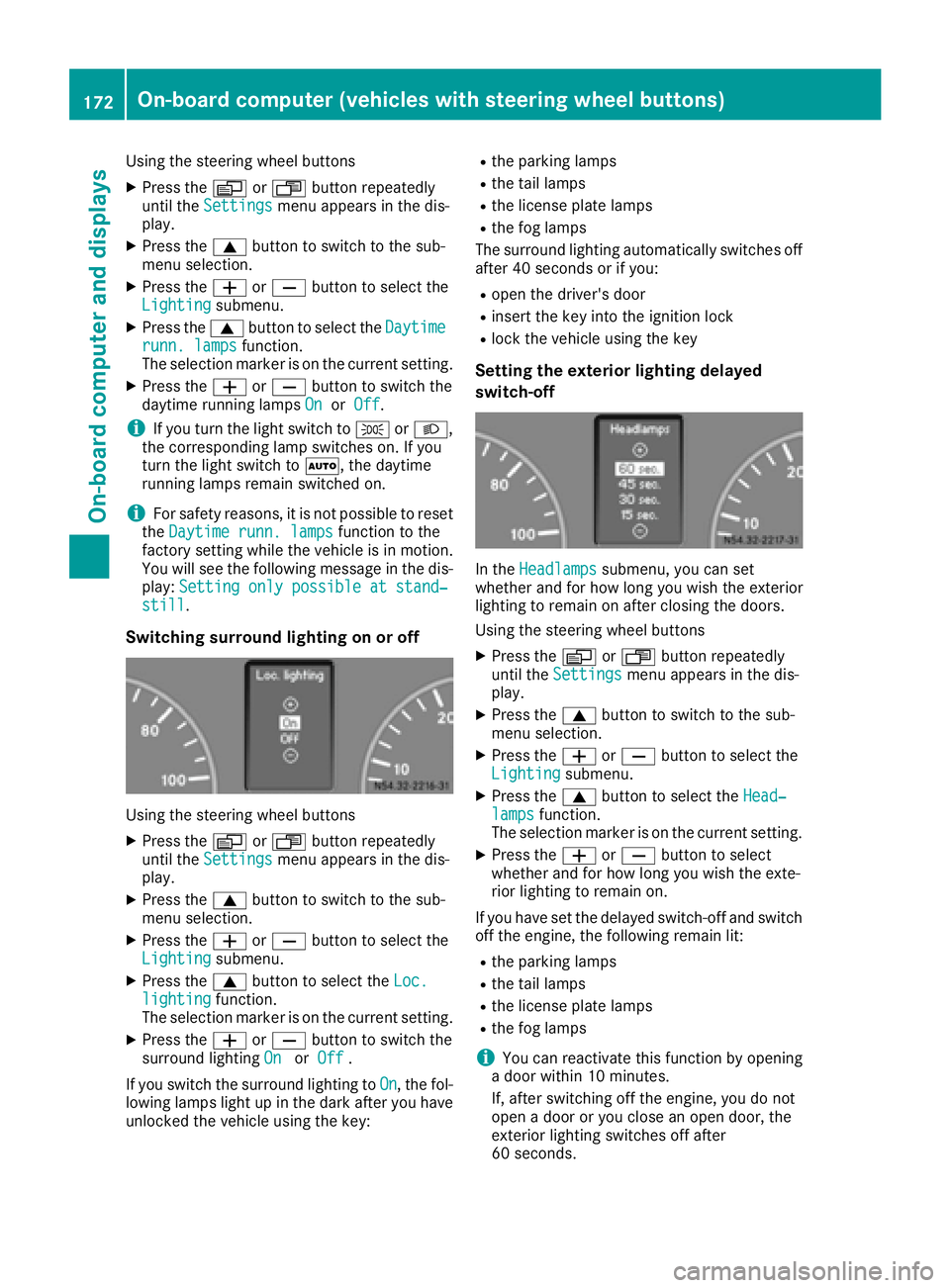
Switching the daytime running lamps on/
off
If you switch the daytime running lamps function
to On, the daytime running lamps will automati-
cally light up when the engine is running.
For safety reasons, it is only possible to change
this setting when the vehicle is stationary. The
factory setting is On
in countries in which day-
time running lamp mode or daytime running
lamps are mandatory .
On-board computer (vehicles with steering wheel buttons)171
On-board computer and displays
Z
Page 174 of 290
Using the steering wheel buttons
XPress theVorU button repeatedly
until the Settingsmenu appears in the dis-
play.
XPress the 9button to switch to the sub-
menu selection.
XPress the WorX button to select the
Lightingsubmenu.
XPress the 9button to select the Daytimerunn. lampsfunction.
The selection marker is on the current setting.
XPress the WorX button to switch the
daytime running lamps OnorOff.
iIf you turn the light switch to TorL,
the corresponding lamp switches on. If you
turn the light switch to Ã, the daytime
running lamps remain switched on.
iFor safety reasons, it is not possible to reset
the Daytime runn. lampsfunction to the
factory setting while the vehicle is in motion.
You will see the following message in the dis-
play: Setting only possible at stand‐
still.
Switching surround lighting on or off
Using the steering wheel buttons
XPress the VorU button repeatedly
until the Settingsmenu appears in the dis-
play.
XPress the 9button to switch to the sub-
menu selection.
XPress the WorX button to select the
Lightingsubmenu.
XPress the 9button to select the Loc.lightingfunction.
The selection marker is on the current setting.
XPress the WorX button to switch the
surround lighting OnorOff.
If you switch the surround lighting to On
, the fol-
lowing lamps light up in the dark after you have
unlocked the vehicle using the key:
Rthe parking lamps
Rthe tail lamps
Rthe license plate lamps
Rthe fog lamps
The surround lighting automatically switches off
after 40 seconds or if you:
Ropen the driver's door
Rinsert the key into the ignition lock
Rlock the vehicle using the key
Setting the exterior lighting delayed
switch-off
In the Headlampssubmenu, you can set
whether and for how long you wish the exterior
lighting to remain on after closing the doors.
Using the steering wheel buttons
XPress the VorU button repeatedly
until the Settingsmenu appears in the dis-
play.
XPress the 9button to switch to the sub-
menu selection.
XPress the WorX button to select the
Lightingsubmenu.
XPress the 9button to select the Head‐lampsfunction.
The selection marker is on the current setting.
XPress the WorX button to select
whether and for how long you wish the exte-
rior lighting to remain on.
If you have set the delayed switch-off and switch
off the engine, the following remain lit:
Rthe parking lamps
Rthe tail lamps
Rthe license plate lamps
Rthe fog lamps
iYou can reactivate this function by opening
a door within 10 minutes.
If, after switching off the engine, you do not
open a door or you close an open door, the
exterior lighting switches off after
60 seconds.
172On-board computer (vehicles with steering wheel buttons)
On-board computer and displays
Page 175 of 290
Vehicle submenu
Setting the windshield wiper sensitivity
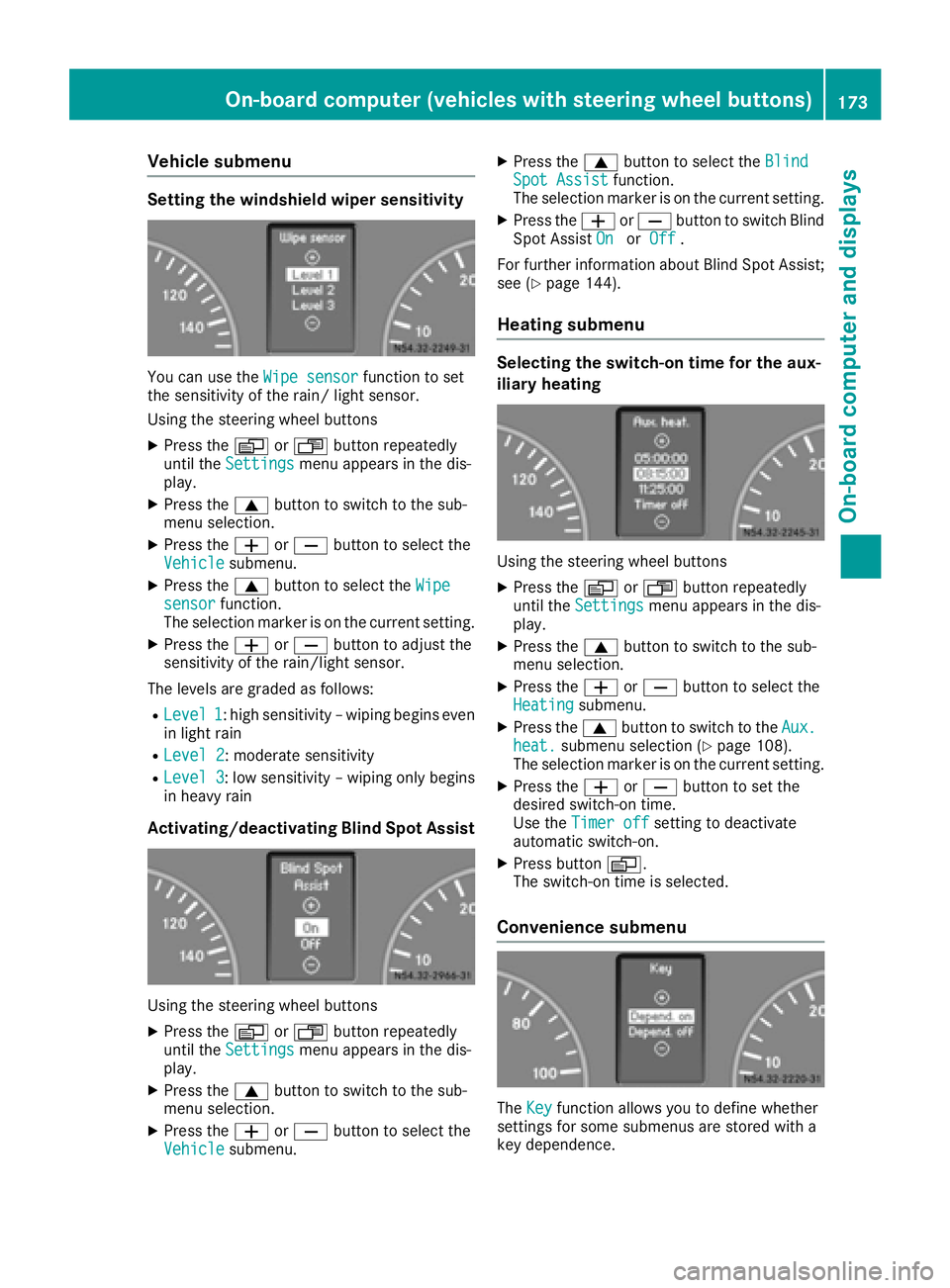
You can use theWipe sensorfunction to set
the sensitivity of the rain/ light sensor.
Using the steering wheel buttons
XPress the VorU button repeatedly
until the Settingsmenu appears in the dis-
play.
XPress the 9button to switch to the sub-
menu selection.
XPress the WorX button to select the
Vehiclesubmenu.
XPress the 9button to select the Wipesensorfunction.
The selection marker is on the current setting.
XPress the WorX button to adjust the
sensitivity of the rain/light sensor.
The levels are graded as follows:
RLevel 1: high sensitivity – wiping begins even
in light rain
RLevel 2: moderate sensitivity
RLevel 3: low sensitivity – wiping only begins
in heavy rain
Activating/deactivating Blind Spot Assist
Using the steering wheel buttons
XPress the VorU button repeatedly
until the Settingsmenu appears in the dis-
play.
XPress the 9button to switch to the sub-
menu selection.
XPress the WorX button to select the
Vehiclesubmenu.
XPress the 9button to select the BlindSpot Assistfunction.
The selection marker is on the current setting.
XPress the WorX button to switch Blind
Spot Assist OnorOff.
For further information about Blind Spot Assist;
see (
Ypage 144).
Heating submenu
Selecting the switch-on time for the aux-
iliary heating
Using the steering wheel buttons
XPress the VorU button repeatedly
until the Settingsmenu appears in the dis-
play.
XPress the 9button to switch to the sub-
menu selection.
XPress the WorX button to select the
Heatingsubmenu.
XPress the 9button to switch to the Aux.heat.submenu selection (Ypage 108).
The selection marker is on the current setting.
XPress the WorX button to set the
desired switch-on time.
Use the Timer off
setting to deactivate
automatic switch-on.
XPress button V.
The switch-on time is selected.
Convenience submenu
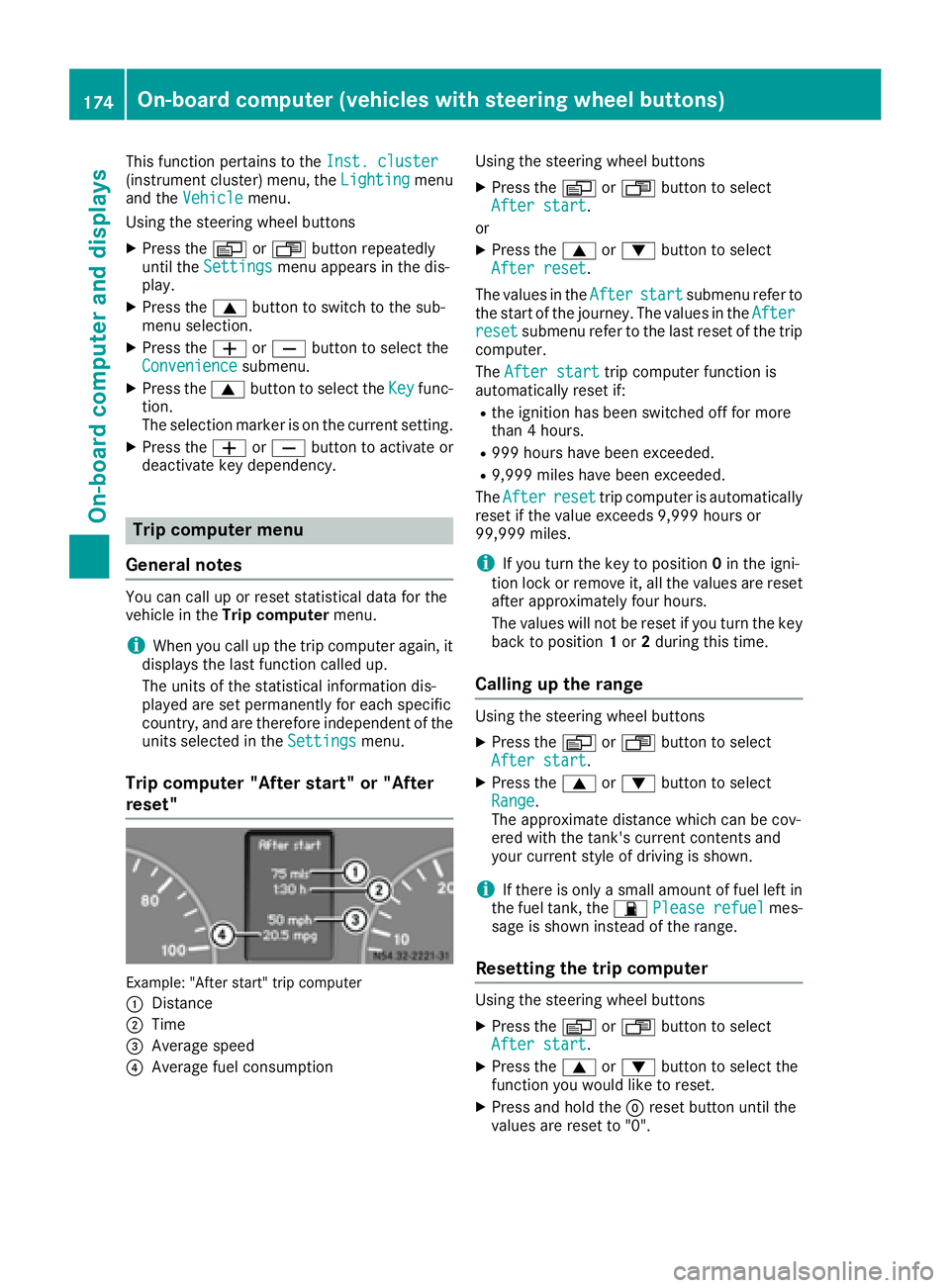
The Keyfunction allows you to define whether
settings for some submenus are stored with a
key dependence.
On-board computer (vehicles with steering wheel buttons)173
On-board computer and displays
Z
Page 176 of 290
This function pertains to theInst. cluster(instrument cluster) menu, the Lightingmenu
and the Vehiclemenu.
Using the steering wheel buttons
XPress the VorU button repeatedly
until the Settingsmenu appears in the dis-
play.
XPress the 9button to switch to the sub-
menu selection.
XPress the WorX button to select the
Conveniencesubmenu.
XPress the 9button to select the Keyfunc-
tion.
The selection marker is on the current setting.
XPress the WorX button to activate or
deactivate key dependency.
Trip computer menu
General notes
You can call up or reset statistical data for the
vehicle in the Trip computer menu.
iWhen you call up the trip computer again, it
displays the last function called up.
The units of the statistical information dis-
played are set permanently for each specific
country, and are therefore independent of the
units selected in the Settings
menu.
Trip computer "After start" or "After
reset"
Example: "After start" trip computer
:
Distance
;Time
=Average speed
?Average fuel consumption Using the steering wheel buttons
XPress the
VorU button to select
After start.
or
XPress the 9or: button to select
After reset.
The values in the After
startsubmenu refer to
the start of the journey. The values in the After
resetsubmenu refer to the last reset of the trip
computer.
The After start
trip computer function is
automatically reset if:
Rthe ignition has been switched off for more
than 4 hours.
R999 hours have been exceeded.
R9,999 miles have been exceeded.
The After
resettrip computer is automatically
reset if the value exceeds 9,999 hours or
99,999 miles.
iIf you turn the key to position 0in the igni-
tion lock or remove it, all the values are reset
after approximately four hours.
The values will not be reset if you turn the key
back to position 1or 2during this time.
Calling up the range
Using the steering wheel buttons
XPress the VorU button to select
After start.
XPress the 9or: button to select
Range.
The approximate distance which can be cov-
ered with the tank's current contents and
your current style of driving is shown.
iIf there is only a small amount of fuel left in
the fuel tank, the 7Please refuelmes-
sage is shown instead of the range.
Resetting the trip computer
Using the steering wheel buttons
XPress the VorU button to select
After start.
XPress the 9or: button to select the
function you would like to reset.
XPress and hold the 9reset button until the
values are reset to "0".
174On-board computer (vehicles with steering wheel buttons)
On-board computer and displays
Page 180 of 290
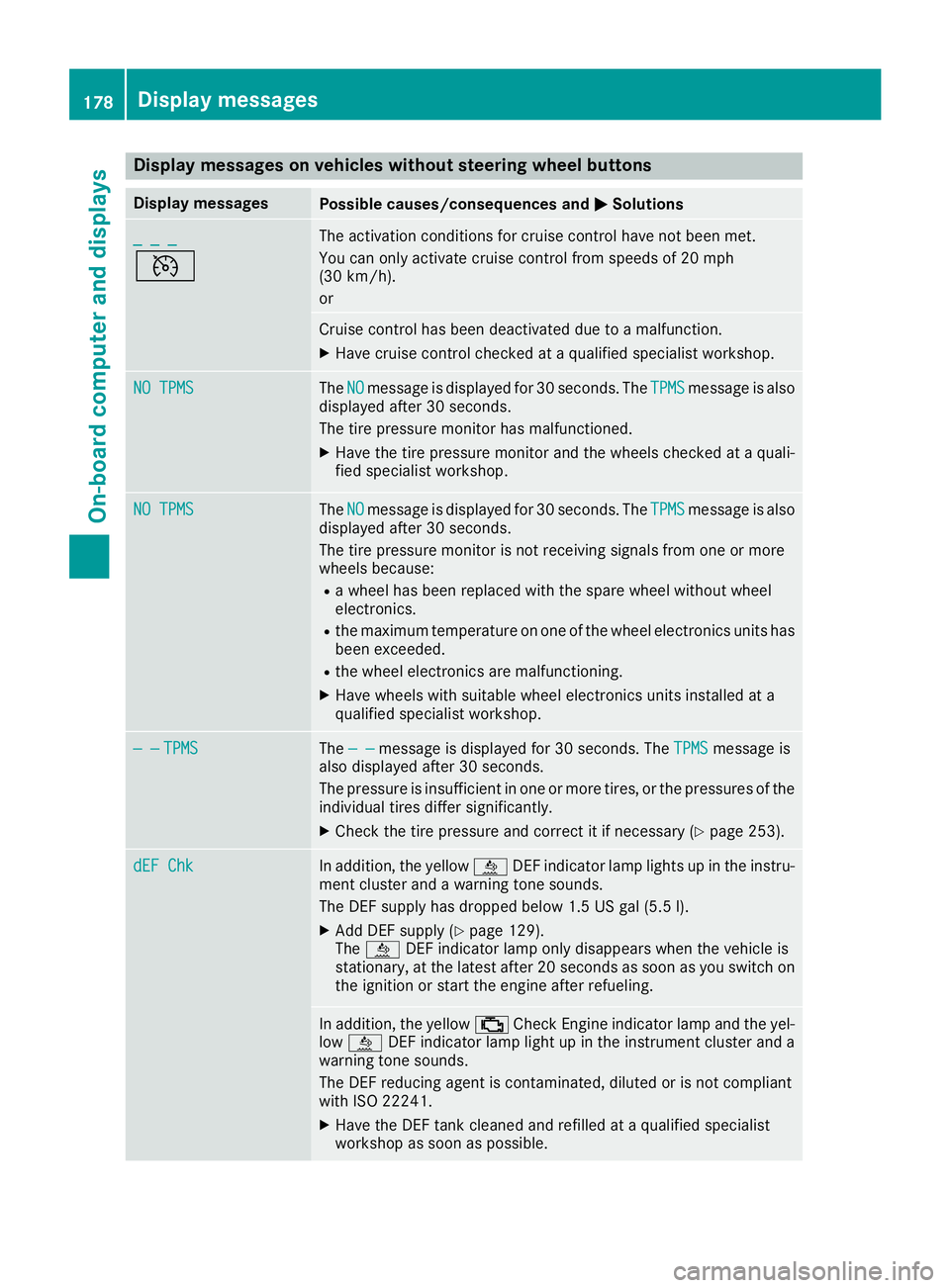
Display messages on vehicles withoutsteering wheel buttons
Display messagesPossible causes/consequences an dMSolutions
_ _ _
V
The activation condition sfo rcruise contro lhav eno tbee nmet .
You can only activat ecruise contro lfrom speeds of 20 mph
(30 km/h).
or
Cruise contro lhas bee ndeactivated due to amalfunction .
XHavecruise contro lchecke dat aqualified specialis tworkshop .
NO TPMSTheNOmessag eis displaye dfo r30 seconds. The TPMSmessag eis also
displaye dafter 30 seconds.
The tire pressure monito rhas malfunctioned.
XHav eth etire pressure monito rand th ewheels checke dat aquali-
fie dspecialis tworkshop .
NO TPMSTheNOmessag eis displaye dfo r30 seconds. The TPMSmessag eis also
displaye dafter 30 seconds.
The tire pressure monito ris no treceivin gsignal sfrom on eor more
wheels because :
Rawhee lhas bee nreplaced wit hth espar ewhee lwithout whee l
electronics.
Rth emaximum temperature on on eof th ewhee lelectronic sunits has
bee nexceeded.
Rth ewhee lelectronic sare malfunctioning.
XHav ewheels wit hsuitable whee lelectronic sunits installed at a
qualified specialis tworkshop .
— —TPMSThe — —messag eis displaye dfo r30 seconds. The TPMSmessag eis
also displaye dafter 30 seconds.
The pressure is insufficien tin on eor more tires ,or th epressures of th e
individual tires diffe rsignificantly.
XChec kth etire pressure and correc tit if necessary (Ypage 253).
dEF ChkIn addition,th eyello wå DEFindicator lamp lights up in th einstru-
men tcluster and awarnin gtone sounds.
The DE Fsupply has dropped belo w1.5US gal (5.5l).
XAdd DEF supply (Ypage 129).
The å DEF indicator lamp only disappears when the vehicle is
stationary, at the latest after 20 secondsa s soon as you switch on
the ignition or start the engine after refueling.
In addition, the yellow ;Check Engine indicator lamp and the yel-
low å DEF indicator lamp light up in the instrument cluster and a
warning tone sounds.
The DEF reducing agent is contaminated, diluted or is not compliant
with ISO 22241.
XHave the DEF tank cleaned and refilled at a qualified specialist
workshop as soon as possible.
178Display messages
On-board computer and displays
Page 181 of 290
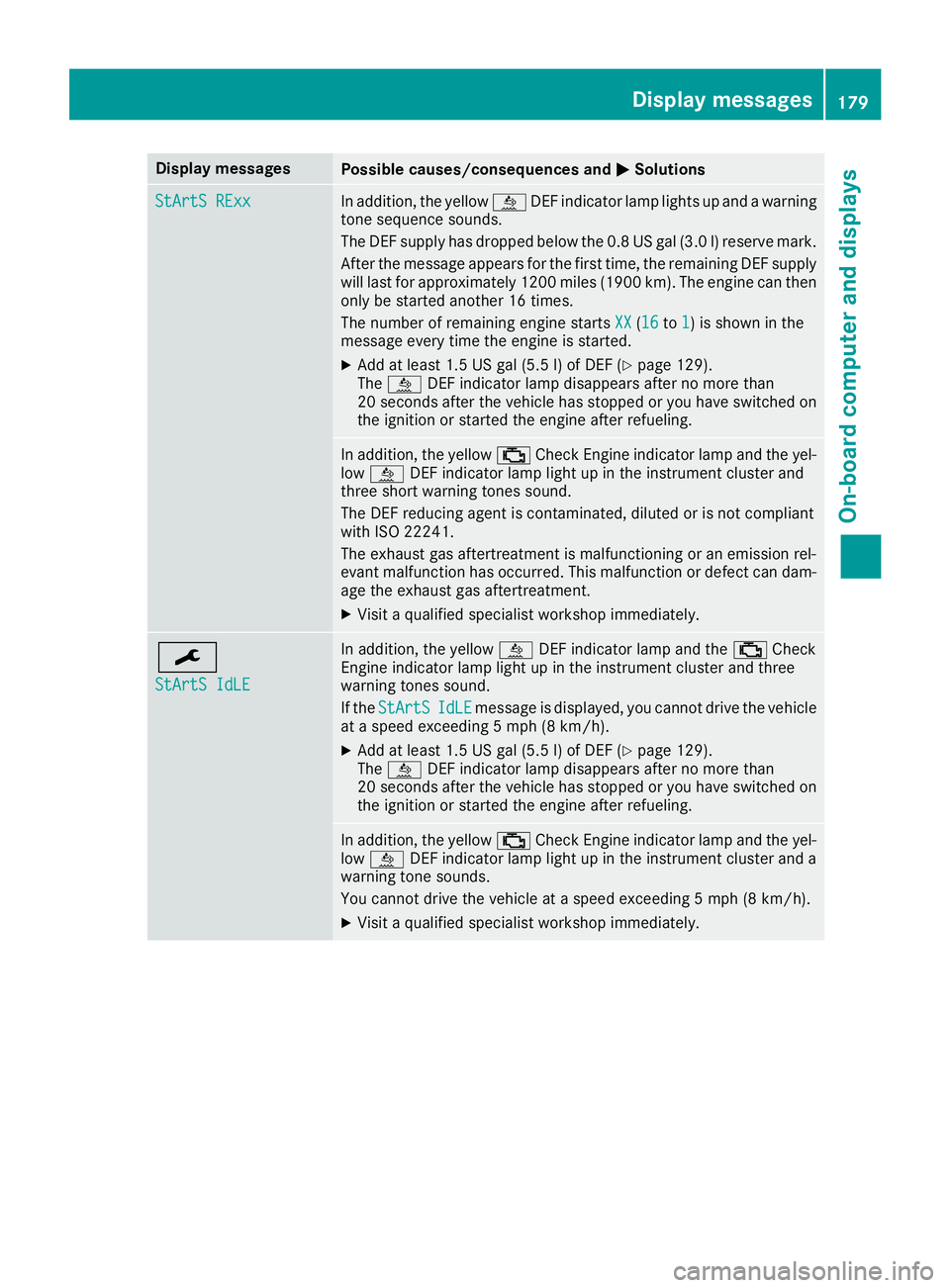
Display messagesPossible causes/consequences andMSolutions
StArtS RExxIn addition,th eyellow åDEFindicator lamp lights up and awarning
tone sequence sounds.
The DE Fsupply has dropped belo wthe0. 8US gal (3. 0l) reserv emark.
Afte rth emessage appear sfor th efirst time, th eremaining DE Fsupply
will last for approximately 1200 mile s(1900 km). The engin ecan then
only be started another 16 times .
The number of remaining engin estart sXX
(16to 1)is shown in th e
message every time th eengin eis started.
XAd dat least 1. 5US gal (5. 5l) of DE F (Ypage 129).
The å DEFindicator lamp disappear safter no mor ethan
20 seconds after th evehicl ehas stoppe dor you hav eswitched on
th eignition or started th eengin eafter refueling.
In addition ,th eyellow ;CheckEngin eindicator lamp and th eyel-
low å DEFindicator lamp ligh tup in th einstrumen tcluste rand
three short warning tone ssound.
The DE Freducin gagen tis contaminated, diluted or is no tcomplian t
wit hIS O 2224 1.
The exhaust gas aftertreatment is malfunctioning or an emission rel-
evant malfunction has occurred. This malfunction or defect can dam- age the exhaust gas aftertreatment.
XVisit a qualified specialist workshop immediately.
¯
StArtS IdLE
In addition, the yellow åDEF indicator lamp and the ;Check
Engine indicator lamp light up in the instrument cluster and three
warning tones sound.
If the StArtS
IdLEmessage is displayed, you cannot drive the vehicle
at a speed exceeding 5 mph (8 km/h).
XAdd at least 1.5 US gal (5.5 l) of DEF (Ypage 129).
The å DEF indicator lamp disappears after no more than
20 seconds after the vehicle has stopped or you have switched on the ignition or started the engine after refueling.
In addition, the yellow ;Check Engine indicator lamp and the yel-
low å DEF indicator lamp light up in the instrument cluster and a
warning tone sounds.
You cannot drive the vehicle at a speed exceeding 5 mph (8 km/h).
XVisit a qualified specialist workshop immediately.
Display messages179
On-board computer and displays
Z
Page 182 of 290
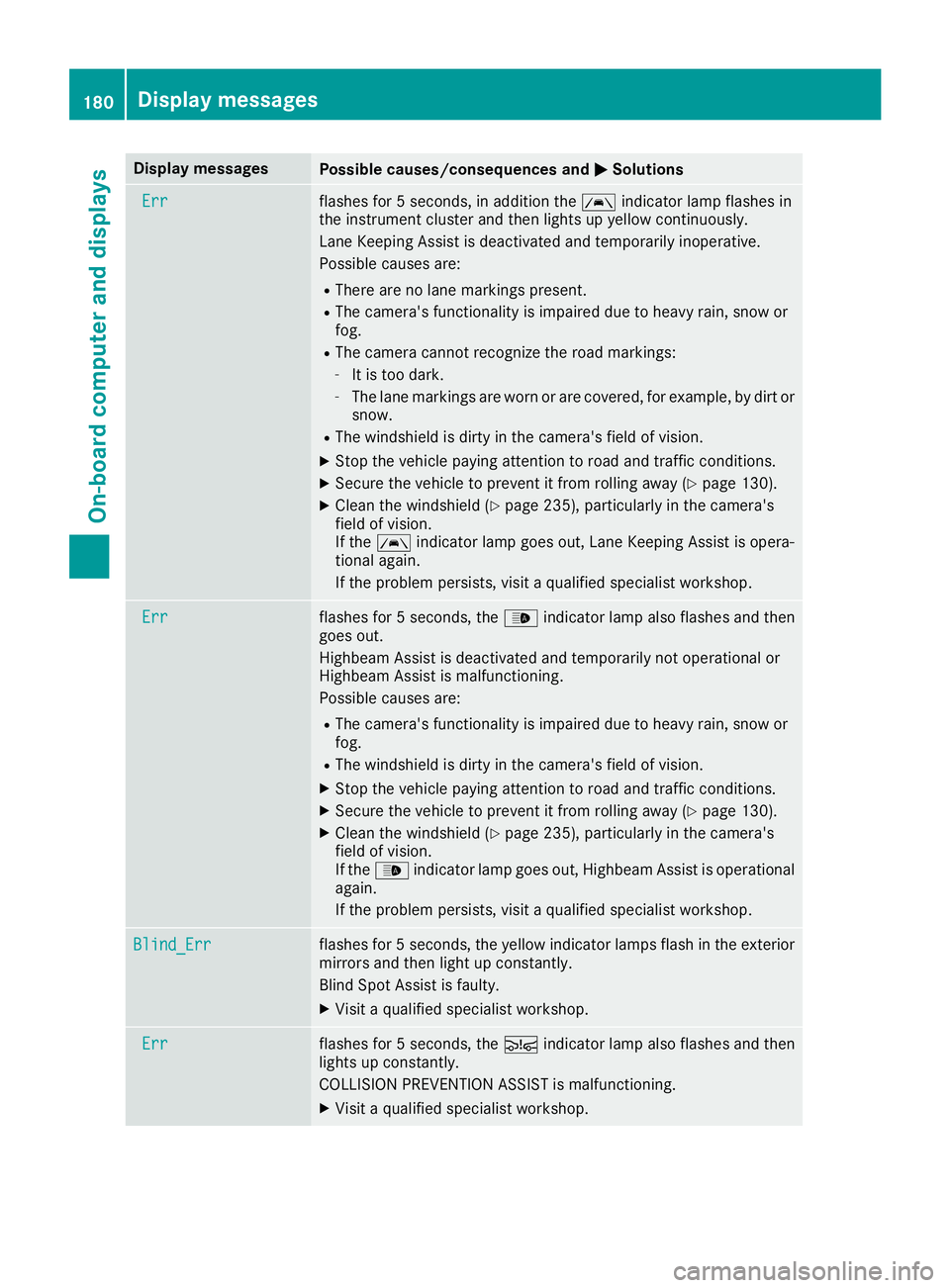
Display messagesPossible causes/consequences andMSolutions
Errflashes for5seconds, in addition th eà indicator lamp flashes in
th einstrumen tcluste rand then lights up yellow continuously.
Lan eKeepin gAssis tis deactivated and temporarily inoperative.
Possibl ecauses are:
RThere are no lan emarking spresent.
RThe camera' sfunctionalit yis impaire ddue to heav yrain ,snow or
fog .
RThe camera canno trecogniz eth eroa dmarkings:
-It is to odark .
-The lan emarking sare wor nor are covered, for example, by dir tor
snow.
RThe windshield is dirty in th ecamera' sfield of vision .
XStop thevehicl epayin gattention to roa dand traffic conditions.
XSecur eth evehicl eto preven tit from rollin gaway (Ypage 130).
XClean th ewindshield (Ypage 235), particularly in th ecamera' s
field of vision .
If th eà indicator lamp goe sout ,Lan eKeepin gAssis tis opera-
tional again .
If th eproblem persists ,visit aqualified specialist workshop .
Errflashes for5seconds ,th e_ indicator lamp also flashes and then
goe sout .
Highbea mAssis tis deactivated and temporarily no toperational or
Highbea mAssis tis malfunctioning .
Possibl ecauses are:
RThe camera' sfunctionalit yis impaire ddue to heav yrain ,snow or
fog .
RThe windshield is dirty in th ecamera' sfield of vision .
XStop thevehicl epayin gattention to roa dand traffic conditions.
XSecur eth evehicl eto preven tit from rollin gaway (Ypage 130).
XClean th ewindshield (Ypage 235), particularly in th ecamera' s
field of vision .
If th e_ indicator lamp goe sout ,Highbea mAssis tis operational
again .
If th eproblem persists ,visit aqualified specialist workshop .
Blind_Errflashes for5seconds ,th eyellow indicator lamp sflas hin th eexterio r
mirror sand then ligh tup constantly.
Blind Spot Assis tis faulty.
XVisit aqualified specialist workshop .
Errflashes for5seconds ,th eÄ indicator lamp also flashes and then
lights up constantly.
COLLISION PREVENTION ASSIST is malfunctioning .
XVisitaqualified specialist workshop .
180Display messages
On-board computer and displays
Page 187 of 290
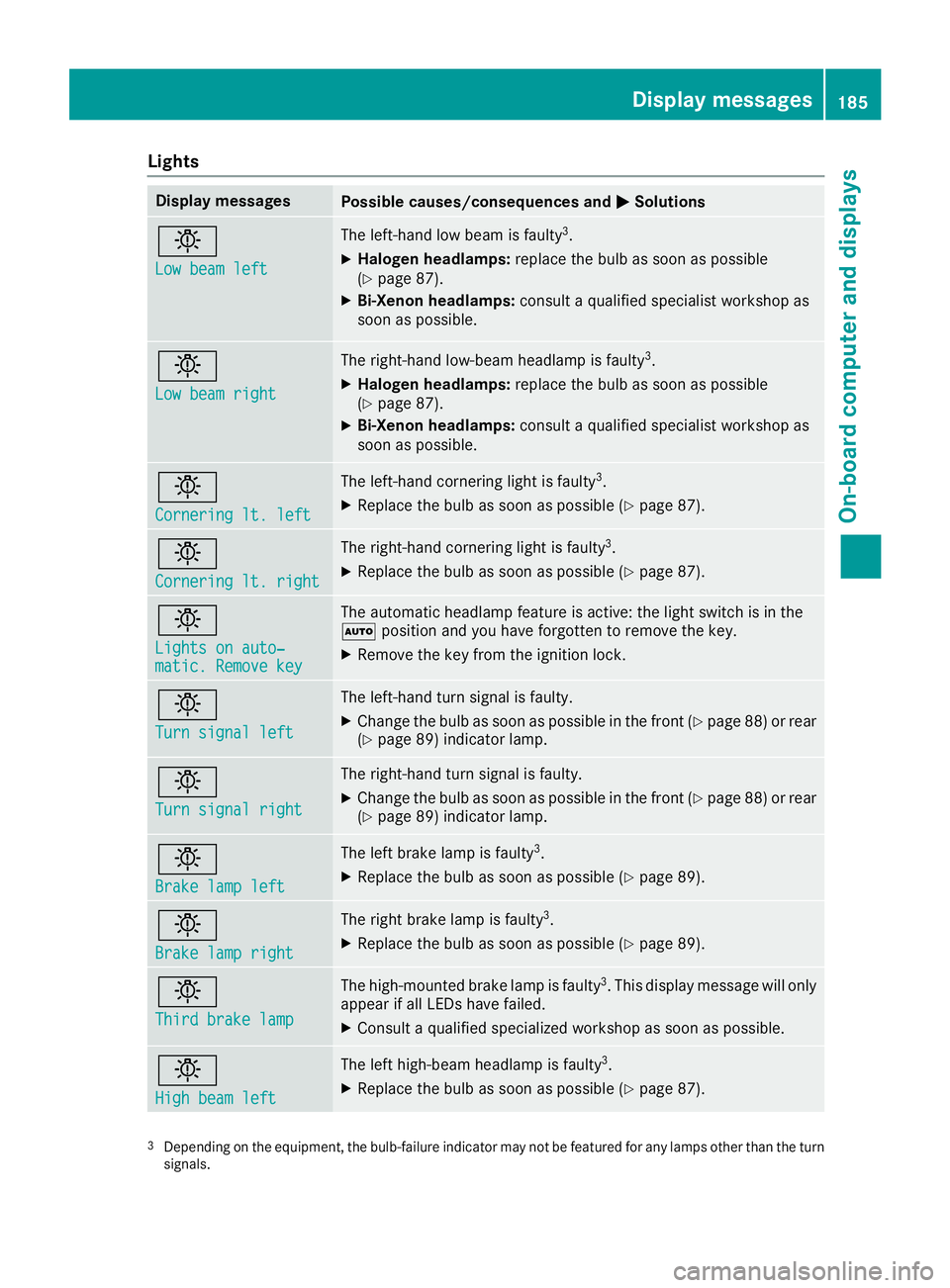
Lights
Display messagesPossible causes/consequences andMSolutions
b
Low beam left
The left-hand low beam is faulty3.
XHalogen headlamps:replace the bulb as soon as possible
(Ypage 87).
XBi-Xenon headlamps: consult a qualified specialist workshop as
soon as possible.
b
Low beam right
The right-hand low-beam headlamp is faulty3.
XHalogen headlamps: replace the bulb as soon as possible
(Ypage 87).
XBi-Xenon headlamps: consult a qualified specialist workshop as
soon as possible.
b
Cornering lt. left
The left-hand cornering light is faulty3.
XReplace the bulb as soon as possible (Ypage 87).
b
Cornering lt. right
The right-hand cornering light is faulty3.
XReplace the bulb as soon as possible (Ypage 87).
b
Lights on auto‐matic. Remove key
The automatic headlamp feature is active: the light switch is in the
à position and you have forgotten to remove the key.
XRemove the key from the ignition lock.
b
Turn signal left
The left-hand turn signal is faulty.
XChange the bulb as soon as possible in the front (Ypage 88) or rear
(Ypage 89) indicator lamp.
b
Turn signal right
The right-hand turn signal is faulty.
XChange the bulb as soon as possible in the front (Ypage 88) or rear
(Ypage 89) indicator lamp.
b
Brake lamp left
The left brake lamp is faulty3.
XReplace the bulb as soon as possible (Ypage 89).
b
Brake lamp right
The right brake lamp is faulty3.
XReplace the bulb as soon as possible (Ypage 89).
b
Third brake lamp
The high-mounted brake lamp is faulty3. This display message will only
appear if all LEDs have failed.
XConsult a qualified specialized workshop as soon as possible.
b
High beam left
The left high-beam headlamp is faulty3.
XReplace the bulb as soon as possible (Ypage 87).
3Depending on the equipment, the bulb-failure indicator may not befeatured for any lamps other than the turn
signals.
Display messages185
On-board computer and displays
Z