light MERCEDES-BENZ SPRINTER 2016 MY16 Operator’s Manual
[x] Cancel search | Manufacturer: MERCEDES-BENZ, Model Year: 2016, Model line: SPRINTER, Model: MERCEDES-BENZ SPRINTER 2016Pages: 290, PDF Size: 6.44 MB
Page 237 of 290
Cleaning the paintwork
!Do not affix:
Rstickers
Rfilms
Rmagnetic plates or similar items
to painted surfaces. You could otherwise
damage the paintwork.
Scratches, corrosive deposits, areas affected by
corrosion and damage caused by inadequate
care cannot always be completely repaired. In
such cases, visit a qualified specialist workshop.
XRemove impurities immediately, where pos-
sible, whilst avoiding rubbing too hard.
XSoak insect remains with insect remover and
rinse off the treated areas afterwards.
XSoak bird droppings with water and rinse off
the treated areas afterwards.
XRemove coolant, brake fluid, tree resin, oils,
fuels and greases by rubbing gently with a
cloth soaked in petroleum ether or lighter
fluid.
XUse tar remover to remove tar stains.
XUse silicone remover to remove wax.
Cleaning the windows
GWARNING
You could become trapped by the windshield wipers if they start moving while cleaning the
windshield or wiper blades. There is a risk of
injury.
Always switch off the windshield wipers and
the ignition before cleaning the windshield or
wiper blades.
!Do not fold the windshield wipers away from
the windshield unless the hood is closed. Oth-
erwise, you could damage the hood.
!Hold the wiper arm securely when folding
back. The windshield could be damaged if the
wiper arm smacks against it suddenly.
!Do not use dry cloths, abrasive products,
solvents or cleaning agents containing sol-
vents to clean the inside of the windows. Do
not touch the insides of the windows with
hard objects, e.g. an ice scraper or ring. There
is otherwise a risk of damaging the windows. Before cleaning the windshield
XTurn the key to position
0in the ignition lock
or remove it.
XFold the windshield wiper arms away from the
windshield until you feel them engage.
Before switching the ignition on again, fold
the windshield wipers back into position.
Cleaning the windows
XClean the inside and outside of the windows
with a damp cloth and a cleaning agent that is
recommended and approved for Sprinter
vehicles.
Exterior
Cleaning the wheels
!Do not use any acidic or alkaline cleaning
agents. They can cause corrosion on the
wheel bolts (wheel nuts) or the retainer
springs for the wheel-balancing weights.
!Do not park the vehicle for an extended
period straight after cleaning it, particularly
after having cleaned the wheels with wheel
cleaner. Wheel cleaners could cause
increased corrosion of the brake discs and
brake pads/linings. For this reason, you
should drive for a few minutes after cleaning.
Braking heats the brake discs and the brake
pads/linings, thus drying them. The vehicle
can then be parked.
If you clean the wheels with a power washer,
observe the safety notes for the power washer
(
Ypage 234). You could otherwise damage the
tires.
Cleaning the wiper blades
GWARNING
You could become trapped by the windshield wipers if they start moving while cleaning the
windshield or wiper blades. There is a risk of
injury.
Always switch off the windshield wipers and
the ignition before cleaning the windshield or
wiper blades.
Care235
Maintenance and care
Z
Page 238 of 290
!Do not fold the windshield wipers away from
the windshield unless the hood is closed. Oth-
erwise, you could damage the hood.
!Do not pull the wiper blade. Otherwise, the
wiper blade could be damaged.
!Do not clean wiper blades too often and do
not rub them too hard. Otherwise, the graph-
ite coating could be damaged. This could
cause wiper noise.
!Hold the wiper arm securely when folding
back. The windshield could be damaged if the
wiper arm smacks against it suddenly.
XTurn the key to position 0in the ignition lock
or remove it.
XFold the windshield wiper arms away from the
windshield until you feel them engage.
XCarefully clean the wiper blades with a damp
cloth.
XFold back the wiper arms before switching on
the ignition.
Cleaning the exterior lighting
!Only use cleaning agents or cleaning cloths
which are suitable for plastic light lenses.
Unsuitable cleaning agents or cleaning cloths
could scratch or damage the plastic light len- ses.
XClean the plastic covers of the exterior light-
ing with a damp sponge and a mild cleaning
agent, e.g. car shampoo for Sprinter vehicles,
or with cleaning cloths.
Cleaning the mirror turn signal
!Only use cleaning agents or cleaning cloths
that are suitable for plastic lenses. Unsuitable
cleaning agents or cleaning cloths could
scratch or damage the plastic lenses of the
mirror turn signals.
XClean the plastic lenses of the mirror turn sig-
nals in the exterior mirror housing using a wet
sponge and mild cleaning agent, e.g. car
shampoo or cleaning cloths.
Cleaning the sensors
!Do not use dry, coarse or hard cloths and do
not scrub. You will otherwise scratch or dam-
age the sensors. If you clean the sensors with a power washer
or steam cleaner, observe the information
provided by the manufacturer regarding the
distance to be maintained between the vehi-
cle and the nozzle of the power washer.
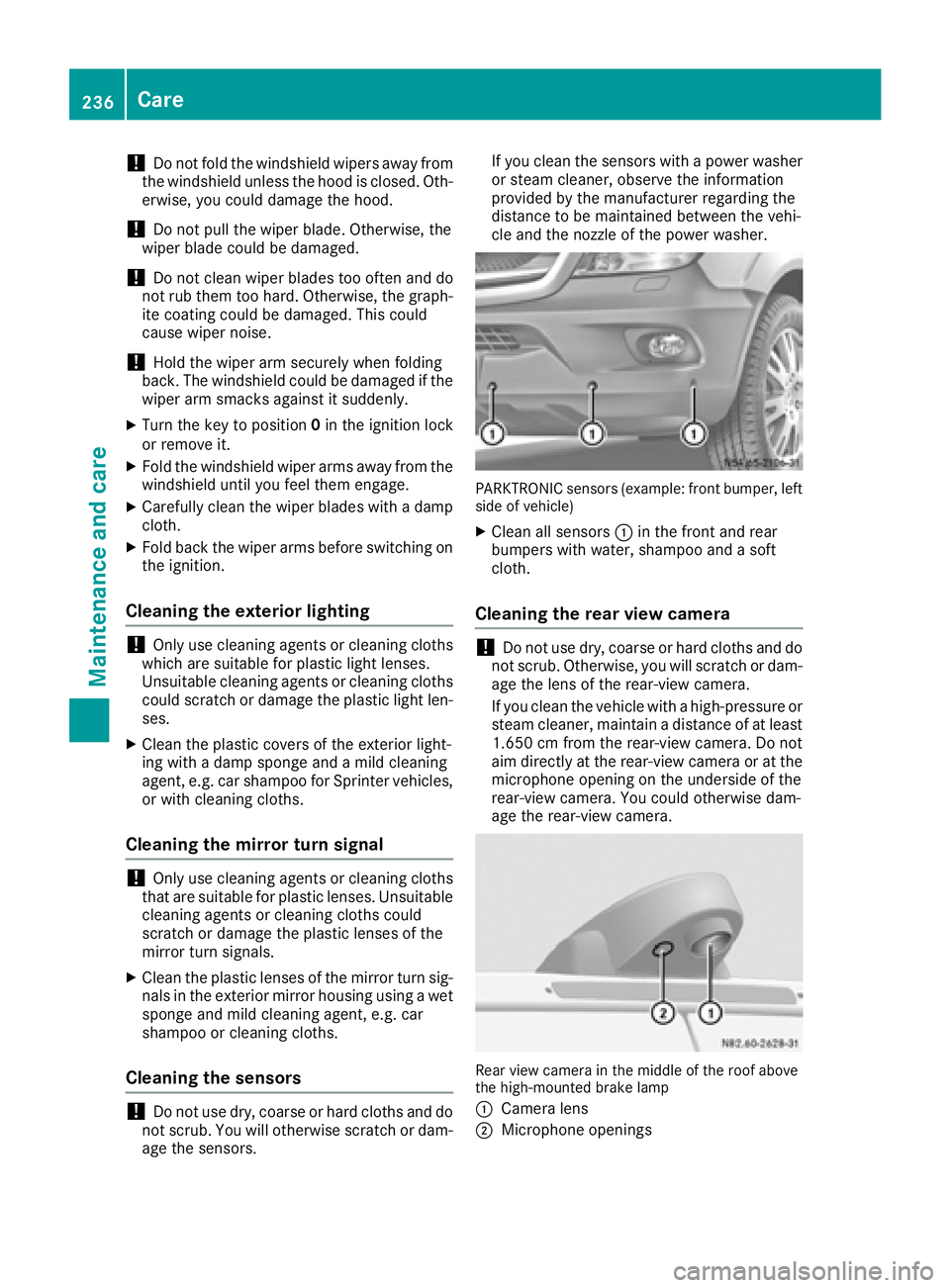
PARKTRONIC sensors (example: front bumper, left
side of vehicle)
XClean all sensors :in the front and rear
bumpers with water, shampoo and a soft
cloth.
Cleaning the rear view camera
!Do not use dry, coarse or hard cloths and do
not scrub. Otherwise, you will scratch or dam-
age the lens of the rear-view camera.
If you clean the vehicle with a high-pressure or
steam cleaner, maintain a distance of at least
1.650 cm from the rear-view camera. Do not
aim directly at the rear-view camera or at the
microphone opening on the underside of the
rear-view camera. You could otherwise dam-
age the rear-view camera.
Rear view camera in the middle of the roof above
the high-mounted brake lamp
:
Camera lens
;Microphone openings
236Care
Maintenance and care
Page 240 of 290
XSwitch off the audio equipment and let the
display cool down.
XClean the display surface with a commercially
available microfiber cloth and cleaner for
TFT/LCD displays.
XDry the display surface using a dry microfiber
cloth.
Cleaning the plastic trim
GWARNING
Care products and cleaning agents containing solvents cause surfaces in the cockpit to
become porous. As a result, plastic parts may
come loose in the event of air bag deploy-
ment. There is a risk of injury.
Do not use any care products and cleaning
agents to clean the cockpit.
!Do not affix the following to plastic surfaces:
Rstickers
Rfilms
Rscented oil bottles or similar items
You can otherwise damage the plastic.
!Do not allow cosmetics, insect repellent or
sunscreen to come into contact with the plas-
tic trim. This maintains the high-quality look of
the surfaces.
XWipe the plastic trim and the cockpit with a
damp, lint-free cloth, e.g. a microfiber cloth.
XHeavy soiling: use a mild detergent or care
products and cleaning agents recommended
and approved by Mercedes-Benz.
Cleaning the steering wheel and selec-
tor lever
XThoroughly wipe with a damp cloth.
Cleaning the trim elements
!Do not use solvent-based cleaning agents
such as tar remover, wheel cleaners, polishes
or waxes. There is otherwise a risk of damag- ing the surface.
XWipe the trim elements with a damp, lint-free
cloth, e.g. a microfiber cloth.
XHeavy soiling: use care products and clean-
ing agents recommended and approved for
Sprinter vehicles.
Cleaning the seat covers
!Do not use microfiber cloths to clean artifi-
cial leather covers. If used often, a microfiber
cloth can damage the cover.
!Clean:
Rartificial leather covers with a cloth mois-
tened with a solution containing 1% deter-
gent, e.g. dish washing liquid.
Rcloth covers with a microfiber cloth mois-
tened with a solution containing 1% deter-
gent, e.g. dish washing liquid. Wipe entire
seat sections carefully to avoid leaving visi-
ble lines. Leave the seat to dry afterwards.
Cleaning results depend on the type of dirt
and how long it has been there.
Cleaning the seat belts
GWARNING
Seat belts can become severely weakened if
bleached or dyed. This could cause the seat
belts to tear or fail, for instance, in the event of an accident. This poses an increased risk of
injury or fatal injury.
Never bleach or dye the seat belts.
!Do not clean the seat belts using chemical
cleaning agents. Do not dry the seat belts by
heating at temperatures above 176 ‡(80 †)
or in direct sunlight.
Remove any stains or dirt immediately. This will
avoid residue or damage.
XUse clean, lukewarm water and soap solution.
Cleaning the headliner
XUse a soft brush or dry shampoo to remove
heavy soiling.
238Care
Maintenance and care
Page 242 of 290
Useful information
This Operator's Manual describes all models as
well as standard and optional equipment of your
vehicle that were available at the time of going
to print. Country-specific variations are possi-
ble. Note that your vehicle may not be equipped
with all of the described functions. This also
applies to systems and functions relevant to
safety.
Read the information on qualified specialist
workshops (
Ypage 26).
Where will I find...?
Vehicle tool kit
General notes
The vehicle tool kit is in the stowage compart-
ment in the footwell on the front-passenger
side.
The vehicle tool kit consists of:
Ra towing eye
Ra screwdriver with Torx, Phillips and slotted
bits
If your vehicle is equipped with a spare wheel
bracket and a jack, the vehicle tool kit addition-
ally contains:
Ra wheel wrench
Ra spanner
Ra pump lever rod
iThe maximum payload of the jack can be
found on the sticker on the jack itself.
The jack is maintenance-free. In the event of a
malfunction, please contact a qualified spe-
cialist workshop.
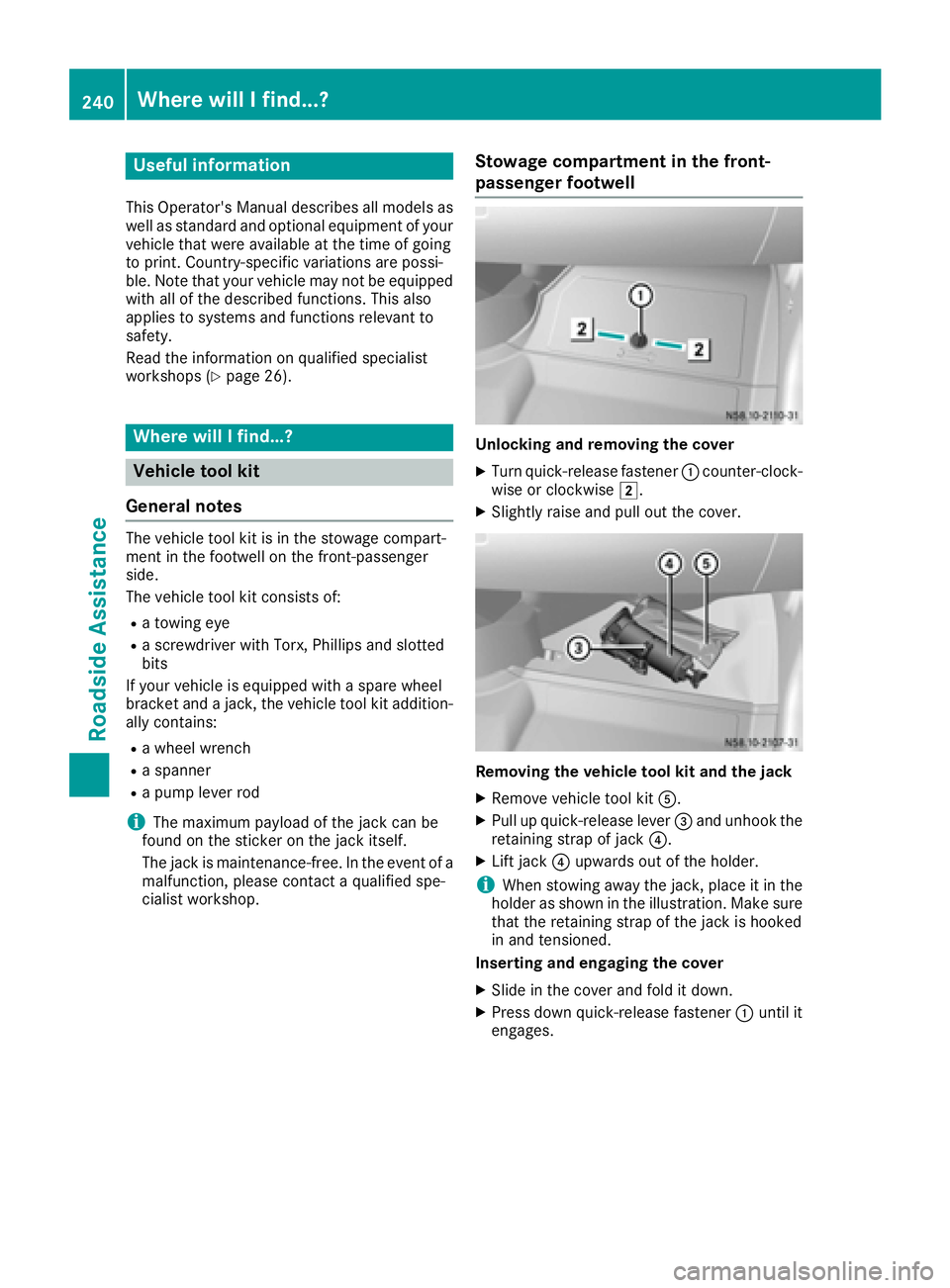
Stowage compartment in the front-
passenger footwell
Unlocking and removing the cover
XTurn quick-release fastener :counter-clock-
wise or clockwise 2.
XSlightly raise and pull out the cover.
Removing the vehicle tool kit and the jack
XRemove vehicle tool kit A.
XPull up quick-release lever =and unhook the
retaining strap of jack ?.
XLift jack?upwards out of the holder.
iWhen stowing away the jack, place it in the
holder as shown in the illustration. Make sure
that the retaining strap of the jack is hooked
in and tensioned.
Inserting and engaging the cover
XSlide in the cover and fold it down.
XPress down quick-release fastener :until it
engages.
240Where will I find...?
Roadside Assistance
Page 254 of 290
The tires are cold:
Rif the vehicle has been parked for at least
three hours without direct sunlight on the
tires, and
Rif the vehicle has not been driven further than
1 mile (1.6 km)
Tire temperature changes depending on the
ambient temperature, driving speed and tire
load. If the tire temperature changes by 18 ‡
(10 †), the tire pressure changes by approx-
imately 10 kPa (0.1 bar/1.5 psi). Take this into
account when checking the pressure of warm
tires. Only correct the tire pressure if it is too low
for the current operating conditions. If you
check the tire pressures when the tires are
warm, the resulting values will be higher than if
the tires were cold. This is normal. Do not under
any circumstances release the air in order to
adjust the pressure to the prescribed value for
cold tires. The tire pressure would otherwise be
too low.
Observe the recommended tire pressures for
cold tires:
Ron the Tire and Loading Information placard5
on the B-pillar on the driver's side, or
Ron the tire pressure plate on the B-pillar on the
driver's side of the vehicle
R
Underinflated or overinflated tires
Underinflated tires:
GWARNING
Tires with pressure that is too low can over-
heat and burst as a consequence. In addition, they also suffer from excessive and/or irreg-
ular wear, which can severely impair the brak-
ing properties and the driving characteristics.
There is a risk of an accident.
Avoid tire pressures that are too low in all the
tires, including the spare wheel.
Underinflated tires can:
Rfail from being overheated
Radversely affect handling
Rwear excessively and/or unevenly
Rhave an adverse effect on fuel consumption
Overinflated tires
GWARNING
Tires with excessively high pressure can burst
because they are damaged more easily by
road debris, potholes etc. In addition, they
also suffer from irregular wear, which can
severely impair the braking properties and the driving characteristics. There is a risk of an
accident.
Avoid tire pressures that are too high in all the
tires, including the spare wheel.
Overinflated tires can:
Rincrease the braking distance
Radversely affect handling
Rwear excessively and/or unevenly
Radversely affect ride comfort
Rbe more susceptible to damage
Maximum tire pressures
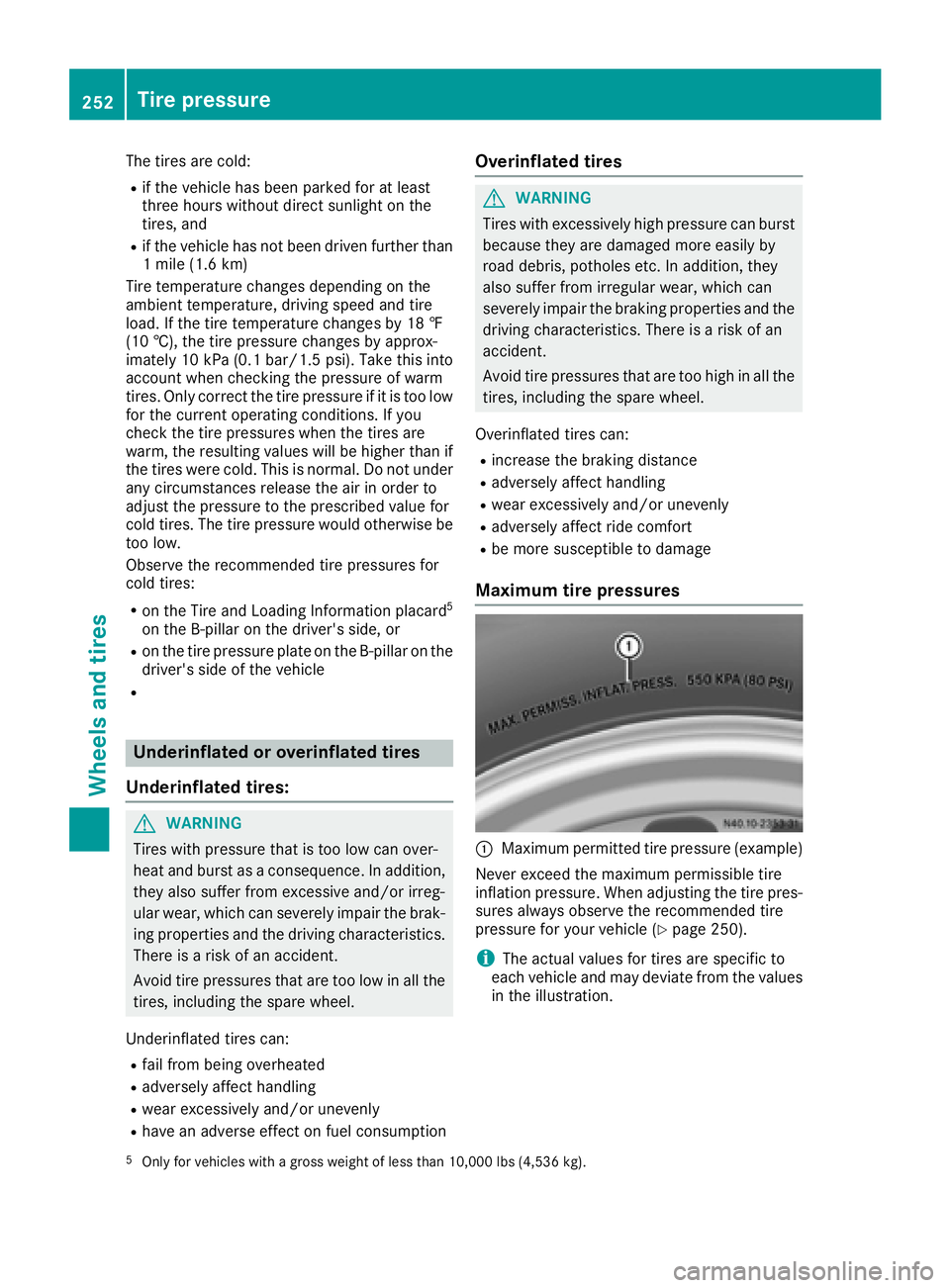
:Maximum permitted tire pressure (example)
Never exceed the maximum permissible tire
inflation pressure. When adjusting the tire pres-
sures always observe the recommended tire
pressure for your vehicle (
Ypage 250).
iThe actual values for tires are specific to
each vehicle and may deviate from the values
in the illustration.
5Only for vehicles with a gross weight of less than 10,000 lbs (4,536 kg).
252Tire pressure
Wheels and tires
Page 256 of 290
cle is started as long as the malfunction
exists.
When the malfunction indicator is illuminated,the system may not be able to detect or signal
low tire pressure as intended. TPMS malfunc-
tions may occur for a variety of reasons,
including the mounting of incompatible
replacement or alternate tires or wheels on
the vehicle that prevent the TPMS from func-
tioning properly. Always check the TPMS mal-
function telltale after replacing one or more
tires or wheels on your vehicle to ensure that
the replacement or alternate tires and wheels
allow the TPMS to continue to function prop-
erly.
Vehicles with a tire pressure monitor are equip-
ped with sensors in the wheels that monitor the
tire pressure of all four tires. The tire pressure
monitor monitors the pressure in all four tires;
you set this pressure when you activate the tire
pressure monitor. The tire pressure monitor
warns you when the pressure drops in one or
more of the tires. The tire pressure monitor only
functions if the corresponding sensors are
installed on all wheels.
You should always adjust the tire pressure
according to the vehicle load. Restart the tire
pressure monitor if you change the tire pres-
sure.
The tire pressure monitor does not warn you if a
tire pressure is incorrect. Observe the notes on
the recommended tire pressure (
Ypage 250).
The tire pressure moni tor i
s not able to warn you
of a sudden loss of pressure, e.g. following pen- etration by a foreign object. In this event, brake
the vehicle until it comes to a standstill. Do not
carry out any sudden steering maneuvers.
The tire pressure monitor has a yellow h
warning lamp in the instrument cluster for indi-
cating pressure loss/malfunctions (USA) or
pressure loss (Canada). Depending on how the
warning lamp flashes or lights up, an underin-
flated tire or a malfunction in the tire pressure
monitor is displayed:
Rif the h warning lamp is lit continuously,
the tire pressure on one or more tires is sig- nificantly too low. The tire pressure monitor is
not malfunctioning.
RUSA only: if the hwarning lamp flashes for
60 seconds and then remains lit constantly,
the tire pressure monitor is malfunctioning.
Only vehicles with steering wheel buttons: the
on-board computer displays information on tire
pressure. After a few minutes of driving, the cur-
rent tire pressure of each tire is shown in the on-
board computer.
USA only: if the tire pressure monitor is mal-
functioning, it may be more than 10 minutes
before the malfunction is shown. The htire
pressure warning lamp flashes for 60 seconds
and then remains lit. When the malfunction has been rectified, the htire pressure warning
lamp goes out after a few minutes of driving.
The tire p
ressure values indicated by the on-
board computer may differ from those meas-
ured at a gas station with a pressure gage. The
tire pressures shown by the on-board computer
refer to those measured at sea level. At high
altitudes, the tire pressure values indicated by a pressure gage are higher than those shown by
the on-board computer. In this case, do not
reduce the tire pressures.
If radio transmitting equipment (e.g. wireless
headphones, two-way radios) is operated inside
the vehicle or in the vicinity of the vehicle, this
can interfere with the operation of the tire pres-
sure monitor.
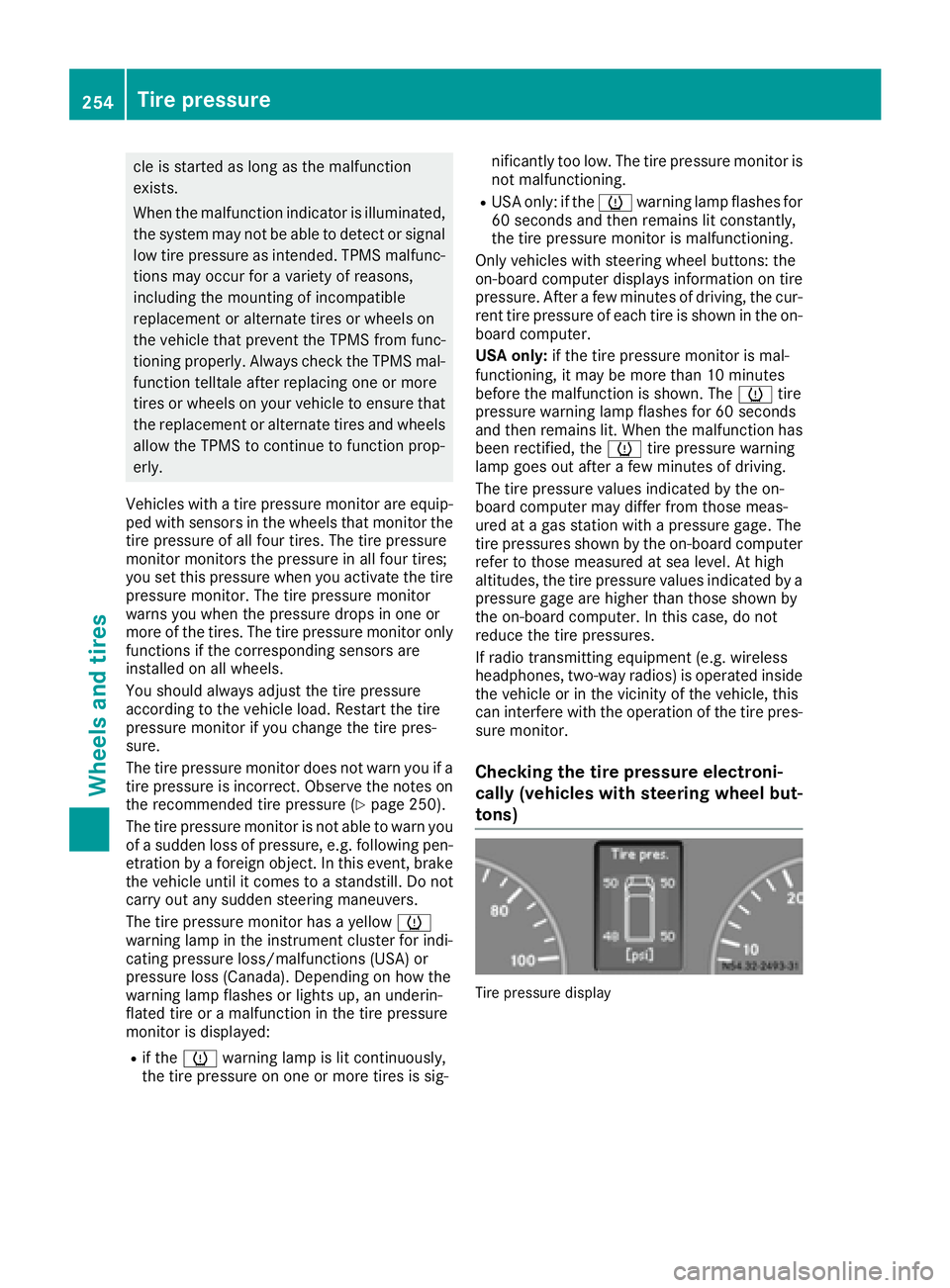
Checking the tire pressure electroni-
cally (vehicles with steering wheel but-
tons)
Tire pressure display
254Tire pressure
Wheels and tires
Page 257 of 290
Using the steering wheel buttons
XTurn the SmartKey to position2in the ignition
lock.
XPress the VorU button repeatedly
until the standard display is shown
(
Ypage 167).
XPress the 9or: button repeatedly
until the current pressure of the individual
tires is shown in the display.
If the vehicle is parked for longer than
20 minutes or you then drive at less than 18 mph
(30 km/h), the Tire pres. displayed
after driving for several minutesmes-
sage appears.
iThe tire pressure value shown in the display
may differ from those measured at a gas sta-
tion using a pressure gage. The on-board
computer will generally give you a more exact
value.
Tire pressure loss warning system
Vehicles with steering wheel buttons
If the tire pressure monitor detects a pressure
loss in one or more tires, the on-board computer
displays the yellow Tire
pres.Adjustpres.warning message. The htire pressure loss
warning lamp in the instrument cluster
(
Ypage 202) flashes for about 60 seconds and
then remains lit.
The pressure of the affected tire is highlighted in
yellow in the on-board computer (
Ypage 176).
If the tire pressure monitor detects a significant
pressure loss in one or more tires, the on-board
computer displays the red Tire pres.
Warn‐ingTiredefectwarning message. Theh
tire pressure loss warning lamp in the instru-
ment cluster (
Ypage 202) flashes for about 60
seconds and then remains lit. An additional
warning tone sounds.
The pressure of the affected tire is highlighted in
yellow in the on-board computer (
Ypage 176).
Restarting the tire pressure monitor
When you restart the tire pressure monitor, the
currently set tire pressure are taken as refer-
ence values for monitoring. In most cases, the tire pressure monitor detects
the new reference values automatically, e.g.
after you have:
Rchanged the tire pressure
Rchanged wheels or tires
Rinstalled new wheels or tires
However, you can also define reference values
manually as described here.
Before restarting the tire pressure monitor:
XSet the tire pressure to the value recommen- ded on the Tire and Loading Information plac-
ard or the tire pressure table on the B-pillar on
the driver's side (
Ypage 250).
Observe the notes on tire pressure when
doing so (
Ypage 250).
XMake sure that the tire pressure is correct on
all four wheels.
Restarting the tire pressure monitor (vehi-
cles without steering wheel buttons):
XTurn the SmartKey to position 2in the ignition
lock.
XPress the 4menu button on the instrument
cluster repeatedly until the display shows the
following message:
+CAL- TPMS
XPress the fbutton on the instrument clus-
ter.
The display shows:
OK TPMS
The tire pressure monitor activation process
has begun. The tire pressures measured for
the individual wheels are stored as the new
reference values, provided that the tire pres-
sure monitor considers them to be plausible.
If you wish to cancel the restart:
XPress the gbutton or the 4menu button on
the instrument cluster.
The activation process is canceled automati-
cally if 30 seconds elapse without input.
Restarting the tire pressure monitor (vehi-
cles with steering wheel buttons):
XTurn the key to position 2in the ignition lock.
XPress the VorU button on the steering
wheel until the standard display (Ypage 167)
appears in the display.
XPress the 9or: button on the steering
wheel repeatedly until the current pressure of
Tire pressure255
Wheels and tires
Z
Page 264 of 290
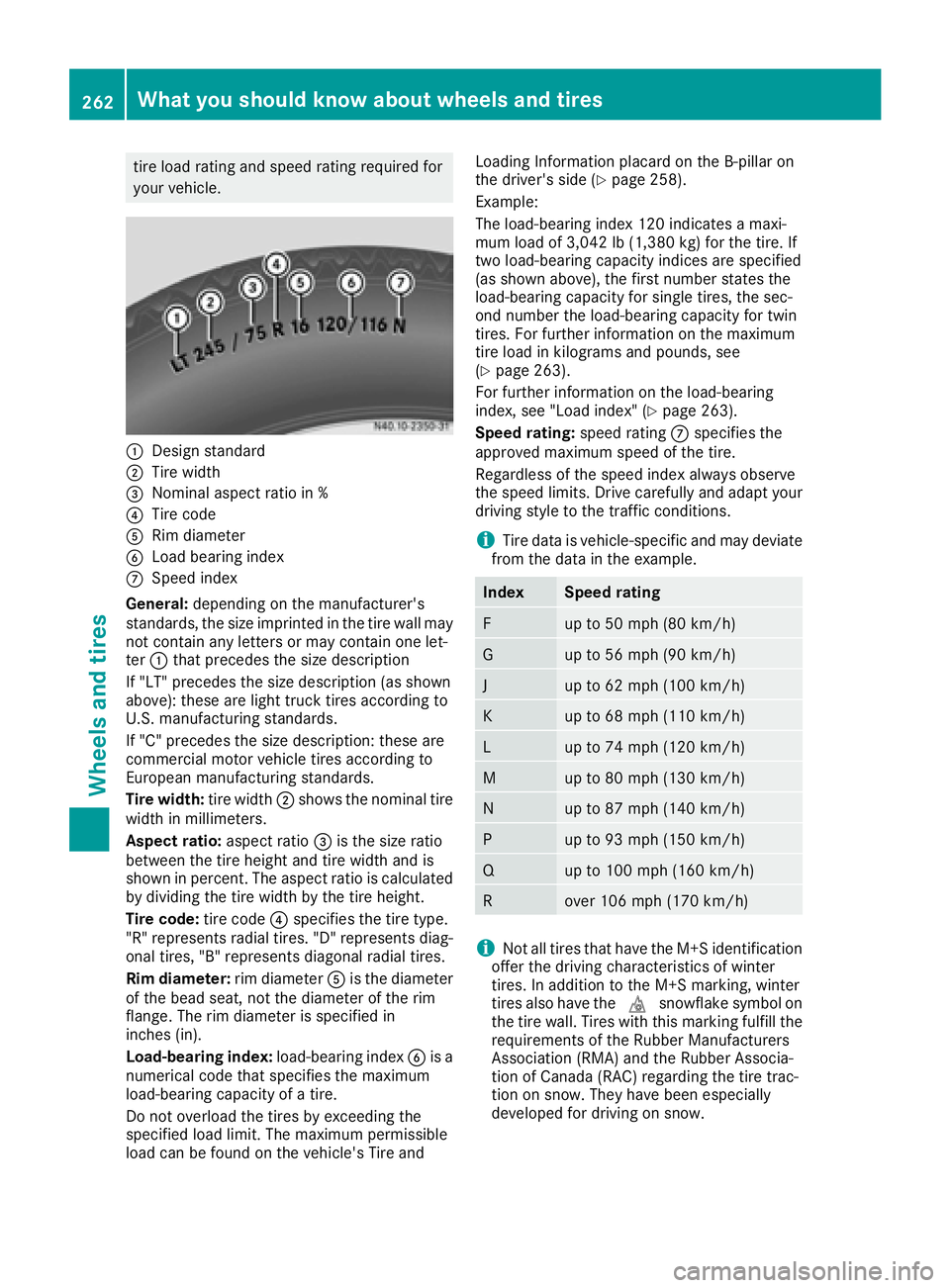
tire load rating and speed rating required for
your vehicle.
:Design standard
;Tire width
=Nominal aspect ratio in %
?Tire code
ARim diameter
BLoad bearing index
CSpeed index
General: depending on the manufacturer's
standards, the size imprinted in the tire wall may
not contain any letters or may contain one let-
ter :that precedes the size description
If "LT" precedes the size description (as shown
above): these are light truck tires according to
U.S. manufacturing standards.
If "C" precedes the size description: these are
commercial motor vehicle tires according to
European manufacturing standards.
Tire width: tire width;shows the nominal tire
width in millimeters.
Aspect ratio: aspect ratio=is the size ratio
between the tire height and tire width and is
shown in percent. The aspect ratio is calculated
by dividing the tire width by the tire height.
Tire code: tire code?specifies the tire type.
"R" represents radial tires. "D" represents diag-
onal tires, "B" represents diagonal radial tires.
Rim diameter: rim diameterAis the diameter
of the bead seat, not the diameter of the rim
flange. The rim diameter is specified in
inches (in).
Load-bearing index: load-bearing indexBis a
numerical code tha t s
pecifies the maximum
load-bearing capacity of a tire.
Do not overload the tires by exceeding the
specified load limit. The maximum permissible
load can be found on the vehicle's Tire and Loading Information placard on the B-pillar on
the driver's side (
Ypage 258).
Example:
The load-bearing index 120 indicates a maxi-
mum load of 3,042 lb (1,380 kg) for the tire. If
two load-bearing capacity indices are specified
(as shown above), the first number states the
load-bearing capacity for single tires, the sec-
ond number the load-bearing capacity for twin
tires. For further information on the maximum
tire load in kilograms and pounds, see
(
Ypage 263).
For further information on the load-bearing
index, see "Load index" (
Ypage 263).
Speed rating: speed ratingCspecifies the
approved maximum speed of the tire.
Regardless of the speed index always observe
the speed limits. Drive carefully and adapt your
driving style to the traffic conditions.
iTire data is vehicle-specific and may deviate
from the data in the example.
IndexSpeed rating
Fup to 50 mph (80 km/h)
Gup to 56 mph (90 km/h)
Jup to 62 mph (100 km/h)
Kup to 68 mph (110 km/h)
Lup to 74 mph (120 km/h)
Mup to 80 mph (130 km/h)
Nup to 87 mph (140 km/h)
Pup to 93 mph (150 km/h)
Qup to 100 mph (160 km/h)
Rover 106 mph (170 km/h)
iNot all tires that have the M+S identification
offer the driving characteristics of winter
tires. In addition to the M+S marking, winter
tires also have the isnowflake symbol on
the tire wall. Tires with this marking fulfill the
requirements of the Rubber Manufacturers
Association (RMA) and the Rubber Associa-
tion of Canada (RAC) regarding the tire trac-
tion on snow. They have been especially
developed for driving on snow.
262What you should know about wheels and tires
Wheels and tires
Page 265 of 290
Further information on the reading of tire infor-
mation can be obtained at any qualified special-
ist workshop.
Load index
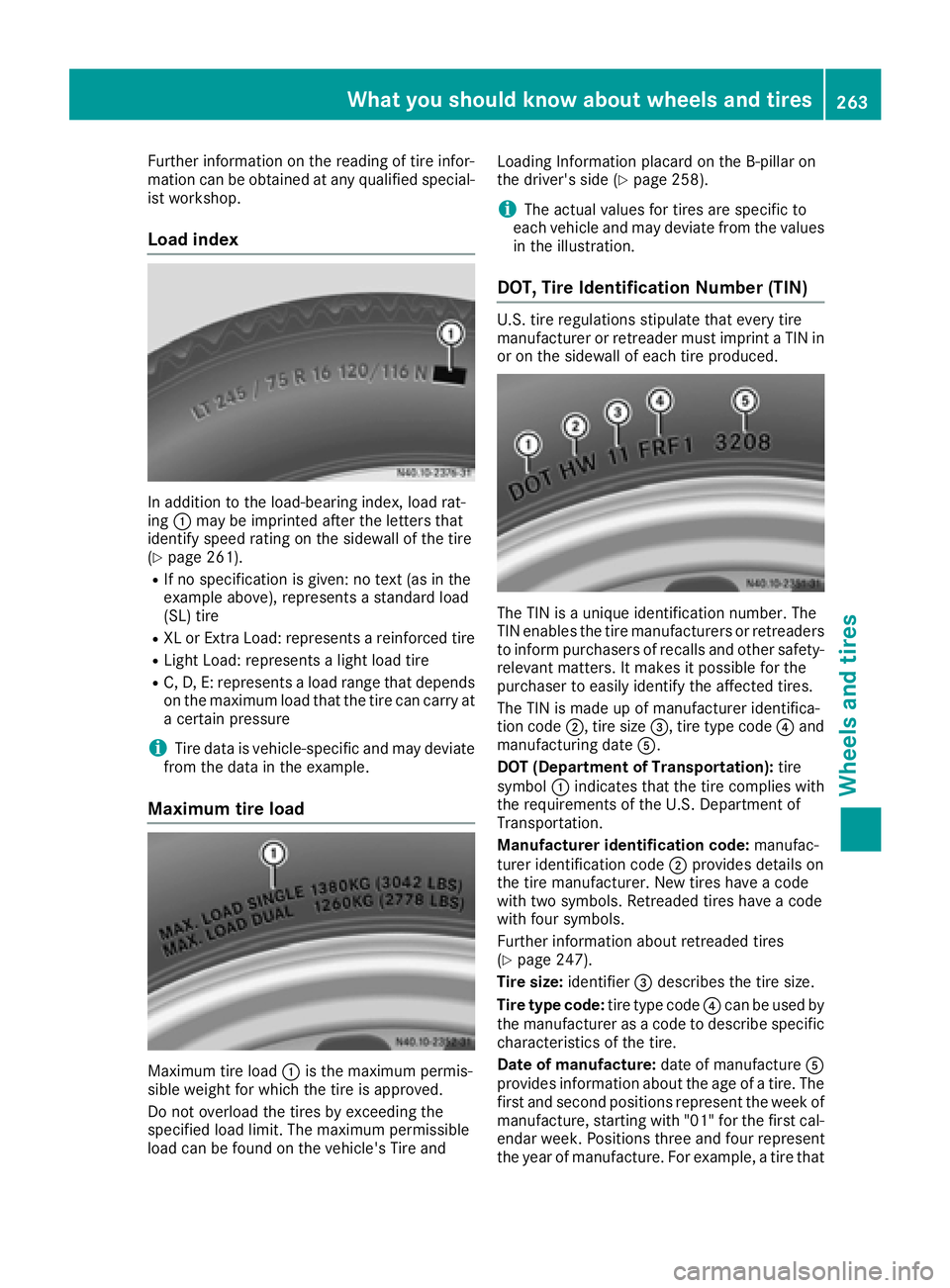
In addition to the load-bearing index, load rat-
ing:may be imprinted after the letters that
identify speed rating on the sidewall of the tire
(
Ypage 261).
RIf no specification is given: no text (as in the
example above), represents a standard load
(SL) tire
RXL or Extra Load: represents a reinforced tire
RLight Load: represents a light load tire
RC, D, E: represents a load range that depends
on the maximum load that the tire can carry at
a certain pressure
iTire data is vehicle-specific and may deviate
from the data in the example.
Maximum tire load
Maximum tire load :is the maximum permis-
sible weight for which the tire is approved.
Do not overload the tires by exceeding the
specified load limit. The maximum permissible
load can be found on the vehicle's Tire and Loading Information placard on the B-pillar on
the driver's side (
Ypage 258).
iThe actual values for tires are specific to
each vehicle and may deviate from the values
in the illustration.
DOT, Tire Identification Number (TIN)
U.S. tire regulations stipulate that every tire
manufacturer or retreader must imprint a TIN in
or on the sidewall of each tire produced.
The TIN is a unique identification number. The
TIN enables the tire manufacturers or retreaders
to inform purchasers of recalls and other safety-
relevant matters. It makes it possible for the
purchaser to easily identify the affected tires.
The TIN is made up of manufacturer identifica-
tion code ;, tire size =, tire type code ?and
manufacturing date A.
DOT (Department of Transportation): tire
symbol :indicates that the tire complies with
the requirements of the U.S. Department of
Transportation.
Manufacturer identification code: manufac-
turer identification code ;provides details on
the tire manufacturer. New tires have a code
with two symbols. Retreaded tires have a code
with four symbols.
Further information about retreaded tires
(
Ypage 247).
Tire size: identifier=describes the tire size.
Tire type code: tire type code?can be used by
the manufacturer as a code to describe specific
characteristics of the tire.
Date of manufacture: date of manufactureA
provides information about the age of a tire. The first and second positions represent the week of
manufacture, starting with "01" for the first cal-
endar week. Positions three and four represent
the year of manufacture. For example, a tire that
What you should know about wheels and tires263
Wheels and tires
Z
Page 267 of 290
cle weight rating (GVWR) specified on the vehi-
cle identification plate at the base of the driver's
seat (
Ypage 276).
GVWR (Gross Vehicle Weight Rating)
The GVWR is the maximum permitted gross
weight of the fully laden vehicle (weight of the
vehicle including all accessories, occupants,
fuel, luggage and the drawbar noseweight if
applicable). The Gross Vehicle Weight Rating is
specified on the vehicle identification plate on
the driver seat frame (
Ypage 276).
Maximum weight of the laden vehicle
The maximum weight is the sum of:
Rthe curb weight of the vehicle
Rthe weight of the accessories
Rthe load limit
Rthe weight of the factory installed optional
equipment
Kilopascal (kPa)
Metric unit for tire pressure. 6.9 kPa are the
equivalent of 1 psi. Another tire pressure unit is
bar. 100 kilopascals(kPa) are the equivalent of
1 bar.
Load index
In addition to the load bearing index, a load
index can be stamped onto the sidewall of the
tire. It specifies the load-bearing capacity of the
tire more precisely.
Curb weight
The weight of a vehicle with standard equipment
including the maximum filling capacity of fuel,
oil, and coolant. It also includes the air-condi-
tioning system and optional equipme nt i
f these
are installed on the vehicle, but does not include
passengers or luggage.
Maximum tire load
The maximum tire load in kilograms or pounds is
the maximum weight for which a tire is
approved.
Maximum permissible tire pressure
Maximum permissible tire pressure for one tire.
Maximum load on one tire
Maximum load on one tire. This is calculated by
dividing the maximum axle load of one axle by
two.
PSI (Pounds per square inch)
Standard unit of measurement for tire pressure.
Aspect ratio
Relationship between tire height and width in
percent.
tire pressure
Pressure inside the tire applying an outward
force to every square inch of the tire's surface.
Tire pressure is specified in pounds per square
inch (psi), in kilopascal (kPa) or in bar. Tire pres-
sure should only be corrected when the tires are
cold.
Cold tire pressure
The tires are cold:
Rif the vehicle has been parked for at least
three hours without direct sunlight on the
tires, and
Rif the vehicle has not been driven further than
1 mile (1.6 km)
Tire tread
The part of the tire that comes into contact with the road.
Tire bead
The tire bead ensures that the tire sits securely
on the wheel. There are several stee l wires in the
bead to prevent the tire from coming loose from
the wheel rim.
Sidewall
The part of the tire between the tread and the
tire bead.
Weight of optional extras
The combined weight of those optional extras
that weigh more than the replaced standard
parts and more than 2.3 kg (5 lbs). These
optional extras, such as high-performance
brakes, a roof rack or a high-performance bat-
tery, are not included in the curb weight and the
weight of the accessories.
TIN (Tire Identification Number)
A unique identification number which can be
used by a tire manufacturer to identify tires, for
example for a product recall, and thus identify
the purchasers. The TIN is composed of the
manufacturer identification code, tire size, tire
model code and manufacturing date.
What you should know about wheels and tires265
Wheels and tires
Z