steering wheel MERCEDES-BENZ SPRINTER 2016 MY16 Operator’s Manual
[x] Cancel search | Manufacturer: MERCEDES-BENZ, Model Year: 2016, Model line: SPRINTER, Model: MERCEDES-BENZ SPRINTER 2016Pages: 290, PDF Size: 6.44 MB
Page 257 of 290
Using the steering wheel buttons
XTurn the SmartKey to position2in the ignition
lock.
XPress the VorU button repeatedly
until the standard display is shown
(
Ypage 167).
XPress the 9or: button repeatedly
until the current pressure of the individual
tires is shown in the display.
If the vehicle is parked for longer than
20 minutes or you then drive at less than 18 mph
(30 km/h), the Tire pres. displayed
after driving for several minutesmes-
sage appears.
iThe tire pressure value shown in the display
may differ from those measured at a gas sta-
tion using a pressure gage. The on-board
computer will generally give you a more exact
value.
Tire pressure loss warning system
Vehicles with steering wheel buttons
If the tire pressure monitor detects a pressure
loss in one or more tires, the on-board computer
displays the yellow Tire
pres.Adjustpres.warning message. The htire pressure loss
warning lamp in the instrument cluster
(
Ypage 202) flashes for about 60 seconds and
then remains lit.
The pressure of the affected tire is highlighted in
yellow in the on-board computer (
Ypage 176).
If the tire pressure monitor detects a significant
pressure loss in one or more tires, the on-board
computer displays the red Tire pres.
Warn‐ingTiredefectwarning message. Theh
tire pressure loss warning lamp in the instru-
ment cluster (
Ypage 202) flashes for about 60
seconds and then remains lit. An additional
warning tone sounds.
The pressure of the affected tire is highlighted in
yellow in the on-board computer (
Ypage 176).
Restarting the tire pressure monitor
When you restart the tire pressure monitor, the
currently set tire pressure are taken as refer-
ence values for monitoring. In most cases, the tire pressure monitor detects
the new reference values automatically, e.g.
after you have:
Rchanged the tire pressure
Rchanged wheels or tires
Rinstalled new wheels or tires
However, you can also define reference values
manually as described here.
Before restarting the tire pressure monitor:
XSet the tire pressure to the value recommen- ded on the Tire and Loading Information plac-
ard or the tire pressure table on the B-pillar on
the driver's side (
Ypage 250).
Observe the notes on tire pressure when
doing so (
Ypage 250).
XMake sure that the tire pressure is correct on
all four wheels.
Restarting the tire pressure monitor (vehi-
cles without steering wheel buttons):
XTurn the SmartKey to position 2in the ignition
lock.
XPress the 4menu button on the instrument
cluster repeatedly until the display shows the
following message:
+CAL- TPMS
XPress the fbutton on the instrument clus-
ter.
The display shows:
OK TPMS
The tire pressure monitor activation process
has begun. The tire pressures measured for
the individual wheels are stored as the new
reference values, provided that the tire pres-
sure monitor considers them to be plausible.
If you wish to cancel the restart:
XPress the gbutton or the 4menu button on
the instrument cluster.
The activation process is canceled automati-
cally if 30 seconds elapse without input.
Restarting the tire pressure monitor (vehi-
cles with steering wheel buttons):
XTurn the key to position 2in the ignition lock.
XPress the VorU button on the steering
wheel until the standard display (Ypage 167)
appears in the display.
XPress the 9or: button on the steering
wheel repeatedly until the current pressure of
Tire pressure255
Wheels and tires
Z
Page 258 of 290
the individual tires is displayed or the display
shows the following message:
Tire pres. displayed after driving
for several minutes
XPress the9reset button on the instrument
cluster.
The display shows the following message:
Monitor current tire pressure?
XPress the Wbutton on the steering wheel.
The display shows the following message:
Tire pres. monitor reactivated
The tire pressure monitor activation process
has begun. The tire pressures measured for
the individual wheels are stored as the new
reference values, provided that the tire pres-
sure monitor considers them to be plausible.
If you wish to cancel the restart:
XPress the Xbutton on the steering wheel.
256Tire pressure
Wheels and tires
Page 260 of 290
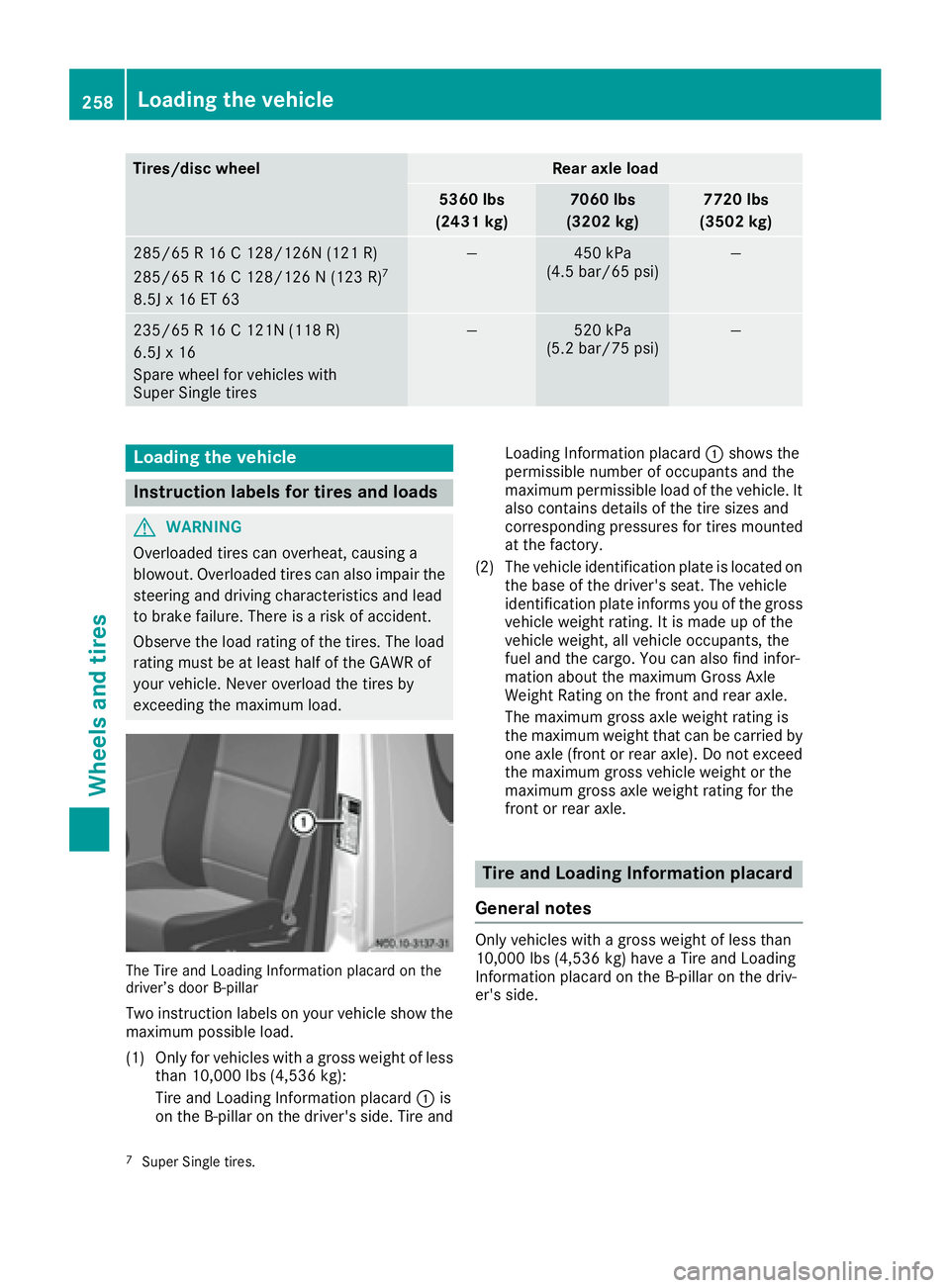
Tires/disc wheelRear axle load
5360 lbs
(2431 kg)7060 lbs
(3202 kg)7720 lbs
(3502 kg)
285/65 R 16 C 128/126N (121 R)
285/65 R 16 C 128/126 N (123 R)7
8.5J x 16 ET 63
—450 kPa
(4.5 bar/65 psi)—
235/65 R 16 C 121N (118 R)
6.5J x 16
Spare wheel for vehicles with
Super Single tires—520 kPa
(5.2 bar/75 psi)—
Loading the vehicle
Instruction labels for tires and loads
GWARNING
Overloaded tires can overheat, causing a
blowout. Overloaded tires can also impair the steering and driving characteristics and lead
to brake failure. There is a risk of accident.
Observe the load rating of the tires. The load
rating must be at least half of the GAWR of
your vehicle. Never overload the tires by
exceeding the maximum load.
The Tire and Loading Information placard on the
driver’s door B-pillar
Two instruction labels on your vehicle show themaximum possible load.
(1) Only for vehicles with a gross weight of less than 10,000 lbs (4,536 kg):
Tire and Loading Information placard :is
on the B-pillar on the driver's side. Tire and Loading Information placard
:shows the
permissible number of occupants and the
maximum permissible load of the vehicle. It
also contains details of the tire sizes and
corresponding pressures for tires mounted
at the factory.
(2) The vehicle identification plate is located on the base of the driver's seat. The vehicle
identification plate informs you of the gross
vehicle weight rating. It is made up of the
vehicle weight, all vehicle occupants, the
fuel and the cargo. You can also find infor-
mation about the maximum Gross Axle
Weight Rating on the front and rear axle.
The maximum gross axle weight rating is
the maximum weight that can be carried by
one axle (front or rear axle). Do not exceed
the maximum gross vehicle weight or the
maximum gross axle weight rating for the
front or rear axle.
Tire and Loading Information placard
General notes
Only vehicles with a gross weight of less than
10,000 lbs (4,536 kg) have a Tire and Loading
Information placard on the B-pillar on the driv-
er's side.
7Super Single tires.
258Loading the vehicle
Wheels and tires
Page 281 of 290
Fuel additives
!Do not add gasoline or kerosene todiesel
fuel to improve its flow characteristics. Gas-
olin e or kerosene impairs the lubricating
properties of the diesel fuel. This can result in
damage to the fuel injection system, for
example.
Information on fuel consumption
HEnvironmental note
CO
2(carbon dioxide) is the gaswhich scien-
tists believe to be prin cipally responsible for
global warming (the greenhouse effect). Your veh icle'sCO
2emissions are directly related to
fuel consumption and therefore depend on:
Reff icie nt use of the fuel bythe engine
Rdriv ing style
Rother non-technical factors, such as envi-
ronmental influences, road conditions or
traff icflow
You can min imize your veh icle'sCO
2emis-
sions by driv ing carefully and having itserv-
iced regularly.
Fuel consumption depends on:
Rthe vehicleversion
Rthe style of driving
Rthe operating conditions
Rthe type or quality of the fuel used
The veh icle will use more fuel than usual inthe
fol lowin g situations:
Rat very low outside temperatures
Rincity traff ic
Rduring short journeys
Ron mountainous terrain
Rwhen to winga trailer
To keep fuel consumption low,observe the
advice inthe "Protection of the environment"
section (
Ypage 24).
The fol lowing components of the different veh i-
cle versions influence fuel consumption:
Rtire sizes, tire tread, tire pressure, tire cond i-
tion
Rbody
Rtransmission ratios for the drive assemblies
Radditional equipment (e.g. air-conditioning
system, auxil iary heating system)
For these reasons, the actual consumption fig-
ures for your vehicle may deviate from the con-
sumption figures determined according to EU
Directive 80 /1268/EE C.
Data concerning fuel consumption are recorded
in the on-board computer; use the steering
wheel buttons to call up the Trip computer
menu (
Ypage 174).
Diesel Exhaust Fluid (DEF)
General notes
HEnvironmental note
Dispose of DEF in an environmentally respon-
sible manner.
When opening the DEF tank filler cap at high
outside temperatures, ammonia vapors may
escape.
Ammonia vapors have a pungent smell and pri-
marily cause irritation of the:
Rskin
Rmucous membranes
Reyes
You may experience a burning sensation in your
eyes, nose and throat, as well as coughing and
watering of the eyes.
Do not inhale ammonia vapors. Avoid contact
with DEF.
Do not allow DEF to come into direct contact
with your skin; it is hazardous to your health.
Rinse any affected areas off with plenty of clean water. Consult a doctor if necessary.
If DEF heats up, e.g. in direct sunlight, in the DEF
supply reservoir for some time to over 122 ‡
(50 †), ammonia vapor will develop.
To conform to emission regulations, you must
operate the vehicle with DEF and refill the supply
regularly. The engine management recognizes
attempts to operate the vehicle without DEF,
with thinned DEF or with another reducing
agent. After previous warning messages, the
engine management then prevents a further
engine start.
When the number of remaining engine starts is 0
the engine management prevents the vehicle
from being driven at a speed exceeding 5 mph
Service products and capacities279
Technical data
Z