brakes MERCEDES-BENZ SPRINTER 2016 MY16 Operator’s Manual
[x] Cancel search | Manufacturer: MERCEDES-BENZ, Model Year: 2016, Model line: SPRINTER, Model: MERCEDES-BENZ SPRINTER 2016Pages: 290, PDF Size: 6.44 MB
Page 140 of 290
could slip sideways, tip and rollover. There is arisk of an accident.
Always drive on a steep incline in the line of
fall (straight up or down) and do not turn the
vehicle.
GWARNING
When driving off-road, your body is subject to
forces from all directions, due to the uneven
surface. You could be thrown from your seat,
for instance. There is a risk of injury.
Always wear a seat belt, even when driving off-
road.
GWARNING
If you drive over obstacles or in ruts, the steer-
ing wheel may jerk out of your grip, causing
injury to your hands.
Always hold the steering wheel firmly with
both hands. When driving over obstacles, you
must expect steering forces to increase
briefly and suddenly.
GWARNING
Flammable material such as leaves, grass or
twigs may ignite if they come into contact with
hot parts of the exhaust system. There is a risk of fire.
When driving off road or on unpaved roads,
check the vehicle's underside regularly. In
particular, remove parts of plants or other
flammable materials which have become
trapped. In the case of damage, contact a
qualified specialist workshop.
!When driving off-road or on unpaved surfa-
ces, check the underside of the vehicle and
the wheels and tires at regular intervals. In
particular, remove any trapped foreign
objects, e.g. stones and branches.
Such foreign objects may:
Rdamage the chassis, the fuel tank or the
brake system
Rcause imbalances and thus vibrations
Rbe flung out when you continue driving
If there is any damage, inform a qualified spe-
cialist workshop. When driving off-road and on construction sites,
sand, mud and water mixed with oil, for exam-
ple, may get into the brakes. This may lead to a
reduction in braking performance or total brake
failure, also as a result of increased wear. The
braking characteristics will vary depending on
the material that has got into the system. Clean
the brakes after driving off-road. If you then
notice reduced braking performance or hear
scraping noises, have the brake system checked
at a
quali
fied specialist workshop. Adjust your
driving style to the changed braking character-
istics.
Driving off-road or on construction sites increa-
ses the possibility of vehicle damage which may
in turn lead to the failure of certain assemblies
and systems. Adapt your driving style to the off- road driving conditions. Drive carefully. Have
any vehicle damage rectified at a qualified spe-
cialist workshop as soon as possible.
When driving on rough terrain, do not shift the
transmission into the neutral position. You could
lose control when attempting to brake the vehi-
cle with the service brake. If your vehicle cannot
manage an uphill slope, drive back down the
slope in reverse gear.
When loading your vehicle for driving off-road or on a construction site, keep the vehicle's center
of gravity as low as possible.
Checklist before driving off-road
XCheck the fuel and DEF levels (Ypage 162)
and top up (Ypage 129).
XEngine: check the oil level (Ypage 220) and
add oil (Ypage 222).
Before driving up or down steep gradients, fill
the oil to the maximum level.
iIf you drive up or down steep gradients, the
4 symbol may appear in the display. The
engine operating safety is not put at risk if you
have filled the engine oil to the maximum level
before the journey.
XVehicle tool kit: check that the jack is work-
ing (Ypage 240).
XMake sure that a lug wrench (Ypage 240),
wooden underlay for the jack, a robust tow
cable and a folding spade are carried in the
vehicle.
XWheels and tires: check the tire tread depth
(Ypage 248) and tire pressure
(Ypage 250).
138Driving tips
Driving and parking
Page 141 of 290
Rules for driving off-road
!Always bear the vehicle's ground clearance
in mind and avoid obstacles, e.g. deep ruts.
Obstacles may damage the following parts of
the vehicle:
Rthe chassis
Rthe drive train
Rthe fuel and supply tanks
For this reason, you should always drive
slowly when driving off-road. If you have to
drive over obstacles, have the front
passenger direct you.
iWe recommend that you additionally carry a
shovel and a recovery rope with shackle in the
vehicle.
REnsure that loads and items of luggage are
securely stowed or lashed down
(
Ypage 212).
RBefore driving off-road, stop the vehicle and
shift to a low gear.
RIf the surface demands it, temporarily deacti-
vate ASR when pulling away (Ypage 53).
ROnly drive off-road with the engine running
and a gear engaged.
RDrive slowly and smoothly. Walking pace is
necessary in many situations.
RAvoid spinning the drive wheels.
RMake sure that the wheels always remain in
contact with the ground.
RDrive with extreme care over unknown terrain
where you can only see for a short distance.
As a precaution, get out of the vehicle to take
a look at the route to be taken in advance.
RCheck the water depth before fording.
RWatch out for obstacles (e.g. rocks, holes,
tree stumps and ruts).
RAvoid edges where the surface could crumble
or break away.
Checklist after driving off-road
!If you detect damage to the vehicle after
driving off-road, have the vehicle checked
immediately at a qualified specialist work-
shop.
Off-road driving places a higher demand on your
vehicle than normal road operation. Check your
vehicle after driving on rough terrain. By doing
so you will notice any damage in good time and reduce the risk of an accident for yourself and
other road users. Clean your vehicle thoroughly
before driving on public roads.
Observe the following points after driving off-
road, on construction sites and before driving on
public roads:
XVehicles with all-wheel drive:
deactivate
all-wheel drive (Ypage 148).
XActivate ASR (Ypage 53).
XClean the headlamps and tail lamps and
check them for damage.
XClean the front and rear license plates.
XClean the windshield, windows and exterior
mirrors.
XClean the steps, door sills and grab handles.
This increases safety of footing.
XClean the wheels and tires, wheel arches and
the underbody of the vehicle with a water jet.
This increases road grip, especially on wet
road surfaces.
XCheck the wheels and tires and wheel arches
for trapped foreign objects and remove them.
Trapped foreign objects can damage the
wheels and tires or may be fl
ung out from the
vehicle when you continue driving.
XCheck the underbody for trapped branches or
other parts of plants and remove them.
Trapped branches or other parts of plants
increase the risk of fire and can cause dam-
age to fuel lines, brake hoses and the rubber
bellows of axle joints and drive shafts.
XClean the brake disks, brake pads and axle
joints, particularly after operation in sand,
mud, grit and gravel, water or similarly dirty
conditions.
XCheck the entire floor assembly, the tires,
wheels, bodywork structure, brakes, steering,
chassis and exhaust system for any damage.
XCheck the service brake for operating safety,
e.g. carry out a brake test.
XIf you notice strong vibrations after driving off-
road, check the wheels and drive train for for-
eign objects again. Remove any foreign
objects which can lead to imbalances and
thus cause vibrations.
Driving tips139
Driving and parking
Z
Page 143 of 290
Storing and maintaining the current
speed
XAccelerate the vehicle to the desired speed
above 20 mph (30 km/h).
XBriefly push the cruise control lever up:or
down ?.
XRelease the accelerator pedal.
Cruise control is activated. The current speed
is stored.
The display shows the Vsymbol and the
stored speed.
Resuming the stored speed
GWARNING
If you call up the stored speed and it differs
from the current speed, the vehicle acceler-
ates or decelerates. If you do not know the
stored speed, the vehicle could accelerate or brake unexpectedly. There is a risk of an acci-
dent.
Pay attention to the road and traffic condi-
tions before calling up the stored speed. If you
do not know the stored speed, store the
desired speed again.
XBriefly pull the cruise control lever towards
you =.
XRelease the accelerator pedal.
Cruise control is activated and resumes the
vehicle's speed to the last speed stored.
The display shows the Vsymbol and the
stored speed.
iWhen you pull the cruise control level
towards you for the first time after starting the
engine, cruise control adopts the current
speed.
Setting the speed
It may be a moment before the vehicle starts to
accelerate or brake to the set speed. Take this
delay into account when setting the speed.
XBriefly push the cruise control lever up :to
increase the speed or down =to reduce the
speed.
The last stored speed increases or decreases
in 1 mph increments (1 km/h increments).
or
XPress and hold the cruise control lever up :
or down =until the desired speed has been
reached.
XRelease the cruise control lever.
The current speed is stored.
The display shows the Vsymbol and the
stored speed.
iCruise control is not deactivated if you
depress the accelerator pedal. If you acceler-
ate briefly to overtake, for example, cruise
control resumes the vehicle’s speed to the
last speed stored after you have finished over-
taking.
Deactivating cruise control
There are various ways to deactivate cruise con- trol:
XBriefly press the cruise control lever for-
wards ?.
or
XApply the brakes.
The last speed set remains stored. The last
speed stored is deleted when you switch off the
engine.
Cruise control is deactivated automatically
when:
Ryou apply the brakes
Ryou apply the parking brake and the c
indicator lamp in the instrument cluster lights
up
Ryou are driving slower than 20 mph (30 km/h)
Ryou shift the automatic transmission to neu-
tral position Nwhile the vehicle is in motion
RESP®or ASR intervenes
Rthere is a malfunction in the ESP®, ASR or ABS
system
Driving systems141
Driving and parking
Z
Page 145 of 290
If you approach an obstacle and the distance
warning function detects a risk of a collision, the
system will alert you both visually and acousti-
cally.
In particular, the detection of obstacles can be
impaired in the case of:
Rdirt on the sensors or anything else covering
the sensors
Rsnow or heavy rain
Rinterference from other radar sources
Rthere are strong radar reflections, for exam-
ple in parking garages
Ra narrow vehicle traveling in front, e.g. a
motorbike
Ra vehicle traveling in front on a different line
Following damage to the front end of the vehicle,
have the configuration and operation of the
radar sensor checked at a qualified specialist
workshop. This also applies to collisions at slow
speeds where there is no visible damage to the
front of the vehicle.
Activating/deactivating the distance
warning function
When you switch on the engine, the distance
warning function switches on after a few sec-
onds.
XTo deactivate: press theæbutton
(Ypage 35).
Vehicles without steering wheel buttons:
the Ä warning lamp in the instrument clus-
ter lights up and the OFF
message flashes. The
message then disappears and the Äindi-
cator lamp remains lit.
Vehicles with steering wheel buttons: the
Ä warning lamp in the instrument cluster
flashes and the Distance
warningsystemdeactivatedmessage appears .The mes-
sage then disappears and the Äwarning
lamp remains lit.
XTo activate: press theæbutton again
(Ypage 35).
Vehicles without steering wheel buttons:
the Ä warning lamp in the instrument clus-
ter lights up and the on
message flashes. The
message then disappears and the Äindi-
cator lamp goes out.
Vehicles with steering wheel buttons: the
Ä warning lamp in the instrument cluster
flashes and the Distance
warningsystemactivatedmessage appears in the multi- function display. The message then disap-
pears and the indicator lamp
Ägoes out.
Adaptive Brake Assist
iObserve the "Important safety notes" sec-
tion for driving safety systems (Ypage 52).
GWARNING
Adaptive Brake Assist cannot always clearly
identify objects and complex traffic situa-
tions.
In such cases, Adaptive Brake Assist can:
Rintervene unnecessarily
Rnot intervene
There is a risk of an accident.
Always pay careful attention to the traffic sit- uation and be ready to brake. Terminate the
intervention in a non-critical driving situation.
GWARNING
Adaptive Brake Assist does not react:
Rto people or animals
Rto oncoming vehicles
Rto crossing traffic
Rto stationary obstacles
Rwhen cornering
As a result, the Adaptive Brake Assist may not
intervene in all critical conditions. There is a
risk of an accident.
Always pay careful attention to the traffic sit- uation and be ready to brake.
Adaptive Brake Assist aids you when braking
during hazardous situations at speeds above
20 mph (30 km/h). With the help of Adaptive
Brake Assist, the distance warning signal can
detect obstacles that are in the path of your
vehicle for an extended period of time.
When you approach an obstacle and adaptive
Brake Assist detects that there is a risk of a col- lision, adaptive Brake Assist calculates the brak-
ing force necessary to avoid a collision. Should
you apply the brakes forcefully, adaptive Brake
Assist will automatically increase the braking
force to the calculated level.
Driving systems143
Driving and parking
Z
Page 146 of 290
XKeep the brake pedal depressed until the
emergency braking situation is over.
ABS prevents the wheels from locking.
The brakes function as usual again if:
Ryou release the brake pedal
Rthere is no longer any danger of a collision
Rno obstacle is detected in front of your vehicle
Adaptive Brake Assist is then deactivated.
Up to the maximum vehicle speed, adaptive
Brake Assist can react to moving obstacles that
have already been recognized as such at least
once over the period of observation. Adaptive
Brake Assist does not react to stationary obsta-
cles.
In particular, the detection of obstacles can be
impaired if:
Rdirt on the sensors or anything else covering
the sensors
Rsnow or heavy rain
Rinterference from other radar sources
Rthere are strong radar reflections, for exam-
ple in parking garages
Ra narrow vehicle traveling in front, e.g. a
motorbike
Ra vehicle traveling in front on a different line
If adaptive Brake Assist is not available due to a
malfunction in the radar sensor system, the full
brake boosting effect with the help of BAS
remains available.
Following damage to the front end of the vehicle,
have the configuration and operation of the
radar sensor checked at a qualified specialist
workshop. This also applies to collisions at slow
speeds where there is no visible damage to the
front of the vehicle.
Lane Tracking package
Blind Spot Assist
General notes
Blind Spot Assist uses a radar sensor system to
monitor the areas on both sides of your vehicle.
It supports you from speeds of approximately
20 mph (30 km/h). A warning display in the
exterior mirrors draws your attention to vehicles detected in the monitored area. If you then
switch on the corresponding turn signal to
change lane, you will also receive an optical and
audible collision warning. For this purpose, Blind Spot Assist uses sensors in the rear bumper and
behind the protective strips of the B-pillars.
Important safety notes
GWARNING
Blind Spot Assist does not react to:
Rvehicles overtaken too closely on the side,
placing them in the blind spot area
Rvehicles which approach with a large speed
differential and overtake your vehicle
As a result, Blind Spot Assist may not give
warnings in such situations. There is a risk of
an accident.
Always observe the traffic conditions care-
fully, and maintain a safe lateral distance.
Blind Spot Assist is only an aid. It may fail to
detect some vehicles and is no substitute for
attentive driving.
iUSA only:
This device has been approved by the FCC as
a "Vehicular Radar System". The radar sensor is intended for use in an automotive radar
system only. Removal, tampering, or altering
of the device will void any warranties, and is
not permitted by the FCC. Do not tamper with,
alter, or use in any non-approved way.
Any unauthorized modification to this device
could void the user’s authority to operate the
equipment.
Monitoring range of the sensors
In particular, the detection of obstacles can be
impaired in the case of:
Rdirt on the sensors or anything else covering
the sensors
Rpoor visibility, e.g. due to fog, heavy rain or
snow
Rnarrow and short vehicles, e.g. motorcycles
or bicycles
Rvery wide lanes
Rnarrow lanes
Rvehicles not driving in the middle of their lane
Rbarriers or other road boundaries
Vehicles in the monitoring range are then not
indicated.
144Driving systems
Driving and parking
Page 151 of 290
Conditions for engaging/disengaging
LOW RANGE can only be engaged or disengaged
if:
Rthe engine is running
Rthe vehicle is stationary
Rthe brake pedal is depressed
Rthe selector lever of the automatic transmis-
sion is in positionPor N
Rall-wheel drive is engaged
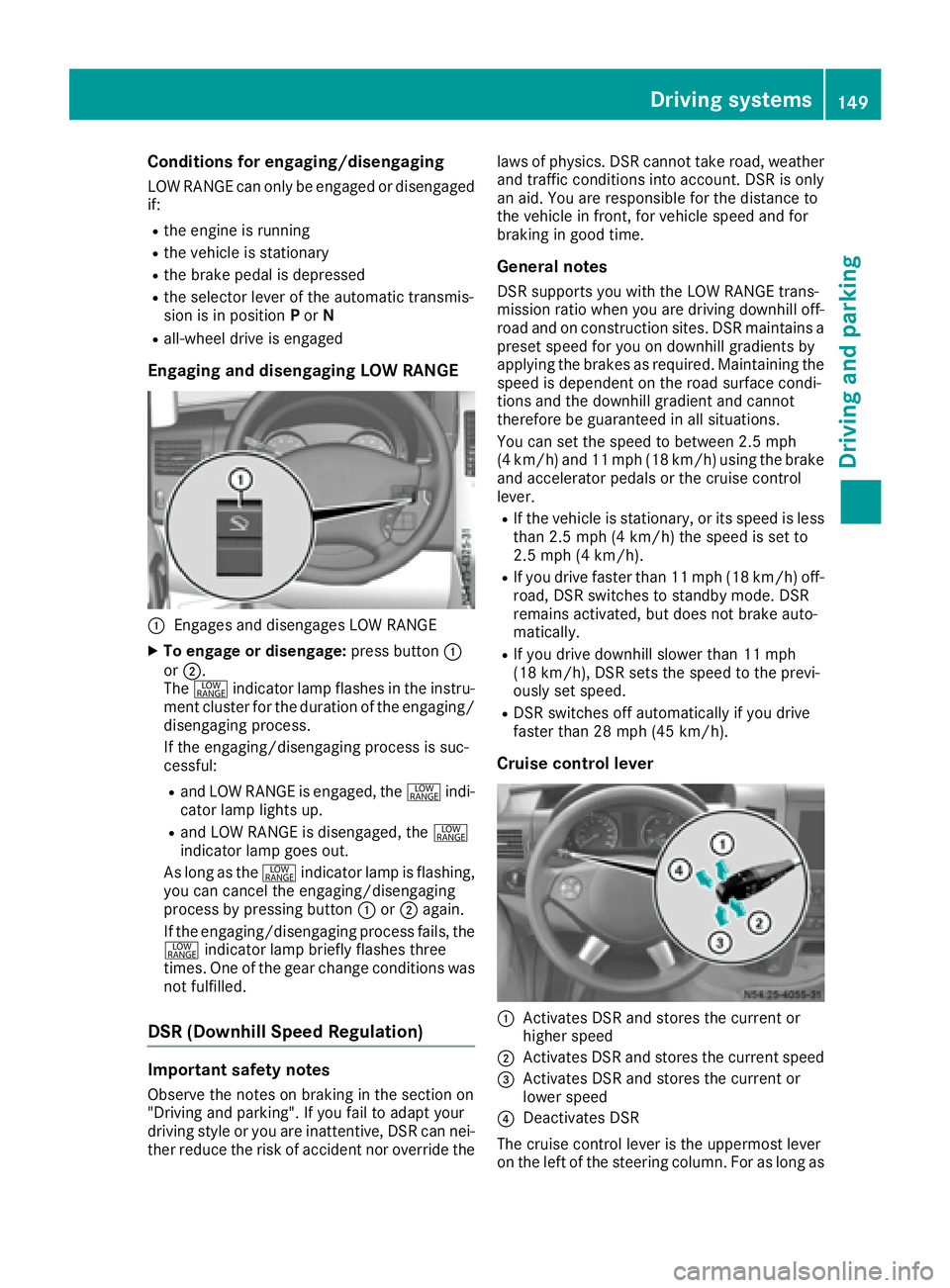
Engaging and disengaging LOW RANGE
:Engages and disengages LOW RANGE
XTo engage or disengage: press button:
or ;.
The + indicator lamp flashes in the instru-
ment cluster for the duration of the engaging/
disengaging process.
If the engaging/disengaging process is suc-
cessful:
Rand LOW RANGE is engaged, the +indi-
cator lamp lights up.
Rand LOW RANGE is disengaged, the +
indicator lamp goes out.
As long as the +indicator lamp is flashing,
you can cancel the engaging/disengaging
process by pressing button :or; again.
If the engaging/disengaging process fails, the + indicator lamp briefly flashes three
times. One of the gear change conditions was
not fulfilled.
DSR (Downhill Speed Regulation)
Important safety notes
Observe the notes on braking in the section on
"Driving and parking". If you fail to adapt your
driving style or you are inattentive, DSR can nei-
ther reduce the risk of accident nor override the laws of physics. DSR cannot take road, weather
and traffic conditions into account. DSR is only
an aid. You are responsible for the distance to
the vehicle in front, for vehicle speed and for
braking in good time.
General notes
DSR supports you with the LOW RANGE trans-
mission ratio when you are driving downhill off-
road and on construction sites. DSR maintains a
preset speed for you on downhill gradients by
applying the brakes as required. Maintaining the
speed is dependent on the road surface condi-
tions and the downhill gradient and cannot
therefore be guaranteed in all situations.
You can set the speed to between 2.5 mph
(4 km/h) and 11 mph (18 km/h) using the brake
and accelerator pedals or the cruise control
lever.
RIf the vehicle is stationary, or its speed is less
than 2.5 mph (4 km/h) the speed is set to
2.5 mph (4 km/h).
RIf you drive faster than 11 mph (18 km/h) off-
road, DSR switches to standby mode. DSR
remains activated, but does not brake auto-
matically.
RIf you drive downhill slower than 11 mph
(18 km/h), DSR sets the speed to the previ-
ously set speed.
RDSR switches off automatically if you drive
faster than 28 mph (45 km/h).
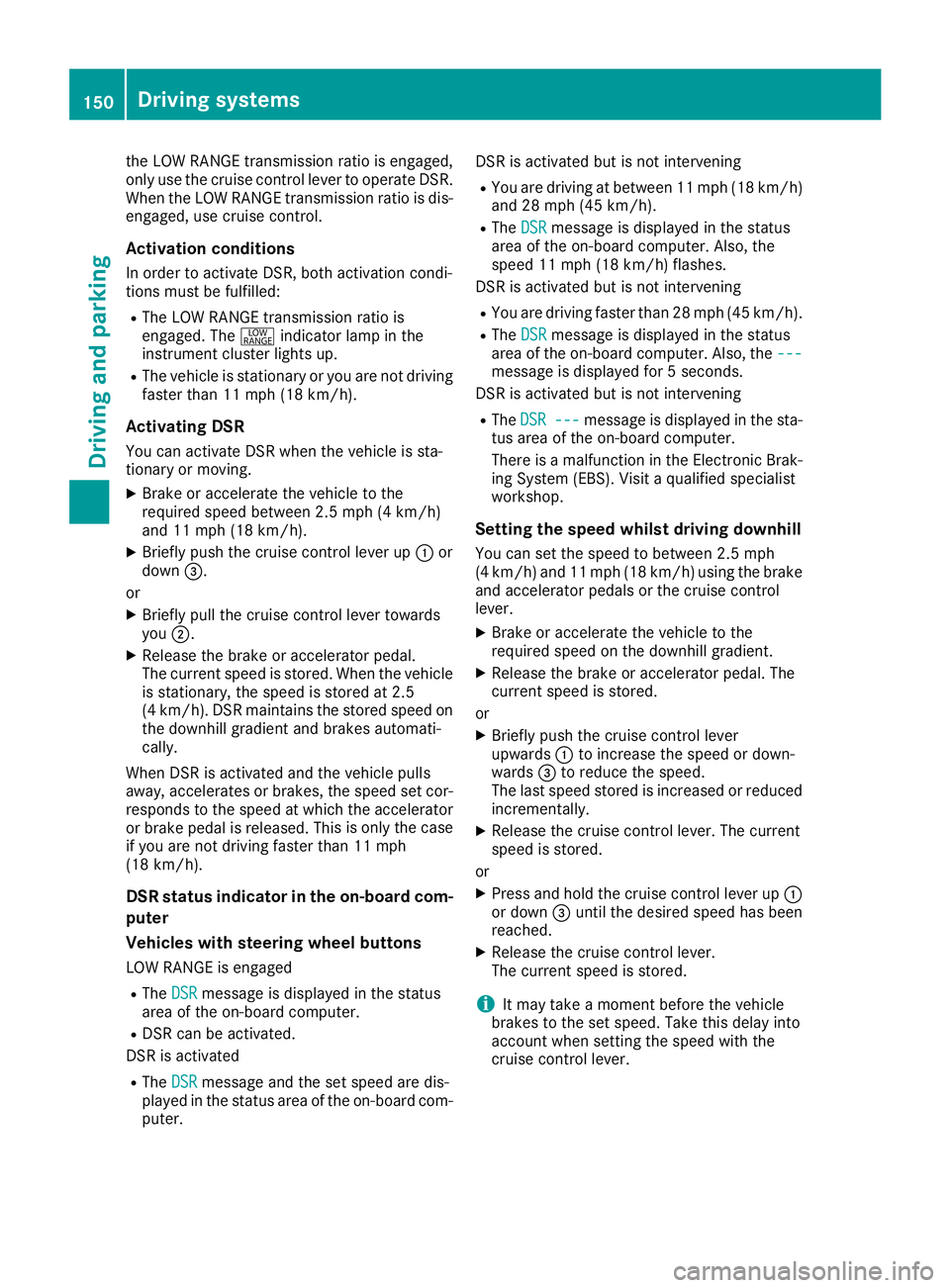
Cruise control lever
:Activates DSR and stores the current or
higher speed
;Activates DSR and stores the current speed
=Activates DSR and stores the current or
lower speed
?Deactivates DSR
The cruise control lever is the uppermost lever
on the left of the steering column. For as long as
Driving systems149
Driving and parking
Z
Page 152 of 290
the LOW RANGE transmission ratio is engaged,
only use the cruise control lever to operate DSR.
When the LOW RANGE transmission ratio is dis-
engaged, use cruise control.
Activation conditions
In order to activate DSR, both activation condi-
tions must be fulfilled:
RThe LOW RANGE transmission ratio is
engaged. The+indicator lamp in the
instrument cluster lights up.
RThe vehicle is stationary or you are not driving faster than 11 mph (18 km/h).
Activating DSR
You can activate DSR when the vehicle is sta-
tionary or moving.
XBrake or accelerate the vehicle to the
required speed between 2.5 mph (4 km/h)
and 11 mph (18 km/h).
XBriefly push the cruise control lever up :or
down =.
or
XBriefly pull the cruise control lever towards
you ;.
XRelease the brake or accelerator pedal.
The current speed is stored. When the vehicle
is stationary, the speed is stored at 2.5
(4 km/h). DSR maintains the stored speed on
the downhill gradient and brakes automati-
cally.
When DSR is activated and the vehicle pulls
away, accelerates or brakes, the speed set cor-
responds to the speed at which the accelerator
or brake pedal is released. Thi s i
s only the case
if you are not driving faster than 11 mph
(18 km/h).
DSR status indicator in the on-board com-
puter
Vehicles with steering wheel buttons
LOW RANGE is engaged
RThe DSRmessage is displayed in the status
area of the on-board computer.
RDSR can be activated.
DSR is activated
RThe DSRmessage and the set speed are dis-
played in the status area of the on-board com-
puter. DSR is activated but is not intervening
RYou are driving at between 11 mph (18 km/h)
and 28 mph (45 km/h).
RThe
DSRmessage is displayed in the status
area of the on-board computer. Also, the
speed 11 mph (18 km/h) flashes.
DSR is activated but is not intervening
RYou are driving faster than 28 mph (45 km/h).
RThe DSRmessage is displayed in the status
area of the on-board computer. Also, the ---
message is displayed for 5 seconds.
DSR is activated but is not intervening
RThe DSR---message is displayed in the sta-
tus area of the on-board computer.
There is a malfunction in the Electronic Brak-
ing System (EBS). Visit a qualified specialist
workshop.
Setting the speed whilst driving downhill
You can set the speed to between 2.5 mph
(4 km/h) and 11 mph (18 km/h) using the brake
and accelerator pedals or the cruise control
lever.
XBrake or accelerate the vehicle to the
required speed on the downhill gradient.
XRelease the brake or accelerator pedal. The
current speed is stored.
or
XBriefly push the cruise control lever
upwards :to increase the speed or down-
wards =to reduce the speed.
The last speed stored is increased or reduced
incrementally.
XRelease the cruise control lever. The current
speed is stored.
or
XPress and hold the cruise control lever up :
or down =until the desired speed has been
reached.
XRelease the cruise control lever.
The current speed is stored.
iIt may take a moment before the vehicle
brakes to the set speed. Take this delay into
account when setting the speed with the
cruise control lever.
150Driving system s
Driving an d parking
Page 153 of 290
Deactivating DSR
XBriefly press thecruise control lever for-
ward s?.
or
XAccelerate and drive faste rthan 28 mph
(45 km/h).
DS Rdeactivates automatically if:
Ryou are drivin gfaste rthan 28 mph (45 km/h).
Ryou disengage th eLO WRANGE transmissio n
ratio.
Rthere is amalfunction in th eES P®or AB Ssys-
tem.
PARKTRONIC
General notes
PARKTRONI Cis an electronic parkin gaid. The
system is equipped wit hultrasonic sensor sin
th efron tand rea rbumpers to monitor th eare a
around your vehicle. PARKTRONI Cindicate svis -
ually and audibl yth edistanc ebetween your
vehicl eand an object.
Your vehicl efeatures tw oseparat esoun demit-
ters wit hdifferen tfrequencies fo rth ewarnin g
tones. The warnin granges in fron tof and behin d
th evehicl eare indicate dby differen twarnin g
tones.
PARKTRONI Cis activated automatically when
you:
Rtur nth eke yto position 2in th eignition loc k
Rrelease theparkin gbrak eand
Rmov eth eselector lever to D,Nor R.
PARKTRONI Cis deactivated at speeds abov e
11 mph (18 km/h). PARKTRONI Cis reactivated
at speeds belo w10 mph (16 km/h).
Important safet ynotes
PARKTRONI Cis only an aid. It canno treplac e
your own awareness of th eimmediat esurround -
ings. You are responsibl efo rsaf emaneuvering,
parkin gand pullin gaway. Whe nmaneuvering,
parkin gand pullin gaway, mak esur ethat there
are no persons, animals or objects in th emaneu-
verin garea.
!Pay particular attention to obstacles abov e
or belo wthesensor swhen parking, suc has
flower pot sor trailer towbars. PARKTRONI C
doe sno trecogniz esuc hobjects when they are in th
eimmediat evicinit yof th evehicle.
You could damage th evehicl eor objects .
PARKTRONI Ccan suffer interferenc efrom:
Rultrasonic source ssuc has atruck's
compressed-air brakes, an automati ccar
wash or apneumati cdrill
Rattachments to th evehicle, e.g. rea rmoun-
te dracks
Rnumber plates (vehicle license plates) that
are no taffixed flat against th ebumper
Rdirty or icy sensor s
Remove adetachable trailer couplin gif it is no
longer required. PARKTRONI Cmeasures th e
minimum detection range to an obstacle from
th ebumper, no tth eball coupling.
Range of th esensor s
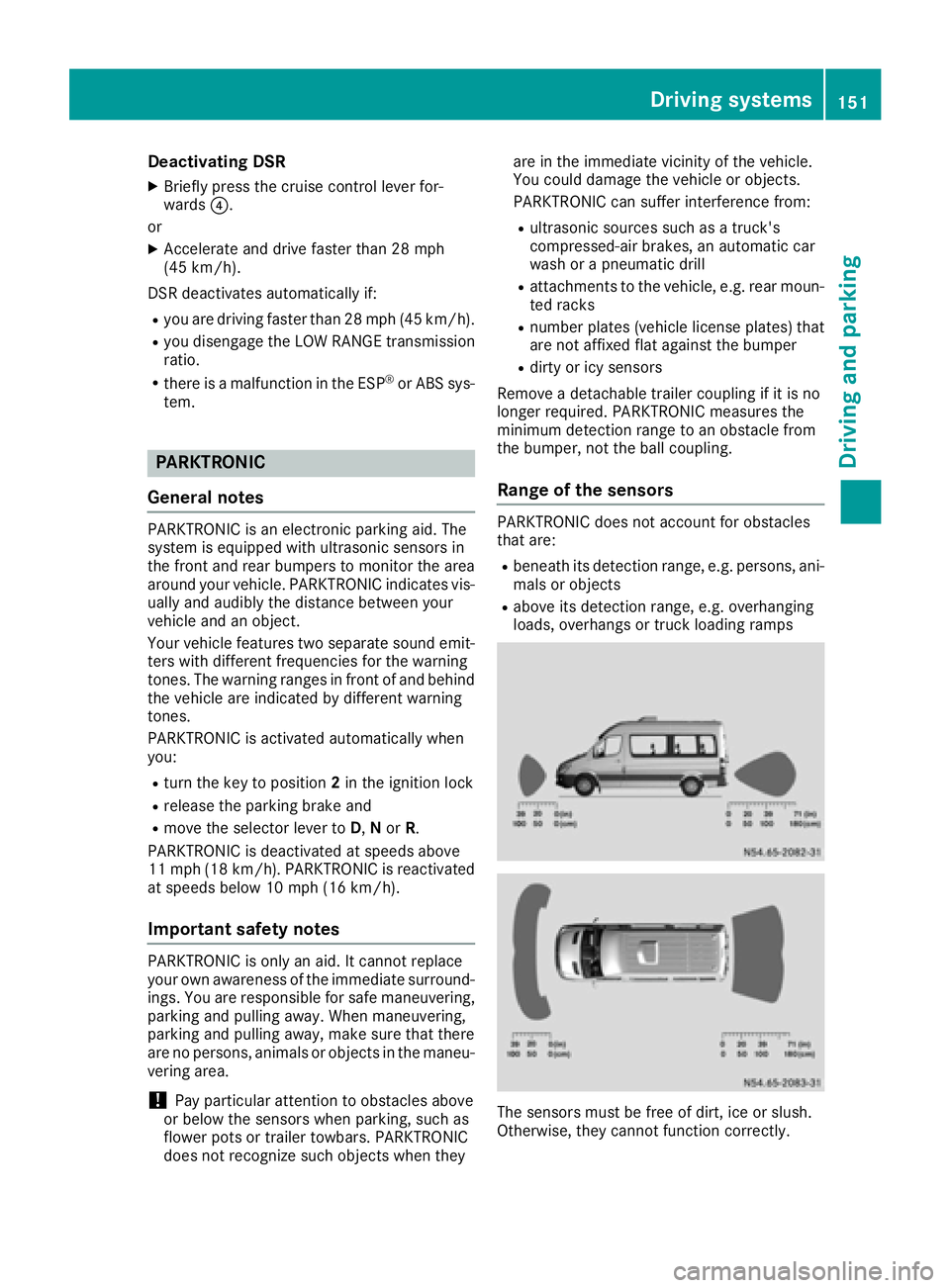
PARKTRONI Cdoe sno taccoun tfo robstacles
that are :
Rbeneathits detection range, e.g. persons, ani -
mals or objects
Rabov eits detection range, e.g. overhangin g
loads ,overhang sor truck loading ramps
The sensor smus tbe free of dirt, ice or slush.
Otherwise ,they canno tfunction correctly.
Driving systems15 1
Driving an d parking
Z
Page 159 of 290
Weight information can be found in the “Per-
missible trailer and drawbar noseweights” sec-
tion (
Ypage 159).
iThe height of the ball neck changes accord-
ing to the load on the vehicle. If this is case,
use a trailer with a height-adjustable trailer
drawbar.
Driving tips
The maximum permissible speed for vehicle/
trailer combination depends on the type of
trailer. Before setting off, check the vehicle
documents of the your trailer to find out the
permissible maximum speed. Observe the
legally prescribed maximum speed for vehicle/
trailer combinations in the relevant country,
state or Canadian province.
When towing a trailer, your vehicle's handling
characteristics will be different in comparison to when driving without a trailer and it will con-
sume more fuel.
On long, steep downhill slopes you must select
shift range 3,2or 1in good time.
iThis also applies if cruise control is activa-
ted.
This enables you to utilize the engine's braking
effect and you do not need to brake so heavily to
keep the correct speed. which protects the
brake system and prevents the brakes from
overheating and wearing too quickly. If you need to brake additionally, to not depress the brake
pedal constantly, but periodically.
Driving tips
If the trailer begins to swing from side to side:
XDo not accelerate.
XDo not counter-steer.
XBrake if necessary.
iYou can reduce the risk of the trailer swing-
ing and rocking by retrofitting anti-roll bars or trailer stability programs. More information is
available from your authorized Sprinter
Dealer.
RMaintain a greater distance than you would
when driving without towing a trailer.
RAvoid sudden braking. Apply the brakes gen-
tly at first to allow the trailer brake to overrun.
Then, increase the brake force quickly.
RThe figures for the gradient climbing capabil-
ities from a standstill refer to sea level. When
driving in mountainous areas, note that the
power output of the engine, and with it its
gradient climbing capability, decrease with
increasing altitude.
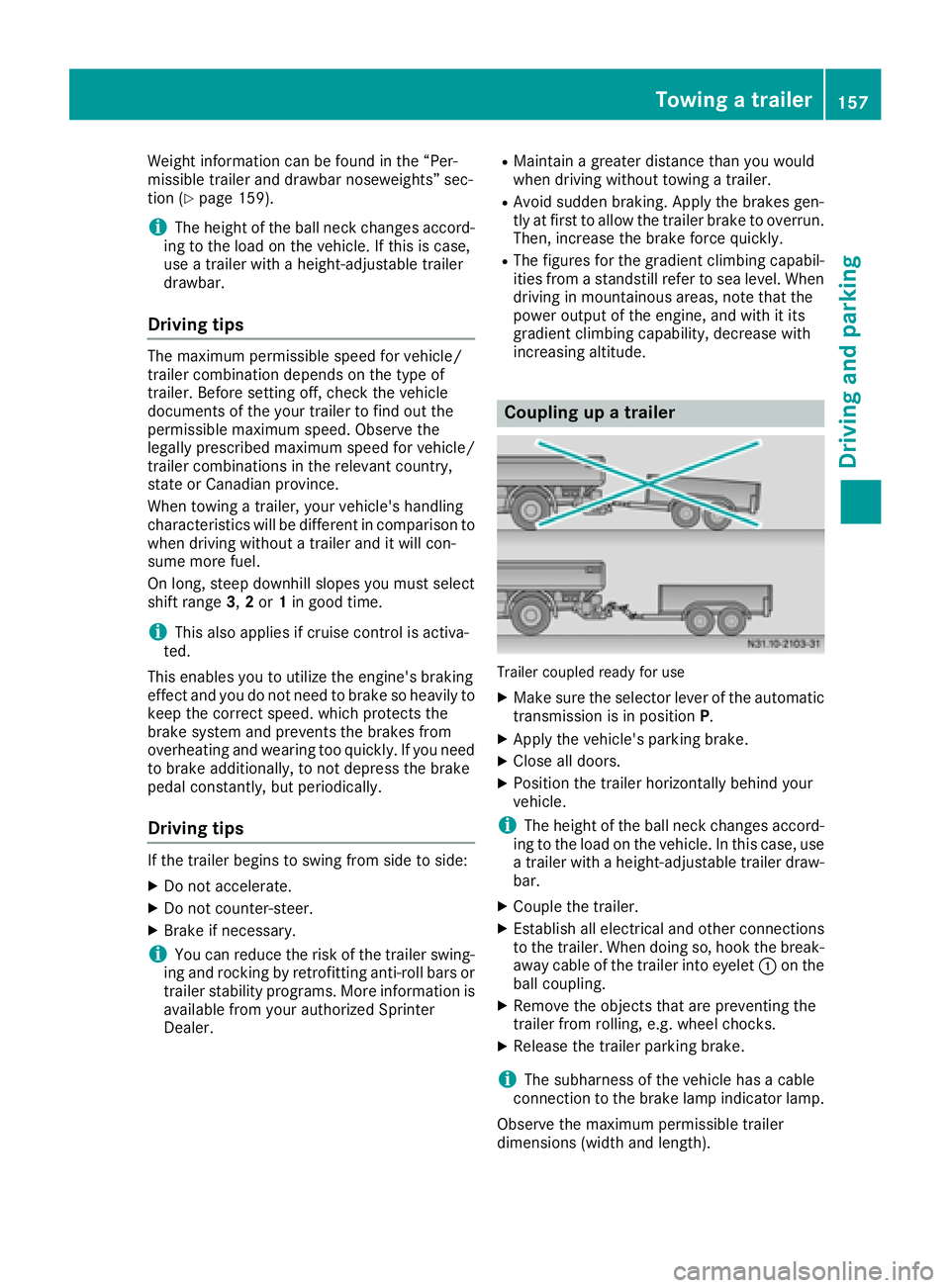
Coupling up a trailer
Trailer coupled ready for use
XMake sure the selector lever of the automatic
transmission is in position P.
XApply the vehicle's parking brake.
XClose all doors.
XPosition the trailer horizontally behind your
vehicle.
iThe height of the ball neck changes accord-
ing to the load on the vehicle. In this case, use
a trailer with a height-adjustable trailer draw-
bar.
XCouple the trailer.
XEstablish all electrical and other connections to the trailer. When doing so, hook the break-
away cable of the trailer into eyelet :on the
ball coupling.
XRemove the objects that are preventing the
trailer from rolling, e.g. wheel chocks.
XRelease the trailer parking brake.
iThe subharness of the vehicle has a cable
connection to the brake lamp indicator lamp.
Observe the maximum permissible trailer
dimensions (width and length).
Towing a trailer157
Driving and parking
Z
Page 160 of 290
Most federal states and all Canadian provinces
require by law:
Rsafety chains between the towing vehicle andthe trailer. The chains should be cross-wound
under the trailer drawbar. They must be fas-
tened to the vehicle's trailer coupling, not to
the bumper or the axle.
Leave enough slack in the chains. This allows you to drive round tight corners.
Ra separate brake system for certain types of
trailer.
Ra safety shut-off for braked trailers. Find out
the specific requirements according to the
applicable laws.
If the trailer becomes detached from the tow-
ing vehicle, the safety feature applies the
trailer brakes.
Towing a trailer
There are numerous legal requirements con-
cerning the towing of a trailer, e.g. speed restric-tions. Make sure your vehicle/trailer combina-
tion complies with local laws. This not only
means where you live, but also anywhere you
are driving to. Information is available from the
police and local authorities.
Observe the following when towing a trailer:
RPractice driving around bends, stopping and
backing up at a place where there is no traffic.
This enables you to gain experience and get
used to the new handling characteristics.
RBefore driving, check:
-that the trailer tow hitch and ball coupling
are secure
-that the safety switch for a braked trailer is
functioning properly
-that the safety chains are secure and not
damaged
-that the electrical connections are secure
-that the lights are working
-that the wheels are in good order and the
tire pressure is correct
RAdjust the exterior mirrors to provide an
unobstructed view of the rear section of the
trailer.
RIf the trailer has electronically controlled
brakes, pull the vehicle/trailer combination
away carefully. Brake manually using the
brake controller and check that the brakes
are working.
RSecure the load on the trailer according to the
applicable specifications and current stand-
ards on securing loads (
Ypage 214).
RWhen driving with a trailer, check at regular
intervals that the load is secured and that the
brakes and lights are working.
RBear in mind that the handling will be less
stable when towing a trailer than when driving
without one. Avoid sudden steering move-
ments.
RThe vehicle/trailer combination is heavier,
accelerates more slowly and has a decreased
gradient climbing capability and a longer
braking distance.
It is more susceptible to crosswinds and
requires cautious steering.
RIf possible, do not brake suddenly, but rather
moderately at first so that the trailer can acti-
vate its brakes. Then increase the force on the
brake pedal.
RIf the automatic transmission repeatedly
shifts between gears when driving on inclines,
restrict the shift range. Select shift range 4,3,
2 or 1.
Driving in a low gear and at a low speed
reduces the risk of damaging the engine.
RWhen driving on a downhill gradient, shift to a
low gear and take advantage of the engine's
braking effect.
Avoid continuous brake application as this
may overheat the vehicle brakes and, if inst
al-
led, the trailer brakes.
RIf the coolant temperature increases dramat-
ically while the air-conditioning system is
switched on, switch off the air-conditioning
system.
Coolant heat can also be dissipated by
switching the airflow and the temperature of
the heater/air conditioning to the maximum
level. Open the windows if necessary.
RWhen overtaking, pay particular attention to
the extended length of your vehicle/trailer
combination.
Due to the length of your vehicle/trailer com- bination you need an additional distance
before you can return to your original lane.
158Towing a trailer
Driving and parking