check oil MERCEDES-BENZ SPRINTER 2016 MY16 Operator’s Manual
[x] Cancel search | Manufacturer: MERCEDES-BENZ, Model Year: 2016, Model line: SPRINTER, Model: MERCEDES-BENZ SPRINTER 2016Pages: 290, PDF Size: 6.44 MB
Page 163 of 290
Useful information
This Operator's Manual describes all models as
well as standard and optional equipment of your
vehicle that were available at the time of going
to print. Country-specific variations are possi-
ble. Note that your vehicle may not be equipped
with all of the described functions. This also
applies to systems and functions relevant to
safety.
Read the information on qualified specialist
workshops (
Ypage 26).
Important safety notes
GWARNING
If you are driving and reach through the steer- ing wheel to operate the adjustment knob,
you could lose control of the vehicle. There is
a risk of an accident and injury.
Only operate the adjustment knobs when thevehicle is stationary. Do not reach through the
steering wheel when driving.
GWARNING
If you operate information systems and com-
munication equipment integrated in the vehi-
cle while driving, you will be distracted from
traffic conditions. You could also lose control
of the vehicle. There is a risk of an accident.
Only operate the equipment when the traffic
situation permits. If you are not sure that this
is possible, park the vehicle paying attention
to traffic conditions and operate the equip-
ment when the vehicle is stationary.
GWARNING
If the instrument cluster has failed or mal-
functioned, you may not recognize function
restrictions in systems relevant to safety. The
operating safety of your vehicle may be
impaired. There is a risk of an accident.
Drive on carefully. Have the vehicle checked
at a qualified specialist workshop immedi-
ately. You must observe the legal requirements for the
country in which you are currently driving when
operating the on-board computer.
The on-board computer display only shows mes-
sages and warnings from certain systems. You
should therefore make sure your vehicle is oper-
ating safely at all times. If the operating safety of
your vehicle is impaired, stop the vehicle as
soon as possible, paying attention to road and
traffic conditions. Then consult a qualified spe-
cialist workshop.
Instrument cluster
Overview
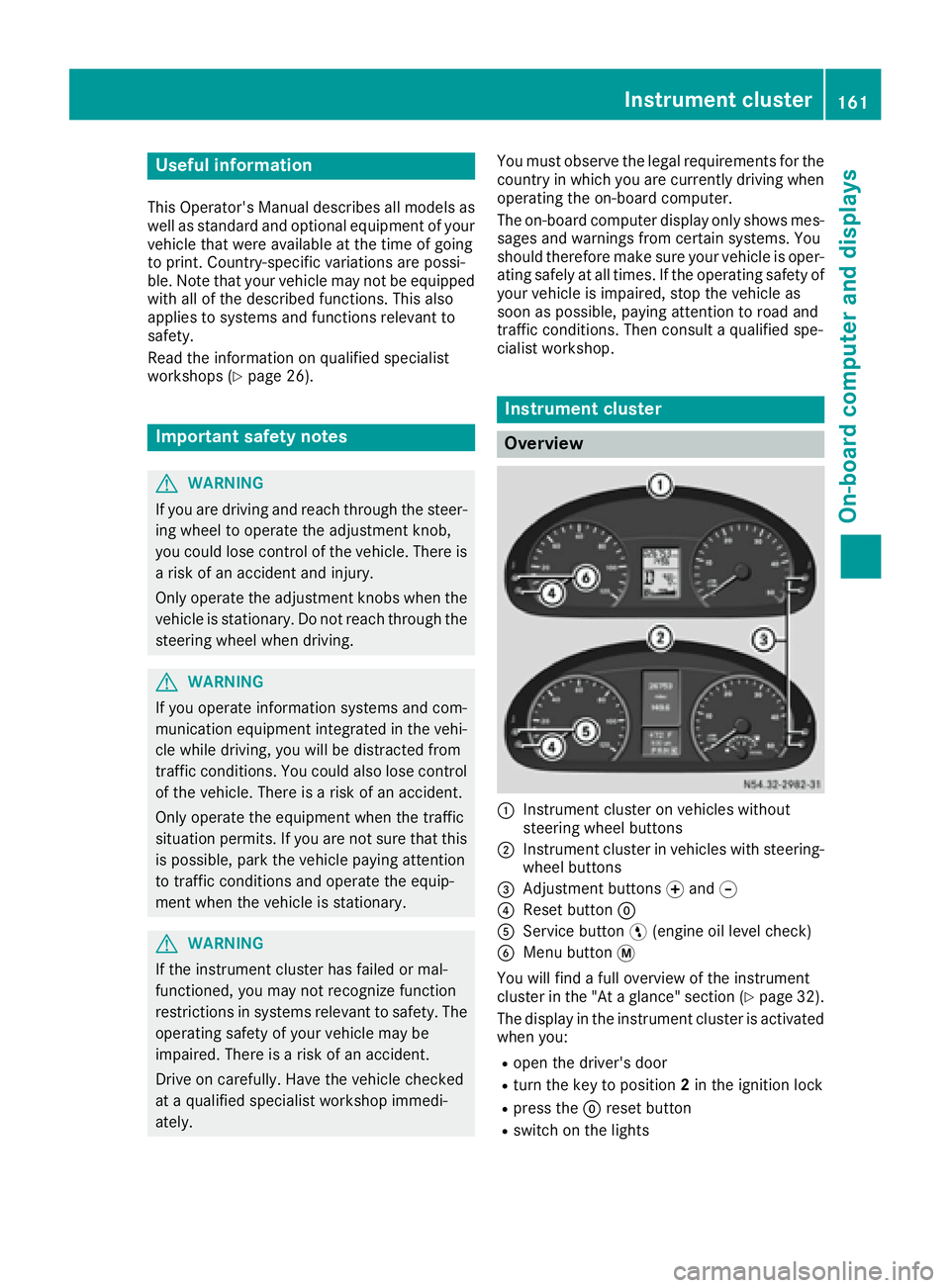
:Instrument cluster on vehicles without
steering wheel buttons
;Instrument cluster in vehicles with steering-
wheel buttons
=Adjustment buttons fand g
?Reset button 9
AService button Ë(engine oil level check)
BMenu button 4
You will find a full overview of the instrument
cluster in the "At a glance" section (
Ypage 32).
The display in the instrument cluster is activated when you:
Ropen the driver's door
Rturn the key to position 2in the ignition lock
Rpress the 9reset button
Rswitch on the lights
Instrument cluster161
On-board computer and displays
Z
Page 166 of 290
Using thef,g,4or9 adjustment buttons,
you can select the following functions:
RCalling up the service due date
(Ypage 226)
RChecking the oil level (Ypage 220)
RChecking the DEF supply (Ypage 162)
RPreselecting/setting the auxiliary heating
switch-on time (Ypage 108)
RTire pressure monitor (Ypage 253)
RSetting the time (Ypage 164)
RActivating/deactivating Highbeam Assist
(Ypage 171)
RSetting the daytime running lamps
(Ypage 79)
Setting the time
XTurn the key to position 2in the ignition lock.
XPress the 4menu button repeatedly until the
hours figure flashes.
XPress the forg button to set the hour.
XPress the 9reset button.
The minute display flashes.
XPress the forg button to set the minute.
iIf you keep the forg button pressed, the
value will change continuously.
Activating/deactivating Highbeam
Assist
XTurn the key to position 2in the ignition lock.
XPress the 4menu button repeatedly until the
_ indicator lamp flashes and the onorOFFmessage appears in the display.
XUse the forg button to switch Highbeam
Assist on/off.
Switching the daytime running lamps
on/off
If you switch the daytime running lamps on, the
daytime running lamps will automatically light
up when the engine is running.
For safety reasons, it is only possible to change
this setting when the vehicle is stationary. The
factory setting is on
in countries in which day-
time running lamp mode or daytime running
lamps are mandatory.
XTurn the key to position 2in the ignition lock.
XPress the 4menu button repeatedly until the
L indicator lamp flashes and the onorOFFmessage appears in the display.
XPress the forg button to activate or deac-
tivate the daytime running lamps.
iUSA only:
If you turn the light switch to TorL,
the corresponding light switches on. If you
turn the light switch to Ã, the daytime
running lamps remain switched on.
Canada only:
If you turn the light switch to L, the low-
beam headlamps switch on. If you turn the
light switch to TorÃ, the daytime run-
ning lamps remain switched on.
On-board computer (vehicles with
steering wheel buttons)
Operating the on-board computer
Overview
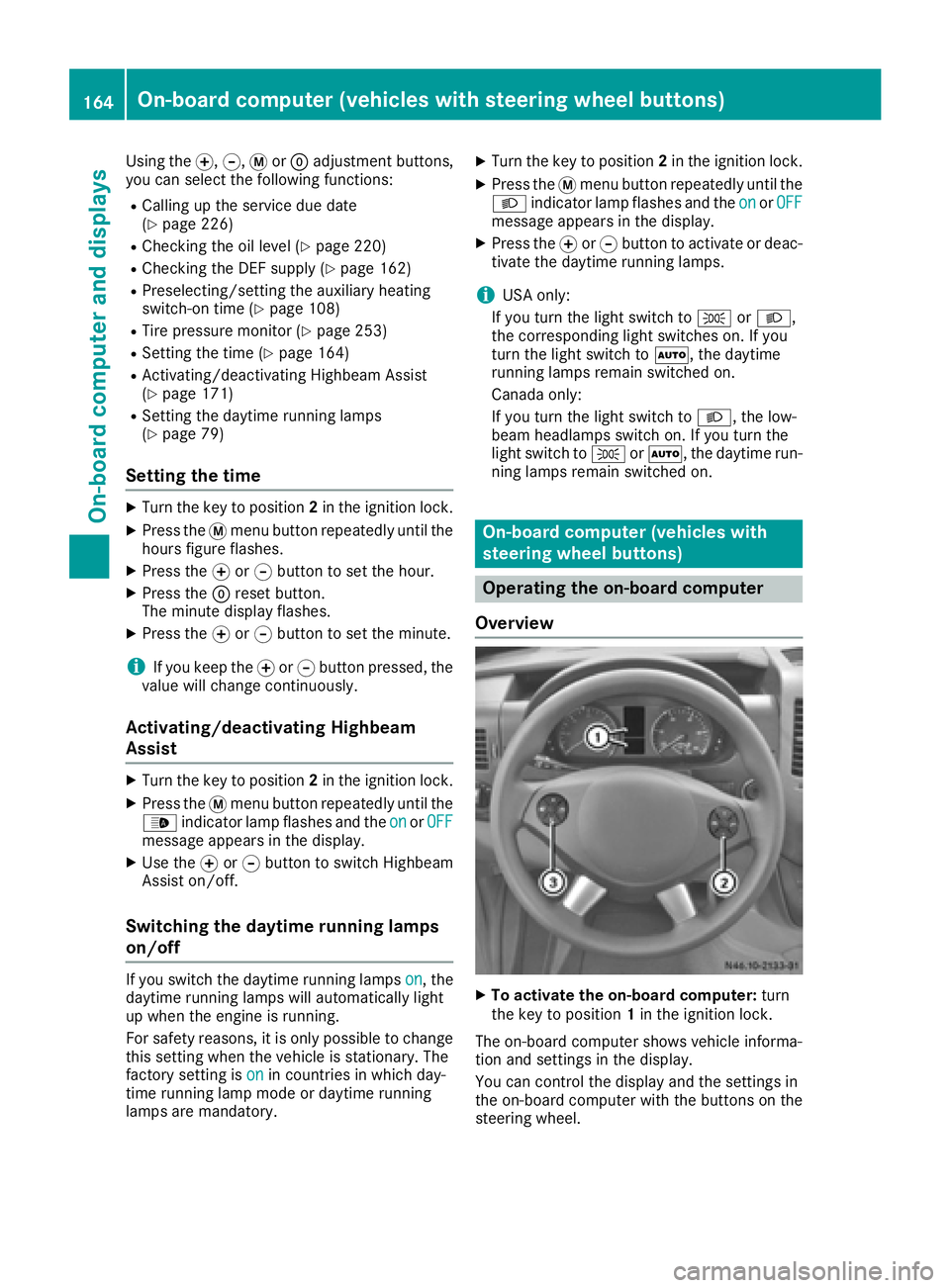
XTo activate the on-board computer: turn
the key to position 1in the ignition lock.
The on-board computer shows vehicle informa-
tion and settings in the display.
You can control the display and the settings in
the on-board computer with the buttons on the
steering wheel.
164On-board computer (vehicles with steering wheel buttons)
On-board computer and displays
Page 168 of 290
Menu overview
Diagrams
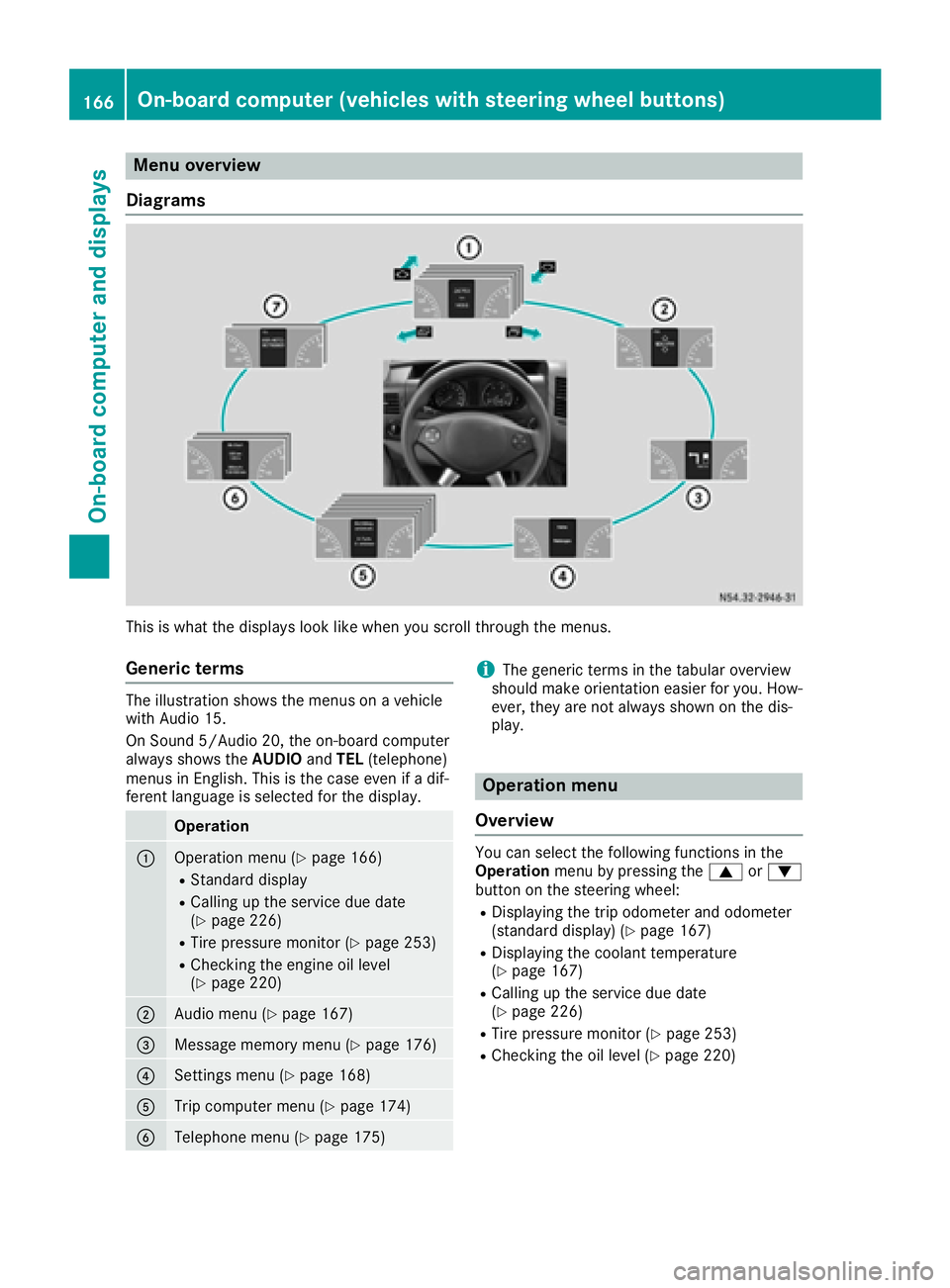
This is what the displays look like when you scroll through the menus.
Generic terms
The illustration shows the menus on a vehicle
with Audio 15.
On Sound 5/Audio 20, the on-board computer
always shows the AUDIOandTEL (telephone)
menus in English. This is the case even if a dif-
ferent language is selected for the display.
Operation
:Operation menu (Ypage 166)
RStandard display
RCalling up the service due date
(Ypage 226)
RTire pressure monitor (Ypage 253)
RChecking the engine oil level
(Ypage 220)
;Audio menu (Ypage 167)
=Message memory menu (Ypage 176)
?Settings menu (Ypage 168)
ATrip computer menu (Ypage 174)
BTelephone menu (Ypage 175)
iThe generic terms in the tabular overview
should make orientation easier for you. How-
ever, they are not always shown on the dis-
play.
Operation menu
Overview
You can select the following functions in the
Operation menu by pressing the 9or:
button on the steering wheel:
RDisplaying the trip odometer and odometer
(standard display) (Ypage 167)
RDisplaying the coolant temperature
(Ypage 167)
RCalling up the service due date
(Ypage 226)
RTire pressure monitor (Ypage 253)
RChecking the oil level (Ypage 220)
166On-board computer (vehicles with steering wheel buttons)
On-board computer and displays
Page 191 of 290
Display messagesPossible causes/consequences andMSolutions
*
CoolantCheck level
The coolan tlevel is to olow.
Never run th eengin eif th ecoolan tlevel is to olow. The engin ecould
overheat and be damaged.
XStop th evehicl eas soo nas possible, payin gattention to roa dand
traffic conditions.
XSwitc hoff th eengin eand let it cool down .
XAddcoolan tand be sur eto observ eth ewarning note s
(Ypage 283).
XIf you need to add coolan tfrequently, hav eth eengin ecoolin gsys-
te m checke dat aqualified specialist workshop .
7
Reservefue lDriveto agas statio n
The fuel level has fallen int oth ereserv erange.
XRefue lat th eneares tgas station (Ypage 127).
:
WaterinfuelVisitworkshop
The water that has collecte din th ewater separator has reached th e
maximum level.
XDrain th ewater separator (Ypage 224).
m
Fuelfilter Visitworkshop
The fuel filter is dirty.
XHav eth efuel filter elemen treplace das soo nas possibl eat aquali-
fie dspecialist workshop .
4
Engine oil Add 1.0quart(Canada:1.0liter)
The oil level is to olow.
XChec kth eoil level th enext time you refuel (Ypage 220), and add
oil.
4
Engine oil levelNot whe neng .run ‐ning
You wan tto chec kth eengin eoil level eve nthough th eengin eis still
running.
XSwitc hoff th eengine.
XChec kth eoil level (Ypage 220).
4
Engine oil levelReduce oil level
You haveadded to omuc hengin eoil. There is aris kof damaging th e
engin eor catalytic converter.
XChec kth eoil level (Ypage 220).
XIf theoil level is to ohigh :hav eth eengin eoil extracted at th enext
qualified specialist workshop .
XIf theoil level is correct: hav eth emalfunction rectifie dat th enext
qualified specialist workshop .
Display messages189
On-board computer and displays
Z
Page 192 of 290
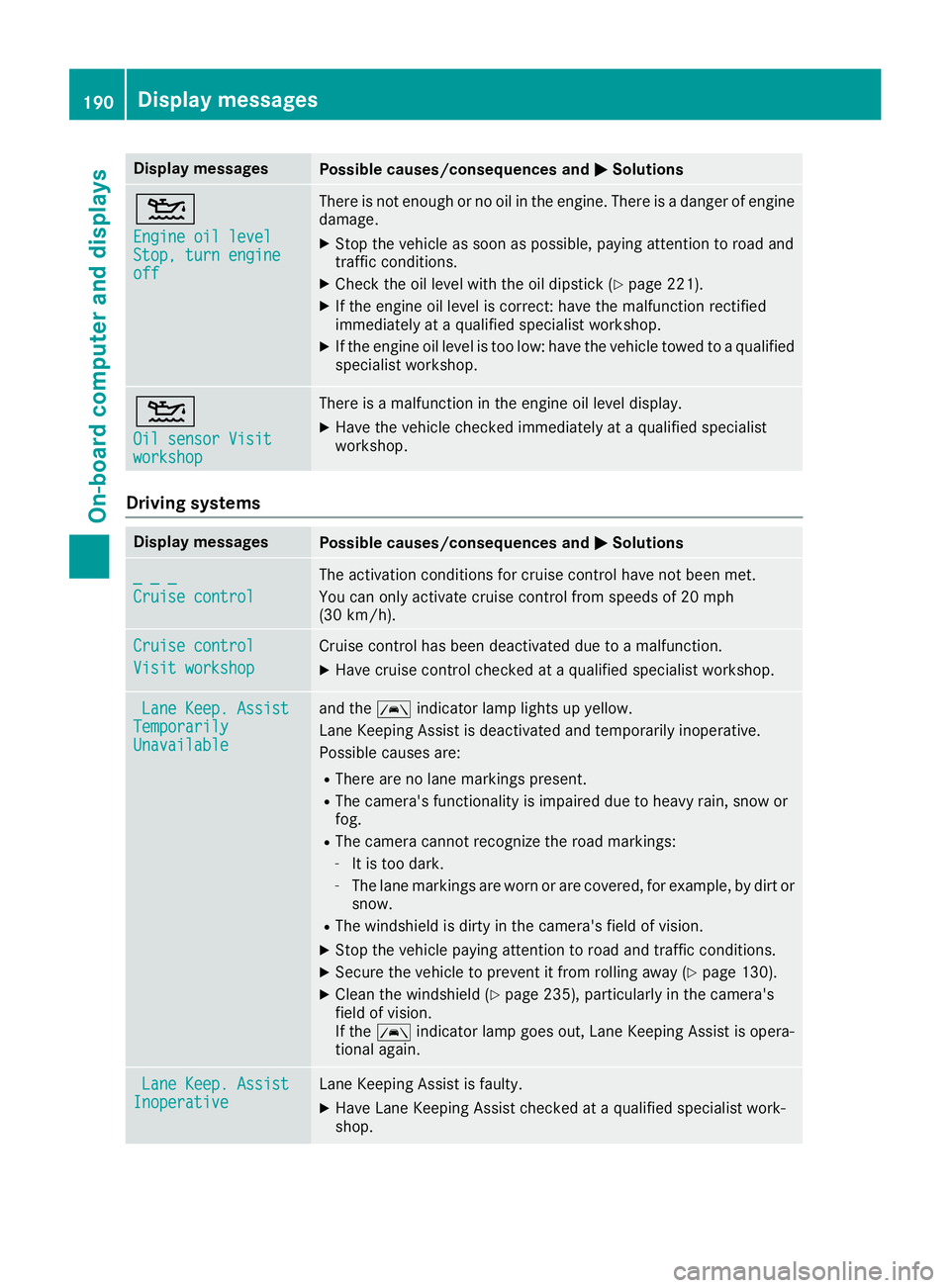
Display messagesPossible causes/consequences andMSolutions
4
Engine oil levelStop, turnengineoff
There is no tenough or no oil in th eengine. There is adanger of engin e
damage.
XStop th evehicl eas soo nas possible, payin gattention to roa dand
traffic conditions.
XChec kth eoil level wit hth eoil dipstick (Ypage 221).
XIf theengin eoil level is correct: hav eth emalfunction rectifie d
immediately at aqualified specialist workshop .
XIf theengin eoil level is to olow: hav eth evehicl etowed to aqualified
specialist workshop .
4
Oil sensor Visitworkshop
There isamalfunction in th eengin eoil level display.
XHav eth evehicl echecke dimmediately at aqualified specialist
workshop .
Driving systems
Display messagesPossible causes/consequences and MSolutions
_ _ _
Cruise control
The activation condition sfor cruise control hav eno tbeen met .
You can only activat ecruise control from speeds of 20 mph
(30 km/h).
Cruise contro l
Visit workshop
Cruisecontrol has been deactivated due to amalfunction .
XHavecruise control checke dat aqualified specialist workshop .
LaneKeep. AssistTemporarilyUnavailable
and th eà indicator lamp lights up yellow.
Lan eKeepin gAssis tis deactivated and temporarily inoperative.
Possibl ecauses are:
RThere are no lan emarking spresent.
RThe camera' sfunctionalit yis impaire ddue to heav yrain ,snow or
fog .
RThe camera canno trecogniz eth eroa dmarkings:
-It is to odark .
-The lan emarking sare wor nor are covered, for example, by dir tor
snow.
RThe windshield is dirty in th ecamera' sfield of vision .
XStop thevehicl epayin gattention to roa dand traffic conditions.
XSecur eth evehicl eto preven tit from rollin gaway (Ypage 130).
XClean th ewindshield (Ypage 235), particularly in th ecamera' s
field of vision .
If th eà indicator lamp goe sout ,Lan eKeepin gAssis tis opera-
tional again .
LaneKeep. AssistInoperativeLan eKeepin gAssis tis faulty.
XHav eLan eKeepin gAssis tchecke dat aqualified specialist work-
shop.
190Display messages
On-board computer and displays
Page 200 of 290
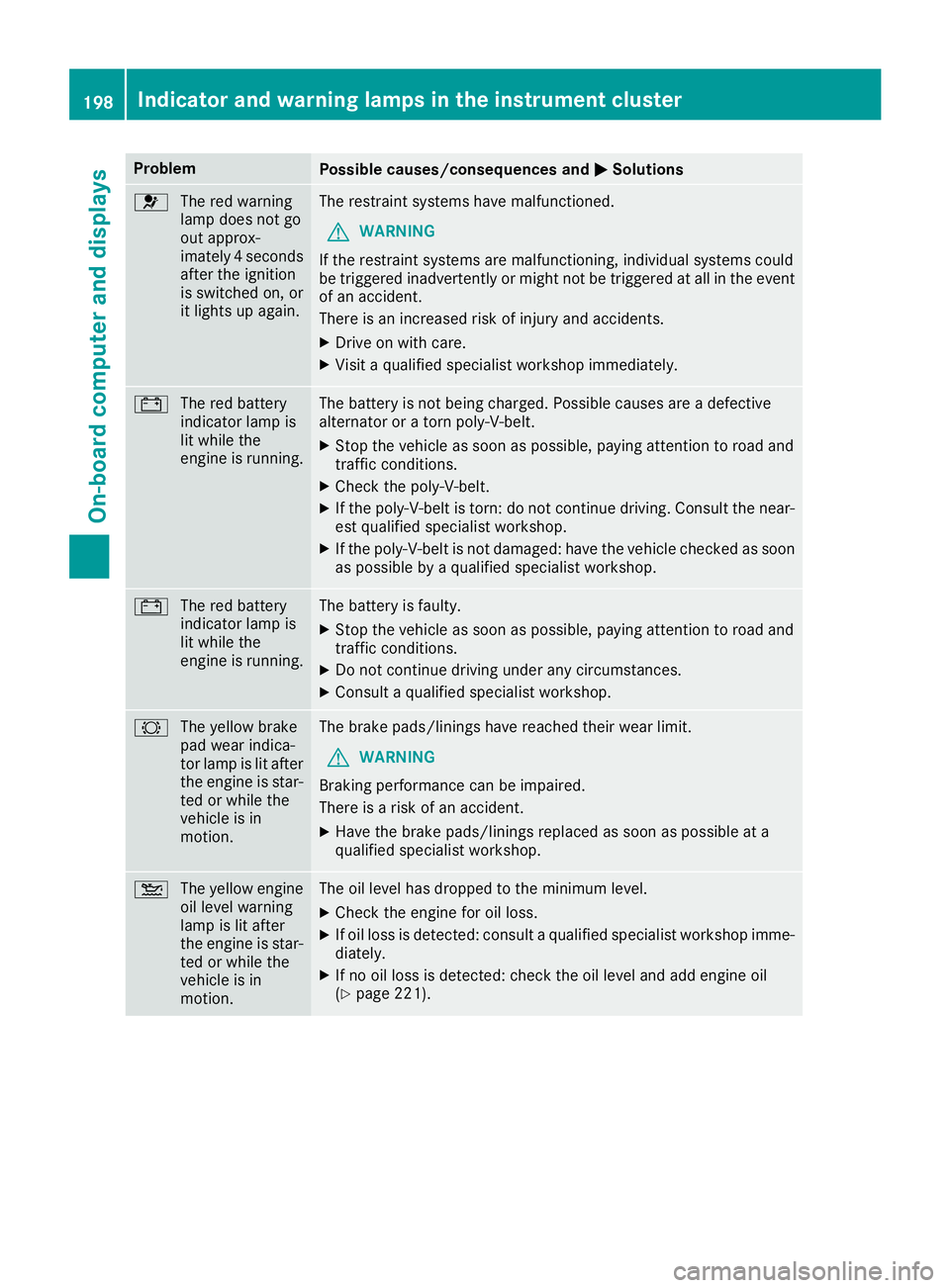
ProblemPossible causes/consequences andMSolutions
6
The red warning
lamp does not go
out approx-
imately 4 seconds
after the ignition
is switched on, or
it lights up again.The restraint systems have malfunctioned.
GWARNING
If the restraint systems are malfunctioning, individual systems could
be triggered inadvertently or might not be triggered at all in the event
of an accident.
There is an increased risk of injury and accidents.
XDrive on with care.
XVisit a qualified specialist workshop immediately.
# The red battery
indicator lamp is
lit while the
engine is running.The battery is not being charged. Possible causes are a defective
alternator or a torn poly-V-belt.
XStop the vehicle as soon as possible, paying attention to road and
traffic conditions.
XCheck the poly-V-belt.
XIf the poly-V-belt is torn: do not continue driving. Consult the near-
est qualified specialist workshop.
XIf the poly-V-belt is not damaged: have the vehicle checked as soon
as possible by a qualified specialist workshop.
#The red battery
indicator lamp is
lit while the
engine is running.The battery is faulty.
XStop the vehicle as soon as possible, paying attention to road and
traffic conditions.
XDo not continue driving under any circumstances.
XConsult a qualified specialist workshop.
#The yellow brake
pad wear indica-
tor lamp is lit after
the engine is star-
ted or while the
vehicle is in
motion.The brake pads/linings have reached their wear limit.
GWARNING
Braking performance can be impaired.
There is a risk of an accident.
XHave the brake pads/linings replaced as soon as possible at a
qualified specialist workshop.
4 The yellow engine
oil level warning
lamp is lit after
the engine is star-
ted or while the
vehicle is in
motion.The oil level has dropped to the minimum level.
XCheck the engine for oil loss.
XIf oil loss is detected: consult a qualified specialist workshop imme-
diately.
XIf no oil loss is detected: check the oil level and add engine oil
(Ypage 221).
198Indicator and warning lamps in the instrument cluster
On-board computer and displays
Page 201 of 290
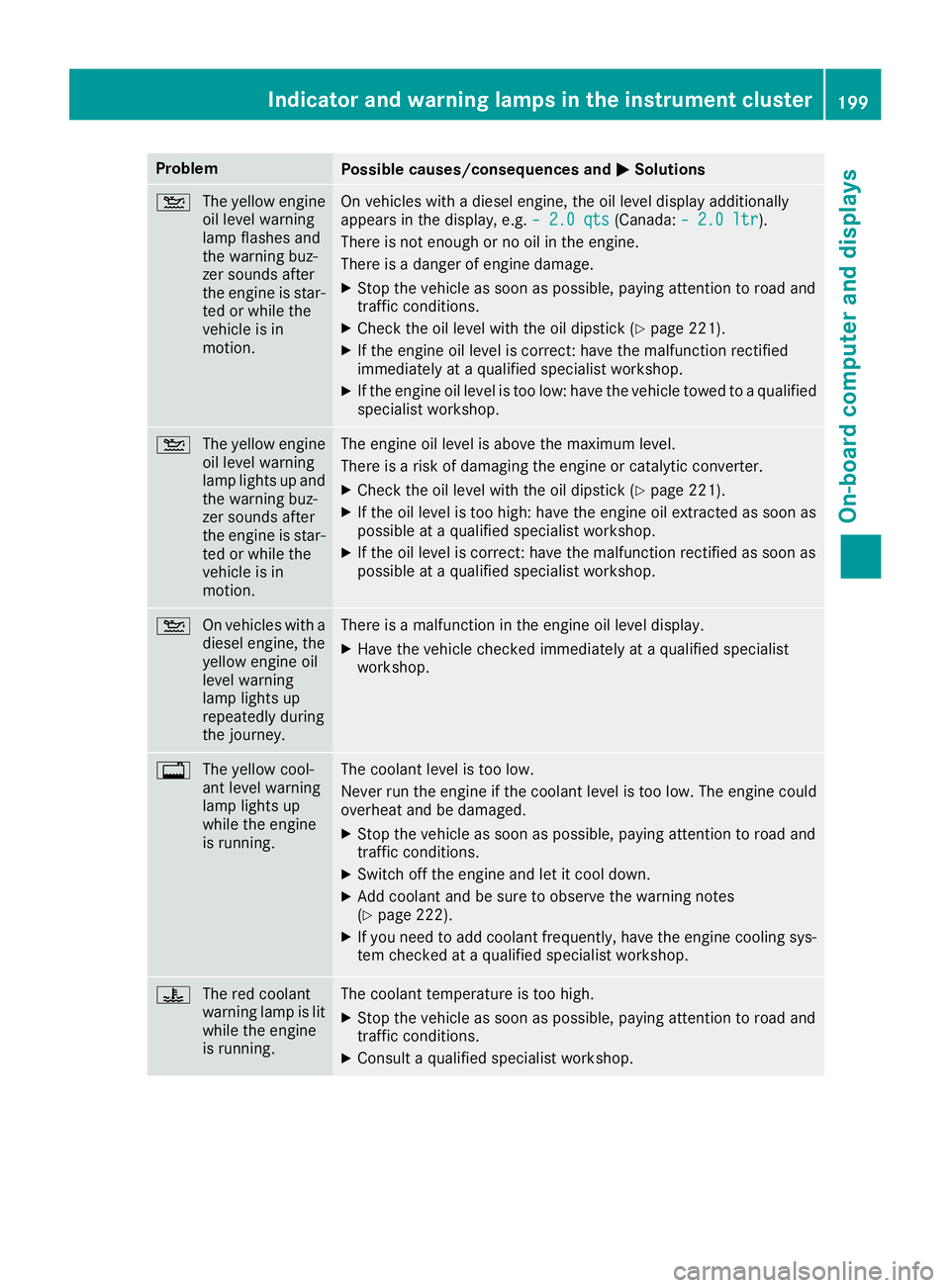
ProblemPossible causes/consequences andMSolutions
4
The yellow engine
oil level warning
lamp flashes and
the warning buz-
zer sounds after
the engine is star-
ted or while the
vehicle is in
motion.On vehicles with a diesel engine, the oil level display additionally
appears in the display, e.g. – 2.0 qts(Canada:– 2.0 ltr).
There is not enough or no oil in the engine.
There is a danger of engine damage.
XStop the vehicle as soon as possible, paying attention to road and
traffic conditions.
XCheck the oil level with the oil dipstick (Ypage 221).
XIf the engine oil level is correct: have the malfunction rectified
immediately at a qualified specialist workshop.
XIf the engine oil level is too low: have the vehicle towed to a qualified
specialist workshop.
4 The yellow engine
oil level warning
lamp lights up and
the warning buz-
zer sounds after
the engine is star-
ted or while the
vehicle is in
motion.The engine oil level is above the maximum level.
There is a risk of damaging the engine or catalytic converter.
XCheck the oil level with the oil dipstick (Ypage 221).
XIf the oil level is too high: have the engine oil extracted as soon as
possible at a qualified specialist workshop.
XIf the oil level is correct: have the malfunction rectified as soon as
possible at a qualified specialist workshop.
4 On vehicles with a
diesel engine, the
yellow engine oil
level warning
lamp lights up
repeatedly during
the journey.There is a malfunction in the engine oil level display.
XHave the vehicle checked immediately at a qualified specialist
workshop.
%The yellow cool-
ant level warning
lamp lights up
while the engine
is running.The coolant level is too low.
Never run the engine if the coolant level is too low. The engine could
overheat and be damaged.
XStop the vehicle as soon as possible, paying attention to road and
traffic conditions.
XSwitch off the engine and let it cool down.
XAdd coolant and be sure to observe the warning notes
(Ypage 222).
XIf you need to add coolant frequently, have the engine cooling sys-
tem checked at a qualified specialist workshop.
?The red coolant
warning lamp is lit
while the engine
is running.The coolant temperature is too high.
XStop the vehicle as soon as possible, paying attention to road and
traffic conditions.
XConsult a qualified specialist workshop.
Indicator and warning lamps in the instrument cluster199
On-board computer and displays
Z
Page 215 of 290
Load securing aids and tie downs may not be
used, for example, if:
Ridentification marks are missing or illegible
Rthere are yarn breakages, damage to bearingseams or other signs of tearing
Rthere are signs of shearing, deformation,
pinching or other damage
Rthere is damage to clamping or connecting
elements
Such load securing aids and tie downs are worn;
they should not be used and must be replaced. If
you use load securing aids or tie downs which
are worn, the load may not be sufficiently
secured and could cause damage to property.
After an accident, the following must be
checked at a specialist workshop:
RCargo compartment floor
RLoad surface
RCargo tie-down rings
RTie downs
Otherwise, the load may not be correctly
secured the next time anything is stowed.
Even if you follow all loading guidelines, the load
increases the risk of injury in the event of an
accident. Observe the tips in the "Securing lug-
gage/loads" (
Ypage 214) and "Load distribu-
tion" (Ypage 214) sections.
Before loading
!
The anti-slip mats cannot be used for secur-
ing goods and must be replaced when they
show signs of:
RPermanent deformation and crushing
RCrack formation
RCuts
XTire pressure: check the tire pressure and
correct if necessary (Ypage 250).
XCargo compartment floor: clean the cargo
compartment floor.
The cargo compartment floor must be free
from oil and dust, dry and swept clean to pre-
vent the load from slipping.
XPlace non-slip mats (anti-slip mats) on the
cargo compartment floor if necessary.
During loading
!
On passenger van versions with maximum
seating layout, the permissible rear axle load
would be exceeded if the full payload were to
be loaded in the cargo compartment.
XObserve the gross axle weight rating and per-
missible gross vehicle weight for your vehicle.
Take into account that your vehicle's curb
weight is increased if accessories or optional equipment are installed. The maximum pay-
load is thus reduced.
XObserve the notes on load distribution
(Ypage 214).
The overall center of gravity of the load should
always be as low as possible, centered and
between the axles near the rear axle.
XSecure the load (Ypage 214).
Observe the legal requirements of the country
in which you are currently driving.
Checks after loading
GWARNING
Combustion engines emit poisonous exhaust
gases, such as carbon monoxide. If the sliding door or rear door is open when the engine is
running, exhaust gases can enter the vehicle
interior, especially during the journey. There
is a risk of poisoning.
Always switch off the engine before opening
the sliding door or rear door. Never drive the
vehicle when the sliding door or rear door is
open.
XSecuring loads: check that the load is secure
before every journey and at regular intervals
during a long journey, and correct if neces-
sary.
XDoors: close the sliding doors and rear doors.
XTire pressure: adjust the tire pressures
according to the vehicle load (Ypage 250).
XDriving style: adapt your driving style
according to the vehicle load.
Loading guidelines213
Transporting loads
Z
Page 222 of 290
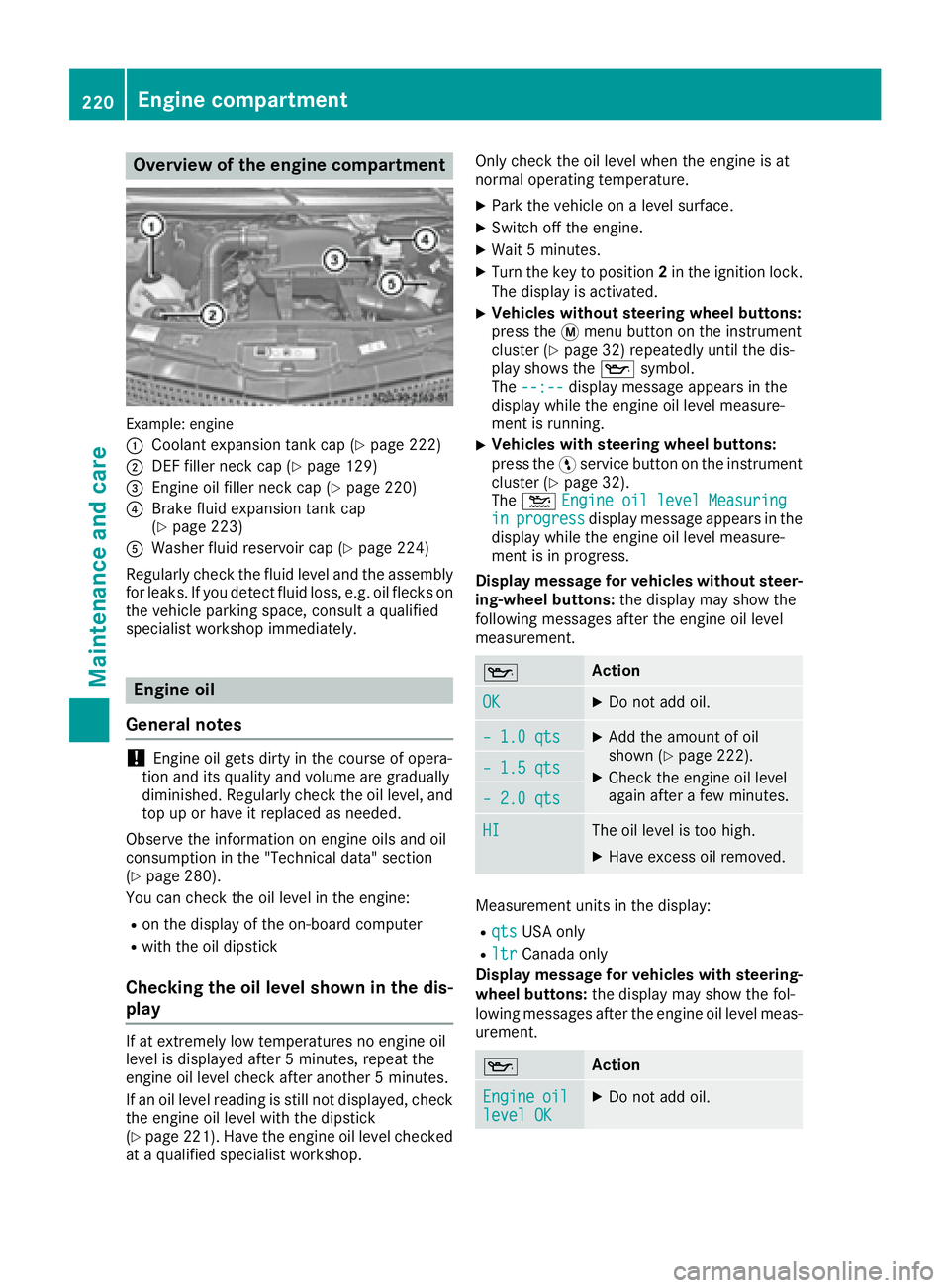
Overview of the engine compartment
Example: engine
:
Coolant expansion tank cap (Ypage 222)
;DEF filler neck cap (Ypage 129)
=Engine oil filler neck cap (Ypage 220)
?Brake fluid expansion tank cap
(Ypage 223)
AWasher fluid reservoir cap (Ypage 224)
Regularly check the fluid level and the assembly
for leaks. If you detect fluid loss, e.g. oil flecks on
the vehicle parking space, consult a qualified
specialist workshop immediately.
Engine oil
General notes
!Engine oil gets dirty in the course of opera-
tion and its quality and volume are gradually
diminished. Regularly check the oil level, and
top up or have it replaced as needed.
Observe the information on engine oils and oil
consumption in the "Technical data" section
(
Ypage 280).
You can check the oil level in the engine:
Ron the display of the on-board computer
Rwith the oil dipstick
Checking the oil level shown in the dis-
play
If at extremely low temperatures no engine oil
level is displayed after 5 minutes, repeat the
engine oil level check after another 5 minutes.
If an oil level reading is still not displayed, check
the engine oil level with the dipstick
(
Ypage 221). Have the engine oil level checked
at a qualified specialist workshop. Only check the oil level when the engine is at
normal operating temperature.
XPark the vehicle on a level surface.
XSwitch off the engine.
XWait 5 minutes.
XTurn the key to position
2in the ignition lock.
The display is activated.
XVehicles without steering wheel buttons:
press the 4menu button on the instrument
cluster (
Ypage 32) repeatedly until the dis-
play shows the 1symbol.
The --:--
display message appears in the
display while the engine oil level measure-
ment is running.
XVehicles with steering wheel buttons:
press the Ëservice button on the instrument
cluster (
Ypage 32).
The 4 Engine oil level Measuring
inprogressdisplay message appears in the
display while the engine oil level measure-
ment is in progress.
Display message for vehicles without steer-
ing-wheel buttons: the display may show the
following messages after the engine oil level
measurement.
1Action
OKXDo not add oil.
– 1.0 qtsXAdd the amount of oil
shown (Ypage 222).
XCheck the engine oil level
again after a few minutes.– 1.5 qts
– 2.0 qts
HIThe oil level is too high.
XHave excess oil removed.
Measurement units in the display:
RqtsUSA only
RltrCanada only
Display message for vehicles with steering- wheel buttons: the display may show the fol-
lowing messages after the engine oil level meas-
urement.
1Action
Engineoillevel OKXDo not add oil.
220Engine compartment
Maintenance and care
Page 223 of 290
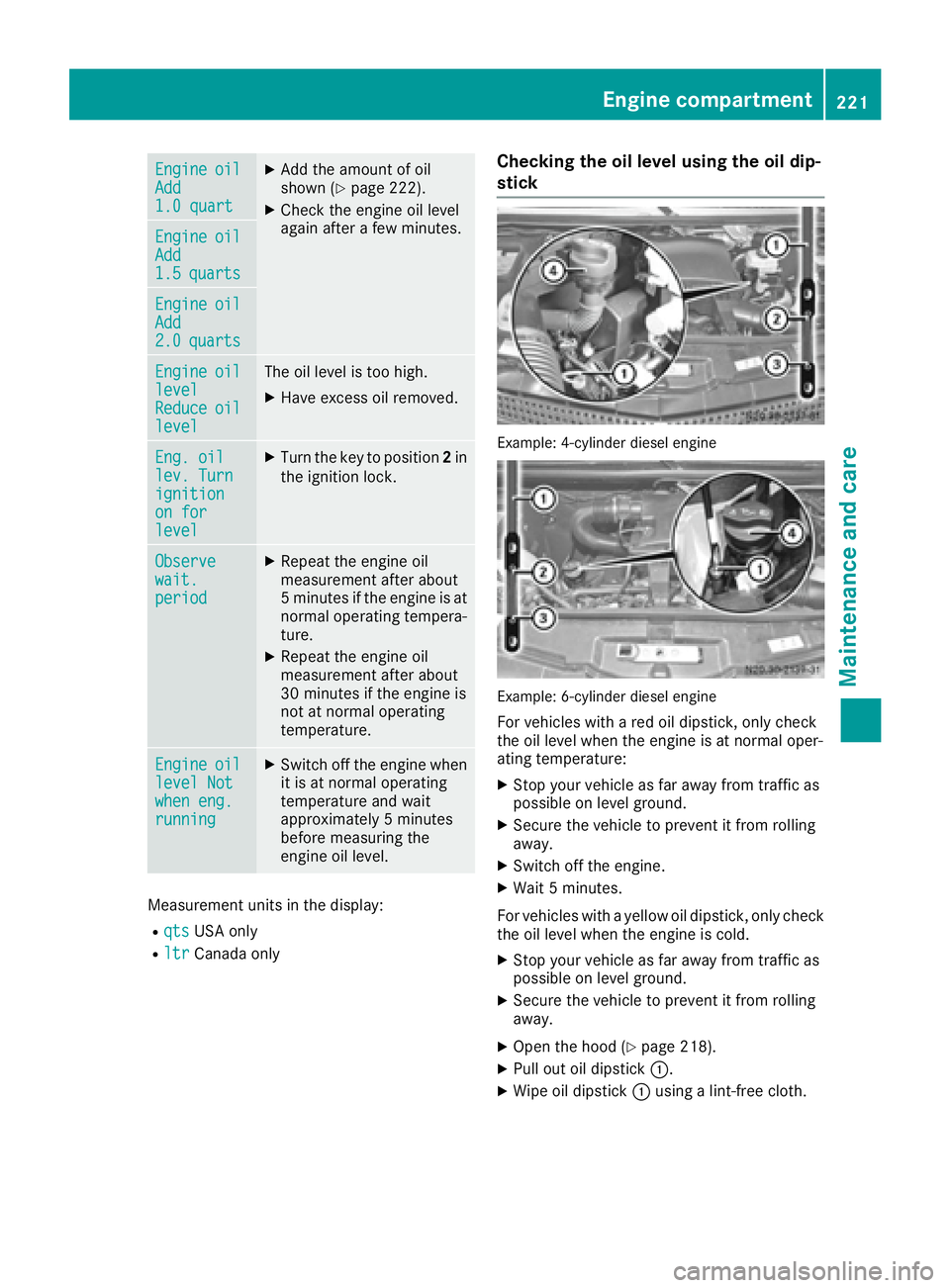
EngineoilAdd1.0 quart
XAdd the amount of oil
shown (Ypage 222).
XCheck the engine oil level
again after a few minutes.
EngineoilAdd1.5quarts
EngineoilAdd2.0quarts
EngineoillevelReduceoillevel
The oil level is too high.
XHave excess oil removed.
Eng. oillev. Turnignitionon forlevel
XTurn the key to position2in
the ignition lock.
Observewait.period
XRepeat the engine oil
measurement after about
5 minutes if the engine is at
normal operating tempera-
ture.
XRepeat the engine oil
measurement after about
30 minutes if the engine is
not at normal operating
temperature.
Engineoillevel Notwhen eng.running
XSwitch off the engine when it is at normal operating
temperature and wait
approximately 5 minutes
before measuring the
engine oil level.
Measurement units in the display:
RqtsUSA only
RltrCanada only
Checking the oil level using the oil dip-
stick
Example: 4-cylinder diesel engine
Example: 6-cylinder diesel engine
For vehicles with a red oil dipstick, only check
the oil level when the engine is at normal oper-
ating temperature:
XStop your vehicle as far away from traffic as
possible on level ground.
XSecure the vehicle to prevent it from rolling
away.
XSwitch off the engine.
XWait 5 minutes.
For vehicles with a yellow oil dipstick, only check
the oil level when the engine is cold.
XStop your vehicle as far away from traffic as
possible on level ground.
XSecure the vehicle to prevent it from rolling
away.
XOpen the hood (Ypage 218).
XPull out oil dipstick :.
XWipe oil dipstick:using a lint-free cloth.
Engine compartment221
Maintenance and care
Z