high beam MERCEDES-BENZ SPRINTER 2016 MY16 Operator’s Manual
[x] Cancel search | Manufacturer: MERCEDES-BENZ, Model Year: 2016, Model line: SPRINTER, Model: MERCEDES-BENZ SPRINTER 2016Pages: 290, PDF Size: 6.44 MB
Page 89 of 290
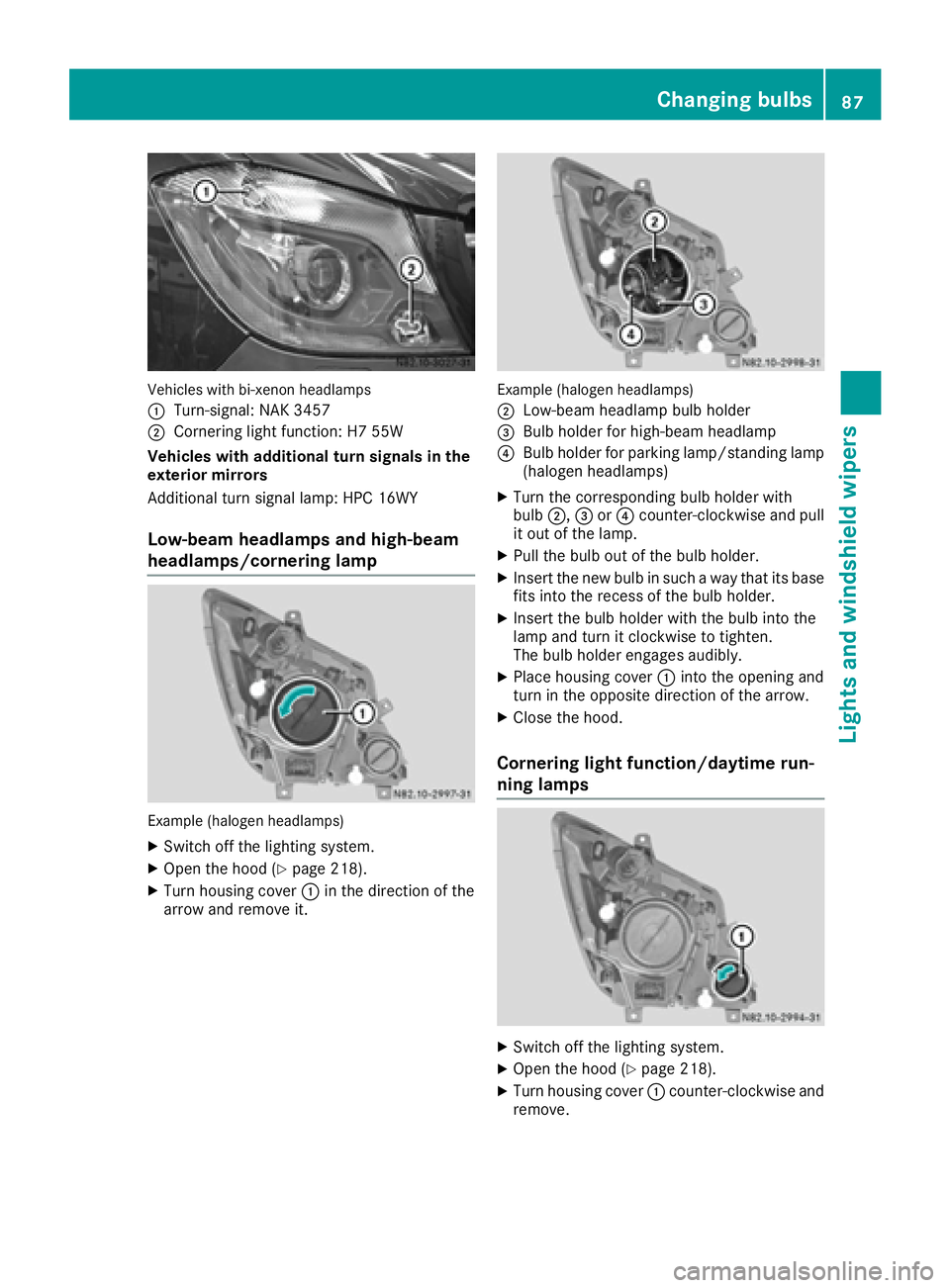
Vehicles with bi-xenon headlamps
:
Turn-signal: NAK 3457
;Cornering light function: H7 55W
Vehicles with additional turn signals in the
exterior mirrors
Additional turn signal lamp: HPC 16WY
Low-beam headlamps and high-beam
headlamps/cornering lamp
Example (halogen headlamps)
XSwitch off the lighting system.
XOpen the hood (Ypage 218).
XTurn housing cover :in the direction of the
arrow and remove it.
Example (halogen headlamps)
;
Low-beam headlamp bulb holder
=Bulb holder for high-beam headlamp
?Bulb holder for parking lamp/standing lamp
(halogen headlamps)
XTurn the corresponding bulb holder with
bulb ;,=or? counter-clockwise and pull
it out of the lamp.
XPull the bulb out of the bulb holder.
XInsert the new bulb in such a way that its base fits into the recess of the bulb holder.
XInsert the bulb holder with the bulb into the
lamp and turn it clockwise to tighten.
The bulb holder engages audibly.
XPlace housing cover :into the opening and
turn in the opposite direction of the arrow.
XClose the hood.
Cornering light function/daytime run-
ning lamps
XSwitch off the lighting system.
XOpen the hood (Ypage 218).
XTurn housing cover :counter-clockwise and
remove.
Changing bulbs87
Lights and windshield wipers
Z
Page 166 of 290
Using thef,g,4or9 adjustment buttons,
you can select the following functions:
RCalling up the service due date
(Ypage 226)
RChecking the oil level (Ypage 220)
RChecking the DEF supply (Ypage 162)
RPreselecting/setting the auxiliary heating
switch-on time (Ypage 108)
RTire pressure monitor (Ypage 253)
RSetting the time (Ypage 164)
RActivating/deactivating Highbeam Assist
(Ypage 171)
RSetting the daytime running lamps
(Ypage 79)
Setting the time
XTurn the key to position 2in the ignition lock.
XPress the 4menu button repeatedly until the
hours figure flashes.
XPress the forg button to set the hour.
XPress the 9reset button.
The minute display flashes.
XPress the forg button to set the minute.
iIf you keep the forg button pressed, the
value will change continuously.
Activating/deactivating Highbeam
Assist
XTurn the key to position 2in the ignition lock.
XPress the 4menu button repeatedly until the
_ indicator lamp flashes and the onorOFFmessage appears in the display.
XUse the forg button to switch Highbeam
Assist on/off.
Switching the daytime running lamps
on/off
If you switch the daytime running lamps on, the
daytime running lamps will automatically light
up when the engine is running.
For safety reasons, it is only possible to change
this setting when the vehicle is stationary. The
factory setting is on
in countries in which day-
time running lamp mode or daytime running
lamps are mandatory.
XTurn the key to position 2in the ignition lock.
XPress the 4menu button repeatedly until the
L indicator lamp flashes and the onorOFFmessage appears in the display.
XPress the forg button to activate or deac-
tivate the daytime running lamps.
iUSA only:
If you turn the light switch to TorL,
the corresponding light switches on. If you
turn the light switch to Ã, the daytime
running lamps remain switched on.
Canada only:
If you turn the light switch to L, the low-
beam headlamps switch on. If you turn the
light switch to TorÃ, the daytime run-
ning lamps remain switched on.
On-board computer (vehicles with
steering wheel buttons)
Operating the on-board computer
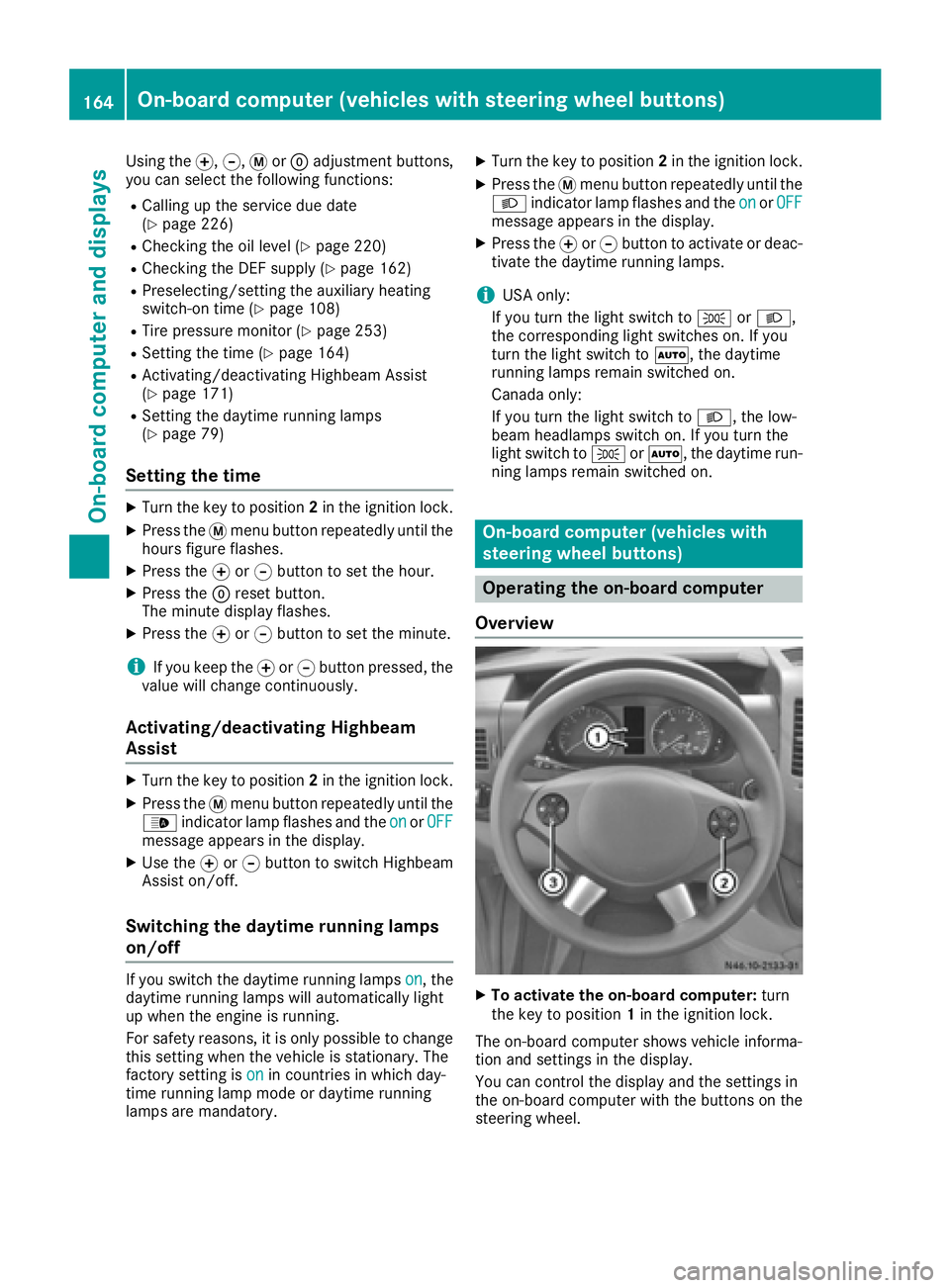
Overview
XTo activate the on-board computer: turn
the key to position 1in the ignition lock.
The on-board computer shows vehicle informa-
tion and settings in the display.
You can control the display and the settings in
the on-board computer with the buttons on the
steering wheel.
164On-board computer (vehicles with steering wheel buttons)
On-board computer and displays
Page 170 of 290
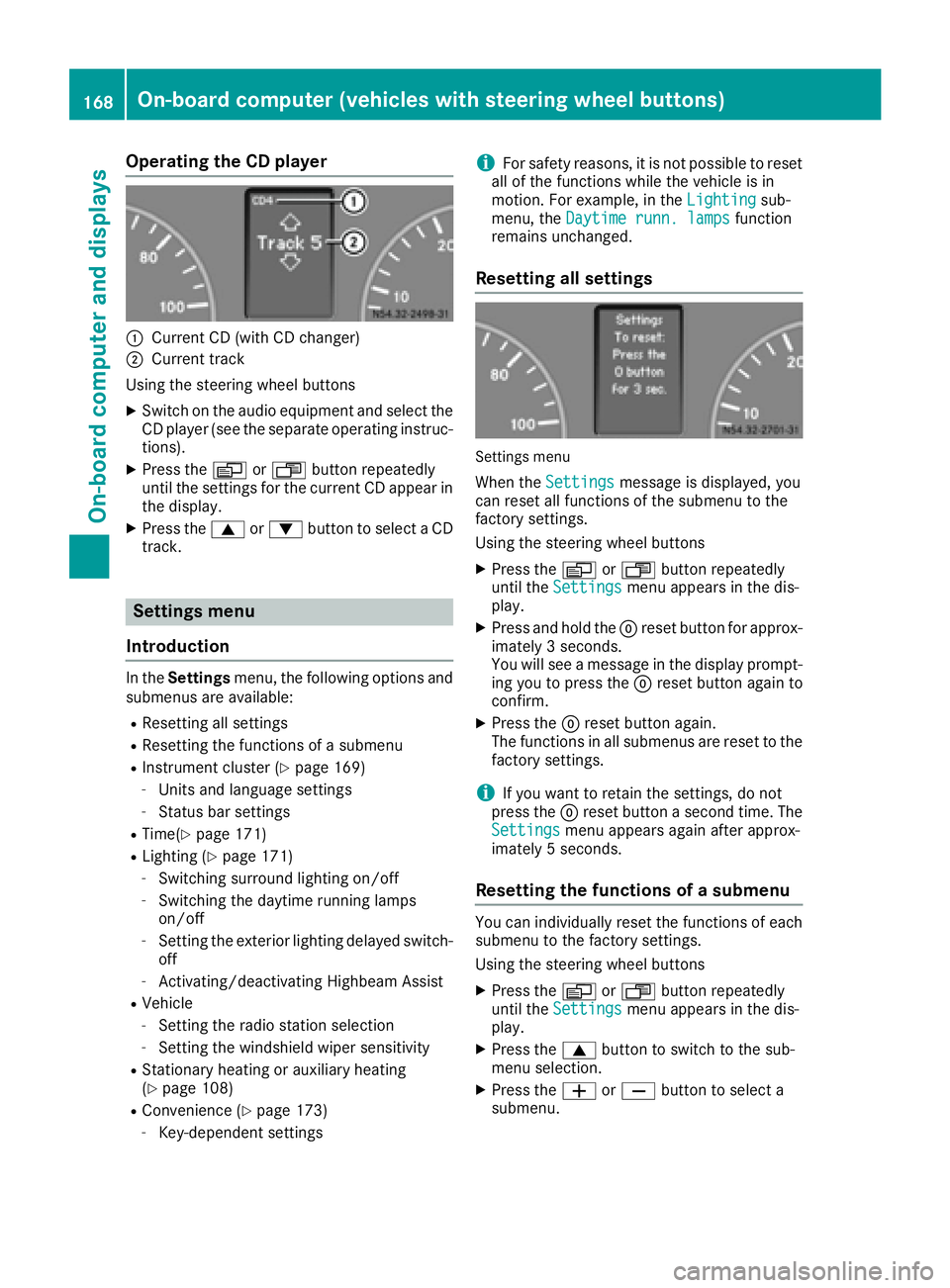
Operating the CD player
:Current CD (with CD changer)
;Current track
Using the steering wheel buttons
XSwitch on the audio equipment and select the
CD player (see the separate operating instruc-
tions).
XPress the VorU button repeatedly
until the settings for the current CD appear in
the display.
XPress the 9or: button to select a CD
track.
Settings menu
Introduction
In the Settings menu, the following options and
submenus are available:
RResetting all settings
RResetting the functions of a submenu
RInstrument cluster (Ypage 169)
-Units and language settings
-Status bar settings
RTime(Ypage 171)
RLighting (Ypage 171)
-Switching surround lighting on/off
-Switching the daytime running lamps
on/off
-Setting the exterior lighting delayed switch-
off
-Activating/deactivating Highbeam Assist
RVehicle
-Setting the radio station selection
-Setting the windshield wiper sensitivity
RStationary heating or auxiliary heating
(Ypage 108)
RConvenience (Ypage 173)
-Key-dependent settings
iFor safety reasons, it is not possible to reset
all of the functions while the vehicle is in
motion. For example, in the Lighting
sub-
menu, the Daytime runn. lampsfunction
remains unchanged.
Resetting all settings
Settings menu
When the Settingsmessage is displayed, you
can reset all functions of the submenu to the
factory settings.
Using the steering wheel buttons
XPress the VorU button repeatedly
until the Settingsmenu appears in the dis-
play.
XPress and hold the 9reset button for approx-
imately 3 seconds.
You will see a message in the display prompt-
ing you to press the 9reset button again to
confirm.
XPress the 9reset button again.
The functions in all submenus are reset to the
factory settings.
iIf you want to retain the settings, do not
press the 9reset button a second time. The
Settings
menu appears again after approx-
imately 5 seconds.
Resetting the functions of a submenu
You can individually reset the functions of each
submenu to the factory settings.
Using the steering wheel buttons
XPress the VorU button repeatedly
until the Settingsmenu appears in the dis-
play.
XPress the 9button to switch to the sub-
menu selection.
XPress the WorX button to select a
submenu.
168On-board computer (vehicles with steering wheel buttons)
On-board computer and displays
Page 173 of 290
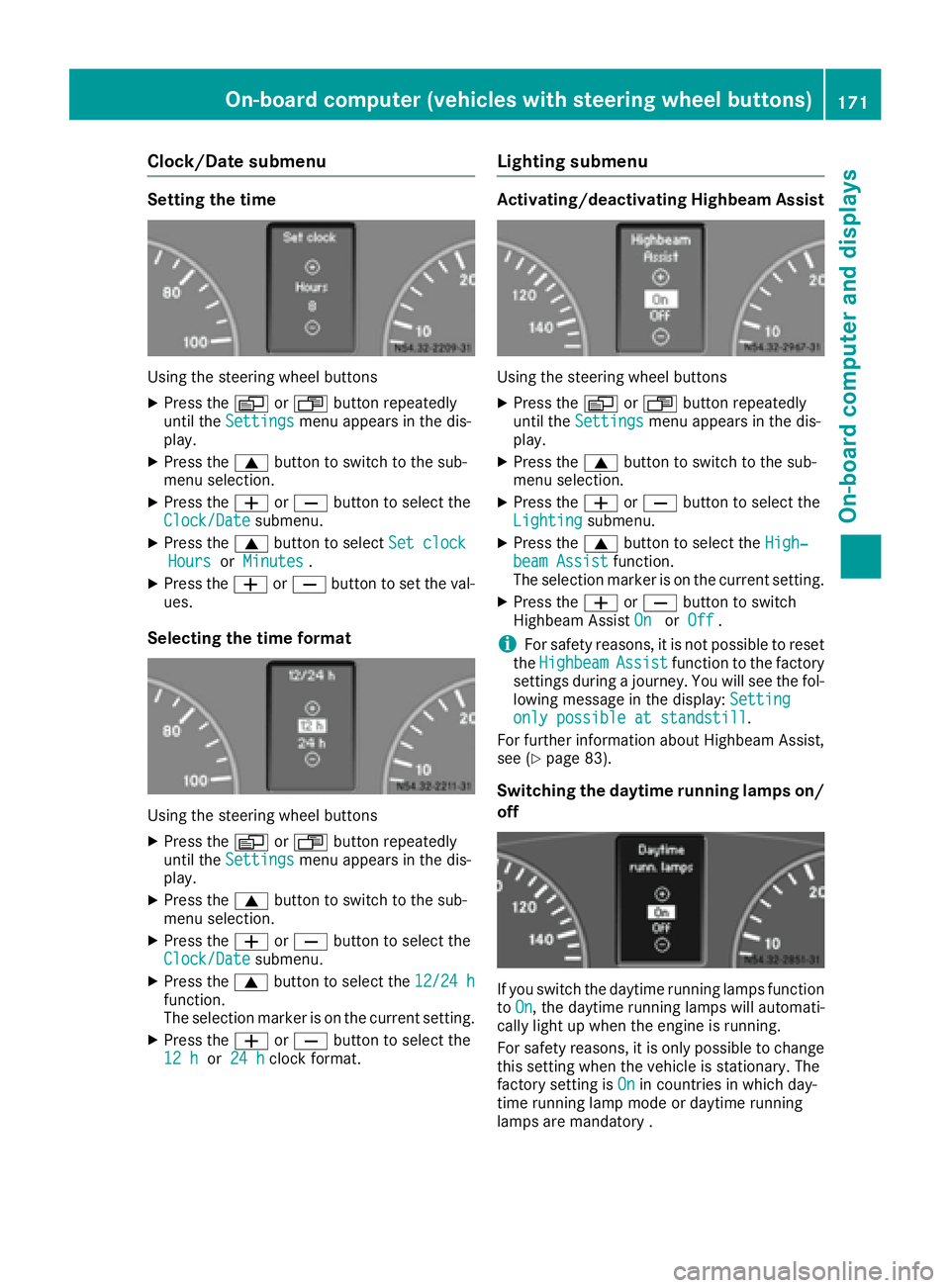
Clock/Date submenu
Setting the time
Using the steering wheel buttons
XPress theVorU button repeatedly
until the Settingsmenu appears in the dis-
play.
XPress the 9button to switch to the sub-
menu selection.
XPress the WorX button to select the
Clock/Datesubmenu.
XPress the 9button to select Set clockHoursorMinutes.
XPress the WorX button to set the val-
ues.
Selecting the time format
Using the steering wheel buttons
XPress the VorU button repeatedly
until the Settingsmenu appears in the dis-
play.
XPress the 9button to switch to the sub-
menu selection.
XPress the WorX button to select the
Clock/Datesubmenu.
XPress the 9button to select the 12/24 hfunction.
The selection marker is on the current setting.
XPress theWorX button to select the
12 hor 24 hclock format.
Lighting submenu
Activating/deactivating Highbeam Assist
Using the steering wheel buttons
XPress the VorU button repeatedly
until the Settingsmenu appears in the dis-
play.
XPress the 9button to switch to the sub-
menu selection.
XPress the WorX button to select the
Lightingsubmenu.
XPress the 9button to select the High‐beam Assistfunction.
The selection marker is on the current setting.
XPress the WorX button to switch
Highbeam Assist OnorOff.
iFor safety reasons, it is not possible to reset
the HighbeamAssistfunction to the factory
settings during a journey. You will see the fol-
lowing message in the display: Setting
only possible at standstill.
For further information about Highbeam Assist,
see (
Ypage 83).
Switching the daytime running lamps on/
off
If you switch the daytime running lamps function
to On, the daytime running lamps will automati-
cally light up when the engine is running.
For safety reasons, it is only possible to change
this setting when the vehicle is stationary. The
factory setting is On
in countries in which day-
time running lamp mode or daytime running
lamps are mandatory .
On-board computer (vehicles with steering wheel buttons)171
On-board computer and displays
Z
Page 187 of 290
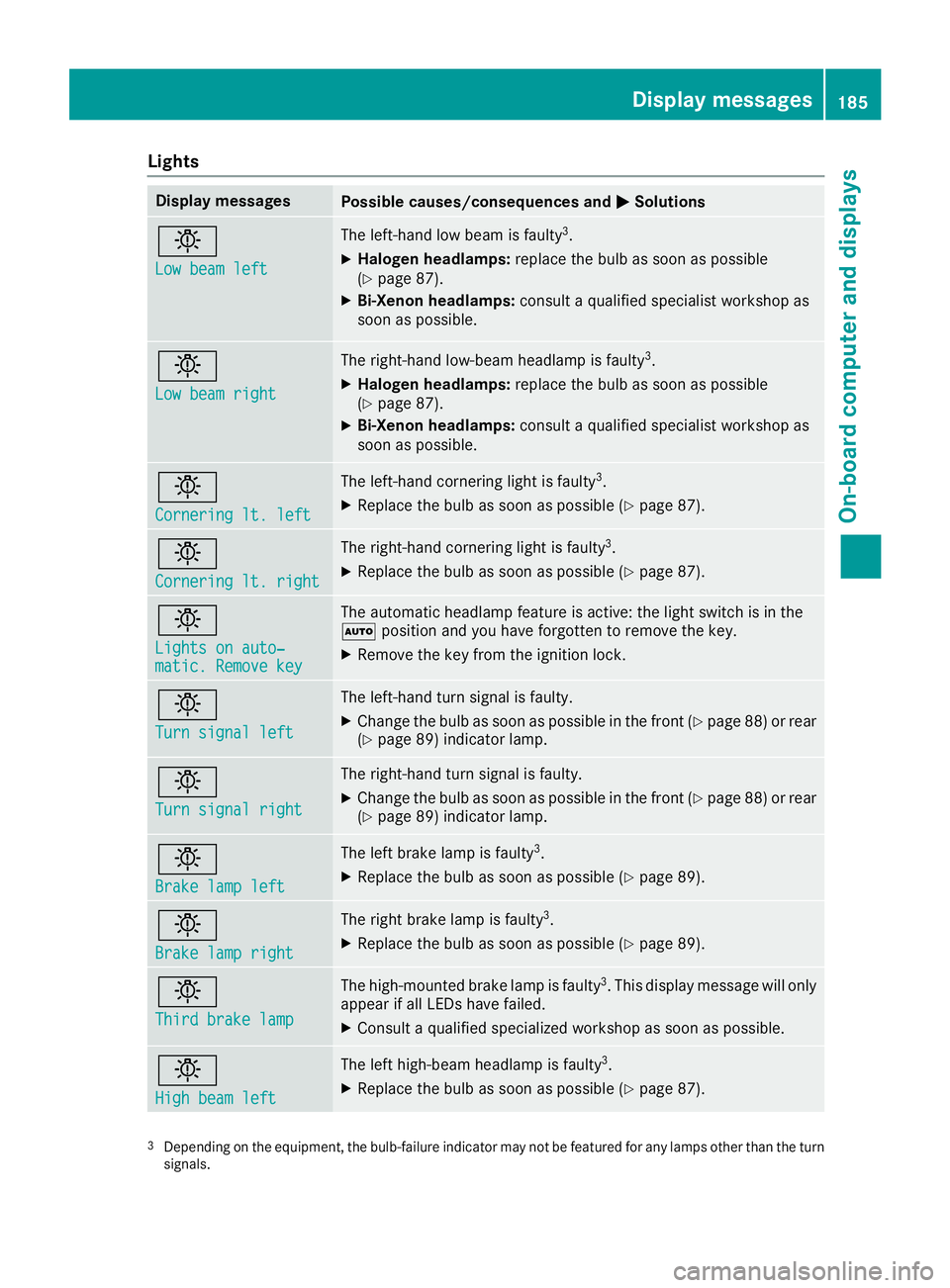
Lights
Display messagesPossible causes/consequences andMSolutions
b
Low beam left
The left-hand low beam is faulty3.
XHalogen headlamps:replace the bulb as soon as possible
(Ypage 87).
XBi-Xenon headlamps: consult a qualified specialist workshop as
soon as possible.
b
Low beam right
The right-hand low-beam headlamp is faulty3.
XHalogen headlamps: replace the bulb as soon as possible
(Ypage 87).
XBi-Xenon headlamps: consult a qualified specialist workshop as
soon as possible.
b
Cornering lt. left
The left-hand cornering light is faulty3.
XReplace the bulb as soon as possible (Ypage 87).
b
Cornering lt. right
The right-hand cornering light is faulty3.
XReplace the bulb as soon as possible (Ypage 87).
b
Lights on auto‐matic. Remove key
The automatic headlamp feature is active: the light switch is in the
à position and you have forgotten to remove the key.
XRemove the key from the ignition lock.
b
Turn signal left
The left-hand turn signal is faulty.
XChange the bulb as soon as possible in the front (Ypage 88) or rear
(Ypage 89) indicator lamp.
b
Turn signal right
The right-hand turn signal is faulty.
XChange the bulb as soon as possible in the front (Ypage 88) or rear
(Ypage 89) indicator lamp.
b
Brake lamp left
The left brake lamp is faulty3.
XReplace the bulb as soon as possible (Ypage 89).
b
Brake lamp right
The right brake lamp is faulty3.
XReplace the bulb as soon as possible (Ypage 89).
b
Third brake lamp
The high-mounted brake lamp is faulty3. This display message will only
appear if all LEDs have failed.
XConsult a qualified specialized workshop as soon as possible.
b
High beam left
The left high-beam headlamp is faulty3.
XReplace the bulb as soon as possible (Ypage 87).
3Depending on the equipment, the bulb-failure indicator may not befeatured for any lamps other than the turn
signals.
Display messages185
On-board computer and displays
Z
Page 188 of 290
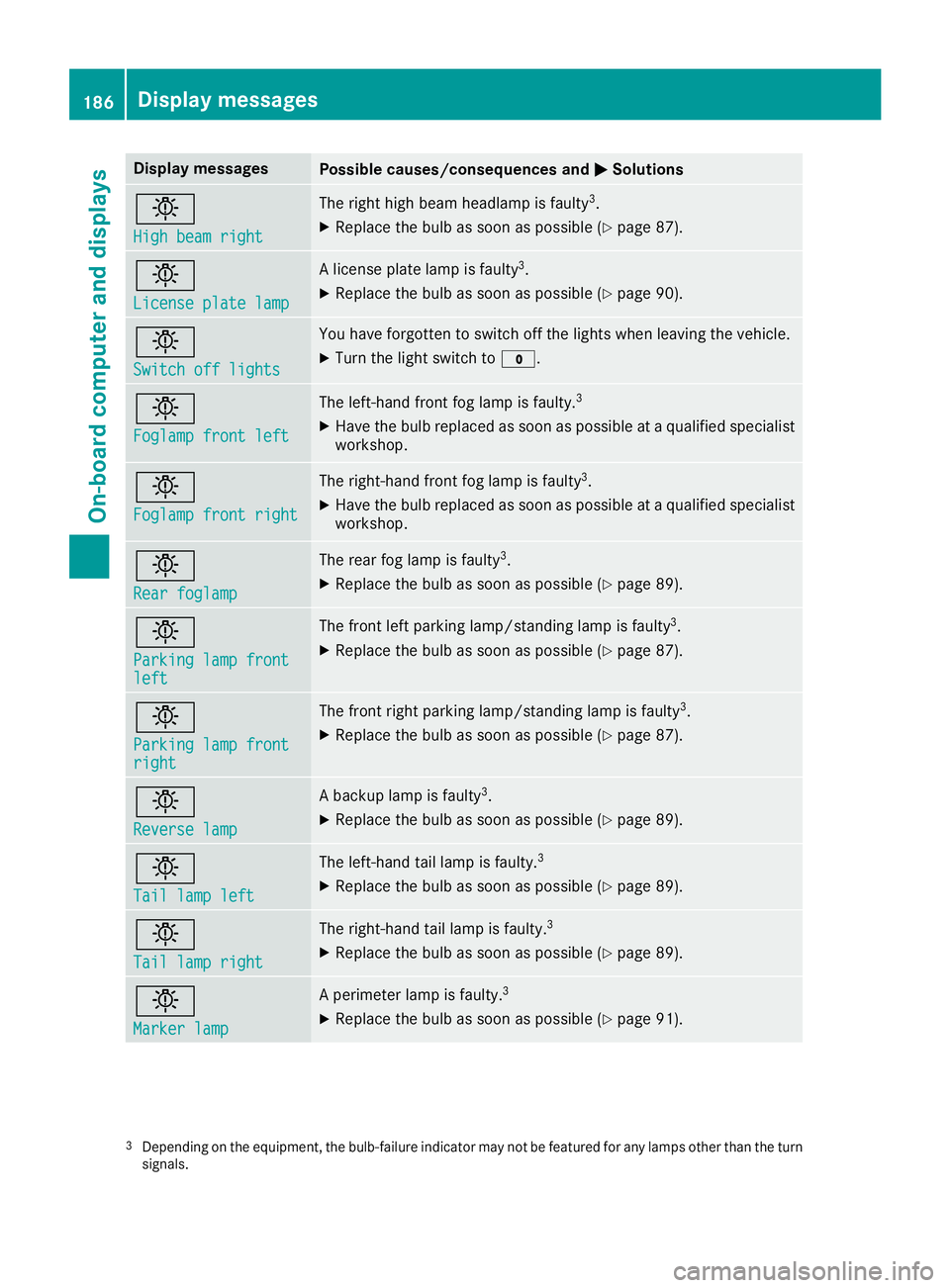
Display messagesPossible causes/consequences andMSolutions
b
Highbea mright
The right high beam headlamp is fault y3.
XReplaceth ebulb as soo nas possibl e (Ypage 87).
b
Licenseplate lam p
Alicense plat elamp is fault y3.
XReplaceth ebulb as soo nas possibl e (Ypage 90).
b
Switch off lights
You haveforgotte nto switch off th elights when leaving th evehicle.
XTurn th eligh tswitch to $.
b
Foglampfront lef t
The left-han dfron tfog lamp is faulty.3
XHav eth ebulb replace das soo nas possibl eat aqualified specialist
workshop .
b
Foglampfront right
The right-hand fron tfog lamp is fault y3.
XHaveth ebulb replace das soo nas possibl eat aqualified specialist
workshop .
b
Rearfoglam p
The rear fog lamp is fault y3.
XReplaceth ebulb as soo nas possibl e (Ypage 89).
b
Parkinglam pfrontlef t
The fron tlef tparking lamp/standin glamp is fault y3.
XReplaceth ebulb as soo nas possibl e (Ypage 87).
b
Parkinglam pfrontright
The fron tright parking lamp/standin glamp is fault y3.
XReplaceth ebulb as soo nas possibl e (Ypage 87).
b
Reverselam p
Abackup lamp is fault y3.
XReplaceth ebulb as soo nas possibl e (Ypage 89).
b
Taillam plef t
The left-han dtai llamp is faulty.3
XReplac eth ebulb as soo nas possibl e (Ypage 89).
b
Taillam pright
The right-hand tai llamp is faulty.3
XReplac eth ebulb as soo nas possibl e (Ypage 89).
b
Marker lam p
Aperimete rlamp is faulty.3
XReplac eth ebulb as soo nas possibl e (Ypage 91).
3Dependin gon th eequipment, th ebulb-failure indicato rmay no tbe featured for any lamp sother than th etur n
signals.
186Display messages
On-board computer and displays
Page 189 of 290
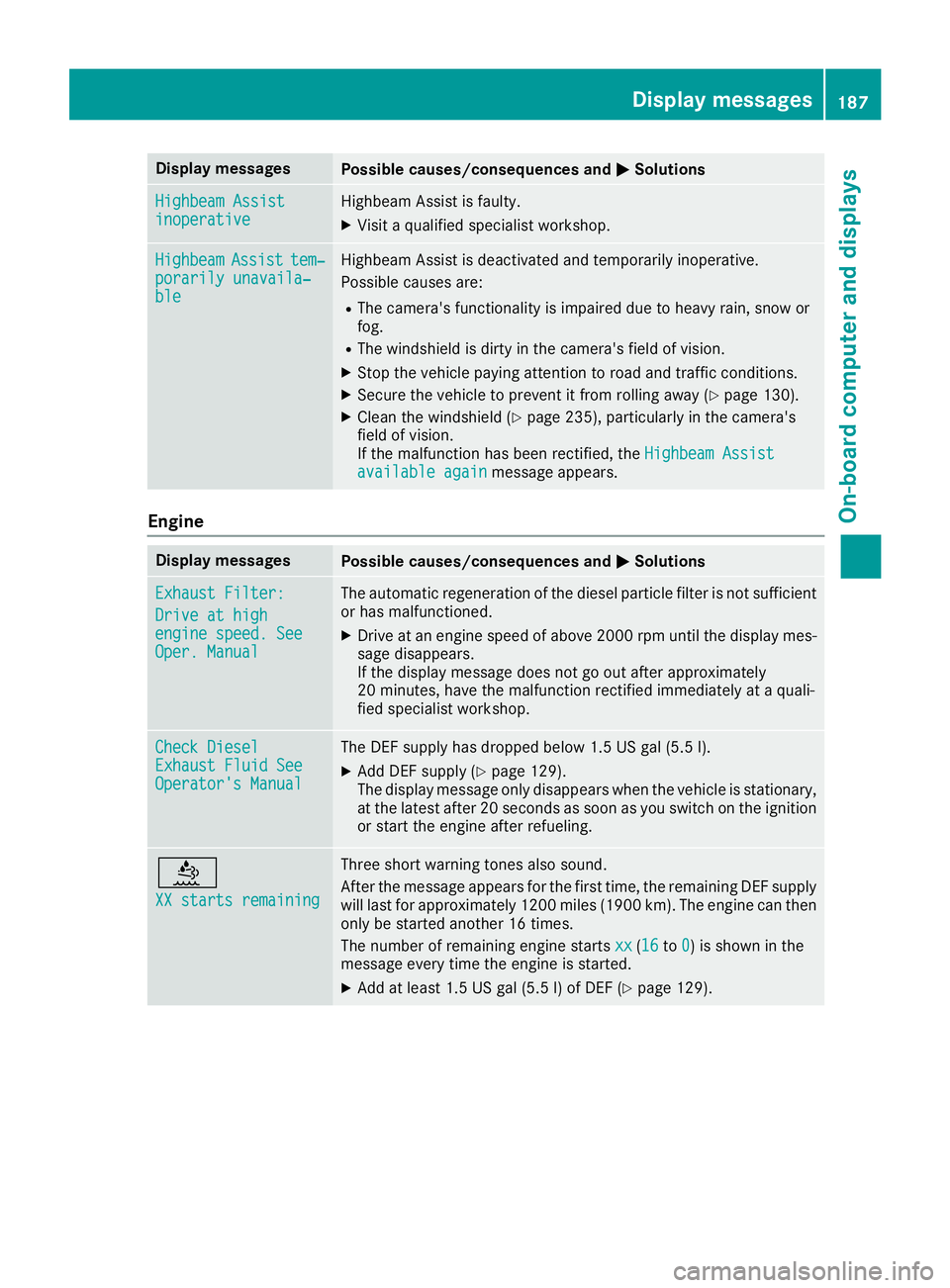
Display messagesPossible causes/consequences andMSolutions
Highbeam AssistinoperativeHighbeamAssis tis faulty.
XVisit aqualified specialist workshop .
HighbeamAssisttem‐porarily unavaila‐ble
Highbea mAssis tis deactivated and temporarily inoperative.
Possibl ecauses are:
RThe camera' sfunctionalit yis impaire ddue to heav yrain ,snow or
fog .
RThe windshield is dirty in th ecamera' sfield of vision .
XStop thevehicl epayin gattention to roa dand traffic conditions.
XSecur eth evehicl eto preven tit from rollin gaway (Ypage 130).
XClean th ewindshield (Ypage 235), particularly in th ecamera' s
field of vision .
If th emalfunction has been rectified, th eHighbeam Assist
available againmessage appears.
Engine
Display messagesPossible causes/consequences and MSolutions
ExhaustFilter :
Drive at hig hengine speed. SeeOper. Manual
The automatic regeneration of th ediesel particl efilter is no tsufficien t
or has malfunctioned.
XDrive at an engin espeed of abov e2000 rpm until th edisplay mes -
sage disappears.
If th edisplay message does no tgo out after approximately
20 minutes, hav eth emalfunction rectifie dimmediately at aquali-
fie dspecialist workshop .
Check DieselExhaustFluid SeeOperator' sManual
The DE Fsupply has dropped belo w1.5US gal (5. 5l).
XAd dDE Fsupply (Ypage 129).
The display message only disappear swhen th evehicl eis stationary,
at th elatest after 20 seconds as soo nas you switch on th eignition
or start th eengin eafter refueling.
å
XX starts remaining
Three short warning tone salso sound.
Afte rth emessage appear sfor th efirst time, th eremaining DE Fsupply
will last for approximately 1200 mile s(1900 km). The engin ecan then
only be started another 16 times .
The number of remaining engin estart sxx
(16to 0)is shown in th e
message every time th eengin eis started.
XAd dat least 1. 5US gal (5.5l)of DEF (Ypage 129).
Display messages187
On-board computer and displays
Z