heating MERCEDES-BENZ SPRINTER 2016 MY16 Operator’s Manual
[x] Cancel search | Manufacturer: MERCEDES-BENZ, Model Year: 2016, Model line: SPRINTER, Model: MERCEDES-BENZ SPRINTER 2016Pages: 290, PDF Size: 6.44 MB
Page 118 of 290
exists, deactivate the respective programmedtime.
You can set three preselection times using the
timer.
After a malfunction or if the battery has been
disconnected, you must set the preselection
times again. You can find information on mal-
functions in the "Problems with the auxiliary
warm-air heater" section (
Ypage 117).
XPress the Ûorâ button until the B
symbol in the menu bar flashes.
XPress the bbutton.
In the program column, the Gpreselection
memory numbers appear. The selected pre-
selection memory flashes.
XPress the Ûorâ button to select the
desired preselection memory.
XPress the bbutton.
The preselection memory is selected. The
days are shown.
XSet the day and time as described in the "Set-
ting the day, time and operating duration"
section (
Ypage 115).
The preselection time is stored. The program
column disappears. In the display panel, the
on
message and the ysymbol appear.
XPress the bbutton.
The operating duration flashes.
XPress the Ûorâ button to set the
minute value (10 to 120).
XPress the bbutton.
The operating duration for the preselection
time is saved. The time and number of the
selected preselection memory are shown.
iThe preselection memory that will be acti-
vated next is underlined. Additionally, the day
that is set appears.
Deactivating the preselection time
XCarry out the steps as described in the "Set-
ting the preselection time" section.
If the y symbol in the status bar is shown:
XPress the Ûorâ button until the offmessage in the display panel is shown.
XPress thebbutton.
The preselection time is deactivated. The time
is shown.
Setting the heating level
You can set the heating level to a range between 10 and 30.
The heating level corresponds to a preselection
temperature for the vehicle interior. This is a
guide value and may, depending on the outside
temperature, differ from the interior tempera-
ture.
XPress the Ûorâ button until the ß
symbol in the menu bar flashes.
XPress the bbutton.
The heating level display flashes.
XUsing the Ûandâ buttons, set the
desired heating level to a range between 10
and 30.
XPress the bbutton.
The heating level is set and the ysymbol
appears.
116Operating the auxiliary heating system
Climate control
Page 119 of 290
Problems with the auxiliary warm-air heater
ProblemPossible causes/consequences andMSolutions
The auxiliary heating
does not switch on.The outside temperature is above 39 ‡ (4 †). The auxiliary heating
switches off automatically.
The auxiliary heating
switches off automati-
cally and/or cannot be
switched on.The fuel tank is less thanÕfull. The auxiliary heating switches off
automatically.
XRefuel at the nearest gas station.
XThen, start the auxiliary heating several times until the fuel lines are
full.
or
The low-voltage protection system integrated in the control unit
switches off the auxiliary heating because the on-board voltage is less
than 10 V.
XHave the alternator and battery checked.
or
The fuse is blown.
XReplace the fuse; see the "Fuse allocation" supplement.
XHave the cause of the blown fuse determined at a qualified spe-
cialist workshop.
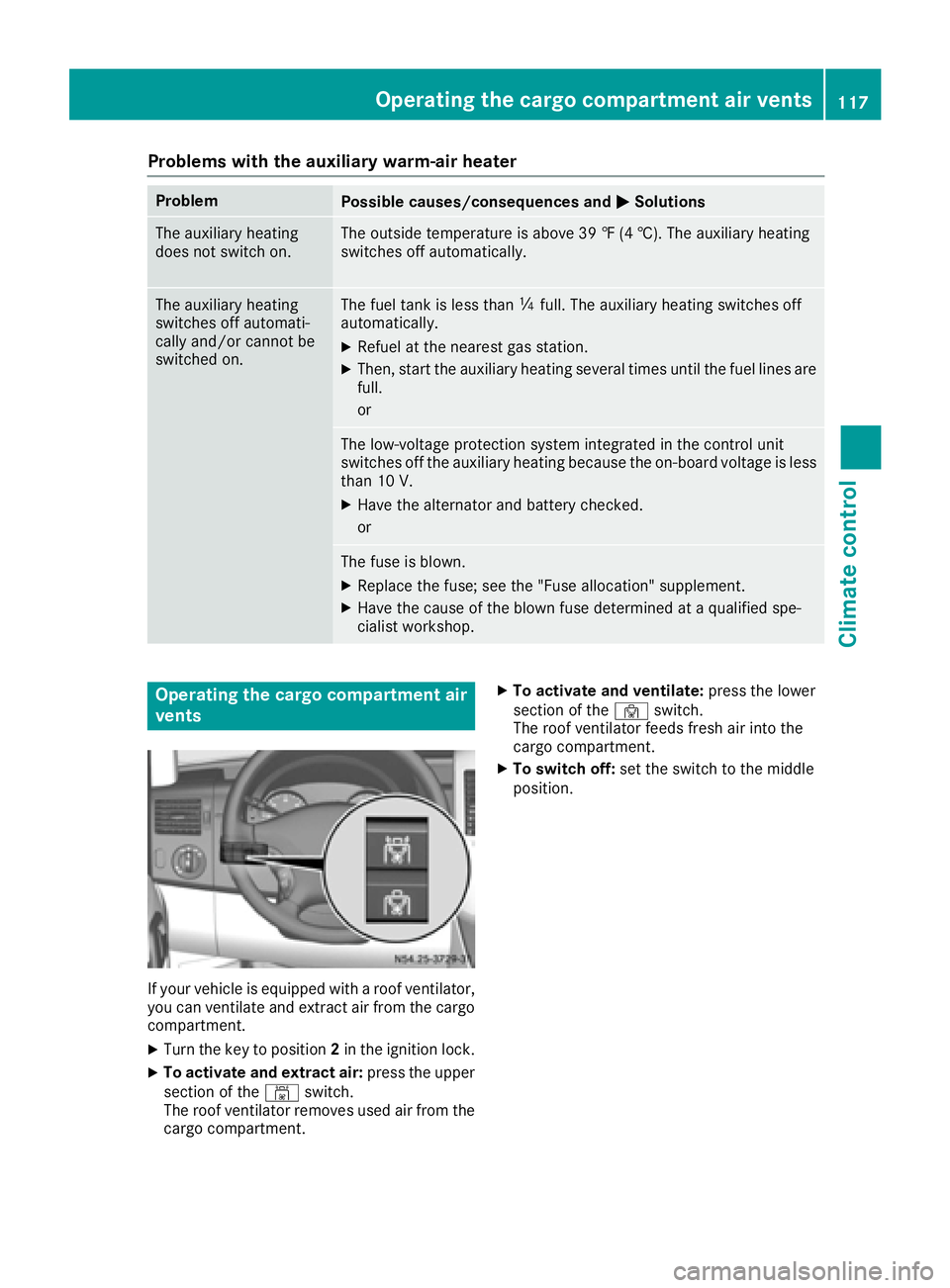
Operating the cargo compartment air
vents
If your vehicle is equipped with a roof ventilator,
you can ventilate and extract air from the cargo
compartment.
XTurn the key to position 2in the ignition lock.
XTo activate and extract air: press the upper
section of the ´switch.
The roof ventilator removes used air from the
cargo compartment.
XTo activate and ventilate: press the lower
section of the ·switch.
The roof ventilator feeds fresh air into the
cargo compartment.
XTo switch off: set the switch to the middle
position.
Operating the cargo compartment air vents117
Climate control
Z
Page 129 of 290
Problems with the transmission
ProblemPossible causes/consequences andMSolutions
The transmission mal-
functions when shifting
gear.The transmission is losing oil.
XHave the transmission checked immediately at a qualified specialist
workshop.
The acceleration charac-
teristics have deteriora-
ted noticeably.
The transmission does
not shift.The transmission is in emergency mode.
It is only possible to shift into second gear or reverse gear R.
XStop the vehicle.
XDepress the brake pedal.
XMove the selector lever to positionP.
XSwitch off the engine.
XWait at least 10 seconds before restarting the engine.
XDepress the brake pedal.
XMove the selector lever to positionDor R.
In position D, the transmission shifts into second gear; in position R,
the transmission shifts into reverse gear.
XHave the transmission checked immediately at a qualified specialist
workshop.
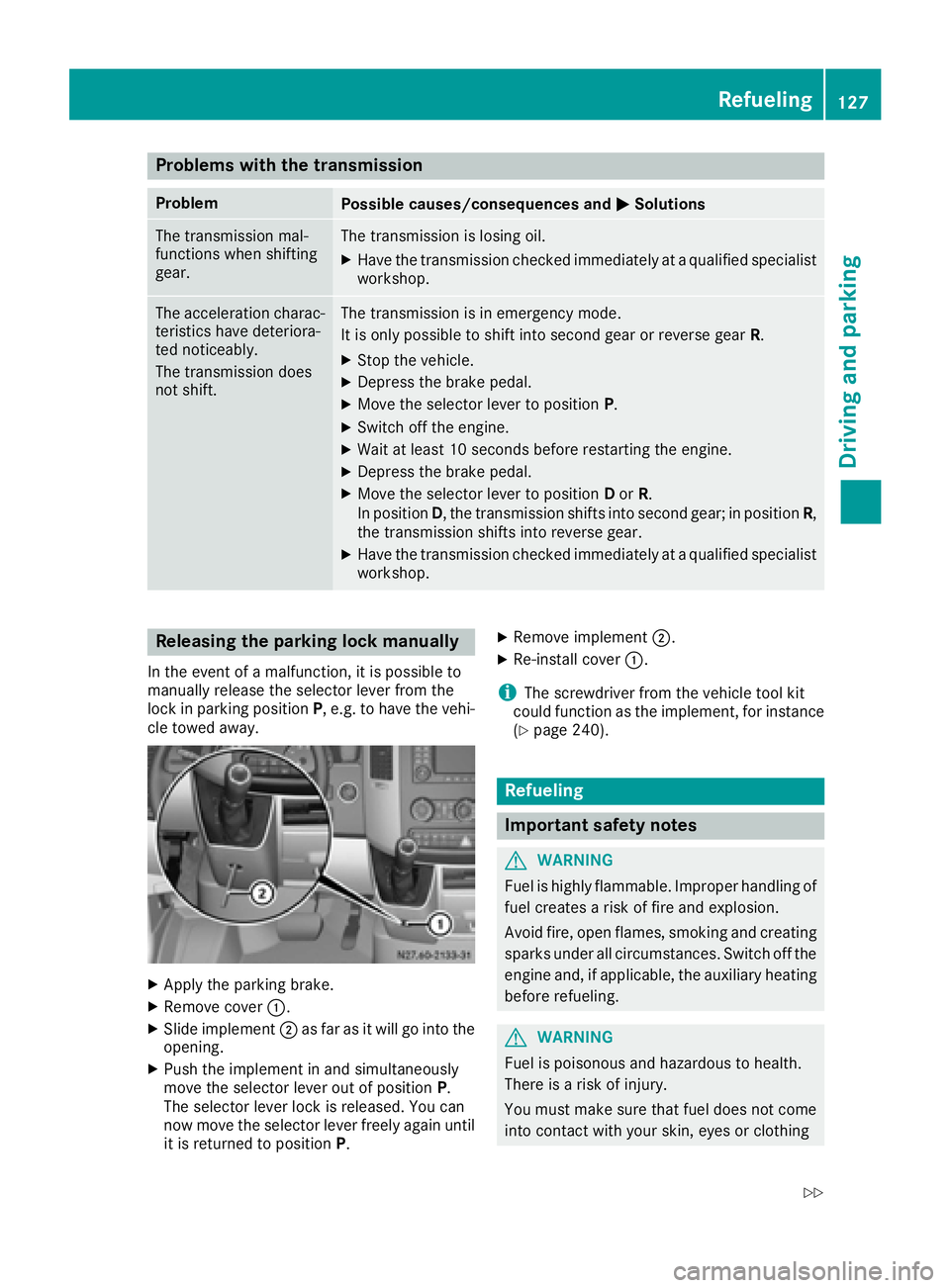
Releasing the parking lock manually
In the event of a malfunction, it is possible to
manually release the selector lever from the
lock in parking position P, e.g. to have the vehi-
cle towed away.
XApply the parking brake.
XRemove cover :.
XSlide implement ;as far as it will go into the
opening.
XPush the implement in and simultaneously
move the selector lever out of position P.
The selector lever lock is released. You can
now move the selector lever freely again until
it is returned to position P.
XRemove implement;.
XRe-install cover:.
iThe screwdriver from the vehicle tool kit
could function as the implement, for instance
(
Ypage 240).
Refueling
Important safety notes
GWARNING
Fuel is highly flammable. Improper handling of
fuel creates a risk of fire and explosion.
Avoid fire, open flames, smoking and creating
sparks under all circumstances. Switch off the
engine and, if applicable, the auxiliary heating
before refueling.
GWARNING
Fuel is poisonous and hazardous to health.
There is a risk of injury.
You must make sure that fuel does not come into contact with your skin, eyes or clothing
Refueling127
Driving and parking
Z
Page 130 of 290
and that it is not swallowed. Do not inhale fuelvapors. Keep fuel away from children.
If you or others come into contact with fuel,
observe the following:
RWash away fuel from skin immediately
using soap and water.
RIf fuel comes into contact with your eyes,
immediately rinse them thoroughly with
clean water. Seek medical assistance with-
out delay.
RIf fuel is swallowed, seek medical assis-
tance without delay. Do not induce vomit-
ing.
RImmediately change out of clothing which
has come into contact with fuel.
GWARNING
If you mix diesel fuel with gasoline, the flash
point is lower than that of pure diesel fuel.
When the engine is running, exhaust system
components could overheat without being
noticed. There is a risk of fire.
Never refuel with gasoline. Never mix gasoline with diesel fuel.
HEnvironmental note
If fuels are handled improperly, they pose a
danger to persons and the environment. Do
not allow fuels to run into the sewage system,
the surface waters, the ground water or into
the ground.
!Do not use gasoline to refuel vehicles with a
diesel engine. Even small amounts of gasoline
will cause damage to the fuel system and
engine.
!Do not switch on the ignition if you acciden-
tally refuel with the wrong fuel. Otherwise, the
fuel will enter the fuel lines. Notify a qualified
specialist workshop and have the fuel tank
and fuel lines drained completely.
!Overfilling the fuel tank could damage the
fuel system.
!Take care not to spill any fuel on painted
surfaces. You could otherwise damage the
paintwork.
!Filter the fuel before transferring it to the
vehicle if you are refueling the vehicle from
barrels or containers.
This will prevent malfunctions in the fuel sys-
tem due to contaminated fuel.
Further information on fuel and on fuel grades
can be found in the "Technical data" section
(
Ypage 277).
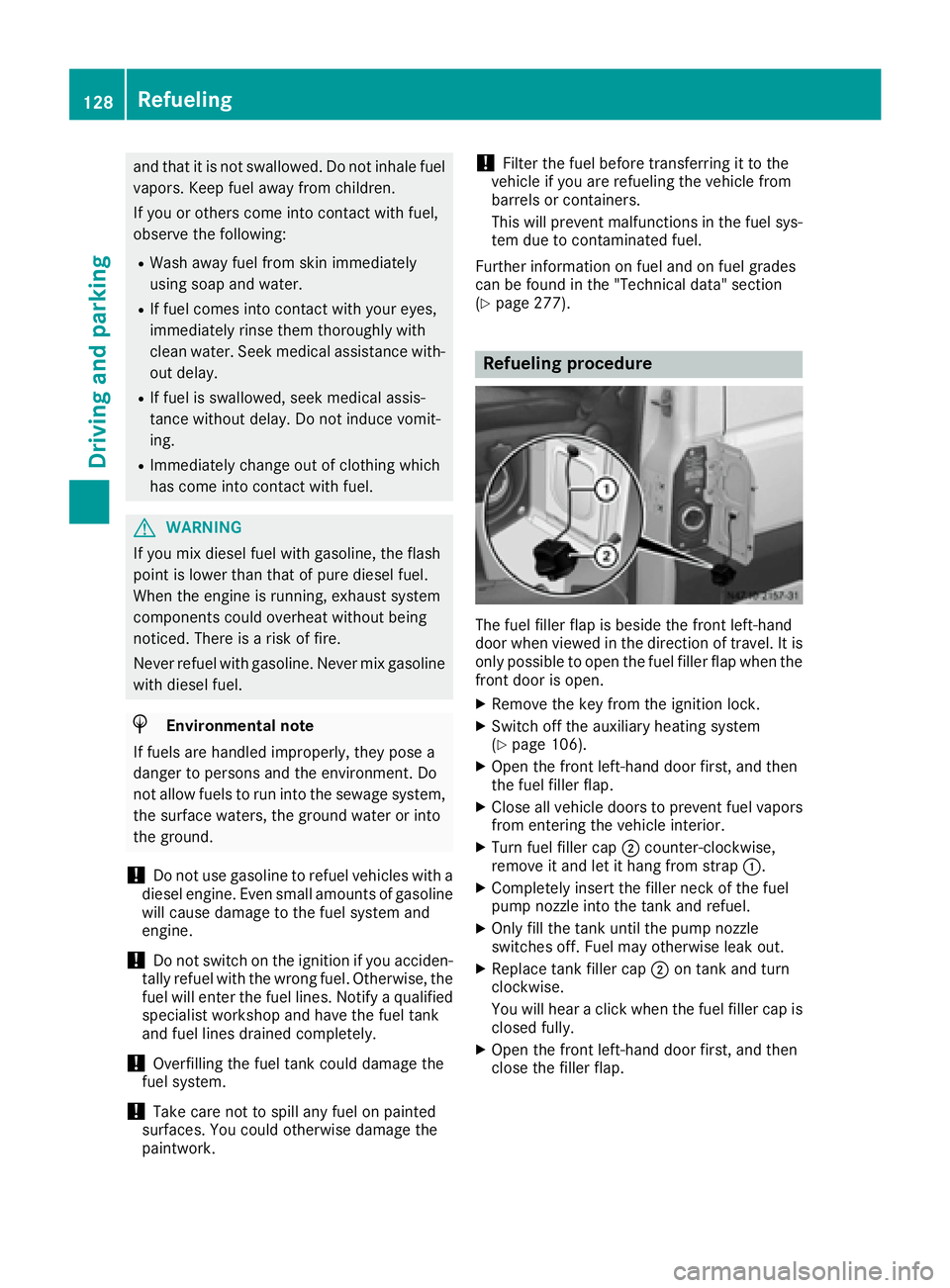
Refueling procedure
The fuel filler flap is beside the front left-hand
door when viewed in the direction of travel. It is
only possible to open the fuel filler flap when the front door is open.
XRemove the key from the ignition lock.
XSwitch off the auxiliary heating system
(Ypage 106).
XOpen the front left-hand door first, and then
the fuel filler flap.
XClose all vehicle doors to prevent fuel vaporsfrom entering the vehicle interior.
XTurn fuel filler cap ;counter-clockwise,
remove it and let it hang from strap :.
XCompletely insert the filler neck of the fuel
pump nozzle into the tank and refuel.
XOnly fill the tank until the pump nozzle
switches off. Fuel may otherwise leak out.
XReplace tank filler cap;on tank and turn
clockwise.
You will hear a click when the fuel filler cap is
closed fully.
XOpen the front left-hand door first, and then
close the filler flap.
128Refueling
Driving and parking
Page 131 of 290
Problems with the fuel and fuel tank
If your vehicle is losing fuel, the fuel lines or thefuel tank are defective.
XTurn the key immediately to position 0in the
ignition lock and remove it.
XDo not restart the engine under any circum-
stances.
XConsult a qualified specialist workshop.
If the fuel tank has been run dry, after refueling
carry out the following steps:
XBefore starting the engine: switch on the igni-
tion three or four times.
XTurn the key to position 2in the ignition lock
(Ypage 119).
The % preglow indicator lamp in the instru-
ment cluster lights up briefly.
XOnce the %preglow indicator lamp goes
out, turn the key to position 3in the ignition
lock and release it as soon as the engine is
running.
You can start the diesel engine without preglow
when the engine is warm.
Diesel Exhaust Fluid (DEF)
Important safety notes
!Only use DEF in accordance with
ISO 22241. Never mix DEF with additives or
thin it with tap water. The exhaust gas after-
treatment may otherwise be damaged.
Observe the MB Specifications for Service
Products, Sheet 352.0.
Damage that results from the use of additives
or tap water leads to the loss of the New
Vehicle Limited Warranty.
!If DEF comes into contact with a painted or
aluminum surface, wash the surface off
immediately with plenty of water.
!DEF is not a diesel additive and must not be
mixed with fuel in the tank. Even small
amounts of DEF can cause engine damage.
Damage that results from the blending of DEF
will not be covered by the New Vehicle Limi-
ted Warranty.
iIf the outside temperature is below 12 ‡
( Ò 11 †) it may be difficult to top up. If the DEF
is frozen and there is an active warning indi- cator, topping up may not be possible. Park
the vehicle in a warm place, e.g. in a garage,
until the DEF has become liquid again. Top-
ping up is then possible again. Alternatively,
have the DEF tank refilled at a qualified spe-
cialist workshop.
iIf you add DEF at temperatures below 12 ‡
( Ò 11 †) it is possible that the level is not
shown correctly due to the frozen DEF.
Drive for at least 20 minute s(heating phase in
the tank activated) and then st
op the vehicle
for at least 30 seconds. The level is then
shown correctly.
You will find further information on DEF in the
"Service products" section (
Ypage 277).
Refueling procedure
DEF filler neck
Non-lockable DEF filler cap
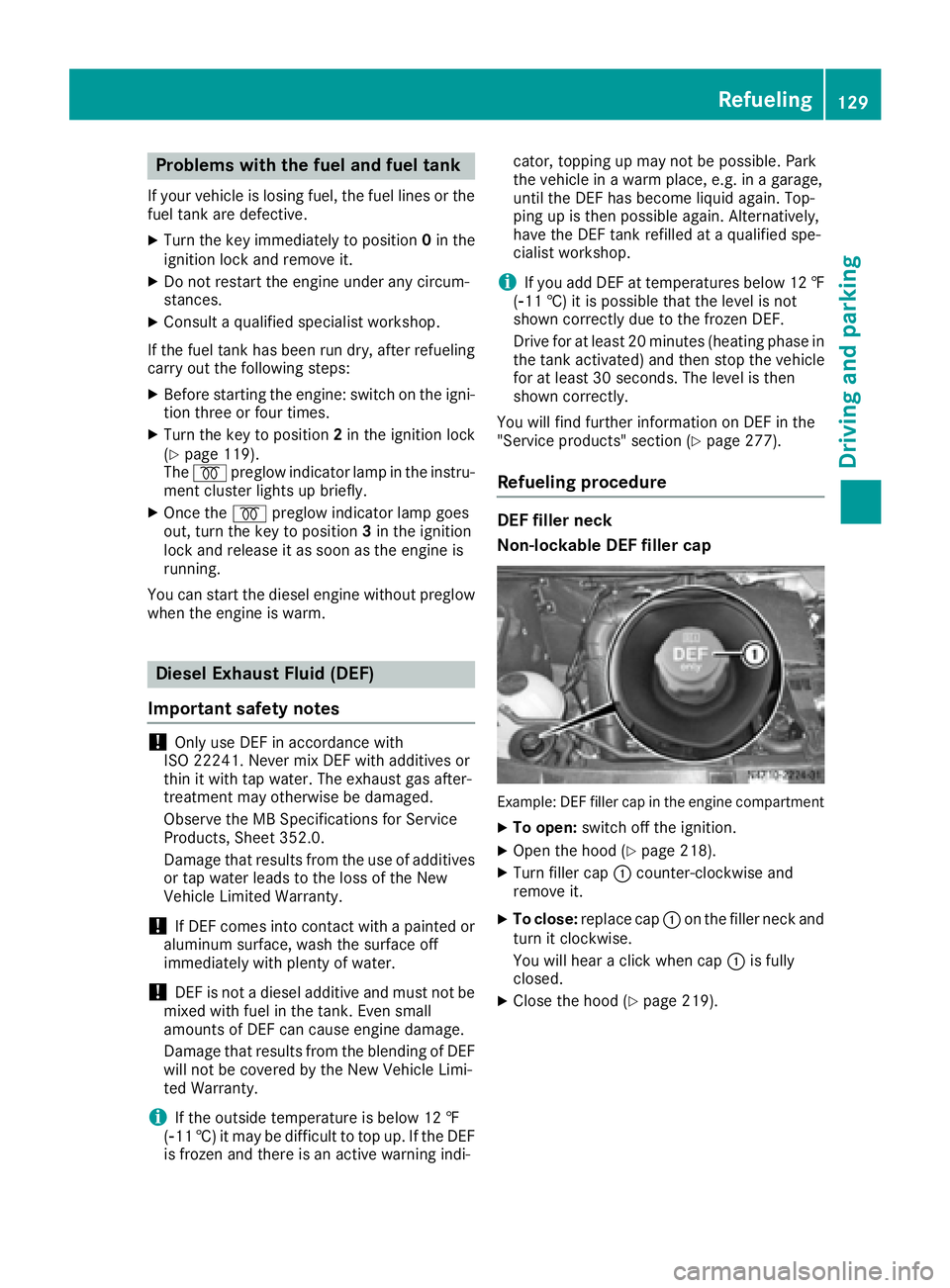
Example: DEF filler cap in the engine compartment
XTo open: switch off the ignition.
XOpen the hood (Ypage 218).
XTurn filler cap :counter-clockwise and
remove it.
XTo close: replace cap :on the filler neck and
turn it clockwise.
You will hear a click when cap :is fully
closed.
XClose the hood (Ypage 219).
Refueling129
Driving and parking
Z
Page 137 of 290
Low-beam headlamps
If you are traveling in countries where vehicles
are driven on the opposite side of the road to
that in which the vehicle is registered, you will
need to:
Rhave the halogen headlamps partially masked
Rhave the Bi-Xenon headlamps set to symmet-
rical low beam
This prevents glare to oncoming traffic and no
longer illuminates the edge of the road to the
same height and distance.
Have the headlamps masked or adjusted at a
qualified specialist workshop before you cross
the border, but as close to it as possible.
When you return from your journey, and as close
to the border as possible, you will need to:
Rremove the adhesive surfaces from your hal-
ogen headlamps and clean the glass of the
headlamps if necessary
Rhave the Bi-Xenon headlamps reset to asym-
metrical low beam at a qualified specialist
workshop
Transport by rail
Transporting your vehicle by rail may be subject
to certain restrictions or require special meas-
ures to be taken in some countries due to vary- ing tunnel heights and loading standards.
You can obtain further information from any
authorized Sprinter dealer.
Brakes
Important safety notes
GWARNING
If you shift down on a slippery road surface in an attempt to increase the engine's braking
effect, the drive wheels could lose their grip.
There is an increased danger of skidding and
accidents.
Do not shift down for additional engine brak-
ing on a slippery road surface.
GWARNING
If you rest your foot on the brake pedal while
driving, the braking system can overheat. This
increases the stopping distance and can even
cause the braking system to fail. There is a
risk of an accident.
Never use the brake pedal as a footrest. Never
depress the brake pedal and the accelerator
pedal at the same time.
!Depressing the brake pedal constantly
results in excessive and premature wear to
the brake pads.
Downhill gradients
!Depressing the brake pedal constantly
results in excessive and premature wear to
the brake pads.
On long and steep downhill gradients, you
should change down to shift range 2or1 in
good time. This should be observed in particular
when driving with a laden vehicle and when tow-
ing a trailer.
iYou must also change the shift range in
good time when cruise control is switched on.
You thereby make use of the braking effect of
the engine and do not have to brake as often to
maintain the speed. This relieves the load on the
service brake and prevents the brakes from
overheating and wearing too quickly.
Heavy and light loads
GWARNING
If you rest your foot on the brake pedal while
driving, the braking system can overheat. This increases the stopping distance and can even
cause the braking system to fail. There is a
risk of an accident.
Never use the brake pedal as a footrest. Never
depress the brake pedal and the accelerator
pedal at the same time.
!Depressing the brake pedal constantly
results in excessive and premature wear to
the brake pads.
If the brakes have been subjected to a heavy
load, do not stop the vehicle immediately. Drive
on for a short while. The brakes are cooled down
more quickly in the airflow.
Driving tips135
Driving and parking
Z
Page 139 of 290
erwise, water may enter the vehicle interior or
the engine compartment. This can damage
the electronic components in the engine or
the automatic transmission. Water can also
be drawn in by the engine's air suction nozzles
and this can cause engine damage.
If you have to drive on stretches of road on which
water has collected, please bear in mind that:
Rthe water level of standing water should not
be above the lower edge of the front bumper
Rdo not drive faster than walking speed
Driving in winter
General notes
GWARNING
If you shift down on a slippery road surface in an attempt to increase the engine's braking
effect, the drive wheels could lose their grip.
There is an increased danger of skidding and
accidents.
Do not shift down for additional engine brak-
ing on a slippery road surface.
GDANGER
If the exhaust pipe is blocked or adequate
ventilation is not possible, poisonous gases
such as carbon monoxide (CO) may enter the vehicle. This is the case, e.g. if the vehicle
becomes trapped in snow. There is a risk of
fatal injury.
If you leave the engine or the auxiliary heating
running, make sure the exhaust pipe and area
around the vehicle are clear of snow. To
ensure an adequate supply of fresh air, open a
window on the side of the vehicle that is not
facing into the wind.
Have your vehicle winterproofed at a qualified
specialist workshop in good time at the onset of
winter.
iDo not cover the radiator, e.g. with a winter
cover. The measurements of the on-board
diagnostic system may otherwise return inac-
curate values. Some of these values are
legally prescribed and must therefore always
be exact. Observe the notes in the "Winter operation" sec-
tion (
Ypage 249).
Slippery road surfaces
GWARNING
If you shift down on a slippery road surface in an attempt to increase the engine's braking
effect, the drive wheels could lose their grip.
There is an increased danger of skidding and
accidents.
Do not shift down for additional engine brak-
ing on a slippery road surface.
GWARNING
The outside temperature indicator is not
designed to serve as an ice-warning device
and is therefore unsuitable for that purpose.
Indicated temperatures just above the freez-
ing point do not guarantee that the road sur-
face is free of ice. The road may still be icy,
especially in wooded areas or on bridges.
!Vehicles with automatic transmission may
roll only briefly in the neutral position N. Pro-
longed rolling of the wheels, e.g. when being
towed, will result in transmission damage.
If the vehicle threatens to skid or cannot be
stopped when moving at low speed:
XShift the transmission to neutral position N.
XTry to maintain control of the vehicle using
corrective steering.
Drive particularly carefully on slippery roads.
Avoid sudden acceleration, steering and braking
maneuvers. Do not use cruise control.
You can find further information on winter tires
and snow chains in the "Winter operation" sec-
tion (
Ypage 249).
Driving off-road
Important safety notes
GWARNING
If you drive on a steep incline at an angle or
turn when driving on an incline, the vehicle
Driving tips137
Driving and parking
Z
Page 159 of 290
Weight information can be found in the “Per-
missible trailer and drawbar noseweights” sec-
tion (
Ypage 159).
iThe height of the ball neck changes accord-
ing to the load on the vehicle. If this is case,
use a trailer with a height-adjustable trailer
drawbar.
Driving tips
The maximum permissible speed for vehicle/
trailer combination depends on the type of
trailer. Before setting off, check the vehicle
documents of the your trailer to find out the
permissible maximum speed. Observe the
legally prescribed maximum speed for vehicle/
trailer combinations in the relevant country,
state or Canadian province.
When towing a trailer, your vehicle's handling
characteristics will be different in comparison to when driving without a trailer and it will con-
sume more fuel.
On long, steep downhill slopes you must select
shift range 3,2or 1in good time.
iThis also applies if cruise control is activa-
ted.
This enables you to utilize the engine's braking
effect and you do not need to brake so heavily to
keep the correct speed. which protects the
brake system and prevents the brakes from
overheating and wearing too quickly. If you need to brake additionally, to not depress the brake
pedal constantly, but periodically.
Driving tips
If the trailer begins to swing from side to side:
XDo not accelerate.
XDo not counter-steer.
XBrake if necessary.
iYou can reduce the risk of the trailer swing-
ing and rocking by retrofitting anti-roll bars or trailer stability programs. More information is
available from your authorized Sprinter
Dealer.
RMaintain a greater distance than you would
when driving without towing a trailer.
RAvoid sudden braking. Apply the brakes gen-
tly at first to allow the trailer brake to overrun.
Then, increase the brake force quickly.
RThe figures for the gradient climbing capabil-
ities from a standstill refer to sea level. When
driving in mountainous areas, note that the
power output of the engine, and with it its
gradient climbing capability, decrease with
increasing altitude.
Coupling up a trailer
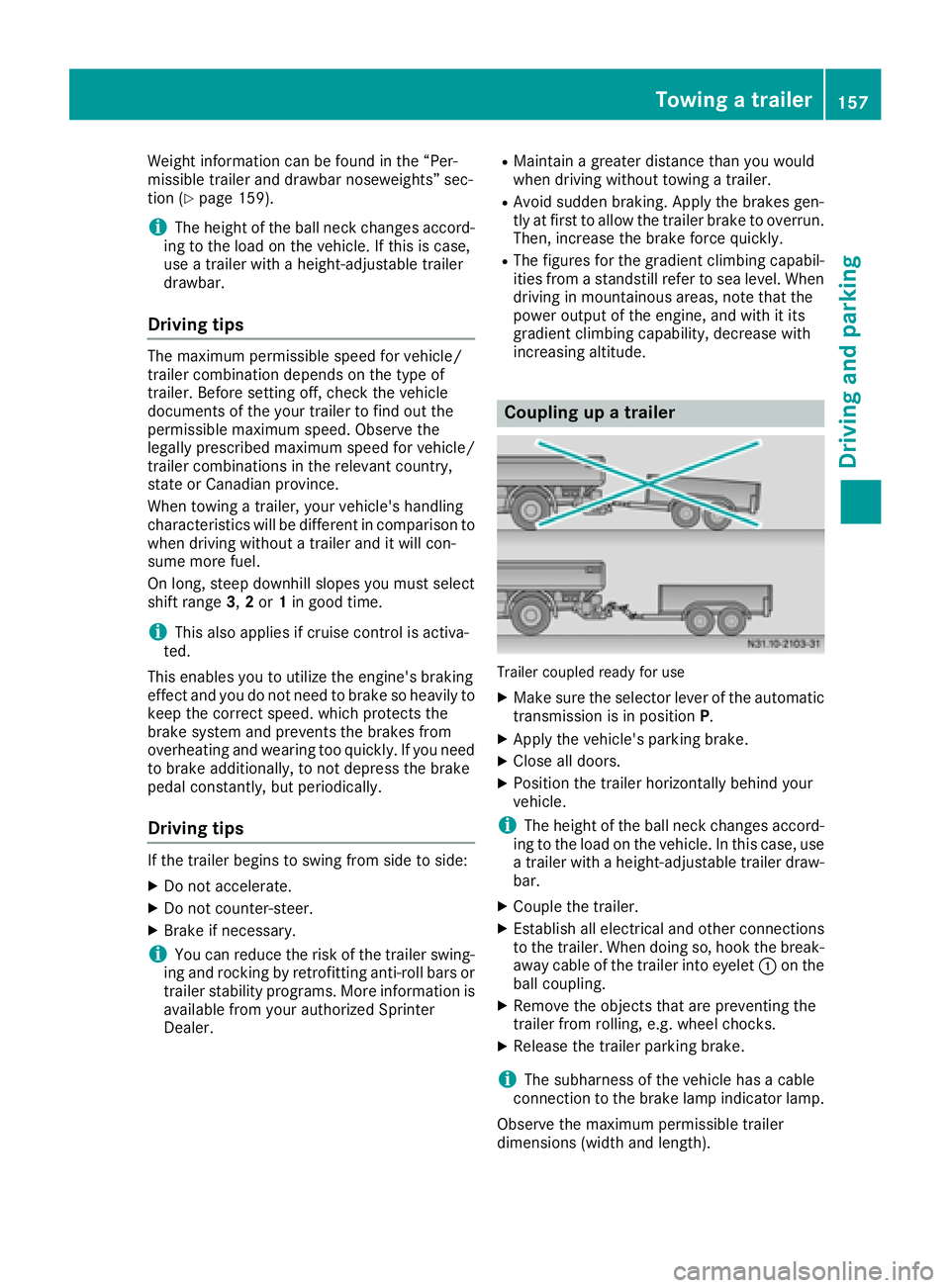
Trailer coupled ready for use
XMake sure the selector lever of the automatic
transmission is in position P.
XApply the vehicle's parking brake.
XClose all doors.
XPosition the trailer horizontally behind your
vehicle.
iThe height of the ball neck changes accord-
ing to the load on the vehicle. In this case, use
a trailer with a height-adjustable trailer draw-
bar.
XCouple the trailer.
XEstablish all electrical and other connections to the trailer. When doing so, hook the break-
away cable of the trailer into eyelet :on the
ball coupling.
XRemove the objects that are preventing the
trailer from rolling, e.g. wheel chocks.
XRelease the trailer parking brake.
iThe subharness of the vehicle has a cable
connection to the brake lamp indicator lamp.
Observe the maximum permissible trailer
dimensions (width and length).
Towing a trailer157
Driving and parking
Z
Page 166 of 290
Using thef,g,4or9 adjustment buttons,
you can select the following functions:
RCalling up the service due date
(Ypage 226)
RChecking the oil level (Ypage 220)
RChecking the DEF supply (Ypage 162)
RPreselecting/setting the auxiliary heating
switch-on time (Ypage 108)
RTire pressure monitor (Ypage 253)
RSetting the time (Ypage 164)
RActivating/deactivating Highbeam Assist
(Ypage 171)
RSetting the daytime running lamps
(Ypage 79)
Setting the time
XTurn the key to position 2in the ignition lock.
XPress the 4menu button repeatedly until the
hours figure flashes.
XPress the forg button to set the hour.
XPress the 9reset button.
The minute display flashes.
XPress the forg button to set the minute.
iIf you keep the forg button pressed, the
value will change continuously.
Activating/deactivating Highbeam
Assist
XTurn the key to position 2in the ignition lock.
XPress the 4menu button repeatedly until the
_ indicator lamp flashes and the onorOFFmessage appears in the display.
XUse the forg button to switch Highbeam
Assist on/off.
Switching the daytime running lamps
on/off
If you switch the daytime running lamps on, the
daytime running lamps will automatically light
up when the engine is running.
For safety reasons, it is only possible to change
this setting when the vehicle is stationary. The
factory setting is on
in countries in which day-
time running lamp mode or daytime running
lamps are mandatory.
XTurn the key to position 2in the ignition lock.
XPress the 4menu button repeatedly until the
L indicator lamp flashes and the onorOFFmessage appears in the display.
XPress the forg button to activate or deac-
tivate the daytime running lamps.
iUSA only:
If you turn the light switch to TorL,
the corresponding light switches on. If you
turn the light switch to Ã, the daytime
running lamps remain switched on.
Canada only:
If you turn the light switch to L, the low-
beam headlamps switch on. If you turn the
light switch to TorÃ, the daytime run-
ning lamps remain switched on.
On-board computer (vehicles with
steering wheel buttons)
Operating the on-board computer
Overview
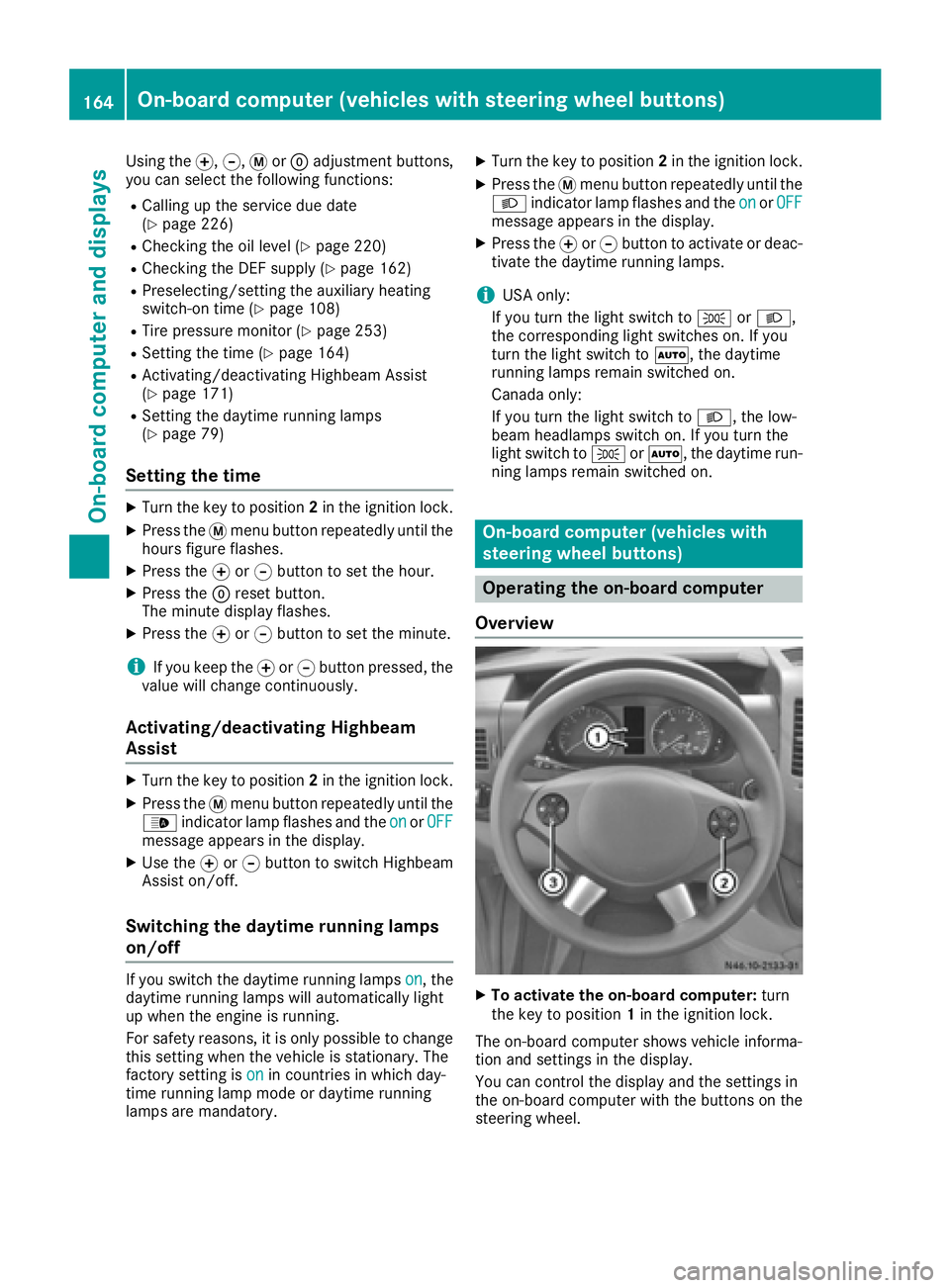
XTo activate the on-board computer: turn
the key to position 1in the ignition lock.
The on-board computer shows vehicle informa-
tion and settings in the display.
You can control the display and the settings in
the on-board computer with the buttons on the
steering wheel.
164On-board computer (vehicles with steering wheel buttons)
On-board computer and displays
Page 170 of 290
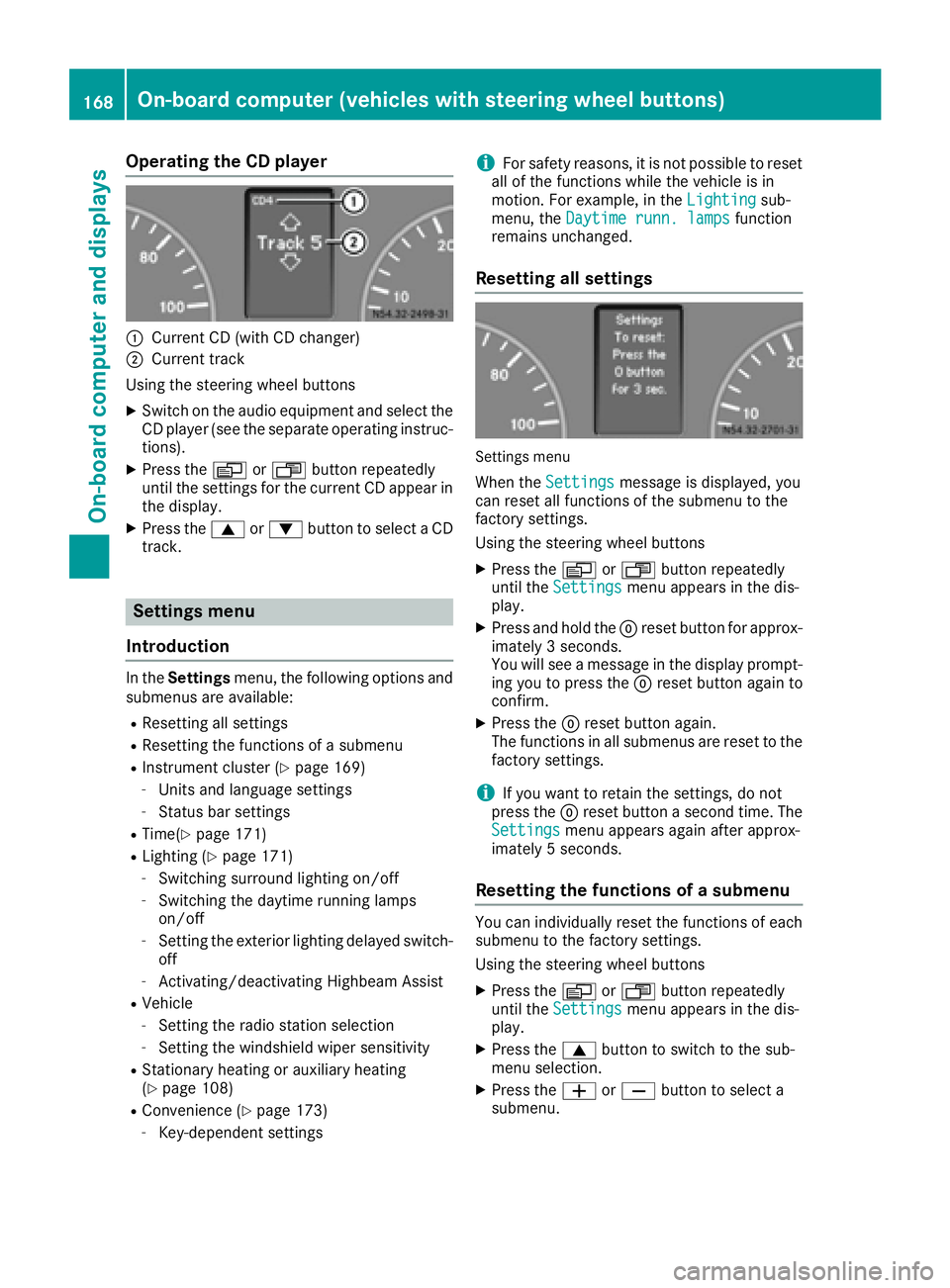
Operating the CD player
:Current CD (with CD changer)
;Current track
Using the steering wheel buttons
XSwitch on the audio equipment and select the
CD player (see the separate operating instruc-
tions).
XPress the VorU button repeatedly
until the settings for the current CD appear in
the display.
XPress the 9or: button to select a CD
track.
Settings menu
Introduction
In the Settings menu, the following options and
submenus are available:
RResetting all settings
RResetting the functions of a submenu
RInstrument cluster (Ypage 169)
-Units and language settings
-Status bar settings
RTime(Ypage 171)
RLighting (Ypage 171)
-Switching surround lighting on/off
-Switching the daytime running lamps
on/off
-Setting the exterior lighting delayed switch-
off
-Activating/deactivating Highbeam Assist
RVehicle
-Setting the radio station selection
-Setting the windshield wiper sensitivity
RStationary heating or auxiliary heating
(Ypage 108)
RConvenience (Ypage 173)
-Key-dependent settings
iFor safety reasons, it is not possible to reset
all of the functions while the vehicle is in
motion. For example, in the Lighting
sub-
menu, the Daytime runn. lampsfunction
remains unchanged.
Resetting all settings
Settings menu
When the Settingsmessage is displayed, you
can reset all functions of the submenu to the
factory settings.
Using the steering wheel buttons
XPress the VorU button repeatedly
until the Settingsmenu appears in the dis-
play.
XPress and hold the 9reset button for approx-
imately 3 seconds.
You will see a message in the display prompt-
ing you to press the 9reset button again to
confirm.
XPress the 9reset button again.
The functions in all submenus are reset to the
factory settings.
iIf you want to retain the settings, do not
press the 9reset button a second time. The
Settings
menu appears again after approx-
imately 5 seconds.
Resetting the functions of a submenu
You can individually reset the functions of each
submenu to the factory settings.
Using the steering wheel buttons
XPress the VorU button repeatedly
until the Settingsmenu appears in the dis-
play.
XPress the 9button to switch to the sub-
menu selection.
XPress the WorX button to select a
submenu.
168On-board computer (vehicles with steering wheel buttons)
On-board computer and displays