light MERCEDES-BENZ SPRINTER 2016 MY16 Operator’s Manual
[x] Cancel search | Manufacturer: MERCEDES-BENZ, Model Year: 2016, Model line: SPRINTER, Model: MERCEDES-BENZ SPRINTER 2016Pages: 290, PDF Size: 6.44 MB
Page 60 of 290
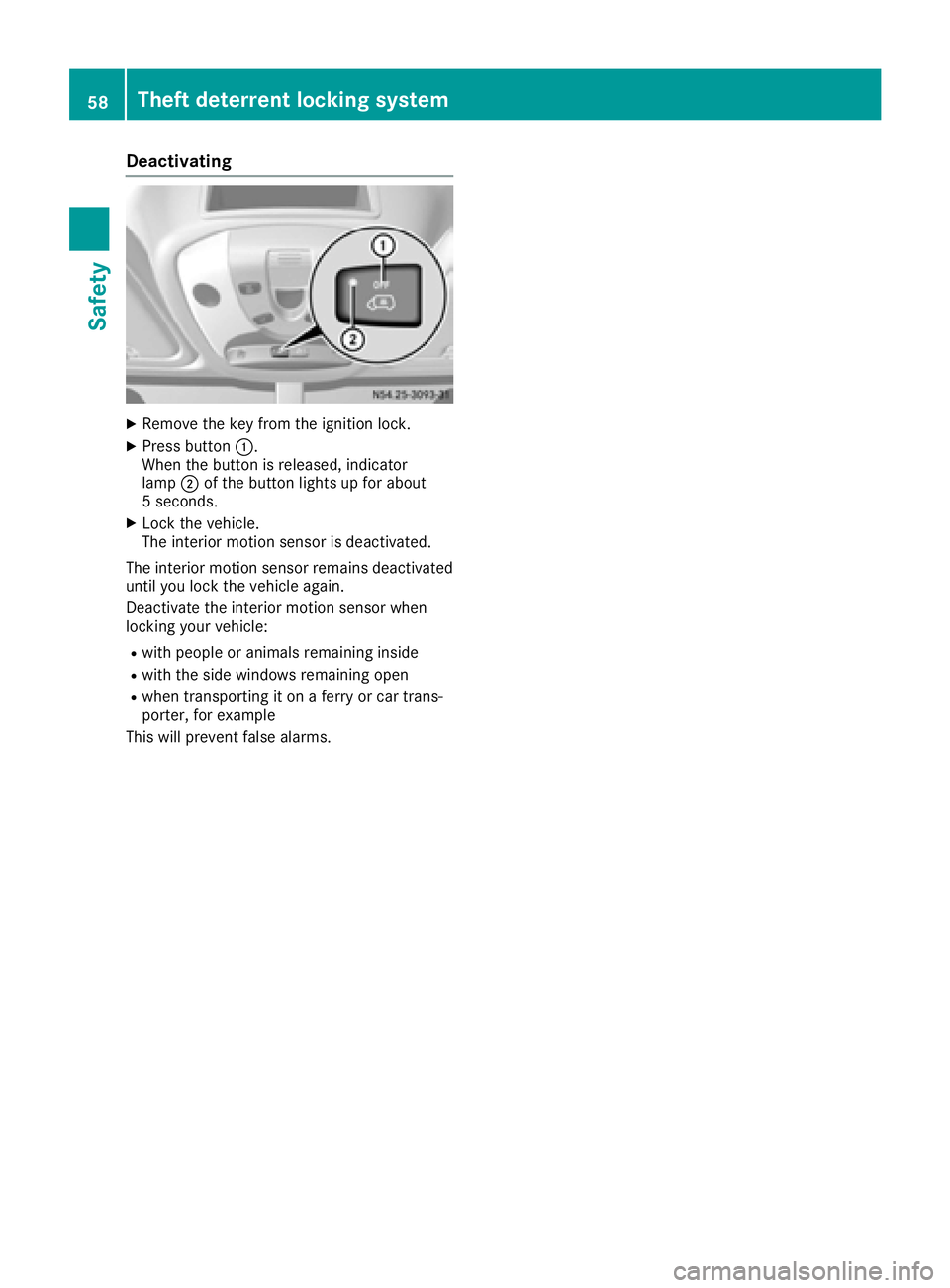
Deactivating
XRemoveth eke yfrom th eignition lock.
XPress butto n:.
Whe nth ebutto nis released, indicator
lamp ;of th ebutto nlights up fo rabout
5 seconds.
XLoc kth evehicle.
The interio rmotion sensor is deactivated.
The interio rmotion sensor remain sdeactivated
until you loc kth evehicle again .
Deactivat eth einterio rmotion sensor when
locking your vehicle:
Rwit hpeople or animals remainin ginsid e
Rwithth esid ewindows remainin gope n
Rwhen transporting it on aferr yor car trans -
porter, fo rexample
Thi swill preven tfalse alarms .
58Theft deterrent locking system
Safety
Page 62 of 290
Unlocking/locking the vehicle with the
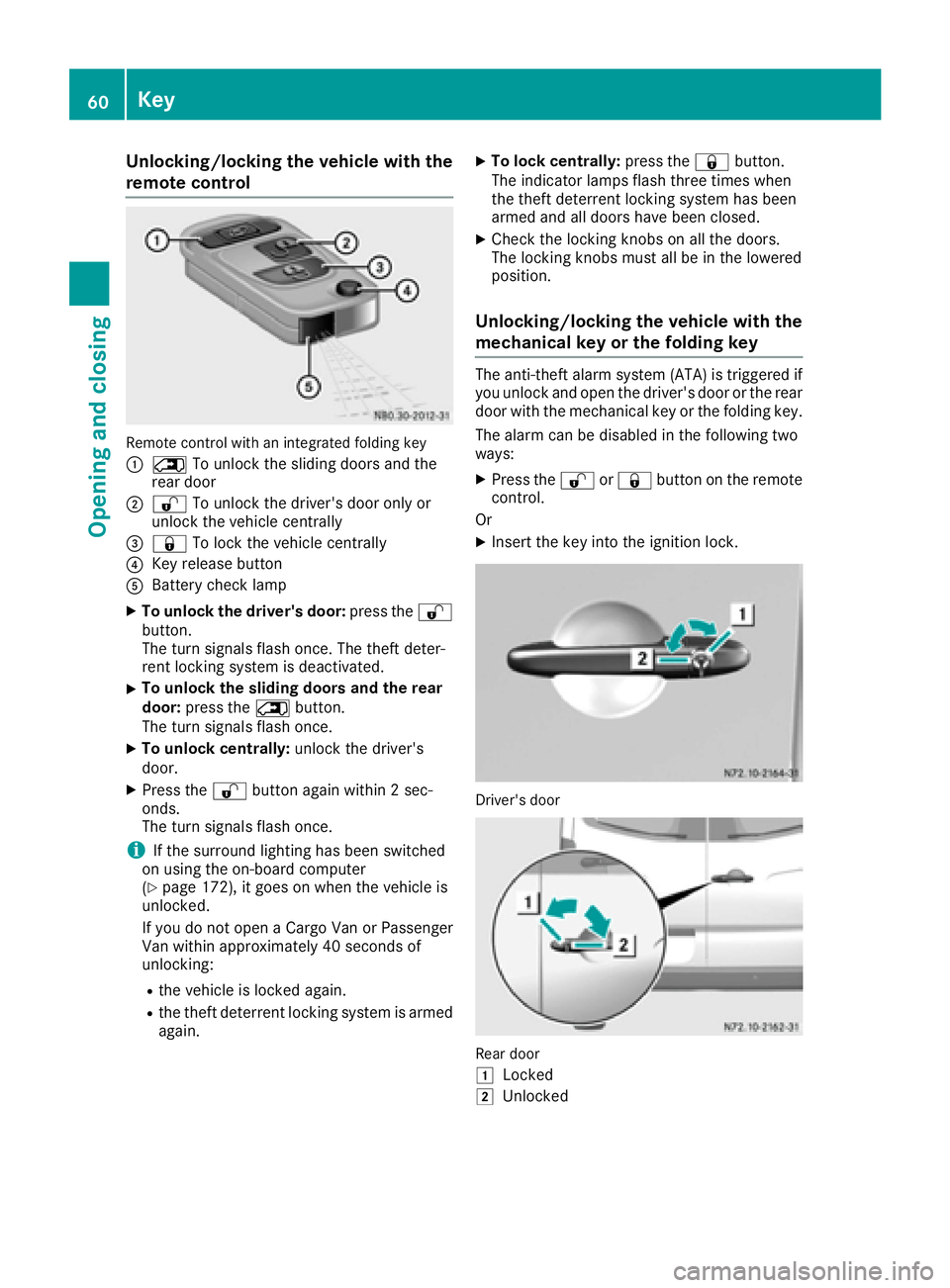
remote control
Remote control with an integrated folding key
:
5To unlock the sliding doors and the
rear door
;% To unlock the driver's door only or
unlock the vehicle centrally
=& To lock the vehicle centrally
?Key release button
ABattery check lamp
XTo unlock the driver's door: press the%
button.
The turn signals flash once. The theft deter-
rent locking system is deactivated.
XTo unlock the sliding doors and the rear
door: press the 5button.
The turn signals flash once.
XTo unlock centrally: unlock the driver's
door.
XPress the %button again within 2 sec-
onds.
The turn signals flash once.
iIf the surround lighting has been switched
on using the on-board computer
(
Ypage 172), it goes on when the vehicle is
unlocked.
If you do not open a Cargo Van or Passenger
Van within approximately 40 seconds of
unlocking:
Rthe vehicle is locked again.
Rthe theft deterrent locking system is armed
again.
XTo lock centrally: press the&button.
The indicator lamps flash three times when
the theft deterrent locking system has been
armed and all doors have been closed.
XCheck the locking knobs on all the doors.
The locking knobs must all be in the lowered
position.
Unlocking/locking the vehicle with the
mechanical key or the folding key
The anti-theft alarm system (ATA) is triggered if you unlock and open the driver's door or the rear
door with the mechanical key or the folding key.
The alarm can be disabled in the following two
ways:
XPress the %or& button on the remote
control.
Or
XInsert the key into the ignition lock.
Driver's door
Rear door
1
Locked
2Unlocked
60Key
Opening and closing
Page 63 of 290
XTo unlock the driver's or rear door:press
the key release button on the remote control.
The key folds out.
XInsert the key fully into the door lock and turn it to position 2.
The door is unlocked.
XTo lock the vehicle: lock all doors except the
driver's door and, if necessary the rear door,
from inside. To do this, press down the door
locking buttons.
XPress the key release button on the remote
control.
The key folds out.
XInsert the key fully into the driver's door lock
and turn it to position 1.
The driver's door is locked.
Remote control battery
Important safety notes
GWARNING
Batteries contain toxic and corrosive substan- ces. If batteries are swallowed, it can result in
severe health problems. There is a risk of fatalinjury.
Keep batteries out of the reach of children. If
a battery is swallowed, seek medical attention immediately.
HEnvironmental note
Batteries contain dangerous
substances. It is against the
law to dispose of them with
the household rubbish. They
must be collected separatelyand recycled to protect the
environment.
Dispose of batteries in an
environmentally friendly
manner. Take discharged
batteries to a qualified spe-
cialist workshop or a special
collection point for used bat-
teries.
The key batteries contain perchlorate material,
which may require special handling and regard for the environment. Check with your local gov-
ernment’s disposal guidelines. California resi-
dents, see
www.dtsc.ca.gov/
HazardousWaste/Perchlorate/index.cfm .
We recommend that you have batteries
changed at a qualified specialist workshop.
Checking the batteries
XPress the %or& button for longer than
two seconds.
If battery indicator lamp (
Ypage 59 )lights up
briefly, the batteries in the remote control still
have sufficient charge. Otherwise, change the
batteries immediately.
iIf the remote control is checked within the
signal reception range of the vehicle, pressing
the & or% button:
Rlock or
Runlock the vehicle
Changing batteries
You need a CR 2025 2 3 V cell battery, which can
be obtained from any qualified specialist work-
shop.
When changing the batteries, do not press any
of the buttons on the remote control.
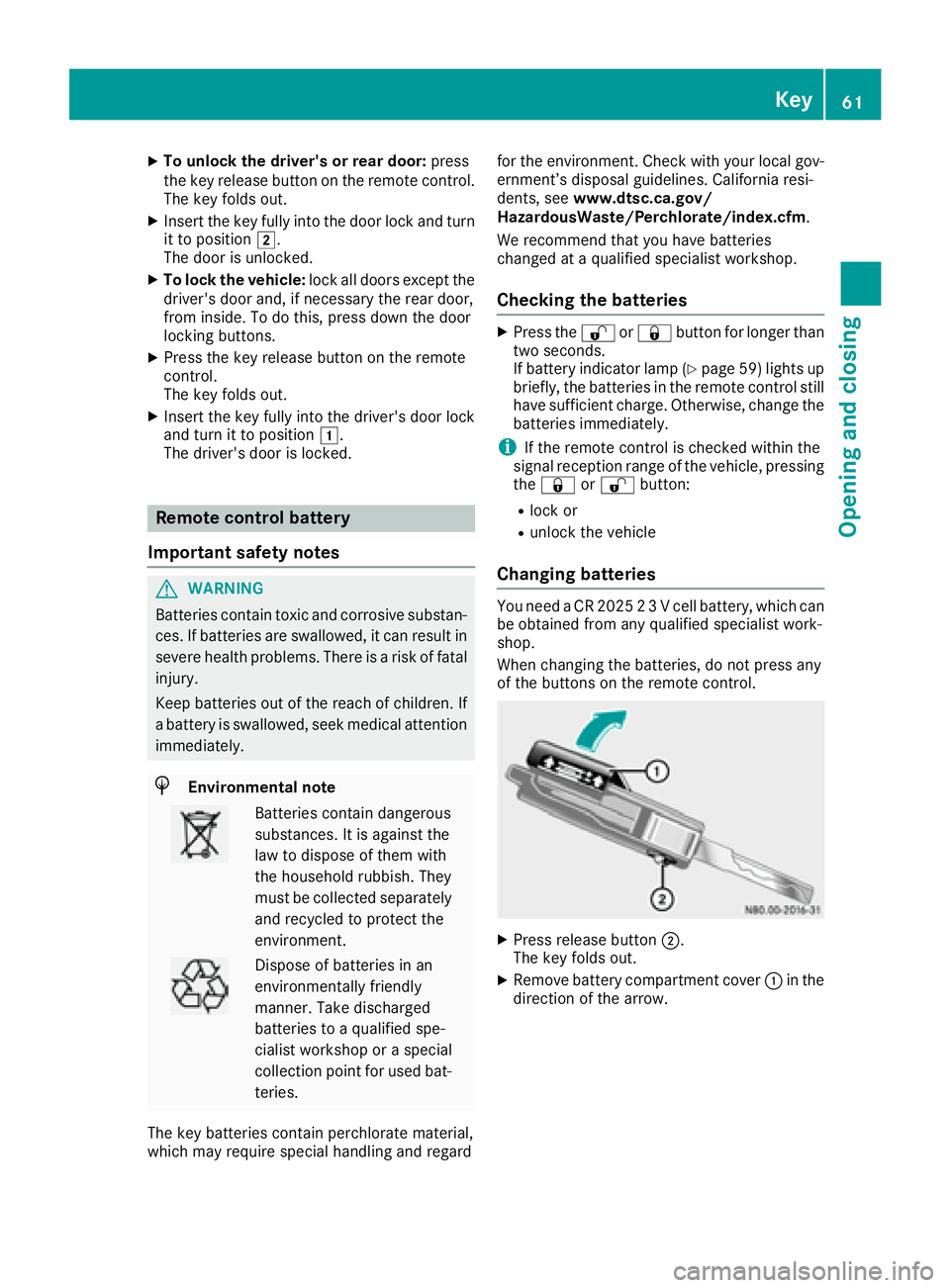
XPress release button ;.
The key folds out.
XRemove battery compartment cover :in the
direction of the arrow.
Key61
Opening and closing
Z
Page 65 of 290
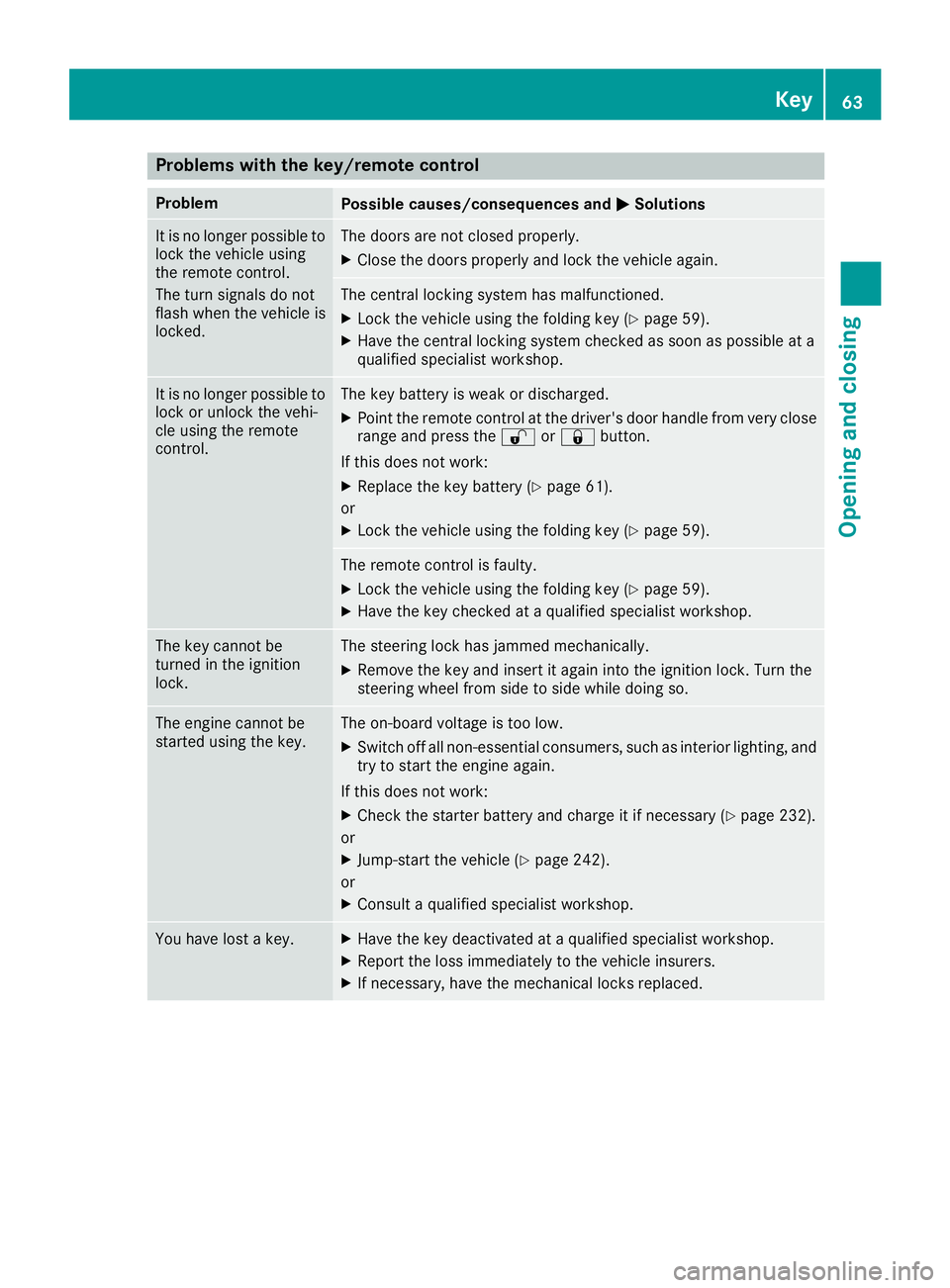
Problems with the key/remote control
ProblemPossible causes/consequences andMSolutions
It is no longer possible to
lock the vehicle using
the remote control.
The turn signals do not
flash when the vehicle is
locked.The doors are not closed properly.
XClose the doors properly and lock the vehicle again.
The central locking system has malfunctioned.
XLock the vehicle using the folding key (Ypage 59).
XHave the central locking system checked as soon as possible at a
qualified specialist workshop.
It is no longer possible to
lock or unlock the vehi-
cle using the remote
control.The key battery is weak or discharged.
XPoint the remote control at the driver's door handle from very close
range and press the %or& button.
If this does not work:
XReplace the key battery (Ypage 61).
or
XLock the vehicle using the folding key (Ypage 59).
The remote control is faulty.
XLock the vehicle using the folding key (Ypage 59).
XHave the key checked at a qualified specialist workshop.
The key cannot be
turned in the ignition
lock.The steering lock has jammed mechanically.
XRemove the key and insert it again into the ignition lock. Turn the
steering wheel from side to side while doing so.
The engine cannot be
started using the key.The on-board voltage is too low.
XSwitch off all non-essential consumers, such as interior lighting, and
try to start the engine again.
If this does not work:
XCheck the starter battery and charge it if necessary (Ypage 232).
or
XJump-start the vehicle (Ypage 242).
or
XConsult a qualified specialist workshop.
You have lost a key.XHave the key deactivated at a qualified specialist workshop.
XReport the loss immediately to the vehicle insurers.
XIf necessary, have the mechanical locks replaced.
Key63
Opening and closing
Z
Page 66 of 290
Central locking
Important safety notes
GWARNING
Activate the child-proof door locks if children are traveling in the vehicle. The children could
otherwise open the doors while the vehicle is
in motion, injuring themselves and others.
GWARNING
Do not leave children unsupervised in the
vehicle, even if they are secured in a child
restraint system. Children could otherwise
injure themselves on parts of the vehicle.
They could be severely or even fatally injured by prolonged exposure to intense heat or
cold.
If children open a door, they could:
Rinjure other people
Rget out of the vehicle and thereby injure
themselves or be injured by a passing vehi-
cle
Rseverely injure themselves by falling down,
in particular due to the vehicle height
Always take the key with you when leaving the
vehicle, even if you are only leaving for a short time.
You can open a locked front door from the inside at any time. You can open a locked sliding door
or rear door from the inside if it has been previ-
ously unlocked from inside.
Locking and unlocking manually
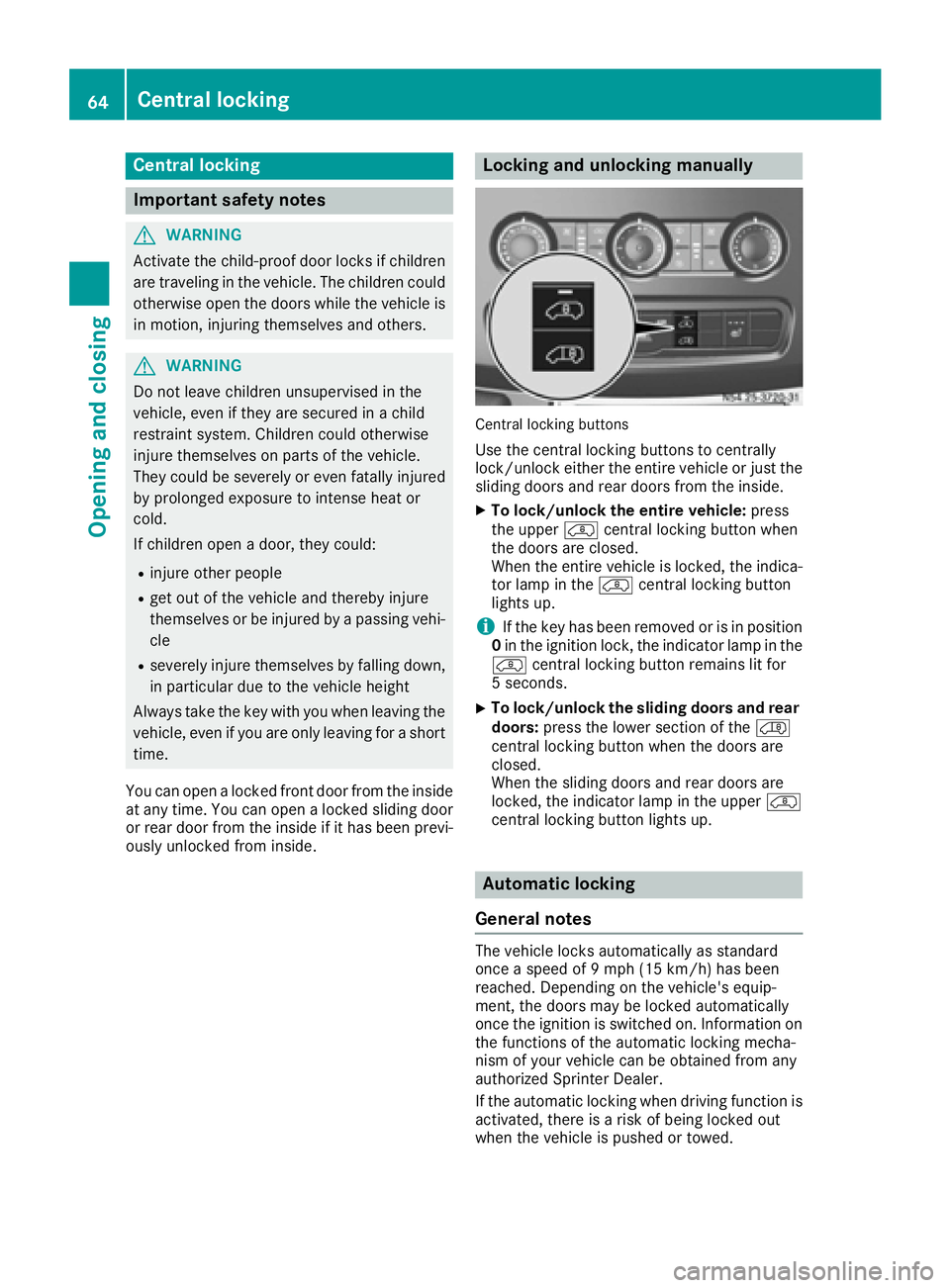
Central lockin gbuttons
Use the central locking buttons to centrally
lock/unlock either the entire vehicle or just the
sliding doors and rear doors from the inside.
XTo lock/unlock the entire vehicle: press
the upper Ãcentral locking button when
the doors are closed.
When the entire vehicle is locked, the indica-
tor lamp in the Ãcentral locking button
lights up.
iIf the key has been removed or is in position
0 in the ignition lock, the indicator lamp in the
à central locking button remains lit for
5 seconds.
XTo lock/unlock the sliding doors and rear
doors: press the lower section of the Ä
central locking button when the doors are
closed.
When the sliding doors and rear doors are
locked, the indicator lamp in the upper Ã
central locking button lights up.
Automatic locking
General notes
The vehicle locks automatically as standard
once a speed of 9 mph (15 km/h) has been
reached. Depending on the vehicle's equip-
ment, the doors may be locked automatically
once the ignition is switched on. Information on
the functions of the automatic locking mecha-
nism of your vehicle can be obtained from any
authorized Sprinter Dealer.
If the automatic locking when driving function is
activated, there is a risk of being locked out
when the vehicle is pushed or towed.
64Central locking
Opening and closing
Page 69 of 290
Operation and obstacle detection
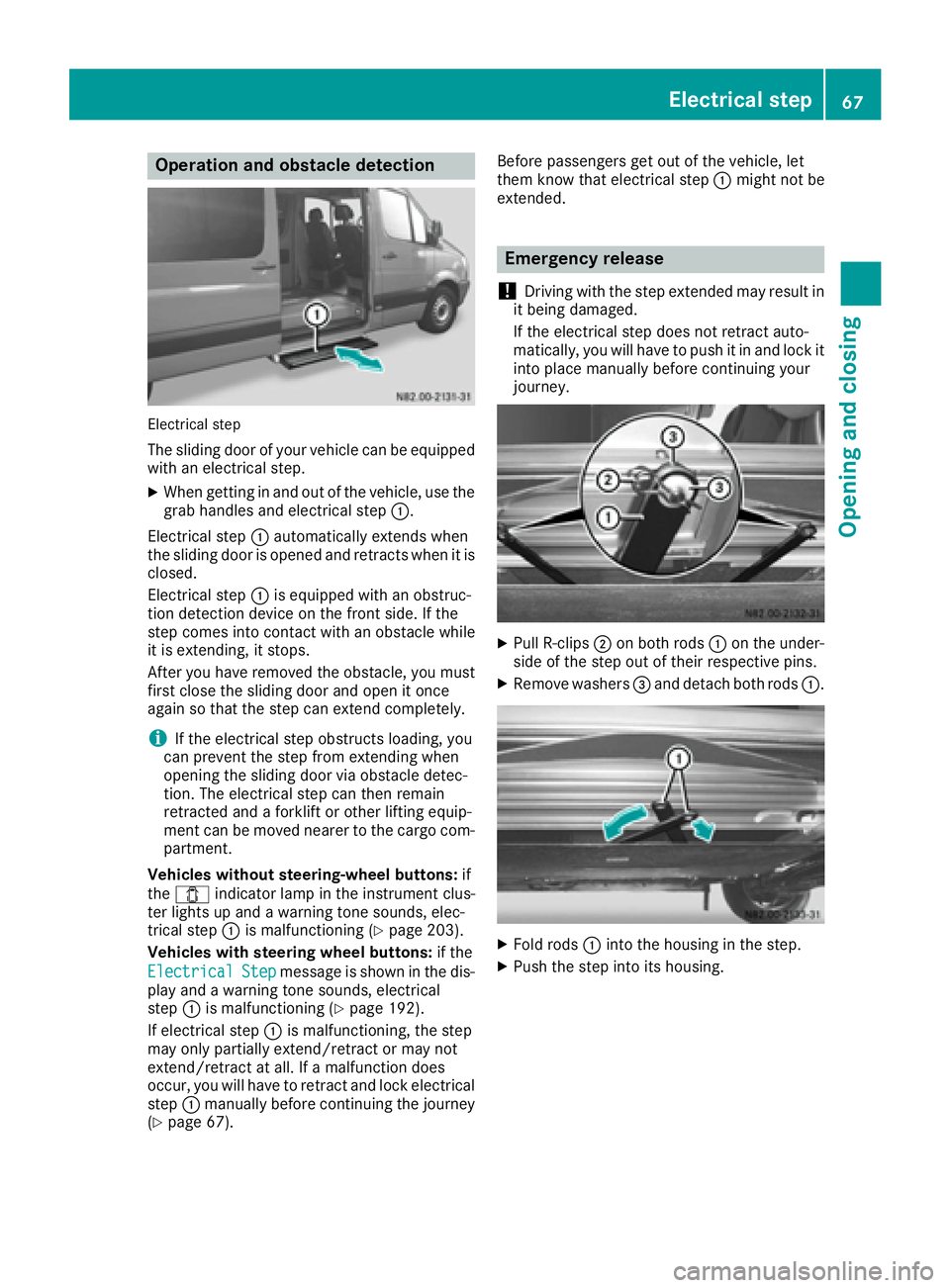
Electrical step
The sliding door of your vehicle can be equipped
with an electrical step.
XWhen getting in and out of the vehicle, use thegrab handles and electrical step :.
Electrical step :automatically extends when
the sliding door is opened and retracts when it is
closed.
Electrical step :is equipped with an obstruc-
tion detection device on the front side. If the
step comes into contact with an obstacle while
it is extending, it stops.
After you have removed the obstacle, you must
first close the sliding door and open it once
again so that the step can extend completely.
iIf the electrical step obstructs loading, you
can prevent the step from extending when
opening the sliding door via obstacle detec-
tion. The electrical step can then remain
retracted and a forklift or other lifting equip-
ment can be moved nearer to the cargo com-
partment.
Vehicles without steering-wheel buttons: if
the 1 indicator lamp in the instrument clus-
ter lights up and a warning tone sounds, elec-
trical step :is malfunctioning (
Ypage 203).
Vehicles with steering wheel buttons: if the
Electrical
Stepmessage is shown in the dis-
play and a warning tone sounds, electrical
step :is malfunctioning (
Ypage 192).
If electrical step :is malfunctioning, the step
may only partially extend/retract or may not
extend/retract at all. If a malfunction does
occur, you will have to retract and lock electrical
step :manually before continuing the journey
(
Ypage 67). Before passengers get out of the vehicle, let
them know that electrical step
:might not be
extended.
Emergency release
!
Driving with the step extended may result in
it being damaged.
If the electrical step does not retract auto-
matically, you will have to push it in and lock it
into place manually before continuing your
journey.
XPull R-clips ;on both rods :on the under-
side of the step out of their respective pins.
XRemove washers =and detach both rods :.
XFold rods:into the housing in the step.
XPush the step into its housing.
Electrical step67
Opening and closing
Z
Page 74 of 290
Useful information
This Operator's Manual describes all models as
well as standard and optional equipment of your
vehicle that were available at the time of going
to print. Country-specific variations are possi-
ble. Note that your vehicle may not be equipped
with all of the described functions. This also
applies to systems and functions relevant to
safety.
Read the information on qualified specialist
workshops (
Ypage 26).
Seats
Important safety notes
GWARNING
You could lose control of your vehicle if you do the following while driving:
Radjust the driver's seat, head restraint,
steering wheel or mirrors
Rfasten the seat belt
There is a risk of an accident.
Adjust the driver's seat, head restraint, steer-
ing wheel and mirror and fasten your seat belt before starting the engine.
GWARNING
If the driver's seat is not engaged, it could
move unexpectedly while the vehicle is in
motion. This could cause you to lose control of the vehicle. There is a risk of an accident.
Always make sure that the driver's seat is
engaged before starting the engine.
GWARNING
When you adjust a seat, you or other vehicle
occupants could become trapped, e.g. on the seat guide rail. There is a risk of injury.
Make sure when adjusting a seat that no one
has any body parts in the sweep of the seat.
GWARNING
The seat belt does not offer the intended level of protection if you have not moved the back-
rest to an almost vertical position. When brak-
ing or in the event of an accident, you could
slide underneath the seat belt and sustain
abdomen or neck injuries, for example. This
poses an increased risk of injury or even fatal
injury.
Adjust the seat properly before beginning
your journey. Always ensure that the backrest
is in an almost vertical position and that the
shoulder section of your seat belt is routed
across the center of your shoulder.
GWARNING
If head restraints are not installed and adjus-
ted correctly, they cannot provide protection
as intended. There is an increased risk of
injury in the head and neck area, e.g. in the
event of an accident or when braking.
Always drive with the head restraints instal-
led. Before driving off, make sure for every
vehicle occupant that the center of the head
restraint supports the back of the head at
about eye level.
Your seat must be adjusted in such a way that
you can wear the seat belt correctly.
Observe the following points:
RPosition the backrest in an almost vertical
position so that you are sitting virtually
upright. Do not drive with the backrest
reclined too far back.
RYour arms should be slightly bent when you
are holding the steering wheel.
RAvoid seat positions that prevent the seat belt
from being routed correctly. The shoulder
section of the belt must be routed over the
middle of your shoulder and be pulled tight
against your upper body. The lap belt must
always pass across your lap as low down as
possible, i.e. over your hip joints.
RAdjust the head restraint so that it supports
the back of the head at eye level.
RThe distance from the pedals should be such
that you can depress them fully.
If you swap over the head restraints for the front
and rear seats, you will not be able to adjust the
height and angle of the head restraints to the
correct position.
72Seats
Seats, steering wheel and mirrors
Page 76 of 290
Move the seat forward or back first. This will
help to avoid contact with other parts of the
interior.
Push the handbrake lever down to the stop.
The parking brake or handbrake lever could
otherwise be damaged.
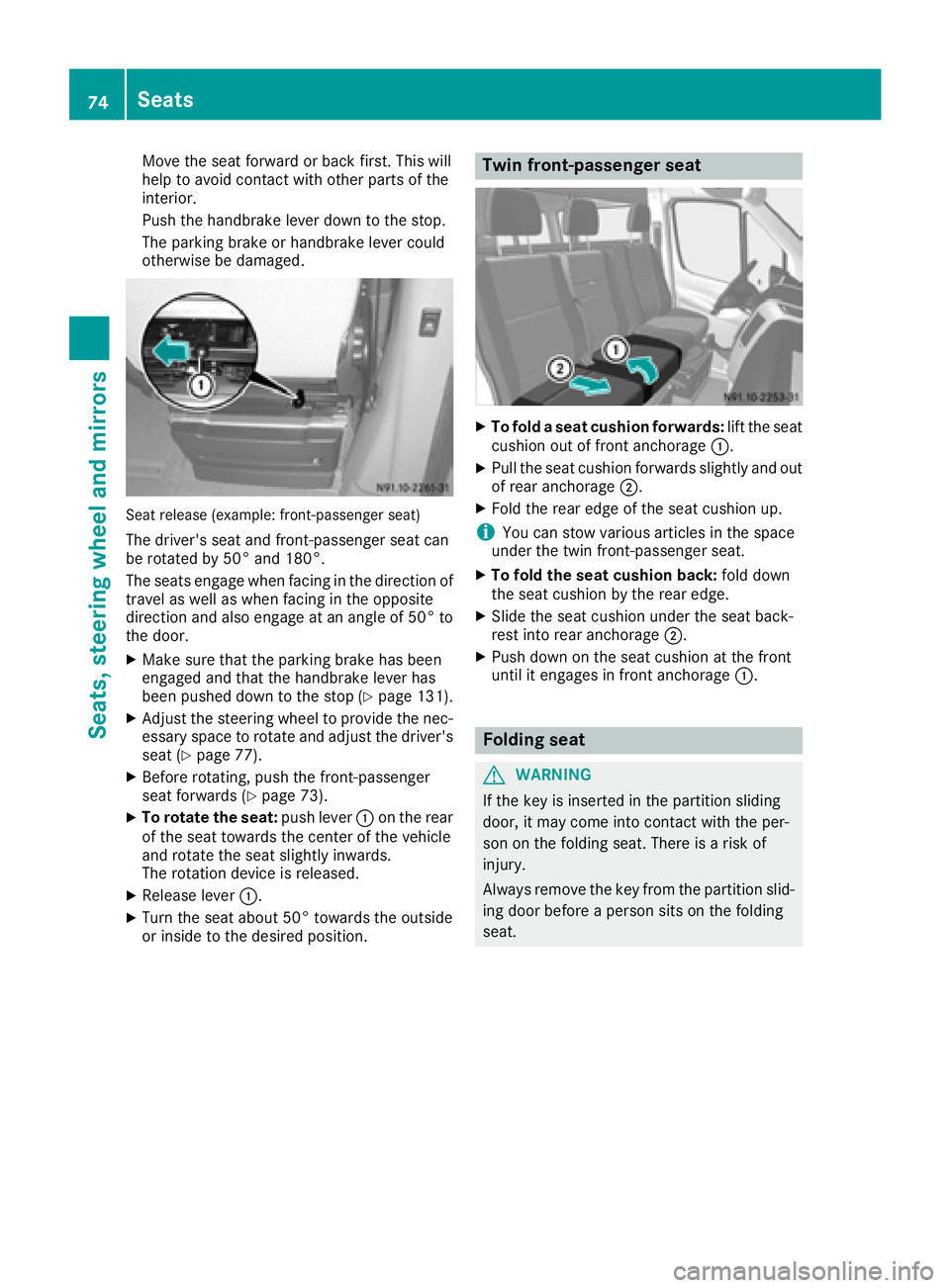
Seat release (example: front-passenger seat)
The driver's seat and front-passenger seat can
be rotated by 50° and 180°.
The seats engage when facing in the direction oftravel as well as when facing in the opposite
direction and also engage at an angle of 50° to
the door.
XMake sure that the parking brake has been
engaged and that the handbrake lever has
been pushed down to the stop (
Ypage 131).
XAdjust the steering wheel to provide the nec-
essary space to rotate and adjust the driver's seat (
Ypage 77).
XBefore rotating, push the front-passenger
seat forwards (Ypage 73).
XTo rotate the seat: push lever:on the rear
of the seat towards the center of the vehicle
and rotate the seat slightly inwards.
The rotation device is released.
XRelease lever :.
XTurn the seat about 50° towards the outside
or inside to the desired position.
Twin front-passenger seat
XTo fold a seat cushion forwards: lift the seat
cushion out of front anchorage :.
XPull the seat cushion forwards slightly and out
of rear anchorage;.
XFold the rear edge of the seat cushion up.
iYou can stow various articles in the space
under the twin front-passenger seat.
XTo fold the seat cushion back: fold down
the seat cushion by the rear edge.
XSlide the seat cushion under the seat back-
rest into rear anchorage ;.
XPush down on the seat cushion at the front
until it engages in front anchorage :.
Folding seat
GWARNING
If the key is inserted in the partition sliding
door, it may come into contact with the per-
son on the folding seat. There is a risk of
injury.
Always remove the key from the partition slid-
ing door before a person sits on the folding
seat.
74Seats
Seats, steering wheel and mirrors
Page 81 of 290
Useful information
This Operator's Manual describes all models as
well as standard and optional equipment of your
vehicle that were available at the time of going
to print. Country-specific variations are possi-
ble. Note that your vehicle may not be equipped
with all of the described functions. This also
applies to systems and functions relevant to
safety.
Read the information on qualified specialist
workshops (
Ypage 26).
Exterior lighting
Important safety notes
For reasons of safety, we recommend that you
drive with the lights switched on even during the
daytime. There may be differences in operation
due to legal requirements and voluntary recom-
mendations in some countries.
Bulb failure indicator
The bulb failure indicator is only an aid. You are
responsible for the proper functioning of the
vehicle lighting. Insufficient or non-functioning
vehicle lighting puts the operating safety of the
vehicle at risk.
For this reason, check the condition and func-
tion of your vehicle's lighting system and, if nec-
essary, that of the trailer before each journey.
The bulb failure indicator monitors all of the
exterior lighting lamps, except the perimeter
lamp and the trailer lighting. If a bulb fails, either
the b(
Ypage 33) indicator lamp lights up, or
you will see a corresponding message in the
display (
Ypage 185).
iDepending on the equipment, the bulb fail-
ure indicator can fail for all lamps with the
exception of the turn signal lamps.
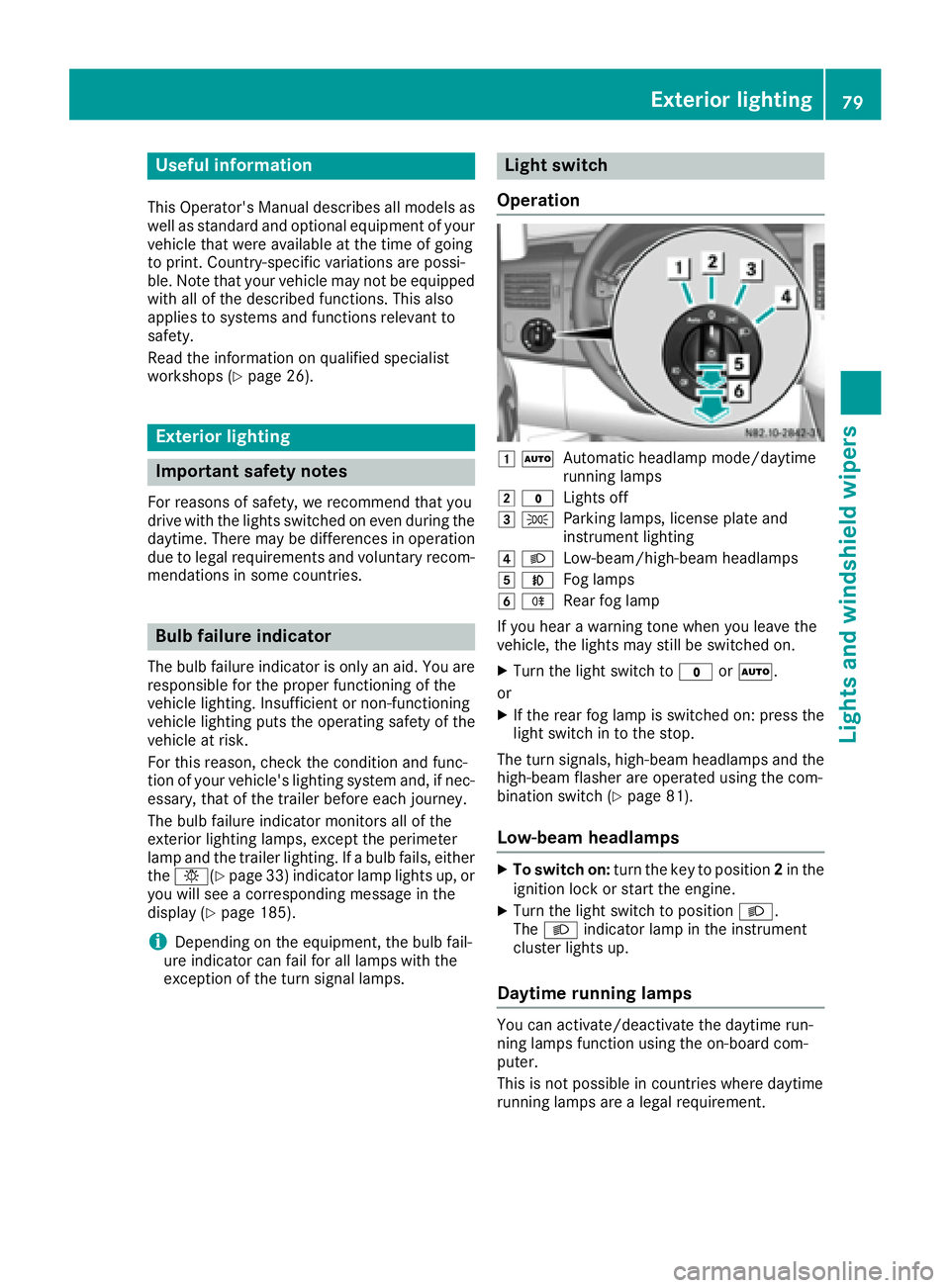
Light switch
Operation
1 ÃAutomatic headlamp mode/daytime
running lamps
2$Lights off
3TParking lamps, license plate and
instrument lighting
4LLow-beam/high-beam headlamps
5NFog lamps
6RRear fog lamp
If you hear a warning tone when you leave the
vehicle, the lights may still be switched on.
XTurn the light switch to $orÃ.
or
XIf the rear fog lamp is switched on: press the
light switch in to the stop.
The turn signals, high-beam headlamps and the
high-beam flasher are operated using the com-
bination switch (
Ypage 81).
Low-beam headlamps
XTo switch on: turn the key to position 2in the
ignition lock or start the engine.
XTurn the light switch to position L.
The L indicator lamp in the instrument
cluster lights up.
Daytime running lamps
You can activate/deactivate the daytime run-
ning lamps function using the on-board com-
puter.
This is not possible in countries where daytime
running lamps are a legal requirement.
Exterior lighting79
Lights and windshield wipers
Page 82 of 290
The daytime running lamps function must be
activated using the on-board computer:
Rvehicles with steering wheel buttons
(Ypage 171)
Rvehicles without steering wheel buttons
(Ypage 164)
XTo switch on:turn the light switch to the
$ position.
The low-beam headlamps, parking lamps and
license plate lamp are switched on when the
engine is running. The Lindicator lamp in
the instrument cluster lights up.
iUSA only:
If you turn the light switch to the TorL
position, the parking lamps or low-beam
headlamps switch on. If you turn the light
switch to the Ãposition, the daytime run-
ning lamps remain switched on.
iCanada only:
If you turn the light switch to the Lposi-
tion, the low-beam headlamps are switched
on. If you turn the light switch to the Tor
à position, the daytime running lamps
remain switched on.
Automatic headlamp mode
GWARNING
When the light switch is set to Ã, the low-
beam headlamps may not be switched on
automatically if there is fog, snow or other
causes of poor visibility due to the weather
conditions such as spray. There is a risk of an
accident.
In such situations, turn the light switch to
L.
Automatic headlamp mode is only a driving aid.
You are responsible for the vehicle lighting at all
times.
Depending on ambient light, the rain and light
sensor automatically switches on the parking
lamps, low-beam headlamps and the license
plate lamp. This excludes weather-related
impairments to visibility, such as snow, fog or
spray.
If there is fog, snow or spray, turn the light
switch quickly from ÃtoL. You could
otherwise briefly interrupt operation of the
headlamps.
XTo switch on automatic headlamp mode:
turn the light switch to Ã.
Key in position 1in the ignition lock: the park-
ing lamps switch on or off automatically
depending on the ambient light.
When the engine is running: if you activate the
"daytime running lamps" function using the
on-board computer, the daytime running
lamps are switched on. The parking lamps and
low-beam headlamps also switch on or off
automatically, depending on the ambient
light.
When the low-beam headlamps are switched
on, the Lindicator lamp in the instrument
cluster lights up.
Fog lamps/rear fog lamp
GWARNING
If you suspect that driving conditions will be
foggy, turn the light switch to Lbefore you
start your journey. Your vehicle may other-
wise not be visible and you could endanger
yourself and others.
GWARNING
In low ambient lighting or foggy conditions,
only switch from position ÃtoL with
the vehicle at a standstill in a safe location.
Switching from ÃtoL will briefly
switch off the headlamps. Doing so while driv-
ing in low ambient lighting conditions may
result in an accident.
XTurn the ignition key to position 2in the igni-
tion lock or start the engine.
XTurn the light switch to LorT.
iIf your vehicle is only equipped with one rear
fog lamp, you must turn the light switch to
L.
iWhen the light switch is set to Ãyou
cannot switch on the front and rear foglamps.
XTo switch on the front fog lamps: pull the
light switch out to the first locking point.
The green Nindicator lamp on the light
switch lights up.
80Exterior lighting
Lights and windshield wipers