ESP MERCEDES-BENZ SPRINTER 2016 MY16 Operator’s Manual
[x] Cancel search | Manufacturer: MERCEDES-BENZ, Model Year: 2016, Model line: SPRINTER, Model: MERCEDES-BENZ SPRINTER 2016Pages: 290, PDF Size: 6.44 MB
Page 138 of 290
Wet road surfaces
If you have been driving for a long time in heavy
rain without braking, there may be a delayed
response when you first apply the brakes. This
may also occur after driving through a car wash
or deep water.
You must depress the brake pedal more firmly.
Maintain a longer distance to the vehicle in
front.
While paying attention to the traffic conditions,
you should brake the vehicle firmly after driving
on a wet road surface or through a car wash. This
heats the brake discs, so that they dry more
quickly, which protects them against corrosion.
Limited braking performance on salt-
treated roads
When driving on salted roads, salt may start to
build up on the brake disks and brake pads. Thiscan increase braking distances considerably.
Maintain a greater distance to the vehicle in
front.
To remove any build-up of salt that may have
formed:
XApply the brakes at the start of the journey,
occasionally during journey and at the end of
the journey. Make sure that you do not endan-
ger other road users when doing so.
New brake discs and brake pads/
linings
New brake pads and brake discs only reach their
optimal braking effect after a few
100 kilometers. Until then, compensate for this by applying greater force to the brake pedal.
For safety reasons, Mercedes-Benz recom-
mends only installing the following brake discs
and brake pads/linings:
Rbrake discs that have been approved by
Mercedes-Benz
Rbrake pads/linings that have been approved
by Mercedes-Benz or are of an equivalent
standard of quality
Other brake discs or brake pads/linings can
compromise the safety of your vehicle.
Always replace all brake discs and brake pads/
linings on an axle at the same time. Always
install new brake pads/linings when replacing
brake discs.
Parking brake
GWARNING
If you must brake the vehicle with the parking brake, the braking distance is considerably
longer and the wheels could lock. There is an
increased danger of skidding and accidents.
Only use the parking brake to brake the vehi-
cle when the service brake is faulty. Do not
apply the parking brake too firmly. If the
wheels lock, release the parking brake until
the wheels begin turning again.
When driving on wet roads or dirt-covered sur-
faces, road salt and/or dirt may get into the
parking brake. This causes corrosion and a
reduction of braking force.
In order to prevent this, drive with the parking
brake lightly applied from time to time. When
doing so, drive for a distance of approximately
110 yds (100 m) at a maximum speed of 12 mph
(20 km/h).
The brake lamps are not illuminated when you
brake the vehicle using the parking brake.
Driving in wet conditions
Hydroplaning
GWARNING
There is a danger of hydroplaning occurring,
even if you are driving slowly and your tires
have sufficient tread depth, depending on the
depth of water on the road. There is a risk of
an accident.
For this reason, avoid tire ruts and brake care-
fully.
Therefore, in heavy rain or other conditions in
which hydroplaning can occur, drive as follows:
Rreduce your speed
Ravoid tire ruts
Rapply the brakes with care
Driving on flooded roads
!Do not drive through flooded areas. Check
the depth of any water before driving through
it. Drive slowly through standing water. Oth-
136Driving tips
Driving and parking
Page 139 of 290
erwise, water may enter the vehicle interior or
the engine compartment. This can damage
the electronic components in the engine or
the automatic transmission. Water can also
be drawn in by the engine's air suction nozzles
and this can cause engine damage.
If you have to drive on stretches of road on which
water has collected, please bear in mind that:
Rthe water level of standing water should not
be above the lower edge of the front bumper
Rdo not drive faster than walking speed
Driving in winter
General notes
GWARNING
If you shift down on a slippery road surface in an attempt to increase the engine's braking
effect, the drive wheels could lose their grip.
There is an increased danger of skidding and
accidents.
Do not shift down for additional engine brak-
ing on a slippery road surface.
GDANGER
If the exhaust pipe is blocked or adequate
ventilation is not possible, poisonous gases
such as carbon monoxide (CO) may enter the vehicle. This is the case, e.g. if the vehicle
becomes trapped in snow. There is a risk of
fatal injury.
If you leave the engine or the auxiliary heating
running, make sure the exhaust pipe and area
around the vehicle are clear of snow. To
ensure an adequate supply of fresh air, open a
window on the side of the vehicle that is not
facing into the wind.
Have your vehicle winterproofed at a qualified
specialist workshop in good time at the onset of
winter.
iDo not cover the radiator, e.g. with a winter
cover. The measurements of the on-board
diagnostic system may otherwise return inac-
curate values. Some of these values are
legally prescribed and must therefore always
be exact. Observe the notes in the "Winter operation" sec-
tion (
Ypage 249).
Slippery road surfaces
GWARNING
If you shift down on a slippery road surface in an attempt to increase the engine's braking
effect, the drive wheels could lose their grip.
There is an increased danger of skidding and
accidents.
Do not shift down for additional engine brak-
ing on a slippery road surface.
GWARNING
The outside temperature indicator is not
designed to serve as an ice-warning device
and is therefore unsuitable for that purpose.
Indicated temperatures just above the freez-
ing point do not guarantee that the road sur-
face is free of ice. The road may still be icy,
especially in wooded areas or on bridges.
!Vehicles with automatic transmission may
roll only briefly in the neutral position N. Pro-
longed rolling of the wheels, e.g. when being
towed, will result in transmission damage.
If the vehicle threatens to skid or cannot be
stopped when moving at low speed:
XShift the transmission to neutral position N.
XTry to maintain control of the vehicle using
corrective steering.
Drive particularly carefully on slippery roads.
Avoid sudden acceleration, steering and braking
maneuvers. Do not use cruise control.
You can find further information on winter tires
and snow chains in the "Winter operation" sec-
tion (
Ypage 249).
Driving off-road
Important safety notes
GWARNING
If you drive on a steep incline at an angle or
turn when driving on an incline, the vehicle
Driving tips137
Driving and parking
Z
Page 141 of 290
Rules for driving off-road
!Always bear the vehicle's ground clearance
in mind and avoid obstacles, e.g. deep ruts.
Obstacles may damage the following parts of
the vehicle:
Rthe chassis
Rthe drive train
Rthe fuel and supply tanks
For this reason, you should always drive
slowly when driving off-road. If you have to
drive over obstacles, have the front
passenger direct you.
iWe recommend that you additionally carry a
shovel and a recovery rope with shackle in the
vehicle.
REnsure that loads and items of luggage are
securely stowed or lashed down
(
Ypage 212).
RBefore driving off-road, stop the vehicle and
shift to a low gear.
RIf the surface demands it, temporarily deacti-
vate ASR when pulling away (Ypage 53).
ROnly drive off-road with the engine running
and a gear engaged.
RDrive slowly and smoothly. Walking pace is
necessary in many situations.
RAvoid spinning the drive wheels.
RMake sure that the wheels always remain in
contact with the ground.
RDrive with extreme care over unknown terrain
where you can only see for a short distance.
As a precaution, get out of the vehicle to take
a look at the route to be taken in advance.
RCheck the water depth before fording.
RWatch out for obstacles (e.g. rocks, holes,
tree stumps and ruts).
RAvoid edges where the surface could crumble
or break away.
Checklist after driving off-road
!If you detect damage to the vehicle after
driving off-road, have the vehicle checked
immediately at a qualified specialist work-
shop.
Off-road driving places a higher demand on your
vehicle than normal road operation. Check your
vehicle after driving on rough terrain. By doing
so you will notice any damage in good time and reduce the risk of an accident for yourself and
other road users. Clean your vehicle thoroughly
before driving on public roads.
Observe the following points after driving off-
road, on construction sites and before driving on
public roads:
XVehicles with all-wheel drive:
deactivate
all-wheel drive (Ypage 148).
XActivate ASR (Ypage 53).
XClean the headlamps and tail lamps and
check them for damage.
XClean the front and rear license plates.
XClean the windshield, windows and exterior
mirrors.
XClean the steps, door sills and grab handles.
This increases safety of footing.
XClean the wheels and tires, wheel arches and
the underbody of the vehicle with a water jet.
This increases road grip, especially on wet
road surfaces.
XCheck the wheels and tires and wheel arches
for trapped foreign objects and remove them.
Trapped foreign objects can damage the
wheels and tires or may be fl
ung out from the
vehicle when you continue driving.
XCheck the underbody for trapped branches or
other parts of plants and remove them.
Trapped branches or other parts of plants
increase the risk of fire and can cause dam-
age to fuel lines, brake hoses and the rubber
bellows of axle joints and drive shafts.
XClean the brake disks, brake pads and axle
joints, particularly after operation in sand,
mud, grit and gravel, water or similarly dirty
conditions.
XCheck the entire floor assembly, the tires,
wheels, bodywork structure, brakes, steering,
chassis and exhaust system for any damage.
XCheck the service brake for operating safety,
e.g. carry out a brake test.
XIf you notice strong vibrations after driving off-
road, check the wheels and drive train for for-
eign objects again. Remove any foreign
objects which can lead to imbalances and
thus cause vibrations.
Driving tips139
Driving and parking
Z
Page 142 of 290
Drivingsystems
Cruis econtro l
General notes
Cruise contro lmaintain sth espeed of th evehi-
cl e fo ryou.
Use cruise contro lif road and traffic condition s
mak eit appropriat eto maintain asteady speed
fo r a prolonged period. You can set any speed
from 20 mph upwards in increment sof 1mph .
iIf you hav eset km/h as th euni tfo rth edig-
ital speedometer (Ypage 170), you can set
any speed from 30 km/h upwards in incre-
ments of 1km/h.
Cruise contro lshould no tbe activated when
drivin goff-road or on construction sites.
Cruise contro lmay no tbe able to maintain th e
stored speed on uphill or downhill gradients. If
th egradient evens out and th evehicle' sspeed
doe sno tfall belo w20 mph (30 km/ h), the
stored speed is resumed.
iThe speed shown in the speedometer may
differ slightly from the speed stored by cruise
control.
Important safety notes
If you fail to adapt your driving style or if you are inattentive, cruise control can neither reduce
the risk of an accident nor override the laws of
physics. Cruise control cannot take road,
weather and traffic conditions into account.
Cruise control is only an aid. You are responsible
for the distance to the vehicle in front, for vehi-
cle speed, for braking in good time and for stay-
ing in lane.
Do not use cruise control:
Rin traffic conditions that are unsuitable for
driving at a constant speed, e.g. in heavy traf-
fic, on winding roads or off-road.
Ron slippery roads. Braking or accelerating
may cause the drive wheels to lose traction
and the vehicle could then skid.
Rwhen there is poor visibility, e.g. due to fog,
heavy rain or snow.
If there is a change of drivers, make sure that
you inform the new driver about the set cruise
speed.
Cruise control lever
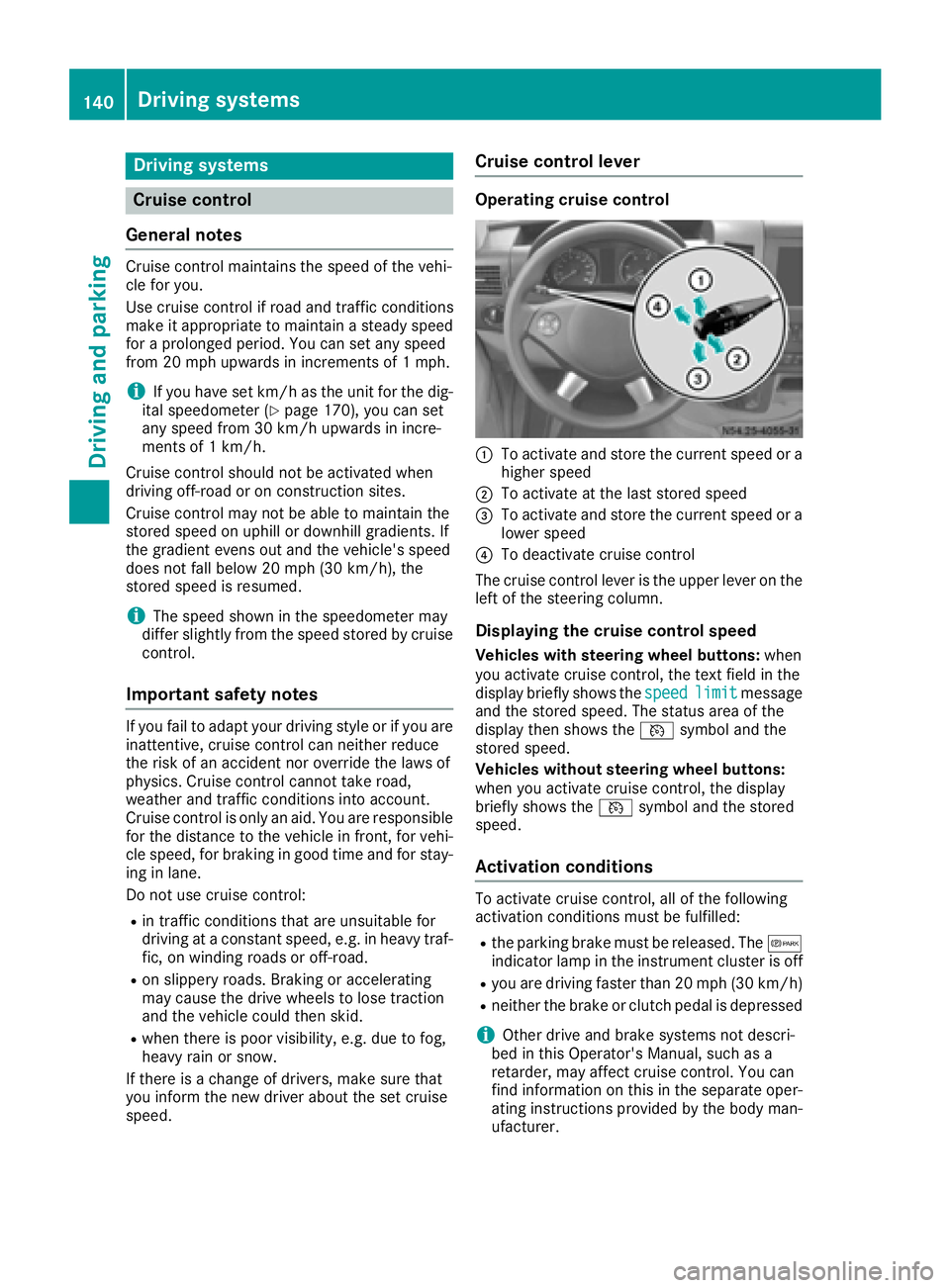
Operating cruise control
:To activate and store the current speed or a
higher speed
;To activate at the last stored speed
=To activate and store the current speed or a
lower speed
?To deactivate cruise control
The cruise control lever is the upper lever on the
left of the steering column.
Displaying the cruise control speed
Vehicles with steering wheel buttons: when
you activate cruise control, the text field in the
display briefly shows the speed
limitmessage
and the stored speed. The status area of the
display then shows the Vsymbol and the
stored speed.
Vehicles without steering wheel buttons:
when you activate cruise control, the display
briefly shows the Vsymbol and the stored
speed.
Activation conditions
To activate cruise control, all of the following
activation conditions must be fulfilled:
Rthe parking brake must be released. The c
indicator lamp in the instrument cluster is off
Ryou are driving faster than 20 mph (30 km/h)
Rneither the brake or clutch pedal is depressed
iOther drive and brake systems not descri-
bed in this Operator's Manual, such as a
retarder, may affect cruise control. You can
find information on this in the separate oper-
ating instructions provided by the body man-
ufacturer.
140Driving systems
Driving and parking
Page 143 of 290
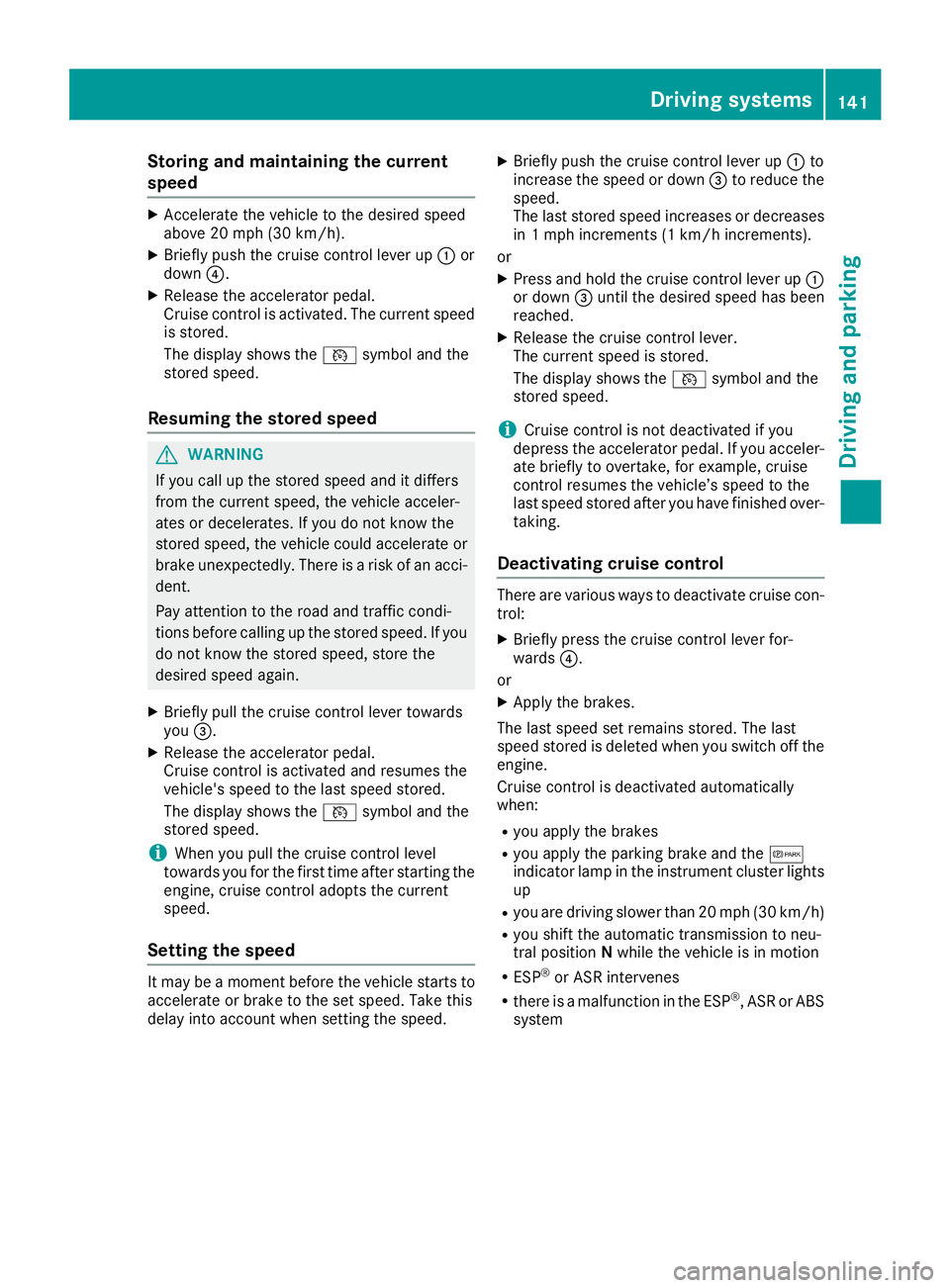
Storing and maintaining the current
speed
XAccelerate the vehicle to the desired speed
above 20 mph (30 km/h).
XBriefly push the cruise control lever up:or
down ?.
XRelease the accelerator pedal.
Cruise control is activated. The current speed
is stored.
The display shows the Vsymbol and the
stored speed.
Resuming the stored speed
GWARNING
If you call up the stored speed and it differs
from the current speed, the vehicle acceler-
ates or decelerates. If you do not know the
stored speed, the vehicle could accelerate or brake unexpectedly. There is a risk of an acci-
dent.
Pay attention to the road and traffic condi-
tions before calling up the stored speed. If you
do not know the stored speed, store the
desired speed again.
XBriefly pull the cruise control lever towards
you =.
XRelease the accelerator pedal.
Cruise control is activated and resumes the
vehicle's speed to the last speed stored.
The display shows the Vsymbol and the
stored speed.
iWhen you pull the cruise control level
towards you for the first time after starting the
engine, cruise control adopts the current
speed.
Setting the speed
It may be a moment before the vehicle starts to
accelerate or brake to the set speed. Take this
delay into account when setting the speed.
XBriefly push the cruise control lever up :to
increase the speed or down =to reduce the
speed.
The last stored speed increases or decreases
in 1 mph increments (1 km/h increments).
or
XPress and hold the cruise control lever up :
or down =until the desired speed has been
reached.
XRelease the cruise control lever.
The current speed is stored.
The display shows the Vsymbol and the
stored speed.
iCruise control is not deactivated if you
depress the accelerator pedal. If you acceler-
ate briefly to overtake, for example, cruise
control resumes the vehicle’s speed to the
last speed stored after you have finished over-
taking.
Deactivating cruise control
There are various ways to deactivate cruise con- trol:
XBriefly press the cruise control lever for-
wards ?.
or
XApply the brakes.
The last speed set remains stored. The last
speed stored is deleted when you switch off the
engine.
Cruise control is deactivated automatically
when:
Ryou apply the brakes
Ryou apply the parking brake and the c
indicator lamp in the instrument cluster lights
up
Ryou are driving slower than 20 mph (30 km/h)
Ryou shift the automatic transmission to neu-
tral position Nwhile the vehicle is in motion
RESP®or ASR intervenes
Rthere is a malfunction in the ESP®, ASR or ABS
system
Driving systems141
Driving and parking
Z
Page 146 of 290
XKeep the brake pedal depressed until the
emergency braking situation is over.
ABS prevents the wheels from locking.
The brakes function as usual again if:
Ryou release the brake pedal
Rthere is no longer any danger of a collision
Rno obstacle is detected in front of your vehicle
Adaptive Brake Assist is then deactivated.
Up to the maximum vehicle speed, adaptive
Brake Assist can react to moving obstacles that
have already been recognized as such at least
once over the period of observation. Adaptive
Brake Assist does not react to stationary obsta-
cles.
In particular, the detection of obstacles can be
impaired if:
Rdirt on the sensors or anything else covering
the sensors
Rsnow or heavy rain
Rinterference from other radar sources
Rthere are strong radar reflections, for exam-
ple in parking garages
Ra narrow vehicle traveling in front, e.g. a
motorbike
Ra vehicle traveling in front on a different line
If adaptive Brake Assist is not available due to a
malfunction in the radar sensor system, the full
brake boosting effect with the help of BAS
remains available.
Following damage to the front end of the vehicle,
have the configuration and operation of the
radar sensor checked at a qualified specialist
workshop. This also applies to collisions at slow
speeds where there is no visible damage to the
front of the vehicle.
Lane Tracking package
Blind Spot Assist
General notes
Blind Spot Assist uses a radar sensor system to
monitor the areas on both sides of your vehicle.
It supports you from speeds of approximately
20 mph (30 km/h). A warning display in the
exterior mirrors draws your attention to vehicles detected in the monitored area. If you then
switch on the corresponding turn signal to
change lane, you will also receive an optical and
audible collision warning. For this purpose, Blind Spot Assist uses sensors in the rear bumper and
behind the protective strips of the B-pillars.
Important safety notes
GWARNING
Blind Spot Assist does not react to:
Rvehicles overtaken too closely on the side,
placing them in the blind spot area
Rvehicles which approach with a large speed
differential and overtake your vehicle
As a result, Blind Spot Assist may not give
warnings in such situations. There is a risk of
an accident.
Always observe the traffic conditions care-
fully, and maintain a safe lateral distance.
Blind Spot Assist is only an aid. It may fail to
detect some vehicles and is no substitute for
attentive driving.
iUSA only:
This device has been approved by the FCC as
a "Vehicular Radar System". The radar sensor is intended for use in an automotive radar
system only. Removal, tampering, or altering
of the device will void any warranties, and is
not permitted by the FCC. Do not tamper with,
alter, or use in any non-approved way.
Any unauthorized modification to this device
could void the user’s authority to operate the
equipment.
Monitoring range of the sensors
In particular, the detection of obstacles can be
impaired in the case of:
Rdirt on the sensors or anything else covering
the sensors
Rpoor visibility, e.g. due to fog, heavy rain or
snow
Rnarrow and short vehicles, e.g. motorcycles
or bicycles
Rvery wide lanes
Rnarrow lanes
Rvehicles not driving in the middle of their lane
Rbarriers or other road boundaries
Vehicles in the monitoring range are then not
indicated.
144Driving systems
Driving and parking
Page 147 of 290
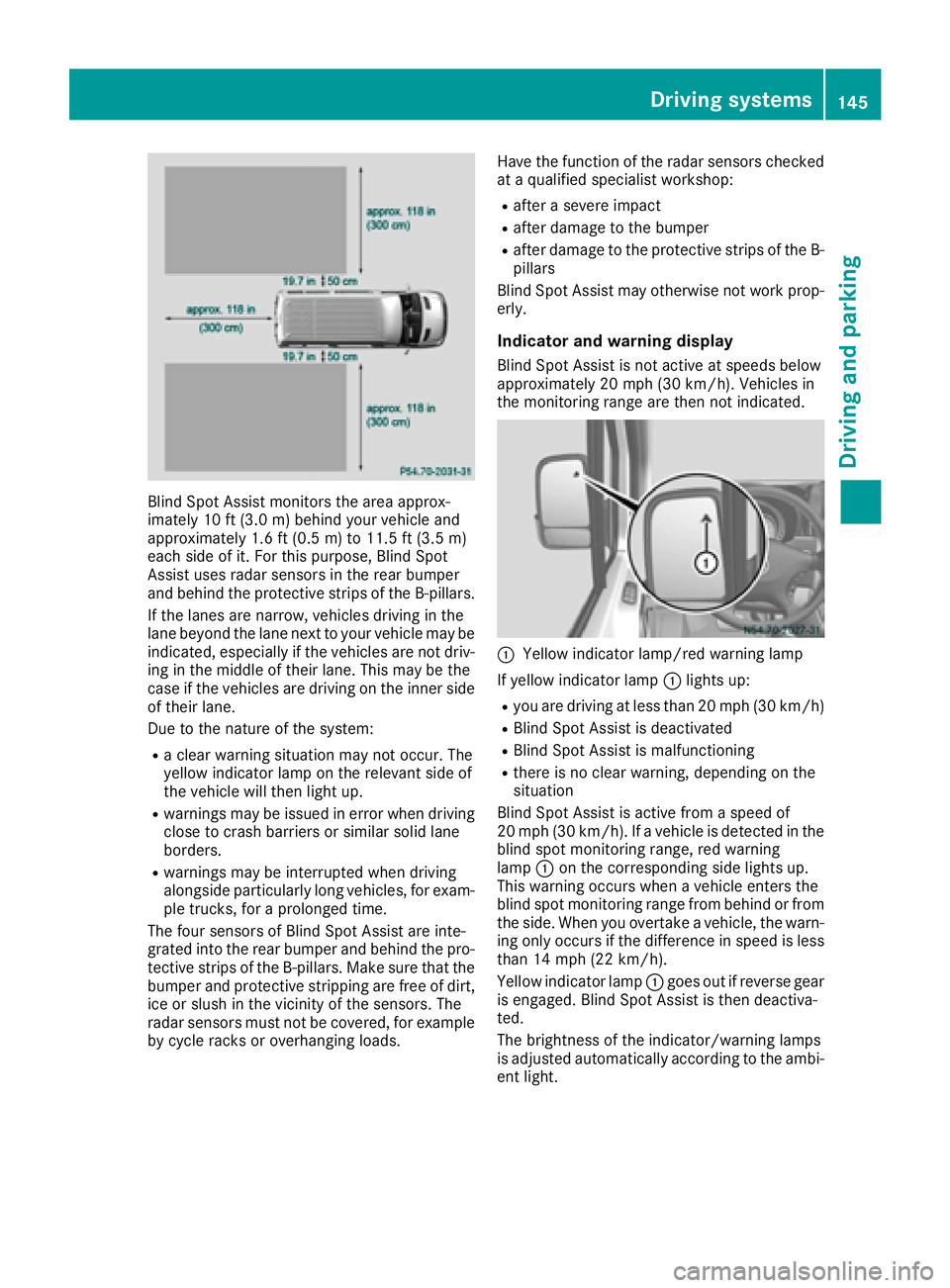
Blind Spot Assist monitors the area approx-
imately 10 ft (3.0m) behind your vehicle and
approximately 1.6 ft (0.5 m)to 11.5 ft (3.5 m)
ea ch side of it. For this purpose, Blind Spot
Assist uses radar sensors in the rear bumper
and behind the protective strips of the B-pillars.
If the lanes are narrow, vehicles driving in the
lane beyond the lane next to your vehicle may be
indicated, especially if the vehicles are not driv-
ing in the middle of their lane. This may be the
case if the vehicles are driving on the inner side
of their lane.
Due to the nature of the system:
Ra clear warning situation may not occur. The
yellow indicator lamp on the relevant side of
the vehicle will then light up.
Rwarnings may be issued in error when driving
close to crash barriers or similar solid lane
borders.
Rwarnings may be interrupted when driving
alongside particularly long vehicles, for exam-
ple trucks, for a prolonged time.
The four sensors of Blind Spot Assist are inte-
grated into the rear bumper and behind the pro-
tective strips of the B-pillars. Make sure that the
bumper and protective stripping are free of dirt,
ice or slush in the vicinity of the sensors. The
radar sensors must not be covered, for example
by cycle racks or overhanging loads. Have the function of the radar sensors checked
at a qualified specialist workshop:
Rafter a severe impact
Rafter damage to the bumper
Rafter damage to the protective strips of the B-
pillars
Blind Spot Assist may otherwise not work prop-
erly.
Indicator and warning display
Blind Spot Assist is not active at speeds below
approximately 20 mph (30 km/h). Vehicles in
the monitoring range are then not indicated.
:Yellow indicator lamp/red warning lamp
If yellow indicator lamp :lights up:
Ryou are driving at less than 20 mph (30 km/h)
RBlind Spot Assist is deactivated
RBlind Spot Assist is malfunctioning
Rthere is no clear warning, depending on the
situation
Blind Spot Assist is active from a speed of
20 mph (30 km/h). If a vehicle is detected in the
blind spot monitoring range, red warning
lamp :on the corresponding side lights up.
This warning occurs when a vehicle enters the
blind spot monitoring range from behind or from
the side. When you overtake a vehicle, the warn-
ing only occurs if the difference in speed is less
than 14 mph (22 km/h).
Yellow indicator lamp :goes out if reverse gear
is engaged. Blind Spot Assist is then deactiva-
ted.
The brightness of the indicator/warning lamps
is adjusted automatically according to the ambi- ent light.
Driving systems145
Driving and parking
Z
Page 148 of 290
Collision warning
If a vehicle is detected in the monitoring range of
Blind Spot Assist and you switch on the corre-
sponding turn signal, a double warning tone
sounds once. Red warning lamp:flashes. If
the turn signal remains on, detected vehicles
are indicated by the flashing of red warning
lamp :. There are no further warning tones.
Activating/deactivating Blind Spot Assist
iBlind Spot Assist is activated when you
switch on the ignition.
XTurn the key to position 2in the ignition lock.
Warning lamps :in the exterior mirrors light
up red for approximately 1.5 seconds and
then turn yellow.
XTo deactivate: press thekbutton in the
center console (Ypage 35).
The yellow indicator lamp in exterior mirror :
first flashes and then lights up continuously.
XTo activate: press thekbutton in the
center console again (Ypage 35).
The yellow indicator lamp in exterior mirror :
flashes initially. If you exceed 20 mph
(30 km/h) while driving, the yellow indicator
lamp in exterior mirror :goes out.
Towing a trailer
If you attach a trailer, make sure that you have
correctly established the electrical connection.
This can be accomplished by checking the trailer
lighting. Blind Spot Assist is deactivated as a
result. The indicator lamp in the exterior mirrors
lights up yellow.
On veh icles wit
h steering wheel buttons, the
Blind Spot Assist Deactivatedmessage
also appears in the display.
Lane Keeping Assist
General notes
Lane Keeping Assist monitors the area in front of
your vehicle by means of a camera at the top of
the windshield. Lane Keeping Assist detects
lane markings on the road and warns you before
you leave your lane unintentionally.
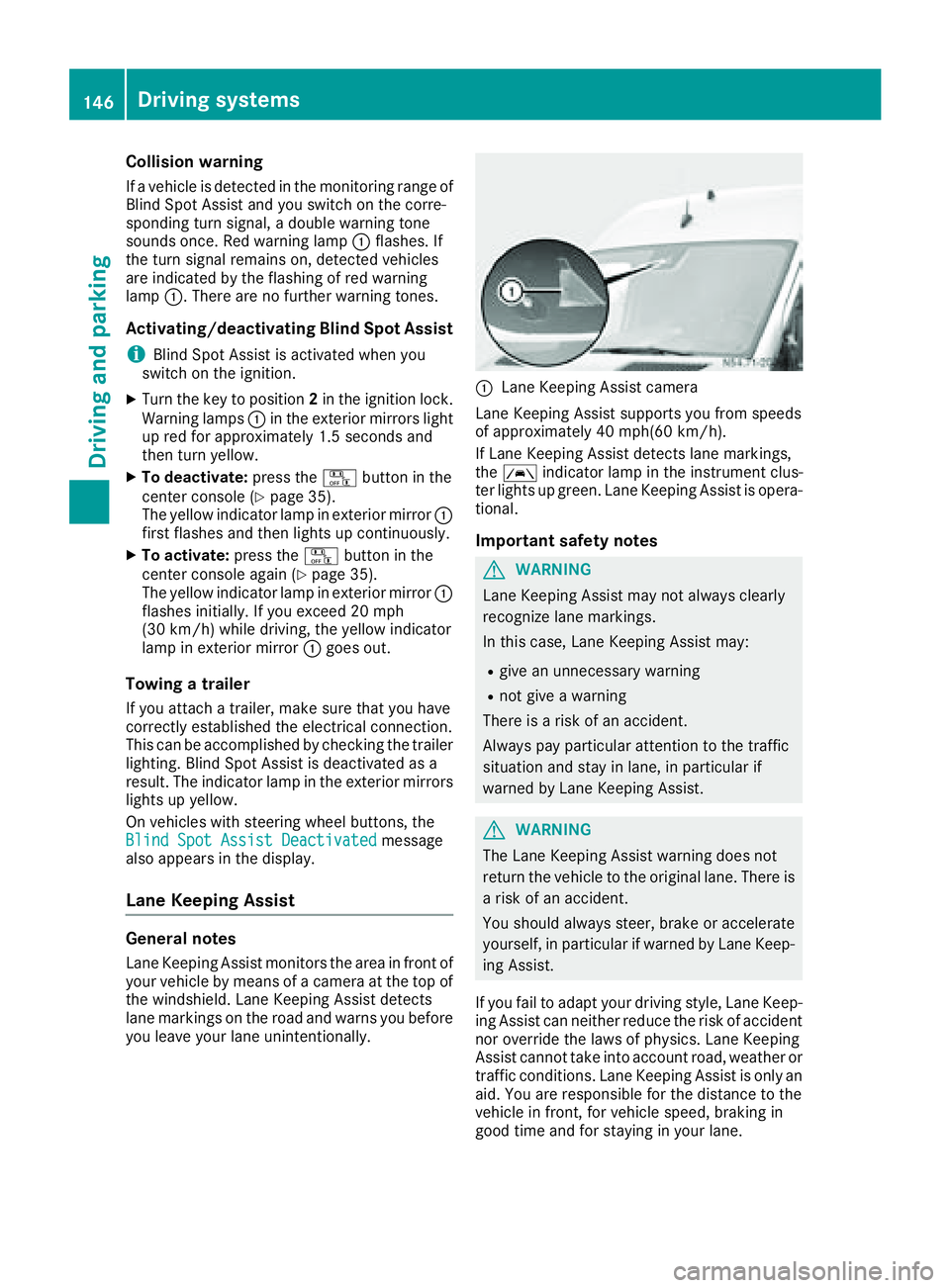
:Lane Keeping Assist camera
Lane Keeping Assist supports you from speeds
of approximately 40 mph(60 km/h).
If Lane Keeping Assist detects lane markings,
the à indicator lamp in the instrument clus-
ter lights up green. Lane Keeping Assist is opera-
tional.
Important safety notes
GWARNING
Lane Keeping Assist may not always clearly
recognize lane markings.
In this case, Lane Keeping Assist may:
Rgive an unnecessary warning
Rnot give a warning
There is a risk of an accident.
Always pay particular attention to the traffic
situation and stay in lane, in particular if
warned by Lane Keeping Assist.
GWARNING
The Lane Keeping Assist warning does not
return the vehicle to the original lane. There is
a risk of an accident.
You should always steer, brake or accelerate
yourself, in particular if warned by Lane Keep-
ing Assist.
If you fail to adapt your driving style, Lane Keep-
ing Assist can neither reduce the risk of accident
nor override the laws of physics. Lane Keeping
Assist cannot take into account road, weather or traffic conditions. Lane Keeping Assist is only an
aid. You are responsible for the distance to the
vehicle in front, for vehicle speed, braking in
good time and for staying in your lane.
146Driving systems
Driving and parking
Page 149 of 290
Lane Keeping Assist does not keep your vehicle
in its lane.
The system may be impaired or may not function
if:
Rif the vehicle is incorrectly loaded
(Ypage 212)
Rthere is poor visibility, e.g. due to insufficient
illumination of the road, or due to snow, rain,
fog or spray
Rthere is glare, e.g. from oncoming traffic, the
sun or reflection from other vehicles (e.g. if
the road surface is wet)
Rthe windshield is dirty, fogged up, damaged or
covered, for instance by a sticker, in the vicin-
ity of the camera
Rno, or several, unclear lane markings are pres-
ent for one lane, e.g. in a construction area
Rthe lane markings are worn away, dark or cov-
ered up, e.g. by dirt or snow
Rthe distance to the vehicle in front is too small
and the lane markings thus cannot be detec-
ted
Rthe lane markings change quickly, e.g. lanes
branch off, cross one another or merge
Rthe road is narrow and winding
Rthere are highly variable shade conditions on
the road
A warning may be given if a front wheel passes
over a lane marking. In addition, a warning tone
sounds and the Ãindicator lamp in the
instrument cluster flashes red.
Activating/deactivating Lane Keeping
Assist
Lane Keeping Assist is automatically activated
when you start the engine.
XTo deactivate: press thejbutton in the
center console (Ypage 35).
On vehicles without steering wheel but-
tons:
OFF
flashes briefly in the display and the Ã
indicator lamp in the instrument cluster
flashes yellow and then lights up continu-
ously.
On vehicles with steering wheel buttons:
The Lane
Keep.AssistDeactivatedmes-
sage appears in the display and the Ã
indicator lamp in the instrument cluster
flashes yellow and then lights up continu-
ously. Lane Keeping Assist is deactivated.
XTo activate:
press thejbutton in the
center console again (Ypage 35).
On vehicles without steering wheel but-
tons:
on
flashes briefly in the display and the Ã
indicator lamp in the instrument cluster goes
out. If a lane marking is detected, the Ã
indicator lamp lights up green.
On vehicles with steering wheel buttons:
The Lane Keep. Assist Activated
mes-
sage appears in the display and the Ã
indicator lamp in the instrument cluster goes
out. If a lane marking is detected, the Ã
indicator lamp lights up green.
Lane Keeping Assist is activated.
A Lane Keeping Assist warning is suppressed if:
Ra driving safety system intervenes, such as
ABS, BAS or ESP®.
Ryou have set the turn signal and a lane change is detected. In this case, the warnings are
suppressed for a certain period of time.
Ryou accelerate hard, e.g. kickdown on vehi-
cles with an automatic transmission.
Ryou brake hard.
Ryou steer actively, e.g. swerve to avoid an
obstacle or change lane quickly.
Ryou cut the corner on a sharp bend.
In order that you are warned only when neces-
sary and in good time if you cross the lane mark-
ing, the system recognizes certain conditions
and warns you accordingly.
Lane Keeping Assist warns you earlier if:
Ryou approach the outer lane marking on a
bend.
Rthe road has very wide lanes, e.g. a freeway.
Rthe system recognizes solid lane markings.
Warnings are given later if:
Rthe road has narrow lanes.
Ryou cut the corner on a bend.
All-wheel drive
Important safety notes
!Never tow the vehicle with one axle raised.
This may damage the transfer case. Damage
of this sort is not covered by the Mercedes-
Benz Limited Warranty. All wheels must
Driving systems147
Driving and parking
Z
Page 150 of 290
remain either on the ground or be fully raised.
Observe the instructions for towing the vehi-
cle with all wheels in full contact with the
ground.
!A function or performance test should only
be carried out on a two-axle dynamometer.
Before you operate the vehicle on such a
dynamometer, please consult a qualified
workshop. You could otherwise damage the
drive train or the brake system.
If you fail to adapt your driving style or if you are
inattentive, the all-wheel drive system can nei-
ther reduce the risk of an accident nor override
the laws of physics. The all-wheel drive system
cannot take road, weather and traffic conditions
into account. The all-wheel drive system is only
an aid. You are responsible for the distance to
the vehicle in front, for vehicle speed and for
braking in good time.
4ETS ensures permanent drive for all four
wheels, and together with ESP
®it improves the
vehicle's traction.
If a driven wheel spins due to lack of traction:
RWhen pulling away, make use of the traction
control integrated in ESP®. Depress the
accelerator pedal as far as necessary.
RWhile driving, slowly take your foot off the
accelerator pedal
In wintry driving conditions, always use winter
tires (M+S tires) and if necessary, snow chains
(
Ypage 249). This is the only way to get the full
benefit from the all-wheel drive system.
For information on "Driving off-road", see
(
Ypage 137).
Engaging all-wheel drive
Conditions for engaging/disengaging
All-wheel drive can only be engaged or disen-
gaged if:
Rthe engine is running
Rthe vehicle is stationary
If it is not possible to engage all-wheel-drive:
Rmove the selector lever to position N
Rrelease the brake pedal
Rpress the;button
Rmove the selector lever from Nto Dor R
Engaging/disengaging all-wheel drive
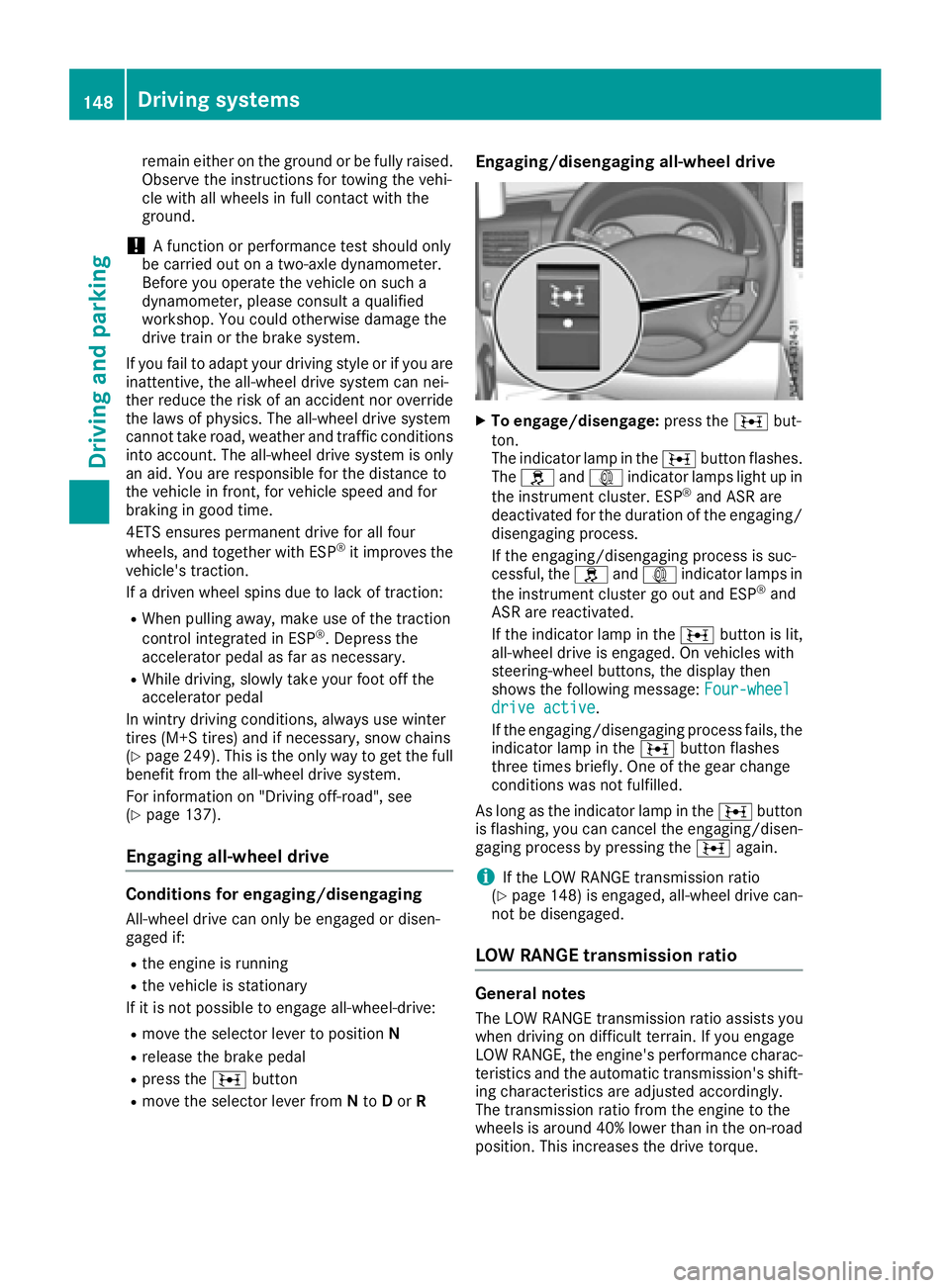
XTo engage/disengage: press the;but-
ton.
The indicator lamp in the ;button flashes.
The h and: indicator lamps light up in
the instrument cluster. ESP
®and ASR are
deactivated for the duration of the engaging/ disengaging process.
If the engaging/disengaging process is suc-
cessful, the hand: indicator lamps in
the instrument cluster go out and ESP
®and
ASR are reactivated.
If the indicator lamp in the ;button is lit,
all-wheel drive is engaged. On vehicles with
steering-wheel buttons, the display then
shows the following message: Four-wheel
drive active.
If the engaging/disengaging process fails, the indicator lamp in the ;button flashes
three times briefly. One of the gear change
conditions was not fulfilled.
As long as the indicator lamp in the ;button
is flashing, you can cancel the engaging/disen-
gaging process by pressing the ;again.
iIf the LOW RANGE transmission ratio
(Ypage 148) is engaged, all-wheel drive can-
not be disengaged.
LOW RANGE transmission ratio
General notes
The LOW RANGE transmission ratio assists you
when driving on difficult terrain. If you engage
LOW RANGE, the engine's performance charac-
teristics and the automatic transmission's shift-
ing characteristics are adjusted accordingly.
The transmission ratio from the engine to the
wheels is around 40% lower than in the on-road position. This increases the drive torque.
148Driving systems
Driving and parking