buttons MERCEDES-BENZ SPRINTER 2016 MY16 Operator’s Manual
[x] Cancel search | Manufacturer: MERCEDES-BENZ, Model Year: 2016, Model line: SPRINTER, Model: MERCEDES-BENZ SPRINTER 2016Pages: 290, PDF Size: 6.44 MB
Page 180 of 290
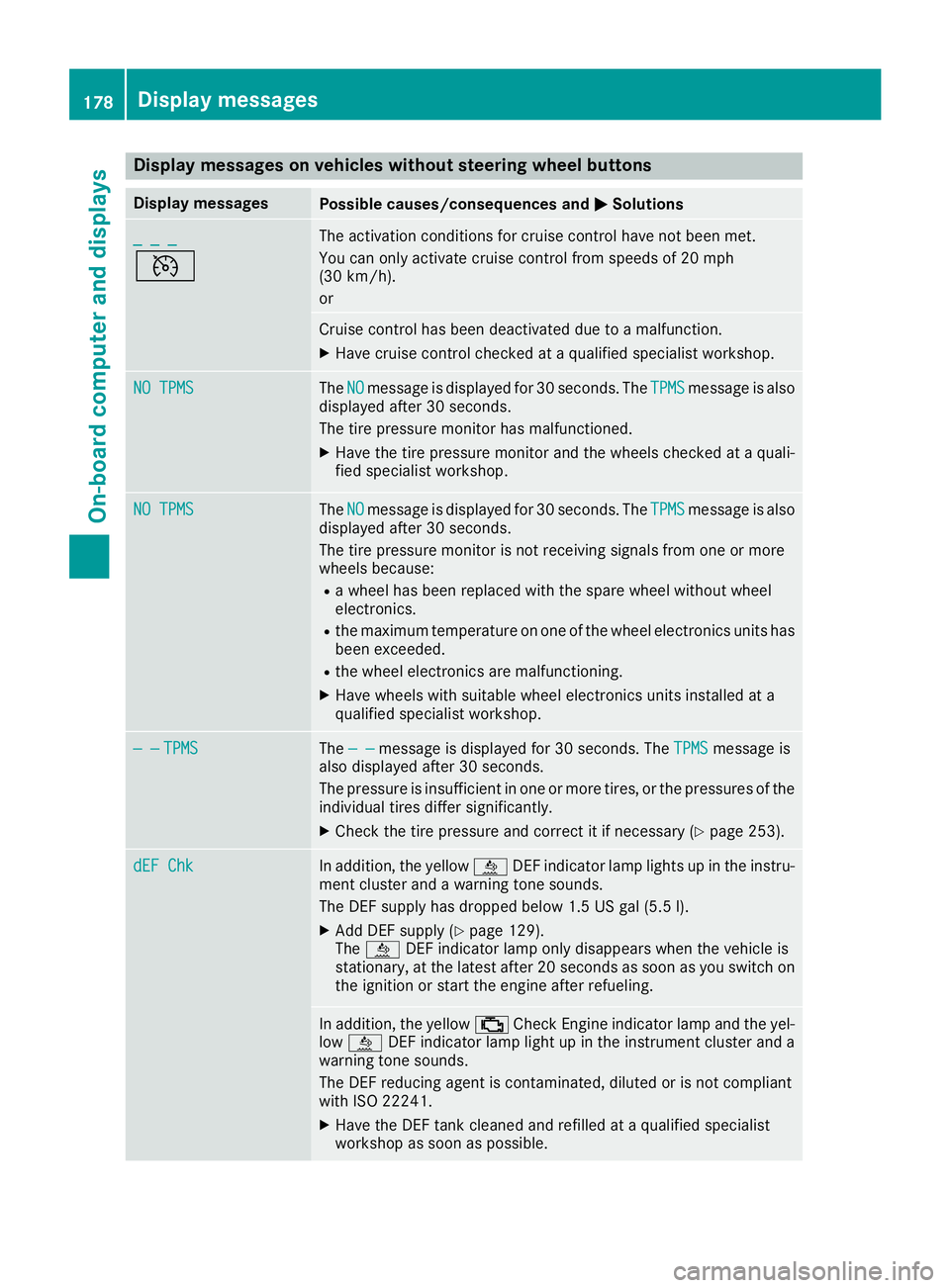
Display messages on vehicles withoutsteering wheel buttons
Display messagesPossible causes/consequences an dMSolutions
_ _ _
V
The activation condition sfo rcruise contro lhav eno tbee nmet .
You can only activat ecruise contro lfrom speeds of 20 mph
(30 km/h).
or
Cruise contro lhas bee ndeactivated due to amalfunction .
XHavecruise contro lchecke dat aqualified specialis tworkshop .
NO TPMSTheNOmessag eis displaye dfo r30 seconds. The TPMSmessag eis also
displaye dafter 30 seconds.
The tire pressure monito rhas malfunctioned.
XHav eth etire pressure monito rand th ewheels checke dat aquali-
fie dspecialis tworkshop .
NO TPMSTheNOmessag eis displaye dfo r30 seconds. The TPMSmessag eis also
displaye dafter 30 seconds.
The tire pressure monito ris no treceivin gsignal sfrom on eor more
wheels because :
Rawhee lhas bee nreplaced wit hth espar ewhee lwithout whee l
electronics.
Rth emaximum temperature on on eof th ewhee lelectronic sunits has
bee nexceeded.
Rth ewhee lelectronic sare malfunctioning.
XHav ewheels wit hsuitable whee lelectronic sunits installed at a
qualified specialis tworkshop .
— —TPMSThe — —messag eis displaye dfo r30 seconds. The TPMSmessag eis
also displaye dafter 30 seconds.
The pressure is insufficien tin on eor more tires ,or th epressures of th e
individual tires diffe rsignificantly.
XChec kth etire pressure and correc tit if necessary (Ypage 253).
dEF ChkIn addition,th eyello wå DEFindicator lamp lights up in th einstru-
men tcluster and awarnin gtone sounds.
The DE Fsupply has dropped belo w1.5US gal (5.5l).
XAdd DEF supply (Ypage 129).
The å DEF indicator lamp only disappears when the vehicle is
stationary, at the latest after 20 secondsa s soon as you switch on
the ignition or start the engine after refueling.
In addition, the yellow ;Check Engine indicator lamp and the yel-
low å DEF indicator lamp light up in the instrument cluster and a
warning tone sounds.
The DEF reducing agent is contaminated, diluted or is not compliant
with ISO 22241.
XHave the DEF tank cleaned and refilled at a qualified specialist
workshop as soon as possible.
178Display messages
On-board computer and displays
Page 183 of 290
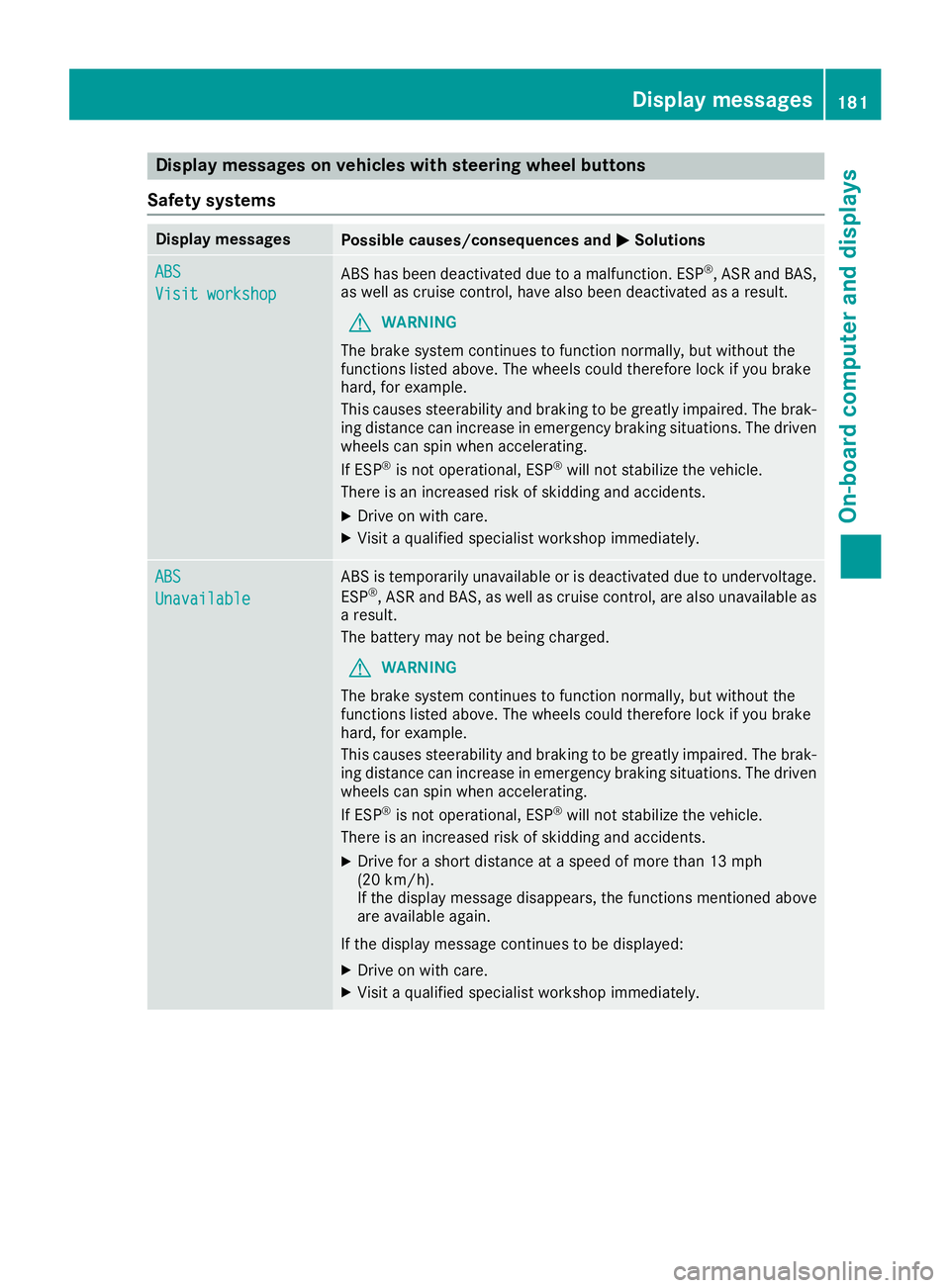
Display messages on vehicles withsteering wheel buttons
Safet ysystems
Display messagesPossible causes/consequences an dMSolutions
ABS
Visit workshop
AB Shas bee ndeactivated due to amalfunction .ES P®,AS Rand BAS,
as well as cruise control, hav ealso bee ndeactivated as aresult .
GWARNING
The brake syste mcontinues to function normally, but without th e
function slisted above. The wheels could therefore loc kif you brake
hard, fo rexample.
Thi scauses steerability and braking to be greatly impaired. The brak-
in gdistanc ecan increase in emergency braking situations. The driven
wheels can spi nwhen accelerating.
If ES P
®is no toperational, ES P®will notstabilize th evehicle.
There is an increase dris kof skidding and accidents .
XDrive on withcare.
XVisit aqualified specialis tworkshop immediately.
ABS
Unavailable
AB Sis temporarily unavailable or is deactivated due to undervoltage.
ES P®,AS Rand BAS, as well as cruise control, are also unavailable as
a result .
The battery may no tbe bein gcharged.
GWARNING
The brake syste mcontinues to function normally, but without th e
function slisted above. The wheels could therefore loc kif you brake
hard, fo rexample.
Thi scauses steerability and braking to be greatly impaired. The brak-
in gdistanc ecan increase in emergency braking situations. The driven
wheels can spi nwhen accelerating.
If ES P
®is no toperational, ES P®will notstabilize th evehicle.
There is an increase dris kof skidding and accidents .
XDrive for ashort distanc eat aspeed of more than 13 mph
(20 km/h).
If th edisplay messag edisappears ,th efunction smentioned abov e
are available again .
If th edisplay messag econtinues to be displayed:
XDrive on wit hcare.
XVisit aqualified specialis tworkshop immediately.
Display messages18 1
On-board computer and displays
Z
Page 197 of 290
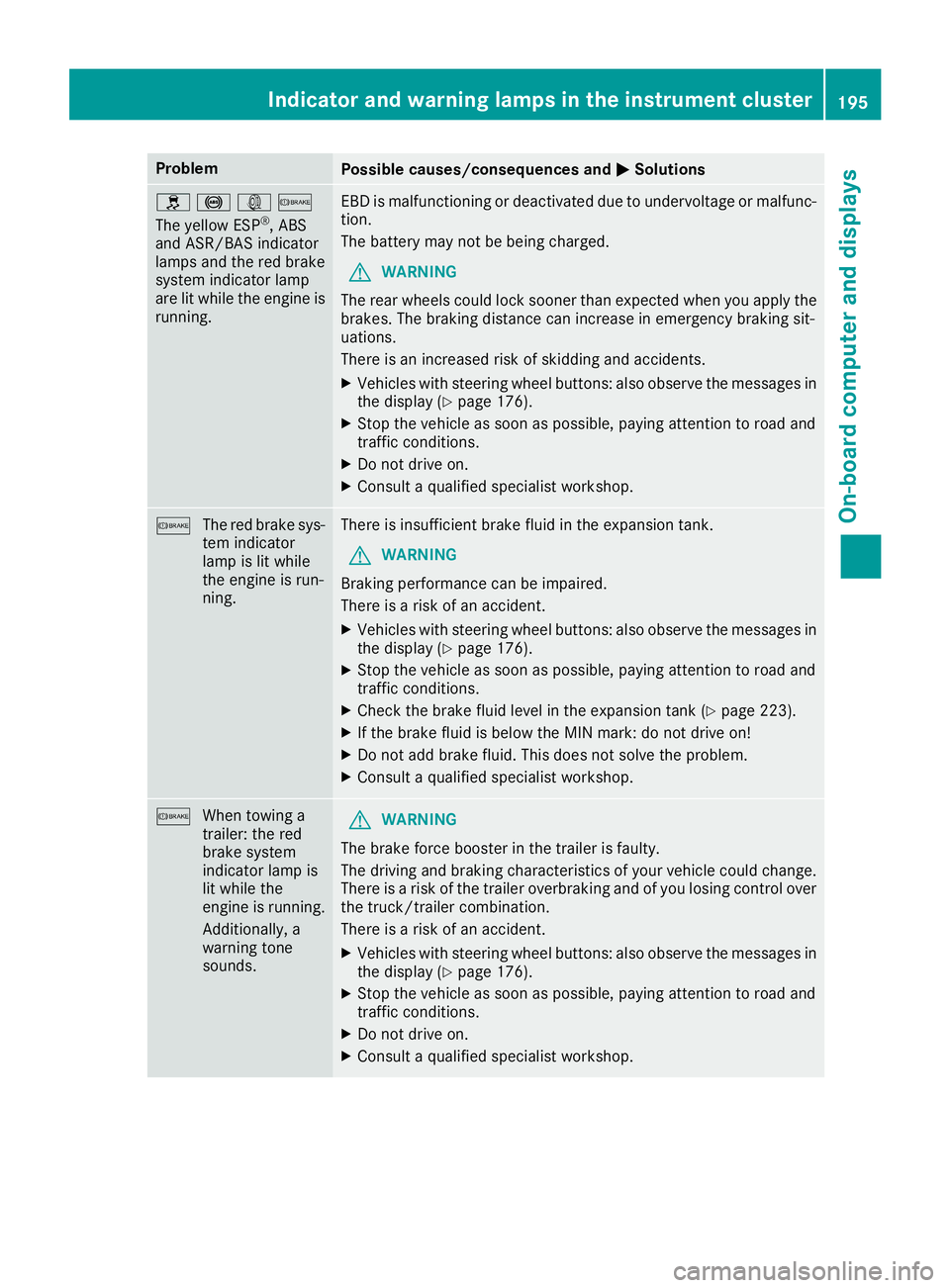
ProblemPossible causes/consequences andMSolutions
h!:b
The yellow ESP®, ABS
and ASR/BAS indicator
lamps and the red brake
system indicator lamp
are lit while the engine is
running.
EBD is malfunctioning or deactivated due to undervoltage or malfunc-
tion.
The battery may not be being charged.
GWARNING
The rear wheels could lock sooner than expected when you apply the
brakes. The braking distance can increase in emergency braking sit-
uations.
There is an increased risk of skidding and accidents.
XVehicles with steering wheel buttons: also observe the messages in
the display (Ypage 176).
XStop the vehicle as soon as possible, paying attention to road and
traffic conditions.
XDo not drive on.
XConsult a qualified specialist workshop.
b The red brake sys-
tem indicator
lamp is lit while
the engine is run-
ning.There is insufficient brake fluid in the expansion tank.
GWARNING
Braking performance can be impaired.
There is a risk of an accident.
XVehicles with steering wheel buttons: also observe the messages in
the display (Ypage 176).
XStop the vehicle as soon as possible, paying attention to road and
traffic conditions.
XCheck the brake fluid level in the expansion tank (Ypage 223).
XIf the brake fluid is below the MIN mark: do not drive on!
XDo not add brake fluid. This does not solve the problem.
XConsult a qualified specialist workshop.
b When towing a
trailer: the red
brake system
indicator lamp is
lit while the
engine is running.
Additionally, a
warning tone
sounds.GWARNING
The brake force booster in the trailer is faulty.
The driving and braking characteristics of your vehicle could change.
There is a risk of the trailer overbraking and of you losing control over
the truck/trailer combination.
There is a risk of an accident.
XVehicles with steering wheel buttons: also observe the messages in
the display (Ypage 176).
XStop the vehicle as soon as possible, paying attention to road and
traffic conditions.
XDo not drive on.
XConsult a qualified specialist workshop.
Indicator and warning lamps in the instrument cluster195
On-board computer and displays
Z
Page 199 of 290
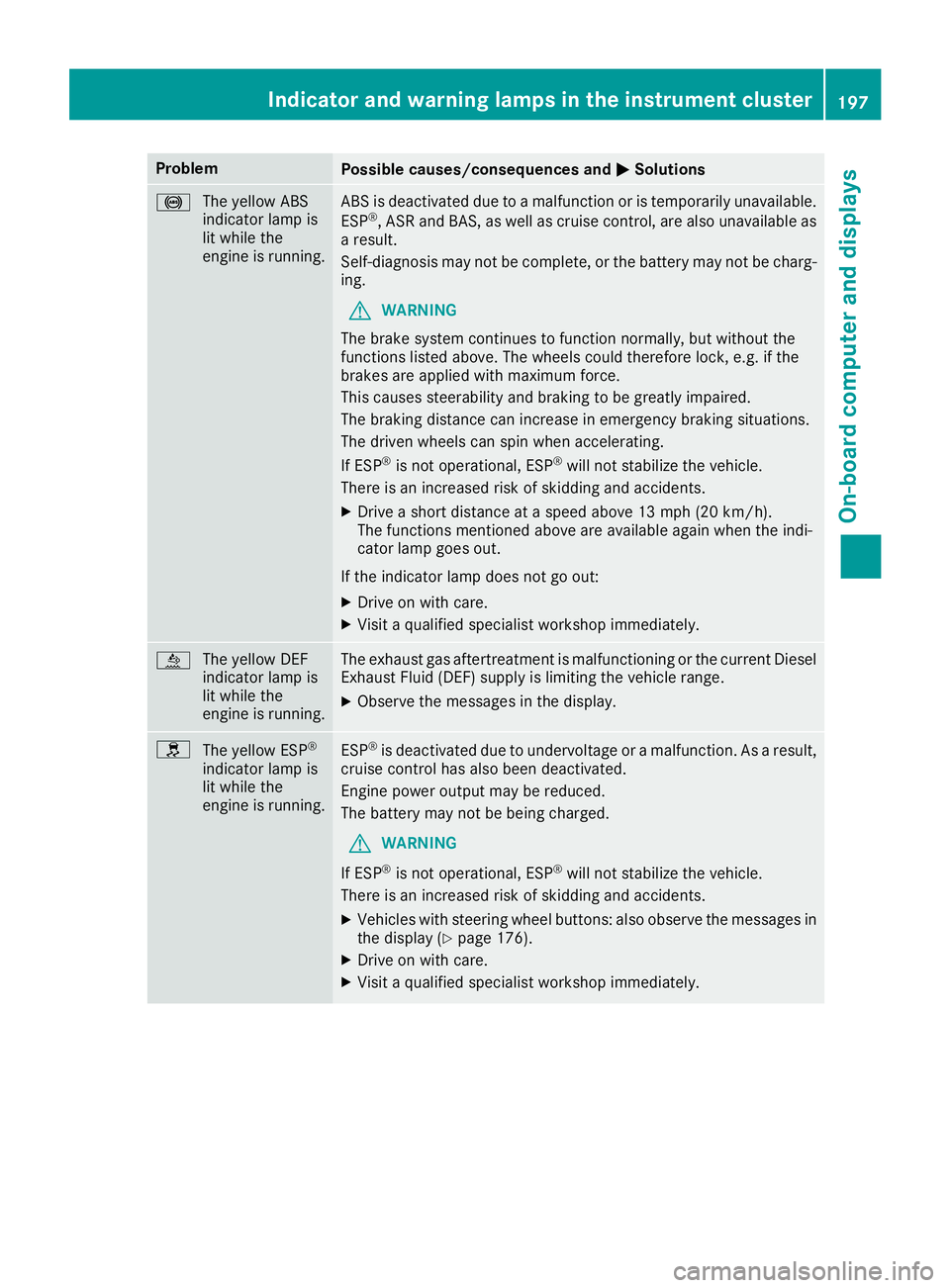
ProblemPossible causes/consequences andMSolutions
!
The yellow ABS
indicator lamp is
lit while the
engine is running.ABS is deactivated due to a malfunction or is temporarily unavailable.
ESP®, ASR and BAS, as well as cruise control, are also unavailable as
a result.
Self-diagnosis may not be complete, or the battery may not be charg-
ing.
GWARNING
The brake system continues to function normally, but without the
functions listed above. The wheels could therefore lock, e.g. if the
brakes are applied with maximum force.
This causes steerability and braking to be greatly impaired.
The braking distance can increase in emergency braking situations.
The driven wheels can spin when accelerating.
If ESP
®is not operational, ESP®will not stabilize the vehicle.
There is an increased risk of skidding and accidents.
XDrive a short distance at a speed above 13 mph (20 km/h).
The functions mentioned above are available again when the indi-
cator lamp goes out.
If the indicator lamp does not go out:
XDrive on with care.
XVisit a qualified specialist workshop immediately.
å The yellow DEF
indicator lamp is
lit while the
engine is running.The exhaust gas aftertreatment is malfunctioning or the current Diesel
Exhaust Fluid (DEF) supply is limiting the vehicle range.
XObserve the messages in the display.
h
The yellow ESP®
indicator lamp is
lit while the
engine is running.ESP®is deactivated due to undervoltage or a malfunction. As a result,
cruise control has also been deactivated.
Engine power output may be reduced.
The battery may not be being charged.
GWARNING
If ESP
®is not operational, ESP®will not stabilize the vehicle.
There is an increased risk of skidding and accidents.
XVehicles with steering wheel buttons: also observe the messages in the display (Ypage 176).
XDrive on with care.
XVisit a qualified specialist workshop immediately.
Indicator and warning lamps in the instrument cluster197
On-board computer and displays
Z
Page 204 of 290
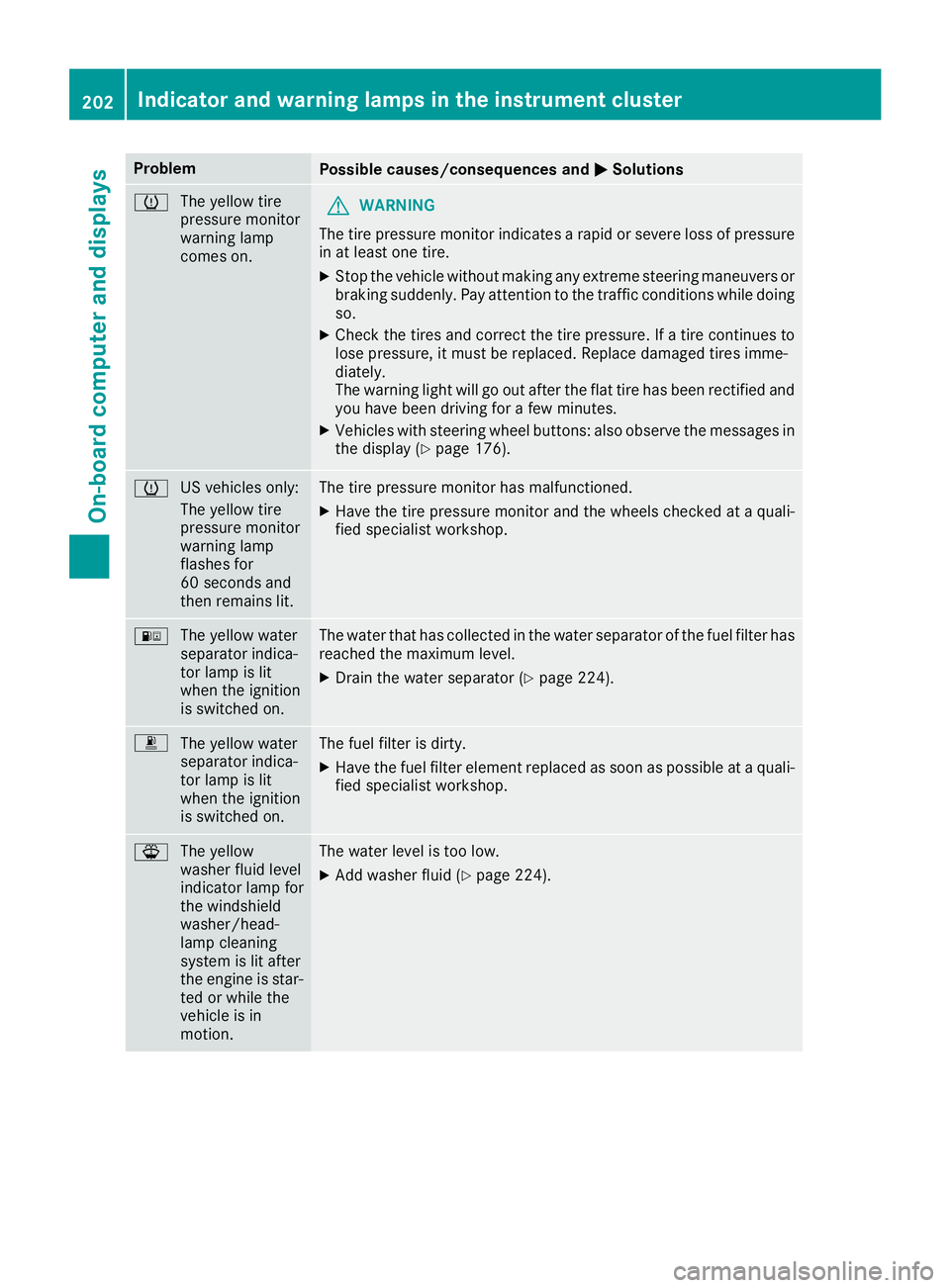
ProblemPossible causes/consequences andMSolutions
h
The yellow tire
pressure monitor
warning lamp
comes on.GWARNING
The tire pressure monitor indicates a rapid or severe loss of pressure
in at least one tire.
XStop the vehicle without making any extreme steering maneuvers or
braking suddenly. Pay attention to the traffic conditions while doing
so.
XCheck the tires and correct the tire pressure. If a tire continues to
lose pressure, it must be replaced. Replace damaged tires imme-
diately.
The warning light will go out after the flat tire has been rectified and
you have been driving for a few minutes.
XVehicles with steering wheel buttons: also observe the messages in the display (Ypage 176).
h US vehicles only:
The yellow tire
pressure monitor
warning lamp
flashes for
60 seconds and
then remains lit.The tire pressure monitor has malfunctioned.
XHave the tire pressure monitor and the wheels checked at a quali-
fied specialist workshop.
:
The yellow water
separator indica-
tor lamp is lit
when the ignition
is switched on.The water that has collected in the water separator of the fuel filter has
reached the maximum level.
XDrain the water separator (Ypage 224).
m
The yellow water
separator indica-
tor lamp is lit
when the ignition
is switched on.The fuel filter is dirty.
XHave the fuel filter element replaced as soon as possible at a quali-
fied specialist workshop.
¦The yellow
washer fluid level
indicator lamp for
the windshield
washer/head-
lamp cleaning
system is lit after
the engine is star-
ted or while the
vehicle is in
motion.The water level is too low.
XAdd washer fluid (Ypage 224).
202Indicator and warning lamps in the instrument cluster
On-board computer and displays
Page 222 of 290
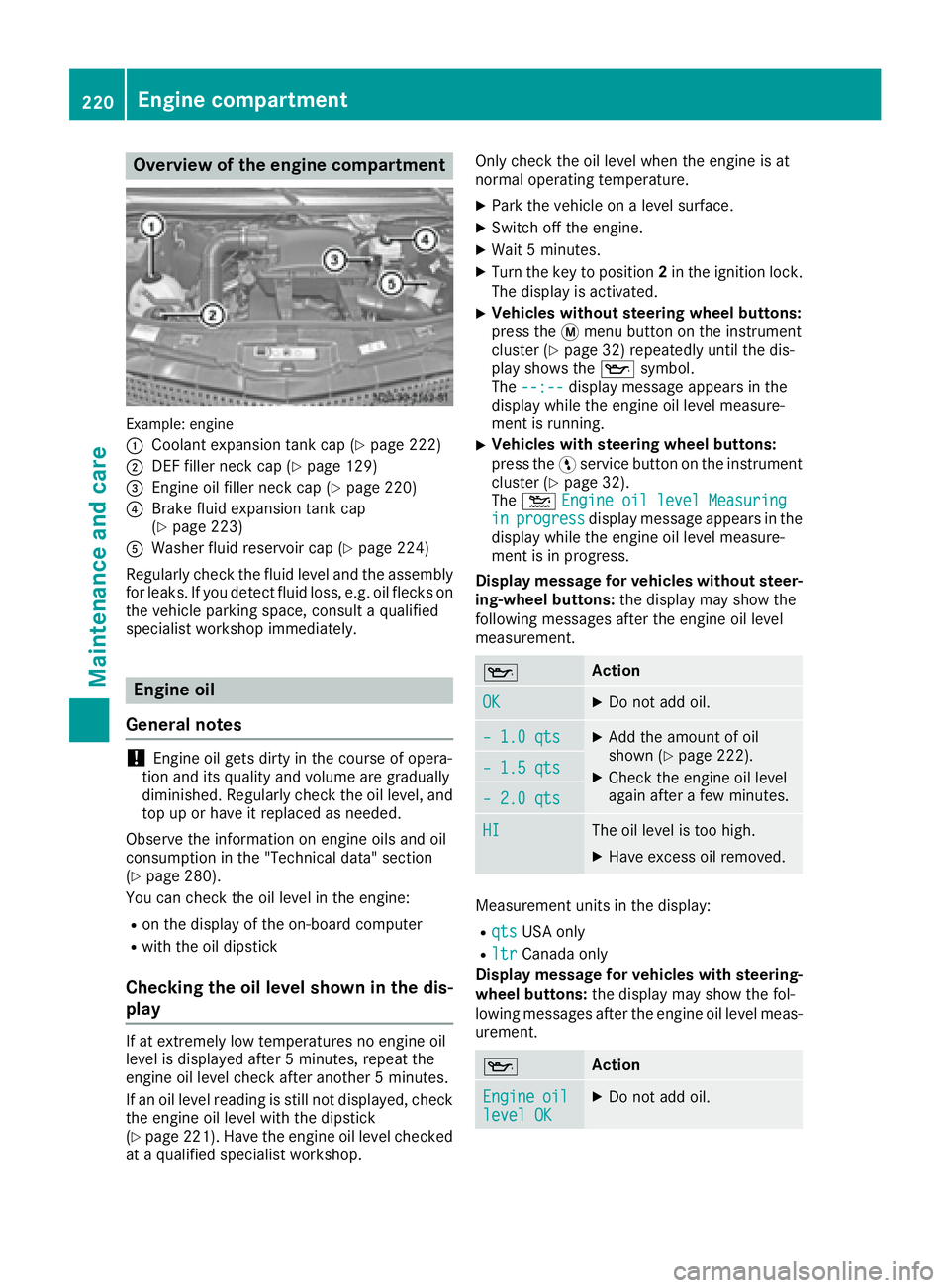
Overview of the engine compartment
Example: engine
:
Coolant expansion tank cap (Ypage 222)
;DEF filler neck cap (Ypage 129)
=Engine oil filler neck cap (Ypage 220)
?Brake fluid expansion tank cap
(Ypage 223)
AWasher fluid reservoir cap (Ypage 224)
Regularly check the fluid level and the assembly
for leaks. If you detect fluid loss, e.g. oil flecks on
the vehicle parking space, consult a qualified
specialist workshop immediately.
Engine oil
General notes
!Engine oil gets dirty in the course of opera-
tion and its quality and volume are gradually
diminished. Regularly check the oil level, and
top up or have it replaced as needed.
Observe the information on engine oils and oil
consumption in the "Technical data" section
(
Ypage 280).
You can check the oil level in the engine:
Ron the display of the on-board computer
Rwith the oil dipstick
Checking the oil level shown in the dis-
play
If at extremely low temperatures no engine oil
level is displayed after 5 minutes, repeat the
engine oil level check after another 5 minutes.
If an oil level reading is still not displayed, check
the engine oil level with the dipstick
(
Ypage 221). Have the engine oil level checked
at a qualified specialist workshop. Only check the oil level when the engine is at
normal operating temperature.
XPark the vehicle on a level surface.
XSwitch off the engine.
XWait 5 minutes.
XTurn the key to position
2in the ignition lock.
The display is activated.
XVehicles without steering wheel buttons:
press the 4menu button on the instrument
cluster (
Ypage 32) repeatedly until the dis-
play shows the 1symbol.
The --:--
display message appears in the
display while the engine oil level measure-
ment is running.
XVehicles with steering wheel buttons:
press the Ëservice button on the instrument
cluster (
Ypage 32).
The 4 Engine oil level Measuring
inprogressdisplay message appears in the
display while the engine oil level measure-
ment is in progress.
Display message for vehicles without steer-
ing-wheel buttons: the display may show the
following messages after the engine oil level
measurement.
1Action
OKXDo not add oil.
– 1.0 qtsXAdd the amount of oil
shown (Ypage 222).
XCheck the engine oil level
again after a few minutes.– 1.5 qts
– 2.0 qts
HIThe oil level is too high.
XHave excess oil removed.
Measurement units in the display:
RqtsUSA only
RltrCanada only
Display message for vehicles with steering- wheel buttons: the display may show the fol-
lowing messages after the engine oil level meas-
urement.
1Action
Engineoillevel OKXDo not add oil.
220Engine compartment
Maintenance and care
Page 228 of 290
Do not run the engine for longer than neces-
sary when the vehicle is stationary.
Before having maintenance and repairs per-
formed, it is essential to read the materials rela-
ted to the maintenance and repairs:
Rthe applicable sections of the technical doc-
umentation, e.g. the Operator's Manual and
workshop information.
Rregulations such as industrial safety regula-
tions and accident prevention regulations.
While working under the vehicle, you must
secure the vehicle on jack stands with sufficient load capacity.
Never use the jack as a substitute. The vehicle's
jack is intended only to raise the vehicle for a
short time when changing a wheel. It is not
suited for performing maintenance work under
the vehicle.
Please also refer to the notes about qualified
specialist workshops (
Ypage 26).
The scope and regularity of the inspection and
maintenance work primarily depend on the
often diverse operating conditions. Specialist
knowledge beyond the scope of this Operator's
Manual is required when carrying out testing
and maintenance work. This work should only be
carried out by trained staff.
The vehicle Maintenance Booklet describes the scope and fre que
ncy of maintenance work and
contains additional notes on the New Vehicle
Limited Warranty and on service products.
Maintenance services must be carried out in
accordance with the provisions and recommen-
dations in the Maintenance Booklet. Not doing
so could void the warranty claim and lead to
refusal of goodwill gestures after the manufac-
turer has submitted a damage report.
iObserve the notes on genuine Sprinter parts
(Ypage 28).
Service interval display
General notes
A service that is due is displayed in the service
interval display about 1 month in advance. A
message is then displayed while the vehicle is in
motion or when the ignition is switched on.
iThe service interval display does not provide
information about the engine oil level. The service interval display should therefore not
be confused with the
5engine oil level
display.
The service due date is displayed in days or
miles (kilometers), depending on the total dis-
tance driven.
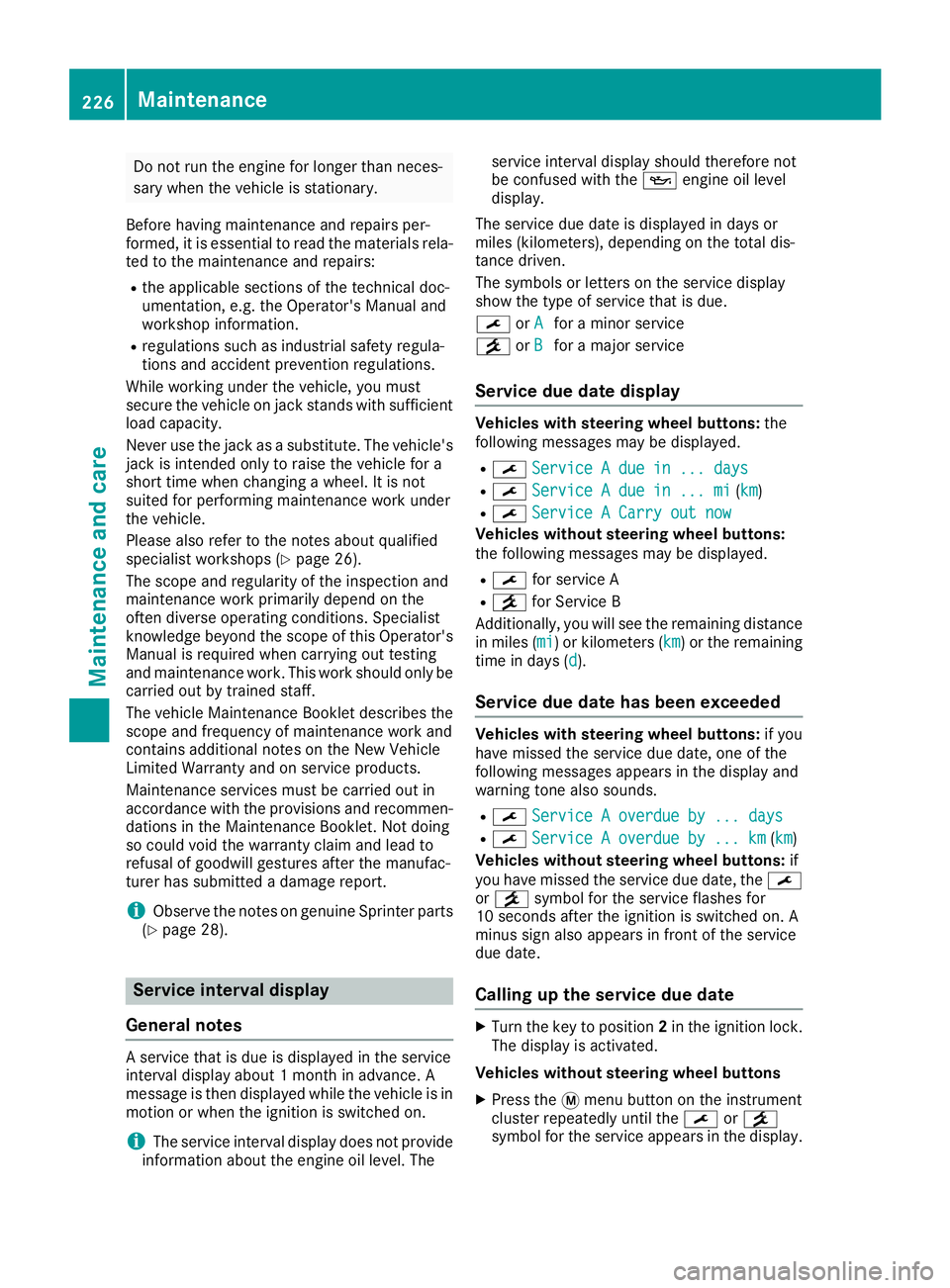
The symbols or letters on the service display
show the type of service that is due.
¯ orA
for a minor service
° orB
for a major service
Service due date display
Vehicles with steering wheel buttons: the
following messages may be displayed.
R¯ Service A due in ... days
R¯Service A due in ... mi(km)
R¯ Service A Carry out now
Vehicles without steering wheel buttons:
the following messages may be displayed.
R¯for service A
R°for Service B
Additionally, you will see the remaining distance
in miles ( mi
) or kilometers ( km) or the remaining
time in days ( d).
Service due date has been exceeded
Vehicles with steering wheel buttons: if you
have missed the service due date, one of the
following messages appears in the display and
warning tone also sounds.
R¯ Service A overdue by ... days
R¯Service A overdue by ... km(km)
Vehicles without steering wheel buttons: if
you have missed the service due date, the ¯
or ° symbol for the service flashes for
10 seconds after the ignition is switched on. A
minus sign also appears in front of the service
due date.
Calling up the service due date
XTurn the key to position 2in the ignition lock.
The display is activated.
Vehicles without steering wheel buttons
XPress the 4menu button on the instrument
cluster repeatedly until the ¯or°
symbol for the service appears in the display.
226Maintenance
Maintenance and care
Page 229 of 290
Additionally, you will see the remaining dis-
tance in miles (mi) or kilometers ( km) or the
remaining time in days ( d).
Vehicles with steering wheel buttons
XPress the VorU button on the steering
wheel until the standard display (Ypage 167)
appears in the display.
XPress the &or* button on the steering
wheel repeatedly until the service message
appears in the display, for example:
R¯ Service A in ... days
R¯Service A in ... mi(km)
Battery
Important safety notes
Work on the battery, e.g. removing or installing,
requires specialist knowledge and the use of
special tools. Therefore, always have work on
the battery carried out at a qualified specialist
workshop.
GWARNING
Work carried out incorrectly on the battery
can lead, for example, to a short circuit and
thus damage the vehicle electronics. This can
lead to function restrictions applying to
safety-relevant systems, e.g. the lighting sys-
tem, ABS (anti-lock braking system) or ESP
®
(Electronic Stability Program). The operating
safety of your vehicle may be restricted. You
could lose control of the vehicle, for example:
Rbraking
Rin the event of abrupt steering maneuver
and/or when the vehicle's speed is not
adapted to the road conditions
There is a risk of an accident.
In the event of a short circuit or a similar inci- dent, contact a qualified specialist workshop
immediately. Do not drive any further. You
should have all work involving the battery car-
ried out at a qualified specialist workshop.
Further information can be found under "ABS"
(
Ypage 53) and under "ESP®" (Ypage 54).
GWARNING
Electrostatic build-up can lead to the creation of sparks, which could ignite the highly explo-
sive gases of a battery. There is a risk of an
explosion.
Before handling the battery, touch the vehicle
body to remove any existing electrostatic
build-up.
The flammable gas mix is produced when the
battery is charged or when the vehicle is jump-
started.
Always make sure that neither you nor the bat-
tery are electrostatically charged. Electrostatic
charging results, for example, from:
Rwearing synthetic clothing
Rfriction between clothing and the seat
Rdragging or pushing the battery across carpet flooring or any other synthetic materials
Rrubbing the battery with cloths or towels.
Comply with the following safety precautions
and take protective measures when handling
batteries.
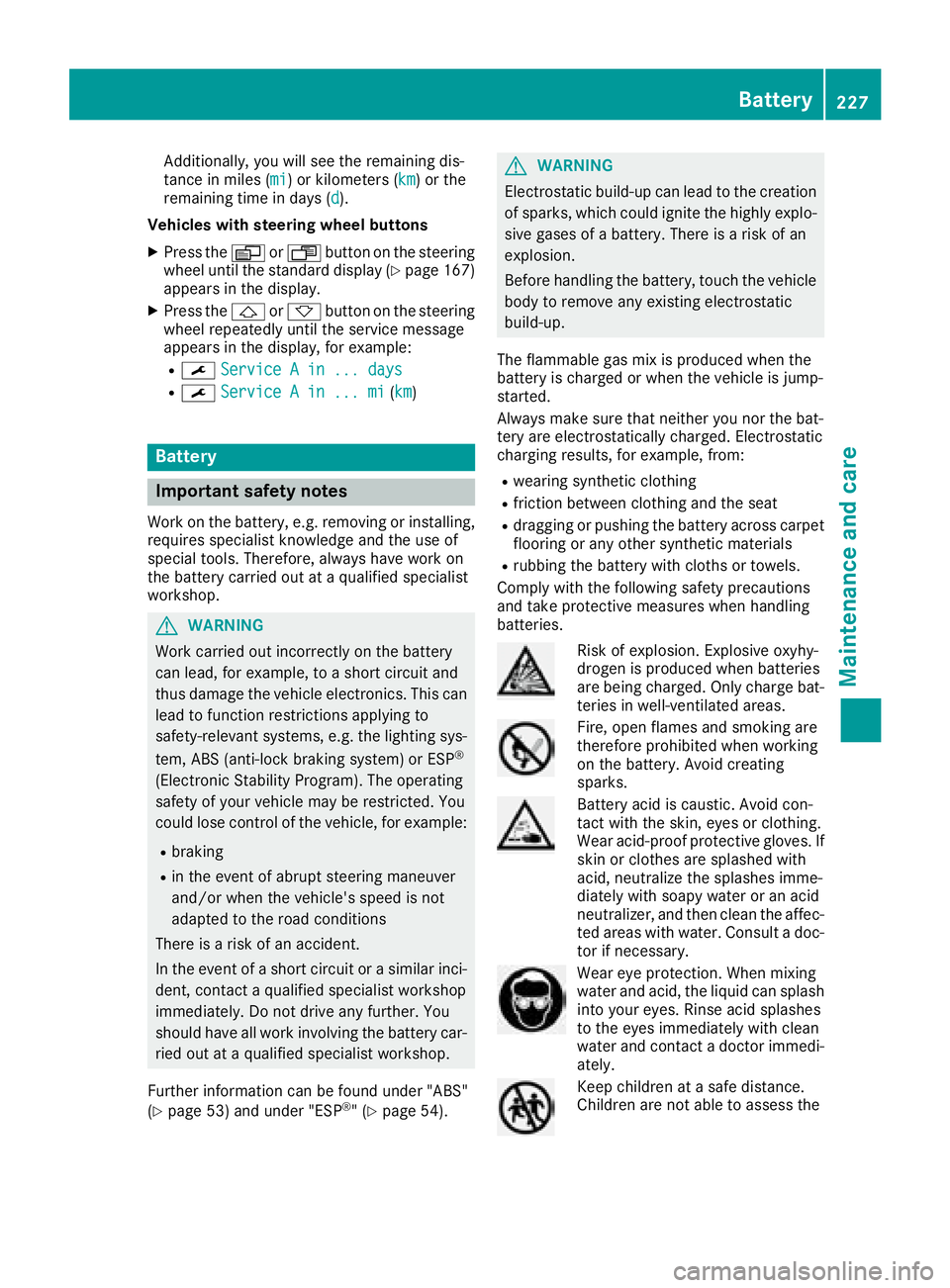
Risk of explosion. Explosive oxyhy-
drogen is produced when batteries
are being charged. Only charge bat-
teries in well-ventilated areas.
Fire, open flames and smoking are
therefore prohibited when working
on the battery. Avoid creating
sparks.
Battery acid is caustic. Avoid con-
tact with the skin, eyes or clothing.
Wear acid-proof protective gloves. If
skin or clothes are splashed with
acid, neutralize the splashes imme-
diately with soapy water or an acid
neutralizer, and then clean the affec-
ted areas with water. Consult a doc- tor if necessary.
Wear eye protection. When mixing
water and acid, the liquid can splash
into your eyes. Rinse acid splashes
to the eyes immediately with clean
water and contact a doctor immedi-
ately.
Keep children at a safe distance.
Children are not able to assess the
Battery227
Maintenance and care
Z
Page 256 of 290
cle is started as long as the malfunction
exists.
When the malfunction indicator is illuminated,the system may not be able to detect or signal
low tire pressure as intended. TPMS malfunc-
tions may occur for a variety of reasons,
including the mounting of incompatible
replacement or alternate tires or wheels on
the vehicle that prevent the TPMS from func-
tioning properly. Always check the TPMS mal-
function telltale after replacing one or more
tires or wheels on your vehicle to ensure that
the replacement or alternate tires and wheels
allow the TPMS to continue to function prop-
erly.
Vehicles with a tire pressure monitor are equip-
ped with sensors in the wheels that monitor the
tire pressure of all four tires. The tire pressure
monitor monitors the pressure in all four tires;
you set this pressure when you activate the tire
pressure monitor. The tire pressure monitor
warns you when the pressure drops in one or
more of the tires. The tire pressure monitor only
functions if the corresponding sensors are
installed on all wheels.
You should always adjust the tire pressure
according to the vehicle load. Restart the tire
pressure monitor if you change the tire pres-
sure.
The tire pressure monitor does not warn you if a
tire pressure is incorrect. Observe the notes on
the recommended tire pressure (
Ypage 250).
The tire pressure moni tor i
s not able to warn you
of a sudden loss of pressure, e.g. following pen- etration by a foreign object. In this event, brake
the vehicle until it comes to a standstill. Do not
carry out any sudden steering maneuvers.
The tire pressure monitor has a yellow h
warning lamp in the instrument cluster for indi-
cating pressure loss/malfunctions (USA) or
pressure loss (Canada). Depending on how the
warning lamp flashes or lights up, an underin-
flated tire or a malfunction in the tire pressure
monitor is displayed:
Rif the h warning lamp is lit continuously,
the tire pressure on one or more tires is sig- nificantly too low. The tire pressure monitor is
not malfunctioning.
RUSA only: if the hwarning lamp flashes for
60 seconds and then remains lit constantly,
the tire pressure monitor is malfunctioning.
Only vehicles with steering wheel buttons: the
on-board computer displays information on tire
pressure. After a few minutes of driving, the cur-
rent tire pressure of each tire is shown in the on-
board computer.
USA only: if the tire pressure monitor is mal-
functioning, it may be more than 10 minutes
before the malfunction is shown. The htire
pressure warning lamp flashes for 60 seconds
and then remains lit. When the malfunction has been rectified, the htire pressure warning
lamp goes out after a few minutes of driving.
The tire p
ressure values indicated by the on-
board computer may differ from those meas-
ured at a gas station with a pressure gage. The
tire pressures shown by the on-board computer
refer to those measured at sea level. At high
altitudes, the tire pressure values indicated by a pressure gage are higher than those shown by
the on-board computer. In this case, do not
reduce the tire pressures.
If radio transmitting equipment (e.g. wireless
headphones, two-way radios) is operated inside
the vehicle or in the vicinity of the vehicle, this
can interfere with the operation of the tire pres-
sure monitor.
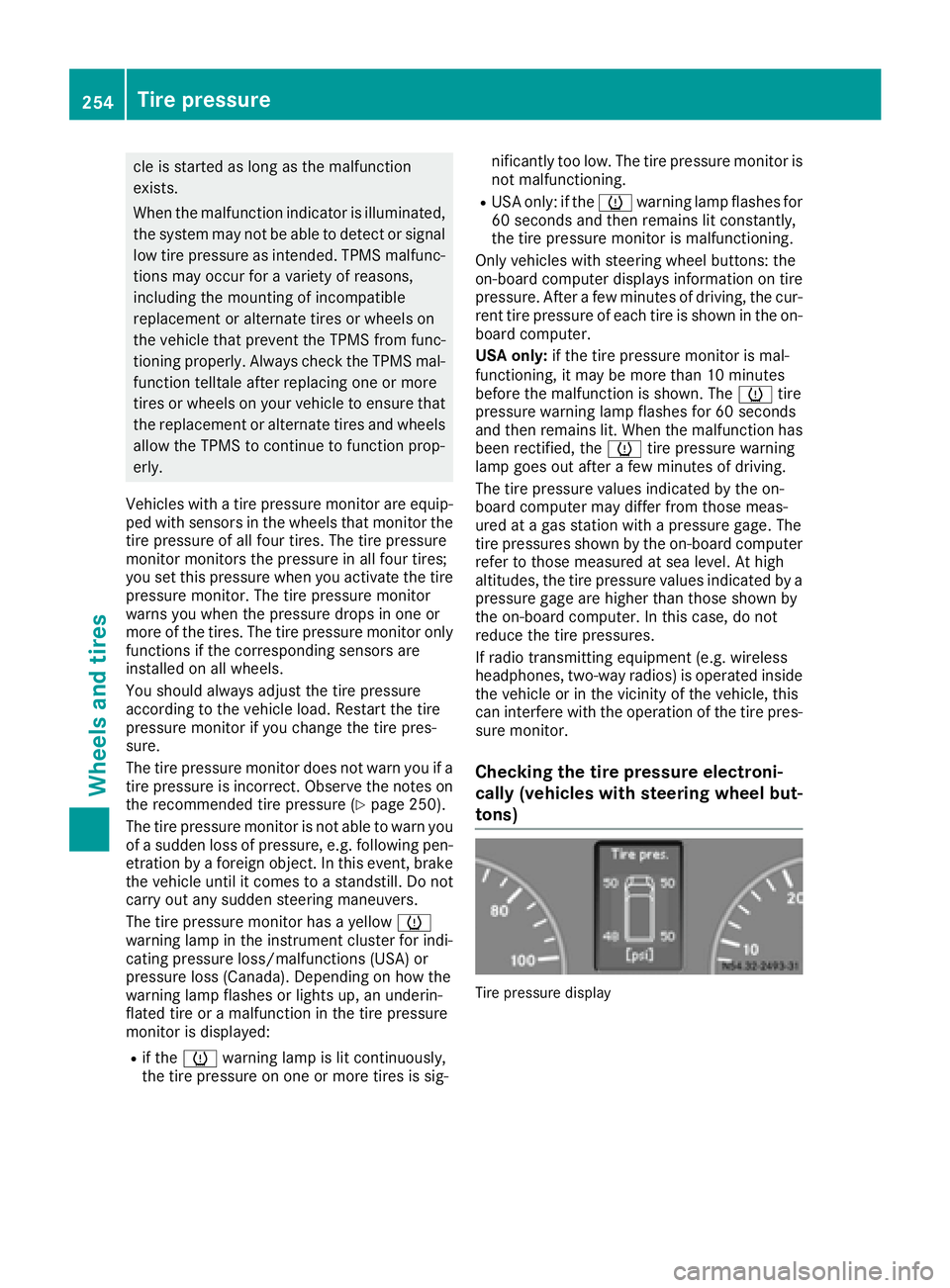
Checking the tire pressure electroni-
cally (vehicles with steering wheel but-
tons)
Tire pressure display
254Tire pressure
Wheels and tires
Page 257 of 290
Using the steering wheel buttons
XTurn the SmartKey to position2in the ignition
lock.
XPress the VorU button repeatedly
until the standard display is shown
(
Ypage 167).
XPress the 9or: button repeatedly
until the current pressure of the individual
tires is shown in the display.
If the vehicle is parked for longer than
20 minutes or you then drive at less than 18 mph
(30 km/h), the Tire pres. displayed
after driving for several minutesmes-
sage appears.
iThe tire pressure value shown in the display
may differ from those measured at a gas sta-
tion using a pressure gage. The on-board
computer will generally give you a more exact
value.
Tire pressure loss warning system
Vehicles with steering wheel buttons
If the tire pressure monitor detects a pressure
loss in one or more tires, the on-board computer
displays the yellow Tire
pres.Adjustpres.warning message. The htire pressure loss
warning lamp in the instrument cluster
(
Ypage 202) flashes for about 60 seconds and
then remains lit.
The pressure of the affected tire is highlighted in
yellow in the on-board computer (
Ypage 176).
If the tire pressure monitor detects a significant
pressure loss in one or more tires, the on-board
computer displays the red Tire pres.
Warn‐ingTiredefectwarning message. Theh
tire pressure loss warning lamp in the instru-
ment cluster (
Ypage 202) flashes for about 60
seconds and then remains lit. An additional
warning tone sounds.
The pressure of the affected tire is highlighted in
yellow in the on-board computer (
Ypage 176).
Restarting the tire pressure monitor
When you restart the tire pressure monitor, the
currently set tire pressure are taken as refer-
ence values for monitoring. In most cases, the tire pressure monitor detects
the new reference values automatically, e.g.
after you have:
Rchanged the tire pressure
Rchanged wheels or tires
Rinstalled new wheels or tires
However, you can also define reference values
manually as described here.
Before restarting the tire pressure monitor:
XSet the tire pressure to the value recommen- ded on the Tire and Loading Information plac-
ard or the tire pressure table on the B-pillar on
the driver's side (
Ypage 250).
Observe the notes on tire pressure when
doing so (
Ypage 250).
XMake sure that the tire pressure is correct on
all four wheels.
Restarting the tire pressure monitor (vehi-
cles without steering wheel buttons):
XTurn the SmartKey to position 2in the ignition
lock.
XPress the 4menu button on the instrument
cluster repeatedly until the display shows the
following message:
+CAL- TPMS
XPress the fbutton on the instrument clus-
ter.
The display shows:
OK TPMS
The tire pressure monitor activation process
has begun. The tire pressures measured for
the individual wheels are stored as the new
reference values, provided that the tire pres-
sure monitor considers them to be plausible.
If you wish to cancel the restart:
XPress the gbutton or the 4menu button on
the instrument cluster.
The activation process is canceled automati-
cally if 30 seconds elapse without input.
Restarting the tire pressure monitor (vehi-
cles with steering wheel buttons):
XTurn the key to position 2in the ignition lock.
XPress the VorU button on the steering
wheel until the standard display (Ypage 167)
appears in the display.
XPress the 9or: button on the steering
wheel repeatedly until the current pressure of
Tire pressure255
Wheels and tires
Z