Page 167 MERCEDES-BENZ SPRINTER 2016 MY16 Operator’s Manual
[x] Cancel search | Manufacturer: MERCEDES-BENZ, Model Year: 2016, Model line: SPRINTER, Model: MERCEDES-BENZ SPRINTER 2016Pages: 290, PDF Size: 6.44 MB
Page 123 of 290
Rall the doors are closed.
Rall the vehicle occupants are wearing their
seat belts correctly.
Rthe parking brake is applied.
iIf you depress the brake pedal before start-
ing the engine, the pedal travel is short and
pedal resistance is high.
If you depress the brake pedal again after
starting the engine, pedal travel and resist-
ance will be back to normal again.
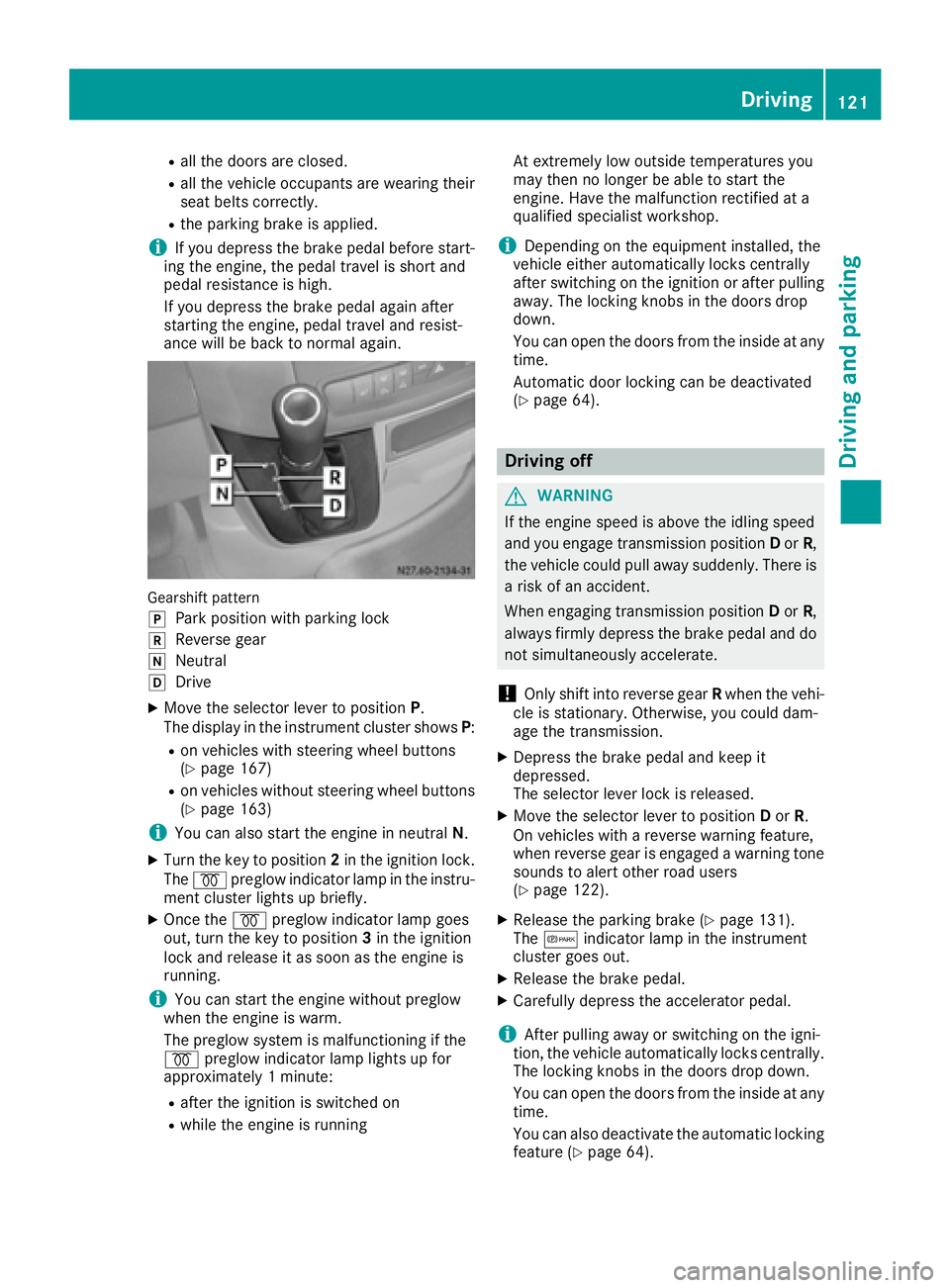
Gearshift pattern
j
Park position with parking lock
kReverse gear
iNeutral
hDrive
XMove the selector lever to position P.
The display in the instrument cluster shows P:
Ron vehicles with steering wheel buttons
(Ypage 167)
Ron vehicles without steering wheel buttons
(Ypage 163)
iYou can also start the engine in neutral N.
XTurn the key to position 2in the ignition lock.
The % preglow indicator lamp in the instru-
ment cluster lights up briefly.
XOnce the %preglow indicator lamp goes
out, turn the key to position 3in the ignition
lock and release it as soon as the engine is
running.
iYou can start the engine without preglow
when the engine is warm.
The preglow system is malfunctioning if the
% preglow indicator lamp lights up for
approximately 1 minute:
Rafter the ignition is switched on
Rwhile the engine is running At extremely low outside temperatures you
may then no longer be able to start the
engine. Have the malfunction rectified at a
qualified specialist workshop.
iDepending on the equipment installed, the
vehicle either automatically locks centrally
after switching on the ignition or after pulling
away. The locking knobs in the doors drop
down.
You can open the doors from the inside at any
time.
Automatic door locking c
an be deactivated
(Ypage 64).
Driving off
GWARNING
If the engine speed is above the idling speed
and you engage transmission position Dor R,
the vehicle could pull away suddenly. There is
a risk of an accident.
When engaging transmission position Dor R,
always firmly depress the brake pedal and do not simultaneously accelerate.
!Only shift into reverse gear Rwhen the vehi-
cle is stationary. Otherwise, you could dam-
age the transmission.
XDepress the brake pedal and keep it
depressed.
The selector lever lock is released.
XMove the selector lever to position Dor R.
On vehicles with a reverse warning feature,
when reverse gear is engaged a warning tone
sounds to alert other road users
(
Ypage 122).
XRelease the parking brake (Ypage 131).
The c indicator lamp in the instrument
cluster goes out.
XRelease the brake pedal.
XCarefully depress the accelerator pedal.
iAfter pulling away or switching on the igni-
tion, the vehicle automatically locks centrally.
The locking knobs in the doors drop down.
You can open the doors from the inside at any
time.
You can also deactivate the automatic locking
feature (
Ypage 64).
Driving121
Driving and parking
Z
Page 126 of 290
ProblemPossible causes/consequences andMSolutions
The engine does not
start.
The starter motor cannot
be heard.The on-board voltage is too low. The battery is too weak or discharged.
XJump-start the vehicle (Ypage 242).
If the engine cannot be jump-started, the starter motor is faulty.
XConsult a qualified specialist workshop.
The engine does not
start.
The starter motor cannot
be heard.The battery is discharged or faulty.
XCheck the battery for damage.
XCharge the battery (Ypage 232).
Automatic transmission
Important safety notes
GWARNING
If the engine speed is above the idling speed
and you engage transmission position Dor R,
the vehicle could pull away suddenly. There is
a risk of an accident.
When engaging transmission position Dor R,
always firmly depress the brake pedal and do not simultaneously accelerate.
!Vehicles with automatic transmission may
roll only briefly in the neutral position N. Pro-
longed rolling of the wheels, e.g. when being
towed, will result in transmission damage.
Towing (
Ypage 243)
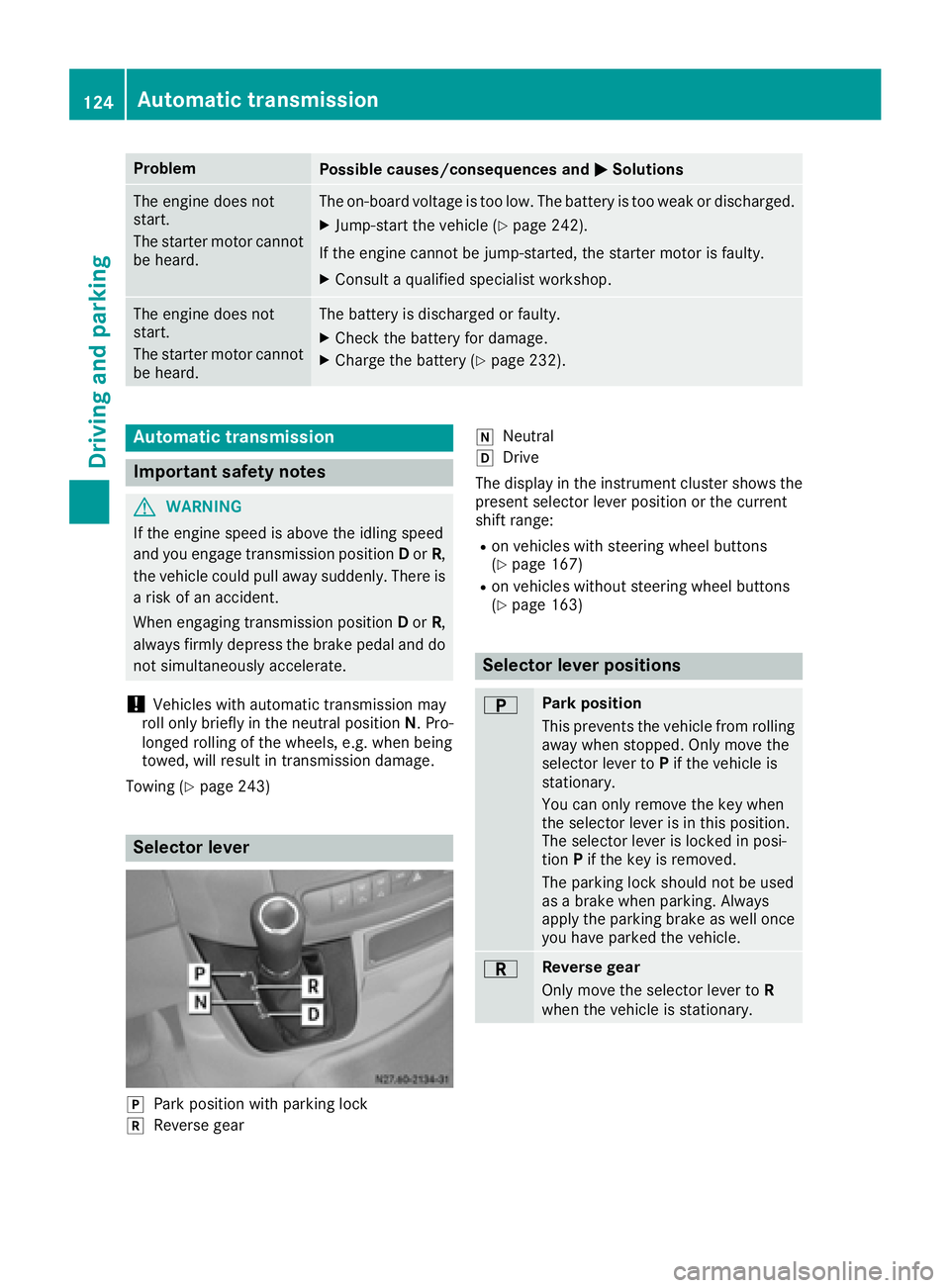
Selector lever
jPark position with parking lock
kReverse gear
iNeutral
hDrive
The display in the instrument cluster shows the
present selector lever position or the current
shift range:
Ron vehicles with steering wheel buttons
(Ypage 167)
Ron vehicles without steering wheel buttons
(Ypage 163)
Selector lever positions
BPark position
This prevents the vehicle from rolling
away when stopped. Only move the
selector lever to Pif the vehicle is
stationary.
You can only remove the key when
the selector lever is in this position.
The selector lever is locked in posi-
tion Pif the key is removed.
The parking lock should not be used
as a brake when parking. Always
apply the parking brake as well once
you have parked the vehicle.
CReverse gear
Only move the selector lever to R
when the vehicle is stationary.
124Automatic transmission
Driving and parking
Page 164 of 290
The display switches off automatically after
approximately 30 seconds if:
Rthe key is in position0in the ignition lock.
Rthe vehicle lighting is not switched on.
Instrument lighting
When the lights are switched on, you can adjust
the brightness of the instrument cluster lighting
using the fand gbuttons.
XTo brighten: press thefbutton.
XTo dim: press the gbutton.
iVehicles with automatic headlamp mode:
the instrument lighting also adapts to auto-
matic headlamp mode.
Tachometer
!
Do not drive in the overrevving range, as this
could damage the engine.
HEnvironmental note
Avoid driving at high engine speeds. This
unnecessarily increases the fuel consumption
of your vehicle and harms the environment as
a result of increased emissions.
The red band in the tachometer indicates the
engine's overrevving range.
To protect the engine, the fuel supply is inter-
rupted when the red band is reached.
Outside temperature
You should pay special attention to road condi-
tions when temperatures are around the freez-
ing point.
On vehicles without steering wheel buttons
(
Ypage 163) and on vehicles with steering
wheel buttons (Ypage 167), the outside tem-
perature display is in the display.
Changes in the outside temperature are dis-
played after a short delay.
Speedometer
The speed can also be shown in the display. You
can find information on the digital speedometer for vehicles without steering wheel buttons
under (
Ypage 163) and for vehicles with steer-
ing wheel buttons under (Ypage 167).
iIn some countries, a warning sounds when
the vehicle reaches the maximum speed limit,
e.g. at 75 mph (120 km/h).
Trip odometer
XTo reset: make sure that the display is show-
ing the trip odometer if you have a vehicle with
steering wheel buttons (
Ypage 167).
XPress and hold the 9reset button until the
trip odometer is reset to 0.0.
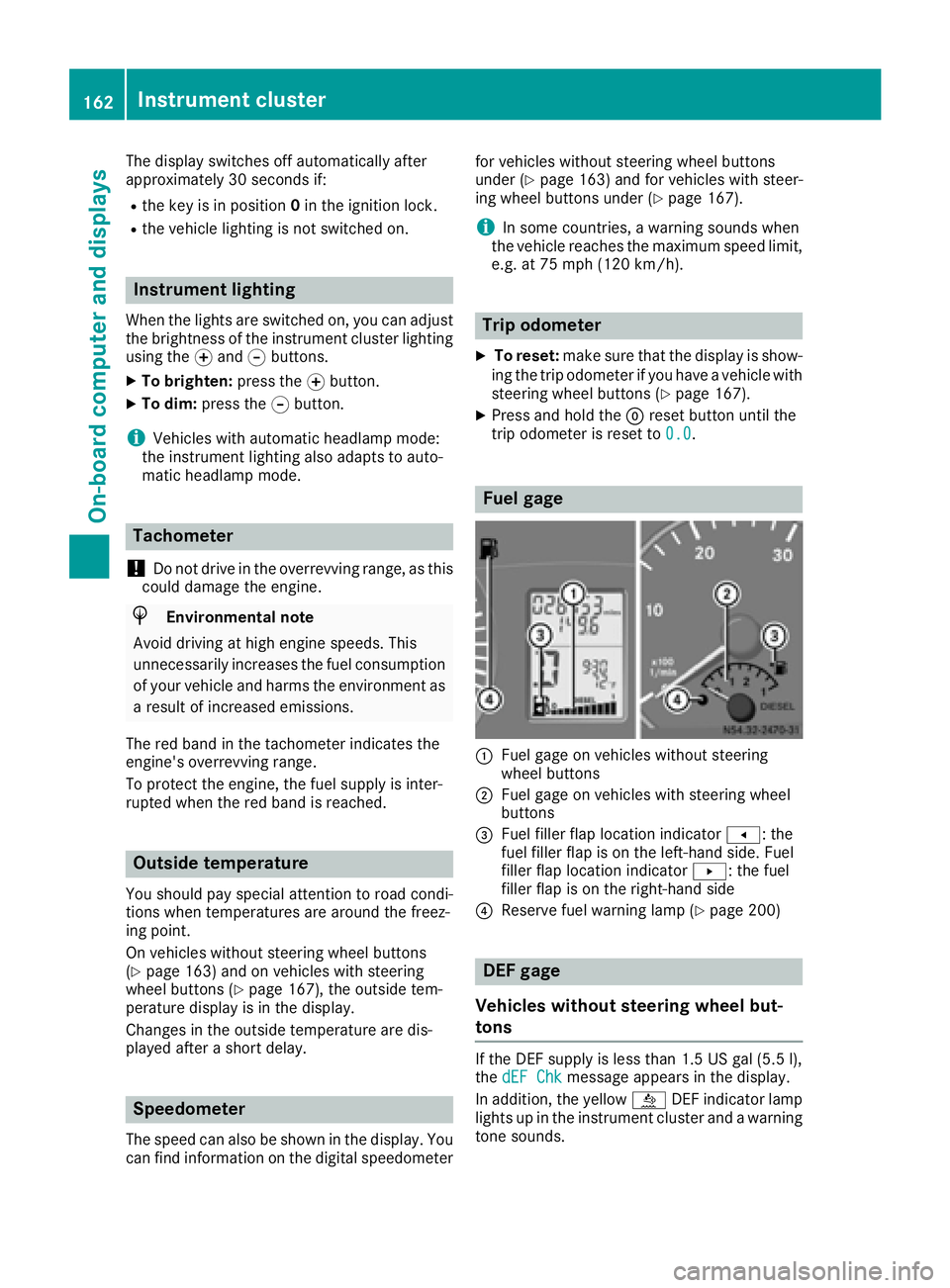
Fuel gage
:Fuel gage on vehicles without steering
wheel buttons
;Fuel gage on vehicles with steering wheel
buttons
=Fuel filler flap location indicator t: the
fuel filler flap is on the left-hand side. Fuel
filler flap location indicator u: the fuel
filler flap is on the right-hand side
?Reserve fuel warning lamp (Ypage 200)
DEF gage
Vehicles without steering wheel but-
tons
If the DEF supply is less than 1.5 US gal (5.5 l),
the dEF Chkmessage appears in the display.
In addition, the yellow åDEF indicator lamp
lights up in the instrument cluster and a warning
tone sounds.
162Instrument cluster
On-board computer and displays
Page 168 of 290
Menu overview
Diagrams
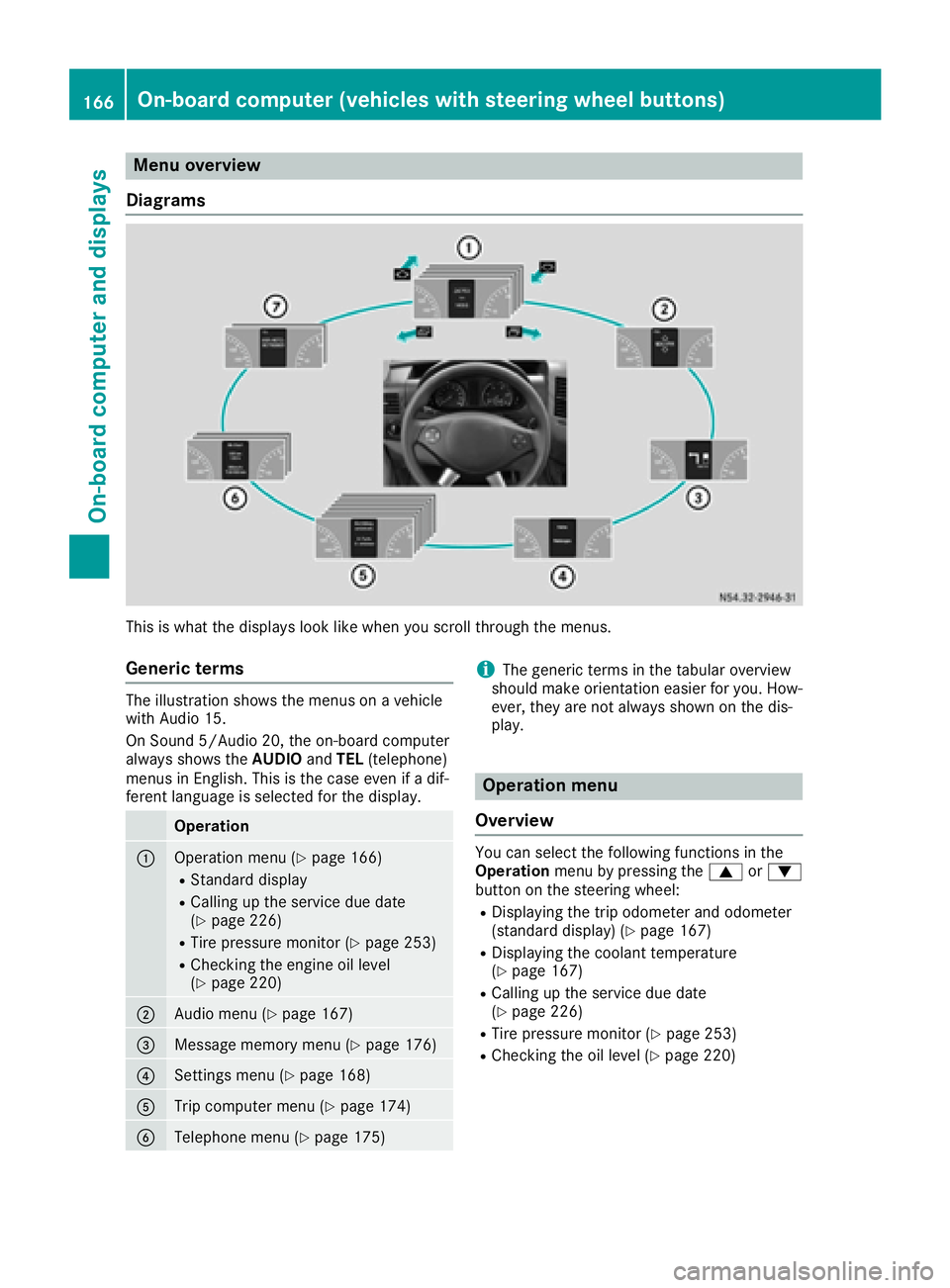
This is what the displays look like when you scroll through the menus.
Generic terms
The illustration shows the menus on a vehicle
with Audio 15.
On Sound 5/Audio 20, the on-board computer
always shows the AUDIOandTEL (telephone)
menus in English. This is the case even if a dif-
ferent language is selected for the display.
Operation
:Operation menu (Ypage 166)
RStandard display
RCalling up the service due date
(Ypage 226)
RTire pressure monitor (Ypage 253)
RChecking the engine oil level
(Ypage 220)
;Audio menu (Ypage 167)
=Message memory menu (Ypage 176)
?Settings menu (Ypage 168)
ATrip computer menu (Ypage 174)
BTelephone menu (Ypage 175)
iThe generic terms in the tabular overview
should make orientation easier for you. How-
ever, they are not always shown on the dis-
play.
Operation menu
Overview
You can select the following functions in the
Operation menu by pressing the 9or:
button on the steering wheel:
RDisplaying the trip odometer and odometer
(standard display) (Ypage 167)
RDisplaying the coolant temperature
(Ypage 167)
RCalling up the service due date
(Ypage 226)
RTire pressure monitor (Ypage 253)
RChecking the oil level (Ypage 220)
166On-board computer (vehicles with steering wheel buttons)
On-board computer and displays
Page 169 of 290
Standard display
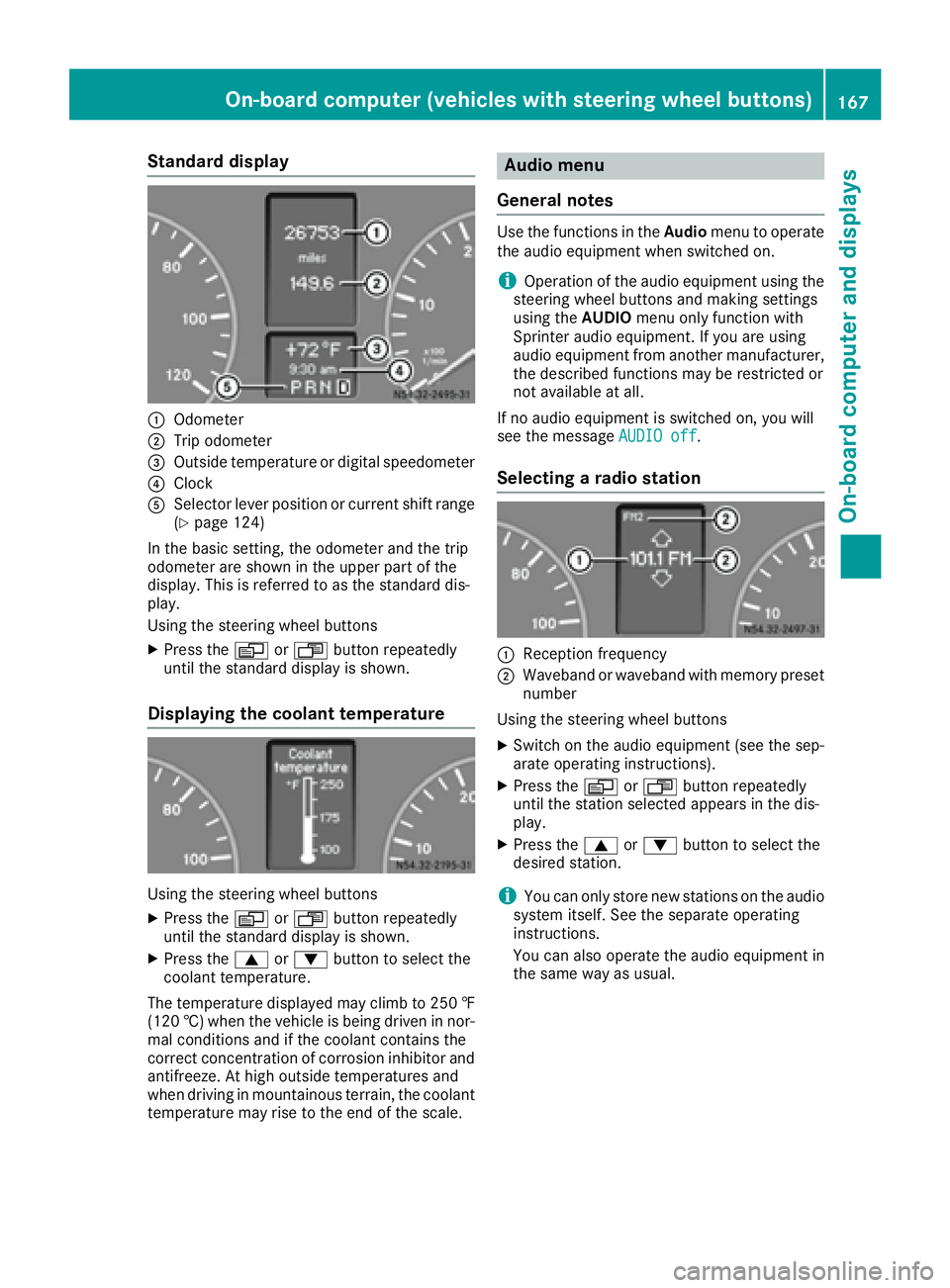
:Odometer
;Trip odometer
=Outside temperature or digital speedometer
?Clock
ASelector lever position or current shift range
(Ypage 124)
In the basic setting, the odometer and the trip
odometer are shown in the upper part of the
display. This is referred to as the standard dis-
play.
Using the steering wheel buttons
XPress the VorU button repeatedly
until the standard display is shown.
Displaying the coolant temperature
Using the steering wheel buttons
XPress the VorU button repeatedly
until the standard display is shown.
XPress the 9or: button to select the
coolant temperature.
The temperature displayed may climb to 250 ‡
(120 †) when the vehicle is being driven in nor-
mal conditions and if the coolant contains the
correct concentration of corrosion inhibitor and
antifreeze. At high outside temperatures and
when driving in mountainous terrain, the coolant
temperature may rise to the end of the scale.
Audio menu
General notes
Use the functions in the Audiomenu to operate
the audio equipment when switched on.
iOperation of the audio equipment using the
steering wheel buttons and making settings
using the AUDIOmenu only function with
Sprinter audio equipment. If you are using
audio equipment from another manufacturer,
the described functions may be restricted or
not available at all.
If no audio equipment is switched on, you will
see the message AUDIO off
.
Selecting a radio station
:Reception frequency
;Waveband or waveband with memory preset
number
Using the steering wheel buttons
XSwitch on the audio equipment (see the sep-
arate operating instructions).
XPress the VorU button repeatedly
until the station selected appears in the dis-
play.
XPress the 9or: button to select the
desired station.
iYou can only store new stations on the audio
system itself. See the separate operating
instructions.
You can also operate the audio equipment in
the same way as usual.
On-board computer (vehicles with steering wheel buttons)167
On-board computer and displays
Z
Page 229 of 290
Additionally, you will see the remaining dis-
tance in miles (mi) or kilometers ( km) or the
remaining time in days ( d).
Vehicles with steering wheel buttons
XPress the VorU button on the steering
wheel until the standard display (Ypage 167)
appears in the display.
XPress the &or* button on the steering
wheel repeatedly until the service message
appears in the display, for example:
R¯ Service A in ... days
R¯Service A in ... mi(km)
Battery
Important safety notes
Work on the battery, e.g. removing or installing,
requires specialist knowledge and the use of
special tools. Therefore, always have work on
the battery carried out at a qualified specialist
workshop.
GWARNING
Work carried out incorrectly on the battery
can lead, for example, to a short circuit and
thus damage the vehicle electronics. This can
lead to function restrictions applying to
safety-relevant systems, e.g. the lighting sys-
tem, ABS (anti-lock braking system) or ESP
®
(Electronic Stability Program). The operating
safety of your vehicle may be restricted. You
could lose control of the vehicle, for example:
Rbraking
Rin the event of abrupt steering maneuver
and/or when the vehicle's speed is not
adapted to the road conditions
There is a risk of an accident.
In the event of a short circuit or a similar inci- dent, contact a qualified specialist workshop
immediately. Do not drive any further. You
should have all work involving the battery car-
ried out at a qualified specialist workshop.
Further information can be found under "ABS"
(
Ypage 53) and under "ESP®" (Ypage 54).
GWARNING
Electrostatic build-up can lead to the creation of sparks, which could ignite the highly explo-
sive gases of a battery. There is a risk of an
explosion.
Before handling the battery, touch the vehicle
body to remove any existing electrostatic
build-up.
The flammable gas mix is produced when the
battery is charged or when the vehicle is jump-
started.
Always make sure that neither you nor the bat-
tery are electrostatically charged. Electrostatic
charging results, for example, from:
Rwearing synthetic clothing
Rfriction between clothing and the seat
Rdragging or pushing the battery across carpet flooring or any other synthetic materials
Rrubbing the battery with cloths or towels.
Comply with the following safety precautions
and take protective measures when handling
batteries.
Risk of explosion. Explosive oxyhy-
drogen is produced when batteries
are being charged. Only charge bat-
teries in well-ventilated areas.
Fire, open flames and smoking are
therefore prohibited when working
on the battery. Avoid creating
sparks.
Battery acid is caustic. Avoid con-
tact with the skin, eyes or clothing.
Wear acid-proof protective gloves. If
skin or clothes are splashed with
acid, neutralize the splashes imme-
diately with soapy water or an acid
neutralizer, and then clean the affec-
ted areas with water. Consult a doc- tor if necessary.
Wear eye protection. When mixing
water and acid, the liquid can splash
into your eyes. Rinse acid splashes
to the eyes immediately with clean
water and contact a doctor immedi-
ately.
Keep children at a safe distance.
Children are not able to assess the
Battery227
Maintenance and care
Z
Page 257 of 290
Using the steering wheel buttons
XTurn the SmartKey to position2in the ignition
lock.
XPress the VorU button repeatedly
until the standard display is shown
(
Ypage 167).
XPress the 9or: button repeatedly
until the current pressure of the individual
tires is shown in the display.
If the vehicle is parked for longer than
20 minutes or you then drive at less than 18 mph
(30 km/h), the Tire pres. displayed
after driving for several minutesmes-
sage appears.
iThe tire pressure value shown in the display
may differ from those measured at a gas sta-
tion using a pressure gage. The on-board
computer will generally give you a more exact
value.
Tire pressure loss warning system
Vehicles with steering wheel buttons
If the tire pressure monitor detects a pressure
loss in one or more tires, the on-board computer
displays the yellow Tire
pres.Adjustpres.warning message. The htire pressure loss
warning lamp in the instrument cluster
(
Ypage 202) flashes for about 60 seconds and
then remains lit.
The pressure of the affected tire is highlighted in
yellow in the on-board computer (
Ypage 176).
If the tire pressure monitor detects a significant
pressure loss in one or more tires, the on-board
computer displays the red Tire pres.
Warn‐ingTiredefectwarning message. Theh
tire pressure loss warning lamp in the instru-
ment cluster (
Ypage 202) flashes for about 60
seconds and then remains lit. An additional
warning tone sounds.
The pressure of the affected tire is highlighted in
yellow in the on-board computer (
Ypage 176).
Restarting the tire pressure monitor
When you restart the tire pressure monitor, the
currently set tire pressure are taken as refer-
ence values for monitoring. In most cases, the tire pressure monitor detects
the new reference values automatically, e.g.
after you have:
Rchanged the tire pressure
Rchanged wheels or tires
Rinstalled new wheels or tires
However, you can also define reference values
manually as described here.
Before restarting the tire pressure monitor:
XSet the tire pressure to the value recommen- ded on the Tire and Loading Information plac-
ard or the tire pressure table on the B-pillar on
the driver's side (
Ypage 250).
Observe the notes on tire pressure when
doing so (
Ypage 250).
XMake sure that the tire pressure is correct on
all four wheels.
Restarting the tire pressure monitor (vehi-
cles without steering wheel buttons):
XTurn the SmartKey to position 2in the ignition
lock.
XPress the 4menu button on the instrument
cluster repeatedly until the display shows the
following message:
+CAL- TPMS
XPress the fbutton on the instrument clus-
ter.
The display shows:
OK TPMS
The tire pressure monitor activation process
has begun. The tire pressures measured for
the individual wheels are stored as the new
reference values, provided that the tire pres-
sure monitor considers them to be plausible.
If you wish to cancel the restart:
XPress the gbutton or the 4menu button on
the instrument cluster.
The activation process is canceled automati-
cally if 30 seconds elapse without input.
Restarting the tire pressure monitor (vehi-
cles with steering wheel buttons):
XTurn the key to position 2in the ignition lock.
XPress the VorU button on the steering
wheel until the standard display (Ypage 167)
appears in the display.
XPress the 9or: button on the steering
wheel repeatedly until the current pressure of
Tire pressure255
Wheels and tires
Z
Page 289 of 290
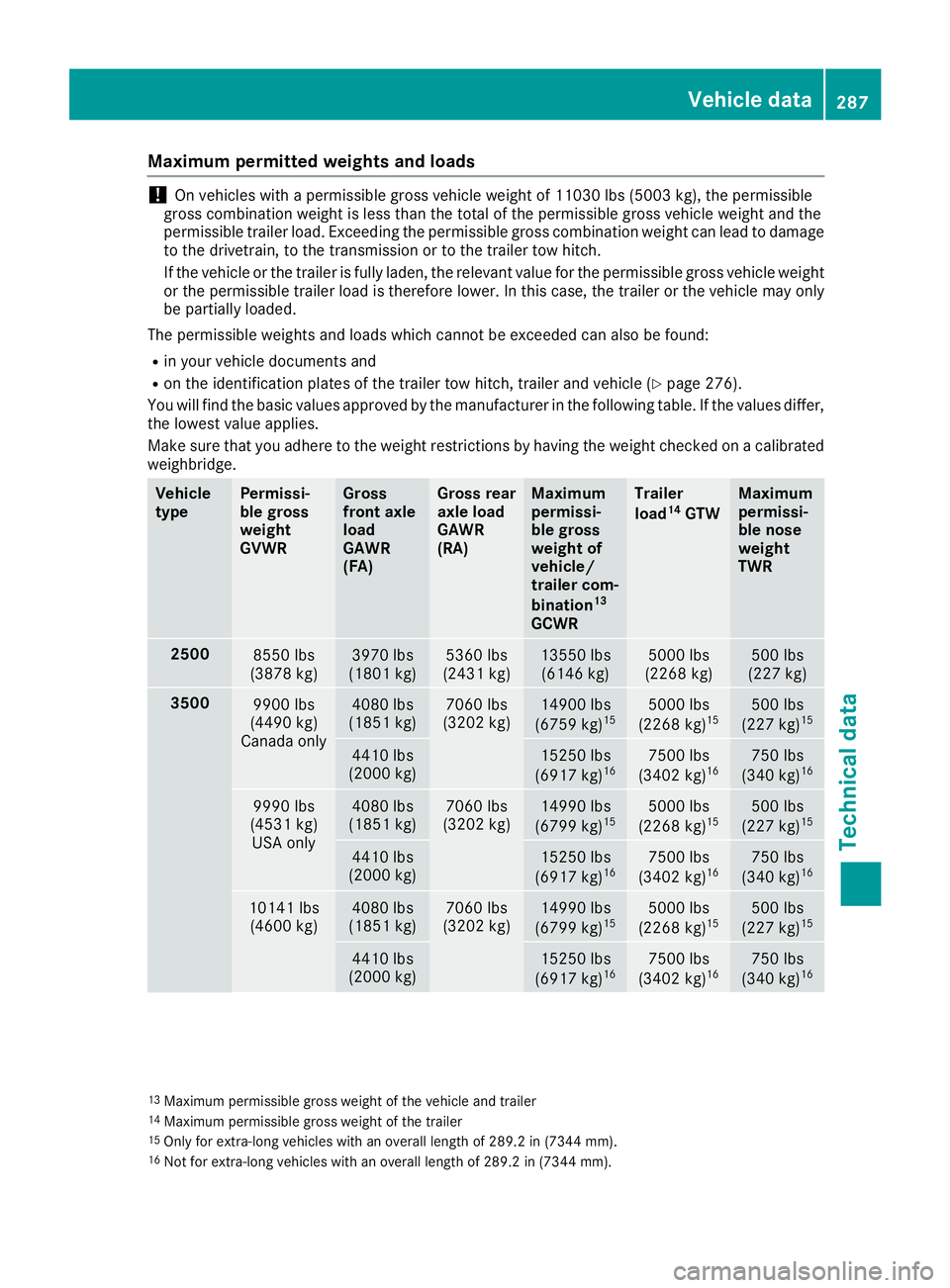
Maximum permitted weights and loads
!On vehicles with a permissible gross vehicle weight of 11030 lbs (5003 kg), the permissible
gross combination weight is less than the total of the permissible gross vehicle weight and the
permissible trailer load. Exceeding the permissible gross combination weight can lead to damage
to the drivetrain, to the transmission or to the trailer tow hitch.
If the vehicle or the trailer is fully laden, the relevant value for the permissible gross vehicle weight
or the permissible trailer load is therefore lower. In this case, the trailer or the vehicle may only
be partially loaded.
The permissible weights and loads which cannot be exceeded can also be found:
Rin your vehicle documents and
Ron the identification plates of the trailer tow hitch, trailer and vehicle (Ypage 276).
You will find the basic values approved by the manufacturer in the following table. If the values differ,
the lowest value applies.
Make sure that you adhere to the weight restrictions by having the weight checked on a calibrated
weighbridge.
Vehicle
typePermissi-
ble gross
weight
GVWRGross
front axle
load
GAWR
(FA)Gross rear
axle load
GAWR
(RA)Maximum
permissi-
ble gross
weight of
vehicle/
trailer com-
bination
13
GCWR
Trailer
load14GTW
Maximum
permissi-
ble nose
weight
TWR
25008550 lbs
(3878 kg)3970 lbs
(1801 kg)5360 lbs
(2431 kg)13550 lbs (6146 kg)5000 lbs
(2268 kg)500 lbs
(227 kg)
35009900 lbs
(4490 kg)
Canada only4080 lbs
(1851 kg)7060 lbs
(3202 kg)14900 lbs
(6759 kg)155000 lbs
(2268 kg)15500 lbs
(227 kg)15
4410 lbs
(2000 kg)15250 lbs
(6917 kg)167500 lbs
(3402 kg)16750 lbs
(340 kg)16
9990 lbs
(4531 kg) USA only4080 lbs
(1851 kg)7060 lbs
(3202 kg)14990 lbs
(6799 kg)155000 lbs
(2268 kg)15500 lbs
(227 kg)15
4410 lbs
(2000 kg)15250 lbs
(6917 kg)167500 lbs
(3402 kg)16750 lbs
(340 kg)16
10141 lbs (4600 kg)4080 lbs
(1851 kg)7060 lbs
(3202 kg)14990 lbs
(6799 kg)155000 lbs
(2268 kg)15500 lbs
(227 kg)15
4410 lbs
(2000 kg)15250 lbs
(6917 kg)167500 lbs
(3402 kg)16750 lbs
(340 kg)16
13Maximum permissible gross weight of the vehicle and trailer14Maximum permissible gross weight of the trailer15Only for extra-long vehicles with an overall length of 289.2 in (7344 mm).16Not for extra-long vehicles with an overall length of 289.2 in (7344 mm).
Vehicle data287
Technical data
Z