oil change MERCEDES-BENZ SPRINTER 2016 MY16 Operator’s Manual
[x] Cancel search | Manufacturer: MERCEDES-BENZ, Model Year: 2016, Model line: SPRINTER, Model: MERCEDES-BENZ SPRINTER 2016Pages: 290, PDF Size: 6.44 MB
Page 6 of 290
Overview ........................................124
Problem (malfunction) ................... 127
Releasing the parking lock man-
ually ............................................... 127
Selector lever ................................ 124
Selector lever positions ................. 124
Shift ranges ................................... 125
Starting the engine ........................ 120
Touchshift ...................................... 125
Trailer towing ................................. 126
Transmission oil change ................ 282
Automatic transmission emer-
gency mode ....................................... 127
AUX port ............................................. 211
Auxiliary heater
see Auxiliary warm-air heater
see Hot-water auxiliary heater
Auxiliary heating
Activating/deactivating heater
booster mode ................................ 111
Adjusting ....................................... 173
Conditions for switching on ........... 108
Heating time .................................. 107
Important safety notes .................. 106
Operating with the button (control
panel) ............................................ 108
Operation with the remote con-
trol ................................................. 109
Operation with the timer ................ 114
Selecting a switch-on time ............. 108
Setting the switch-on time ............. 109
see Auxiliary heating
see Auxiliary warm-air heater
see Hot-water auxiliary heater
Auxiliary warm-air heater
Problem (malfunction) ................... 117
Axle load, permissible (trailer tow-
ing) ...................................................... 287
B
Backup lamps
Replacing bulbs ............................... 89
Backup lamps (Chassis Cab)
Replacing bulbs ............................... 90
BAS (Brake Assist System)
Display message ............................ 182
Function/notes ................................ 54 Indicator lamp ................................ 195
Basic settings
see Settings
Battery
Isolating switch .............................. 118
Replacing (SmartKey) ......................6 1
Battery (SmartKey)
Checking .......................................... 61
Important safety notes .................... 61
Replacing ......................................... 61
Battery (vehicle)
Care ............................................... 232
Charge indicator lamp ................... 198
Charging ........................................ 232
Disconnecting and connecting ....... 229
Disconnecting and connecting
(engine compartment) ................... 231
Display message ............................ 192
Important safety notes .................. 227
Installing/removing (engine com-
partment) ....................................... 231
Jump starting ................................. 242
Location ......................................... 228
Removing and installing ................. 230
Removing and installing the floor
covering ......................................... 228
Before driving off
Important safety notes .................. 120
Belt
see Seat belts
Bleeding the fuel system .................. 123
Blind Spot Assist
Activating/deactivating ......... 146, 173
Notes/function .............................. 144
Trailer towing ................................. 146
Bottle holder
see Cup holder
Brake Assist
see BAS (Brake Assist System)
Brake Assist System
see BAS (Brake Assist System)
Brake fluid
Checking the level ......................... 223
Display message ............................ 183
Notes ............................................. 283
Warning lamp ................................. 195
4Index
Page 12 of 290
Checking the oil level (on-board
computer) ...................................... 220
Checking the oil level using the
dipstick .......................................... 221
Dis play message ............................ 190
Fill ing capacity .............................. .282
Information about oil consump-
tion ................................................ 282
Mixing ............................................ 281
Notes about oil grades ................... 280
Oil change ...................................... 282
Oil level (note) ............................... 220
Viscosity ........................................ 281
Warning lamp ................................. 198
Engine speed setting (working
mode) ................................................. 154
Engine, jump-starting ....................... 242
ESP
®(Electronic Stability Pro-
gram)
Display message ............................ 184
Important safety information ........... 54
Indicator lamp ................................ 197
Warning lamp ................................. 194
Exhaust check ................................... 134
Exhaust gas aftertreatment
DEF level indicator ......................... 162
DEF reducing agent ....................... 279
Diesel Exhaust Fluid (DEF) ............. 279
Display messages (vehicles with
steering wheel buttons) ................. 187
Display messages (vehicles with-
out steering wheel buttons) ........... 178
Indicator lamp ....................... 197, 201
Malfunction ....................................1 88
Refilling DEF .................................. 129
Exterior lighting
see Lights
Exterior mirrors
Adjusting ......................................... 78
Important safety notes .................... 78
Eye glasse
s compartment
................. 205
F
Fire extinguisher............................... 242
First-aid kit ......................................... 241 Flat tire
Changing a wheel/mounting the
spare wheel ................................... 267
General notes ................................ 266
Fog lamps
Switching on/off .............................. 80
Fogged-up windows
see Climate control
Folding seat ......................................... 74
Frequencies
Mobile phone ................................. 275
Two-way radio ................................ 275
Front fog lamps
Switching on/off .............................. 80
Front interior light
Replacing bulbs ............................... 92
Front windshield
see Windshield
Fuel
Additives (diesel) ........................... 279
Consumption information .............. 279
Consumption statistics .................. 174
Diesel at very low outside temper-atures ............................................ 278
Display message ............................ 189
Driving tips ....................................1 33
Fuel gauge ..................................... 162
Problem (malfunction) ................... 129
Quality (diesel) ............................... 278
Refueling ........................................ 127
Showing the range (on-board
computer with steering wheel but-
tons) .............................................. 174
Showing the range (vehicles with
steering wheel buttons) ................. 174
Tank content/reserve fuel ............. 278
Fuel filter with water separator
draining ......................................... 224
Indicator lamp ................................ 202
Fuel gauge ......................................... 162
Fuel tank
Problem (malfunction) ................... 129
Fuel tank content
Reserve, display message .............. 189
Fuses .................................................. 246
10Index
Page 34 of 290
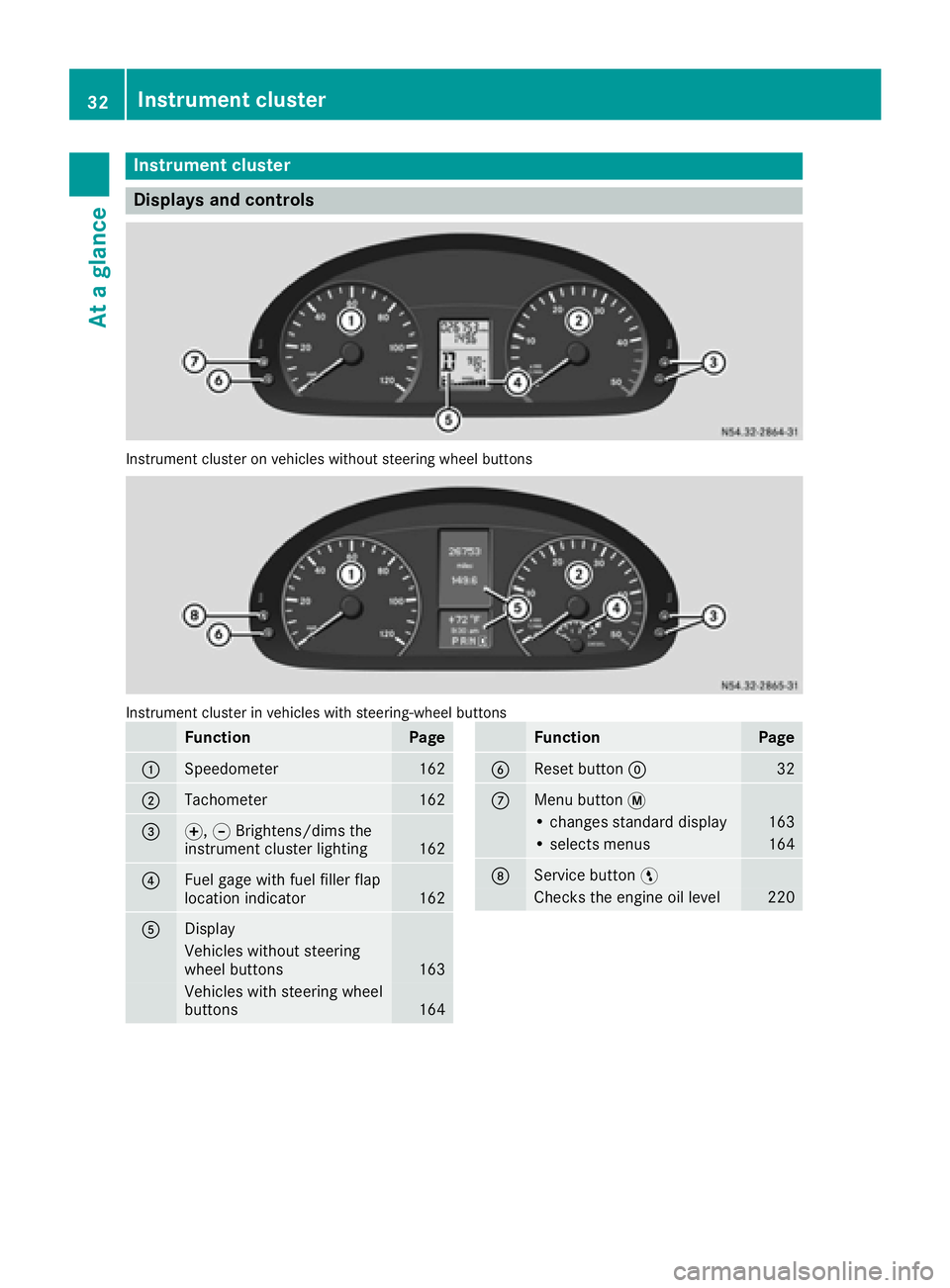
Instrument cluster
Displays and controls
Instrumentcluste ron vehicles without steering whee lbuttons
Instrumen tcluste rin vehicles wit hsteering-wheel buttons
FunctionPag e
:Speedometer162
;Tachometer162
=f, gBrightens/dims th e
instrumen tcluste rlighting16 2
?Fue lgage wit hfuel filler flap
location indicator16 2
ADisplay
Vehicles without steering
whee lbuttons16 3
Vehicles wit hsteering whee l
buttons16 4
FunctionPag e
BReset butto n932
CMen ubutto n4
• changes standard display16 3
•select smenus16 4
DService butto nË
Checks th eengin eoil level22 0
32Instrument cluster
At a glance
Page 61 of 290
Useful information
This Operator's Manual describes all models as
well as standard and optional equipment of your
vehicle that were available at the time of going
to print. Country-specific variations are possi-
ble. Note that your vehicle may not be equipped
with all of the described functions. This also
applies to systems and functions relevant to
safety.
Read the information on qualified specialist
workshops (
Ypage 26).
Key
Important safety notes
GWARNING
When the double locks are activated, the
doors can no longer be opened from the
inside. People in the vehicle can no longer get
out, e.g. in hazardous situations. There is a
risk of injury.
Therefore, do not leave any people unsuper-
vised in the vehicle, particularly children, eld-
erly people or people in need of special assis-
tance. Do not activate the double lock when
people are in the vehicle.
GWARNING
If you leave children unsupervised in the vehi-
cle, they could set it in motion by, for example:
Rrelease the parking brake.
Rshift the automatic transmission out of park
position Por shift manual transmission into
neutral.
Rstart the engine.
In addition, they may operate vehicle equip-
ment and become trapped. There is a risk of
an accident and injury.
When leaving the vehicle, always take the
SmartKey with you and lock the vehicle. Never
leave children unsupervised in the vehicle.
GWARNING
If you attach heavy or large objects to the
SmartKey, the SmartKey could be uninten-
tionally turned in the ignition lock. This could
cause the engine to be switched off. There is a risk of an accident.
Do not attach any heavy or large objects to the
SmartKey. Remove any bulky key rings before
inserting the SmartKey into the ignition lock.
Do not keep the key with remote control:
Rwith electronic devices, e.g. a mobile phone
or another key with remote control
Rwith metallic objects, e.g. coins or metal foil
Rin metallic objects, e.g. metal cases
This can affect the key's functionality.
Key functions of the remote control
General notes
The vehicle is equipped with either 2 or 4 remote
controls with a folding key, or 4 mechanical
keys. In this Operator's Manual, both the
mechanical keys and the keys with remote con-
trol are referred to as keys. The remote control
key has a range of up to 32 ft (10 m). Use the
remote control of the key only when in immedi-
ate proximity of the vehicle. This prevents theft.
Remote controls that are not included in the
scope of delivery for the vehicle must be pro-
grammed before use. Further information can
be obtained at any authorized Sprinter Dealer.
The key's remote control locks/unlocks the
driver's door and/or the following centrally if
the factory settings have not been changed:
Rthe driver's and the front-passenger door
Rthe sliding doors
Rthe rear doors
iIf the driver's or front-passenger door is not
closed, the corresponding door is not locked.
If a sliding door or a rear door is not closed
properly, none of the rear doors are locked.
If there is a key is in the ignition lock, the remote
control is inoperative. When locking or unlock-
ing the vehicle with the remote control, always
pay attention to the indicator lamp signaling.
Also check the locking knobs of the doors.
Key59
Opening and closing
Z
Page 136 of 290
Do not drink or take drugs and drive or allow
anyone to drive who has been drinking or tak-ing drugs.
Emission control
GWARNING
Combustion engines emit poisonous exhaust
gases such as carbon monoxide. Inhaling
these exhaust gases leads to poisoning. There
is a risk of fatal injury. Therefore never leave
the engine running in enclosed spaces with-
out sufficient ventilation.
Certain engine systems are designed to keep
the level of poisonous substances in exhaust
fumes within legal limits.
These systems only work optimally if they are
maintained exactly in accordance with the man-
ufacturer's specifications. Any work on the
engine should therefore be carried out by quali-
fied and authorized technicians at a Sprinter
dealer.
The engine settings must not be changed under any circumstances. In addition, all specific
maintenance work must be carried out at regu-
lar intervals and in accordance with the service
requirements of the dealer listed here on the
inside title page. Details can be found in the
Maintenance Booklet.
Short journey
!
If the vehicle is predominantly used for
short-distance driving or is stationary for long
periods, this could lead to a malfunction in the automatic cleaning function for the diesel par-
ticle filter. This can lead to blockage of the
diesel particle filter. This can also result in fuel
collecting in the engine oil and cause engine
failure.
Therefore, if you mainly drive short distances,
drive on a highway or an inter-urban road for
20 minute severy 300 miles (500 km). This facil-
itates the diesel particle filter's burn-off proc-
ess.
Speed limiter
GWARNING
Exceeding the stated tire load-bearing capa-
city and the approved maximum speed could
lead to tire damage or the tire bursting. There is a risk of accident.
Therefore, only use tire types and sizes
approved for your vehicle model. Observe the
tire load rating and speed rating required for
your vehicle.
As the driver, you must find out about the max-
imum speed of the vehicle and the resulting per-
missible maximum speed of the tires (tire and
tire pressure). In particular, also observe the tire
approval regulations for each country.
You must not exceed the speed limit for the tires
listed in the tire pressure tables. You can find
information on tire pressures in the "Wheels and
tires" section (
Ypage 250).
You can permanently limit the maximum speed
of your vehicle to 65 mph (105 km/h) or 75 mph (120 km/h).
We recommend that you have the maximum
speed programmed by an authorized Sprinter
dealer.
Before overtaking, take into consideration that
the engine speed limiter prevents the speed
increasing beyond the programmed maximum
speed.
Driving abroad
Service
An extensive network of authorized Sprinter
Dealers is also at your disposal when you are
traveling abroad. Nevertheless, please bear in
mind that service facilities or replacement parts
may not always be immediately available. You
can obtain a list of workshops at any authorized
Sprinter Dealer.
Fuel
In some countries, only fuels with a higher sulfur
content are available.
Unsuitable fuel can cause engine damage. Infor-
mation on fuel (
Ypage 277).
134Driving tips
Driving and parking
Page 140 of 290
could slip sideways, tip and rollover. There is arisk of an accident.
Always drive on a steep incline in the line of
fall (straight up or down) and do not turn the
vehicle.
GWARNING
When driving off-road, your body is subject to
forces from all directions, due to the uneven
surface. You could be thrown from your seat,
for instance. There is a risk of injury.
Always wear a seat belt, even when driving off-
road.
GWARNING
If you drive over obstacles or in ruts, the steer-
ing wheel may jerk out of your grip, causing
injury to your hands.
Always hold the steering wheel firmly with
both hands. When driving over obstacles, you
must expect steering forces to increase
briefly and suddenly.
GWARNING
Flammable material such as leaves, grass or
twigs may ignite if they come into contact with
hot parts of the exhaust system. There is a risk of fire.
When driving off road or on unpaved roads,
check the vehicle's underside regularly. In
particular, remove parts of plants or other
flammable materials which have become
trapped. In the case of damage, contact a
qualified specialist workshop.
!When driving off-road or on unpaved surfa-
ces, check the underside of the vehicle and
the wheels and tires at regular intervals. In
particular, remove any trapped foreign
objects, e.g. stones and branches.
Such foreign objects may:
Rdamage the chassis, the fuel tank or the
brake system
Rcause imbalances and thus vibrations
Rbe flung out when you continue driving
If there is any damage, inform a qualified spe-
cialist workshop. When driving off-road and on construction sites,
sand, mud and water mixed with oil, for exam-
ple, may get into the brakes. This may lead to a
reduction in braking performance or total brake
failure, also as a result of increased wear. The
braking characteristics will vary depending on
the material that has got into the system. Clean
the brakes after driving off-road. If you then
notice reduced braking performance or hear
scraping noises, have the brake system checked
at a
quali
fied specialist workshop. Adjust your
driving style to the changed braking character-
istics.
Driving off-road or on construction sites increa-
ses the possibility of vehicle damage which may
in turn lead to the failure of certain assemblies
and systems. Adapt your driving style to the off- road driving conditions. Drive carefully. Have
any vehicle damage rectified at a qualified spe-
cialist workshop as soon as possible.
When driving on rough terrain, do not shift the
transmission into the neutral position. You could
lose control when attempting to brake the vehi-
cle with the service brake. If your vehicle cannot
manage an uphill slope, drive back down the
slope in reverse gear.
When loading your vehicle for driving off-road or on a construction site, keep the vehicle's center
of gravity as low as possible.
Checklist before driving off-road
XCheck the fuel and DEF levels (Ypage 162)
and top up (Ypage 129).
XEngine: check the oil level (Ypage 220) and
add oil (Ypage 222).
Before driving up or down steep gradients, fill
the oil to the maximum level.
iIf you drive up or down steep gradients, the
4 symbol may appear in the display. The
engine operating safety is not put at risk if you
have filled the engine oil to the maximum level
before the journey.
XVehicle tool kit: check that the jack is work-
ing (Ypage 240).
XMake sure that a lug wrench (Ypage 240),
wooden underlay for the jack, a robust tow
cable and a folding spade are carried in the
vehicle.
XWheels and tires: check the tire tread depth
(Ypage 248) and tire pressure
(Ypage 250).
138Driving tips
Driving and parking
Page 166 of 290
Using thef,g,4or9 adjustment buttons,
you can select the following functions:
RCalling up the service due date
(Ypage 226)
RChecking the oil level (Ypage 220)
RChecking the DEF supply (Ypage 162)
RPreselecting/setting the auxiliary heating
switch-on time (Ypage 108)
RTire pressure monitor (Ypage 253)
RSetting the time (Ypage 164)
RActivating/deactivating Highbeam Assist
(Ypage 171)
RSetting the daytime running lamps
(Ypage 79)
Setting the time
XTurn the key to position 2in the ignition lock.
XPress the 4menu button repeatedly until the
hours figure flashes.
XPress the forg button to set the hour.
XPress the 9reset button.
The minute display flashes.
XPress the forg button to set the minute.
iIf you keep the forg button pressed, the
value will change continuously.
Activating/deactivating Highbeam
Assist
XTurn the key to position 2in the ignition lock.
XPress the 4menu button repeatedly until the
_ indicator lamp flashes and the onorOFFmessage appears in the display.
XUse the forg button to switch Highbeam
Assist on/off.
Switching the daytime running lamps
on/off
If you switch the daytime running lamps on, the
daytime running lamps will automatically light
up when the engine is running.
For safety reasons, it is only possible to change
this setting when the vehicle is stationary. The
factory setting is on
in countries in which day-
time running lamp mode or daytime running
lamps are mandatory.
XTurn the key to position 2in the ignition lock.
XPress the 4menu button repeatedly until the
L indicator lamp flashes and the onorOFFmessage appears in the display.
XPress the forg button to activate or deac-
tivate the daytime running lamps.
iUSA only:
If you turn the light switch to TorL,
the corresponding light switches on. If you
turn the light switch to Ã, the daytime
running lamps remain switched on.
Canada only:
If you turn the light switch to L, the low-
beam headlamps switch on. If you turn the
light switch to TorÃ, the daytime run-
ning lamps remain switched on.
On-board computer (vehicles with
steering wheel buttons)
Operating the on-board computer
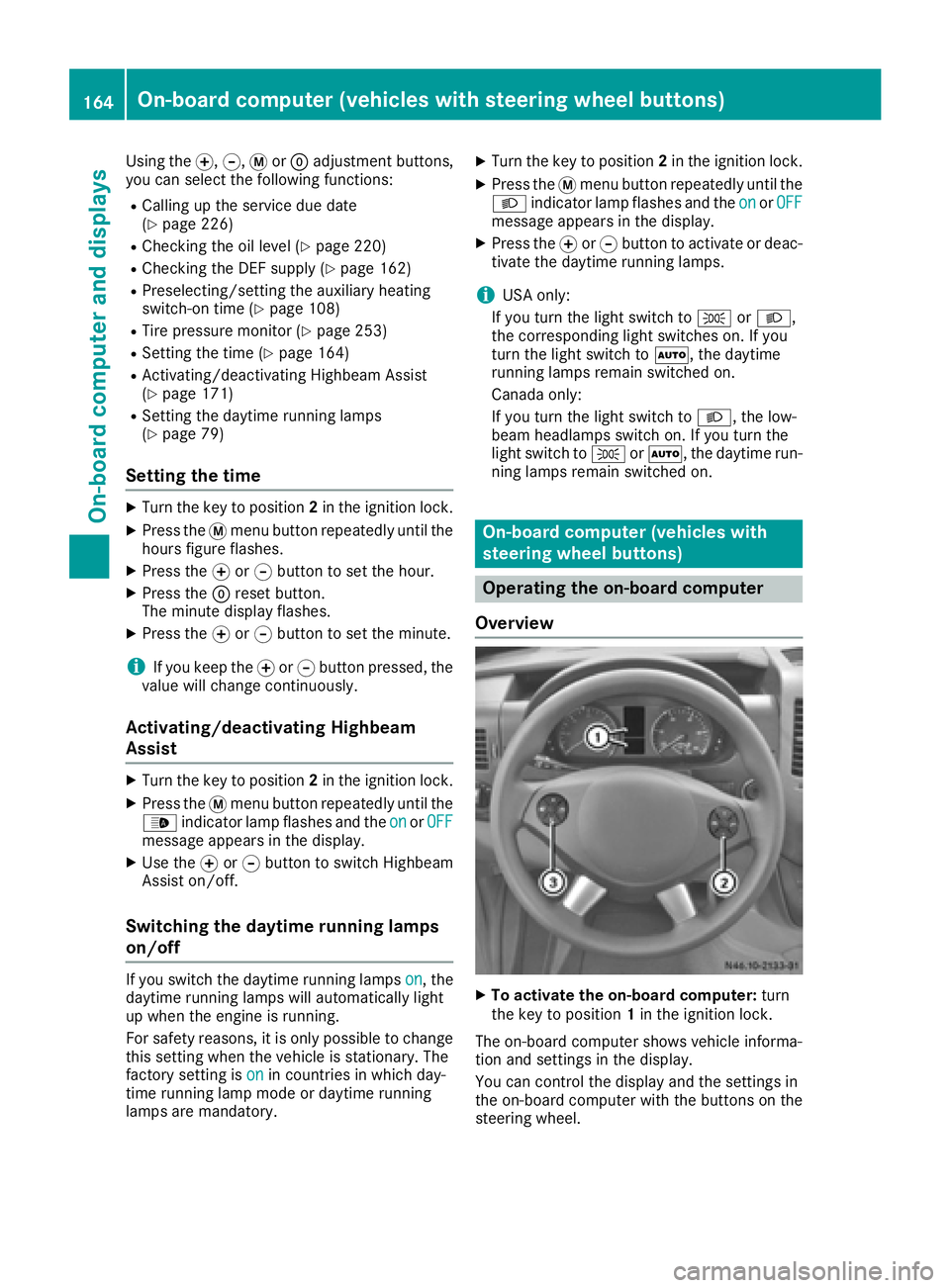
Overview
XTo activate the on-board computer: turn
the key to position 1in the ignition lock.
The on-board computer shows vehicle informa-
tion and settings in the display.
You can control the display and the settings in
the on-board computer with the buttons on the
steering wheel.
164On-board computer (vehicles with steering wheel buttons)
On-board computer and displays
Page 269 of 290
tional tires, an arrow on the sidewall shows the
prescribed direction of rotation of the tire.
Twin rear tires:if the tires are of identical
dimensions, you can rotate the wheels on the
front axle and the inner wheels on the rear axle
in pairs such that the original direction of tire
rotation is retained. With unidirectional tires,
you may rotate the outside wheels at the rear
axle from one side to the other.
Direction of rotation
Tires with a specified direction of rotation have
additional benefits, e.g. if there is a risk of hydro-
planing. You will only gain these benefits if the
correct direction of rotation is observed.
An arrow on the sidewall of the tire indicates its
correct direction of rotation.
You may mount a spare wheel against the direc-
tion of rotation. Observe the time restriction on
use as well as the speed limitation specified on
the spare wheel.
Storing wheels
Store wheels that are not being used in a cool,
dry and preferably dark place. Protect the tires
from contact with oil, grease and fuel.
Mounting a wheel
Vehicle preparation
XStop the vehicle as far away as possible from
traffic and on a level, firm and non-slip sur-
face.
XIf your vehicle poses a risk to approaching
traffic, switch on the hazard warning lamps.
XApply the parking brake.
XTurn the front wheels to the straight-ahead
position.
XMove the selector lever of the automatic
transmission to position P.
XSwitch off the engine.
XPassengers should leave the vehicle. Make
sure that the passengers are not endangered
as they do so.
XMake sure that no one is near the danger area
while the wheel is being changed. Anyone
who is not directly assisting in the wheel change should, for example, stand behind the
barrier.
XPlace the warning triangle or warning lamp at
a suitable distance.
Observe legal requirements.
XSecure the vehicle to prevent it from rolling
away.
iObserve the safety notes on parking in the
section on "Driving and parking"
(
Ypage 130).
XOn level terrain: place chocks or other suit-
able objects under the front and rear of the
wheel that is diagonally opposite the wheel to
be changed.
XOn slight inclines: place chocks or other
suitabl e objects under the wheels on the front
and rear axles opposite the wheel to be
changed.
XTake the vehicle tool kit and the jack from the
footwell on the front-passenger side
(
Ypage 240).
XRemove the spare wheel from the spare wheel
bracket (Ypage 273). Observe the safety
notes in the "Spare wheel" section
(
Ypage 272).
XOn wheels with wheel bolts, remove the hub
caps.
XAssemble the lug wrench extension using the
middle rod and the rod with the largest diam-
eter from the three-piece jack pump lever.
XStarting with the middle rod, slide the lug
wrench extension as far as it will go onto the
lug wrench.
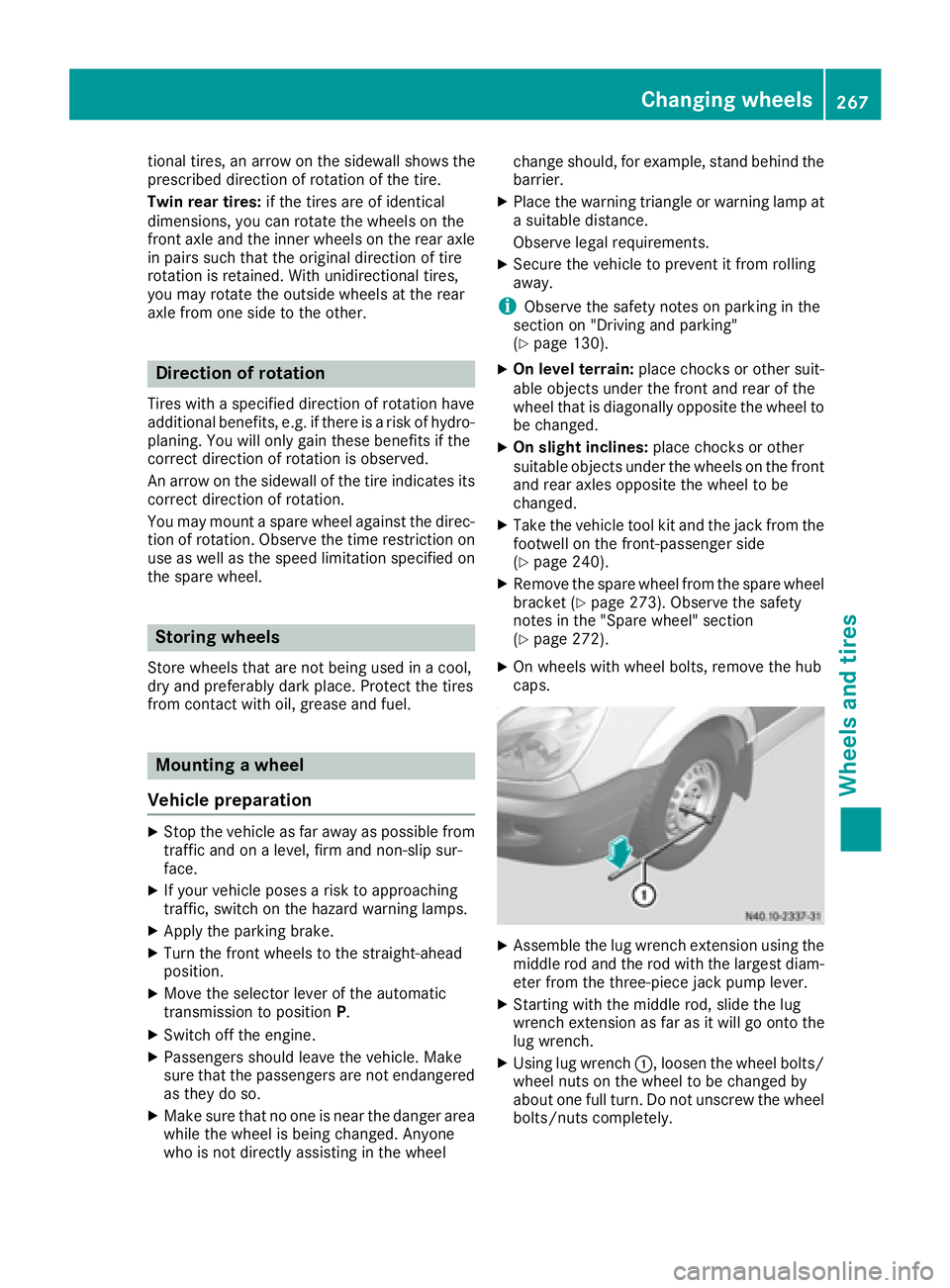
XUsing lug wrench :, loosen the wheel bolts/
wheel nuts on the wheel to be changed by
about one full turn. Do not unscrew the wheel bolts/nuts completely.
Changing wheels267
Wheels an d tires
Z
Page 272 of 290
wide tire at a qualified specialist workshop
immediately.
!Vehicles with Super Single tires:if you
install the spare wheel, do not exceed the
maximum speed of 40 mph (60 km/h) and do
not drive further than 65 miles(100 km).
The transmission could otherwise be dam-
aged by the difference in wheel rotation
speeds.
On vehicles with Super Single tires, you must
attach the narrow spare wheel to the rear axle by
means of an adapter. The adapter is bolted to
the spare wheel using the adapter bolts for
transportation.
The handling characteristics of your vehicle are affected when driving with a spare wheel instal-
led. After changing a wheel, drive to the nearest
specialist workshop and have the spare wheel
replaced with a wheel and tire assembly that hasa Super Single tire.
XClean the wheel and wheel hub contact sur-
faces.
XUnscrew the six adapter bolts on the spare
wheel and remove the adapter.
XTighten the adapter with the six adapter boltsevenly in a crosswise pattern through the
outer holes on the wheel hub.
XTighten the six adapter bolts on the wheel hub
to a tightening torque of 177 lb-ft(240 Nm).
XPush the wheel onto the adapter and attach it.
Mounting a new wheel
GWARNING
Oiled or greased wheel bolts or damaged
wheel bolts/hub threads can cause the wheel bolts to come loose. As a result, you could
lose a wheel while driving. There is a risk of
accident.
Never oil or grease wheel bolts. In the event of
damage to the threads, contact a qualified
specialist workshop immediately. Have the
damaged wheel bolts or hub threads
replaced/renewed. Do not continue driving.
GWARNING
If you tighten the wheel bolts or wheel nuts
when the vehicle is raised, the jack could tip
over. There is a risk of injury.
Only tighten the wheel bolts or wheel nuts
when the vehicle is on the ground.
Always observe the instructions and safety
notes on "Changing a wheel" (
Ypage 266).
Only use wheel bolts or wheel nuts that have
been designed for the wheel and the vehicle. For safety reasons, we recommend that you only
use wheel bolts or wheel nuts which have been
approved for Sprinter vehicles and the respec-
tive wheel.
!For a steel wheel, only use the short wheel
bolts to mount the steel spare wheel. Using
other wheel bolts to mount the steel spare
wheel could damage the brake system.
!On vehicles equipped with a tire pressure
monitor, electronic components are located
in the wheel.
Tire-mounting tools should not be used near
the valve. This could damage the electronic
components.
Only have tires changed at a qualified spe-
cialist workshop.
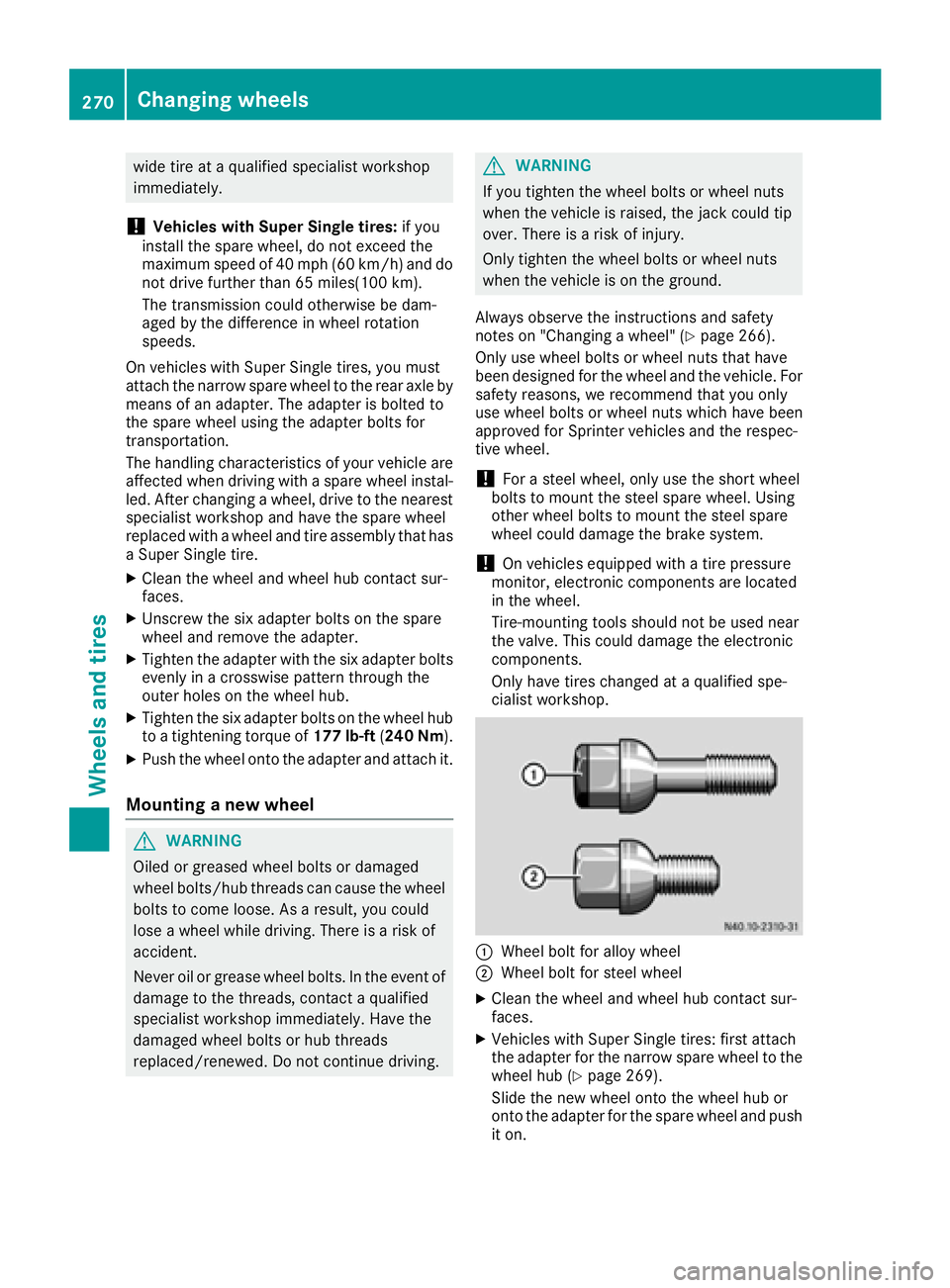
:Wheel bolt for alloy wheel
;Wheel bolt for steel wheel
XClean the wheel and wheel hub contact sur-
faces.
XVehicles with Super Single tires: first attach
the adapter for the narrow spare wheel to the
wheel hub (
Ypage 269).
Slide the new wheel onto the wheel hub or
onto the adapter for the spare wheel and push
it on.
270Changing wheels
Wheels and tires
Page 279 of 290
iSuch data is vehicle-specific and may differ
from that shown. Always observe the specifi-
cations on your vehicle's identification plate.
Engine number
The engine number is stamped on the crank-
case. More information may be obtained at any
qualified specialist workshop.
Service products and capacities
Important safety notes
GWARNING
Service products may be poisonous and haz-
ardous to health. There is a risk of injury.
Comply with instructions on the use, storage
and disposal of service products on the labels
of the respective original containers. Always
store service products sealed in their original
containers. Always keep service products out
of the reach of children.
HEnvironmental note
Dispose of service products in an environ-
mentally responsible manner.
Service products include the following:
RFuels, e.g. diesel
RAdditives for the exhaust gas aftertreatment,
e.g. Diesel Exhaust Fluid (DEF)
RLubricants, e.g. engine oil, transmission oil
RCoolant
RBrake fluid
RWasher fluid
RClimate control system refrigerants
Approved service products comply with the
highest quality standards and are listed in the
MB Specifications for Service Products. Only
use service products approved for the vehicle.
This is an important condition for the warranty.
You will recognize the approved service prod-
ucts by the inscription on the container: MB
Approval (e.g. MB Approval 228.5)
Other identifications and recommendations
refer to quality level or a specification according to an MB Sheet Number (e.g. MB 228.5). They
are therefore not necessarily approved.
Further information can be obtained at any
qualified specialist workshop.
Additives for approved service products are nei-
ther required nor permitted. Approved fuel addi- tives are the exception. Additives can cause
engine damage and must therefore not be
added to the service products.
The use of additives is always the responsibility
of the vehicle operator. The use of additives may
result in the restriction or loss of yo ur Li
mited
Warranty entitlements.
Fuel
Important safety notes
GWARNING
Fuel is highly flammable. Improper handling of
fuel creates a risk of fire and explosion.
Avoid fire, open flames, smoking and creating
sparks under all circumstances. Switch off the
engine and, if applicable, the auxiliary heating
before refueling.
GWARNING
Fuel is poisonous and hazardous to health.
There is a risk of injury.
You must make sure that fuel does not come into contact with your skin, eyes or clothing
and that it is not swallowed. Do not inhale fuel
vapors. Keep fuel away from children.
If you or others come into contact with fuel,
observe the following:
RWash away fuel from skin immediately
using soap and water.
RIf fuel comes into contact with your eyes,
immediately rinse them thoroughly with
clean water. Seek medical assistance with-
out delay.
RIf fuel is swallowed, seek medical assis-
tance without delay. Do not induce vomit-
ing.
RImmediately change out of clothing which
has come into contact with fuel.
Service products and capacities277
Technical data
Z