heater MERCEDES-BENZ SPRINTER 2017 MY17 Operator’s Manual
[x] Cancel search | Manufacturer: MERCEDES-BENZ, Model Year: 2017, Model line: SPRINTER, Model: MERCEDES-BENZ SPRINTER 2017Pages: 286, PDF Size: 4.36 MB
Page 114 of 286
ProblemPossible causes/consequences andMSolutions
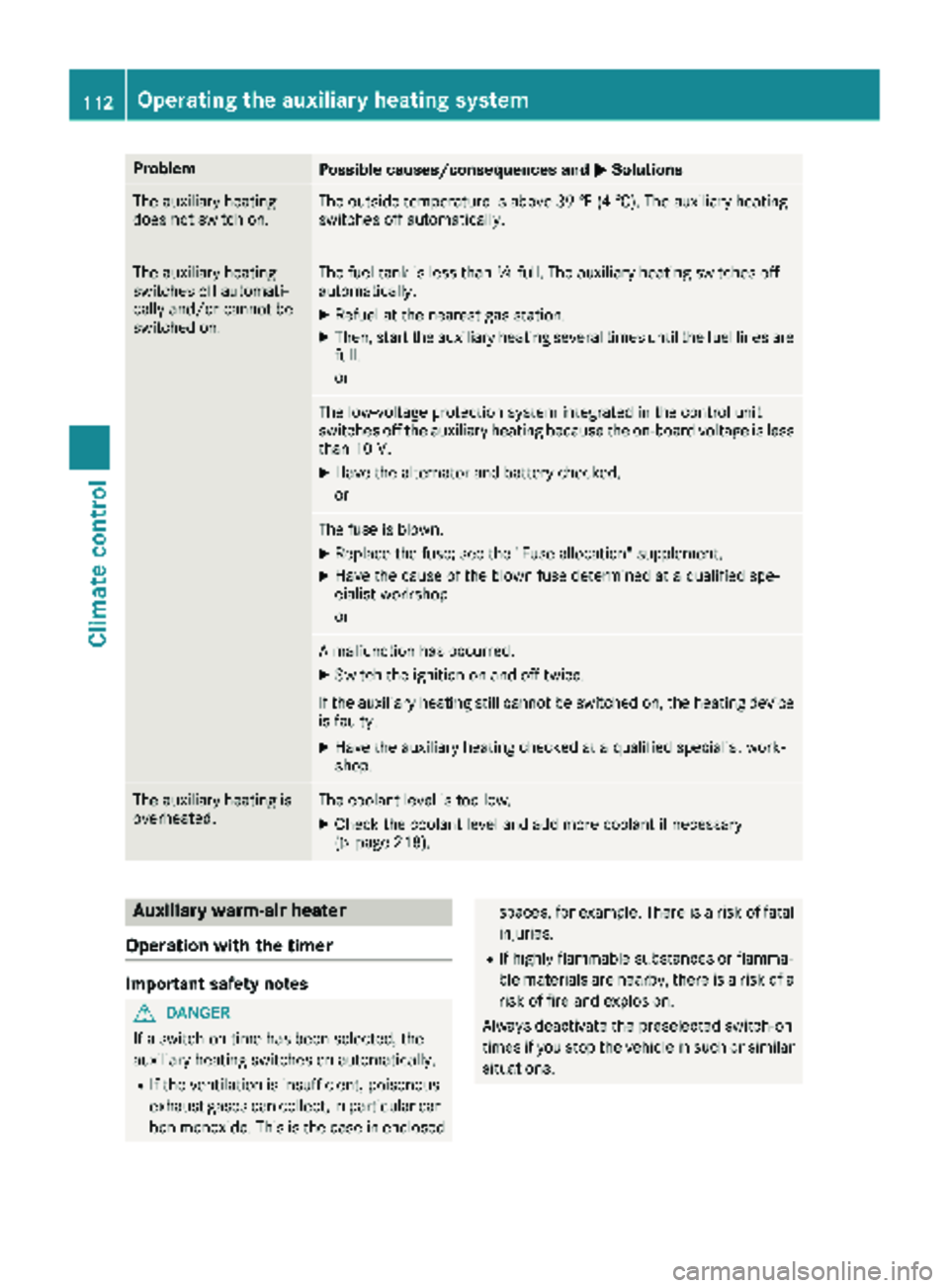
The auxiliary heating
does not switch on.The outside temperature is above 39 ‡ (4 †). The auxiliary heating
switches off automatically.
The auxiliary heating
switches off automati-
cally and/or cannot be
switched on.The fuel tank is less thanÕfull. The auxiliary heating switches off
automatically.
XRefuel at the nearest gas station.
XThen, start the auxiliary heating several times until the fuel lines are
full.
or
The low-voltage protection system integrated in the control unit
switches off the auxiliary heating because the on-board voltage is less
than 10 V.
XHave the alternator and battery checked.
or
The fuse is blown.
XReplace the fuse; see the "Fuse allocation" supplement.
XHave the cause of the blown fuse determined at a qualified spe-
cialist workshop.
or
A malfunction has occurred.
XSwitch the ignition on and off twice.
If the auxiliary heating still cannot be switched on, the heating device
is faulty.
XHave the auxiliary heating checked at a qualified specialist work-
shop.
The auxiliary heating is
overheated.The coolant level is too low.
XCheck the coolant level and add more coolant if necessary
(Ypage 218).
Auxiliary warm-air heater
Operation with the timer
Important safety notes
GDANGER
If a switch-on time has been selected, the
auxiliary heating switches on automatically.
RIf the ventilation is insufficient, poisonous
exhaust gases can collect, in particular car-
bon monoxide. This is the case in enclosed
spaces, for example. There is a risk of fatal injuries.
RIf highly flammable substances or flamma-
ble materials are nearby, there is a risk of a
risk of fire and explosion.
Always deactivate the preselected switch-on
times if you stop the vehicle in such or similar situations.
112Operating the auxiliary heating system
Climate control
Page 115 of 286
Use the timer to:
Ractivate and deactivate immediate heating
mode
Rset up to three switch-on times
Rset the operating duration to between 10 and
120 minutes or to continuous operation
Rset the heating level (preselected tempera-
ture) to a range between 10 and 30
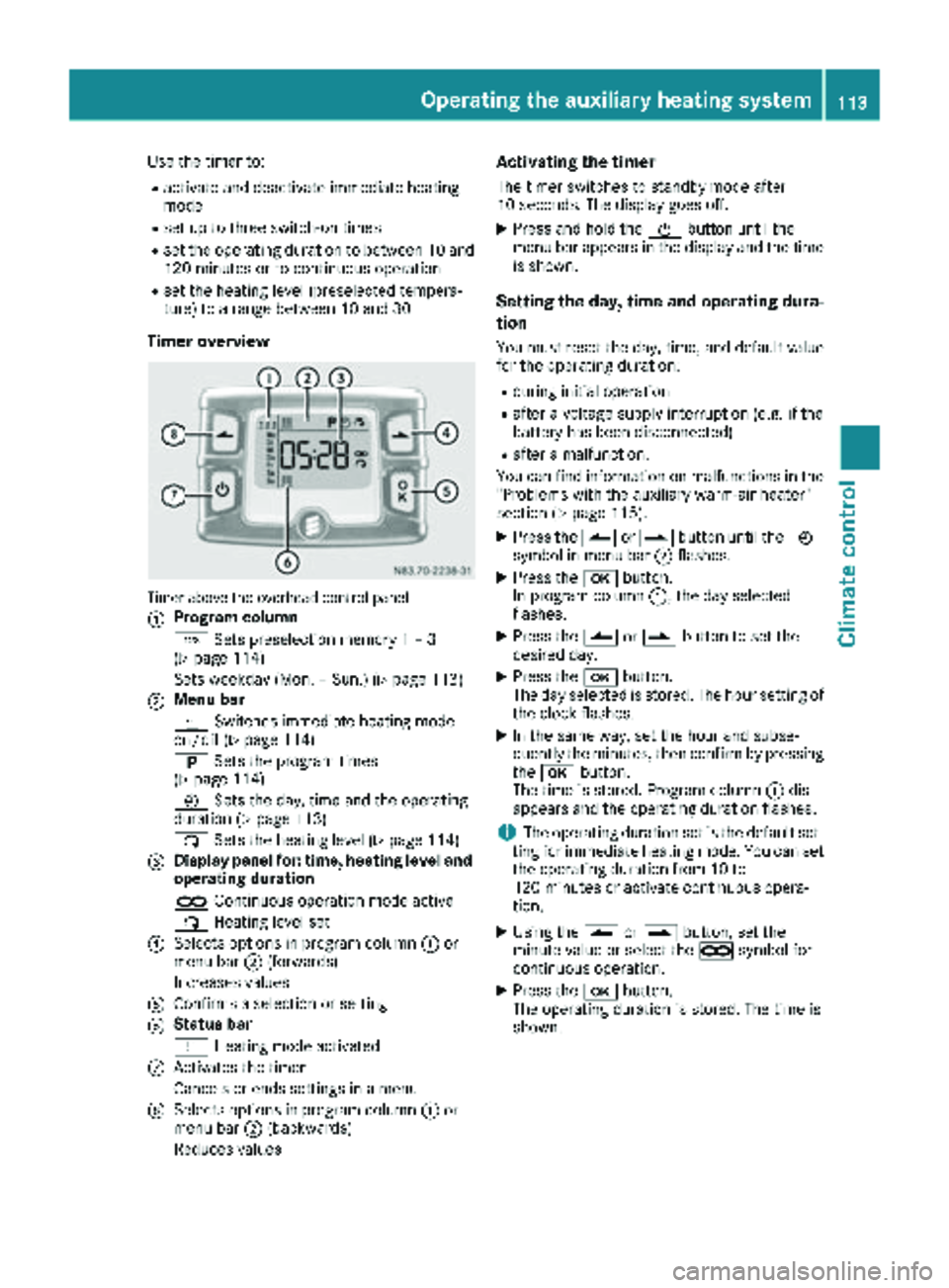
Timer overview
Timer above the overhead control panel
:
Program column
GSets preselection memory 1 – 3
(
Ypage 114)
Sets weekday (Mon. – Sun.) (
Ypage 113)
;Menu bar
y Switches immediate heating mode
on/off (
Ypage 114)
B Sets the program times
(
Ypage 114)
Ñ Sets the day, time and the operating
duration (
Ypage 113)
ß Sets the heating level (
Ypage 114)
=Display panel for: time, heating level and
operating duration
àContinuous operation mode active
ß Heating level set
?Selects options in program column :or
menu bar ;(forwards)
Increases values
AConfirms a selection or setting
BStatus bar
y Heating mode activated
CActivates the timer
Cancels or ends settings in a menu
DSelects options in program column :or
menu bar ;(backwards)
Reduces values
Activating the timer
The timer switches to standby mode after
10 seconds. The display goes off.
XPress and hold the Übutton until the
menu bar appears in the display and the time
is shown.
Setting the day, time and operating dura-
tion
You must reset the day, time, and default value
for the operating duration:
Rduring initial operation
Rafter a voltage supply interruption (e.g. if the
battery has been disconnected)
Rafter a malfunction.
You can find information on malfunctions in the
"Problems with the auxiliary warm-air heater"
section (
Ypage 115).
XPress the Ûorâ button until the Ñ
symbol in menu bar ;flashes.
XPress the bbutton.
In program column :, the day selected
flashes.
XPress the Ûorâ button to set the
desired day.
XPress the bbutton.
The day selected is stored. The hour setting of
the clock flashes.
XIn the same way, set the hour and subse-
quently the minutes, then confirm by pressing
the b button.
The time is stored. Program column :dis-
appears and the operating duration flashes.
iThe operating duration set is the default set-
ting for immediate heating mode. You can set
the operating duration from 10 to
120 minutes or activate continuous opera-
tion.
XUsing the Ûorâ button, set the
minute value or select the àsymbol for
cont
inuous operation.
XPress the bbutton.
The operating duration is stored. The time is
shown.
Operating the auxiliary heating system113
Climate control
Z
Page 116 of 286
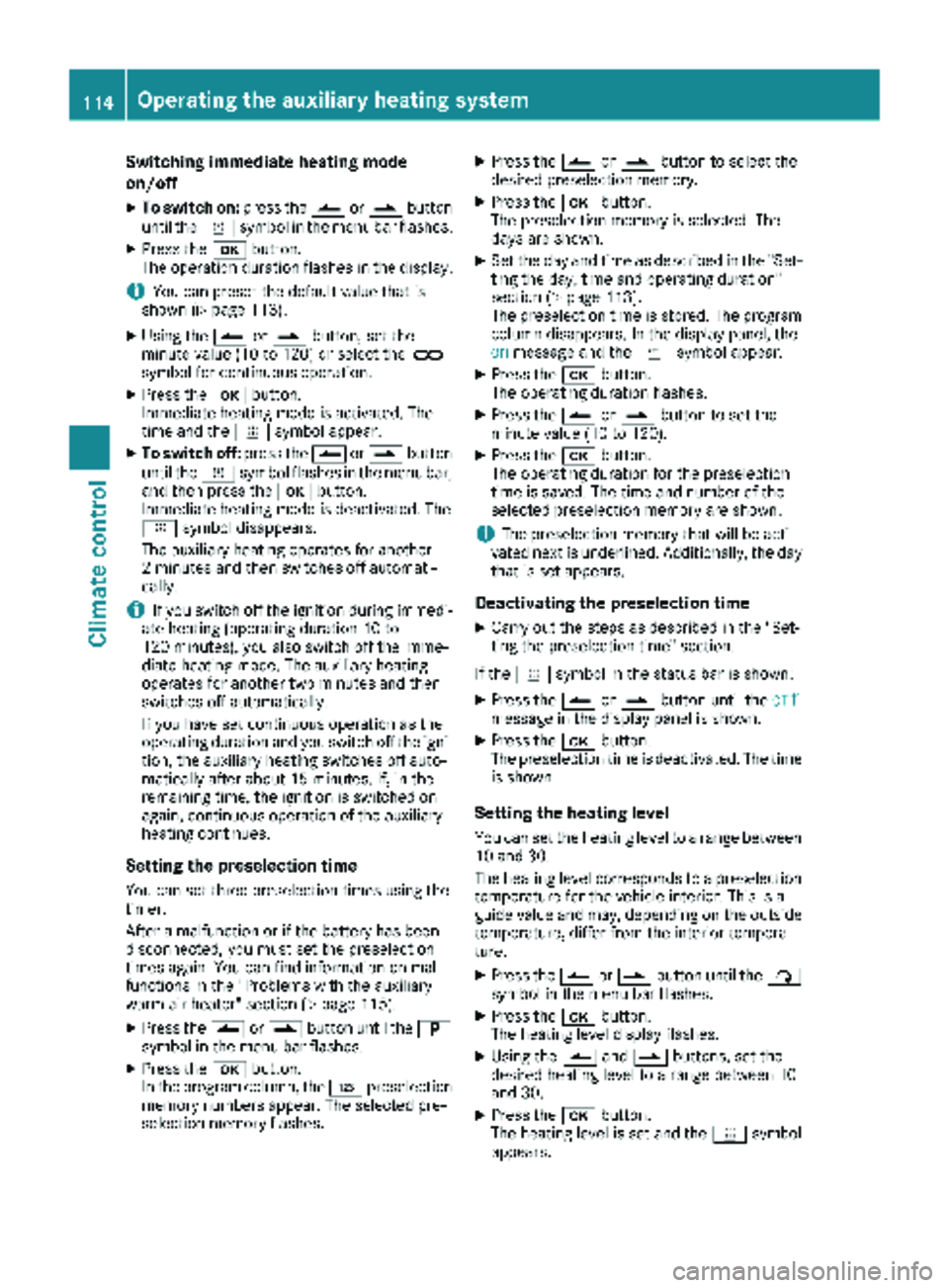
Switching immediate heating mode
on/off
XTo switch on:press theÛorâ button
until the ysymbol in the menu bar flashes.
XPress the bbutton.
The operation duration flashes in the display.
iYou can preset the default value that is
shown (Ypage 113).
XUsing the Ûorâ button, set the
minute value (10 to 120) or select the à
symbol for continuous operation.
XPress the bbutton.
Immediate heating mode is activated. The
time and the ysymbol appear.
XTo switch off: press theÛorâ button
until the ysymbol flashes in the menu bar,
and then press the bbutton.
Immediate heating mode is deactivated. The
y symbol disappears.
The auxiliary heating operates for another
2 minutes and then switches off automati-
cally.
iIf you switch off the ignition during immedi-
ate heating (operating duration 10 to
120 minutes), you also switch off the imme-
diate heating mode. The auxiliary heating
operates for another two minutes and then
switches off automatically.
If you have set continuous operation as the
operating duration and you switch off the igni-
tion, the auxiliary heating switches off auto-
matically after about 15 minutes. If, in the
remaining time, the ignition is switched on
again, continuous operation of the auxiliary
heating continues.
Setting the preselection time
You can set three preselection times using the
timer.
After a malfunction or if the battery has been
disconnected, you must set the preselection
times again. You can find information on mal-
functions in the "Problems with the auxiliary
warm-air heater" section (
Ypage 115).
XPress the Ûorâ button until the B
symbol in the menu bar flashes.
XPress the bbutton.
In the program column, the Gpreselection
memory numbers appear. The selected pre-
selection memory flashes.
XPress the Ûorâ button to select the
desired preselection memory.
XPress the bbutton.
The preselection memory is selected. The
days are shown.
XSet the day and time as described in the "Set-
ting the day, time and operating duration"
section (
Ypage 113).
The preselection time is stored. The program
column disappears. In the display panel, the
on
message and the ysymbol appear.
XPress the bbutton.
The operating duration flashes.
XPress the Ûorâ button to set the
minute value (10 to 120).
XPress the bbutton.
The operating duration for the preselection
time is saved. The time and number of the
selected preselection memory are shown.
iThe preselection memory that will be acti-
vated next is underlined. Additionally, the day
that is set appears.
Deactivating the preselection time
XCarry out the steps as described in the "Set-
ting the preselection time" section.
If the y symbol in the status bar is shown:
XPress the Ûorâ button until the offmessage in the display panel is shown.
XPress thebbutton.
The preselection time is deactivated. The time
is shown.
Setting the heating level
You can set the heating level to a range between 10 and 30.
The heating level corresponds to a preselection
temperature for the vehicle interior. This is a
guide value and may, depending on the outside
temperature, differ from the interior tempera-
ture.
XPress the Ûorâ button until the ß
symbol in the menu bar flashes.
XPress the bbutton.
The heating level display flashes.
XUsing the Ûandâ buttons, set the
desired heating level to a range between 10
and 30.
XPress the bbutton.
The heating level is set and the ysymbol
appears.
114Operating the auxiliary heating system
Climate control
Page 117 of 286
Problems with the auxiliary warm-air heater
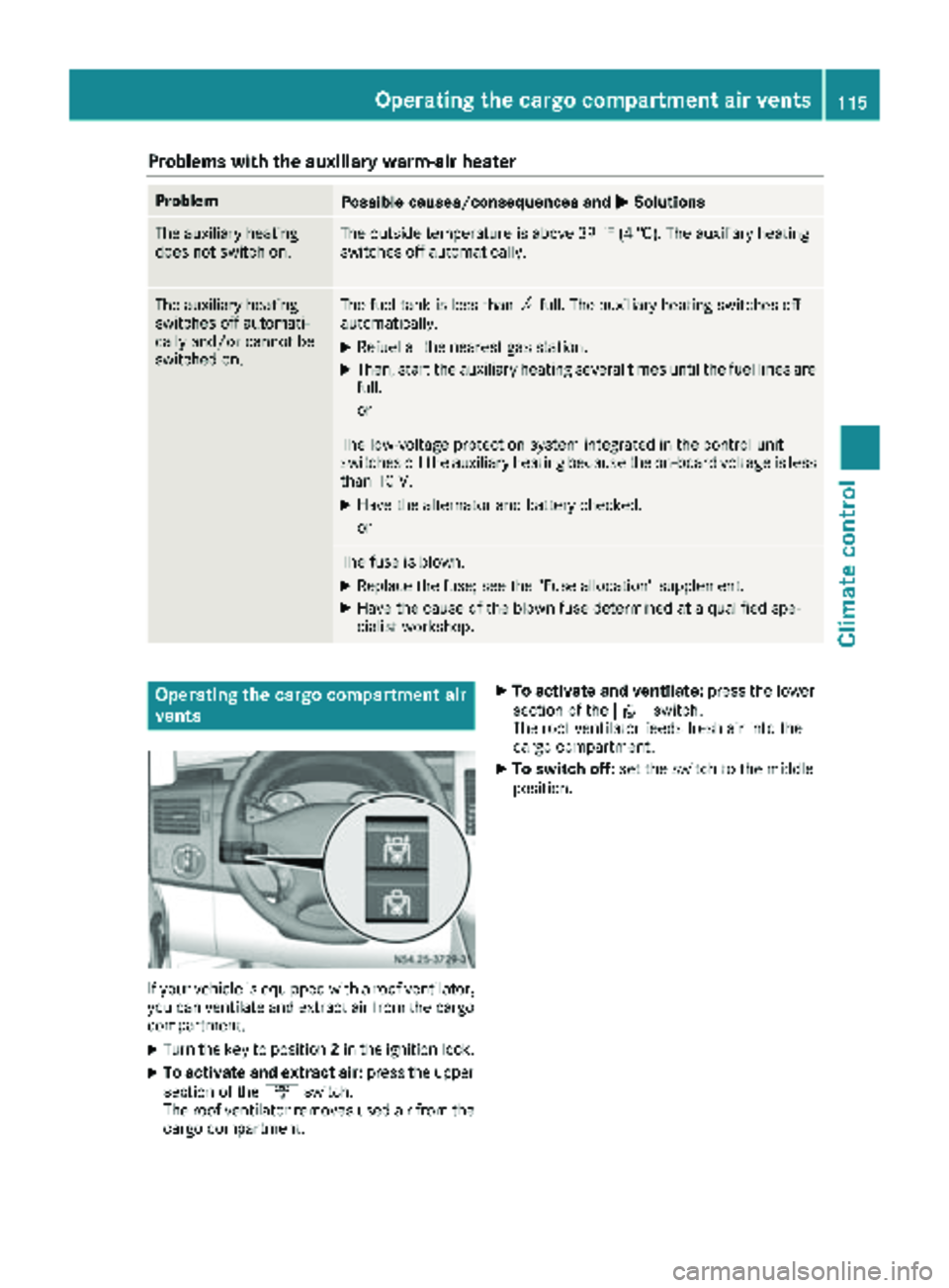
ProblemPossible causes/consequences andMSolutions
The auxiliary heating
does not switch on.The outside temperature is above 39 ‡ (4 †). The auxiliary heating
switches off automatically.
The auxiliary heating
switches off automati-
cally and/or cannot be
switched on.The fuel tank is less thanÕfull. The auxiliary heating switches off
automatically.
XRefuel at the nearest gas station.
XThen, start the auxiliary heating several times until the fuel lines are
full.
or
The low-voltage protection system integrated in the control unit
switches off the auxiliary heating because the on-board voltage is less
than 10 V.
XHave the alternator and battery checked.
or
The fuse is blown.
XReplace the fuse; see the "Fuse allocation" supplement.
XHave the cause of the blown fuse determined at a qualified spe-
cialist workshop.
Operating the cargo compartment air
vents
If your vehicle is equipped with a roof ventilator,
you can ventilate and extract air from the cargo
compartment.
XTurn the key to position 2in the ignition lock.
XTo activate and extract air: press the upper
section of the ´switch.
The roof ventilator removes used air from the
cargo compartment.
XTo activate and ventilate: press the lower
section of the ·switch.
The roof ventilator feeds fresh air into the
cargo compartment.
XTo switch off: set the switch to the middle
position.
Operating the cargo compartment air vents115
Climate control
Z
Page 158 of 286
the heater/air conditioning to the maximum
level. Open the windows if necessary.
RWhen overtaking, pay particular attention to
the extended length of your vehicle/trailer
combination.
Due to the length of your vehicle/trailer com-bination you need an additional distance
before you can return to your original lane.
Uncoupling a trailer
GWARNING
If you uncouple a trailer with the overrun
brake engaged, you could trap your hand
between the vehicle and the trailer drawbar.
There is a risk of injury.
Do not uncouple a trailer if the overrun brake
is engaged.
!Do not disconnect a trailer with an engaged
overrun brake. Otherwise, your vehicle could
be damaged by the rebounding of the overrun
brake.
XMake sure the selector lever of the automatic
transmission is in position P.
XApply the parking brake of the vehicle.
XClose all doors.
XApply the parking brake of the trailer.
XIn addition, secure the trailer against rolling
away with a wheel chock or similar object.
XRemove the trailer cable and safety chains
and decouple the trailer.
Permissible trailer loads and trailer
drawbar noseweights
Weight information
!On vehicles with a permissible gross vehicle
weight of 11030 lbs (5003 kg), the permissi -
bl egros scombin ation weight is less than the
total of the permissible gross vehicle weight
and the permissible trailer load. Exceeding
the permissible gross combination weight can
lead to damage to the drivetrain, to the trans-
mission or to the trailer tow hitch.
If the vehicle or the trailer is fully laden, the
relevant value for the permissible gross vehi-
cle weight or the permissible trailer load is therefore lower. In this case, the trailer or the
vehicle may only be partially loaded.
The gross trailer weight (GTW) is calculated by
adding the weight of the trailer to the weight of
the load and equipment. If the trailer is equipped with a separate functional braking system, then
the maximum gross trailer weight is 5000 lbs
(2268 kg )or 7500 lb s(3402 kg).
GWARNING
If you to w atrailer without aseparat efunc-
tional brakin gsystem and agross trailer
weigh t(GTW) of mor ethan 1635 lbs (750kg),
the nthe vehicl ebr ake system may overheat.
This increases the braking distance and the
brake system may even fail. There is an
increased risk of accident and injury, possibly
even fatal.
Always use a trailer with a separate functional
braking system when towing a trailer with a
gross trailer weight (GTW) of more than
1635 lbs (750kg).
Th emaximu mpermissibl etrailer dr awbar nose-
weight on the ball coupling is 500 lbs (227 kg) or
750 lbs (340 kg). The actual noseweight may not
exceed the value given on the identification
plates of the trailer tow hitch or the trailer. If the
values vary, the lowest value always applies.
The gross combination weight rating (GCWR) is
calculated by adding the gross weight of the
trailer to the gross vehicle weight including a
driver's weight of approximately 150 lbs (68 kg).
The maximum permissible gross combination
weight is vehicle-specific and equipment-
dependent.
When driving with a trailer, you should not
exceed the maximum permitted gross combi-
nation weight rating (GCWR).
The permissible values, which must not be
exceeded, can be found in your vehicle docu-
ments and on the trailer tow hitch type plates for the t
railer and the vehicle (Ypage 272). The
basic values approved by the manufacturer can
also be found in the "Technical data" section
(
Ypage 282). If the values vary, the lowest
value always applies.
156Towing a trailer
Driving and parking