check oil MERCEDES-BENZ SPRINTER 2017 MY17 Operator’s Manual
[x] Cancel search | Manufacturer: MERCEDES-BENZ, Model Year: 2017, Model line: SPRINTER, Model: MERCEDES-BENZ SPRINTER 2017Pages: 286, PDF Size: 4.36 MB
Page 7 of 286
Emergency running mode .............. 124
Important safety notes .................. 121
Kickdown ....................................... 123
Maneuvering .................................. 123
Overview ........................................ 121
Problem (malfunction) ................... 124
Releasing the parking lock man-
ually ............................................... 124
Selector lever ................................ 121
Selector lever positions ................. 122
Shift ranges ................................... 123
Starting the engine ........................ 118
Touchshift ...................................... 122
Trailer towing ................................. 123
Transmission oil change ................ 279
Automatic transmission emer-
gency mode ....................................... 124
AUX port ............................................. 207
Auxiliary heater
see Auxiliary warm-air heater
see Hot-water auxiliary heater
Auxiliary heating
Activating/deactivating heater
booster mode ................................ 110
Adjusting ....................................... 170
Conditions for switching on ........... 107
Heating time .................................. 106
Important safety notes .................. 105
Operating with the button (control
panel) ............................................ 107
Operation with the remote con-
trol ................................................. 108
Operation with the timer ................ 112
Selecting a switch-on time ............. 107
Setting the switch-on time ............. 108
see Auxiliary heating
see Auxiliary warm-air heater
see Hot-water auxiliary heater
Auxiliary warm-air heater
Problem (malfunction) ................... 115
Axle load, permissible (trailer tow-
ing) ...................................................... 283
B
Backup lamps
Replacing bulbs ............................... 90 Backup lamps (Chassis Cab)
Replacing bulbs ............................... 91
BAS (Brake Assist System)
Display message ............................ 179
Function/notes ................................ 54
Indicator lamp ................................ 191
Basic settings
see Settings
Battery
Isolating switch .............................. 116
Replacing (SmartKey) ...................... 61
Battery (SmartKey)
Checking .......................................... 61
Important safety notes .................... 61
Replacing ......................................... 61
Battery (vehicle)
Care ............................................... 228
Charge indicator lamp ................... 194
Charging ........................................ 228
Disconnecting and connecting ....... 225
Disconnecting and connecting
(engine compartment) ................... 227
Display message ............................ 189
Important safety notes .................. 223
Installing/removing (engine com-
partment) ....................................... 228
Jump starting ................................. 238
Location ......................................... 224
Removing and installing ................. 226
Removing and installing the floor
covering ......................................... 224
Before driving off
Important safety notes .................. 118
Belt
see Seat belts
Belt warning ......................................... 44
Bleeding the fuel system .................. 120
Blind Spot Assist
Activating/deactivating ......... 143, 170
Notes/function .............................. 141
Trailer towing ................................. 143
Bottle holder
see Cup holder
Brake Assist
see BAS (Brake Assist System)
Brake Assist System
see BAS (Brake Assist System)
Index5
Page 13 of 286
Tow-starting (vehicle) ..................... 242
Engine electronics
Notes ............................................. 271
Problem (malfunction) ...................1 20
Engine oil
Adding ...........................................2 18
Additives ........................................ 278
Checking the oil level (on-board
computer) ...................................... 216
Checking the oil level using the
dipstick .......................................... 217
Display message ............................ 186
Filling capacity ............................... 278
Information about oil consump-
tion ................................................ 278
Mixing ............................................ 278
Notes about oil grades ................... 277
Oil change ...................................... 278
Oil level (note) ............................... 216
Viscosity ........................................ 277
Warning lamp ................................. 195
Engine speed setting (working
mode) ................................................. 151
Engine, jump-starting ....................... 238
ESP
®(Electronic Stability Pro-
gram)
Display message ............................ 181
Important safety information ........... 55
Indicator lamp ................................ 194
Warning lamp ................................. 190
Exhaust check ................................... 131
Exhaust gas aftertreatment
DEF level indicator ......................... 159
DEF reducing agent ....................... 275
Diesel Exhaust Fluid (DEF) ............. 275
Display messages (vehicles with
steering wheel buttons) ................. 184
Display messages (vehicles with-
out steering wheel buttons) ........... 175
Indicator lamp ....................... 193, 197
Malfunction ....................................1 84
Refilling DEF .................................. 126
Exterior lighting
see Lights
Exterior mirrors
Adjusting ......................................... 78
Important safety notes .................... 78 Eyegl
asses compartment
................. 201
F
Fire extinguisher............................... 238
First-aid kit ......................................... 237
Flat tire
Changing a wheel/mounting the
spare wheel ................................... 263
General notes ................................ 262
Fog lamps
Switching on/off .............................. 81
Fogged up-up windows
see Climate control
Folding seat ......................................... 74
Frequencies
Mobile phone ................................. 271
Two-way radio ................................ 271
Front fog lamps
Switching on/off .............................. 81
Front interior light
Replacing bulbs ............................... 93
Front windshield
see Windshield
Fuel
Additives (diesel) ........................... 274
Consumption information .............. 275
Consumption statistics .................. 171
Diesel at very low outside temper-atures ............................................ 274
Display message ............................ 185
Driving tips ....................................1 30
Fuel gauge ..................................... 159
Problem (malfunction) ................... 126
Quality (diesel) ............................... 274
Refueling ........................................ 124
Showing the range (on-board
computer with steering wheel but-
tons) .............................................. 171
Showing the range (vehicles with
steering wheel buttons) ................. 171
Tank content/reserve fuel ............. 274
Fuel filter with water separator
draining ......................................... 220
Indicator lamp ................................ 198
Fuel gauge ......................................... 159
Fuel tank
Problem (malfunction) ................... 126
Index11
Page 16 of 286
M
M+S tires............................................ 245
Maintenance ...................................... 221
Malfunctions
Message memory (on-board com-
puter) ............................................. 173
Maximum speed
Speed limitation ............................. 131
Menu (vehicles with steering
wheel buttons)
Audio ............................................. 164
Operation ....................................... 163
Settings .........................................1 65
Telephone ...................................... 172
Message
see Display message
Message memory (on-board com-
puter) ..................................................1 73
Mirrors
Exterior mirrors ................................ 78
Rear-view mirror .............................. 78
Mobile navigation devices ................ 207
Mobile phone ..................................... 207
Important safety notes .................. 206
Pre-installation ............................... 206
Type approval/frequency .............. 271
Mobile phone
see Mobile phone
Mounting wheels
Lowering the vehicle ......................2 67
Mounting a new wheel ................... 266
Preparing the vehicle ..................... 263
Raising the vehicle ......................... 263
Removing a wheel .......................... 265
Removing and mounting the spare wheel ............................................. 269
Securing the vehicle against roll-
ing away ........................................ 263
N
Navigation
Fittings for PND mobile navigation
devices .......................................... 207
Notes on breaking-in a new vehi-
cle ....................................................... 116
O
Occupant safety
Air bags ...........................................4 4
Belt warning ..................................... 44
Children in the vehicle ..................... 47
Important safety notes ....................4 0
Introduction to the restraint sys-
tem .................................................. 40
Pets in the vehicle ........................... 52
Restraint system warning lamp ........ 40
Seat belt .......................................... 41
Odometer
Display (vehicles with steering
wheel buttons) ............................... 164
Display (vehicles without steering
wheel buttons) ............................... 160
Off-road driving
Checklist after driving off-road ...... 136
Important safety notes .................. 135
Rules for driving off-road ............... 136
Oil
see Engine oil
On-board computer
Checking the oil level .....................2 16
Display message ............................ 173
Lighting submenu .......................... 168
On-board computer (vehicles with
steering wheel buttons)
Audio menu ................................... 164
Display message ............................ 161
Menu overview .............................. 163
Operating ....................................... 161
Operation menu .............................1 63
Settings menu ............................... 165
Standard display ............................ 164
Telephone menu ............................ 172
Trip computer menu ......................1 71
On-board computer (vehicles with-
out steering wheel buttons)
Display message ............................ 173
General notes ................................ 160
Setting the clock ............................ 161
Standard display ............................ 160
Operating Instructions
Before the first journey .................... 23
Limited Warranty .............................2 3
14Index
Page 23 of 286
Trip computer (on-board com-
puter).................................................. 171
Trip meter
see Trip odometer
Trip odometer
Display (vehicles with steering
wheel buttons) ............................... 164
Display (vehicles without steering
wheel buttons) ............................... 160
Resetting ....................................... 159
see Trip computer (on-board computer)
Turn signals
Replacing bulbs (front) ..................... 89
Replacing bulbs (rear) ...................... 90
Switching on/off .............................. 82
Turn signals (Chassis Cab)
Replacing bulbs (rear) ...................... 91
Twin front-passenger seat
Stowage compartment .................. 202
Two-way radios
Type approval/frequency .............. 271
TWR (Tongue Weight Rating) (defi-
nition) ................................................. 261
U
Unlocking
From inside the vehicle (central
unlocking button) ............................. 63
USB port ............................................. 207
V
Vehicle
Data acquisition ............................... 30
Display message ............................ 189
Electronics ..................................... 271
Equipment ....................................... 23
Individual settings (vehicles with
steering wheel buttons) ................. 165
Limited Warranty ............................. 23
Loading .......................................... 254
Locking (SmartKey) .......................... 59
Lowering ........................................ 267
Maintenance .................................... 24
Operating safety .............................. 26
Parking for a long period ................ 129
Pulling away ................................... 119 Raising ........................................... 263
Registration ..................................... 28
Reporting problems ......................... 28
Securing from rolling away ............ 127
Towing away .................................. 239
Transporting .................................. 242
Unlocking (SmartKey) ...................... 59
Vehicle battery
see Battery (vehicle)
Vehicle bodies ..................................... 28
Body/equipment mounting direc-
tives for trucks ................................. 28
Vehicle data ....................................... 281
Vehicle identification number .......... 272
Vehicle identification plate .............. 272
Vehicle tool kit .................................. 236
Voltage supply
Fuses ............................................. 242
W
WarningStickers ........................................... 25
Warning and indicator lamp
Power assistance for the steering .. 199
Warning and indicator lamps
Brakes ........................................... 192
Check Engine ................................. 196
Coolant .......................................... 195
Diesel Exhaust Fluid (DEF) ............. 193
Electrical step ................................ 199
ESP
®.............................................. 190
ESP®function ................................ 194
Overview .......................................... 34
Seat belt ........................................ 198
Warning lamp .................................... 237
Warning triangle ................................ 237
Warning- and indicator lamps
ABS ................................................ 191
Air filter .......................................... 197
ASR ................................................ 190
BAS ................................................ 191
Battery charge ............................... 194
Brake wear .................................... 194
Bulbs .............................................. 198
Doors ............................................. 198
Engine oil level ............................... 195
Preglow .......................................... 197
Index21
Page 35 of 286
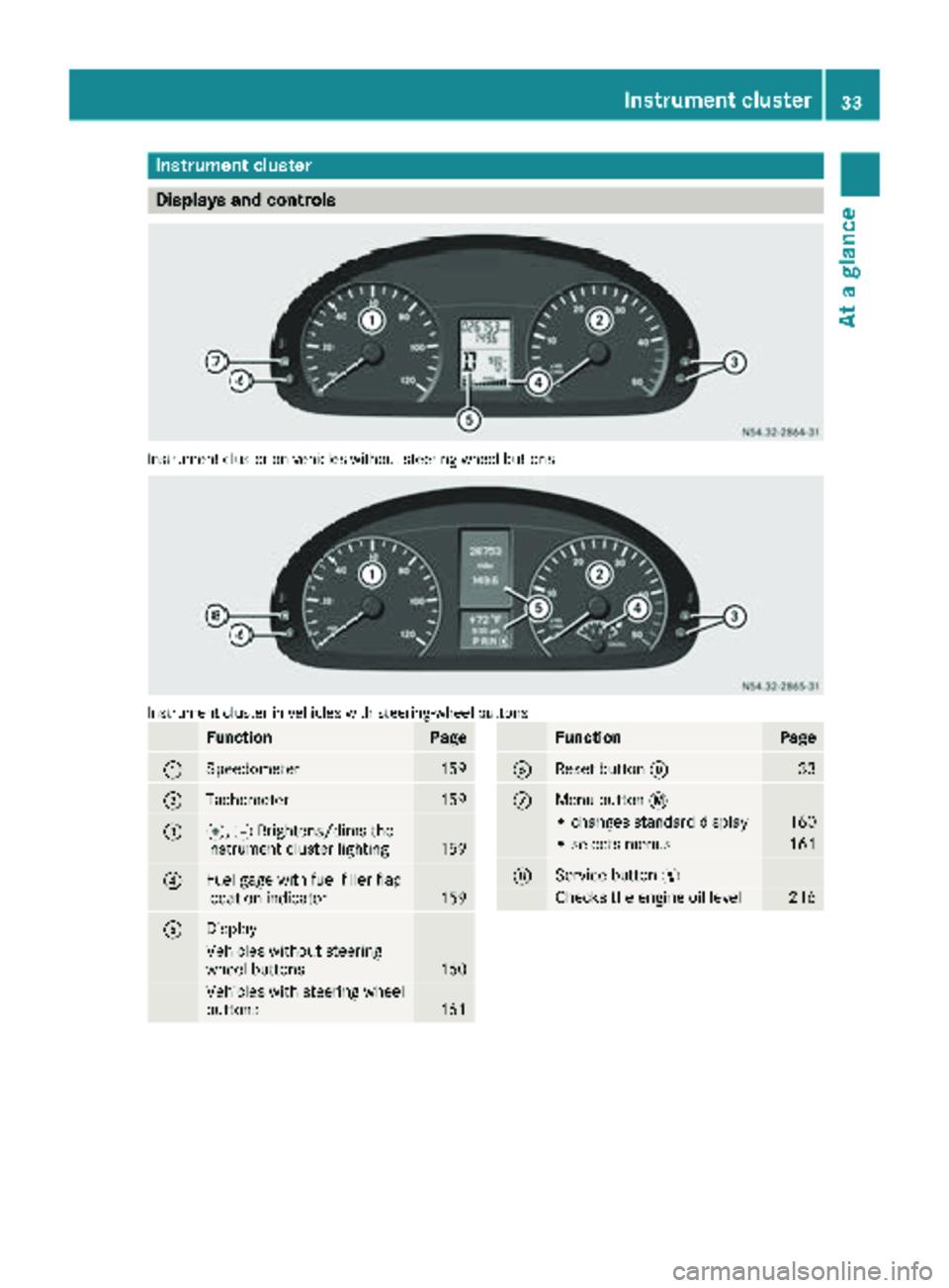
Instrument cluster
Displays and controls
Instrumentcluste ron vehicles without steering whee lbuttons
Instrumen tcluste rin vehicles wit hsteering-wheel buttons
FunctionPag e
:Speedometer159
;Tachometer159
=f, gBrightens/dims th e
instrumen tcluste rlighting15 9
?Fue lgage wit hfuel filler flap
location indicator15 9
ADisplay
Vehicles without steering
whee lbuttons16 0
Vehicles wit hsteering whee l
buttons16 1
FunctionPag e
BReset butto n933
CMen ubutto n4
• changes standard display16 0
•select smenus16 1
DService butto nË
Checks th eengin eoil level21 6
Instrument cluster33
At a glance
Page 61 of 286
Useful information
This Operator's Manual describes all models as
well as standard and optional equipment of your
vehicle that were available at the time of going
to print. Country-specific variations are possi-
ble. Note that your vehicle may not be equipped
with all of the described functions. This also
applies to systems and functions relevant to
safety.
Read the information on qualified specialist
workshops (
Ypage 27).
Key
Important safety notes
GWARNING
When the double locks are activated, the
doors can no longer be opened from the
inside. People in the vehicle can no longer get
out, e.g. in hazardous situations. There is a
risk of injury.
Therefore, do not leave any people unsuper-
vised in the vehicle, particularly children, eld-
erly people or people in need of special assis-
tance. Do not activate the double lock when
people are in the vehicle.
GWARNING
If you leave children unsupervised in the vehi-
cle, they could set it in motion by, for example:
Rrelease the parking brake.
Rshift the automatic transmission out of park
position Por shift manual transmission into
neutral.
Rstart the engine.
In addition, they may operate vehicle equip-
ment and become trapped. There is a risk of
an accident and injury.
When leaving the vehicle, always take the
SmartKey with you and lock the vehicle. Never
leave children unsupervised in the vehicle.
GWARNING
If you attach heavy or large objects to the
SmartKey, the SmartKey could be uninten-
tionally turned in the ignition lock. This could
cause the engine to be switched off. There is a risk of an accident.
Do not attach any heavy or large objects to the
SmartKey. Remove any bulky key rings before
inserting the SmartKey into the ignition lock.
Do not keep the key with remote control:
Rwith electronic devices, e.g. a mobile phone
or another key with remote control
Rwith metallic objects, e.g. coins or metal foil
Rin metallic objects, e.g. metal cases
This can affect the key's functionality.
Key functions of the remote control
General notes
The vehicle is equipped with either 2 or 4 remote
controls with a folding key, or 4 mechanical
keys. In this Operator's Manual, both the
mechanical keys and the keys with remote con-
trol are referred to as keys. The remote control
key has a range of up to 32 ft (10 m). Use the
remote control of the key only when in immedi-
ate proximity of the vehicle. This prevents theft.
Remote controls that are not included in the
scope of delivery for the vehicle must be pro-
grammed before use. Further information can
be obtained at any authorized Sprinter Dealer.
The key's remote control locks/unlocks the
driver's door and/or the following centrally if
the factory settings have not been changed:
Rthe driver's and the front-passenger door
Rthe sliding doors
Rthe rear doors
iIf the driver's or front-passenger door is not
closed, the corresponding door is not locked.
If a sliding door or a rear door is not closed
properly, none of the rear doors are locked.
If there is a key is in the ignition lock, the remote
control is inoperative. When locking or unlock-
ing the vehicle with the remote control, always
pay attention to the indicator lamp signaling.
Also check the locking knobs of the doors.
Key59
Opening and closing
Z
Page 126 of 286
Problems with the transmission
ProblemPossible causes/consequences andMSolutions
The transmission mal-
functions when shifting
gear.The transmission is losing oil.
XHave the transmission checked immediately at a qualified specialist
workshop.
The acceleration charac-
teristics have deteriora-
ted noticeably.
The transmission does
not shift.The transmission is in emergency mode.
It is only possible to shift into second gear or reverse gear R.
XStop the vehicle.
XDepress the brake pedal.
XMove the selector lever to positionP.
XSwitch off the engine.
XWait at least 10 seconds before restarting the engine.
XDepress the brake pedal.
XMove the selector lever to positionDor R.
In position D, the transmission shifts into second gear; in position R,
the transmission shifts into reverse gear.
XHave the transmission checked immediately at a qualified specialist
workshop.
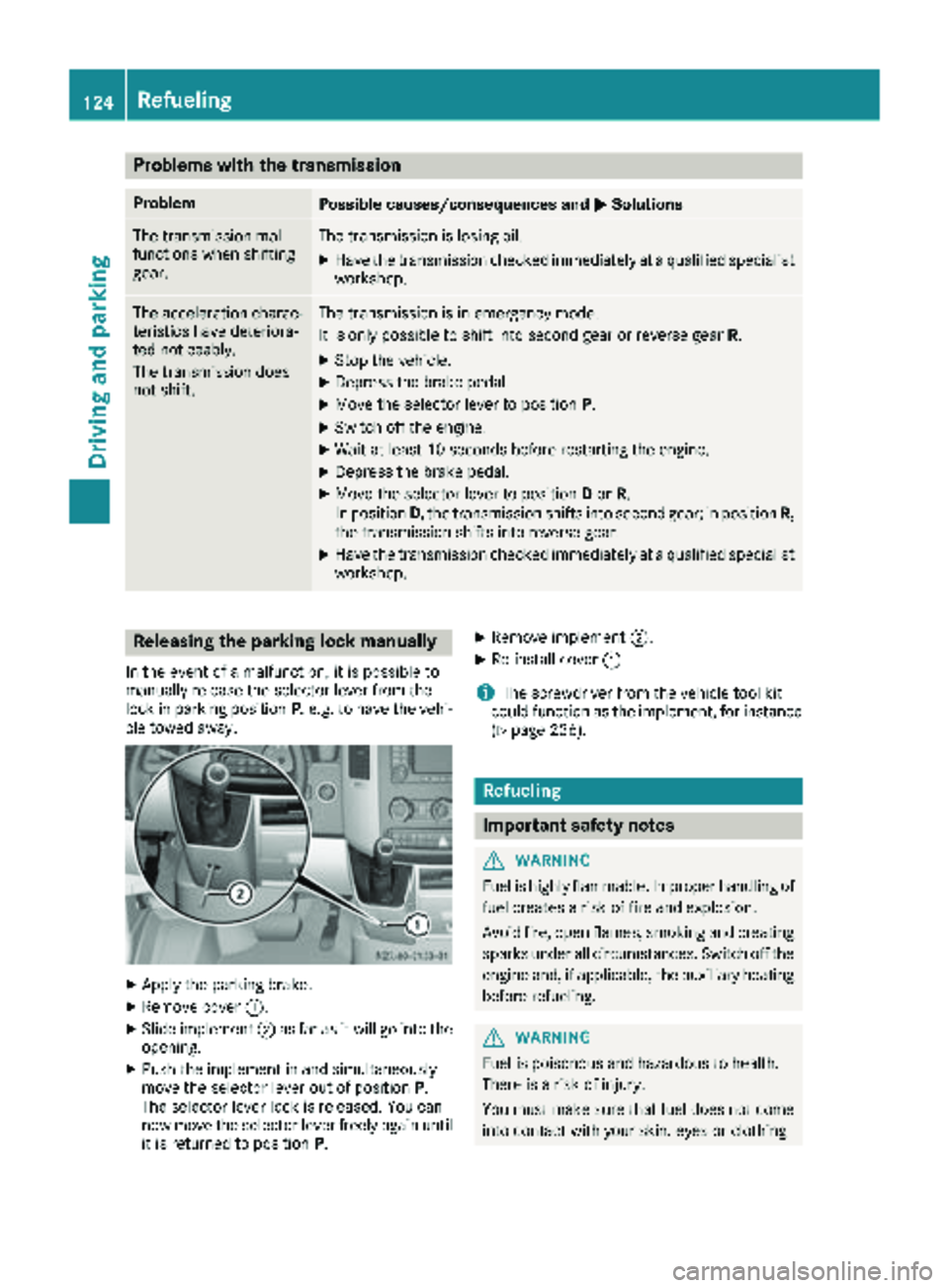
Releasing the parking lock manually
In the event of a malfunction, it is possible to
manually release the selector lever from the
lock in parking position P, e.g. to have the vehi-
cle towed away.
XApply the parking brake.
XRemove cover :.
XSlide implement ;as far as it will go into the
opening.
XPush the implement in and simultaneously
move the selector lever out of position P.
The selector lever lock is released. You can
now move the selector lever freely again until
it is returned to position P.
XRemove implement;.
XRe-install cover:.
iThe screwdriver from the vehicle tool kit
could function as the implement, for instance
(
Ypage 236).
Refueling
Important safety notes
GWARNING
Fuel is highly flammable. Improper handling of
fuel creates a risk of fire and explosion.
Avoid fire, open flames, smoking and creating
sparks under all circumstances. Switch off the
engine and, if applicable, the auxiliary heating
before refueling.
GWARNING
Fuel is poisonous and hazardous to health.
There is a risk of injury.
You must make sure that fuel does not come into contact with your skin, eyes or clothing
124Refueling
Driving and parking
Page 137 of 286
longed rolling of the wheels, e.g. when being
towed, will result in transmission damage.
If the vehicle threatens to skid or cannot be
stopped when moving at low speed:
XShift the transmission to neutral position N.
XTry to maintain control of the vehicle using
corrective steering.
Drive particularly carefully on slippery roads.
Avoid sudden acceleration, steering and braking
maneuvers. Do not use cruise control.
You can find further information on winter tires
and snow chains in the "Winter operation" sec-
tion (
Ypage 245).
Driving off-road
Important safety notes
GWARNING
If you drive on a steep incline at an angle or
turn when driving on an incline, the vehicle
could slip sideways, tip and rollover. There is a risk of an accident.
Always drive on a steep incline in the line of
fall (straight up or down) and do not turn the
vehicle.
GWARNING
When driving off-road, your body is subject to
forces from all directions, due to the uneven
surface. You could be thrown from your seat,
for instance. There is a risk of injury.
Always wear a seat belt, even when driving off-
road.
GWARNING
If you drive over obstacles or in ruts, the steer-
ing wheel may jerk out of your grip, causing
injury to your hands.
Always hold the steering wheel firmly with
both hands. When driving over obstacles, you
must expect steering forces to increase
briefly and suddenly.
GWARNING
Flammable material such as leaves, grass or
twigs may ignite if they come into contact with
hot parts of the exhaust system. There is a risk of fire.
When driving off road or on unpaved roads,
check the vehicle's underside regularly. In
particular, remove parts of plants or other
flammable materials which have become
trapped. In the case of damage, contact a
qualified specialist workshop.
!When driving off-road or on unpaved surfa-
ces, check the underside of the vehicle and
the wheels and tires at regular intervals. In
particular, remove any trapped foreign
objects, e.g. stones and branches.
Such foreign objects may:
Rdamage the chassis, the fuel tank or the
brake system
Rcause imbalances and thus vibrations
Rbe flung out when you continue driving
If there is any damage, inform a qualified spe-
cialist workshop.
When driving off-road and on construction sites,
sand, mud and water mixed with oil, for exam-
ple, may get into the brakes. This may lead to a
reduction in braking performance or total brake
failure, also as a result of increased wear. The
braking characteristics will vary depending on
the material that has got into the system. Clean
the brakes after driving off-road. If you then
notice reduced braking performance or hear
scraping noises, have the brake system checked
at a qualified specialist workshop. Adjust your
driving style to the changed braking character-
istics.
Driving off-road or on construction sites increa-
ses the possibility of vehicle damage which may
in turn lead to the failure of certain assemblies
and systems. Adapt your driving style to the off- road driving c
onditions. Drive carefully. Have
any vehicle damage rectified at a qualified spe-
cialist workshop as soon as possible.
When driving on rough terrain, do not shift the
transmission into the neutral position. You could
lose control when attempting to brake the vehi-
cle with the service brake. If your vehicle cannot
manage an uphill slope, drive back down the
slope in reverse gear.
Driving tips135
Driving and parking
Z
Page 138 of 286
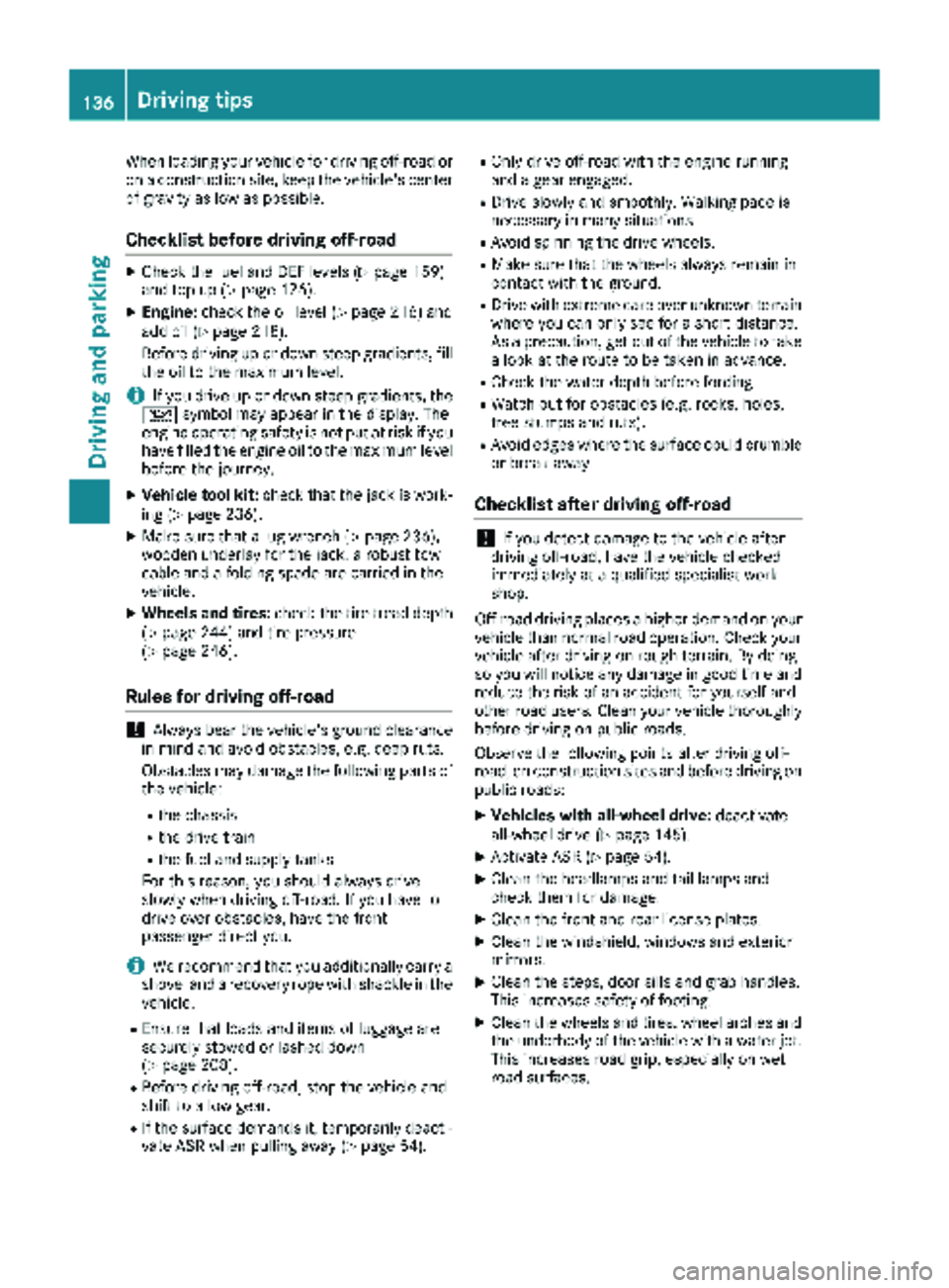
When loading your vehicle for driving off-road or
on a construction site, keep the vehicle's centerof gravity as low as possible.
Checklist before driving off-road
XCheck the fuel and DEF levels (Ypage 159)
and top up (Ypage 126).
XEngine: check the oil level (Ypage 216) and
add oil (Ypage 218).
Before driving up or down steep gradients, fill
the oil to the maximum level.
iIf you drive up or down steep gradients, the
4 symbol may appear in the display. The
engine operating safety is not put at risk if you
have filled the engine oil to the maximum level
before the journey.
XVehicle tool kit: check that the jack is work-
ing (Ypage 236).
XMake sure that a lug wrench (Ypage 236),
wooden underlay for the jack, a robust tow
cable and a folding spade are carried in the
vehicle.
XWheels and tires: check the tire tread depth
(Ypage 244) and tire pressure
(Ypage 246).
Rules for driving off-road
!Always bear the vehicle's ground clearance
in mind and avoid obstacles, e.g. deep ruts.
Obstacles may damage the following parts of
the vehicle:
Rthe chassis
Rthe drive train
Rthe fuel and supply tanks
For this reason, you should always drive
slowly when driving off-road. If you have to
drive over obstacles, have the front
passenger direct you.
iWe recommend that you additionally carry a
shovel and a recovery rope with shackle in the
vehicle.
REnsure that loads and items of luggage are
securely stowed or lashed down
(
Ypage 208).
RBefore driving off-road, stop the vehicle and
shift to a low gear.
RIf the surface demands it, temporarily deacti-
vate ASR when pulling away (Ypage 54).
ROnly drive off-road with the engine running
and a gear engaged.
RDrive slowly and smoothly. Walking pace is
necessary in many situations.
RAvoid spinning the drive wheels.
RMake sure that the wheels always remain in
contact with the ground.
RDrive with extreme care over unknown terrain
where you can only see for a short distance.
As a precaution, get out of the vehicle to take
a look at the route to be taken in advance.
RCheck the water depth before fording.
RWatch out for obstacles (e.g. rocks, holes,
tree stumps and ruts).
RAvoid edges where the surface could crumble
or break away.
Checklist after driving off-road
!If you detect damage to the vehicle after
driving off-road, have the vehicle checked
immediately at a qualified specialist work-
shop.
Off-road driving places a higher demand on your
vehicle than normal road operation. Check your
vehicle after driving on rough terrain. By doing
so you will notice any damage in good time and
reduce the risk of an accident for yourself and
other road users. Clean your vehicle thoroughly
before driving on public roads.
Observe the following points after driving off-
road, on construction sites and before driving on
public roads:
XVehicles with all-wheel drive: deactivate
all-wheel drive (Ypage 145).
XActivate ASR (Ypage 54).
XClean the headlamps and tail lamps and
check them for damage.
XClean the front and rear license plates.
XClean the windshield, windows and exterior
mirrors.
XClean the steps, door sills and grab handles.
This increases safety of footing.
XClean the wheels and tires, wheel arches and
the underbody of the vehicle with a water jet.
This increases road grip, especially on wet
road surfaces.
136Driving tips
Driving and parking
Page 160 of 286
Useful information
This Operator's Manual describes all models as
well as standard and optional equipment of your
vehicle that were available at the time of going
to print. Country-specific variations are possi-
ble. Note that your vehicle may not be equipped
with all of the described functions. This also
applies to systems and functions relevant to
safety.
Read the information on qualified specialist
workshops (
Ypage 27).
Important safety notes
GWARNING
If you are driving and reach through the steer- ing wheel to operate the adjustment knob,
you could lose control of the vehicle. There is
a risk of an accident and injury.
Only operate the adjustment knobs when thevehicle is stationary. Do not reach through the
steering wheel when driving.
GWARNING
If you operate information systems and com-
munication equipment integrated in the vehi-
cle while driving, you will be distracted from
traffic conditions. You could also lose control
of the vehicle. There is a risk of an accident.
Only operate the equipment when the traffic
situation permits. If you are not sure that this
is possible, park the vehicle paying attention
to traffic conditions and operate the equip-
ment when the vehicle is stationary.
GWARNING
If the instrument cluster has failed or mal-
functioned, you may not recognize function
restrictions in systems relevant to safety. The
operating safety of your vehicle may be
impaired. There is a risk of an accident.
Drive on carefully. Have the vehicle checked
at a qualified specialist workshop immedi-
ately. You must observe the legal requirements for the
country in which you are currently driving when
operating the on-board computer.
The on-board computer display only shows mes-
sages and warnings from certain systems. You
should therefore make sure your vehicle is oper-
ating safely at all times. If the operating safety of
your vehicle is impaired, stop the vehicle as
soon as possible, paying attention to road and
traffic conditions. Then consult a qualified spe-
cialist workshop.
Instrument cluster
Overview
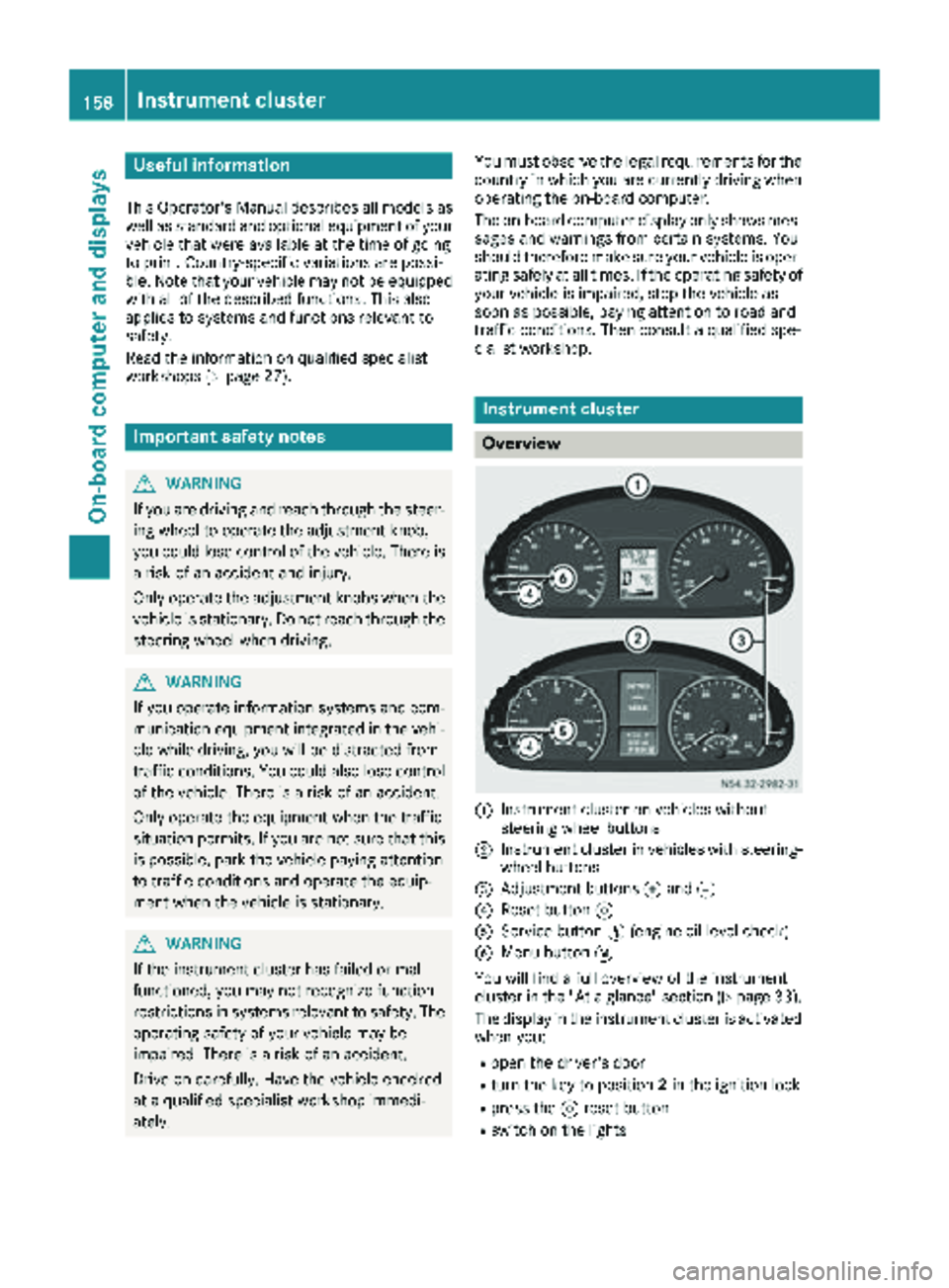
:Instrument cluster on vehicles without
steering wheel buttons
;Instrument cluster in vehicles with steering-
wheel buttons
=Adjustment buttons fand g
?Reset button 9
AService button Ë(engine oil level check)
BMenu button 4
You will find a full overview of the instrument
cluster in the "At a glance" section (
Ypage 33).
The display in the instrument cluster is activated when you:
Ropen the driver's door
Rturn the key to position 2in the ignition lock
Rpress the 9reset button
Rswitch on the lights
158Instrument cluster
On-board computer and displays