ignition MERCEDES-BENZ SPRINTER 2017 MY17 Operator’s Manual
[x] Cancel search | Manufacturer: MERCEDES-BENZ, Model Year: 2017, Model line: SPRINTER, Model: MERCEDES-BENZ SPRINTER 2017Pages: 286, PDF Size: 4.36 MB
Page 59 of 286
or heavy objects on or in front of the seats
next to the emergency exit window.
RThe window handles must not be used as
hooks, e.g. to hang up light objects, bags or
items of clothing.
RWhen exiting the vehicle through the emer-
gency exit window, pay attention to the vehi-
cle height and the local conditions. Particu-
larly children and smaller adults may require
assistance when exiting the vehicle.
Theft deterrent locking system
Immobilizer
XTo activate:remove the key from the ignition
lock.
XTo deactivate: turn the key to position 2in
the ignition lock.
The immobilizer prevents your vehicle from
being started without the correct key.
Always take the key with you and lock the vehi-
cle when leaving the vehicle. If you leave the key
in the vehicle, anyone can start the engine.
iThe immobilizer is always deactivated when
you start the engine.
In the event that the engine cannot be started
when the starter battery is fully charged, the
immobilizer may be faulty. Contact an author-
ized Sprinter dealer or call 1-877-762-8267
(in USA) or 1-800-387-0100 (in Canada).
ATA (Anti-Theft Alarm system)
XTo arm: close all doors.
XLock the vehicle with the key.
The indicator lamp in the central locking but-
ton (
Ypage 63) flashes.
XTo disarm: unlock the vehicle with the key.
The indicator lamp in the central locking but-
ton (
Ypage 63) goes out.
iCargo Van and Passenger Van only:
Unless you open a door within 40 seconds
after unlocking the vehicle:
Rthe vehicle will be locked again
Rthe anti-theft alarm system will be armed
again If the alarm system is armed, a visual and audi-
ble alarm is triggered by the following:
RUnlocking the vehicle from inside
ROpening a door
ROpening the hood
iThe alarm is not switched off, even if you
immediately close the open door that has trig- gered it, for example.
XTo stop the alarm: press the%button on
the remote control.
or
XInsert the key into the ignition lock.
The alarm stops.
Tow-away alarm
Operation
A visual and audible alarm is triggered if the
inclination of the vehicle changes when the tow- away alarm is armed. This can be the case if the
vehicle is raised on one side, for example.
Arming and disarming
The tow-away alarm is automatically armed
approximately 20 seconds after you lock the
vehicle.
The tow-away alarm is automatically deactiva-
ted when you unlock the vehicle.
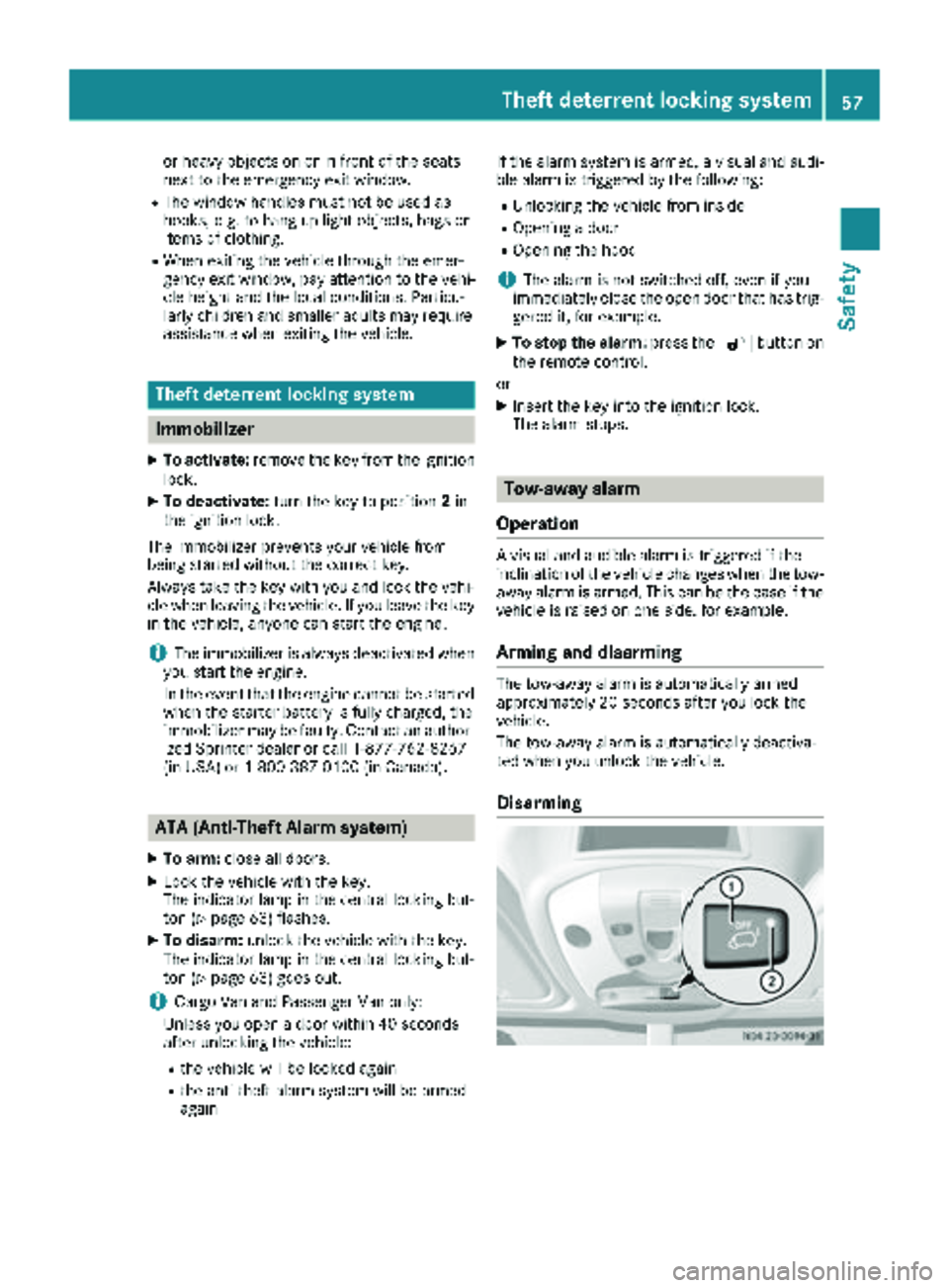
Disarming
Theft deterrent locking system57
Safety
Z
Page 60 of 286
XRemove theke yfrom th eignition lock.
XPress butto n:.
When th ebutto nis released, indicator
lamp ;in th ebutto nlights up for about
5 seconds.
XLoc kth evehicle.
The tow-away alarm is disarmed .
The tow-away alarm remain sdisarmed until you
loc kth evehicl eagain .
Disar mthetow-away alarm when lockin gyour
vehicl eand :
Rloadin gand/o rtransporting th evehicle, on a
ferry or car transporter, for exampl e
Rparking onamoving surface, as split-level
garage
This will preven tfals ealarms.
Interior motion sensor
Operation
If th earmed interior motion sensor detects
motion in th evehicl einterior, avisual and acous-
ti c alarm is triggered .This can happe nif some-
on ereaches int oth evehicl einterior, for exam-
ple.
Switching on
XClose th eside windows .
XMakesur ethat nothing (suc has mascots or
coat hangers) are hangin gon th erear-view
mirror or on th egrab handles on th ehead-
liner.
This will preven tfals ealarms.
XLoc kth evehicle.
The interior motion sensor is armed after
approximately 40 seconds.
Switching off
XUnloc kvehicle.
The interior motion sensor automatically
switches off .
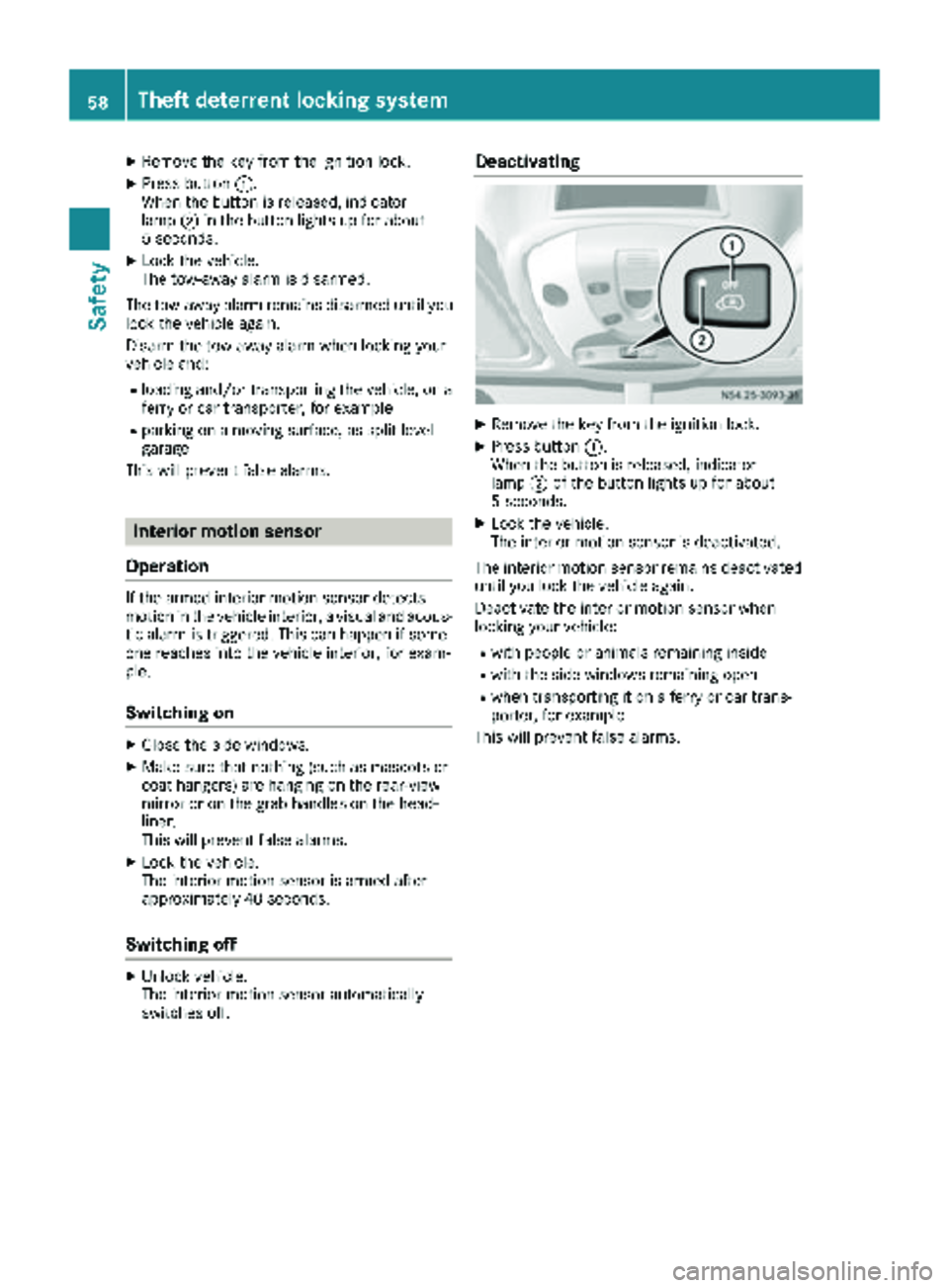
Deactivating
XRemove theke yfrom th eignition lock.
XPress butto n:.
When th ebutto nis released, indicator
lamp ;of th ebutto nlights up for about
5 seconds.
XLoc kth evehicle.
The interior motion sensor is deactivated.
The interior motion sensor remain sdeactivated
until you loc kth evehicl eagain .
Deactivat eth einterior motion sensor when
lockin gyour vehicle:
Rwit hpeople or animals remaining inside
Rwit hth eside windows remaining open
Rwhen transporting it on aferry or car trans -
porter, for exampl e
This will preven tfals ealarms.
58Theft deterrent locking system
Safety
Page 61 of 286
Useful information
This Operator's Manual describes all models as
well as standard and optional equipment of your
vehicle that were available at the time of going
to print. Country-specific variations are possi-
ble. Note that your vehicle may not be equipped
with all of the described functions. This also
applies to systems and functions relevant to
safety.
Read the information on qualified specialist
workshops (
Ypage 27).
Key
Important safety notes
GWARNING
When the double locks are activated, the
doors can no longer be opened from the
inside. People in the vehicle can no longer get
out, e.g. in hazardous situations. There is a
risk of injury.
Therefore, do not leave any people unsuper-
vised in the vehicle, particularly children, eld-
erly people or people in need of special assis-
tance. Do not activate the double lock when
people are in the vehicle.
GWARNING
If you leave children unsupervised in the vehi-
cle, they could set it in motion by, for example:
Rrelease the parking brake.
Rshift the automatic transmission out of park
position Por shift manual transmission into
neutral.
Rstart the engine.
In addition, they may operate vehicle equip-
ment and become trapped. There is a risk of
an accident and injury.
When leaving the vehicle, always take the
SmartKey with you and lock the vehicle. Never
leave children unsupervised in the vehicle.
GWARNING
If you attach heavy or large objects to the
SmartKey, the SmartKey could be uninten-
tionally turned in the ignition lock. This could
cause the engine to be switched off. There is a risk of an accident.
Do not attach any heavy or large objects to the
SmartKey. Remove any bulky key rings before
inserting the SmartKey into the ignition lock.
Do not keep the key with remote control:
Rwith electronic devices, e.g. a mobile phone
or another key with remote control
Rwith metallic objects, e.g. coins or metal foil
Rin metallic objects, e.g. metal cases
This can affect the key's functionality.
Key functions of the remote control
General notes
The vehicle is equipped with either 2 or 4 remote
controls with a folding key, or 4 mechanical
keys. In this Operator's Manual, both the
mechanical keys and the keys with remote con-
trol are referred to as keys. The remote control
key has a range of up to 32 ft (10 m). Use the
remote control of the key only when in immedi-
ate proximity of the vehicle. This prevents theft.
Remote controls that are not included in the
scope of delivery for the vehicle must be pro-
grammed before use. Further information can
be obtained at any authorized Sprinter Dealer.
The key's remote control locks/unlocks the
driver's door and/or the following centrally if
the factory settings have not been changed:
Rthe driver's and the front-passenger door
Rthe sliding doors
Rthe rear doors
iIf the driver's or front-passenger door is not
closed, the corresponding door is not locked.
If a sliding door or a rear door is not closed
properly, none of the rear doors are locked.
If there is a key is in the ignition lock, the remote
control is inoperative. When locking or unlock-
ing the vehicle with the remote control, always
pay attention to the indicator lamp signaling.
Also check the locking knobs of the doors.
Key59
Opening and closing
Z
Page 62 of 286
Unlocking/locking the vehicle with the
remote control
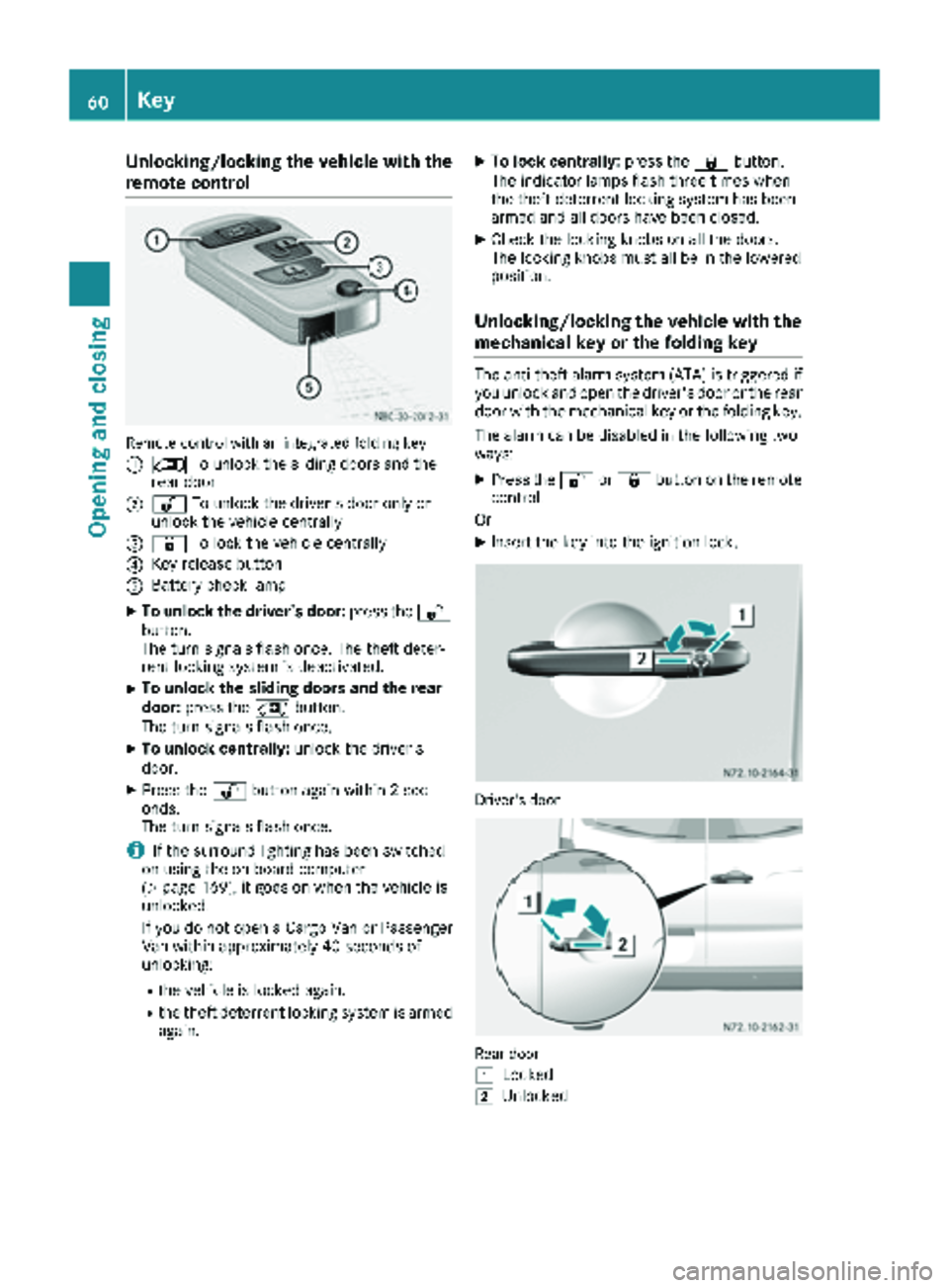
Remote control with an integrated folding key
:
5To unlock the sliding doors and the
rear door
;% To unlock the driver's door only or
unlock the vehicle centrally
=& To lock the vehicle centrally
?Key release button
ABattery check lamp
XTo unlock the driver's door: press the%
button.
The turn signals flash once. The theft deter-
rent locking system is deactivated.
XTo unlock the sliding doors and the rear
door: press the 5button.
The turn signals flash once.
XTo unlock centrally: unlock the driver's
door.
XPress the %button again within 2 sec-
onds.
The turn signals flash once.
iIf the surround lighting has been switched
on using the on-board computer
(
Ypage 169), it goes on when the vehicle is
unlocked.
If you do not open a Cargo Van or Passenger
Van within approximately 40 seconds of
unlocking:
Rthe vehicle is locked again.
Rthe theft deterrent locking system is armed
again.
XTo lock centrally: press the&button.
The indicator lamps flash three times when
the theft deterrent locking system has been
armed and all doors have been closed.
XCheck the locking knobs on all the doors.
The locking knobs must all be in the lowered
position.
Unlocking/locking the vehicle with the
mechanical key or the folding key
The anti-theft alarm system (ATA) is triggered if you unlock and open the driver's door or the rear
door with the mechanical key or the folding key.
The alarm can be disabled in the following two
ways:
XPress the %or& button on the remote
control.
Or
XInsert the key into the ignition lock.
Driver's door
Rear door
1
Locked
2Unlocked
60Key
Opening and closing
Page 64 of 286
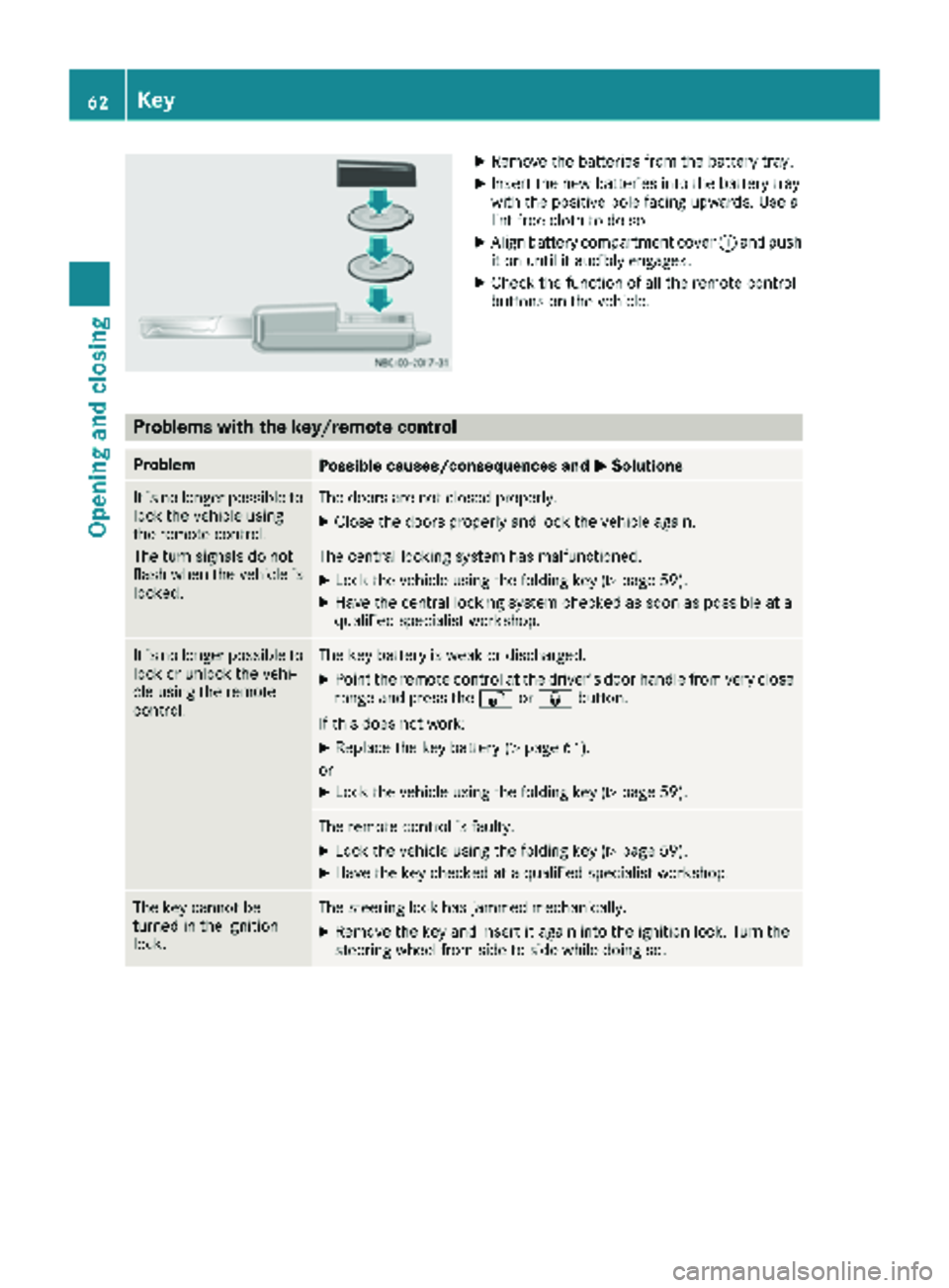
XRemove thebatterie sfrom th ebattery tray.
XInser tth ene wbatterie sint oth ebattery tray
wit hth epositive pole facing upwards. Use a
lint-free cloth to do so.
XAlign battery compartmen tcover :and push
it on until it audibly engages.
XChec kth efunction of all th eremot econtrol
buttons on th evehicle.
Problems with the key/remote control
ProblemPossible causes/consequences and MSolutions
It is no longer possibleto
loc kth evehicl eusin g
th eremot econtrol .
The tur nsignals do no t
flas hwhen th evehicl eis
locked.The door sare no tclosed properly.
XClose th edoor sproperly and loc kth evehicl eagain .
The central lockin gsystem has malfunctioned.
XLoc kth evehicl eusin gth efoldin gke y (Ypage 59).
XHav eth ecentral lockin gsystem checke das soo nas possibl eat a
qualified specialist workshop.
It is no longer possibl eto
loc kor unlock th evehi-
cle usin gth eremot e
control .The keybattery is weak or discharged.
XPoin tth eremot econtrol at th edriver' sdoor handle from ver yclose
range and press th e% or& button.
If this does no twork:
XReplac eth eke ybattery (Ypage 61).
or
XLoc kth evehicl eusin gth efoldin gke y (Ypage 59).
The remot econtrol is faulty.
XLoc kth evehicl eusin gth efoldin gke y (Ypage 59).
XHav eth eke ychecke dat aqualified specialist workshop.
The ke ycanno tbe
turne din th eignition
lock.The steering loc khas jammed mechanically.
XRemove th eke yand insert it again int oth eignition lock. Turn th e
steering whee lfrom side to side while doin gso.
62Key
Opening and closing
Page 66 of 286
XTo lock/unlock the entire vehicle:press
the upper Ãcentral locking button when
the doors are closed.
When the entire vehicle is locked, the indica- tor lamp in the Ãcentral locking button
lights up.
iIf the SmartKey has been removed or is in
position 0in the ignition lock, the indicator
lamp in the Ãcentral locking button
remains lit for 5 seconds.
XTo lock/unlock the sliding doors and rear
doors: press the lower section of the Ä
central locking button when the doors are
closed.
When the sliding doors and rear doors are
locked, the indicator lamp in the upper Ã
central locking button lights up.
Automatic locking
General notes
The vehicle locks automatically as standard
once a speed of 9 mph (15 km/h) has been
reached. Depending on the vehicle's equip-
ment, the doors may be locked automatically
once the ignition is switched on. Information on
the functions of the automatic locking mecha-
nism of your vehicle can be obtained from any
authorized Sprinter Dealer.
If the automatic locking when driving function is
activated, there is a risk of being locked out
when the vehicle is pushed or towed.
For this reason, deactivate the automatic lock-
ing when driving function:
Rbefore pushing the vehicle
Rbefore towing the vehicle
If activated, automatic locking is deactivated
when the vehicle is unlocked or locked using the
central locking button.
Automatic locking is reactivated after the igni-
tion is switched off or a door is opened with the
vehicle stationary.
Activating automatic locking when driv-
ing
XTurn the SmartKey to position 1or 2in the
ignition lock when the doors are closed.
XFor the entire vehicle: press the upperÃ
central locking button until the indicator lamp
in the button flashes four times.
XFor the sliding doors and rear doors only:
press the Älower central locking button
until the indicator lamp in the Ãupper
button flashes four times.
Deactivating automatic locking when
driving
XTurn the SmartKey to position 1or 2in the
ignition lock when the doors are closed.
XFor the entire vehicle: press theÃupper
central locking button until the indicator lamp
in the button flashes twice.
XFor the sliding doors and rear doors only:
press the Älower central locking button
until the indicator lamp in the Ãupper
button flashes twice.
Driver's door and front passenger
door
!
Only open the doors when road and traffic
conditions permit. Make sure that there is
sufficient clearance when opening the doors.
Otherwise, you could damage your vehicle or
other vehicles.
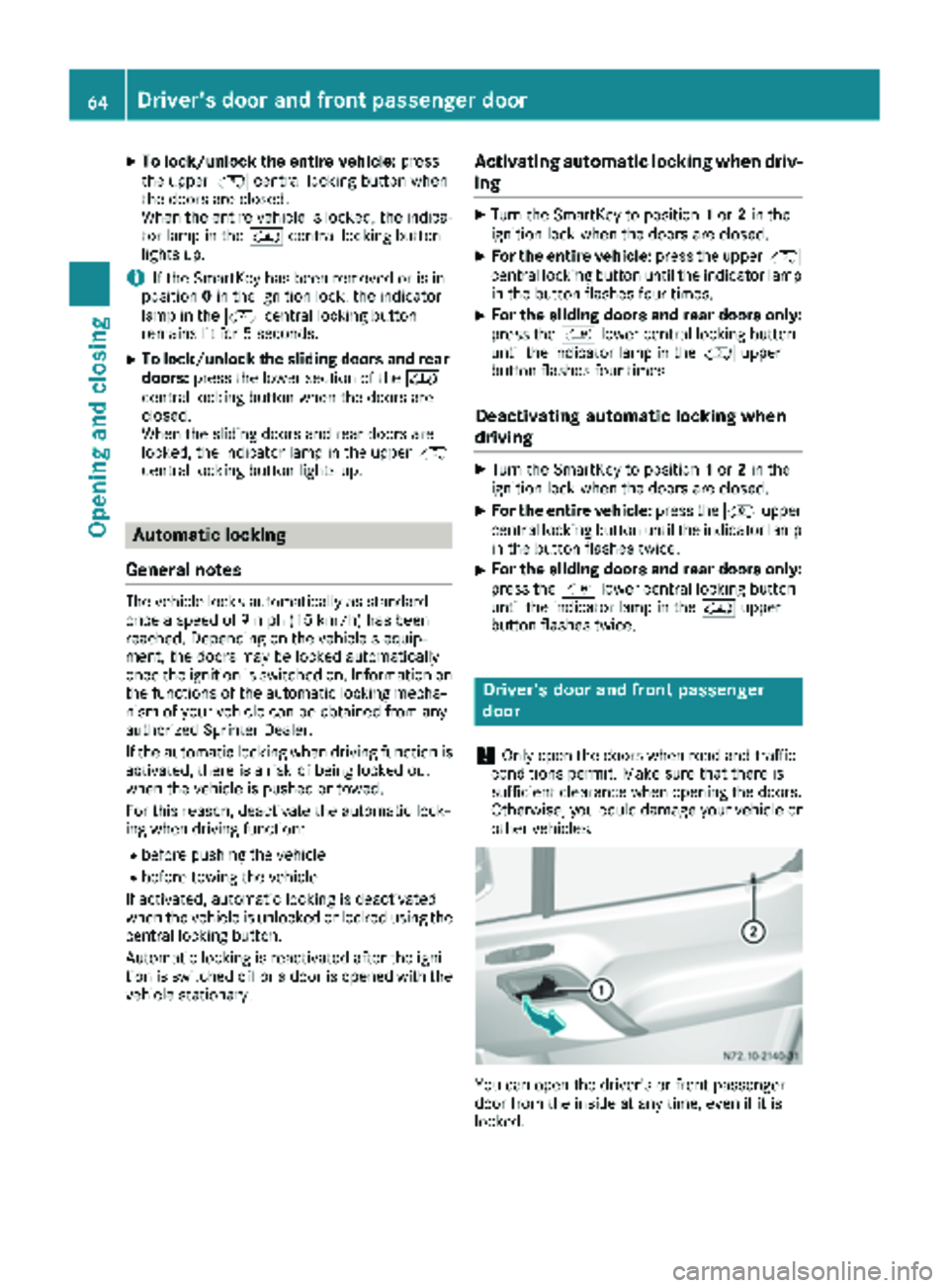
You can open the driver's or front-passenger
door from the inside at any time, even if it is
locked.
64Driver's door and front passenger door
Opening and closing
Page 72 of 286
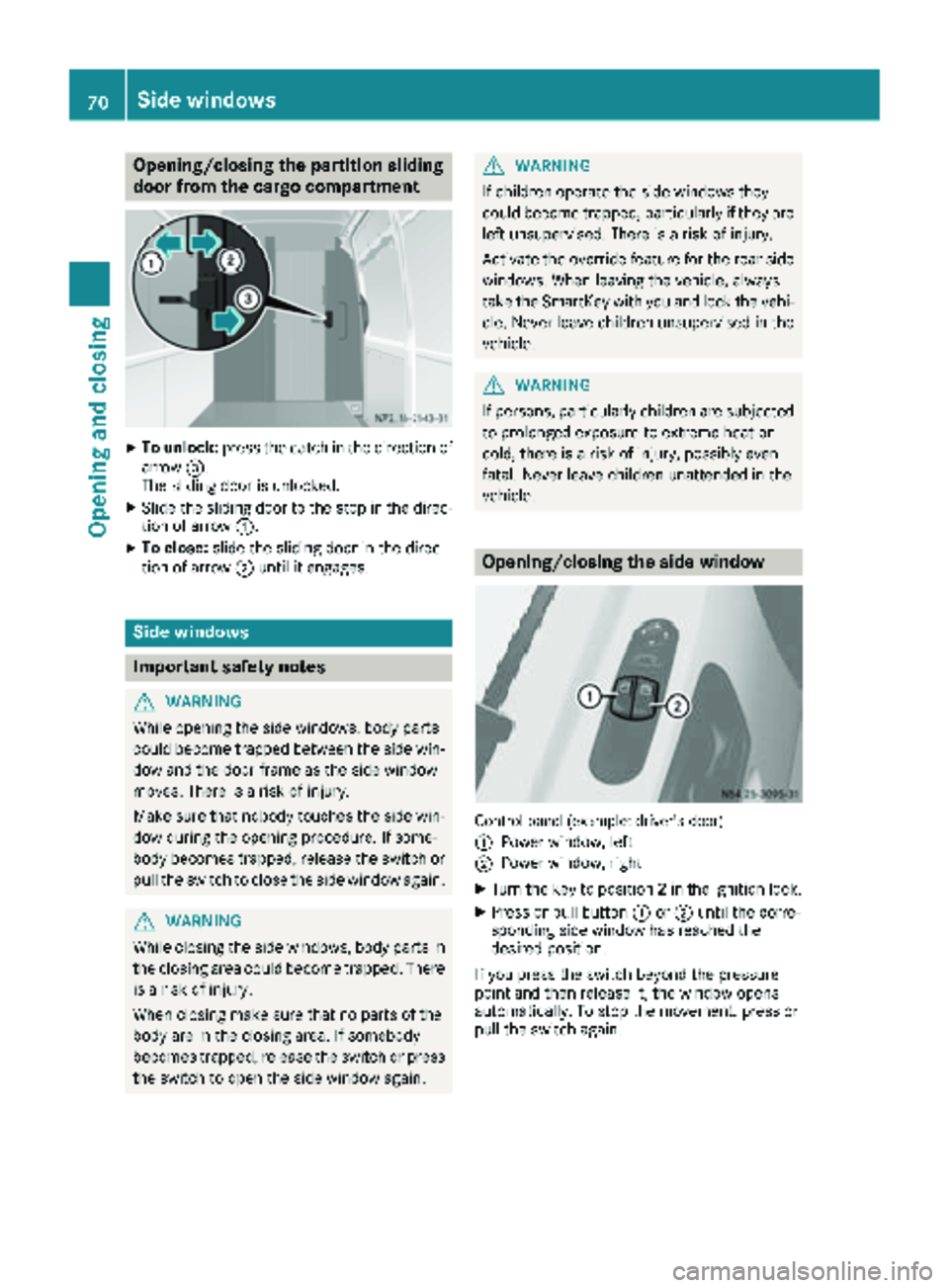
Opening/closing the partition sliding
door from the cargo compartment
XTo unlock:press the catch in the direction of
arrow =.
The sliding door is unlocked.
XSlide the sliding door to the stop in the direc- tion of arrow :.
XTo close:slide the sliding door in the direc-
tion of arrow ;until it engages.
Side windows
Important safety notes
GWARNING
While opening the side windows, body parts
could become trapped between the side win-
dow and the door frame as the side window
moves. There is a risk of injury.
Make sure that nobody touches the side win-
dow during the opening procedure. If some-
body becomes trapped, release the switch or
pull the switch to close the side window again.
GWARNING
While closing the side windows, body parts in
the closing area could become trapped. There is a risk of injury.
When closing make sure that no parts of the
body are in the closing area. If somebody
becomes trapped, release the switch or press
the switch to open the side window again.
GWARNING
If children operate the side windows they
could become trapped, particularly if they are left unsupervised. There is a risk of injury.
Activate the override feature for the rear side
windows. When leaving the vehicle, always
take the SmartKey with you and lock the vehi-
cle. Never leave children unsupervised in the
vehicle.
GWARNING
If persons, particularly children are subjected to prolonged exposure to extreme heat or
cold, there is a risk of injury, possibly even
fatal. Never leave children unattended in the
vehicle.
Opening/closing the side window
Control panel (example: driver's door)
:
Power window, left
;Power window, right
XTurn the key to position 2in the ignition lock.
XPress or pull button :or; until the corre-
sponding side window has reached the
desired position.
If you press the switch beyond the pressure
point and then release it, the window opens
automatically. To stop the movement, press or
pull the switch again.
70Side windows
Opening and closing
Page 73 of 286
Resetting the side windows
You must reset the side windows if there has
been a malfunction or an interruption in the volt-
age supply.
XTurn the key to position2in the ignition lock.
XPull the two power window switches and hold
for approximately 1 second after closing the
side window.
Problems with the side windows
If you cannot completely open or close a side
window:
If there are no objects or leaves in the window
guide that prevent the sliding sunroof from clos-
ing, there has been a malfunction or the on-
board voltage has been interrupted.
XReset the side window (Ypage 71).
Side windows71
Opening and closing
Z
Page 79 of 286
XTo set the armrest angle:fold the armrest
upwards by more than 45° ;.
The armrest is released.
XFold armrest =forwards to the stop.
XSlowly fold the armrest upwards to the
desired position.
XTo fold the armrest up: if necessary, fold the
armrest upwards :by more than 90°.
Seat heating
GWARNING
Repeatedly switching on the seat heating can
cause the seat cushion and backrest pads to
become very hot. The health of persons with
limited temperature sensitivity or a limited
ability to react to excessively high tempera-
tures may be affected or they may even suffer
burn-like injuries. There is a risk of injury.
Therefore, do not switch the seat heating on
repeatedly.
!When you leave your seat, do not place any-
thing on the seat and switch off the seat heat-
ing. Do not switch the seat heating on when
the seat is not occupied, e.g. when driving
without a front passenger. The seat heating
may otherwise overheat, causing damage to
the seat.
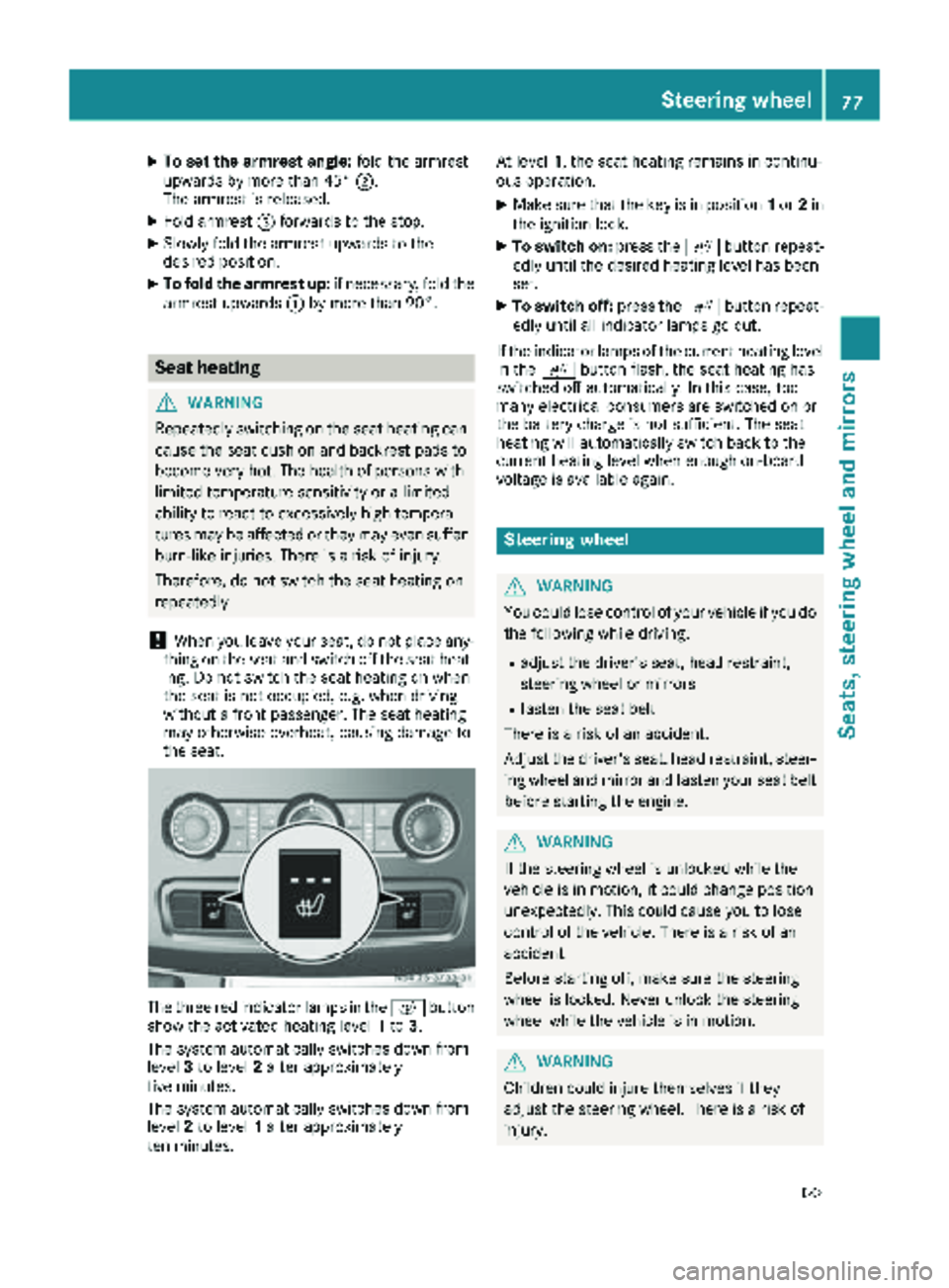
The three red indicator lamps in the cbutton
show the activated heating level 1to 3.
The system automatically switches down from
level 3to level 2after approximately
five minutes.
The system automatically switches down from
level 2to level 1after approximately
ten minutes. At level
1, the seat heating remains in continu-
ous operation.
XMake sure that the key is in position 1or 2in
the ignition lock.
XTo switch on: press thecbutton repeat-
edly until the desired heating level has been
set.
XTo switch off: press thecbutton repeat-
edly until all indicator lamps go out.
If the indicator lamps of the current heating level
in the cbutton flash, the seat heating has
switched off automatically. In this case, too
many electrical consumers are switched on or
the battery charge is not sufficient. The seat
heating will automatically switch back to the
current heating level when enough on-board
voltage is available again.
Steering wheel
GWARNING
You could lose control of your vehicle if you do the following while driving:
Radjust the driver's seat, head restraint,
steering wheel or mirrors
Rfasten the seat belt
There is a risk of an accident.
Adjust the driver's seat, head restraint, steer-
ing wheel and mirror and fasten your seat belt before starting the engine.
GWARNING
If the steering wheel is unlocked while the
vehicle is in motion, it could change position
unexpectedly. This could cause you to lose
control of the vehicle. There is a risk of an
accident.
Before starting off, make sure the steering
wheel is locked. Never unlock the steering
wheel while the vehicle is in motion.
GWARNING
Children could injure themselves if they
adjust the steering wheel. There is a risk of
injury.
Steering wheel77
Seats, steering wheel and mirrors
Z
Page 80 of 286
When leaving the vehicle, always take the
SmartKey with you and lock the vehicle. Never
leave children unsupervised in the vehicle.
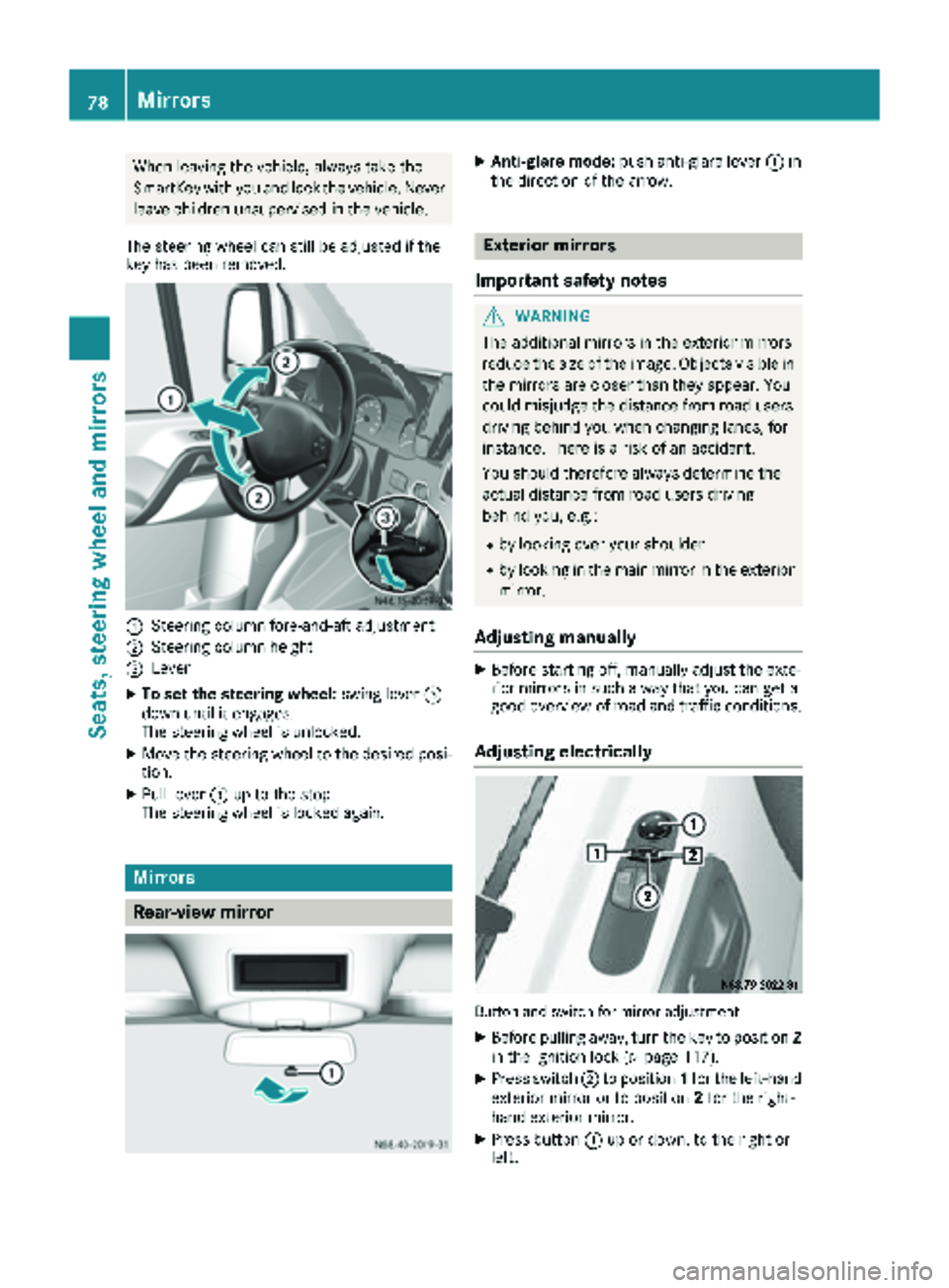
The steering wheel can still be adjusted if the
key has been removed.
:Steering column fore-and-aft adjustment
;Steering column height
=Lever
XTo set the steering wheel: swing lever=
down until it engages.
The steering wheel is unlocked.
XMove the steering wheel to the desired posi-
tion.
XPull lever =up to the stop.
The steering wheel is locked again.
Mirrors
Rear-view mirror
XAnti-glare mode: push anti-glare lever :in
the direction of the arrow.
Exterior mirrors
Important safety notes
GWARNING
The additional mirrors in the exterior mirrors
reduce the size of the image. Objects visible in
the mirrors are closer than they appear. You
could misjudge the distance from road users
driving behind you when changing lanes, for
instance. There is a risk of an accident.
You should therefore always determine the
actual distance from road users driving
behind you, e.g.:
Rby looking over your shoulder
Rby looking in the main mirror in the exterior
mirror.
Adjusting manually
XBefore starting off, manually adjust the exte-
rior mirrors in such a way that you can get a
good overview of road and traffic conditions.
Adjusting electrically
Button and switch for mirror adjustment
XBefore pulling away, turn the key to position 2
in the ignition lock (Ypage 117).
XPress switch ;to position 1for the left-hand
exterior mirror or to position 2for the right-
hand exterior mirror.
XPress button :up or down, to the right or
left.
78Mirrors
Seats, steering wheel and mirrors