ESP MERCEDES-BENZ SPRINTER 2017 MY17 Operator’s Manual
[x] Cancel search | Manufacturer: MERCEDES-BENZ, Model Year: 2017, Model line: SPRINTER, Model: MERCEDES-BENZ SPRINTER 2017Pages: 286, PDF Size: 4.36 MB
Page 68 of 286
Electrical closing assist
If your vehicle is equipped with electrical closing
assist, you will require less force to close the
sliding door.
Electrical step
Important safety notes
!
Always observe the ground clearance of the
vehicle and avoid obstacles. On vehicles with a step, ground clearance is further restricted.
Obstacles can damage the vehicle.
If you must drive over obstacles, drive espe-
cially slowly and carefully. If necessary, have
another person direct you.
If you do not use the grab handle and the step,
you could injure yourself when getting in and out
of the vehicle.
In order to reduce risks:
Rdraw the passengers' attention to the electri-
cal step. Wait until the electrical step is fully
extended.
Rdo not jump out of the vehicle.
Ronly use the grab handle and step. Only they
are designed for such a load.
Rkeep grab handles, access steps and entry
sills free from dirt, e.g. mud, clay, snow and
ice.
Operation and obstacle detection
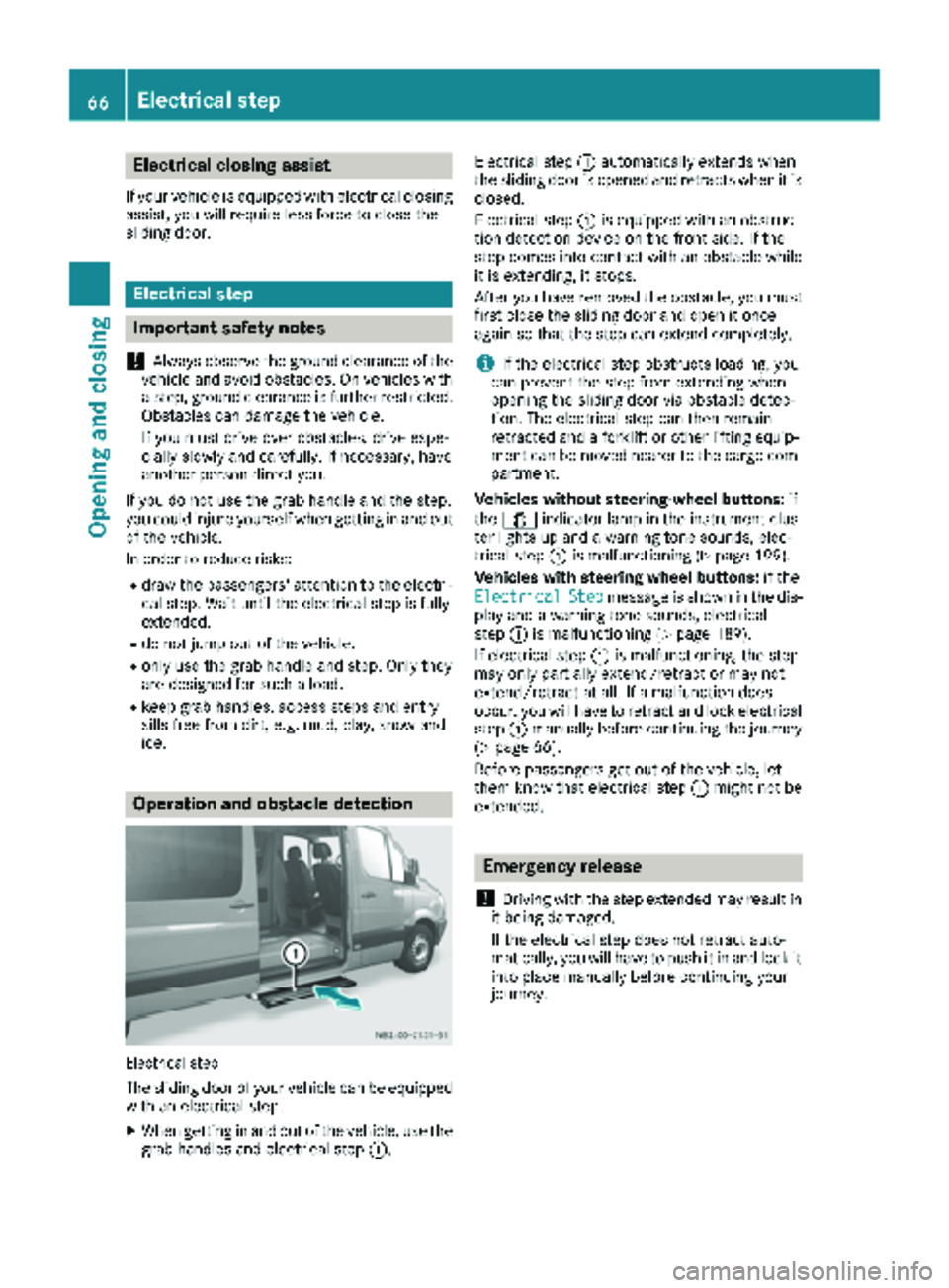
Electrical step
The sliding door of your vehicle can be equipped
with an electrical step.
XWhen getting in and out of the vehicle, use the grab handles and electrical step :.Electrical step
:automatically extends when
the sliding door is opened and retracts when it is
closed.
Electrical step :is equipped with an obstruc-
tion detection device on the front side. If the
step comes into contact with an obstacle while
it is extending, it stops.
After you have removed the obstacle, you must
first close the sliding door and open it once
again so that the step can extend completely.
iIf the electrical step obstructs loading, you
can prevent the step from extending when
opening the sliding door via obstacle detec-
tion. The electrical step can then remain
retracted and a forklift or other lifting equip-
ment can be moved nearer to the cargo com-
partment.
Vehicles without steering-wheel buttons: if
the 1 indicator lamp in the instrument clus-
ter lights up and a warning tone sounds, elec-
trical step :is malfunctioning (
Ypage 199).
Vehicles with steering wheel buttons: if the
Electrical
Stepmessage is shown in the dis-
play and a warning tone sounds, electrical
step :is malfunctioning (
Ypage 189).
If electrical step :is malfunctioning, the step
may only partially extend/retract or may not
extend/retract at all. If a malfunction does
occur, you will have to retract and lock electrical
step :manually before continuing the journey
(
Ypage 66).
Before passengers get out of the vehicle, let
them know that electrical step :might not be
extended.
Emergency release
!
Driving with the step extended may result in
it being damaged.
If the electrical step does not retract auto-
matically, you will have to push it in and lock it
into place manually before continuing your
journey.
66Electrical step
Opening and closing
Page 69 of 286
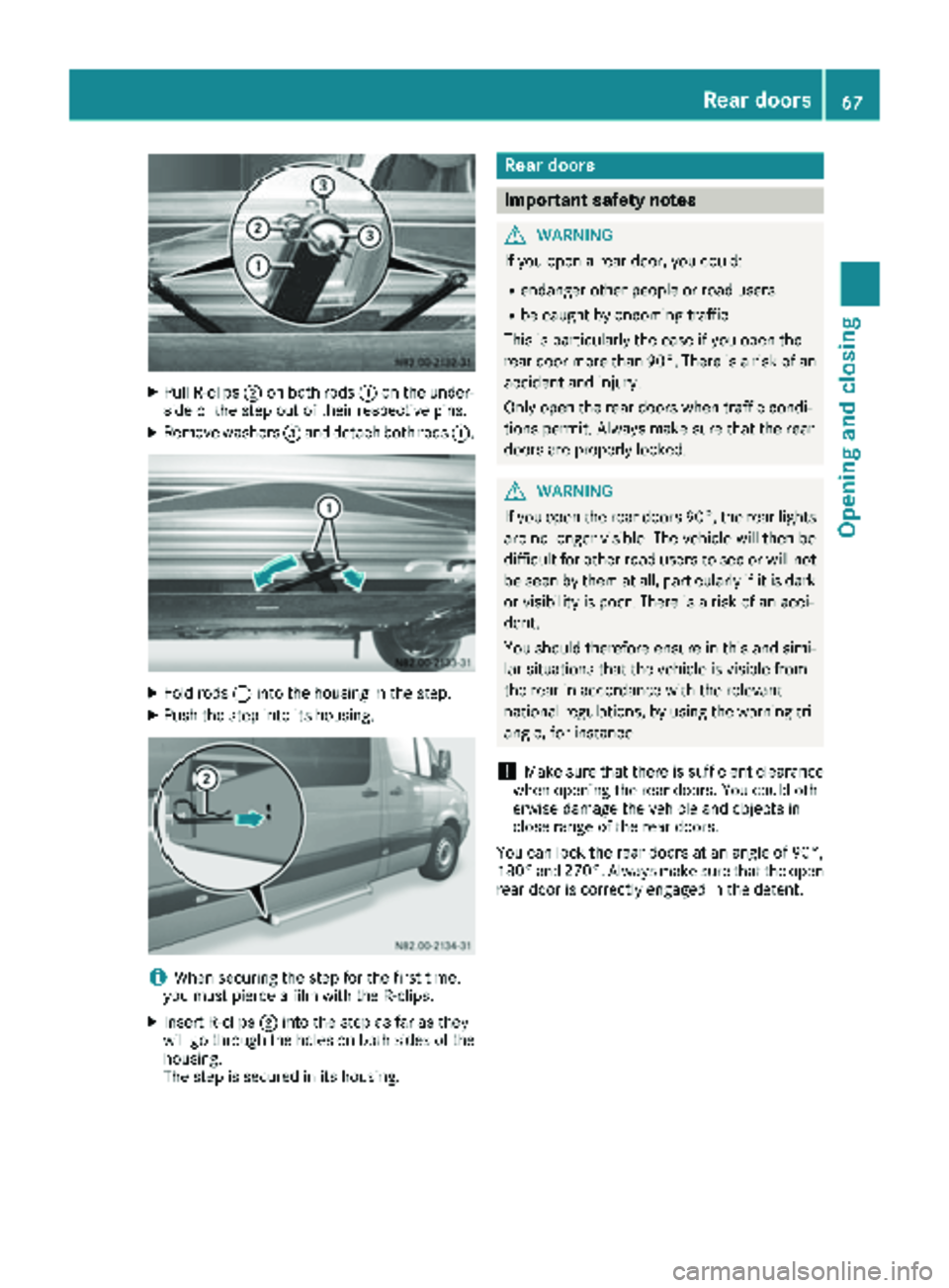
XPull R-clips;on both rods :on the under-
side of the step out of their respective pins.
XRemove washers =and detach both rods :.
XFold rods:into the housing in the step.
XPush the step into its housing.
iWhen securing the step for the first time,
you must pierce a film with the R-clips.
XInsert R-clips ;into the step as far as they
will go through the holes on both sides of the
housing.
The step is secured in its housing.
Rear doors
Important safety notes
GWARNING
If you open a rear door, you could:
Rendanger other people or road users
Rbe caught by oncoming traffic
This is particularly the case if you open the
rear door more than 90°. There is a risk of an
accident and injury.
Only open the rear doors when traffic condi-
tions permit. Always make sure that the rear
doors are properly locked.
GWARNING
If you open the rear doors 90°, the rear lights are no longer visible. The vehicle will then be
difficult for other road users to see or will not
be seen by them at all, particularly if it is dark
or visibility is poor. There is a risk of an acci-
dent.
You should therefore ensure in this and simi-
lar situations that the vehicle is visible from
the rear in accordance with the relevant
national regulations, by using the warning tri-
angle, for instance.
!Make sure that there is sufficient clearance
when opening the rear doors. You could oth-
erwise damage the vehicle and objects in
close range of the rear doors.
You can lock the rear doors at an angle of 90°,
180° and 270°. Always make sure that the open
rear door is correctly engaged in the detent.
Rear doors67
Opening and closing
Z
Page 77 of 286
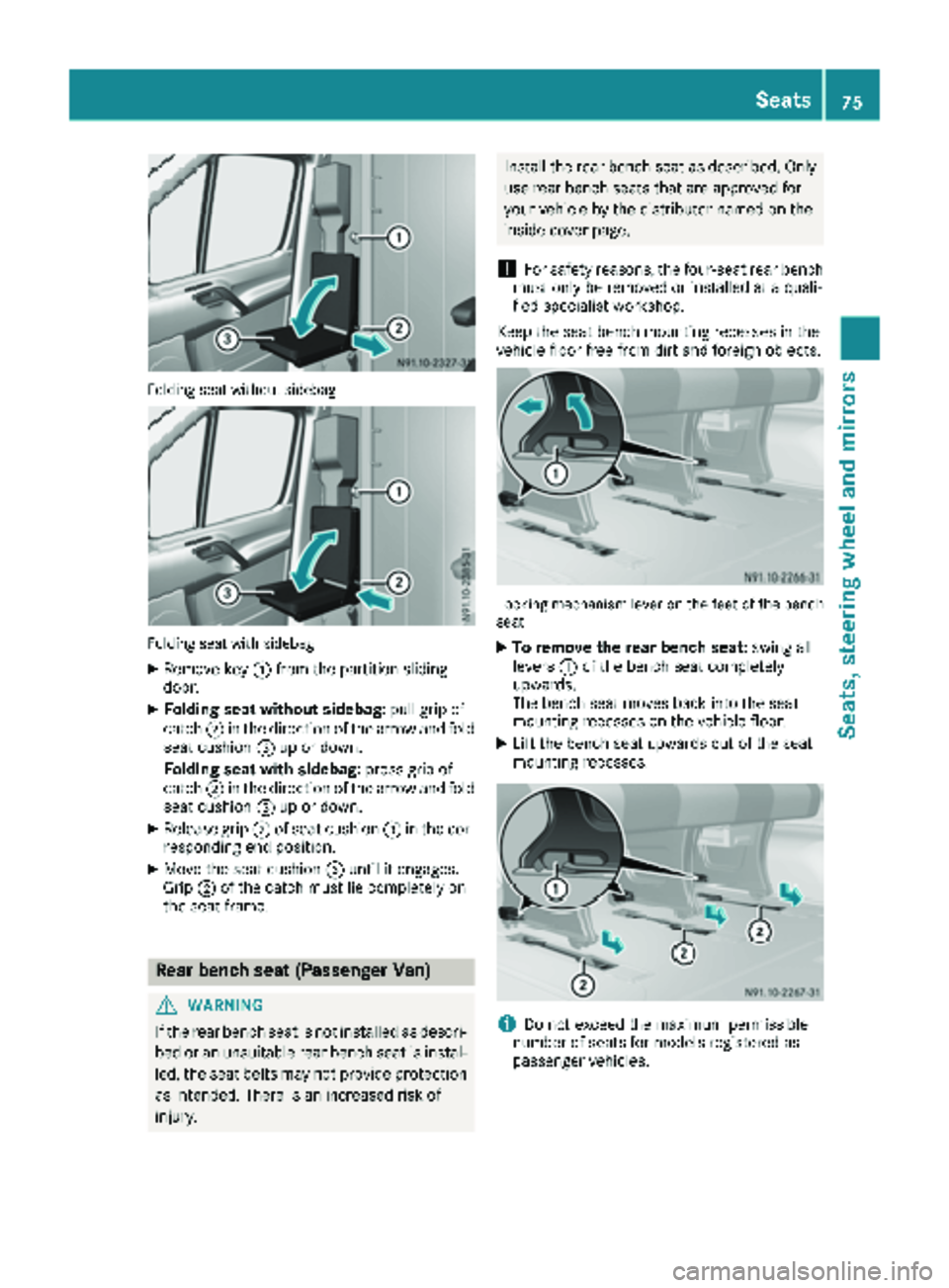
Folding seat without sidebag
Folding seat with sidebag
XRemove key:from the partition sliding
door.
XFolding seat without sidebag: pull grip of
catch ;in the direction of the arrow and fold
seat cushion =up or down.
Folding seat with sidebag: press grip of
catch ;in the direction of the arrow and fold
seat cushion =up or down.
XRelease grip ;of seat cushion =in the cor-
responding end position.
XMove the seat cushion =until it engages.
Grip ;of the catch must lie completely on
the seat frame.
Rear bench seat (Passenger Van)
GWARNING
If the rear bench seat is not installed as descri- bed or an unsuitable rear bench seat is instal-
led, the seat belts may not provide protection
as intended. There is an increased risk of
injury.
Install the rear bench seat as described. Onlyuse rear bench seats that are approved for
your vehicle by the distributor named on the
inside cover page.
!For safety reasons, the four-seat rear bench
must only be removed or installed at a quali-
fied specialist workshop.
Keep the seat bench mounting recesses in the
vehicle floor free from dirt and foreign objects.
Locking mechanism lever on the feet of the bench
seat
XTo remove the rear bench seat: swing all
levers :of the bench seat completely
upwards.
The bench seat moves back into the seat
mounting recesses on the vehicle floor.
XLift the bench seat upwards out of the seat
mounting recesses.
iDo not exceed the maximum permissible
number of seats for models registered as
passenger vehicles.
Seats75
Seats, steering wheel and mirrors
Z
Page 78 of 286
XTo install the rear bench seat:observe the
prescribed installation position of the bench
seat.
Install the two-seat bench seat only on the
driver's side.
XCheck mounting shells ;on the vehicle
floor.
XPosition the bench seat in the direction of
travel in corresponding mounting shells ;.
XSlide the bench seat forwards until you hear
the locking mechanisms engage.
XCheck levers:on the anchorages of the
bench seat.
All levers :must be flush to the vehicle floor.
Head restraints
GWARNING
If head restraints are not installed and adjus-
ted correctly, they cannot provide protection
as intended. There is an increased risk of
injury in the head and neck area, e.g. in the
event of an accident or when braking.
Always drive with the head restraints instal-
led. Before driving off, make sure for every
vehicle occupant that the center of the head
restraint supports the back of the head at
about eye level.
Do not change over the head restraints for the
front and rear seats. Otherwise, it will not be
possible to correctly adjust the height and angle
of the head restraints.
Adjust the head restraint so that it is as close as
possible to your head.
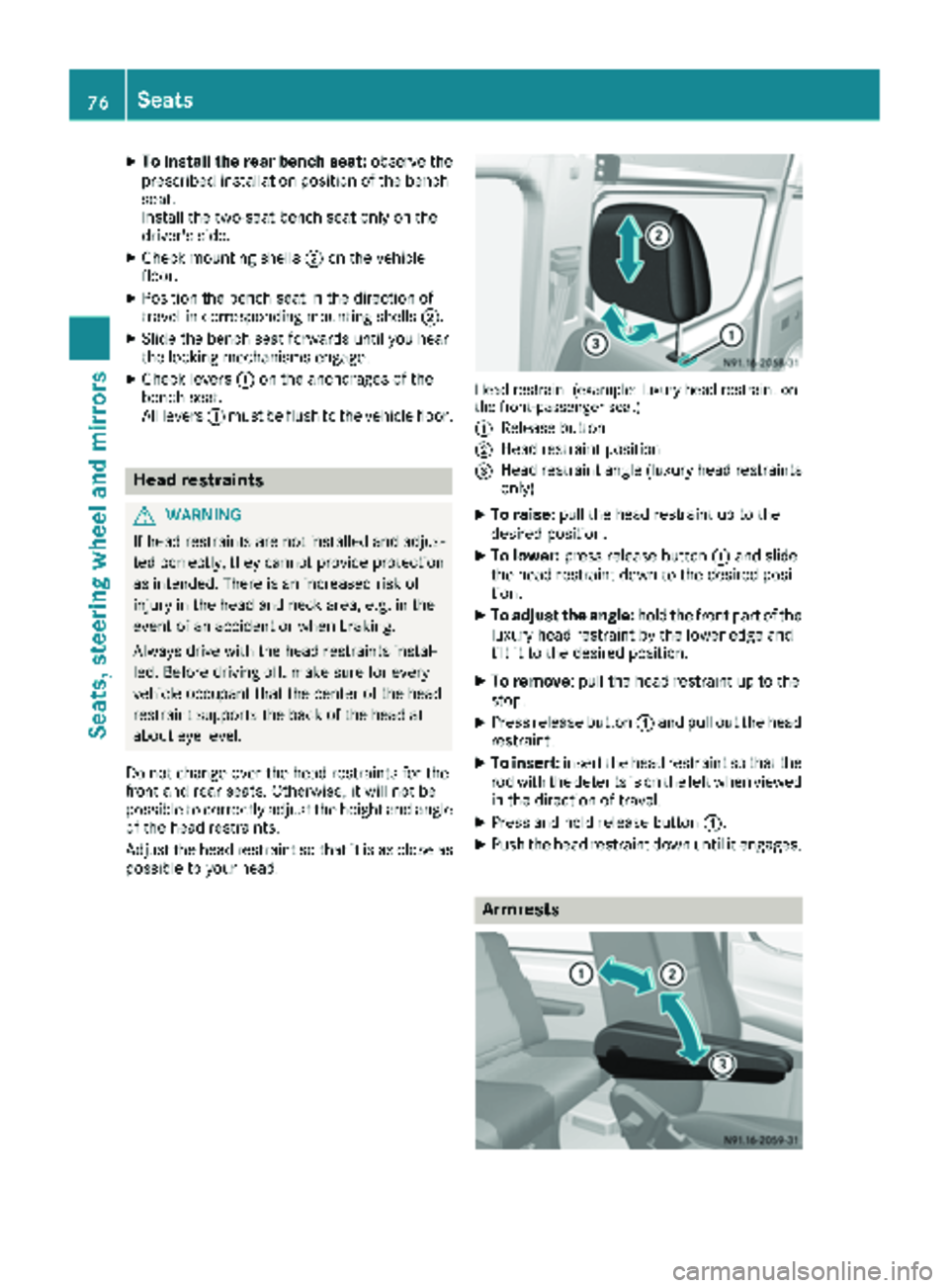
Head restraint (example: luxury head restraint on
the front-passenger seat)
:
Release button
;Head restraint position
=Head restraint angle (luxury head restraints only)
XTo raise: pull the head restraint up to the
desired position.
XTo lower: press release button :and slide
the head restraint down to the desired posi-
tion.
XTo adjust the angle: hold the front part of the
luxury head restraint by the lower edge and
tilt it to the desired position.
XTo remove: pull the head restraint up to the
stop.
XPress release button :and pull out the head
restraint.
XTo insert: insert the head restraint so that the
rod with the detents is on the left when viewed in the direction of travel.
XPress and hold release button :.
XPush the head restraint down until it engages.
Armrests
76Seats
Seats, steeringwheel and mirrors
Page 82 of 286
Useful information
This Operator's Manual describes all models as
well as standard and optional equipment of your
vehicle that were available at the time of going
to print. Country-specific variations are possi-
ble. Note that your vehicle may not be equipped
with all of the described functions. This also
applies to systems and functions relevant to
safety.
Read the information on qualified specialist
workshops (
Ypage 27).
Exterior lighting
Important safety notes
For reasons of safety, we recommend that you
drive with the lights switched on even during the
daytime. There may be differences in operation
due to legal requirements and voluntary recom-
mendations in some countries.
Bulb failure indicator
The bulb failure indicator is only an aid. You are
responsible for the proper functioning of the
vehicle lighting. Insufficient or non-functioning
vehicle lighting puts the operating safety of the
vehicle at risk.
For this reason, check the condition and func-
tion of your vehicle's lighting system and, if nec-
essary, that of the trailer before each journey.
The bulb failure indicator monitors all of the
exterior lighting lamps, except the perimeter
lamp and the trailer lighting. If a bulb fails, either
the b(
Ypage 34) indicator lamp lights up, or
you will see a corresponding message in the
display (
Ypage 182).
iDepending on the equipment, the bulb fail-
ure indicator can fail for all lamps with the
exception of the turn signal lamps.
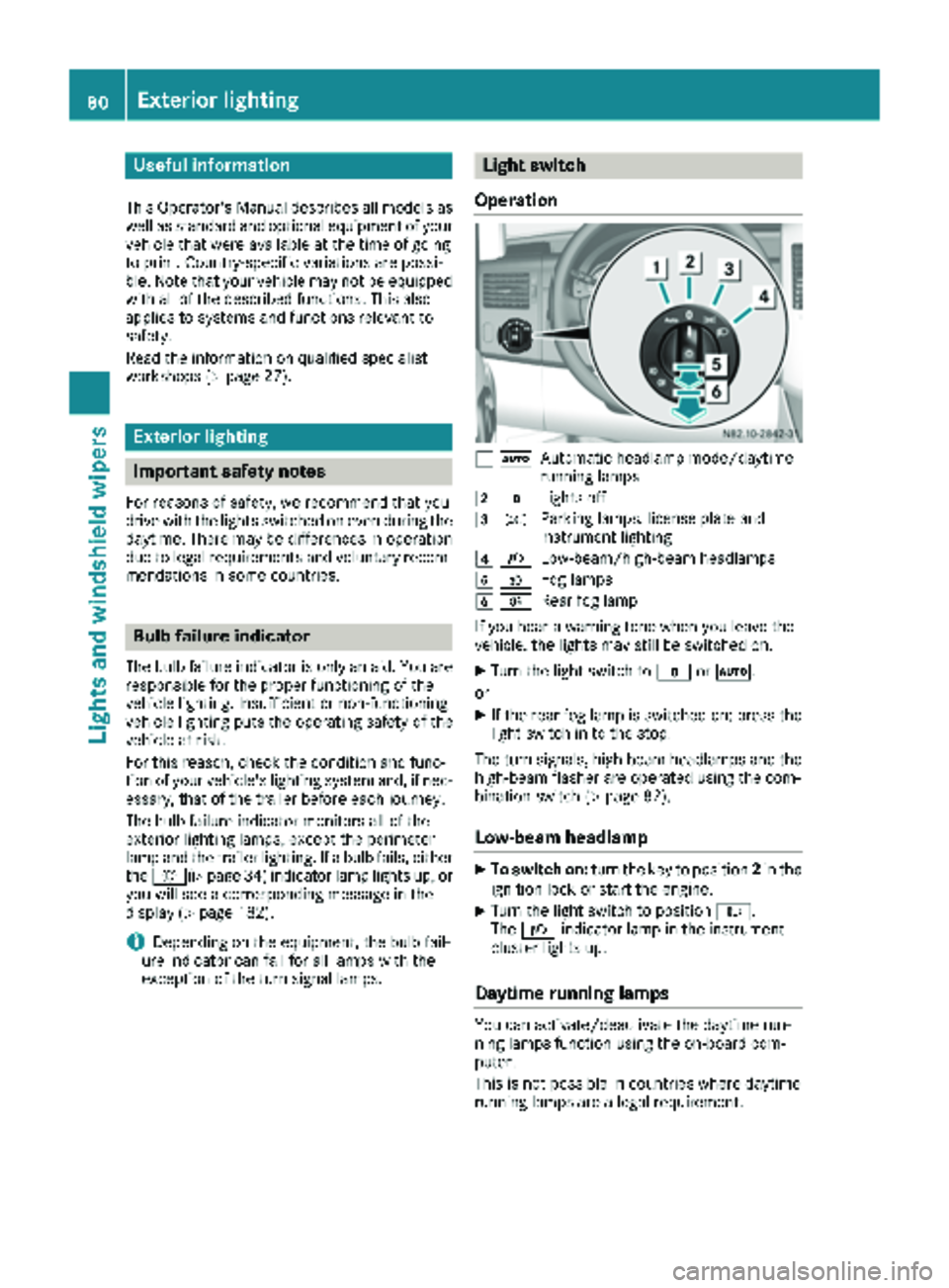
Light switch
Operation
1 ÃAutomatic headlamp mode/daytime
running lamps
2$Lights off
3TParking lamps, license plate and
instrument lighting
4LLow-beam/high-beam headlamps
5NFog lamps
6RRear fog lamp
If you hear a warning tone when you leave the
vehicle, the lights may still be switched on.
XTurn the light switch to $orÃ.
or
XIf the rear fog lamp is switched on: press the
light switch in to the stop.
The turn signals, high-beam headlamps and the
high-beam flasher are operated using the com-
bination switch (
Ypage 82).
Low-beam headlamp
XTo switch on: turn the key to position 2in the
ignition lock or start the engine.
XTurn the light switch to position L.
The L indicator lamp in the instrument
cluster lights up.
Daytime running lamps
You can activate/deactivate the daytime run-
ning lamps function using the on-board com-
puter.
This is not possible in countries where daytime
running lamps are a legal requirement.
80Exterior lighting
Lights and windshield wipers
Page 83 of 286
The daytime running lamps function must be
activated using the on-board computer:
Rvehicles with steering wheel buttons
(Ypage 168)
Rvehicles without steering wheel buttons
(Ypage 161)
XTo switch on:turn the light switch to the
$ position.
The low-beam headlamps, parking lamps and
license plate lamp are switched on when the
engine is running. The Lindicator lamp in
the instrument cluster lights up.
iUSA only:
If you turn the light switch to the TorL
position, the parking lamps or low-beam
headlamps switch on. If you turn the light
switch to the Ãposition, the daytime run-
ning lamps remain switched on.
iCanada only:
If you turn the light switch to the Lposi-
tion, the low-beam headlamps are switched
on. If you turn the light switch to the Tor
à position, the daytime running lamps
remain switched on.
Automatic headlamp mode
GWARNING
When the light switch is set to Ã, the low-
beam headlamps may not be switched on
automatically if there is fog, snow or other
causes of poor visibility due to the weather
conditions such as spray. There is a risk of an
accident.
In such situations, turn the light switch to
L.
Automatic headlamp mode is only a driving aid.
You are responsible for the vehicle lighting at all
times.
Depending on ambient light, the rain and light
sensor automatically switches on the parking
lamps, low-beam headlamps and the license
plate lamp. This excludes weather-related
impairments to visibility, such as snow, fog or
spray.
If there is fog, snow or spray, turn the light
switch quickly from ÃtoL. You could
otherwise briefly interrupt operation of the
headlamps.
XTo switch on automatic headlamp mode:
turn the light switch to Ã.
Key in position 1in the ignition lock: the park-
ing lamps switch on or off automatically
depending on the ambient light.
When the engine is running: if you activate the
"daytime running lamps" function using the
on-board computer, the daytime running
lamps are switched on. The parking lamps and
low-beam headlamps also switch on or off
automatically, depending on the ambient
light.
When the low-beam headlamps are switched
on, the Lindicator lamp in the instrument
cluster lights up.
Fog lamps/rear fog lamp
GWARNING
If you suspect that driving conditions will be
foggy, turn the light switch to Lbefore you
start your journey. Your vehicle may other-
wise not be visible and you could endanger
yourself and others.
GWARNING
In low ambient lighting or foggy conditions,
only switch from position ÃtoL with
the vehicle at a standstill in a safe location.
Switching from ÃtoL will briefly
switch off the headlamps. Doing so while driv-
ing in low ambient lighting conditions may
result in an accident.
XTurn the ignition key to position 2in the igni-
tion lock or start the engine.
XTurn the light switch to LorT.
iIf your vehicle is only equipped with one rear
fog lamp, you must turn the light switch to
L.
iWhen the light switch is set to Ãyou
cannot switch on the front and rear foglamps.
XTo switch on the front fog lamps: pull the
light switch out to the first locking point.
The green Nindicator lamp on the light
switch lights up.
Exterior lighting81
Lights and windshield wipers
Z
Page 84 of 286
XTo switch on the rear fog lamp:pull the light
switch out to the second locking point.
The yellow Rindicator lamp on the light
switch lights up.
XTo switch off the front and rear foglamps:
push in the light switch to the stop.
The R andN indicator lamp on the light
switch go out.
Combination switch
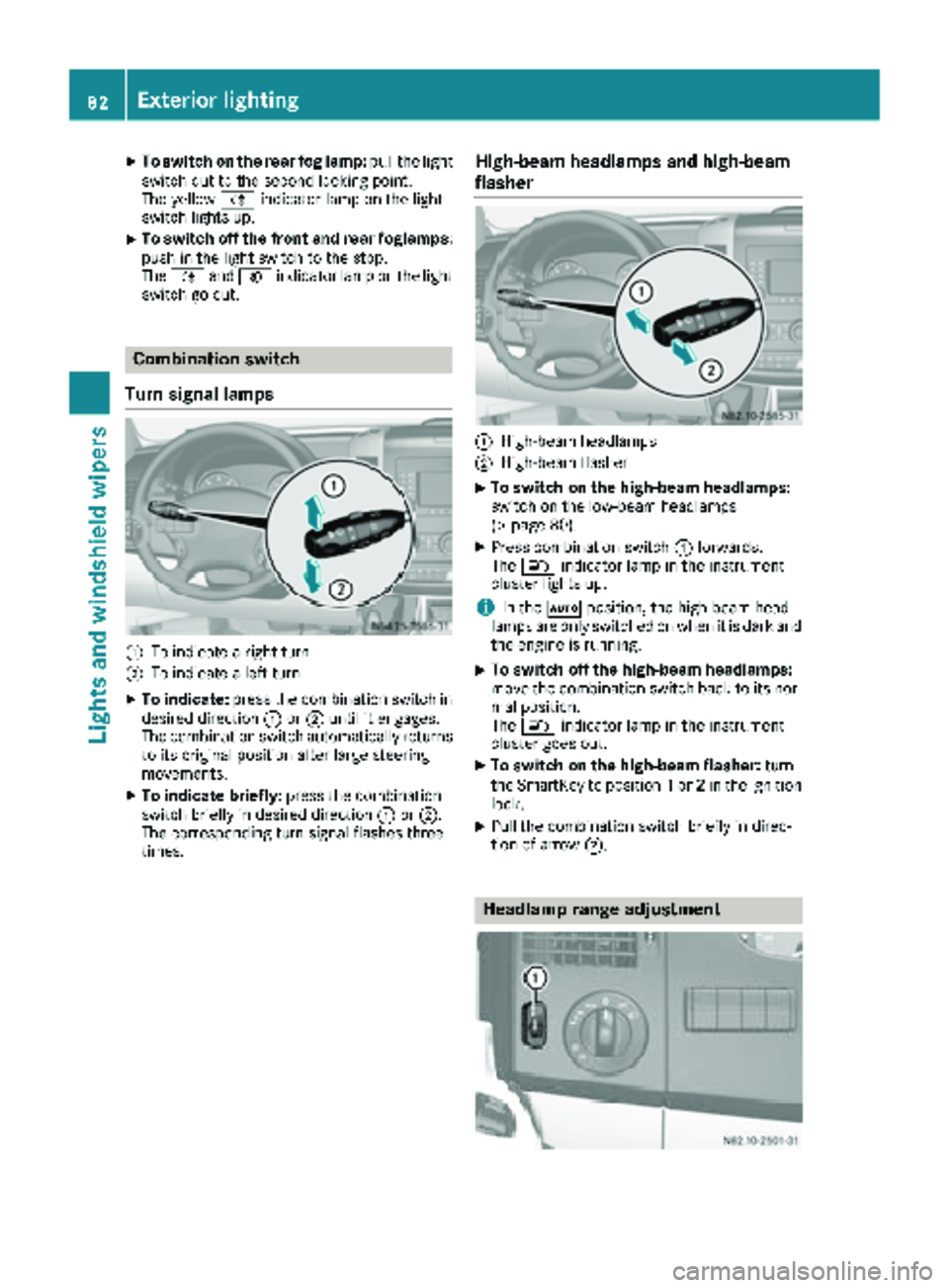
Turn signal lamps
:To indicate a right turn
;To indicate a left turn
XTo indicate: press the combination switch in
desired direction :or; until it engages.
The combination switch automatically returns
to its original position after large steering
movements.
XTo indicate briefly: press the combination
switch briefly in desired direction :or;.
The corresponding turn signal flashes three
times.
High-beam headlamps and high-beam
flasher
:High-beam headlamps
;High-beam flasher
XTo switch on the high-beam headlamps:
switch on the low-beam headlamps
(
Ypage 80).
XPress combination switch :forwards.
The K indicator lamp in the instrument
cluster lights up.
iIn the Ãposition, the high-beam head-
lamps are only switched on when it is dark and
the engine is running.
XTo switch off the high-beam headlamps:
move the combination switch back to its nor-
mal position.
The K indicator lamp in the instrument
cluster goes out.
XTo switch on the high-beam flasher: turn
the SmartKey to position 1or 2in the ignition
lock.
XPull the combination switch briefly in direc-
tion of arrow ;.
Headlamp range adjustment
82Exterior lighting
Lights andwindshield wiper s
Page 85 of 286
The headlamp range control is used to adapt the
downward angle of the headlamp beams in
accordance with the load on your vehicle. The
cone of light from the headlamps changes if
seats are occupied or if the cargo compartmentis being loaded or unloaded. This can impair vis-
ibility and cause glare to oncoming traffic.
You can only adjust the headlamp range while
the engine is running.
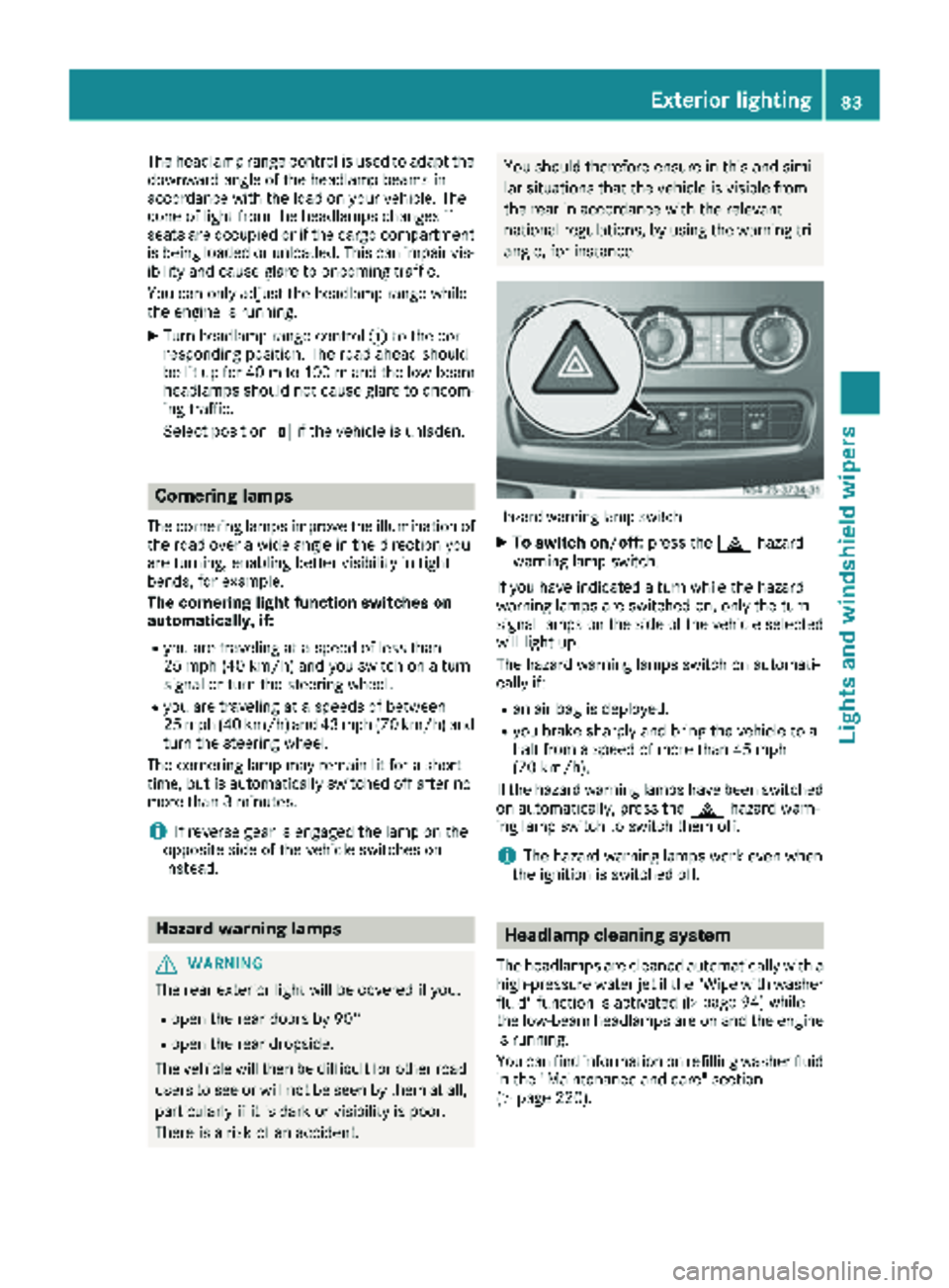
XTurn headlamp range control :to the cor-
responding position. The road ahead should
be lit up for 40 mto 100 mand the low-beam
headlamps should not cause glare to oncom-
ing traffic.
Select position gif the vehicle is unladen.
Cornering lamps
The cornering lamps improve the illumination of
the road over a wide angle in the direction you
are turning, enabling better visibility in tight
bends, for example.
The cornering light function switches on
automatically, if:
Ryou are traveling at a speed of less than
25 mph (40 km/h) and you switch on a turn
signal or turn the steering wheel.
Ryou are traveling at a speeds of between
25 mph (40 km/h) and 43 mph (70 km/h) and
turn the steering wheel.
The cornering lamp may remain lit for a short
time, but is automatically switched off after no
more than 3 minutes.
iIf reverse gear is engaged the lamp on the
opposite side of the vehicle switches on
instead.
Hazard warning lamps
GWARNING
The rear exterior light will be covered if you:
Ropen the rear doors by 90°
Ropen the rear dropside.
The vehicle will then be difficult for other road users to see or will not be seen by them at all,
particularly if it is dark or visibility is poor.
There is a risk of an accident.
You should therefore ensure in this and simi-
lar situations that the vehicle is visible from
the rear in accordance with the relevant
national regulations, by using the warning tri-
angle, for instance.
Hazard warning lamp switch
XTo switch on/off: press the£hazard
warning lamp switch.
If you have indicated a turn while the hazard
warning lamps are switched on, only the turn
signal lamps on the side of the vehicle selected
will light up.
The hazard warning lamps switch on automati-
cally if:
Ran air bag is deployed.
Ryou brake sharply and bring the vehicle to a
halt from a speed of more than 45 mph
(70 km/h).
If the hazard warning lamps have been switched
on automatically, press the £hazard warn-
ing lamp switch to switch them off.
iThe hazard warning lamps work even when
the ignition is switched off.
Headlamp cleaning system
The headlamps are cleaned automatically with a
high-pressure water jet if the "Wipe with washer
fluid" function is activated (
Ypage 94) while
the low-beam headlamps are on and the engine is running.
You can find information on refilling washer fluid
in the "Maintenance and care" section
(
Ypage 220).
Exterior lighting83
Lights and windshield wiper s
Z
Page 86 of 286
Highbeam Assist
General notes
You can use this function to set the headlamps
to change between low beam and high beam
automatically. The system recognizes vehicles
with their lights on, either approaching from the
opposite direction or traveling in front of your
vehicle, and consequently switches the head-
lamps from high beam to low beam.
Once the system no longer detects any other
vehicles, it reactivates the high-beam head-
lamps.
The system's optical sensor is located behind
the windshield near the overhead control panel.
Important safety notes
GWARNING
Highbeam Assist does not recognize road
users:
Rwho have no lights, e.g. pedestrians
Rwho have poor lighting, e.g. cyclists
Rwhose lighting is blocked, e.g. by a barrier
In very rare cases, Highbeam Assist may fail to
recognize other road users who have lights, or
may recognize them too late. In this or similar situations, the automatic high-beam head-
lamps will not be deactivated or will be acti-
vated regardless. There is a risk of an acci-
dent.
Always carefully observe the traffic conditions
and switch off the high-beam headlamps in
good time.
Highbeam Assist cannot take into account road,
weather or traffic conditions. Highbeam Assist
is only an aid. You are responsible for adjusting
the vehicle's lighting to the prevailing light, vis-
ibility and traffic conditions.
In particular, the detection of obstacles can be
restricted if there is:
Rpoor visibility, e.g. due to fog, heavy rain or
snow
Rdirt on the sensors or anything else covering
the sensors
Activating/deactivating Highbeam
Assist
XTo activate: switch on the Highbeam Assist
function using the on-board computer
(
Ypage 168).
XTurn the light switch to the Ãposition.
XPress the combination switch beyond the
pressure point in the direction of arrow :
(
Ypage 82).
Highbeam Assist is active.
The _ or
indicator lamp in the
multifunction display lights up when it is dark
and the light sensor activates the low-beam
headlamps.
If you are driving at speeds above approx-
imately 22 mph (35 km/h) and no other road
users have been detected:
The high-beam headlamps are switched on
automatically. The Kindicator lamp in the
instrument cluster also lights up.
If you are driving at speeds below approx-
imately 19 mph (30 km/h), other road users
are recognized or the roads are adequately lit:
The high-beam headlamps are switched off
automatically. The Kindicator lamp in the
instrument cluster goes out. The _or
indicator lamp in the multifunction
display remains lit.
XTo deactivate: move the combination switch
back to its normal position or move the light
switch to another position.
The _ or
indicator lamp in the
multifunction display goes out.
Headlamps fogged up on the inside
The headlamps may fog up on the inside if there is high atmospheric humidity.
XSwitch on the low-beam headlamps and drive
off.
The level of moisture diminishes, depending
on the length of the journey and the weather
conditions (humidity and temperature).
If the level of moisture does not diminish:
XHave the headlamps checked at a qualified
specialist workshop.
84Exterior lighting
Lights and windshield wipers
Page 90 of 286
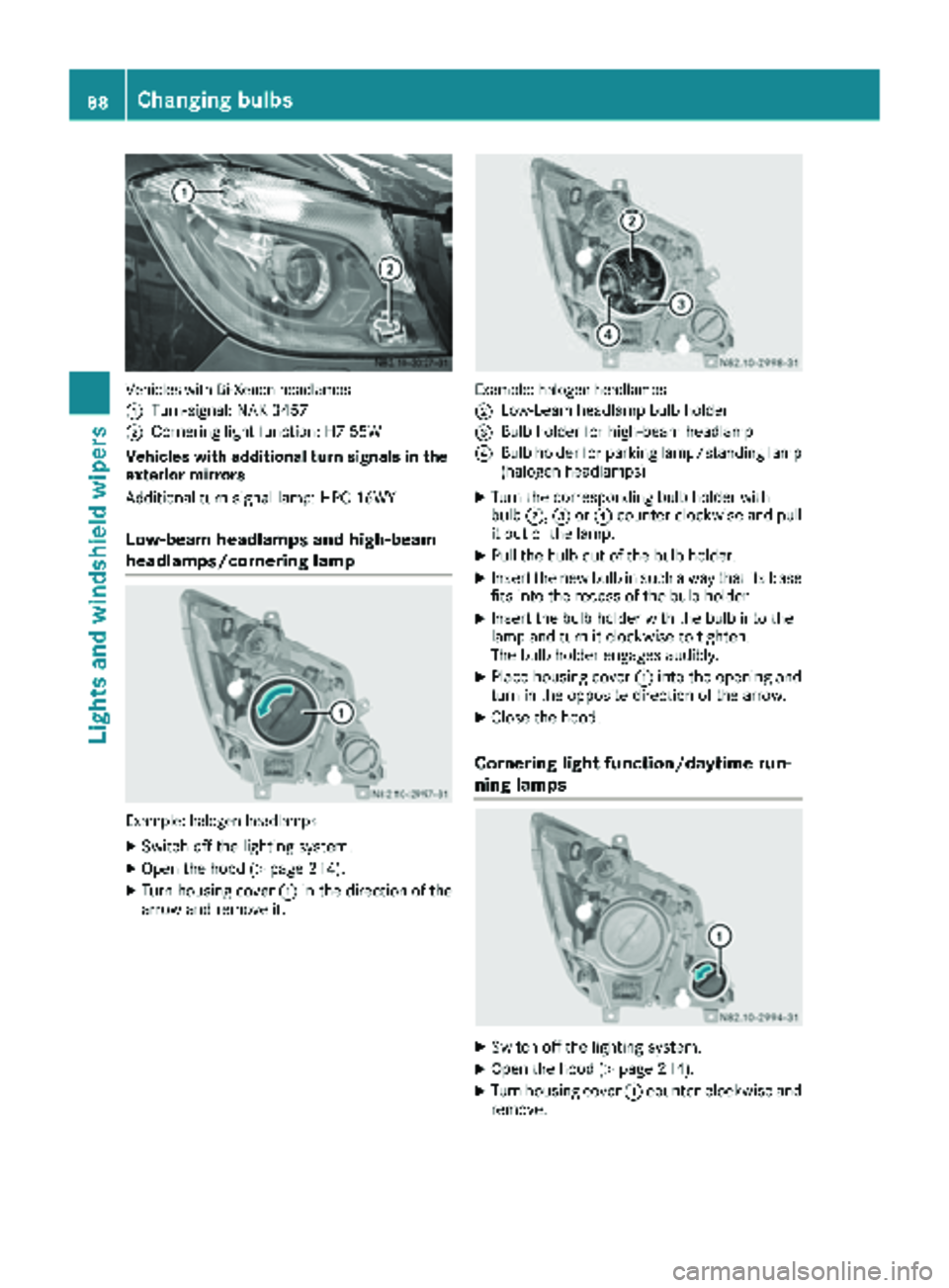
Vehicles with Bi-Xenon headlamps
:
Turn-signal: NAK 3457
;Cornering light function: H7 55W
Vehicles with additional turn signals in the
exterior mirrors
Additional turn signal lamp: HPC 16WY
Low-beam headlamps and high-beam
headlamps/cornering lamp
Example: halogen headlamps
XSwitch off the lighting system.
XOpen the hood (Ypage 214).
XTurn housing cover :in the direction of the
arrow and remove it.
Example: halogen headlamps
;
Low-beam headlamp bulb holder
=Bulb holder for high-beam headlamp
?Bulb holder for parking lamp/standing lamp
(halogen headlamps)
XTurn the corresponding bulb holder with
bulb ;,=or? counter-clockwise and pull
it out of the lamp.
XPull the bulb out of the bulb holder.
XInsert the new bulb in such a way that its base fits into the recess of the bulb holder.
XInsert the bulb holder with the bulb into the
lamp and turn it clockwise to tighten.
The bulb holder engages audibly.
XPlace housing cover :into the opening and
turn in the opposite direction of the arrow.
XClose the hood.
Cornering light function/daytime run-
ning lamps
XSwitch off the lighting system.
XOpen the hood (Ypage 214).
XTurn housing cover :counter-clockwise and
remove.
88Changing bulbs
Lights and windshield wipers