ESP MERCEDES-BENZ SPRINTER 2017 MY17 Operator’s Manual
[x] Cancel search | Manufacturer: MERCEDES-BENZ, Model Year: 2017, Model line: SPRINTER, Model: MERCEDES-BENZ SPRINTER 2017Pages: 286, PDF Size: 4.36 MB
Page 152 of 286
Selector lever posi-
tionMonitoring
DFront area
Ror NFront and rear area
PNo areas activated
One or more segments light up as the vehicle
approaches an obstacle, depending on the vehi-
cle's distance from the obstacle.
From the:
Rsixth segment, an intermittent warning tone
sounds for approximately 2 seconds.
Rseventh segment, a continuous warning tone
sounds. This indicates that you have now
reached the minimum distance.
Roll-back warning
PARKTRONIC automatically monitors the area
behind the vehicle if the vehicle begins to roll
backwards without reverse gear engaged, e.g.
after stopping on an uphill gradient.
If PARKTRONIC recognizes an obstacle at a dis-
tance of at most 31 in (80 cm), all the segments
in the warning displays light up. A continuous
warning tone also sounds as the vehicle
approaches the obstacle and for a further
2 seconds after the vehicle has come to a halt.
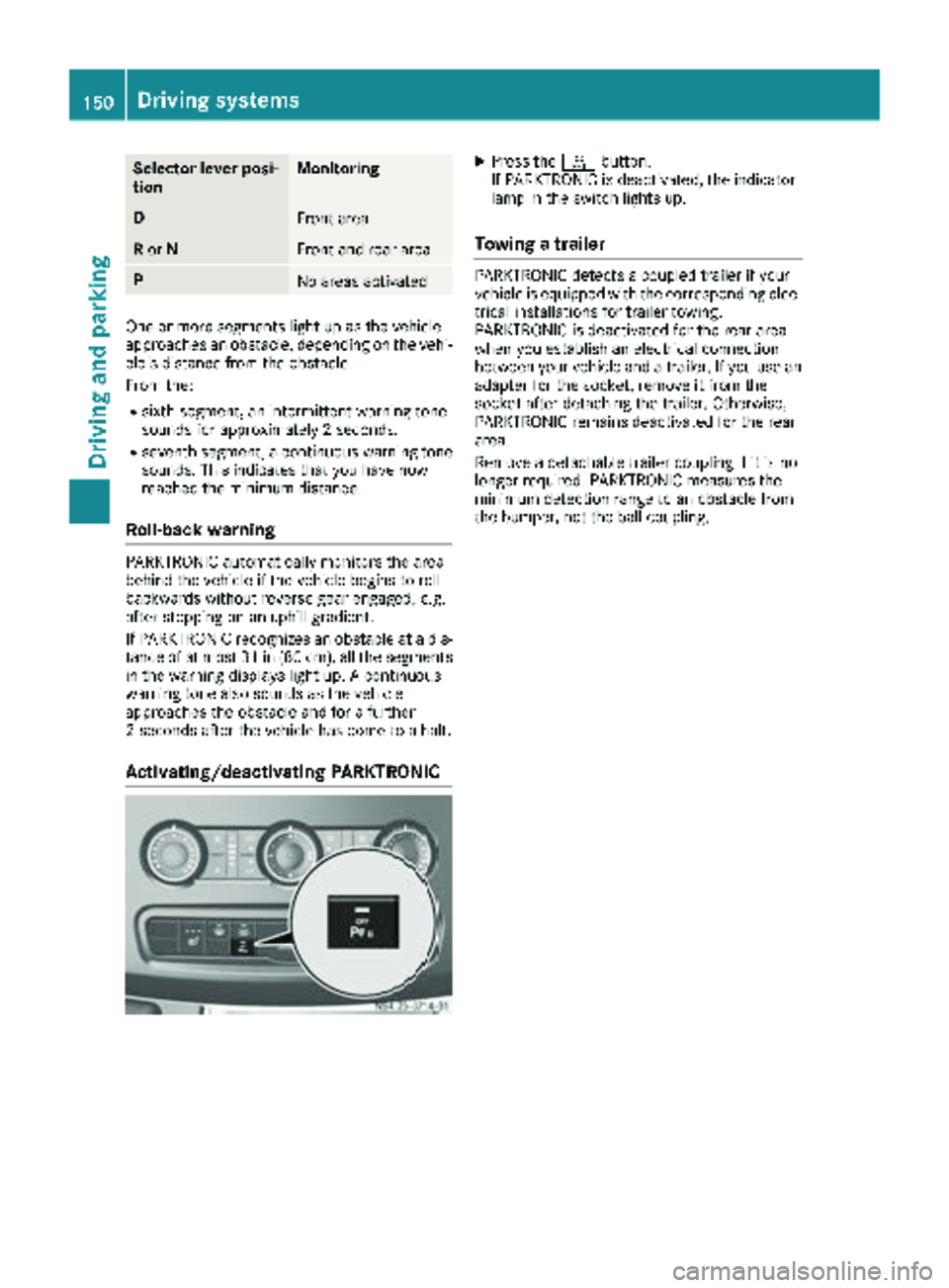
Activating/deactivating PARKTRONIC
XPress the fbutton.
If PARKTRONIC is deactivated, the indicator
lamp in the switch lights up.
Towing a trailer
PARKTRONIC detects a coupled trailer if your
vehicle is equipped with the corresponding elec-
trical installations for trailer towing.
PARKTRONIC is deactivated for the rear area
when you establish an electrical connection
between your vehicle and a trailer. If you use an
adapter for the socket, remove it from the
socket after detaching the trailer. Otherwise,
PARKTRONIC remains deactivated for the rear
area.
Remove a detachable trailer coupling if it is no
longer required. PARKTRONIC measures the
minimum detection range to an obstacle from
the bumper, not the ball coupling.
150Driving systems
Driving and parking
Page 153 of 286
Problems with PARKTRONIC
ProblemPossible causes/consequences andMSolutions
Only the red segments in
the PARKTRONIC warn-
ing displays are lit.
In addition, a warning
tone sounds for approx.
two seconds
PARKTRONIC is deacti-
vated after approx-
imately 20 seconds.
The indicator lamp of the
f button lights up
and the red segments in
the PARKTRONIC warn-
ing display go out.PARKTRONIC has malfunctioned and has switched itself off.
XIf problems persist, have PARKTRONIC checked at a qualified spe- cialist workshop.
The PARKTRONIC warn-
ing displays implausible
distances.
For example, all the seg-
ments may be lit even
though there is no obsta-
cle present.The PARKTRONIC sensors are dirty or iced up.
XClean the PARKTRONIC sensors (Ypage 232).
XTurn the key to position 2in the ignition lock.
The license plate or other parts attached near the sensors may not be
secured correctly.
XCheck the license plate and attachment parts near the sensors for
correct seating.
An external radio or ultrasonic source may be causing interference.
XCheck PARKTRONIC functions in a different location.
Rear view camera
Important safety notes
The rear view camera is only an aid. It cannot
replace your own awareness of the immediate
surroundings. You are responsible for safe
maneuvering, parking and pulling away. When
maneuvering, parking and pulling away, make
sure that there are no persons, animals or
objects in the maneuvering area.
The rear view camera is a visual parking aid.
Information on operation can be found in the
separate Audio 15 supplement.
The camera is in the middle of the roof above the
high-mounted brake lamp (
Ypage 232).
You can find information on cleaning the camera
in the "Maintenance and care" section
(
Ypage 232).
Working mode
ADR (working speed governor)
General notes
When activated, ADR automatically increases
the engine speed to a preset speed or a speed
you have set.
iAfter a cold start, the idling speed of the
engine is increased automatically. If the pre-
set working speed is lower than the increased idling speed, the working speed is only
reached once the engine has completed the
warm-up phase.
It is only possible to activate ADR with the
vehicle stationary and the parking brake
applied.
The selector lever of the automatic transmis-
sion must be in position P.
Working mode151
Driving and parking
Z
Page 154 of 286
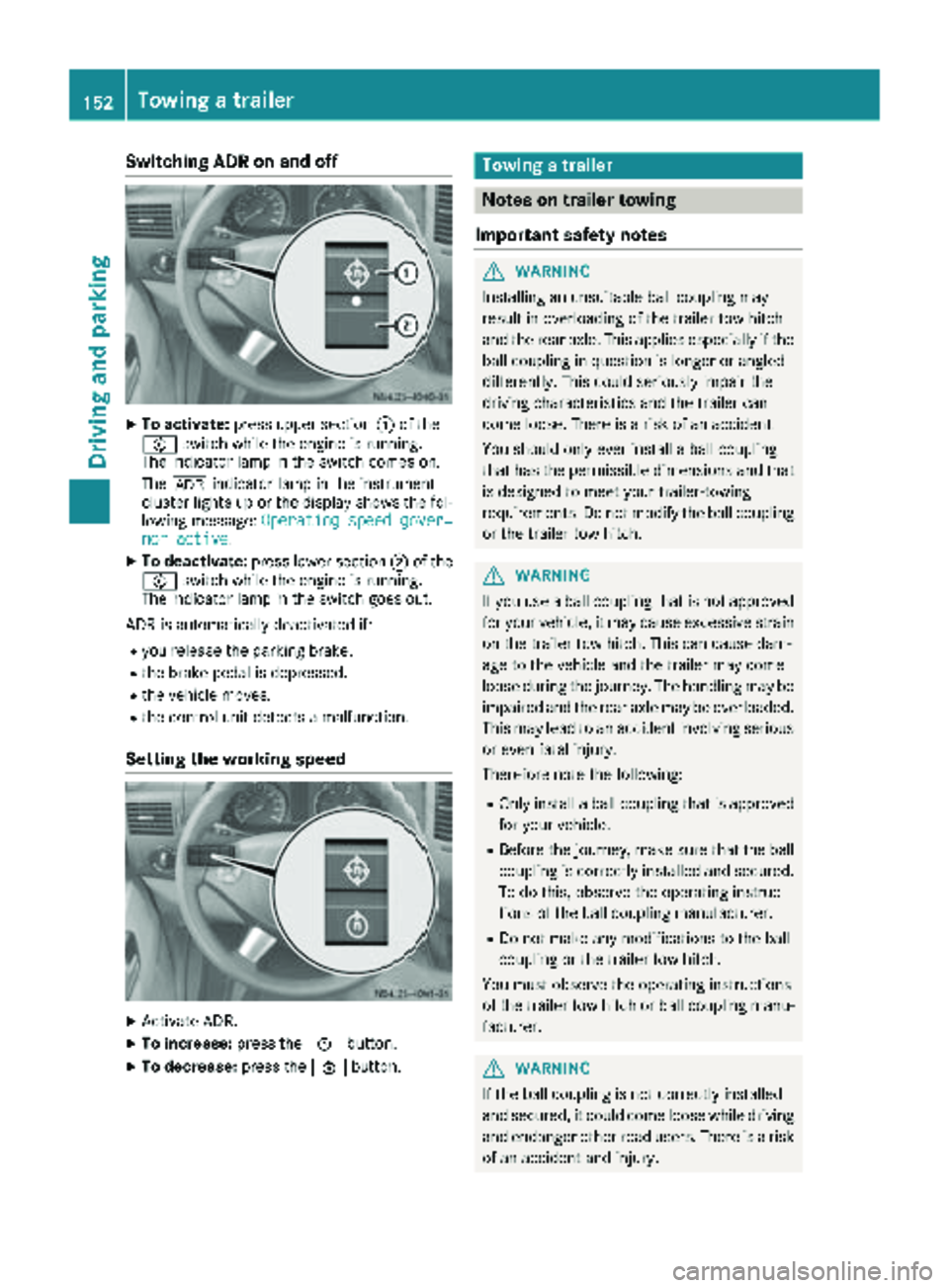
Switching ADR on and off
XTo activate:press upper section :of the
E switch while the engine is running.
The indicator lamp in the switch comes on.
The K indicator lamp in the instrument
cluster lights up or the display shows the fol-
lowing message: Operating speed gover‐
nor active.
XTo deactivate:press lower section ;of the
E switch while the engine is running.
The indicator lamp in the switch goes out.
ADR is automatically deactivated if:
Ryou release the parking brake.
Rthe brake pedal is depressed.
Rthe vehicle moves.
Rthe control unit detects a malfunction.
Setting the working speed
XActivate ADR.
XTo increase: press theEbutton.
XTo decrease: press theFbutton.
Towing a trailer
Notes on trailer towing
Important safety notes
GWARNING
Installing an unsuitable ball coupling may
result in overloading of the trailer tow hitch
and the rear axle. This applies especially if the ball coupling in question is longer or angled
differently. This could seriously impair the
driving characteristics and the trailer can
come loose. There is a risk of an accident.
You should only ever install a ball coupling
that has the permissible dimensions and that
is designed to meet your trailer-towing
requirements. Do not modify the ball coupling
or the trailer tow hitch.
GWARNING
If you use a ball coupling that is not approved
for your vehicle, it may cause excessive strain
on the trailer tow hitch. This can cause dam-
age to the vehicle and the trailer may come
loose during the journey. The handling may be
impaired and the rear axle may be overloaded.
This may lead to an accident involving serious
or even fatal injury.
Therefore note the following:
ROnly install a ball coupling that is approved for your vehicle.
RBefore the journey, make sure that the ballcoupling is correctly installed and secured.
To do this, observe the operating instruc-
tions of the ball coupling manufacturer.
RDo not make any modifications to the ball
coupling or the trailer tow hitch.
You must observe the operating instructions
of the trailer tow hitch or ball coupling manu-
facturer.
GWARNING
If the ball coupling is not correctly installed
and secured, it could come loose while driving and endanger other road users. There is a risk
of an accident and injury.
152Towing a trailer
Driving and parking
Page 162 of 286
If the supply of DEF falls below the reserve range
of 0.8 US gal (3.0l)the StArtS RExxmessage
appears in the display. Also, the yellow å
DEF indicator lamp lights up in the instrument
cluster and three warning tones sound.
In the display, xx
corresponds to the number of
possible remaining engine starts ( 16to0).
When the display shows that the number of
remaining starts is 0
, theStArtSIdLEmessage
appears in the display and three warning tones
sound.
In addition, the yellow åDEF indicator lamp
and the ;Check Engine indicator lamp light
up in the instrument cluster and three warning
tones sound.
The engine management only allows speeds of
up to 5 mph (8 km/h).
Add at least 1.5 US gal (5.5 l) of DEF
(
Ypage 126).
The display message only disappears when the
vehicle is stationary, at the latest after
20 second s, as soon as yo uswit ch on the igni-
tion or start the engine after refueling.
Vehicles with steering wheel buttons
If the supply of DEF is less than 1.5 US gal
(5.5 l),the Check Diesel Exhaust Fluid
See Operator's Manualmessage appears in
the display.
If the supply of DEF falls below the reserve range
of 0.8 US ga l(3.0 l),the XX
startsremainingmessage is displayed.
Three short warning tones also sound.
In the display, xx
corresponds to the number of
possible remaining engine starts ( 16to0).
When the display shows that the number of
remaining starts is 0
, theStArtSIdLEmessage
appears in the display.
The yellow ;Check Engine indicator lamp
also lights up and three short warning tones
sound.
The engine management only allows speeds of
up to 5 mph (8 km/h).
Add at least 1.5 US gal (5.5 l) of DEF
(
Ypage 126).
The display message only disappears when the
vehicle is stationary, at the latest after
20 seconds, as soon as you switch on the igni-
tion or start the engine after refueling.
On-board computer (vehicles without
steering wheel buttons)
Operating the on-board computer
General notes
The on-board computer is activated as soon as
you turn the key to position 1in the ignition lock.
The on-board computer shows vehicle informa-
tion and settings in the display.
You can control the display and the settings in
the on-board computer using the adjustment
buttons on the instrument cluster.
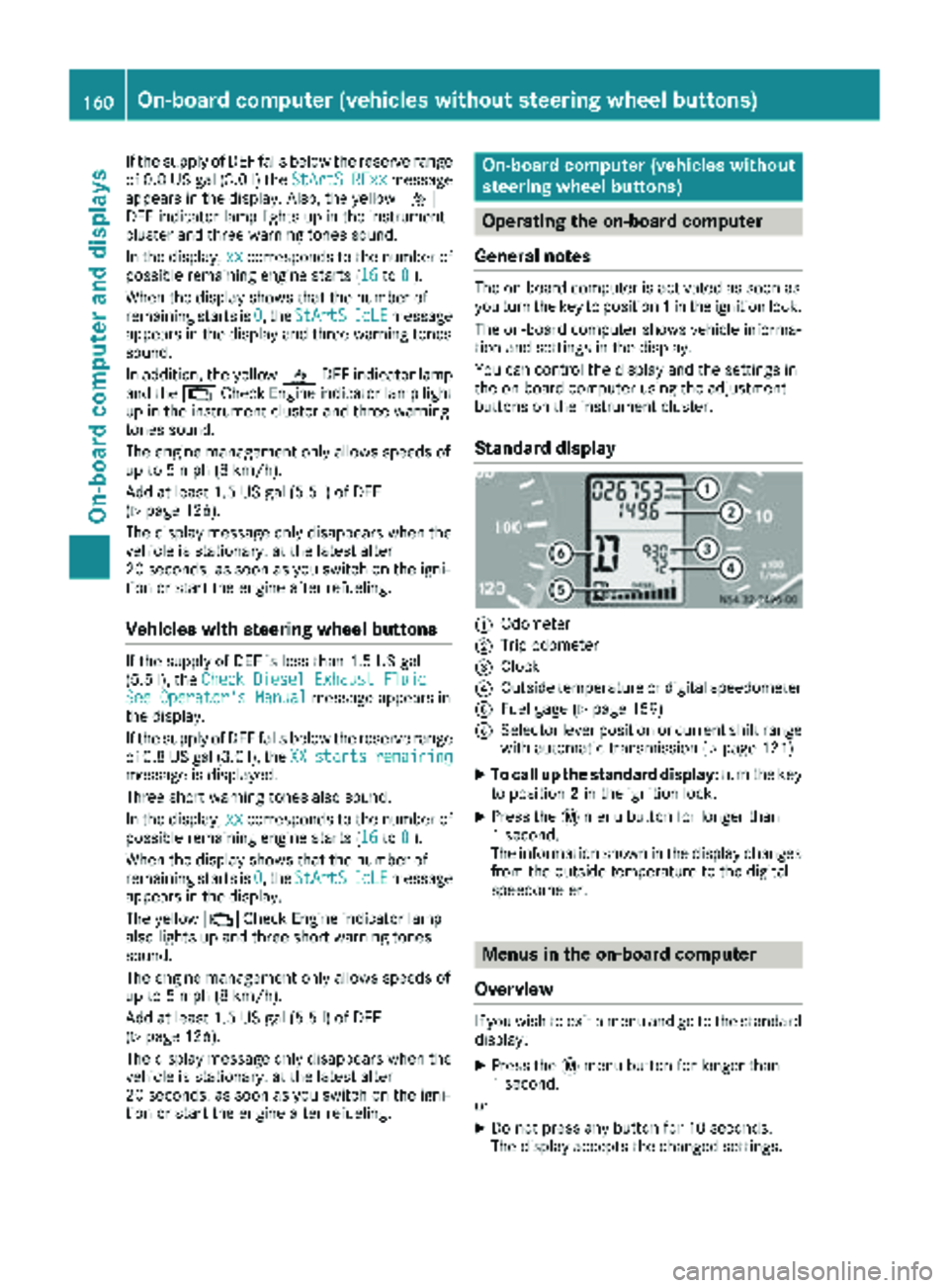
Standard display
:Odometer
;Trip odometer
=Clock
?Outside temperature or digital speedometer
AFuel gage (Ypage 159)
BSelector lever position or current shift range
with automatic transmission (Ypage 121)
XTo call up the standard display: turn the key
to position 2in the ignition lock.
XPress the 4menu button for longer than
1 second.
The information shown in the display changes
from the outside temperature to the digital
speedometer.
Menus in the on-board computer
Overview
If you wish to exit a menu and go to the standard display:
XPress the 4menu button for longer than
1 second.
or
XDo not press any button for 10 seconds.
The display accepts the changed settings.
160On-board computer (vehicles without steering wheel buttons)
On-board computer and displays
Page 163 of 286
Using thef,g,4or9 adjustment buttons,
you can select the following functions:
RCalling up the service due date
(Ypage 222)
RChecking the oil level (Ypage 216)
RChecking the DEF supply (Ypage 159)
RPreselecting/setting the auxiliary heating
switch-on time (Ypage 107)
RTire pressure monitor(Ypage 249)
RSetting the time (Ypage 161)
RActivating/deactivating Highbeam Assist
(Ypage 168)
RSetting the daytime running lamps
(Ypage 80)
Setting the time
XTurn the SmartKey to position 2in the ignition
lock.
XPress the 4menu button repeatedly until the
hours figure flashes.
XPress the forg button to set the hour.
XPress the 9reset button.
The minute display flashes.
XPress the forg button to set the minute.
iIf you keep the forg button pressed, the
value will change continuously.
Activating/deactivating Highbeam
Assist
XTurn the SmartKey to position 2in the ignition
lock.
XPress the 4menu button repeatedly until the
_ indicator lamp flashes and the onorOFFmessage appears in the display.
XUse the forg button to switch Highbeam
Assist on/off.
Switching the daytime running lamps
on/off
If you switch the daytime running lamps on, the
daytime running lamps will automatically light
up when the engine is running.
For safety reasons, it is only possible to change
this setting when the vehicle is stationary. The
factory setting is on
in countries where daytime
running lamp mode or daytime running lamps
are mandatory.
XTurn the SmartKey to position 2in the ignition
lock.
XPress the 4menu button repeatedly until the
L indicator lamp flashes and the onorOFFmessage appears in the display.
XPress the forg button to activate or deac-
tivate the daytime running lamps.
iUSA only:
If you turn the light switch to TorL,
the corresponding light switches on. If you
turn the light switch to Ã, the daytime
running lamps remain switched on.
Canada only:
If you turn the light switch to L, the low-
beam headlamps switch on. If you turn the
light switch to TorÃ, the daytime run-
ning lamps remain switched on.
On-board computer (vehicles with
steering wheel buttons)
Operating the on-board computer
Overview
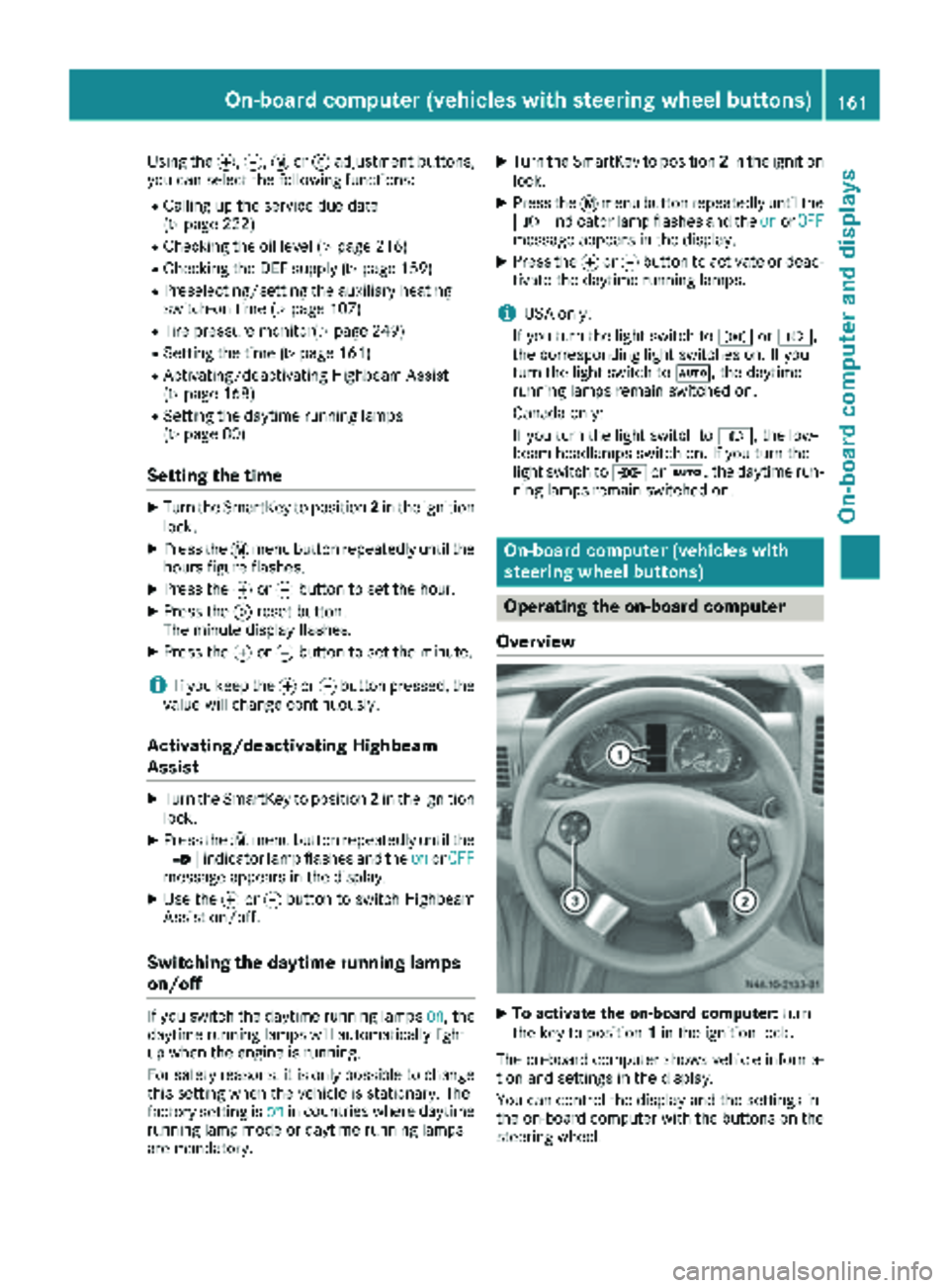
XTo activate the on-board computer: turn
the key to position 1in the ignition lock.
The on-board computer shows vehicle informa-
tion and settings in the display.
You can control the display and the settings in
the on-board computer with the buttons on the
steering wheel.
On-board computer (vehicles with steering wheel buttons)161
On-board computer and displays
Z
Page 171 of 286
Using the steering wheel buttons
XPress theVorU button repeatedly
until the Settingsmenu appears in the dis-
play.
XPress the 9button to switch to the sub-
menu selection.
XPress the WorX button to select the
Lightingsubmenu.
XPress the 9button to select the Daytimerunn. lampsfunction.
The selection marker is on the current setting.
XPress the WorX button to switch the
daytime running lamps OnorOff.
iIf you turn the light switch to TorL,
the corresponding lamp switches on. If you
turn the light switch to Ã, the daytime
running lamps remain switched on.
iFor safety reasons, it is not possible to reset
the Daytime runn. lampsfunction to the
factory setting while the vehicle is in motion.
You will see the following message in the dis-
play: Setting only possible at stand‐
still.
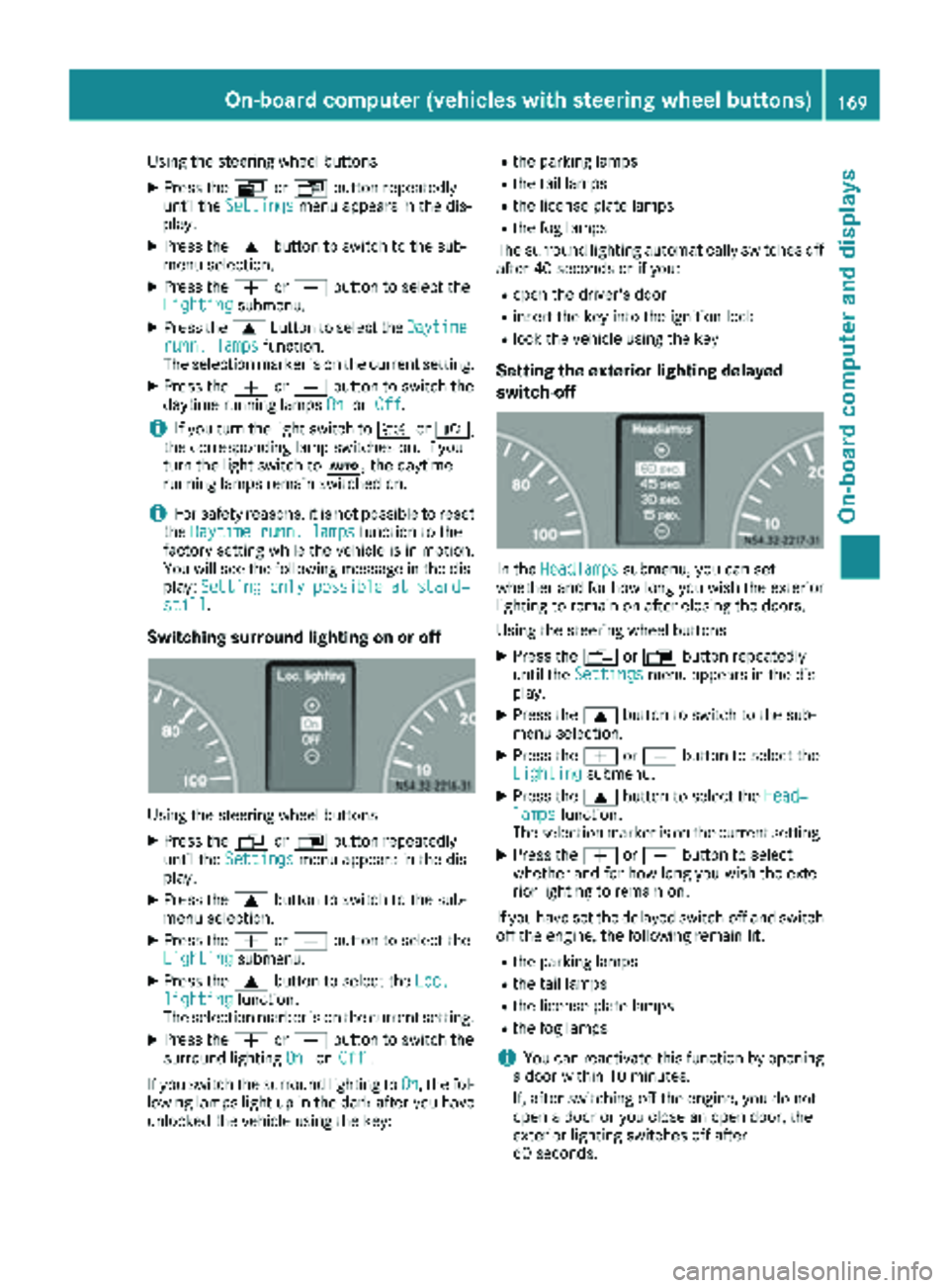
Switching surround lighting on or off
Using the steering wheel buttons
XPress the VorU button repeatedly
until the Settingsmenu appears in the dis-
play.
XPress the 9button to switch to the sub-
menu selection.
XPress the WorX button to select the
Lightingsubmenu.
XPress the 9button to select the Loc.lightingfunction.
The selection marker is on the current setting.
XPress the WorX button to switch the
surround lighting OnorOff.
If you switch the surround lighting to On
, the fol-
lowing lamps light up in the dark after you have
unlocked the vehicle using the key:
Rthe parking lamps
Rthe tail lamps
Rthe license plate lamps
Rthe fog lamps
The surround lighting automatically switches off
after 40 seconds or if you:
Ropen the driver's door
Rinsert the key into the ignition lock
Rlock the vehicle using the key
Setting the exterior lighting delayed
switch-off
In the Headlampssubmenu, you can set
whether and for how long you wish the exterior
lighting to remain on after closing the doors.
Using the steering wheel buttons
XPress the VorU button repeatedly
until the Settingsmenu appears in the dis-
play.
XPress the 9button to switch to the sub-
menu selection.
XPress the WorX button to select the
Lightingsubmenu.
XPress the 9button to select the Head‐lampsfunction.
The selection marker is on the current setting.
XPress the WorX button to select
whether and for how long you wish the exte-
rior lighting to remain on.
If you have set the delayed switch-off and switch
off the engine, the following remain lit:
Rthe parking lamps
Rthe tail lamps
Rthe license plate lamps
Rthe fog lamps
iYou can reactivate this function by opening
a door within 10 minutes.
If, after switching off the engine, you do not
open a door or you close an open door, the
exterior lighting switches off after
60 seconds.
On-board computer (vehicles with steering wheel buttons)169
On-board computer and displays
Z
Page 174 of 286
Telephone menu
Introduction
GWARNING
If you operate information systems and com-
munication equipment integrated in the vehi-
cle while driving, you will be distracted from
traffic conditions. You could also lose control
of the vehicle. There is a risk of an accident.
Only operate the equipment when the traffic
situation permits. If you are not sure that this
is possible, park the vehicle paying attention
to traffic conditions and operate the equip-
ment when the vehicle is stationary.
You must observe the legal requirements of the
country in which you are currently driving when
operating a mobile phone in the vehicle. If it is
permitted to operate a mobile phone while the
vehicle is in motion, only operate it when road
and traffic conditions permit.
If you have connected a mobile phone to the
Sprinter hands-free system, you can operate it
using the functions in the TEL
menu.
XSwitch on the mobile phone (see the separate
operating instructions).
XSwitch on the audio equipment (see the sep-
arate operating instructions).
XEstablish a Bluetooth®connection between
the mobile phone and the audio equipment
(see the separate operating instructions).
XPress the VorU button on the steering
wheel to select the TELmenu.
XWhenPlease enter PIN:appears in the
display, enter the PIN using the mobile phone
or audio equipment.
The mobile phone will search for a network.
The display remains blank during this time.
You will see the mobile phone operational
readiness display once the mobile phone has
found a network.
iYou can obtain further information about
suitable mobile phones and connecting
mobile phones via Bluetooth
®at any qualified
specialist workshop.
iIf the mobile phone operational readiness
symbol goes out, your vehicle is outside of the
transmission and reception range.
Accepting a call
XPress the 6button on the steering wheel
to accept an incoming call.
The display shows the call duration.
Rejecting or ending a call
XPress ~button on the steering wheel to
reject or end a call.
The caller then hears the engaged tone.
The display shows the mobile phone opera-
tional readiness symbol again.
Dialing a number from the phone book
You can enter new telephone numbers into the
phone book via the mobile phone (see the sep-
arate operating instructions). If your mobile
phone is able to receive calls, you can search for
and dial a number from the phone book.
Using the steering wheel buttons
XUse the VorU button to select the TELmenu.
The display shows the mobile phone opera-
tional readiness symbol.
XPress the9or: button to switch to
the phone book.
The on-board computer reads the phone book
stored on the SIM card or in the mobile phone.
This may take more than a minute.
When the message is no longer displayed,
reading has ended.
XPress the 9or: button to select the
desired name.
or
XTo start rapid scrolling: press and hold the
9 or: button longer than 1 second.
Rapid scrolling stops when you release the
button or reach the end of the list.
Using the steering wheel buttons
XTo start dialing: press the6button.
The on-board computer dials the correspond-
ing phone number.
When a connection is established, the name
of the other person and/or the call duration
appear in the display.
XTo exit the phone book: press the~but-
ton.
172On-board computer (vehicles withsteering whee lbu ttons)
On-board computer and displays
Page 175 of 286
Redialing
The on-board computer saves the last names or
numbers dialed in the redial memory.
Using the steering wheel buttons
XUse theVorU button to select the TELmenu.
The display shows the mobile phone opera-
tional readiness symbol.
XPress the6button.
The display shows the most recently dialed
numbers or names in the redial memory.
XPress the 9or: button to select the
desired name or number.
XTo start dialing: press the6button.
The on-board computer dials the correspond-
ing phone number.
When a connection is established, the name
of the other person and/or the call duration
appear in the display.
or
XTo exit the redial memory: press the~
button.
Display messages
Notes on display messages
Important safety notes
GWARNING
No information will be displayed if either the
instrument cluster or the display is inopera-
tive.
As a result, you will not be able to see warning
and indicator lamps or information about the
driving conditions, such as speed or outside
temperature. Driving characteristics may be
impaired. Adjust your driving style and vehicle
speed accordingly.
Contact a qualified specialist workshop
immediately.
GWARNING
If service work is not carried out correctly, the operating safety of your vehicle may be affec-
ted. This could cause you to lose control of
your vehicle and cause an accident. More-
over, the safety systems may no longer be
able to protect you or others as they are
designed to do.
Always have service work carried out at a
qualified specialist workshop.
iIf you turn the key to position 2in the igni-
tion, a display check is performed. All warning
and indicator lamps (except the turn signal
indicator lamps) and the display are activa-
ted. Before starting the journey, check that
the warning and indicator lamps are operating
correctly.
Vehicles without steering wheel but-
tons
Warnings, malfunctions or additional informa-
tion may also be shown in the display. The fol-
lowing tables show all the display messages. A
warning tone sounds with certain display mes-
sages.
Vehicles with steering wheel buttons
The on-board computer shows warnings, mal-
functions or additional information in the dis-
play. A warning tone sounds with certain display
messages. Display messages of a high priority
are shown in red.
Please respond in accordance with the display
messages and follow the additional notes in this Operator's Manual.
You can hide low-priority display messages by
pressing the V,U,9or: button
on the steering wheel or the 9reset button.
You cannot hide display messages of the highest
priority. These messages will continue to be
shown in the display until their cause has been
eliminated.
The on-board computer stores certain display
messages in the message memory
(
Ypage 173).
Message memory
The on-board computer only records and shows
malfunctions and warnings from certain sys-
tems. Therefore, make sure that your vehicle is
safe to use. You could otherwise cause an acci-
dent by driving an unsafe vehicle.
Display messages173
On-board computer and displays
Z
Page 176 of 286
The on-board computer stores certain display
messages. In theMessage memory menu, you
can call up stored display messages.
Using the steering wheel buttons
XPress the VorU button repeatedly
until the number of stored display messages,
e.g. 2 messages
, appears in the display.
If no malfunctions have occurred, the No
messagesmessage appears.
XScroll through the stored display messages
with the9or: button.
XTo exit the message memory menu: press
the V orU button. When you switch off the ignition, all display mes-
sages are deleted from the message memory.
You can only remove the key when it is in the
basic position.
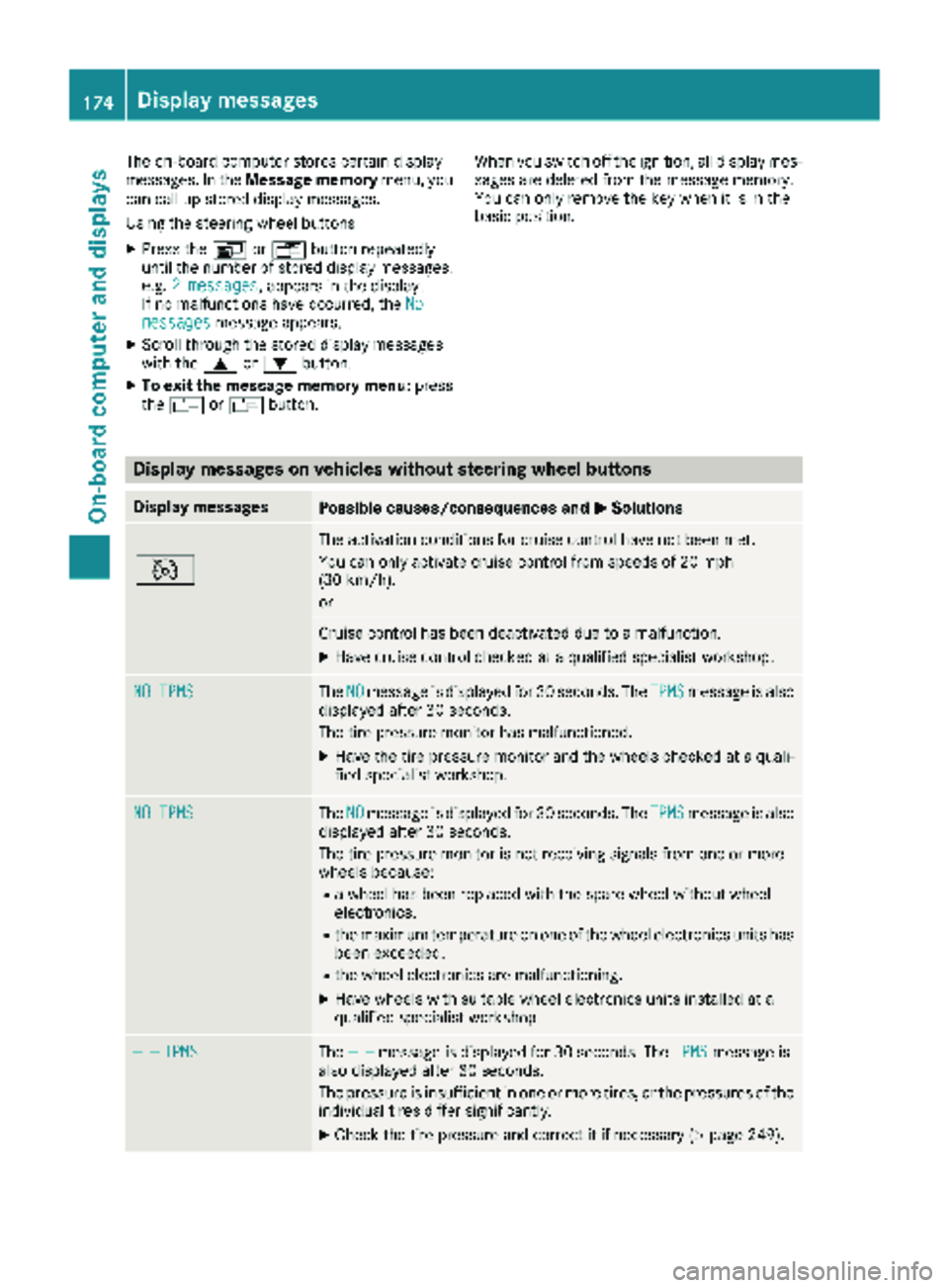
Display messages on vehicles without steering wheel buttons
Display messagesPossible causes/consequences and
MSolutions
_ _ _
V
The activation conditions for cruise control have not been met.
You can only activate cruise control from speeds of 20 mph
(30 km/h).
or
Cruise control has been deactivated due to a malfunction.
XHave cruise control checked at a qualified specialist workshop.
NO TPMSTheNOmessage is displayed for 30 seconds. The TPMSmessage is also
displayed after 30 seconds.
The tire pressure monitor has malfunctioned.
XHave the tire pressure monitor and the wheels checked at a quali-
fied specialist workshop.
NO TPMSThe NOmessage is displayed for 30 seconds. The TPMSmessage is also
displayed after 30 seconds.
The tire pressure monitor is not receiving signals from one or more
wheels because:
Ra wheel has been replaced with the spare wheel without wheel
electronics.
Rthe maximum temperature on one of the wheel electronics units has
been exceeded.
Rthe wheel electronics are malfunctioning.
XHave wheels with suitable wheel electronics units installed at a
qualified specialist workshop.
— —TPMSThe — —message is displayed for 30 seconds. The TPMSmessage is
also displayed after 30 seconds.
The pressure is insufficient in one or more tires, or the pressures of the
individual tires differ significantly.
XCheck the tire pressure and correct it if necessary (Ypage 249).
174Display messages
On-board computer and displays
Page 177 of 286
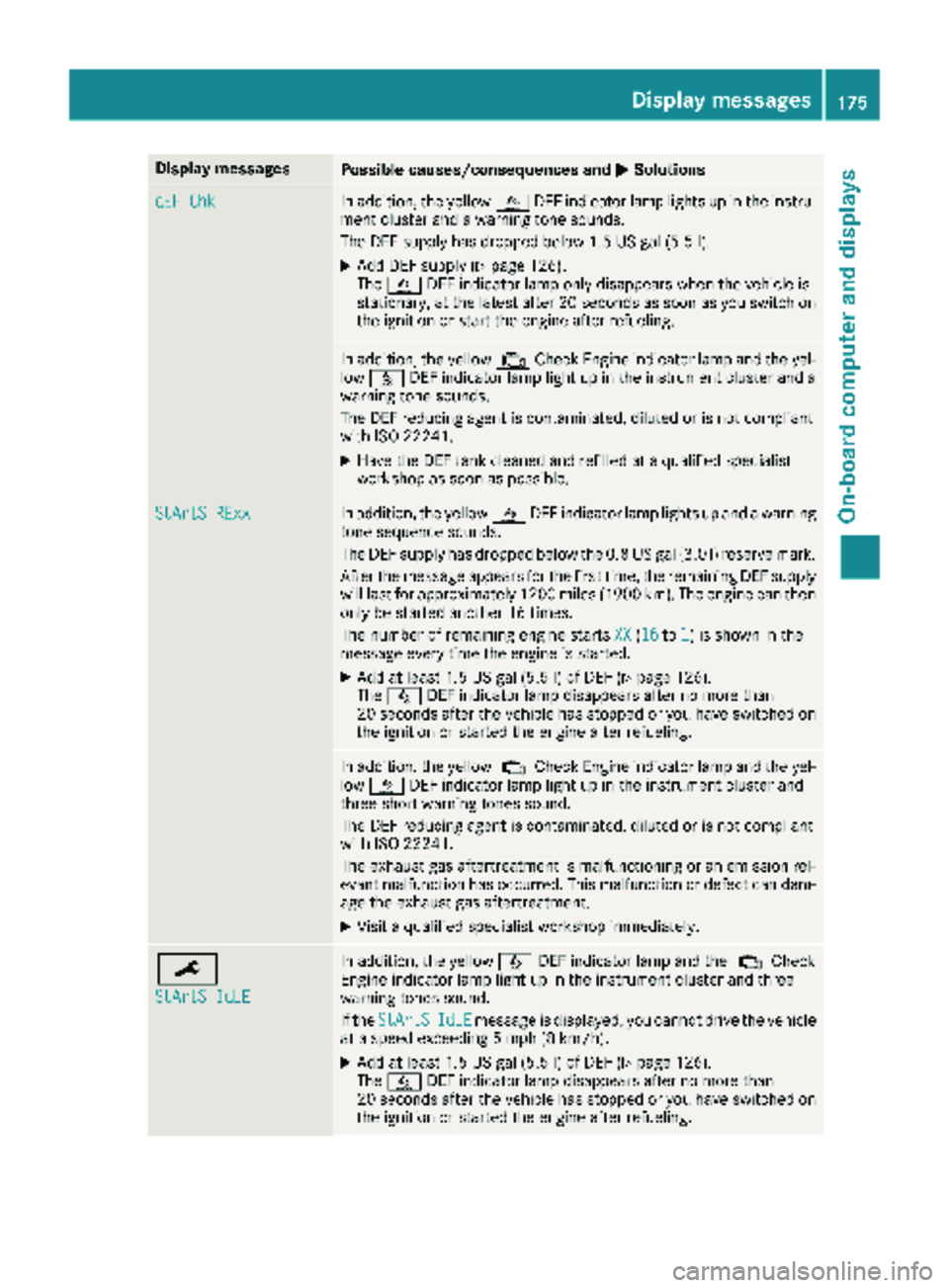
Display messagesPossible causes/consequences andMSolutions
dEF ChkIn addition,th eyellow åDEFindicator lamp lights up in th einstru-
men tcluste rand awarning tone sounds.
The DE Fsupply has dropped belo w1.5US gal (5.5l).
XAdd DEF supply (Ypage 126).
The å DEF indicator lamp only disappears when the vehicle is
stationary, at the latest after 20 secondsa s soon as you switch on
the ignition or start the engine after refueling.
In addition, the yellow ;Check Engine indicator lamp and the yel-
low å DEF indicator lamp light up in the instrument cluster and a
warning tone sounds.
The DEF reducing agent is contaminated, diluted or is not compliant
with ISO 22241.
XHave the DEF tank cleaned and refilled at a qualified specialist
workshop as soon as possible.
StArtS RExxIn addition, the yellow åDEF indicator lamp lights up and a warning
tone sequence sounds.
The DEF supply has dropped below the 0.8 US gal (3.0 l) reserve mark.
After the message appears for the first time, the remaining DEF supply
will last for approximately 1200 miles (1900 km). The engine can then
only be started another 16 times.
The number of remaining engine starts XX
(16to1) is shown in the
message every time the engine is started.
XAdd at least 1.5 US gal (5.5 l) of DEF (Ypage 126).
The å DEF indicator lamp disappears after no more than
20 seconds after the vehicle has stopped or you have switched on the ignition or started the engine after refueling.
In addition, the yellow ;Check Engine indicator lamp and the yel-
low å DEF indicator lamp light up in the instrument cluster and
three short warning tones sound.
The DEF reducing agent is contaminated, diluted or is not compliant
with ISO 22241.
The exhaust gas aftertreatment is malfunctioning or an emission rel-
evant malfunction has occurred. This malfunction or defect can dam- age the exhaust gas aftertreatment.
XVisit a qualified specialist workshop immediately.
¯
StArtS IdLE
In addition, the yellow åDEF indicator lamp and the ;Check
Engine indicator lamp light up in the instrument cluster and three
warning tones sound.
If the StArtS
IdLEmessage is displayed, you cannot drive the vehicle
at a speed exceeding 5 mph (8 km/h).
XAdd at least 1.5 US gal (5.5 l) of DEF (Ypage 126).
The å DEF indicator lamp disappears after no more than
20 seconds after the vehicle has stopped or you have switched on the ignition or started the engine after refueling.
Display messages175
On-board computer and displays
Z