steering wheel MERCEDES-BENZ SPRINTER 2017 MY17 Operator’s Manual
[x] Cancel search | Manufacturer: MERCEDES-BENZ, Model Year: 2017, Model line: SPRINTER, Model: MERCEDES-BENZ SPRINTER 2017Pages: 286, PDF Size: 4.36 MB
Page 76 of 286
while driving, the restraint systems may not
be able to provide the intended protection.
There is an increased risk of injury, possibly
even fatal.
Engage the driver's and front-passenger seatsso they are facing the direction of travel
before starting the engine.
!When rotating the seats, make sure that
there is sufficient space to do so.
Move the seat forward or back first. This will
help to avoid contact with other parts of the
interior.
Push the handbrake lever down to the stop.
The parking brake or handbrake lever could
otherwise be damaged.
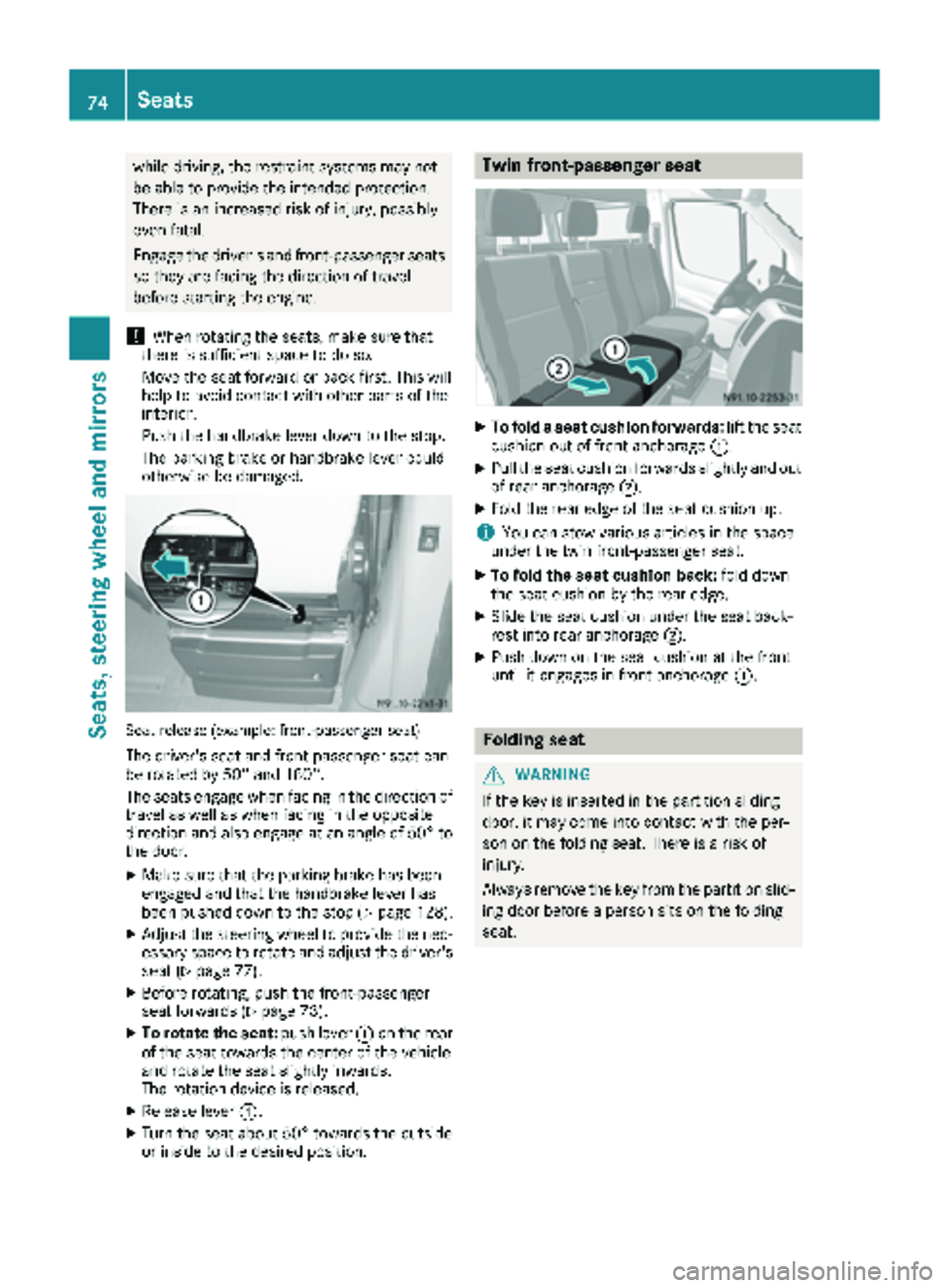
Seat release (example: front-passenger seat)
The driver's seat and front-passenger seat can
be rotated by 50° and 180°.
The seats engage when facing in the direction of travel as well as when facing in the opposite
direction and also engage at an angle of 50° to
the door.
XMake sure that the parking brake has been
engaged and that the handbrake lever has
been pushed down to the stop (
Ypage 128).
XAdjust the steering wheel to provide the nec-
essary space to rotate and adjust the driver's seat (
Ypage 77).
XBefore rotating, push the front-passenger
seat forwards (Ypage 73).
XTo rotate the seat: push lever:on the rear
of the seat towards the center of the vehicle
and rotate the seat slightly inwards.
The rotation device is released.
XRelease lever :.
XTurn the seat about 50° towards the outside
or inside to the desired position.
Twin front-passenger seat
XTo fold a seat cushion forwards: lift the seat
cushion out of front anchorage :.
XPull the seat cushion forwards slightly and out
of rear anchorage;.
XFold the rear edge of the seat cushion up.
iYou can stow various articles in the space
under the twin front-passenger seat.
XTo fold the seat cushion back: fold down
the seat cushion by the rear edge.
XSlide the seat cushion under the seat back-
rest into rear anchorage ;.
XPush down on the seat cushion at the front
until it engages in front anchorage :.
Folding seat
GWARNING
If the key is inserted in the partition sliding
door, it may come into contact with the per-
son on the folding seat. There is a risk of
injury.
Always remove the key from the partition slid-
ing door before a person sits on the folding
seat.
74Seats
Seats, steering wheel and mirrors
Page 77 of 286
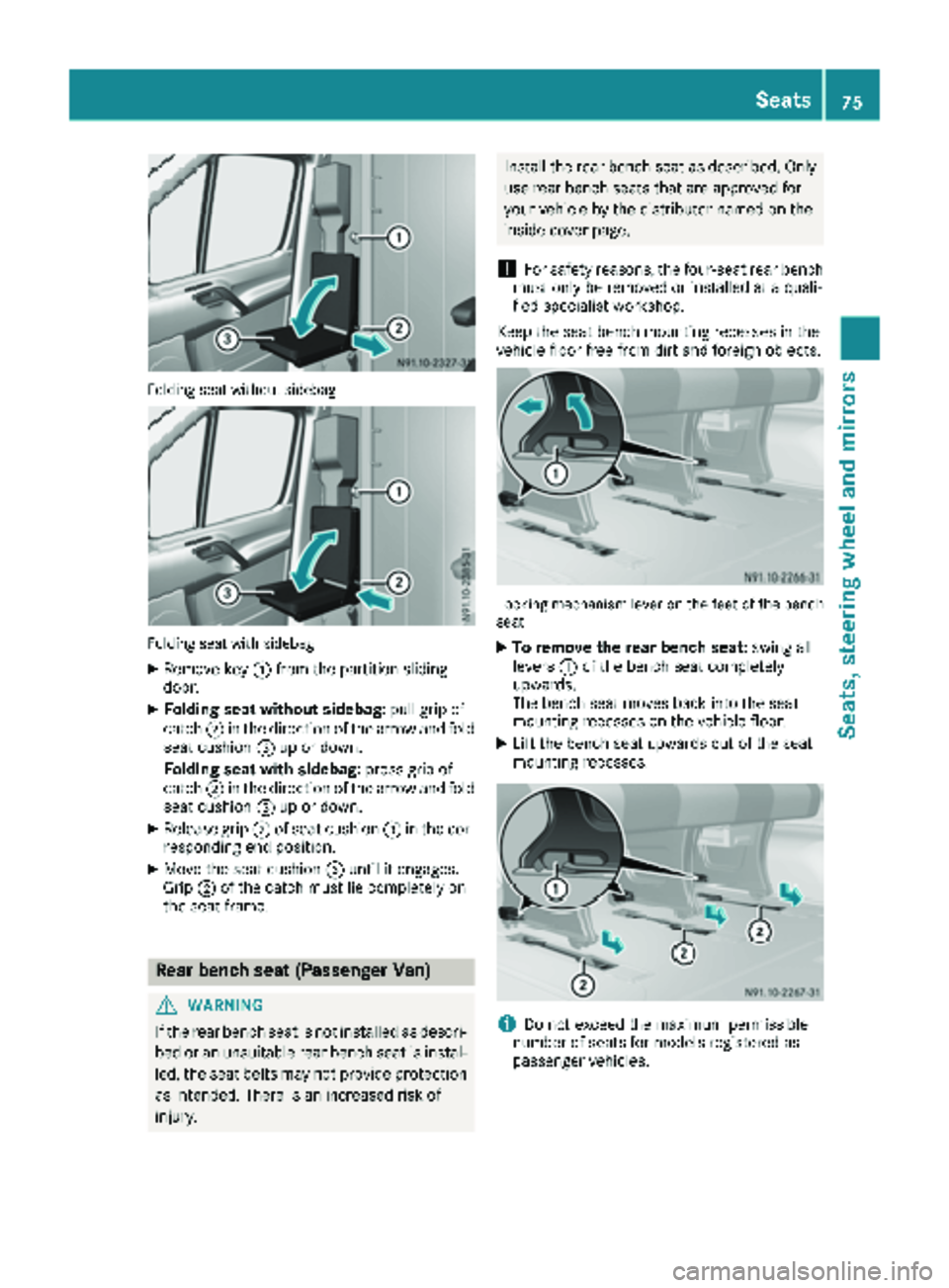
Folding seat without sidebag
Folding seat with sidebag
XRemove key:from the partition sliding
door.
XFolding seat without sidebag: pull grip of
catch ;in the direction of the arrow and fold
seat cushion =up or down.
Folding seat with sidebag: press grip of
catch ;in the direction of the arrow and fold
seat cushion =up or down.
XRelease grip ;of seat cushion =in the cor-
responding end position.
XMove the seat cushion =until it engages.
Grip ;of the catch must lie completely on
the seat frame.
Rear bench seat (Passenger Van)
GWARNING
If the rear bench seat is not installed as descri- bed or an unsuitable rear bench seat is instal-
led, the seat belts may not provide protection
as intended. There is an increased risk of
injury.
Install the rear bench seat as described. Onlyuse rear bench seats that are approved for
your vehicle by the distributor named on the
inside cover page.
!For safety reasons, the four-seat rear bench
must only be removed or installed at a quali-
fied specialist workshop.
Keep the seat bench mounting recesses in the
vehicle floor free from dirt and foreign objects.
Locking mechanism lever on the feet of the bench
seat
XTo remove the rear bench seat: swing all
levers :of the bench seat completely
upwards.
The bench seat moves back into the seat
mounting recesses on the vehicle floor.
XLift the bench seat upwards out of the seat
mounting recesses.
iDo not exceed the maximum permissible
number of seats for models registered as
passenger vehicles.
Seats75
Seats, steering wheel and mirrors
Z
Page 78 of 286
XTo install the rear bench seat:observe the
prescribed installation position of the bench
seat.
Install the two-seat bench seat only on the
driver's side.
XCheck mounting shells ;on the vehicle
floor.
XPosition the bench seat in the direction of
travel in corresponding mounting shells ;.
XSlide the bench seat forwards until you hear
the locking mechanisms engage.
XCheck levers:on the anchorages of the
bench seat.
All levers :must be flush to the vehicle floor.
Head restraints
GWARNING
If head restraints are not installed and adjus-
ted correctly, they cannot provide protection
as intended. There is an increased risk of
injury in the head and neck area, e.g. in the
event of an accident or when braking.
Always drive with the head restraints instal-
led. Before driving off, make sure for every
vehicle occupant that the center of the head
restraint supports the back of the head at
about eye level.
Do not change over the head restraints for the
front and rear seats. Otherwise, it will not be
possible to correctly adjust the height and angle
of the head restraints.
Adjust the head restraint so that it is as close as
possible to your head.
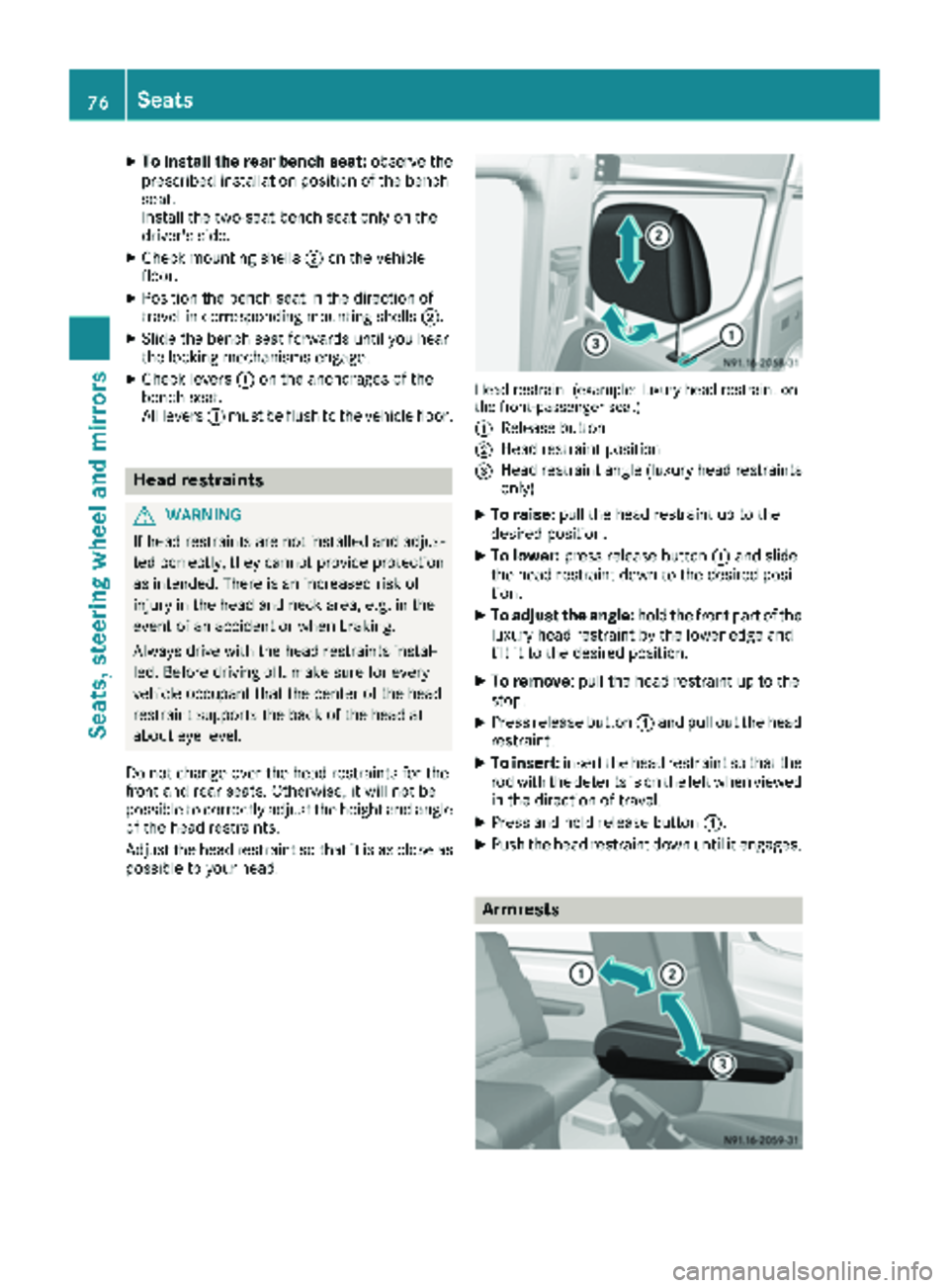
Head restraint (example: luxury head restraint on
the front-passenger seat)
:
Release button
;Head restraint position
=Head restraint angle (luxury head restraints only)
XTo raise: pull the head restraint up to the
desired position.
XTo lower: press release button :and slide
the head restraint down to the desired posi-
tion.
XTo adjust the angle: hold the front part of the
luxury head restraint by the lower edge and
tilt it to the desired position.
XTo remove: pull the head restraint up to the
stop.
XPress release button :and pull out the head
restraint.
XTo insert: insert the head restraint so that the
rod with the detents is on the left when viewed in the direction of travel.
XPress and hold release button :.
XPush the head restraint down until it engages.
Armrests
76Seats
Seats, steeringwheel and mirrors
Page 79 of 286
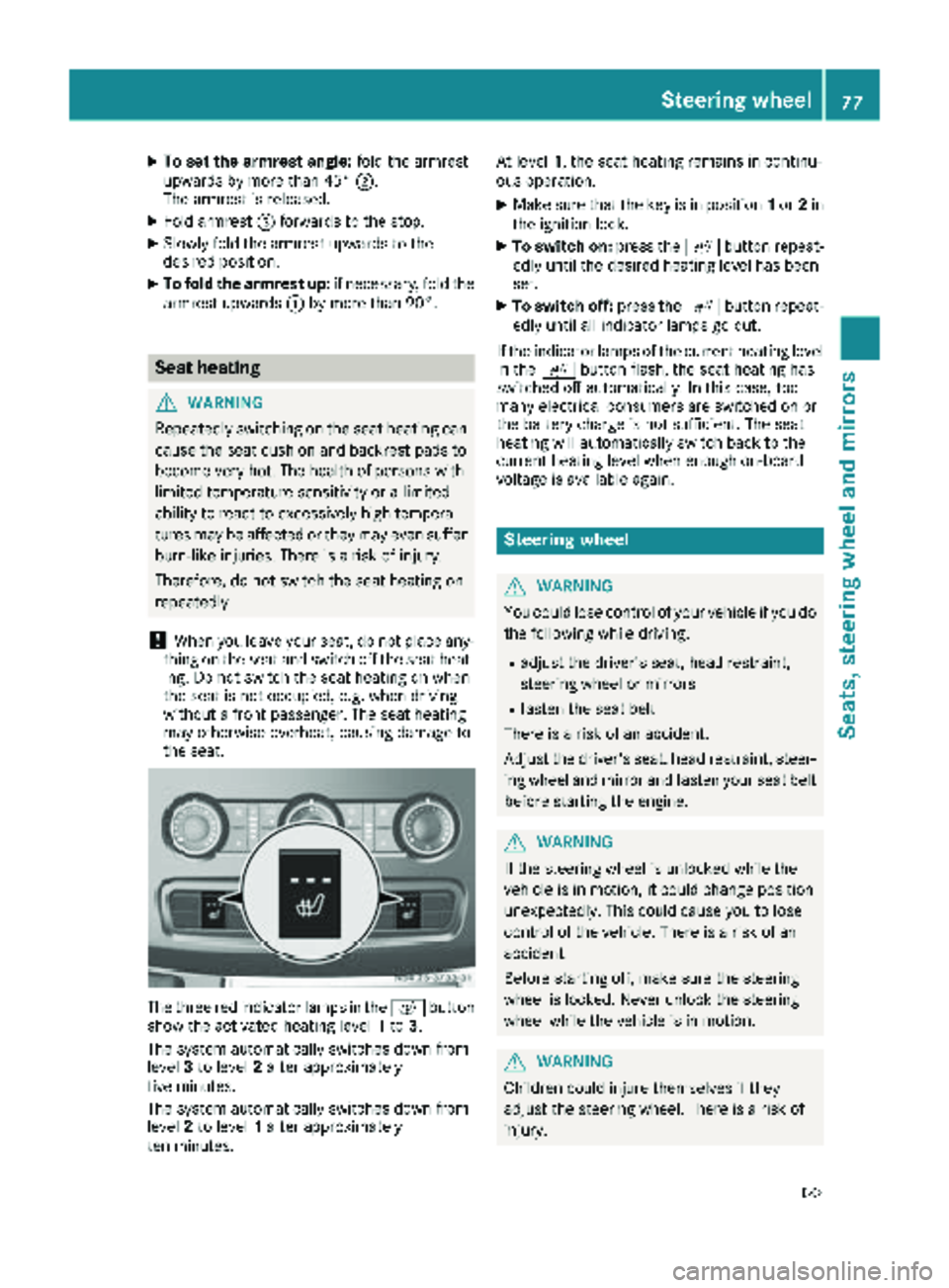
XTo set the armrest angle:fold the armrest
upwards by more than 45° ;.
The armrest is released.
XFold armrest =forwards to the stop.
XSlowly fold the armrest upwards to the
desired position.
XTo fold the armrest up: if necessary, fold the
armrest upwards :by more than 90°.
Seat heating
GWARNING
Repeatedly switching on the seat heating can
cause the seat cushion and backrest pads to
become very hot. The health of persons with
limited temperature sensitivity or a limited
ability to react to excessively high tempera-
tures may be affected or they may even suffer
burn-like injuries. There is a risk of injury.
Therefore, do not switch the seat heating on
repeatedly.
!When you leave your seat, do not place any-
thing on the seat and switch off the seat heat-
ing. Do not switch the seat heating on when
the seat is not occupied, e.g. when driving
without a front passenger. The seat heating
may otherwise overheat, causing damage to
the seat.
The three red indicator lamps in the cbutton
show the activated heating level 1to 3.
The system automatically switches down from
level 3to level 2after approximately
five minutes.
The system automatically switches down from
level 2to level 1after approximately
ten minutes. At level
1, the seat heating remains in continu-
ous operation.
XMake sure that the key is in position 1or 2in
the ignition lock.
XTo switch on: press thecbutton repeat-
edly until the desired heating level has been
set.
XTo switch off: press thecbutton repeat-
edly until all indicator lamps go out.
If the indicator lamps of the current heating level
in the cbutton flash, the seat heating has
switched off automatically. In this case, too
many electrical consumers are switched on or
the battery charge is not sufficient. The seat
heating will automatically switch back to the
current heating level when enough on-board
voltage is available again.
Steering wheel
GWARNING
You could lose control of your vehicle if you do the following while driving:
Radjust the driver's seat, head restraint,
steering wheel or mirrors
Rfasten the seat belt
There is a risk of an accident.
Adjust the driver's seat, head restraint, steer-
ing wheel and mirror and fasten your seat belt before starting the engine.
GWARNING
If the steering wheel is unlocked while the
vehicle is in motion, it could change position
unexpectedly. This could cause you to lose
control of the vehicle. There is a risk of an
accident.
Before starting off, make sure the steering
wheel is locked. Never unlock the steering
wheel while the vehicle is in motion.
GWARNING
Children could injure themselves if they
adjust the steering wheel. There is a risk of
injury.
Steering wheel77
Seats, steering wheel and mirrors
Z
Page 80 of 286
When leaving the vehicle, always take the
SmartKey with you and lock the vehicle. Never
leave children unsupervised in the vehicle.
The steering wheel can still be adjusted if the
key has been removed.
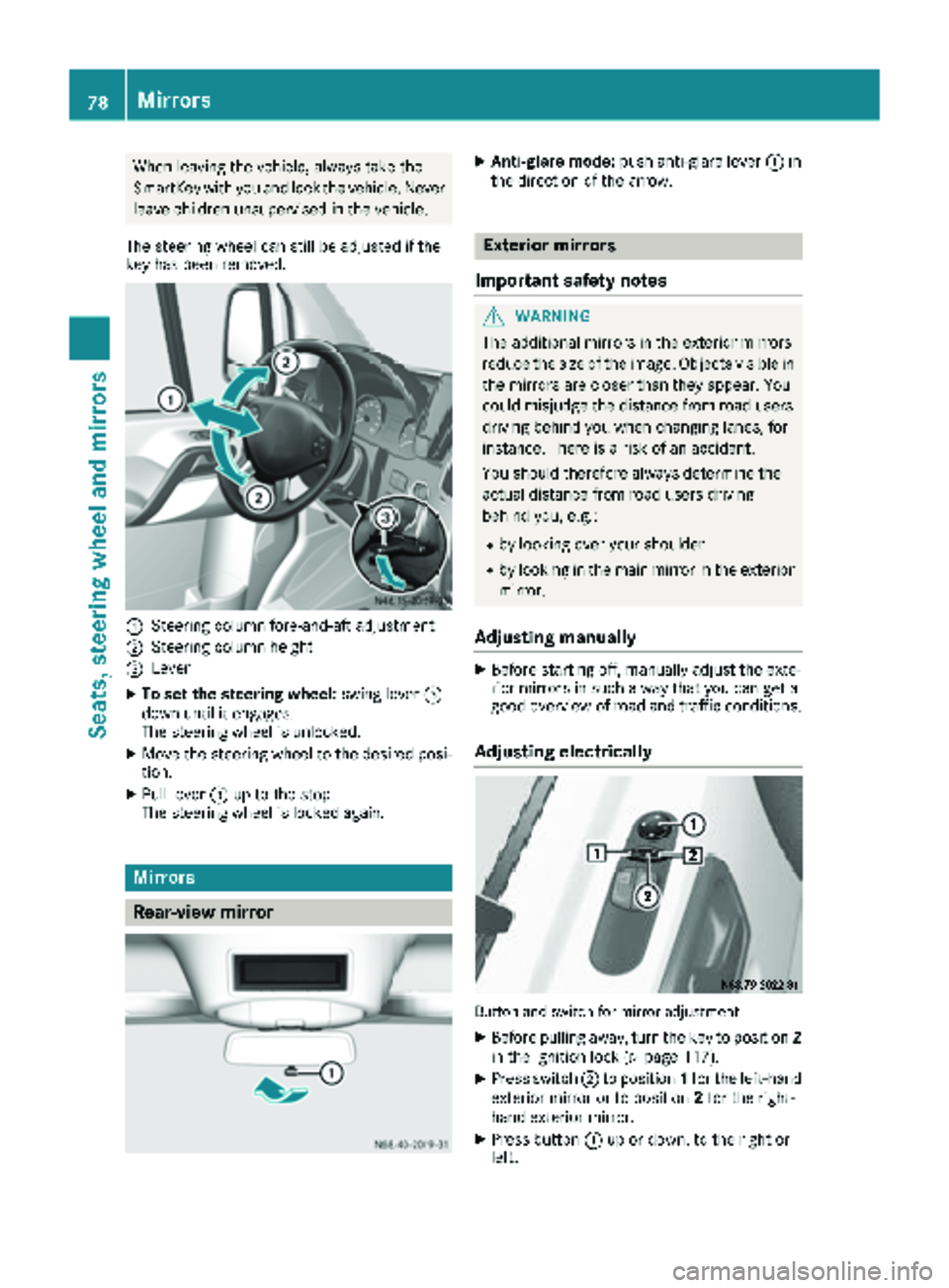
:Steering column fore-and-aft adjustment
;Steering column height
=Lever
XTo set the steering wheel: swing lever=
down until it engages.
The steering wheel is unlocked.
XMove the steering wheel to the desired posi-
tion.
XPull lever =up to the stop.
The steering wheel is locked again.
Mirrors
Rear-view mirror
XAnti-glare mode: push anti-glare lever :in
the direction of the arrow.
Exterior mirrors
Important safety notes
GWARNING
The additional mirrors in the exterior mirrors
reduce the size of the image. Objects visible in
the mirrors are closer than they appear. You
could misjudge the distance from road users
driving behind you when changing lanes, for
instance. There is a risk of an accident.
You should therefore always determine the
actual distance from road users driving
behind you, e.g.:
Rby looking over your shoulder
Rby looking in the main mirror in the exterior
mirror.
Adjusting manually
XBefore starting off, manually adjust the exte-
rior mirrors in such a way that you can get a
good overview of road and traffic conditions.
Adjusting electrically
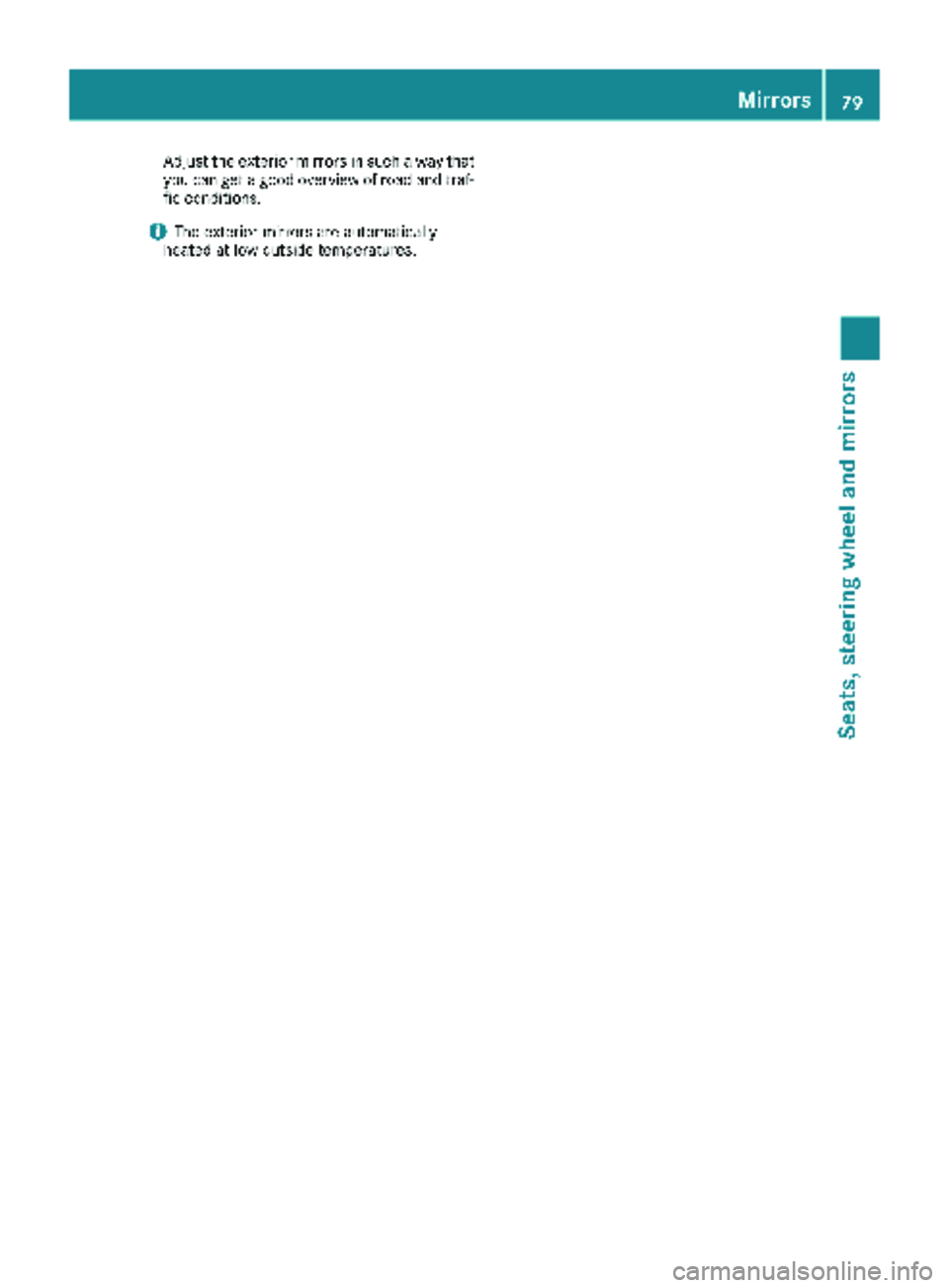
Button and switch for mirror adjustment
XBefore pulling away, turn the key to position 2
in the ignition lock (Ypage 117).
XPress switch ;to position 1for the left-hand
exterior mirror or to position 2for the right-
hand exterior mirror.
XPress button :up or down, to the right or
left.
78Mirrors
Seats, steering wheel and mirrors
Page 81 of 286
Adjust the exterior mirrors in such a way that
you can get a good overview of road and traf-
fic conditions.
iThe exterior mirrors are automatically
heated at low outside temperatures.
Mirrors79
Seats, steering wheel and mirrors
Z
Page 83 of 286
The daytime running lamps function must be
activated using the on-board computer:
Rvehicles with steering wheel buttons
(Ypage 168)
Rvehicles without steering wheel buttons
(Ypage 161)
XTo switch on:turn the light switch to the
$ position.
The low-beam headlamps, parking lamps and
license plate lamp are switched on when the
engine is running. The Lindicator lamp in
the instrument cluster lights up.
iUSA only:
If you turn the light switch to the TorL
position, the parking lamps or low-beam
headlamps switch on. If you turn the light
switch to the Ãposition, the daytime run-
ning lamps remain switched on.
iCanada only:
If you turn the light switch to the Lposi-
tion, the low-beam headlamps are switched
on. If you turn the light switch to the Tor
à position, the daytime running lamps
remain switched on.
Automatic headlamp mode
GWARNING
When the light switch is set to Ã, the low-
beam headlamps may not be switched on
automatically if there is fog, snow or other
causes of poor visibility due to the weather
conditions such as spray. There is a risk of an
accident.
In such situations, turn the light switch to
L.
Automatic headlamp mode is only a driving aid.
You are responsible for the vehicle lighting at all
times.
Depending on ambient light, the rain and light
sensor automatically switches on the parking
lamps, low-beam headlamps and the license
plate lamp. This excludes weather-related
impairments to visibility, such as snow, fog or
spray.
If there is fog, snow or spray, turn the light
switch quickly from ÃtoL. You could
otherwise briefly interrupt operation of the
headlamps.
XTo switch on automatic headlamp mode:
turn the light switch to Ã.
Key in position 1in the ignition lock: the park-
ing lamps switch on or off automatically
depending on the ambient light.
When the engine is running: if you activate the
"daytime running lamps" function using the
on-board computer, the daytime running
lamps are switched on. The parking lamps and
low-beam headlamps also switch on or off
automatically, depending on the ambient
light.
When the low-beam headlamps are switched
on, the Lindicator lamp in the instrument
cluster lights up.
Fog lamps/rear fog lamp
GWARNING
If you suspect that driving conditions will be
foggy, turn the light switch to Lbefore you
start your journey. Your vehicle may other-
wise not be visible and you could endanger
yourself and others.
GWARNING
In low ambient lighting or foggy conditions,
only switch from position ÃtoL with
the vehicle at a standstill in a safe location.
Switching from ÃtoL will briefly
switch off the headlamps. Doing so while driv-
ing in low ambient lighting conditions may
result in an accident.
XTurn the ignition key to position 2in the igni-
tion lock or start the engine.
XTurn the light switch to LorT.
iIf your vehicle is only equipped with one rear
fog lamp, you must turn the light switch to
L.
iWhen the light switch is set to Ãyou
cannot switch on the front and rear foglamps.
XTo switch on the front fog lamps: pull the
light switch out to the first locking point.
The green Nindicator lamp on the light
switch lights up.
Exterior lighting81
Lights and windshield wipers
Z
Page 85 of 286
The headlamp range control is used to adapt the
downward angle of the headlamp beams in
accordance with the load on your vehicle. The
cone of light from the headlamps changes if
seats are occupied or if the cargo compartmentis being loaded or unloaded. This can impair vis-
ibility and cause glare to oncoming traffic.
You can only adjust the headlamp range while
the engine is running.
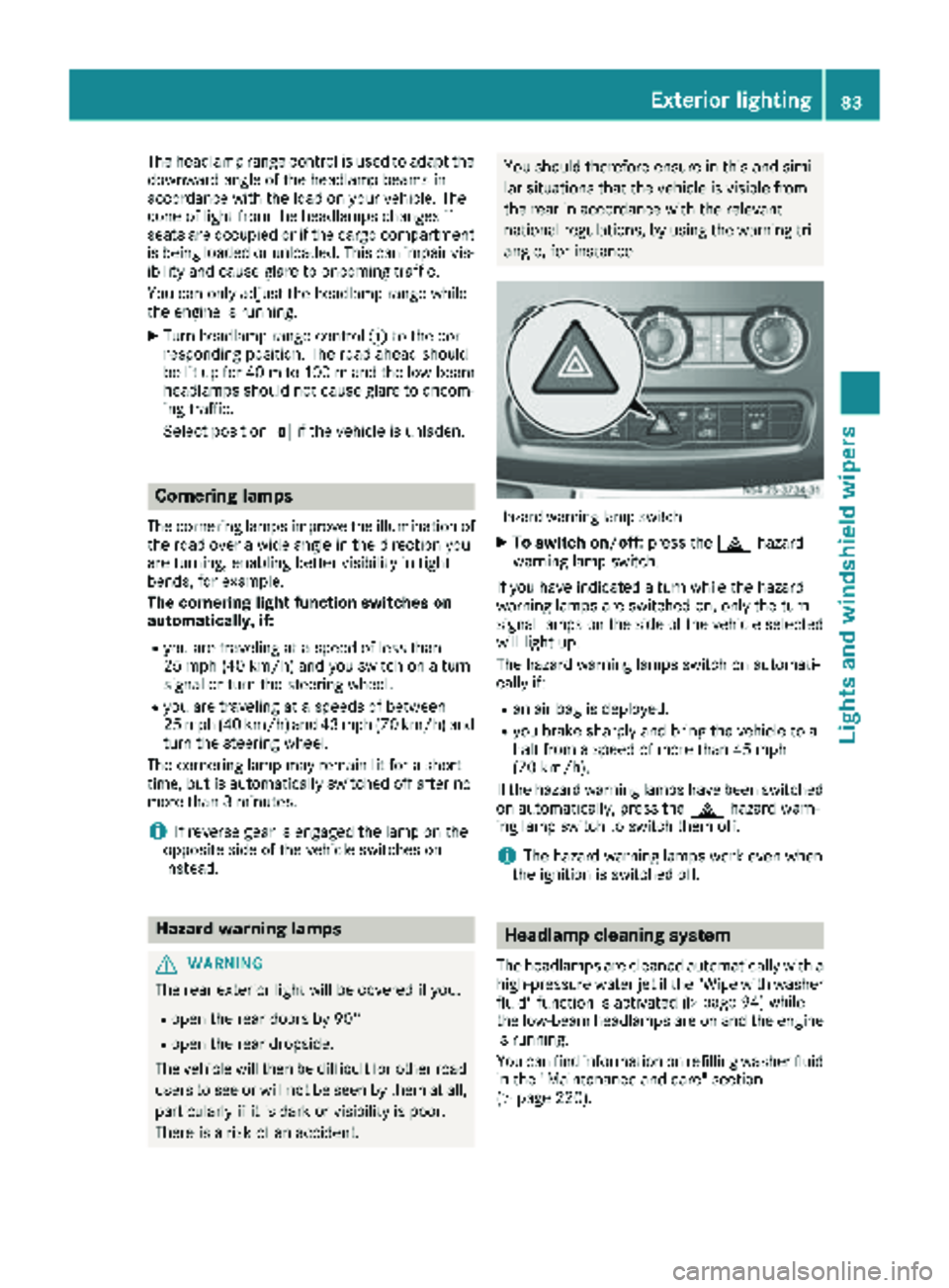
XTurn headlamp range control :to the cor-
responding position. The road ahead should
be lit up for 40 mto 100 mand the low-beam
headlamps should not cause glare to oncom-
ing traffic.
Select position gif the vehicle is unladen.
Cornering lamps
The cornering lamps improve the illumination of
the road over a wide angle in the direction you
are turning, enabling better visibility in tight
bends, for example.
The cornering light function switches on
automatically, if:
Ryou are traveling at a speed of less than
25 mph (40 km/h) and you switch on a turn
signal or turn the steering wheel.
Ryou are traveling at a speeds of between
25 mph (40 km/h) and 43 mph (70 km/h) and
turn the steering wheel.
The cornering lamp may remain lit for a short
time, but is automatically switched off after no
more than 3 minutes.
iIf reverse gear is engaged the lamp on the
opposite side of the vehicle switches on
instead.
Hazard warning lamps
GWARNING
The rear exterior light will be covered if you:
Ropen the rear doors by 90°
Ropen the rear dropside.
The vehicle will then be difficult for other road users to see or will not be seen by them at all,
particularly if it is dark or visibility is poor.
There is a risk of an accident.
You should therefore ensure in this and simi-
lar situations that the vehicle is visible from
the rear in accordance with the relevant
national regulations, by using the warning tri-
angle, for instance.
Hazard warning lamp switch
XTo switch on/off: press the£hazard
warning lamp switch.
If you have indicated a turn while the hazard
warning lamps are switched on, only the turn
signal lamps on the side of the vehicle selected
will light up.
The hazard warning lamps switch on automati-
cally if:
Ran air bag is deployed.
Ryou brake sharply and bring the vehicle to a
halt from a speed of more than 45 mph
(70 km/h).
If the hazard warning lamps have been switched
on automatically, press the £hazard warn-
ing lamp switch to switch them off.
iThe hazard warning lamps work even when
the ignition is switched off.
Headlamp cleaning system
The headlamps are cleaned automatically with a
high-pressure water jet if the "Wipe with washer
fluid" function is activated (
Ypage 94) while
the low-beam headlamps are on and the engine is running.
You can find information on refilling washer fluid
in the "Maintenance and care" section
(
Ypage 220).
Exterior lighting83
Lights and windshield wiper s
Z
Page 109 of 286
Outside tempera-
tureEngine runtime
Above 32 ‡ (0 †)at least 10 minutes
32 ‡ (0 †) to 14 ‡
(Ò10 †)at least 15 minutes
Below 14 ‡ (Ò10 †)at least 20 minutes
Before switching on
XCheck the fuel level and top up if necessary.
The auxiliary heating is operated directly
using the vehicle's fuel. The tank must be at
least a quarter full to ensure that the auxiliary
heating functions.
XSwitch on climate control (Ypage 100).
XSet the temperature control to the desired
temperature (Ypage 101).
XSet the air distribution as required
(Ypage 101).
XOpen the center (Ypage 104) and side air
vents (Ypage 105) and set them to the middle
position.
iThe auxiliary heating automatically switches
to heater booster mode after the engine is
started.
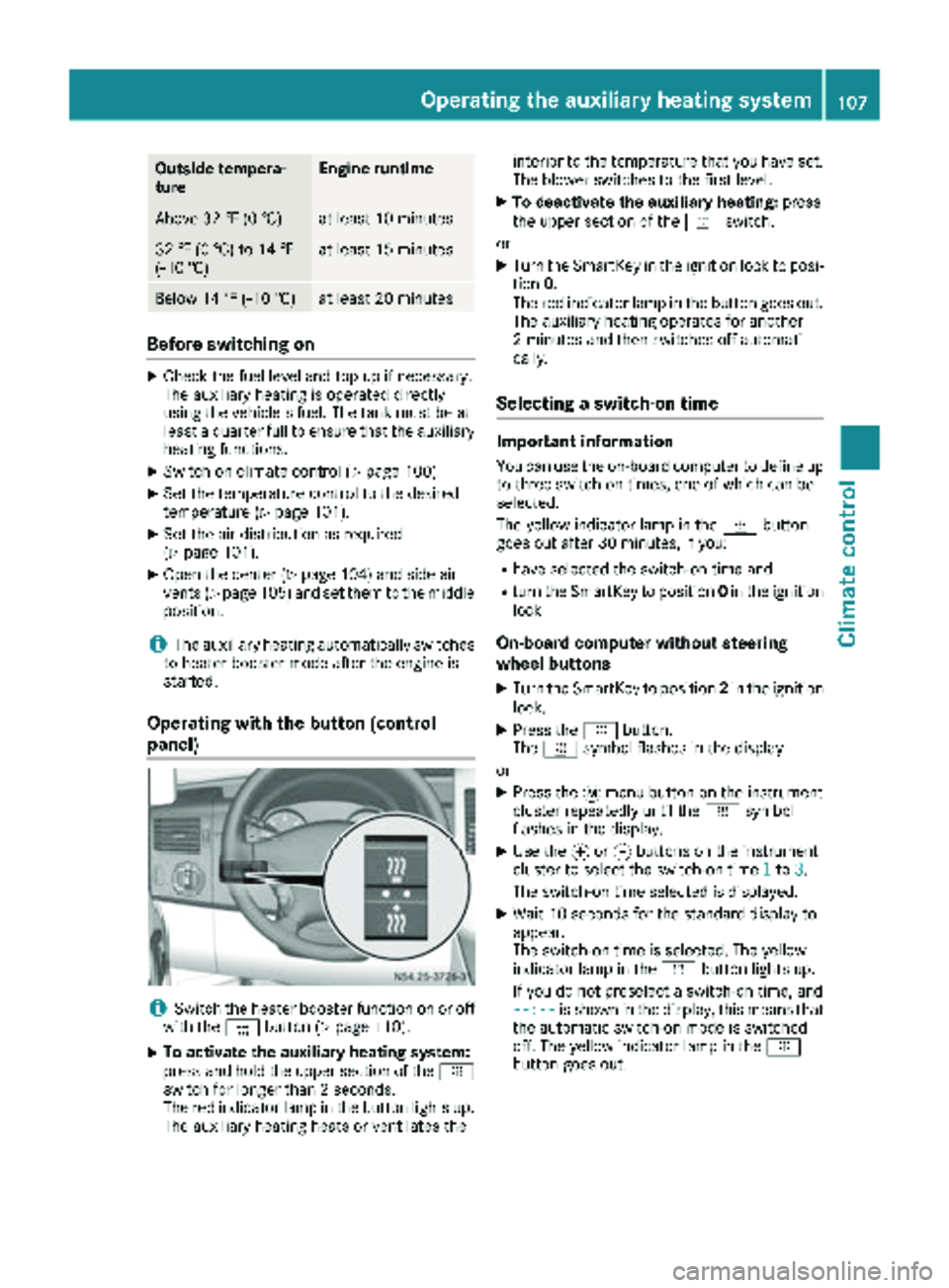
Operating with the button (control
panel)
iSwitch the heater booster function on or off
with the ¢button (Ypage 110).
XTo activate the auxiliary heating system:
press and hold the upper section of the y
switch for longer than 2 seconds.
The red indicator lamp in the button lights up.
The auxiliary heating heats or ventilates the interior to the temperature that you have set.
The blower switches to the first level.
XTo deactivate the auxiliary heating:
press
the upper section of the yswitch.
or
XTurn the SmartKey in the ignition lock to posi-
tion 0.
The red indicator lamp in the button goes out.
The auxiliary heating operates for another
2 minutes and then switches off automati-
cally.
Selecting a switch-on time
Important information
You can use the on-board computer to define up
to three switch-on times, one of which can be
selected.
The yellow indicator lamp in the ybutton
goes out after 30 minutes, if you:
Rhave selected the switch-on time and
Rturn the SmartKey to position 0in the ignition
lock
On-board computer without steering
wheel buttons
XTurn the SmartKey to position 2in the ignition
lock.
XPress the ybutton.
The y symbol flashes in the display.
or
XPress the 4menu button on the instrument
cluster repeatedly until the ysymbol
flashes in the display.
XUse the forg buttons on the instrument
cluster to select the switch-on time 1to3.
The switch-on time selected is displayed.
XWait 10 seconds for the standard display to
appear.
The switch-on time is selected. The yellow
indicator lamp in the ybutton lights up.
If you do not preselect a switch-on time, and
--:--
is shown in the display, this means that
the automatic switch-on mode is switched
off. The yellow indicator lamp in the y
button goes out.
Operating the auxiliary heating system107
Climate control
Z
Page 110 of 286
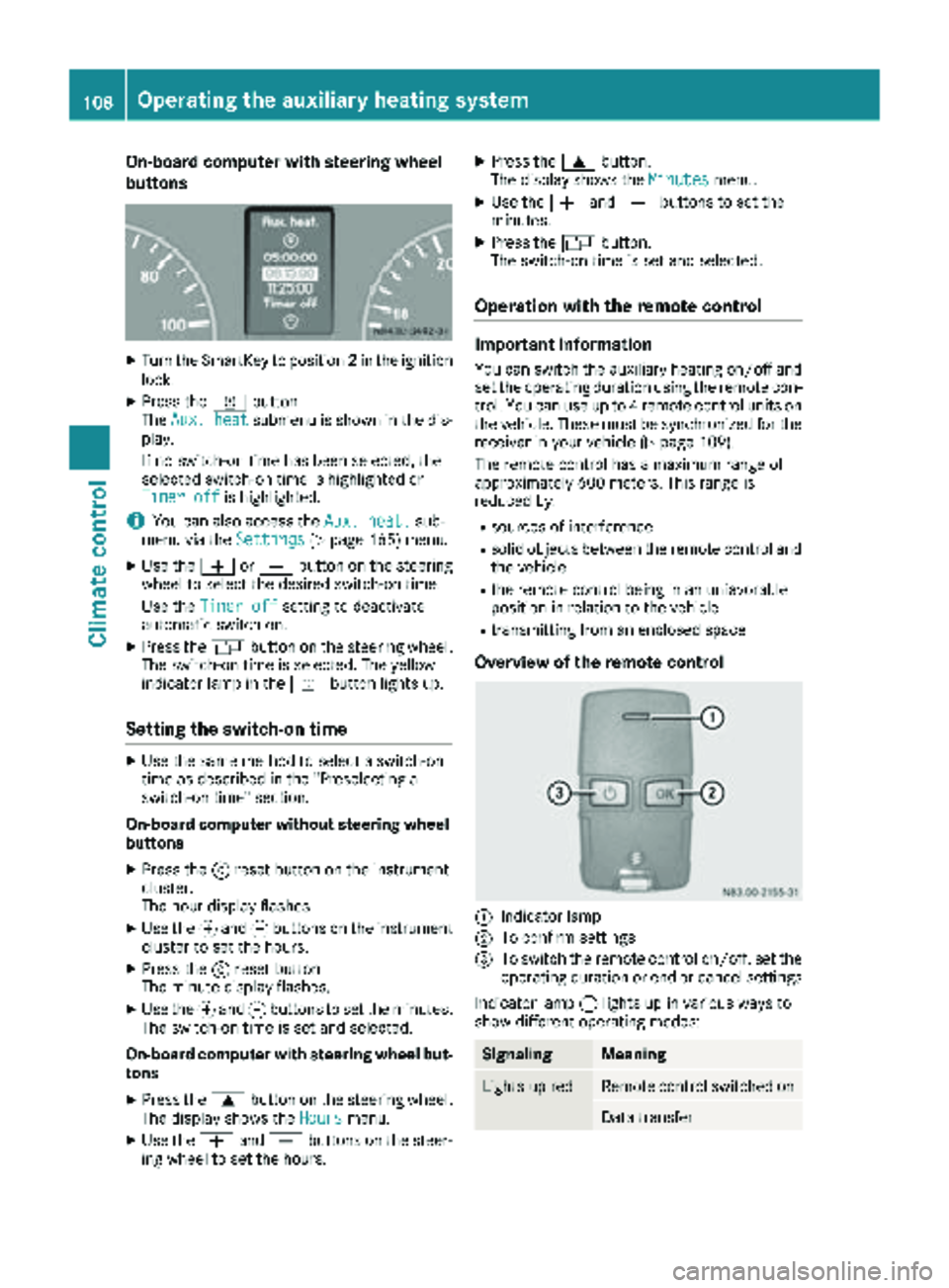
On-board computer with steering wheel
buttons
XTurn the SmartKey to position2in the ignition
lock.
XPress the ybutton.
The Aux. heatsubmenu is shown in the dis-
play.
If no switch-on time has been selected, the
selected switch-on time is highlighted or
Timer off
is highlighted.
iYou can also access the Aux. heat.sub-
menu via the Settings(Ypage 165) menu.
XUse theWorX button on the steering
wheel to select the desired switch-on time.
Use the Timer off
setting to deactivate
automatic switch-on.
XPress the Vbutton on the steering wheel.
The switch-on time is selected. The yellow
indicator lamp in the ybutton lights up.
Setting the switch-on time
XUse the same method to select a switch-on
time as described in the "Preselecting a
switch-on time" section.
On-board computer without steering wheel
buttons
XPress the 9reset button on the instrument
cluster.
The hour display flashes.
XUse the fand gbuttons on the instrument
cluster to set the hours.
XPress the 9reset button
The minute display flashes.
XUse the fand gbuttons to set the minutes.
The switch-on time is set and selected.
On-board computer with steering wheel but-
tons
XPress the 9button on the steering wheel.
The display shows the Hoursmenu.
XUse theWandX buttons on the steer-
ing wheel to set the hours.
XPress the 9button.
The display shows the Minutesmenu.
XUse theWandX buttons to set the
minutes.
XPress the Vbutton.
The switch-on time is set and selected.
Operation with the remote control
Important information
You can switch the auxiliary heating on/off and
set the operating duration using the remote con-
trol. You can use up to 4 remote control units on
the vehicle. These must be synchronized for the
receiver in your vehicle (
Ypage 109).
The remote control has a maximum range of
approximately 600 meters. This range is
reduced by:
Rsources of interference
Rsolid objects between the remote control and
the vehicle
Rthe remote control being in an unfavorable
position in relation to the vehicle
Rtransmitting from an enclosed space
Overview of the remote control
:Indicator lamp
;To confirm settings
=To switch the remote control on/off, set the operating duration or end or cancel settings
Indicator lamp :lights up in various ways to
show different operating modes:
SignalingMeaning
Lights up redRemote control switched on
Data transfer
108Operating the auxiliary heating system
Climate control