wheel MERCEDES-BENZ SPRINTER 2017 MY17 Operator’s Manual
[x] Cancel search | Manufacturer: MERCEDES-BENZ, Model Year: 2017, Model line: SPRINTER, Model: MERCEDES-BENZ SPRINTER 2017Pages: 286, PDF Size: 4.36 MB
Page 55 of 286
As a result, they could:
Ractivate vehicle equipment and become
trapped, for example
Ractivate or deactivate systems, thereby
endangering other road users
Unsecured animals could also be flung around
the vehicle in the event of an accident or sud-
den steering or braking, thereby injuring vehi- cle occupants. There is a risk of an accident
and injury.
Never leave animals unattended in the vehi-
cle. Always secure animals properly during
the journey, e.g. use a suitable animal trans-
port box.
Driving safety systems
Overview
In this section, you will find information about
the following driving safety systems:
RABS ( Anti-lock Braking System)
RASR (Acceleration SkidControl)
RBAS ( Brake Assist System)
REBD ( Electronic Brake Force Distribution)
RESP®(E lectronic StabilityProgram)
Important safety notes
If you fail to adapt your driving style or if you are
inattentive, the driving safety systems can nei-
ther reduce the risk of accident nor override the
laws of physics. Driving safety systems are
merely aids designed to assist driving. You are
responsible for the distance to the vehicle in
front, for vehicle speed, braking in good time
and for staying in your lane. Always adapt your
driving style to the prevailing road and weather
conditions and maintain a sufficient, safe dis-
tance from other road users. Drive carefully.
Please note that the driving safety systems
described only work optimally when:
Rthere is adequate contact between the tires
and the road surface
Ryou use winter tires (M+S tires), with snow
chains if necessary, when the road conditions
are wintry Pay particular attention to the information
regarding tires, tire tread and winter operation
under "Wheels and tires" (
Ypage 243).
ABS (Anti-lock Braking System)
Important safety notes
Observe the important safety guidelines for the
driving safety system (Ypage 53).
GWARNING
If ABS is faulty, the wheels could lock when
braking. The steerability and braking charac-
teristics may be severely impaired. Addition-
ally, further driving safety systems are deac-
tivated. There is an increased danger of skid-
ding and accidents.
Drive on carefully. Have ABS checked imme-
diately at a qualified specialist workshop.
If ABS is malfunctioning, other systems will also
fail, including driving safety systems. Observe
the information relating to the !warning
lamp (
Ypage 191).
ABS regulates brake pressure in such a way that
the wheels do not lock when you brake. This
allows you to continue steering the vehicle when
braking.
ABS works from a speed of about 5 mph
(8 km/h), regardless of road-surface conditions. ABS works on slippery surfaces, even when you
only brake gently.
The yellow !warning lamp in the instrument
cluster lights up when the ignition is switched
on. The lamp goes out when the engine starts
running.
Braking
If ABS intervenes when braking, you will feel a
pulsating in the brake pedal.
The pulsating brake pedal can be an indication
of hazardous road conditions and functions as a
reminder to take extra care while driving.
XIf ABS intervenes: continue to depress the
brake pedal with force until the braking sit-
uation is over.
XTo make a full brake application: depress
the brake pedal with full force.
Driving safety systems53
Safety
Z
Page 56 of 286
ASR (accelerationskid control )
Gene ral notes
Important safety notes
Observ eth eimportant safet yguidelines for th e
drivin gsafet ysystem (Ypage 53).
AS Rcan neither reduce th eris kof an acciden t
no rsuspen dth elaws of physics if th edriver
does no tpay attention when pullin gaway or
accelerating .AS Ris only an aid. Always adapt
your drivin gstyle to suit th eprevailing road and
weather conditions.
If you activat eor deactivat eth eall-whee ldrive
in avehicl ewit hthis option ,AS Rwill be deacti -
vated for th eduration of th eactivation/deacti-
vation process.
Vehicles without steering whee lbuttons :if AS R
is malfunctioning ,th e: indicator lamp lights
up while th eengin eis runnin gand th eengin e
powe rmay be reduce d (
Ypage 191).
AS Rsignificantly improve straction ,i.e .th e
transmission of powe rfrom th etires to th eroad
surface, and thus increases th evehicle's drivin g
stability. If th edrivin gwheels start to spin ,AS R
brakes individual drive wheels and limits th e
engin etorque .AS Rthus significantly assist syou
when pullin gaway and accelerating ,especially
on wet or slipper yroads.
If traction on th eroad surfac eis no tsufficient,
eve nAS Rwill no tallow you to pull away without
difficulty. The typ eof tire
s and total weigh
tof th e
vehicl eas well as th egradien tof th eroad also
play acrucia lrole.
If AS Rintervenes, th ed warning lamp in th e
instrumen tcluste rflashes .
Activating/deactivating ASR
GWARNIN G
If deactivated, AS Rwill no tattemp tto stabi-
liz eth evehicl eduring pullin gaway and accel-
eration .There is an increased ris kof skiddin g
and of an accident.
Only deactivat eAS Rin th esituation sdescri-
bed in th efollowing.
!If you deactivat eASR, ES P®will still inter-
ven eto stabiliz eth evehicle. Frequen tbraking
automatically triggered by ES P
®can damage
th ebrak esystem. Fo
rthis reason ,deactivat eAS Ronly briefl y
and when absolutely necessary.
When ES P®is intervening and th ed warning
lamp in th einstrumen tcluste ris flashing, leav e
AS Ron .In this case, only depress th eacceler -
ato rpedal as far as require dwhen pullin gaway.
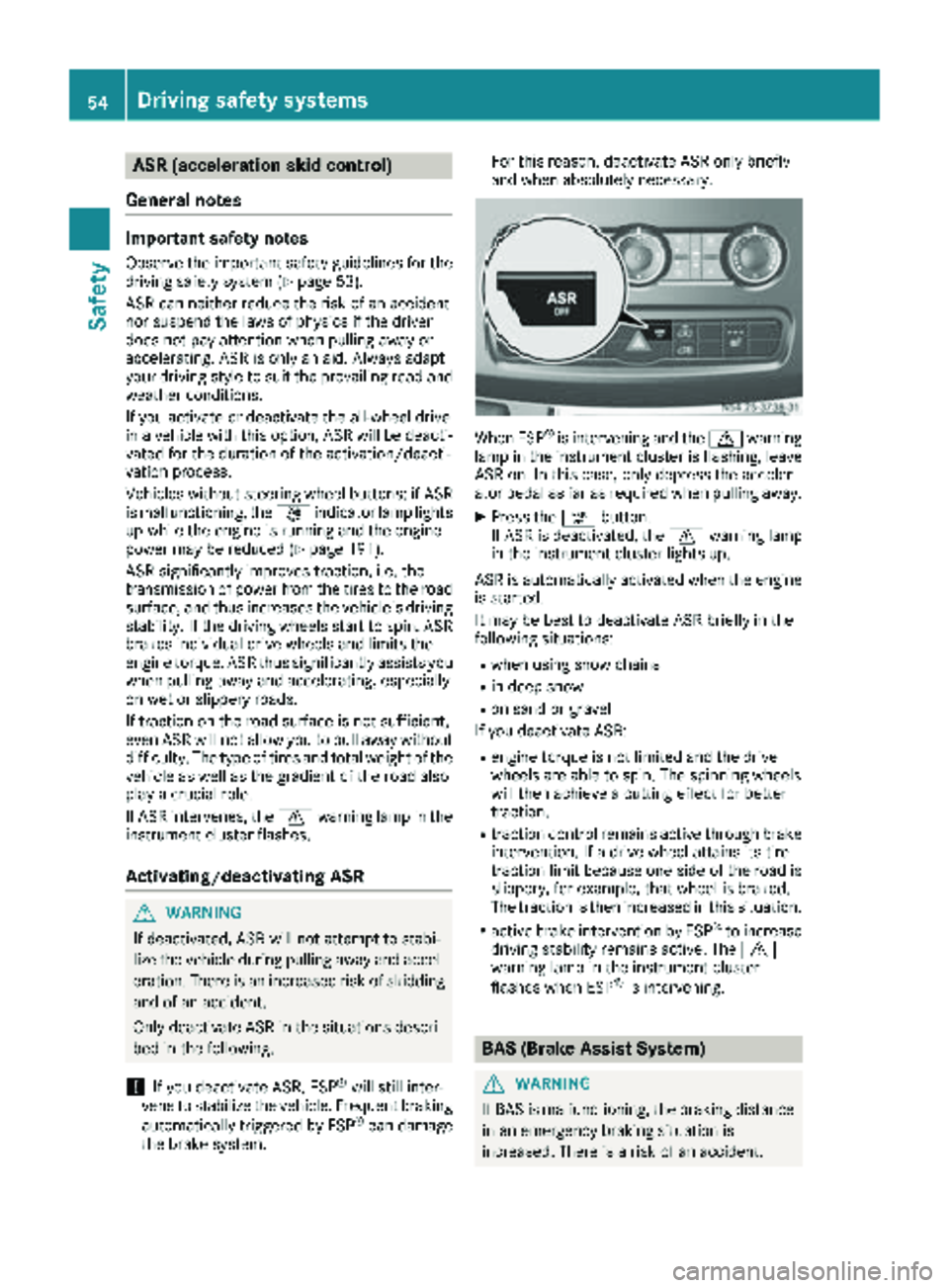
XPress th eà button.
If AS Ris deactivated, th ed warning lamp
in th einstrumen tcluste rlights up.
AS Ris automatically activated when th eengin e
is started.
It may be best to deactivat eAS Rbriefl yin th e
followin gsituations:
Rwhen usin gsnow chain s
Rin deep snow
Ron sandor gravel
If you deactivat eASR:
Rengin etorque is no tlimite dand th edrive
wheels are able to spin .The spinnin gwheels
will then achiev e acutting effec tfor bette r
traction .
Rtraction control remain sactive throug hbrak e
intervention .If adrive whee lattain sits tire
traction limi tbecause on eside of th eroad is
slippery, for example, that whee lis braked.
The traction is then increased in this situation .
Ractive brakeintervention by ES P®to increase
drivin gstabilit yremain sactive .The d
warning lamp in th einstrumen tcluste r
flashes when ES P
®is intervening.
BAS (Brake Assist System)
GWARNING
If BA Sis malfunctioning ,th ebraking distanc e
in an emergenc ybraking situation is
increased. There is aris kof an accident.
54Driving safety systems
Safety
Page 57 of 286
In an emergency braking situation, depress
the brake pedal with full force. ABS prevents
the wheels from locking.
Vehicles without steering wheel buttons: if the
BAS driving safety system is malfunctioning,
the : warning lamp lights up while the
engine is running (
Ypage 191).
BAS operates in emergency braking situations.
If you depress the brake quickly, BAS automat-
ically increases the brake pressure, thereby
reducing the stopping distance.
The brakes will function as usual once you
release the brake pedal. BAS is deactivated.
EBD (electronic brake force distribu-
tion)
GWARNING
If EBD is malfunctioning, the rear wheels can
lock, e.g. under full braking. This increases the
risk of skidding and an accident.
You should therefore adapt your driving style
to the different handling characteristics. Have
the brake system checked at a qualified spe-
cialist workshop.
EBD monitors and controls the brake pressure
to the rear wheels. This enables EBD to improve
handling during braking.
Observe the information on warning and indica-
tor lamps (
Ypage 191).
ESP®(Electronic Stability Program)
Important safety notes
GWARNING
If ESP
®is malfunctioning it will not provide
any vehicle stabilization. There is an increased
risk of skidding or of an accident.
Exercise caution when continuing to drive.
Have ESP
®checked at a qualified specialist
workshop.
!Do not run the vehicle on a roller dynamom-
eter (e.g. for performance tests). If you must
operate the vehicle on a roller dynamometer, please consult a qualified specialist workshop
in advance. You could otherwise damage the
drive train or the brake system.
If you activate or deactivate the all-wheel drive
in a vehicle with this option, ESP
®will be deac-
tivated for the duration of the activation/deac-
tivation process.
If ESP
®is malfunctioning, the hindicator
lamp lights up while the engine is running and
the engine power may be reduced
(
Ypage 190).
iOnly use wheels with the recommended tire
sizes. Only then will ESP®function properly.
4ETS (Electronic Traction System)
!A function or performance test should only
be carried out on a two-axle dynamometer.
Before you operate the vehicle on such a
dynamometer, please consult a qualified
workshop. You could otherwise damage the
drive train or the brake system.
4ETS is only active when all-wheel drive is acti-
vated (
Ypage 145).
4ETS ensures permanent drive for all four
wheels, and together with ESP
®it improves the
vehicle's traction.
If a driven wheel spins due to lack of traction:
RWhen pulling away, make use of the traction
control integrated in ESP®. Depress the
accelerator pedal as far as necessary.
RWhile driving, slowly take your foot off the
accelerator pedal.
In wintry driving conditions, always use winter
tires (M+S tires) and if necessary, snow chains
(
Ypage 246). This is the only way to get the full
benefit from the all-wheel drive system.
Crosswind Assist
Crosswind Assist does not work if ESP®is deac-
tivated or disabled because of a malfunction.
Crosswind Assist does not react:
Rin the event of severe jolts and vibrations, e.g.
as a result of uneven surfaces or potholes.
Rif the vehicle loses traction, e.g. on snow or
ice or when hydroplaning.
Rto large and sudden steering movements by
the driver.
Driving safety systems55
Safety
Z
Page 58 of 286
Crosswind Assist is operational again as soon as
the driving conditions return to normal.
Cros swind Assist detects strong crosswind
gusts that can impair the road holding of your
veh icle when driving straight ahead. Cros swind
Assist intervenes dependin g on thedirection
and strength of the crosswind .
A stabiliz ing brake application helps you to keep
the veh icleon track.
In formation appears inthe instrument cluster In
the event that Cros swind Assist intervenes
noticeably.
On vehicles without steering wheel buttons:
the d indicator lamp inthe instrument clus-
ter flashes.
On vehicles with steering wheel buttons: the
d indicator lamp inthe instrument cluster
flashes and the message Crosswind Assist
Activeappearsinthe multifunction display.
Cros swind Assist isactive above a veh iclespeed
of 50 mph (80 km/h) when the veh icle is driving
straight ahead or cornering gently.
Emergency exit
Emergency exit window
GWAR NING
The emergency exit wind ow cannotbelocked
in plac e. You risk injury ifyou exit the vehicle
through the emergency exit wind ow.
RMake sure that nobodybecomes tr apped,
both when closing and when opening the
emergency exit wind ow.
RThe opened emergency exit wind ow must
be held in plac eby another person.
Pay attention to traff icconditions.
GWAR NING
If the emergency exit wind owisunlocked
while driv ing,itcould open and slam shut and
consequently fall down. There isa risk of an
acc iden t and injury.
Before starting off, make sure that the emer-
gency exit wind owislocked and the locking
pin s are undamage d.
!Make sure there issuff icient clearance
when opening the emergency exit wind ow.Hold the open window in position. You could
otherwise damage the emergency exit win-
dow.
The emergency exit wind
owisintended for use
in an emergency only and must not be opened
unless the vehicle isstationary. The emergency
exit window isthe first window behind the driv-
er's seat on the driver's side. It is marked by the
"Emergency Exit" label.
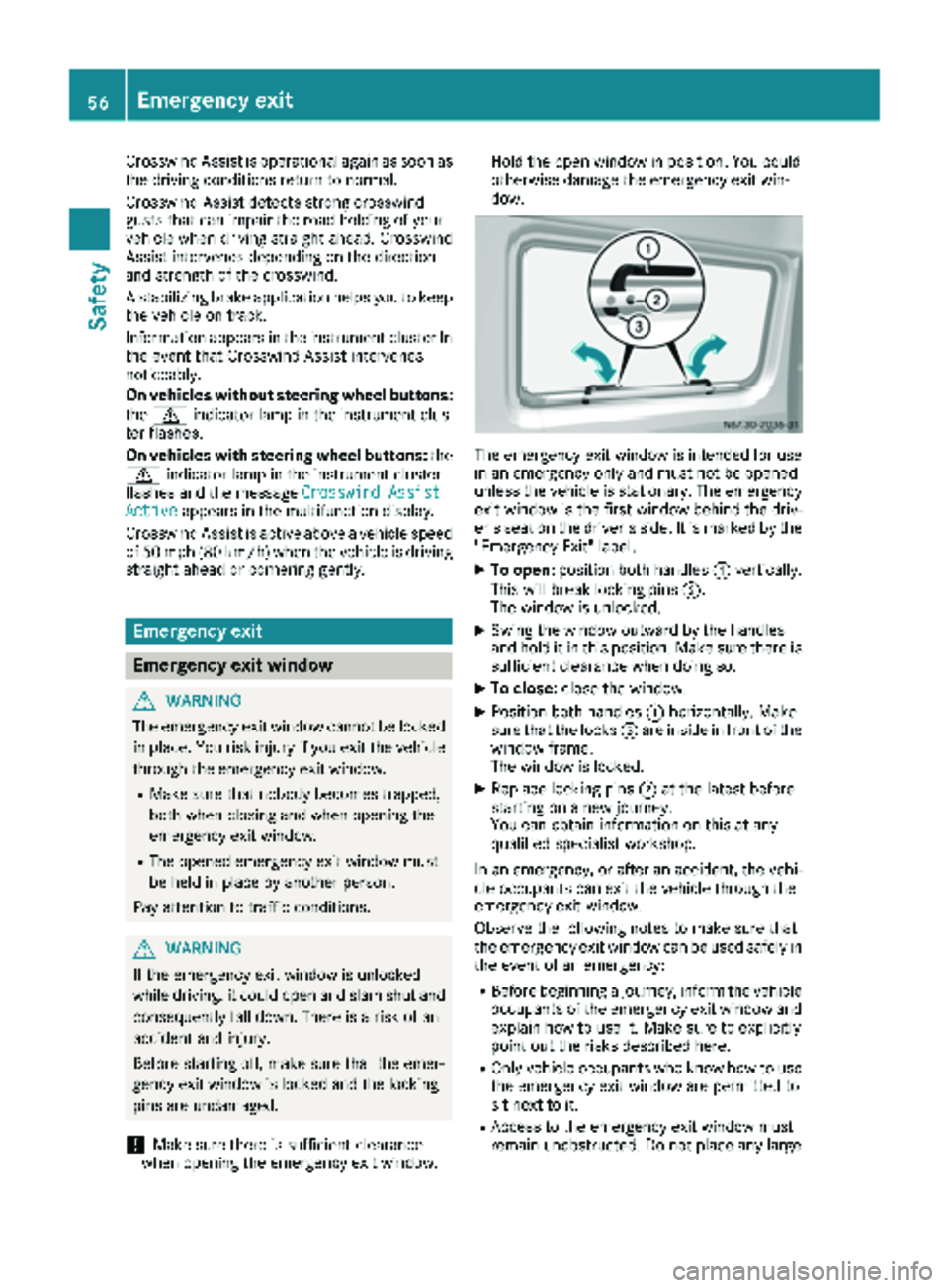
XTo open: position both handles :vertically.
This willbreak locking pins ;.
The wind ow is unlocked.
XSwin g the window outward by the handles
and hold it in this position. Make sure there is
sufficient clearance when doing so.
XTo close: close the window.
XPosition both handles :horizontally. Make
sure that the locks =are inside infront of the
window frame.
The wind ow is locked.
XReplace locking pins ;at the latest before
starting on a new journey.
You can obtain information on this at any
qualif ied specialist workshop.
In an emergency, or after an accident, the vehi-
cle occupants can exit the vehicle through the
emergency exit wind ow.
Observe the foll owing notes to make sure that
the emergency exit window can be used safely in
the event of an emergency:
RBefore beginning a journey, inform the vehicle
occupants of the emergency exit wind ow and
explain how to use it. Make sure to explicitly
poin t out the risks describe d here.
ROnlyvehicle occupants who know how to use
the emergency exit wind ow are permitted to
sit next to it.
RAccess to the emergency exit wind ow must
remain unobstructed. Do not place any large
56Emergency exit
Safety
Page 68 of 286
Electrical closing assist
If your vehicle is equipped with electrical closing
assist, you will require less force to close the
sliding door.
Electrical step
Important safety notes
!
Always observe the ground clearance of the
vehicle and avoid obstacles. On vehicles with a step, ground clearance is further restricted.
Obstacles can damage the vehicle.
If you must drive over obstacles, drive espe-
cially slowly and carefully. If necessary, have
another person direct you.
If you do not use the grab handle and the step,
you could injure yourself when getting in and out
of the vehicle.
In order to reduce risks:
Rdraw the passengers' attention to the electri-
cal step. Wait until the electrical step is fully
extended.
Rdo not jump out of the vehicle.
Ronly use the grab handle and step. Only they
are designed for such a load.
Rkeep grab handles, access steps and entry
sills free from dirt, e.g. mud, clay, snow and
ice.
Operation and obstacle detection
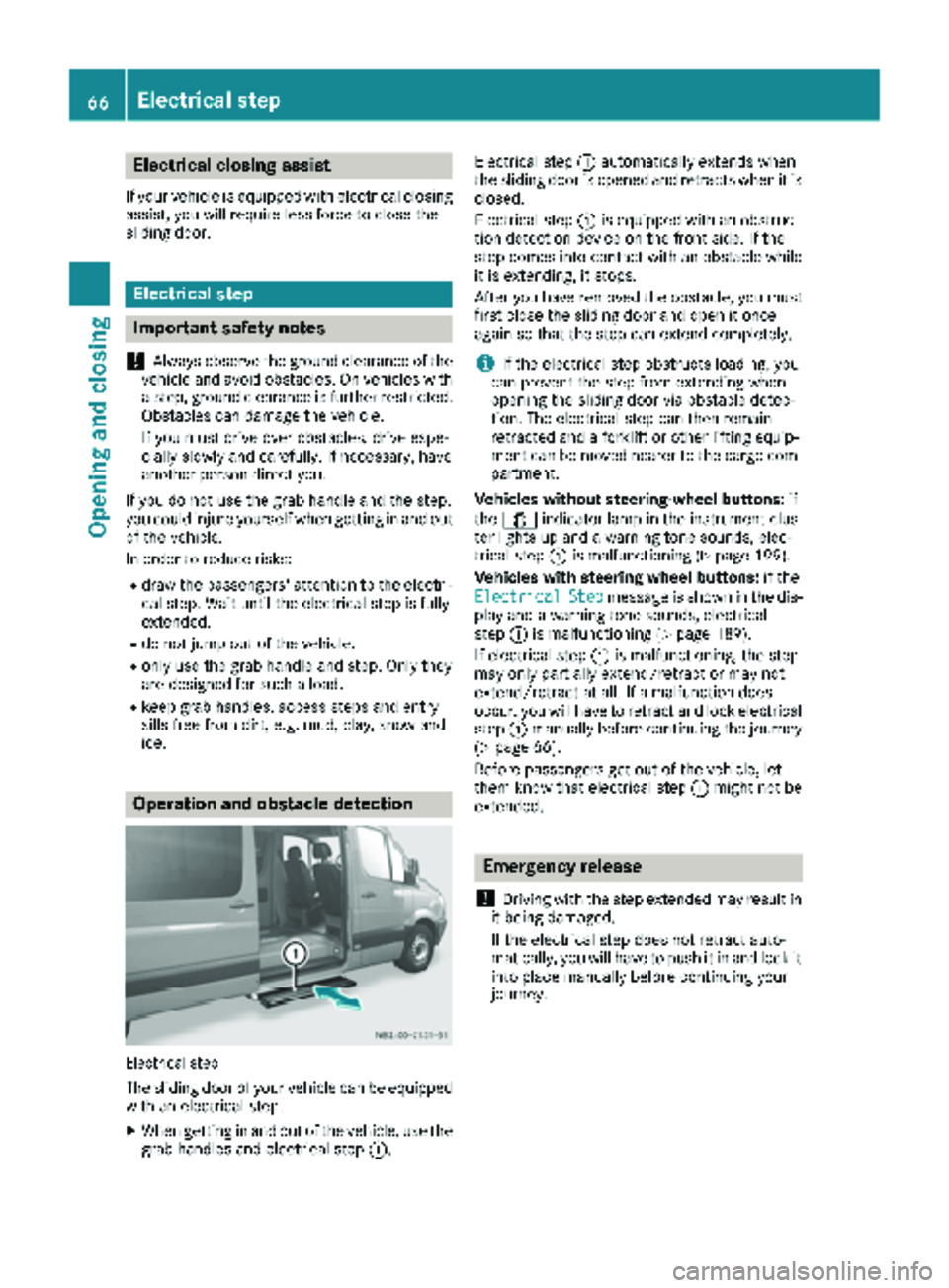
Electrical step
The sliding door of your vehicle can be equipped
with an electrical step.
XWhen getting in and out of the vehicle, use the grab handles and electrical step :.Electrical step
:automatically extends when
the sliding door is opened and retracts when it is
closed.
Electrical step :is equipped with an obstruc-
tion detection device on the front side. If the
step comes into contact with an obstacle while
it is extending, it stops.
After you have removed the obstacle, you must
first close the sliding door and open it once
again so that the step can extend completely.
iIf the electrical step obstructs loading, you
can prevent the step from extending when
opening the sliding door via obstacle detec-
tion. The electrical step can then remain
retracted and a forklift or other lifting equip-
ment can be moved nearer to the cargo com-
partment.
Vehicles without steering-wheel buttons: if
the 1 indicator lamp in the instrument clus-
ter lights up and a warning tone sounds, elec-
trical step :is malfunctioning (
Ypage 199).
Vehicles with steering wheel buttons: if the
Electrical
Stepmessage is shown in the dis-
play and a warning tone sounds, electrical
step :is malfunctioning (
Ypage 189).
If electrical step :is malfunctioning, the step
may only partially extend/retract or may not
extend/retract at all. If a malfunction does
occur, you will have to retract and lock electrical
step :manually before continuing the journey
(
Ypage 66).
Before passengers get out of the vehicle, let
them know that electrical step :might not be
extended.
Emergency release
!
Driving with the step extended may result in
it being damaged.
If the electrical step does not retract auto-
matically, you will have to push it in and lock it
into place manually before continuing your
journey.
66Electrical step
Opening and closing
Page 74 of 286
Useful information
This Operator's Manual describes all models as
well as standard and optional equipment of your
vehicle that were available at the time of going
to print. Country-specific variations are possi-
ble. Note that your vehicle may not be equipped
with all of the described functions. This also
applies to systems and functions relevant to
safety.
Read the information on qualified specialist
workshops (
Ypage 27).
Seats
Important safety notes
GWARNING
You could lose control of your vehicle if you do the following while driving:
Radjust the driver's seat, head restraint,
steering wheel or mirrors
Rfasten the seat belt
There is a risk of an accident.
Adjust the driver's seat, head restraint, steer-
ing wheel and mirror and fasten your seat belt before starting the engine.
GWARNING
If the driver's seat is not engaged, it could
move unexpectedly while the vehicle is in
motion. This could cause you to lose control of the vehicle. There is a risk of an accident.
Always make sure that the driver's seat is
engaged before starting the engine.
GWARNING
When you adjust a seat, you or other vehicle
occupants could become trapped, e.g. on the seat guide rail. There is a risk of injury.
Make sure when adjusting a seat that no one
has any body parts in the sweep of the seat.
GWARNING
The seat belt does not offer the intended level of protection if you have not moved the back-
rest to an almost vertical position. When brak-
ing or in the event of an accident, you could
slide underneath the seat belt and sustain
abdomen or neck injuries, for example. This
poses an increased risk of injury or even fatal
injury.
Adjust the seat properly before beginning
your journey. Always ensure that the backrest
is in an almost vertical position and that the
shoulder section of your seat belt is routed
across the center of your shoulder.
GWARNING
If head restraints are not installed and adjus-
ted correctly, they cannot provide protection
as intended. There is an increased risk of
injury in the head and neck area, e.g. in the
event of an accident or when braking.
Always drive with the head restraints instal-
led. Before driving off, make sure for every
vehicle occupant that the center of the head
restraint supports the back of the head at
about eye level.
Your seat must be adjusted in such a way that
you can wear the seat belt correctly.
Observe the following points:
RPosition the backrest in an almost vertical
position so that you are sitting virtually
upright. Do not drive with the backrest
reclined too far back.
RYour arms should be slightly bent when you
are holding the steering wheel.
RAvoid seat positions that prevent the seat belt
from being routed correctly. The shoulder
section of the belt must be routed over the
middle of your shoulder and be pulled tight
against your upper body. The lap belt must
always pass across your lap as low down as
possible, i.e. over your hip joints.
RAdjust the head restraint so that it supports
the back of the head at eye level.
RThe distance from the pedals should be such
that you can depress them fully.
If you swap over the head restraints for the front
and rear seats, you will not be able to adjust the
height and angle of the head restraints to the
correct position.
72Seats
Seats, steering wheel and mirrors
Page 75 of 286
Use the head restraint pad to adjust the head
restraint so that it is as close as possible to the
back of your head.
Before the journey, make sure the head
restraints have been correctly set for each of the
vehicle's passengers (
Ypage 76).
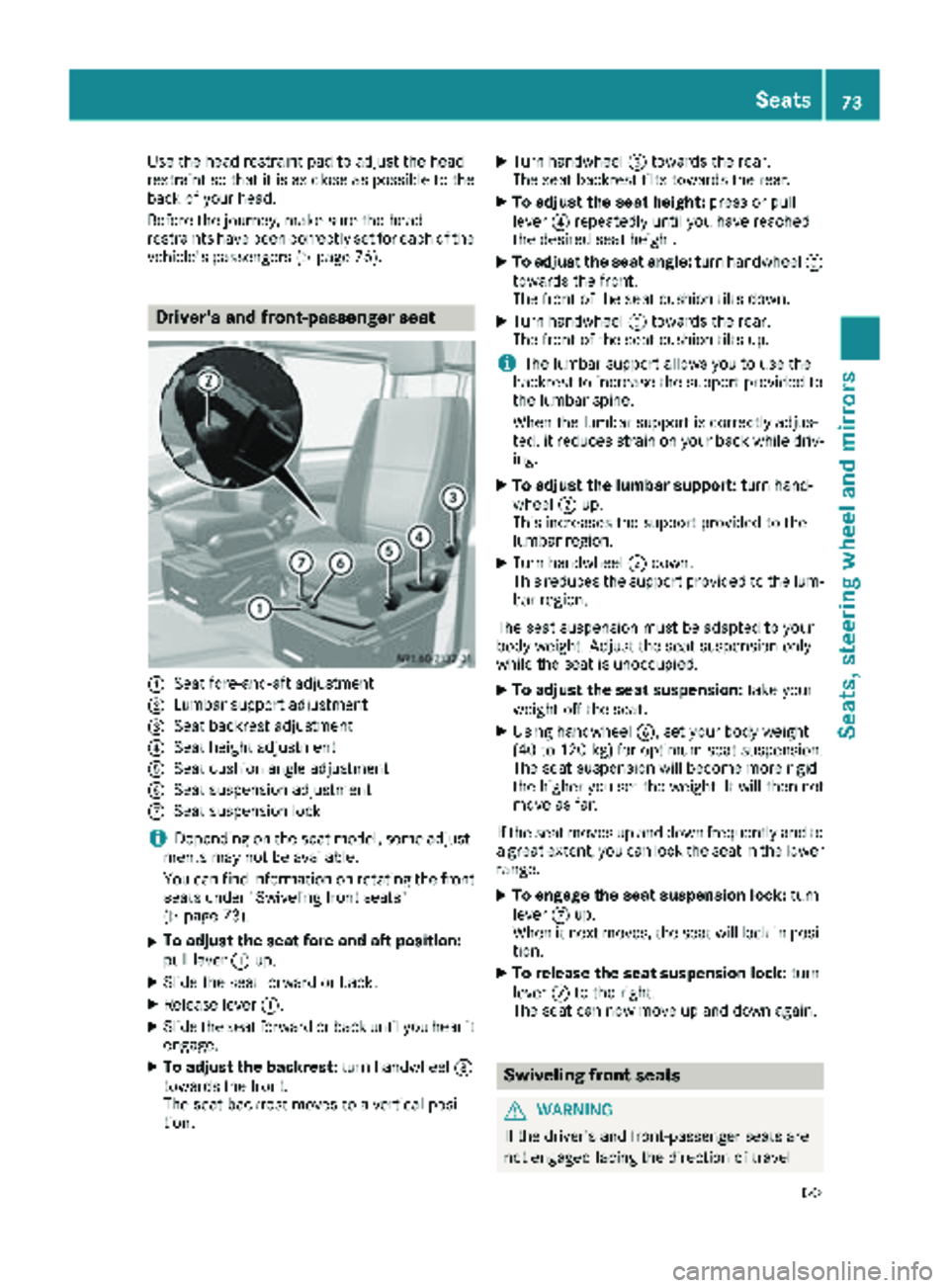
Driver's and front-passenger seat
:Seat fore-and-aft adjustment
;Lumbar support adjustment
=Seat backrest adjustment
?Seat height adjustment
ASeat cushion angle adjustment
BSeat suspension adjustment
CSeat suspension lock
iDepending on the seat model, some adjust-
ments may not be available.
You can find information on rotating the front
seats under "Swiveling front seats"
(
Ypage 73).
XTo adjust the seat fore-and-aft position:
pull lever :up.
XSlide the seat forward or back.
XRelease lever :.
XSlide the seat forward or back until you hear it
engage.
XTo adjust the backrest: turn handwheel=
towards the front.
The seat backrest moves to a vertical posi-
tion.
XTurn handwheel =towards the rear.
The seat backrest tilts towards the rear.
XTo adjust the seat height: press or pull
lever ?repeatedly until you have reached
the desired seat height.
XTo adjust the seat angle: turn handwheelA
towards the front.
The front of the seat cushion tilts down.
XTurn handwheel Atowards the rear.
The front of the seat cushion tilts up.
iThe lumbar support allows you to use the
backrest to increase the support provided to
the lumbar spine.
When the lumbar support is correctly adjus-
ted, it reduces strain on your back while driv-
ing.
XTo adjust the lumbar support: turn hand-
wheel ;up.
This increases the support provided to the
lumbar region.
XTurn handwheel ;down.
This reduces the support provided to the lum-
bar region.
The seat suspension must be adapted to your
body weight. Adjust the seat suspension only
while the seat is unoccupied.
XTo adjust the seat suspension: take your
weight off the seat.
XUsing handwheel B, set your body weight
(40 to 120 kg) for optimum seat suspension.
The seat suspension will become more rigid
the higher you set the weight. It will then not
move as far.
If the seat moves up and down frequently and to a great extent, you can lock the seat in the lower
range.
XTo engage the seat suspension lock: turn
lever Cup.
When it next moves, the seat will lock in posi-
tion.
XTo release the seat suspension lock: turn
lever Cto the right.
The seat can now move up and down agai n.
Swiveling front seats
GWARNING
If the driver's and front-passenger seats are
not engaged facing the direction of travel
Seats73
Seats, steering wheel and mirrors
Z
Page 76 of 286
while driving, the restraint systems may not
be able to provide the intended protection.
There is an increased risk of injury, possibly
even fatal.
Engage the driver's and front-passenger seatsso they are facing the direction of travel
before starting the engine.
!When rotating the seats, make sure that
there is sufficient space to do so.
Move the seat forward or back first. This will
help to avoid contact with other parts of the
interior.
Push the handbrake lever down to the stop.
The parking brake or handbrake lever could
otherwise be damaged.
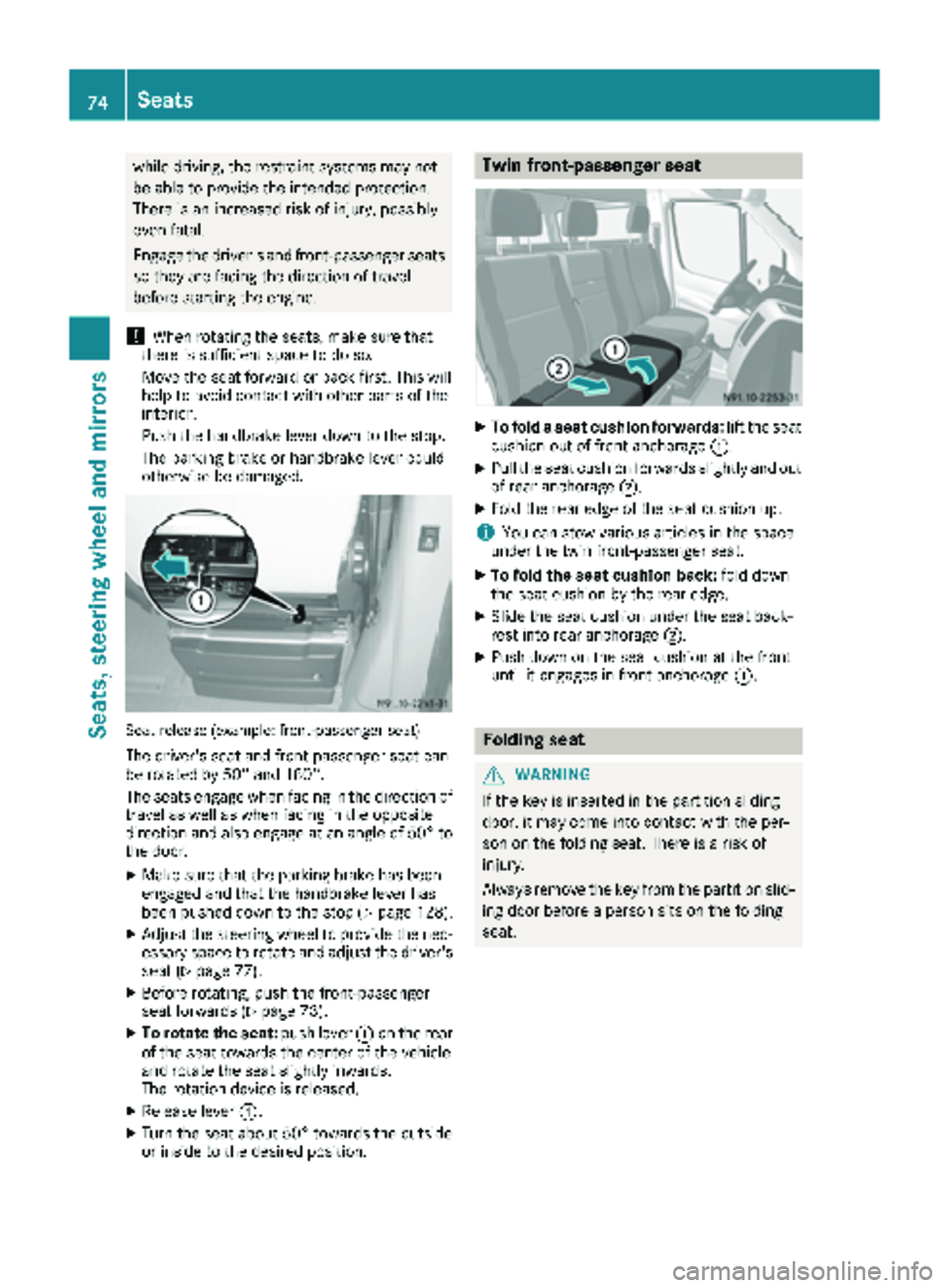
Seat release (example: front-passenger seat)
The driver's seat and front-passenger seat can
be rotated by 50° and 180°.
The seats engage when facing in the direction of travel as well as when facing in the opposite
direction and also engage at an angle of 50° to
the door.
XMake sure that the parking brake has been
engaged and that the handbrake lever has
been pushed down to the stop (
Ypage 128).
XAdjust the steering wheel to provide the nec-
essary space to rotate and adjust the driver's seat (
Ypage 77).
XBefore rotating, push the front-passenger
seat forwards (Ypage 73).
XTo rotate the seat: push lever:on the rear
of the seat towards the center of the vehicle
and rotate the seat slightly inwards.
The rotation device is released.
XRelease lever :.
XTurn the seat about 50° towards the outside
or inside to the desired position.
Twin front-passenger seat
XTo fold a seat cushion forwards: lift the seat
cushion out of front anchorage :.
XPull the seat cushion forwards slightly and out
of rear anchorage;.
XFold the rear edge of the seat cushion up.
iYou can stow various articles in the space
under the twin front-passenger seat.
XTo fold the seat cushion back: fold down
the seat cushion by the rear edge.
XSlide the seat cushion under the seat back-
rest into rear anchorage ;.
XPush down on the seat cushion at the front
until it engages in front anchorage :.
Folding seat
GWARNING
If the key is inserted in the partition sliding
door, it may come into contact with the per-
son on the folding seat. There is a risk of
injury.
Always remove the key from the partition slid-
ing door before a person sits on the folding
seat.
74Seats
Seats, steering wheel and mirrors
Page 77 of 286
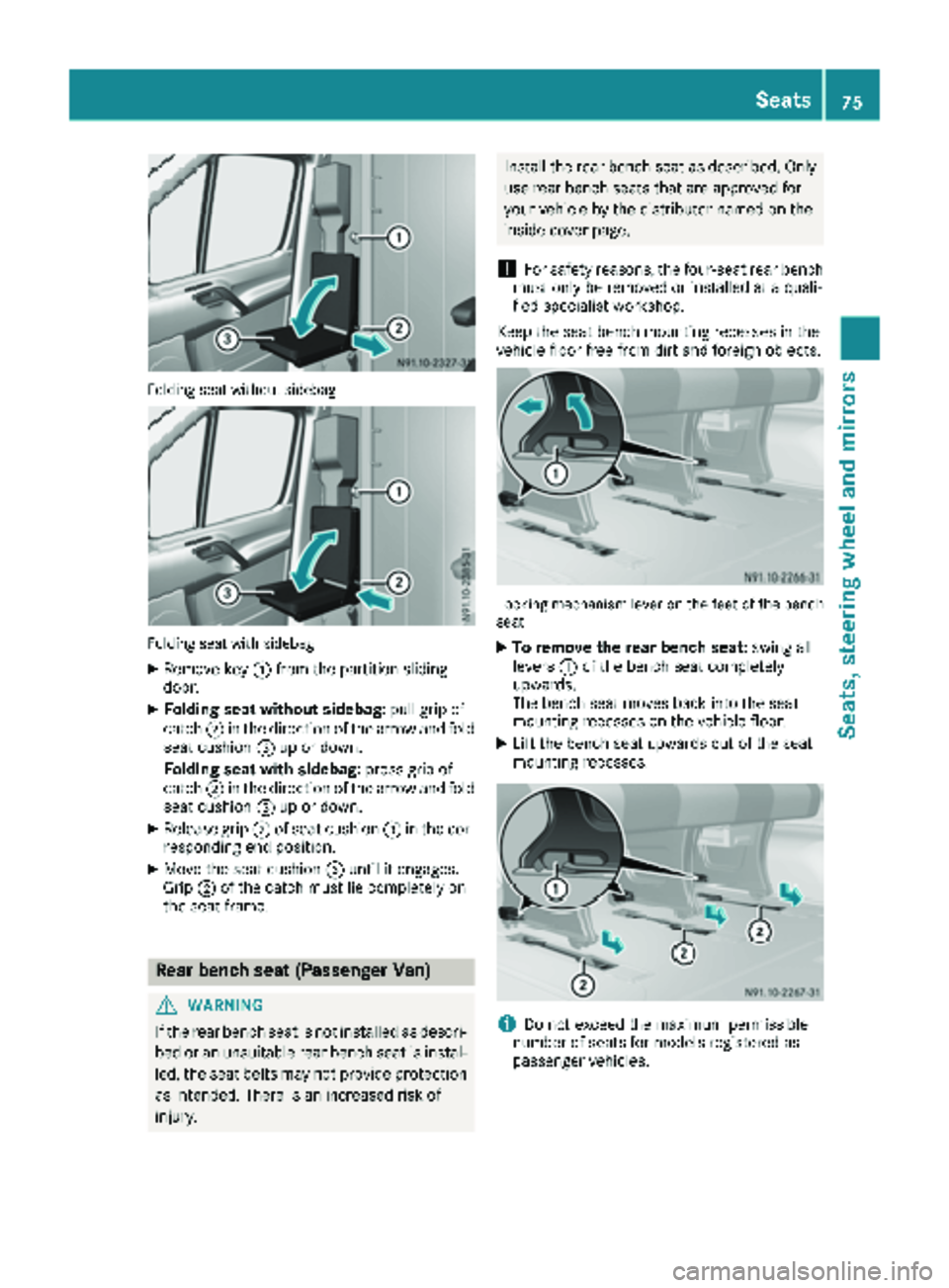
Folding seat without sidebag
Folding seat with sidebag
XRemove key:from the partition sliding
door.
XFolding seat without sidebag: pull grip of
catch ;in the direction of the arrow and fold
seat cushion =up or down.
Folding seat with sidebag: press grip of
catch ;in the direction of the arrow and fold
seat cushion =up or down.
XRelease grip ;of seat cushion =in the cor-
responding end position.
XMove the seat cushion =until it engages.
Grip ;of the catch must lie completely on
the seat frame.
Rear bench seat (Passenger Van)
GWARNING
If the rear bench seat is not installed as descri- bed or an unsuitable rear bench seat is instal-
led, the seat belts may not provide protection
as intended. There is an increased risk of
injury.
Install the rear bench seat as described. Onlyuse rear bench seats that are approved for
your vehicle by the distributor named on the
inside cover page.
!For safety reasons, the four-seat rear bench
must only be removed or installed at a quali-
fied specialist workshop.
Keep the seat bench mounting recesses in the
vehicle floor free from dirt and foreign objects.
Locking mechanism lever on the feet of the bench
seat
XTo remove the rear bench seat: swing all
levers :of the bench seat completely
upwards.
The bench seat moves back into the seat
mounting recesses on the vehicle floor.
XLift the bench seat upwards out of the seat
mounting recesses.
iDo not exceed the maximum permissible
number of seats for models registered as
passenger vehicles.
Seats75
Seats, steering wheel and mirrors
Z
Page 78 of 286
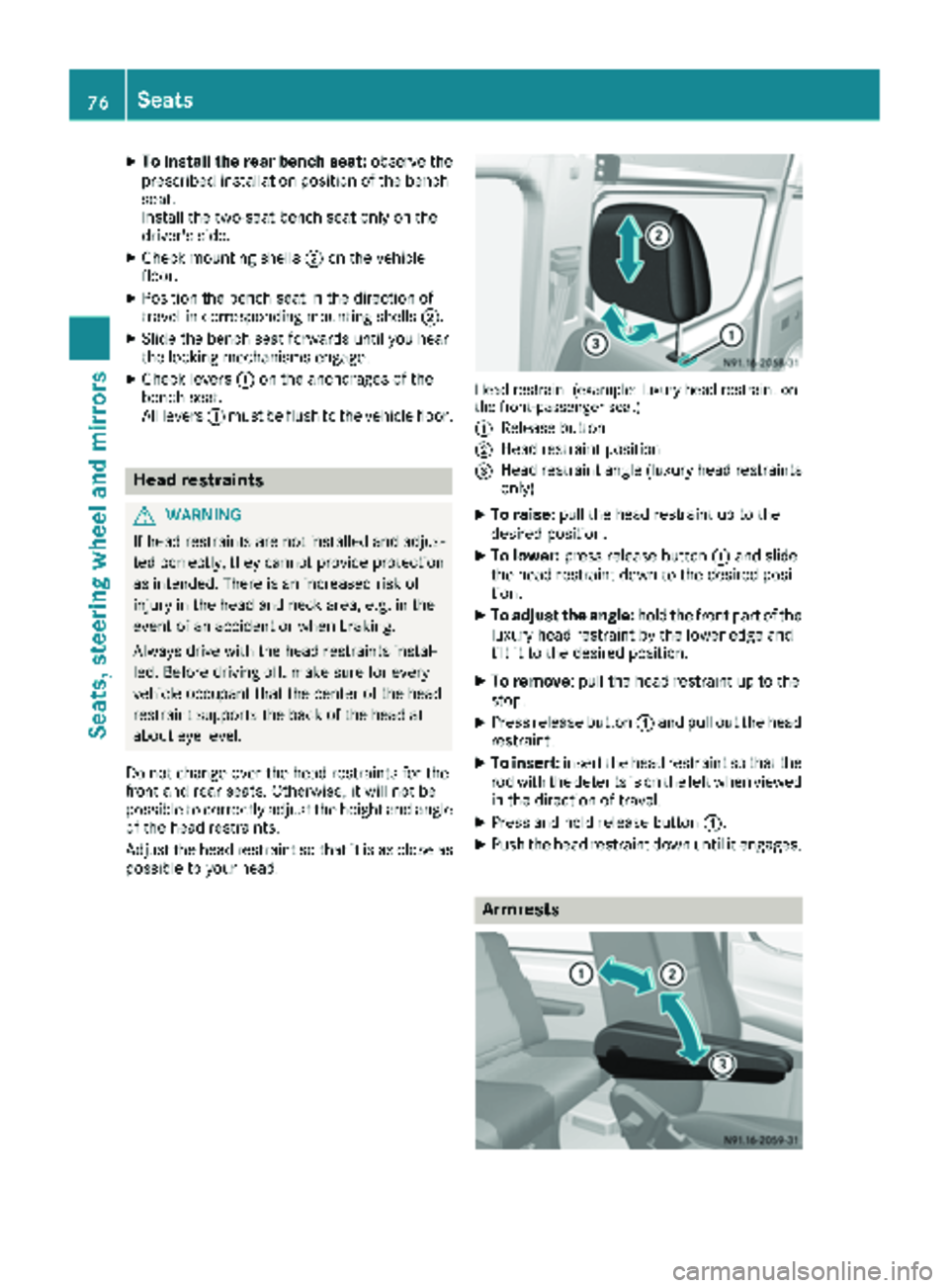
XTo install the rear bench seat:observe the
prescribed installation position of the bench
seat.
Install the two-seat bench seat only on the
driver's side.
XCheck mounting shells ;on the vehicle
floor.
XPosition the bench seat in the direction of
travel in corresponding mounting shells ;.
XSlide the bench seat forwards until you hear
the locking mechanisms engage.
XCheck levers:on the anchorages of the
bench seat.
All levers :must be flush to the vehicle floor.
Head restraints
GWARNING
If head restraints are not installed and adjus-
ted correctly, they cannot provide protection
as intended. There is an increased risk of
injury in the head and neck area, e.g. in the
event of an accident or when braking.
Always drive with the head restraints instal-
led. Before driving off, make sure for every
vehicle occupant that the center of the head
restraint supports the back of the head at
about eye level.
Do not change over the head restraints for the
front and rear seats. Otherwise, it will not be
possible to correctly adjust the height and angle
of the head restraints.
Adjust the head restraint so that it is as close as
possible to your head.
Head restraint (example: luxury head restraint on
the front-passenger seat)
:
Release button
;Head restraint position
=Head restraint angle (luxury head restraints only)
XTo raise: pull the head restraint up to the
desired position.
XTo lower: press release button :and slide
the head restraint down to the desired posi-
tion.
XTo adjust the angle: hold the front part of the
luxury head restraint by the lower edge and
tilt it to the desired position.
XTo remove: pull the head restraint up to the
stop.
XPress release button :and pull out the head
restraint.
XTo insert: insert the head restraint so that the
rod with the detents is on the left when viewed in the direction of travel.
XPress and hold release button :.
XPush the head restraint down until it engages.
Armrests
76Seats
Seats, steeringwheel and mirrors