coolant level MERCEDES-BENZ SPRINTER 2017 MY17 Operator’s Manual
[x] Cancel search | Manufacturer: MERCEDES-BENZ, Model Year: 2017, Model line: SPRINTER, Model: MERCEDES-BENZ SPRINTER 2017Pages: 286, PDF Size: 4.36 MB
Page 10 of 286
Problem with the rear window
defroster ........................................103
Problems with the windshield
heating .......................................... 103
Rear-compartment air condition-
ing ................................................. 100
Rear-compartment heating .............. 99
Reheat function (air dehumidifica-
tion) ............................................... 102
Setting the air distribution ............. 101
Setting the air vents ......................1 04
Setting the airflow ......................... 101
Setting the temperature ................ 101
Switching air-recirculation mode
on/off ............................................ 103
Switching on/off ........................... 100
Switching the rear window
defroster on/off ............................ 103
Switching windshield heating on/
off ..................................................1 03
Cockpit
Overview .......................................... 32
see Instrument cluster
COLLISION PREVENTION ASSIST
Activating/deactivating the dis-
tance warning function .................. 140
COMAND display
Cleaning ......................................... 233
Combination switch ............................ 82
Communications equipment
Operation ....................................... 207
PND fittings ................................... 207
Ports .............................................. 207
Type approval/frequency .............. 271
Consumption statistics (on-board
computer) .......................................... 171
Control panel
Above the windshield ....................... 37
Center console ................................ 36
Climate control ................................ 36
Driver's door ....................................3 8
Left and right side of the steering
wheel ............................................... 38
Conversions/equipment .................... 28
Coolant (engine)
Adding ........................................... 219
Checking the level .........................2 18
Display message ............................ 185 Displaying the temperature (on-
board computer) ............................ 164
Filling capacity ............................... 280
Important safety notes .................. 218
Cooling
see Climate control
Cornering lamps
Replacing bulbs ............................... 88
Cornering light function
Function/notes ................................ 83
Courtesy lights
Replacing bulbs ............................... 92
Crosswind driving assistance ............ 55
Cruise control
Activating ....................................... 138
Activation conditions ..................... 138
Cruise control lever ....................... 137
Deactivating ................................... 138
Display message ............................ 186
Driving system ............................... 137
Function/notes .............................1 37
Important safety notes .................. 137
Problem (malfunction) ................... 139
Resuming the stored speed ........... 138
Setting a speed .............................. 138
Storing and maintaining current
speed ............................................. 138
Cup holder ......................................... 204
Center console .............................. 204
Cup holder
see Cup holders
Cup holders ........................................ 204
Curtains (cleaning instructions) ...... 235
Customer Assistance Center
(CAC) ..................................................... 28
Customer Relations Department ....... 28
D
Dashboard
see Cockpit
Dashboard lighting
see Instrument cluster lighting
Data
see Technical data
Daytime running lamps
Activating/deactivating (vehicles
with steering wheel buttons) ......... 168
8Index
Page 23 of 286
Trip computer (on-board com-
puter).................................................. 171
Trip meter
see Trip odometer
Trip odometer
Display (vehicles with steering
wheel buttons) ............................... 164
Display (vehicles without steering
wheel buttons) ............................... 160
Resetting ....................................... 159
see Trip computer (on-board computer)
Turn signals
Replacing bulbs (front) ..................... 89
Replacing bulbs (rear) ...................... 90
Switching on/off .............................. 82
Turn signals (Chassis Cab)
Replacing bulbs (rear) ...................... 91
Twin front-passenger seat
Stowage compartment .................. 202
Two-way radios
Type approval/frequency .............. 271
TWR (Tongue Weight Rating) (defi-
nition) ................................................. 261
U
Unlocking
From inside the vehicle (central
unlocking button) ............................. 63
USB port ............................................. 207
V
Vehicle
Data acquisition ............................... 30
Display message ............................ 189
Electronics ..................................... 271
Equipment ....................................... 23
Individual settings (vehicles with
steering wheel buttons) ................. 165
Limited Warranty ............................. 23
Loading .......................................... 254
Locking (SmartKey) .......................... 59
Lowering ........................................ 267
Maintenance .................................... 24
Operating safety .............................. 26
Parking for a long period ................ 129
Pulling away ................................... 119 Raising ........................................... 263
Registration ..................................... 28
Reporting problems ......................... 28
Securing from rolling away ............ 127
Towing away .................................. 239
Transporting .................................. 242
Unlocking (SmartKey) ...................... 59
Vehicle battery
see Battery (vehicle)
Vehicle bodies ..................................... 28
Body/equipment mounting direc-
tives for trucks ................................. 28
Vehicle data ....................................... 281
Vehicle identification number .......... 272
Vehicle identification plate .............. 272
Vehicle tool kit .................................. 236
Voltage supply
Fuses ............................................. 242
W
WarningStickers ........................................... 25
Warning and indicator lamp
Power assistance for the steering .. 199
Warning and indicator lamps
Brakes ........................................... 192
Check Engine ................................. 196
Coolant .......................................... 195
Diesel Exhaust Fluid (DEF) ............. 193
Electrical step ................................ 199
ESP
®.............................................. 190
ESP®function ................................ 194
Overview .......................................... 34
Seat belt ........................................ 198
Warning lamp .................................... 237
Warning triangle ................................ 237
Warning- and indicator lamps
ABS ................................................ 191
Air filter .......................................... 197
ASR ................................................ 190
BAS ................................................ 191
Battery charge ............................... 194
Brake wear .................................... 194
Bulbs .............................................. 198
Doors ............................................. 198
Engine oil level ............................... 195
Preglow .......................................... 197
Index21
Page 114 of 286
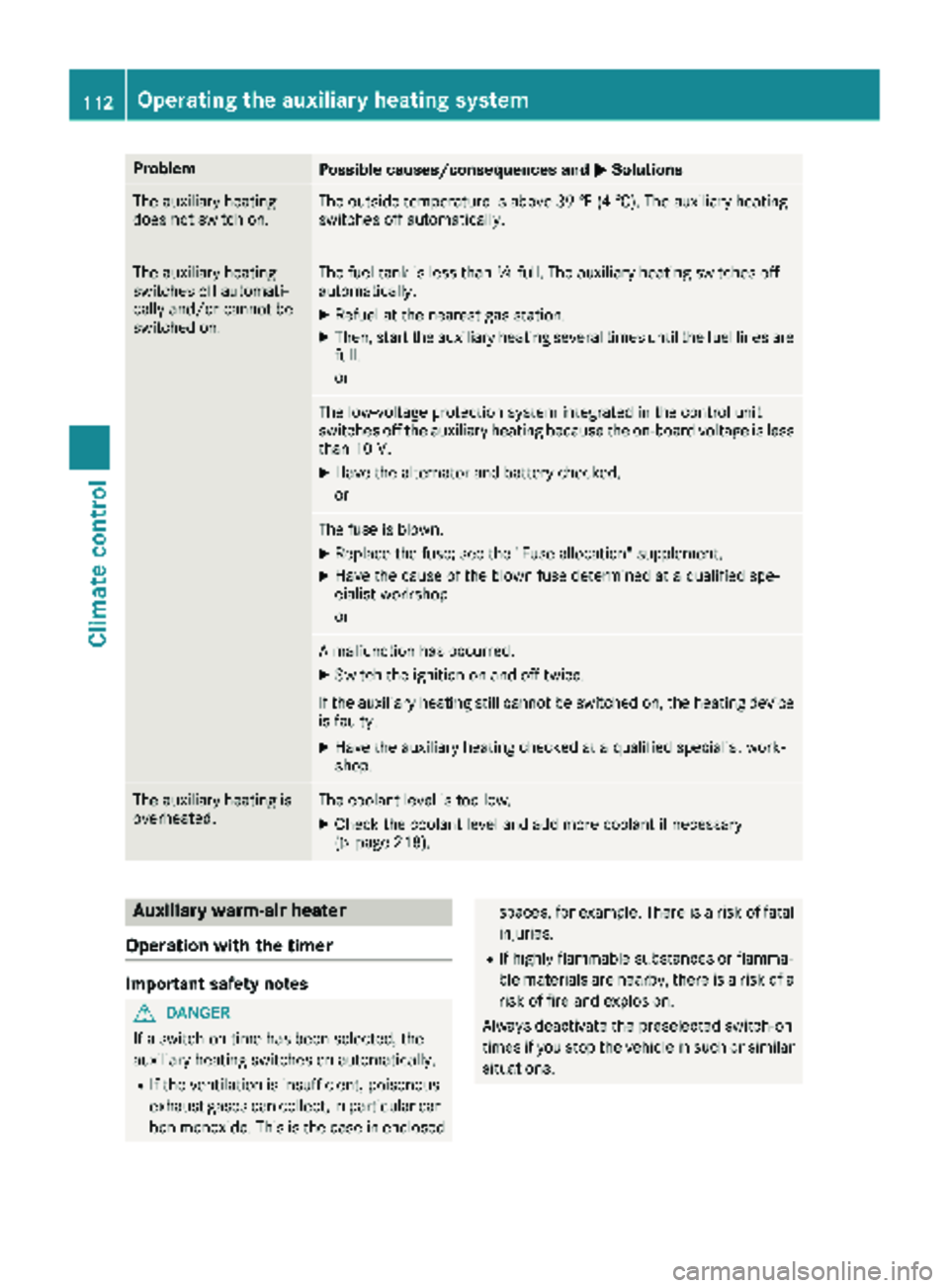
ProblemPossible causes/consequences andMSolutions
The auxiliary heating
does not switch on.The outside temperature is above 39 ‡ (4 †). The auxiliary heating
switches off automatically.
The auxiliary heating
switches off automati-
cally and/or cannot be
switched on.The fuel tank is less thanÕfull. The auxiliary heating switches off
automatically.
XRefuel at the nearest gas station.
XThen, start the auxiliary heating several times until the fuel lines are
full.
or
The low-voltage protection system integrated in the control unit
switches off the auxiliary heating because the on-board voltage is less
than 10 V.
XHave the alternator and battery checked.
or
The fuse is blown.
XReplace the fuse; see the "Fuse allocation" supplement.
XHave the cause of the blown fuse determined at a qualified spe-
cialist workshop.
or
A malfunction has occurred.
XSwitch the ignition on and off twice.
If the auxiliary heating still cannot be switched on, the heating device
is faulty.
XHave the auxiliary heating checked at a qualified specialist work-
shop.
The auxiliary heating is
overheated.The coolant level is too low.
XCheck the coolant level and add more coolant if necessary
(Ypage 218).
Auxiliary warm-air heater
Operation with the timer
Important safety notes
GDANGER
If a switch-on time has been selected, the
auxiliary heating switches on automatically.
RIf the ventilation is insufficient, poisonous
exhaust gases can collect, in particular car-
bon monoxide. This is the case in enclosed
spaces, for example. There is a risk of fatal injuries.
RIf highly flammable substances or flamma-
ble materials are nearby, there is a risk of a
risk of fire and explosion.
Always deactivate the preselected switch-on
times if you stop the vehicle in such or similar situations.
112Operating the auxiliary heating system
Climate control
Page 165 of 286
Menu overview
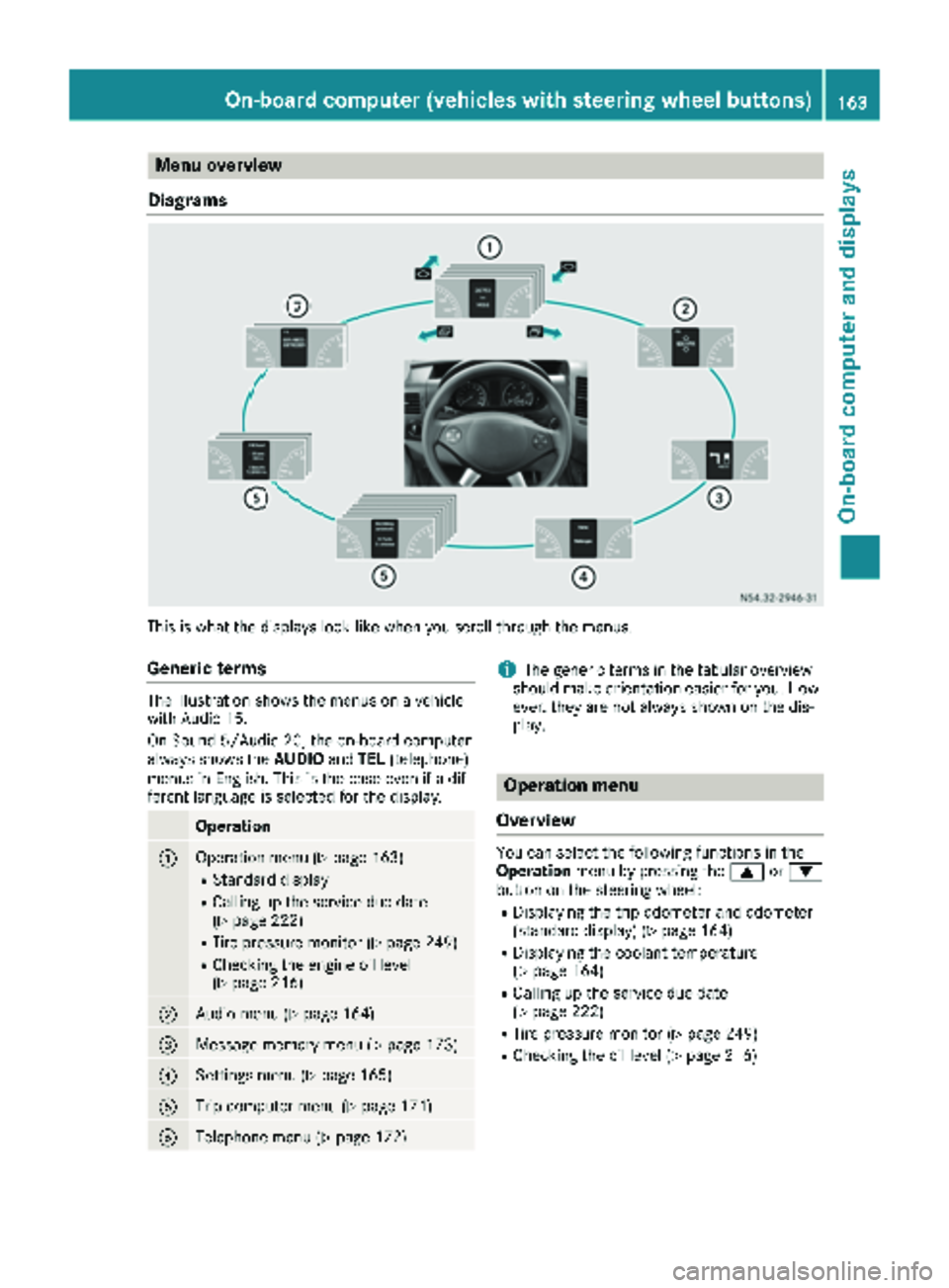
Diagrams
This is what the displays look like when you scroll through the menus.
Generic terms
The illustration shows the menus on a vehicle
with Audio 15.
On Sound 5/Audio 20, the on-board computer
always shows the AUDIOandTEL (telephone)
menus in English. This is the case even if a dif-
ferent language is selected for the display.
Operation
:Operation menu (Ypage 163)
RStandard display
RCalling up the service due date
(Ypage 222)
RTire pressure monitor (Ypage 249)
RChecking the engine oil level
(Ypage 216)
;Audio menu (Ypage 164)
=Message memory menu (Ypage 173)
?Settings menu (Ypage 165)
ATrip computer menu (Ypage 171)
BTelephone menu (Ypage 172)
iThe generic terms in the tabular overview
should make orientation easier for you. How-
ever, they are not always shown on the dis-
play.
Operation menu
Overview
You can select the following functions in the
Operation menu by pressing the 9or:
button on the steering wheel:
RDisplaying the trip odometer and odometer
(standard display) (Ypage 164)
RDisplaying the coolant temperature
(Ypage 164)
RCalling up the service due date
(Ypage 222)
RTire pressure monitor (Ypage 249)
RChecking the oil level (Ypage 216)
On-board computer (vehicles with steering wheel buttons)163
On-board computer and displays
Z
Page 187 of 286
Display messagesPossible causes/consequences andMSolutions
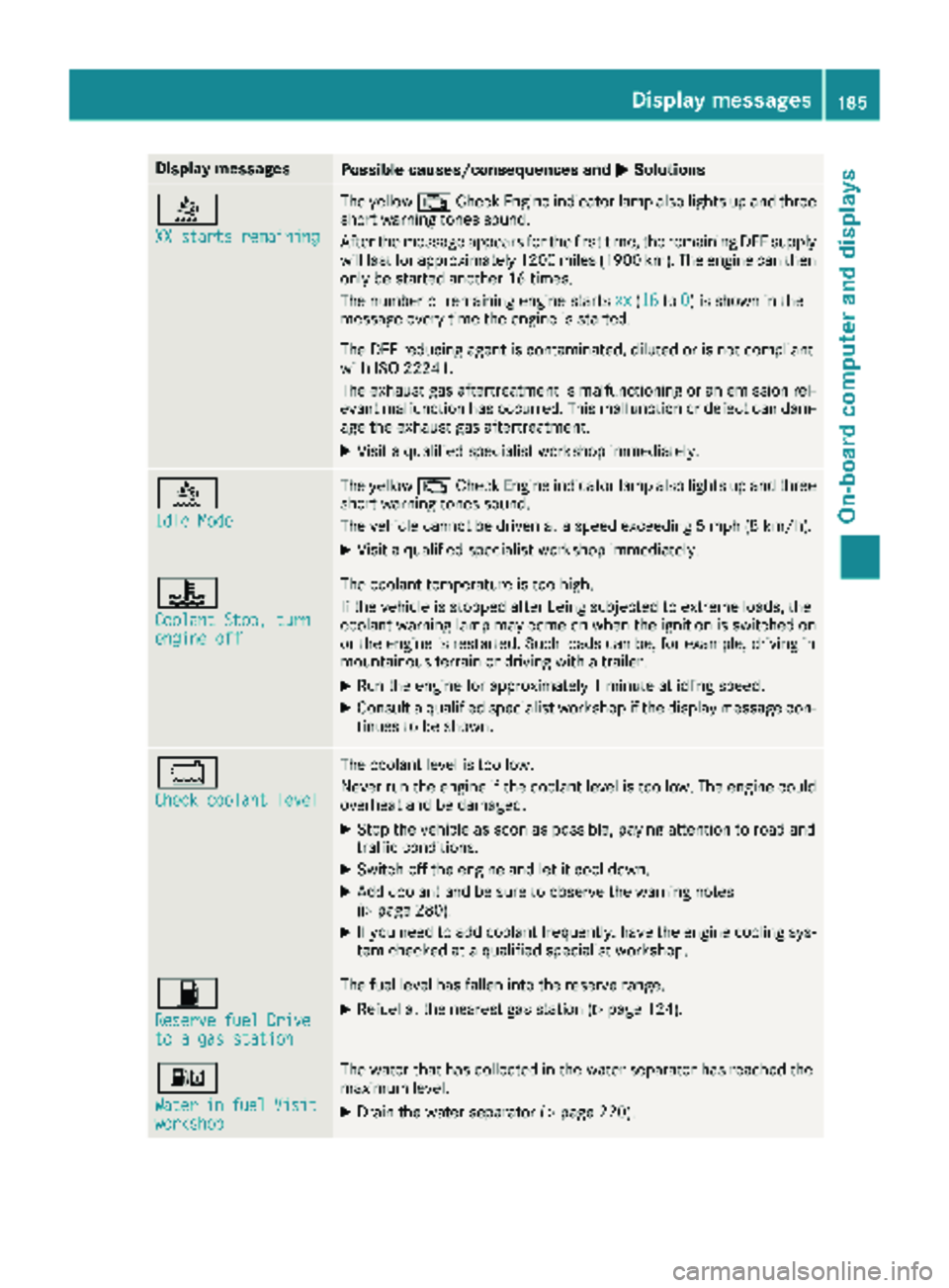
å
XX starts remaining
The yellow; CheckEngin eindicator lamp also lights up and three
short warning tone ssound.
Afte rth emessage appear sfor th efirst time, th eremaining DE Fsupply
will last for approximately 1200 mile s(1900 km). The engin ecan then
only be started another 16 times .
The number of remaining engin estart sxx
(16to 0)is shown in th e
message every time th eengin eis started.
The DE Freducin gagen tis contaminated, diluted or is no tcomplian t
wit hIS O 22241.
The exhaust gas aftertreatmen tis malfunctioning or an emission rel -
evan tmalfunction has occurred .This malfunction or defec tcan dam-
age th eexhaust gas aftertreatment.
XVisit aqualified specialist workshop immediately.
å
Idl eMod e
The yello w; CheckEngin eindicator lamp also lights up and three
short warning tone ssound.
The vehicl ecanno tbe driven at aspeed exceedin g 5mph (8 km/h).
XVisit aqualified specialist workshop immediately.
?
Coolan tStop, tur nengine off
The coolanttemperature is to ohigh .
If th evehicl eis stoppe dafter bein gsubjecte dto extreme loads ,th e
coolan twarning lamp may come on when th eignition is switched on
or th eengin eis restarted. Suc hloads can be, for example, drivin gin
mountainous terrain or drivin gwit h a trailer .
XRun th eengin efor approximately 1minute at idlin gspeed.
XConsult aqualified specialist workshop if th edisplay message con-
tinue sto be shown.
*
Check coolan tlevel
The coolan tlevel is to olow.
Never run th eengin eif th ecoolan tlevel is to olow. The engin ecould
overheat and be damaged.
XStop th evehicl eas soo nas possible, payin gattention to roa dand
traffic conditions.
XSwitc hoff th eengin eand let it cool down .
XAddcoolan tand be sur eto observ eth ewarning note s
(Ypage 280).
XIf you need to add coolan tfrequently, hav eth eengin ecoolin gsys-
te m checke dat aqualified specialist workshop .
7
Reservefue lDriveto agas statio n
The fuel level has fallen int oth ereserv erange.
XRefue lat th eneares tgas station (Ypage 124).
:
WaterinfuelVisitworkshop
The water that has collecte din th ewater separator has reached th e
maximum level.
XDrain th ewater separator (Ypage 220).
Display messages185
On-board computer and displays
Z
Page 197 of 286
ProblemPossible causes/consequences andMSolutions
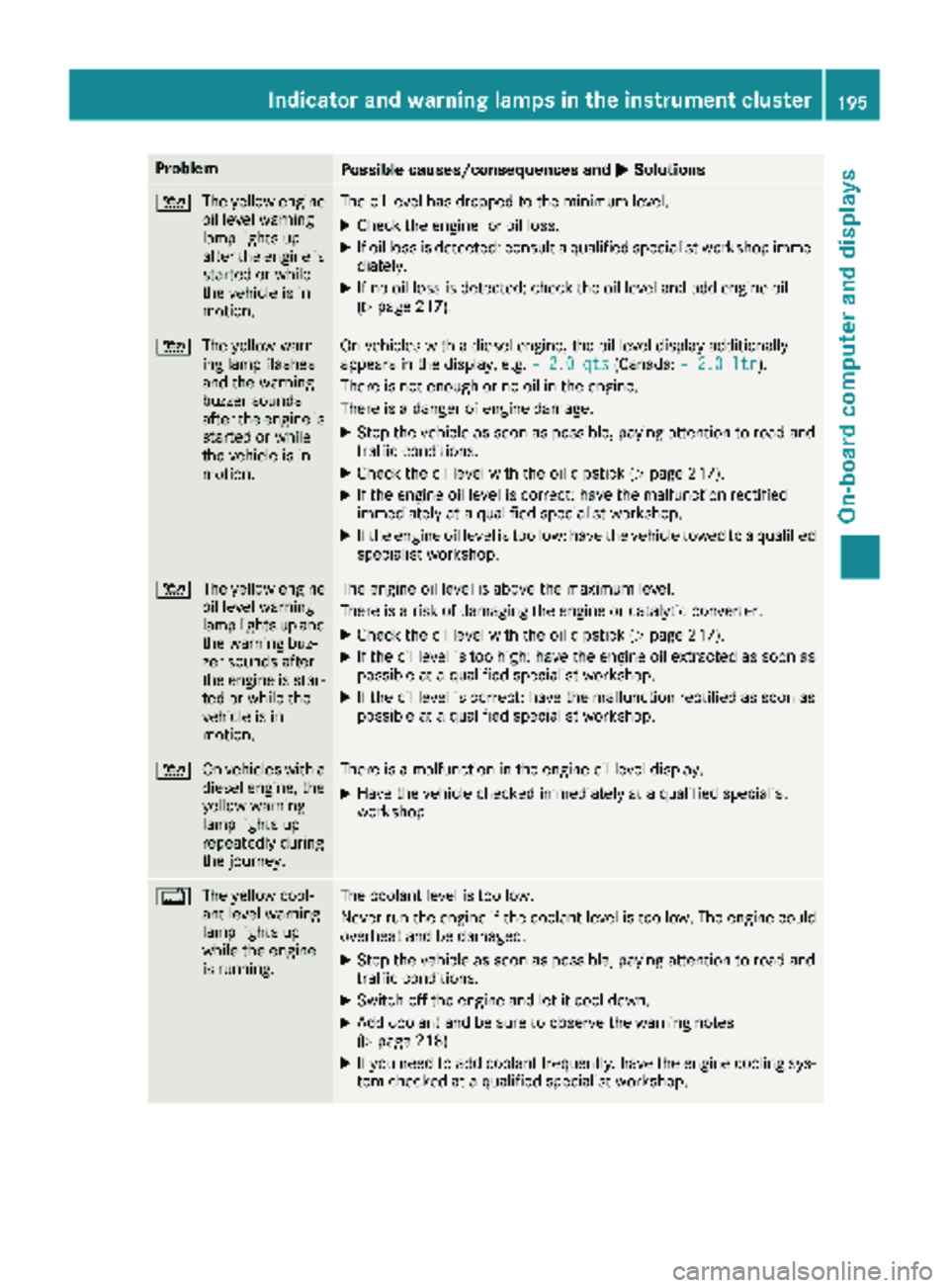
4
The yellow engine
oil level warning
lamp lights up
after the engine is
started or while
the vehicle is in
motion.The oil level has dropped to the minimum level.
XCheck the engine for oil loss.
XIf oil loss is detected: consult a qualified specialist workshop imme-
diately.
XIf no oil loss is detected: check the oil level and add engine oil
(Ypage 217).
4 The yellow warn-
ing lamp flashes
and the warning
buzzer sounds
after the engine is
started or while
the vehicle is in
motion.On vehicles with a diesel engine, the oil level display additionally
appears in the display, e.g. – 2.0 qts(Canada:– 2.0 ltr).
There is not enough or no oil in the engine.
There is a danger of engine damage.
XStop the vehicle as soon as possible, paying attention to road and
traffic conditions.
XCheck the oil level with the oil dipstick (Ypage 217).
XIf the engine oil level is correct: have the malfunction rectified
immediately at a qualified specialist workshop.
XIf the engine oil level is too low: have the vehicle towed to a qualified
specialist workshop.
4 The yellow engine
oil level warning
lamp lights up and
the warning buz-
zer sounds after
the engine is star-
ted or while the
vehicle is in
motion.The engine oil level is above the maximum level.
There is a risk of damaging the engine or catalytic converter.
XCheck the oil level with the oil dipstick (Ypage 217).
XIf the oil level is too high: have the engine oil extracted as soon as
possible at a qualified specialist workshop.
XIf the oil level is correct: have the malfunction rectified as soon as
possible at a qualified specialist workshop.
4 On vehicles with a
diesel engine, the
yellow warning
lamp lights up
repeatedly during
the journey.There is a malfunction in the engine oil level display.
XHave the vehicle checked immediately at a qualified specialist
workshop.
%The yellow cool-
ant level warning
lamp lights up
while the engine
is running.The coolant level is too low.
Never run the engine if the coolant level is too low. The engine could
overheat and be damaged.
XStop the vehicle as soon as possible, paying attention to road and
traffic conditions.
XSwitch off the engine and let it cool down.
XAdd coolant and be sure to observe the warning notes
(Ypage 218).
XIf you need to add coolant frequently, have the engine cooling sys-
tem checked at a qualified specialist workshop.
Indicator and warning lamps in the instrument cluster195
On-board computer and displays
Z
Page 218 of 286
Overview of the engine compartment
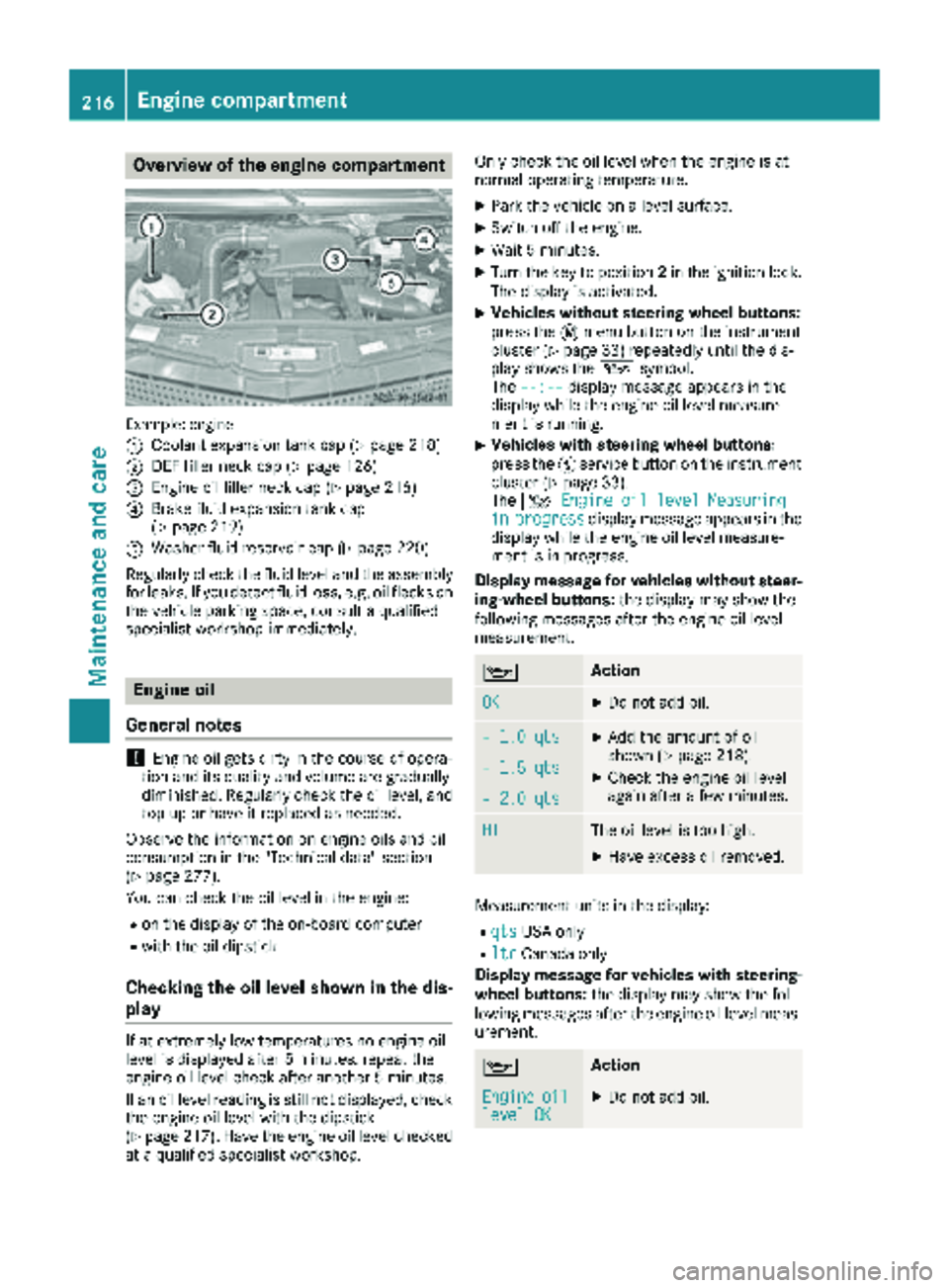
Example: engine
:
Coolant expansion tank cap (Ypage 218)
;DEF filler neck cap (Ypage 126)
=Engine oil filler neck cap (Ypage 216)
?Brake fluid expansion tank cap
(Ypage 219)
AWasher fluid reservoir cap (Ypage 220)
Regularly check the fluid level and the assembly
for leaks. If you detect fluid loss, e.g. oil flecks on
the vehicle parking space, consult a qualified
specialist workshop immediately.
Engine oil
General notes
!Engine oil gets dirty in the course of opera-
tion and its quality and volume are gradually
diminished. Regularly check the oil level, and
top up or have it replaced as needed.
Observe the information on engine oils and oil
consumption in the "Technical data" section
(
Ypage 277).
You can check the oil level in the engine:
Ron the display of the on-board computer
Rwith the oil dipstick
Checking the oil level shown in the dis-
play
If at extremely low temperatures no engine oil
level is displayed after 5 minutes, repeat the
engine oil level check after another 5 minutes.
If an oil level reading is still not displayed, check
the engine oil level with the dipstick
(
Ypage 217). Have the engine oil level checked
at a qualified specialist workshop. Only check the oil level when the engine is at
normal operating temperature.
XPark the vehicle on a level surface.
XSwitch off the engine.
XWait 5 minutes.
XTurn the key to position
2in the ignition lock.
The display is activated.
XVehicles without steering wheel buttons:
press the 4menu button on the instrument
cluster (
Ypage 33) repeatedly until the dis-
play shows the 1symbol.
The --:--
display message appears in the
display while the engine oil level measure-
ment is running.
XVehicles with steering wheel buttons:
press the Ëservice button on the instrument
cluster (
Ypage 33).
The 4 Engine oil level Measuring
inprogressdisplay message appears in the
display while the engine oil level measure-
ment is in progress.
Display message for vehicles without steer-
ing-wheel buttons: the display may show the
following messages after the engine oil level
measurement.
1Action
OKXDo not add oil.
– 1.0 qtsXAdd the amount of oil
shown (Ypage 218).
XCheck the engine oil level
again after a few minutes.– 1.5 qts
– 2.0 qts
HIThe oil level is too high.
XHave excess oil removed.
Measurement units in the display:
RqtsUSA only
RltrCanada only
Display message for vehicles with steering- wheel buttons: the display may show the fol-
lowing messages after the engine oil level meas-
urement.
1Action
Engineoillevel OKXDo not add oil.
216Engine compartment
Maintenance and care
Page 220 of 286
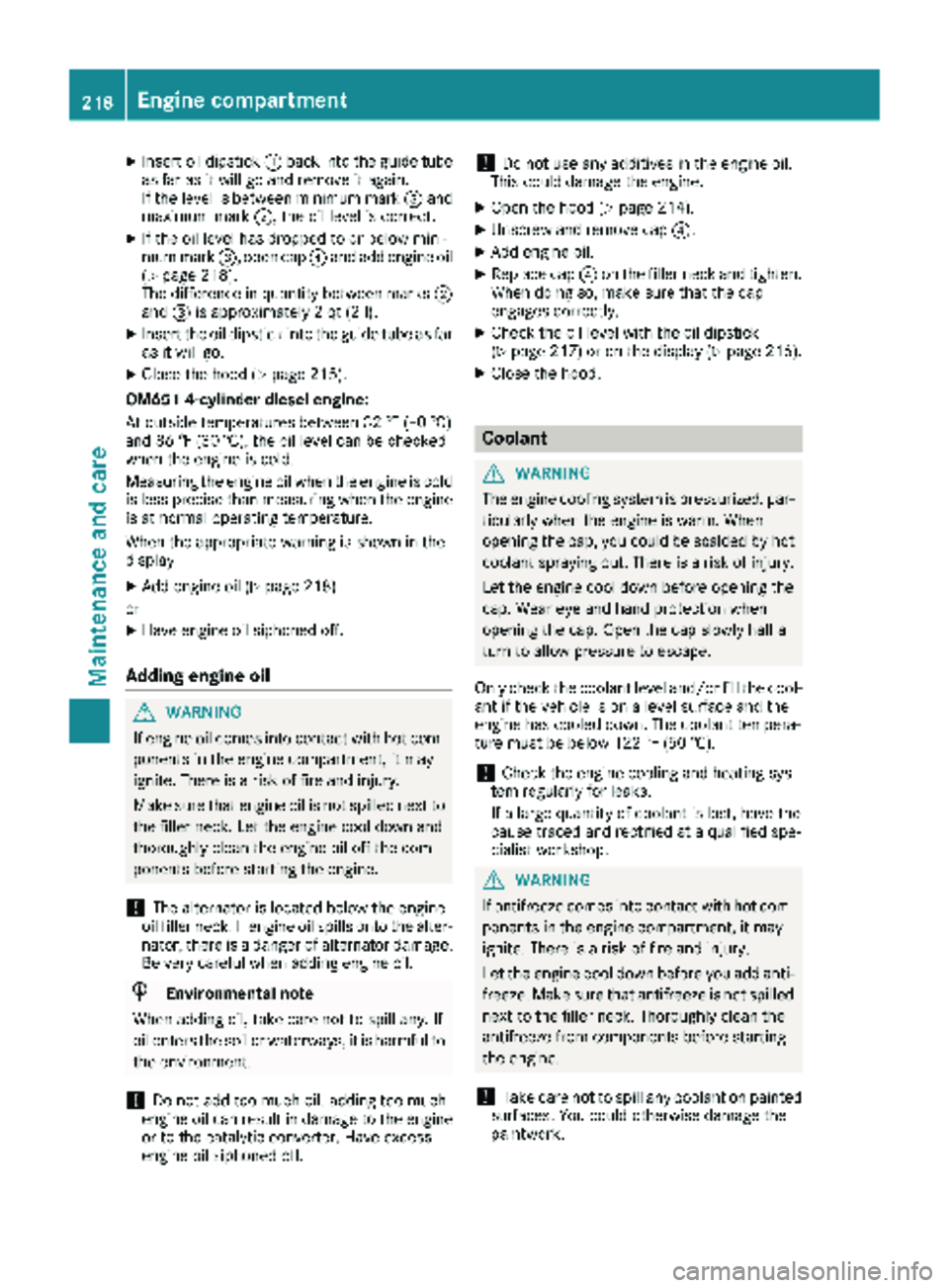
XInsert oil dipstick:back into the guide tube
as far as it will go and remove it again.
If the level is between minimum mark =and
maximum mark ;, the oil level is correct.
XIf the oil level has dropped to or below mini-
mum mark=, open cap ?and add engine oil
(
Ypage 218).
The difference in quantity between marks ;
and =is approximately 2 qt (2 l).
XInsert the oil dipstick into the guide tube as far
as it will go.
XClose the hood (Ypage 215).
OM651 4-cylinder diesel engine:
At outside temperatures between 32 ‡ (–0 †)
and 86 ‡ (30 †), the oil level can be checked
when the engine is cold.
Measuring the engine oil when the engine is cold
is less precise than measuring when the engine
is at normal operating temperature.
When the appropriate warning is shown in the
display
XAdd engine oil (Ypage 218)
or
XHave engine oil siphoned off.
Adding engine oil
GWARNING
If engine oil comes into contact with hot com- ponents in the engine compartment, it may
ignite. There is a risk of fire and injury.
Make sure that engine oil is not spilled next to
the filler neck. Let the engine cool down and
thoroughly clean the engine oil off the com-
ponents before starting the engine.
!The alternator is located below the engine
oil filler neck. If engine oil spills onto the alter-
nator, there is a danger of alternator damage.
Be very careful when adding engine oil.
HEnvironmental note
When adding oil, take care not to spill any. If
oil enters the soil or waterways, it is harmful to
the environment.
!Do not add too much oil. adding too much
engine oil can result in damage to the engine
or to the catalytic converter. Have excess
engine oil siphoned off.
!Do not use any additives in the engine oil.
This could damage the engine.
XOpen the hood (Ypage 214).
XUnscrew and remove cap ?.
XAdd engine oil.
XReplace cap?on the filler neck and tighten.
When doing so, make sure that the cap
engages correctly.
XCheck the oil level with the oil dipstick
(Ypage 217) or on the display (Ypage 216).
XClose the hood.
Coolant
GWARNING
The engine cooling system is pressurized, par-
ticularly when the engine is warm. When
opening the cap, you could be scalded by hot
coolant spraying out. There is a risk of injury.
Let the engine cool down before opening the
cap. Wear eye and hand protection when
opening the cap. Open the cap slowly half a
turn to allow pressure to escape.
Only check the coolant level and/or fill the cool-
ant if the vehicle is on a level surface and the
engine has cooled down. The coolant tempera-
ture must be below 122 ‡ (50 †).
!Check the engine cooling and heating sys-
tem regularly for leaks.
If a large quantity of coolant is lost, have the
cause traced and rectified at a qualified spe-
cialist workshop.
GWARNING
If antifreeze comes into contact with hot com- ponents in the engine compartment, it may
ignite. There is a risk of fire and injury.
Let the engine cool down before you add anti-
freeze. Make sure that antifreeze is not spilled
next to the filler neck. Thoroughly clean the
antifreeze from components before starting
the engine.
!Take care not to spill any coolant on painted
surfaces. You could otherwise damage the
paintwork.
218Engine compartment
Maintenance and care
Page 221 of 286
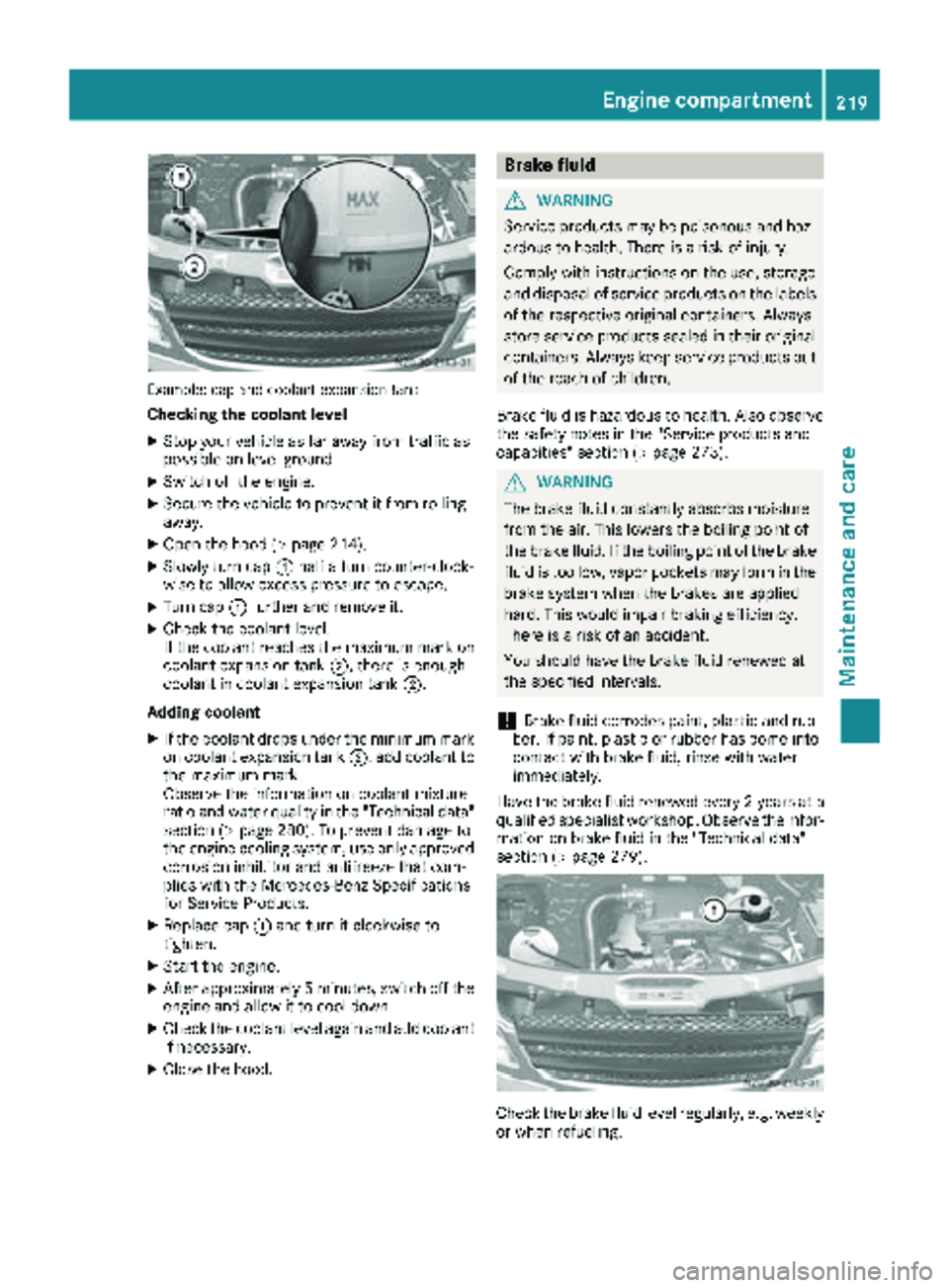
Example: cap and coolant expansion tank
Checking the coolant level
XStop your vehicle as far away from traffic as
possible on level ground.
XSwitch off the engine.
XSecure the vehicle to prevent it from rolling
away.
XOpen the hood (Ypage 214).
XSlowly turn cap:half a turn counter-clock-
wise to allow excess pressure to escape.
XTurn cap :further and remove it.
XCheck the coolant level.
If the coolant reaches the maximum mark on
coolant expansion tank ;, there is enough
coolant in coolant expansion tank ;.
Adding coolant
XIf the coolant drops under the minimum mark
on coolant expansion tank ;, add coolant to
the maximum mark.
Observe the information on coolant mixture
ratio and water quality in the "Technical data"
section (
Ypage 280). To prevent damage to
the engine cooling system, use only approved
corrosion inhibitor and antifreeze that com-
plies with the Mercedes-Benz Specifications
for Service Products.
XReplace cap :and turn it clockwise to
tighten.
XStart the engine.
XAfter approximately 5 minutes, switch off the
engine and allow it to cool down.
XCheck the coolant level again and add coolant
if necessary.
XClose the hood.
Brake fluid
GWARNING
Service products may be poisonous and haz-
ardous to health. There is a risk of injury.
Comply with instructions on the use, storage
and disposal of service products on the labels
of the respective original containers. Always
store service products sealed in their original
containers. Always keep service products out
of the reach of children.
Brake fluid is hazardous to health. Also observe
the safety notes in the "Service products and
capacities" section (
Ypage 273).
GWARNING
The brake fluid constantly absorbs moisture
from the air. This lowers the boiling point of
the brake fluid. If the boiling point of the brake
fluid is too low, vapor pockets may form in the
brake system when the brakes are applied
hard. This would impair braking efficiency.
There is a risk of an accident.
You should have the brake fluid renewed at
the specified intervals.
!Brake fluid corrodes paint, plastic and rub-
ber. If paint, plastic or rubber has come into
contact with brake fluid, rinse with water
immediately.
Have the brake fluid renewed every 2 year sat a
qualified specialist workshop. Observe the infor- mation on brake fluid in the "Technical data"
section (
Ypage 279).
Check the brake fluid level regularly, e.g. weekly
or when refueling.
Engine compartment219
Maintenance and care
Z
Page 263 of 286
Curb weight
The weight of a vehicle with standard equipment
including the maximum filling capacity of fuel,
oil, and coolant. It also includes the air-condi-
tioning system and optional equipment if these
are installed on the vehicle, but does not include
passengers or luggage.
Maximum tire load
The maximum tire load in kilograms or pounds is
the maximum weight for which a tire is
approved.
Maximum permissible tire pressure
Maximum permissible tire pressure for one tire.
Maximum load on one tire
Maximum load on one tire. This is calculated by
dividing the maximum axle load of one axle by
two.
PSI (Pounds per square inch)
Standard unit of measurement for tire pressure.
Aspect ratio
Relationship between tire height and width in
percent.
tire pressure
Pressure inside the tire applying an outward
force to every square inch of the tire's surface.
Tire pressure is specified in pounds per square
inch (psi), in kilopascal (kPa) or in bar. Tire pres-
sure should only be corrected when the tires are
cold.
Cold tire pressure
The tires are cold:
Rif the vehicle has been parked for at least
three hours without direct sunlight on the
tires, and
Rif the vehicle has not been driven further than
1 mile (1.6 km)
Tire tread
The part of the tire that comes into contact with the road.
Tire bead
The tire bead ensures that the tire sits securely
on t
he wheel. There are several steel wires in the
bead to prevent the tire from coming loose from
the wheel rim.
Sidewall
The part of the tire between the tread and the
tire bead.
Weight of optional extras
The combined weight of those optional extras
that weigh more than the replaced standard
parts and more than 2.3 kg (5 lbs). These
optional extras, such as high-performance
brakes, a roof rack or a high-performance bat-
tery, are not included in the curb weight and the
weight of the accessories.
TIN (Tire Identification Number)
A unique identification number which can be
used by a tire manufacturer to identify tires, for
example for a product recall, and thus identify
the purchasers. The TIN is composed of the
manufacturer identification code, tire size, tire
model code and manufacturing date.
Load bearing index
The load bearing index (also load index) is a code
that contains the maximum load bearing capa-
city of a tire.
Traction
Traction is the result of friction between the tires
and the road surface.
TWR (permissible trailer drawbar load)
The TWR is the maximum permissible weight
that may act on the ball coupling of the trailer
tow hitch.
Wear indicator
Narrow bars (tread wear bars) that are distrib-
uted over the tire tread. If the tir e tread is level
with the bars, the wear limit of áin (1.6 mm)
has been reached.
Distribution of the vehicle occupants
The distribution of vehicle occupants over des-
ignated seat positions in a vehicle.
Maximum permissible payload weight
Nominal load and goods/luggage load plus
68 kg (150lbs) multiplied by the number of
seats in the vehicle.
What you should know about wheels and tires261
Wheels and tires
Z