lock MERCEDES-BENZ SPRINTER 2018 MY18 Operator’s Manual
[x] Cancel search | Manufacturer: MERCEDES-BENZ, Model Year: 2018, Model line: SPRINTER, Model: MERCEDES-BENZ SPRINTER 2018Pages: 294, PDF Size: 4.36 MB
Page 207 of 294
Useful information
This Operator's Manual describes all models as
well as standard and optional equipment of your
vehicle that were available at the time of going
to print. Country-specific variations are possi-
ble. Note that your vehicle may not be equipped
with all of the described functions. This also
applies to systems and functions relevant to
safety.
Read the information on qualified specialist
workshops (
Ypage 27).
Stowage spaces and stowage com-
partments
Important safety notes
GWARNING
If objects in the passenger compartment are
stowed incorrectly, they can slide or be
thrown around and hit vehicle occupants. In
addition, cupholders, open stowage spaces
and mobile phone brackets cannot always
retain all objects they contain. There is a risk of injury, particularly in the event of sudden
braking or a sudden change in direction.
RAlways stow objects so that they cannot be
thrown around in such situations.
RAlways make sure that objects do not pro-
trude from stowage spaces, parcel nets or
stowage nets.
RClose the lockable stowage spaces before
starting a journey.
RAlways stow and secure heavy, hard, poin-
ted, sharp-edged, fragile or bulky objects in
the trunk.
In addition, observe the information in the
"Loading guidelines" section (
Ypage 213).
Glove box
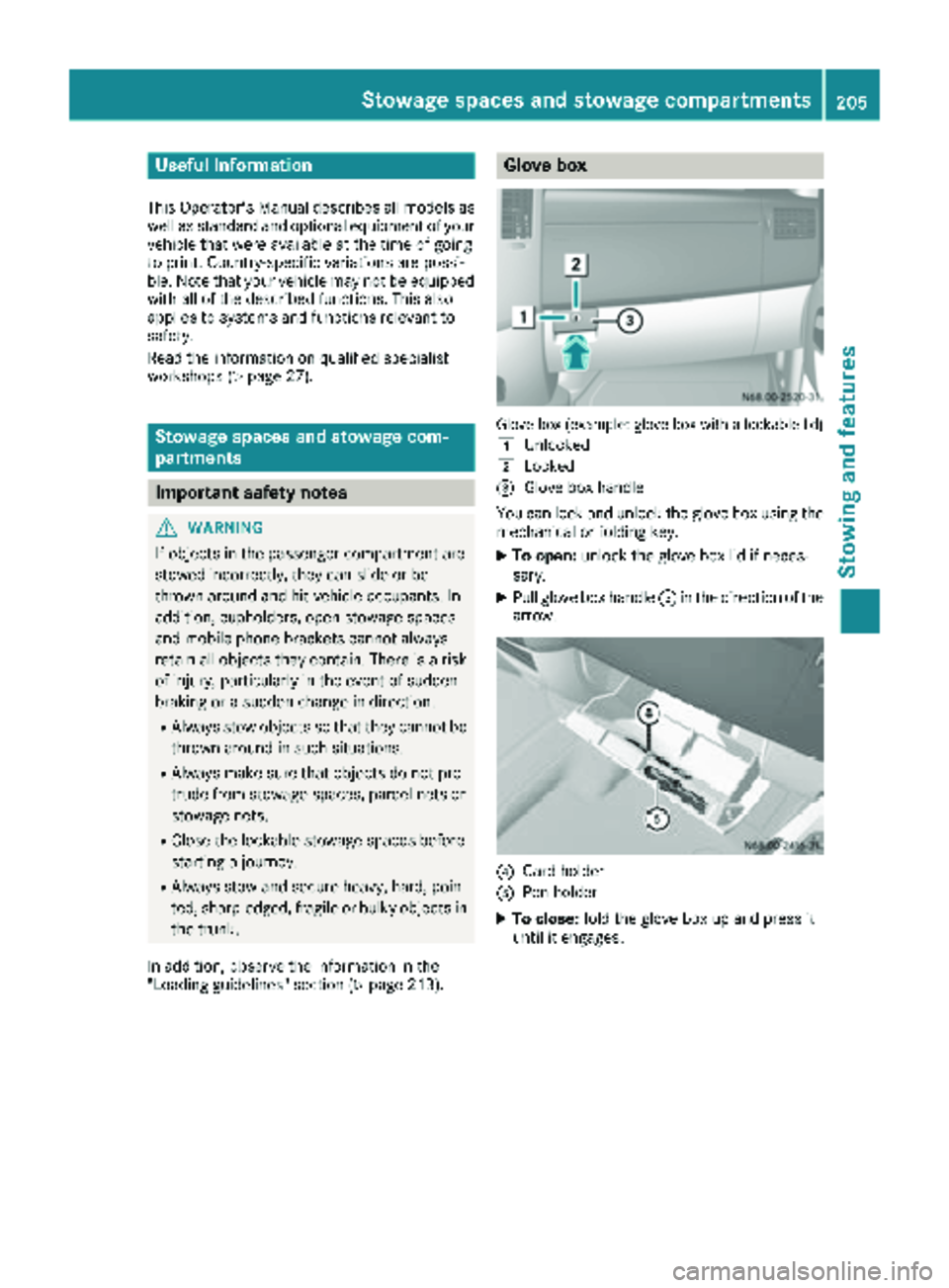
Glove box (example: glove box with a lockable lid)
1
Unlocked
2Locked
=Glove box handle
You can lock and unlock the glove box using the mechanical or folding key.
XTo open: unlock the glove box lid if neces-
sary.
XPull glove box handle =in the direction of the
arrow.
?Card holder
APen holder
XTo close: fold the glove box up and press it
until it engages.
Stowage spaces and stowage compartments205
Stowing and features
Z
Page 212 of 294
Ashtray
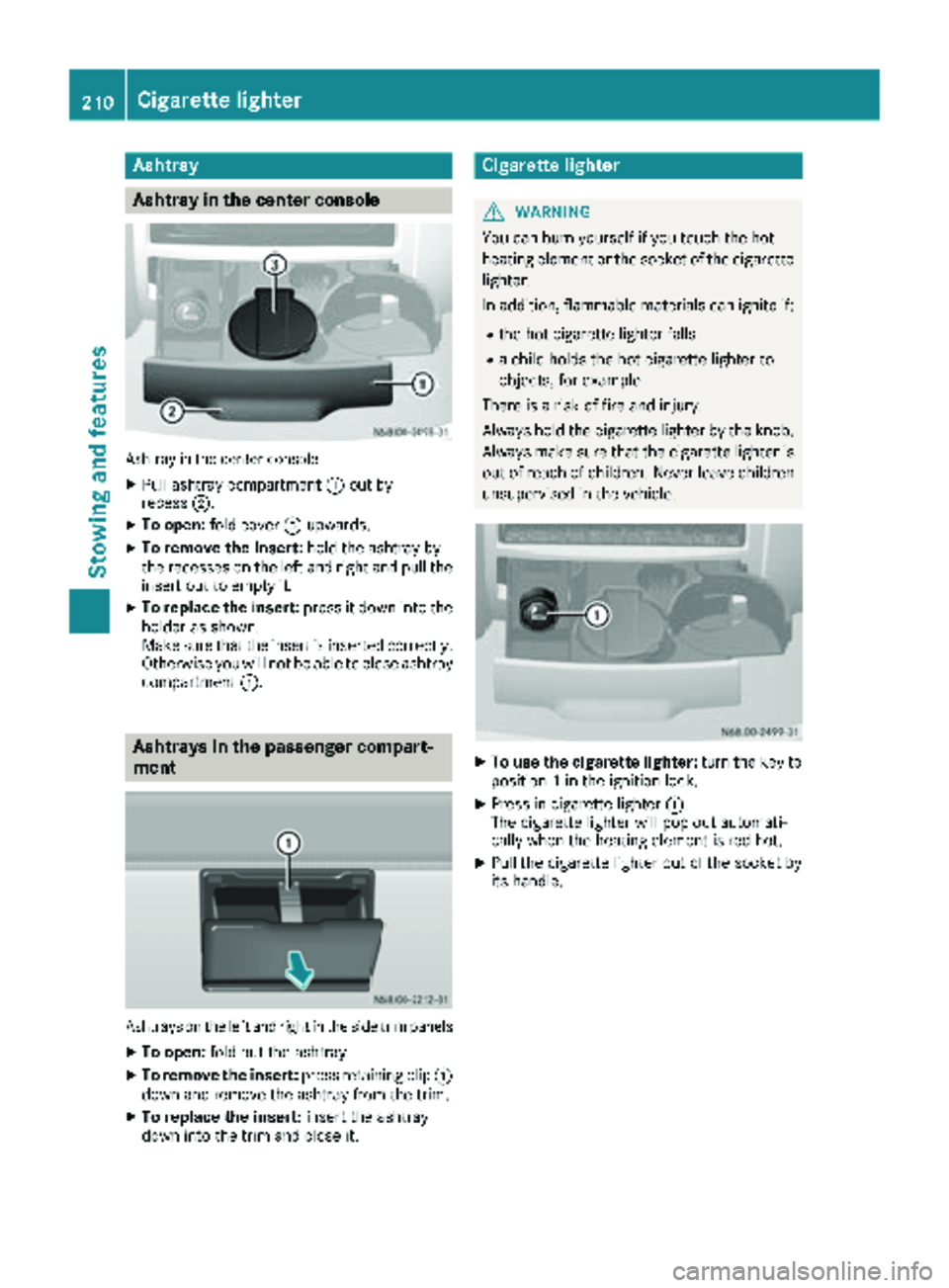
Asht ray in the center console
Ashtray in th ecenter console
XPull ashtray compartmen t: out by
recess ;.
XTo open :fol dcover =upwards.
XTo remove th einsert: hold theashtray by
th erecesses on th elef tand right and pull th e
insert out to empty it .
XTo replace theinsert: press it down int oth e
holder as shown.
Mak esur ethat th einsert is inserted correctly.
Otherwise you will no tbe able to close ashtray
compartmen t:.
Asht rays in the passenger compa rt-
ment
Ashtrays on th elef tand right in th eside trim panels
XTo open :fol dout th eashtray.
XTo remove th einsert: press retaining cli p:
down and remove th eashtray from th etrim.
XTo replace th einsert: insert th eashtray
down int oth etrim and close it .
Cigarette lighter
GWARNING
You can burn yourself if you touch th ehot
heating elemen tor th esocke tof th ecigarette
lighter.
In addition ,flammabl ematerials can ignit eif:
Rth ehot cigarette lighte rfalls
Ra child hold sth ehot cigarette lighte rto
objects ,for exampl e
There is aris kof fir eand injury.
Always hold th ecigarette lighte rby th eknob.
Always mak esur ethat th ecigarette lighte ris
out of reac hof children .Never leav echildren
unsupervised in th evehicle.
XTo use th ecigarette lighter :tur nth eke yto
position 1in th eignition lock.
XPress in cigarette lighte r:.
The cigarette lighte rwill pop out automati-
call ywhen th eheating elemen tis red-hot .
XPull thecigarette lighte rout of th esocke tby
it s handle.
210Cigarette lighter
Stowing and features
Page 213 of 294
12-V socket
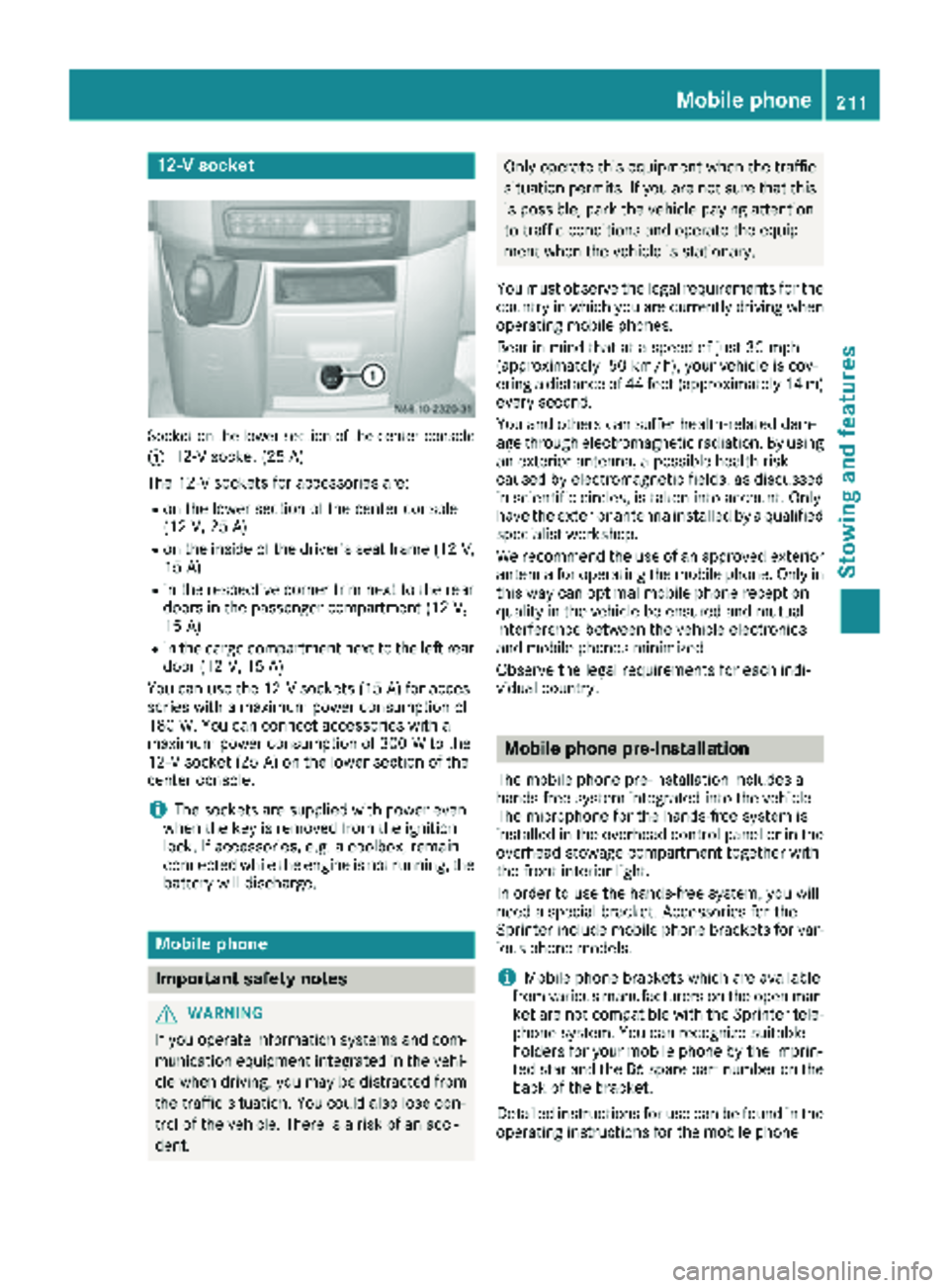
Socket on the lower section of the center console
:
12-V socket (25 A)
The 12-V sockets for accessories are:
Ron the lower section of the center console
(12 V, 25 A)
Ron the inside of the driver's seat frame (12V,
15 A)
Rin the respective corner trim next to the rear
doors in the passenger compartment (12 V,
15 A)
Rin the cargo compartment next to the left rear
door (12 V, 15 A)
You can use the 12-V sockets (15 A) for acces-
sories with a maximum power consumption of
180 W. You can connect accessories with a
maximum power consumption of 300 W to the
12-V socket (25 A) on the lower section of the
center console.
iThe sockets are supplied with power even
when the key is removed from the ignition
lock. If accessories, e.g. a coolbox, remain
connected while the engine is not running, the
battery will discharge.
Mobile phone
Important safety notes
GWARNING
If you operate information systems and com-
munication equipment integrated in the vehi-
cle when driving, you may be distracted from
the traffic situation. You could also lose con-
trol of the vehicle. There is a risk of an acci-
dent.
Only operate this equipment when the traffic
situation permits. If you are not sure that this is possible, park the vehicle paying attention
to traffic conditions and operate the equip-
ment when the vehicle is stationary.
You must observe the legal requirements for the
country in which you are currently driving when
operating mobile phones.
Bear in mind that at a speed of just 30 mph
(approximately 50 km/h), your vehicle is cov-
ering a distance of 44 feet (approximately 14 m)
every second.
You and others can suffer health-related dam-
age through electromagnetic radiation. By using
an exterior antenna, a possible health risk
caused by electromagnetic fields, as discussed
in scientific circles, is taken into account. Only
have the exterior antenna installed by a qualified
specialist workshop.
We recommend the use of an approved exterior
antenna for operating the mobile phone. Only in
this way can optimal mobile phone reception
quality in the vehicle be ensured and mutual
interference between the vehicle electronics
and mobile phones minimized.
Observe the legal requirements for each indi-
vidual country.
Mobile phone pre-installation
The mobile phone pre-installation includes a
hands-free system integrated into the vehicle.
The microphone for the hands-free system is
installed in the overhead control panel or in the
overhead stowage compartment together with
the front interior light.
In order to use the hands-free system, you will
need a special bracket. Accessories for the
Sprinter include mobile phone brackets for var-
ious phone models.
iMobile phone brackets which are available
from various manufacturers on the open mar- ket are not compatible with the Sprinter tele-
phone system. You can recognize suitable
holders for your mobile phone by the imprin-
ted star and the B6 spare part number on the
back of the bracket.
Detailed instructions for use can be found in the
operating instructions for the mobile phone
Mobile phone211
Stowing and features
Z
Page 214 of 294
bracket and in the separate operating instruc-
tions for the mobile phone pre-installation.
iThe mobile phone battery is charged
depending on the condition of charge and the
position of the key in the ignition lock. The
mobile phone display indicates the charging
process.
Additional communications equip-
ment
Important safety notes
GWARNING
If you operate mobile communication equip-
ment when driving, you may be distracted
from the traffic situation. You could also lose
control of the vehicle. There is a risk of an
accident.
Only operate this equipment when the vehicle
is stationary.
Observe the legal requirements for the country
in which you are currently driving when operat-
ing mobile communication equipment.
Please remember, a navigation system does not
supply information on the load-bearing capacity of bridges or the overhead clearance of under-
passes. The driver remains responsible for
safety at all times.
You and others can suffer health-related dam-
age through electromagnetic radiation. By using
an exterior antenna, a possible health risk
caused by electromagnetic fields, as discussed
in scientific circles, is taken into account. Only
have the exterior antenna installed by a qualified
specialist workshop.
You will find information on installing electrical
or electronic equipment in the “Vehicle elec-
tronics” section (
Ypage 276).
Installation for PND mobile navigation
devices
You can secure a personal navigation device
(Personal Navigation Device PND) using a com-
mercially available adapter.
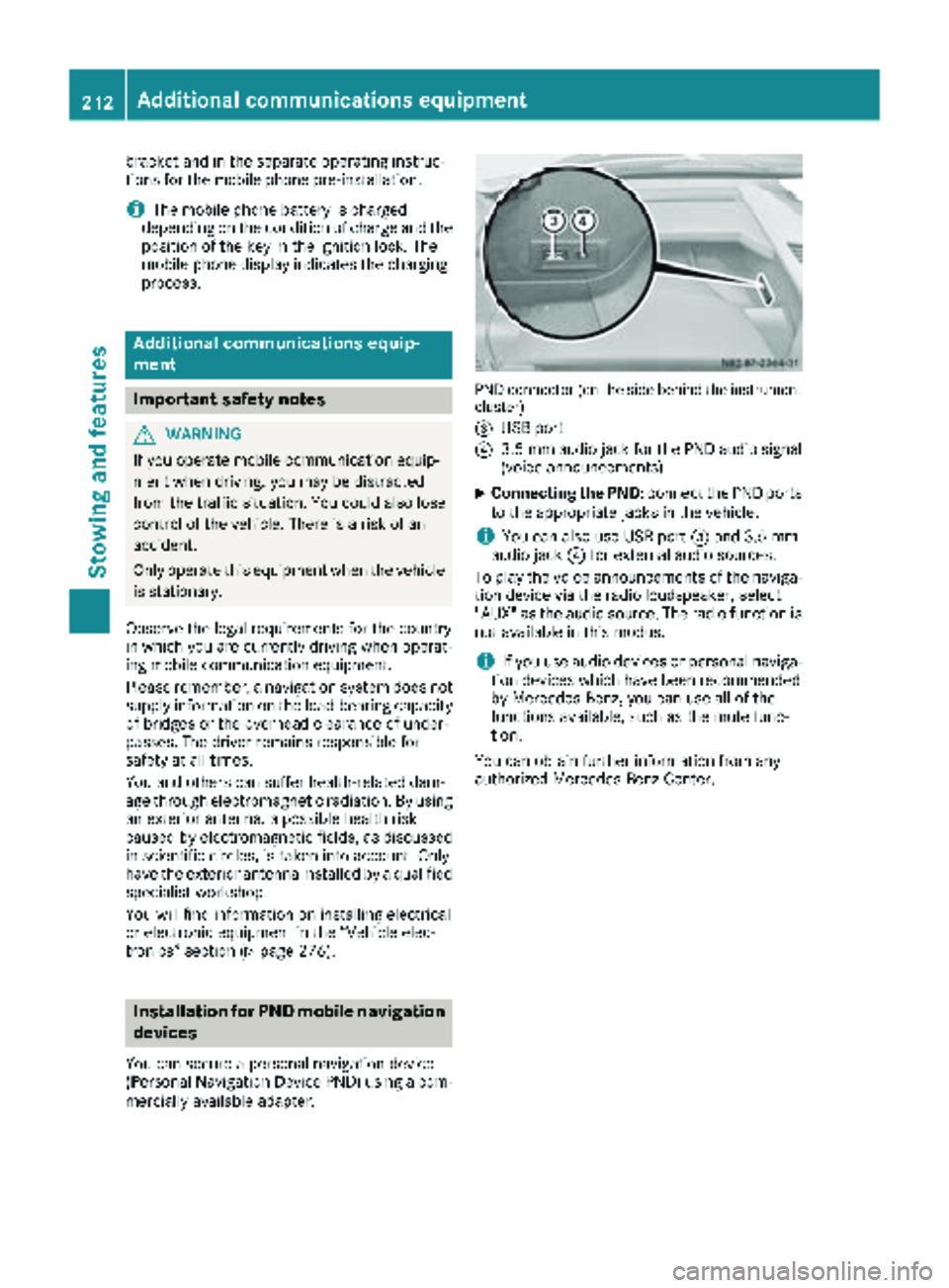
PND connector (on the side behind the instrument
cluster)
=
USB port
?3.5 mm audio jack for the PND audio signal
(voice announcements)
XConnecting the PND: connect the PND ports
to the appropriate jacks in the vehicle.
iYou can also use USB port =and 3.5 mm
audio jack ?for external audio sources.
To play the voice announcements of the naviga-
tion device via the radio loudspeaker, select
"AUX" as the audio source. The radio function is
not available in this modus.
iIf you use audio devices or personal naviga-
tion devices which have been recommended
by Mercedes-Benz, you can use all of the
functions available, such as the mute func-
tion.
You can obtain further information from any
authorized Mercedes-Benz Center.
212Additional communications equipment
Stowing and features
Page 218 of 294
XFill spaces between the load and the cargo
compartment walls or wheel housings (form-
locking). Use rigid load securing aids, such as
wedges, wooden fixings or padding.
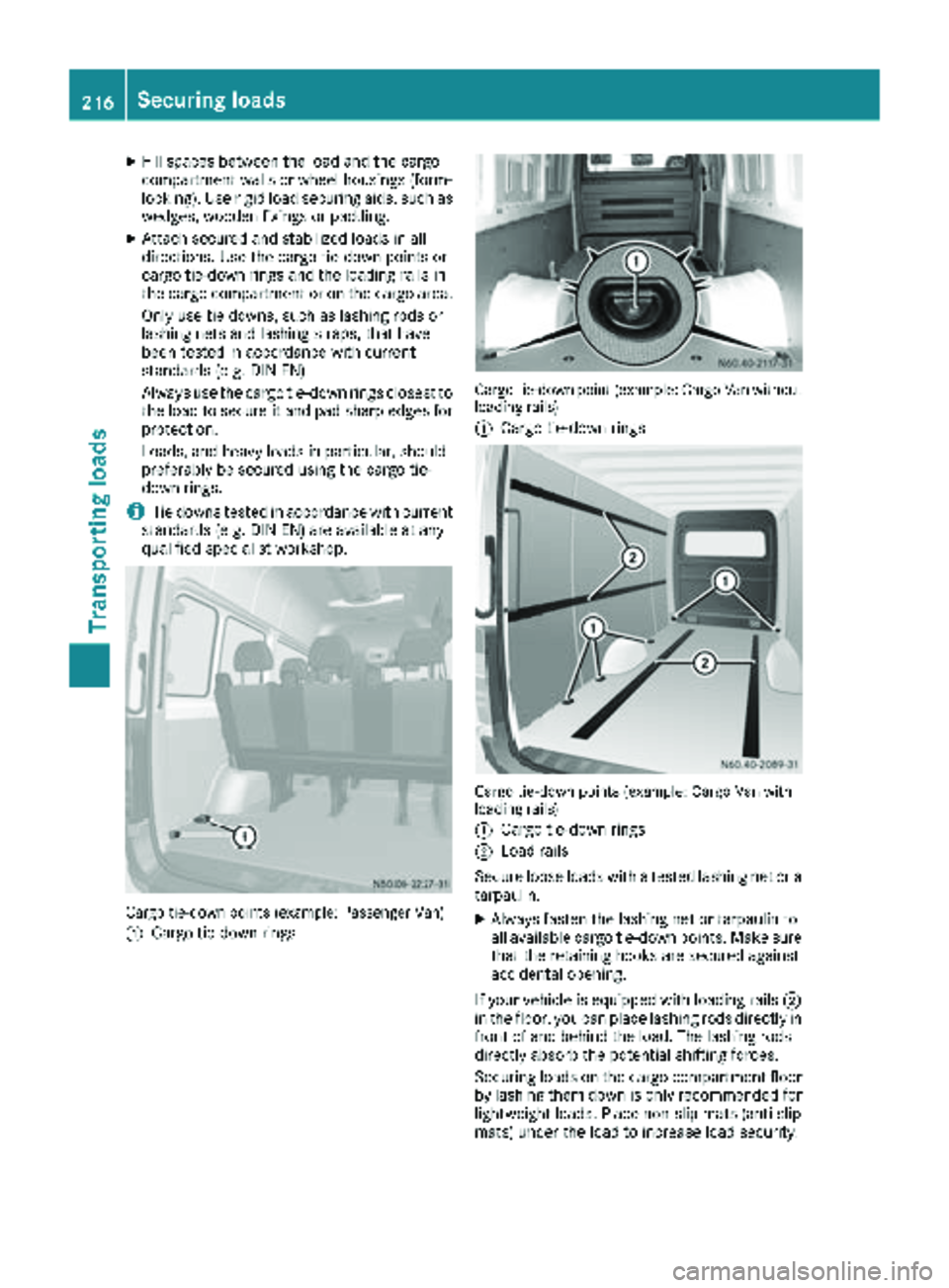
XAttach secured and stabilized loads in all
directions. Use the cargo tie-down points or
cargo tie-down rings and the loading rails in
the cargo compartment or on the cargo area.
Only use tie downs, such as lashing rods or
lashing nets and lashing straps, that have
been tested in accordance with current
standards (e.g. DIN EN).
Always use the cargo tie-down rings closest to
the load to secure it and pad sharp edges for
protection.
Loads, and heavy loads in particular, should
preferably be secured using the cargo tie-
down rings.
iTie downs tested in accordance with current
standards (e.g. DIN EN) are available at any
qualified specialist workshop.
Cargo tie-down points (example: Passenger Van)
:
Cargo tie-down rings
Cargo tie-down point (example: Cargo Van without
loading rails)
:
Cargo tie-down rings
Cargo tie-down points (example: Cargo Van with
loading rails)
:
Cargo tie-down rings
;Load rails
Secure loose loads with a tested lashing net or a
tarpaulin.
XAlways fasten the lashing net or tarpaulin to
all available cargo tie-down points. Make sure
that the retaining hooks are secured against
accidental opening.
If your vehicle is equipped with loading rails ;
in the floor, you can place lashing rods directly in
front of and behind the load. The lashing rods
directly absorb the potential shifting forces.
Securing loads on the cargo compartment floor
by lashing them down is only recommended for
lightweight loads. Place non-slip mats (anti-slip
mats) under the load to increase load security.
216Securing loads
Transporting loads
Page 219 of 294
Installing/removing cargo tie-down
rings for the load rails
GWARNING
If th ecargo tie-down rin gis no tproperly
installed, it may slip or become detached in
th eevent of abrup tchanges in direction ,brak -
ing maneuvers or an accident. This may caus e
objects ,luggag eor th eload to slip, ti pove ror
be tosse dabout ,striking vehicl eoccupants.
Ther eis aris kof injury.
Before usin gth ecargo tie-down rings, always
mak esur ethey are properly installed and
canno tbe moved.
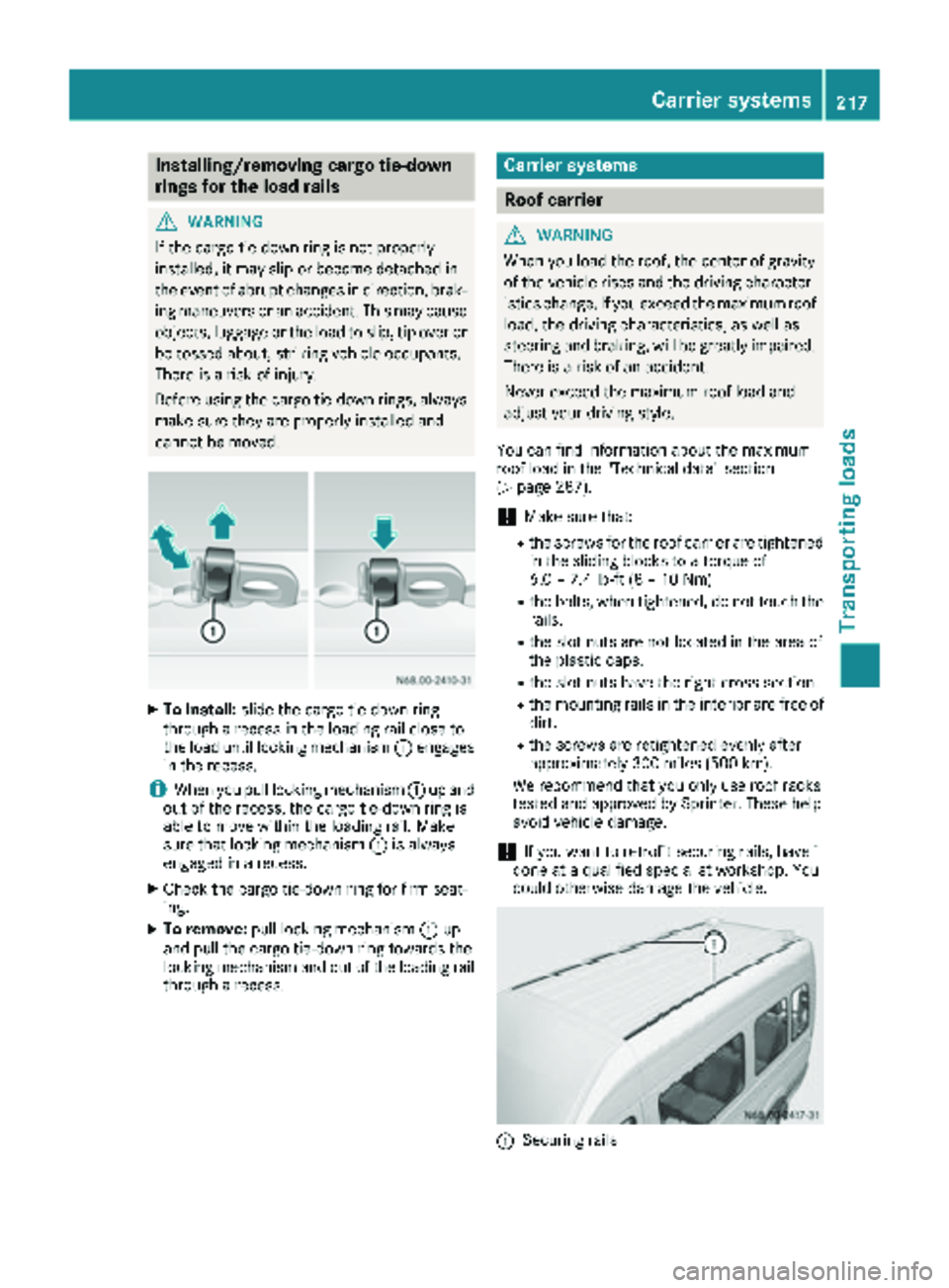
XTo install: slide thecargo tie-down rin g
throug h arecess in th eloadin grail close to
th eload until lockin gmechanism :engage s
in th erecess .
iWhen you pull lockin gmechanism :up and
out of th erecess ,th ecargo tie-down rin gis
able to mov ewithin th eloadin grail. Mak e
sur ethat lockin gmechanism :is always
engage din arecess .
XCheckth ecargo tie-down rin gfor fir mseat -
ing .
XTo remove: pull lockingmechanism :up
and pull th ecargo tie-down rin gtowards th e
lockin gmechanism and out of th eloadin grail
throug h arecess .
Carrier systems
Roof carrier
GWARNIN G
When you load th eroof, th ecenter of gravit y
of th evehicl erises and th edriving character-
istics change. If you exceed th emaximum roo f
load, th edriving characteristics ,as well as
steering and braking ,will be greatl yimpaired.
Ther eis aris kof an accident.
Never exceed th emaximum roo fload and
adjust your driving style.
You can fin dinformation about th emaximum
roo fload in th e"Technical data" section
(
Ypage 287).
!Mak esur ethat:
Rth escrews for th eroo fcarrie rare tightened
in th esliding blocks to atorque of
6. 0 – 7.4lb-ft (8 –10 Nm)
Rth ebolts, when tightened, do no ttouch th e
rails .
Rtheslot nut sare no tlocate din th earea of
th eplastic caps.
Rth eslot nut shav eth eright cross-section .
Rthemounting rails in th einterior are free of
dirt .
Rthescrews are retightened evenly after
approximately 30 0mile s(50 0km).
We recommen dtha tyou only use roo fracks
tested and approve dby Sprinter. These help
avoid vehicl edamage.
!If you wan tto retrofit securin grails, hav eit
don eat aqualified specialist workshop .You
could otherwise damage th evehicle.
:Securin grail s
Carrier systems217
Transporting loads
Z
Page 220 of 294
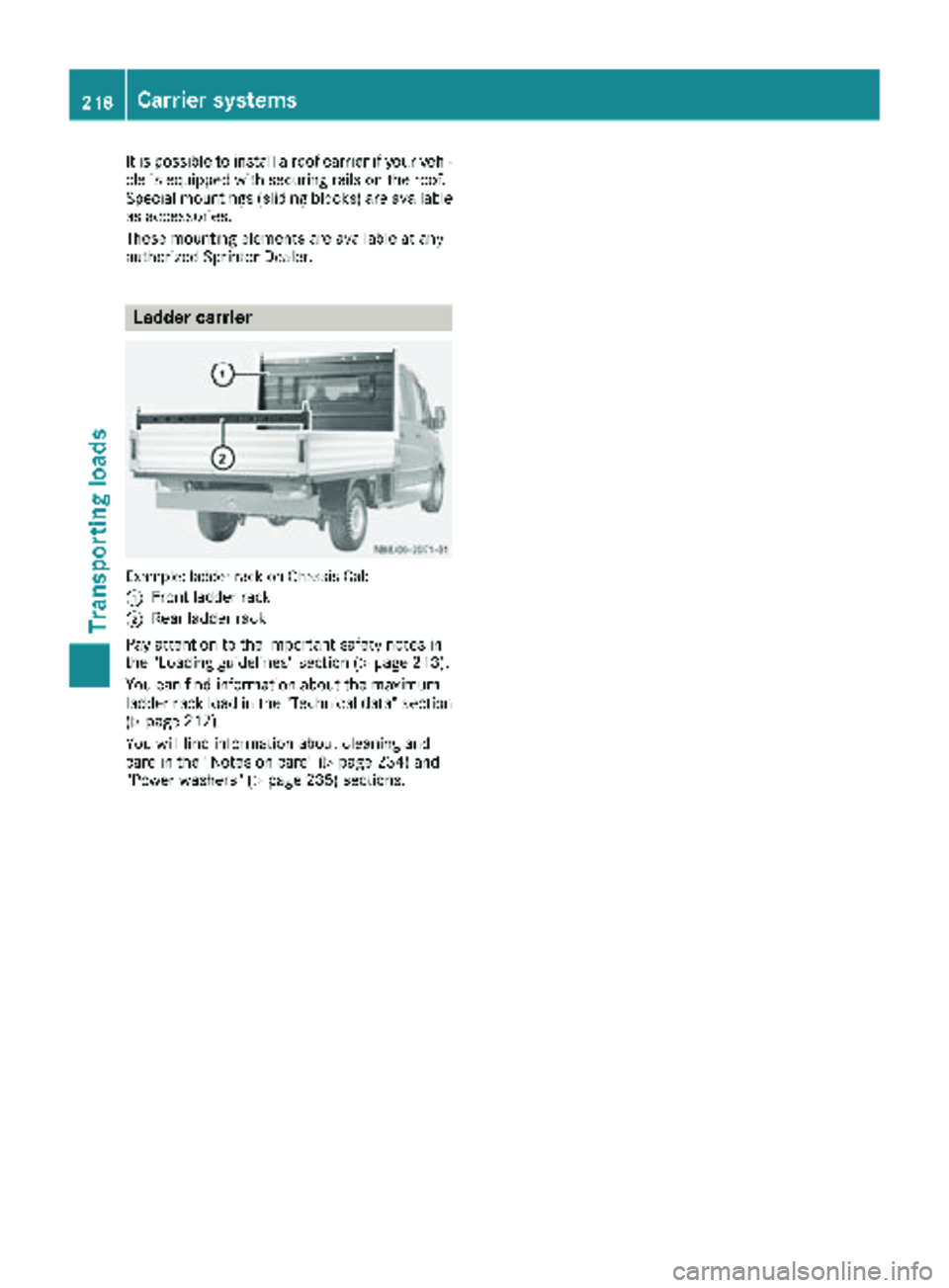
It is possible to install a roof carrier if your vehi-
cle is equipped with securing rails on the roof.
Special mountings (sliding blocks) are available
as accessories.
These mounting elements are available at any
authorized Sprinter Dealer.
Ladder carrier
Example: ladder rack on Chassis Cab
:
Front ladder rack
;Rear ladder rack
Pay attention to the important safety notes in
the "Loading guidelines" section (
Ypage 213).
You can find information about the maximum
ladder rack load in the "Technical data" section
(
Ypage 217).
You will find information about cleaning and
care in the "Notes on care" (
Ypage 234) and
"Power washers" (Ypage 235) sections.
218Carrier systems
Transporting loads
Page 221 of 294
Useful information
This Operator's Manual describes all models as
well as standard and optional equipment of your
vehicle that were available at the time of going
to print. Country-specific variations are possi-
ble. Note that your vehicle may not be equipped
with all of the described functions. This also
applies to systems and functions relevant to
safety.
Read the information on qualified specialist
workshops (
Ypage 27).
Engine compartment
Hood
Important safety notes
GWARNING
If the hood is unlatched, it may open up when the vehicle is in motion and block your view.
There is a risk of an accident.
Never unlatch the hood while driving.
GWARNING
Opening the hood when the engine is over-
heated or when there is a fire in the engine
compartment could expose you to hot gases
or other service products. There is a risk of
injury.
Let an overheated engine cool down before
opening the hood. If there is a fire in the
engine compartment, keep the hood closed
and contact the fire department.
GWARNING
The engine compartment contains moving
components. Certain components, such as
the radiator fan, may continue to run or start
again suddenly when the ignition is off. There is a risk of injury.
If you need to do any work inside the engine
compartment:
Rswitch off the ignition
Rnever reach into the area where there is a
risk of danger from moving components,
such as the fan rotation area
Rremove jewelry and watches
Rkeep items of clothing and hair, for exam-
ple, away from moving parts
GWARNING
The fuel injection system operates with a high
voltage. If you touch the live components, you could receive an electric shock. There is a risk
of injury.
Never touch components of the fuel injection
system when the ignition is switched on.
The live components of the fuel injection system
are, for example, the injectors.
GWARNING
Certain components in the engine compart-
ment, such as the engine, radiator and parts
of the exhaust system, can become very hot.
Working in the engine compartment poses a
risk of injury.
Where possible, let the engine cool down and touch only the components described in the
following.
If you have to carry out work in the engine com-
partment, only touch the following components:
RHood
ROil dipstick
REngine oil filler neck cap
RWasher fluid reservoir cap
RCoolant expansion tank cap
Opening the hood
!Make sure that the windshield wipers are
not folded away from the windshield. You
could otherwise damage the windshield wip-
ers or the hood.
Engine compartment219
Maintenance and care
Z
Page 222 of 294
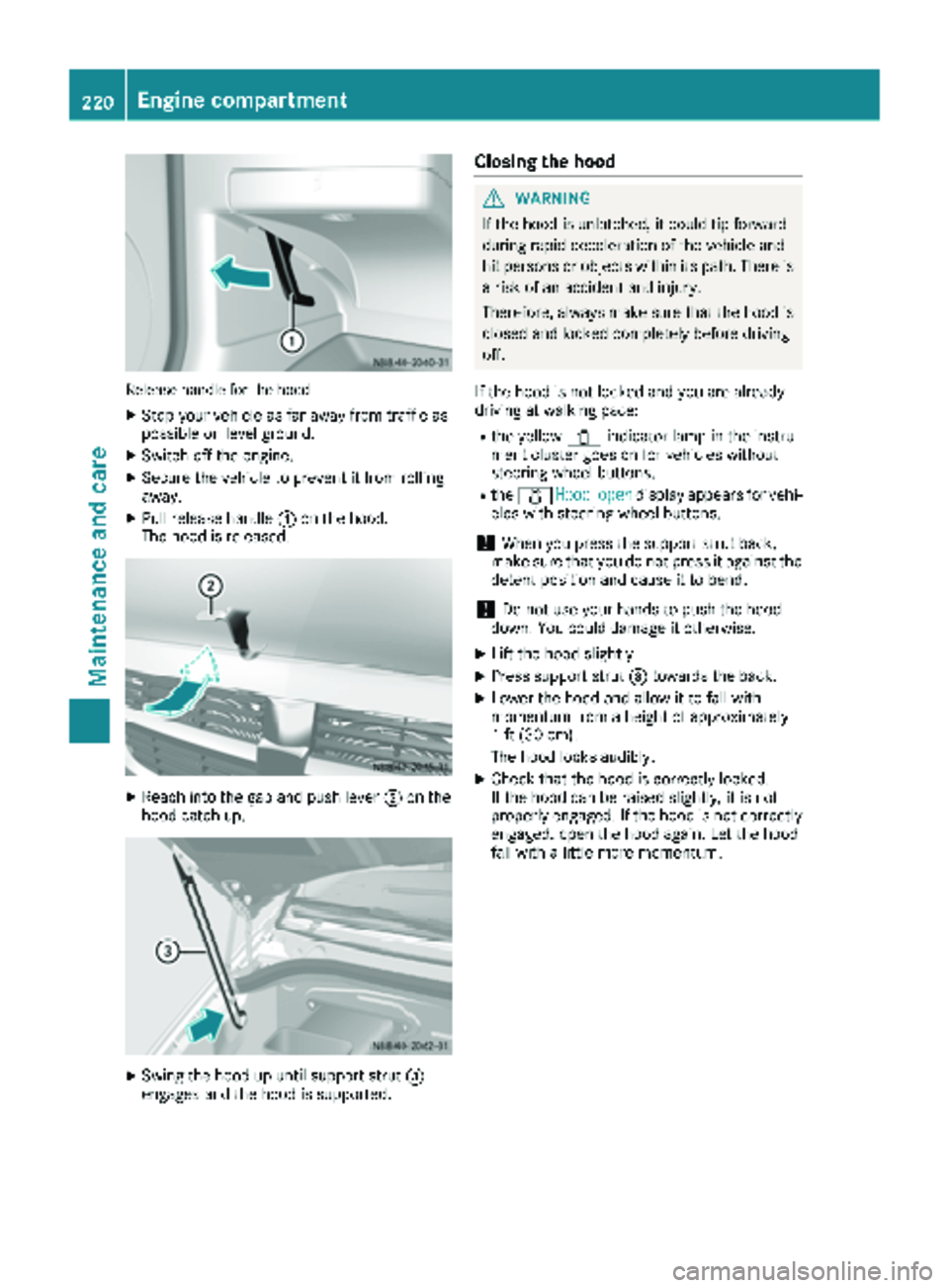
Releasehandle for th ehoo d
XStop your veh icleas far away fr omtraff icas
possible on level ground.
XSwitch off the engine.
XSecure the veh icleto prevent itfrom rolling
away.
XPull release handle :onthe hood.
The hoodis released.
XReach into the gap and push lever ;onthe
hoo d catch up.
XSwin g the hood up unt ilsupport strut =
engages and the hood issupported.
Closing the hood
GWARNIN G
If the hoodis unlatched, it could tip forward
during rapid decelerati on ofthe vehicle and
hit persons or objects within its path.Thereis
a risk ofan acc ident and injury.
Therefore, always make sure that the hoodis
closed and locked co mpletely before driv ing
off.
If the hood is not locked and you are alrea dy
driv ing at walking pace:
Rthe yellow 1indicat or lamp in theinstru-
ment cluster goes onfor vehicles without
steering -wheel butto ns.
Rthe 1 Hoodopendisplay appears for vehi-
cles with steering-wheel butto ns.
!When you press the support strut back,
make sure that you do not press it against the
detent position and cause itto bend.
!Do no t use your hands to push thehood
down .You could damage it otherwise.
XLift the hood slightly.
XPress support strut =towards the back.
XLowe r the hood and allow it to fallwith
mom entum fr oma height of approximat ely
1 ft (30 cm).
The hood locks audibly.
XChec k that the hood is correctly locke d.
If the hood can beraised slightly, it is not
properly engaged. Ifthe hood is not correctly
engaged, openthehood again. Let the hood
fall with a little moremom entum.
220Engine compartment
Maintenance and care
Page 223 of 294
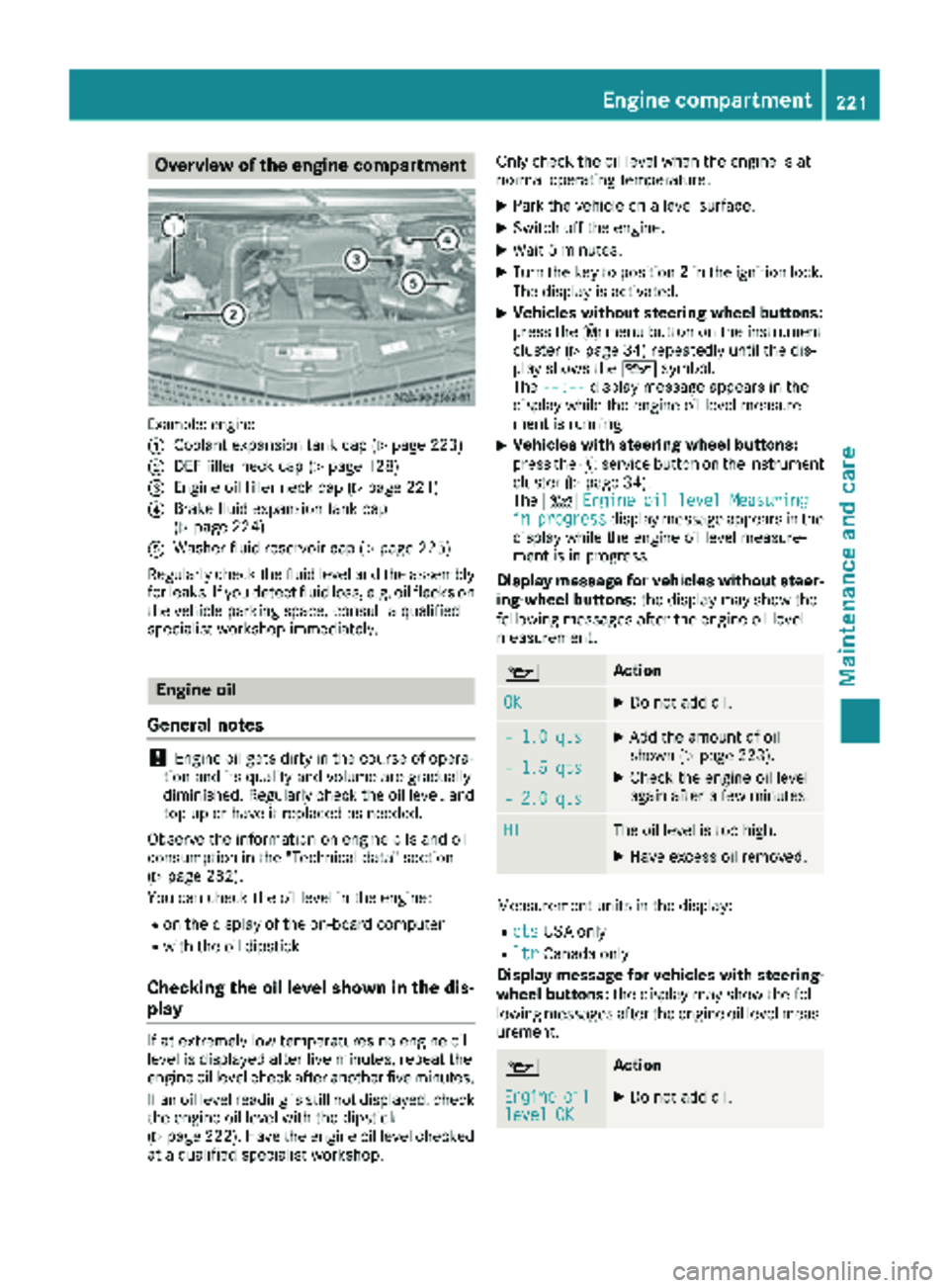
Overview of the engine compartment
Example: engine
:
Coolant expansion tank cap (Ypage 223)
;DEF filler neck cap (Ypage 128)
=Engine oil filler neck cap (Ypage 221)
?Brake fluid expansion tank cap
(Ypage 224)
AWasher fluid reservoir cap (Ypage 225)
Regularly check the fluid level and the assembly
for leaks. If you detect fluid loss, e.g. oil flecks on
the vehicle parking space, consult a qualified
specialist workshop immediately.
Engine oil
General notes
!Engine oil gets dirty in the course of opera-
tion and its quality and volume are gradually
diminished. Regularly check the oil level, and
top up or have it replaced as needed.
Observe the information on engine oils and oil
consumption in the "Technical data" section
(
Ypage 282).
You can check the oil level in the engine:
Ron the display of the on-board computer
Rwith the oil dipstick
Checking the oil level shown in the dis-
play
If at extremely low temperatures no engine oil
level is displayed after five minutes, repeat the
engine oil level check after another five minutes.
If an oil level reading is still not displayed, check
the engine oil level with the dipstick
(
Ypage 222). Have the engine oil level checked
at a qualified specialist workshop. Only check the oil level when the engine is at
normal operating temperature.
XPark the vehicle on a level surface.
XSwitch off the engine.
XWait 5 minutes.
XTurn the key to position
2in the ignition lock.
The display is activated.
XVehicles without steering wheel buttons:
press the 4menu button on the instrument
cluster (
Ypage 34) repeatedly until the dis-
play shows the 1symbol.
The --:--
display message appears in the
display while the engine oil level measure-
ment is running.
XVehicles with steering wheel buttons:
press the Ëservice button on the instrument
cluster (
Ypage 34).
The 4 Engine oil level Measuring
inprogressdisplay message appears in the
display while the engine oil level measure-
ment is in progress.
Display message for vehicles without steer-
ing-wheel buttons: the display may show the
following messages after the engine oil level
measurement.
1Action
OKXDo not add oil.
– 1.0 qtsXAdd the amount of oil
shown (Ypage 223).
XCheck the engine oil level
again after a few minutes.– 1.5 qts
– 2.0 qts
HIThe oil level is too high.
XHave excess oil removed.
Measurement units in the display:
RqtsUSA only
RltrCanada only
Display message for vehicles with steering- wheel buttons: the display may show the fol-
lowing messages after the engine oil level meas-
urement.
1Action
Engineoillevel OKXDo not add oil.
Engine compartment221
Maintenance and care
Z