key battery MERCEDES-BENZ SPRINTER 2018 MY18 Operator’s Manual
[x] Cancel search | Manufacturer: MERCEDES-BENZ, Model Year: 2018, Model line: SPRINTER, Model: MERCEDES-BENZ SPRINTER 2018Pages: 294, PDF Size: 4.36 MB
Page 7 of 294
Selector lever ................................ 123
Selector lever positions ................. 124
Shift ranges ................................... 125
Starting the engine ........................ 120
Touchshift ...................................... 124
Trailer towing ................................. 125
Transmission oil change ................ 284
Automatic transmission emer-
gency mode ....................................... 126
AUX port ............................................. 212
Auxiliary heater
see Auxiliary warm-air heater
see Hot-water auxiliary heater
Auxiliary heating
Activating/deactivating heater
booster mode ................................ 112
Adjusting ....................................... 172
Conditions for switching on ........... 109
Heating time .................................. 108
Important safety notes .................. 107
Operating with the button (control
panel) ............................................ 109
Operation with the remote con-
trol ................................................. 110
Operation with the timer ................ 114
Selecting a switch-on time ............. 109
Setting the switch-on time ............. 110
see Auxiliary heating
see Auxiliary warm-air heater
see Hot-water auxiliary heater
Auxiliary warm-air heater
Problem (malfunction) ................... 117
Setting the departure time ............. 116
Axle load, permissible (trailer tow-
ing) ...................................................... 288
B
Backup lamps
Replacing bulbs ............................... 92
Backup lamps (Chassis Cab)
Replacing bulbs ............................... 93
BAS (Brake Assist System)
Display message ............................ 182
Function/notes ................................ 56
Indicator lamp ................................ 196
Basic settings
see Settings Battery
Replacing (SmartKey) ...................... 63
Battery (SmartKey)
Checking .......................................... 63
Important safety notes .................... 63
Replacing ......................................... 63
Battery (vehicle)
Care ............................................... 233
Charging ........................................ 233
Disconnecting/connecting (addi-
tional battery) ................................ 232
Disconnecting/connecting
(starter battery) ............................. 230
Display message ............................ 194
Important safety notes .................. 228
Indicator lamp ................................ 199
Installing/removing (additional
battery) .......................................... 233
Jump starting ................................. 243
Location ......................................... 229
Main switch ................................... 118
Removing and installing (starter
battery) .......................................... 231
Removing and installing the floor
covering ......................................... 229
Before driving off
Important safety notes .................. 120
Belt
see Seat belts
Belt warning ......................................... 45
Bio-diesel ........................................... 279
Bleeding the fuel system .................. 122
Blind Spot Assist
Activating/deactivating (button) .... 145
Activating/deactivating (vehicle
with steering wheel buttons) ......... 172
Display messages (vehicles with
steering wheel buttons) ................. 192
Display messages (vehicles with-
out steering wheel buttons) ........... 180
Notes/function .............................. 143
Trailer towing ................................. 145
Bottle holder
see Cup holder
Brake Assist
see BAS (Brake Assist System)
Brake fluid
Checking the level ......................... 224
Index5
Page 19 of 294
Display message ............................ 184
Fastening ......................................... 44
Important safety guidelines .............42
Introduction .....................................4 2
Releasin g ......................................... 45
Warning lamp ................................. 203
Warning lamp (function) ................... 45
Seat heating ......................................... 79
Seats
Adjusting lumbar support ................ 75
Adjusting the front-passenger
seat .................................................. 75
Adjusting the head restraint ............ 78
Armrest ............................................ 78
Cleaning the cover ......................... 239
Correct driver's seat position ........... 74
Folding seat ..................................... 76
Important safety notes .................... 74
Rear bench seat ............................... 77
Seat heating .................................... 79
Setting the driver's seat ................... 75
Swivel seat ....................................... 75
Twin front-passenger seat ................ 76
Securing loads
Important safety notes .................. 215
Selector lever
Cleaning ......................................... 239
see Automatic transmission
Sensors (cleaning instructions) ....... 237
Service center
see Qualified specialist workshop
Service interval display
Calling up the service due date ...... 227
Exceeding a service due date ........ 227
Notes ............................................. 227
Service due date (automatic dis-
play) ............................................... 227
Service products
Brake fluid ..................................... 284
Coolant (engine) ............................ 285
Diesel Exhaust Fluid (DEF) ............. 281
Engine oil ....................................... 282
Fuel ................................................ 278
Important safety notes .................. 278
Power steering fluid ....................... 284
Refrigerant ..................................... 286
Transmission oil ............................. 284
Washer fluid ................................... 286 Setting the air distribution
............... 103
Setting the airflow ............................ 103
Setting the clock
Vehicles with steeri
ng wheel but-
tons ............................................... 169
Vehicles without steering wheel
buttons .......................................... 163
Settings
Resetting all (vehicles with steer-
ing wheel buttons) ......................... 167
Resetting submenus (vehicles
with steering wheel buttons) ......... 167
Short journeys (diesel particle fil-
ter) ...................................................... 133
Side impact air bag ............................. 46
Side marker lamp
Changing bulbs ................................ 91
Side windows
Cleaning ......................................... 236
Hinged side windows ....................... 72
Important safety information ........... 72
Opening/closing .............................. 72
Overview .......................................... 72
Problem (malfunction) ..................... 73
Resetting ......................................... 73
Sliding door
Cleaning ......................................... 238
Closing assist ................................... 68
Important safety notes .................... 67
Opening/closing from the inside ..... 67
Opening/closing from the out-
side .................................................. 67
SmartKey
Changing the battery ....................... 63
Changing the locking system set-
tings ............................................... 172
Checking the battery ....................... 63
Display message ............................ 194
Door central locking/unlocking ....... 61
Important safety notes .................... 61
Loss ................................................. 64
Problem (malfunction) ..................... 64
Snow chains ...................................... 251
Sockets .............................................. 211
Spare wheel
General notes ................................ 273
Important safety notes .................. 273
Index17
Page 23 of 294
Two-way radiosType approval/frequency .............. 276
TWR (Tongue Weight Rating) (defi-
nition) ................................................. 266
Type plate
Vehicle identification number
(VIN) .............................................. 276
U
UnlockingFrom inside the vehicle (central
unlocking button) ............................. 65
USB port ............................................. 212
V
Vehicle
Data acquisition ............................... 30
Display message ............................ 194
Electronics ..................................... 276
Equipment ....................................... 23
Individual settings (vehicles with
steering wheel buttons) ................. 167
Limited Warranty ............................. 23
Loading .......................................... 259
Locking (SmartKey) .......................... 61
Lowering ........................................ 272
Maintenance .................................... 24
Operating safety .............................. 26
Parking for a long period ................ 131
Pulling away ................................... 121
Raising ........................................... 268
Registration ..................................... 28
Reporting problems ......................... 28
Securing from rolling away ............ 129
Towing away .................................. 244
Transporting .................................. 247
Unlocking (SmartKey) ...................... 61
Vehicle battery
see Battery (vehicle)
Vehicle bodies ..................................... 28
Body/equipment mounting direc-
tives for trucks ................................. 28
Vehicle data ....................................... 286
Vehicle identification number .......... 276
Vehicle identification plate .............. 276
Vehicle tool kit .................................. 241 VIN
...................................................... 276
Voltage supply
Fuses ............................................. 247
W
WarningStickers ........................................... 25
Warning and indicator lamp
Power assistance for the steering .. 204
Warning and indicator lamps
Brakes ........................................... 197
Check Engine ................................. 201
Coolant .......................................... 200
Diesel Exhaust Fluid (DEF) ............. 198
Distance warning function ............. 195
Electrical step ................................ 204
ESP
®.............................................. 195
ESP®function ................................ 199
Lane Keeping Assist ...................... 195
Overview .......................................... 35
Seat belt ........................................ 203
Warning lamp .................................... 242
Warning triangle ................................ 242
Warning- and indicator lamps
ABS ................................................ 196
Air filter .......................................... 202
ASR ................................................ 195
BAS ................................................ 196
Battery charge ............................... 199
Brake wear .................................... 199
Bulbs .............................................. 203
Doors ............................................. 203
Engine oil level ............................... 200
Preglow .......................................... 202
Reserve fuel ................................... 201
Tire pressure monitor .................... 202
Water separator ............................. 203
Windshield washer fluid ................. 203
Warranty .............................................. 23
Washer fluid
Adding ........................................... 225
Capacities ...................................... 286
Display message ............................ 194
Indicator lamp ................................ 203
Notes ............................................. 286
Wiping with ...................................... 96
Index21
Page 32 of 294
The operating safety of the vehicle could be
jeopardized if you use parts, tires and wheels as
well as accessories relevant to safety which
have not been approved by Mercedes-Benz. This
could lead to malfunctions in safety-relevant
systems, e.g. the brake system. Only use genu-
ine Mercedes-Benz parts or parts of equal qual-ity. Only use tires, wheels and accessories that
have been specifically approved for your vehi-
cle.
We test genuine Sprinter parts, as well as con-
version parts and accessories that have been
specifically approved for the type of vehicle, for:
RReliability
RSafety
RSuitability
Despite ongoing market research, Mercedes-
Benz is unable to assess other parts. Therefore,
we accept no responsibility for the use of such
parts in Sprinter vehicles, even if they have been
officially approved or independently approved
by a testing center.
In some countries, certain parts are only offi-
cially approved for installation or modification if
they comply with legal requirements. All genu-
ine Sprinter parts satisfy these requirements.
Make sure that all parts are suitable for your
vehicle.
Always specify the vehicle identification number
(VIN) and engine number when ordering genuine Sprinter parts (
Ypage 276).
QR code for rescue card
The QR Code stickers are affixed to the B-pillar
on the driver's and front-passenger side.
In the event of an accident the rescue services
use the QR Code to quickly find the rescue card
for your vehicle. The current rescue card con-
tains the most important information on your
vehicle, e.g. the electric cable routes, in a com-
pact form.
Further information can be found at http://
www.mercedes-benz.de/qr-code.
Data stored in the vehicle
Information from electronic control
units
There are electronic control units installed in
your vehicle. Some of these are necessary for
your vehicle to operate safely, while some offer
support during driving (driver assistance sys-
tems). In addition, your vehicle offers comfort
and entertainment functions that are also made
possible by electronic control units.
Electronic control units contain data storage
systems that can temporarily or permanently
save technical information concerning the vehi-
cle's condition, component stress and mainte-
nance requirements as well as technical events
and malfunctions.
This information generally documents the con-
dition of a component, a module, a system or the
surroundings, for example:
ROperating conditions of system components
(e.g. levels, battery status, tire pressure)
RStatus messages concerning the vehicle or its
individual components (e.g. wheel revolution
number / speed, deceleration in movement,
lateral acceleration, display showing fastened
belts)
RMalfunctions and defects in key system com-
ponents (e.g. lights, brakes)
RInformation about events leading to vehicle
damage
RSystem responses in special driving situa-
tions (e.g. air bag deployment, intervention of
stability control systems)
RAmbient conditions (e.g. temperature, rain
sensor)
In addition to performing the actual control unit function, these data are used by manufacturers
to detect and rectify malfunctions and to opti-
mize vehicle functions. Most of these data are
volatile and processed only in the vehicle itself.
Only a small part of the data is stored in event or
malfunction memories.
When you use services, the technical data from
the vehicle can be read out by service network
employees or third parties. Service activities
include repairs, maintenance, warranty claims
and quality assurance measures. The data are
read out via the connection for OBD (on-board
diagnostics) in the vehicle, which is required by
law. The relevant offices in the service network
or third parties collect, process and use the
30Introduction
Page 60 of 294
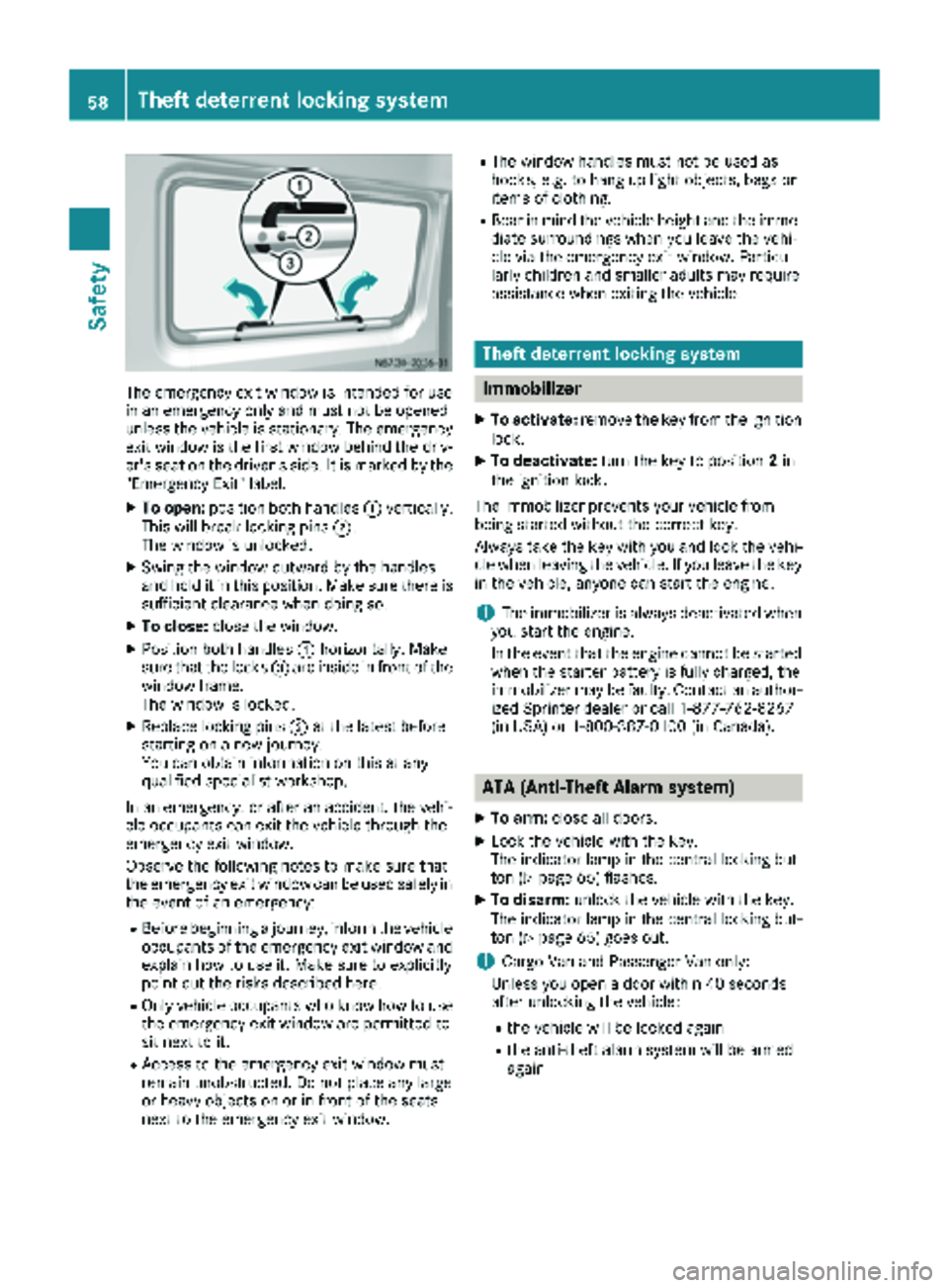
The emergency exit window is intended for use
in an emergency only and must not be opened
unless the vehicle is stationary. The emergency
exit window is the first window behind the driv-
er's seat on the driver's side. It is marked by the
"Emergency Exit" label.
XTo open:position both handles :vertically.
This will break locking pins ;.
The window is unlocked.
XSwing the window outward by the handles
and hold it in this position. Make sure there is
sufficient clearance when doing so.
XTo close: close the window.
XPosition both handles :horizontally. Make
sure that the locks =are inside in front of the
window frame.
The window is locked.
XReplace locking pins ;at the latest before
starting on a new journey.
You can obtain information on this at any
qualified specialist workshop.
In an emergency, or after an accident, the vehi-
cle occupants can exit the vehicle through the
emergency exit window.
Observe the following notes to make sure that
the emergency exit window can be used safely in
the event of an emergency:
RBefore beginning a journey, inform the vehicle
occupants of the emergency exit window and explain how to use it. Make sure to explicitly
point out the risks described here.
ROnly vehicle occupants who know how to use
the emergency exit window are permitted to
sit next to it.
RAccess to the emergency exit window must
remain unobstructed. Do not place any large
or heavy objects on or in front of the seats
next to the emergency exit window.
RThe window handles must not be used as
hooks, e.g. to hang up light objects, bags or
items of clothing.
RBear in mind the vehicle height and the imme-
diate surroundings when you leave the vehi-
cle via the emergency exit window. Particu-
larly children and smaller adults may require
assistance when exiting the vehicle.
Theft deterrent locking system
Immobilizer
XTo activate: remove the key from the ignition
lock.
XTo deactivate: turn the key to position 2in
the ignition lock.
The immobilizer prevents your vehicle from
being started without the correct key.
Always take the key with you and lock the vehi-
cle when leaving the vehicle. If you leave the key
in the vehicle, anyone can start the engine.
iThe immobilizer is always deactivated when
you start the engine.
In the event that the engine cannot be started
when the starter battery is fully charged, the
immobilizer may be faulty. Contact an author-
ized Sprinter dealer or call 1-877-762-8267
(in USA) or 1-800-387-0100 (in Canada).
ATA (Anti-Theft Alarm system)
XTo arm: close all doors.
XLock the vehicle with the key.
The indicator lamp in the central locking but-
ton (
Ypage 65) flashes.
XTo disarm: unlock the vehicle with the key.
The indicator lamp in the central locking but-
ton (
Ypage 65) goes out.
iCargo Van and Passenger Van only:
Unless you open a door within 40 seconds
after unlocking the vehicle:
Rthe vehicle will be locked again
Rthe anti-theft alarm system will be armed
again
58Theft deterrent locking system
Safety
Page 64 of 294
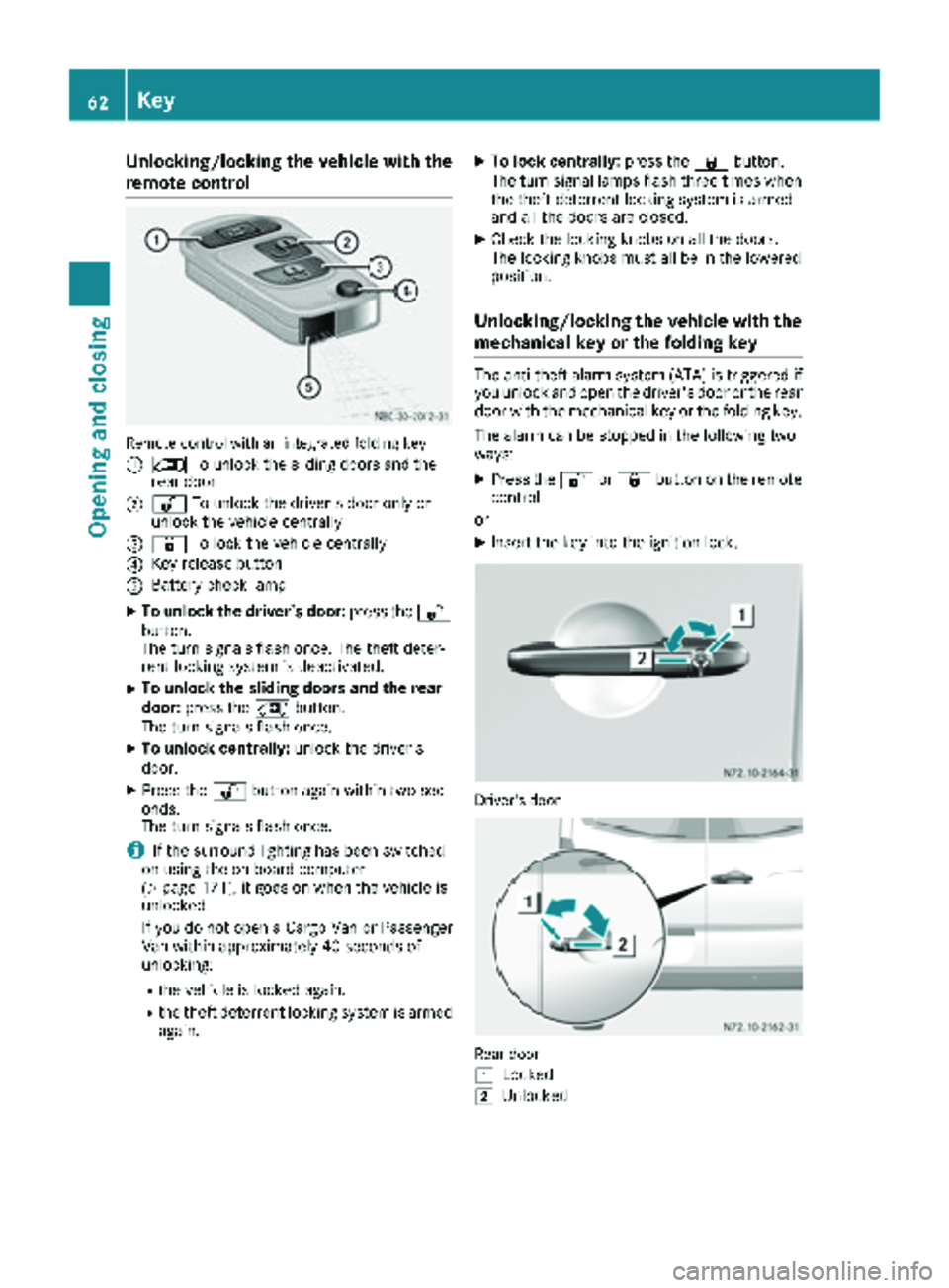
Unlocking/locking the vehicle with the
remote control
Remote control with an integrated folding key
:
5To unlock the sliding doors and the
rear door
;% To unlock the driver's door only or
unlock the vehicle centrally
=& To lock the vehicle centrally
?Key release button
ABattery check lamp
XTo unlock the driver's door: press the%
button.
The turn signals flash once. The theft deter-
rent locking system is deactivated.
XTo unlock the sliding doors and the rear
door: press the 5button.
The turn signals flash once.
XTo unlock centrally: unlock the driver's
door.
XPress the %button again within two sec-
onds.
The turn signals flash once.
iIf the surround lighting has been switched
on using the on-board computer
(
Ypage 171), it goes on when the vehicle is
unlocked.
If you do not open a Cargo Van or Passenger
Van within approximately 40 seconds of
unlocking:
Rthe vehicle is locked again.
Rthe theft deterrent locking system is armed
again.
XTo lock centrally: press the&button.
The turn signal lamps flash three times when
the theft deterrent locking system is armed
and all the doors are closed.
XCheck the locking knobs on all the doors.
The locking knobs must all be in the lowered
position.
Unlocking/locking the vehicle with the
mechanical key or the folding key
The anti-theft alarm system (ATA) is triggered if you unlock and open the driver's door or the rear
door with the mechanical key or the folding key.
The alarm can be stopped in the following two
ways:
XPress the %or& button on the remote
control.
or
XInsert the key into the ignition lock.
Driver's door
Rear door
1
Locked
2Unlocked
62Key
Opening and closing
Page 65 of 294
XTo unlock the driver's or rear door:press
the key release button on the remote control.
The key folds out.
XInsert the key fully into the door lock and turn it to position 2.
The door is unlocked.
XTo lock the vehicle: lock all doors except the
driver's door and, if necessary the rear door,
from inside. To do this, press down the door
locking buttons.
XPress the key release button on the remote
control.
The key folds out.
XInsert the key fully into the driver's door lock
and turn it to position 1.
The driver's door is locked.
Remote control battery
Important safety notes
GWARNING
Batteries contain toxic and corrosive substan- ces. If batteries are swallowed, it can result in
severe health problems. There is a risk of fatalinjury.
Keep batteries out of the reach of children. If
a battery is swallowed, seek medical attention immediately.
HEnvironmental note
Batteries contain dangerous
substances. It is against the
law to dispose of them with
the household rubbish. They
must be collected separatelyand recycled to protect the
environment.
Dispose of batteries in an
environmentally friendly
manner. Take discharged
batteries to a qualified spe-
cialist workshop or a special
collection point for used bat-
teries.
The key batteries contain perchlorate material,
which may require special handling and regard for the environment. Check with your local gov-
ernment’s disposal guidelines. California resi-
dents, see
www.dtsc.ca.gov/
HazardousWaste/Perchlorate/index.cfm .
We recommend that you have batteries
changed at a qualified specialist workshop.
Checking the batteries
XPress the %or& button for longer than
two seconds.
If battery indicator lamp (
Ypage 61 )lights up
briefly, the batteries in the remote control still
have sufficient charge. Otherwise, change the
batteries immediately.
iIf the remote control is checked within the
signal reception range of the vehicle, pressing
the & or% button:
Rlock or
Runlock the vehicle
Changing batteries
You need a CR 2025 2 3 V cell battery, which can
be obtained from any qualified specialist work-
shop.
When changing the batteries, do not press any
of the buttons on the remote control.
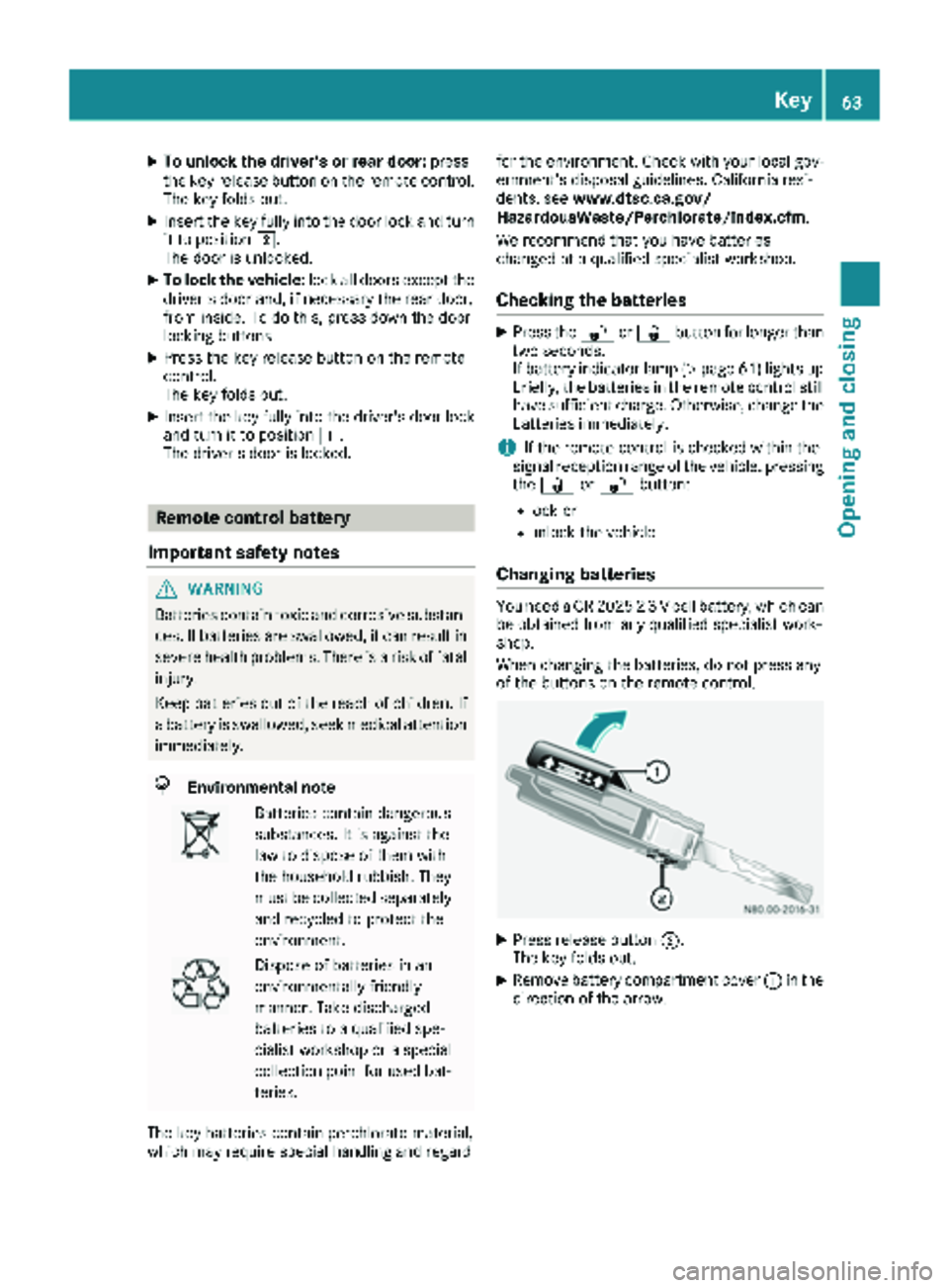
XPress release button ;.
The key folds out.
XRemove battery compartment cover :in the
direction of the arrow.
Key63
Opening and closing
Z
Page 66 of 294
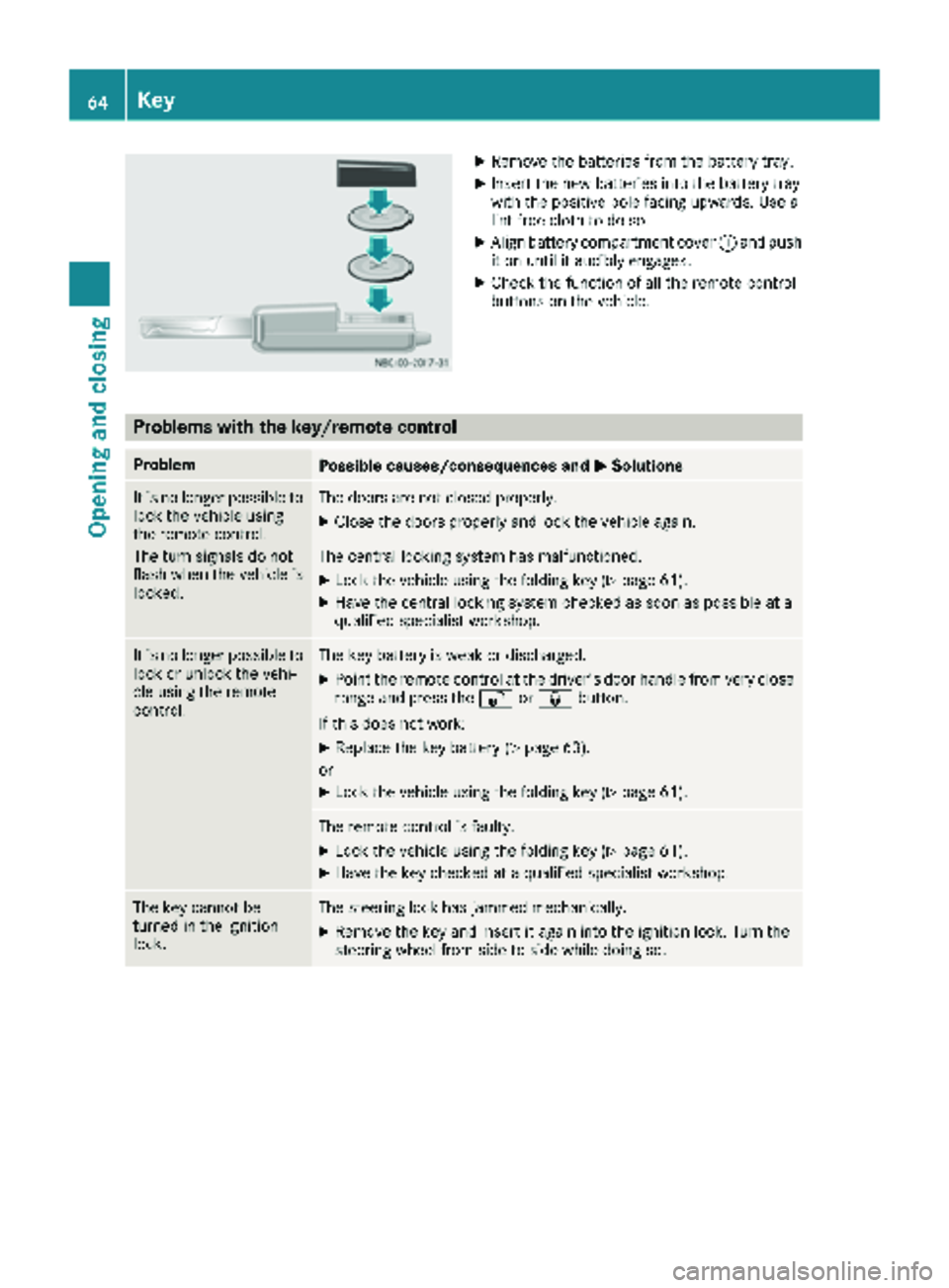
XRemove thebatterie sfrom th ebattery tray.
XInser tth ene wbatterie sint oth ebattery tray
wit hth epositive pole facing upwards. Use a
lint-free cloth to do so.
XAlign battery compartmen tcover :and push
it on until it audibly engages.
XChec kth efunction of all th eremot econtrol
buttons on th evehicle.
Problems with the key/remote control
ProblemPossible causes/consequences and MSolutions
It is no longer possibleto
loc kth evehicl eusin g
th eremot econtrol .
The tur nsignals do no t
flas hwhen th evehicl eis
locked.The door sare no tclosed properly.
XClose th edoor sproperly and loc kth evehicl eagain .
The central lockin gsystem has malfunctioned.
XLoc kth evehicl eusin gth efoldin gke y (Ypage 61).
XHav eth ecentral lockin gsystem checke das soo nas possibl eat a
qualified specialist workshop.
It is no longer possibl eto
loc kor unlock th evehi-
cle usin gth eremot e
control .The keybattery is weak or discharged.
XPoin tth eremot econtrol at th edriver' sdoor handle from ver yclose
range and press th e% or& button.
If this does no twork:
XReplac eth eke ybattery (Ypage 63).
or
XLoc kth evehicl eusin gth efoldin gke y (Ypage 61).
The remot econtrol is faulty.
XLoc kth evehicl eusin gth efoldin gke y (Ypage 61).
XHav eth eke ychecke dat aqualified specialist workshop.
The ke ycanno tbe
turne din th eignition
lock.The steering loc khas jammed mechanically.
XRemove th eke yand insert it again int oth eignition lock. Turn th e
steering whee lfrom side to side while doin gso.
64Key
Opening and closing
Page 67 of 294
ProblemPossible causes/consequences andMSolutions
The engine cannot be
started using the key.The on-board voltage is too low.
XSwitch off all non-essential consumers, such as interior lighting, and
try to start the engine again.
If this does not work:
XCheck the starter battery and charge it if necessary (Ypage 233).
or
XJump-start the vehicle (Ypage 243).
or
XConsult a qualified specialist workshop.
You have lost a key.XHave the key deactivated at a qualified specialist workshop.
XReport the loss immediately to the vehicle insurers.
XIf necessary, have the mechanical locks replaced.
Central locking
Important safety notes
GWARNING
If children are left unsupervised in the vehicle,
they could:
Ropen the doors, thus endangering other
people or road users.
Rget out and disrupt traffic.
Roperate the vehicle's equipment.
Additionally, children could set the vehicle in
motion if, for example, they:
Rrelease the parking brake.
Rshifting the automatic transmission out of
park position P
RStart the engine.
There is a risk of an accident and injury.
When leaving the vehicle, always take the
SmartKey with you and lock the vehicle. Never
leave children or animals unattended in the
vehicle. Always keep the SmartKey out of
reach of children.
GWARNING
If persons, particularly children are subjected to prolonged exposure to extreme heat or
cold, there is a risk of injury, possibly even
fatal. Never leave children unattended in the
vehicle.
You can open a locked front door from the inside
at any time. You can open a locked sliding door
or rear door from the inside if it has been previ-
ously unlocked from inside.
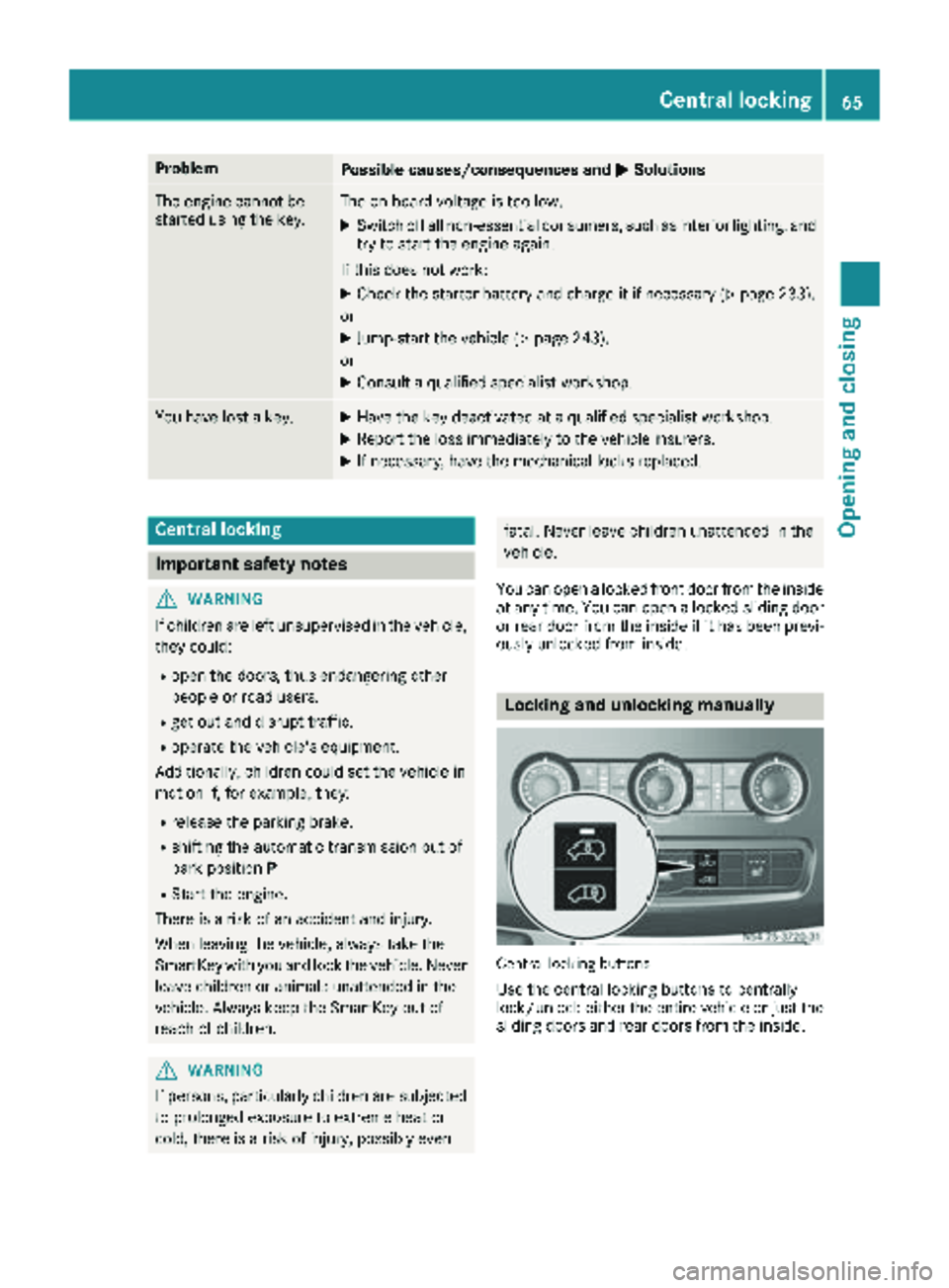
Locking and unlocking manually
Central locking buttons
Use the central locking buttons to centrally
lock/unlock either the entire vehicle or just the sliding doors and rear doors from the inside.
Central locking65
Opening and closing
Z
Page 81 of 294
XTo set the armrest angle:fold the armrest
upwards by more than 45° ;.
The armrest is released.
XFold armrest =forwards to the stop.
XSlowly fold the armrest upwards to the
desired position.
XTo fold the armrest up: if necessary, fold the
armrest upwards :by more than 90°.
Seat heating
GWARNING
Repeatedly switching on the seat heating can
cause the seat cushion and backrest pads to
become very hot. The health of persons with
limited temperature sensitivity or a limited
ability to react to high temperatures may be
affected or they may even suffer burn-like
injuries. There is a risk of injury.
Therefore, do not switch the seat heating on
repeatedly.
!When you leave your seat, do not place any-
thing on the seat and switch off the seat heat-
ing. Do not switch the seat heating on when
the seat is not occupied, e.g. when driving
without a front passenger. The seat heating
may otherwise overheat, causing damage to
the seat.
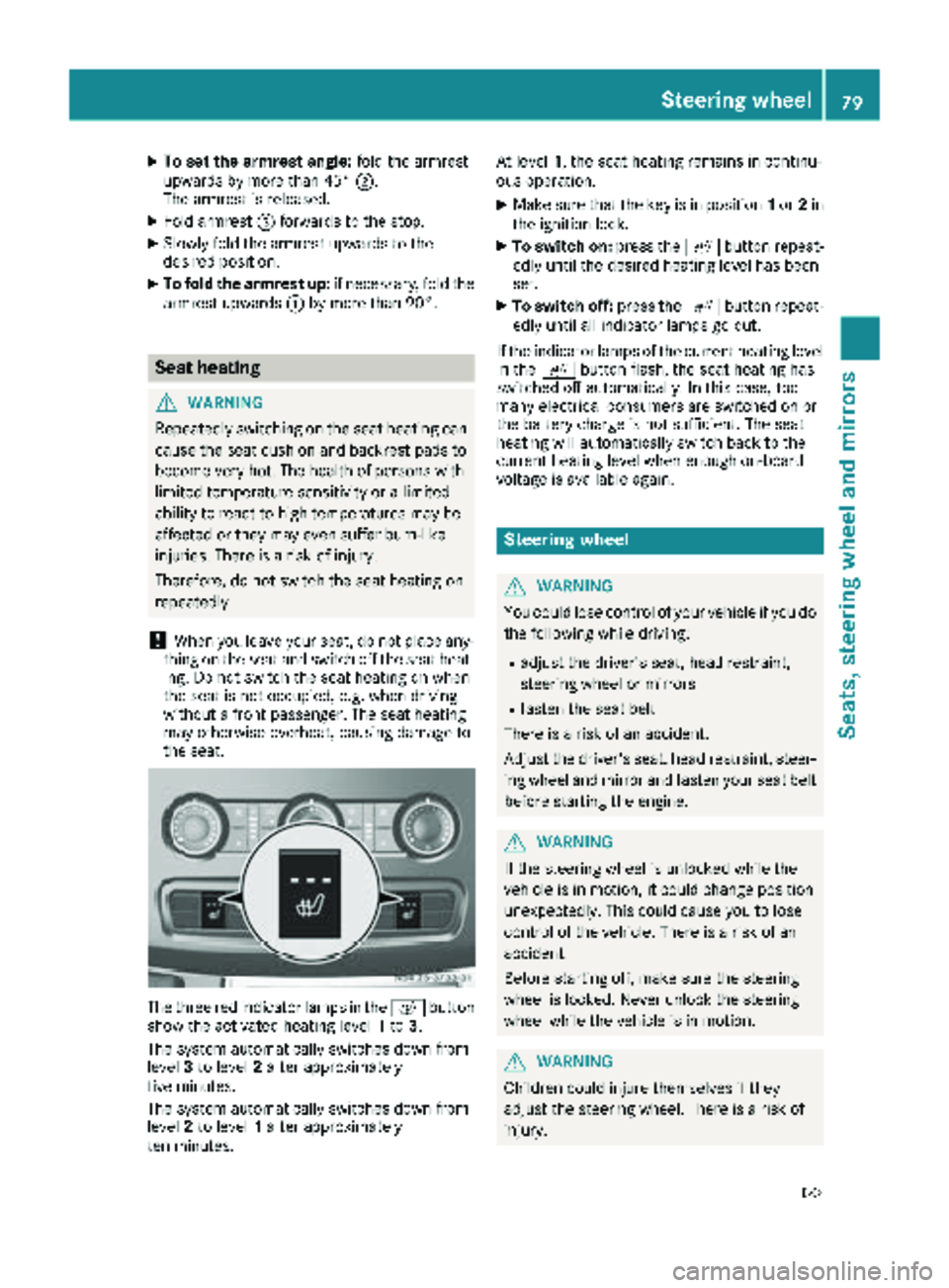
The three red indicator lamps in the cbutton
show the activated heating level 1to 3.
The system automatically switches down from
level 3to level 2after approximately
five minutes.
The system automatically switches down from
level 2to level 1after approximately
ten minutes. At level
1, the seat heating remains in continu-
ous operation.
XMake sure that the key is in position 1or 2in
the ignition lock.
XTo switch on: press thecbutton repeat-
edly until the desired heating level has been
set.
XTo switch off: press thecbutton repeat-
edly until all indicator lamps go out.
If the indicator lamps of the current heating level
in the cbutton flash, the seat heating has
switched off automatically. In this case, too
many electrical consumers are switched on or
the battery charge is not sufficient. The seat
heating will automatically switch back to the
current heating level when enough on-board
voltage is available again.
Steering wheel
GWARNING
You could lose control of your vehicle if you do the following while driving:
Radjust the driver's seat, head restraint,
steering wheel or mirrors
Rfasten the seat belt
There is a risk of an accident.
Adjust the driver's seat, head restraint, steer-
ing wheel and mirror and fasten your seat belt before starting the engine.
GWARNING
If the steering wheel is unlocked while the
vehicle is in motion, it could change position
unexpectedly. This could cause you to lose
control of the vehicle. There is a risk of an
accident.
Before starting off, make sure the steering
wheel is locked. Never unlock the steering
wheel while the vehicle is in motion.
GWARNING
Children could injure themselves if they
adjust the steering wheel. There is a risk of
injury.
Steering wheel79
Seats, steering wheel and mirrors
Z