warning MERCEDES-BENZ SPRINTER 2018 MY18 Operator’s Manual
[x] Cancel search | Manufacturer: MERCEDES-BENZ, Model Year: 2018, Model line: SPRINTER, Model: MERCEDES-BENZ SPRINTER 2018Pages: 294, PDF Size: 4.36 MB
Page 164 of 294
If the supply of DEF falls below the reserve range
of 0.8 US gal (3.0l)the StArtS RExxmessage
appears in the display. Also, the yellow å
DEF indicator lamp lights up in the instrument
cluster and three warning tones sound.
In the display, xx
corresponds to the number of
possible remaining engine starts ( 16to0).
When the display shows that the number of
remaining starts is 0
, theStArtSIdLEmessage
appears in the display and three warning tones
sound.
In addition, the yellow åDEF indicator lamp
and the ;Check Engine indicator lamp light
up in the instrument cluster and three warning
tones sound.
The engine management only allows speeds of
up to 5 mph (8 km/h).
Add at least 1.5 US gal (5.5 l) of DEF
(
Ypage 128).
The display message only disappears when the
vehicle is stationary, at the latest after
20 second s, as soon as yo uswit ch on the igni-
tion or start the engine after refueling.
Vehicles with steering wheel buttons
If the supply of DEF is less than 1.5 US gal
(5.5 l),the Check Diesel Exhaust Fluid
See Operator's Manualmessage appears in
the display.
If the supply of DEF falls below the reserve range
of 0.8 US ga l(3.0 l),the XX
startsremainingmessage is displayed.
Three short warning tones also sound.
In the display, xx
corresponds to the number of
possible remaining engine starts ( 16to0).
When the display shows that the number of
remaining starts is 0
, theStArtSIdLEmessage
appears in the display.
The yellow ;Check Engine indicator lamp
also lights up and three short warning tones
sound.
The engine management only allows speeds of
up to 5 mph (8 km/h).
Add at least 1.5 US gal (5.5 l) of DEF
(
Ypage 128).
The display message only disappears when the
vehicle is stationary, at the latest after
20 seconds, as soon as you switch on the igni-
tion or start the engine after refueling.
On-board computer (vehicles without
steering wheel buttons)
Operating the on-board computer
General notes
The on-board computer is activated as soon as
you turn the key to position 1in the ignition lock.
The on-board computer shows vehicle informa-
tion and settings in the display.
You can control the display and the settings in
the on-board computer using the adjustment
buttons on the instrument cluster.
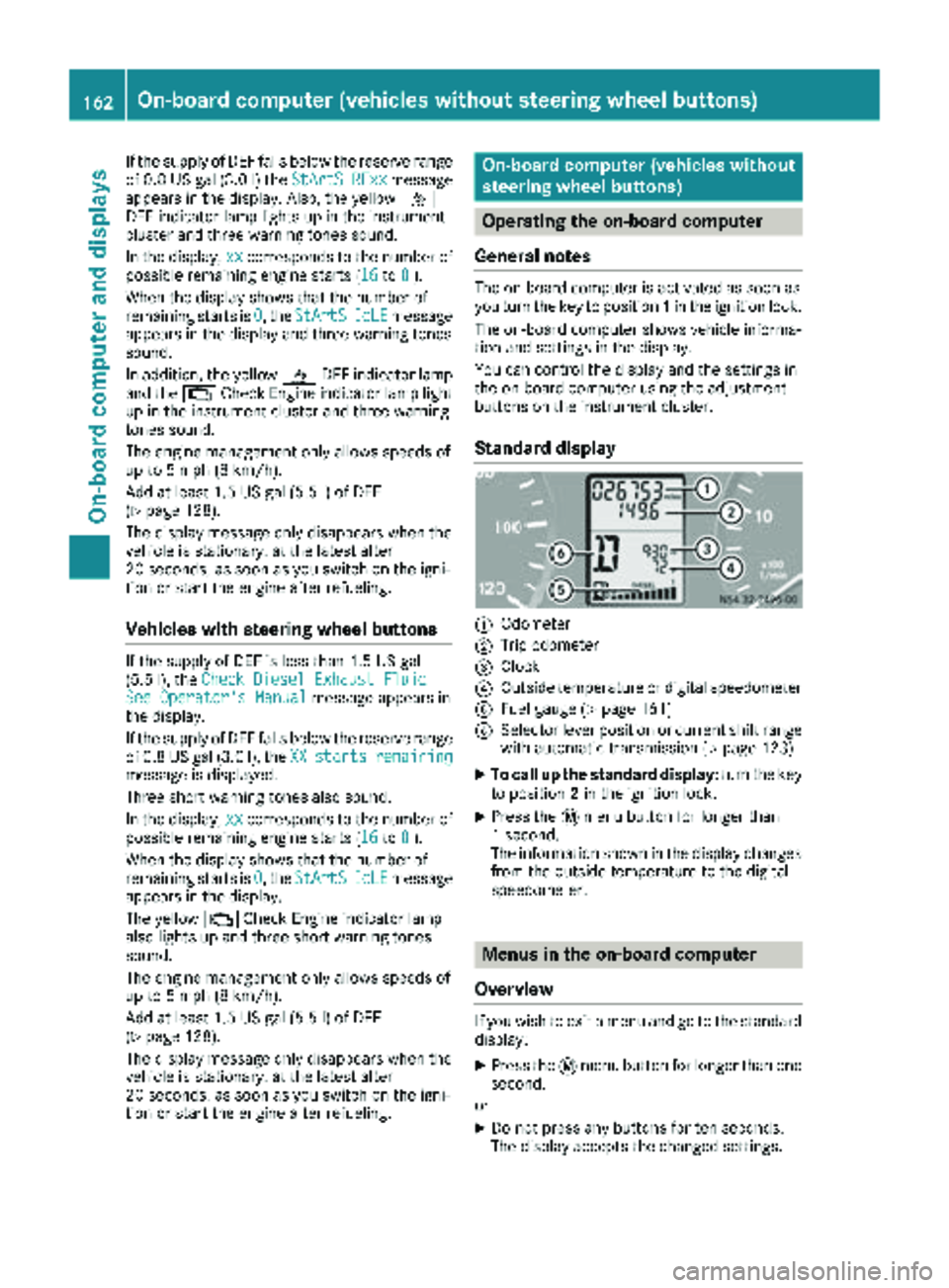
Standard display
:Odometer
;Trip odometer
=Clock
?Outside temperature or digital speedometer
AFuel gauge (Ypage 161)
BSelector lever position or current shift range
with automatic transmission (Ypage 123)
XTo call up the standard display: turn the key
to position 2in the ignition lock.
XPress the 4menu button for longer than
1 second.
The information shown in the display changes
from the outside temperature to the digital
speedometer.
Menus in the on-board computer
Overview
If you wish to exit a menu and go to the standard display:
XPress the 4menu button for longer than one
second.
or
XDo not press any buttons for ten seconds.
The display accepts the changed settings.
162On-board computer (vehicles without steering wheel buttons)
On-board computer and displays
Page 175 of 294
Trip computer menu
General notes
You can call up or reset statistical data for the
vehicle in the Trip computer menu.
iWhen you call up the trip computer again, it
displays the last function called up.
The units of the statistical information dis-
played are set permanently for each specific
country, and are therefore independent of the
units selected in the Settings
menu.
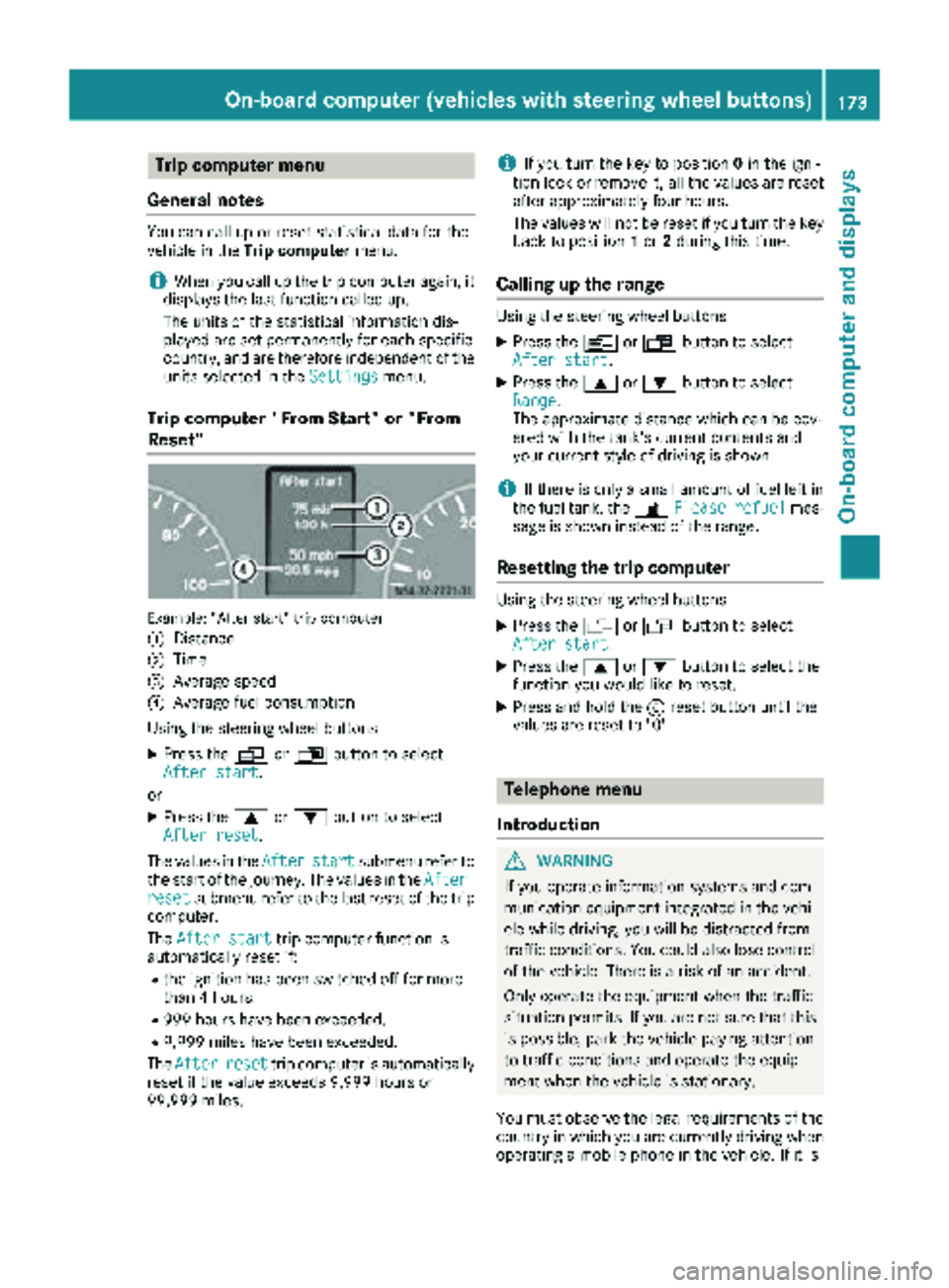
Trip computer "From Start" or "From
Reset"
Example: "After start" trip computer
:
Distance
;Time
=Average speed
?Average fuel consumption
Using the steering wheel buttons
XPress the VorU button to select
After start.
or
XPress the 9or: button to select
After reset.
The values in the After
startsubmenu refer to
the start of the journey. The values in the After
resetsubmenu refer to the last reset of the trip
computer.
The After start
trip computer function is
automatically reset if:
Rthe ignition has been switched off for more
than 4 hours.
R999 hours have been exceeded.
R9,999 miles have been exceeded.
The After
resettrip computer is automatically
reset if the value exceeds 9,999 hours or
99,999 miles.
iIf you turn the key to position 0in the igni-
tion lock or remove it, all the values are reset
after approximately four hours.
The values will not be reset if you turn the key
back to position 1or 2during this time.
Calling up the range
Using the steering wheel buttons
XPress the VorU button to select
After start.
XPress the 9or: button to select
Range.
The approximate distance which can be cov-
ered with the tank's current contents and
your current style of driving is shown.
iIf there is only a small amount of fuel left in
the fuel tank, the 7Please refuelmes-
sage is shown instead of the range.
Resetting the trip computer
Using the steering wheel buttons
XPress the VorU button to select
After start.
XPress the 9or: button to select the
function you would like to reset.
XPress and hold the 9reset button until the
values are reset to "0".
Telephone menu
Introduction
GWARNING
If you operate information systems and com-
munication equipment integrated in the vehi-
cle while driving, you will be distracted from
traffic conditions. You could also lose control
of the vehicle. There is a risk of an accident.
Only operate the equipment when the traffic
situation permits. If you are not sure that this
is possible, park the vehicle paying attention
to traffic conditions and operate the equip-
ment when the vehicle is stationary.
You must observe the legal requirements of the
country in which you are currently driving when
operating a mobile phone in the vehicle. If it is
On-board computer (vehicles withsteering whee lbu ttons)173
On-board computer and displays
Z
Page 177 of 294
When a connection is established, the name
of the other person and/or the call duration
appear in the display.
or
XTo exit the redial memory: press the~
button.
Display messages
Notes on display messages
Important safety notes
GWARNING
If the instrument display fails or is malfunc-
tioning, you may not recognize limitations in
the functions of systems relevant to safety.
The operating safety of your vehicle could be
affected. There is a risk of an accident.
Drive on carefully. Have the vehicle checked
at a qualified specialist workshop immedi-
ately.
iIf you turn the key to position 2in the igni-
tion, a display check is performed. All warning
and indicator lamps (except the turn signal
indicator lamps) and the display are activa-
ted. Before starting the journey, check that
the warning and indicator lamps are operating
correctly.
Vehicles without steering wheel but-
tons
Warnings, malfunctions or additional informa-
tion may also be shown in the display. The fol-
lowing tables show all the display messages. A
warning tone sounds with certain display mes-
sages.
Vehicles with steering wheel buttons
The on-board computer shows warnings, mal-
functions or additional information in the dis- play. A warning tone sounds with certain display
messages. Display messages of a high priority
are shown in red.
Please respond in accordance with the display
messages and follow the additional notes in this
Operator's Manual.
You can hide low-priority display messages by
pressing the
V,U,9or: button
on the steering wheel or the 9reset button.
You cannot hide display messages of the highest
priority. These messages will continue to be
shown in the display until their cause has been
eliminated.
The on-board computer stores certain display
messages in the message memory
(
Ypage 175).
Message memory
The on-board computer only records and shows
malfunctions and warnings from certain sys-
tems. Therefore, make sure that your vehicle is
safe to use. You could otherwise cause an acci-
dent by driving an unsafe vehicle.
The on-board computer stores certain display
messages. In the Message memory menu, you
can call up stored display messages.
Using the steering wheel buttons
XPress the VorU button repeatedly
until the number of stored display messages,
e.g. 2 messages
, appears in the display.
If no malfunctions have occurred, the No
messagesmessage appears.
XScroll through the stored display messages
with the9or: button.
XTo exit the message memory menu: press
the V orU button.
When you switch off the ignition, all display mes-
sages are deleted from the message memory.
You can only remove the key when it is in the
basic position.
Display messages175
On-board computer and displays
Z
Page 179 of 294
Diesel Exhaust Fluid(DEF)
Vehicles wit hpassenger vehicle approva l
Display messagesPossible causes/consequences an dMSolutions
dEF ChkIn addition ,th eyello wå DEFindicator lamp lights up in th einstru-
men tcluster and awarnin gtone sounds.
The DE Fsupply has dropped belo w1.5US gal (5.5l).
XAdd DEF supply (Ypage 128).
The å DEF indicator lamp only disappears when the vehicle is
stationary, at the latest after 20 secondsa s soon as you switch on
the ignition or start the engine after refueling.
In addition, the yellow ;Check Engine indicator lamp and the yel-
low å DEF indicator lamp light up in the instrument cluster and a
warning tone sounds.
The DEF reducing agent is contaminated, diluted or is not compliant
with ISO 22241.
XHave the DEF tank cleaned and refilled at a qualified specialist
workshop as soon as possible.
StArtS RExxIn addition, the yellow åDEF indicator lamp lights up and a warning
tone sequence sounds.
The DEF supply has dropped below the 0.8 US gal (3.0 l) reserve mark.
After the message appears for the first time, the remaining DEF supply
will last for approximately 1200 miles (1900 km). The engine can then
only be started another 16 times.
The number of remaining engine starts XX
(16to1) is shown in the
message every time the engine is started.
XAdd at least 1.5 US gal (5.5 l) of DEF (Ypage 128).
The å DEF indicator lamp only disappears when the vehicle is
stationary, at the latest after 20 seconds as soon as you switch on the ignition or start the engine after refueling.
In addition, the yellow ;Check Engine indicator lamp and the yel-
low å DEF indicator lamp light up in the instrument cluster and
three short warning tones sound.
The DEF reducing agent is contaminated, diluted or is not compliant
with ISO 22241.
The exhaust gas aftertreatment is malfunctioning or an emission rel-
evant malfunction has occurred. This malfunction or defect can dam- age the exhaust gas aftertreatment.
XVisit a qualified specialist workshop immediately.
Display messages177
On-board computer and displays
Z
Page 180 of 294
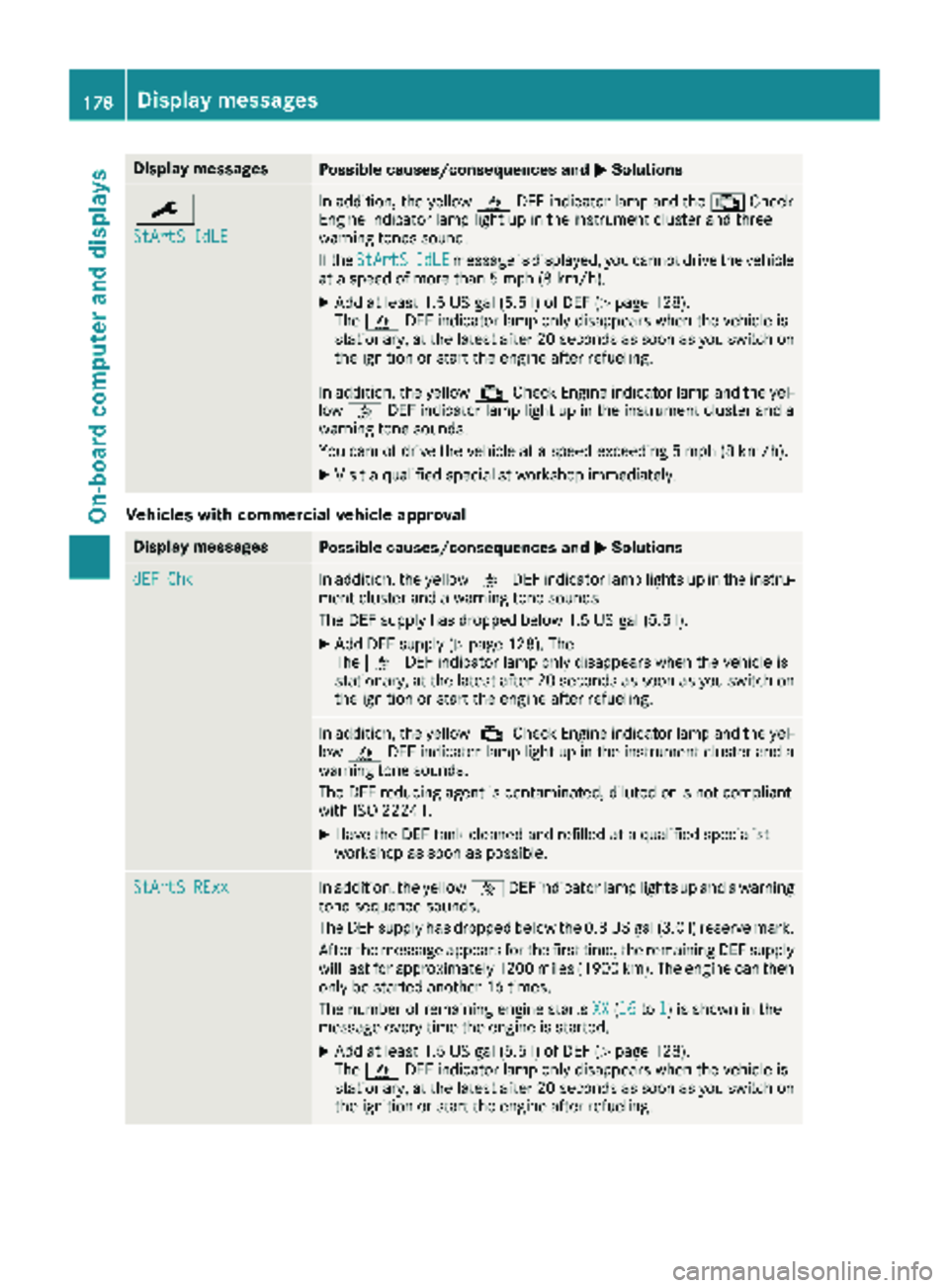
Display messagesPossible causes/consequences andMSolutions
¯
StArtS IdLE
In addition,th eyellow åDEFindicator lamp and th e; Check
Engin eindicator lamp ligh tup in th einstrumen tcluste rand three
warning tone ssound.
If th eStArtS
IdL Emessage is displayed, you canno tdrive th evehicl e
at aspeed of mor ethan 5mph (8 km/ h).
XAdd at least 1.5 US gal (5.5 l) of DEF (Ypage 128).
The å DEF indicator lamp only disappears when the vehicle is
stationary, at the latest after 20 secondsa s soon as you switch on
the ignition or start the engine after refueling.
In addition, the yellow ;Check Engine indicator lamp and the yel-
low å DEF indicator lamp light up in the instrument cluster and a
warning tone sounds.
You cannot drive the vehicle at a speed exceeding 5 mph (8 km/h).
XVisit a qualified specialist workshop immediately.
Vehicles with commercial vehicle approval
Display messagesPossible causes/consequences and MSolutions
dEF ChkIn addition, the yellowåDEF indicator lamp lights up in the instru-
ment cluster and a warning tone sounds.
The DEF supply has dropped below 1.5 US gal (5.5 l).
XAdd DEF supply (Ypage 128). The
The å DEF indicator lamp only disappears when the vehicle is
stationary, at the latest after 20 secondsa s soon as you switch on
the ignition or start the engine after refueling.
In addition, the yellow ;Check Engine indicator lamp and the yel-
low å DEF indicator lamp light up in the instrument cluster and a
warning tone sounds.
The DEF reducing agent is contaminated, diluted or is not compliant
with ISO 22241.
XHave the DEF tank cleaned and refilled at a qualified specialist
workshop as soon as possible.
StArtS RExxIn addition, the yellow åDEF indicator lamp lights up and a warning
tone sequence sounds.
The DEF supply has dropped below the 0.8 US gal (3.0 l) reserve mark.
After the message appears for the first time, the remaining DEF supply
will last for approximately 1200 miles (1900 km). The engine can then
only be started another 16 times.
The number of remaining engine starts XX
(16to1) is shown in the
message every time the engine is started.
XAdd at least 1.5 US gal (5.5 l) of DEF (Ypage 128).
The å DEF indicator lamp only disappears when the vehicle is
stationary, at the latest after 20 seconds as soon as you switch on the ignition or start the engine after refueling.
178Display messages
On-board computer and displays
Page 181 of 294
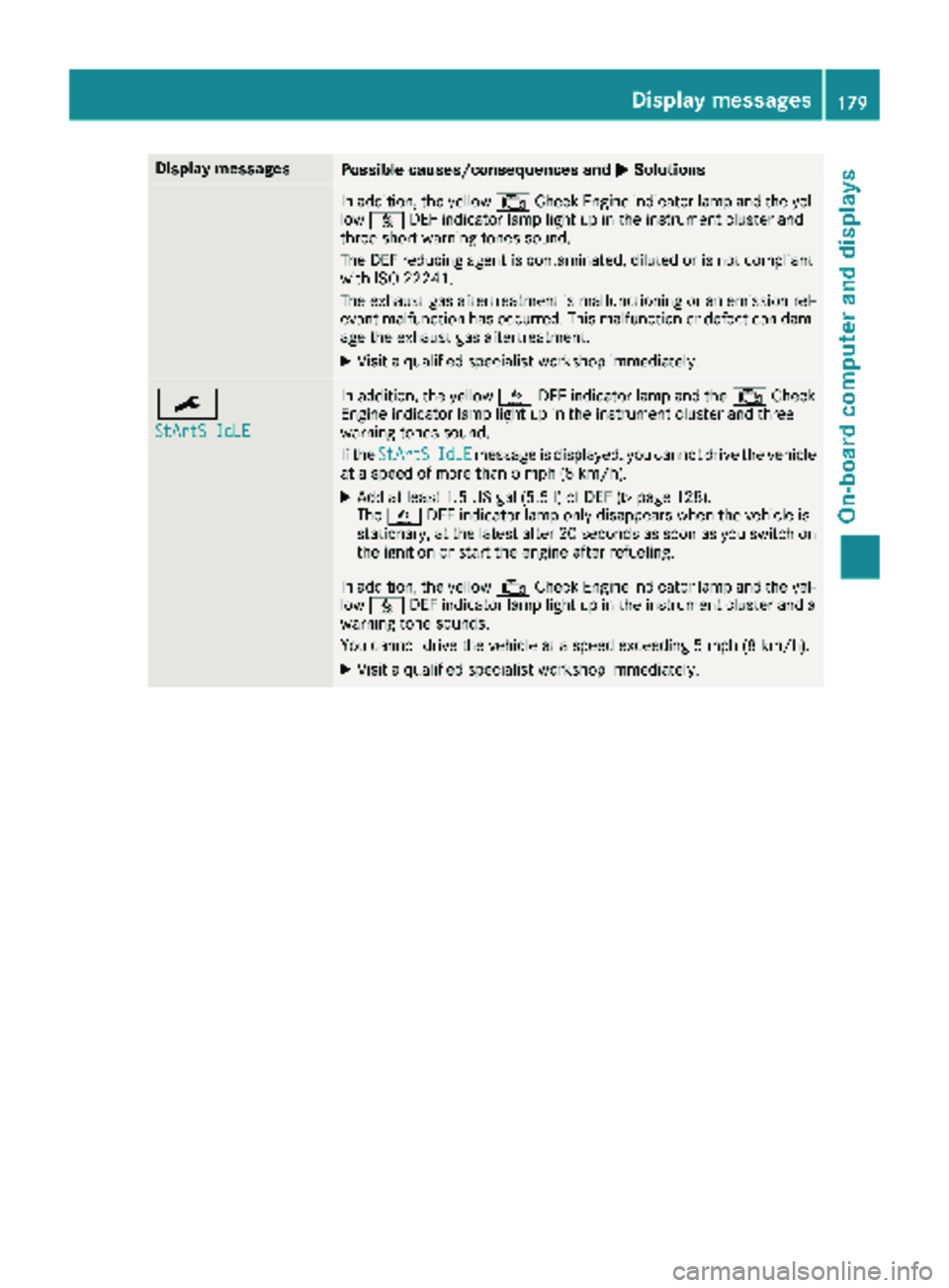
Display messagesPossible causes/consequences andMSolutions
In addition,th eyellow ;CheckEngin eindicator lamp and th eyel-
low å DEFindicator lamp ligh tup in th einstrumen tcluste rand
three short warning tone ssound.
The DE Freducin gagen tis contaminated, diluted or is no tcomplian t
wit hIS O 2224 1.
The exhaust gas aftertreatment is malfunctioning or an emission rel-
evant malfunction has occurred. This malfunction or defect can dam- age the exhaust gas aftertreatment.
XVisit a qualified specialist workshop immediately.
¯
StArtS IdLE
In addition, the yellow åDEF indicator lamp and the ;Check
Engine indicator lamp light up in the instrument cluster and three
warning tones sound.
If the StArtS
IdLEmessage is displayed, you cannot drive the vehicle
at a speed of more than 5 mph (8 km/h).
XAdd at least 1.5 US gal (5.5 l) of DEF (Ypage 128).
The å DEF indicator lamp only disappears when the vehicle is
stationary, at the latest after 20 seconds as soon as you switch on the ignition or start the engine after refueling.
In addition, the yellow ;Check Engine indicator lamp and the yel-
low å DEF indicator lamp light up in the instrument cluster and a
warning tone sounds.
You cannot drive the vehicle at a speed exceeding 5 mph (8 km/h).
XVisit a qualified specialist workshop immediately.
Display messages179
On-board computer and displays
Z
Page 183 of 294
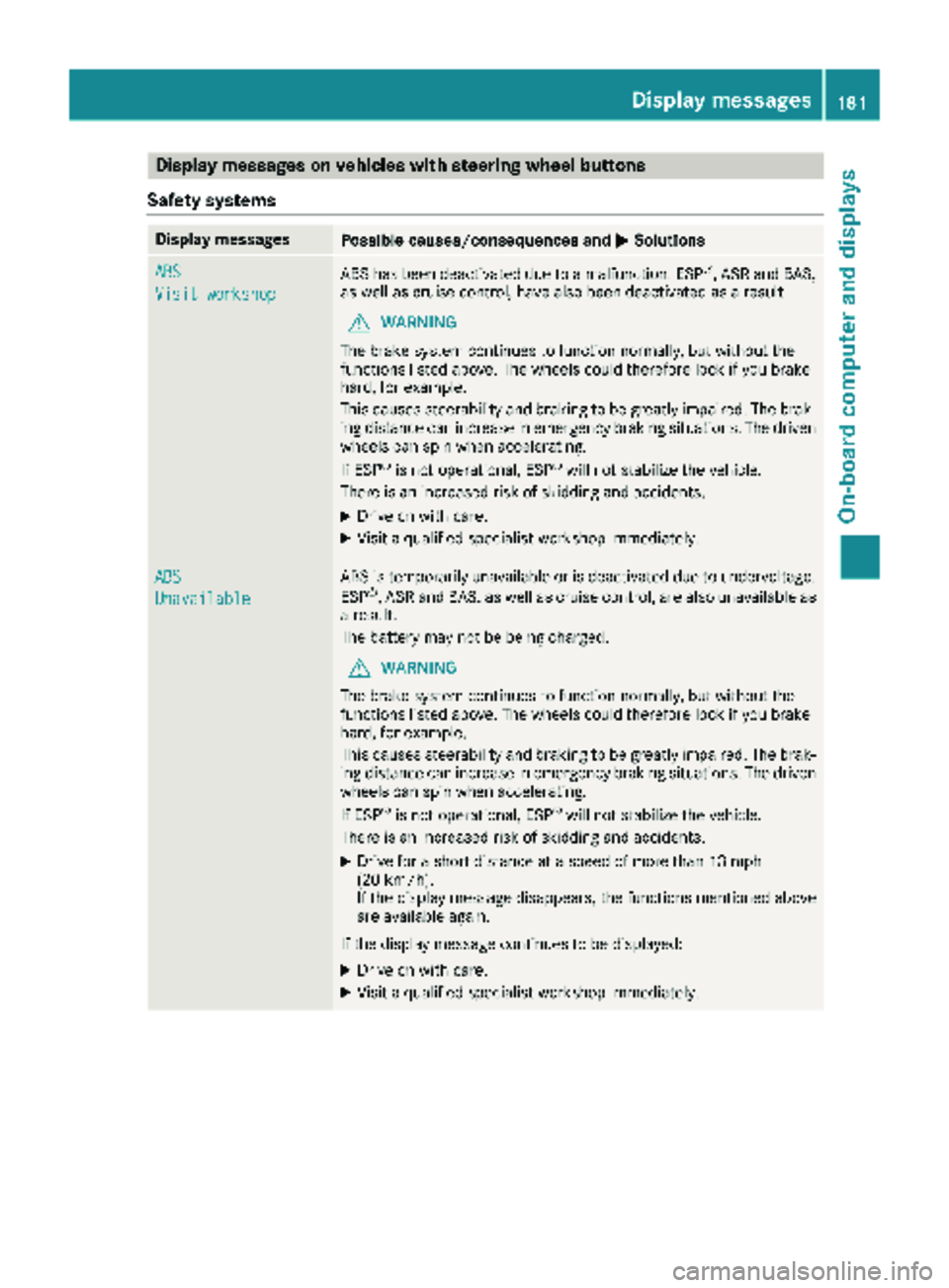
Display messages on vehicles withsteering wheel buttons
Safet ysystems
Display messagesPossible causes/consequences an dMSolutions
ABS
Visit workshop
AB Shas bee ndeactivated due to amalfunction .ES P®,AS Rand BAS,
as well as cruise control, hav ealso bee ndeactivated as aresult .
GWARNING
The brake syste mcontinues to function normally, but without th e
function slisted above. The wheels could therefore loc kif you brake
hard, fo rexample.
Thi scauses steerability and braking to be greatly impaired. The brak-
in gdistanc ecan increase in emergency braking situations. The driven
wheels can spi nwhen accelerating.
If ES P
®is no toperational, ES P®will notstabilize th evehicle.
There is an increase dris kof skidding and accidents .
XDrive on withcare.
XVisit aqualified specialis tworkshop immediately.
ABS
Unavailable
AB Sis temporarily unavailable or is deactivated due to undervoltage.
ES P®,AS Rand BAS, as well as cruise control, are also unavailable as
a result .
The battery may no tbe bein gcharged.
GWARNING
The brake syste mcontinues to function normally, but without th e
function slisted above. The wheels could therefore loc kif you brake
hard, fo rexample.
Thi scauses steerability and braking to be greatly impaired. The brak-
in gdistanc ecan increase in emergency braking situations. The driven
wheels can spi nwhen accelerating.
If ES P
®is no toperational, ES P®will notstabilize th evehicle.
There is an increase dris kof skidding and accidents .
XDrive for ashort distanc eat aspeed of more than 13 mph
(20 km/h).
If th edisplay messag edisappears ,th efunction smentioned abov e
are available again .
If th edisplay messag econtinues to be displayed:
XDrive on wit hcare.
XVisit aqualified specialis tworkshop immediately.
Display messages18 1
On-board computer and displays
Z
Page 184 of 294
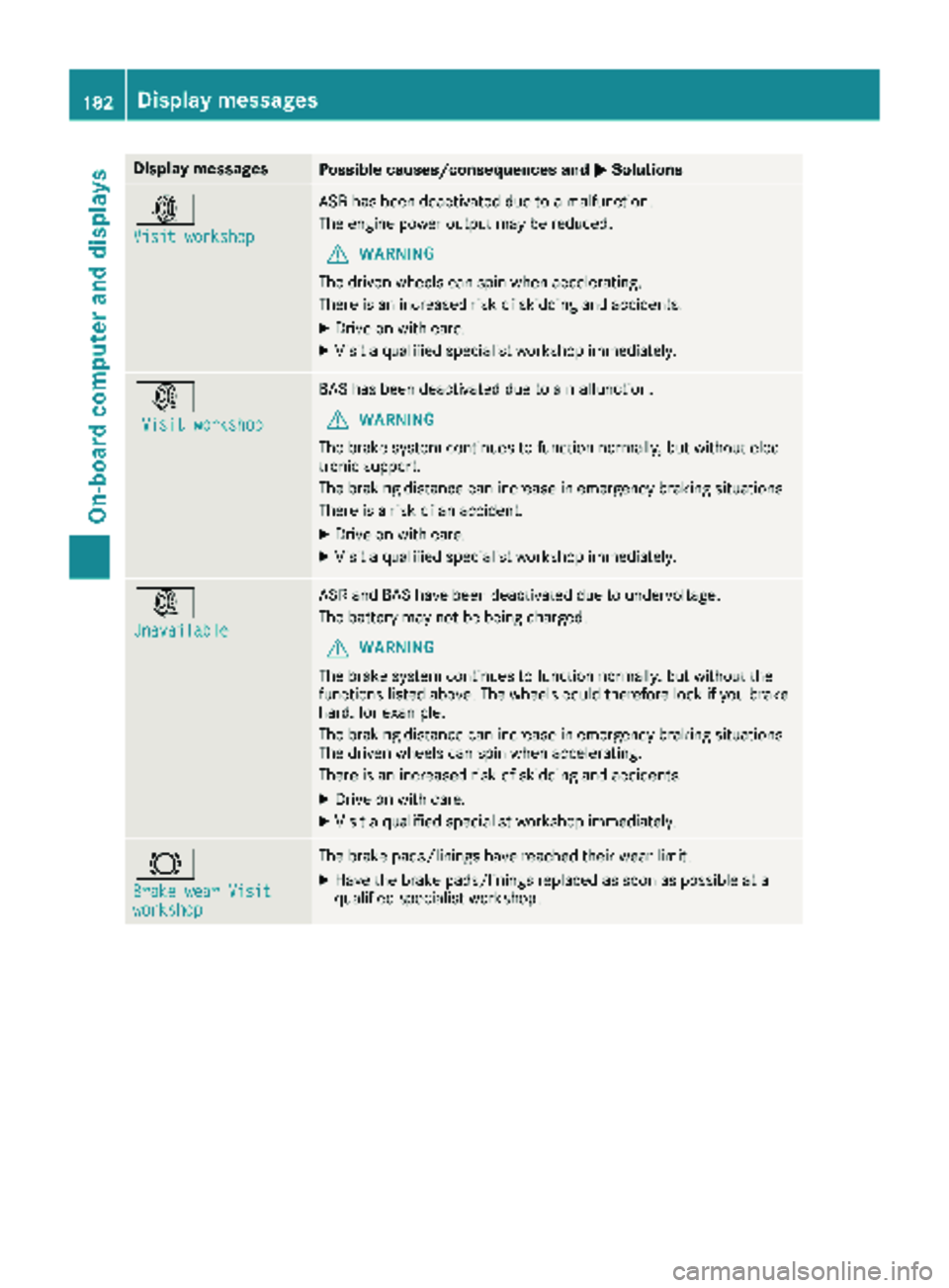
Display messagesPossible causes/consequences andMSolutions
:
Visit workshop
ASRhas been deactivated due to amalfunction .
The engin epowe routput may be reduced.
GWARNIN G
The driven wheels can spin when accelerating .
There is an increased ris kof skiddin gand accidents .
XDrive on withcare.
XVisit aqualified specialist workshop immediately.
:
Visit workshop
BA Shas been deactivated due to amalfunction .
GWARNING
The brak esystem continues to function normally, but without elec -
tronic support .
The braking distanc ecan increas ein emergenc ybraking situations.
There is aris kof an accident.
XDrive on wit hcare.
XVisit aqualified specialist workshop immediately.
:
Unavailable
AS Rand BA Shav ebeen deactivated due to undervoltage.
The battery may no tbe bein gcharged.
GWARNIN G
The brak esystem continues to function normally, but without th e
function slisted above. The wheels could therefor eloc kif you brak e
hard, for example.
The braking distanc ecan increas ein emergenc ybraking situations.
The driven wheels can spin when accelerating .
There is an increased ris kof skiddin gand accidents .
XDrive on withcare.
XVisit aqualified specialist workshop immediately.
#
Brake wea rVisitworkshop
The brak epads/linings hav ereached their wear limit.
XHav eth ebrak epads/linings replace das soo nas possibl eat a
qualified specialist workshop .
182Display messages
On-board computer and displays
Page 185 of 294
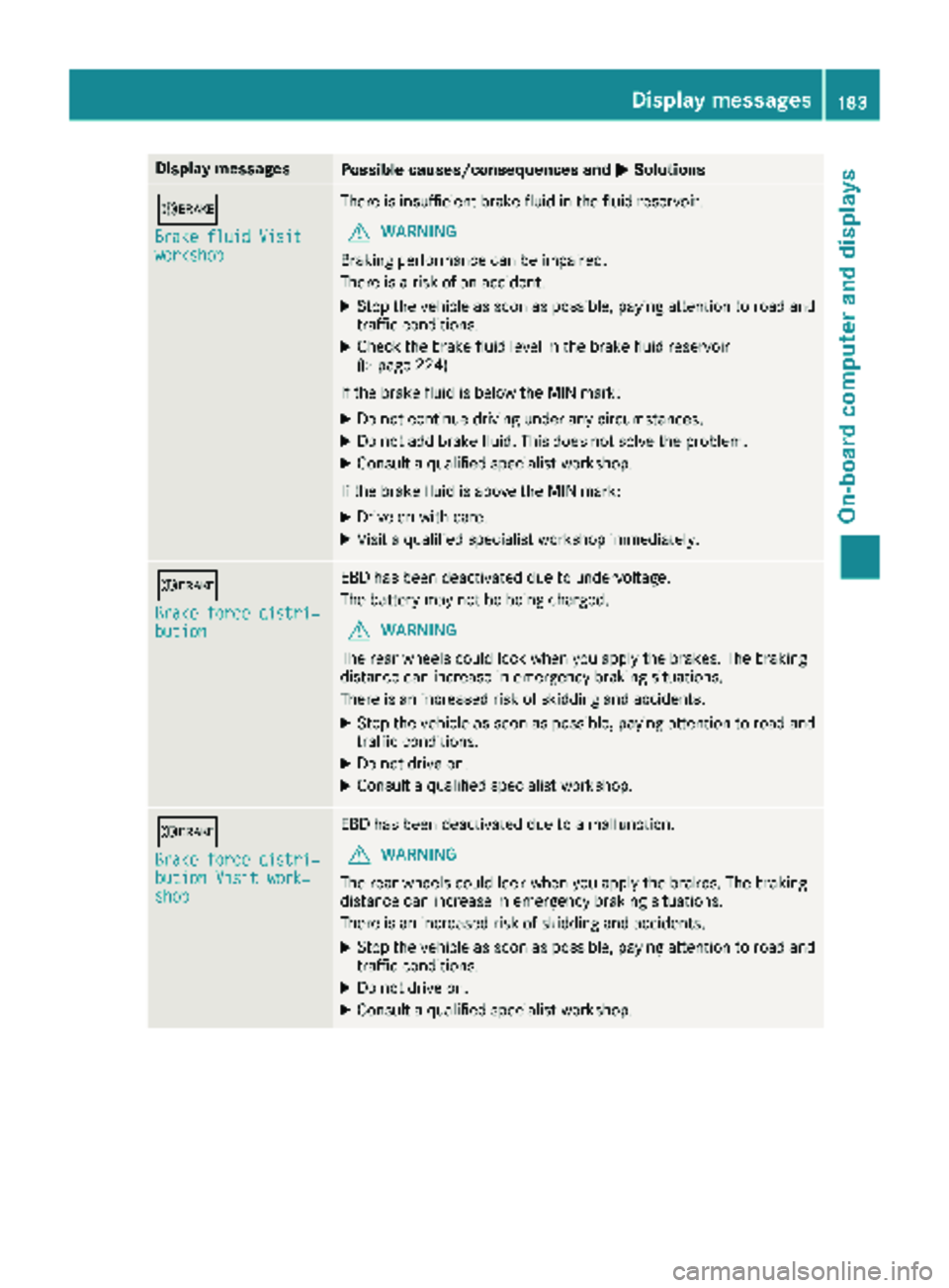
Display messagesPossible causes/consequences andMSolutions
b
Brake fluid Visitworkshop
There is insufficientbrak efluid in th efluid reservoir .
GWARNING
Braking performance can be impaired.
There is aris kof an accident.
XStop th evehicl eas soo nas possible, payin gattention to roa dand
traffic conditions.
XChec kth ebrak efluid level in th ebrak efluid reservoir
(Ypage 224).
If th ebrak eflui dis belo wtheMIN mark:
XDo no tcontinu edrivin gunder any circumstances.
XDo no tadd brak efluid .This does no tsolv eth eproblem .
XConsult aqualified specialist workshop .
If th ebrak eflui dis abov eth eMIN mark:
XDrive on wit hcare.
XVisit aqualified specialist workshop immediately.
b
Brake force distri ‐bution
EBDhas been deactivated due to undervoltage.
The battery may no tbe bein gcharged.
GWARNIN G
The rear wheels could loc kwhen you apply th ebrakes. The braking
distanc ecan increas ein emergenc ybraking situations.
There is an increased ris kof skiddin gand accidents .
XStop thevehicl eas soo nas possible, payin gattention to roa dand
traffic conditions.
XDo no tdrive on .
XConsult aqualified specialist workshop .
b
Brake force distri‐bution Visit work‐shop
EBDhas been deactivated due to amalfunction .
GWARNING
The rear wheels could loc kwhen you apply th ebrakes. The braking
distanc ecan increas ein emergenc ybraking situations.
There is an increased ris kof skiddin gand accidents .
XStop thevehicl eas soo nas possible, payin gattention to roa dand
traffic conditions.
XDo no tdrive on .
XConsult aqualified specialist workshop .
Display messages183
On-board computer and displays
Z
Page 186 of 294
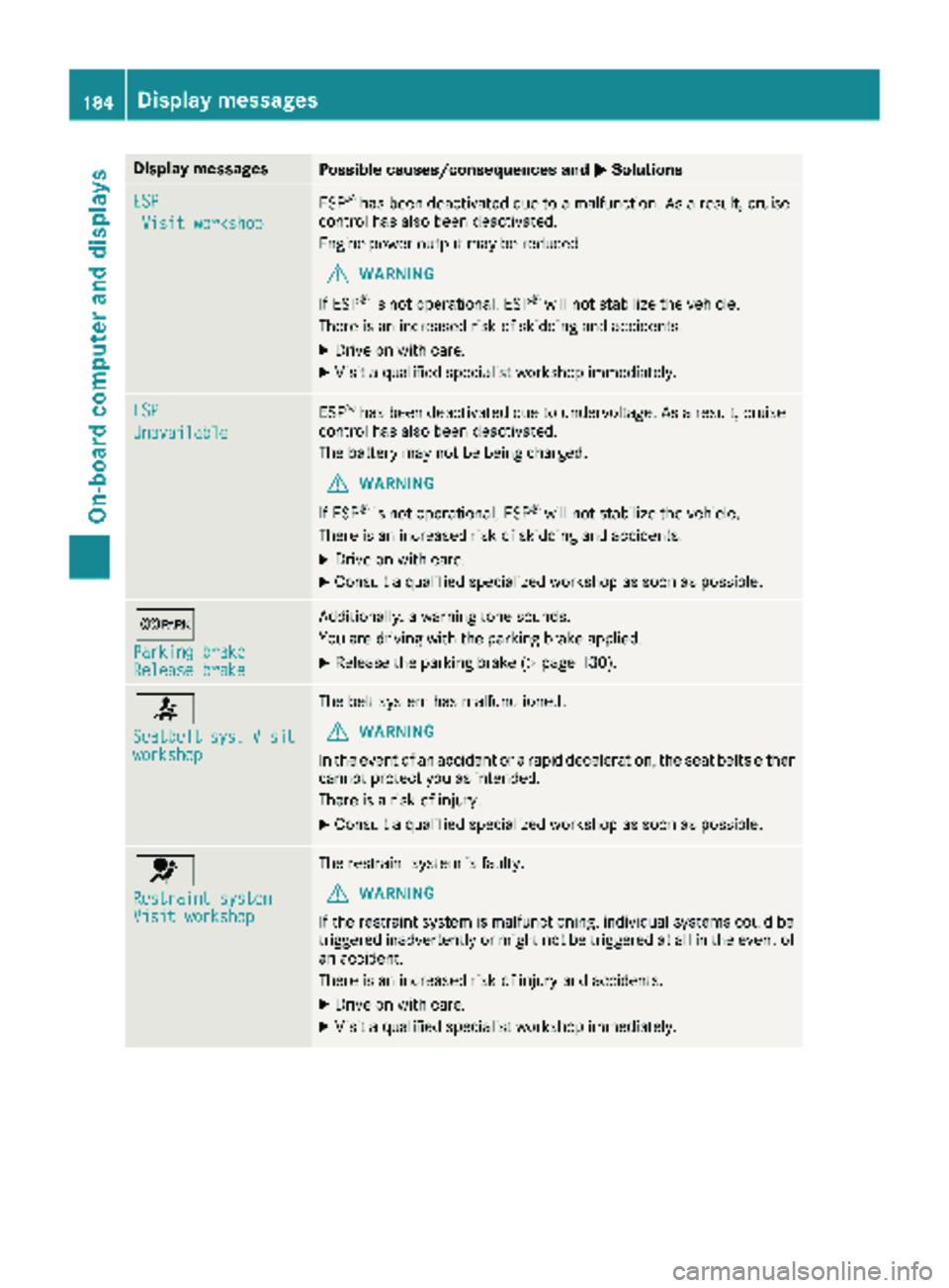
Display messagesPossible causes/consequences andMSolutions
ESP
Visit workshop
ESP®has been deactivated due to amalfunction .As aresult ,cruise
control has also been deactivated.
Engin epowe routput may be reduced.
GWARNIN G
If ES P
®is no toperational, ES P®will notstabiliz eth evehicle.
There is an increased ris kof skiddin gand accidents .
XDrive on withcare.
XVisit aqualified specialist workshop immediately.
ESP
Unavailable
ES P®has been deactivated due to undervoltage. As aresult ,cruise
control has also been deactivated.
The battery may no tbe bein gcharged.
GWARNIN G
If ES P
®is no toperational, ES P®will notstabiliz eth evehicle.
There is an increased ris kof skiddin gand accidents .
XDrive on withcare.
XConsult aqualified specialized workshop as soo nas possible.
c
Parkin gbrakeReleas ebrake
Additionally, awarning tone sounds.
You are drivin gwit hth eparking brak eapplied.
XReleas eth eparking brak e (Ypage 130).
7
Seatbeltsys.Visitworkshop
The belt system has malfunctioned.
GWARNIN G
In th eevent of an acciden tor arapi ddeceleration ,th eseat belt seither
canno tprotect you as intended.
There is aris kof injury.
XConsult aqualified specialized workshop as soo nas possible.
6
Restraint systemVisit workshop
The restrain tsystem is faulty.
GWARNIN G
If th erestrain tsystem is malfunctioning ,individual systems could be
triggered inadvertentl yor might no tbe triggered at all in th eevent of
an accident.
There is an increased ris kof injury and accidents .
XDrive on withcare.
XVisit aqualified specialist workshop immediately.
184Display messages
On-board computer and displays