light MERCEDES-BENZ SPRINTER 2018 MY18 Operator’s Manual
[x] Cancel search | Manufacturer: MERCEDES-BENZ, Model Year: 2018, Model line: SPRINTER, Model: MERCEDES-BENZ SPRINTER 2018Pages: 294, PDF Size: 4.36 MB
Page 18 of 294
Windshield wiper .............................. 96
Range (vehicles with steering
wheel buttons) ..................................1 73
Rear bench seat
Installing/removing (Passenger
Van) ................................................. 77
Stowage compartment (crewcab) .. 208
Rear compartment
Activating/deactivating climate
control ...........................................1 02
Setting the air vents ......................1 07
Rear door
Child-proof locks .............................. 54
Important safety notes .................... 69
Opening/closing from inside ........... 71
Opening/closing from the out-
side ..................................................7 0
Rear fog lamp
Replacing bulbs ............................... 92
Switching on/off .............................. 83
Rear fog lamp (Chassis Cab)
Replacing bulbs ............................... 93
Rear interior light
Replacing bulbs ............................... 95
Rear view camera
Cleaning instructions ..................... 237
Important safety notes .................. 153
Switching on .................................. 153
Rear window defroster
Problem (malfunction) ................... 105
Switching on/off ........................... 105
Rear window wiper
Switching on/off .............................. 97
Rear-compartment air-condition-
ing system
see Climate control
Rear-compartment heating
see Climate control
Rear-view mirror
Anti-glare mode ............................... 80
Refilling
DEF filler neck ............................... 128
Important safety notes (Diesel
Exhaust Fluid – DEF) ...................... 128
Refilling procedure (Diesel
Exhaust Fluid – DEF) ...................... 128
Refrigerant ......................................... 286 Refueling
Fuel filler flap ................................. 127
Important safety notes (fuel) ......... 126
Refueling procedure (fuel) ............. 127
see Fuel
Releasing the parking lock man-
ually (automatic transmission) ........ 126
Remote contro l
C
hanging the operating duration
(auxiliary heating) .......................... 111
Replacing the battery (auxiliary
heating ) ........................................ 112
Switching on/off (auxiliary heat-
ing) ................................................ 111
Synchronizing (auxiliary heating) ... 111
Replacing bulbs
Important safety notes .................... 89
Replacing the battery (auxiliary
heating remote control) .................... 112
Replacing the fuel filter .................... 203
Reporting safety defects .................... 28
Rescue card ......................................... 30
Reserve fuel
Display message ............................ 190
Restraint system
Display message ............................ 184
Introduction ..................................... 41
Warning lamp ................................. 199
Warning lamp (function) ................... 41
Reverse warning feature .................. 121
Roadside Assistance (breakdown) .... 24
Roof carrier
Maximum payload .......................... 287
Notes ............................................. 217
Roof load (roof carrier) ..................... 287
S
Safety
Children in the vehicle ..................... 49
Operating safety .............................. 26
see Occupant safety
Safety system
see Driving safety systems
Seat belts
Adjusting the height ......................... 44
Cleaning ......................................... 239
Correct usage .................................. 43
16Index
Page 20 of 294
Removing/mounting ...................... 274
Specia lsea tbelt retractor .................. 49
Specialist worksho p............................ 27
Speed ,controlling
see Cruis econtrol
Speedomete r
Digital (vehicles wit hsteerin g
whee lbuttons ).............................. .169
Digital (vehicles without steering
wheel buttons) ............................... 162
Selecting display unit (vehicles
with steering- wheel buttons) ........1 68
Sprinter dealer
see Qualified specialist workshop
Standing lamps
Replacing bulbs (rear) ......................9 2
Standing lamps (Chassis Cab)
Replacing bulbs (rear) ......................9 3
Start-off assist
Display message ............................1 82
Starting (engine) ................................ 120
Station
see Radio
Steering wheel
Adjusting ......................................... 79
Button overview ............................... 37
Cleaning ......................................... 239
Step
see Electrical step
Stickers
General safety notes ........................ 25
Stowage spaces
see Stowage spaces and stowage
compartments
Stowage spaces and stowage com-
partments
Eyeglasses compartment ...............2 06
Glove box ....................................... 205
Important safety notes .................. 205
Paper holder .................................. 208
Stowage compartment above the
windshield ..................................... 207
Stowage compartment in the cen-
ter console ..................................... 207
Stowage compartment in the
dashboard ...................................... 206
Stowage space above the head-
liner ............................................... 207 Stowage spa
ce under the rear
bench seat ..................................... 208
Stowage space under the twin co-
driver's seat ................................... 207
Summer tires ..................................... 250
Switch unit
see Control panel
Switching off the alarm (ATA) ............ 58
Switching the heater booster func-
tion on/off ......................................... 112
Switching the surround lighting
on/off (on-board computer) ............. 171
Swivel seat ........................................... 75
T
Tachometer ........................................ 161
Tail lamps
Replacing bulbs ............................... 92
Tail lamps (Chassis Cab)
Replacing bulbs ............................... 93
Tank content
Fuel gauge ..................................... 161
Range (vehicles with steering
wheel buttons) ............................... 173
Reserve fuel warning lamp ............. 201
Technical data
Capacities ...................................... 278
Cargo tie-down points .................... 287
Cargo tie-down rings ...................... 287
Loading rails .................................. 287
Roof carrier .................................... 287
Tires/wheels ................................. 273
Trailer tow hitch ............................. 288
Vehicle data ................................... 286
Telephone (on-board computer)
Accepting an incoming call ............ 174
Display messages .......................... 194
Numbers from the phone book ...... 174
Operating ....................................... 173
Redialing ........................................ 174
Rejecting or ending a call .............. 174
Temperature
Outside temperature ...................... 161
Setting (climate control) ................ 103
Setting the unit (vehicles with
steering wheel buttons) ................. 168
18Index
Page 24 of 294
WheelsChanging a wheel .......................... 267
Checking ........................................ 249
Cleaning ......................................... 236
Important safety notes .................. 248
Installing the adapter (spare
wheel) ............................................ 270
Interchanging/changing ................ 267
Mounting a wheel .......................... 268
Removing a wheel .......................... 270
Removing and mounting the spare
wheel ............................................. 274
Snow chains .................................. 251
Storing ...........................................2 67
Tightening torque ........................... 272
Wheel/tire combinations ...............2 73
Window curtain air bag ....................... 47
Windows
see Side windows
Windshield
Cleaning ......................................... 236
Defrosting ...................................... 104
Windshield heating
Problem (malfunction) ................... 105
Switching on/off ........................... 105
Windshield washer fluid
Adding ...........................................2 25
Indicator lamp ................................ 203
Windshield wipers
Problem (malfunction) ..................... 98
Rain and light sensor ....................... 96
Rear window wiper .......................... 97
Replacing the wiper blades .............. 97
Setting the sensitivity (vehicles
with steering wheel buttons and
rain/light sensor) ........................... 171
Switching on/off .............................. 96
Wiping with windshield washer
fluid ................................................. 96
Winter diesel ..................................... 279
Winter driving
Slippery road surfaces ................... 136
Snow chains .................................. 251
Winter operation
General notes ................................ 250
Radiator cover ................................. 29
Winter tires
M+S tires ....................................... 250 Setting a limit spee
d ......................1
33
Wi
per blades
Cleaning ......................................... 236
Replacing ......................................... 97
Workshop
see Qualified specialist workshop
22Index
Page 32 of 294
The operating safety of the vehicle could be
jeopardized if you use parts, tires and wheels as
well as accessories relevant to safety which
have not been approved by Mercedes-Benz. This
could lead to malfunctions in safety-relevant
systems, e.g. the brake system. Only use genu-
ine Mercedes-Benz parts or parts of equal qual-ity. Only use tires, wheels and accessories that
have been specifically approved for your vehi-
cle.
We test genuine Sprinter parts, as well as con-
version parts and accessories that have been
specifically approved for the type of vehicle, for:
RReliability
RSafety
RSuitability
Despite ongoing market research, Mercedes-
Benz is unable to assess other parts. Therefore,
we accept no responsibility for the use of such
parts in Sprinter vehicles, even if they have been
officially approved or independently approved
by a testing center.
In some countries, certain parts are only offi-
cially approved for installation or modification if
they comply with legal requirements. All genu-
ine Sprinter parts satisfy these requirements.
Make sure that all parts are suitable for your
vehicle.
Always specify the vehicle identification number
(VIN) and engine number when ordering genuine Sprinter parts (
Ypage 276).
QR code for rescue card
The QR Code stickers are affixed to the B-pillar
on the driver's and front-passenger side.
In the event of an accident the rescue services
use the QR Code to quickly find the rescue card
for your vehicle. The current rescue card con-
tains the most important information on your
vehicle, e.g. the electric cable routes, in a com-
pact form.
Further information can be found at http://
www.mercedes-benz.de/qr-code.
Data stored in the vehicle
Information from electronic control
units
There are electronic control units installed in
your vehicle. Some of these are necessary for
your vehicle to operate safely, while some offer
support during driving (driver assistance sys-
tems). In addition, your vehicle offers comfort
and entertainment functions that are also made
possible by electronic control units.
Electronic control units contain data storage
systems that can temporarily or permanently
save technical information concerning the vehi-
cle's condition, component stress and mainte-
nance requirements as well as technical events
and malfunctions.
This information generally documents the con-
dition of a component, a module, a system or the
surroundings, for example:
ROperating conditions of system components
(e.g. levels, battery status, tire pressure)
RStatus messages concerning the vehicle or its
individual components (e.g. wheel revolution
number / speed, deceleration in movement,
lateral acceleration, display showing fastened
belts)
RMalfunctions and defects in key system com-
ponents (e.g. lights, brakes)
RInformation about events leading to vehicle
damage
RSystem responses in special driving situa-
tions (e.g. air bag deployment, intervention of
stability control systems)
RAmbient conditions (e.g. temperature, rain
sensor)
In addition to performing the actual control unit function, these data are used by manufacturers
to detect and rectify malfunctions and to opti-
mize vehicle functions. Most of these data are
volatile and processed only in the vehicle itself.
Only a small part of the data is stored in event or
malfunction memories.
When you use services, the technical data from
the vehicle can be read out by service network
employees or third parties. Service activities
include repairs, maintenance, warranty claims
and quality assurance measures. The data are
read out via the connection for OBD (on-board
diagnostics) in the vehicle, which is required by
law. The relevant offices in the service network
or third parties collect, process and use the
30Introduction
Page 33 of 294
data. These data document the vehicle's tech-
nical states, are used to help in finding malfunc-
tions and improving quality and are sent to the
manufacturer where necessary. In addition, the
manufacturer is subject to product liability. The
manufacturer needs technical data from vehi-
cles for this purpose.
Malfunction memories in the vehicle can be
reset by a service center during repair or service
work.
You can incorporate data into the vehicle's com-
fort and infotainment functions yourself as part
of the selected equipment.
These include:
RMultimedia data such as music, films or pho-
tos for playback in an integrated multimedia
system
RAddress book data for use in conjunction with
an integrated hands-free system or an inte-
grated navigation system
RNavigation destinations that have been
entered
RData about using Internet services
These data can be saved locally in the vehicle or are located on a device that you have connected
to the vehicle. If these data are saved in the
vehicle, you can delete them at any time. These data are sent to third parties only at your
request, particularly when you use online serv-
ices in accordance with the settings that you
have selected.
You can save and change comfort settings/
customizations in the vehicle at any time.
Depending on the equipment, these settings
include:
RSeat and steering wheel position settings
RSuspension and climate control settings
RCustom settings such as interior lighting
If your vehicle is equipped appropriately, you
can connect your smartphone or another mobile terminal to the vehicle. You can control this by
means of the control elements integrated in the
vehicle. The smartphone's picture and sound
can be output via the multimedia system. Spe-
cific items of information are also sent to your
smartphone.
Depending on the type of integration, such infor-
mation includes:
RGeneral vehicle information
RPosition data This allows you to use selected apps on your
smartphon
e, such as navigation or music play-
back. There is no additional interaction between
the smartphone and the vehicle, particularly
active access to vehicle data. The type of addi-
tional data processing is determined by the pro- vider of the app being used. Whether you can
configure settings for it and, if so, which ones,
depends on the app and your smartphone's
operating system.
Service provider
Wireless network connection
If your vehicle has a wireless network connec-
tion, it enables data to be exchanged between
your vehicle and other systems. The wireless
network connection is enabled by either an in-
vehicle transmitter and receiver or your own
mobile end device (e.g. smartphone). Online
functions can be used via this wireless connec-
tion. These include online services and applica-
tions/apps provided by the manufacturer or
other providers.
Manufacturer's own services
In the case of the manufacturer's online serv-
ices, the manufacturer describes the functions
in a suitable place and the associated informa-
tion subject to data protection legislation. Per-
sonal data can be used in the provision of online
services. Data are exchanged via a secure con-
nection (e.g. using the IT system specially pro-
vided for this purpose by the manufacturer).
Collecting, processing and using personal data
beyond the provision of services is permitted
only on the basis of a statutory permit or decla-
ration of consent.
You can usually activate and deactivate the serv-
ices and functions (some of which are subject to
charge). In many cases, this also applies to the
vehicle's entire data connection. However, this
does not apply in particular to legally prescribed
functions and services such as the "eCall" emer-
gency call system.
Services from third parties
If it is possible to use online services from other
providers, these services are the responsibility
of the provider in question and subject to that
provider's data protection conditions and terms
Introduction31
Z
Page 35 of 294
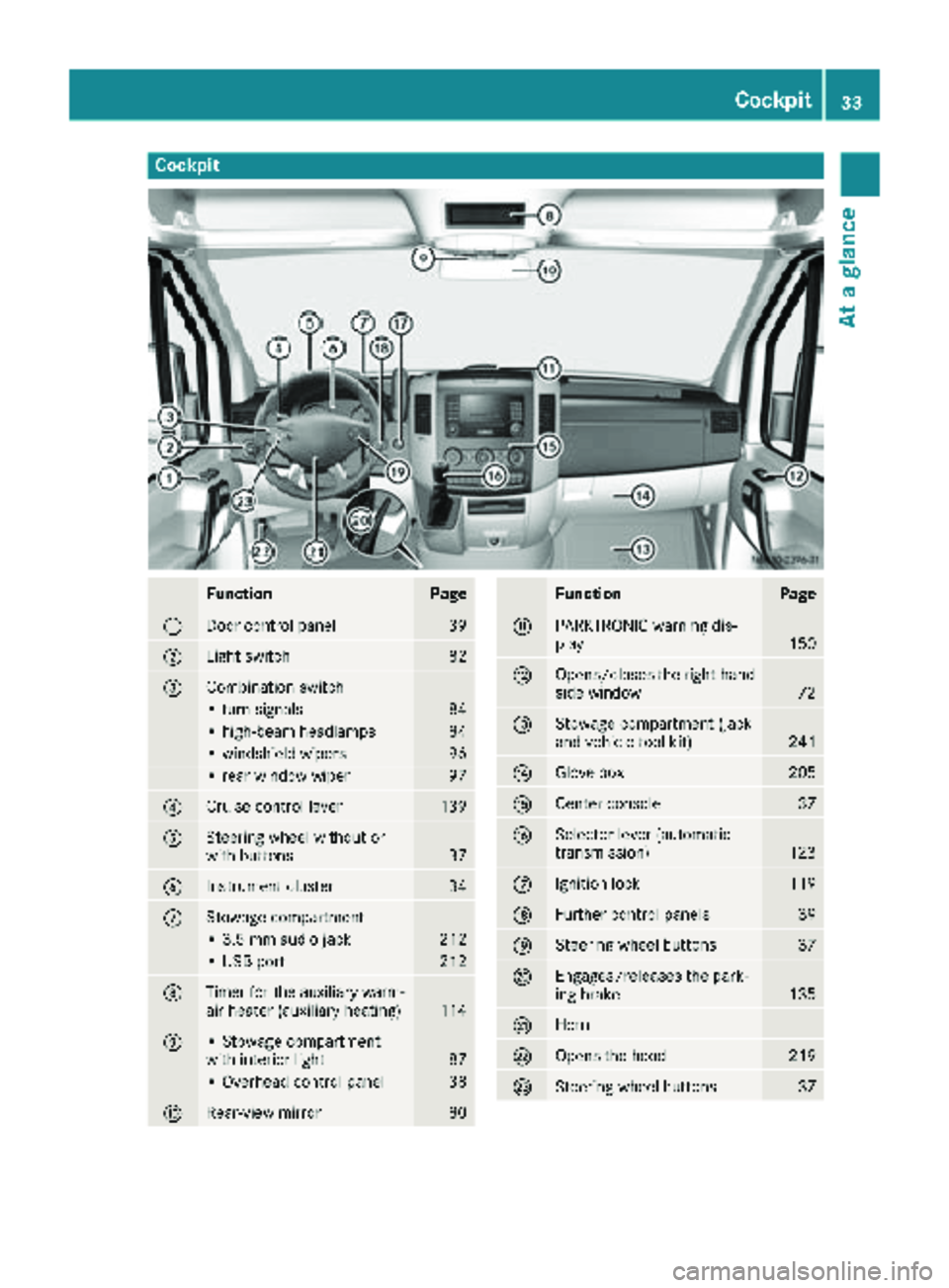
Cockpit
FunctionPage
:Door control panel39
;Light switch82
=Combination switch
• turn signals84
• high-beam headlamps84
• windshield wipers96
• rear window wiper97
?Cruise control lever139
ASteering wheel without or
with buttons37
BInstrument cluster34
CStowage compartment
• 3.5 mm audio jack212
• USB port212
DTimer for the auxiliary warm-
air heater (auxiliary heating)114
E• Stowage compartment
with interior light87
• Overhead control panel38
FRear-view mirror80
FunctionPage
GPARKTRONIC warning dis-
play150
HOpens/closes the right-hand
side window72
IStowage compartment (jack
and vehicle tool kit)241
JGlove box205
KCenter console37
LSelector lever (automatic
transmission)123
MIgnition lock119
NFurther control panels39
OSteering wheel buttons37
PEngages/releases the park-
ing brake135
QHorn
ROpens the hood219
SSteering wheel buttons37
Cockpit33
At a glance
Page 36 of 294
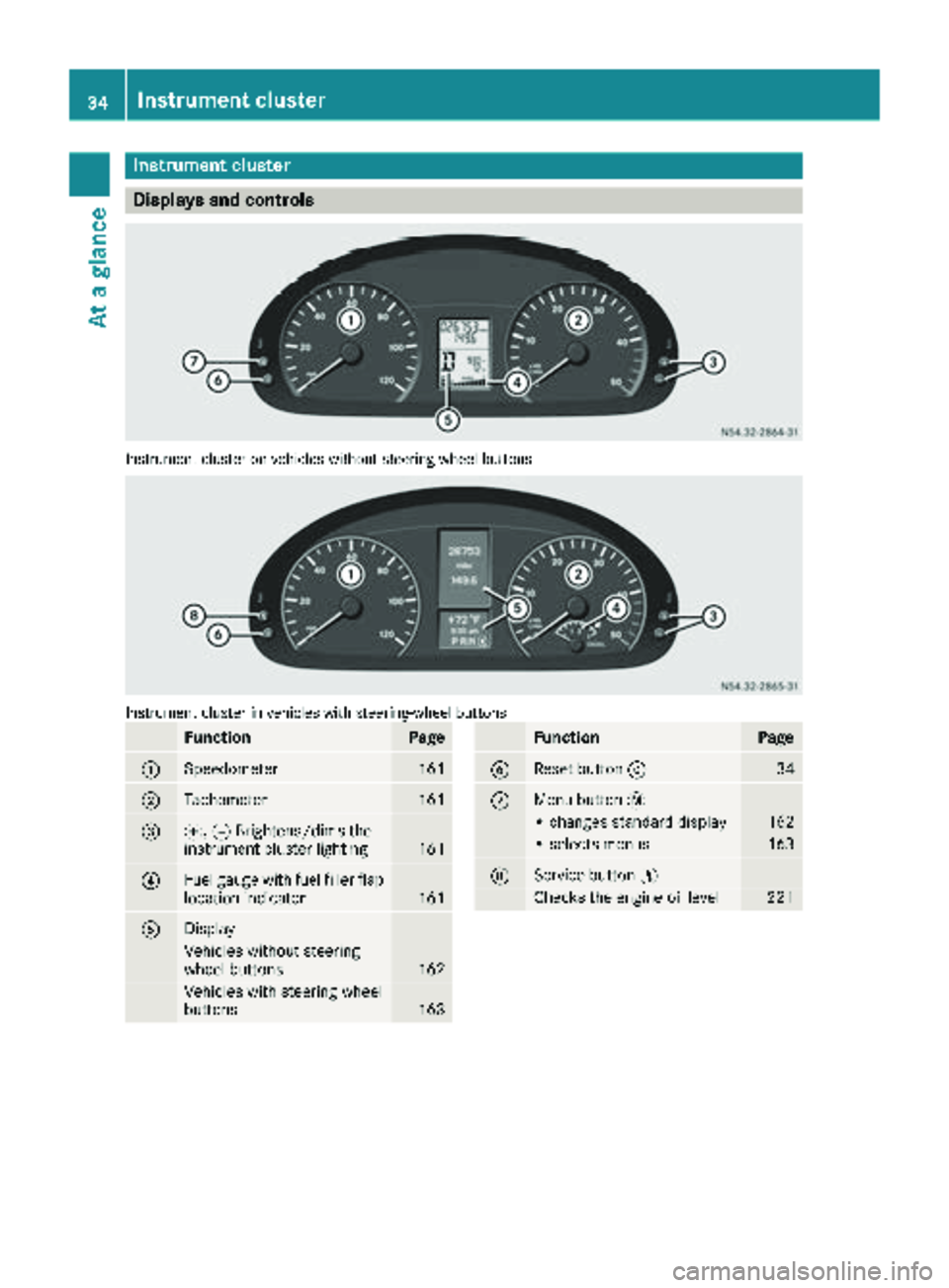
Instrument cluster
Displays and controls
Instrumentcluste ron vehicles without steering whee lbuttons
Instrumen tcluste rin vehicles wit hsteering-wheel buttons
FunctionPag e
:Speedometer161
;Tachometer161
=f, gBrightens/dims th e
instrumen tcluste rlighting16 1
?Fue lgauge wit hfuel filler flap
location indicator16 1
ADisplay
Vehicles without steering
whee lbuttons16 2
Vehicles wit hsteering whee l
buttons16 3
FunctionPag e
BReset butto n934
CMen ubutto n4
• changes standard display16 2
•select smenus16 3
DService butto nË
Checks th eengin eoil level22 1
34Instrument cluster
At a glance
Page 40 of 294
FunctionPage
àActivates/deactivates ASR55
Ã
ÄCentral locking65
æActivates/deactivates the
distance warning function142
jActivates/deactivates Lane
Keeping Assist146
kActivates/deactivates Blind
Spot Assist143
AStowage compartment
BCup holder with:209
• Ashtray210
• Cigarette lighter210
C12-V socket211
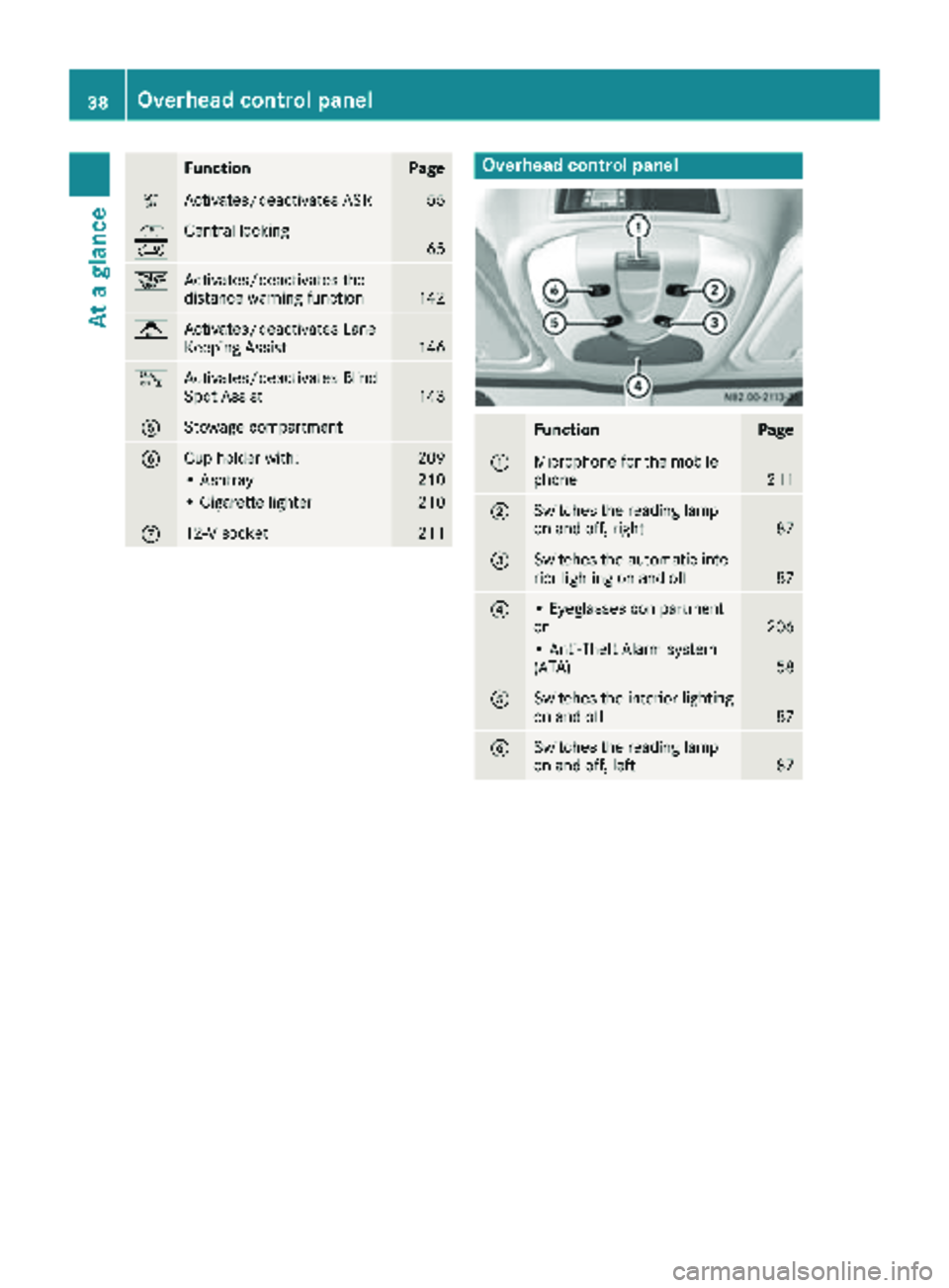
Overhead control panel
FunctionPage
:Microphone for the mobile
phone211
;Switches the reading lamp
on and off, right87
=Switches the automatic inte-
rior lighting on and off87
?• Eyeglasses compartment
or206
• Anti-Theft Alarm system
(ATA)58
ASwitches the interior lighting
on and off87
BSwitches the reading lamp
on and off, left87
38Overhead control panel
At a glance
Page 42 of 294
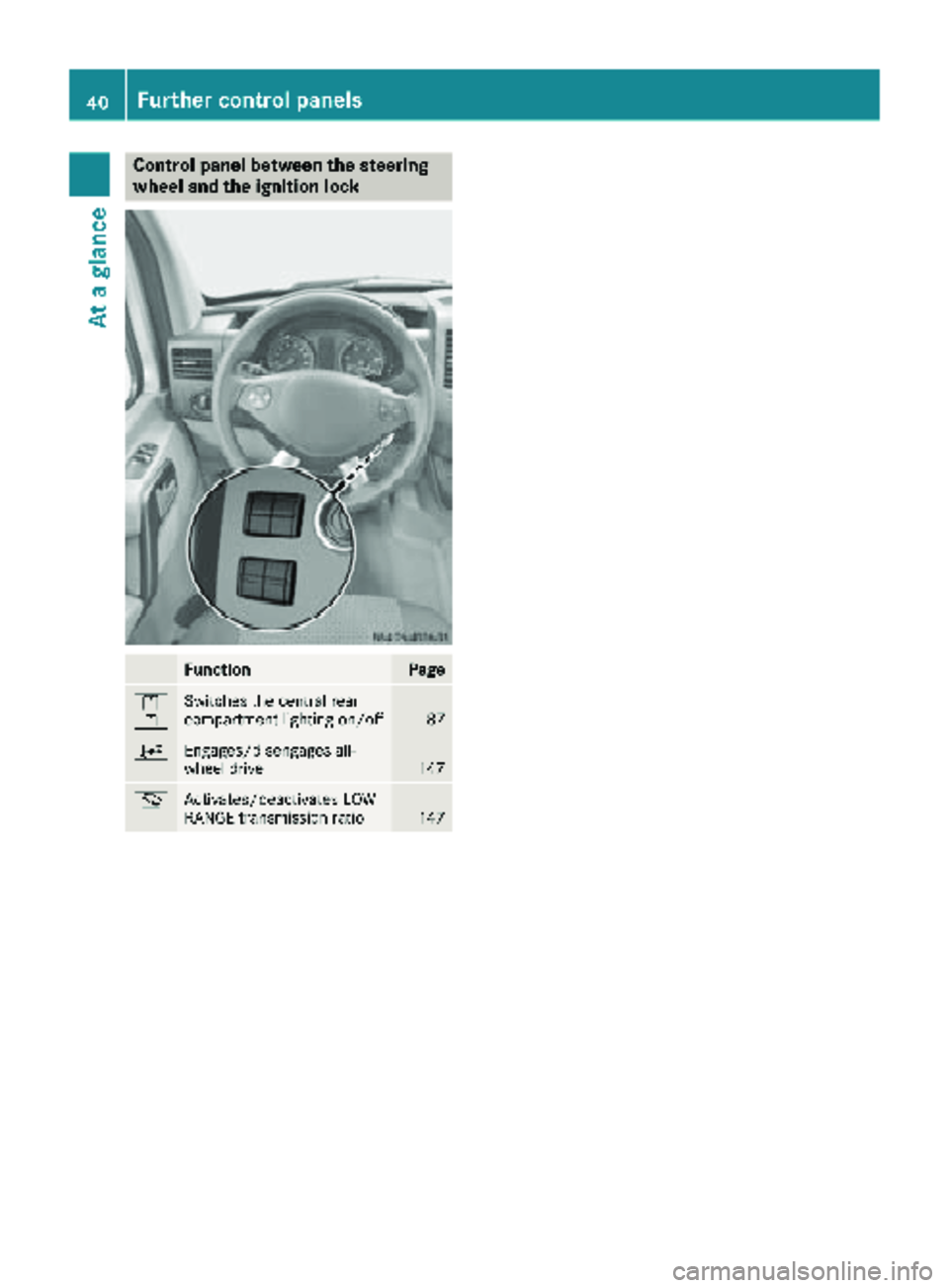
Control panel between the steering
wheel and the ignition lock
FunctionPage
l
kSwitches the central rear
compartment lighting on/off87
;Engages/disengages all-
wheel drive147
mActivates/deactivates LOW
RANGE transmission ratio147
40Further control panels
At a glance
Page 43 of 294
Useful information
This Operator's Manual describes all models as
well as standard and optional equipment of your
vehicle that were available at the time of going
to print. Country-specific variations are possi-
ble. Note that your vehicle may not be equipped
with all of the described functions. This also
applies to systems and functions relevant to
safety.
Read the information on qualified specialist
workshops (
Ypage 27).
Occupant safety
Restraint system introduction
The restraint system can reduce the risk of vehi-cle occupants coming into contact with parts of
the vehicle's interior in the event of an accident.
The restraint system can also reduce the forces to which vehicle occupants are subjected during
an accident.
The restraint system comprises:
RSeat belt system
RAir bags
RChild restraint system
RChild seat securing systems
The components of the restraint system work in
conjunction with each other. They can only
deploy their protective function if, at all times, all
vehicle occupants:
Rhave fastened their seat belts correctly
(Ypage 43)
Rhave the seat and head restraint adjusted
properly (Ypage 74)
As the driver, you also have to make sure that
the steering wheel is adjusted correctly.
Observe the information relating to the correct
driver's seat position (
Ypage 74).
You also have to make sure that an air bag can
inflate properly if deployed (
Ypage 45).
An air bag supplements a correctly worn seat
belt. As an additional safety device, the air bag
increases the level of protection for vehicle
occupants in the event of an accident. For exam-
ple, if, in the event of an accident, the protection
offered by the seat belt is sufficient, the air bags are not deployed. When an accident occurs, only
the air bags that increase protection in that par-
ticular accident situation are deployed. How- ever, seat belts and air bags generally do not
protect against objects penetrating the vehicle
from the outside.
Information on restraint system operation can
be found under "Triggering of the Emergency
Tensioning Devices and air bags" (
Ypage 47).
See "Children in the vehicle" for information on
children traveling with you in the vehicle as well
as on child restraint systems (
Ypage 49).
Important safety notes
GWARNING
Modifications to the restraint system may
cause it to no longer work as intended. The
restraint system may then not perform its
intended protective function and may fail in an
accident or trigger unexpectedly, for example.
This poses an increased risk of injury or even fatal injury.
Never modify parts of the restraint system.
Never tamper with the wiring, the electronic
components or their software.
If it is necessary to modify components of the
restraint system to accommodate a person with
disabilities, contact an authorized Sprinter
dealer for details. USA only: contact our Cus-
tomer Assistance Center at 1‑ 877‑762‑ 8267 for
details.
Restraint system warning lamp
The functions of the restraint system are
checked after the ignition is switched on and at regular intervals while the engine is running.
Therefore, malfunctions can be detected in
good time.
The 6 restraint system warning lamp on the
instrument cluster lights up when the ignition is
switched on. It goes out no later than a few sec-
onds after the vehicle is started. The compo-
nents of the restraint system are in operational
readiness.
Occupant safety41
Safety
Z