tow MERCEDES-BENZ SPRINTER 2018 MY18 Operator’s Manual
[x] Cancel search | Manufacturer: MERCEDES-BENZ, Model Year: 2018, Model line: SPRINTER, Model: MERCEDES-BENZ SPRINTER 2018Pages: 294, PDF Size: 4.36 MB
Page 78 of 294
while driving, the restraint systems may not
be able to provide the intended protection.
There is an increased risk of injury, possibly
even fatal.
Engage the driver's and front-passenger seatsso they are facing the direction of travel
before starting the engine.
!When rotating the seats, make sure that
there is sufficient space to do so.
Move the seat forward or back first. This will
help to avoid contact with other parts of the
interior.
Push the handbrake lever down to the stop.
The parking brake or handbrake lever could
otherwise be damaged.
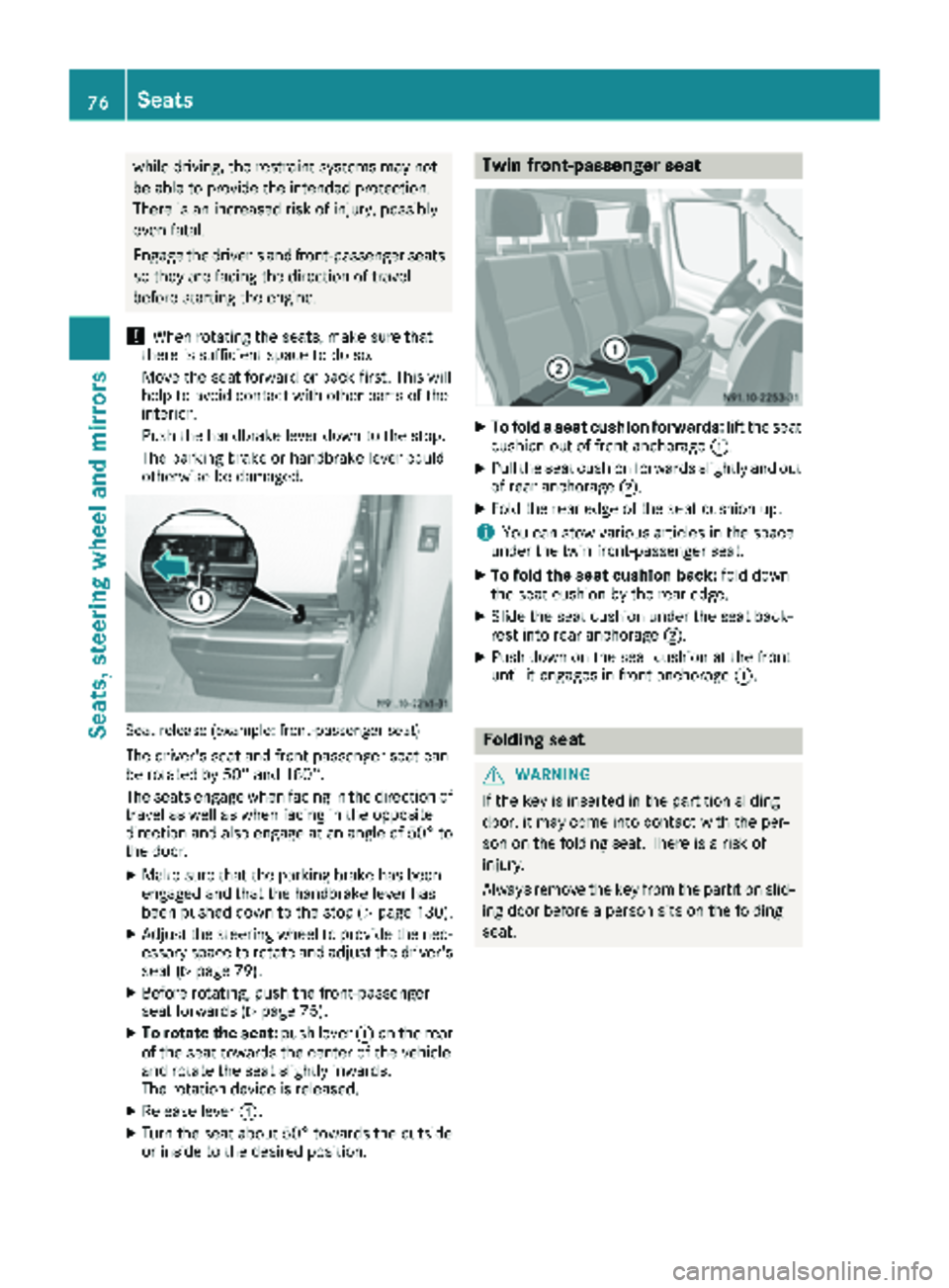
Seat release (example: front-passenger seat)
The driver's seat and front-passenger seat can
be rotated by 50° and 180°.
The seats engage when facing in the direction of travel as well as when facing in the opposite
direction and also engage at an angle of 50° to
the door.
XMake sure that the parking brake has been
engaged and that the handbrake lever has
been pushed down to the stop (
Ypage 130).
XAdjust the steering wheel to provide the nec-
essary space to rotate and adjust the driver's seat (
Ypage 79).
XBefore rotating, push the front-passenger
seat forwards (Ypage 75).
XTo rotate the seat: push lever:on the rear
of the seat towards the center of the vehicle
and rotate the seat slightly inwards.
The rotation device is released.
XRelease lever :.
XTurn the seat about 50° towards the outside
or inside to the desired position.
Twin front-passenger seat
XTo fold a seat cushion forwards: lift the seat
cushion out of front anchorage :.
XPull the seat cushion forwards slightly and out
of rear anchorage;.
XFold the rear edge of the seat cushion up.
iYou can stow various articles in the space
under the twin front-passenger seat.
XTo fold the seat cushion back: fold down
the seat cushion by the rear edge.
XSlide the seat cushion under the seat back-
rest into rear anchorage ;.
XPush down on the seat cushion at the front
until it engages in front anchorage :.
Folding seat
GWARNING
If the key is inserted in the partition sliding
door, it may come into contact with the per-
son on the folding seat. There is a risk of
injury.
Always remove the key from the partition slid-
ing door before a person sits on the folding
seat.
76Seats
Seats, steering wheel and mirrors
Page 99 of 294
iCanada only:
If the wind shield wiper s areswitched on and
you stop the veh icle, the windshield wiper
speed isreduced. For example, ifyou have
selected level IIand stop the veh icle,wipin g
continues with intermittent wipe whilethe
veh icle is stationary. Ifintermittent wipe is
selected, the intervals become longer.
Vehicles with a rain and light sensor: you
can use level Ias the universal setting. The
rain and light sensor sets the appropriate wip-
ing frequency automatically, according to the
intensity of the rain. When you stop the veh i-
cle, leve lsIII and IIare swit ched down to
level Iautomatically.
The wind shield wiper will return to the original
level when you drive faster than 5 mph
(8 km/h).
You can adjust the sensitivit y of the rain and
light sensor using the on-board computer
(
Ypage 171).
In formation on checking the washer fluid level
can befound inthe "Maintenance and care"
section (
Ypage 225).
Switching the rear window wiper on/
off
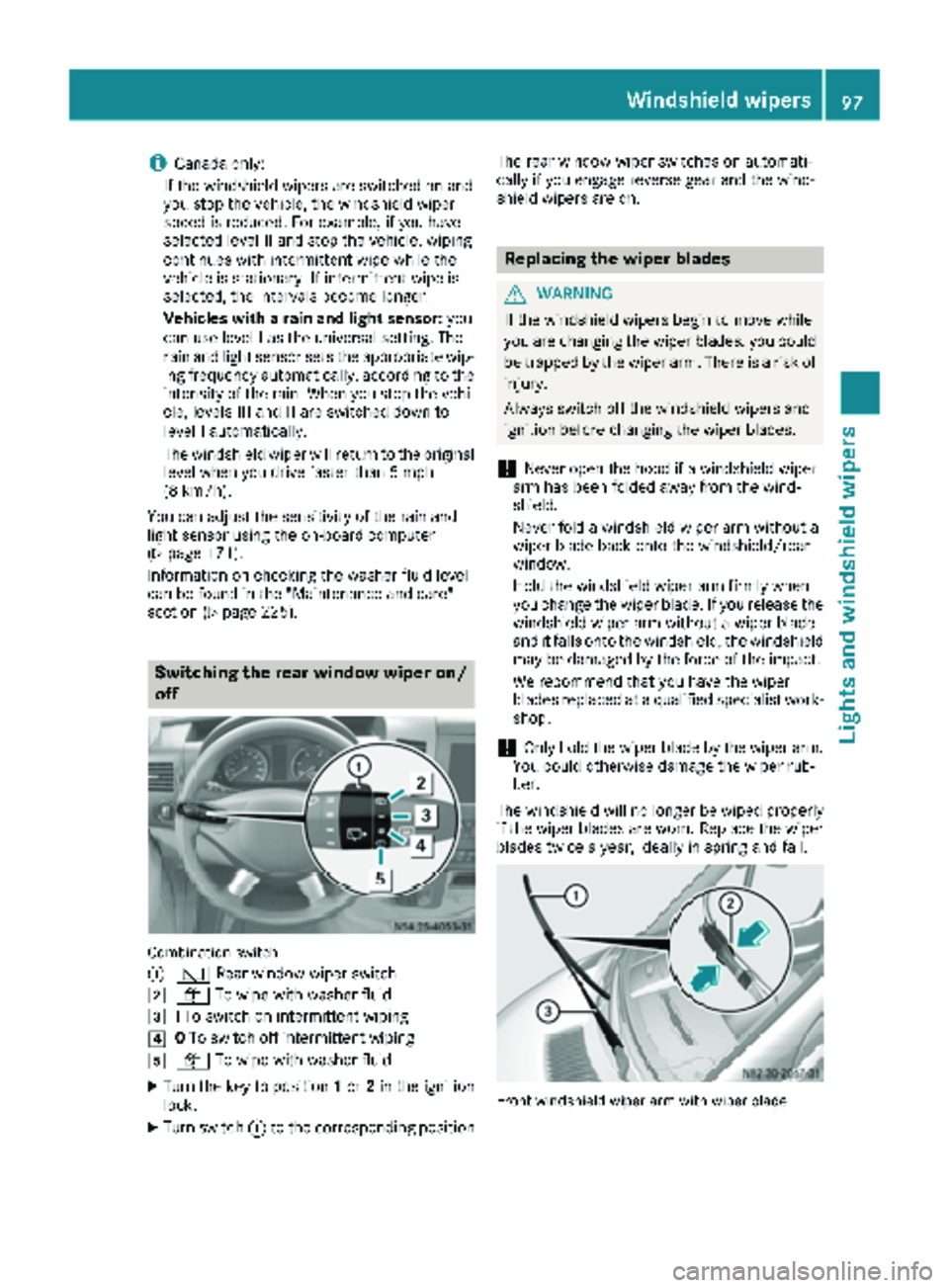
Combination switch
:
è Rearwindowwiper swit ch
2ôTowipe wit h washer fluid
3ITo swit ch on intermittent wiping
40To swit ch off intermittent wiping
5ô Towipe wit h washer fluid
XTurn the key to position 1or 2in the ignition
lock.
XTurn switch: to the corresponding position The rear window wiper
switches on automati-
cally if you engage reverse gear and the wind-
shield wiper s are on.
Replacing the wiper blades
GWARNING
If the wind shield wipers begin to move while
you are changing the wiperblades, you could
be trapped by the wiper arm. There isa risk of
injury.
Always switch off the windshield wipers and
ignition before changing the wiper blades.
!Never open the hood if a windshield wiper
arm has been folded away from the wind-
shield.
Never fold a windshield wiper armwithout a
wiper blade back onto the windshield/rear
wind ow.
Hold the windshield wiper arm firmly when
you change the wiper blade. If you release the
windshield wiper arm without a wiperblade
and itfalls onto the windshield, the windshield
may be damaged by the force of the impact.
We recommend that you have the wiper
blades replaced at a qualified specialist work-
shop.
!Only hold the wiperblade by the wiperarm.
You could otherwise damage the wiper rub-
ber.
The wind shield will no longerbe wipedproperly
if the wiper blades are worn. Replace the wiper
blades twice a year, ideally in spring and fall.
Fron twindshield wiper arm wit hwiper blade
Windshield wipers97
Lights and windshield wipers
Z
Page 106 of 294
button to reduce or theKbutton to
increase the airflow.
The blower speeds are shown in bars next to
the buttons.
Defrosting the windows
You can use the "defrosting" function to defrost
the windshield or to demist the inside of the
windshield and the side windows.
Only use the following settings until the win-
dows are clear again.
XVehicle with window heating: switch on the
front (Ypage 105) and/or rear window
defroster (Ypage 105) .
XSwitch on climate control (Ypage 102).
Vehicle with heating
XSet temperature control :and airflow con-
trol ;toz (Ypage 99).
XSet air-distribution control ?tosz
(Ypage 99).
XClose the center air vents (Ypage 106) and
the air outlets for the headroom and the rear compartment (
Ypage 107).
XDirect the side air vents towards the side win-dows and open the defroster vents for the
side windows (
Ypage 107).
Vehicle with air conditioning
XSet temperature control :to
z (Ypage 100).
XPress the Kbutton until the maximum
blower output is reached.
All bars in the display next to the button light
up.
XSet air-distribution control Atosz
(Ypage 100).
XClose the center air vents (Ypage 106) and
the air outlets for the headroom and the rear
compartment (
Ypage 107).
XDirect the side air vents towards the side win-
dows and open the defroster vents for the
side windows (
Ypage 107).
Clearing condensation from the win-
dows
Windows fogged up on the inside
You should only select this setting until the win-
dows are clear again.
XVehicle with window heating: switch on the
front (Ypage 105) and/or rear window
defroster (Ypage 105) .
XSwitch on climate control (Ypage 102).
XSwitch off air-recirculation mode
(Ypage 105).
Vehicle with heating
XSet temperature control :to a higher tem-
perature (Ypage 99).
XSet airflow control ;to a higher blower set-
ting. It should be set at least to level two
(
Ypage 99).
XSet air-distribution control ?tosz
(Ypage 99).
iIf the windows still fog up, set the control as
described for defrosting (Ypage 104).
Vehicle with air conditioning
XActivate cooling with air dehumidification
(Ypage 103).
XPress the ¨button (Ypage 100).
Reheat mode is activated. The indicator lamp
in the switch lights up.
To deactivate reheat mode, press the ¨
button again. The indicator lamp in the button
goes out.
Windows fogged up on the outside
You should only select this setting until the
windshield is clear again.
XSwitch on the windshield wipers (Ypage 96).
XSwitch on climate control (Ypage 102).
XAdjust air distribution to the footwell
(Ypage 103).
XClose the air vents (Ypage 106).
104Operating the climate control system
Climate control
Page 122 of 294
Preparing for a journey
Visual check of the vehicle exterior
XIn particular, check the following components
on the vehicle, and on the trailer as necessary:
Rlicense plates, vehicle lighting, turn signals,
brake lamps and wiper blades for dirt and
damage
Rtires and wheels for firm seating, correct
tire pressure and general condition
Rtrailer tow hitch for play and security
The trailer coupling is one of the most
important vehicle parts with regard to road safety. The separate instructions issued by
the manufacturer pertaining to operation,
care and maintenance should be observed.
Rthat contour markings on attachments and
bodies are in good condition
XRectify any noticeable defects before com-
mencing the journey.
Checks in the vehicle
Emergency equipment and first-aid kit
XCheck the equipment to make sure that it is
accessible, complete and ready for use.
The first aid and breakdown assistance equip-
ment is in the front door stowage compartments
and behind the driver's seat.
Vehicle lighting
XTurn the key to position 2in the ignition lock.
XCheck the lighting system with the aid of a
second person.
XReplace defective bulbs (Ypage 89).
Before driving off
GWARNING
Objects in the driver's footwell may restrict
the clearance around the pedals or block a
depressed pedal. This jeopardizes the oper-
ating and road safety of the vehicle. There is a risk of an accident.
Stow all objects securely in the vehicle so that
they do not get into the driver's footwell.
When using floormats or carpets, make sure
that they are properly secured so that they do
not slip or obstruct the pedals. Do not place
several floormats or carpets on top of one
another.
GWARNING
Unsuitable footwear can hinder correct usage of the pedals, e.g.:
Rshoes with thick soles
Rshoes with high heels
Rslippers
There is a risk of an accident.
Wear suitable footwear to ensure correct
usage of the pedals.
XSecure the load as per the loading guidelines
(Ypage 213).
XStow luggage items securely. Secure the load
as per the loading guidelines (Ypage 213).
XMake sure that the floormats and carpets are
properly secured so that they cannot slip and
obstruct the pedals.
XClose all doors.
Starting the engine
GWARNING
Combustion engines emit poisonous exhaust
gases such as carbon monoxide. Inhaling
these exhaust gases leads to poisoning. There
is a risk of fatal injury. Therefore never leave
the engine running in enclosed spaces with-
out sufficient ventilation.
!Do not depress the accelerator pedal when
starting the engine.
XBefore starting the engine, make sure that:
Rall the doors are closed.
Rall the vehicle occupants are wearing their
seat belts correctly.
Rthe parking brake is applied.
iIf you depress the brake pedal before start-
ing the engine, the pedal travel is short and
pedal resistance is high.
If you depress the brake pedal again after
starting the engine, pedal travel and resist-
ance will be back to normal again.
120Driving
Driving and parking
Page 125 of 294
ProblemPossible causes/consequences andMSolutions
The vehicle cannot be
driven at a speed
exceeding 5 mph
(8 km/h).
The yellow;Check
Engine lamp and the yel-
low å DEF indicator
lamp
2light up.
The exhaust gas aftertreatment system is defective or an emissions-
relevant malfunction has occurred.
This malfunction or defect can damage the exhaust gas aftertreat-
ment.
XObserve the messages in the display:
Ron vehicles without steering-wheel buttons (Ypage 177)
Ron vehicles with steering wheel buttons (Ypage 187).
The engine does not
start.
The starter motor cannot
be heard.The battery isolating switch is switched off.
XSwitch on the power supply (Ypage 119).
The engine does not
start.
The starter motor cannot
be heard.The on-board voltage is too low. The battery is too weak or discharged.
XJump-start the vehicle (Ypage 243).
If the engine cannot be jump-started, the starter motor is faulty.
XConsult a qualified specialist workshop.
The engine does not
start.
The starter motor cannot
be heard.The battery is discharged or faulty.
XCheck the battery for damage.
XCharge the battery (Ypage 233).
Automatic transmission
Important safety notes
GWARNING
If the engine speed is above the idling speed
and you engage transmission position Dor R,
the vehicle could pull away suddenly. There is
a risk of an accident.
When engaging transmission position Dor R,
always firmly depress the brake pedal and do not simultaneously accelerate.
!Vehicles with automatic transmission may
roll only briefly in the neutral position N. Pro-
longed rolling of the wheels, e.g. when being
towed, will result in transmission damage.
Towing (
Ypage 244)
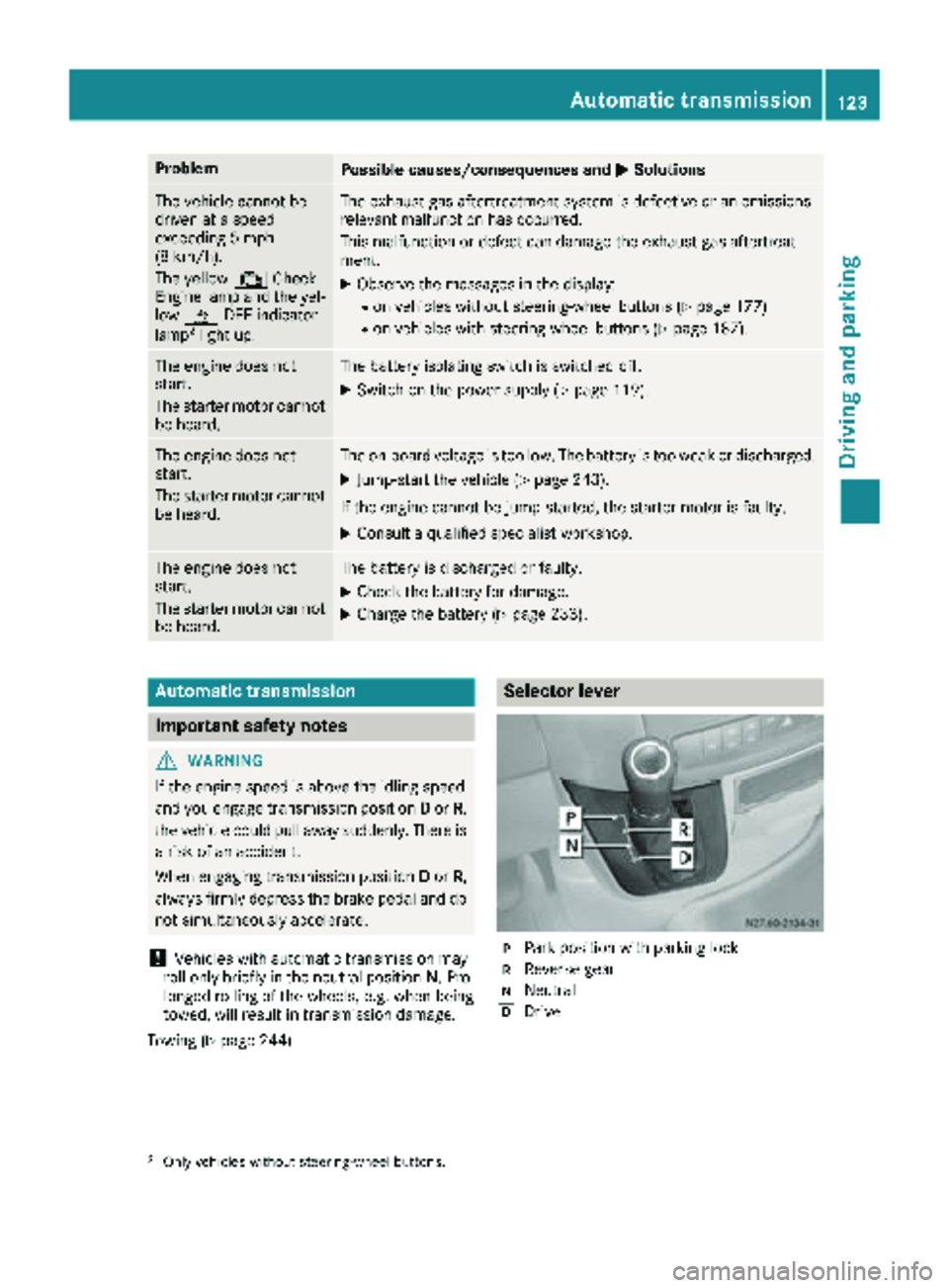
Selector lever
jPark position with parking lock
kReverse gear
iNeutral
hDrive
2Only vehicles without steering-wheel buttons.
Automatic transmission123
Driving and parking
Z
Page 126 of 294
The display in the instrument cluster shows the
present selector lever position or the current
shift range:
Ron vehicles with steering wheel buttons
(Ypage 166)
Ron vehicles without steering wheel buttons
(Ypage 162)
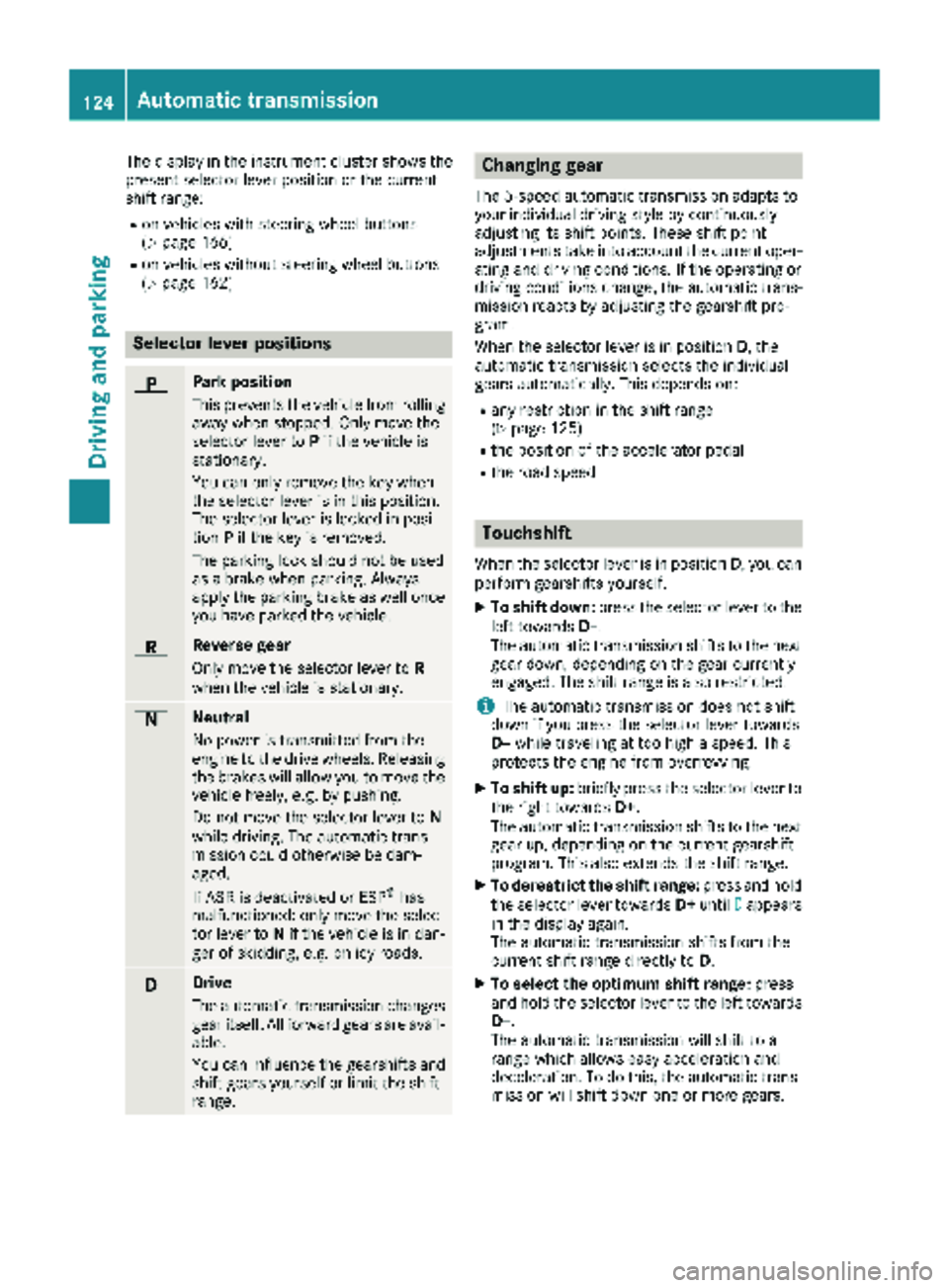
Selector lever positions
BPark position
This prevents the vehicle from rolling
away when stopped. Only move the
selector lever toPif the vehicle is
stationary.
You can only remove the key when
the selector lever is in this position.
The selector lever is locked in posi-
tion Pif the key is removed.
The parking lock should not be used
as a brake when parking. Always
apply the parking brake as well once
you have parked the vehicle.
CReverse gear
Only move the selector lever to R
when the vehicle is stationary.
ANeutral
No power is transmitted from the
engine to the drive wheels. Releasing
the brakes will allow you to move the
vehicle freely, e.g. by pushing.
Do not move the selector lever to N
while driving. The automatic trans-
mission could otherwise be dam-
aged.
If ASR is deactivated or ESP
®has
malfunctioned: only move the selec-
tor lever to Nif the vehicle is in dan-
ger of skidding, e.g. on icy roads.
7Drive
The automatic transmission changes
gear itself. All forward gears are avail-
able.
You can influence the gearshifts and
shift gears yourself or limit the shift
range.
Changing gear
The 5-speed automatic transmission adapts to
your individual driving style by continuously
adjusting its shift points. These shift point
adjustments take into account the current oper-
ating and driving conditions. If the operating or
driving conditions change, the automatic trans-
mission reacts by adjusting the gearshift pro-
gram.
When the selector lever is in position D, the
automatic transmission selects the individual
gears automatically. This depends on:
Rany restriction in the shift range
(Ypage 125)
Rthe position of the accelerator pedal
Rthe road speed
Touchshift
When the selector lever is in position D, you can
perform gearshifts yourself.
XTo shift down: press the selector lever to the
left towards D–.
The automatic transmission shifts to the next gear down, depending on the gear currently
engaged. The shift range is also restricted.
iThe automatic transmission does not shift
down if you press the selector lever towards
D– while traveling at too high a speed. This
protects the engine from overrevving.
XTo shift up: briefly press the selector lever to
the right towards D+.
The automatic transmission shifts to the next
gear up, depending on the current gearshift
program. This also extends the shift range.
XTo derestrict the shift range: press and hold
the selector lever towards D+until D
appears
in the display again.
The automatic transmission shifts from the
current shift range directly to D.
XTo select the optimum shift range: press
and hold the selector lever to the left towards
D–.
The automatic transmission will shift to a
range which allows easy acceleration and
deceleration. To do this, the automatic trans-
mission will shift down one or more gears.
124Automatic transmission
Driving and parking
Page 127 of 294
Shift ranges
When the selector lever is in positionDyou can
restrict or derestrict the shift range for the auto- matic transmission.
XTo extend and restrict the shift range:
press the selector lever briefly to the right
towards D+or left towards D–.
The display shows the selected shift range.
The automatic transmission shifts only as far
as the relevant gear.
iIf the maximum engine speed for the restric-
ted shift range is reached and you depress the
accelerator pedal, the automatic transmis-
sion will not shift up.
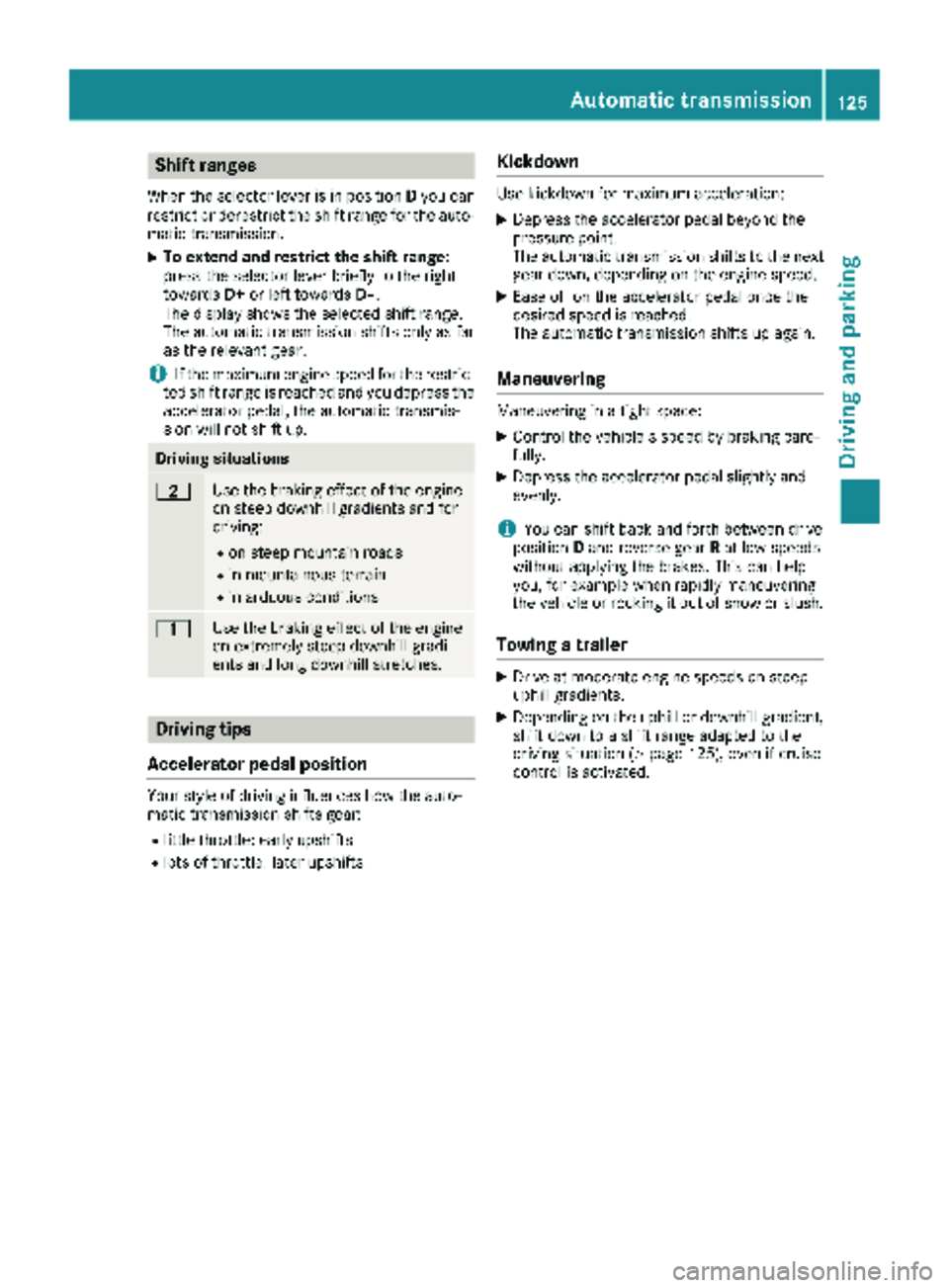
Driving situations
5Use the braking effect of the engine
on steep downhill gradients and for
driving:
Ron steep mountain roads
Rin mountainous terrain
Rin arduous conditions
4Use the braking effect of the engine
on extremely steep downhill gradi-
ents and long downhill stretches.
Driving tips
Accelerator pedal position
Your style of driving influences how the auto-
matic transmission shifts gear:
Rlittle throttle: early upshifts
Rlots of throttle: later upshifts
Kickdown
Use kickdown for maximum acceleration:
XDepress the accelerator pedal beyond the
pressure point.
The automatic transmission shifts to the next
gear down, depending on the engine speed.
XEase off on the accelerator pedal once the
desired speed is reached.
The automatic transmission shifts up again.
Maneuvering
Maneuvering in a tight space:
XControl the vehicle's speed by braking care-
fully.
XDepress the accelerator pedal slightly and
evenly.
iYou can shift back and forth between drive
position Dand reverse gear Rat low speeds
without applying the brakes. This can help
you, for example when rapidly maneuvering
the vehicle or rocking it out of snow or slush.
Towing a trailer
XDrive at moderate engine speeds on steep
uphill gradients.
XDepending on the uphill or downhill gradient,
shift down to a shift range adapted to the
driving situation (
Ypage 125), even if cruise
control is activated.
Automatic transmission125
Driving and parking
Z
Page 128 of 294
Problems with the transmission
ProblemPossible causes/consequences andMSolutions
The transmission mal-
functions when shifting
gear.The transmission is losing oil.
XHave the transmission checked immediately at a qualified specialist
workshop.
The acceleration charac-
teristics have deteriora-
ted noticeably.
The transmission does
not shift.The transmission is in emergency mode.
It is only possible to shift into second gear or reverse gear R.
XStop the vehicle.
XDepress the brake pedal.
XMove the selector lever to positionP.
XSwitch off the engine.
XWait at least 10 seconds before restarting the engine.
XDepress the brake pedal.
XMove the selector lever to positionDor R.
In position D, the transmission shifts into second gear; in position R,
the transmission shifts into reverse gear.
XHave the transmission checked immediately at a qualified specialist
workshop.
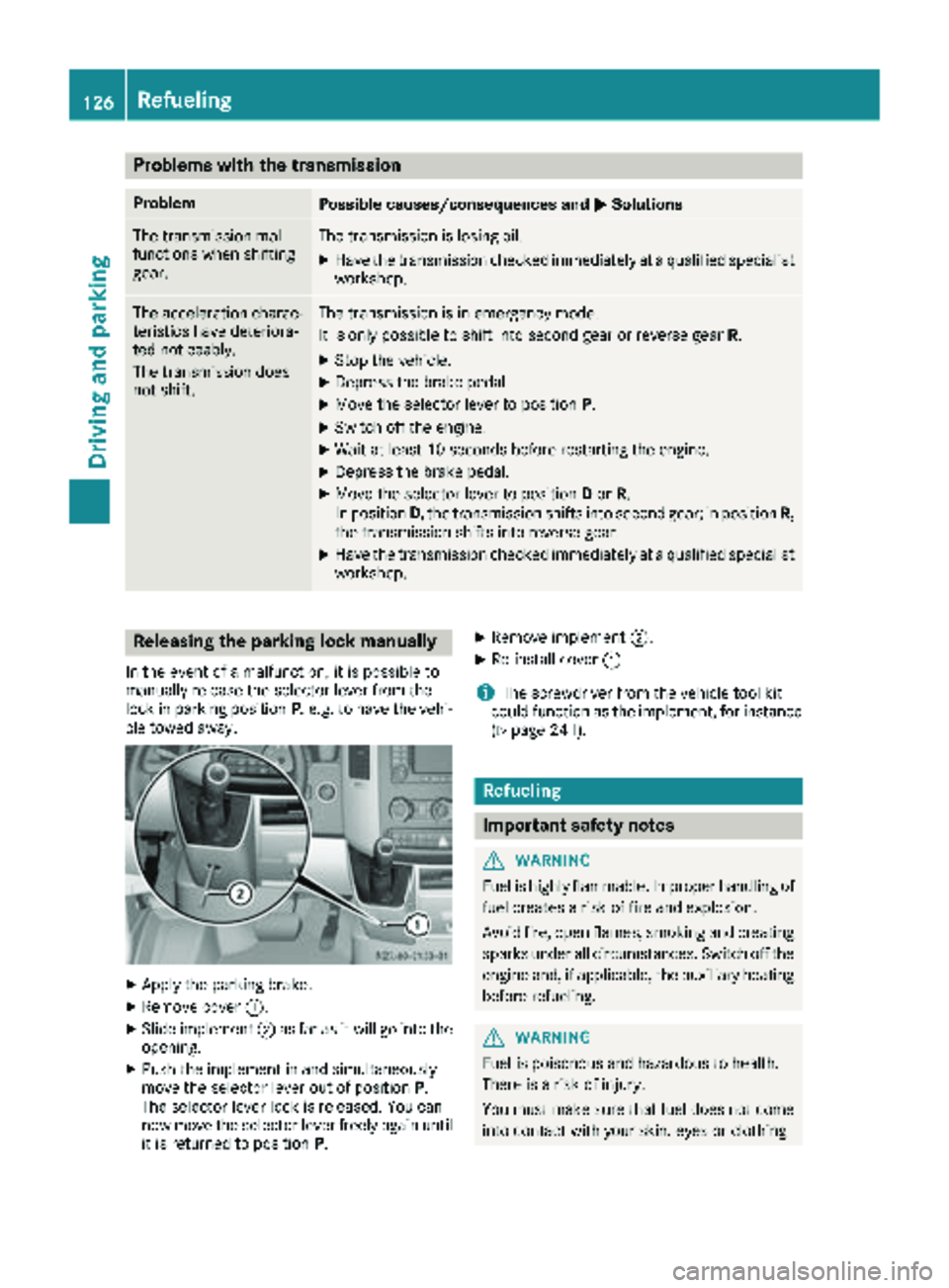
Releasing the parking lock manually
In the event of a malfunction, it is possible to
manually release the selector lever from the
lock in parking position P, e.g. to have the vehi-
cle towed away.
XApply the parking brake.
XRemove cover :.
XSlide implement ;as far as it will go into the
opening.
XPush the implement in and simultaneously
move the selector lever out of position P.
The selector lever lock is released. You can
now move the selector lever freely again until
it is returned to position P.
XRemove implement;.
XRe-install cover:.
iThe screwdriver from the vehicle tool kit
could function as the implement, for instance
(
Ypage 241).
Refueling
Important safety notes
GWARNING
Fuel is highly flammable. Improper handling of
fuel creates a risk of fire and explosion.
Avoid fire, open flames, smoking and creating
sparks under all circumstances. Switch off the
engine and, if applicable, the auxiliary heating
before refueling.
GWARNING
Fuel is poisonous and hazardous to health.
There is a risk of injury.
You must make sure that fuel does not come into contact with your skin, eyes or clothing
126Refueling
Driving and parking
Page 131 of 294
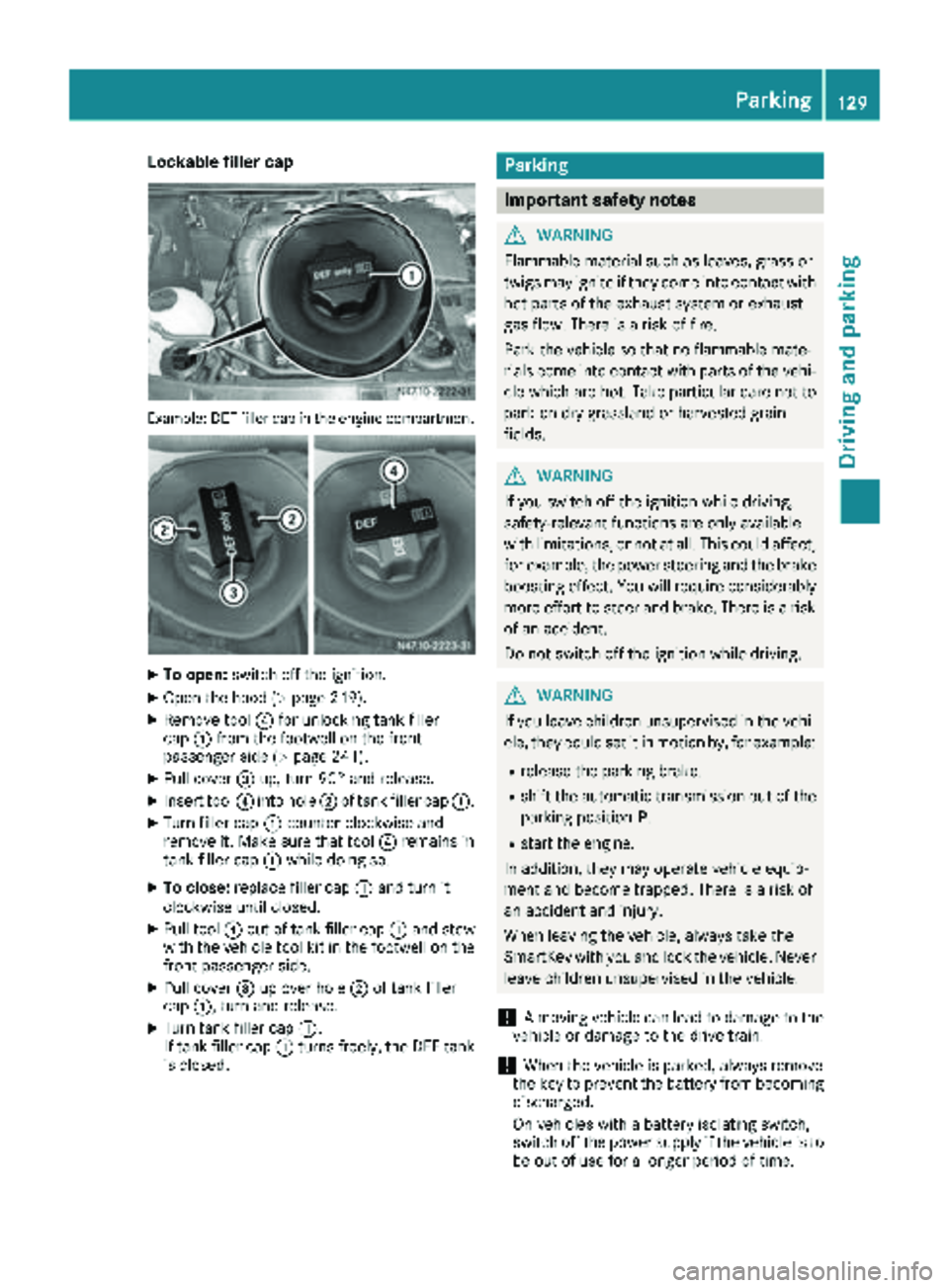
Lockable filler cap
Example: DEF filler cap in the engine compartment
XTo open:switch off the ignition.
XOpen the hood (Ypage 219).
XRemove tool ?for unlocking tank filler
cap :from the footwell on the front-
passenger side (
Ypage 241).
XPull cover =up, turn 90° and release.
XInsert tool ?into hole ;of tank filler cap :.
XTurn filler cap:counter-clockwise and
remove it. Make sure that tool ?remains in
tank filler cap :while doing so.
XTo close: replace filler cap :and turn it
clockwise until closed.
XPull tool ?out of tank filler cap :and stow
with the vehicle tool kit in the footwell on the
front-passenger side.
XPull cover =up over hole ;of tank filler
cap :, turn and release.
XTurn tank filler cap :.
If tank filler cap :turns freely, the DEF tank
is closed.
Parking
Important safety notes
GWARNING
Flammable material such as leaves, grass or
twigs may ignite if they come into contact with
hot parts of the exhaust system or exhaust
gas flow. There is a risk of fire.
Park the vehicle so that no flammable mate-
rials come into contact with parts of the vehi-
cle which are hot. Take particular care not to
park on dry grassland or harvested grain
fields.
GWARNING
If you switch off the ignition while driving,
safety-relevant functions are only available
with limitations, or not at all. This could affect, for example, the power steering and the brake
boosting effect. You will require considerably
more effort to steer and brake. There is a risk
of an accident.
Do not switch off the ignition while driving.
GWARNING
If you leave children unsupervised in the vehi-
cle, they could set it in motion by, for example:
Rrelease the parking brake.
Rshift the automatic transmission out of the
parking position P.
Rstart the engine.
In addition, they may operate vehicle equip-
ment and become trapped. There is a risk of
an accident and injury.
When leaving the vehicle, always take the
SmartKey with you and lock the vehicle. Never
leave children unsupervised in the vehicle.
!A moving vehicle can lead to damage to the
vehicle or damage to the drive train.
!When the vehicle is parked, always remove
the key to prevent the battery from becoming
discharged.
On vehicles with a battery isolating switch,
switch off the power supply if the vehicle is to
be out of use for a longer period of time.
Parking129
Driving and parking
Z
Page 132 of 294
Always park your vehicle safely and according to
legal requirements and secure it against rolling
away.
To ensure that the vehicle is properly secured
against rolling away unintentionally:
Rthe parking brake must be firmly applied
Rthe selector lever must be in positionPand
the key must be removed from the ignition
lock
Ron steep uphill or downhill gradients, the front
wheels must be turned towards the curb
Rthe rear axle must be secured, e.g. with a
wheel chock, on steep uphill or downhill gra-
dients
Use the wheel chock (
Ypage 131) to do so.
If you leave the vehicle parked for more than
three weeks:
Rconnect the batteries to a trickle charger or
Rdisconnect the vehicle's starter battery or
Rswitch off the electrical system using the bat-
tery main switch (Ypage 118) and
Rdisconnect the vehicle's auxiliary battery
Otherwise, you need to check the battery's con-
dition of charge every 3 weeks, since standby
power consumption can drain the battery. If the
battery voltage is lower than 12.2 V,the battery
must be charged. Otherwise, the battery may be damaged by exhaustive discharging.
Be sure to observe the notes on disconnecting
and charging the batte
ries under "Bat-
tery“ (Ypage 228). You can obtain information
about trickle chargers from a qualified specialist
workshop.
Parking brake
GWARNING
If you leave children unsupervised in the vehi-
cle, they could set it in motion by, for example:
Rrelease the parking brake.
Rshift the automatic transmission out of the
parking position P.
Rstart the engine.
In addition, they may operate vehicle equip-
ment and become trapped. There is a risk of
an accident and injury.
When leaving the vehicle, always take the
SmartKey with you and lock the vehicle. Never
leave children unsupervised in the vehicle.
GWARNING
If you must brake the vehicle with the parking brake, the braking distance is considerably
longer and the wheels could lock. There is an
increased danger of skidding and accidents.
Only use the parking brake to brake the vehi-
cle when the service brake is faulty. Do not
apply the parking brake too firmly. If the
wheels lock, release the parking brake until
the wheels begin turning again.
The brake lamps are not illuminated when you
brake the vehicle using the parking brake.
As a rule, you may only apply the parking brake
when the vehicle is stationary.
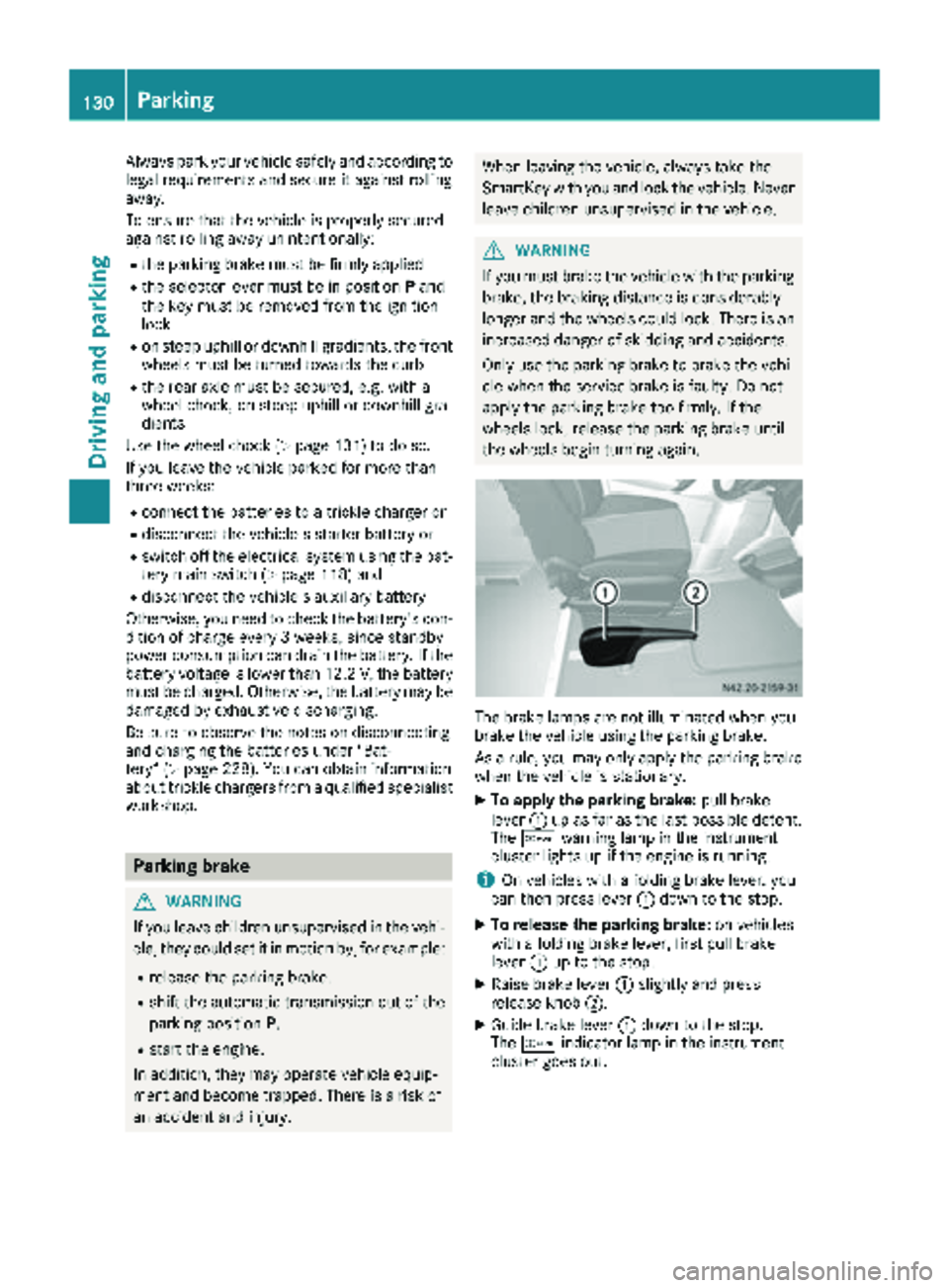
XTo apply the parking brake: pull brake
lever :up as far as the last possible detent.
The c warning lamp in the instrument
cluster lights up if the engine is running.
iOn vehicles with a folding brake lever, you
can then press lever :down to the stop.
XTo release the parking brake: on vehicles
with a folding brake lever, first pull brake
lever :up to the stop.
XRaise brake lever :slightly and press
release knob ;.
XGuide brake lever :down to the stop.
The c indicator lamp in the instrument
cluster goes out.
130Parking
Driving an d parking