lock MERCEDES-BENZ SPRINTER 2018 MY18 Operator’s Manual
[x] Cancel search | Manufacturer: MERCEDES-BENZ, Model Year: 2018, Model line: SPRINTER, Model: MERCEDES-BENZ SPRINTER 2018Pages: 294, PDF Size: 4.36 MB
Page 67 of 294
ProblemPossible causes/consequences andMSolutions
The engine cannot be
started using the key.The on-board voltage is too low.
XSwitch off all non-essential consumers, such as interior lighting, and
try to start the engine again.
If this does not work:
XCheck the starter battery and charge it if necessary (Ypage 233).
or
XJump-start the vehicle (Ypage 243).
or
XConsult a qualified specialist workshop.
You have lost a key.XHave the key deactivated at a qualified specialist workshop.
XReport the loss immediately to the vehicle insurers.
XIf necessary, have the mechanical locks replaced.
Central locking
Important safety notes
GWARNING
If children are left unsupervised in the vehicle,
they could:
Ropen the doors, thus endangering other
people or road users.
Rget out and disrupt traffic.
Roperate the vehicle's equipment.
Additionally, children could set the vehicle in
motion if, for example, they:
Rrelease the parking brake.
Rshifting the automatic transmission out of
park position P
RStart the engine.
There is a risk of an accident and injury.
When leaving the vehicle, always take the
SmartKey with you and lock the vehicle. Never
leave children or animals unattended in the
vehicle. Always keep the SmartKey out of
reach of children.
GWARNING
If persons, particularly children are subjected to prolonged exposure to extreme heat or
cold, there is a risk of injury, possibly even
fatal. Never leave children unattended in the
vehicle.
You can open a locked front door from the inside
at any time. You can open a locked sliding door
or rear door from the inside if it has been previ-
ously unlocked from inside.
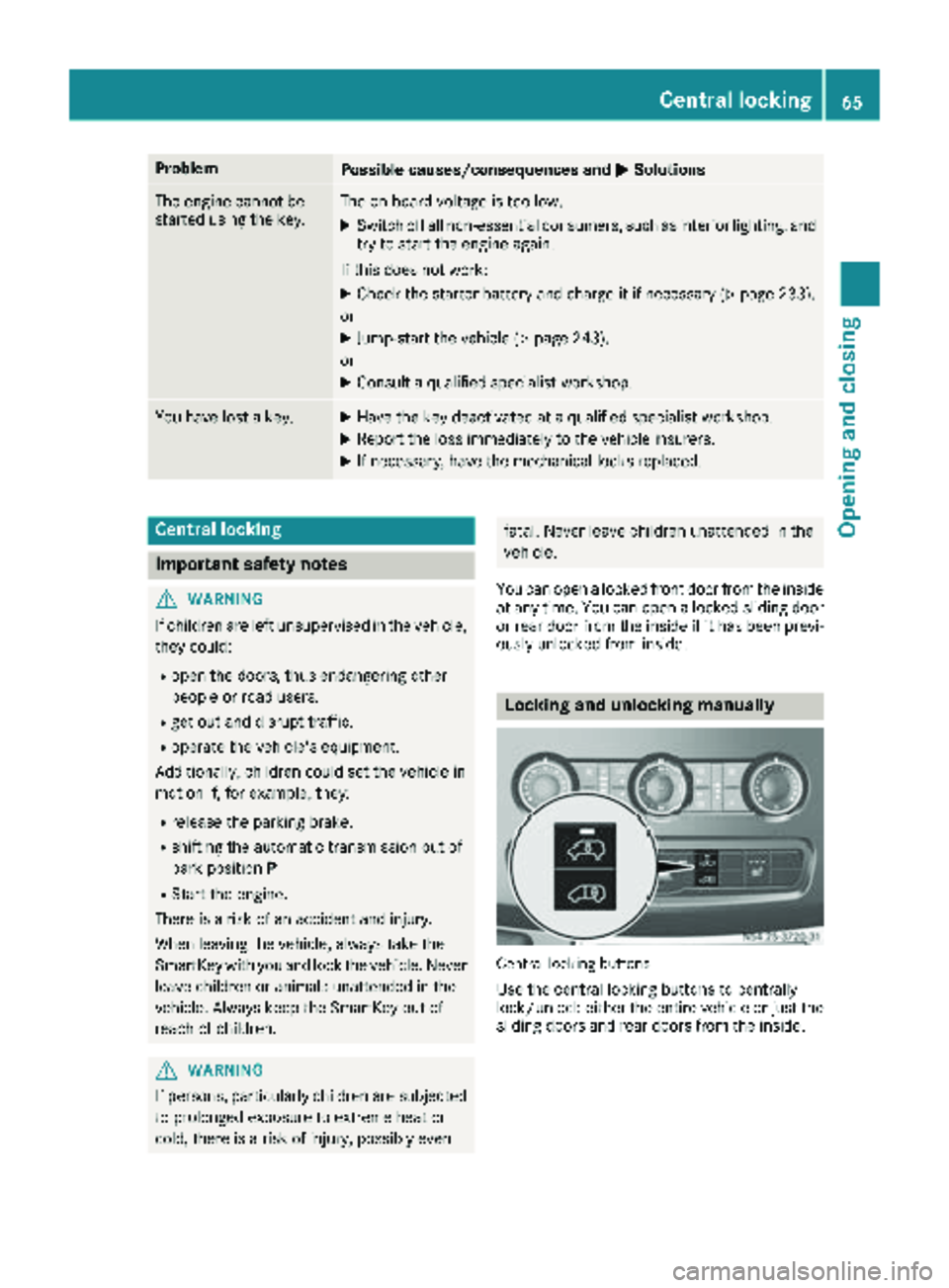
Locking and unlocking manually
Central locking buttons
Use the central locking buttons to centrally
lock/unlock either the entire vehicle or just the sliding doors and rear doors from the inside.
Central locking65
Opening and closing
Z
Page 68 of 294
XTo lock/unlock the entire vehicle:press
the upper Ãcentral locking button when
the doors are closed.
When the entire vehicle is locked, the indica- tor lamp in the Ãcentral locking button
lights up.
iIf the key has been removed or is in position
0 in the ignition lock, the indicator lamp in the
à central locking button remains lit for
five seconds.
XTo lock/unlock the sliding doors and rear
doors: press the lower section of the Ä
central locking button when the doors are
closed.
When the sliding doors and rear doors are
locked, the indicator lamp in the upper Ã
central locking button lights up.
Automatic locking
General notes
The vehicle locks automatically as standard
once a speed of 9 mph (15 km/h) has been
reached. Depending on the vehicle's equip-
ment, the doors may be locked automatically
once the ignition is switched on. Information on
the functions of the automatic locking mecha-
nism of your vehicle can be obtained from any
authorized Sprinter Dealer.
If the automatic locking when driving function is
activated, there is a risk of being locked out
when the vehicle is pushed or towed.
For this reason, deactivate the automatic lock-
ing when driving function:
Rbefore pushing the vehicle
Rbefore towing the vehicle
If activated, automatic locking is deactivated
when the vehicle is unlocked or locked using the
central locking button.
Automatic locking is reactivated after the igni-
tion is switched off or a door is opened with the
vehicle stationary.
Activating automatic locking when driv-
ing
XTurn the key to position 1or 2in the ignition
lock when the doors are closed.
XFor the entire vehicle: press the upperÃ
central locking button until the indicator lamp
in the button flashes four times.
XFor the sliding doors and rear doors only:
press the lower Äcentral locking button
until the indicator lamp in the upper Ã
button flashes four times.
Deactivating automatic locking when
driving
XTurn the key to position 1or 2in the ignition
lock when the doors are closed.
XFor the entire vehicle: press the upperÃ
central locking button until the indicator lamp
in the button flashes twice.
XFor the sliding doors and rear doors only:
press the lower Äcentral locking button
until the indicator lamp in the upper Ã
button flashes twice.
Driver's door and front-passenger
door
!
Only open the doors when road and traffic
conditions permit. Make sure that there is
sufficient clearance when opening the doors.
Otherwise, you could damage your vehicle or
other vehicles.
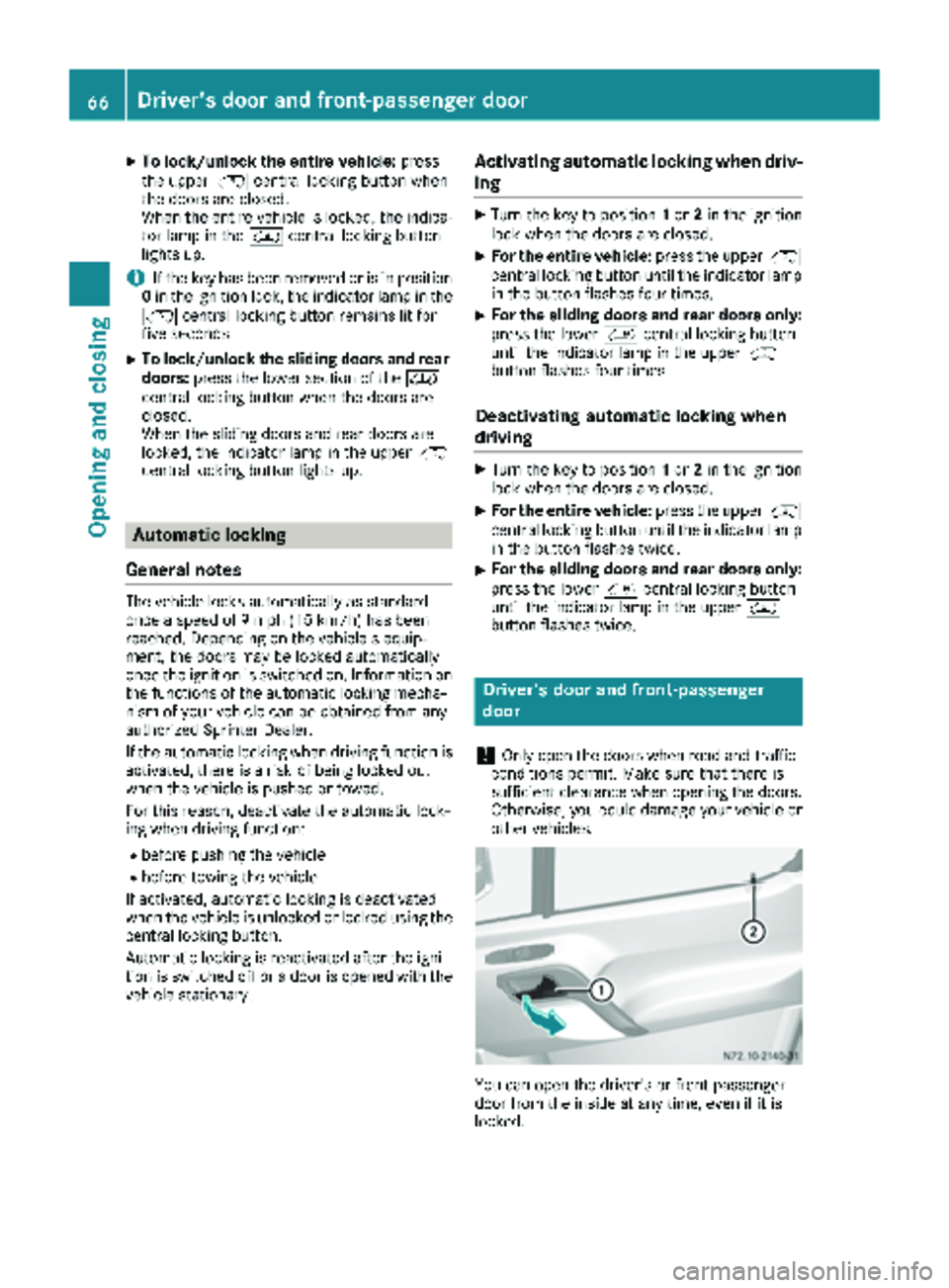
You can open the driver's or front-passenger
door from the inside at any time, even if it is
locked.
66Driver's door and front-passenger door
Opening and closing
Page 69 of 294
XPull door handle:.
Locking knob ;pops up.
The door opens.
Sliding door
Important safety notes
GWARNING
If the open sliding door is not engaged, it could
move on its own if the vehicle is on a slope.
This could trap you or other persons. There is a risk of injury.
Always make sure that the open sliding door is
engaged.
!Only open the doors when road and traffic
conditions permit. Make sure that there is
sufficient clearance when opening the doors.
Otherwise, you could damage your vehicle or other vehicles.
The sliding door of your vehicle can be equipped
with an electrical access step. Observe the
notes on the electrical step when opening and
closing the sliding door (
Ypage 68).
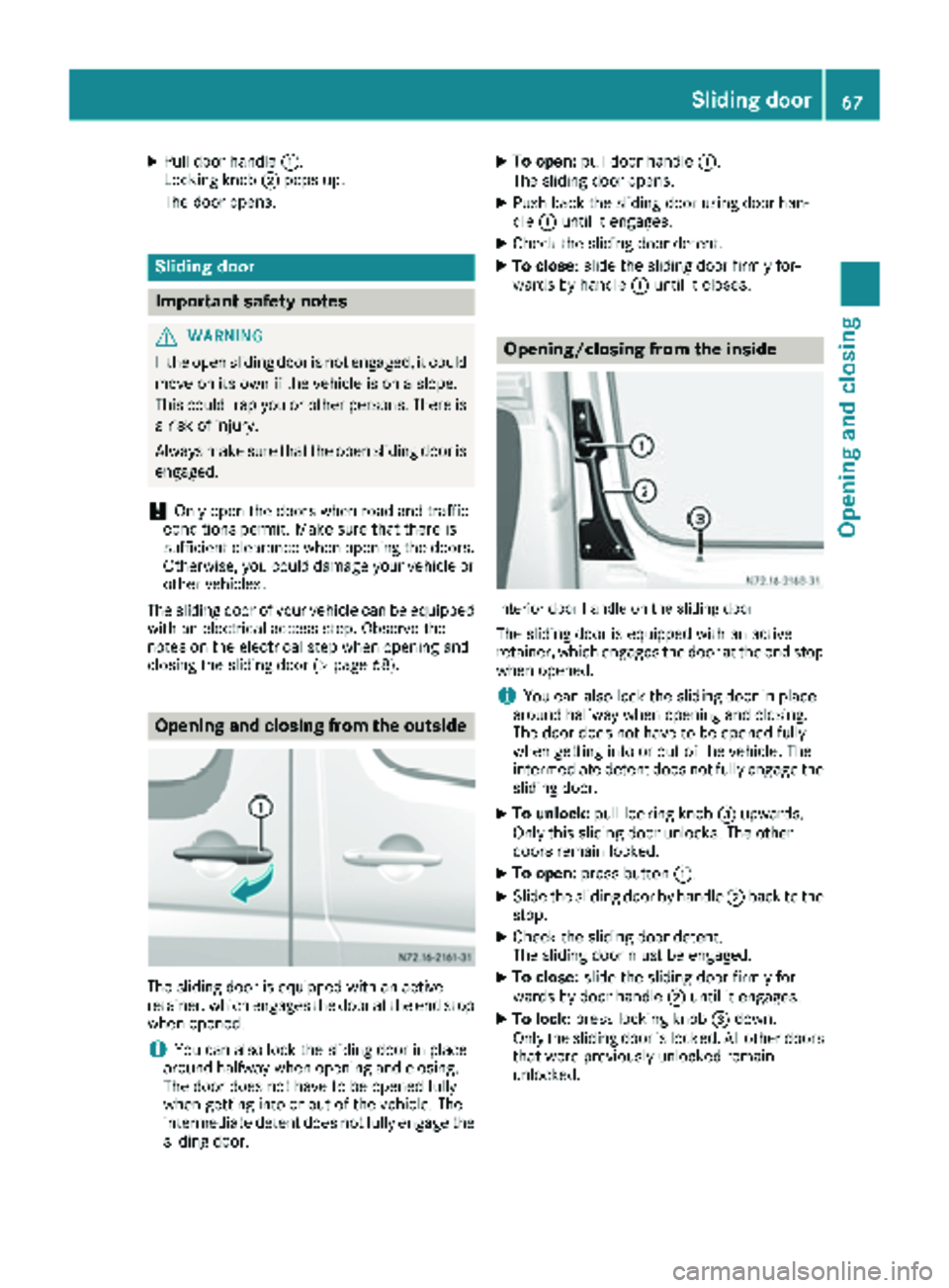
Opening and closing from the outside
The sliding door is equipped with an active
retainer, which engages the door at the end stop
when opened.
iYou can also lock the sliding door in place
around halfway when opening and closing.
The door does not have to be opened fully
when getting into or out of the vehicle. The
intermediate detent does not fully engage the
sliding door.
XTo open: pull door handle :.
The sliding door opens.
XPush back the sliding door using door han-
dle :until it engages.
XCheck the sliding door detent.
XTo close: slide the sliding door firmly for-
wards by handle :until it closes.
Opening/closing from the inside
Interior door handle on the sliding door
The sliding door is equipped with an active
retainer, which engages the door at the end stop
when opened.
iYou can also lock the sliding door in place
around halfway when opening and closing.
The door does not have to be opened fully
when getting into or out of the vehicle. The
intermediate detent does not fully engage the
sliding door.
XTo unlock: pull locking knob =upwards.
Only this sliding door unlocks. The other
doors remain locked.
XTo open: press button :.
XSlide the sliding door by handle ;back to the
stop.
XCheck the sliding door detent.
The sliding door must be engaged.
XTo close: slide the sliding door firmly for-
wards by door handle ;until it engages.
XTo lock: press locking knob =down.
Only the sliding door is locked. All other doors that were previously unlocked remain
unlocked.
Sliding door67
Opening and closing
Z
Page 70 of 294
Electrical closing assist
If your vehicle is equipped with electrical closing
assist, you will require less force to close the
sliding door.
Electrical step
Important safety notes
!
Always observe the ground clearance of the
vehicle and avoid obstacles. On vehicles with a step, ground clearance is further restricted.
Obstacles can damage the vehicle.
If you must drive over obstacles, drive espe-
cially slowly and carefully. If necessary, have
another person direct you.
If you do not use the grab handle and the step,
you could injure yourself when getting in and out
of the vehicle.
In order to reduce risks:
Rdraw the passengers' attention to the electri-
cal step. Wait until the electrical step is fully
extended.
Rdo not jump out of the vehicle.
Ronly use the grab handle and step. Only they
are designed for such a load.
Rkeep grab handles, access steps and entry
sills free from dirt, e.g. mud, clay, snow and
ice.
Operation and obstacle detection
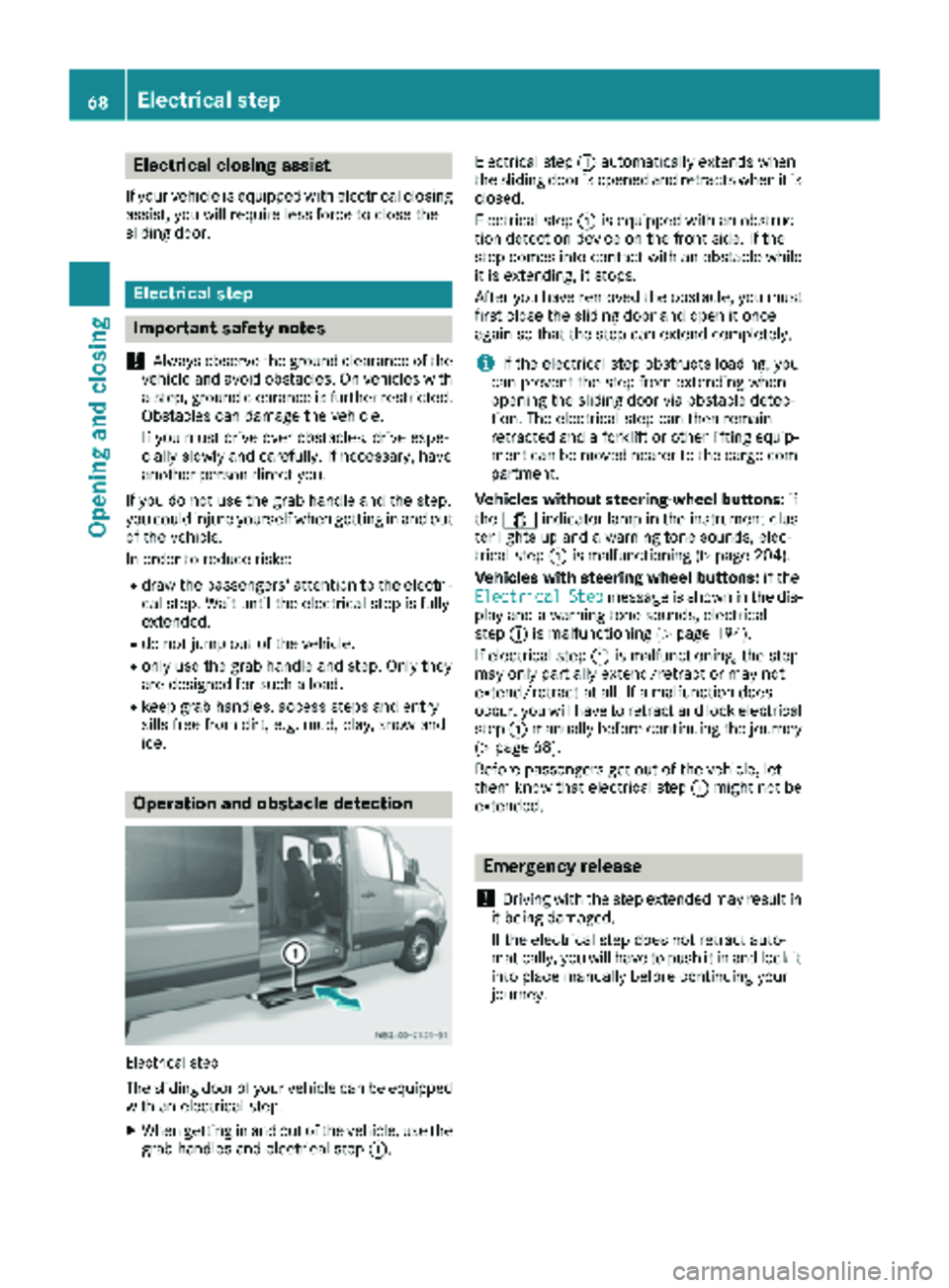
Electrical step
The sliding door of your vehicle can be equipped
with an electrical step.
XWhen getting in and out of the vehicle, use the grab handles and electrical step :.Electrical step
:automatically extends when
the sliding door is opened and retracts when it is
closed.
Electrical step :is equipped with an obstruc-
tion detection device on the front side. If the
step comes into contact with an obstacle while
it is extending, it stops.
After you have removed the obstacle, you must
first close the sliding door and open it once
again so that the step can extend completely.
iIf the electrical step obstructs loading, you
can prevent the step from extending when
opening the sliding door via obstacle detec-
tion. The electrical step can then remain
retracted and a forklift or other lifting equip-
ment can be moved nearer to the cargo com-
partment.
Vehicles without steering-wheel buttons: if
the 1 indicator lamp in the instrument clus-
ter lights up and a warning tone sounds, elec-
trical step :is malfunctioning (
Ypage 204).
Vehicles with steering wheel buttons: if the
Electrical
Stepmessage is shown in the dis-
play and a warning tone sounds, electrical
step :is malfunctioning (
Ypage 194).
If electrical step :is malfunctioning, the step
may only partially extend/retract or may not
extend/retract at all. If a malfunction does
occur, you will have to retract and lock electrical
step :manually before continuing the journey
(
Ypage 68).
Before passengers get out of the vehicle, let
them know that electrical step :might not be
extended.
Emergency release
!
Driving with the step extended may result in
it being damaged.
If the electrical step does not retract auto-
matically, you will have to push it in and lock it
into place manually before continuing your
journey.
68Electrical step
Opening and closing
Page 71 of 294
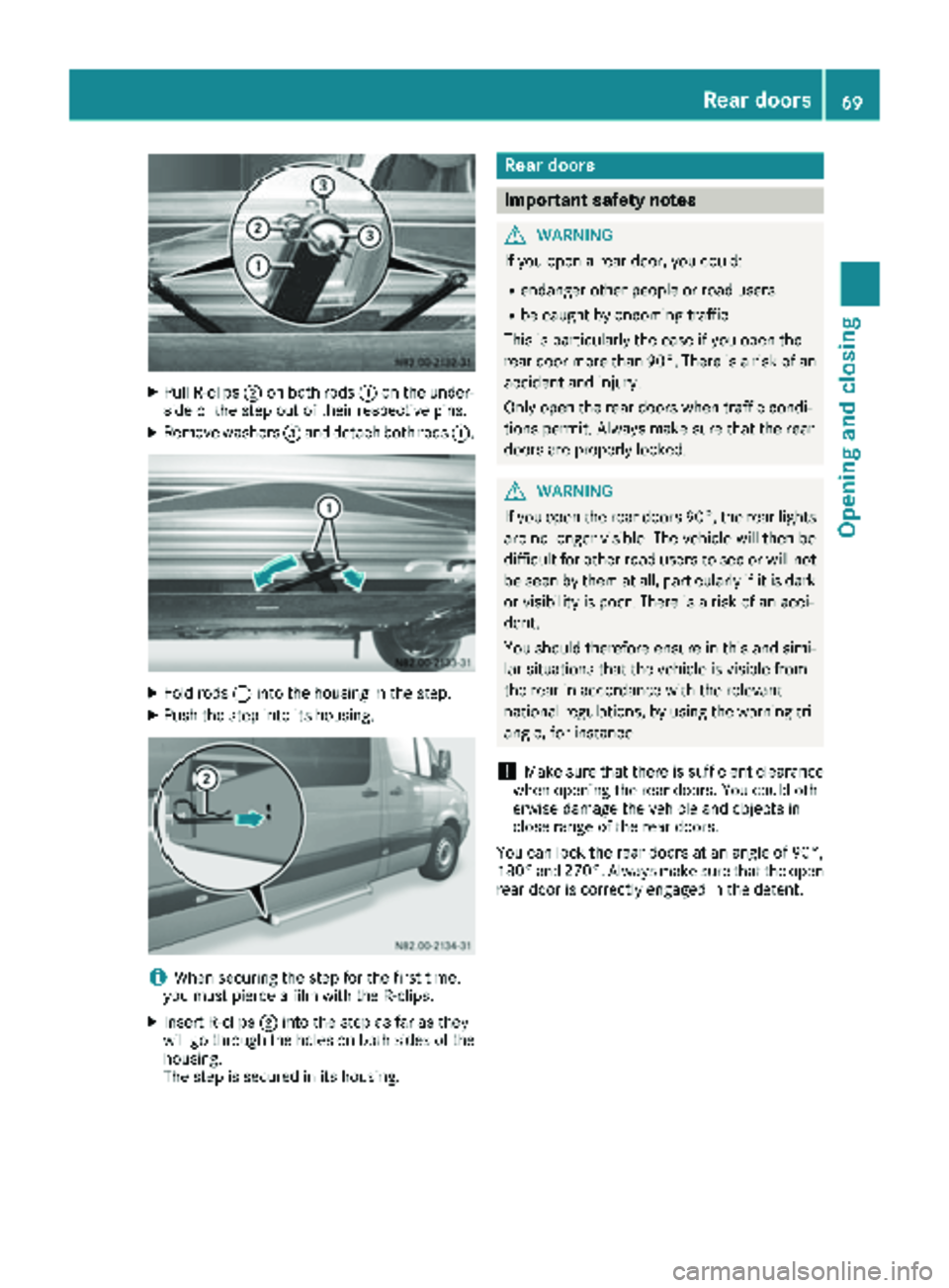
XPull R-clips;on both rods :on the under-
side of the step out of their respective pins.
XRemove washers =and detach both rods :.
XFold rods:into the housing in the step.
XPush the step into its housing.
iWhen securing the step for the first time,
you must pierce a film with the R-clips.
XInsert R-clips ;into the step as far as they
will go through the holes on both sides of the
housing.
The step is secured in its housing.
Rear doors
Important safety notes
GWARNING
If you open a rear door, you could:
Rendanger other people or road users
Rbe caught by oncoming traffic
This is particularly the case if you open the
rear door more than 90°. There is a risk of an
accident and injury.
Only open the rear doors when traffic condi-
tions permit. Always make sure that the rear
doors are properly locked.
GWARNING
If you open the rear doors 90°, the rear lights are no longer visible. The vehicle will then be
difficult for other road users to see or will not
be seen by them at all, particularly if it is dark
or visibility is poor. There is a risk of an acci-
dent.
You should therefore ensure in this and simi-
lar situations that the vehicle is visible from
the rear in accordance with the relevant
national regulations, by using the warning tri-
angle, for instance.
!Make sure that there is sufficient clearance
when opening the rear doors. You could oth-
erwise damage the vehicle and objects in
close range of the rear doors.
You can lock the rear doors at an angle of 90°,
180° and 270°. Always make sure that the open
rear door is correctly engaged in the detent.
Rear doors69
Opening and closing
Z
Page 73 of 294
Closing the rear doors from the outside
XPull the rear door away from magnetic door
retainer.
XClose the left-hand rear door firmly from the
outside.
XClose the right-hand rear door firmly from the
outside.
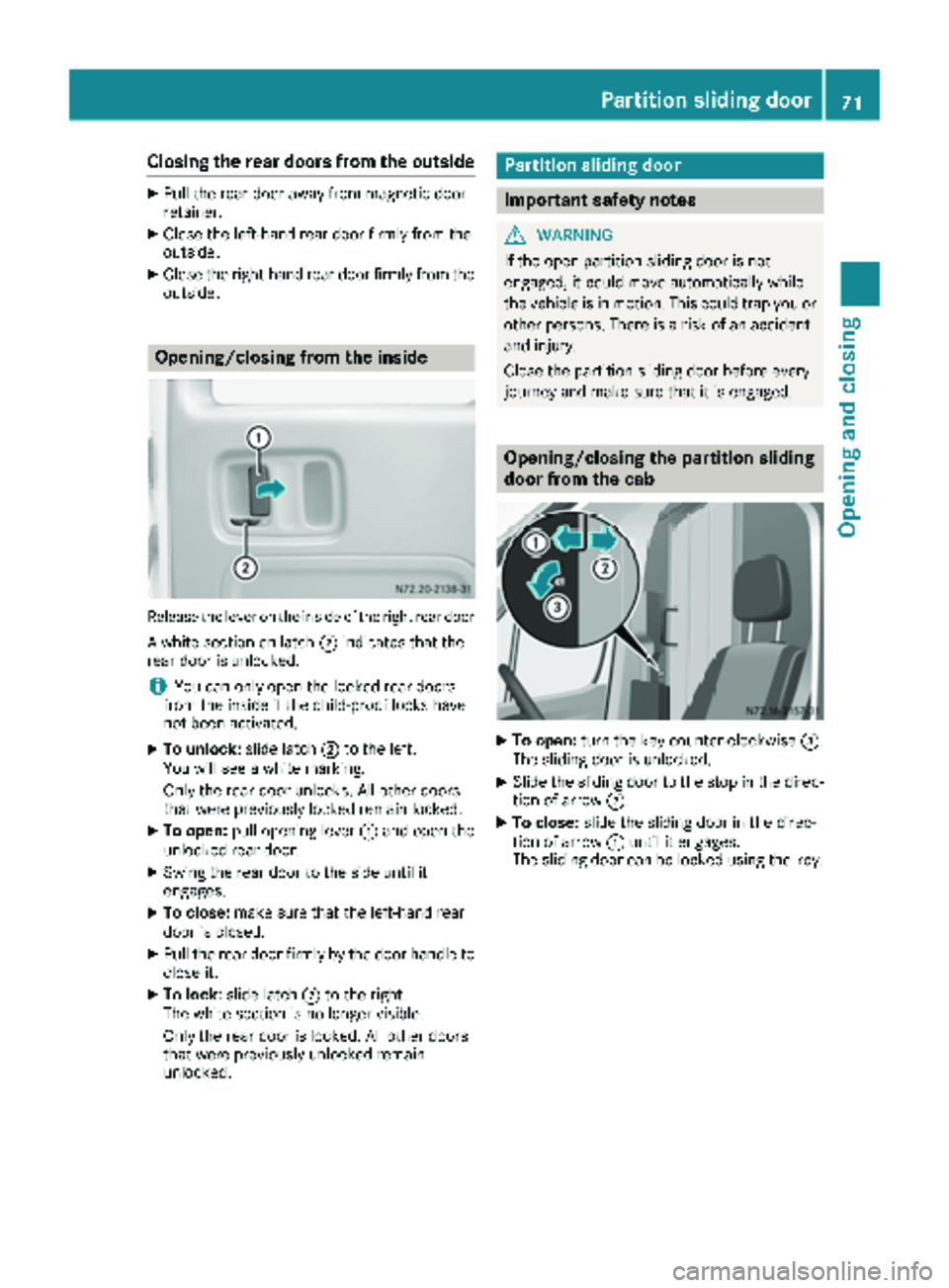
Opening/closing from the inside
Releaseth eleve ron th einside of th erigh trear door
A white section on latch ;indicates that the
rear door is unlocked.
iYou can only open the locked rear doors
from the inside if the child-proof locks have
not been activated.
XTo unlock: slide latch;to the left.
You will see a white marking.
Only the rear door unlocks. All other doors
that were previously locked remain locked.
XTo open: pull opening lever :and open the
unlocked rear door.
XSwing the rear door to the side until it
engages.
XTo close: make sure that the left-hand rear
door is closed.
XPull the rear door firmly by the door handle to
close it.
XTo lock: slide latch ;to the right.
The white section is no longer visible.
Only the rear door is locked. All other doors
that were previously unlocked remain
unlocked.
Partition sliding door
Important safety notes
GWARNING
If the open partition sliding door is not
engaged, it could move automatically while
the vehicle is in motion. This could trap you or
other persons. There is a risk of an accident
and injury.
Close the partition sliding door before every
journey and make sure that it is engaged.
Opening/closing the partition sliding
door from the cab
XTo open: turn the key counter-clockwise =.
The sliding door is unlocked.
XSlide the sliding door to the stop in the direc-
tion of arrow ;.
XTo close:slide the sliding door in the direc-
tion of arrow :until it engages.
The sliding door can be locked using the key.
Partition sliding door71
Opening and closing
Z
Page 74 of 294
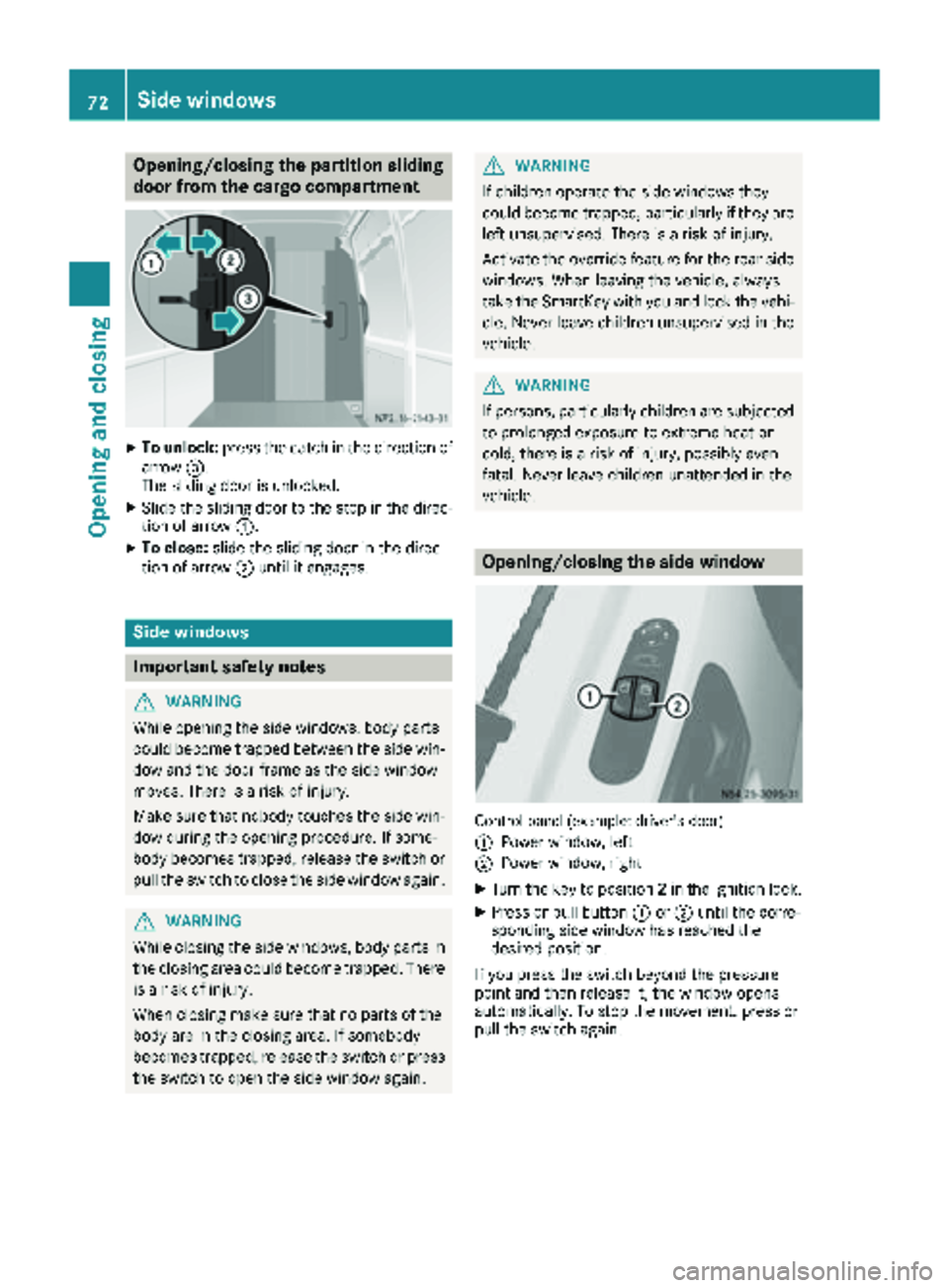
Opening/closing the partition sliding
door from the cargo compartment
XTo unlock:press the catch in the direction of
arrow =.
The sliding door is unlocked.
XSlide the sliding door to the stop in the direc- tion of arrow :.
XTo close:slide the sliding door in the direc-
tion of arrow ;until it engages.
Side windows
Important safety notes
GWARNING
While opening the side windows, body parts
could become trapped between the side win-
dow and the door frame as the side window
moves. There is a risk of injury.
Make sure that nobody touches the side win-
dow during the opening procedure. If some-
body becomes trapped, release the switch or
pull the switch to close the side window again.
GWARNING
While closing the side windows, body parts in
the closing area could become trapped. There is a risk of injury.
When closing make sure that no parts of the
body are in the closing area. If somebody
becomes trapped, release the switch or press
the switch to open the side window again.
GWARNING
If children operate the side windows they
could become trapped, particularly if they are left unsupervised. There is a risk of injury.
Activate the override feature for the rear side
windows. When leaving the vehicle, always
take the SmartKey with you and lock the vehi-
cle. Never leave children unsupervised in the
vehicle.
GWARNING
If persons, particularly children are subjected to prolonged exposure to extreme heat or
cold, there is a risk of injury, possibly even
fatal. Never leave children unattended in the
vehicle.
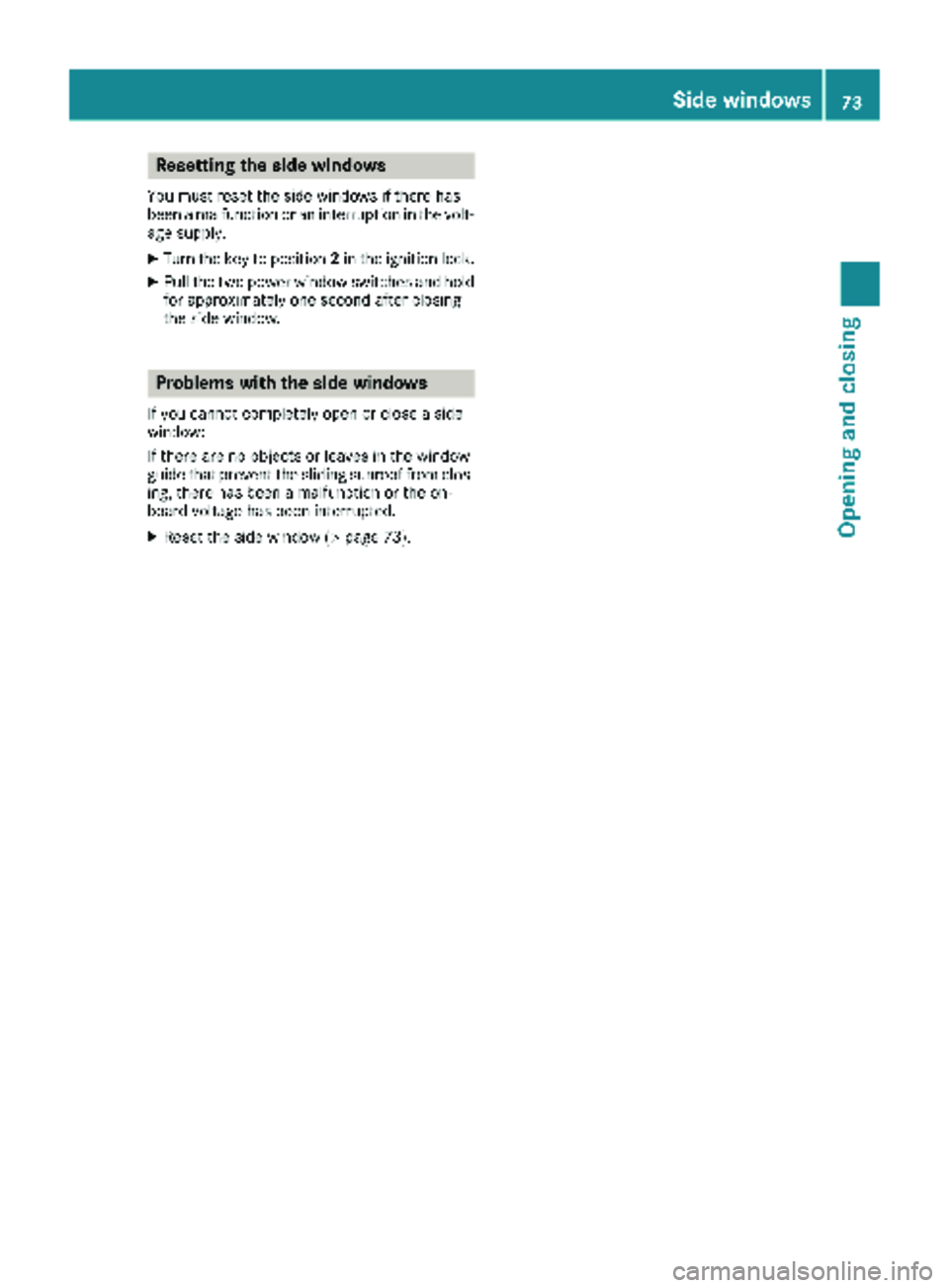
Opening/closing the side window
Control panel (example: driver's door)
:
Power window, left
;Power window, right
XTurn the key to position 2in the ignition lock.
XPress or pull button :or; until the corre-
sponding side window has reached the
desired position.
If you press the switch beyond the pressure
point and then release it, the window opens
automatically. To stop the movement, press or
pull the switch again.
72Side windows
Opening and closing
Page 75 of 294
Resetting the side windows
You must reset the side windows if there has
been a malfunction or an interruption in the volt-
age supply.
XTurn the key to position2in the ignition lock.
XPull the two power window switches and hold
for approximately one second after closing
the side window.
Problems with the side windows
If you cannot completely open or close a side
window:
If there are no objects or leaves in the window
guide that prevent the sliding sunroof from clos-
ing, there has been a malfunction or the on-
board voltage has been interrupted.
XReset the side window (Ypage 73).
Side windows73
Opening and closing
Z
Page 77 of 294

Use the head restraint pad to adjust the head
restraint so that it is as close as possible to the
back of your head.
Before the journey, make sure the head
restraints have been correctly set for each of the
vehicle's passengers (
Ypage 78).
Driver's and front-passenger seat
:Seat fore-and-aft adjustment
;Lumbar support adjustment
=Seat backrest adjustment
?Seat height adjustment
ASeat cushion angle adjustment
BSeat suspension adjustment
CSeat suspension lock
iDepending on the seat model, some adjust-
ments may not be available.
You can find information on rotating the front
seats under "Swiveling front seats"
(
Ypage 75).
XTo adjust the seat fore-and-aft position:
pull lever :up.
XSlide the seat forward or back.
XRelease lever :.
XSlide the seat forward or back until you hear it
engage.
XTo adjust the backrest: turn handwheel=
towards the front.
The seat backrest moves to a vertical posi-
tion.
XTurn handwheel =towards the rear.
The seat backrest tilts towards the rear.
XTo adjust the seat height: press or pull
lever ?repeatedly until you have reached
the desired seat height.
XTo adjust the seat angle: turn handwheelA
towards the front.
The front of the seat cushion tilts down.
XTurn handwheel Atowards the rear.
The front of the seat cushion tilts up.
iThe lumbar support allows you to use the
backrest to increase the support provided to
the lumbar spine.
When the lumbar support is correctly adjus-
ted, it reduces strain on your back while driv-
ing.
XTo adjust the lumbar support: turn hand-
wheel ;up.
This increases the support provided to the
lumbar region.
XTurn handwheel ;down.
This reduces the support provided to the lum-
bar region.
The seat suspension must be adapted to your
body weight. Adjust the seat suspension only
while the seat is unoccupied.
XTo adjust the seat suspension: take your
weight off the seat.
XUsing handwheel B, set your body weight
(40 to 120 kg) for optimum seat suspension.
The seat suspension will become more rigid
the higher you set the weight. It will then not
move as far.
If the seat moves up and down frequently and to a great extent, you can lock the seat in the lower
range.
XTo engage the seat suspension lock: turn
lever Cup.
When it next moves, the seat will lock in posi-
tion.
XTo release the seat suspension lock: turn
lever Cto the right.
The seat can now move up and down agai n.
Swiveling front seats
GWARNING
If the driver's and front-passenger seats are
not engaged facing the direction of travel
Seats75
Seats, steering wheel and mirrors
Z
Page 79 of 294
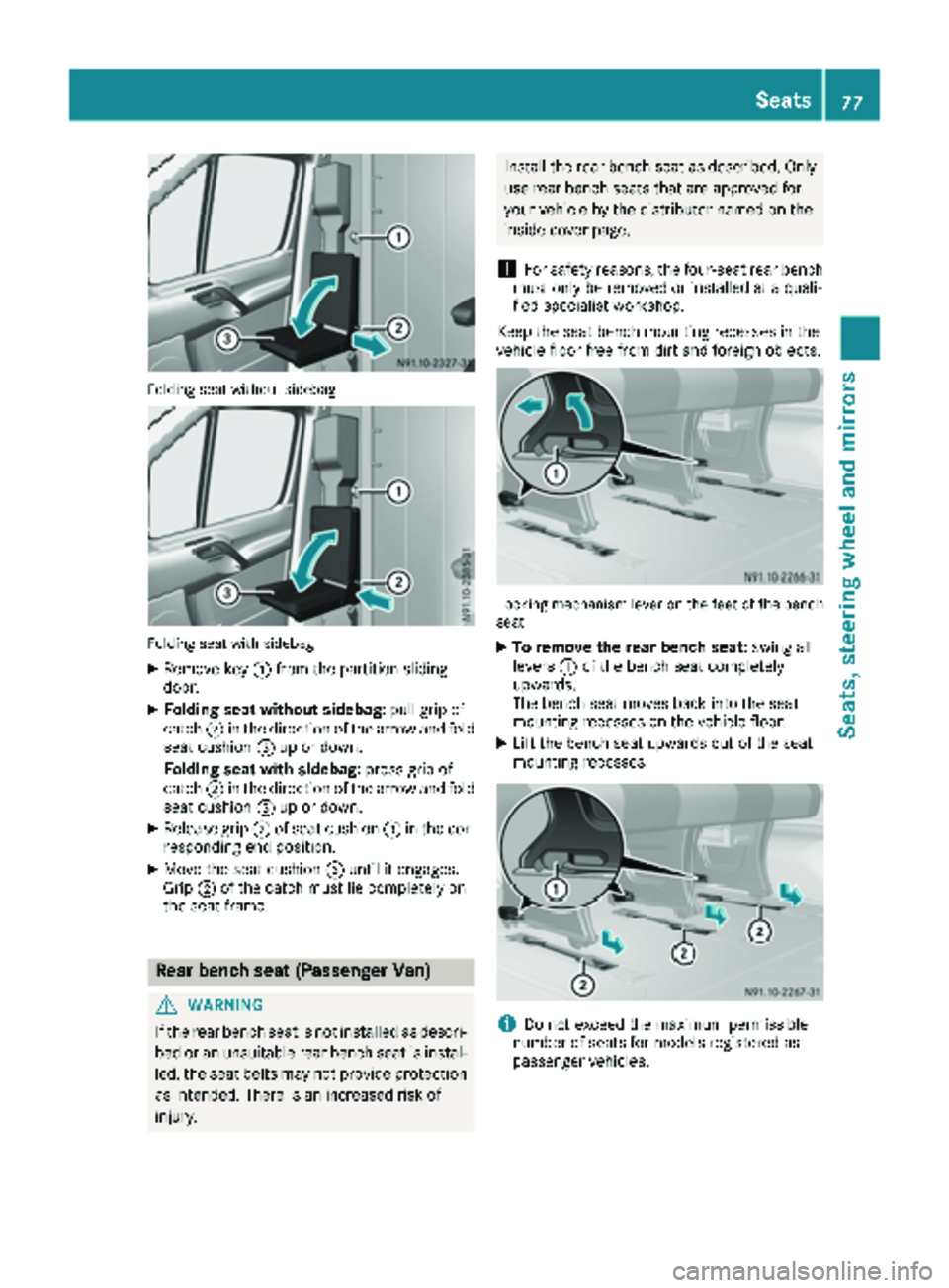
Folding seat without sidebag
Folding seat with sidebag
XRemove key:from the partition sliding
door.
XFolding seat without sidebag: pull grip of
catch ;in the direction of the arrow and fold
seat cushion =up or down.
Folding seat with sidebag: press grip of
catch ;in the direction of the arrow and fold
seat cushion =up or down.
XRelease grip ;of seat cushion =in the cor-
responding end position.
XMove the seat cushion =until it engages.
Grip ;of the catch must lie completely on
the seat frame.
Rear bench seat (Passenger Van)
GWARNING
If the rear bench seat is not installed as descri- bed or an unsuitable rear bench seat is instal-
led, the seat belts may not provide protection
as intended. There is an increased risk of
injury.
Install the rear bench seat as described. Onlyuse rear bench seats that are approved for
your vehicle by the distributor named on the
inside cover page.
!For safety reasons, the four-seat rear bench
must only be removed or installed at a quali-
fied specialist workshop.
Keep the seat bench mounting recesses in the
vehicle floor free from dirt and foreign objects.
Locking mechanism lever on the feet of the bench
seat
XTo remove the rear bench seat: swing all
levers :of the bench seat completely
upwards.
The bench seat moves back into the seat
mounting recesses on the vehicle floor.
XLift the bench seat upwards out of the seat
mounting recesses.
iDo not exceed the maximum permissible
number of seats for models registered as
passenger vehicles.
Seats77
Seats, steering wheel and mirrors
Z