light MERCEDES-BENZ SPRINTER 2018 MY18 Operator’s Manual
[x] Cancel search | Manufacturer: MERCEDES-BENZ, Model Year: 2018, Model line: SPRINTER, Model: MERCEDES-BENZ SPRINTER 2018Pages: 294, PDF Size: 4.36 MB
Page 108 of 294
Heating and air-conditioning system
Air-recirculation mode switches off automati-
cally after about 10 to 30 minutes, depending on
the outside temperature.
XSwitch on climate control (Ypage 102).
XTo activate/deactivate:press theebut-
ton.
If the indicator lamp in the ebutton lights
up, air-recirculation mode is activated.
Rear-compartment heating and rear-
compartment air-conditioning system
On vehicles with rear-compartment heating and
a rear-compartment air-conditioning system,
you can activate or deactivate air-recirculation
mode for the rear-compartment climate control.
XSwitch on climate control (Ypage 102).
XTo activate: set the temperature control of
rear-compartment heating =(Ypage 101) or
rear-compartment air conditioning system ;
(
Ypage 102) to the center position.
Only one of the two climate control systems in
the rear compartment is activated and is in
air-recirculation mode.
XTo deactivate: turn the temperature control
of rear-compartment heating =(Ypage 101)
or rear-compartment air-conditioning sys-
tem ;(
Ypage 102) clockwise or counter-
clockwise. Only change the temperature in
small increments.
Adjusting the air vents
Important safety notes
GWARNING
Very hot or very cold air can flow from the air
vents. This could result in burns or frostbite in
the immediate vicinity of the air vents. There
is a risk of injury.
Make sure that all vehicle occupants always
maintain a sufficient distance to the air out-
lets. If necessary, redirect the airflow to
another area of the vehicle interior.
The center and side air vents are adjustable. On vehicles with a rear-compartment air-condi-
tioning system, you can also adjust the air vents
in the roof duct.
iFor virtually draft-free ventilation, adjust the
sliders of the center air vents to the center
position.
In order to ensure the direct flow of fresh air
through the air vents into the vehicle interior,
please observe the following notes:
Rkeep the air inlet grille on the hood free of
blockages, such as ice, snow or leaves.
Rnever cover the vents or the ventilation grilles
in the vehicle interior.
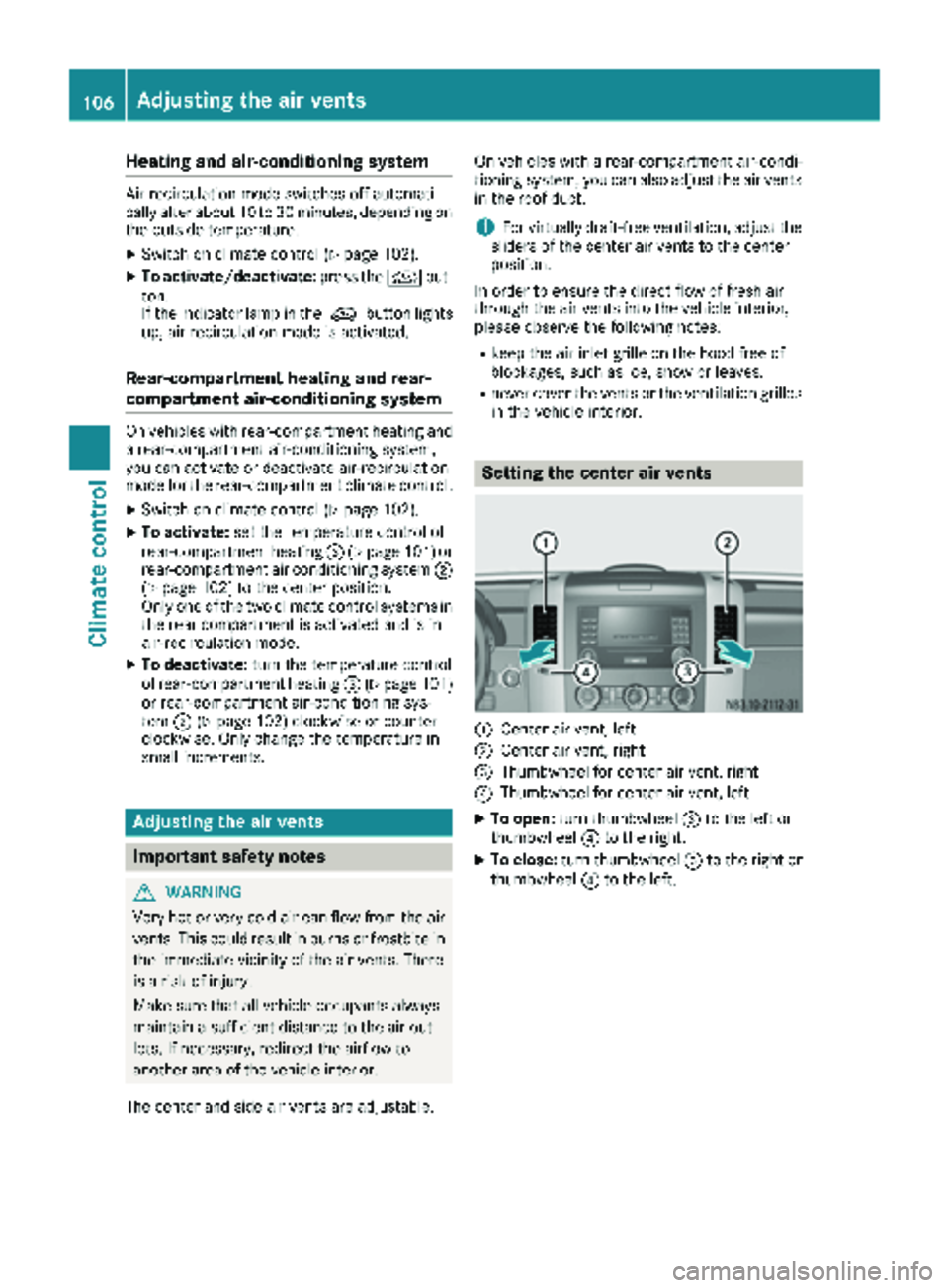
Setting the center air vents
:Center air vent, left
;Center air vent, right
=Thumbwheel for center air vent, right
?Thumbwheel for center air vent, left
XTo open: turn thumbwheel =to the left or
thumbwheel ?to the right.
XTo close: turn thumbwheel =to the right or
thumbwheel ?to the left.
106Adjusting the air vents
Climate control
Page 111 of 294
Outside tempera-
tureEngine runtime
Above 32 ‡ (0 †)at least 10 minutes
32 ‡ (0 †) to 14 ‡
(Ò10 †)at least 15 minutes
Below 14 ‡ (Ò10 †)at least 20 minutes
Before switching on
XCheck the fuel level and top up if necessary.
The auxiliary heating is operated directly
using the vehicle's fuel. The tank must be at
least a quarter full to ensure that the auxiliary
heating functions.
XSwitch on climate control (Ypage 102).
XSet the temperature control to the desired
temperature (Ypage 103).
XSet the air distribution as required
(Ypage 103).
XOpen the center (Ypage 106) and side air
vents (Ypage 107) and set them to the middle
position.
iThe auxiliary heating automatically switches
to heater booster mode after the engine is
started.
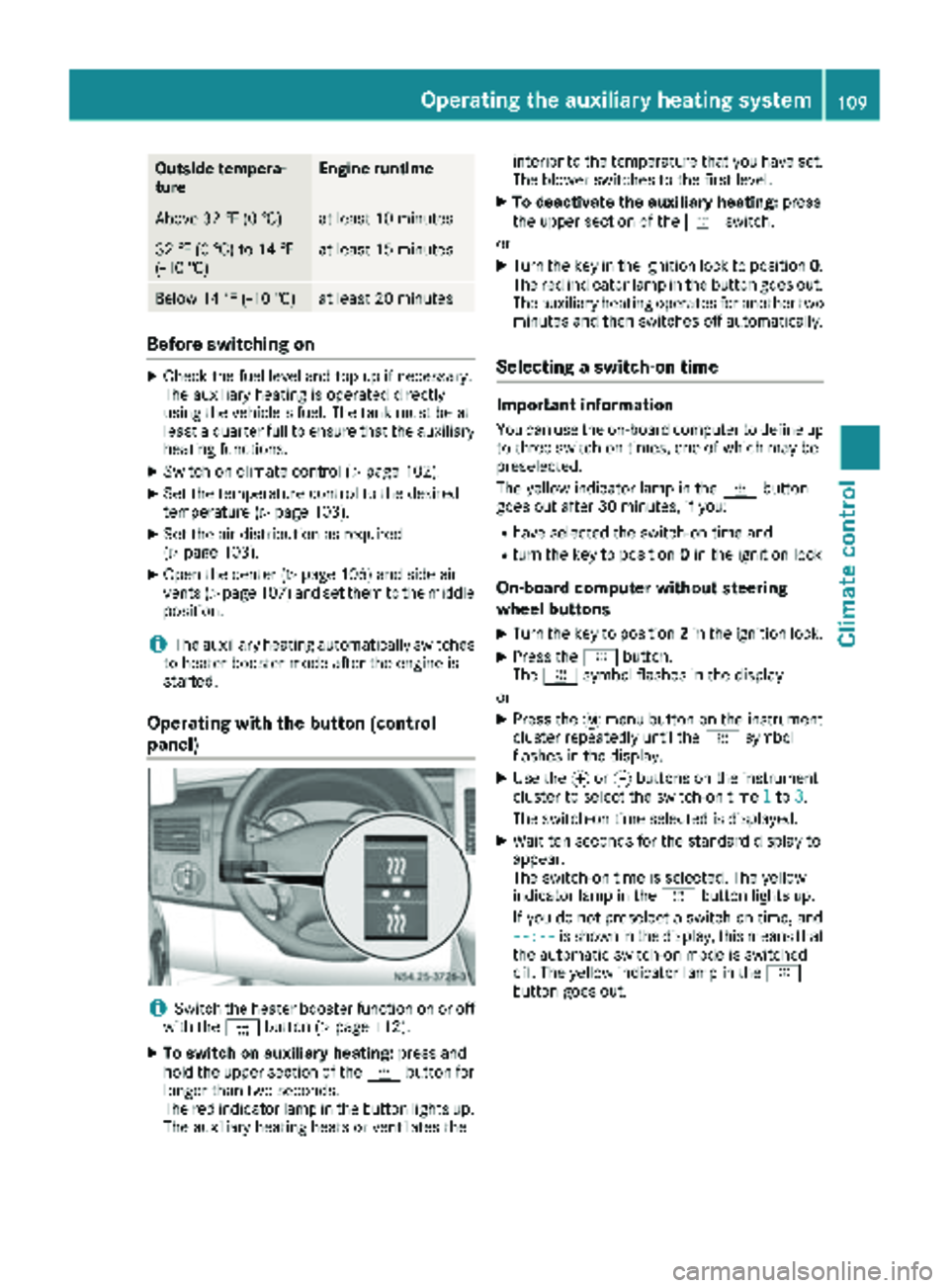
Operating with the button (control
panel)
iSwitch the heater booster function on or off
with the ¢button (Ypage 112).
XTo switch on auxiliary heating: press and
hold the upper section of the ybutton for
longer than two seconds.
The red indicator lamp in the button lights up.
The auxiliary heating heats or ventilates the interior to the temperature that you have set.
The blower switches to the first level.
XTo deactivate the auxiliary heating:
press
the upper section of the yswitch.
or
XTurn the key in the ignition lock to position 0.
The red indicator lamp in the button goes out.
The auxiliary heating operates for another two
minutes and then switches off automatically.
Selecting a switch-on time
Important information
You can use the on-board computer to define up
to three switch-on times, one of which may be
preselected.
The yellow indicator lamp in the ybutton
goes out after 30 minutes, if you:
Rhave selected the switch-on time and
Rturn the key to position 0in the ignition lock
On-board computer without steering
wheel buttons
XTurn the key to position 2in the ignition lock.
XPress the ybutton.
The y symbol flashes in the display.
or
XPress the 4menu button on the instrument
cluster repeatedly until the ysymbol
flashes in the display.
XUse the forg buttons on the instrument
cluster to select the switch-on time 1to3.
The switch-on time selected is displayed.
XWait ten seconds for the standard display to
appear.
The switch-on time is selected. The yellow
indicator lamp in the ybutton lights up.
If you do not preselect a switch-on time, and
--:--
is shown in the display, this means that
the automatic switch-on mode is switched
off. The yellow indicator lamp in the y
button goes out.
Operating the auxiliary heating system109
Climate control
Z
Page 112 of 294
On-board computer with steering wheel
buttons
XTurn the key to position2in the ignition lock.
XPress the ybutton.
The Aux. heatsubmenu is shown in the dis-
play.
If no switch-on time has been selected, the
selected switch-on time is highlighted or
Timer off
is highlighted.
iYou can also access the Aux. heat.sub-
menu via the Settingsmenu (Ypage 167).
XUse theWorX button on the steering
wheel to select the desired switch-on time.
Use the Timer off
setting to deactivate
automatic switch-on.
XPress the Vbutton on the steering wheel.
The switch-on time is selected. The yellow
indicator lamp in the ybutton lights up.
Setting the switch-on time
XUse the same method to select a switch-on
time as described in the "Preselecting a
switch-on time" section.
On-board computer without steering wheel
buttons
XPress the 9reset button on the instrument
cluster.
The hour display flashes.
XUse the fand gbuttons on the instrument
cluster to set the hours.
XPress the 9reset button
The minute display flashes.
XUse the fand gbuttons to set the minutes.
The switch-on time is set and selected.
On-board computer with steering wheel but-
tons
XPress the 9button on the steering wheel.
The display shows the Hoursmenu.
XUse theWandX buttons on the steer-
ing wheel to set the hours.
XPress the 9button.
The display shows the Minutesmenu.
XUse theWandX buttons to set the
minutes.
XPress the Vbutton.
The switch-on time is set and selected.
Operation with the remote control
Important information
You can switch the auxiliary heating on/off and
set the operating duration using the remote con-
trol. You can use up to 4 remote control units on
the vehicle. These must be synchronized for the
receiver in your vehicle (
Ypage 111).
The remote control has a maximum range of
approximately 600 meters. This range is
reduced by:
Rsources of interference
Rsolid objects between the remote control and
the vehicle
Rthe remote control being in an unfavorable
position in relation to the vehicle
Rtransmitting from an enclosed space
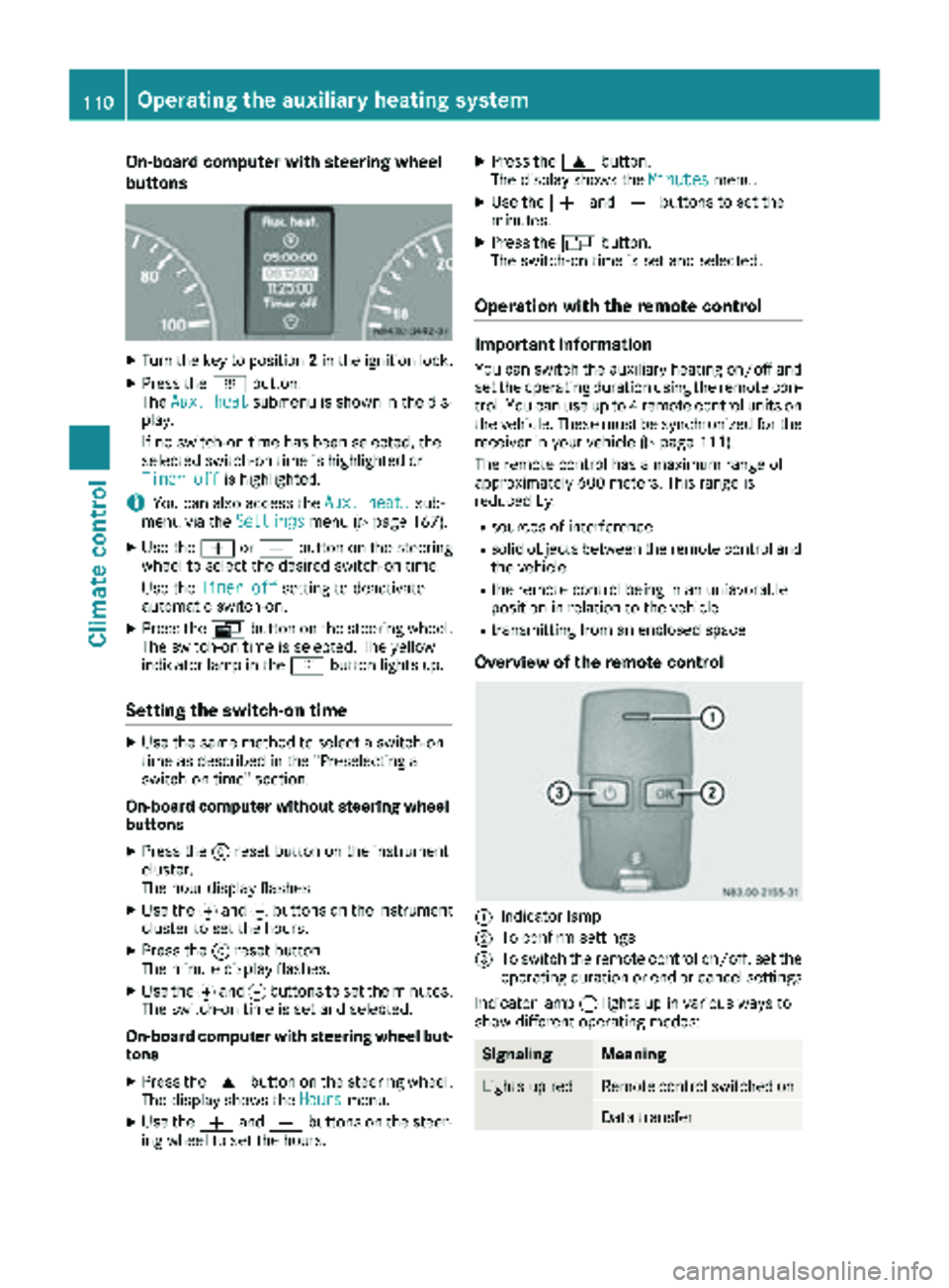
Overview of the remote control
:Indicator lamp
;To confirm settings
=To switch the remote control on/off, set the operating duration or end or cancel settings
Indicator lamp :lights up in various ways to
show different operating modes:
SignalingMeaning
Lights up redRemote control switched on
Data transfer
110Operating the auxiliary heating system
Climate control
Page 113 of 294
SignalingMeaning
Flashes redAuxiliary heating switched
off
Lights up
greenAuxiliary heating switched
on
Flashes greenChange operating duration
active
Flashes alter-
nately red and
greenRemote control in synchro-
nizing mode
iWhen the remote control battery is weak,
indicator lamp :flashes red rapidly. Replace
the remote control battery (
Ypage 112).
You can find information on further lamp sta-
tuses in the "Problems with the hot-water aux-
iliary heater" section (
Ypage 113).
Switching the remote control on/off
The remote control switches to standby mode
after ten seconds. Indicator lamp :goes out.
XTo switch on: press and hold the Übutton
until indicator lamp :lights up red.
If a connection between the remote control
and the receiver in the vehicle has been estab-
lished and indicator lamp ::
Rflashes red, the auxiliary heating is switched
off.
Rlights up green, the auxiliary heating is
switched on.
XTo switch off:press and hold the Übut-
ton until indicator lamp :goes out.
Switching the auxiliary heating on/off
XSwitch on the remote control.
XTo switch on: when indicator lamp :flashes
red, press the bbutton.
During data transmission, indicator lamp :
lights up red.
When indicator lamp :lights up green, the
auxiliary heating is switched on.
XTo switch off: when indicator lamp :lights
up green, press the bbutton.
During data transmission, indicator lamp :
lights up red.
When indicator lamp :flashes red, the aux-
iliary heating is switched off.
Changing the operating duration
XSwitch on the remote control.
XWhen indicator lamp :flashes red, press
Ü andb simultaneously.
Indicator lamp :flashes green.
XPress the Übutton repeatedly until the
desired operating duration is shown.
R20 minutes
Indicator lamp :flashes green twice.
R30 minutes
Indicator lamp :flashes green three
times.
R40 minutes
Indicator lamp :flashes green four times.
XPress the bbutton.
During data transmission, indicator lamp :
lights up red.
If indicator lamp :emits two long, green
flashes, the selected operating duration is
stored.
iIf no adjustment is made to the operating
duration, indicator lamp :flashes six times
and the remote control goes into standby
mode.
Synchronizing the remote control
XPress the yauxiliary heating button in the
control panel for longer than ten seconds
(
Ypage 109).
When you press and hold the ybutton, the
red indicat
or lamp lights up in the button.
When the red indicator lamp in the ybut-
ton flashes, the receiver in the vehicle is ready
for synchronizing.
XPress and hold the Üremote control but-
ton until indicator lamp :lights up red.
If there is an active connection between the
remote control and the receiver, indicator
lamp :flashes alternately red and green.
The remote control is in synchronizing mode.
iIf you press the Übutton again on the
remote control after starting synchronization,
you will only synchronize this remote control
unit with the receiver. Any other remote con-
trol units that were synchronized will be
cleared. Indicator lamp :flashes alternately
red and green (very slowly).
XPress the bbutton on the remote control.
During data transmission, indicator lamp :
lights up red.
Operating the auxiliary heating system111
Climate control
Z
Page 114 of 294
When remote control indicator lamp:emits
two long green flashes, the remote control is
synchronized. The indicator lamp in the y
auxiliary heating button goes out.
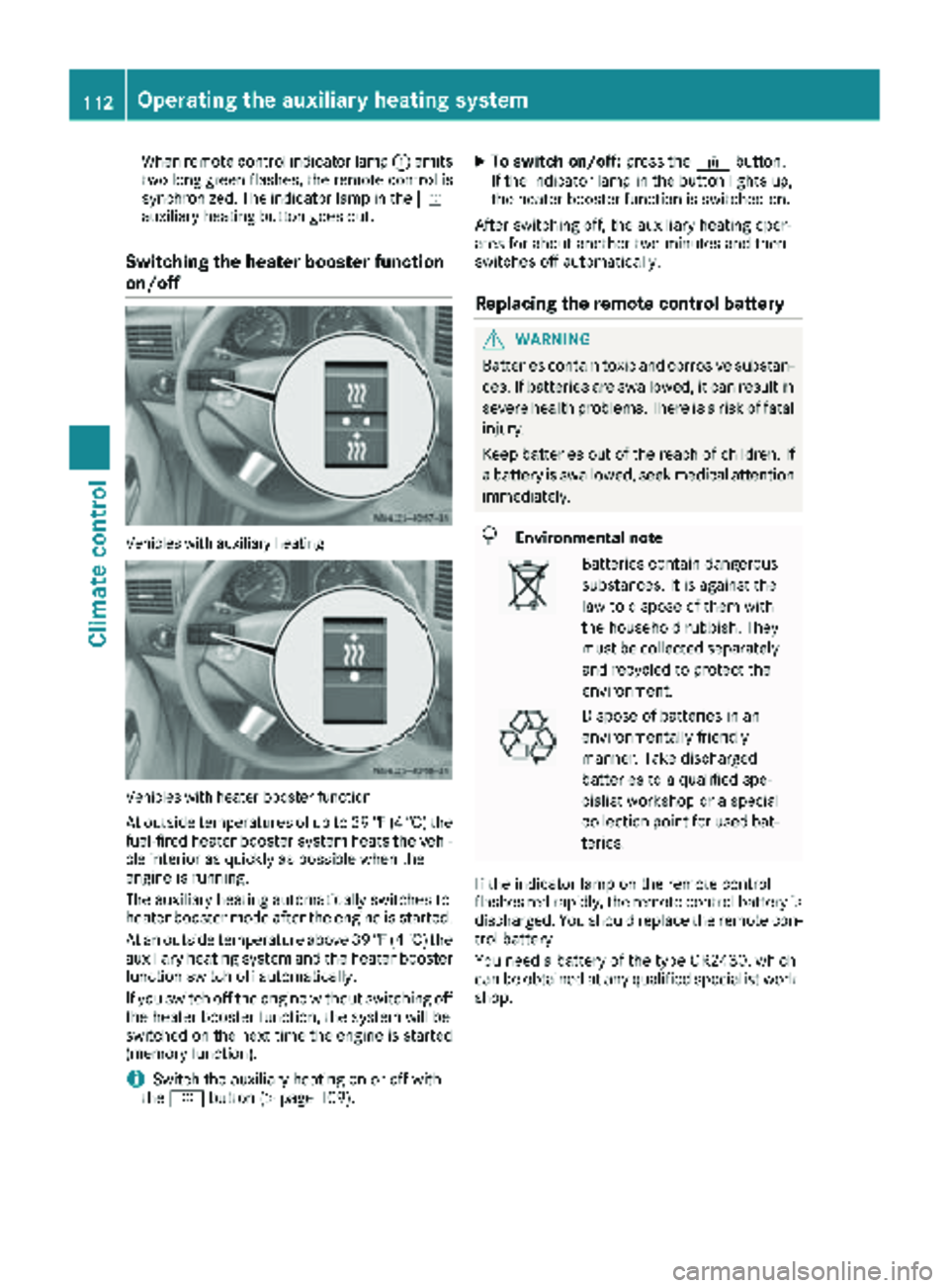
Switching the heater booster function
on/off
Vehicles with auxiliary heating
Vehicles with heater booster function
At outside temperatures of up to 39 ‡(4 †) the
fuel-fired heater booster system heats the vehi-
cle interior as quickly as possible when the
engine is running.
The auxiliary heating automatically switches to
heater booster mode after the engine is started.
At an outside temperature above 39 ‡(4 †) the
auxiliary heating system and the heater booster
function switch off automatically.
If you switch off the engine without switching off
the heater booster function, the system will be
switched on the next time the engine is started (memory function).
iSwitch the auxiliary heating on or off with
the y button (Ypage 109).
XTo switch on/off: press the¢button.
If the indicator lamp in the button lights up,
the heater booster function is switched on.
After switching off, the auxiliary heating oper-
ates for about another two minutes and then
switches off automatically.
Replacing the remote control battery
GWARNING
Batteries contain toxic and corrosive substan- ces. If batteries are swallowed, it can result in
severe health problems. There is a risk of fatalinjury.
Keep batteries out of the reach of children. If
a battery is swallowed, seek medical attention
immediately.
HEnvironmental note
Batteries contain dangerous
substances. It is against the
law to dispose of them with
the household rubbish. They
must be collected separately and recycled to protect the
environment.
Dispose of batteries in an
environmentally friendly
manner. Take discharged
batteries to a qualified spe-
cialist workshop or a special
collection point for used bat-
teries.
If the indicator lamp on the remote control
flashes red rapidly, the remote control battery is
discharged. You should replace the remote con-
trol battery.
You need a battery of the type CR2430, which
can be obtained at any qualified specialist work-
shop.
112Operating the auxiliary heating system
Climate control
Page 121 of 294
the battery main switch. You could otherwise
damage components of the electrical system.
You can use the battery isolating switch to dis-
connect the power supply to all your vehicle's
consumers. This will prevent uncontrolled bat-
tery discharge caused by off-load current con-
sumption.
If your vehicle is equipped with an auxiliary bat-
tery in the engine compartment, you will need to
disconnect both batteries. Only then is the elec- trical system fully disconnected from the power
supply.
iOnly switch the vehicle to de-energized
using the battery main switch if:
Rthe vehicle is stationary for a lengthy period
Rit is absolutely necessary
After the power supply has been activated,
you will need to reset the side windows
(
Ypage 73).
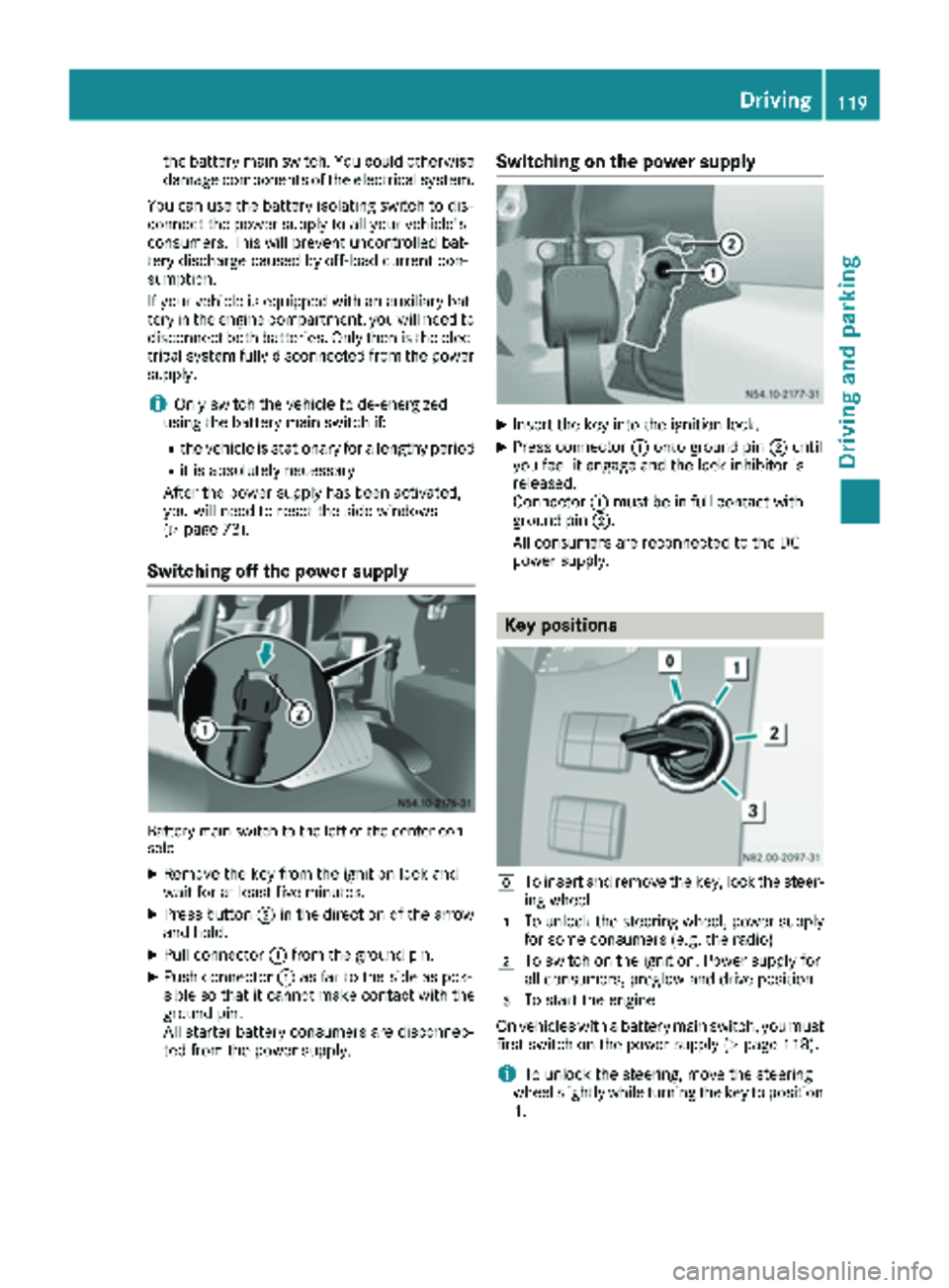
Switching off the power supply
Battery main switch to the left of the center con-
sole
XRemove the key from the ignition lock and
wait for at least five minutes.
XPress button ;in the direction of the arrow
and hold.
XPull connector :from the ground pin.
XPush connector :as far to the side as pos-
sible so that it cannot make contact with the
ground pin.
All starter battery consumers are disconnec-
ted from the power supply.
Switching on the power supply
XInsert the key into the ignition lock.
XPress connector :onto ground pin ;until
you feel it engage and the lock inhibitor is
released.
Connector :must be in full contact with
ground pin ;.
All consumers are reconnected to the DC
power supply.
Key positions
gTo insert and remove the key, lock the steer-
ing wheel
1To unlock the steering wheel, power supply
for some consumers (e.g. the radio)
2To switch on the ignition. Power supply for
all consumers, preglow and drive position
3To start the engine
On vehicles with a battery main switch, you must
first switch on the power supply (
Ypage 118).
iTo unlock the steering, move the steering
wheel slightly while turning the key to position
1 .
Driving119
Dr iving an d parking
Z
Page 122 of 294
Preparing for a journey
Visual check of the vehicle exterior
XIn particular, check the following components
on the vehicle, and on the trailer as necessary:
Rlicense plates, vehicle lighting, turn signals,
brake lamps and wiper blades for dirt and
damage
Rtires and wheels for firm seating, correct
tire pressure and general condition
Rtrailer tow hitch for play and security
The trailer coupling is one of the most
important vehicle parts with regard to road safety. The separate instructions issued by
the manufacturer pertaining to operation,
care and maintenance should be observed.
Rthat contour markings on attachments and
bodies are in good condition
XRectify any noticeable defects before com-
mencing the journey.
Checks in the vehicle
Emergency equipment and first-aid kit
XCheck the equipment to make sure that it is
accessible, complete and ready for use.
The first aid and breakdown assistance equip-
ment is in the front door stowage compartments
and behind the driver's seat.
Vehicle lighting
XTurn the key to position 2in the ignition lock.
XCheck the lighting system with the aid of a
second person.
XReplace defective bulbs (Ypage 89).
Before driving off
GWARNING
Objects in the driver's footwell may restrict
the clearance around the pedals or block a
depressed pedal. This jeopardizes the oper-
ating and road safety of the vehicle. There is a risk of an accident.
Stow all objects securely in the vehicle so that
they do not get into the driver's footwell.
When using floormats or carpets, make sure
that they are properly secured so that they do
not slip or obstruct the pedals. Do not place
several floormats or carpets on top of one
another.
GWARNING
Unsuitable footwear can hinder correct usage of the pedals, e.g.:
Rshoes with thick soles
Rshoes with high heels
Rslippers
There is a risk of an accident.
Wear suitable footwear to ensure correct
usage of the pedals.
XSecure the load as per the loading guidelines
(Ypage 213).
XStow luggage items securely. Secure the load
as per the loading guidelines (Ypage 213).
XMake sure that the floormats and carpets are
properly secured so that they cannot slip and
obstruct the pedals.
XClose all doors.
Starting the engine
GWARNING
Combustion engines emit poisonous exhaust
gases such as carbon monoxide. Inhaling
these exhaust gases leads to poisoning. There
is a risk of fatal injury. Therefore never leave
the engine running in enclosed spaces with-
out sufficient ventilation.
!Do not depress the accelerator pedal when
starting the engine.
XBefore starting the engine, make sure that:
Rall the doors are closed.
Rall the vehicle occupants are wearing their
seat belts correctly.
Rthe parking brake is applied.
iIf you depress the brake pedal before start-
ing the engine, the pedal travel is short and
pedal resistance is high.
If you depress the brake pedal again after
starting the engine, pedal travel and resist-
ance will be back to normal again.
120Driving
Driving and parking
Page 123 of 294
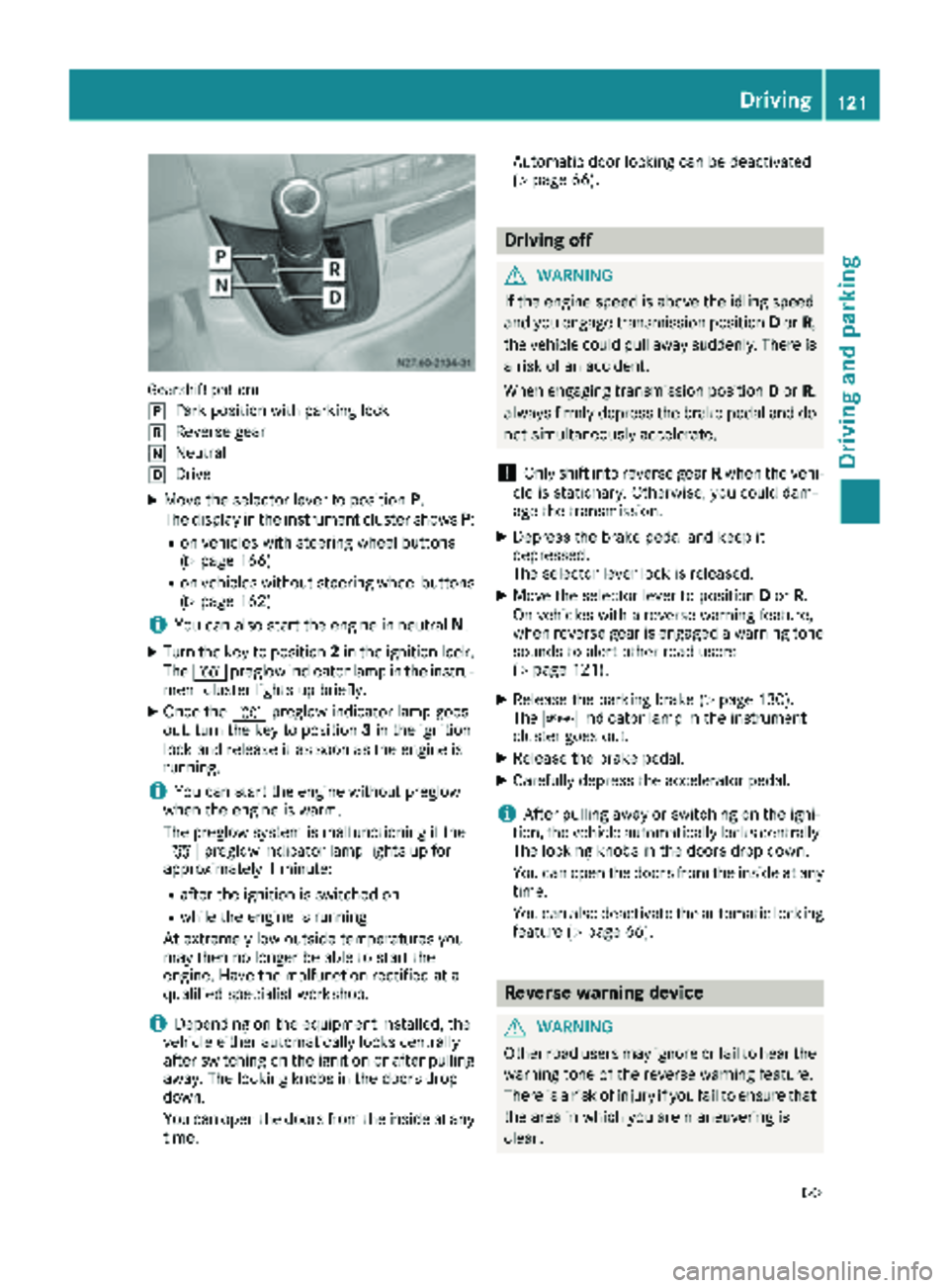
Gearshift pattern
j
Park position with parking lock
kReverse gear
iNeutral
hDrive
XMove the selector lever to positionP.
The display in the instrument cluster shows P:
Ron vehicles with steering wheel buttons
(Ypage 166)
Ron vehicles without steering wheel buttons
(Ypage 162)
iYou can also start the engine in neutral N.
XTurn the key to position 2in the ignition lock.
The % preglow indicator lamp in the instru-
ment cluster lights up briefly.
XOnce the %preglow indicator lamp goes
out, turn the key to position 3in the ignition
lock and release it as soon as the engine is
running.
iYou can start the engine without preglow
when the engine is warm.
The preglow system is malfunctioning if the
% preglow indicator lamp lights up for
approximately 1 minute:
Rafter the ignition is switched on
Rwhile the engine is running
At extremely low outside temperatures you
may then no longer be able to start the
engine. Have the malfunction rectified at a
qualified specialist workshop.
iDepending on the equipment installed, the
vehicle either automatically locks centrally
after switching on the ignition or after pulling
away. The locking knobs in the doors drop
down.
You can open the doors from the inside at any
time. Automatic door locking can be deactivated
(
Ypage 66).
Driving off
GWARNING
If the engine speed is above the idling speed
and you engage transmission position Dor R,
the vehicle could pull away suddenly. There is
a risk of an accident.
When engaging transmission position Dor R,
always firmly depress the brake pedal and do not simultaneously accelerate.
!Only shift into reverse gear Rwhen the vehi-
cle is stationary. Otherwise, you could dam-
age the transmission.
XDepress the brake pedal and keep it
depressed.
The selector lever lock is released.
XMove the selector lever to position Dor R.
On vehicles with a reverse warning feature,
when reverse gear is engaged a warning tone
sounds to alert other road users
(
Ypage 121).
XRelease the parking brake (Ypage 130).
The c indicator lamp in the instrument
cluster goes out.
XRelease the brake pedal.
XCarefully depress the accelerator pedal.
iAfter pulling away or switching on the igni-
tion, the vehicle automatically locks centrally.
The locking knobs in the doors drop down.
You can open the doors from the inside at any
time.
You can also deactivate the automatic locking
feature (
Ypage 66).
Reverse warning device
GWARNING
Other road users may ignore or fail to hear the warning tone of the reverse warning feature.
There is a risk of injury if you fail to ensure that
the area in which you are maneuvering is
clear.
Driving121
Driving and parking
Z
Page 125 of 294
ProblemPossible causes/consequences andMSolutions
The vehicle cannot be
driven at a speed
exceeding 5 mph
(8 km/h).
The yellow;Check
Engine lamp and the yel-
low å DEF indicator
lamp
2light up.
The exhaust gas aftertreatment system is defective or an emissions-
relevant malfunction has occurred.
This malfunction or defect can damage the exhaust gas aftertreat-
ment.
XObserve the messages in the display:
Ron vehicles without steering-wheel buttons (Ypage 177)
Ron vehicles with steering wheel buttons (Ypage 187).
The engine does not
start.
The starter motor cannot
be heard.The battery isolating switch is switched off.
XSwitch on the power supply (Ypage 119).
The engine does not
start.
The starter motor cannot
be heard.The on-board voltage is too low. The battery is too weak or discharged.
XJump-start the vehicle (Ypage 243).
If the engine cannot be jump-started, the starter motor is faulty.
XConsult a qualified specialist workshop.
The engine does not
start.
The starter motor cannot
be heard.The battery is discharged or faulty.
XCheck the battery for damage.
XCharge the battery (Ypage 233).
Automatic transmission
Important safety notes
GWARNING
If the engine speed is above the idling speed
and you engage transmission position Dor R,
the vehicle could pull away suddenly. There is
a risk of an accident.
When engaging transmission position Dor R,
always firmly depress the brake pedal and do not simultaneously accelerate.
!Vehicles with automatic transmission may
roll only briefly in the neutral position N. Pro-
longed rolling of the wheels, e.g. when being
towed, will result in transmission damage.
Towing (
Ypage 244)
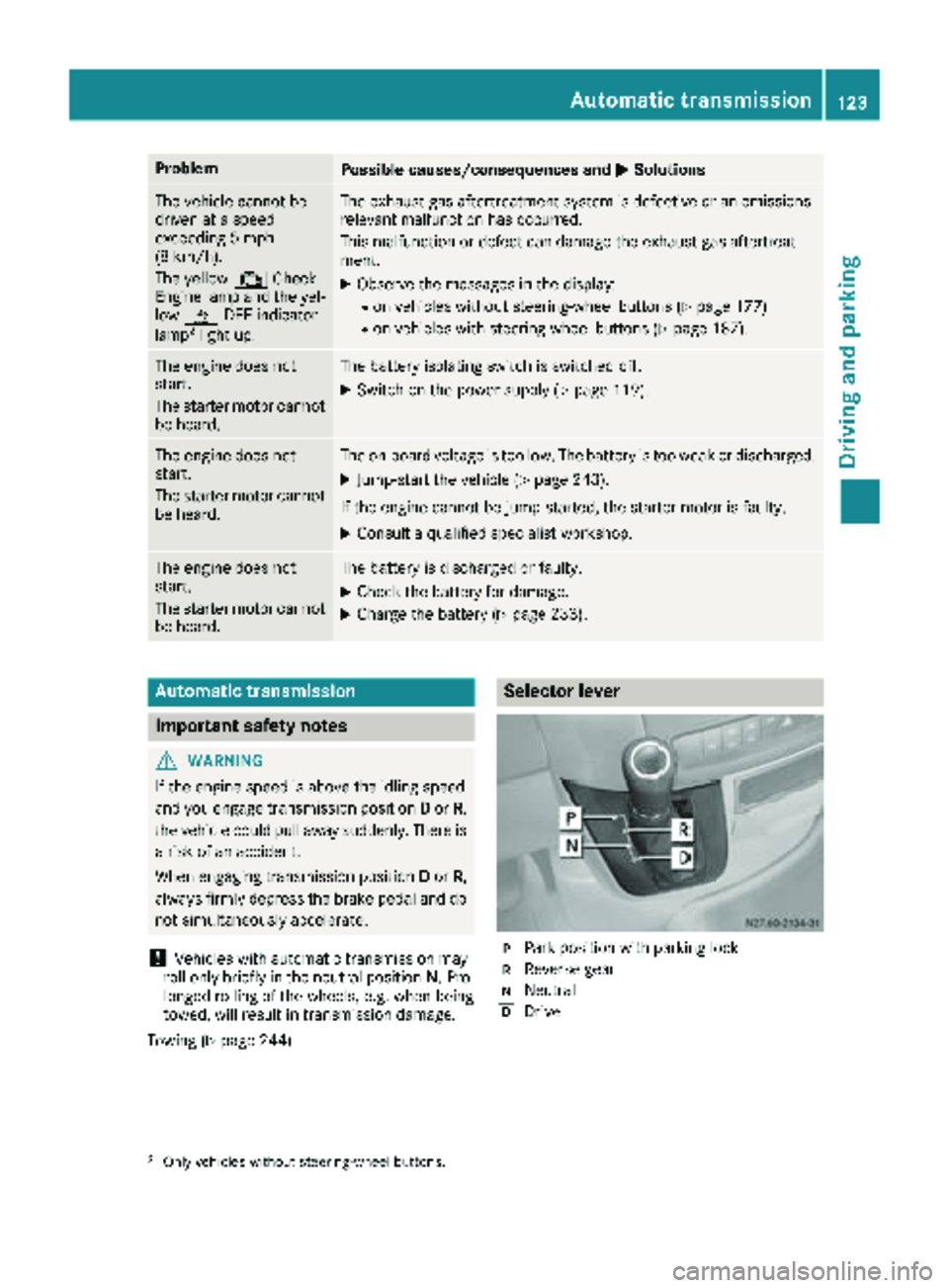
Selector lever
jPark position with parking lock
kReverse gear
iNeutral
hDrive
2Only vehicles without steering-wheel buttons.
Automatic transmission123
Driving and parking
Z
Page 127 of 294
Shift ranges
When the selector lever is in positionDyou can
restrict or derestrict the shift range for the auto- matic transmission.
XTo extend and restrict the shift range:
press the selector lever briefly to the right
towards D+or left towards D–.
The display shows the selected shift range.
The automatic transmission shifts only as far
as the relevant gear.
iIf the maximum engine speed for the restric-
ted shift range is reached and you depress the
accelerator pedal, the automatic transmis-
sion will not shift up.
Driving situations
5Use the braking effect of the engine
on steep downhill gradients and for
driving:
Ron steep mountain roads
Rin mountainous terrain
Rin arduous conditions
4Use the braking effect of the engine
on extremely steep downhill gradi-
ents and long downhill stretches.
Driving tips
Accelerator pedal position
Your style of driving influences how the auto-
matic transmission shifts gear:
Rlittle throttle: early upshifts
Rlots of throttle: later upshifts
Kickdown
Use kickdown for maximum acceleration:
XDepress the accelerator pedal beyond the
pressure point.
The automatic transmission shifts to the next
gear down, depending on the engine speed.
XEase off on the accelerator pedal once the
desired speed is reached.
The automatic transmission shifts up again.
Maneuvering
Maneuvering in a tight space:
XControl the vehicle's speed by braking care-
fully.
XDepress the accelerator pedal slightly and
evenly.
iYou can shift back and forth between drive
position Dand reverse gear Rat low speeds
without applying the brakes. This can help
you, for example when rapidly maneuvering
the vehicle or rocking it out of snow or slush.
Towing a trailer
XDrive at moderate engine speeds on steep
uphill gradients.
XDepending on the uphill or downhill gradient,
shift down to a shift range adapted to the
driving situation (
Ypage 125), even if cruise
control is activated.
Automatic transmission125
Driving and parking
Z