charging MERCEDES-BENZ SPRINTER 2018 MY18 Operator’s Manual
[x] Cancel search | Manufacturer: MERCEDES-BENZ, Model Year: 2018, Model line: SPRINTER, Model: MERCEDES-BENZ SPRINTER 2018Pages: 294, PDF Size: 4.36 MB
Page 7 of 294
Selector lever ................................ 123
Selector lever positions ................. 124
Shift ranges ................................... 125
Starting the engine ........................ 120
Touchshift ...................................... 124
Trailer towing ................................. 125
Transmission oil change ................ 284
Automatic transmission emer-
gency mode ....................................... 126
AUX port ............................................. 212
Auxiliary heater
see Auxiliary warm-air heater
see Hot-water auxiliary heater
Auxiliary heating
Activating/deactivating heater
booster mode ................................ 112
Adjusting ....................................... 172
Conditions for switching on ........... 109
Heating time .................................. 108
Important safety notes .................. 107
Operating with the button (control
panel) ............................................ 109
Operation with the remote con-
trol ................................................. 110
Operation with the timer ................ 114
Selecting a switch-on time ............. 109
Setting the switch-on time ............. 110
see Auxiliary heating
see Auxiliary warm-air heater
see Hot-water auxiliary heater
Auxiliary warm-air heater
Problem (malfunction) ................... 117
Setting the departure time ............. 116
Axle load, permissible (trailer tow-
ing) ...................................................... 288
B
Backup lamps
Replacing bulbs ............................... 92
Backup lamps (Chassis Cab)
Replacing bulbs ............................... 93
BAS (Brake Assist System)
Display message ............................ 182
Function/notes ................................ 56
Indicator lamp ................................ 196
Basic settings
see Settings Battery
Replacing (SmartKey) ...................... 63
Battery (SmartKey)
Checking .......................................... 63
Important safety notes .................... 63
Replacing ......................................... 63
Battery (vehicle)
Care ............................................... 233
Charging ........................................ 233
Disconnecting/connecting (addi-
tional battery) ................................ 232
Disconnecting/connecting
(starter battery) ............................. 230
Display message ............................ 194
Important safety notes .................. 228
Indicator lamp ................................ 199
Installing/removing (additional
battery) .......................................... 233
Jump starting ................................. 243
Location ......................................... 229
Main switch ................................... 118
Removing and installing (starter
battery) .......................................... 231
Removing and installing the floor
covering ......................................... 229
Before driving off
Important safety notes .................. 120
Belt
see Seat belts
Belt warning ......................................... 45
Bio-diesel ........................................... 279
Bleeding the fuel system .................. 122
Blind Spot Assist
Activating/deactivating (button) .... 145
Activating/deactivating (vehicle
with steering wheel buttons) ......... 172
Display messages (vehicles with
steering wheel buttons) ................. 192
Display messages (vehicles with-
out steering wheel buttons) ........... 180
Notes/function .............................. 143
Trailer towing ................................. 145
Bottle holder
see Cup holder
Brake Assist
see BAS (Brake Assist System)
Brake fluid
Checking the level ......................... 224
Index5
Page 38 of 294
FunctionPage
¦Fluid level too low in wind-
shield washer/headlamp
cleaning system
203
åDEF supply low or contami-
nated/diluted161
Exhaust gas aftertreatment
malfunction198
ÄIndicator lamp, distance
warning195
·Warning lamp, distance
warning195
ÃWarning and indicator lamps,
Lane Keeping Assist146
1Door or hood open203
Electrically operated step
malfunction204
#Brake pads/linings worn199
+LOW RANGE active147
KHigh-beam headlamps on
(vehicle with steering wheel
buttons)
84
JRight-hand turn signal84
:ASR malfunction55
BAS malfunction196
hESP®malfunction195
ÈDirt accumulation in air filter202
6Reserve fuel161
Fuel filler cap open201
FunctionPage
:Water in the fuel203
mFuel filter dirty203
#The charging process is mal-
functioning199
bBulb defective203
=Tachometer with warning
and indicator lamps
cParking brake applied135
LLow-beam headlamps on82
KWorking speed governor
(ADR) on153
ÐPower steering assistance
malfunction204
KHigh-beam headlamps on
(vehicle without steering
wheel buttons)
84
åDEF supply low or contami-
nated/diluted161
Exhaust gas aftertreatment
malfunction198
|Reserve fuel201
Fuel filler cap open201
hESP®malfunction195
7Fasten seat belts203
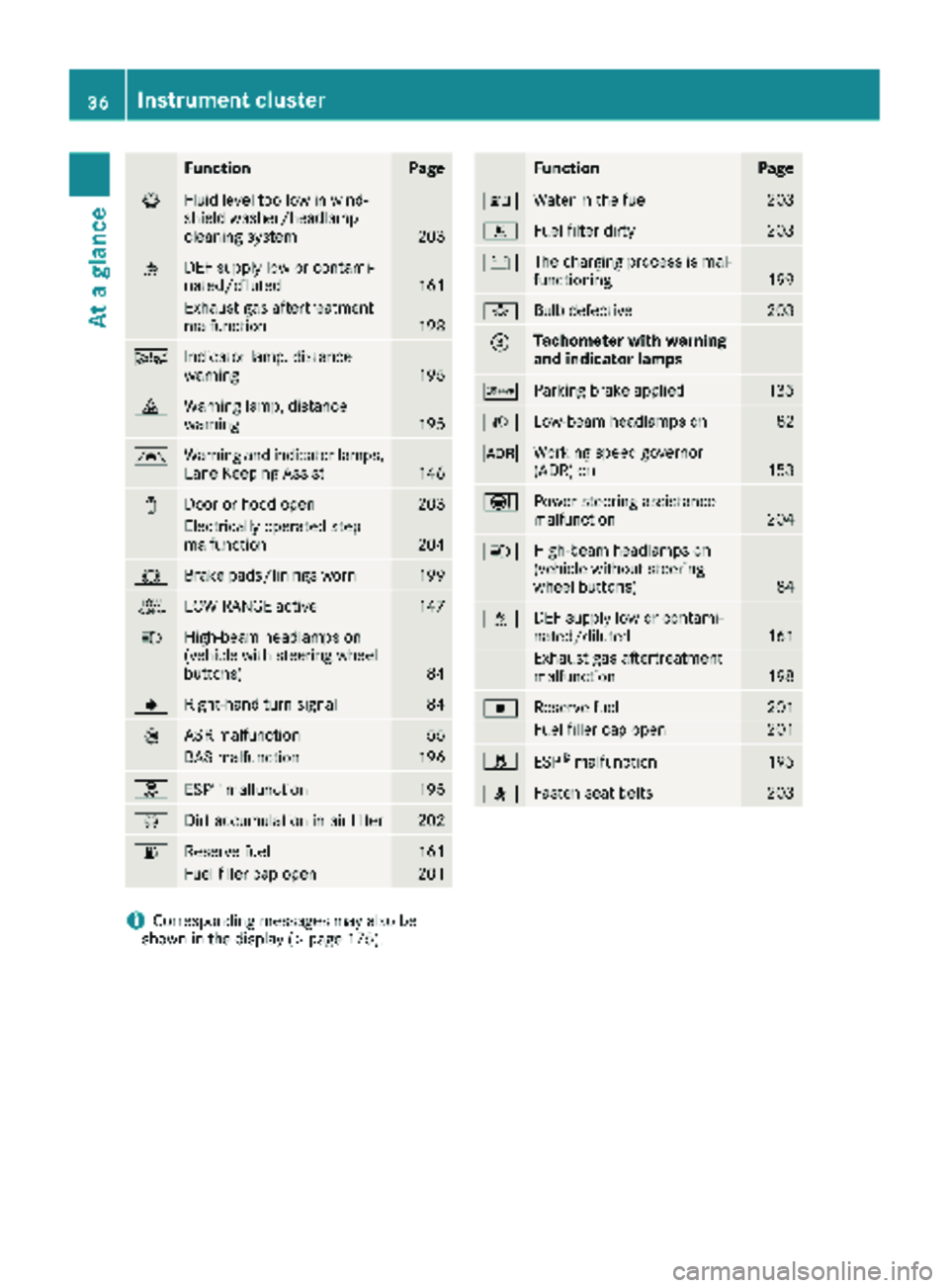
iCorresponding messages may also be
shown in the display (Ypage 175).
36Instrument cluster
At a glance
Page 120 of 294
Useful information
This Operator's Manual describes all models as
well as standard and optional equipment of your
vehicle that were available at the time of going
to print. Country-specific variations are possi-
ble. Note that your vehicle may not be equipped
with all of the described functions. This also
applies to systems and functions relevant to
safety.
Read the information on qualified specialist
workshops (
Ypage 27).
Breaking-in notes
The first 1000 miles (1500 km)
New or replaced brake pads and brake disks
only reach their optimum braking effect after a
few 100 miles (a few 100 kilometers). Until then,
compensate for this by applying greater force to
the brake pedal.
For the service life and economy of your vehicle
it is crucial that you break in the engine with due
care.
RTherefore, protect the engine for the first
1000 miles (1500 km) by driving at varying
vehicle and engine speeds.
RAvoid overstraining the vehicle and high
engine speeds during this period, e.g. driving
at full throttle. Do not exceed Øof the max-
imum speed for each gear.
RDo not change down a gear manually in order to brake.
RTry to avoid depressing the accelerator pedal
beyond the point of resistance (kickdown).
RThe shift ranges 3,2or 1should only be
engaged when driving slowly, e.g. when driv-
ing in mountainous terrain.
After 1000 miles (1500 km), you can increase
the engine speed gradually and accelerate the
vehicle to full speed.
iYou should also observe these notes on
breaking-in if the engine or parts of the drive
train on your vehicle have been replaced.
Driving
Important safety notes
GWARNING
If you switch off the ignition while driving,
safety-relevant functions are only available
with limitations, or not at all. This could affect, for example, the power steering and the brake
boosting effect. You will require considerably
more effort to steer and brake. There is a risk
of an accident.
Do not switch off the ignition while driving.
GWARNING
If the parking brake has not been fully
released when driving, the parking brake can:
Roverheat and cause a fire
Rlose its hold function.
There is a risk of fire and an accident. Release
the parking brake fully before driving off.
If you park the vehicle for more than
three weeks:
Rconnect the batteries to a trickle charger or
Rdisconnect the vehicle's starter battery or
Rswitch off the electrical system using the bat-
tery main switch (Ypage 118) and
Rdisconnect the vehicle's auxiliary battery
Otherwise, you need to check the battery's con-
dition of charge every 3 weeks, since standby
power consumption can drain the battery. If the
battery voltage is lower than 12.2 V, the battery
must be charged. Otherwise, the battery may be damaged by exhaustive discharging.
Be sure to observe the notes on disconnecting
and charging the batteries under "Battery"
(
Ypage 228). You can obtain information about
trickle chargers from a qualified specialist work-
shop.
Battery isolating switch
Important safety notes
!Make sure that the key is in position 0in the
ignition lock and that at least five minutes
have passed before removing or reconnecting
118Driving
Driving and parking
Page 132 of 294
Always park your vehicle safely and according to
legal requirements and secure it against rolling
away.
To ensure that the vehicle is properly secured
against rolling away unintentionally:
Rthe parking brake must be firmly applied
Rthe selector lever must be in positionPand
the key must be removed from the ignition
lock
Ron steep uphill or downhill gradients, the front
wheels must be turned towards the curb
Rthe rear axle must be secured, e.g. with a
wheel chock, on steep uphill or downhill gra-
dients
Use the wheel chock (
Ypage 131) to do so.
If you leave the vehicle parked for more than
three weeks:
Rconnect the batteries to a trickle charger or
Rdisconnect the vehicle's starter battery or
Rswitch off the electrical system using the bat-
tery main switch (Ypage 118) and
Rdisconnect the vehicle's auxiliary battery
Otherwise, you need to check the battery's con-
dition of charge every 3 weeks, since standby
power consumption can drain the battery. If the
battery voltage is lower than 12.2 V,the battery
must be charged. Otherwise, the battery may be damaged by exhaustive discharging.
Be sure to observe the notes on disconnecting
and charging the batte
ries under "Bat-
tery“ (Ypage 228). You can obtain information
about trickle chargers from a qualified specialist
workshop.
Parking brake
GWARNING
If you leave children unsupervised in the vehi-
cle, they could set it in motion by, for example:
Rrelease the parking brake.
Rshift the automatic transmission out of the
parking position P.
Rstart the engine.
In addition, they may operate vehicle equip-
ment and become trapped. There is a risk of
an accident and injury.
When leaving the vehicle, always take the
SmartKey with you and lock the vehicle. Never
leave children unsupervised in the vehicle.
GWARNING
If you must brake the vehicle with the parking brake, the braking distance is considerably
longer and the wheels could lock. There is an
increased danger of skidding and accidents.
Only use the parking brake to brake the vehi-
cle when the service brake is faulty. Do not
apply the parking brake too firmly. If the
wheels lock, release the parking brake until
the wheels begin turning again.
The brake lamps are not illuminated when you
brake the vehicle using the parking brake.
As a rule, you may only apply the parking brake
when the vehicle is stationary.
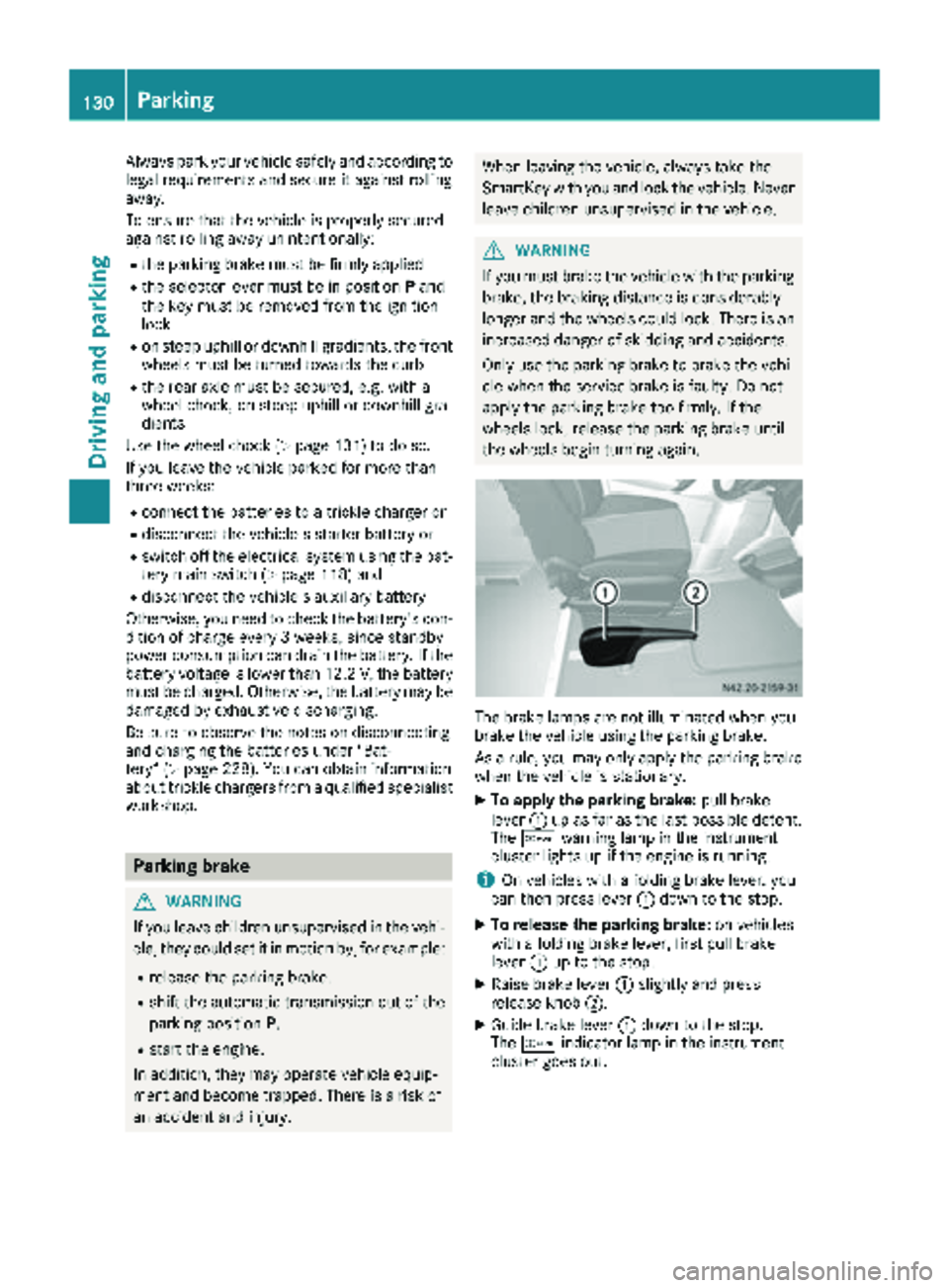
XTo apply the parking brake: pull brake
lever :up as far as the last possible detent.
The c warning lamp in the instrument
cluster lights up if the engine is running.
iOn vehicles with a folding brake lever, you
can then press lever :down to the stop.
XTo release the parking brake: on vehicles
with a folding brake lever, first pull brake
lever :up to the stop.
XRaise brake lever :slightly and press
release knob ;.
XGuide brake lever :down to the stop.
The c indicator lamp in the instrument
cluster goes out.
130Parking
Driving an d parking
Page 134 of 294
Rswitch off the electrical system using the bat-
tery main switch (Ypage 118) and
Rdisconnect the vehicle's auxiliary battery
Otherwise, you need to check the battery's con- dition of charge every 3 weeks, since standby
power consumption can drain the battery. If the
battery voltage is lower than 12.2 V, the battery
must be charged. Otherwise, the battery may be
damaged by exhaustive discharging.
Be sure to observe the notes on disconnecting
and charging the batteries under "Battery"
(
Ypage 228). You can obtain information about
trickle chargers from a qualified specialist work-
shop.
If you leave the vehicle parked for longer than
6 weeks, the vehicle may suffer damage as a
result of lack of use. In this event, consult a
qualified specialist workshop.
Driving tips
General notes
Important safety notes
GWARNING
The driver's attention to the road must always be his/her primary focus when driving. For
your safety and the safety of others, we rec-
ommend that you pull over to a safe location
and stop before placing or taking a telephone
call. If you choose to use the telephone while
driving, please use the hands-free device and
only use the telephone when road, weather
and traffic conditions permit.
Some jurisdictions prohibit the driver from
using a mobile phone while driving a vehicle.
Bear in mind that at a speed of just 30 mph
(approximately 50 km/h), your vehicle covers
a distance of 44 feet (approximately 14 m)
every second.
GWARNING
If you switch off the ignition while driving,
safety-relevant functions are only available
with limitations, or not at all. This could affect, for example, the power steering and the brake
boosting effect. You will require considerably
more effort to steer and brake. There is a risk
of an accident.
Do not switch off the ignition while driving.
!Always observe the ground clearance of the
vehicle and avoid obstacles. On vehicles with a step, ground clearance is further restricted.
Obstacles can damage the vehicle.
If you must drive over obstacles, drive espe-
cially slowly and carefully. If necessary, have
another person direct you.
Drive sensibly – save fuel
In order to save fuel, observe the following tips:
XThe tires should always be inflated to the rec-
ommended tire pressure.
XRemove unnecessary loads.
XRemove roof carriers when they are not nee-
ded.
XWarm up the engine at low engine speeds.
XAvoid frequent acceleration or braking.
XHave all maintenance work carried out as
indicated by the service intervals in the Main-
tenance Booklet or by the service interval dis-
play.
Fuel consumption also increases when driving in cold weather, in stop-start traffic and in moun-
tainous terrain.
Overrun cutoff
If you are in overrun mode and take your foot off
the accelerator pedal, the fuel supply is cut off
when the engine speed is out of the idle speed
control range.
Drinking and driving
GWARNING
Drinking and driving and/or taking drugs and driving are very dangerous combinations.
Even a small amount of alcohol or drugs can
affect your reflexes, perceptions and judg-
ment.
The possibility of a serious or even fatal acci-
dent are greatly increased when you drink or
take drugs and drive.
132Driving tips
Driving and parking
Page 214 of 294
bracket and in the separate operating instruc-
tions for the mobile phone pre-installation.
iThe mobile phone battery is charged
depending on the condition of charge and the
position of the key in the ignition lock. The
mobile phone display indicates the charging
process.
Additional communications equip-
ment
Important safety notes
GWARNING
If you operate mobile communication equip-
ment when driving, you may be distracted
from the traffic situation. You could also lose
control of the vehicle. There is a risk of an
accident.
Only operate this equipment when the vehicle
is stationary.
Observe the legal requirements for the country
in which you are currently driving when operat-
ing mobile communication equipment.
Please remember, a navigation system does not
supply information on the load-bearing capacity of bridges or the overhead clearance of under-
passes. The driver remains responsible for
safety at all times.
You and others can suffer health-related dam-
age through electromagnetic radiation. By using
an exterior antenna, a possible health risk
caused by electromagnetic fields, as discussed
in scientific circles, is taken into account. Only
have the exterior antenna installed by a qualified
specialist workshop.
You will find information on installing electrical
or electronic equipment in the “Vehicle elec-
tronics” section (
Ypage 276).
Installation for PND mobile navigation
devices
You can secure a personal navigation device
(Personal Navigation Device PND) using a com-
mercially available adapter.
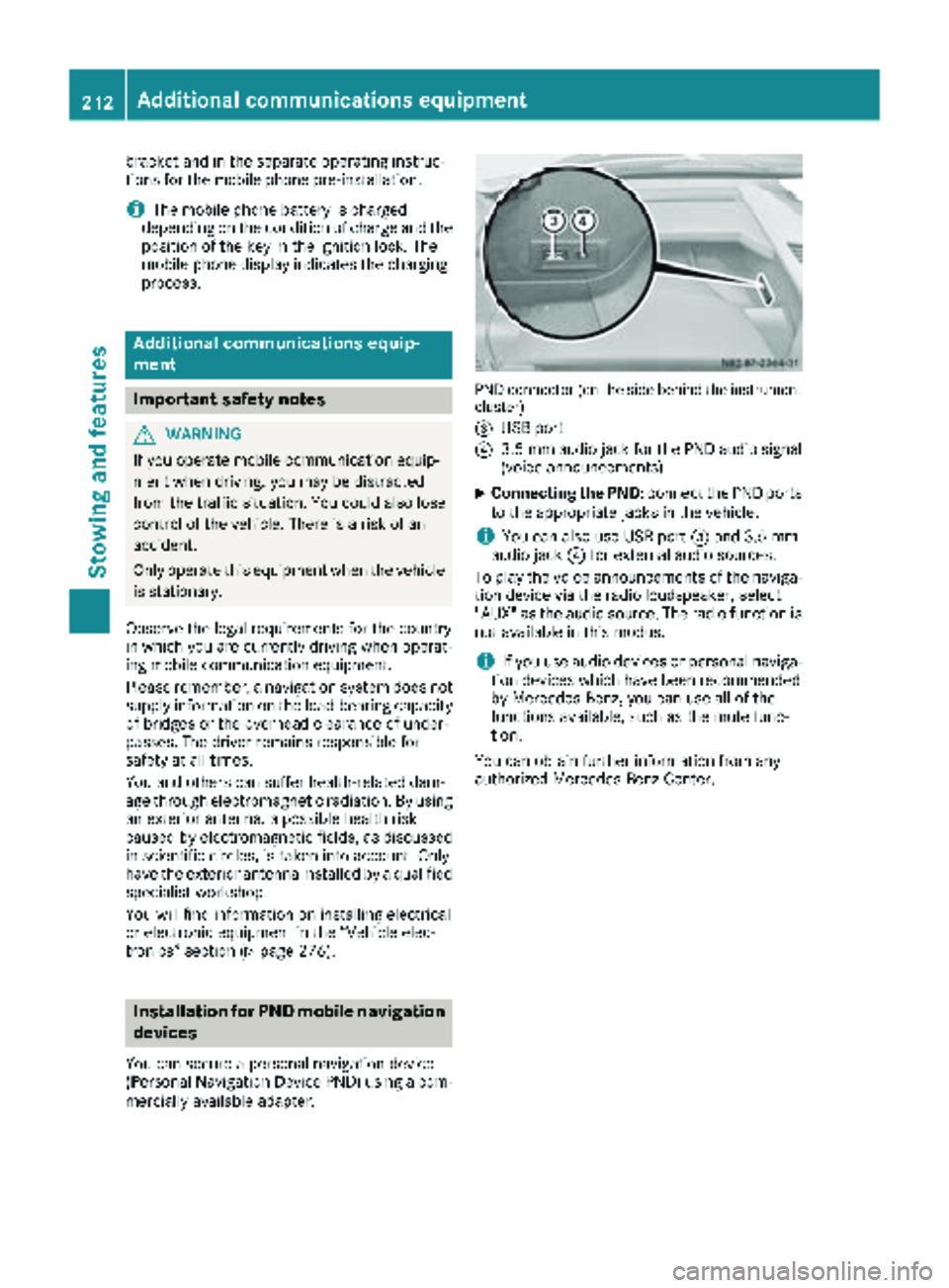
PND connector (on the side behind the instrument
cluster)
=
USB port
?3.5 mm audio jack for the PND audio signal
(voice announcements)
XConnecting the PND: connect the PND ports
to the appropriate jacks in the vehicle.
iYou can also use USB port =and 3.5 mm
audio jack ?for external audio sources.
To play the voice announcements of the naviga-
tion device via the radio loudspeaker, select
"AUX" as the audio source. The radio function is
not available in this modus.
iIf you use audio devices or personal naviga-
tion devices which have been recommended
by Mercedes-Benz, you can use all of the
functions available, such as the mute func-
tion.
You can obtain further information from any
authorized Mercedes-Benz Center.
212Additional communications equipment
Stowing and features
Page 230 of 294
Additionally, you will see the remaining dis-
tance in miles (mi) or kilometers ( km) or the
remaining time in days ( d).
Vehicles with steering wheel buttons
XPress the VorU button on the steering
wheel until the standard display (Ypage 166)
appears in the display.
XPress the &or* button on the steering
wheel repeatedly until the service message
appears in the display, for example:
R¯ Service A in ... days
R¯Service A in ... mi(km)
Battery
Important safety notes
Work on the battery, e.g. removing or installing,
requires specialist knowledge and the use of
special tools. Therefore, always have work on
the battery carried out at a qualified specialist
workshop.
GWARNING
Work carried out incorrectly on the battery
can lead, for example, to a short circuit and
thus damage the vehicle electronics. This can
lead to function restrictions applying to
safety-relevant systems, e.g. the lighting sys-
tem, the ABS (anti-lock braking system) or the
ESP
®(Electronic Stability Program). The oper-
ating safety of your vehicle may be restricted.
You could lose control of the vehicle, for
example:
Rwhen braking
Rin the event of abrupt steering maneuvers
and/or when the vehicle's speed is not
adapted to the road conditions
There is a risk of an accident.
In the event of a short circuit or a similar inci-
dent, contact a qualified specialist workshop
immediately. Do not drive any further. You
should have all work involving the battery car- ried out at a qualified specialist workshop.
Further information can be found under "ABS"
(
Ypage 54) and under "ESP®" (Ypage 56).
GWARNING
Electrostatic build-up can lead to the creation of sparks, which could ignite the highly explo-
sive gases of a battery. There is a risk of an
explosion.
Before handling the battery, touch the vehicle
body to remove any existing electrostatic
build-up.
The flammable gas mix is produced when the
battery is charged or when the vehicle is jump-
started.
Always make sure that neither you nor the bat-
tery are electro statically charged. Electrostatic
charging results, for example, from:
Rwearing synthetic clothing
Rfriction between clothing and the seat
Rdragging or pushing the battery across carpet
flooring or any other synthetic materials
Rrubbing the battery with cloths or towels.
Comply with the following safety precautions
and take protective measures when handling
batteries.
Risk of explosion. Explosive oxyhy-
drogen is produced when batteries
are being charged. Only charge bat-
teries in well-ventilated areas.
Fire, open flames and smoking are
therefore prohibited when working
on the battery. Avoid creating
sparks.
Battery acid is caustic. Avoid con-
tact with the skin, eyes or clothing.
Wear acid-proof protective gloves. If
skin or clothes are splashed with
acid, neutralize the splashes imme-
diately with soapy water or an acid
neutralizer, and then clean the affec-
ted areas with water. Consult a doc- tor if necessary.
Wear eye protection. When mixing
water and acid, the liquid can splash
into your eyes. Rinse acid splashes
to the eyes immediately with clean
water and contact a doctor immedi-
ately.
Keep children at a safe distance.
Children are not able to assess the
228Battery
Maintenance and care
Page 231 of 294
dangers posed by batteries and
acid.
When handling batteries, observe
the safety precautions and special
protective measures contained in
this Operator's Manual.
HEnvironmental note
Batteries contain dangerous
substances. It is against the
law to dispose of them with
the household rubbish. They
must be collected separatelyand recycled to protect the
environment.
Dispose of batteries in an
environmentally friendly
manner. Take discharged
batteries to a qualified spe-
cialist workshop or a special
collection point for used bat-
teries.
Observe the following notes:
RRecharge the battery more frequently, if you:
-predominantly drive short distances
-predominantly drive at low outside temper-
atures
-park the vehicle for longer than
three weeks.
In order for the batteries to achieve their max- imum possible service life, they must always
be sufficiently charged.
RWhen you park the vehicle, remove the key if
you do not require any electrical consumers.
The vehicle will then use very little energy,
thus conserving battery power.
RWhen replacing a battery, only use batteries
that are recommended for use in Sprinter
vehicles.
RHave the battery removed at a qualified spe-
cialist workshop.
RIf you leave the vehicle parked for longer than
three weeks:
-consult a qualified specialist workshop or
-switch off the power supply using the bat-
tery main switch (Ypage 118) or
-disconnect the batteries (Ypage 230). Otherwise, you need to check the battery's
condition of charge every three weeks, since
standby power consumption can drain the
battery. If the battery voltage is lower than
12.2 V, the battery must be charged. Other-
wise, the battery may be damaged by exhaus-
tive discharging.
Be sure to observe the notes on charging the
batteries (
Ypage 233).
Installation locations
Your vehicle may be equipped with three bat-
teries, depending on the equipment version:
RStarter battery in the battery case in the left
footwell
RAdditional battery in the engine compartment
RAuxiliary battery under the left-hand front
seat
Have the auxiliary battery removed at a qualified
specialist workshop.
Installing/removing the floor cover-
ing (starter battery)
GWARNING
Objects in the driver's footwell can restrict the pedal travel or obstruct a depressed pedal.
The operating and road safety of the vehicle is
jeopardized. There is a risk of an accident.
Make sure that all objects in the vehicle are
stowed correctly, and that they cannot enter
the driver's footwell. Install the floormats
securely and as specified in order to ensure
sufficient clearance for the pedals. Do not use
loose floormats and do not place floormats on
top of one another.
Battery229
Maintenance and care
Z
Page 232 of 294
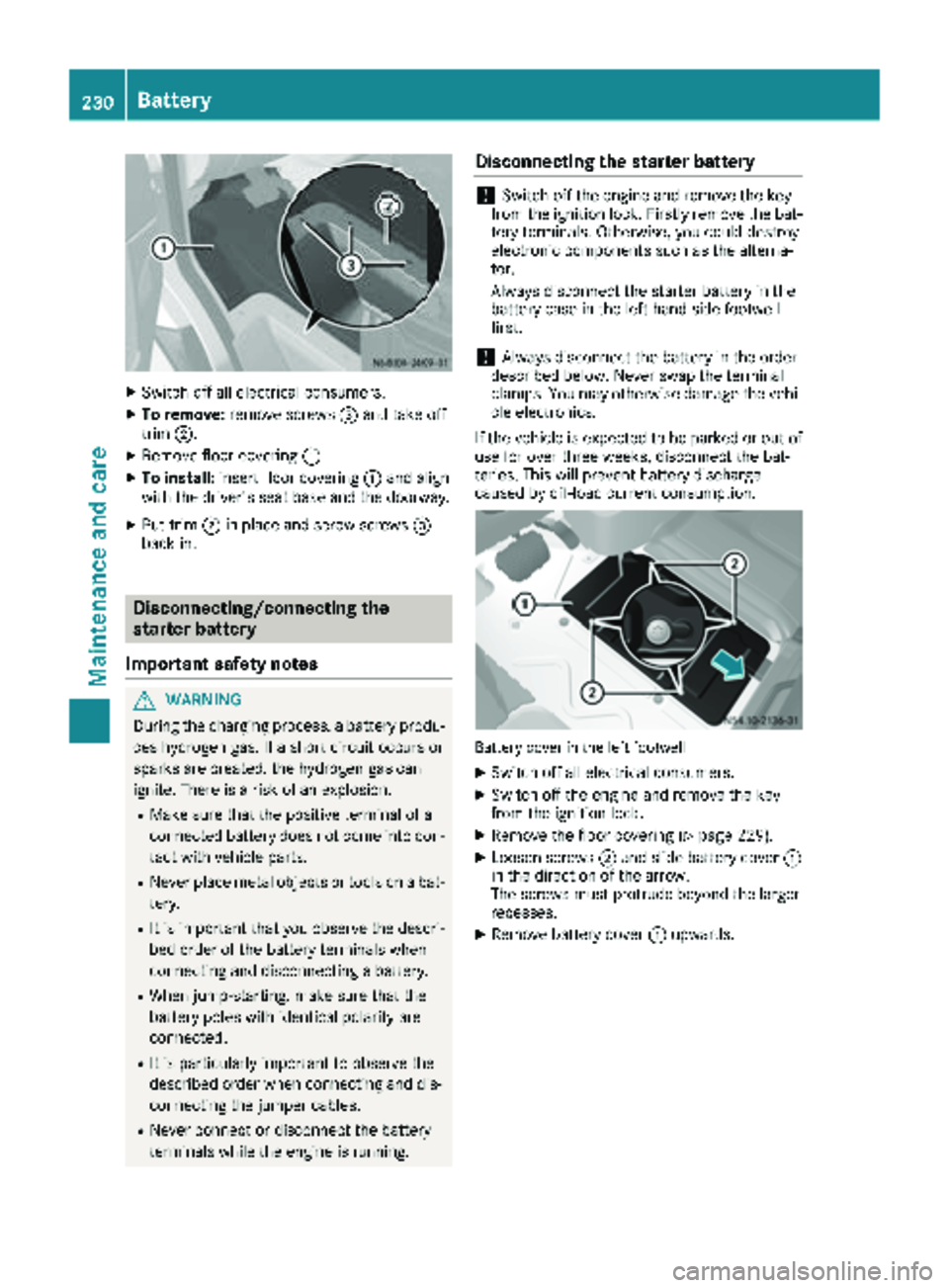
XSwitch off all electrical consumers.
XTo remove:remove screws =and take off
trim ;.
XRemove floor covering :.
XTo install:insert floor covering :and align
with the driver's seat base and the doorway.
XPut trim ;in place and screw screws =
back in.
Disconnecting/connecting the
starter battery
Important safety notes
GWARNING
During the charging process, a battery produ-
ces hydrogen gas. If a short circuit occurs or
sparks are created, the hydrogen gas can
ignite. There is a risk of an explosion.
RMake sure that the positive terminal of a
connected battery does not come into con- tact with vehicle parts.
RNever place metal objects or tools on a bat-
tery.
RIt is important that you observe the descri-
bed order of the battery terminals when
connecting and disconnecting a battery.
RWhen jump-starting, make sure that the
battery poles with identical polarity are
connected.
RIt is particularly important to observe the
described order when connecting and dis-
connecting the jumper cables.
RNever connect or disconnect the battery
terminals while the engine is running.
Disconnecting the starter battery
!Switch off the engine and remove the key
from the ignition lock. Firstly remove the bat-
tery terminals. Otherwise, you could destroy
electronic components such as the alterna-
tor.
Always disconnect the starter battery in the
battery case in the left-hand side footwell
first.
!Always disconnect the battery in the order
described below. Never swap the terminal
clamps. You may otherwise damage the vehi- cle electronics.
If the vehicle is expected to be parked or out of
use for over three weeks, disconnect the bat-
teries. This will prevent battery discharge
caused by off-load current consumption.
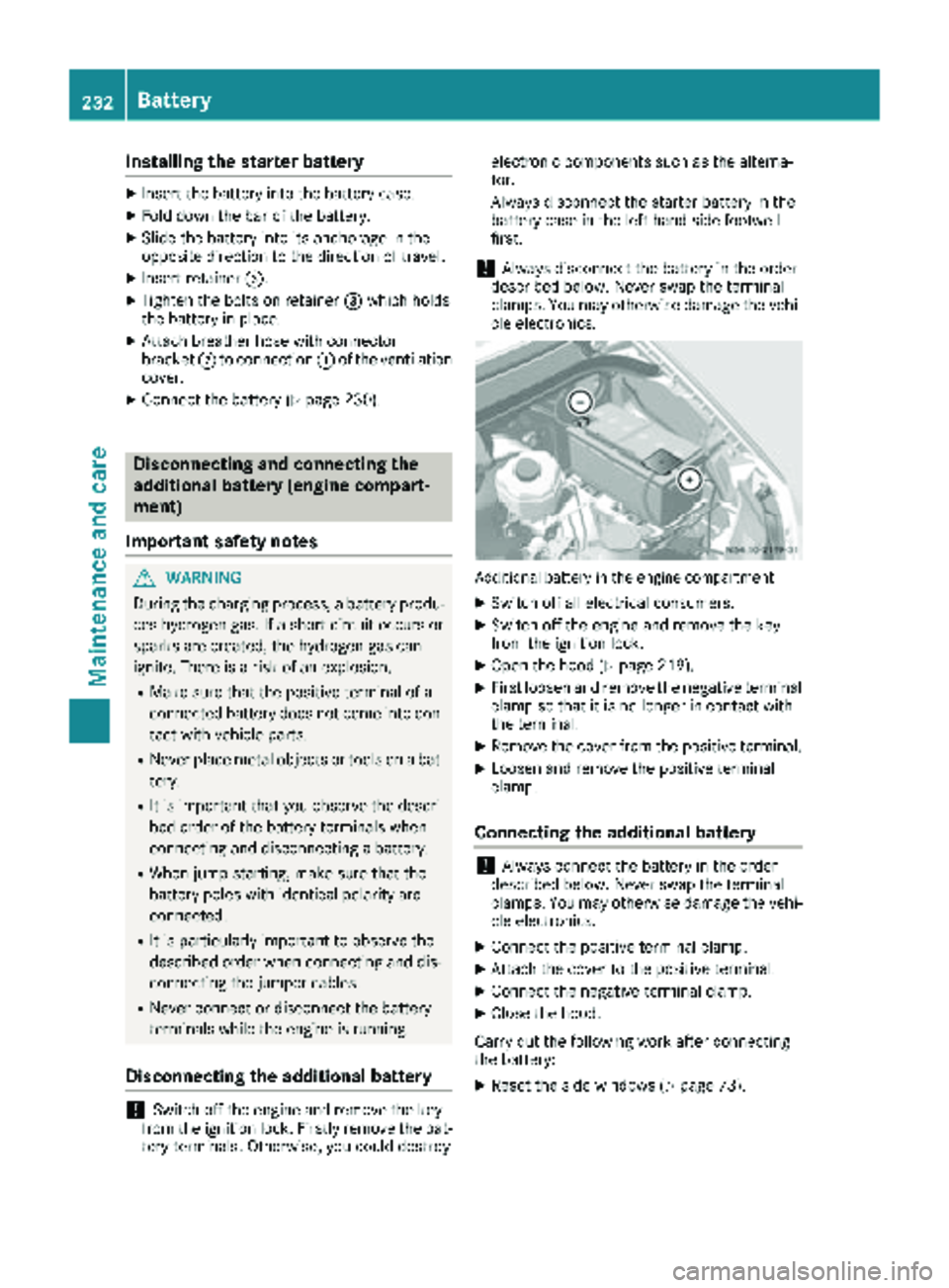
Battery cover in the left footwell
XSwitch off all electrical consumers.
XSwitch off the engine and remove the key
from the ignition lock.
XRemove the floor covering (Ypage 229).
XLoosen screws ;and slide battery cover :
in the direction of the arrow.
The screws must protrude beyond the larger
recesses.
XRemove battery cover :upwards.
230Battery
Maintenance and care
Page 234 of 294
Installing the starter battery
XInsertth ebattery int oth ebattery case.
XFold down th ebar of th ebattery.
XSlide th ebattery int oits anchorage in th e
opposit edirection to th edirection of travel .
XInsertretainer =.
XTightenth ebolt son retainer =whic hhold s
th ebattery in place.
XAttac hbreather hos ewit hconnecto r
bracke t; to connection :of th eventilation
cover .
XConnect th ebattery (Ypage 230).
Disconnecting and connecting the
additional battery (engine compart-
ment)
Important safety notes
GWARNIN G
During th echarging process, abattery produ-
ce shydrogen gas. If ashort circuit occur sor
sparks are created, th ehydrogen gas can
ignite. Ther eis aris kof an explosion .
RMakesur ethat th epositive termina lof a
connecte dbattery does no tcome int ocon-
tac twit hvehicl eparts.
RNever plac emetal objects or tools on abat -
tery.
RIt is important that you observ eth edescri-
bed order of th ebattery terminals when
connecting and disconnecting abattery.
RWhen jump-starting ,mak esur ethat th e
battery pole swit hidentical polarit yare
connected.
RIt is particularly important to observ eth e
describe dorder when connecting and dis-
connecting th ejumper cables.
RNever connec tor disconnect th ebattery
terminals while th eengin eis running.
Disconnecting the additional battery
!Switc hoff th eengin eand remove th eke y
from th eignition lock. Firstly remove th ebat -
tery terminals. Otherwise, you could destroy electronic component
ssuc has th ealterna-
tor.
Always disconnect th estarter battery in th e
battery cas ein th eleft-han dside footwell
first .
!Always disconnect th ebattery in th eorder
describe dbelow. Never swap th etermina l
clamps. You may otherwise damag eth evehi-
cle electronics .
Additional battery in th eengin ecompartmen t
XSwitchoff all electrical consumers.
XSwitc hoff th eengin eand remove th eke y
from th eignition lock.
XOpen th ehoo d (Ypage 219).
XFirst loosen and remove th enegative termina l
clam pso that it is no longer in contact wit h
th eterminal.
XRemove th ecover from th epositive terminal.
XLoosen and remove th epositive termina l
clamp.
Connecting the additional battery
!Always connec tth ebattery in th eorder
describe dbelow. Never swap th etermina l
clamps. You may otherwise damag eth evehi-
cle electronics .
XConnect thepositive termina lclamp.
XAttac hth ecover to th epositive terminal.
XConnect th enegative termina lclamp.
XClose th ehood.
Carr yout th efollowin gwor kafter connecting
th ebattery:
XReset th eside windows (Ypage 73).
232Battery
Maintenance and care