heater MERCEDES-BENZ SPRINTER 2018 MY18 Operator’s Manual
[x] Cancel search | Manufacturer: MERCEDES-BENZ, Model Year: 2018, Model line: SPRINTER, Model: MERCEDES-BENZ SPRINTER 2018Pages: 294, PDF Size: 4.36 MB
Page 7 of 294
Selector lever ................................ 123
Selector lever positions ................. 124
Shift ranges ................................... 125
Starting the engine ........................ 120
Touchshift ...................................... 124
Trailer towing ................................. 125
Transmission oil change ................ 284
Automatic transmission emer-
gency mode ....................................... 126
AUX port ............................................. 212
Auxiliary heater
see Auxiliary warm-air heater
see Hot-water auxiliary heater
Auxiliary heating
Activating/deactivating heater
booster mode ................................ 112
Adjusting ....................................... 172
Conditions for switching on ........... 109
Heating time .................................. 108
Important safety notes .................. 107
Operating with the button (control
panel) ............................................ 109
Operation with the remote con-
trol ................................................. 110
Operation with the timer ................ 114
Selecting a switch-on time ............. 109
Setting the switch-on time ............. 110
see Auxiliary heating
see Auxiliary warm-air heater
see Hot-water auxiliary heater
Auxiliary warm-air heater
Problem (malfunction) ................... 117
Setting the departure time ............. 116
Axle load, permissible (trailer tow-
ing) ...................................................... 288
B
Backup lamps
Replacing bulbs ............................... 92
Backup lamps (Chassis Cab)
Replacing bulbs ............................... 93
BAS (Brake Assist System)
Display message ............................ 182
Function/notes ................................ 56
Indicator lamp ................................ 196
Basic settings
see Settings Battery
Replacing (SmartKey) ...................... 63
Battery (SmartKey)
Checking .......................................... 63
Important safety notes .................... 63
Replacing ......................................... 63
Battery (vehicle)
Care ............................................... 233
Charging ........................................ 233
Disconnecting/connecting (addi-
tional battery) ................................ 232
Disconnecting/connecting
(starter battery) ............................. 230
Display message ............................ 194
Important safety notes .................. 228
Indicator lamp ................................ 199
Installing/removing (additional
battery) .......................................... 233
Jump starting ................................. 243
Location ......................................... 229
Main switch ................................... 118
Removing and installing (starter
battery) .......................................... 231
Removing and installing the floor
covering ......................................... 229
Before driving off
Important safety notes .................. 120
Belt
see Seat belts
Belt warning ......................................... 45
Bio-diesel ........................................... 279
Bleeding the fuel system .................. 122
Blind Spot Assist
Activating/deactivating (button) .... 145
Activating/deactivating (vehicle
with steering wheel buttons) ......... 172
Display messages (vehicles with
steering wheel buttons) ................. 192
Display messages (vehicles with-
out steering wheel buttons) ........... 180
Notes/function .............................. 143
Trailer towing ................................. 145
Bottle holder
see Cup holder
Brake Assist
see BAS (Brake Assist System)
Brake fluid
Checking the level ......................... 224
Index5
Page 14 of 294
High-beam headlampsReplacing bulbs ...............................9 0
Switching on/off .............................. 84
Highbeam Assist
Activating/deactivating (vehicles
with steering wheel buttons) ......... 170
Activating/deactivating (vehicles
without steering wheel buttons) .... 163
Display messages (vehicles with
steering wheel buttons) ................. 187
Display messages (vehicles with-
out steering wheel buttons) ........... 180
Function/notes ................................ 86
Hood
Closing ........................................... 220
Display message ............................ 194
Important safety notes .................. 219
Indicator lamp ................................ 203
Opening ......................................... 219
Hot-water auxiliary heater
Problem (malfunction) ................... 113
Hydroplaning ..................................... 136
I
Ignition lock
see Key positions
Immobilizer .......................................... 58
Indicator lamp
see Warning and indicator lamps
Indicators
see Turn signals
Insect protection on the radiator ...... 29
Installing a wheel
Installing the adapter (spare
wheel) ............................................ 270
Instrument cluster
Fuel gauge ..................................... 161
Important safety notes .................. 160
Instrument cluster lighting ............. 161
Outside temperature display .......... 161
Overview .......................................... 34
Speedometer ................................. 161
Tachometer ................................... 161
Warning and indicator lamps ........... 35
Instrument cluster lighting .............. 161
Interior lighting ................................... 87
Front ................................................ 87 Motion detectors ............................. 88
Notes on replacing bulbs ................. 95
Overview .......................................... 87
Replacing bulbs ............................... 95
Switching the load-compartment
lighting on/off ................................. 88
Switching the rear compartment
lighting on centrally ......................... 87
Interior motion sensor
Arming ............................................. 59
Deactivating ..................................... 60
Function ........................................... 59
Switching off .................................... 59
J
JackJacking points ................................ 268
Preparation .................................... 268
Storage location ............................ 241
Using ............................................. 268
Jump-starting ..................................... 243
K
Key
Position in the ignition lock ............ 119
Key positions ..................................... 119
Kickdown ........................................... 125
L
Lamps
see Warning and indicator lamps
Lane Keeping Assist
Activating/deactivating ................. 146
Display messages (vehicles with
steering wheel buttons) ................. 192
Display messages (vehicles with-
out steering wheel buttons) ........... 180
Function/notes ............................. 145
Indicator lamp ................................ 195
Language
Display (vehicles with steering
wheel buttons) ............................... 169
Lashing points and tie downs
Permissible tensile load ................. 287
LATCH-type (ISOFIX) child seat
anchors ................................................ 51
12Index
Page 20 of 294
Removing/mounting ...................... 274
Specia lsea tbelt retractor .................. 49
Specialist worksho p............................ 27
Speed ,controlling
see Cruis econtrol
Speedomete r
Digital (vehicles wit hsteerin g
whee lbuttons ).............................. .169
Digital (vehicles without steering
wheel buttons) ............................... 162
Selecting display unit (vehicles
with steering- wheel buttons) ........1 68
Sprinter dealer
see Qualified specialist workshop
Standing lamps
Replacing bulbs (rear) ......................9 2
Standing lamps (Chassis Cab)
Replacing bulbs (rear) ......................9 3
Start-off assist
Display message ............................1 82
Starting (engine) ................................ 120
Station
see Radio
Steering wheel
Adjusting ......................................... 79
Button overview ............................... 37
Cleaning ......................................... 239
Step
see Electrical step
Stickers
General safety notes ........................ 25
Stowage spaces
see Stowage spaces and stowage
compartments
Stowage spaces and stowage com-
partments
Eyeglasses compartment ...............2 06
Glove box ....................................... 205
Important safety notes .................. 205
Paper holder .................................. 208
Stowage compartment above the
windshield ..................................... 207
Stowage compartment in the cen-
ter console ..................................... 207
Stowage compartment in the
dashboard ...................................... 206
Stowage space above the head-
liner ............................................... 207 Stowage spa
ce under the rear
bench seat ..................................... 208
Stowage space under the twin co-
driver's seat ................................... 207
Summer tires ..................................... 250
Switch unit
see Control panel
Switching off the alarm (ATA) ............ 58
Switching the heater booster func-
tion on/off ......................................... 112
Switching the surround lighting
on/off (on-board computer) ............. 171
Swivel seat ........................................... 75
T
Tachometer ........................................ 161
Tail lamps
Replacing bulbs ............................... 92
Tail lamps (Chassis Cab)
Replacing bulbs ............................... 93
Tank content
Fuel gauge ..................................... 161
Range (vehicles with steering
wheel buttons) ............................... 173
Reserve fuel warning lamp ............. 201
Technical data
Capacities ...................................... 278
Cargo tie-down points .................... 287
Cargo tie-down rings ...................... 287
Loading rails .................................. 287
Roof carrier .................................... 287
Tires/wheels ................................. 273
Trailer tow hitch ............................. 288
Vehicle data ................................... 286
Telephone (on-board computer)
Accepting an incoming call ............ 174
Display messages .......................... 194
Numbers from the phone book ...... 174
Operating ....................................... 173
Redialing ........................................ 174
Rejecting or ending a call .............. 174
Temperature
Outside temperature ...................... 161
Setting (climate control) ................ 103
Setting the unit (vehicles with
steering wheel buttons) ................. 168
18Index
Page 21 of 294
Theft deterrent systemsATA (Anti-Theft Alarm system) ......... 58
Immobilizer ...................................... 58
Tow-away alarm ............................... 59
Tightening torques for wheel nuts/
wheel bolts ........................................ 272
Time
Setting the time (vehicles with
steering wheel buttons) ................. 169
Setting the time (vehicles without
steering wheel buttons) ................. 163
Timer
Activating ....................................... 115
Auxiliary heating ............................ 114
Overview ........................................ 114
Setting the heating level (auxiliary
heating) ......................................... 116
Setting weekday, time and oper-
ating duration (auxiliary heating) ... 115
Switching immediate heating
mode on/off (auxiliary heating) ..... 115
Timer (auxiliary warm-air heater)
Deactivating departure times ......... 116
Setting the departure time ............. 116
Tire pressure
Calling up (on-board computer) ..... 254
Checking manually ........................ 254
Display messages (vehicles with
steering wheel buttons) ................. 193
Display messages (vehicles with-
out steering wheel buttons) ........... 176
Maximum ....................................... 254
Notes ............................................. 253
Recommended ............................... 251
Setting the unit (vehicles with
steering wheel buttons) ................. 169
Tire label ........................................ 252
Tire pressure loss warning system .. 256
Tire pressure monitor
Checking the tire pressure elec-
tronically ........................................ 256
Display message ............................ 193
Function/notes ............................. 254
Indicator lamp ................................ 202
Restarting ...................................... 256
Warning lamp ................................. 256
Tire pressure table ............................ 257 Tires
Aspect ratio (definition) ................. 266
Average weight of the vehicle
occupants (definition) .................... 265
Bar (de
finition) ............................... 265
Changing a wheel .......................... 267
Characteristics .............................. 264
Checking ........................................ 249
Curb weight (definition) ................. 266
Definition of terms ......................... 264
Direction of rotation ...................... 267
Distribution of the vehicle occu-
pants (definition) ............................ 266
DOT (Department of Transporta-
tion) (definition) ............................. 265
DOT, Tire Identification Number
(TIN) ............................................... 264
GAWR (Gross Axle Weight Rating)
(definition) ..................................... 265
GTW (Gross Trailer Weight) (defi-
nition) ............................................ 265
GVW (Gross Vehicle Weight) (def-
inition) ........................................... 265
GVWR (Gross Vehicle Weight Rat- ing) (definition) .............................. 265
Important safety notes .................. 248
Increased vehicle weight due to
optional equipment (definition) ...... 265
Kilopascal (kPa) (definition) ........... 265
Labeling (overview) ........................ 262
Load bearing index (definition) ...... 266
Load index ..................................... 263
Load index (definition) ................... 265
M+S tires ....................................... 250
Maximum load on a tire (defini-
tion) ............................................... 266
Maximum loaded vehicle weight
(definition) ..................................... 265
Maximum permissible tire pres-
sure (definition) ............................. 266
Maximum tire load ......................... 264
Maximum tire load (definition) ....... 266
Optional equipment weight (defi-
nition) ............................................ 266
PSI (pounds per square inch) (def- inition) ........................................... 266
Replacing ....................................... 267
Service life ..................................... 249
Index19
Page 35 of 294
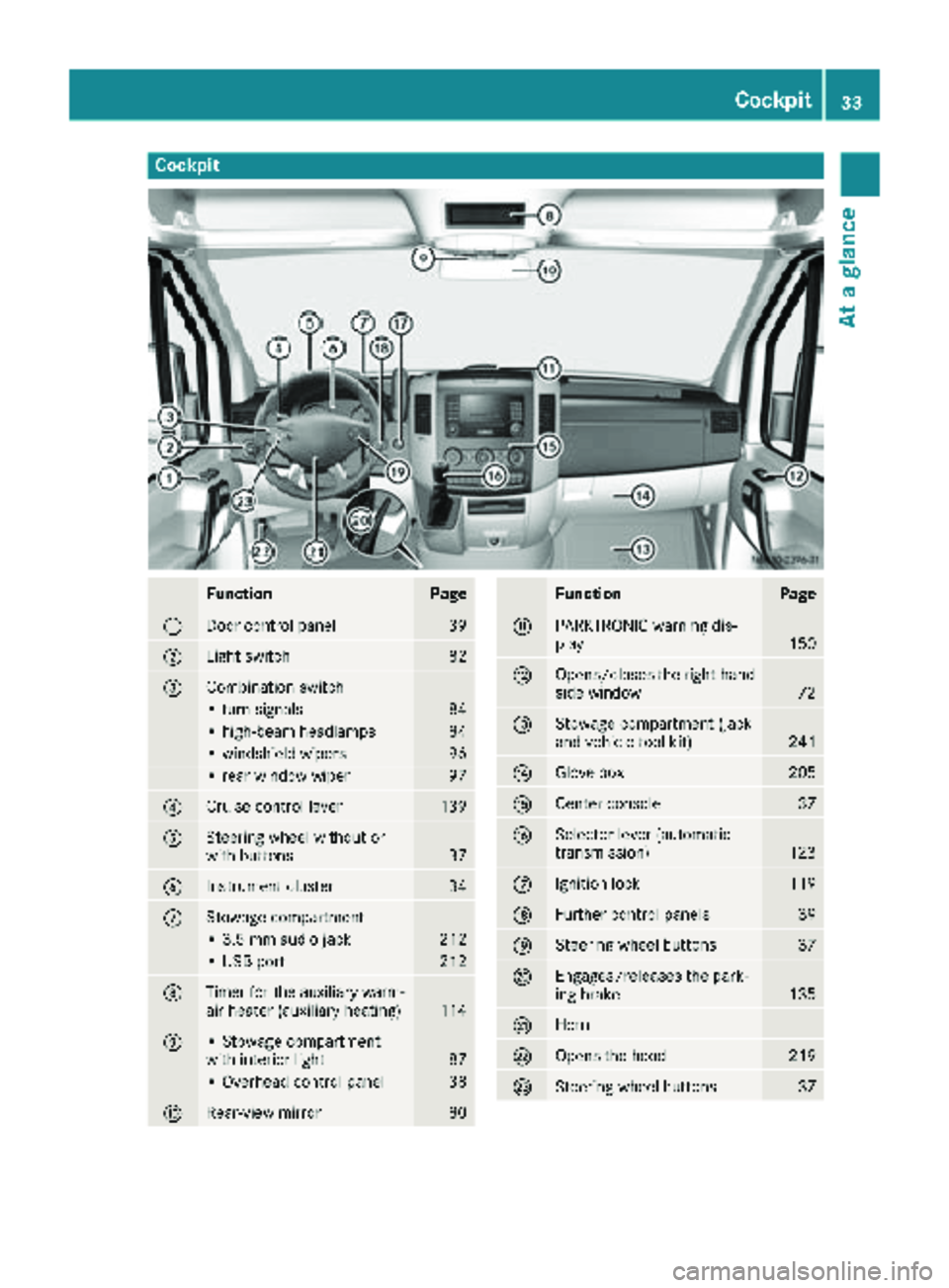
Cockpit
FunctionPage
:Door control panel39
;Light switch82
=Combination switch
• turn signals84
• high-beam headlamps84
• windshield wipers96
• rear window wiper97
?Cruise control lever139
ASteering wheel without or
with buttons37
BInstrument cluster34
CStowage compartment
• 3.5 mm audio jack212
• USB port212
DTimer for the auxiliary warm-
air heater (auxiliary heating)114
E• Stowage compartment
with interior light87
• Overhead control panel38
FRear-view mirror80
FunctionPage
GPARKTRONIC warning dis-
play150
HOpens/closes the right-hand
side window72
IStowage compartment (jack
and vehicle tool kit)241
JGlove box205
KCenter console37
LSelector lever (automatic
transmission)123
MIgnition lock119
NFurther control panels39
OSteering wheel buttons37
PEngages/releases the park-
ing brake135
QHorn
ROpens the hood219
SSteering wheel buttons37
Cockpit33
At a glance
Page 41 of 294
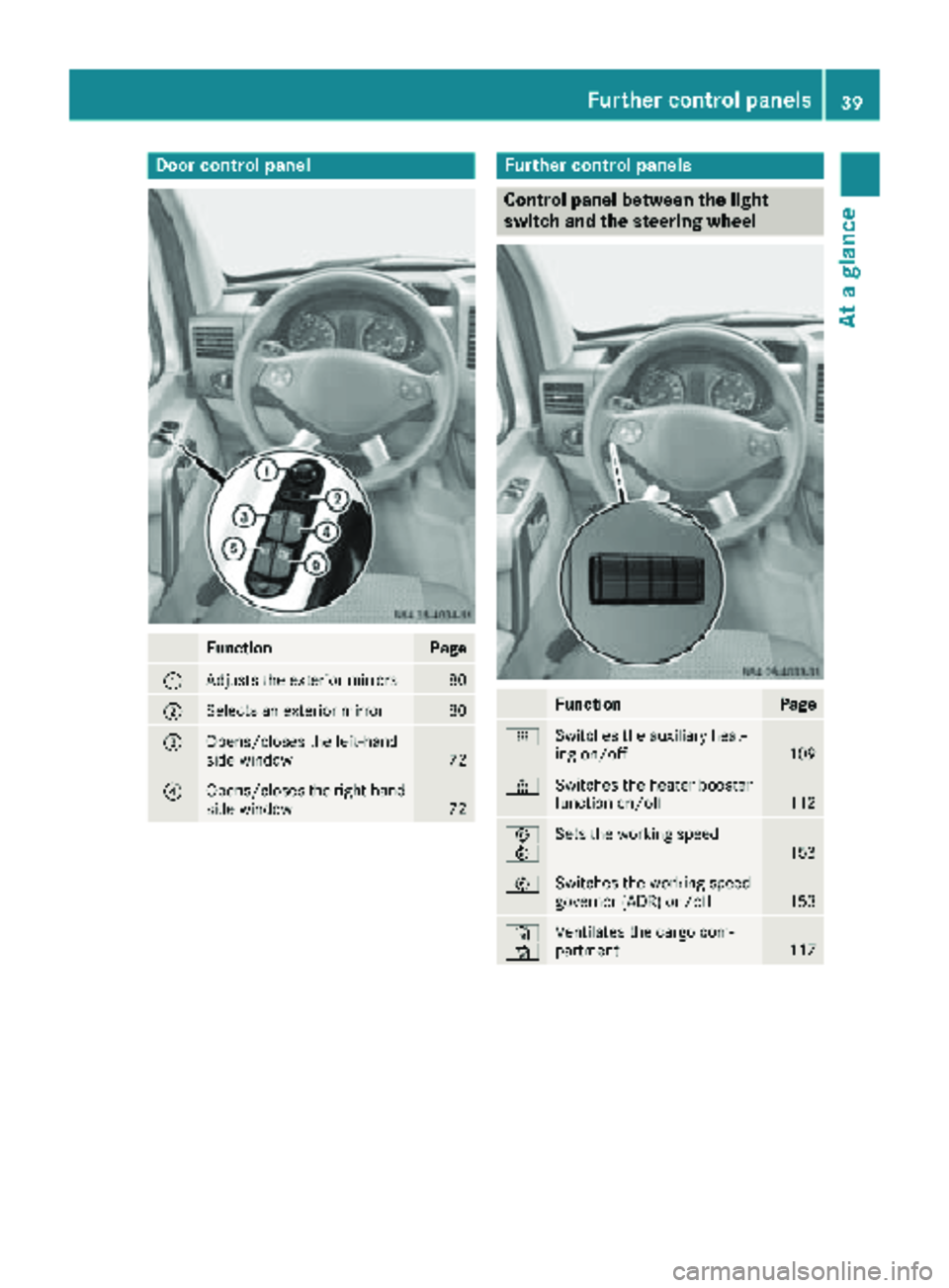
Door controlpanel
FunctionPage
:Adjust sth eexterio rmirrors80
;Selects an exterio rmirro r80
=Opens/closes th eleft-han d
sid ewindow72
?Opens/closes th eright-hand
sid ewindow72
Further contro lpanels
Contro lpanel between th eligh t
switch an dth esteering wheel
FunctionPage
ySwitches th eauxiliar yheat -
in g on/off10 9
±Switches th eheater booster
function on/off11 2
E
FSets th eworking speed15 3
ESwitches th eworking speed
governor (ADR) on/off15 3
´
·Ventilates th ecargo com-
partmen t117
Further control panels39
At a glance
Page 107 of 294
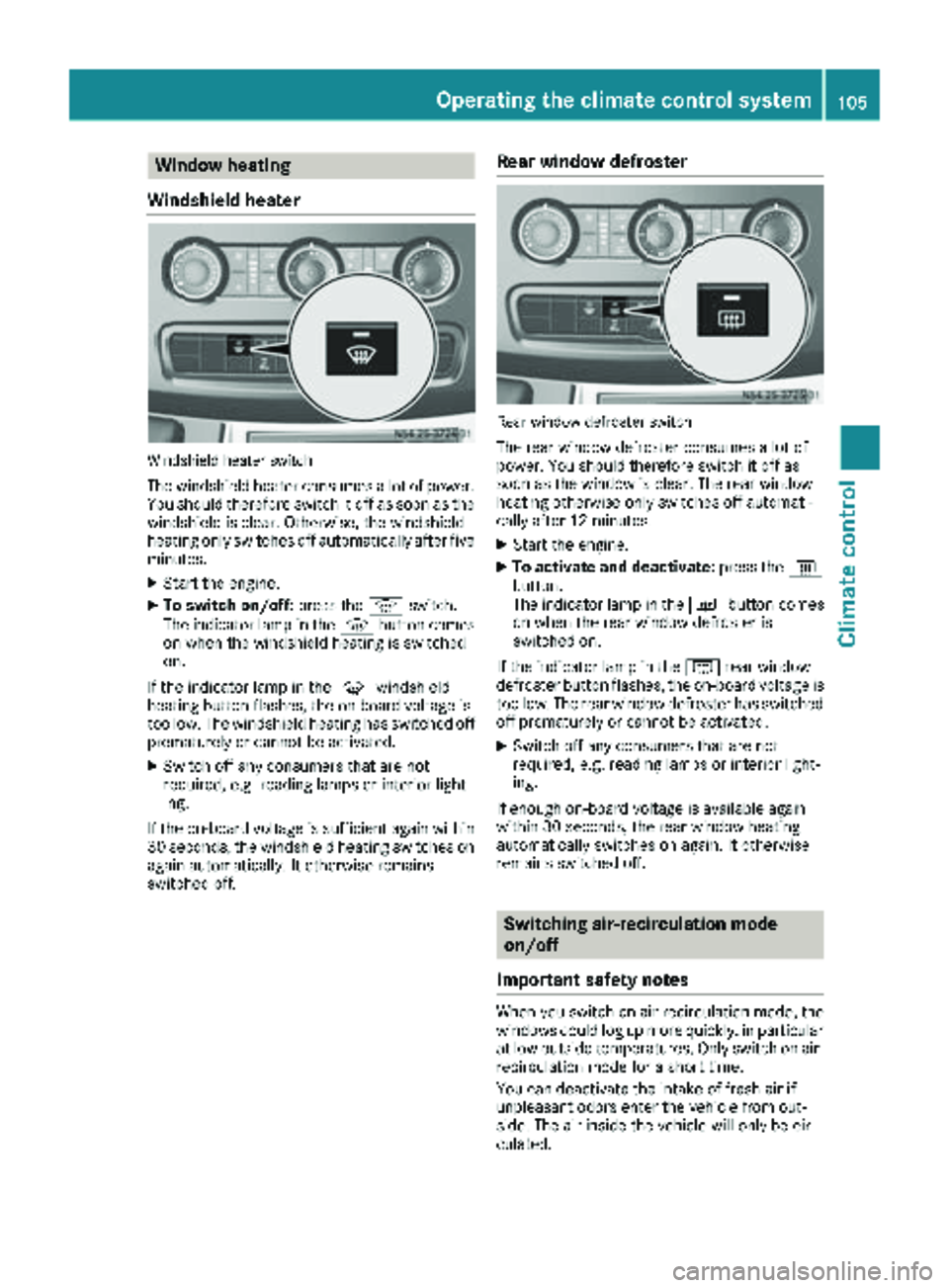
Window heating
Windshield heater
Windshield heater switch
The windshield heater consumes a lot of power.
You should therefore switch it off as soon as the
windshield is clear. Otherwise, the windshield
heating only switches off automatically after five minutes.
XStart the engine.
XTo switch on/off: press thezswitch.
The indicator lamp in the zbutton comes
on when the windshield heating is switched
on.
If the indicator lamp in the zwindshield
heating button flashes, the on-board voltage is
too low. The windshield heating has switched off
prematurely or cannot be activated.
XSwitch off any consumers that are not
required, e.g. reading lamps or interior light-
ing.
If the on-board voltage is sufficient again within
30 seconds, the windshield heating switches on
again automatically. It otherwise remains
switched off.
Rear window defroster
Rear window defroster switch
The rear window defroster consumes a lot of
power. You should therefore switch it off as
soon as the window is clear. The rear window
heating otherwise only switches off automati-
cally after 12 minutes.
XStart the engine.
XTo activate and deactivate: press the|
button.
The indicator lamp in the |button comes
on when the rear window defroster is
switched on.
If the indicator lamp in the |rear window
defroster button flashes, the on-board voltage is
too low. The rear window defroster has switched off prematurely or cannot be activated.
XSwitch off any consumers that are not
required, e.g. reading lamps or interior light-
ing.
If enough on-board voltage is available again
within 30 seconds, the rear window heating
automatically switches on again. It otherwise
remains switched off.
Switching air-recirculation mode
on/off
Important safety notes
When you switch on air-recirculation mode, the windows could fog up more quickly, in particular
at low outside temperatures. Only switch on air-
recirculation mode for a short time.
You can deactivate the intake of fresh air if
unpleasant odors enter the vehicle from out-
side. The air inside the vehicle will only be cir-
culated.
Operating the climate control system105
Climate control
Page 110 of 294
GWARNING
When the auxiliary heating is switched on,
parts of the vehicle can become very hot, e.g.
the exhaust system.
Flammable materials such as leaves, grass or
twigs may ignite if they come into contact
with:
Rhot parts of the exhaust system
Rthe exhaust gas itself
There is a risk of fire.
When the auxiliary heating is switched on,
make sure that:
Rno flammable materials come into contact
with hot vehicle components
Rthe exhaust gas can escape from the
exhaust pipe unhindered
Rthe exhaust gas does not come into contact
with flammable materials.
!Turn on the auxiliary heating at least once a
month for approximately 10 minutes. The
auxiliary heating could otherwise be dam-
aged.
!Make sure that the flow of hot air is not
blocked. The auxiliary heating will otherwise
overheat and switch off.
Your vehicle may be equipped with either an
auxiliary hot-water heater or an auxiliary warm-
air heater. Adjustment and operation of the:
Rhot-water auxiliary heater is done via the on-
board computer and with the auxiliary heating
button in the control panel (
Ypage 109) or
with the remote control (Ypage 110).
Rauxiliary warm-air heater is done via the timer
above the overhead control panel
(
Ypage 114).
The auxiliary heating works independently of the
engine and supplements the climate control
system in the vehicle. The auxiliary heating
heats the air in the vehicle interior to the tem-
perature set.
If your vehicle is equipped with a hot-water aux-
iliary heater, the auxiliary heating also keeps the
coolant warm. This way, the load on the engine
is minimized and fuel is saved.
The heater booster function (
Ypage 112) of the
auxiliary heating supports the climate control system when the engine is running and the out-
side temperature is low.
You can use the auxiliary heating at an outside
temperature of up to 39 ‡ (4 †). At an outside
temperature above 39 ‡ (4 †) the auxiliary
heating system and the heater booster function
switch off automatically.
Hot-water auxiliary heating
Heating time
The heating time when operating the auxiliary
heating with the vehicle is stationary without the
engine running depends on the outside temper-
ature and the electrical consumers switched on.
Outside
tempera-
tureHeating
timePossible startup
procedures
Above 23‡
(Ò5 †)Approx.
20 minutes6
23 ‡
(Ò5 †) to
5 ‡
( Ò15 †)Approx.
40 minutes3
Below 5‡
( Ò 15 †)Approx.
50 minutes2
You can then switch on the auxiliary heating
again.
If you do not start the engine for a while, the total
duration of heating is limited to a maximum of
120 minutes to protect the starter battery.
Switching on the auxiliary heating is then auto-
matically disabled. You can, for example, switch
on the auxiliary heating a maximum of two times
without the engine running if the outside tem-
perature is Ò5 ‡ (Ò20 †). If you attempt to do it
again, the indicator lamps in the y
(
Ypage 109) button flash alternately for about
two minutes indicating restarting lock. The aux-
iliary heating cannot be switched on without
starting the engine.
When the condition of charge of the starter bat-
tery is sufficient again, the switch-on interlock
will be deactivated. To charge the starter bat-
tery, let the engine run. The engine run time
required to reach the necessary condition of
charge depends on the outside temperature and
on the electrical consumers switched on.
108Operating the auxiliary heating system
Climate control
Page 111 of 294
Outside tempera-
tureEngine runtime
Above 32 ‡ (0 †)at least 10 minutes
32 ‡ (0 †) to 14 ‡
(Ò10 †)at least 15 minutes
Below 14 ‡ (Ò10 †)at least 20 minutes
Before switching on
XCheck the fuel level and top up if necessary.
The auxiliary heating is operated directly
using the vehicle's fuel. The tank must be at
least a quarter full to ensure that the auxiliary
heating functions.
XSwitch on climate control (Ypage 102).
XSet the temperature control to the desired
temperature (Ypage 103).
XSet the air distribution as required
(Ypage 103).
XOpen the center (Ypage 106) and side air
vents (Ypage 107) and set them to the middle
position.
iThe auxiliary heating automatically switches
to heater booster mode after the engine is
started.
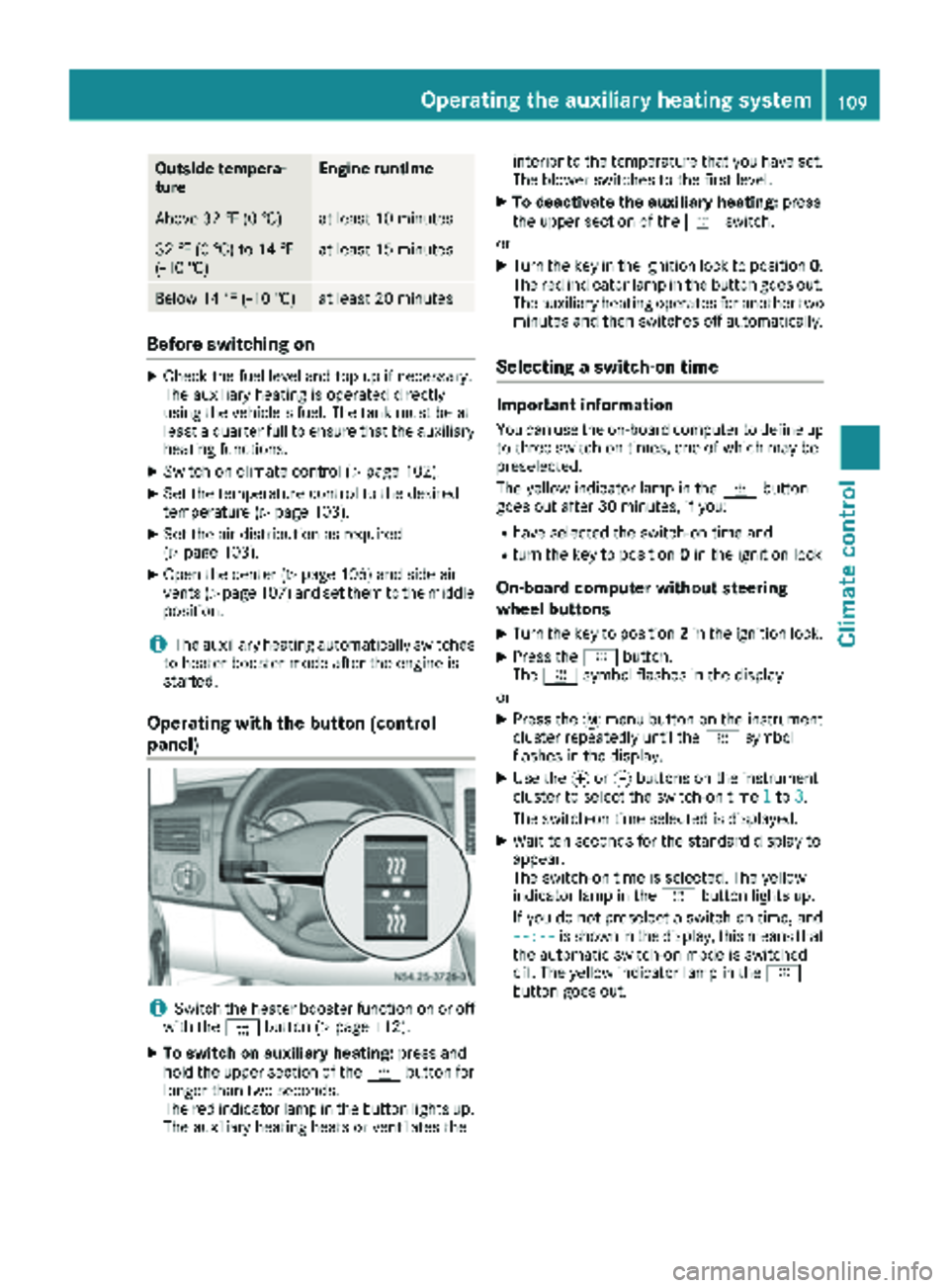
Operating with the button (control
panel)
iSwitch the heater booster function on or off
with the ¢button (Ypage 112).
XTo switch on auxiliary heating: press and
hold the upper section of the ybutton for
longer than two seconds.
The red indicator lamp in the button lights up.
The auxiliary heating heats or ventilates the interior to the temperature that you have set.
The blower switches to the first level.
XTo deactivate the auxiliary heating:
press
the upper section of the yswitch.
or
XTurn the key in the ignition lock to position 0.
The red indicator lamp in the button goes out.
The auxiliary heating operates for another two
minutes and then switches off automatically.
Selecting a switch-on time
Important information
You can use the on-board computer to define up
to three switch-on times, one of which may be
preselected.
The yellow indicator lamp in the ybutton
goes out after 30 minutes, if you:
Rhave selected the switch-on time and
Rturn the key to position 0in the ignition lock
On-board computer without steering
wheel buttons
XTurn the key to position 2in the ignition lock.
XPress the ybutton.
The y symbol flashes in the display.
or
XPress the 4menu button on the instrument
cluster repeatedly until the ysymbol
flashes in the display.
XUse the forg buttons on the instrument
cluster to select the switch-on time 1to3.
The switch-on time selected is displayed.
XWait ten seconds for the standard display to
appear.
The switch-on time is selected. The yellow
indicator lamp in the ybutton lights up.
If you do not preselect a switch-on time, and
--:--
is shown in the display, this means that
the automatic switch-on mode is switched
off. The yellow indicator lamp in the y
button goes out.
Operating the auxiliary heating system109
Climate control
Z
Page 113 of 294
SignalingMeaning
Flashes redAuxiliary heating switched
off
Lights up
greenAuxiliary heating switched
on
Flashes greenChange operating duration
active
Flashes alter-
nately red and
greenRemote control in synchro-
nizing mode
iWhen the remote control battery is weak,
indicator lamp :flashes red rapidly. Replace
the remote control battery (
Ypage 112).
You can find information on further lamp sta-
tuses in the "Problems with the hot-water aux-
iliary heater" section (
Ypage 113).
Switching the remote control on/off
The remote control switches to standby mode
after ten seconds. Indicator lamp :goes out.
XTo switch on: press and hold the Übutton
until indicator lamp :lights up red.
If a connection between the remote control
and the receiver in the vehicle has been estab-
lished and indicator lamp ::
Rflashes red, the auxiliary heating is switched
off.
Rlights up green, the auxiliary heating is
switched on.
XTo switch off:press and hold the Übut-
ton until indicator lamp :goes out.
Switching the auxiliary heating on/off
XSwitch on the remote control.
XTo switch on: when indicator lamp :flashes
red, press the bbutton.
During data transmission, indicator lamp :
lights up red.
When indicator lamp :lights up green, the
auxiliary heating is switched on.
XTo switch off: when indicator lamp :lights
up green, press the bbutton.
During data transmission, indicator lamp :
lights up red.
When indicator lamp :flashes red, the aux-
iliary heating is switched off.
Changing the operating duration
XSwitch on the remote control.
XWhen indicator lamp :flashes red, press
Ü andb simultaneously.
Indicator lamp :flashes green.
XPress the Übutton repeatedly until the
desired operating duration is shown.
R20 minutes
Indicator lamp :flashes green twice.
R30 minutes
Indicator lamp :flashes green three
times.
R40 minutes
Indicator lamp :flashes green four times.
XPress the bbutton.
During data transmission, indicator lamp :
lights up red.
If indicator lamp :emits two long, green
flashes, the selected operating duration is
stored.
iIf no adjustment is made to the operating
duration, indicator lamp :flashes six times
and the remote control goes into standby
mode.
Synchronizing the remote control
XPress the yauxiliary heating button in the
control panel for longer than ten seconds
(
Ypage 109).
When you press and hold the ybutton, the
red indicat
or lamp lights up in the button.
When the red indicator lamp in the ybut-
ton flashes, the receiver in the vehicle is ready
for synchronizing.
XPress and hold the Üremote control but-
ton until indicator lamp :lights up red.
If there is an active connection between the
remote control and the receiver, indicator
lamp :flashes alternately red and green.
The remote control is in synchronizing mode.
iIf you press the Übutton again on the
remote control after starting synchronization,
you will only synchronize this remote control
unit with the receiver. Any other remote con-
trol units that were synchronized will be
cleared. Indicator lamp :flashes alternately
red and green (very slowly).
XPress the bbutton on the remote control.
During data transmission, indicator lamp :
lights up red.
Operating the auxiliary heating system111
Climate control
Z