change wheel MERCEDES-BENZ SPRINTER 2018 MY18 Operator’s Manual
[x] Cancel search | Manufacturer: MERCEDES-BENZ, Model Year: 2018, Model line: SPRINTER, Model: MERCEDES-BENZ SPRINTER 2018Pages: 294, PDF Size: 4.36 MB
Page 7 of 294
Selector lever ................................ 123
Selector lever positions ................. 124
Shift ranges ................................... 125
Starting the engine ........................ 120
Touchshift ...................................... 124
Trailer towing ................................. 125
Transmission oil change ................ 284
Automatic transmission emer-
gency mode ....................................... 126
AUX port ............................................. 212
Auxiliary heater
see Auxiliary warm-air heater
see Hot-water auxiliary heater
Auxiliary heating
Activating/deactivating heater
booster mode ................................ 112
Adjusting ....................................... 172
Conditions for switching on ........... 109
Heating time .................................. 108
Important safety notes .................. 107
Operating with the button (control
panel) ............................................ 109
Operation with the remote con-
trol ................................................. 110
Operation with the timer ................ 114
Selecting a switch-on time ............. 109
Setting the switch-on time ............. 110
see Auxiliary heating
see Auxiliary warm-air heater
see Hot-water auxiliary heater
Auxiliary warm-air heater
Problem (malfunction) ................... 117
Setting the departure time ............. 116
Axle load, permissible (trailer tow-
ing) ...................................................... 288
B
Backup lamps
Replacing bulbs ............................... 92
Backup lamps (Chassis Cab)
Replacing bulbs ............................... 93
BAS (Brake Assist System)
Display message ............................ 182
Function/notes ................................ 56
Indicator lamp ................................ 196
Basic settings
see Settings Battery
Replacing (SmartKey) ...................... 63
Battery (SmartKey)
Checking .......................................... 63
Important safety notes .................... 63
Replacing ......................................... 63
Battery (vehicle)
Care ............................................... 233
Charging ........................................ 233
Disconnecting/connecting (addi-
tional battery) ................................ 232
Disconnecting/connecting
(starter battery) ............................. 230
Display message ............................ 194
Important safety notes .................. 228
Indicator lamp ................................ 199
Installing/removing (additional
battery) .......................................... 233
Jump starting ................................. 243
Location ......................................... 229
Main switch ................................... 118
Removing and installing (starter
battery) .......................................... 231
Removing and installing the floor
covering ......................................... 229
Before driving off
Important safety notes .................. 120
Belt
see Seat belts
Belt warning ......................................... 45
Bio-diesel ........................................... 279
Bleeding the fuel system .................. 122
Blind Spot Assist
Activating/deactivating (button) .... 145
Activating/deactivating (vehicle
with steering wheel buttons) ......... 172
Display messages (vehicles with
steering wheel buttons) ................. 192
Display messages (vehicles with-
out steering wheel buttons) ........... 180
Notes/function .............................. 143
Trailer towing ................................. 145
Bottle holder
see Cup holder
Brake Assist
see BAS (Brake Assist System)
Brake fluid
Checking the level ......................... 224
Index5
Page 13 of 294
Notes about oil grades ................... 282
Oil change ...................................... 283
Oil level (note) ............................... 221
Viscosity ........................................ 282
Warning lamp .................................200
Engine speed setting (working
mode) ................................................. 153
ESP
®(Electronic Stability Pro-
gram)
Crosswind Assist .............................5 7
Display message ............................ 184
Important safety information ........... 56
Indicator lamp ................................ 199
Warning lamp ................................. 195
Exhaust check ................................... 133
Exhaust gas aftertreatment
DEF level indicator .........................1 61
DEF reducing agent ....................... 281
Diesel Exhaust Fluid (DEF) ............. 281
Indicator lamp ................................ 202
Refilling DEF .................................. 128
Exterior lighting
see Lights
Exterior mirrors
Adjusting ......................................... 80
Important safety notes .................... 80
Eyeglasses compartment ................. 206
F
Fire extinguisher............................... 243
First-aid kit ......................................... 242
Flat tire
Changing a wheel/mounting the
spare wheel ................................... 268
General notes ................................ 267
Fog lamps
Switching on/off .............................. 83
Fogged up-up windows
see Climate control
Folding seat ......................................... 76
Frequencies
Mobile phone ................................. 276
Two-way radio ................................ 276
Front interior light
Replacing bulbs ............................... 95
Fuel
Additives (diesel) ........................... 280 Consumption information .............. 280
Consumption statistics .................. 173
Diesel at very low outside temper-
atures ............................................ 279
Driving tips ....................................1 32
Fuel gauge ..................................... 161
Problem (malfunction) ................... 128
Quality (diesel) ............................... 279
Refueling ........................................ 126
Showing the range (vehicles with
steering wheel buttons) ................. 173
Tank content/reserve fuel ............. 279
Fuel filter with water separator
draining ......................................... 225
Indicator lamp ................................ 203
Fuel gauge ......................................... 161
Fuel tank
Problem (malfunction) ................... 128
Fuel tank
see Fuel tank
Fuses .................................................. 247
G
Gasoline
Reserve fuel warning lamp ............. 201
General driving tips
Driving short distances .................. 133
Genuine parts ...................................... 29
Glove box ........................................... 205
GTW (Gross Trailer Weight) (defini-
tion) .................................................... 265
H
Handbrake
see Parking brake
Hazard warning lamps ........................ 85
Head restraints
Adjusting ......................................... 78
Headlamps
Adding fluid to cleaning system ..... 225
Cleaning system (function) .............. 85
Fogging up ....................................... 86
see Automatic headlamp mode
Headliner (cleaning instructions) .... 239
Heating
see Climate control
Index11
Page 28 of 294
Operating conditions:
Ravoid short trips as these increase fuel con-
sumption.
Ralways make sure that the tire pressures
are correct.
Rdo not carry any unnecessary weight.
Rremove roof racks once you no longer need
them.
Ra regularly serviced vehicle will contribute
to environmental protection. You should
therefore adhere to the service intervals.
Ralways have service work carried out at a
qualified specialist workshop.
Personal driving style:
Rdo not depress the accelerator pedal when
starting the engine.
Rdo not warm up the engine when the vehicle
is stationary.
Rdrive carefully and maintain a safe distance
from the vehicle in front.
Ravoid frequent, sudden acceleration and
braking.
Rchange gear in good time and use each gear
only up to Ôof its maximum engine speed.
Rswitch off the engine in stationary traffic.
Rkeep an eye on the vehicle's fuel consump-
tion.
Environmental issues and recommen-
dations
When prompted by this Operator's Manual to
dispose of materials, please try to regenerate
and recycle these materials. Observe all rele-
vant environmental guidelines and regulations
when disposing of materials. This helps to pro-
tect the environment.
Operating safety and vehicle approval
Important safety notes
GWARNING
If you do not have the prescribed service/
maintenance work or any required repairs
carried out, this can result in malfunctions or system failures. There is a risk of an accident.
Always have the prescribed service/mainte-
nance work as well as any required repairs
carried out at a qualified specialist workshop.
Air bags and pyrotechnic Emergency Tensioning
Devices (ETDs) contain perchlorate material,
which may require special handling and regard
for the environment. The guidelines must be
observed during disposal.
In California, you can find more information on
the Internet at www.dtsc.ca.gov.
Notes on operating the vehicle
There is a risk of damage to the vehicle if:
Rthe vehicle makes contact with the ground,
e.g. on a high curb or a loose road surface
Ryou drive too quickly over an obstacle, e.g. a
curb, speed bump or pothole
Ra heavy object hits the underbody or chassis
component
In these or similar situations, the vehicle body/
frame, the underbody, chassis components,
wheels or tires could be damaged even if this is
not visible from the outside. Components that
have been damaged in this way can unexpect-
edly fail or no longer be able to assimilate the
loads occurring in the event of an accident. If the underbody paneling is damaged, flammable
material, such as leaves, grass or twigs, could
collect between the underbody and underbody
paneling. These materials could ignite if they
remain in contact with hot components of the
exhaust system for an extended period.
GWARNING
Flammable material such as leaves, grass or
twigs may ignite if they come into contact with
hot parts of the exhaust system. There is a risk of fire.
26Introduction
Page 33 of 294
data. These data document the vehicle's tech-
nical states, are used to help in finding malfunc-
tions and improving quality and are sent to the
manufacturer where necessary. In addition, the
manufacturer is subject to product liability. The
manufacturer needs technical data from vehi-
cles for this purpose.
Malfunction memories in the vehicle can be
reset by a service center during repair or service
work.
You can incorporate data into the vehicle's com-
fort and infotainment functions yourself as part
of the selected equipment.
These include:
RMultimedia data such as music, films or pho-
tos for playback in an integrated multimedia
system
RAddress book data for use in conjunction with
an integrated hands-free system or an inte-
grated navigation system
RNavigation destinations that have been
entered
RData about using Internet services
These data can be saved locally in the vehicle or are located on a device that you have connected
to the vehicle. If these data are saved in the
vehicle, you can delete them at any time. These data are sent to third parties only at your
request, particularly when you use online serv-
ices in accordance with the settings that you
have selected.
You can save and change comfort settings/
customizations in the vehicle at any time.
Depending on the equipment, these settings
include:
RSeat and steering wheel position settings
RSuspension and climate control settings
RCustom settings such as interior lighting
If your vehicle is equipped appropriately, you
can connect your smartphone or another mobile terminal to the vehicle. You can control this by
means of the control elements integrated in the
vehicle. The smartphone's picture and sound
can be output via the multimedia system. Spe-
cific items of information are also sent to your
smartphone.
Depending on the type of integration, such infor-
mation includes:
RGeneral vehicle information
RPosition data This allows you to use selected apps on your
smartphon
e, such as navigation or music play-
back. There is no additional interaction between
the smartphone and the vehicle, particularly
active access to vehicle data. The type of addi-
tional data processing is determined by the pro- vider of the app being used. Whether you can
configure settings for it and, if so, which ones,
depends on the app and your smartphone's
operating system.
Service provider
Wireless network connection
If your vehicle has a wireless network connec-
tion, it enables data to be exchanged between
your vehicle and other systems. The wireless
network connection is enabled by either an in-
vehicle transmitter and receiver or your own
mobile end device (e.g. smartphone). Online
functions can be used via this wireless connec-
tion. These include online services and applica-
tions/apps provided by the manufacturer or
other providers.
Manufacturer's own services
In the case of the manufacturer's online serv-
ices, the manufacturer describes the functions
in a suitable place and the associated informa-
tion subject to data protection legislation. Per-
sonal data can be used in the provision of online
services. Data are exchanged via a secure con-
nection (e.g. using the IT system specially pro-
vided for this purpose by the manufacturer).
Collecting, processing and using personal data
beyond the provision of services is permitted
only on the basis of a statutory permit or decla-
ration of consent.
You can usually activate and deactivate the serv-
ices and functions (some of which are subject to
charge). In many cases, this also applies to the
vehicle's entire data connection. However, this
does not apply in particular to legally prescribed
functions and services such as the "eCall" emer-
gency call system.
Services from third parties
If it is possible to use online services from other
providers, these services are the responsibility
of the provider in question and subject to that
provider's data protection conditions and terms
Introduction31
Z
Page 36 of 294
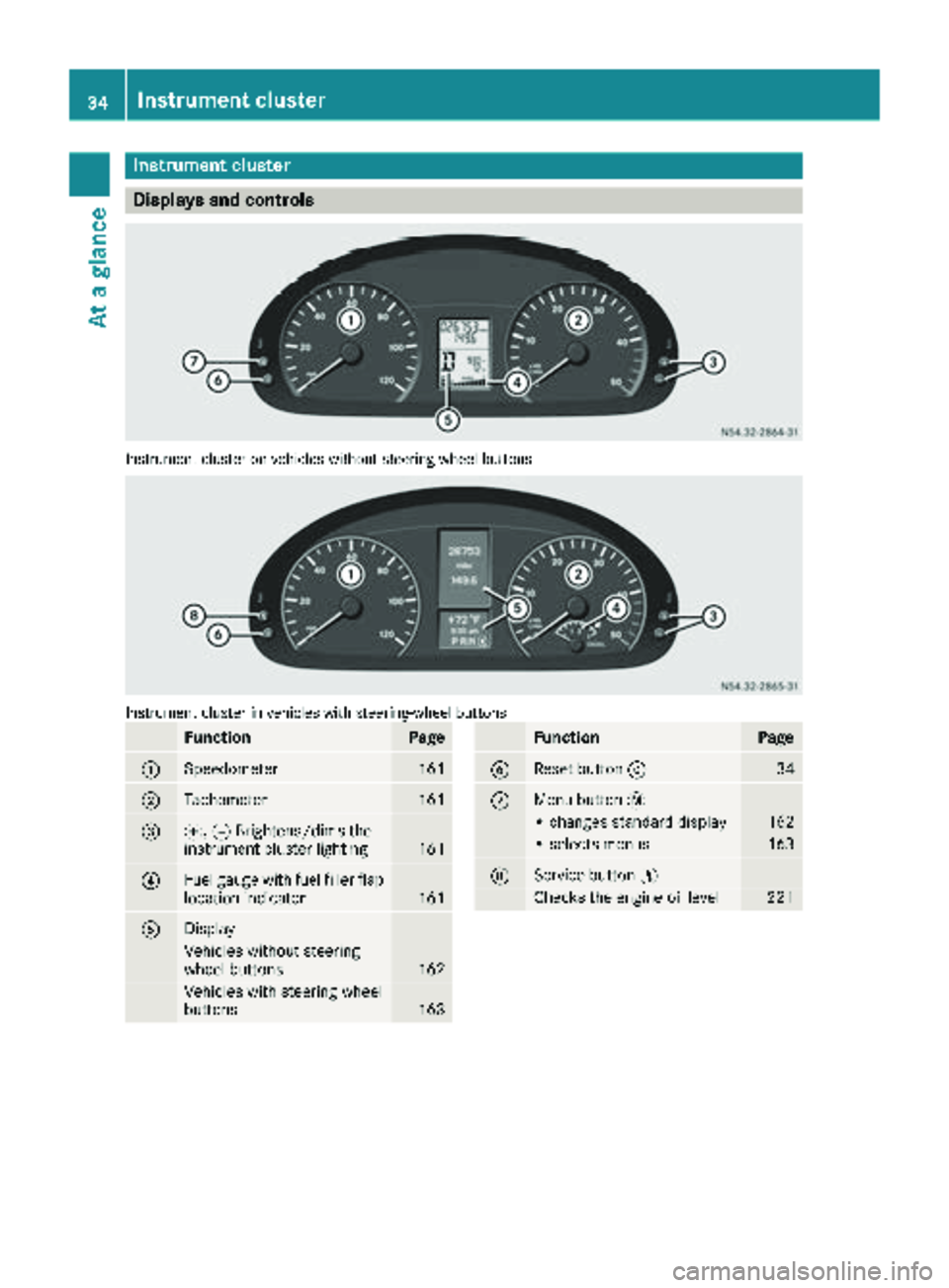
Instrument cluster
Displays and controls
Instrumentcluste ron vehicles without steering whee lbuttons
Instrumen tcluste rin vehicles wit hsteering-wheel buttons
FunctionPag e
:Speedometer161
;Tachometer161
=f, gBrightens/dims th e
instrumen tcluste rlighting16 1
?Fue lgauge wit hfuel filler flap
location indicator16 1
ADisplay
Vehicles without steering
whee lbuttons16 2
Vehicles wit hsteering whee l
buttons16 3
FunctionPag e
BReset butto n934
CMen ubutto n4
• changes standard display16 2
•select smenus16 3
DService butto nË
Checks th eengin eoil level22 1
34Instrument cluster
At a glance
Page 80 of 294
XTo install the rear bench seat:observe the
prescribed installation position of the bench
seat.
Install the two-seat bench seat only on the
driver's side.
XCheck mounting shells ;on the vehicle
floor.
XPosition the bench seat in the direction of
travel in corresponding mounting shells ;.
XSlide the bench seat forwards until you hear
the locking mechanisms engage.
XCheck levers:on the anchorages of the
bench seat.
All levers :must be flush to the vehicle floor.
Head restraints
GWARNING
If the head restraints are not installed or not
adjusted correctly, they cannot provide pro-
tection as intended. There is an increased risk
of injury in the head and neck area, e.g. in the event of an accident or when braking.
Always drive with the head restraints instal-
led. Before driving off, make sure for every
vehicle occupant that the center of the head
restraint supports the back of the head at
about eye level.
Do not change over the head restraints for the
front and rear seats. Otherwise, it will not be
possible to correctly adjust the height and angle of the head restraints.
Adjust the head restraint so that it is as close as
possible to your head.
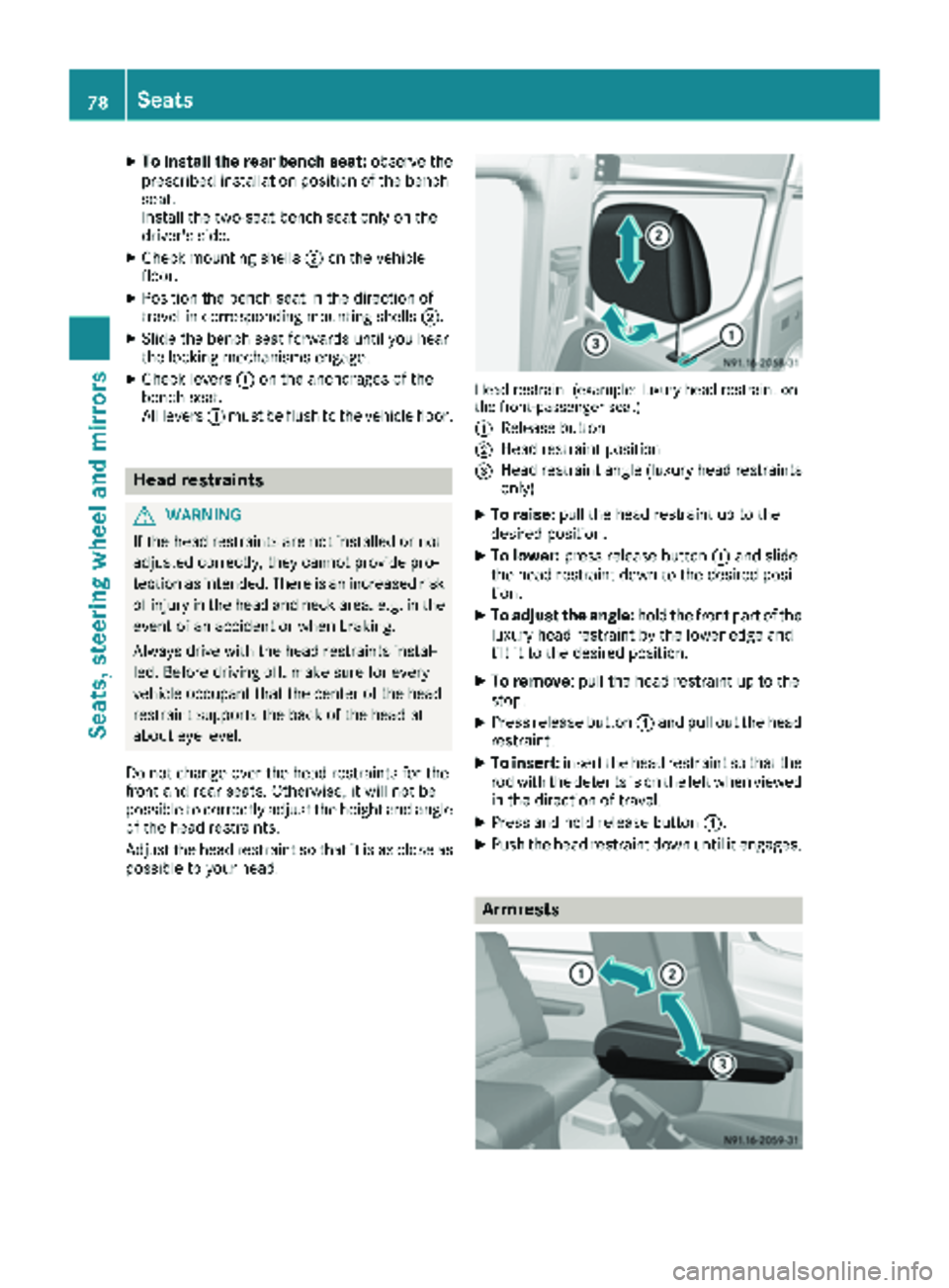
Head restraint (example: luxury head restraint on
the front-passenger seat)
:
Release button
;Head restraint position
=Head restraint angle (luxury head restraints only)
XTo raise: pull the head restraint up to the
desired position.
XTo lower: press release button :and slide
the head restraint down to the desired posi-
tion.
XTo adjust the angle: hold the front part of the
luxury head restraint by the lower edge and
tilt it to the desired position.
XTo remove: pull the head restraint up to the
stop.
XPress release button :and pull out the head
restraint.
XTo insert: insert the head restraint so that the
rod with the detents is on the left when viewed in the direction of travel.
XPress and hold release button :.
XPush the head restraint down until it engages.
Armrests
78Seats
Seats, steeringwheel and mirrors
Page 81 of 294
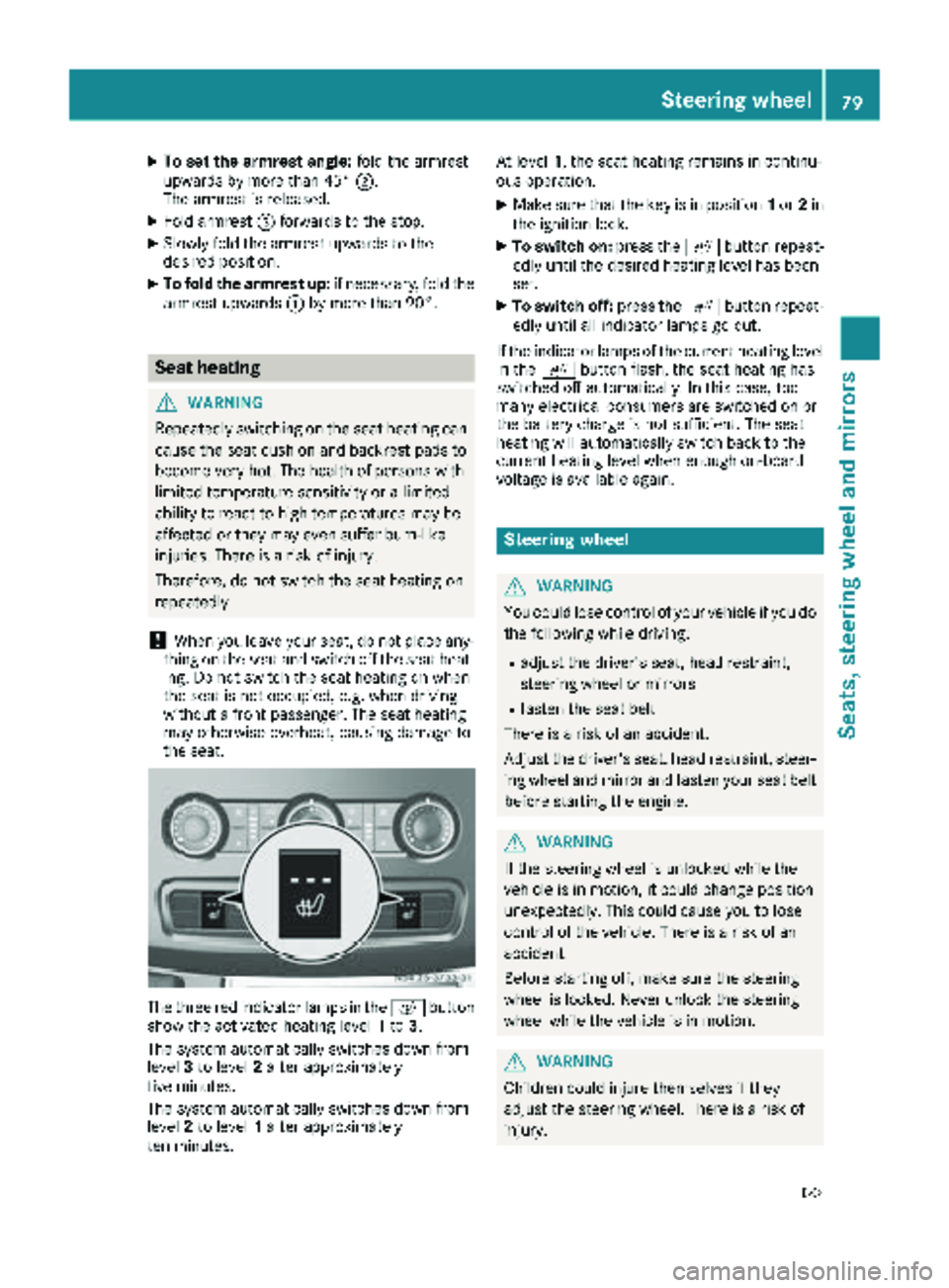
XTo set the armrest angle:fold the armrest
upwards by more than 45° ;.
The armrest is released.
XFold armrest =forwards to the stop.
XSlowly fold the armrest upwards to the
desired position.
XTo fold the armrest up: if necessary, fold the
armrest upwards :by more than 90°.
Seat heating
GWARNING
Repeatedly switching on the seat heating can
cause the seat cushion and backrest pads to
become very hot. The health of persons with
limited temperature sensitivity or a limited
ability to react to high temperatures may be
affected or they may even suffer burn-like
injuries. There is a risk of injury.
Therefore, do not switch the seat heating on
repeatedly.
!When you leave your seat, do not place any-
thing on the seat and switch off the seat heat-
ing. Do not switch the seat heating on when
the seat is not occupied, e.g. when driving
without a front passenger. The seat heating
may otherwise overheat, causing damage to
the seat.
The three red indicator lamps in the cbutton
show the activated heating level 1to 3.
The system automatically switches down from
level 3to level 2after approximately
five minutes.
The system automatically switches down from
level 2to level 1after approximately
ten minutes. At level
1, the seat heating remains in continu-
ous operation.
XMake sure that the key is in position 1or 2in
the ignition lock.
XTo switch on: press thecbutton repeat-
edly until the desired heating level has been
set.
XTo switch off: press thecbutton repeat-
edly until all indicator lamps go out.
If the indicator lamps of the current heating level
in the cbutton flash, the seat heating has
switched off automatically. In this case, too
many electrical consumers are switched on or
the battery charge is not sufficient. The seat
heating will automatically switch back to the
current heating level when enough on-board
voltage is available again.
Steering wheel
GWARNING
You could lose control of your vehicle if you do the following while driving:
Radjust the driver's seat, head restraint,
steering wheel or mirrors
Rfasten the seat belt
There is a risk of an accident.
Adjust the driver's seat, head restraint, steer-
ing wheel and mirror and fasten your seat belt before starting the engine.
GWARNING
If the steering wheel is unlocked while the
vehicle is in motion, it could change position
unexpectedly. This could cause you to lose
control of the vehicle. There is a risk of an
accident.
Before starting off, make sure the steering
wheel is locked. Never unlock the steering
wheel while the vehicle is in motion.
GWARNING
Children could injure themselves if they
adjust the steering wheel. There is a risk of
injury.
Steering wheel79
Seats, steering wheel and mirrors
Z
Page 87 of 294
The headlamp range control is used to adapt the
downward angle of the headlamp beams in
accordance with the load on your vehicle. The
cone of light from the headlamps changes if
seats are occupied or if the cargo compartmentis being loaded or unloaded. This can impair vis-
ibility and cause glare to oncoming traffic.
You can only adjust the headlamp range while
the engine is running.
XTurn headlamp range control :to the cor-
responding position. The road ahead should
be lit up for 40 mto 100 mand the low-beam
headlamps should not cause glare to oncom-
ing traffic.
Select position gif the vehicle is unladen.
Cornering lamps
The cornering lamps improve the illumination of
the road over a wide angle in the direction you
are turning, enabling better visibility in tight
bends, for example.
The cornering light function switches on
automatically, if:
Ryou are traveling at a speed of less than
25 mph (40 km/h) and you switch on a turn
signal or turn the steering wheel.
Ryou are traveling at a speeds of between
25 mph (40 km/h) and 43 mph (70 km/h) and
turn the steering wheel.
The cornering lamp may remain lit for a short
time, but is automatically switched off after no
more than 3 minutes.
iIf reverse gear is engaged the lamp on the
opposite side of the vehicle switches on
instead.
Hazard warning lamps
GWARNING
The rear exterior light will be covered if you:
Ropen the rear doors by 90°
Ropen the rear dropside.
The vehicle will then be difficult for other road users to see or will not be seen by them at all,
particularly if it is dark or visibility is poor.
There is a risk of an accident.
You should therefore ensure in this and simi-
lar situations that the vehicle is visible from
the rear in accordance with the relevant
national regulations, by using the warning tri-
angle, for instance.
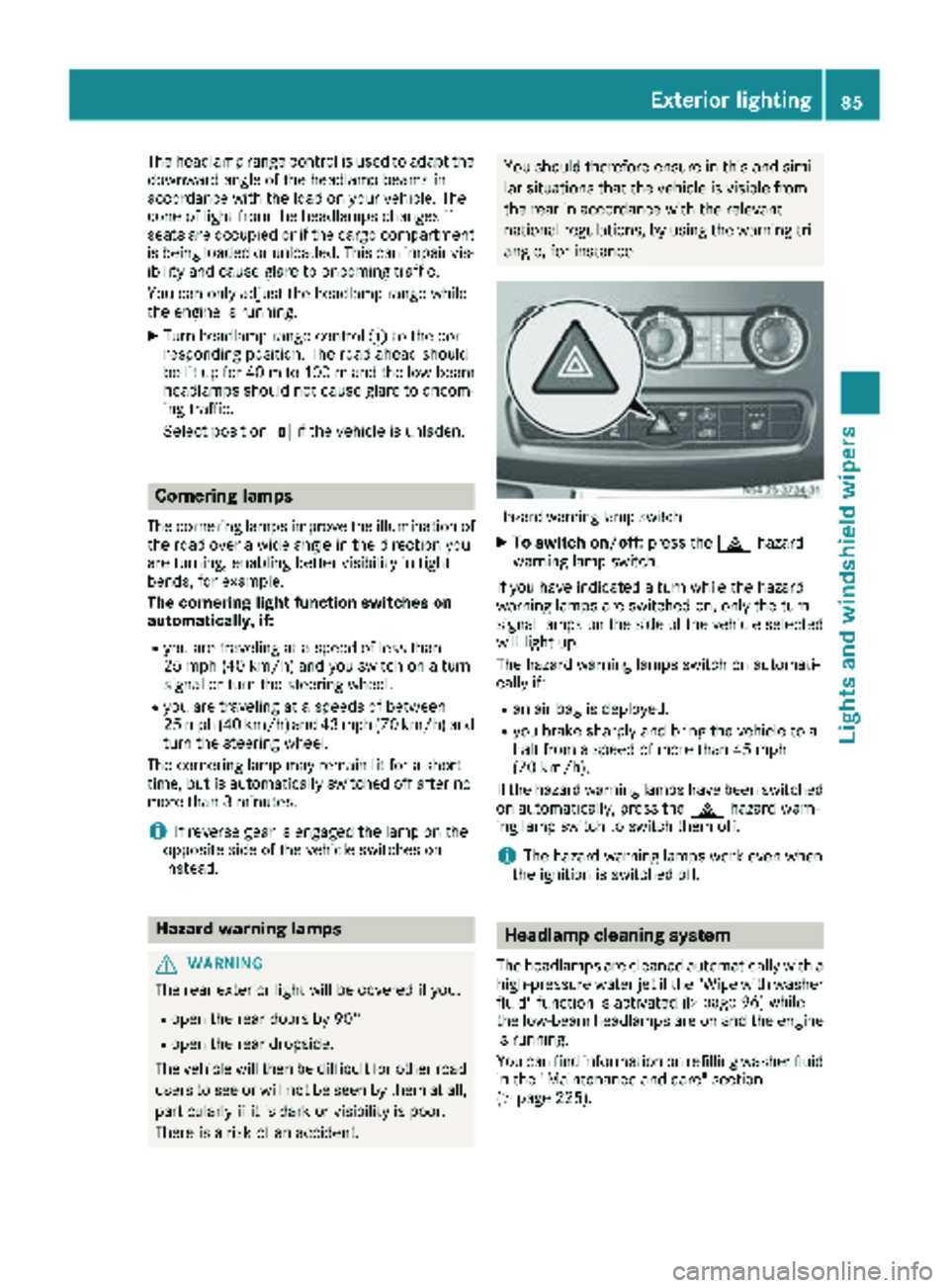
Hazard warning lamp switch
XTo switch on/off: press the£hazard
warning lamp switch.
If you have indicated a turn while the hazard
warning lamps are switched on, only the turn
signal lamps on the side of the vehicle selected
will light up.
The hazard warning lamps switch on automati-
cally if:
Ran air bag is deployed.
Ryou brake sharply and bring the vehicle to a
halt from a speed of more than 45 mph
(70 km/h).
If the hazard warning lamps have been switched
on automatically, press the £hazard warn-
ing lamp switch to switch them off.
iThe hazard warning lamps work even when
the ignition is switched off.
Headlamp cleaning system
The headlamps are cleaned automatically with a
high-pressure water jet if the "Wipe with washer
fluid" function is activated (
Ypage 96) while
the low-beam headlamps are on and the engine is running.
You can find information on refilling washer fluid
in the "Maintenance and care" section
(
Ypage 225).
Exterior lighting85
Lights and windshield wiper s
Z
Page 108 of 294
Heating and air-conditioning system
Air-recirculation mode switches off automati-
cally after about 10 to 30 minutes, depending on
the outside temperature.
XSwitch on climate control (Ypage 102).
XTo activate/deactivate:press theebut-
ton.
If the indicator lamp in the ebutton lights
up, air-recirculation mode is activated.
Rear-compartment heating and rear-
compartment air-conditioning system
On vehicles with rear-compartment heating and
a rear-compartment air-conditioning system,
you can activate or deactivate air-recirculation
mode for the rear-compartment climate control.
XSwitch on climate control (Ypage 102).
XTo activate: set the temperature control of
rear-compartment heating =(Ypage 101) or
rear-compartment air conditioning system ;
(
Ypage 102) to the center position.
Only one of the two climate control systems in
the rear compartment is activated and is in
air-recirculation mode.
XTo deactivate: turn the temperature control
of rear-compartment heating =(Ypage 101)
or rear-compartment air-conditioning sys-
tem ;(
Ypage 102) clockwise or counter-
clockwise. Only change the temperature in
small increments.
Adjusting the air vents
Important safety notes
GWARNING
Very hot or very cold air can flow from the air
vents. This could result in burns or frostbite in
the immediate vicinity of the air vents. There
is a risk of injury.
Make sure that all vehicle occupants always
maintain a sufficient distance to the air out-
lets. If necessary, redirect the airflow to
another area of the vehicle interior.
The center and side air vents are adjustable. On vehicles with a rear-compartment air-condi-
tioning system, you can also adjust the air vents
in the roof duct.
iFor virtually draft-free ventilation, adjust the
sliders of the center air vents to the center
position.
In order to ensure the direct flow of fresh air
through the air vents into the vehicle interior,
please observe the following notes:
Rkeep the air inlet grille on the hood free of
blockages, such as ice, snow or leaves.
Rnever cover the vents or the ventilation grilles
in the vehicle interior.
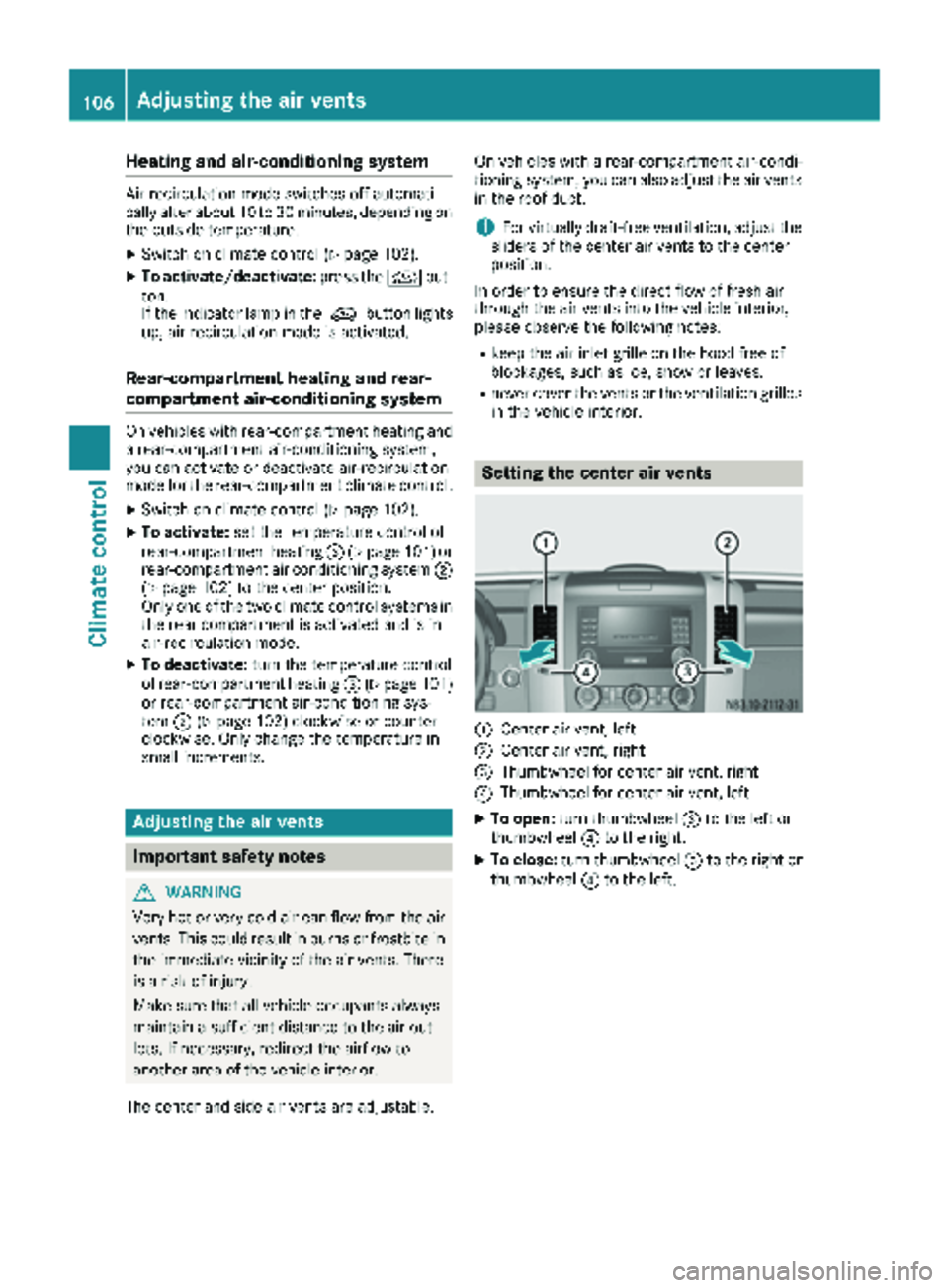
Setting the center air vents
:Center air vent, left
;Center air vent, right
=Thumbwheel for center air vent, right
?Thumbwheel for center air vent, left
XTo open: turn thumbwheel =to the left or
thumbwheel ?to the right.
XTo close: turn thumbwheel =to the right or
thumbwheel ?to the left.
106Adjusting the air vents
Climate control
Page 126 of 294
The display in the instrument cluster shows the
present selector lever position or the current
shift range:
Ron vehicles with steering wheel buttons
(Ypage 166)
Ron vehicles without steering wheel buttons
(Ypage 162)
Selector lever positions
BPark position
This prevents the vehicle from rolling
away when stopped. Only move the
selector lever toPif the vehicle is
stationary.
You can only remove the key when
the selector lever is in this position.
The selector lever is locked in posi-
tion Pif the key is removed.
The parking lock should not be used
as a brake when parking. Always
apply the parking brake as well once
you have parked the vehicle.
CReverse gear
Only move the selector lever to R
when the vehicle is stationary.
ANeutral
No power is transmitted from the
engine to the drive wheels. Releasing
the brakes will allow you to move the
vehicle freely, e.g. by pushing.
Do not move the selector lever to N
while driving. The automatic trans-
mission could otherwise be dam-
aged.
If ASR is deactivated or ESP
®has
malfunctioned: only move the selec-
tor lever to Nif the vehicle is in dan-
ger of skidding, e.g. on icy roads.
7Drive
The automatic transmission changes
gear itself. All forward gears are avail-
able.
You can influence the gearshifts and
shift gears yourself or limit the shift
range.
Changing gear
The 5-speed automatic transmission adapts to
your individual driving style by continuously
adjusting its shift points. These shift point
adjustments take into account the current oper-
ating and driving conditions. If the operating or
driving conditions change, the automatic trans-
mission reacts by adjusting the gearshift pro-
gram.
When the selector lever is in position D, the
automatic transmission selects the individual
gears automatically. This depends on:
Rany restriction in the shift range
(Ypage 125)
Rthe position of the accelerator pedal
Rthe road speed
Touchshift
When the selector lever is in position D, you can
perform gearshifts yourself.
XTo shift down: press the selector lever to the
left towards D–.
The automatic transmission shifts to the next gear down, depending on the gear currently
engaged. The shift range is also restricted.
iThe automatic transmission does not shift
down if you press the selector lever towards
D– while traveling at too high a speed. This
protects the engine from overrevving.
XTo shift up: briefly press the selector lever to
the right towards D+.
The automatic transmission shifts to the next
gear up, depending on the current gearshift
program. This also extends the shift range.
XTo derestrict the shift range: press and hold
the selector lever towards D+until D
appears
in the display again.
The automatic transmission shifts from the
current shift range directly to D.
XTo select the optimum shift range: press
and hold the selector lever to the left towards
D–.
The automatic transmission will shift to a
range which allows easy acceleration and
deceleration. To do this, the automatic trans-
mission will shift down one or more gears.
124Automatic transmission
Driving and parking