lane assist MERCEDES-BENZ SPRINTER 2018 MY18 Operator’s Manual
[x] Cancel search | Manufacturer: MERCEDES-BENZ, Model Year: 2018, Model line: SPRINTER, Model: MERCEDES-BENZ SPRINTER 2018Pages: 294, PDF Size: 4.36 MB
Page 14 of 294
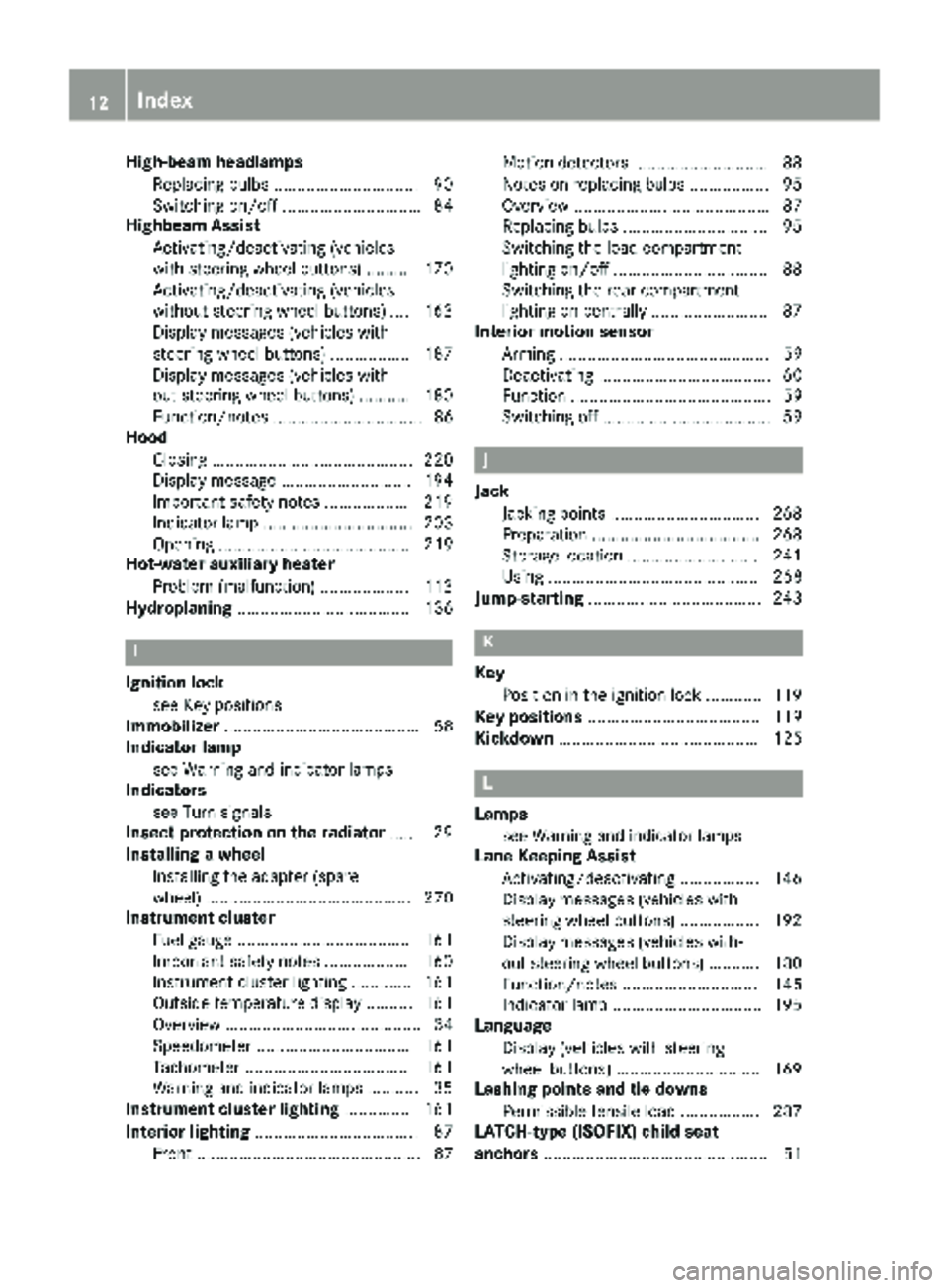
High-beam headlampsReplacing bulbs ...............................9 0
Switching on/off .............................. 84
Highbeam Assist
Activating/deactivating (vehicles
with steering wheel buttons) ......... 170
Activating/deactivating (vehicles
without steering wheel buttons) .... 163
Display messages (vehicles with
steering wheel buttons) ................. 187
Display messages (vehicles with-
out steering wheel buttons) ........... 180
Function/notes ................................ 86
Hood
Closing ........................................... 220
Display message ............................ 194
Important safety notes .................. 219
Indicator lamp ................................ 203
Opening ......................................... 219
Hot-water auxiliary heater
Problem (malfunction) ................... 113
Hydroplaning ..................................... 136
I
Ignition lock
see Key positions
Immobilizer .......................................... 58
Indicator lamp
see Warning and indicator lamps
Indicators
see Turn signals
Insect protection on the radiator ...... 29
Installing a wheel
Installing the adapter (spare
wheel) ............................................ 270
Instrument cluster
Fuel gauge ..................................... 161
Important safety notes .................. 160
Instrument cluster lighting ............. 161
Outside temperature display .......... 161
Overview .......................................... 34
Speedometer ................................. 161
Tachometer ................................... 161
Warning and indicator lamps ........... 35
Instrument cluster lighting .............. 161
Interior lighting ................................... 87
Front ................................................ 87 Motion detectors ............................. 88
Notes on replacing bulbs ................. 95
Overview .......................................... 87
Replacing bulbs ............................... 95
Switching the load-compartment
lighting on/off ................................. 88
Switching the rear compartment
lighting on centrally ......................... 87
Interior motion sensor
Arming ............................................. 59
Deactivating ..................................... 60
Function ........................................... 59
Switching off .................................... 59
J
JackJacking points ................................ 268
Preparation .................................... 268
Storage location ............................ 241
Using ............................................. 268
Jump-starting ..................................... 243
K
Key
Position in the ignition lock ............ 119
Key positions ..................................... 119
Kickdown ........................................... 125
L
Lamps
see Warning and indicator lamps
Lane Keeping Assist
Activating/deactivating ................. 146
Display messages (vehicles with
steering wheel buttons) ................. 192
Display messages (vehicles with-
out steering wheel buttons) ........... 180
Function/notes ............................. 145
Indicator lamp ................................ 195
Language
Display (vehicles with steering
wheel buttons) ............................... 169
Lashing points and tie downs
Permissible tensile load ................. 287
LATCH-type (ISOFIX) child seat
anchors ................................................ 51
12Index
Page 23 of 294
Two-way radiosType approval/frequency .............. 276
TWR (Tongue Weight Rating) (defi-
nition) ................................................. 266
Type plate
Vehicle identification number
(VIN) .............................................. 276
U
UnlockingFrom inside the vehicle (central
unlocking button) ............................. 65
USB port ............................................. 212
V
Vehicle
Data acquisition ............................... 30
Display message ............................ 194
Electronics ..................................... 276
Equipment ....................................... 23
Individual settings (vehicles with
steering wheel buttons) ................. 167
Limited Warranty ............................. 23
Loading .......................................... 259
Locking (SmartKey) .......................... 61
Lowering ........................................ 272
Maintenance .................................... 24
Operating safety .............................. 26
Parking for a long period ................ 131
Pulling away ................................... 121
Raising ........................................... 268
Registration ..................................... 28
Reporting problems ......................... 28
Securing from rolling away ............ 129
Towing away .................................. 244
Transporting .................................. 247
Unlocking (SmartKey) ...................... 61
Vehicle battery
see Battery (vehicle)
Vehicle bodies ..................................... 28
Body/equipment mounting direc-
tives for trucks ................................. 28
Vehicle data ....................................... 286
Vehicle identification number .......... 276
Vehicle identification plate .............. 276
Vehicle tool kit .................................. 241 VIN
...................................................... 276
Voltage supply
Fuses ............................................. 247
W
WarningStickers ........................................... 25
Warning and indicator lamp
Power assistance for the steering .. 204
Warning and indicator lamps
Brakes ........................................... 197
Check Engine ................................. 201
Coolant .......................................... 200
Diesel Exhaust Fluid (DEF) ............. 198
Distance warning function ............. 195
Electrical step ................................ 204
ESP
®.............................................. 195
ESP®function ................................ 199
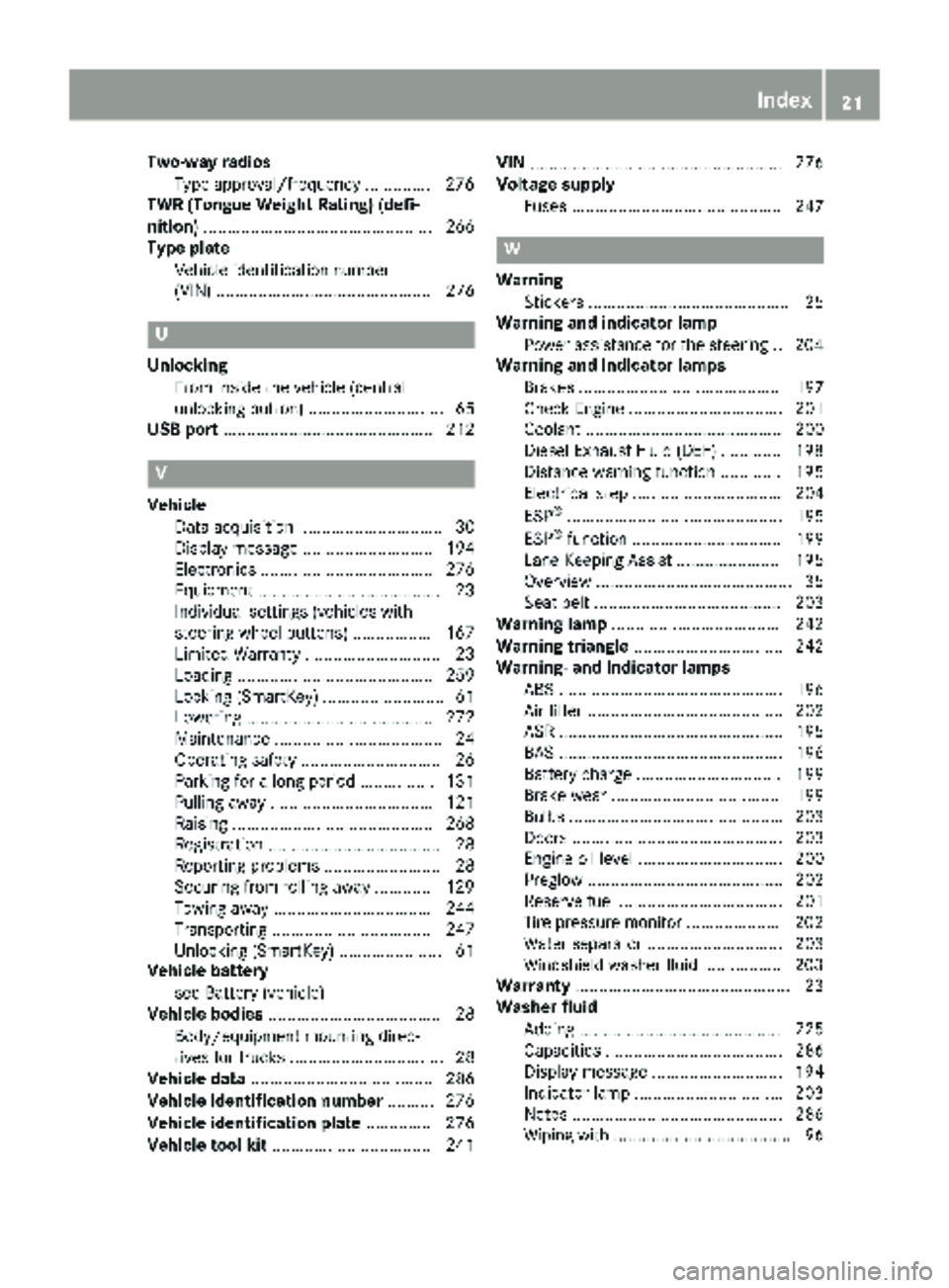
Lane Keeping Assist ...................... 195
Overview .......................................... 35
Seat belt ........................................ 203
Warning lamp .................................... 242
Warning triangle ................................ 242
Warning- and indicator lamps
ABS ................................................ 196
Air filter .......................................... 202
ASR ................................................ 195
BAS ................................................ 196
Battery charge ............................... 199
Brake wear .................................... 199
Bulbs .............................................. 203
Doors ............................................. 203
Engine oil level ............................... 200
Preglow .......................................... 202
Reserve fuel ................................... 201
Tire pressure monitor .................... 202
Water separator ............................. 203
Windshield washer fluid ................. 203
Warranty .............................................. 23
Washer fluid
Adding ........................................... 225
Capacities ...................................... 286
Display message ............................ 194
Indicator lamp ................................ 203
Notes ............................................. 286
Wiping with ...................................... 96
Index21
Page 38 of 294
FunctionPage
¦Fluid level too low in wind-
shield washer/headlamp
cleaning system
203
åDEF supply low or contami-
nated/diluted161
Exhaust gas aftertreatment
malfunction198
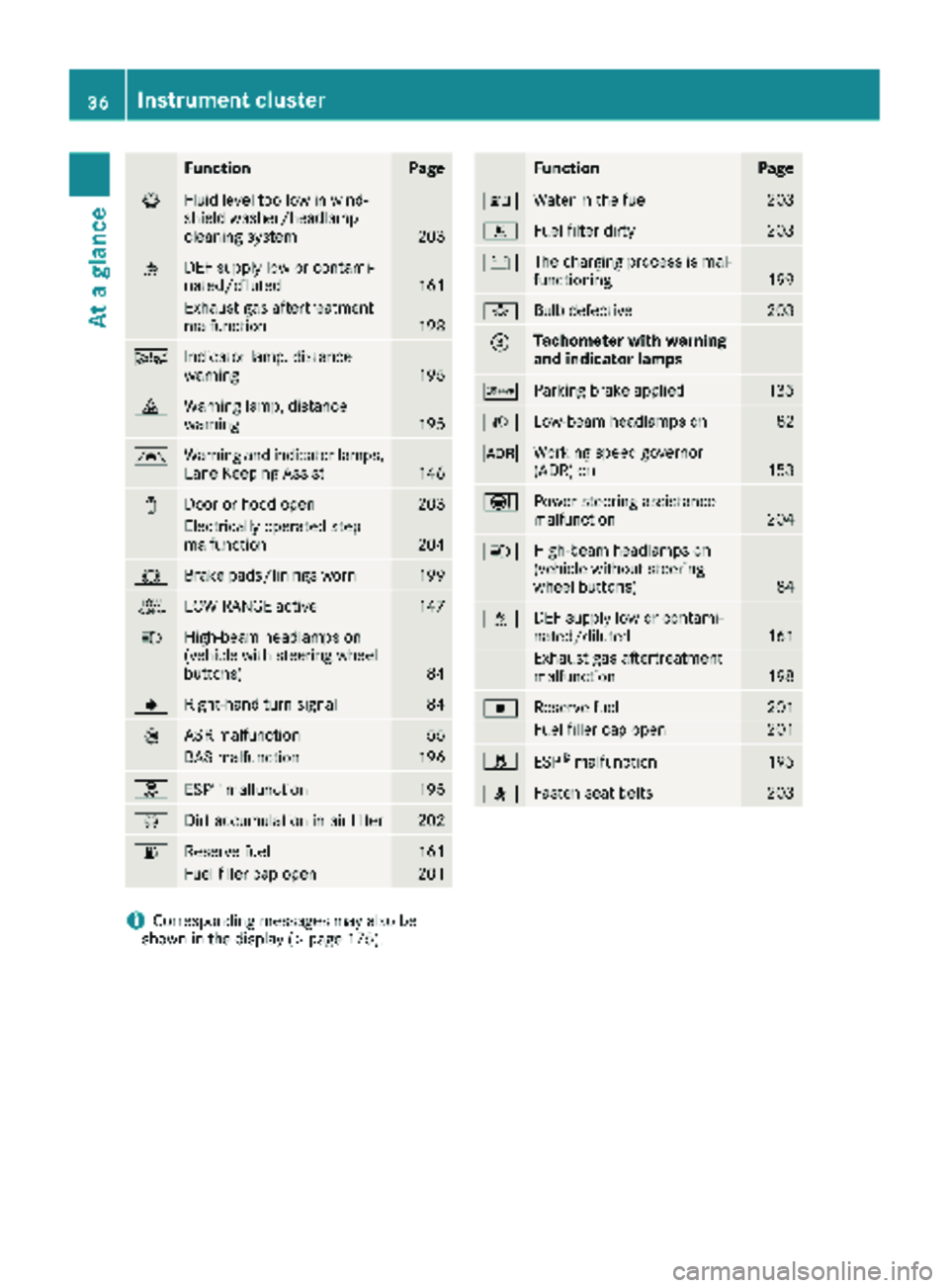
ÄIndicator lamp, distance
warning195
·Warning lamp, distance
warning195
ÃWarning and indicator lamps,
Lane Keeping Assist146
1Door or hood open203
Electrically operated step
malfunction204
#Brake pads/linings worn199
+LOW RANGE active147
KHigh-beam headlamps on
(vehicle with steering wheel
buttons)
84
JRight-hand turn signal84
:ASR malfunction55
BAS malfunction196
hESP®malfunction195
ÈDirt accumulation in air filter202
6Reserve fuel161
Fuel filler cap open201
FunctionPage
:Water in the fuel203
mFuel filter dirty203
#The charging process is mal-
functioning199
bBulb defective203
=Tachometer with warning
and indicator lamps
cParking brake applied135
LLow-beam headlamps on82
KWorking speed governor
(ADR) on153
ÐPower steering assistance
malfunction204
KHigh-beam headlamps on
(vehicle without steering
wheel buttons)
84
åDEF supply low or contami-
nated/diluted161
Exhaust gas aftertreatment
malfunction198
|Reserve fuel201
Fuel filler cap open201
hESP®malfunction195
7Fasten seat belts203
iCorresponding messages may also be
shown in the display (Ypage 175).
36Instrument cluster
At a glance
Page 40 of 294
FunctionPage
àActivates/deactivates ASR55
Ã
ÄCentral locking65
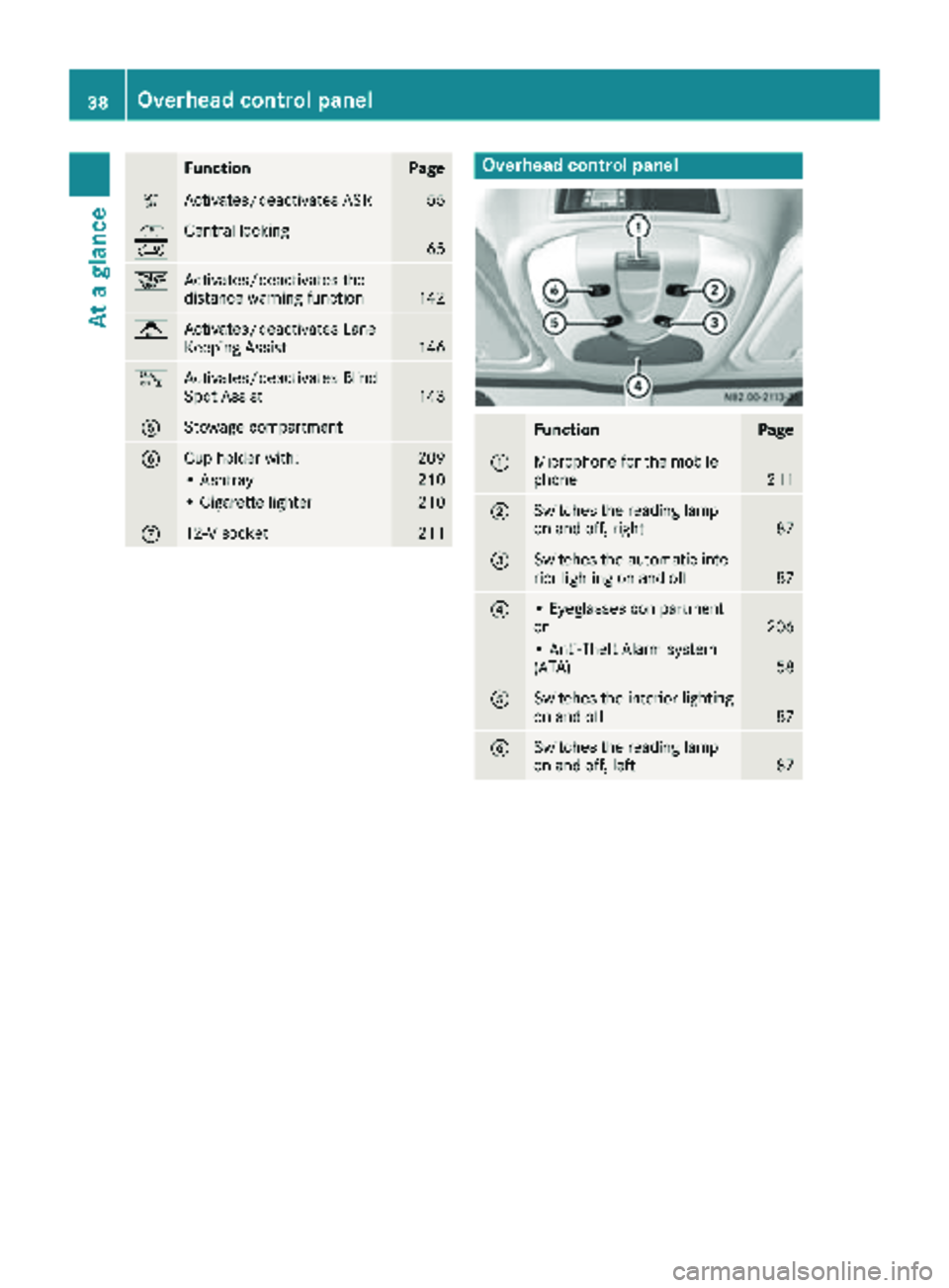
æActivates/deactivates the
distance warning function142
jActivates/deactivates Lane
Keeping Assist146
kActivates/deactivates Blind
Spot Assist143
AStowage compartment
BCup holder with:209
• Ashtray210
• Cigarette lighter210
C12-V socket211
Overhead control panel
FunctionPage
:Microphone for the mobile
phone211
;Switches the reading lamp
on and off, right87
=Switches the automatic inte-
rior lighting on and off87
?• Eyeglasses compartment
or206
• Anti-Theft Alarm system
(ATA)58
ASwitches the interior lighting
on and off87
BSwitches the reading lamp
on and off, left87
38Overhead control panel
At a glance
Page 56 of 294
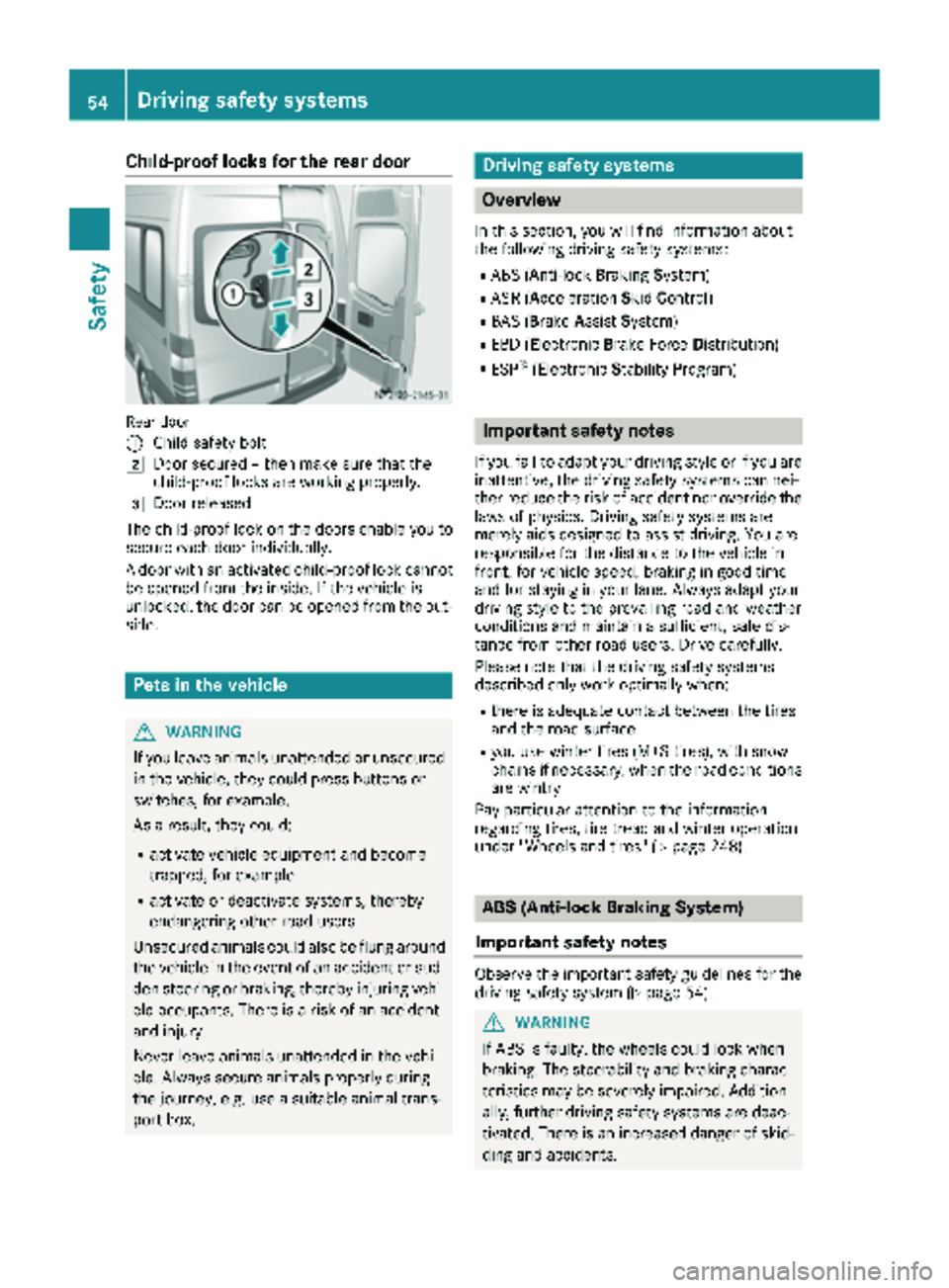
Child-proof locks for the rear door
Rear door
:
Child safety bolt
2Door secured – then make sure that the
child-proof locks are working properly.
3Door released
The child-proof lock on the doors enable you to
secure each door individually.
A door with an activated child-proof lock cannot
be opened from the inside. If the vehicle is
unlocked, the door can be opened from the out-
side.
Pets in the vehicle
GWARNING
If you leave animals unattended or unsecured
in the vehicle, they could press buttons or
switches, for example.
As a result, they could:
Ractivate vehicle equipment and become
trapped, for example
Ractivate or deactivate systems, thereby
endangering other road users
Unsecured animals could also be flung around
the vehicle in the event of an accident or sud-
den steering or braking, thereby injuring vehi-
cle occupants. There is a risk of an accident
and injury.
Never leave animals unattended in the vehi-
cle. Always secure animals properly during
the journey, e.g. use a suitable animal trans-
port box.
Driving safety systems
Overview
In this section, you will find information about
the following driving safety systems:
RABS (Anti-lock Braking System)
RASR (Acceleration SkidControl)
RBAS (B rakeAssist System)
REBD (Electronic Brake Force Distribution)
RESP®(Electronic StabilityProgram)
Important safety notes
If you fail to adapt your driving style or if you are
inattentive, the driving safety systems can nei-
ther reduce the risk of accident nor override the
laws of physics. Driving safety systems are
merely aids designed to assist driving. You are
responsible for the distance to the vehicle in
front, for vehicle speed, braking in good time
and for staying in your lane. Always adapt your
driving style to the prevailing road and weather
conditions and maintain a sufficient, safe dis-
tance from other road users. Drive carefully.
Please note that the driving safety systems
described only work optimally when:
Rthere is adequate contact between the tires
and the road surface
Ryou use winter tires (M+S tires), with snow
chains if necessary, when the road conditions
are wintry
Pay particular attention to the information
regarding tires, tire tread and winter operation
under "Wheels and tires" (
Ypage 248).
ABS (Anti-lock Braking System)
Important safety notes
Observe the important safety guidelines for the
driving safety system (Ypage 54).
GWARNING
If ABS is faulty, the wheels could lock when
braking. The steerability and braking charac-
teristics may be severely impaired. Addition-
ally, further driving safety systems are deac-
tivated. There is an increased danger of skid-
ding and accidents.
54Driving safety systems
Safety
Page 145 of 294
Always pay careful attention to the traffic sit-uation and be ready to brake.
Adaptive Brake Assist aids you when braking
during hazardous situations at speeds above
20 mph (30 km/h). With the help of Adaptive
Brake Assist, the distance warning signal can
detect obstacles that are in the path of your
vehicle for an extended period of time.
When you approach an obstacle and adaptive
Brake Assist detects that there is a risk of a col- lision, adaptive Brake Assist calculates the brak-
ing force necessary to avoid a collision. Should
you apply the brakes forcefully, adaptive Brake
Assist will automatically increase the braking
force to the calculated level.
XKeep the brake pedal depressed until the
emergency braking situation is over.
ABS prevents the wheels from locking.
The brakes function as usual again if:
Ryou release the brake pedal
Rthere is no longer any danger of a collision
Rno obstacle is detected in front of your vehicle
Adaptive Brake Assist is then deactivated.
Up to the maximum vehicle speed, adaptive
Brake Assist can react to moving obstacles that
have already been recognized as such at least
once over the period of observa tion. Ad
aptive
Brake Assist does not react to stationary obsta-
cles.
In particular, the detection of obstacles can be
impaired if:
Rdirt, ice or anything else covering the sensors
Rsnow or heavy rain
Rinterference from other radar sources
Rthere are strong radar reflections, for exam-
ple in parking garages
Ra narrow vehicle traveling in front, e.g. a
motorbike
Ra vehicle traveling in front on a different line
If adaptive Brake Assist is not available due to a
malfunction in the radar sensor system, the full
brake boosting effect with the help of BAS
remains available.
Following damage to the front end of the vehicle,
have the configuration and operation of the
radar sensor checked at a qualified specialist
workshop. This also applies to collisions at slow
speeds where there is no visible damage to the
front of the vehicle.
Lane Tracking package
Blind Spot Assist
General notes
Blind Spot Assist monitors the areas on either
side of the vehicle that are not visible to the
driver with two lateral, rear-facing radar sensors
in the bumper. It supports you from speeds of
approximately 20 mph (30 km/h). A warning
display in the exterior mirrors draws your atten-
tion to vehicles detected in the monitored area. If you then switch on the corresponding turn
signal to change lane, you will also receive an
optical and audible collision warning.
Important safety notes
GWARNING
Blind Spot Assist does not react to:
Rvehicles overtaken too closely on the side,
placing them in the blind spot area
Rvehicles which approach with a large speed
differential and overtake your vehicle
As a result, Blind Spot Assist may not give
warnings in such situations. There is a risk of
an accident.
Always observe the traffic conditions care-
fully, and maintain a safe lateral distance.
Blind Spot Assist is only an aid. It may fail to
detect some vehicles and is no substitute for
attentive driving. Always ensure that there is
sufficient distance to the side for other road
users and obstacles.
iUSA only:
This device has been approved by the FCC as
a "Vehicular Radar System". The radar sensor
is intended for use in an automotive radar
system only. Removal, tampering, or altering
of the device will void any warranties, and is
not permitted by the FCC. Do not tamper with, alter, or use in any non-approved way.
Any unauthorized modification to this device
could void the user’s authority to operate the
equipment.
Driving systems143
Driving an d parking
Z
Page 146 of 294
Monitoring range of the sensors
In particular, the detection of obstacles can be
impaired in the case of:
Rdirt, ice or anything else covering the sensors
Rpoor visibility, e.g. due to fog, heavy rain or
snow
Rnarrow and short vehicles, e.g. motorcycles
or bicycles
Rvery wide lanes
Rnarrow lanes
Rvehicles not driving in the middle of their lane
Rbarriers or other road boundaries
Vehicles in the monitoring range are then not
indicated.
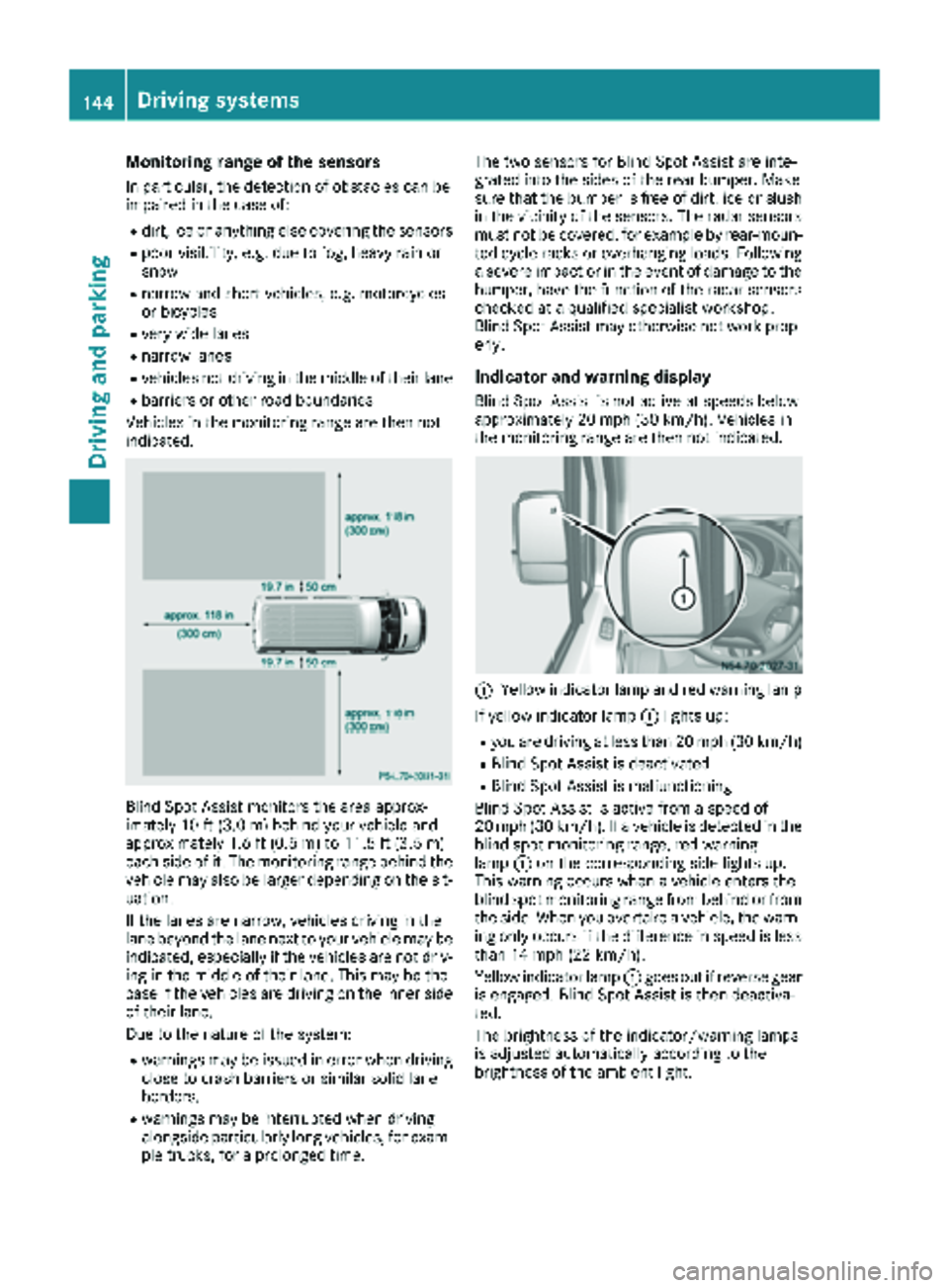
Blind Spot Assist monitors the area approx-
imately 10 ft (3.0 m) behind your vehicle and
approximately 1.6 ft (0.5 m) to 11.5 ft (3.5 m)
each side of it. The monitoring range behind the
vehicle may also be larger depending on the sit-
uation.
If the lanes are narrow, vehicles driving in the
lane beyond the lane next to your vehicle may be
indicated, especially if the vehicles are not driv-
ing in the middle of their lane. This may be the
case if the vehicles are driving on the inner side
of their lane.
Due to the nature of the system:
Rwarnings may be issued in error when driving
close to crash barriers or similar solid lane
borders.
Rwarnings may be interrupted when driving
alongside particularly long vehicles, for exam-
ple trucks, for a prolonged time. The two sensors for Blind Spot Assist are inte-
grated into the sides of the rear bumper. Make
sure that the bumper is free of dirt, ice or slush
in the vicinity of the sensors. The radar sensors
must not be covered, for example by rear-moun- ted cycle racks or overhanging loads. Following
a severe impact or in the event of damage to the
bumper, have the function of the radar sensors
checked at a qualified specialist workshop.
Blind Spot Assist may otherwise not work prop- erly.
Indicator and warning display
Blind Spot Assist is not active at speeds below
approximately 20 mph (30 km/h). Vehicles in
the monitoring range are then not indicated.
:Yellow indicator lamp and red warning lamp
If yellow indicator lamp :lights up:
Ryou are driving at less than 20 mph (30 km/h)
RBlind Spot Assist is deactivated
RBlind Spot Assist is malfunctioning
Blind Spot Assist is active from a speed of
20 mph (30 km/h). If a vehicle is detected in the
blind spot monitoring range, red warning
lamp :on the corresponding side lights up.
This warning occurs when a vehicle enters the
blind spot monitoring range from behind or from
the side. When you overtake a vehicle, the warn- ing only occurs if the difference in speed is less
than 14 mph (22 km/h).
Yellow indicator lamp :goes out if reverse gear
is engaged. Blind Spot Assist is then deactiva-
ted.
The brightness of the indicator/warning lamps
is adjusted automatically according to the
brightness of the ambient light.
144Driving systems
Driving and parking
Page 147 of 294
Collision warning
If a vehicle is detected in the monitoring range of
Blind Spot Assist and you switch on the corre-
sponding turn signal, a double warning tone
sounds once. Red warning lamp:flashes. If
the turn signal remains on, detected vehicles
are indicated by the flashing of red warning
lamp :. There are no further warning tones.
Activating/deactivating Blind Spot Assist
iBlind Spot Assist is activated when you
switch on the ignition.
XTurn the key to position 2in the ignition lock.
Warning lamps :in the exterior mirrors light
up red for approximately 1.5 seconds and
then turn yellow.
XTo deactivate: press thekbutton in the
center console (Ypage 37).
The yellow indicator lamp in exterior mirror :
first flashes and then lights up continuously.
XTo activate: press thekbutton in the
center console again (Ypage 37).
The yellow indicator lamp in exterior mirror :
flashes initially. If you exceed 20 mph
(30 km/h) while driving, the yellow indicator
lamp in exterior mirror :goes out.
Towing a trailer
If you attach a trailer, make sure that you have
correctly established the electrical connection.
This can be accomplished by checking the trailer
lighting. Blind Spot Assist is deactivated as a
result. The indicator lamp in the exterior mirrors
lights up yellow.
On veh icles wit
h steering wheel buttons, the
Blind Spot Assist Deactivatedmessage
also appears in the display.
Lane Keeping Assist
General notes
Lane Keeping Assist monitors the area in front of
your vehicle by means of a camera at the top of
the windshield. Lane Keeping Assist detects
lane markings on the road and warns you before
you leave your lane unintentionally.
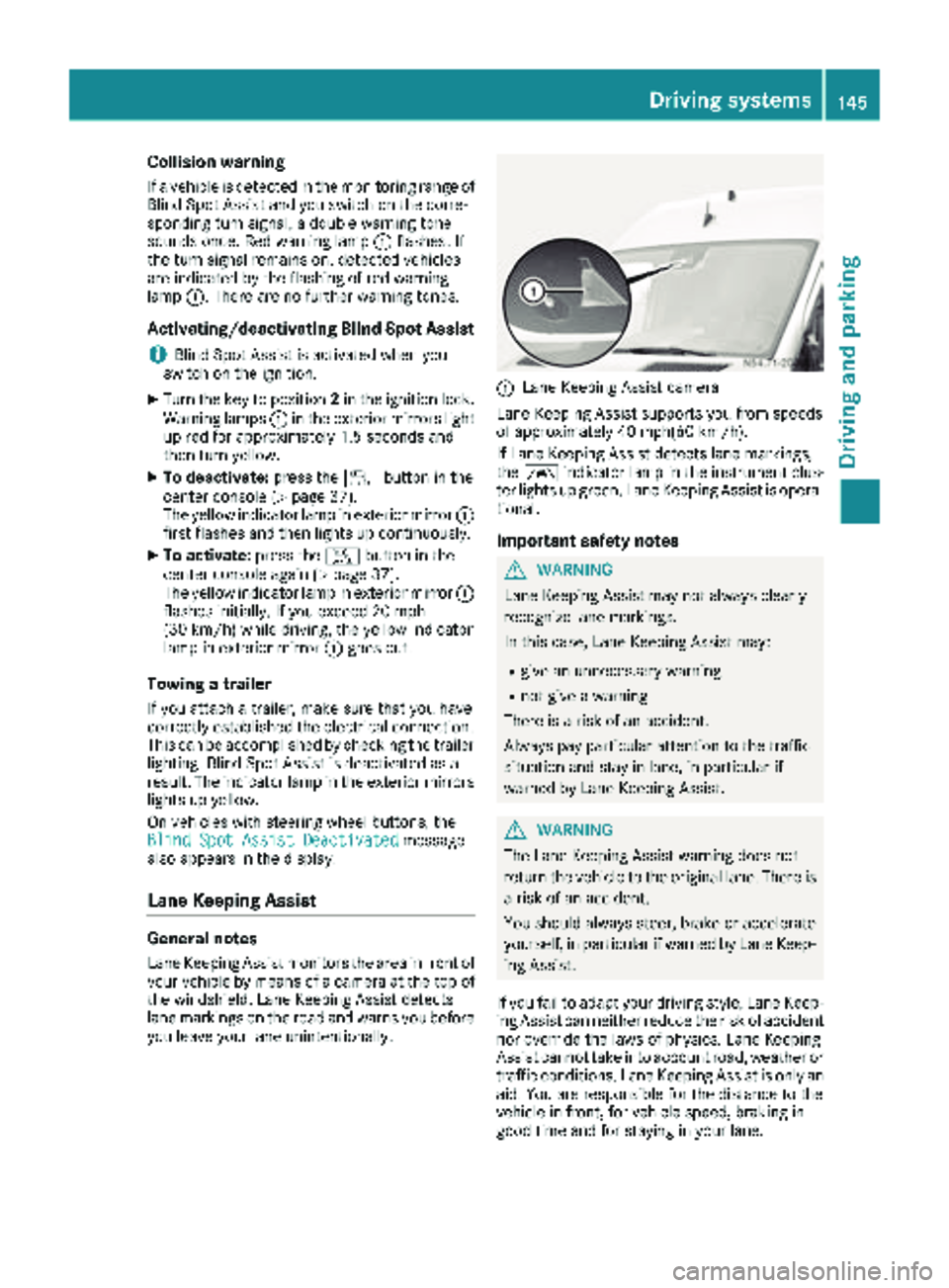
:Lane Keeping Assist camera
Lane Keeping Assist supports you from speeds
of approximately 40 mph(60 km/h).
If Lane Keeping Assist detects lane markings,
the à indicator lamp in the instrument clus-
ter lights up green. Lane Keeping Assist is opera-
tional.
Important safety notes
GWARNING
Lane Keeping Assist may not always clearly
recognize lane markings.
In this case, Lane Keeping Assist may:
Rgive an unnecessary warning
Rnot give a warning
There is a risk of an accident.
Always pay particular attention to the traffic
situation and stay in lane, in particular if
warned by Lane Keeping Assist.
GWARNING
The Lane Keeping Assist warning does not
return the vehicle to the original lane. There is
a risk of an accident.
You should always steer, brake or accelerate
yourself, in particular if warned by Lane Keep-
ing Assist.
If you fail to adapt your driving style, Lane Keep-
ing Assist can neither reduce the risk of accident
nor override the laws of physics. Lane Keeping
Assist cannot take into account road, weather or traffic conditions. Lane Keeping Assist is only an
aid. You are responsible for the distance to the
vehicle in front, for vehicle speed, braking in
good time and for staying in your lane.
Driving systems145
Driving and parking
Z
Page 148 of 294
Lane Keeping Assist does not keep your vehicle
in its lane.
The system may be impaired or may not function
if:
Rif the vehicle is incorrectly loaded
(Ypage 213)
Rthere is poor visibility, e.g. due to insufficient
illumination of the road, or due to snow, rain,
fog or spray
Rthere is glare, e.g. from oncoming traffic, the
sun or reflection from other vehicles (e.g. if
the road surface is wet)
Rthe windshield is dirty, fogged up, damaged or
covered, for instance by a sticker, in the vicin-
ity of the camera
Rno, or several, unclear lane markings are pres-
ent for one lane, e.g. in a construction area
Rthe lane markings are worn away, dark or cov-
ered up, e.g. by dirt or snow
Rthe distance to the vehicle in front is too small
and the lane markings thus cannot be detec-
ted
Rthe lane markings change quickly, e.g. lanes
branch off, cross one another or merge
Rthe road is narrow and winding
Rthere are highly variable shade conditions on
the road
A warning may be given if a front wheel passes
over a lane marking. In addition, a warning tone
sounds and the Ãindicator lamp in the
instrument cluster flashes red.
Activating/deactivating Lane Keeping
Assist
Lane Keeping Assist is automatically activated
when you start the engine.
XTo deactivate: press thejbutton in the
center console (Ypage 37).
On vehicles without steering wheel but-
tons:
OFF
flashes briefly in the display and the Ã
indicator lamp in the instrument cluster
flashes yellow and then lights up continu-
ously.
On vehicles with steering wheel buttons:
The Lane
Keep.AssistDeactivatedmes-
sage appears in the display and the Ã
indicator lamp in the instrument cluster
flashes yellow and then lights up continu-
ously. Lane Keeping Assist is deactivated.
XTo activate:
press thejbutton in the
center console again (Ypage 37).
On vehicles without steering wheel but-
tons:
on
flashes briefly in the display and the Ã
indicator lamp in the instrument cluster goes
out. If a lane marking is detected, the Ã
indicator lamp lights up green.
On vehicles with steering wheel buttons:
The Lane Keep. Assist Activated
mes-
sage appears in the display and the Ã
indicator lamp in the instrument cluster goes
out. If a lane marking is detected, the Ã
indicator lamp lights up green.
Lane Keeping Assist is activated.
A Lane Keeping Assist warning is suppressed if:
Ra driving safety system intervenes, such as
ABS, BAS or ESP®.
Ryou have set the turn signal and a lane change is detected. In this case, the warnings are
suppressed for a certain period of time.
Ryou accelerate hard, e.g. kickdown on vehi-
cles with an automatic transmission.
Ryou brake hard.
Ryou steer actively, e.g. swerve to avoid an
obstacle or change lane quickly.
Ryou cut the corner on a sharp bend.
In order that you are warned only when neces-
sary and in good time if you cross the lane mark-
ing, the system recognizes certain conditions
and warns you accordingly.
Lane Keeping Assist warns you earlier if:
Ryou approach the outer lane marking on a
bend.
Rthe road has very wide lanes, e.g. a freeway.
Rthe system recognizes solid lane markings.
Warnings are given later if:
Rthe road has narrow lanes.
Ryou cut the corner on a bend.
All-wheel drive
Important safety notes
!Never tow the vehicle with one axle raised.
This may damage the transfer case. Damage
of this sort is not covered by the Mercedes-
Benz Limited Warranty. All wheels must
146Driving systems
Driving and parking
Page 182 of 294
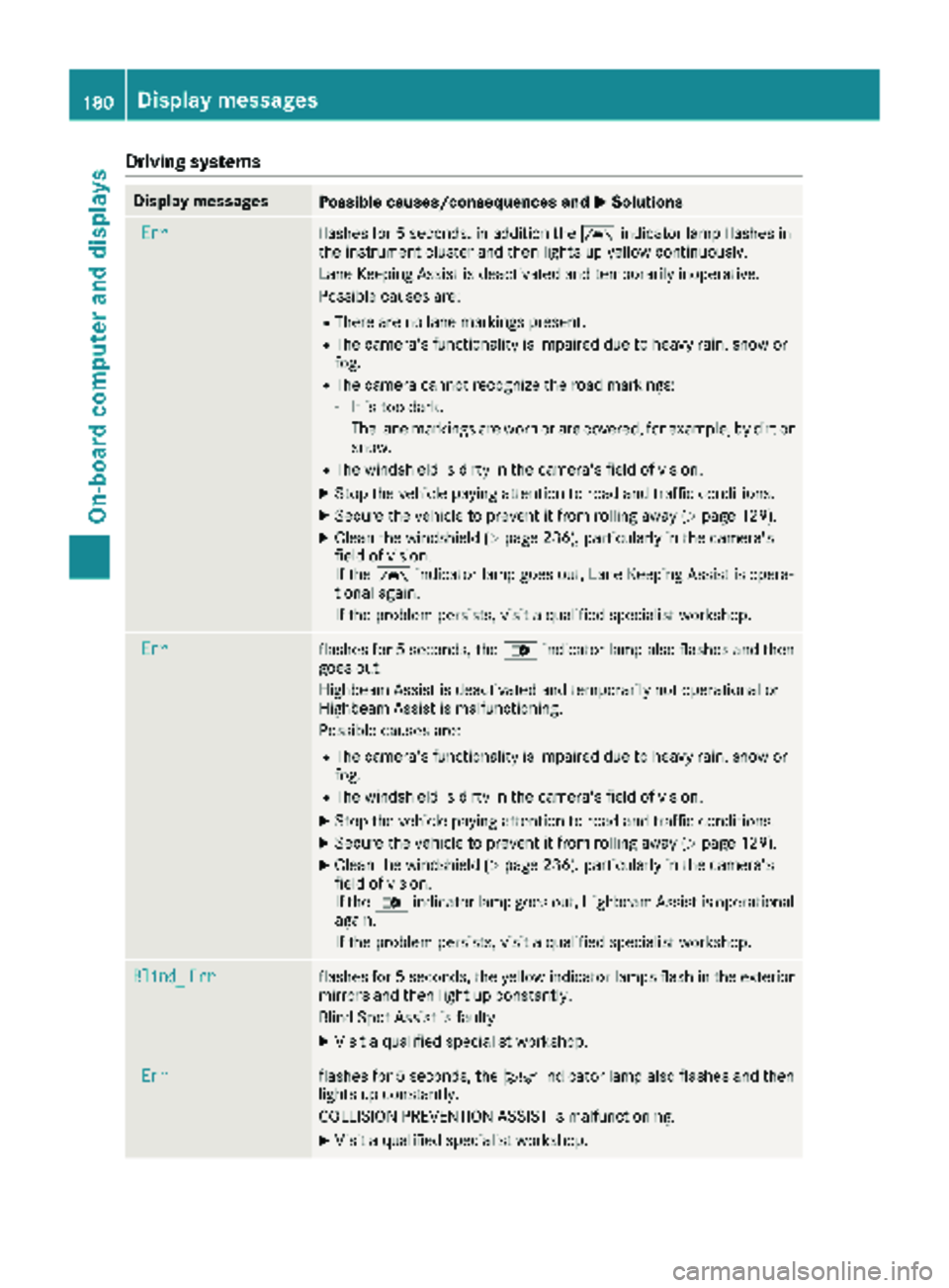
Drivingsystems
Display messagesPossible causes/consequences an dMSolutions
Errflashe sfo r 5 seconds, in addition th eà indicator lamp flashes in
th einstrumen tcluster and then lights up yello wcontinuously.
Lan eKeepin gAssis tis deactivated and temporarily inoperative .
Possible causes are :
RThere are no lanemarking spresent.
RThe camera's functionalit yis impaire ddue to heav yrain ,snow or
fog.
RThe camera canno trecogniz eth eroad markings:
-It is to odark.
-The lan emarking sare wor nor are covered, fo rexample, by dir tor
snow.
RThe windshield is dirty in th ecamera's field of vision .
XStop thevehicle payin gattention to road and traffic conditions.
XSecur eth evehicle to preven tit from rollin gaway (Ypage 129).
XClean th ewindshield (Ypage 236), particularly in th ecamera's
field of vision .
If th eà indicator lamp goe sout ,Lan eKeepin gAssis tis opera-
tional again .
If th eproblem persists ,visit aqualified specialis tworkshop .
Errflashesfo r 5 seconds ,th e_ indicator lamp also flashes and then
goe sout .
Highbeam Assis tis deactivated and temporarily no toperational or
Highbeam Assis tis malfunctioning.
Possible causes are :
RThe camera's functionalit yis impaire ddue to heav yrain ,snow or
fog.
RThe windshield is dirty in th ecamera's field of vision .
XStop thevehicle payin gattention to road and traffic conditions.
XSecur eth evehicle to preven tit from rollin gaway (Ypage 129).
XClean th ewindshield (Ypage 236), particularly in th ecamera's
field of vision .
If th e_ indicator lamp goe sout ,Highbeam Assis tis operational
again .
If th eproblem persists ,visit aqualified specialis tworkshop .
Blind_Errflashesfo r 5 seconds ,th eyello windicator lamp sflas hin th eexterio r
mirrors and then ligh tup constantly.
Blin dSpot Assis tis faulty.
XVisit aqualified specialis tworkshop .
Errflashesfo r 5 seconds ,th eÄ indicator lamp also flashes and then
lights up constantly.
COLLISION PREVENTION ASSIST is malfunctioning.
XVisit aqualified specialis tworkshop .
180Display messages
On-board computer and displays